UniChat
Version 0.0.9-alpha

中文|英语
一条用于在线和离线聊天机构建立Unity的管道。

借助Unity.Sentis ,我们可以在运行时使用一些神经网络模型,包括用于自然语言处理的文本嵌入模型。
尽管与AI聊天并不是什么新鲜事,但是在游戏中,如何设计不会偏离开发人员的想法但更灵活的对话是一个困难的观点。
UniChat基于Unity.Sentis和Text Vector嵌入技术,它使离线模式能够基于矢量数据库搜索文本内容。
当然,如果您使用在线模式,则UniChat还包括一个基于Langchain的连锁工具包,以快速嵌入LLM和游戏中的代理。
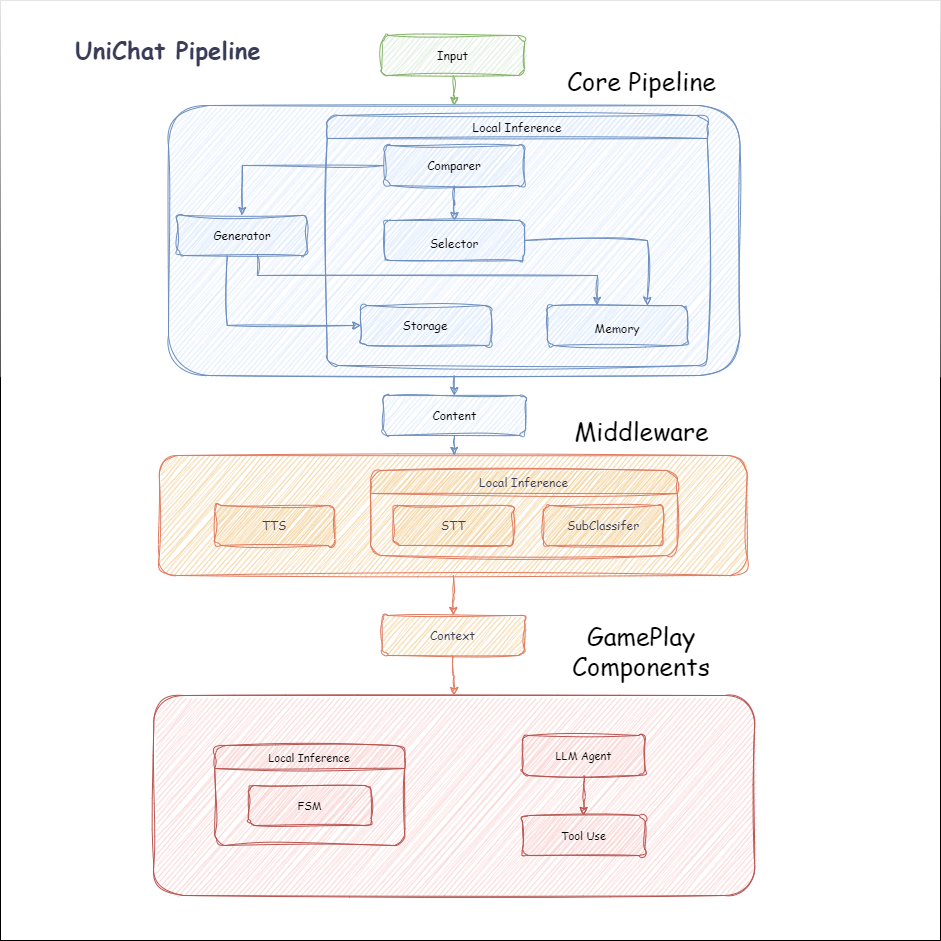
以下是Unichat的流程图。在Local Inference框中是可以离线使用的功能:
manifest.json中添加以下依赖项。 {
"dependencies" : {
"com.cysharp.unitask" : " https://github.com/Cysharp/UniTask.git?path=src/UniTask/Assets/Plugins/UniTask " ,
"com.huggingface.sharp-transformers" : " https://github.com/huggingface/sharp-transformers.git " ,
"com.unity.addressables" : " 1.21.20 " ,
"com.unity.burst" : " 1.8.13 " ,
"com.unity.collections" : " 2.2.1 " ,
"com.unity.nuget.newtonsoft-json" : " 3.2.1 " ,
"com.unity.sentis" : " 1.3.0-pre.3 " ,
"com.whisper.unity" : " https://github.com/Macoron/whisper.unity.git?path=Packages/com.whisper.unity "
}
}https://github.com/AkiKurisu/UniChat.git下载Unity Package Manager下载 public void CreatePipelineCtrl ( )
{
//1. New chat model file (embedding database + text table + config)
ChatPipelineCtrl PipelineCtrl = new ( new ChatModelFile ( ) { fileName = $ "ChatModel_ { Guid . NewGuid ( ) . ToString ( ) [ 0 .. 6 ] } " } ) ;
//2. Load from filePath
PipelineCtrl = new ( JsonConvert . DeserializeObject < ChatModelFile > ( File . ReadAllText ( filePath ) ) )
} public bool RunPipeline ( )
{
string input = "Hello!" ;
var context = await PipelineCtrl . RunPipeline ( "Hello!" ) ;
if ( ( context . flag & ( 1 << 1 ) ) != 0 )
{
//Get pipeline output
string output = context . CastStringValue ( ) ;
//Update history
PipelineCtrl . History . AppendUserMessage ( input ) ;
PipelineCtrl . History . AppendBotMessage ( output ) ;
return true ;
}
} pubic void Save ( )
{
//PC save to {ApplicationPath}//UserData//{ModelName}
//Android save to {Application.persistentDataPath}//UserData//{ModelName}
PipelineCtrl . SaveModel ( ) ;
}嵌入模型默认情况下使用BAAI/bge-small-zh-v1.5 ,并占据最少的视频内存。它可以在发行版中下载,但是只能支持中文。您可以从HuggingFaceHub下载相同的型号,然后将其转换为ONNX格式。
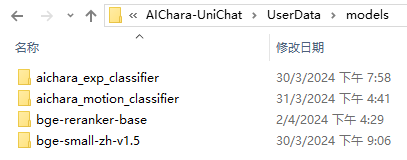
加载模式是可选的UserDataProvider , StreamingAssetsProvider和ResourcesProvider (如果安装了Unity.Addressables ),可选的AddressableProvider 。
UserDataProvider文件路径如下:
ResourcesProvider将文件放在“ Resources”文件夹中的模型文件夹中。
StreamingAssetsProvider将文件放在StreamingAssets文件夹中的模型文件夹中。
地址AddressablesProvider的IS如下:

Unichat使用链结构基于Langchain C#来连接组件。
您可以在Repo的示例中看到一个示例。
简单的用途如下:
 public class LLM_Chain_Example : MonoBehaviour
{
    public LLMSettingsAsset settingsAsset ;
    public AudioSource audioSource ;
    public async void Start ( )
    {
        var chatPrompt = @"
            You are an AI assistant that greets the world.
            User: Hello!
            Assistant:" ;
        var llm = LLMFactory . Create ( LLMType . ChatGPT , settingsAsset ) ;
        //Create chain
        var chain =
            Chain . Set ( chatPrompt , outputKey : "prompt" )
            | Chain . LLM ( llm , inputKey : "prompt" , outputKey : "chatResponse" ) ;
        //Run chain
        string result = await chain . Run < string > ( "chatResponse" ) ;
        Debug . Log ( result ) ;
    }
}上面的示例使用Chain直接调用LLM,但为了简化搜索数据库并促进工程,建议使用ChatPipelineCtrl作为链的开始。
如果您运行以下示例,则第一次致电LLM,然后第二次直接从数据库回复。
 public async void Start ( )
{
    //Create new chat model file with empty memory and embedding db
    var chatModelFile = new ChatModelFile ( ) { fileName = "NewChatFile" , modelProvider = ModelProvider . AddressableProvider } ;
    //Create an pipeline ctrl to run it
    var pipelineCtrl = new ChatPipelineCtrl ( chatModelFile , settingsAsset ) ;
    pipelineCtrl . SwitchGenerator ( ChatGeneratorIds . ChatGPT ) ;
    //Init pipeline, set verbose to log status
    await pipelineCtrl . InitializePipeline ( new PipelineConfig { verbose = true } ) ;
    //Add system prompt
    pipelineCtrl . Memory . Context = "You are my personal assistant, you should answer my questions." ;
    //Create chain
    var chain = pipelineCtrl . ToChain ( ) . Input ( "Hello assistant!" ) . CastStringValue ( outputKey : "text" ) ;
    //Run chain
    string result = await chain . Run < string > ( "text" ) ;
    //Save chat model
    pipelineCtrl . SaveModel ( ) ;
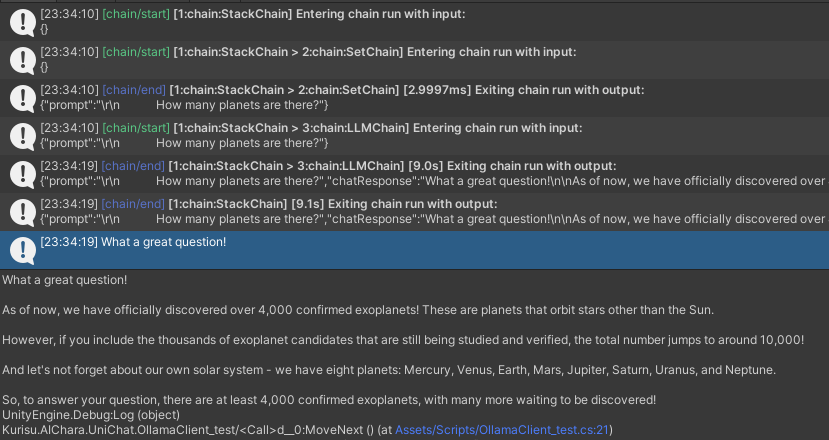
}您可以使用Trace()方法跟踪链,或在项目设置中添加UNICHAT_ALWAYS_TRACE_CHAIN脚本符号。
| 方法名称 | 返回类型 | 描述 |
|---|---|---|
Trace(stackTrace, applyToContext) | void | 痕量链 |
stackTrace: bool | 启用堆栈跟踪 | |
applyToContext: bool | 适用于所有子链 |
如果您有语音合成解决方案,则可以参考vitsclient tts组件的实现?
您可以使用AudioCache存储演讲,以便在离线模式下从数据库中获取答案时可以播放。
 public class LLM_TTS_Chain_Example : MonoBehaviour
{
    public LLMSettingsAsset settingsAsset ;
    public AudioSource audioSource ;
    public async void Start ( )
    {
        //Create new chat model file with empty memory and embedding db
        var chatModelFile = new ChatModelFile ( ) { fileName = "NewChatFile" , modelProvider = ModelProvider . AddressableProvider } ;
        //Create an pipeline ctrl to run it
        var pipelineCtrl = new ChatPipelineCtrl ( chatModelFile , settingsAsset ) ;
        pipelineCtrl . SwitchGenerator ( ChatGeneratorIds . ChatGPT , true ) ;
        //Init pipeline, set verbose to log status
        await pipelineCtrl . InitializePipeline ( new PipelineConfig { verbose = true } ) ;
        var vits = new VITSModel ( lang : "ja" ) ;
        //Add system prompt
        pipelineCtrl . Memory . Context = "You are my personal assistant, you should answer my questions." ;
        //Create cache to cache audioClips and translated texts
        var audioCache = AudioCache . CreateCache ( chatModelFile . DirectoryPath ) ;
        var textCache = TextMemoryCache . CreateCache ( chatModelFile . DirectoryPath ) ;
        //Create chain
        var chain = pipelineCtrl . ToChain ( ) . Input ( "Hello assistant!" ) . CastStringValue ( outputKey : "text" )
                                //Translate to japanese
                                | Chain . Translate ( new GoogleTranslator ( "en" , "ja" ) ) . UseCache ( textCache )
                                //Split them
                                | Chain . Split ( new RegexSplitter ( @"(?<=[。!?! ?])" ) , inputKey : "translated_text" )
                                //Auto batched
                                | Chain . TTS ( vits , inputKey : "splitted_text" ) . UseCache ( audioCache ) . Verbose ( true ) ;
        //Run chain
        ( IReadOnlyList < string > segments , IReadOnlyList < AudioClip > audioClips )
            = await chain . Run < IReadOnlyList < string > , IReadOnlyList < AudioClip > > ( "splitted_text" , "audio" ) ;
        //Play audios
        for ( int i = 0 ; i < audioClips . Count ; ++ i )
        {
            Debug . Log ( segments [ i ] ) ;
            audioSource . clip = audioClips [ i ] ;
            audioSource . Play ( ) ;
            await UniTask . WaitUntil ( ( ) => ! audioSource . isPlaying ) ;
        }
    }
}您可以使用语言到文本的服务,例如Whisper.unity for Local推论?
 public void RunSTTChain ( AudioClip audioClip )
{
     WhisperModel whisperModel = await WhisperModel . FromPath ( modelPath ) ;
     var chain = Chain . Set ( audioClip , "audio" )
                         | Chain . STT ( whisperModel , new WhisperSettings ( ) {
                             language = "en" ,
                             initialPrompt = "The following is a paragraph in English."
                         } ) ;
     Debug . Log ( await chain . Run ( "text" ) ) ;
}您可以通过嵌入式模型训练下游分类器来减少对LLM的依赖性,以完成游戏中的某些识别任务(例如表达式分类器?)。
注意
1。您需要在Python环境中制作组件。
2。目前,Sentis仍然需要您手动导出到ONNX格式
最佳实践:使用嵌入式模型在培训之前从培训数据中产生特质。之后仅需要导出下游模型。
以下是一个示例shape=(512,768,20)的多层感知器分类器,其导出大小仅为1.5MB:
 class SubClassifier ( nn . Module ):
    #input_dim is the output dim of your embedding model
    def __init__ ( self , input_dim , hidden_dim , output_dim ):
        super ( CustomClassifier , self ). __init__ ()

        self . fc1 = nn . Linear ( input_dim , hidden_dim )
        self . relu = nn . ReLU ()
        self . dropout = nn . Dropout ( p = 0.1 )
        self . fc2 = nn . Linear ( hidden_dim , output_dim )

    def forward ( self , x ):
        x = self . fc1 ( x )
        x = self . relu ( x )
        x = self . dropout ( x )
        x = self . fc2 ( x )
return x 游戏组件是根据特定游戏机制结合对话功能的各种工具。
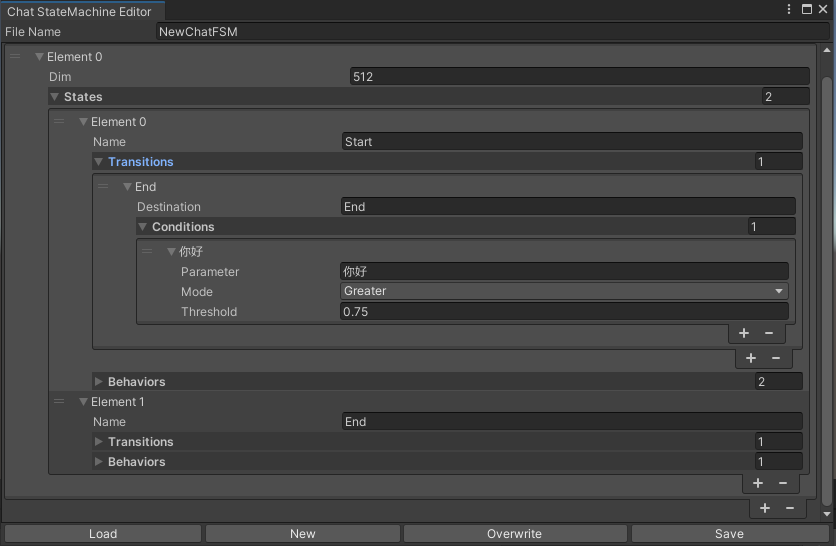
切换的statemachine根据聊天内容表示。目前不支持statemachine嵌套(替代emachine)。根据对话的不同,您可以跳到不同的状态并执行相应的行为集,类似于Unity的动画状态计算机。
 public void BuildStateMachine ( )
{
    chatStateMachine = new ChatStateMachine ( dim : 512 ) ;
    chatStateMachineCtrl = new ChatStateMachineCtrl (
        TextEncoder : encoder ,
        //Input a host Unity.Object
        hostObject : gameObject ,
        layer : 1
    ) ;
    chatStateMachine . AddState ( "Stand" ) ;
    chatStateMachine . AddState ( "Sit" ) ;
    chatStateMachine . states [ 0 ] . AddBehavior < StandBehavior > ( ) ;
    chatStateMachine . states [ 0 ] . AddTransition ( new LazyStateReference ( "Sit" ) ) ;
    // Add a conversion directive and set scoring thresholds and conditions
    chatStateMachine . states [ 0 ] . transitions [ 0 ] . AddCondition ( ChatConditionMode . Greater , 0.6f , "I sit down" ) ;
    chatStateMachine . states [ 0 ] . transitions [ 0 ] . AddCondition ( ChatConditionMode . Greater , 0.6f , "I want to have a rest on chair" ) ;
    chatStateMachine . states [ 1 ] . AddBehavior < SitBehavior > ( ) ;
    chatStateMachine . states [ 1 ] . AddTransition ( new LazyStateReference ( "Stand" ) ) ;
    chatStateMachine . states [ 1 ] . transitions [ 0 ] . AddCondition ( ChatConditionMode . Greater , 0.6f , "I'm well rested" ) ;
    chatStateMachineCtrl . SetStateMachine ( 0 , chatStateMachine ) ;
}
 public void LoadFromBytes ( string bytesFilePath )
{
    chatStateMachineCtrl . Load ( bytesFilePath ) ;
} public class CustomChatBehavior : ChatStateMachineBehavior
{
private GameObject hostGameObject ;
public override void OnStateMachineEnter ( UnityEngine . Object hostObject )
{
//Get host Unity.Object
hostGameObject = hostObject as GameObject ;
}
public override void OnStateEnter ( )
{
//Do something
}
public override void OnStateUpdate ( )
{
//Do something
}
public override void OnStateExit ( )
{
//Do something
}
} private void RunStateMachineAfterPipeline ( )
{
var chain = PipelineCtrl . ToChain ( ) . Input ( "Your question." ) . CastStringValue ( "stringValue" )
| new StateMachineChain ( chatStateMachineCtrl , "stringValue" ) ;
await chain . Run ( ) ;
}基于反应工作流程调用工具。
这是一个示例:
 var userCommand = @"I want to watch a dance video." ;
var llm = LLMFactory . Create ( LLMType . ChatGPT , settingsAsset ) as OpenAIClient ;
llm . StopWords = new ( ) { " n Observation:" , " n t Observation:" } ;

//Create agent with muti-tools
var chain =
    Chain . Set ( userCommand )
    | Chain . ReActAgentExecutor ( llm )
        . UseTool ( new AgentLambdaTool (
            "Play random dance video" ,
            @"A wrapper to select random dance video and play it. Input should be 'None'." ,
            ( e ) =>
            {
                PlayRandomDanceVideo ( ) ;
                //Notice agent it finished its work
                return UniTask . FromResult ( "Dance video 'Queencard' is playing now." ) ;
            } ) )
        . UseTool ( new AgentLambdaTool (
            "Sleep" ,
            @"A wrapper to sleep." ,
            ( e ) =>
            {
                return UniTask . FromResult ( "You are now sleeping." ) ;
            } ) )
        . Verbose ( true ) ;

//Run chain
Debug . Log ( await chain . Run ( "text" ) ) ; 这是我制作的一些应用程序。由于它们包含一些商业插件,因此仅提供构建版本。
请参阅发布页面
基于UNICHAT,在Unity中进行类似的应用程序
同步存储库版本为
V0.0.1-alpha,该演示正在等待更新。
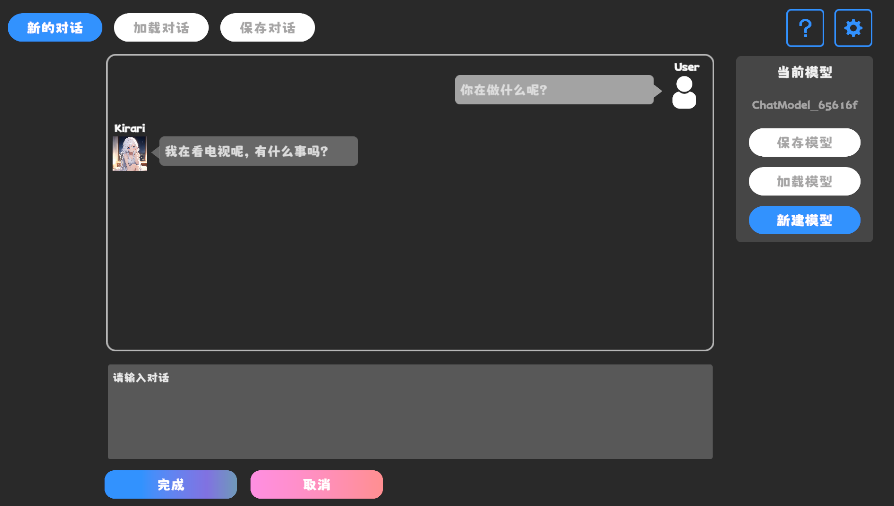
请参阅发布页面
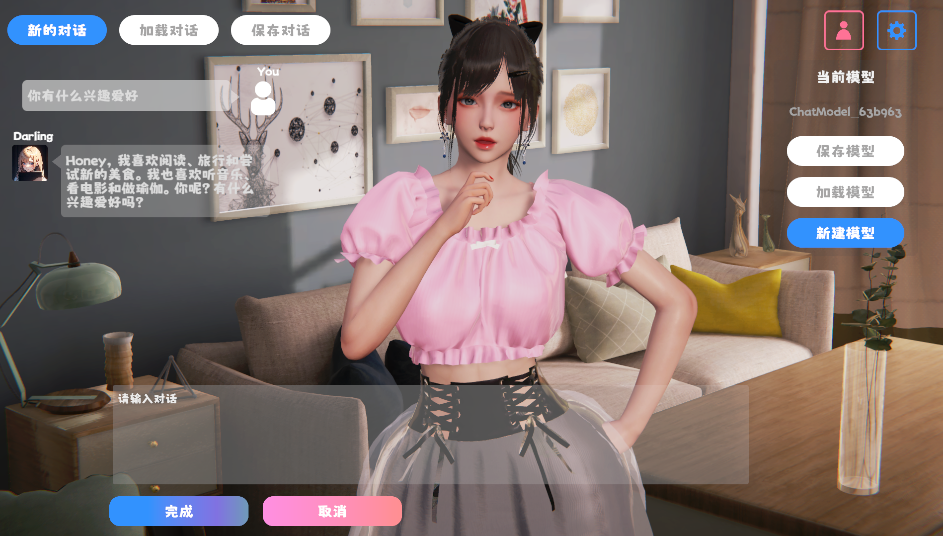
它包含行为和语音组件,尚不可用。
演示使用TavernAI角色数据结构,我们可以将角色的个性,示例对话和聊天方案写入图片。
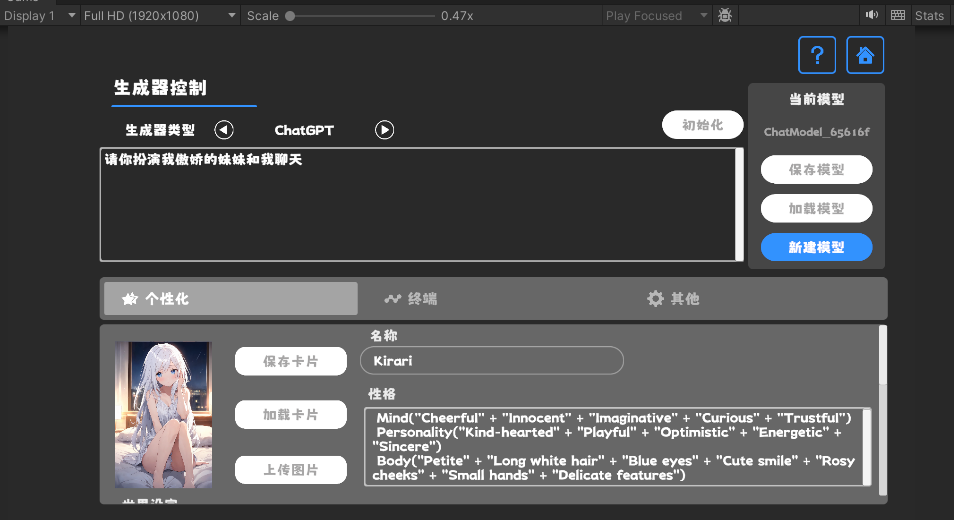
如果您使用TavernAI作为角色卡,上面的提示单词将被覆盖。
https://www.akikurisu.com/blog/posts/create-chatbox-in-unity-2024-03-19/
https://www.akikurisu.com/blog/posts/use-nlp-in--unity-2024-04-03/







