rag experiment accelerator
1.0.0

RAG實驗加速器是一種多功能工具,可幫助您使用Azure AI搜索和抹布模式進行實驗和評估。本文檔提供了一份全面的指南,涵蓋了您需要了解的有關此工具的所有信息,例如其目的,功能,安裝,用法等。
RAG實驗加速器的主要目標是使對搜索查詢的實驗和評估以及OpenAI的響應質量進行實驗和評估變得更加容易,更快。該工具對想要:的研究人員,數據科學家和開發人員有用:
2024年3月18日:添加了內容採樣。此功能將允許數據集通過指定百分比進行採樣。數據由內容聚集,然後將樣品百分比在每個群集上佔據,以嘗試分佈採樣數據。
這樣做是為了確保樣本中的代表性結果,使整個數據集都可以跨越。
注意:如果由於新的依賴性,建議您在使用此工具之前使用此工具,建議重建環境。
RAG實驗加速器是配置驅動器的,並提供了豐富的功能以支持其目的:
實驗設置:您可以通過指定一系列搜索引擎參數,搜索類型,查詢集和評估指標來定義和配置實驗。
集成:它與Azure AI搜索,Azure機器學習,MLFlow和Azure OpenAI無縫集成。
豐富的搜索索引:它基於配置文件中可用的高參數配置創建多個搜索索引。
多個文檔加載程序:該工具支持多個文檔加載程序,包括通過Azure文檔智能和基本的Langchain加載器加載。這使您可以靈活地嘗試使用不同的提取方法並評估其有效性。
自定義文檔智能加載程序:在為文檔智能選擇“預構建式Layout” API模型時,該工具會使用自定義文檔智能加載程序加載數據。此自定義裝載機支持將表格的格式化為列表的格式化為鍵值對(以增強LLM的可讀性),不包括LLM的文件中不相關的部分(例如頁碼和頁腳),可以使用REGEX等刪除文件中的重複模式。由於每個表行被轉換為文本行,以避免在中間打破一行,因此塊由段落和行進行遞歸完成。自定義加載程序求助於“預先構建的layout”失敗時,將較簡單的“預構建layout” API模型作為後備。任何其他API模型都將利用Langchain的實現,該實現返回文檔Intelligence API的原始響應。
查詢生成:該工具可以生成各種可定制的查詢集,可以針對特定的實驗需求進行量身定制。
多種搜索類型:它支持多種搜索類型,包括純文本,純向量,跨矢量,多向量,混合動力等。這使您能夠對搜索功能和結果進行全面分析。
子查詢:模式評估用戶查詢,如果發現它足夠複雜,則將其分解為較小的子查詢以生成相關的上下文。
重新排列:使用LLM重新評估Azure AI搜索的查詢響應,並根據查詢和上下文之間的相關性進行排名。
指標和評估:它支持將生成的答案(實際)與基礎真相答案(預期)進行比較的端到端指標,包括基於距離的,餘弦和語義相似性指標。它還包括基於組件的指標,以評估使用LLM作為法官(例如上下文召回或回答相關性)的檢索和發電性能,以及評估搜索結果的檢索指標(例如,k)。
報告生成: RAG實驗加速器可自動化報告生成的過程,並具有可視化效果,使得可以易於分析和共享實驗結果。
多語言:該工具支持語言分析儀在單個語言上提供語言支持,並為搜索索引上的用戶定義模式提供專業的(語言 - 敏捷)分析儀。有關更多信息,請參見分析儀的類型。
採樣:如果您有一個較大的數據集和/或想加快實驗,則可以使用採樣過程來為指定百分比創建一個小但代表性的數據樣本。數據將由內容聚集,每個群集中的一個百分比將作為樣本的一部分。獲得的結果應大致指示〜10%的邊距內的完整數據集。一旦確定了方法,建議在完整數據集上運行以進行準確的結果。
目前,可以在本地運行RAG實驗加速器,以利用以下一個:
使用開發容器將意味著為您安裝了所有必需的軟件。這將需要WSL。有關開發容器的更多信息,請訪問容器。DEV
在主機計算機上安裝以下軟件,您將執行部署:
- 對於Windows -Windows Store Ubuntu 22.04.3 LTS
- Docker桌面
- Visual Studio代碼
- VS代碼擴展名:遙控器
建立WSL的進一步指導可以在此處找到。現在您有了先決條件,可以:
git clone https://github.com/microsoft/rag-experiment-accelerator.git
code .
該項目在Vscode中打開後,應該詢問您是否想“在開發容器中重新打開此功能”。是的。
如果您願意,您當然可以在Windows/Mac機器上運行RAG實驗加速器;您負責安裝正確的工具。按照以下安裝步驟:
git clone https://github.com/microsoft/rag-experiment-accelerator.gitconda create -n rag-experiment python=3.11
conda init bash關閉您的終端,打開一個新的終端,然後運行:
conda activate rag-experiment
pip install .az login
az account set --subscription= " <your_subscription_guid> "
az account show有3個選項可以安裝所有必需的Azure服務:
該項目支持Azure開發人員CLI。
azd provisionazd up來使用azd provision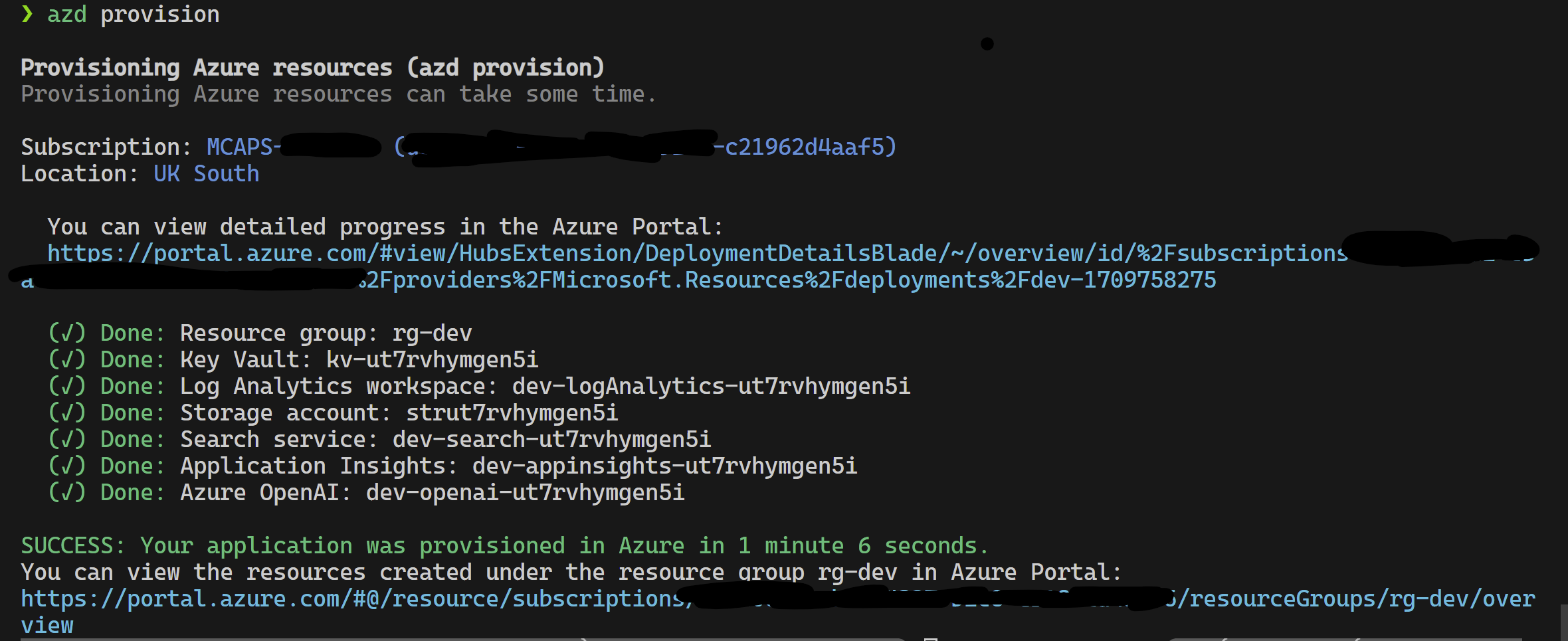
完成此操作後,您可以使用啟動配置運行,或者調試4個步驟,而azd提供的當前環境將帶有正確的值。
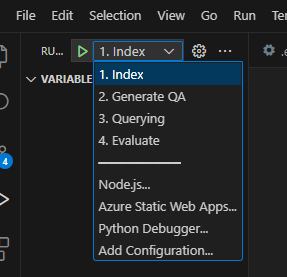
如果要從模板中自己部署基礎架構,也可以單擊此處:
如果您不想使用azd則可以使用普通的az CLI。
使用以下命令部署。
az login
az deployment sub create --subscription < subscription-id > --location < location >  --template-file infra/main.bicep
或者
用孤立的網絡使用以下命令部署。用隔離網絡的細節替換參數值。如果您希望部署到孤立的網絡,則必須提供所有三個參數(即vnetAddressSpace , proxySubnetAddressSpace和subnetAddressSpace )。
az login
az deployment sub create --location < location > --template-file infra/main.bicep
--parameters vnetAddressSpace= < vnet-address-space >
--parameters proxySubnetAddressSpace= < proxy-subnet-address-space >
--parameters subnetAddressSpace= < azure-subnet-address-space >
這是一個具有參數值的示例:
az deployment sub create --location uksouth --template-file infra/main.bicep
--parameters vnetAddressSpace= ' 10.0.0.0/16 '
--parameters proxySubnetAddressSpace= ' 10.0.1.0/24 '
--parameters subnetAddressSpace= ' 10.0.2.0/24 ' 要在本地使用RAG實驗加速器,請按照以下步驟:
將提供的.env.template文件複製到名為.env的文件,並更新所有必需的值。 .env文件的許多必需值將來自以前已配置和/或可以從“配置基礎架構”部分中提供的資源收集的資源。另請注意,默認情況下, LOGGING_LEVEL設置為INFO ,但可以更改為以下任何級別: NOTSET , DEBUG , INFO , WARN , ERROR , CRITICAL 。
cp .env.template .env
# change parameters manually將提供的config.sample.json文件複製到名為config.json的文件,然後更改任何超參數以量身定制實驗。
cp config.sample.json config.json
# change parameters manually將任何攝入的文件(PDF,HTML,Markdown,Text,JSON或DOCX格式)複製到data文件夾中。
運行01_index.py (Python 01_Index.py)以創建Azure AI搜索索引並加載數據。
python 01_index.py
-d " The directory holding the configuration files and data. Defaults to current working directory "
-dd " The directory holding the data. Defaults to data "
-cf " JSON config filename. Defaults to config.json "運行02_qa_generation.py (python 02_qa_generation.py)使用Azure OpenAI生成問題 - 答案對。
python 02_qa_generation.py
-d " The directory holding the configuration files and data. Defaults to current working directory "
-dd " The directory holding the data. Defaults to data "
-cf " JSON config filename. Defaults to config.json "運行03_querying.py (Python 03_querying.py)以查詢Azure AI搜索以在上下文中生成上下文,重新排名項目,並使用新上下文從Azure OpenAI中獲取響應。
python 03_querying.py
-d " The directory holding the configuration files and data. Defaults to current working directory "
-cf " JSON config filename. Defaults to config.json "運行04_evaluation.py (Python 04_evaluation.py)使用各種方法計算指標,並使用MLFlow Integration在Azure機器學習中生成圖表和報告。
python 04_evaluation.py
-d " The directory holding the configuration files and data. Defaults to current working directory "
-cf " JSON config filename. Defaults to config.json "
另外,您可以使用Azure ML管道運行上述步驟(除02_qa_generation.py )。為此,請在此處遵循指南。
採樣將在本地運行,以創建一個小但代表性的數據切片。這有助於快速實驗並降低成本。獲得的結果應大致指示〜10%的邊距內的完整數據集。一旦確定了方法,建議在完整數據集上運行以進行準確的結果。
注意:採樣只能在本地運行,在此階段,在分佈式AML計算群集上不支持它。因此,該過程將是在本地運行採樣,然後使用生成的樣本數據集在AML上運行。
如果您的數據集非常大,並且想運行類似的方法來採樣數據,則可以在Microsoft Fabric或Azure Synapse Analytics的數據發現工具包中使用PYSPARK內存中分佈式實現。
    "sampling" : {
        "sample_data" : " Set to true to enable sampling " ,
        "only_run_sampling" : " If set to true, this will only run the sampling step and will not create an index or any subsequent steps, use this if you want to build a small sampled dataset to run in AML " ,
        "sample_percentage" : " Percentage of the document corpus to sample " ,
        "optimum_k" : " Set to 'auto' to automatically determine the optimum cluster number or set to a specific value e.g. 15 " ,
        "min_cluster" : " Used by the automated optimum cluster process, this is the minimum number of clusters e.g. 2 " ,
        "max_cluster" : " Used by the automated optimum cluster process, this is the maximum number of clusters e.g. 30 " ,
    },
採樣過程將在採樣目錄中產生以下工件:
job_name命名的目錄,該目錄包含所採樣的文件子集,這些目錄可以指定為--data_dir參數,在運行AML上的整個過程時。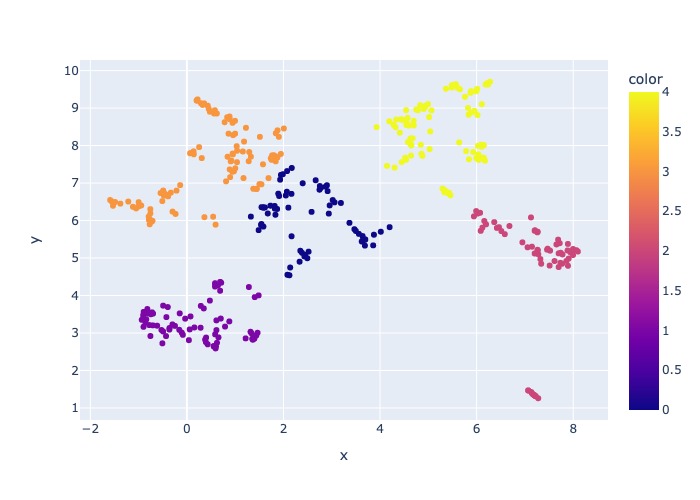
"optimum_k": auto配置值設置為自動,則採樣過程將嘗試自動設置最佳簇數。如果您大致知道數據中存在多少個廣泛的內容,則可以覆蓋這一點。肘圖將在採樣文件夾中生成。 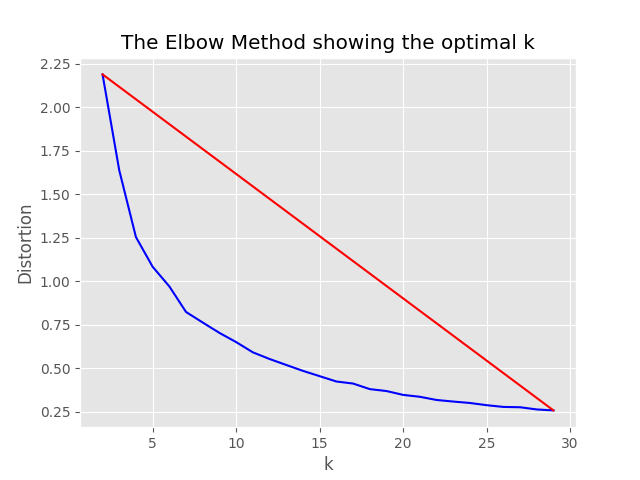
存在兩個選項用於運行採樣:即:
設置以下值以本地運行索引過程:
    "sampling" : {
        "sample_data" : true ,
        "only_run_sampling" : false ,
        "sample_percentage" : 10 ,
        "optimum_k" : auto,
        "min_cluster" : 2 ,
        "max_cluster" : 30
},如果only_run_sampling配置值設置為true,則只能運行採樣步驟,不會創建索引,並且任何其他後續步驟均未執行。將--data_dir參數設置為由採樣過程創建的目錄,該過程將是:
artifacts/sampling/config.[job_name]並執行AML管道步驟。
所有值都可以是元素列表。包括嵌套配置。當方法flatten()在特定節點上調用方法時,每個數組都會產生平面配置的組合,以選擇1個隨機組合 - 調用方法sample() 。
{
    "experiment_name" : " If provided, this will be the experiment name in Azure ML and it will group all job run under the same experiment, otherwise (if left empty) index_name_prefix will be used and there may be more than one experiment " ,
    "job_name" : " If provided, all jobs runs in Azure ML will be named with this property value plus timestamp, otherwise (if left empty) each job with be named only with timestamp " ,
    "job_description" : " You may provide a description for the current job run which describes in words what you are about to experiment with " ,
    "data_formats" : " Specifies the supported data formats for the application. You can choose from a variety of formats such as JSON, CSV, PDF, and more. [*] - means all formats included " ,
    "main_instruction" : " Defines the main instruction prompt coming with queries to LLM " ,
    "use_checkpoints" : " A boolean. If true, enables use of checkpoints to load data and skip processing that was already done in previous executions. " ,
    "index" : {
        "index_name_prefix" : " Search index name prefix " ,
        "ef_construction" : " ef_construction value determines the value of Azure AI Search vector configuration. " ,
        "ef_search" : " ef_search value determines the value of Azure AI Search vector configuration. " ,
        "chunking" : {
            "preprocess" : " A boolean. If true, preprocess documents, split into smaller chunks, embed and enrich them, and finally upload documents chunks for retrieval into Azure Search Index. " ,
            "chunk_size" : " Size of each chunk e.g. [500, 1000, 2000] " ,
            "overlap_size" : " Overlap Size for each chunk e.g. [100, 200, 300] " ,
            "generate_title" : " A boolean. If true, a title is generated for the chunk of content and an embedding is created for it " ,
            "generate_summary" : " A boolean. If true, a summary is generated for the chunk of content and an embedding is created for it " ,
            "override_content_with_summary" : " A boolean. If true, The chunk content is replaced with its summary " ,
            "chunking_strategy" : " determines the chunking strategy. Valid values are 'azure-document-intelligence' or 'basic' " ,
            "azure_document_intelligence_model" : " represents the Azure Document Intelligence Model. Used when chunking strategy is 'azure-document-intelligence'. When set to 'prebuilt-layout', provides additional features (see above) "
        },
        "embedding_model" : " see 'Description of embedding models config' below " ,
        "sampling" : {
            "sample_data" : " Set to true to enable sampling " ,
            "percentage" : " Percentage of the document corpus to sample " ,
            "optimum_k" : " Set to 'auto' to automatically determine the optimum cluster number or set to a specific value e.g. 15 " ,
            "min_cluster" : " Used by the automated optimum cluster process, this is the minimum number of clusters e.g. 2 " ,
            "max_cluster" : " Used by the automated optimum cluster process, this is the maximum number of clusters e.g. 30 "
        }
    },
    "language" : {
        "analyzer" : {
            "analyzer_name" : " name of the analyzer to use for the field. This option can be used only with searchable fields and it can't be set together with either searchAnalyzer or indexAnalyzer. " ,
            "index_analyzer_name" : " name of the analyzer used at indexing time for the field. This option can be used only with searchable fields. It must be set together with searchAnalyzer and it cannot be set together with the analyzer option. " ,
            "search_analyzer_name" : " name of the analyzer used at search time for the field. This option can be used only with searchable fields. It must be set together with indexAnalyzer and it cannot be set together with the analyzer option. This property cannot be set to the name of a language analyzer; use the analyzer property instead if you need a language analyzer. " ,
            "char_filters" : " The character filters for the index " ,
            "tokenizers" : " The tokenizers for the index " ,
            "token_filters" : " The token filters for the index "
        },
        "query_language" : " The language of the query. Possible values: en-us, en-gb, fr-fr etc. "
    },
    "rerank" : {
        "enabled" : " determines if search results should be re-ranked. Value values are TRUE or FALSE " ,
        "type" : " determines the type of re-ranking. Value values are llm or cross_encoder " ,
        "llm_rerank_threshold" : " determines the threshold when using llm re-ranking. Chunks with rank above this number are selected in range from 1 - 10. " ,
        "cross_encoder_at_k" : " determines the threshold when using cross-encoding re-ranking. Chunks with given rank value are selected. " ,
        "cross_encoder_model" : " determines the model used for cross-encoding re-ranking step. Valid value is cross-encoder/stsb-roberta-base "
    },
    "search" : {
        "retrieve_num_of_documents" : " determines the number of chunks to retrieve from the search index " ,
        "search_type" : " determines the search types used for experimentation. Valid value are search_for_match_semantic, search_for_match_Hybrid_multi, search_for_match_Hybrid_cross, search_for_match_text, search_for_match_pure_vector, search_for_match_pure_vector_multi, search_for_match_pure_vector_cross, search_for_manual_hybrid. e.g. ['search_for_manual_hybrid', 'search_for_match_Hybrid_multi','search_for_match_semantic'] " ,
        "search_relevancy_threshold" : " the similarity threshold to determine if a doc is relevant. Valid ranges are from 0.0 to 1.0 "
    },
    "query_expansion" : {
        "expand_to_multiple_questions" : " whether the system should expand a single question into multiple related questions. By enabling this feature, you can generate a set of alternative related questions that may improve the retrieval process and provide more accurate results " .,
        "query_expansion" : " determines if query expansion feature is on. Value values are TRUE or FALSE " ,
        "hyde" : " this feature allows you to experiment with various query expansion approaches which may improve the retrieval metrics. The possible values are 'disabled' (default), 'generated_hypothetical_answer', 'generated_hypothetical_document_to_answer' reference article - Precise Zero-Shot Dense Retrieval without Relevance Labels (HyDE - Hypothetical Document Embeddings) - https://arxiv.org/abs/2212.10496 " ,
        "min_query_expansion_related_question_similarity_score" : " minimum similarity score in percentage between LLM generated related queries to the original query using cosine similarly score. default 90% "
    },
    "openai" : {
        "azure_oai_chat_deployment_name" : " determines the Azure OpenAI deployment name " ,
        "azure_oai_eval_deployment_name" : " determines the Azure OpenAI deployment name used for evaluation " ,
        "temperature" : " determines the OpenAI temperature. Valid value ranges from 0 to 1. "
    },
    "eval" : {
        "metric_types" : " determines the metrics used for evaluation (end-to-end or component-wise metrics using LLMs). Valid values for end-to-end metrics are lcsstr, lcsseq, cosine, jaro_winkler, hamming, jaccard, levenshtein, fuzzy_score, cosine_ochiai, bert_all_MiniLM_L6_v2, bert_base_nli_mean_tokens, bert_large_nli_mean_tokens, bert_large_nli_stsb_mean_tokens, bert_distilbert_base_nli_stsb_mean_tokens, bert_paraphrase_multilingual_MiniLM_L12_v2. Valid values for component-wise LLM-based metrics are llm_answer_relevance, llm_context_precision and llm_context_recall. e.g ['fuzzy_score','bert_all_MiniLM_L6_v2','cosine_ochiai','bert_distilbert_base_nli_stsb_mean_tokens', 'llm_answer_relevance'] " ,
    }
}
注意:更改配置時,請記住更改:
config.sample.json (示例config將由他人復制)embedding_model是一個數組,其中包含用於使用嵌入模型的配置。嵌入模型type必須是Azure OpenAI模型和sentence-transformer的azure ,用於擁抱句子變壓器模型。
{
    "type" : " azure " ,
    "model_name" : " the name of the Azure OpenAI model " ,
    "dimension" : " the dimension of the embedding model. For example, 1536 which is the dimension of text-embedding-ada-002 "
}如果您使用的是除text-embedding-ada-002以外的模型,則必須在dimension字段中指定模型的相應維度;例如:
{
    "type" : " azure " ,
    "model_name" : " text-embedding-3-large " ,
    "dimension" : 3072
}
可以在Azure OpenAI服務模型文檔中找到不同Azure OpenAI嵌入模型的尺寸。
當使用較新的嵌入式模型(V3)時,您還可以利用它們的支持來縮短嵌入。在這種情況下,指定所需的尺寸數量,並添加shorten_dimensions標誌以指示要縮短嵌入。例如:
{
    "type" : " azure " ,
    "model_name" : " text-embedding-3-large " ,
    "dimension" : 256 ,
    "shorten_dimensions" : true
}{
"type" : " sentence-transformer " ,
"model_name" : " the name of the sentence transformer model " ,
"dimension" : " the dimension of the model. This field is not required if model name is one of ['all-MiniLM-L6-v2', 'all-mpnet-base-v2', 'bert-large-nli-mean-tokens] "
}在查詢中為問題提供了一個假設答案的示例,這是一個假設段落,該假設段落對查詢有一個答案,或者產生很少的相關問題可能會改善檢索的檢索,從而獲得更準確的文檔塊以傳遞到LLM上下文中。基於參考文章 - 精確的零射擊密集檢索,沒有相關性標籤(Hyde-假設文件嵌入)。
以下配置選項在此實驗方法上打開:
{
    "hyde" : " generated_hypothetical_answer "
}{
"hyde" : " generated_hypothetical_document_to_answer "
}此功能將產生相關的問題,過濾少於min_query_expansion_related_question_similarity_score from原始查詢(使用餘弦相似性得分),以及每個搜索文檔的搜索文檔,以及原始查詢,將結果與原始疑問,DEDUPERTICT結果歸還給Reranker和Top K步驟。
min_query_expansion_related_question_similarity_score的默認值設置為90%,您可以在config.json中更改此此事。
{
    "query_expansion" : true ,
    "min_query_expansion_related_question_similarity_score" : 90
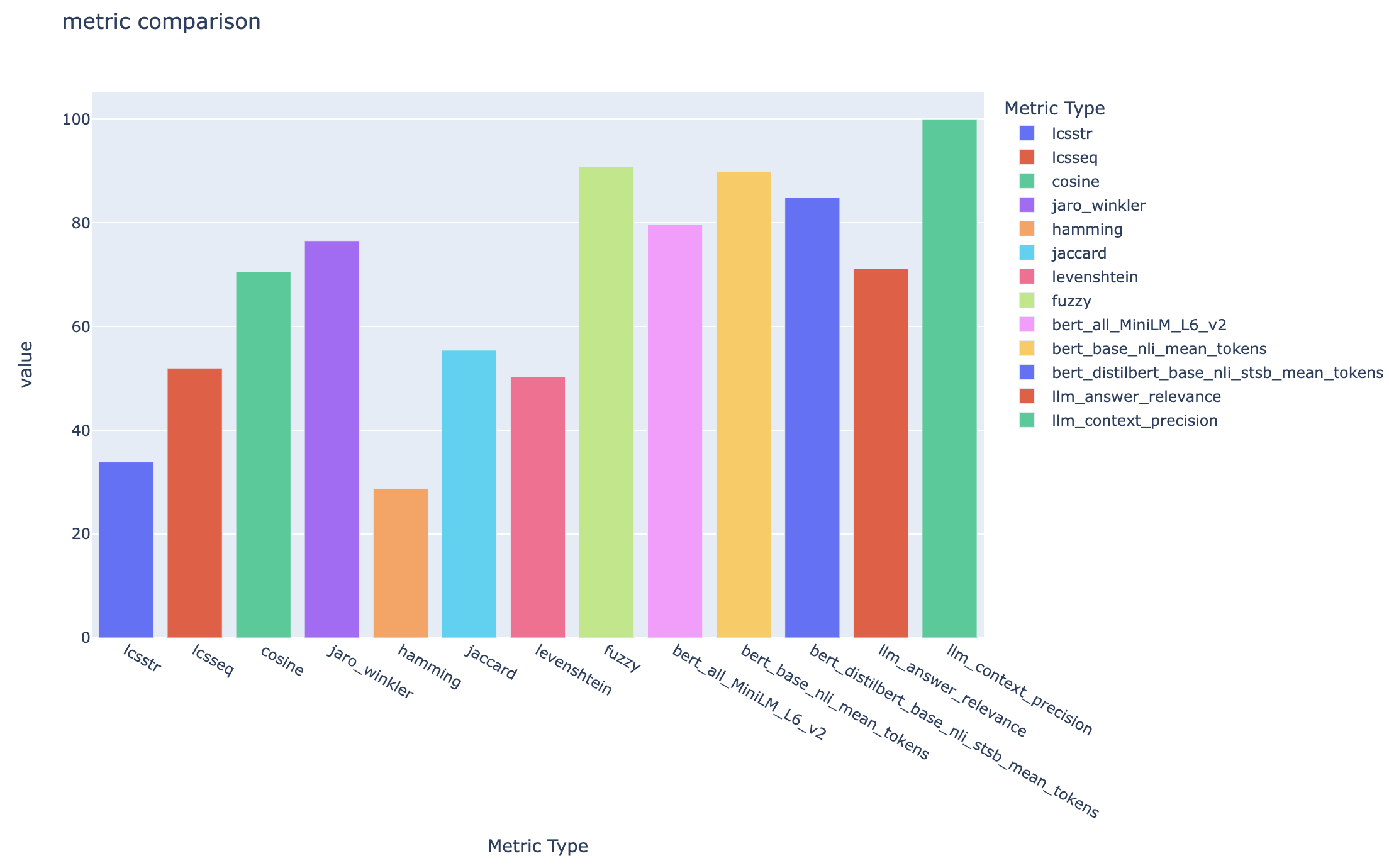
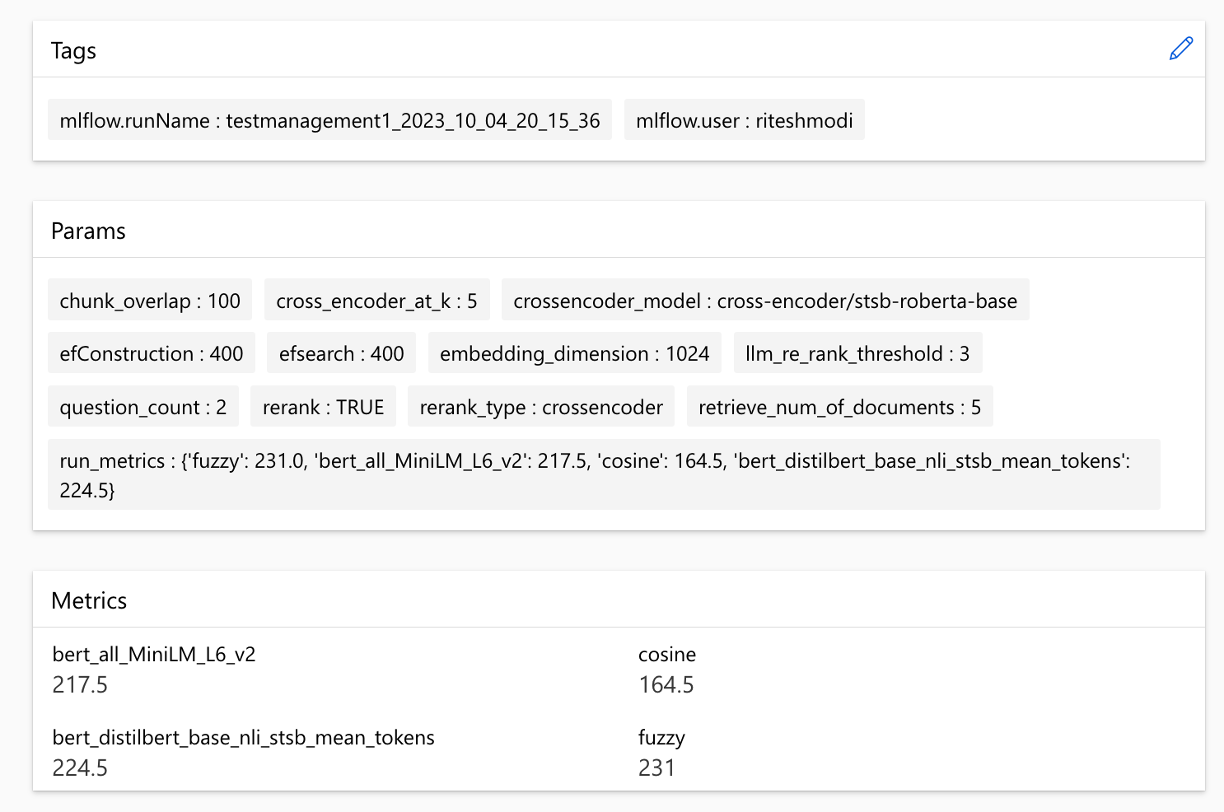
}該解決方案與Azure機器學習集成在一起,並使用MLFlow來管理實驗,作業和工件。您可以將以下報告視為評估過程的一部分:
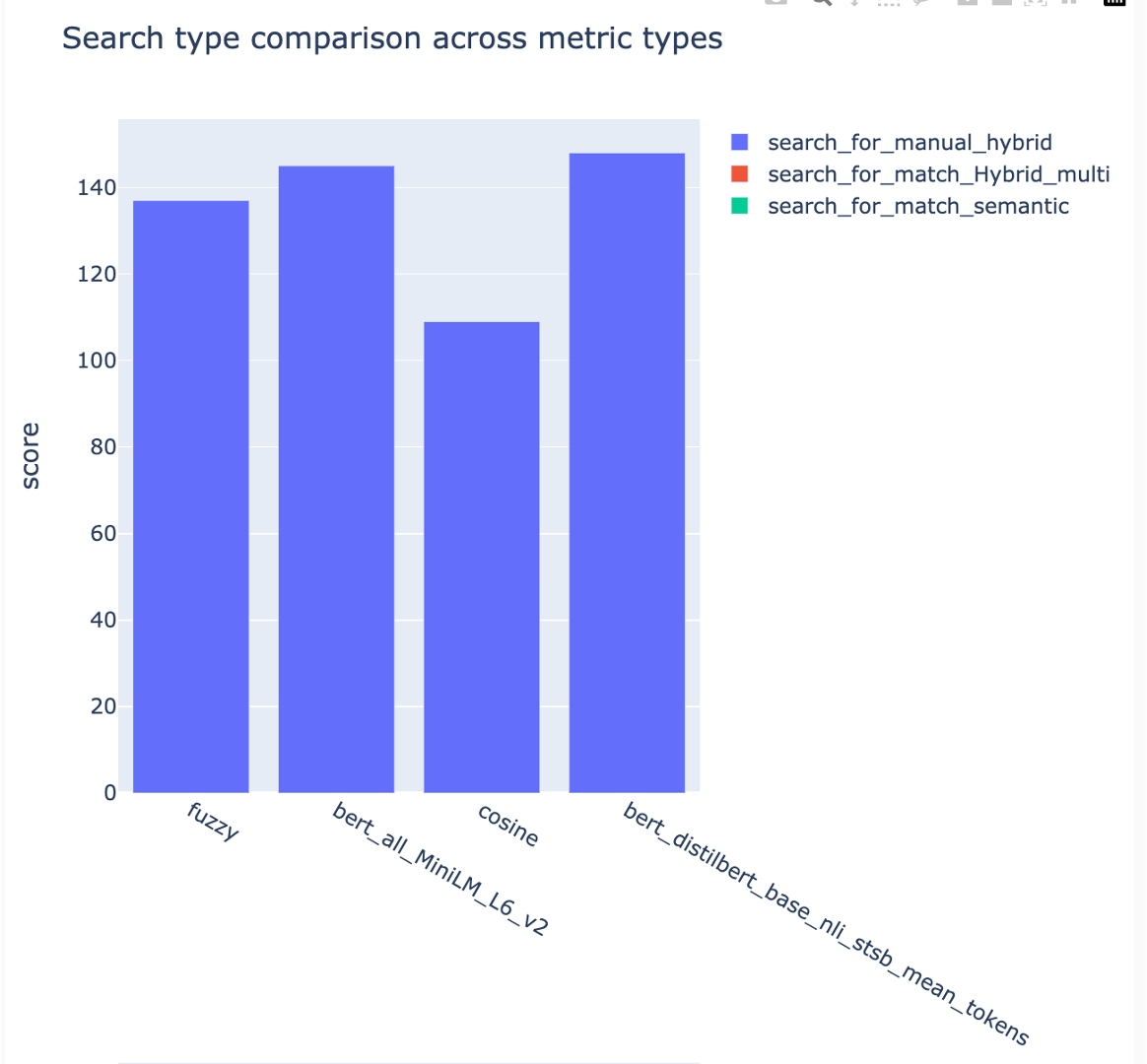
all_metrics_current_run.html顯示了每個選定的度量標準的問題和搜索類型的平均分數:
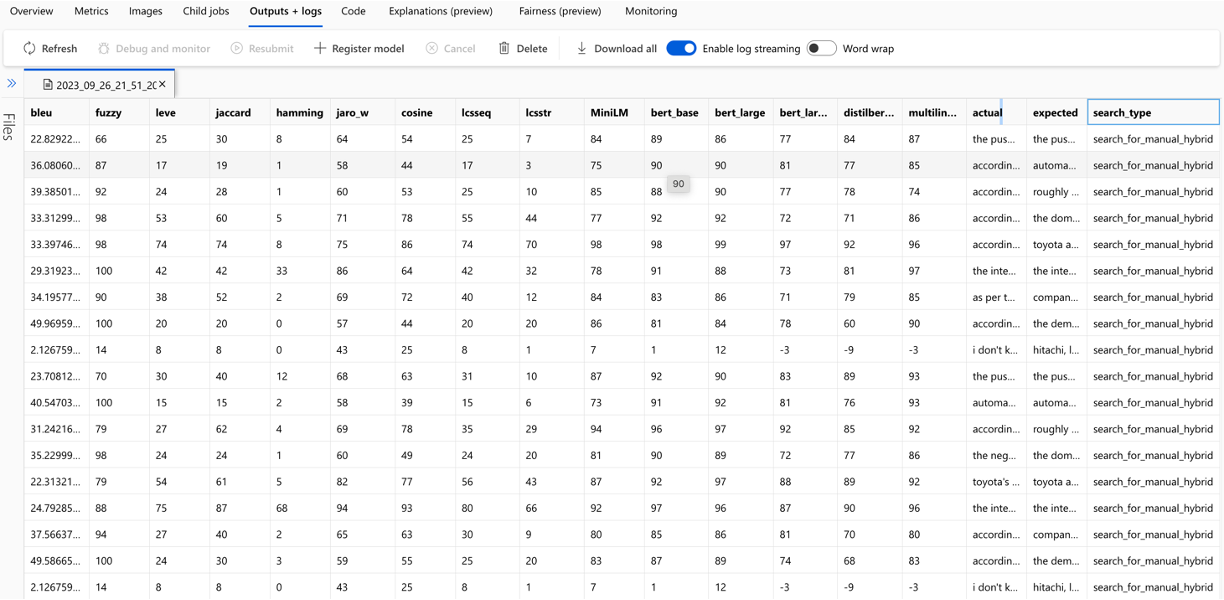
每個問題都跟踪用於評估的每個度量和字段的計算,並在輸出CSV文件中進行搜索類型:
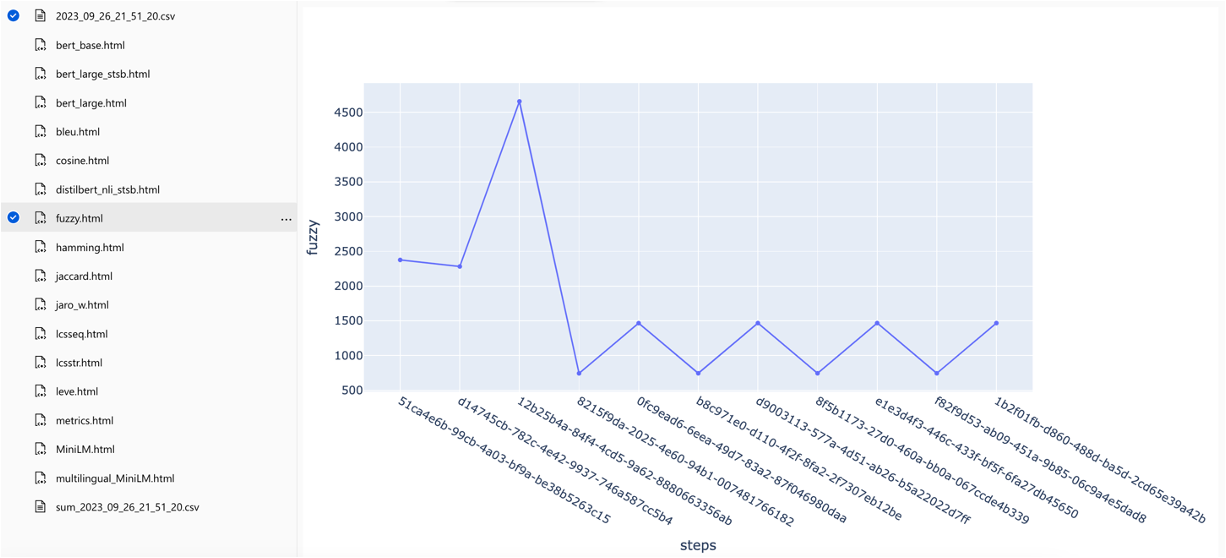
可以在跨行程中比較指標:
可以在不同的搜索策略中比較指標:
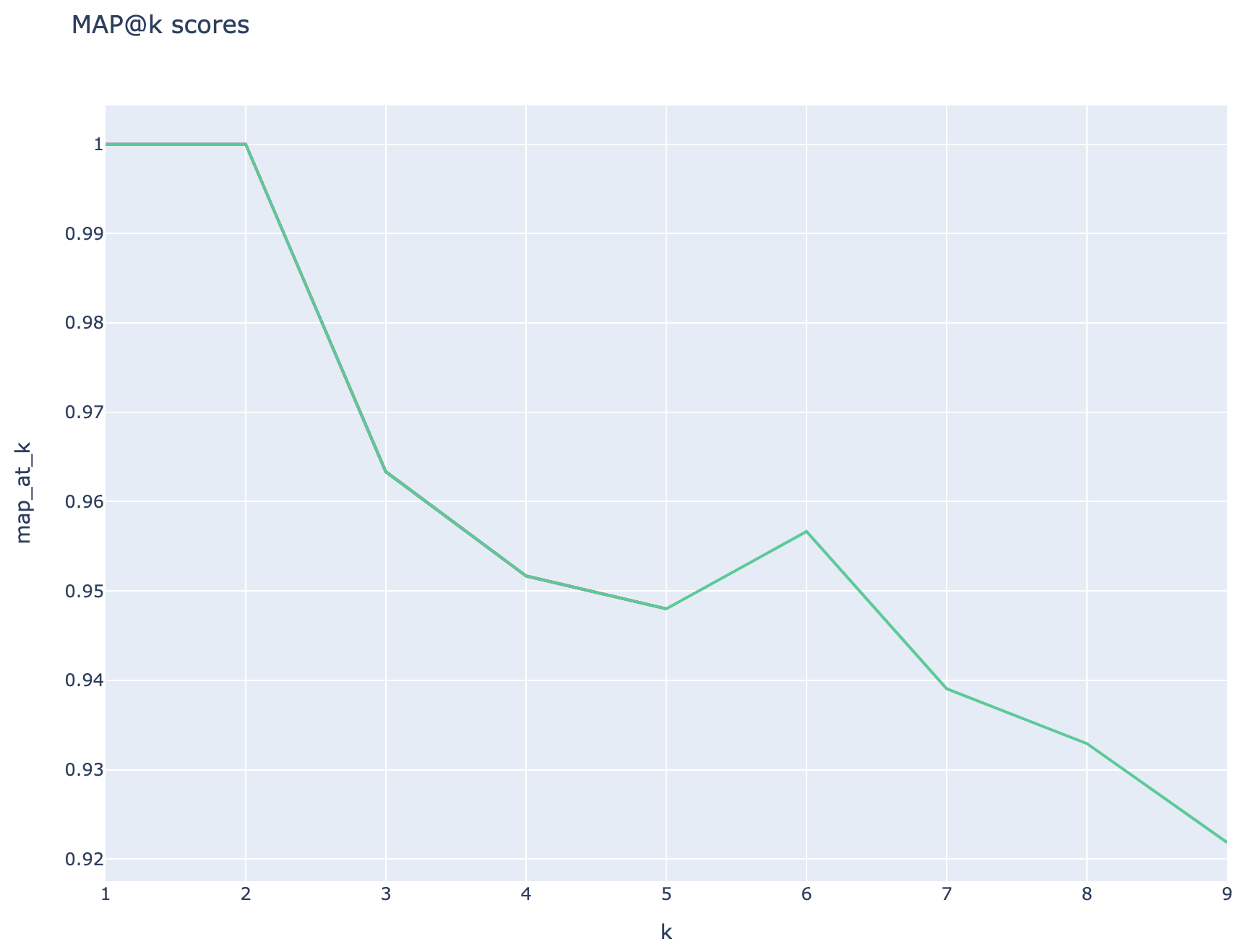
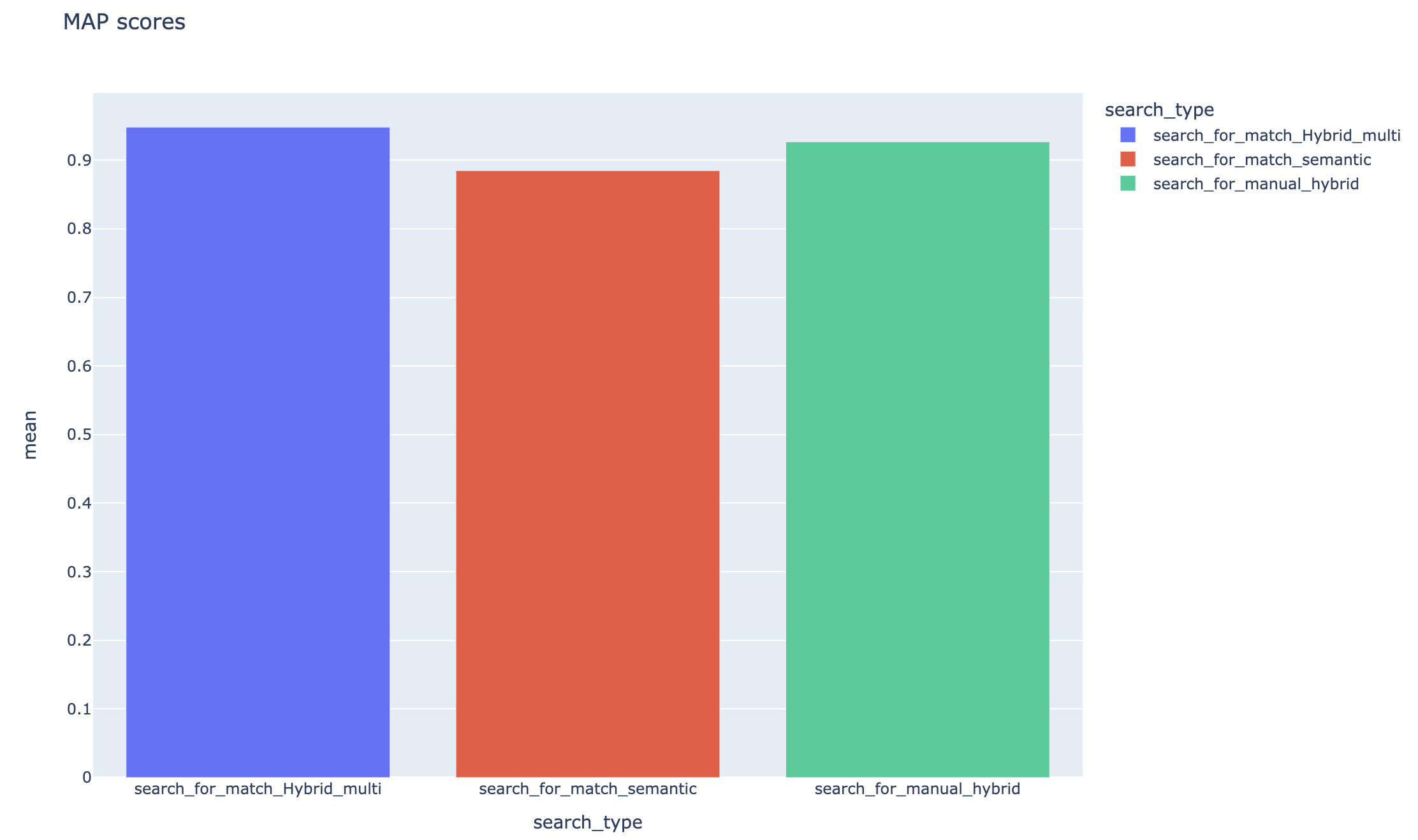
跟踪平均平均精度分數,可以在搜索類型中比較平均地圖得分:
本節概述了工程師/開發人員/數據科學家在使用RAG實驗加速器時可能會遇到的常見陷阱或陷阱。
要成功利用此解決方案,您必須首先通過登錄Azure帳戶來驗證自己。此基本步驟可確保您擁有訪問和管理其使用的Azure資源所需的權限。您可能會出現與將QNA數據存儲到Azure Machine學習數據資產中,由於不適當的授權和對Azure的身份驗證而執行查詢和評估步驟的錯誤。有關身份驗證和授權,請參閱本文檔中的第4點。
在某些情況下,儘管有效的身份驗證和授權,解決方案仍然會產生錯誤。在這種情況下,使用步驟4中提到的步驟開始使用全新的終端實例開始新的會話,並檢查用戶是否有助於訪問與解決方案相關的Azure資源。
該解決方案利用config.json中的幾個配置參數,它們直接影響其功能和性能。請密切注意這些設置:
retireve_num_of_documents:此配置控制以進行分析的初始文檔數量。由於搜索AI結果的等級處理,過高或低值可能導致“索引超出範圍”錯誤。
Cross_encoder_at_k:此配置會影響排名過程。高價值可能導致最終結果中包含無關的文檔。
llm_rerank_threshold:此配置確定哪些文檔傳遞給語言模型(LLM)以進行進一步處理。設置此值太高可能會為LLM創造一個過於較大的上下文,可能導致處理錯誤或降級結果。這也可能導致Azure OpenAI端點的例外。
在運行此解決方案之前,請確保您在config.json文件中正確設置了Azure OpenAI部署名稱,並將相關秘密添加到環境變量(.ENV文件)中。此信息對於應用於設計的適當Azure OpenAI資源和功能的應用程序至關重要。如果您不確定配置數據,請參閱.env.template和config.json文件。該解決方案已通過GPT 3.5渦輪模型進行了測試,需要對任何其他模型進行進一步測試。
在QNA生成步驟中,您有時可能會遇到與Azure Openai收到的JSON輸出有關的錯誤。這些錯誤可以阻止成功產生一些問題和答案。這是您需要知道的:
格式不正確: Azure OpenAI的JSON輸出可能不遵守預期格式,從而導致QNA生成過程問題。內容過濾: Azure OpenAi已有內容過濾器。如果認為輸入文本或生成的響應是不合適的,則可能導致錯誤。 API限制: Azure OpenAI服務具有影響輸出的代幣和速率限制。
端到端評估指標:並非所有比較生成的和地面答案的指標都能夠捕獲語義上的差異。例如,諸如levenshtein或jaro_winkler之類的指標僅測量編輯距離。 cosine指標也不允許使用語義的比較:它使用基於術語頻率向量的基於文本令牌的實現。為了計算生成的答案與預期響應之間的語義相似性,請考慮使用基於嵌入的指標(例如BERT分數( bert_ ))。
組件評估指標:使用LLM-AS判斷的評估指標不是確定性的。加速器中包含的llm_指標使用azure_oai_eval_deployment_name配置字段中指示的模型。 llm_context_recall_instruction llm_answer_relevance_instruction用於評估指令的提示, llm_context_precision_instruction包含在prompts.py文件中。
基於檢索的指標:地圖得分是通過將每個檢索的塊與用於生成QNA對的塊的塊進行比較來計算的。為了評估檢索到的塊是否相關,使用spacyevaluator計算了檢索到的塊與最終用戶問題的串聯( 02_qa_generation.py )中使用的塊之間的相似性。 Spacy相似性默認為令牌向量的平均值,這意味著該計算對單詞的順序不敏感。默認情況下,相似性閾值設置為80%( spacy_evaluator.py )。
我們歡迎您的貢獻和建議。要做出貢獻,您需要同意確認您有權並實際上授予我們使用您的貢獻的權利的貢獻者許可協議(CLA)。有關詳細信息,請訪問[https://cla.opensource.microsoft.com]。
提交拉動請求時,CLA機器人將自動檢查您是否需要提供CLA並給您說明(例如,狀態檢查,評論)。按照機器人的說明進行操作。您只需要對使用我們CLA的所有存儲庫進行一次。
在您做出貢獻之前,請確保運行
 pip install -e .
pre-commit install
該項目遵循Microsoft開源的行為代碼。有關更多信息,請參閱《行為守則常見問題準則》,或提供任何疑問或評論,請聯繫[email protected]。
bug/11-short-descriptionfeature/22-short-descriptionexample_snake_case 。git config --global user.name "First Last"和姓該項目可能包含用於項目,產品或服務的商標或徽標。您必須遵循Microsoft的商標和品牌準則,以正確使用Microsoft商標或徽標。不要在該項目的修改版本中使用Microsoft商標或徽標,以引起混亂或暗示Microsoft贊助。遵循該項目包含的任何第三方商標或徽標的政策。





