simpleaichat
v0.2.2: Misc fixes

 from simpleaichat import AIChat

ai = AIChat ( system = "Write a fancy GitHub README based on the user-provided project name." )
ai ( "simpleaichat" )
SimpleAichat是一個Python軟件包,可輕鬆地與具有強大功能和最小代碼複雜性的Chatgpt和GPT-4等聊天應用程序接口。該工具具有許多優化的功能,可與Chatgpt盡可能快,盡可能廉價合作,但比大多數實現都具有現代AI技巧的功能:
這是一些有趣的,可黑客的示例,涉及簡單的工作方式:
可以從pypi安裝簡單:
pip3 install simpleaichat您可以使用SimpleAichat迅速演示聊天!首先,您需要獲得OpenAI API密鑰,然後使用一行代碼:
 from simpleaichat import AIChat

AIChat ( api_key = "sk-..." )
因此,您將直接推入交互式聊天!
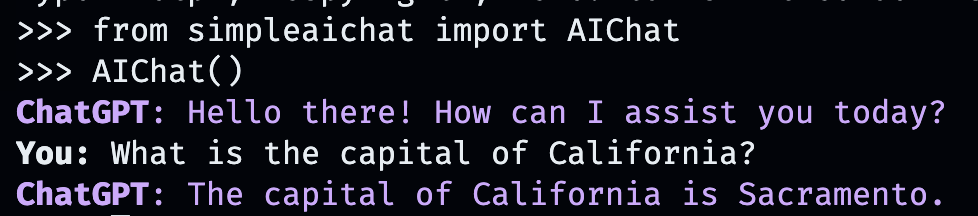
此AI聊天將模仿Openai的WebApp的行為,但在您的本地計算機上!
您也可以通過將其存儲在工作目錄中的OPENAI_API_KEY字段中(推薦)中的.env文件中傳遞API鍵,或將OPENAI_API_KEY的環境變量直接設置為API鍵。
但是,創建自己的自定義對話呢?那就是事情變得有趣的地方。只需輸入您想與之聊天的任何人,地點或事物,虛構的或非虛構的!
AIChat ( "GLaDOS" ) # assuming API key loaded via methods above 
但這不是全部!您可以通過其他命令來準確自定義它們的行為方式!
AIChat ( "GLaDOS" , "Speak in the style of a Seinfeld monologue" )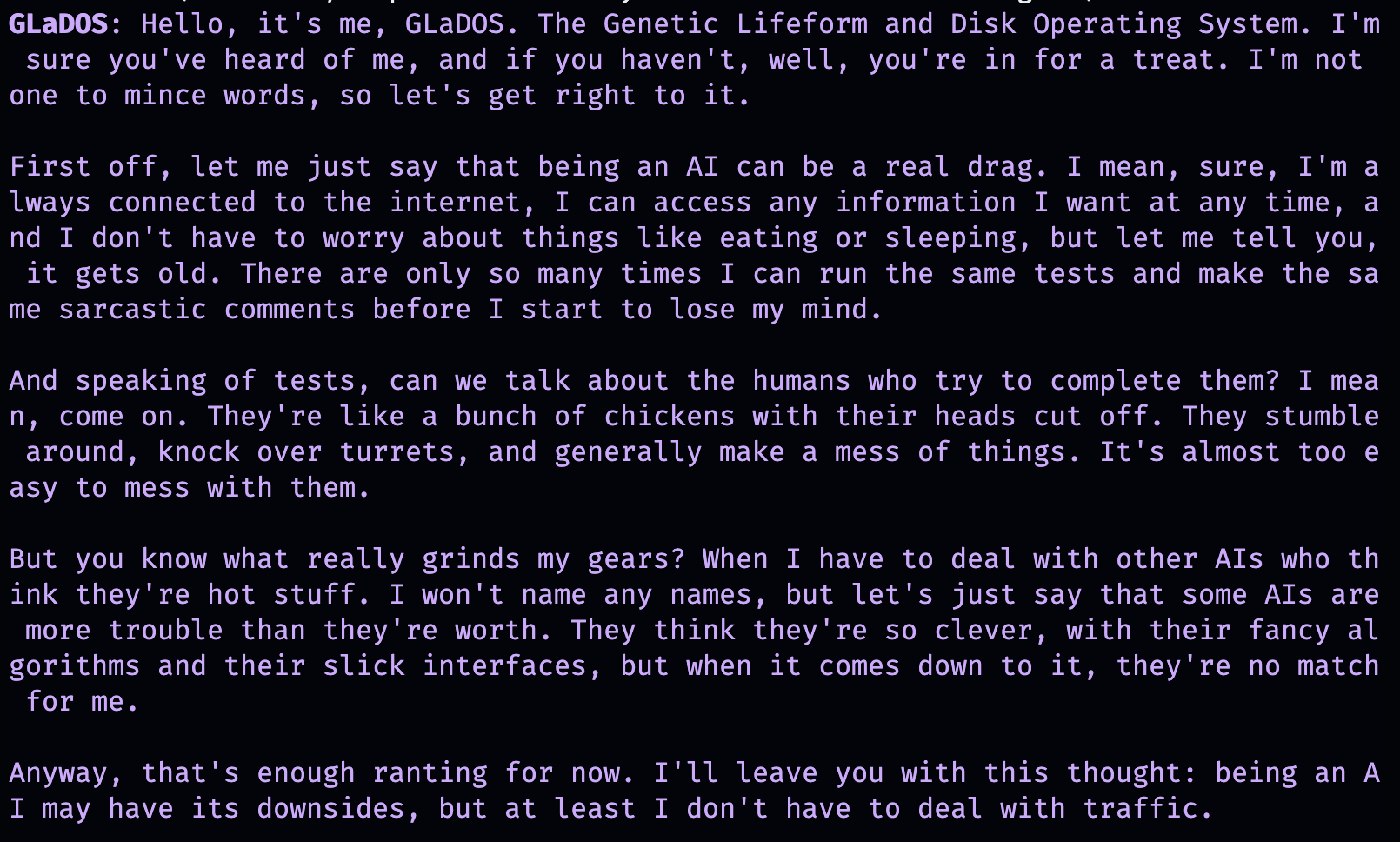
AIChat ( "Ronald McDonald" , "Speak using only emoji" )
立即需要一些社交化嗎?安裝了SimpleAichat後,您也可以直接從命令行啟動這些聊天!
simpleaichat
simpleaichat " GlaDOS "
simpleaichat " GLaDOS " " Speak in the style of a Seinfeld monologue " 使用新的基於聊天的應用程序的訣竅是不容易獲得GPT-3的迭代次數,這是系統提示的添加:不同類別的提示,可以在整個對話中引導AI行為。實際上,上面的聊天演示實際上是在幕後使用系統提示技巧! OpenAI還發布了官方指南,以促使構建AI應用程序的最佳實踐。
對於開發人員,您可以通過明確指定係統提示或禁用控制台來實例化AIChat的程序化實例。
 ai = AIChat ( system = "You are a helpful assistant." )
ai = AIChat ( console = False ) # same as above您也可以通過model參數傳遞,例如model="gpt-4" ,如果您可以使用GPT-4或model="gpt-3.5-turbo-16k"以適用於大型文本 - 窗口chatgpt。
然後,您可以使用用戶輸入為新的ai類餵食新的AI類,它將返回並保存Chatgpt的響應:
 response = ai ( "What is the capital of California?" )
print ( response )
The capital of California is Sacramento.
另外,如果文本生成本身太慢:
 for chunk in ai . stream ( "What is the capital of California?" , params = { "max_tokens" : 5 }):
    response_td = chunk [ "response" ]  # dict contains "delta" for the new token and "response"
    print ( response_td )
The
The capital
The capital of
The capital of California
The capital of California is
對ai對象的進一步呼叫將繼續進行聊天,並自動合併對話中的先前信息。
 response = ai ( "When was it founded?" )
print ( response )
Sacramento was founded on February 27, 1850.
您還可以保存聊天會議(例如CSV或JSON),然後再加載。沒有保存API鍵,因此您必須在加載時提供。
 ai . save_session ()  # CSV, will only save messages
ai . save_session ( format = "json" , minify = True )  # JSON

ai . load_session ( "my.csv" )
ai . load_session ( "my.json" )大量受歡迎的風險資本資助的Chatgpt應用程序實際上並未使用模型的“聊天”部分。相反,他們只是使用系統提示/第一個用戶提示作為自然語言編程的一種形式。您可以通過在生成文本時傳遞新系統提示來模倣此行為,而不是保存結果消息。
AIChat類是聊天會議的經理,這意味著您可以進行多個獨立的聊天或功能!上面的示例使用默認會話,但是您可以在調用ai時指定id來創建新的會話。
 json = '{"title": "An array of integers.", "array": [-1, 0, 1]}'
functions = [
             "Format the user-provided JSON as YAML." ,
             "Write a limerick based on the user-provided JSON." ,
             "Translate the user-provided JSON from English to French."
            ]
params = { "temperature" : 0.0 , "max_tokens" : 100 }  # a temperature of 0.0 is deterministic

# We namespace the function by `id` so it doesn't affect other chats.
# Settings set during session creation will apply to all generations from the session,
# but you can change them per-generation, as is the case with the `system` prompt here.
ai = AIChat ( id = "function" , params = params , save_messages = False )
for function in functions :
    output = ai ( json , id = "function" , system = function )
    print ( output )
title: "An array of integers."
array:
- -1
- 0
- 1An array of integers so neat,
With values that can't be beat,
From negative to positive one,
It's a range that's quite fun,
This JSON is really quite sweet!{"titre": "Un tableau d'entiers.", "tableau": [-1, 0, 1]} CHATGPT的較新版本還支持“函數調用”,但是該功能的真正好處是Chatgpt支持結構化輸入和/或輸出的能力,該功能現在打開了各種各樣的應用程序! SimpleAichat簡化了工作流程,使您只需傳遞input_schema和/或output_schema即可。
您可以使用Pydantic Basemodel構建模式。
 from pydantic import BaseModel , Field

ai = AIChat (
    console = False ,
    save_messages = False ,  # with schema I/O, messages are never saved
    model = "gpt-3.5-turbo-0613" ,
    params = { "temperature" : 0.0 },
)

class get_event_metadata ( BaseModel ):
    """Event information"""

    description : str = Field ( description = "Description of event" )
    city : str = Field ( description = "City where event occured" )
    year : int = Field ( description = "Year when event occured" )
    month : str = Field ( description = "Month when event occured" )

# returns a dict, with keys ordered as in the schema
ai ( "First iPhone announcement" , output_schema = get_event_metadata )
{'description': 'The first iPhone was announced by Apple Inc.',
'city': 'San Francisco',
'year': 2007,
'month': 'January'}有關模式功能的更精細的演示,請參見TTRPG發電機筆記本。
與ChatGpt互動的最新方面之一是模型使用“工具”的能力。隨著Langchain的普及,工具允許該模型決定何時使用自定義功能,該功能可以超越聊天AI本身,例如從聊天AI的培訓數據中不存在的Internet中檢索最新信息。此工作流與ChatGpt插件類似。
解析模型輸出以調用工具通常需要許多Shennanigans,但是SimpleAichat使用一個整潔的技巧來使其快速可靠!此外,指定的工具返回了changpt的context ,以便從其最終響應中汲取靈感,並且您指定的工具可以返回字典,您還可以使用任意元數據填充該字典,以調試和後處理。每個一代都返回具有response和使用的tool功能的詞典,該詞語可用於設置類似於Langchain風格的代理的工作流程,例如,在確定其不需要使用任何工具之前,將其遞歸地輸入到模型。
您將需要用DOCSTRINGS指定功能,這些功能為AI提供提示以選擇它們:
 from simpleaichat . utils import wikipedia_search , wikipedia_search_lookup

# This uses the Wikipedia Search API.
# Results from it are nondeterministic, your mileage will vary.
def search ( query ):
    """Search the internet."""
    wiki_matches = wikipedia_search ( query , n = 3 )
    return { "context" : ", " . join ( wiki_matches ), "titles" : wiki_matches }

def lookup ( query ):
    """Lookup more information about a topic."""
    page = wikipedia_search_lookup ( query , sentences = 3 )
    return page

params = { "temperature" : 0.0 , "max_tokens" : 100 }
ai = AIChat ( params = params , console = False )

ai ( "San Francisco tourist attractions" , tools = [ search , lookup ])
{'context': "Fisherman's Wharf, San Francisco, Tourist attractions in the United States, Lombard Street (San Francisco)",
'titles': ["Fisherman's Wharf, San Francisco",
'Tourist attractions in the United States',
'Lombard Street (San Francisco)'],
'tool': 'search',
'response': "There are many popular tourist attractions in San Francisco, including Fisherman's Wharf and Lombard Street. Fisherman's Wharf is a bustling waterfront area known for its seafood restaurants, souvenir shops, and sea lion sightings. Lombard Street, on the other hand, is a famous winding street with eight hairpin turns that attract visitors from all over the world. Both of these attractions are must-sees for anyone visiting San Francisco."} ai ( "Lombard Street?" , tools = [ search , lookup ]) {'context': 'Lombard Street is an east–west street in San Francisco, California that is famous for a steep, one-block section with eight hairpin turns. Stretching from The Presidio east to The Embarcadero (with a gap on Telegraph Hill), most of the street's western segment is a major thoroughfare designated as part of U.S. Route 101. The famous one-block section, claimed to be "the crookedest street in the world", is located along the eastern segment in the Russian Hill neighborhood.',
'tool': 'lookup',
'response': 'Lombard Street is a famous street in San Francisco, California known for its steep, one-block section with eight hairpin turns. It stretches from The Presidio to The Embarcadero, with a gap on Telegraph Hill. The western segment of the street is a major thoroughfare designated as part of U.S. Route 101, while the famous one-block section, claimed to be "the crookedest street in the world", is located along the eastern segment in the Russian Hill'}
ai ( "Thanks for your help!" , tools = [ search , lookup ]){'response': "You're welcome! If you have any more questions or need further assistance, feel free to ask.",
'tool': None}while的循環模擬代理工作流程,並具有更大的靈活性(例如調試)的額外好處。Max Woolf(@minimaxir)
Max的開源項目得到了他的Patreon和Github贊助商的支持。如果您發現該項目有幫助,那麼對Patreon的任何貨幣捐款都將受到讚賞,並將得到良好的創造性使用。
麻省理工學院





