simpleaichat
v0.2.2: Misc fixes

 from simpleaichat import AIChat

ai = AIChat ( system = "Write a fancy GitHub README based on the user-provided project name." )
ai ( "simpleaichat" )
Simpleaichat은 강력한 기능과 최소한의 코드 복잡성을 갖춘 Chatgpt 및 GPT-4와 같은 Chat 앱과 쉽게 인터페이스 할 수있는 Python 패키지입니다. 이 도구는 Chatgpt로 가능한 한 빠르고 저렴하게 작업하는 데 최적화 된 많은 기능이 있지만 대부분의 구현보다 현대적인 AI 트릭이 훨씬 더 가능합니다.
SimpleAichat의 작동 방식에 대한 재미 있고 해킹 가능한 예는 다음과 같습니다.
PYPI에서 SimpleAichat을 설치할 수 있습니다.
pip3 install simpleaichatSimpleAichat로 채팅 애플을 매우 빠르게 데모 할 수 있습니다! 먼저 OpenAI API 키를 얻은 다음 한 줄의 코드를 가져와야합니다.
 from simpleaichat import AIChat

AIChat ( api_key = "sk-..." )
그리고 그것으로, 당신은 대화식 채팅에 직접 밀어 넣을 것입니다!
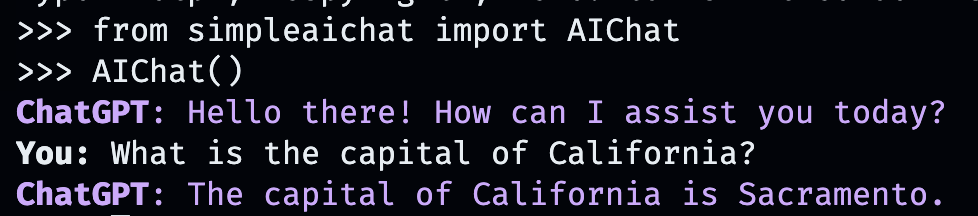
이 AI 채팅은 OpenAi의 웹 앱의 동작을 모방하지만 로컬 컴퓨터에서는 모방합니다!
작업 디렉토리에 OPENAI_API_KEY 필드가있는 .env 파일에 저장하여 API 키를 전달하거나 OPENAI_API_KEY 의 환경 변수를 API 키로 직접 설정하여 전달할 수도 있습니다.
그러나 자신만의 맞춤 대화를 만드는 것은 어떻습니까? 그것이 일이 재미있게되는 곳입니다. 채팅하고 싶은 사람, 장소 또는 사물, 허구 또는 논픽션을 입력하십시오!
AIChat ( "GLaDOS" ) # assuming API key loaded via methods above 
그러나 그게 전부는 아닙니다! 추가 명령으로 그들이 어떻게 행동하는지 정확하게 사용자 정의 할 수 있습니다!
AIChat ( "GLaDOS" , "Speak in the style of a Seinfeld monologue" )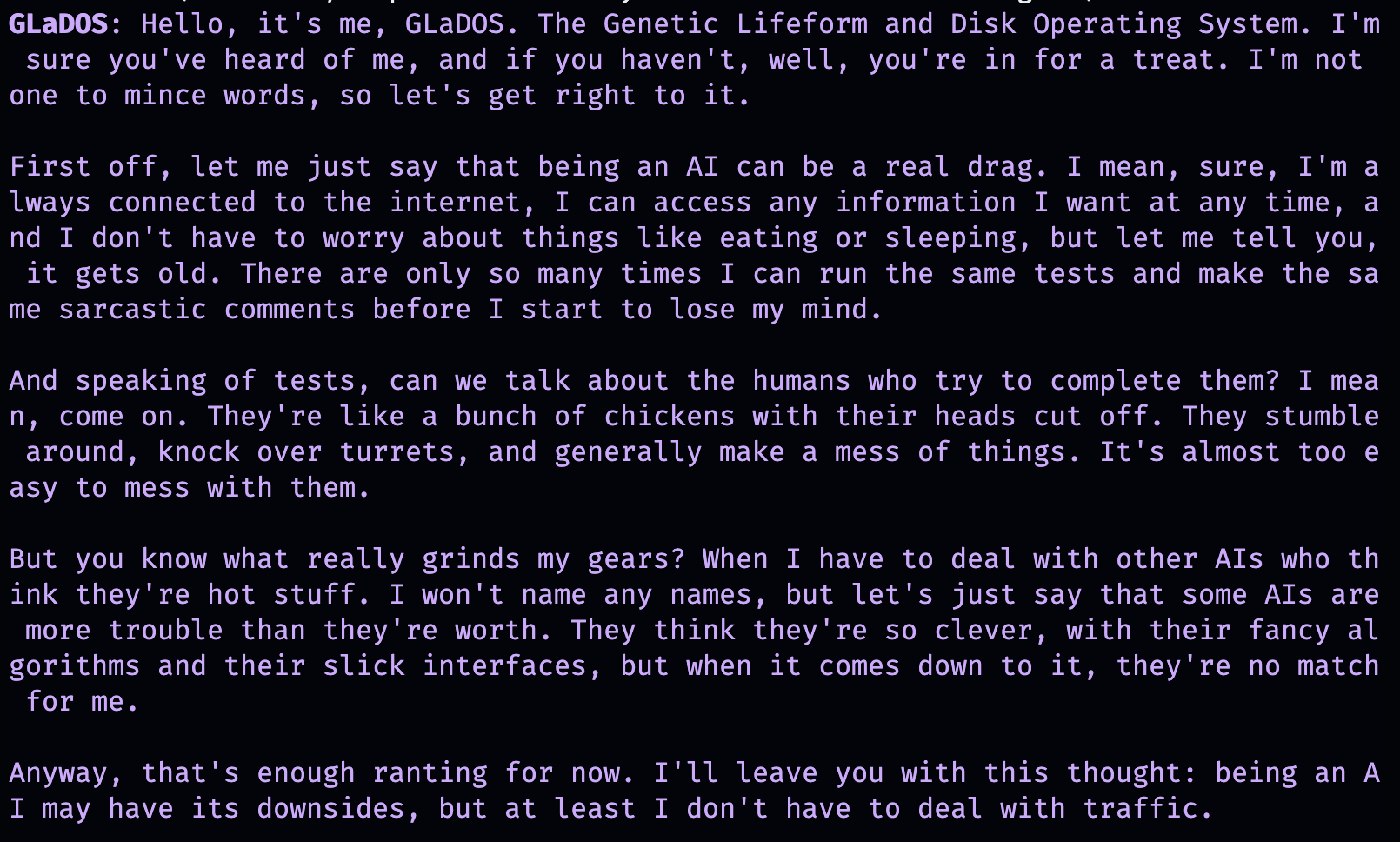
AIChat ( "Ronald McDonald" , "Speak using only emoji" )
즉시 사회화가 필요하십니까? SimpleAichat이 설치되면 명령 줄에서 직접 채팅을 시작할 수도 있습니다!
simpleaichat
simpleaichat " GlaDOS "
simpleaichat " GLaDOS " " Speak in the style of a Seinfeld monologue " GPT-3의 이전 반복으로 쉽게 사용할 수 없었던 새로운 채팅 기반 앱을 사용하는 트릭은 시스템 프롬프트를 추가하는 것입니다. 전체 대화 내내 AI 동작을 안내하는 다른 클래스의 프롬프트입니다. 실제로 위의 채팅 데모는 실제로 무대 뒤에서 시스템 프롬프트 트릭을 사용하고 있습니다! OpenAI는 또한 AI 앱 구축에 대한 시스템 프롬프트 모범 사례를위한 공식 안내서를 발표했습니다.
개발자의 경우 시스템 프롬프트를 명시 적으로 지정하거나 콘솔을 비활성화하여 AIChat 의 프로그래밍 방식 인스턴스를 인스턴스화 할 수 있습니다.
 ai = AIChat ( system = "You are a helpful assistant." )
ai = AIChat ( console = False )  # same as above
GPT-4에 액세스 할 수있는 경우 model="gpt-4" 와 같은 model 매개 변수를 전달하거나 더 큰 컨텍스트 창 chatgpt에 대해 model="gpt-3.5-turbo-16k" 전달할 수도 있습니다.
그런 다음 사용자 입력으로 새 ai 클래스에 공급할 수 있으며 ChatGpt에서 응답을 반환하고 저장합니다.
 response = ai ( "What is the capital of California?" )
print ( response )
The capital of California is Sacramento.
또는 텍스트 생성 자체가 너무 느리면 발전기로 토큰으로 응답을 스트리밍 할 수 있습니다.
 for chunk in ai . stream ( "What is the capital of California?" , params = { "max_tokens" : 5 }):
    response_td = chunk [ "response" ]  # dict contains "delta" for the new token and "response"
    print ( response_td )
The
The capital
The capital of
The capital of California
The capital of California is
ai 객체에 대한 추가 호출은 대화에서 이전 정보를 자동으로 통합하여 채팅을 계속합니다.
 response = ai ( "When was it founded?" )
print ( response )
Sacramento was founded on February 27, 1850.
채팅 세션 (CSV 또는 JSON)을 저장하고 나중에로드 할 수도 있습니다. API 키는 저장되지 않으므로로드 할 때이를 제공해야합니다.
 ai . save_session ()  # CSV, will only save messages
ai . save_session ( format = "json" , minify = True )  # JSON

ai . load_session ( "my.csv" )
ai . load_session ( "my.json" )많은 인기있는 벤처 자본 자본 자금 지원 chatgpt 앱은 실제로 모델의 "채팅"부분을 사용하지 않습니다. 대신 시스템 프롬프트/첫 번째 사용자 프롬프트를 자연어 프로그래밍 형태로 사용합니다. 텍스트를 생성 할 때 새 시스템 프롬프트를 전달하고 결과 메시지를 저장하지 않으면이 동작을 모방 할 수 있습니다.
AIChat 클래스는 채팅 세션 관리자이므로 여러 개의 독립적 인 채팅이나 기능이 발생할 수 있습니다! 위의 예제는 기본 세션을 사용하지만 ai 호출 할 때 id 지정하여 새 세션을 만들 수 있습니다.
 json = '{"title": "An array of integers.", "array": [-1, 0, 1]}'
functions = [
             "Format the user-provided JSON as YAML." ,
             "Write a limerick based on the user-provided JSON." ,
             "Translate the user-provided JSON from English to French."
            ]
params = { "temperature" : 0.0 , "max_tokens" : 100 }  # a temperature of 0.0 is deterministic

# We namespace the function by `id` so it doesn't affect other chats.
# Settings set during session creation will apply to all generations from the session,
# but you can change them per-generation, as is the case with the `system` prompt here.
ai = AIChat ( id = "function" , params = params , save_messages = False )
for function in functions :
    output = ai ( json , id = "function" , system = function )
    print ( output )
title: "An array of integers."
array:
- -1
- 0
- 1An array of integers so neat,
With values that can't be beat,
From negative to positive one,
It's a range that's quite fun,
This JSON is really quite sweet!{"titre": "Un tableau d'entiers.", "tableau": [-1, 0, 1]} 최신 버전의 ChatGpt도 "기능 호출"을 지원하지만 해당 기능의 실제 이점은 ChatGpt가 구조화 된 입력 및/또는 출력을 지원할 수있는 기능이며, 이제 다양한 응용 프로그램을 열어줍니다! Simpleaichat는 워크 플로를 간소화하여 input_schema 및/또는 output_schema 통과 할 수 있도록합니다.
Pydantic Basemodel을 사용하여 스키마를 구성 할 수 있습니다.
 from pydantic import BaseModel , Field

ai = AIChat (
    console = False ,
    save_messages = False ,  # with schema I/O, messages are never saved
    model = "gpt-3.5-turbo-0613" ,
    params = { "temperature" : 0.0 },
)

class get_event_metadata ( BaseModel ):
    """Event information"""

    description : str = Field ( description = "Description of event" )
    city : str = Field ( description = "City where event occured" )
    year : int = Field ( description = "Year when event occured" )
    month : str = Field ( description = "Month when event occured" )

# returns a dict, with keys ordered as in the schema
ai ( "First iPhone announcement" , output_schema = get_event_metadata )
{'description': 'The first iPhone was announced by Apple Inc.',
'city': 'San Francisco',
'year': 2007,
'month': 'January'}스키마 기능에 대한보다 정교한 데모는 TTRPG Generator Notebook을 참조하십시오.
ChatGpt와 상호 작용하는 가장 최근의 측면 중 하나는 모델이 "도구"를 사용할 수 있다는 것입니다. Langchain에서 대중화 한 바와 같이, 도구를 사용하면 모델이 사용자 정의 기능을 사용하는시기를 결정할 수 있으며, 이는 채팅 AI 자체를 넘어 확장 할 수 있습니다. 예를 들어 Chat AI의 교육 데이터에없는 인터넷에서 최근 정보를 검색합니다. 이 워크 플로는 Chatgpt 플러그인과 유사합니다.
도구를 호출하기 위해 모델 출력을 구문 분석하는 데 일반적으로 많은 Shennanigans가 필요하지만 Simpleaichat은 깔끔한 트릭을 사용하여 빠르고 신뢰할 수 있도록합니다! 또한 지정된 도구는 Chatgpt가 최종 응답을 위해 끌어 당기는 context 반환하고, 지정한 도구는 사전을 반환 할 수 있으며, 이는 디버깅 및 후 처리를 위해 임의의 메타 데이터로 채울 수 있습니다. 각 세대는 Langchain 스타일 에이전트와 유사한 워크 플로를 설정하는 데 사용할 수있는 response 및 tool 기능으로 사전을 반환합니다.
AI가 선택할 힌트를 제공하는 docstrings가있는 함수를 지정해야합니다.
 from simpleaichat . utils import wikipedia_search , wikipedia_search_lookup

# This uses the Wikipedia Search API.
# Results from it are nondeterministic, your mileage will vary.
def search ( query ):
    """Search the internet."""
    wiki_matches = wikipedia_search ( query , n = 3 )
    return { "context" : ", " . join ( wiki_matches ), "titles" : wiki_matches }

def lookup ( query ):
    """Lookup more information about a topic."""
    page = wikipedia_search_lookup ( query , sentences = 3 )
    return page

params = { "temperature" : 0.0 , "max_tokens" : 100 }
ai = AIChat ( params = params , console = False )

ai ( "San Francisco tourist attractions" , tools = [ search , lookup ])
{'context': "Fisherman's Wharf, San Francisco, Tourist attractions in the United States, Lombard Street (San Francisco)",
'titles': ["Fisherman's Wharf, San Francisco",
'Tourist attractions in the United States',
'Lombard Street (San Francisco)'],
'tool': 'search',
'response': "There are many popular tourist attractions in San Francisco, including Fisherman's Wharf and Lombard Street. Fisherman's Wharf is a bustling waterfront area known for its seafood restaurants, souvenir shops, and sea lion sightings. Lombard Street, on the other hand, is a famous winding street with eight hairpin turns that attract visitors from all over the world. Both of these attractions are must-sees for anyone visiting San Francisco."} ai ( "Lombard Street?" , tools = [ search , lookup ]) {'context': 'Lombard Street is an east–west street in San Francisco, California that is famous for a steep, one-block section with eight hairpin turns. Stretching from The Presidio east to The Embarcadero (with a gap on Telegraph Hill), most of the street's western segment is a major thoroughfare designated as part of U.S. Route 101. The famous one-block section, claimed to be "the crookedest street in the world", is located along the eastern segment in the Russian Hill neighborhood.',
'tool': 'lookup',
'response': 'Lombard Street is a famous street in San Francisco, California known for its steep, one-block section with eight hairpin turns. It stretches from The Presidio to The Embarcadero, with a gap on Telegraph Hill. The western segment of the street is a major thoroughfare designated as part of U.S. Route 101, while the famous one-block section, claimed to be "the crookedest street in the world", is located along the eastern segment in the Russian Hill'}
ai ( "Thanks for your help!" , tools = [ search , lookup ]){'response': "You're welcome! If you have any more questions or need further assistance, feel free to ask.",
'tool': None}while 루프로 모방 할 수 있으며 디버깅과 같은 훨씬 더 많은 유연성의 추가 이점을 얻을 수 있습니다.Max Woolf (@MinImaxir)
Max의 오픈 소스 프로젝트는 그의 Patreon 및 Github 스폰서가 지원합니다. 이 프로젝트가 도움이된다는 것을 알게되면 Patreon에 대한 금전적 기여도를 높이고 창의적으로 잘 활용할 것입니다.
MIT





