simpleaichat
v0.2.2: Misc fixes

 from simpleaichat import AIChat

ai = AIChat ( system = "Write a fancy GitHub README based on the user-provided project name." )
ai ( "simpleaichat" )
SimpleaIchat هي حزمة Python للتداخل بسهولة مع تطبيقات الدردشة مثل ChatGPT و GPT-4 مع ميزات قوية وحد من تعقيد الكود. تحتوي هذه الأداة على العديد من الميزات المحسّنة للعمل مع ChatGPT بأسرع وأكبر قدر ممكن ، ولكن لا تزال أكثر قدرة على الحيل الحديثة من معظم التطبيقات:
إليك بعض الأمثلة الممتعة والقابلة للاختراق حول كيفية عمل SimpleaIchat:
يمكن تثبيت SimpleaIchat من Pypi:
pip3 install simpleaichatيمكنك عرض تطبيقات الدردشة بسرعة كبيرة مع SimpleaIchat! أولاً ، ستحتاج إلى الحصول على مفتاح Openai API ، ثم مع سطر واحد من التعليمات البرمجية:
 from simpleaichat import AIChat

AIChat ( api_key = "sk-..." )
ومع ذلك ، سوف يتم دفعه مباشرة إلى دردشة تفاعلية!
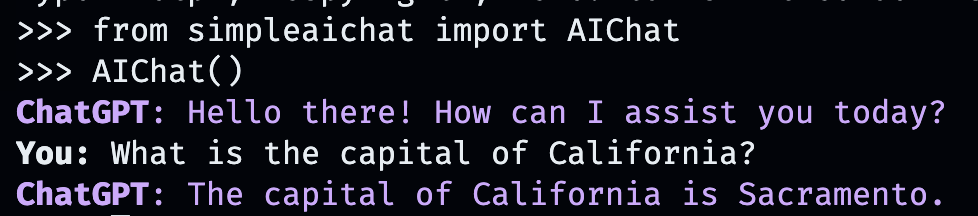
سوف تحاكي دردشة الذكاء الاصطناعى سلوك WebApp من Openai ، ولكن على جهاز الكمبيوتر المحلي الخاص بك!
يمكنك أيضًا تمرير مفتاح API عن طريق تخزينه في ملف .env مع حقل OPENAI_API_KEY في دليل العمل (الموصى به) ، أو عن طريق تعيين متغير البيئة من OPENAI_API_KEY مباشرة إلى مفتاح API.
ولكن ماذا عن إنشاء محادثاتك المخصصة؟ هذا هو المكان الذي تسرح فيه الأمور. ما عليك سوى إدخال أي شخص أو مكان أو شيء أو خيالي أو غير خيالي ، والذي تريد الدردشة معه!
AIChat ( "GLaDOS" ) # assuming API key loaded via methods above 
لكن هذا ليس كل شيء! يمكنك تخصيص كيفية تصرفهم أيضًا بأوامر إضافية!
AIChat ( "GLaDOS" , "Speak in the style of a Seinfeld monologue" )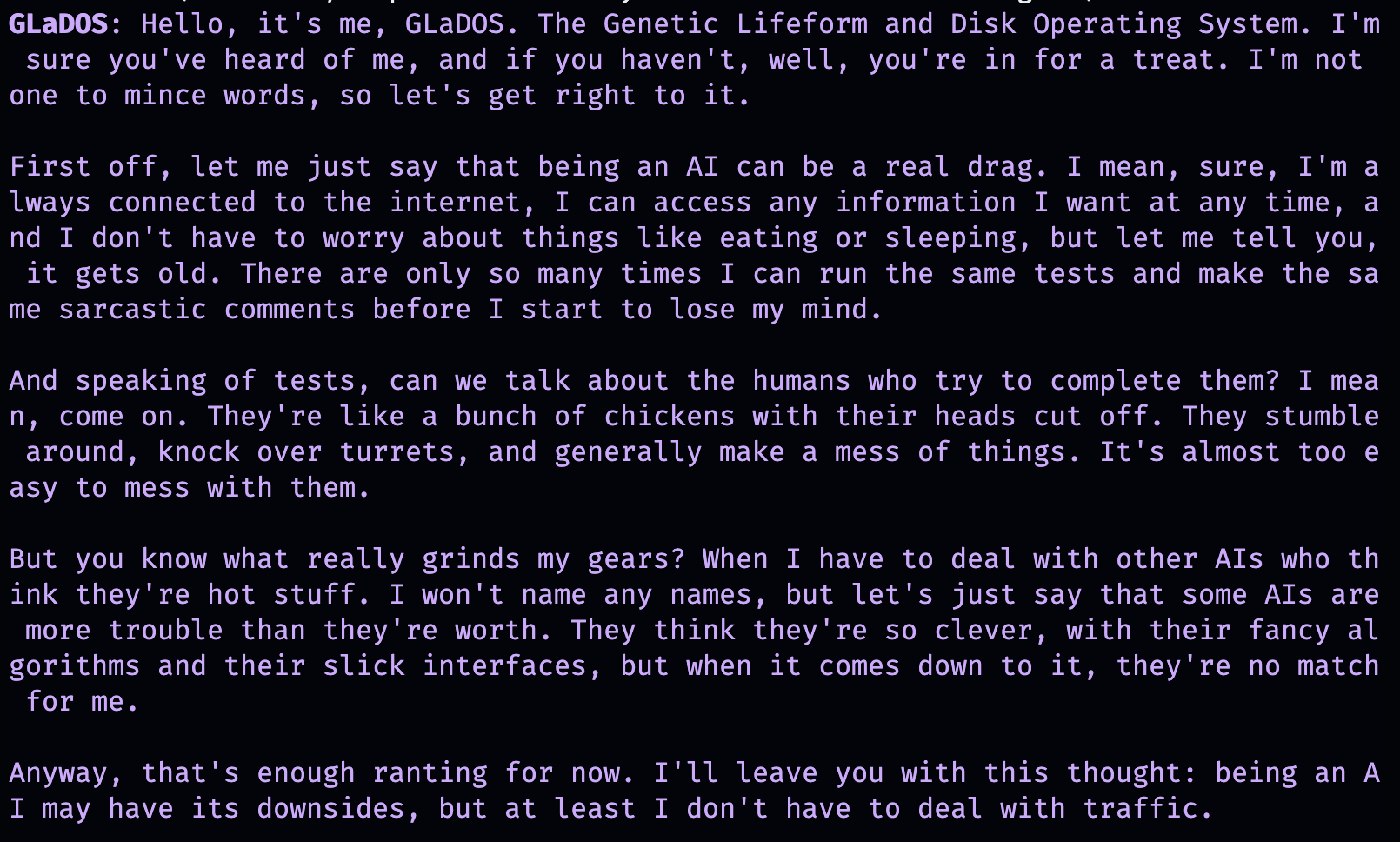
AIChat ( "Ronald McDonald" , "Speak using only emoji" )
هل تحتاج إلى بعض التنشئة الاجتماعية على الفور؟ بمجرد تثبيت SimpleAichat ، يمكنك أيضًا بدء هذه الدردشات مباشرة من سطر الأوامر!
simpleaichat
simpleaichat " GlaDOS "
simpleaichat " GLaDOS " " Speak in the style of a Seinfeld monologue " إن الخدعة مع العمل مع تطبيقات جديدة قائمة على الدردشة لم تكن متاحة بسهولة مع التكرارات السابقة لـ GPT-3 هي إضافة موجه النظام: فئة مختلفة من المطالبة التي توجه سلوك الذكاء الاصطناعي طوال المحادثة بأكملها. في الواقع ، تستخدم عروض الدردشة أعلاه في الواقع حيلًا سريعة النظام وراء الكواليس! أصدرت Openai أيضًا دليلًا رسميًا لأفضل الممارسات المطالعة في النظام لبناء تطبيقات الذكاء الاصطناعي.
بالنسبة للمطورين ، يمكنك إنشاء مثيل برمجي لـ AIChat من خلال تحديد موجه النظام بشكل صريح ، أو عن طريق تعطيل وحدة التحكم.
 ai = AIChat ( system = "You are a helpful assistant." )
ai = AIChat ( console = False )  # same as above
يمكنك أيضًا تمرير معلمة model ، مثل model="gpt-4" إذا كان لديك إمكانية الوصول إلى GPT-4 أو model="gpt-3.5-turbo-16k" للحصول على chatgpt Window الأكبر.
يمكنك بعد ذلك إطعام فئة ai الجديدة مع إدخال المستخدم ، وسيعود وحفظ الاستجابة من ChatGPT:
 response = ai ( "What is the capital of California?" )
print ( response )
The capital of California is Sacramento.
بدلاً من ذلك ، يمكنك دفق الردود بواسطة الرمز المميز مع مولد إذا كان توليد النص نفسه بطيئًا جدًا:
 for chunk in ai . stream ( "What is the capital of California?" , params = { "max_tokens" : 5 }):
    response_td = chunk [ "response" ]  # dict contains "delta" for the new token and "response"
    print ( response_td )
The
The capital
The capital of
The capital of California
The capital of California is
ستستمر المكالمات الإضافية إلى كائن ai للدردشة ، ودمج المعلومات السابقة تلقائيًا من المحادثة.
 response = ai ( "When was it founded?" )
print ( response )
Sacramento was founded on February 27, 1850.
يمكنك أيضًا حفظ جلسات الدردشة (مثل CSV أو JSON) وتحميلها لاحقًا. لم يتم حفظ مفتاح API ، لذا سيتعين عليك توفير ذلك عند التحميل.
 ai . save_session ()  # CSV, will only save messages
ai . save_session ( format = "json" , minify = True )  # JSON

ai . load_session ( "my.csv" )
ai . load_session ( "my.json" )لا تستخدم عدد كبير من تطبيقات ChatGPT التي تمولها الرأسمالية المشهورة في الواقع جزء "الدردشة" من النموذج. بدلاً من ذلك ، يستخدمون فقط مطالبة المستخدم/موجه المستخدم الأول كشكل من أشكال برمجة اللغة الطبيعية. يمكنك محاكاة هذا السلوك عن طريق تمرير موجه نظام جديد عند إنشاء النص ، وعدم حفظ الرسائل الناتجة.
فئة AIChat هي مدير جلسات الدردشة ، مما يعني أنه يمكنك إجراء محادثات أو وظائف مستقلة متعددة! تستخدم الأمثلة المذكورة أعلاه جلسة افتراضية ، ولكن يمكنك إنشاء مسابقة جديدة عن طريق تحديد id عند الاتصال ai .
 json = '{"title": "An array of integers.", "array": [-1, 0, 1]}'
functions = [
             "Format the user-provided JSON as YAML." ,
             "Write a limerick based on the user-provided JSON." ,
             "Translate the user-provided JSON from English to French."
            ]
params = { "temperature" : 0.0 , "max_tokens" : 100 }  # a temperature of 0.0 is deterministic

# We namespace the function by `id` so it doesn't affect other chats.
# Settings set during session creation will apply to all generations from the session,
# but you can change them per-generation, as is the case with the `system` prompt here.
ai = AIChat ( id = "function" , params = params , save_messages = False )
for function in functions :
    output = ai ( json , id = "function" , system = function )
    print ( output )
title: "An array of integers."
array:
- -1
- 0
- 1An array of integers so neat,
With values that can't be beat,
From negative to positive one,
It's a range that's quite fun,
This JSON is really quite sweet!{"titre": "Un tableau d'entiers.", "tableau": [-1, 0, 1]} تدعم الإصدارات الأحدث من ChatGPT أيضًا "استدعاء الوظائف" ، ولكن الفائدة الحقيقية لتلك الميزة هي قدرة chatgpt على دعم المدخلات و/أو الإخراج المنظمة ، والتي تفتح الآن مجموعة واسعة من التطبيقات! يقوم Simpleaichat بتبسيط سير العمل للسماح لك فقط بتمرير input_schema و/أو output_schema .
يمكنك بناء مخطط باستخدام مشكل قاعدي Pydantic.
 from pydantic import BaseModel , Field

ai = AIChat (
    console = False ,
    save_messages = False ,  # with schema I/O, messages are never saved
    model = "gpt-3.5-turbo-0613" ,
    params = { "temperature" : 0.0 },
)

class get_event_metadata ( BaseModel ):
    """Event information"""

    description : str = Field ( description = "Description of event" )
    city : str = Field ( description = "City where event occured" )
    year : int = Field ( description = "Year when event occured" )
    month : str = Field ( description = "Month when event occured" )

# returns a dict, with keys ordered as in the schema
ai ( "First iPhone announcement" , output_schema = get_event_metadata )
{'description': 'The first iPhone was announced by Apple Inc.',
'city': 'San Francisco',
'year': 2007,
'month': 'January'}راجع دفتر Noteberator Generator TTRPG للحصول على عرض أكثر تفصيلاً لقدرات المخطط.
واحدة من أحدث جوانب التفاعل مع ChatGPT هي القدرة على استخدام النموذج "الأدوات". كما هو مشهور من قبل Langchain ، تسمح الأدوات للنموذج بتحديد وقت استخدام وظائف مخصصة ، والتي يمكن أن تمتد إلى ما بعد مجرد دردشة AI نفسها ، على سبيل المثال استرداد المعلومات الحديثة من الإنترنت غير موجودة في بيانات تدريب الدردشة AI. يشبه سير العمل هذا المكونات الإضافية.
يتطلب تحليل إخراج النموذج لاستدعاء الأدوات عادةً عددًا من shennanigans ، ولكن SimpleAichat يستخدم خدعة أنيقة لجعلها سريعة وموثوقة! بالإضافة إلى ذلك ، فإن الأدوات المحددة تُرجع context لاستخلاص ChatGpt من أجل استجابةها النهائية ، ويمكن للأدوات التي تحددها إرجاع القاموس الذي يمكنك ملؤه أيضًا بالبيانات الوصفية التعسفية لتصحيح الأخطاء والمعالجة. يقوم كل جيل بإرجاع قاموس مع response ووظيفة tool المستخدمة ، والتي يمكن استخدامها لإعداد تدفقات سير العمل التي تشبه عوامل Langchain ، على سبيل المثال إدخال التغذية بشكل متكرر للنموذج حتى يحدد أنه لا يحتاج إلى استخدام أي أدوات أخرى.
ستحتاج إلى تحديد وظائف مع docstrings التي توفر تلميحات لوكالة الذكاء الاصطناعى لتحديدها:
 from simpleaichat . utils import wikipedia_search , wikipedia_search_lookup

# This uses the Wikipedia Search API.
# Results from it are nondeterministic, your mileage will vary.
def search ( query ):
    """Search the internet."""
    wiki_matches = wikipedia_search ( query , n = 3 )
    return { "context" : ", " . join ( wiki_matches ), "titles" : wiki_matches }

def lookup ( query ):
    """Lookup more information about a topic."""
    page = wikipedia_search_lookup ( query , sentences = 3 )
    return page

params = { "temperature" : 0.0 , "max_tokens" : 100 }
ai = AIChat ( params = params , console = False )

ai ( "San Francisco tourist attractions" , tools = [ search , lookup ])
{'context': "Fisherman's Wharf, San Francisco, Tourist attractions in the United States, Lombard Street (San Francisco)",
'titles': ["Fisherman's Wharf, San Francisco",
'Tourist attractions in the United States',
'Lombard Street (San Francisco)'],
'tool': 'search',
'response': "There are many popular tourist attractions in San Francisco, including Fisherman's Wharf and Lombard Street. Fisherman's Wharf is a bustling waterfront area known for its seafood restaurants, souvenir shops, and sea lion sightings. Lombard Street, on the other hand, is a famous winding street with eight hairpin turns that attract visitors from all over the world. Both of these attractions are must-sees for anyone visiting San Francisco."} ai ( "Lombard Street?" , tools = [ search , lookup ]) {'context': 'Lombard Street is an east–west street in San Francisco, California that is famous for a steep, one-block section with eight hairpin turns. Stretching from The Presidio east to The Embarcadero (with a gap on Telegraph Hill), most of the street's western segment is a major thoroughfare designated as part of U.S. Route 101. The famous one-block section, claimed to be "the crookedest street in the world", is located along the eastern segment in the Russian Hill neighborhood.',
'tool': 'lookup',
'response': 'Lombard Street is a famous street in San Francisco, California known for its steep, one-block section with eight hairpin turns. It stretches from The Presidio to The Embarcadero, with a gap on Telegraph Hill. The western segment of the street is a major thoroughfare designated as part of U.S. Route 101, while the famous one-block section, claimed to be "the crookedest street in the world", is located along the eastern segment in the Russian Hill'}
ai ( "Thanks for your help!" , tools = [ search , lookup ]){'response': "You're welcome! If you have any more questions or need further assistance, feel free to ask.",
'tool': None}while دون الكثير من التعليمات البرمجية الإضافية ، بالإضافة إلى فائدة إضافية تتمثل في مرونة أكثر بكثير مثل التصحيح.ماكس وولف (minimaxir)
يتم دعم مشاريع ماكس مفتوحة المصدر من قبل رعاة Patreon و Github. إذا وجدت هذا المشروع مفيدًا ، فسيتم تقدير أي مساهمات نقدية في Patreon وسيتم استخدامها بشكل جيد.
معهد ماساتشوستس للتكنولوجيا





