simpleaichat
v0.2.2: Misc fixes

 from simpleaichat import AIChat

ai = AIChat ( system = "Write a fancy GitHub README based on the user-provided project name." )
ai ( "simpleaichat" )
SimpleAichat เป็นแพ็คเกจ Python สำหรับการเชื่อมต่อกับแอพแชทอย่างง่ายดายเช่น ChatGPT และ GPT-4 พร้อมคุณสมบัติที่แข็งแกร่งและความซับซ้อนของรหัสน้อยที่สุด เครื่องมือนี้มีคุณสมบัติมากมายที่ได้รับการปรับให้เหมาะสมสำหรับการทำงานกับ CHATGPT ให้เร็วและราคาถูกที่สุดเท่าที่จะเป็นไปได้ แต่ก็ยังมีความสามารถในการใช้เทคนิค AI ที่ทันสมัยกว่าการใช้งานส่วนใหญ่:
นี่คือตัวอย่างที่สนุกและแฮ็กได้เกี่ยวกับวิธีการทำงานของ SimpleAichat:
SimpleAichat สามารถติดตั้งได้จาก PYPI:
pip3 install simpleaichatคุณสามารถสาธิตแชทแอปได้อย่างรวดเร็วด้วย SimpleAichat! ก่อนอื่นคุณจะต้องได้รับคีย์ OpenAI API จากนั้นด้วยรหัสบรรทัดเดียว:
 from simpleaichat import AIChat

AIChat ( api_key = "sk-..." )
และด้วยสิ่งนั้นคุณจะถูกผลักดันโดยตรงในการแชทแบบโต้ตอบ!
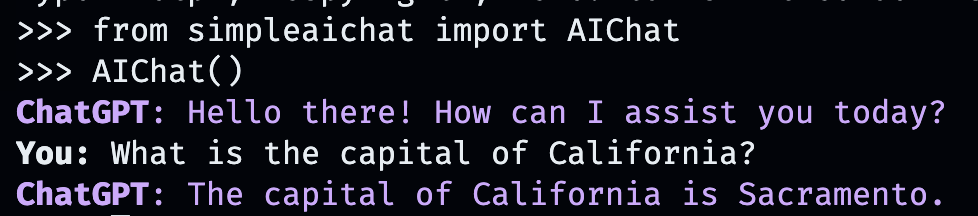
การแชท AI นี้จะเลียนแบบพฤติกรรมของ WebApp ของ Openai แต่ในคอมพิวเตอร์ในพื้นที่ของคุณ!
นอกจากนี้คุณยังสามารถผ่านคีย์ API โดยจัดเก็บไว้ในไฟล์ .env ด้วยฟิลด์ OPENAI_API_KEY ในไดเรกทอรีการทำงาน (แนะนำ) หรือโดยการตั้งค่าตัวแปรสภาพแวดล้อมของ OPENAI_API_KEY โดยตรงไปยังคีย์ API
แต่สิ่งที่เกี่ยวกับการสร้างการสนทนาที่กำหนดเองของคุณเอง? นั่นคือสิ่งที่สนุก เพียงแค่ป้อนข้อมูลใด ๆ สถานที่หรือสิ่งของตัวละครหรือสารคดีที่คุณต้องการแชทด้วย!
AIChat ( "GLaDOS" ) # assuming API key loaded via methods above 
แต่นั่นไม่ใช่ทั้งหมด! คุณสามารถปรับแต่งวิธีการที่พวกเขาประพฤติตนด้วยคำสั่งเพิ่มเติม!
AIChat ( "GLaDOS" , "Speak in the style of a Seinfeld monologue" )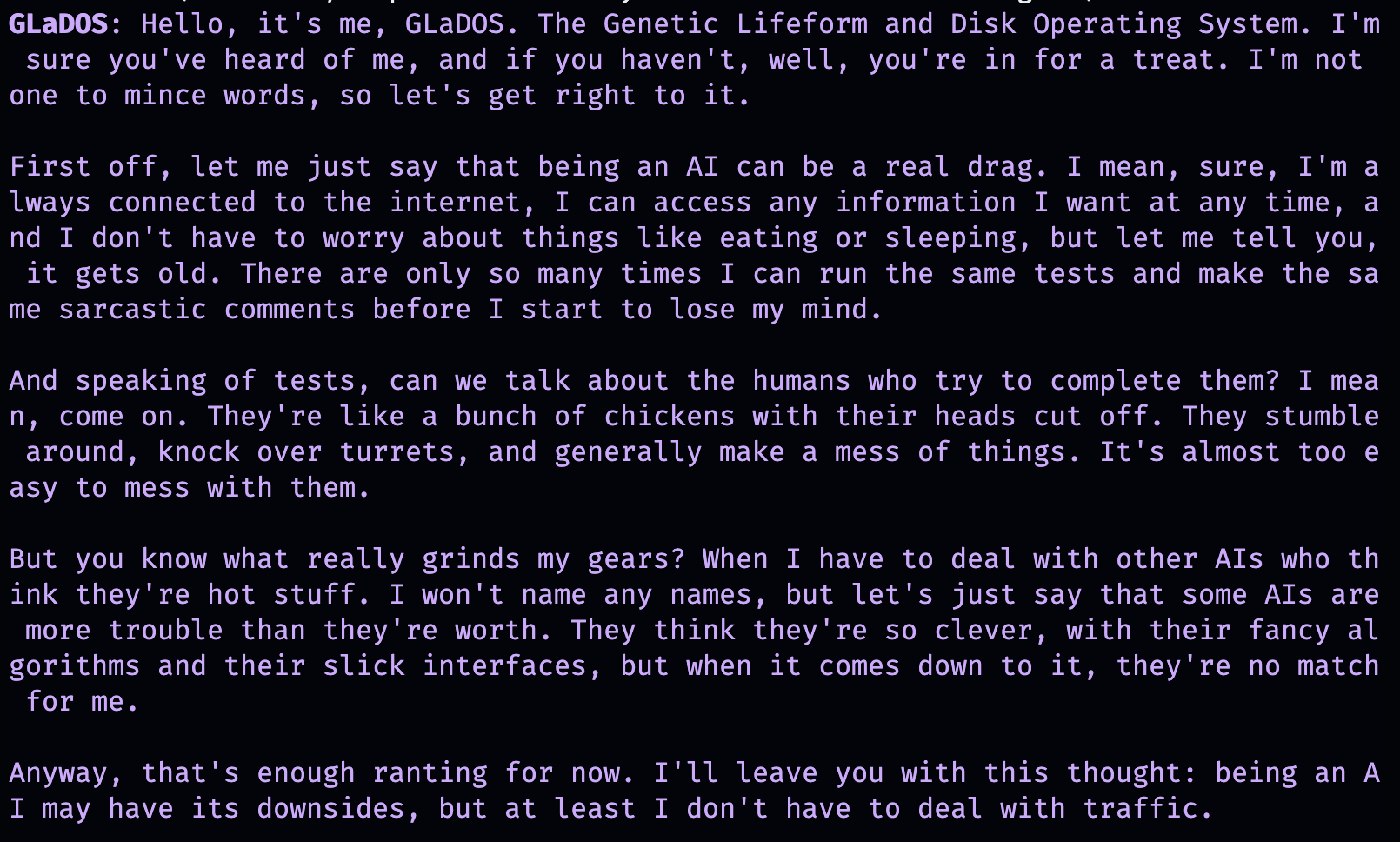
AIChat ( "Ronald McDonald" , "Speak using only emoji" )
ต้องการการขัดเกลาทางสังคมทันทีหรือไม่? เมื่อติดตั้ง SimpleAichat แล้วคุณยังสามารถเริ่มการแชทเหล่านี้ได้โดยตรงจากบรรทัดคำสั่ง!
simpleaichat
simpleaichat " GlaDOS "
simpleaichat " GLaDOS " " Speak in the style of a Seinfeld monologue " เคล็ดลับในการทำงานกับแอพแชทใหม่ที่ไม่พร้อมใช้งานกับการทำซ้ำก่อนหน้านี้ของ GPT-3 คือการเพิ่มพรอมต์ของระบบ: พรอมต์คลาสที่แตกต่างกันซึ่งเป็นแนวทางพฤติกรรม AI ตลอดการสนทนาทั้งหมด อันที่จริงการสาธิตการแชทด้านบนใช้เทคนิคการแจ้งเตือนระบบเบื้องหลัง! OpenAI ยังได้เปิดตัวคู่มืออย่างเป็นทางการสำหรับการปฏิบัติที่ดีที่สุดของระบบเพื่อสร้างแอพ AI
สำหรับนักพัฒนาคุณสามารถยกตัวอย่างอินสแตนซ์แบบโปรแกรมของ AIChat ได้โดยการระบุพรอมต์ระบบอย่างชัดเจนหรือโดยการปิดการใช้งานคอนโซล
 ai = AIChat ( system = "You are a helpful assistant." )
ai = AIChat ( console = False )  # same as above
นอกจากนี้คุณยังสามารถส่งผ่านพารามิเตอร์ model เช่น model="gpt-4" หากคุณสามารถเข้าถึง GPT-4 หรือ model="gpt-3.5-turbo-16k" สำหรับแชท GPT-Window ที่มีขนาดใหญ่กว่า
จากนั้นคุณสามารถป้อนคลาส ai ใหม่ด้วยอินพุตของผู้ใช้และจะกลับมาและบันทึกการตอบกลับจาก chatgpt:
 response = ai ( "What is the capital of California?" )
print ( response )
The capital of California is Sacramento.
หรือคุณสามารถสตรีมการตอบสนองโดยโทเค็นด้วยเครื่องกำเนิดไฟฟ้าหากการสร้างข้อความช้าเกินไป:
 for chunk in ai . stream ( "What is the capital of California?" , params = { "max_tokens" : 5 }):
    response_td = chunk [ "response" ]  # dict contains "delta" for the new token and "response"
    print ( response_td )
The
The capital
The capital of
The capital of California
The capital of California is
การโทรเพิ่มเติมไปยังวัตถุ ai จะดำเนินการแชทต่อไปโดยรวมข้อมูลก่อนหน้านี้จากการสนทนาโดยอัตโนมัติ
 response = ai ( "When was it founded?" )
print ( response )
Sacramento was founded on February 27, 1850.
นอกจากนี้คุณยังสามารถบันทึกเซสชันการแชท (เป็น CSV หรือ JSON) และโหลดในภายหลัง คีย์ API ไม่ได้บันทึกไว้ดังนั้นคุณจะต้องระบุว่าเมื่อโหลด
 ai . save_session ()  # CSV, will only save messages
ai . save_session ( format = "json" , minify = True )  # JSON

ai . load_session ( "my.csv" )
ai . load_session ( "my.json" )แอพ CHATGPT ที่ได้รับทุนสนับสนุนจากกิจการร่วมทุนจำนวนมากไม่ได้ใช้ส่วน "แชท" ของโมเดล แต่พวกเขาเพียงแค่ใช้พรอมต์ระบบ/ผู้ใช้คนแรกเป็นรูปแบบของการเขียนโปรแกรมภาษาธรรมชาติ คุณสามารถเลียนแบบพฤติกรรมนี้ได้โดยผ่านพรอมต์ระบบใหม่เมื่อสร้างข้อความและไม่บันทึกข้อความที่เกิดขึ้น
คลาส AIChat เป็นผู้จัดการ เซสชัน การแชทซึ่งหมายความว่าคุณสามารถมีการแชทหรือฟังก์ชั่นอิสระหลายอย่างที่เกิดขึ้น! ตัวอย่างข้างต้นใช้เซสชันเริ่มต้น แต่คุณสามารถสร้างใหม่ได้โดยการระบุ id เมื่อโทร ai
 json = '{"title": "An array of integers.", "array": [-1, 0, 1]}'
functions = [
             "Format the user-provided JSON as YAML." ,
             "Write a limerick based on the user-provided JSON." ,
             "Translate the user-provided JSON from English to French."
            ]
params = { "temperature" : 0.0 , "max_tokens" : 100 }  # a temperature of 0.0 is deterministic

# We namespace the function by `id` so it doesn't affect other chats.
# Settings set during session creation will apply to all generations from the session,
# but you can change them per-generation, as is the case with the `system` prompt here.
ai = AIChat ( id = "function" , params = params , save_messages = False )
for function in functions :
    output = ai ( json , id = "function" , system = function )
    print ( output )
title: "An array of integers."
array:
- -1
- 0
- 1An array of integers so neat,
With values that can't be beat,
From negative to positive one,
It's a range that's quite fun,
This JSON is really quite sweet!{"titre": "Un tableau d'entiers.", "tableau": [-1, 0, 1]} ChatGPT รุ่นใหม่ยังรองรับ "การเรียกใช้ฟังก์ชั่น" แต่ประโยชน์ที่แท้จริงของคุณสมบัตินั้นคือความสามารถของ ChatGPT เพื่อรองรับอินพุตและ/หรือผลลัพธ์ที่มีโครงสร้างซึ่งตอนนี้เปิดแอปพลิเคชันที่หลากหลาย! SimpleAichat ปรับปรุงเวิร์กโฟลว์เพื่อให้คุณผ่าน input_schema และ/หรือ output_schema
คุณสามารถสร้างสคีมาโดยใช้ pydantic basemodel
 from pydantic import BaseModel , Field

ai = AIChat (
    console = False ,
    save_messages = False ,  # with schema I/O, messages are never saved
    model = "gpt-3.5-turbo-0613" ,
    params = { "temperature" : 0.0 },
)

class get_event_metadata ( BaseModel ):
    """Event information"""

    description : str = Field ( description = "Description of event" )
    city : str = Field ( description = "City where event occured" )
    year : int = Field ( description = "Year when event occured" )
    month : str = Field ( description = "Month when event occured" )

# returns a dict, with keys ordered as in the schema
ai ( "First iPhone announcement" , output_schema = get_event_metadata )
{'description': 'The first iPhone was announced by Apple Inc.',
'city': 'San Francisco',
'year': 2007,
'month': 'January'}ดูสมุดบันทึก TTRPG Generator สำหรับการสาธิตความสามารถของสคีมาอย่างละเอียดยิ่งขึ้น
หนึ่งในแง่มุมล่าสุดของการโต้ตอบกับ CHATGPT คือความสามารถสำหรับโมเดลในการใช้ "เครื่องมือ" ตามที่ได้รับความนิยมจาก Langchain เครื่องมืออนุญาตให้โมเดลตัดสินใจว่าจะใช้ฟังก์ชั่นที่กำหนดเองเมื่อใดซึ่งสามารถขยายได้เกินกว่าการแชท AI เองเช่นการดึงข้อมูลล่าสุดจากอินเทอร์เน็ตที่ไม่ได้อยู่ในข้อมูลการฝึกอบรมของแชท AI เวิร์กโฟลว์นี้คล้ายกับปลั๊กอิน CHATGPT
การแยกวิเคราะห์โมเดลเพื่อเรียกใช้เครื่องมือโดยทั่วไปต้องใช้จำนวนของ Shennanigans แต่ SimpleAichat ใช้เคล็ดลับที่เรียบร้อยเพื่อให้เร็วและเชื่อถือได้! นอกจากนี้เครื่องมือที่ระบุจะส่งคืน context สำหรับ ChatGPT เพื่อดึงมาจากการตอบกลับขั้นสุดท้ายและเครื่องมือที่คุณระบุสามารถส่งคืนพจนานุกรมที่คุณสามารถเติมด้วยข้อมูลเมตาตามอำเภอใจสำหรับการดีบักและการประมวลผลหลังการประมวลผล แต่ละรุ่นส่งคืนพจนานุกรมด้วย response และฟังก์ชั่น tool ที่ใช้ซึ่งสามารถใช้ในการตั้งค่าเวิร์กโฟลว์คล้ายกับตัวแทนสไตล์ Langchain เช่นป้อนอินพุตแบบซ้ำไปยังโมเดลจนกว่าจะกำหนดว่าไม่จำเป็นต้องใช้เครื่องมือเพิ่มเติม
คุณจะต้องระบุฟังก์ชั่นที่มีเอกสารซึ่งให้คำแนะนำสำหรับ AI เพื่อเลือก:
 from simpleaichat . utils import wikipedia_search , wikipedia_search_lookup

# This uses the Wikipedia Search API.
# Results from it are nondeterministic, your mileage will vary.
def search ( query ):
    """Search the internet."""
    wiki_matches = wikipedia_search ( query , n = 3 )
    return { "context" : ", " . join ( wiki_matches ), "titles" : wiki_matches }

def lookup ( query ):
    """Lookup more information about a topic."""
    page = wikipedia_search_lookup ( query , sentences = 3 )
    return page

params = { "temperature" : 0.0 , "max_tokens" : 100 }
ai = AIChat ( params = params , console = False )

ai ( "San Francisco tourist attractions" , tools = [ search , lookup ])
{'context': "Fisherman's Wharf, San Francisco, Tourist attractions in the United States, Lombard Street (San Francisco)",
'titles': ["Fisherman's Wharf, San Francisco",
'Tourist attractions in the United States',
'Lombard Street (San Francisco)'],
'tool': 'search',
'response': "There are many popular tourist attractions in San Francisco, including Fisherman's Wharf and Lombard Street. Fisherman's Wharf is a bustling waterfront area known for its seafood restaurants, souvenir shops, and sea lion sightings. Lombard Street, on the other hand, is a famous winding street with eight hairpin turns that attract visitors from all over the world. Both of these attractions are must-sees for anyone visiting San Francisco."} ai ( "Lombard Street?" , tools = [ search , lookup ]) {'context': 'Lombard Street is an east–west street in San Francisco, California that is famous for a steep, one-block section with eight hairpin turns. Stretching from The Presidio east to The Embarcadero (with a gap on Telegraph Hill), most of the street's western segment is a major thoroughfare designated as part of U.S. Route 101. The famous one-block section, claimed to be "the crookedest street in the world", is located along the eastern segment in the Russian Hill neighborhood.',
'tool': 'lookup',
'response': 'Lombard Street is a famous street in San Francisco, California known for its steep, one-block section with eight hairpin turns. It stretches from The Presidio to The Embarcadero, with a gap on Telegraph Hill. The western segment of the street is a major thoroughfare designated as part of U.S. Route 101, while the famous one-block section, claimed to be "the crookedest street in the world", is located along the eastern segment in the Russian Hill'}
ai ( "Thanks for your help!" , tools = [ search , lookup ]){'response': "You're welcome! If you have any more questions or need further assistance, feel free to ask.",
'tool': None}while วนรอบโดยไม่มีรหัสเพิ่มเติมมากขึ้นรวมถึงประโยชน์เพิ่มเติมของความยืดหยุ่นมากขึ้นเช่นการดีบักMax Woolf (@minimaxir)
โครงการโอเพ่นซอร์สของแม็กซ์ได้รับการสนับสนุนจากผู้สนับสนุน Patreon และ GitHub ของเขา หากคุณพบว่าโครงการนี้มีประโยชน์การมีส่วนร่วมทางการเงินใด ๆ ที่มีต่อ Patreon จะได้รับการชื่นชมและจะถูกนำไปใช้อย่างสร้างสรรค์ที่ดี
มิกซ์





