simpleaichat
v0.2.2: Misc fixes

 from simpleaichat import AIChat

ai = AIChat ( system = "Write a fancy GitHub README based on the user-provided project name." )
ai ( "simpleaichat" )
Simpleaichatは、堅牢な機能と最小限のコードの複雑さを備えたChatGPTやGPT-4などのチャットアプリと簡単にインターフェースするためのPythonパッケージです。このツールには、ChatGPTをできるだけ速く、安価に操作するために最適化された多くの機能がありますが、ほとんどの実装よりも最新のAIトリックが可能です。
Simpleaichatの仕組みに関する楽しい、ハッキング可能な例を次に示します。
simpleaichatはPypiからインストールできます。
pip3 install simpleaichatsimpleaichatを使用して、チャットアプリをデモすることができます!まず、OpenAI APIキーを取得し、次にコードの1行で取得する必要があります。
 from simpleaichat import AIChat

AIChat ( api_key = "sk-..." )
そして、それで、あなたは直接インタラクティブなチャットに押し込まれます!
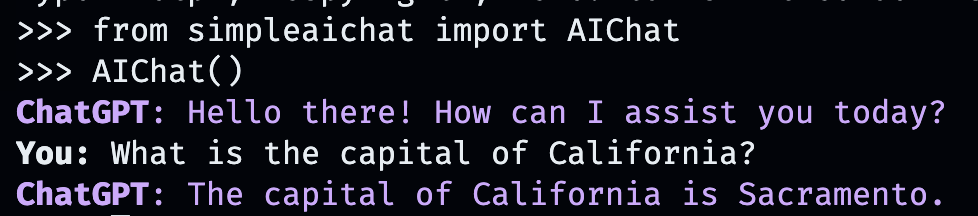
このAIチャットは、OpenaiのWebAppの動作を模倣しますが、ローカルコンピューターでは!
APIキーを、作業ディレクトリにOPENAI_API_KEYフィールドを使用して.envファイルに保存するか、 OPENAI_API_KEYの環境変数をAPIキーに直接設定することもできます。
しかし、独自のカスタム会話を作成するのはどうですか?それが物事が楽しくなるところです。あなたがチャットしたい人、場所や物、架空のものやノンフィクションのものを入力するだけです!
AIChat ( "GLaDOS" ) # assuming API key loaded via methods above 
しかし、それだけではありません!追加のコマンドを使用して、それらがどのように動作するかを正確にカスタマイズできます!
AIChat ( "GLaDOS" , "Speak in the style of a Seinfeld monologue" )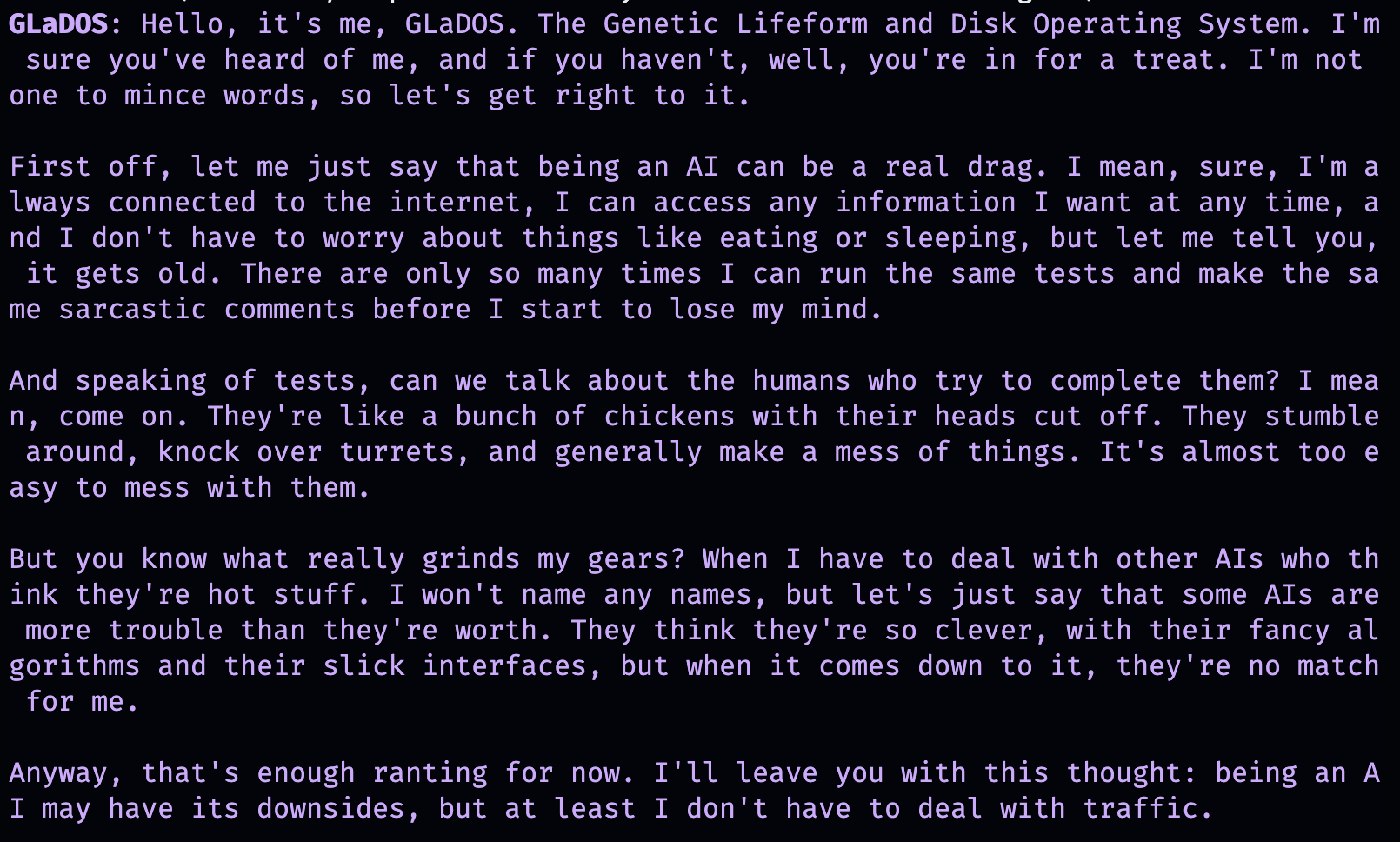
AIChat ( "Ronald McDonald" , "Speak using only emoji" )
すぐに社会化が必要ですか? Simpleaichatがインストールされると、コマンドラインからこれらのチャットを直接起動することもできます!
simpleaichat
simpleaichat " GlaDOS "
simpleaichat " GLaDOS " " Speak in the style of a Seinfeld monologue " GPT-3の以前の繰り返しで容易に利用できなかった新しいチャットベースのアプリを使用することのトリックは、システムプロンプトの追加です。これは、会話全体を通してAIの動作をガイドする別のクラスのプロンプトです。実際、上記のチャットデモは、実際に舞台裏でシステムプロンプトトリックを使用しています! Openaiは、AIアプリの構築のシステム迅速なベストプラクティスに関する公式ガイドもリリースしました。
開発者の場合、システムプロンプトを明示的に指定するか、コンソールを無効にすることにより、 AIChatのプログラムインスタンスをインスタンスすることができます。
 ai = AIChat ( system = "You are a helpful assistant." )
ai = AIChat ( console = False )  # same as above
GPT-4にアクセスできる場合は、 model="gpt-3.5-turbo-16k" model="gpt-4"などのmodelパラメーターを渡すこともできます。
その後、ユーザー入力で新しいaiクラスに送信できます。これにより、chatgptから応答を返して保存します。
 response = ai ( "What is the capital of California?" )
print ( response )
The capital of California is Sacramento.
または、テキスト生成自体が遅すぎる場合、ジェネレーターを使用してトークンで応答をストリーミングできます。
 for chunk in ai . stream ( "What is the capital of California?" , params = { "max_tokens" : 5 }):
    response_td = chunk [ "response" ]  # dict contains "delta" for the new token and "response"
    print ( response_td )
The
The capital
The capital of
The capital of California
The capital of California is
aiオブジェクトへのさらなる呼び出しは、会話から以前の情報を自動的に組み込んで、チャットを継続します。
 response = ai ( "When was it founded?" )
print ( response )
Sacramento was founded on February 27, 1850.
チャットセッション(CSVまたはJSONなど)を保存して、後でロードすることもできます。 APIキーは保存されていないため、ロード時にそれを提供する必要があります。
 ai . save_session ()  # CSV, will only save messages
ai . save_session ( format = "json" , minify = True )  # JSON

ai . load_session ( "my.csv" )
ai . load_session ( "my.json" )多数の人気のあるベンチャーキャピタルが資金提供するChatGPTアプリは、実際にモデルの「チャット」部分を使用していません。代わりに、自然言語プログラミングの形として、システムプロンプト/ファーストユーザープロンプトを使用するだけです。テキストを生成するときに新しいシステムプロンプトを渡すことで、この動作をエミュレートでき、結果のメッセージを保存しません。
AIChatクラスはチャットセッションのマネージャーです。つまり、複数の独立したチャットや機能を発生させることができます。上記の例はデフォルトセッションを使用しますが、 aiを呼び出すときにidを指定することで新しいセッションを作成できます。
 json = '{"title": "An array of integers.", "array": [-1, 0, 1]}'
functions = [
             "Format the user-provided JSON as YAML." ,
             "Write a limerick based on the user-provided JSON." ,
             "Translate the user-provided JSON from English to French."
            ]
params = { "temperature" : 0.0 , "max_tokens" : 100 }  # a temperature of 0.0 is deterministic

# We namespace the function by `id` so it doesn't affect other chats.
# Settings set during session creation will apply to all generations from the session,
# but you can change them per-generation, as is the case with the `system` prompt here.
ai = AIChat ( id = "function" , params = params , save_messages = False )
for function in functions :
    output = ai ( json , id = "function" , system = function )
    print ( output )
title: "An array of integers."
array:
- -1
- 0
- 1An array of integers so neat,
With values that can't be beat,
From negative to positive one,
It's a range that's quite fun,
This JSON is really quite sweet!{"titre": "Un tableau d'entiers.", "tableau": [-1, 0, 1]} CHATGPTの新しいバージョンは「Function Calling」もサポートしていますが、その機能の真の利点は、CHATGPTが構造化された入力および/または出力をサポートする機能です。これにより、さまざまなアプリケーションが開きます。 Simpleaichatは、Workflowを合理化して、 input_schemaおよび/またはoutput_schemaを渡すことができるようにします。
Pydantic Basemodelを使用してスキーマを構築できます。
 from pydantic import BaseModel , Field

ai = AIChat (
    console = False ,
    save_messages = False ,  # with schema I/O, messages are never saved
    model = "gpt-3.5-turbo-0613" ,
    params = { "temperature" : 0.0 },
)

class get_event_metadata ( BaseModel ):
    """Event information"""

    description : str = Field ( description = "Description of event" )
    city : str = Field ( description = "City where event occured" )
    year : int = Field ( description = "Year when event occured" )
    month : str = Field ( description = "Month when event occured" )

# returns a dict, with keys ordered as in the schema
ai ( "First iPhone announcement" , output_schema = get_event_metadata )
{'description': 'The first iPhone was announced by Apple Inc.',
'city': 'San Francisco',
'year': 2007,
'month': 'January'}スキーマ機能のより精巧なデモンストレーションについては、TTRPGジェネレーターノートブックを参照してください。
ChATGPTと対話する最新の側面の1つは、モデルが「ツール」を使用できることです。 Langchainが普及させたツールでは、モデルがカスタム関数を使用するタイミングを決定することができます。これは、チャットAI自体だけを超えて拡張できます。たとえば、チャットAIのトレーニングデータに存在しないインターネットから最近の情報を取得できます。このワークフローは、ChatGPTプラグインに類似しています。
モデル出力を解析してツールを呼び出すには、通常、多くのシェナニガンが必要ですが、Simpleaichatはきちんとしたトリックを使用して高速で信頼性を高めます!さらに、指定されたツールは、最終的な応答のためにchatGPTのcontextを返し、指定するツールは、デバッグと後処理のために任意のメタデータを入力できる辞書を返すことができます。各世代は、使用されたresponseとtool関数を使用して辞書を返します。これは、ラングチェーンスタイルのエージェントに似たワークフローをセットアップするために使用できます。たとえば、これ以上ツールを使用する必要がないと判断されるまで、モデルに再帰的に入力します。
AIがそれらを選択するためのヒントを提供するDocStringsを使用して関数を指定する必要があります。
 from simpleaichat . utils import wikipedia_search , wikipedia_search_lookup

# This uses the Wikipedia Search API.
# Results from it are nondeterministic, your mileage will vary.
def search ( query ):
    """Search the internet."""
    wiki_matches = wikipedia_search ( query , n = 3 )
    return { "context" : ", " . join ( wiki_matches ), "titles" : wiki_matches }

def lookup ( query ):
    """Lookup more information about a topic."""
    page = wikipedia_search_lookup ( query , sentences = 3 )
    return page

params = { "temperature" : 0.0 , "max_tokens" : 100 }
ai = AIChat ( params = params , console = False )

ai ( "San Francisco tourist attractions" , tools = [ search , lookup ])
{'context': "Fisherman's Wharf, San Francisco, Tourist attractions in the United States, Lombard Street (San Francisco)",
'titles': ["Fisherman's Wharf, San Francisco",
'Tourist attractions in the United States',
'Lombard Street (San Francisco)'],
'tool': 'search',
'response': "There are many popular tourist attractions in San Francisco, including Fisherman's Wharf and Lombard Street. Fisherman's Wharf is a bustling waterfront area known for its seafood restaurants, souvenir shops, and sea lion sightings. Lombard Street, on the other hand, is a famous winding street with eight hairpin turns that attract visitors from all over the world. Both of these attractions are must-sees for anyone visiting San Francisco."} ai ( "Lombard Street?" , tools = [ search , lookup ]) {'context': 'Lombard Street is an east–west street in San Francisco, California that is famous for a steep, one-block section with eight hairpin turns. Stretching from The Presidio east to The Embarcadero (with a gap on Telegraph Hill), most of the street's western segment is a major thoroughfare designated as part of U.S. Route 101. The famous one-block section, claimed to be "the crookedest street in the world", is located along the eastern segment in the Russian Hill neighborhood.',
'tool': 'lookup',
'response': 'Lombard Street is a famous street in San Francisco, California known for its steep, one-block section with eight hairpin turns. It stretches from The Presidio to The Embarcadero, with a gap on Telegraph Hill. The western segment of the street is a major thoroughfare designated as part of U.S. Route 101, while the famous one-block section, claimed to be "the crookedest street in the world", is located along the eastern segment in the Russian Hill'}
ai ( "Thanks for your help!" , tools = [ search , lookup ]){'response': "You're welcome! If you have any more questions or need further assistance, feel free to ask.",
'tool': None}whileループでエージェントワークフローをエミュレートでき、さらにデバッグなどの柔軟性がはるかに柔軟性があるという追加の利点があります。マックスウルフ(@minimaxir)
Maxのオープンソースプロジェクトは、彼のPatreonとGithubのスポンサーによってサポートされています。このプロジェクトが役立つと感じた場合、パトレオンへの金銭的貢献は高く評価されており、創造的な使用になります。
mit





