QMChatViewController ios
0.6.6

使用Quickblox communication backend的iOS聊天应用程序的优雅的即时聊天视图控制器。
#特征
Quickblox连接。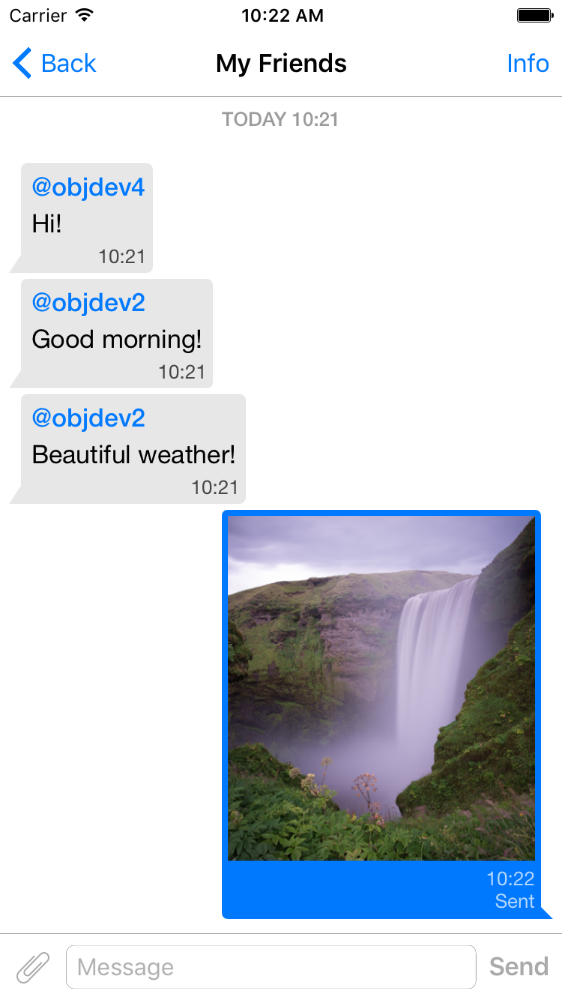
pod 'QMChatViewController'
将QMChatViewController文件夹拖到您的项目文件夹,然后链接到适当的目标。
安装依赖项。
存储库中包含一个示例。尝试查看聊天视图控制器的工作方式。
将QMChatViewController添加到您的应用程序的步骤:
创建一个QMChatViewController的子类。您可以通过代码和接口构建器创建它。
打开您的QMChatViewController的子类,并在ViewDidload方法中执行以下操作:
self.senderID = 2000 ;
self.senderDisplayName = @" user1 " ;[ self .chatDataSource addMessages: <array of messages>];处理消息发送。
- ( void )didPressSendButton:(UIButton *)button
	       withMessageText:( NSString *)text
			      senderId:( NSUInteger )senderId
 		 senderDisplayName:( NSString *)senderDisplayName
              		  date:( NSDate *)date {
	// Add sending message - for example:
    QBChatMessage *message = [QBChatMessage message ];
	message. text = text;
	message. senderID = senderId;

	QBChatAttachment *attacment = [[QBChatAttachment alloc ] init ];
	message. attachments = @[attacment];

	[ self .chatDataSource addMessage: message];

	[ self finishSendingMessageAnimated: YES ];

 	// Save message to your cache/memory storage.
	// Send message using Quickblox SDK
}
返回单元格视图类特定于聊天消息:
- ( Class )viewClassForItem:(QBChatMessage *)item {
    // Cell class for message
    if (item. senderID != self. senderID ) {

        return [QMChatIncomingCell class ];
    }
    else {

        return [QMChatOutgoingCell class ];
    }

    return nil ;
}
计算细胞的大小和最小宽度:
- ( CGFloat )collectionView:(QMChatCollectionView *)collectionView minWidthAtIndexPath:( NSIndexPath *)indexPath {

    QBChatMessage *item = [ self .chatDataSource messageForIndexPath: indexPath];

    NSAttributedString *attributedString = item. senderID == self. senderID ?
    [ self bottomLabelAttributedStringForItem: item] : [ self topLabelAttributedStringForItem: item];

    CGSize size = [TTTAttributedLabel sizeThatFitsAttributedString: attributedString
                                                   withConstraints: CGSizeMake ( 1000 , 10000 )
                                            limitedToNumberOfLines: 1 ];
    return size. width ;
}
顶部,底部和文本标签。
- ( NSAttributedString *)attributedStringForItem:(QBChatMessage *)messageItem {

    UIColor *textColor = [messageItem senderID ] == self. senderID ?
    [UIColor whiteColor ] : [UIColor colorWithWhite: 0.290 alpha: 1.000 ];

    UIFont *font = [UIFont fontWithName: @" Helvetica " size: 15 ];
    NSDictionary *attributes = @{ NSForegroundColorAttributeName :textColor,
                                 NSFontAttributeName :font};

    NSMutableAttributedString *attrStr =
    [[ NSMutableAttributedString alloc ] initWithString: messageItem.text
                                           attributes: attributes];
    return attrStr;
}

- ( NSAttributedString *)topLabelAttributedStringForItem:(QBChatMessage *)messageItem {

    if (messageItem. senderID == self. senderID ) {

        return nil ;
    }

    UIFont *font = [UIFont fontWithName: @" Helvetica " size: 14 ];

    UIColor *textColor = [UIColor colorWithRed: 0.184 green: 0.467 blue: 0.733 alpha: 1.000 ];

    NSDictionary *attributes = @{ NSForegroundColorAttributeName :textColor,
                                 NSFontAttributeName :font};

    NSMutableAttributedString *attrStr =
    [[ NSMutableAttributedString alloc ] initWithString: @" nickname "
                                           attributes: attributes];
    return attrStr;
}

- ( NSAttributedString *)bottomLabelAttributedStringForItem:(QBChatMessage *)messageItem {

    UIFont *font = [UIFont fontWithName: @" Helvetica " size: 12 ];
    UIColor *textColor = [messageItem senderID ] == self. senderID ?

    [UIColor colorWithWhite: 1.000 alpha: 0.510 ] : [UIColor colorWithWhite: 0.000 alpha: 0.490 ];

    NSDictionary *attributes = @{ NSForegroundColorAttributeName :textColor,
                                 NSFontAttributeName :font};

    NSString *dateStr = @" 10:20 " ;

    NSMutableAttributedString *attrStr =
    [[ NSMutableAttributedString alloc ] initWithString: dateStr
                                           attributes: attributes];
    return attrStr;
}
修改收集聊天单元格的属性而不改变约束:
 struct QMChatLayoutModel {

	CGSize avatarSize;
	CGSize containerSize;
	UIEdgeInsets containerInsets;
	CGFloat topLabelHeight;
	CGFloat bottomLabelHeight;
	CGSize staticContainerSize;
	CGFloat maxWidthMarginSpace;
};

typedef struct QMChatLayoutModel QMChatCellLayoutModel;您可以在此方法中修改此属性:
- (QMChatCellLayoutModel)collectionView:(QMChatCollectionView *)collectionView layoutModelAtIndexPath:( NSIndexPath *)indexPath {

	QMChatCellLayoutModel layoutModel = [ super collectionView: collectionView layoutModelAtIndexPath: indexPath];
	// Update attributes here ...
	return layoutModel;
}
因此,如果要隐藏顶部标签或底部标签,则只需将其高度设置为0即可。
QMChatViewController支持图像附件单元格消息。 QMChatAttachmentIncomingCell用于传入附件, QMChatAttachmentOutgoingCell用于外向附件。他们俩都有进度标签以显示加载进度。还包括XIB。
QMChatViewController包含其数据源管理器,称为QMChatDataSource 。它具有所有方法的实现,您需要与QMChatViewController一起使用。该类应用于从数据源添加,更新和删除消息。 QMChatDataSource已有委托,每当修改数据源时都会调用。
有关方法及其用法的更多信息,请查看我们在QMChatDataSource.h中的Inline DOC。
内联代码文档可用。
请参阅许可证







