QMChatViewController ios
0.6.6

وحدة تحكم في عرض الدردشة الجاهزة للوقت لتطبيقات دردشة iOS التي تستخدم Quickblox communication backend .
#سمات
Quickblox .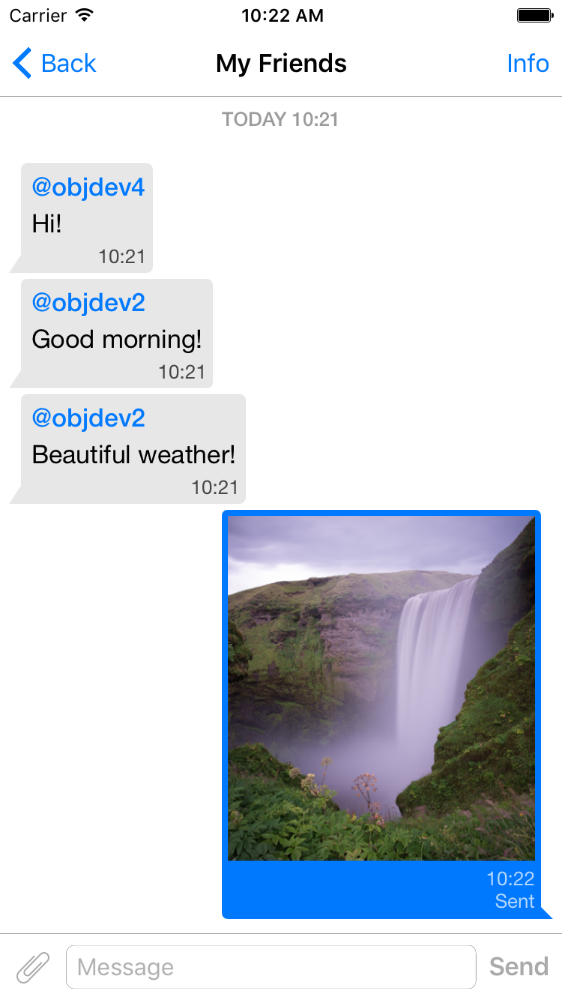
pod 'QMChatViewController'
اسحب مجلد QMChatViewController إلى مجلد المشروع والارتباط بالهدف المناسب.
تثبيت التبعيات.
يتم تضمين مثال في المستودع. جربها لمعرفة كيفية عمل وحدة التحكم في عرض الدردشة.
خطوات لإضافة QMChatViewController إلى تطبيقك:
إنشاء فئة فرعية من QMChatViewController . يمكنك إنشائها على حد سواء من الكود وباني الواجهة.
افتح الفئة الفرعية الخاصة بك من QMChatViewController وقم بما يلي في طريقة العرض :
self.senderID = 2000 ;
self.senderDisplayName = @" user1 " ;[ self .chatDataSource addMessages: <array of messages>];التعامل مع إرسال الرسالة.
- ( void )didPressSendButton:(UIButton *)button
	       withMessageText:( NSString *)text
			      senderId:( NSUInteger )senderId
 		 senderDisplayName:( NSString *)senderDisplayName
              		  date:( NSDate *)date {
	// Add sending message - for example:
    QBChatMessage *message = [QBChatMessage message ];
	message. text = text;
	message. senderID = senderId;

	QBChatAttachment *attacment = [[QBChatAttachment alloc ] init ];
	message. attachments = @[attacment];

	[ self .chatDataSource addMessage: message];

	[ self finishSendingMessageAnimated: YES ];

 	// Save message to your cache/memory storage.
	// Send message using Quickblox SDK
}
إرجاع فئات عرض الخلية الخاصة برسالة الدردشة:
- ( Class )viewClassForItem:(QBChatMessage *)item {
    // Cell class for message
    if (item. senderID != self. senderID ) {

        return [QMChatIncomingCell class ];
    }
    else {

        return [QMChatOutgoingCell class ];
    }

    return nil ;
}
حساب حجم الخلية والحد الأدنى عرض:
- ( CGFloat )collectionView:(QMChatCollectionView *)collectionView minWidthAtIndexPath:( NSIndexPath *)indexPath {

    QBChatMessage *item = [ self .chatDataSource messageForIndexPath: indexPath];

    NSAttributedString *attributedString = item. senderID == self. senderID ?
    [ self bottomLabelAttributedStringForItem: item] : [ self topLabelAttributedStringForItem: item];

    CGSize size = [TTTAttributedLabel sizeThatFitsAttributedString: attributedString
                                                   withConstraints: CGSizeMake ( 1000 , 10000 )
                                            limitedToNumberOfLines: 1 ];
    return size. width ;
}
أعلى ، أسفل ونص الملصقات.
- ( NSAttributedString *)attributedStringForItem:(QBChatMessage *)messageItem {

    UIColor *textColor = [messageItem senderID ] == self. senderID ?
    [UIColor whiteColor ] : [UIColor colorWithWhite: 0.290 alpha: 1.000 ];

    UIFont *font = [UIFont fontWithName: @" Helvetica " size: 15 ];
    NSDictionary *attributes = @{ NSForegroundColorAttributeName :textColor,
                                 NSFontAttributeName :font};

    NSMutableAttributedString *attrStr =
    [[ NSMutableAttributedString alloc ] initWithString: messageItem.text
                                           attributes: attributes];
    return attrStr;
}

- ( NSAttributedString *)topLabelAttributedStringForItem:(QBChatMessage *)messageItem {

    if (messageItem. senderID == self. senderID ) {

        return nil ;
    }

    UIFont *font = [UIFont fontWithName: @" Helvetica " size: 14 ];

    UIColor *textColor = [UIColor colorWithRed: 0.184 green: 0.467 blue: 0.733 alpha: 1.000 ];

    NSDictionary *attributes = @{ NSForegroundColorAttributeName :textColor,
                                 NSFontAttributeName :font};

    NSMutableAttributedString *attrStr =
    [[ NSMutableAttributedString alloc ] initWithString: @" nickname "
                                           attributes: attributes];
    return attrStr;
}

- ( NSAttributedString *)bottomLabelAttributedStringForItem:(QBChatMessage *)messageItem {

    UIFont *font = [UIFont fontWithName: @" Helvetica " size: 12 ];
    UIColor *textColor = [messageItem senderID ] == self. senderID ?

    [UIColor colorWithWhite: 1.000 alpha: 0.510 ] : [UIColor colorWithWhite: 0.000 alpha: 0.490 ];

    NSDictionary *attributes = @{ NSForegroundColorAttributeName :textColor,
                                 NSFontAttributeName :font};

    NSString *dateStr = @" 10:20 " ;

    NSMutableAttributedString *attrStr =
    [[ NSMutableAttributedString alloc ] initWithString: dateStr
                                           attributes: attributes];
    return attrStr;
}
تعديل سمات خلية الدردشة التجميع دون تغيير القيود:
 struct QMChatLayoutModel {

	CGSize avatarSize;
	CGSize containerSize;
	UIEdgeInsets containerInsets;
	CGFloat topLabelHeight;
	CGFloat bottomLabelHeight;
	CGSize staticContainerSize;
	CGFloat maxWidthMarginSpace;
};

typedef struct QMChatLayoutModel QMChatCellLayoutModel;يمكنك تعديل هذه السمات في هذه الطريقة:
- (QMChatCellLayoutModel)collectionView:(QMChatCollectionView *)collectionView layoutModelAtIndexPath:( NSIndexPath *)indexPath {

	QMChatCellLayoutModel layoutModel = [ super collectionView: collectionView layoutModelAtIndexPath: indexPath];
	// Update attributes here ...
	return layoutModel;
}
لذلك إذا كنت ترغب في إخفاء التسمية العلوية أو التسمية السفلية ، فأنت بحاجة فقط إلى ضبط ارتفاعها على 0.
QMChatViewController يدعم رسائل خلية مرفق الصورة. QMChatAttachmentIncomingCell يستخدم في المرفقات الواردة ، ويستخدم QMChatAttachmentOutgoingCell للمرفقات الصادرة. كلاهما لديهما تسمية تقدم لعرض تقدم التحميل. يتم تضمين XIB أيضا.
يحتوي QMChatViewController على مدير مصدر البيانات الذي يسمى QMChatDataSource . لديها تنفيذ جميع الطرق ، والتي تحتاج إلى العمل مع QMChatViewController . يجب استخدام هذه الفئة لإضافة الرسائل وتحديثها وحذفها من مصدر البيانات. قام QMChatDataSource بتفويض ، والذي يسمى كلما تم تعديل مصدر البيانات.
لمزيد من المعلومات حول الأساليب واستخدامها ، تحقق من مستندنا المضمن في QMChatDataSource.h .
وثيقة رمز مضمّنة متاحة.
انظر الترخيص







