QMChatViewController ios
0.6.6

Un elegante controlador de vista de chat listo para llevar para aplicaciones de chat iOS que utilizan Quickblox communication backend .
#Características
Quickblox .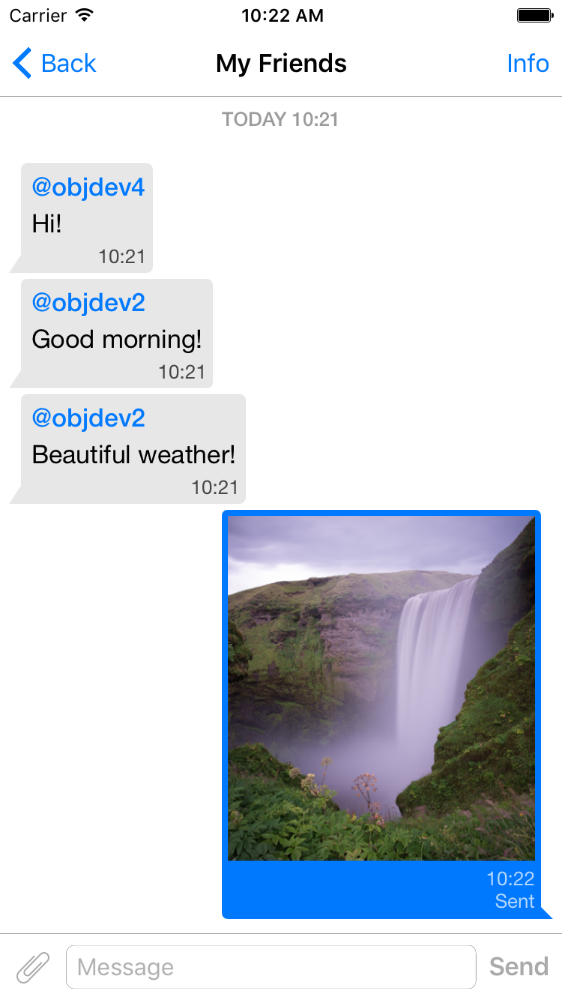
pod 'QMChatViewController'
Arrastre QMChatViewController Carper a su carpeta de proyecto y enlace al objetivo apropiado.
Instalar dependencias.
Se incluye un ejemplo en el repositorio. Pruébelo para ver cómo funciona el controlador de vista de chat.
Pasos para agregar QMChatViewController a su aplicación:
Cree una subclase de QMChatViewController . Puede crearlo tanto a partir de código de interfaz como de interfaz.
Abra su subclase de QMChatViewController y haga lo siguiente en el método ViewDidload :
self.senderID = 2000 ;
self.senderDisplayName = @" user1 " ;[ self .chatDataSource addMessages: <array of messages>];Manejar el envío del mensaje.
- ( void )didPressSendButton:(UIButton *)button
	       withMessageText:( NSString *)text
			      senderId:( NSUInteger )senderId
 		 senderDisplayName:( NSString *)senderDisplayName
              		  date:( NSDate *)date {
	// Add sending message - for example:
    QBChatMessage *message = [QBChatMessage message ];
	message. text = text;
	message. senderID = senderId;

	QBChatAttachment *attacment = [[QBChatAttachment alloc ] init ];
	message. attachments = @[attacment];

	[ self .chatDataSource addMessage: message];

	[ self finishSendingMessageAnimated: YES ];

 	// Save message to your cache/memory storage.
	// Send message using Quickblox SDK
}
Volver a las clases de vista celular específicas para el mensaje de chat:
- ( Class )viewClassForItem:(QBChatMessage *)item {
    // Cell class for message
    if (item. senderID != self. senderID ) {

        return [QMChatIncomingCell class ];
    }
    else {

        return [QMChatOutgoingCell class ];
    }

    return nil ;
}
Calcule el tamaño de la celda y el ancho mínimo:
- ( CGFloat )collectionView:(QMChatCollectionView *)collectionView minWidthAtIndexPath:( NSIndexPath *)indexPath {

    QBChatMessage *item = [ self .chatDataSource messageForIndexPath: indexPath];

    NSAttributedString *attributedString = item. senderID == self. senderID ?
    [ self bottomLabelAttributedStringForItem: item] : [ self topLabelAttributedStringForItem: item];

    CGSize size = [TTTAttributedLabel sizeThatFitsAttributedString: attributedString
                                                   withConstraints: CGSizeMake ( 1000 , 10000 )
                                            limitedToNumberOfLines: 1 ];
    return size. width ;
}
Las etiquetas superior, inferior y de texto.
- ( NSAttributedString *)attributedStringForItem:(QBChatMessage *)messageItem {

    UIColor *textColor = [messageItem senderID ] == self. senderID ?
    [UIColor whiteColor ] : [UIColor colorWithWhite: 0.290 alpha: 1.000 ];

    UIFont *font = [UIFont fontWithName: @" Helvetica " size: 15 ];
    NSDictionary *attributes = @{ NSForegroundColorAttributeName :textColor,
                                 NSFontAttributeName :font};

    NSMutableAttributedString *attrStr =
    [[ NSMutableAttributedString alloc ] initWithString: messageItem.text
                                           attributes: attributes];
    return attrStr;
}

- ( NSAttributedString *)topLabelAttributedStringForItem:(QBChatMessage *)messageItem {

    if (messageItem. senderID == self. senderID ) {

        return nil ;
    }

    UIFont *font = [UIFont fontWithName: @" Helvetica " size: 14 ];

    UIColor *textColor = [UIColor colorWithRed: 0.184 green: 0.467 blue: 0.733 alpha: 1.000 ];

    NSDictionary *attributes = @{ NSForegroundColorAttributeName :textColor,
                                 NSFontAttributeName :font};

    NSMutableAttributedString *attrStr =
    [[ NSMutableAttributedString alloc ] initWithString: @" nickname "
                                           attributes: attributes];
    return attrStr;
}

- ( NSAttributedString *)bottomLabelAttributedStringForItem:(QBChatMessage *)messageItem {

    UIFont *font = [UIFont fontWithName: @" Helvetica " size: 12 ];
    UIColor *textColor = [messageItem senderID ] == self. senderID ?

    [UIColor colorWithWhite: 1.000 alpha: 0.510 ] : [UIColor colorWithWhite: 0.000 alpha: 0.490 ];

    NSDictionary *attributes = @{ NSForegroundColorAttributeName :textColor,
                                 NSFontAttributeName :font};

    NSString *dateStr = @" 10:20 " ;

    NSMutableAttributedString *attrStr =
    [[ NSMutableAttributedString alloc ] initWithString: dateStr
                                           attributes: attributes];
    return attrStr;
}
Modificación de los atributos de la celda de chat de recopilación sin cambiar las restricciones:
 struct QMChatLayoutModel {

	CGSize avatarSize;
	CGSize containerSize;
	UIEdgeInsets containerInsets;
	CGFloat topLabelHeight;
	CGFloat bottomLabelHeight;
	CGSize staticContainerSize;
	CGFloat maxWidthMarginSpace;
};

typedef struct QMChatLayoutModel QMChatCellLayoutModel;Puede modificar estos atributos en este método:
- (QMChatCellLayoutModel)collectionView:(QMChatCollectionView *)collectionView layoutModelAtIndexPath:( NSIndexPath *)indexPath {

	QMChatCellLayoutModel layoutModel = [ super collectionView: collectionView layoutModelAtIndexPath: indexPath];
	// Update attributes here ...
	return layoutModel;
}
Entonces, si desea ocultar la etiqueta superior o la etiqueta inferior, solo necesita establecer su altura en 0.
QMChatViewController admite mensajes de celda de archivos adjuntos de imagen. QMChatAttachmentIncomingCell se utiliza para los archivos adjuntos entrantes, QMChatAttachmentOutgoingCell se utiliza para los archivos adjuntos salientes. Ambos tienen una etiqueta de progreso para mostrar el progreso de carga. Los XIB también están incluidos.
QMChatViewController contiene su administrador de origen de datos llamado QMChatDataSource . Tiene la implementación de todos los métodos, que necesita trabajar con QMChatViewController . Esta clase debe usarse para agregar, actualizar y eliminar mensajes de la fuente de datos. QMChatDataSource tiene delegado, que llamaba cada vez que se modificaron la fuente de datos.
Para obtener más información sobre los métodos y su uso, consulte nuestro Doc en línea en QMChatDataSource.h .
Documentación de código en línea disponible.
Ver licencia







