QMChatViewController ios
0.6.6

คอนโทรลเลอร์มุมมองการแชทพร้อมสำหรับการเดินทางที่หรูหราสำหรับแอปพลิเคชันแชท iOS ที่ใช้ Quickblox communication backend
#คุณสมบัติ
Quickblox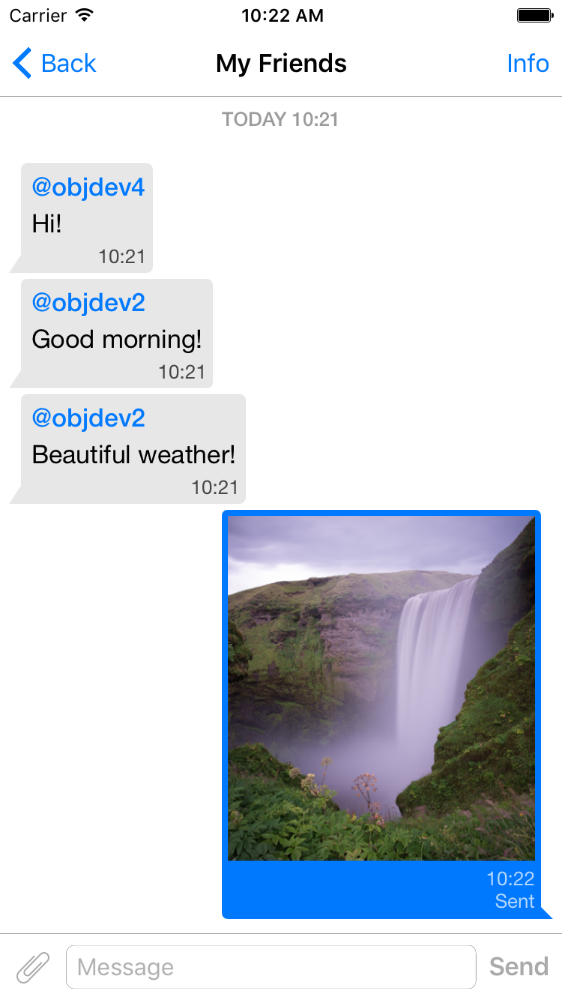
pod 'QMChatViewController'
ลากโฟลเดอร์ QMChatViewController ไปยังโฟลเดอร์โครงการของคุณและเชื่อมโยงไปยังเป้าหมายที่เหมาะสม
ติดตั้งการพึ่งพา
ตัวอย่างรวมอยู่ในที่เก็บ ลองดูเพื่อดูว่าคอนโทรลเลอร์มุมมองแชททำงานอย่างไร
ขั้นตอนในการเพิ่ม QMChatViewController ลงในแอพของคุณ:
สร้างคลาสย่อยของ QMChatViewController คุณสามารถสร้างทั้งจากรหัสและตัวสร้างอินเตอร์เฟส
เปิดคลาสย่อยของ QMChatViewController และทำสิ่งต่อไปนี้ในวิธี ViewDIDLoad :
self.senderID = 2000 ;
self.senderDisplayName = @" user1 " ;[ self .chatDataSource addMessages: <array of messages>];จัดการการส่งข้อความ
- ( void )didPressSendButton:(UIButton *)button
	       withMessageText:( NSString *)text
			      senderId:( NSUInteger )senderId
 		 senderDisplayName:( NSString *)senderDisplayName
              		  date:( NSDate *)date {
	// Add sending message - for example:
    QBChatMessage *message = [QBChatMessage message ];
	message. text = text;
	message. senderID = senderId;

	QBChatAttachment *attacment = [[QBChatAttachment alloc ] init ];
	message. attachments = @[attacment];

	[ self .chatDataSource addMessage: message];

	[ self finishSendingMessageAnimated: YES ];

 	// Save message to your cache/memory storage.
	// Send message using Quickblox SDK
}
ส่งคืนคลาสมุมมองเซลล์เฉพาะไปยังข้อความแชท:
- ( Class )viewClassForItem:(QBChatMessage *)item {
    // Cell class for message
    if (item. senderID != self. senderID ) {

        return [QMChatIncomingCell class ];
    }
    else {

        return [QMChatOutgoingCell class ];
    }

    return nil ;
}
คำนวณขนาดของเซลล์และความกว้างขั้นต่ำ:
- ( CGFloat )collectionView:(QMChatCollectionView *)collectionView minWidthAtIndexPath:( NSIndexPath *)indexPath {

    QBChatMessage *item = [ self .chatDataSource messageForIndexPath: indexPath];

    NSAttributedString *attributedString = item. senderID == self. senderID ?
    [ self bottomLabelAttributedStringForItem: item] : [ self topLabelAttributedStringForItem: item];

    CGSize size = [TTTAttributedLabel sizeThatFitsAttributedString: attributedString
                                                   withConstraints: CGSizeMake ( 1000 , 10000 )
                                            limitedToNumberOfLines: 1 ];
    return size. width ;
}
ฉลากด้านบนด้านล่างและข้อความ
- ( NSAttributedString *)attributedStringForItem:(QBChatMessage *)messageItem {

    UIColor *textColor = [messageItem senderID ] == self. senderID ?
    [UIColor whiteColor ] : [UIColor colorWithWhite: 0.290 alpha: 1.000 ];

    UIFont *font = [UIFont fontWithName: @" Helvetica " size: 15 ];
    NSDictionary *attributes = @{ NSForegroundColorAttributeName :textColor,
                                 NSFontAttributeName :font};

    NSMutableAttributedString *attrStr =
    [[ NSMutableAttributedString alloc ] initWithString: messageItem.text
                                           attributes: attributes];
    return attrStr;
}

- ( NSAttributedString *)topLabelAttributedStringForItem:(QBChatMessage *)messageItem {

    if (messageItem. senderID == self. senderID ) {

        return nil ;
    }

    UIFont *font = [UIFont fontWithName: @" Helvetica " size: 14 ];

    UIColor *textColor = [UIColor colorWithRed: 0.184 green: 0.467 blue: 0.733 alpha: 1.000 ];

    NSDictionary *attributes = @{ NSForegroundColorAttributeName :textColor,
                                 NSFontAttributeName :font};

    NSMutableAttributedString *attrStr =
    [[ NSMutableAttributedString alloc ] initWithString: @" nickname "
                                           attributes: attributes];
    return attrStr;
}

- ( NSAttributedString *)bottomLabelAttributedStringForItem:(QBChatMessage *)messageItem {

    UIFont *font = [UIFont fontWithName: @" Helvetica " size: 12 ];
    UIColor *textColor = [messageItem senderID ] == self. senderID ?

    [UIColor colorWithWhite: 1.000 alpha: 0.510 ] : [UIColor colorWithWhite: 0.000 alpha: 0.490 ];

    NSDictionary *attributes = @{ NSForegroundColorAttributeName :textColor,
                                 NSFontAttributeName :font};

    NSString *dateStr = @" 10:20 " ;

    NSMutableAttributedString *attrStr =
    [[ NSMutableAttributedString alloc ] initWithString: dateStr
                                           attributes: attributes];
    return attrStr;
}
การแก้ไขแอตทริบิวต์การแชทคอลเลกชันโดยไม่ต้องเปลี่ยนข้อ จำกัด :
 struct QMChatLayoutModel {

	CGSize avatarSize;
	CGSize containerSize;
	UIEdgeInsets containerInsets;
	CGFloat topLabelHeight;
	CGFloat bottomLabelHeight;
	CGSize staticContainerSize;
	CGFloat maxWidthMarginSpace;
};

typedef struct QMChatLayoutModel QMChatCellLayoutModel;คุณสามารถแก้ไขแอตทริบิวต์นี้ในวิธีนี้:
- (QMChatCellLayoutModel)collectionView:(QMChatCollectionView *)collectionView layoutModelAtIndexPath:( NSIndexPath *)indexPath {

	QMChatCellLayoutModel layoutModel = [ super collectionView: collectionView layoutModelAtIndexPath: indexPath];
	// Update attributes here ...
	return layoutModel;
}
ดังนั้นหากคุณต้องการซ่อนฉลากด้านบนหรือฉลากด้านล่างคุณเพียงแค่ตั้งค่าความสูงเป็น 0
QMChatViewController รองรับข้อความเซลล์ไฟล์แนบรูปภาพ QMChatAttachmentIncomingCell ใช้สำหรับสิ่งที่แนบมาที่เข้ามา QMChatAttachmentOutgoingCell ใช้สำหรับสิ่งที่แนบมา ทั้งคู่มีฉลากความคืบหน้าเพื่อแสดงความคืบหน้าในการโหลด XIB รวมอยู่ด้วย
QMChatViewController มีตัวจัดการแหล่งข้อมูลที่เรียกว่า QMChatDataSource มันมีการใช้วิธีทั้งหมดซึ่งคุณต้องทำงานกับ QMChatViewController คลาสนี้ควรใช้เพื่อเพิ่มอัปเดตและลบข้อความจากแหล่งข้อมูล QMChatDataSource ได้รับมอบหมายซึ่งเรียกว่าเมื่อใดก็ตามที่แหล่งข้อมูลได้รับการแก้ไข
สำหรับข้อมูลเพิ่มเติมเกี่ยวกับวิธีการและการใช้งานตรวจสอบ DOC แบบอินไลน์ของเราใน QMChatDataSource.h
เอกสารอินไลน์รหัสพร้อมใช้งาน
ดูใบอนุญาต







