QMChatViewController ios
0.6.6

Quickblox communication backend 사용하는 iOS 채팅 응용 프로그램을위한 우아한 GRO 채팅보기 컨트롤러.
#특징
Quickblox 와 쉽게 연결하기 쉽습니다.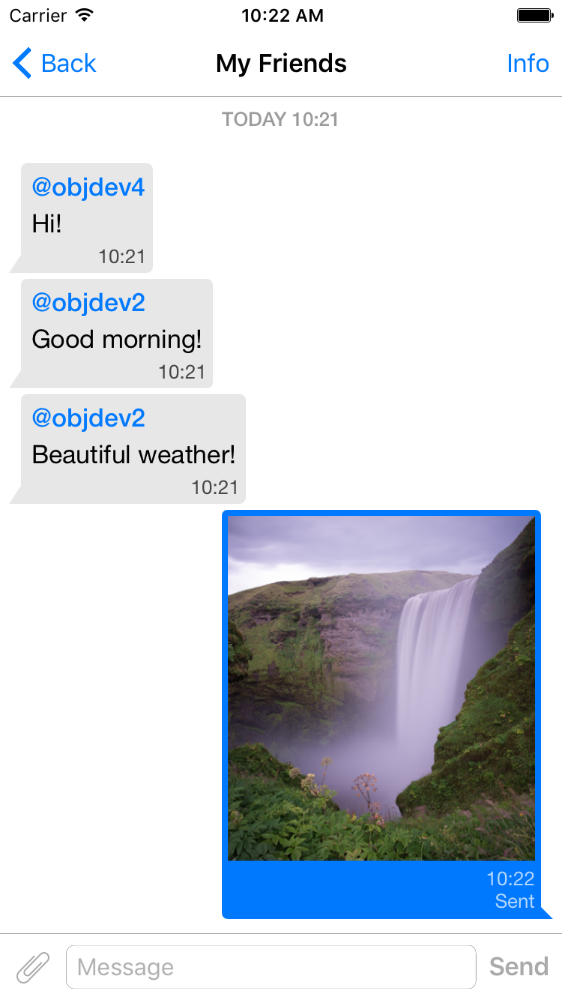
pod 'QMChatViewController'
QMChatViewController 폴더를 프로젝트 폴더로 드래그하고 해당 대상으로 연결하십시오.
종속성을 설치하십시오.
저장소에 예가 포함되어 있습니다. 채팅보기 컨트롤러가 어떻게 작동하는지 확인하려면 시도하십시오.
앱에 QMChatViewController 를 추가하는 단계 :
QMChatViewController 의 서브 클래스를 만듭니다. 코드와 인터페이스 빌더에서 모두 만들 수 있습니다.
QMChatViewController 의 서브 클래스를 열고 ViewDidload 메소드에서 다음을 수행하십시오.
self.senderID = 2000 ;
self.senderDisplayName = @" user1 " ;[ self .chatDataSource addMessages: <array of messages>];메시지 보내기를 처리합니다.
- ( void )didPressSendButton:(UIButton *)button
	       withMessageText:( NSString *)text
			      senderId:( NSUInteger )senderId
 		 senderDisplayName:( NSString *)senderDisplayName
              		  date:( NSDate *)date {
	// Add sending message - for example:
    QBChatMessage *message = [QBChatMessage message ];
	message. text = text;
	message. senderID = senderId;

	QBChatAttachment *attacment = [[QBChatAttachment alloc ] init ];
	message. attachments = @[attacment];

	[ self .chatDataSource addMessage: message];

	[ self finishSendingMessageAnimated: YES ];

 	// Save message to your cache/memory storage.
	// Send message using Quickblox SDK
}
채팅 메시지에 특정한 셀보기 클래스를 반환합니다.
- ( Class )viewClassForItem:(QBChatMessage *)item {
    // Cell class for message
    if (item. senderID != self. senderID ) {

        return [QMChatIncomingCell class ];
    }
    else {

        return [QMChatOutgoingCell class ];
    }

    return nil ;
}
셀의 크기 및 최소 너비 계산 :
- ( CGFloat )collectionView:(QMChatCollectionView *)collectionView minWidthAtIndexPath:( NSIndexPath *)indexPath {

    QBChatMessage *item = [ self .chatDataSource messageForIndexPath: indexPath];

    NSAttributedString *attributedString = item. senderID == self. senderID ?
    [ self bottomLabelAttributedStringForItem: item] : [ self topLabelAttributedStringForItem: item];

    CGSize size = [TTTAttributedLabel sizeThatFitsAttributedString: attributedString
                                                   withConstraints: CGSizeMake ( 1000 , 10000 )
                                            limitedToNumberOfLines: 1 ];
    return size. width ;
}
상단, 하단 및 텍스트 레이블.
- ( NSAttributedString *)attributedStringForItem:(QBChatMessage *)messageItem {

    UIColor *textColor = [messageItem senderID ] == self. senderID ?
    [UIColor whiteColor ] : [UIColor colorWithWhite: 0.290 alpha: 1.000 ];

    UIFont *font = [UIFont fontWithName: @" Helvetica " size: 15 ];
    NSDictionary *attributes = @{ NSForegroundColorAttributeName :textColor,
                                 NSFontAttributeName :font};

    NSMutableAttributedString *attrStr =
    [[ NSMutableAttributedString alloc ] initWithString: messageItem.text
                                           attributes: attributes];
    return attrStr;
}

- ( NSAttributedString *)topLabelAttributedStringForItem:(QBChatMessage *)messageItem {

    if (messageItem. senderID == self. senderID ) {

        return nil ;
    }

    UIFont *font = [UIFont fontWithName: @" Helvetica " size: 14 ];

    UIColor *textColor = [UIColor colorWithRed: 0.184 green: 0.467 blue: 0.733 alpha: 1.000 ];

    NSDictionary *attributes = @{ NSForegroundColorAttributeName :textColor,
                                 NSFontAttributeName :font};

    NSMutableAttributedString *attrStr =
    [[ NSMutableAttributedString alloc ] initWithString: @" nickname "
                                           attributes: attributes];
    return attrStr;
}

- ( NSAttributedString *)bottomLabelAttributedStringForItem:(QBChatMessage *)messageItem {

    UIFont *font = [UIFont fontWithName: @" Helvetica " size: 12 ];
    UIColor *textColor = [messageItem senderID ] == self. senderID ?

    [UIColor colorWithWhite: 1.000 alpha: 0.510 ] : [UIColor colorWithWhite: 0.000 alpha: 0.490 ];

    NSDictionary *attributes = @{ NSForegroundColorAttributeName :textColor,
                                 NSFontAttributeName :font};

    NSString *dateStr = @" 10:20 " ;

    NSMutableAttributedString *attrStr =
    [[ NSMutableAttributedString alloc ] initWithString: dateStr
                                           attributes: attributes];
    return attrStr;
}
제약 조건을 변경하지 않고 수집 채팅 셀 속성 수정 :
 struct QMChatLayoutModel {

	CGSize avatarSize;
	CGSize containerSize;
	UIEdgeInsets containerInsets;
	CGFloat topLabelHeight;
	CGFloat bottomLabelHeight;
	CGSize staticContainerSize;
	CGFloat maxWidthMarginSpace;
};

typedef struct QMChatLayoutModel QMChatCellLayoutModel;이 방법 에서이 속성을 수정할 수 있습니다.
- (QMChatCellLayoutModel)collectionView:(QMChatCollectionView *)collectionView layoutModelAtIndexPath:( NSIndexPath *)indexPath {

	QMChatCellLayoutModel layoutModel = [ super collectionView: collectionView layoutModelAtIndexPath: indexPath];
	// Update attributes here ...
	return layoutModel;
}
따라서 상단 라벨 또는 하단 라벨을 숨기려면 높이를 0으로 설정하면됩니다.
QMChatViewController 이미지 첨부 셀 메시지를 지원합니다. QMChatAttachmentIncomingCell 수신 첨부 파일에 사용되며 QMChatAttachmentOutgoingCell 나가는 첨부 파일에 사용됩니다. 둘 다 로딩 진행 상황을 표시하는 진행 라벨이 있습니다. XIB도 포함되어 있습니다.
QMChatViewController 에는 QMChatDataSource 라는 데이터 소스 관리자가 포함되어 있습니다. 모든 방법을 구현하여 QMChatViewController 와 함께 작업해야합니다. 이 클래스는 데이터 소스에서 메시지를 추가, 업데이트 및 삭제하는 데 사용해야합니다. QMChatDataSource 에는 대의원이 있으며 데이터 소스가 수정 될 때마다 호출됩니다.
방법 및 사용법에 대한 자세한 내용은 QMChatDataSource.h 의 인라인 문서를 확인하십시오.
인라인 코드 문서를 사용할 수 있습니다.
라이센스를 참조하십시오







