reliable discord client irc daemon
1.0.0

目录
描述
警告
特征
限制
用法
MISC功能信息
随机提示和技巧
链接
有关第三方客户阻止的更多信息
API和实施注释
RDIRCD是一个守护程序,允许通过IRC客户端使用个人Discord帐户。
它将“ Discord Server”上的所有私人聊天和公共频道/线程转换为ITC服务器上的频道,并且可以连接到使用常规IRC客户端,而不是浏览器或电子应用程序。
“可靠”之所以出名,是因为最初的目标之一是确认消息传递并在这方面通知任何问题,这在当时其他类似客户缺乏。
有一个IRC频道可以谈论这件事 - 在Libera.Chat上加入#RDIRCD。
irc url:ircs://irc.libera.chat/rdircd(github拒绝制作ircs:// links)
另请参见下面的链接部分,以获取其他替代客户列表很少的列表。
存储库网址:
最后一个有todo列表的git notes,以及默认参考。
虽然我不会将此应用称为“机器人”或“自动化标准用户帐户” - 但此处的目的不是发布任何自动化消息或刮擦任何内容,但可以肯定,不肯定的是,不符合的不符合的员工认为所有第三方客户都是“机器人”,并要求他们使用特殊的二级API使用,请参阅每个帐户中的每个帐户,以便在API中有效的范围/批准的是,在此范围内,请参见AMP/AMP的范围,以使其与此相关联),以使其分别批准,并且可以单独使用,以便逐步进行访问,以使其分别批准,并且要逐步批准,并且要批准符合符合的访问者,并且需要使用该帐户的范围。对于随机的非Admin用户而言,无法使用。
该应用程序不会以“ bot”形式显示,也不使用特定于机器人的端点,因此如果发现它,则可以在帐户终止中使用它。
另请参阅下面有关第三方客户阻止部分的更多信息。
您已经被警告了! :)
可靠发出的消息订购和交付,并明确通知任何类型的问题。
支持私人和公共渠道,频道订购,线程,论坛,除了创建其中任何新的渠道。
每服务器和全局捕获通道跟踪一般活动。
可配置的本地名称别名/重命名,输出消息块/替换,对接收到的消息进行regexP滤波。
通过#rdircd.control频道支持有限的运行时重新配置。
与IRC公会/渠道/用户名转换的简单且一致的不一致。
重新连接,频道或服务器改组等之后,这些都不会改变 - 翻译主要是确定性的,并且不依赖其他名称。
在传入的味精,其他事件,一些嵌入式链接的基本注释中,不及格的翻译提及,答复,附件,贴纸和表情符号。
在发送的消息,编辑和删除中,对Discord用户提及和表情符号翻译的支持有限。
易于访问的积压通过/topic(/t)命令在任何频道中,例如“/t log 2H”,以显示为积压的最后2个小时或“/t log 2019-01-08”以从该点到现在,以转储积压,如果需要,请在多个批次中获取。
通过其他方式发送的消息(例如浏览器)也将传达给IRC,但如果IRC名称与Discord discord to diff nick buts uncord to-cir nick translation,则可能来自差异。
到处都有完整的Unicode支持/使用。
IRC协议是从IRCV3文档实现的,但不使用任何非RFC的内容,因此应与任何旧客户端兼容。可选的TLS包装。
广泛的协议和调试记录选项,有些可以通过#rdircd.debug频道在运行时访问。
仅需要AIOHTTP模块的单个Python3脚本,即在任何地方运行或部署的琐碎。
在AMD64上的相对稳定〜40m内存足迹中运行,这可能不仅仅是bitlbee-discord,但比那些漏水的浏览器选项卡更好。
没有重建,GDB,Rust等,易于调整和调试。
从IRC发送的用户提到和表情符号只能转化为DISCORD标签(如果启用并使用一些怪癖,请参见下文),而不是通道,角色,贴纸,组件等。
不支持发送任何形式的附件或嵌入 - 为此使用webUI,而不是IRC。
不过,Discord会自动注释链接,因此发布媒体就像那样简单。
除了所有类型的阅读和将消息发送到现有频道外,都没有特定于不和谐的操作 - 即没有在不和谐,管理角色,邀请,禁令,超时等上创建帐户或渠道 - 使用webUI,和谐,和谐或适当的不和谐机器人。
不支持创建新的私人聊天和频道/论坛线程。
对于私人聊天,支持甚至可能是危险的 - 有关详细信息,请参阅下面的第三方客户阻止部分的更多信息。
根本不会跟踪用户存在(在线,离线,AFK,玩游戏等)。
不会以非常简单的方式发射用户加入 /零件事件并处理IRC /名称,只列出自应用程序启动以来使用该频道的划痕,并且在IRC-Names-timeout(默认情况下为1天)。
一般而言,完全忽略了所有非文本聊天的东西(例如语音,用户配置文件,游戏库,商店,朋友列表等)。
Discord跟踪“ Read_State”服务器端,此处不以任何方式使用 - 触发历史记录重播仅是手动完成的(/chans中的/t命令),因此有时很容易错过安静的重新连接。
不支持Discord Multifactor身份验证模式,但是手动token auth可能会奏效 - 请参见下面的CAPTCHAS上的注释。
Slash命令(用于机器人)不以任何特殊的方式支持,但是如果IRC客户端将通过这些命令,您可能仍然可以发送它们。
不是最友好的东西,尽管可能与IRC本身相同。
我仅在Linux上运行它,因此不太可能在OSX/Windows上“工作”,但是IDK不太可能。
自定义的临时实现不和谐和IRC,并不能从PYPI以及此类WRT兼容性,错误和角落案例的任何风险和测试中受益。
似乎违反了使用它的不和谐指南 - 有关更多详细信息,请参见上面的警告部分。
在OpenBSD平台上,使用SCRYPT编码的IRC password-hash=时,也可能需要单独安装SCRYPT模块(通过EG pkg_add py3-scrypt ),因为Python端口似乎并没有Hashlib.scrypt在其stdlib中。
最简单的方法可能是如果可用,则将软件包用于/从Linux发行版中使用。
目前已知的发行版包(截至2020-05-17):
还有一个dockerfile和docker-compose.yml用于在Docker/Podman或其他与OCI兼容的容器环境中运行。
(另请参见readme.docker-permissions.md Doc有关这些常见访问问题的信息)
如下本节的其余部分所述,也应该轻松安装一个脚本及其少数依赖项。
在Debian/Ubuntu上,可以使用此命令来完成安装依赖项:
# apt install --no-install-recommends python3-minimal python3-aiohttp
其他Linux发行版也可能具有类似的软件包,我建议尝试将其用作第一个选择,以便它们获得更新并避免额外的本地维护负担,并且仅通过“ PIP”即可通过“ PIP”安装模块后退出。
在使用Python(Python3)安装的任何任意发行版上,使用PIP/VENV安装AIOHTTP模块(及其deps),以无私密的“ RDIRCD”用户的家用DIR可能起作用(在下一个示例中也可以在下一个示例中运行rdircd),但是如果您已经通过OS封装管理器安装了它,则可以忽略此操作。
 root # useradd -m rdircd
root # su - rdircd

## Option 1: use venv to install dependencies into "_venv" dir

rdircd % python3 -m venv _venv
rdircd % ./_venv/bin/pip install aiohttp

## Option 2: install pip (if missing) and use it directly

rdircd % python3 -m ensurepip --user
rdircd % python3 -m pip install --user aiohttp
如果您使用/使用PIPX(例如,来自DiStro Repos),则可以用来运行像这样的Python应用程序,并且可以使用自动维护依赖项 - 仅“ Pipx Run”主脚本: pipx run rdircd --help help-无需触摸VENV或PIP(根本不需要PIPX(PIPX就可以在引擎盖下做))。
安装上述要求后,可以从此存储库中获取脚本本身并这样运行:
 ## Ignore "useradd" if you've already created a user when running "pip" above
root # useradd -m rdircd
root # su - rdircd

## If using "venv" install example above - load its env vars
# Or alternatively run script via "./_venv/bin/python rdircd ..." command line
rdircd % source ./_venv/bin/activate

rdircd % curl -OL 'https://raw.githubusercontent.com/mk-fg/reliable-discord-client-irc-daemon/master/rdircd{,.unicode-emojis.txt.gz}'
rdircd % chmod +x rdircd

## Use "pipx run rdircd ..." here and below, if using pipx instead of pip/venv/distro-pkgs
rdircd % ./rdircd --help
...to test if it runs...

rdircd % ./rdircd --conf-dump-defaults
...for a full list of all supported options with some comments...
...alternatively, to create rdircd.ini template: ./rdircd -c rdircd.ini --conf-init

rdircd % nano rdircd.ini
...see below for configuration file info/example...

rdircd % ./rdircd --debug -c rdircd.ini
...drop --debug and use init system for a regular daemon...
为了设置守护程序/脚本以在OS启动上运行,RDIRCD.Service Systemd单元文件可以在大多数Linux环境(编辑execstart = expart = options and path)中使用,或者可能通过init.d script.d脚本,也许是在“屏幕”会话中作为最后一个度假胜地的临时选项。确保它以EG“ rdircd”用户的形式运行,而不是root。
稍后更新脚本,如果需要,请用最新版本替换它,例如,通过上面的卷曲命令重新下载,在仓库克隆上的git-pull, docker-compose up --build ,build,更新OS软件包或其他方式,通常与它的安装方式有关。
在〜/.rdircd.ini中使用Discord和IRCD Auth凭据创建配置文件(请参阅所有--conf... opts wrt this):
 [irc]
password = hunter2

[auth]
email = [email protected]
password = discord-password
注意:可以省略IRC密码,但请确保从系统中的所有内容(或者可能都这样做)从系统中的所有内容进行防火墙。
但是,如果设置密码,则可能不使用IRC password=上述选项,然后使用password-hash= and -H/--conf-pw-scrypt将其生成它。无论哪种方式,在配置IRC客户端中的该服务器的连接时,请确保使用该密码。
启动rdircd守护程序: ./rdircd --debug
将IRC客户端连接到“ localhost:6667” - 默认收听/绑定主机和端口。
(请参阅./rdircd --conf-dump-defaults或相应的CLI -i/--irc-bind / -s/--irc-tls-pem-file选项,用于在不同的主机/端口/端口和TLS套接字包装上绑定,对于非localhost连接)
使用IRC /list命令查看所有加入的Discord服务器 /公会的频道:
 Channel           Users Topic
-------           ----- -----
#rdircd.control       1  rdircd: control channel, type "help" for more info
#rdircd.debug         1  rdircd: debug logging channel, read-only
#rdircd.monitor       1  rdircd: read-only catch-all channel with messages from everywhere
#rdircd.leftover      1  rdircd: read-only channel for any discord messages in channels ...
#rdircd.voice         1  rdircd: read-only voice-chat notifications from all discords/channels
#rdircd.monitor.jvpp  1  rdircd: read-only catch-all channel for discord [ Server-A ]
#rdircd.leftover.jvpp 1  rdircd: read-only msgs for non-joined channels of discord [ Server-A ]
...
#me.chat.SomeUser     1  me: private chat - SomeUser
#me.chat.x2s456gl0t   3  me: private chat - some-other-user, another-user, user3
#jvpp.announcements   1  Server-A: Please keep this channel unmuted
#jvpp.info            1  Server-A:
#jvpp.rules           1  Server-A:
#jvpp.welcome         1  Server-A: Mute unless you like notification spam
...
#axsd.intro           1  Server-B: Server info and welcomes.
#axsd.offtopic        1  Server-B: Anything goes. Civility is expected.
信息注释此处:
/j #axsd.offtopic ( /join ),就像您使用常规IRC一起查看 /发布MSG。
IRC侧的通道连接/零件不会以任何方式影响不和谐。
Run /topic (often works as /t ) irc-command to show more info on channel-specific commands, eg /t log to fetch and replay backlog starting from last event before last rdircd shutdown, /t log list to list all activity timestamps that rdircd tracks, or /t log 2h to fetch/dump channel log for/from specific time(stamp/span) (iso8601 or a simple relative format).
可以在#rdircd.control Channel,#rdircd.debug chan中使用守护程序控制/配置命令,可用于调整各种日志记录,并更仔细地检查守护程序状态和协议,将“帮助”发送到其中列出可用命令。
有关各种支持配置设置的广泛轮廓,请参见rdircd.defaults.ini文件( ./rdircd --conf-dump-defaults的输出),以及以下特定用途的更多信息。
这里收集了有关各种可选和较明显功能的注释。
有关更多一般信息,请参见“用法”部分。
可以使用-c选项指定多个INI文件,以顺序相互覆盖。
最后一个将被更新WRT [state],token =和类似的运行时内容,以及通过#rdircd.control频道命令设置的任何值,因此使用AUTH和选项指定持久配置,并为该动态状态指定持久配置,并单独(最初为空)。
例如./rdircd -c config.ini -c state.ini 。
--conf-dump以打印所有这些组装的INI。
--conf-dump-defaults标志可用于列出所有选项及其默认值。
频繁的状态时间戳更新是在就位(小固定长度值)的,但是在写入之前检查ctime,因此无论如何还是可以随时手动编辑任何这些文件。
将叹息发送到脚本或控制通道中的“重新加载”命令应加载并按照相同的顺序从所有配置文件中应用值。请注意,该操作不会将文件中缺少的任何值重置为其默认值,只能将其明确设置在当前配置的顶部。
RDIRCD(和Discord)中的所有聊天都是频道。
IRC的 /Q, /QUERY和 /MSG不能以IRC典型方式使用。
要在任何私人聊天中交谈,请加入#me.chat。<username>的频道,其行为与任何其他Discord/rdircd频道一样。
当前无法从RDIRCD创建新的私人聊天,将其他客户端或WebUI使用(或要求某人先与您联系),但是一旦创建了私有聊天频道,也可以在RDIRCD中使用。
另请参见自动加入频道和 /或 /或 /加入EG#rdircd.leftover.me频道,可在需要时可靠地监视私人消息。
在所有代表DISCORD频道的IRC频道中 - 发送/topic (或/t速记通常在IRC客户端中支持) - 它应该在所有特定频道特定命令上打印出最新信息,例如:
/t info - 显示一些内部公会/渠道信息,例如ID等,以命名为Renuames。
应在Discord上打印精确的频道名称(不带RDIRCD所做的任何本地重命名或Discord-cir-to-cir translation),其主题,类型等。
/t info {user-name...} - 在此不和谐中查询用户名(或其中一部分)上的查询信息。
例如, /t info joe137将在频道所属的Discord服务器上查找joe137用户,并像它们的各种不和谐名称一样打印有关它们的信息。
/t log [state] - 重播历史记录以来为“状态”点(默认情况下最后一个rdircd停止)。
/t log (与/t log 1相同),例如,在rdircd重新启动后,可以使用discord,以查询所有可能在停止后发布的消息,以及在它重新启动之前(从那时起)。
或/t log 0要检查自Rdircd所看到的最后一个味精以来,对于不和谐 /网络是薄弱而可能会丢失的情况。
(其中这1和0数字是指从/t log list输出中保存的时间戳,在INI文件中的[state]下存储 /更新)
它也可以与绝对时间或相对时间一起使用,例如/t log 15m以在过去15分钟内请求 /重播频道历史记录,或/t log 2019-01-08 12:30以重播历史记录,因为该特定的RDIRD-LOCAL-LOCAL-LOCAL TIME(除非在那里指定了时区)。
任何Discord代理频道中的Just /t或/topic都会列出更多此类命令,以及有关如何使用它们的更多信息。
可以使用s/hoogle/google/快速修改/重新定词/澄清最后一行的SED-Replacement命令可以编辑发送到Discord通道的最后一条消息。
或//del命令可用于删除它 - 请参见下面的“快速编辑/删除”部分。
@silent邮件中的前缀命令可以抑制有关它的用户通知(在下面的某个地方也解释了)。
在#rdircd.control和#rdircd.debug之类的特殊频道中:发送h或help 。
他们可以有一些很长的支持命令列表,例如,这里是#rdircd.control的一些命令:
status (或st )可用于检查Discord和IRC连接Infos。
connect / disconnect (或on / off )命令可用于手动控制Discord连接,例如一次性用法,或者在本地网络下降时暂时抑制失败的CONN警告。
set irc-disable-reacts-msgs yes - 临时 - 可见的不和谐反应通知(使用set命令)。
或set -s irc-disable-reacts-msgs yes使其永久( -s/--save flag以保存值为INI配置文件)或无参数的简单set以查看所有常规配置选项及其值。
rx Block mee6 bot-noise = (?i)^<MEE6> - temp-block mee6 bot中的所有消息。
(请参阅下面有关此过滤的部分,或在技巧和弹奏下的更多此类内容的示例)
...还有更多 - 类型的help ,以获取完整的最新信息。
#rdircd.monitor可用于从所有连接的服务器中查看活动 - 获取所有消息,并以相关的IRC通道名称为前缀。
#rdircd.monitor.guild(其中“ guild”是哈希或别名,请参见上文)是特定的Discord Server/guild的类似接收通道。
#rdircd.monitor.me可以有用,例如,监视Discord帐户的任何私人聊天和消息(另请参见自动加入频道示例)。
#rdircd.leftover and similar #rdircd.leftover.guild channels are like monitor channels, but skip messages from any channels that IRC client have JOIN-ed, including eg /join #rdircd.leftover.game-x hiding that "game-x" discord msgs from global catch-all #rdircd.leftover, but not counting #rdircd.monitor channels (ie joining them doesn't affect “剩菜”以任何方式)。
#rdircd.voice是一个类似于#rdircd.monitor的频道,但仅捕获语音聊天事件通知,才能及时跟踪这些事件。
如果不需要,可以忽略这些频道,或者通过将例如chan-monitor设置为[IRC] INI Config-File部分下的空值完全禁用。例如,在那里默认情况下,人均语音活动频道是默认的。
配置文件还具有[UNMONITOR]部分,用于可选的频道名称列表,例如:
 [unmonitor]
# All filters are applied to channel names and are case-insensitive
Ignore this particular " bot-commands " channel = game-X.bot-commands
skip forum threads in " game-X " guild = glob:game-X.forum.=*
" wordle " threads in any guild (and chans ending in .wordle) = glob:*.wordle
Don ' t show threads in any forum-like channels = re:^[^.]+ . (forum|discuss) . =.*
disregard all voice-chat stuff = glob:*.vc
该配置部分中的密钥(如“ =”的部分)被忽略,并且可以是任何内容,例如,要么说解释模式的注释(如上所述),而值是确切的频道名称(带有discord prefix,可选#-Prefix),或“ glob:glob:”/“ re:”/“ re: <some-key/comment> = glob:<wildcard-pattern> : <some-key/comment> = glob:<wildcard-pattern>或<some-key/comment> = re:<regexp-pattern>行 - 请参见上面的示例。
这些过滤器匹配的频道名称将从监视通道中删除,因此可以用来定义您不在乎且不想在那里看到的垃圾邮件列表。
#rdircd.control中的“ unmonitor”(或“ um”)命令可以随时添加/删除此类过滤器。另请参见match-counters配置选项,以跟踪是否仍需要/使用特定规则。
监视通道中的消息仅限于特定的长度/线,以避免长时间和/或多行MSG的过度洪水。 [IRC]配置部分下的“ Len-Monitor”和“ Len-Monitor-lines”参数可用于控制这些限制,请参阅“ ./rdircd”。还有一些选项可以更改监视频道的名称格式。
在IRC上,每个人都有一个名称,但与Discord并非如此,每个用户都可以在这里具有以下名称:
login - 不和谐“用户名”,独特地识别每个用户。display - 用户在Discord帐户设置中设置的“显示名称”,而不是唯一。nick - 服务器和朋友“昵称”,设置在Discord Server设置中,并非总是由您设置的。 login是最接近IRC昵称的概念,因为它是全球唯一的,一致的,简短的,仅限的,并且可以通过在[Discord]部分中设置name-preference-order = login option(而不是默认)来使用。
官方不符号客户端首先显示其他名称,这就是为什么name-preference-order选项默认为nick display login值,该登录登录值首先使用Discord/Friend特定的昵称(如果有),则落后于帐户设置中设置的用户设置的自由形式,否则其登录名。
IRC不允许使用的其他用户集昵称中的其他东西也可以用常见的Unicode字符,例如“·”中间点的空格,例如<> <> <>带有Unicode箭头的<>常见的IRC-NICK括号。截断了很长的不和谐刻痕。
目前,没有关于用户更改其特定于DISCORD的显示/昵称的IRC通知,并且不必是唯一的,这可能会使他们很难告诉谁,如果他们出于任何原因而继续更改刻痕。
所有这些都是可通过INI文件设置(或#rdircd.control Channel)配置的,因此,如果它变得太愚蠢且发疯,请设置name-preference-order = login以使用唯一的一致的IRC友好型划痕,以适应所有人。
IRC /who命令或/topic info可以帮助在这些名称之间翻译,例如/t info john1234可以用来打印频道缓冲区中该名称 /登录名的信息,其中应包括所有在该特定不和谐中具有该名称的部分匹配的用户,而/who命令搜索search as search ass search ass search ass search ass las las concovers asl as com com com incom incovers。
(更像是“重命名”而不是“别名”,因为旧名字不继续为这些工作)
可以在配置文件中定义,以替换基于哈希的两个前缀或服务器频道名称,并使用对您更可读/令人难忘或有意义的内容:
 [renames]
guild.jvpp = game-x
guild.sn3y = log-bot
guild.sn3y.chan-fmt = logs/{name}.log
chan.some-long-and-weird-name = weird
chan.@ 710035588048224269 = general-subs
user.noname123 = my-pal-bob
user.@ 123980071029577864 = joe
这应该:
将例如#jvpp.info变成#game-x.info-字母群会-ID到更有意义的前缀。这将适用于该不和谐中的所有渠道 - “公会”重命名。
更改“ sn3y” Discord的频道名称的格式,从#sn3y.debug到#logs/debug.log之类的东西 - 更改频道名称格式。
格式模板使用python str.format语法,带有“名称”(通道名)和“前缀”(guild前缀 - 将在此示例中为“ log -bot”)值。默认格式为{prefix}.{name} 。
此格式选项不影响监视器/剩余通道名称(例如#rdircd.monitor.log-bot或#rdircd.leftover.game-x) - 请参见“ Chan-Monitor-Guild”和“ Chan-Leftover-Guild”和“ Chan-Leftover-Guild”选项[IRC]部分。
重命名为较长的频道以较短的名称(保留行会前缀) - “ chan”重命名。
请注意,这会影响此类频道名称存在的所有行会,并且源名称应为IRC格式,与 /列表相同,并且是RFC1459-Casempapped(与IRC相同)。
重命名具有ID = 710035588048224269的频道为“ Memes”(保留公会前缀) - 使用 @Channel -ID Spec的“ Chan”命名。
可以通过在相应的IRC频道中键入/t info主题命令来找到那个长的Discord频道标识符(也称为“雪花”),可用于参考该特定频道,即在该一台Discord服务器上重命名#general,而不是重命名所有#General Channelels。
当两个频道在同一不和谐中具有相同的确切名称,并且通常会分配.<id-hash>非描述性后缀。
重命名夫妇用户,并由他们的Discord用户名和ID引用。
/t info <nick-or-part-of-it> discord频道中的命令或类似/who irc-command中的命令>命令可以帮助查找Discord ID,例如那里使用的ID。
目前,仅针对异常前缀和频道实现列出的重命名类型,但是[IRC]部分下的选项也有一些选项,用于为System//Monitor/Monitor/剩余和私人-Chat频道设置名称 - “ Chan-sys”,“ Chan-private”,“ chan-private”,“ chan-monitor”,“ chan-monitor”(SEE SEE SEE)。
例如,设置chan-monitor-guild = {prefix}例如,要使#game-x频道在该不和谐中的所有消息中捕获,而无需默认的长#rdircd.monitor。* prefix。
Discord私人消息创建并发布到“ ME”服务器/协会中的频道,与在Discord WebUI中相同的频道,并且可以与任何其他公会/频道(列表,JOIN/PART,SEND/RECV MSG等)相同的方式进行交互。
加入#rdircd.monitor.me(或#rdircd.monitor,请参见上文),以获取所有新的msgs/chats,以及关系更改通知(朋友请求/adds/emoves)作为通知。
接受朋友请求并添加/删除这些可以通过常规的Discord WebUI完成,并且不会以任何特殊的方式在此客户端中实现。
另请参见下面的自动加入频道部分,以获取一种简单的方法,可以通过邀请在IRC客户端中弹出新的私人聊天。
“线程”是一个不和谐功能,允许非ADMIN用户随时为特定主题创建瞬态的临时子渠道,这些主题是自动删除(“存档”)之后(例如一天)。
Discord“论坛”频道基本上是频道,人们只能在theads中创建和交谈,并列出那些更换默认频道聊天的人。
所有非仓线都应在RDIRCD频道列表中显示为常规IRC通道,并带有#gg.general。= fot5. = fot5.的名称。
有几个选项可用于查看父频道的线程和与线程进行交互(主要是在[不和谐]部分中,请参见-conf-dump-defaults输出):
 [irc]
thread-chan-name-len = 30

[discord]
thread-id-prefix = =
thread-msgs-in-parent-chan = yes
thread-msgs-in-parent-chan-monitor = no
thread-msgs-in-parent-chan-full-prefix = no
thread-redirect-prefixed-responses-from-parent-chan = yes
...
但是,即使有所有这些禁用,也应在启动线程时将简单的通知发送到频道,以免完全错过它们。
不支持从IRC,不合时宜的旧线程或管理这些线程,并且在IRC中加入线程通道实际上并不是在Discord UI中“加入线程”(以频道名称固定),但是发布任何内容都应该自动执行此操作。
[IRC]部分中的“ Chan-Auto-Join-RE”设置允许指定REGEXP以匹配频道名称(无#前缀),以自动加入时,当其中任何消息出现时。
例如,可以自动加入任何#me。*通道(直接消息),可以使用正则表达式值(Python“ re”语法):可以使用:
 [irc]
chan-auto-join-re = ^me.或让IRC客户端自动加入所有通道,请使用chan-auto-join-re = .
此选项的空值(默认值)将与众不同。
这可以用作通过#rdircd.monitor/剩余通道跟踪新内容的替代方法。
可以在运行时使用#rdircd.control通道中的“ set”命令(与任何其他值相同)在运行时进行调整,以例如临时启用/禁用此功能,以适用于特定的不和谐或频道。
提及是Discord上的@username标签,旨在提醒某人直接消息。
使用默认配置,当您看到Eg <Galaxy?·Brain> Hi!并想回复突出显示它们,发送Hey @galaxy and welcome可能会起作用。可以肯定的是,还可以使用其完整的IRC尼克。
How it works: if rdircd matches msg-mention-re regexp conf-option against something in a message being sent (eg @galaxy @-mention above), that'd be treated as a "mention", which is either uniquely-matched and translated into a discord mention in the sent message, or returns an error notice (with nicks that match that mention ambiguously, if any).
默认值应该看起来像这样:
 [discord]
msg-mention-re = (?:^|s)(@)(?P<nick>[^s, ; @+!]+)它可以匹配任何类似单词的空间或标点符号分隔@nick在发送行中提到的。
REGEXP(Python“ Re”语法)必须用Nick/username查找字符串命名为“ Nick”组,该字符串将被Discord Tage替换为Discord Tag,并且所有其他捕获组(即没有吗?: :)将被剥离(例如@ in trone @ in forgexp中的 @)。
上面的默认REGEXP仍应允许发送EG @something在WebApp中出现非高光(并且由于Markdown引起的 ),因为由于(?:^|s)零件不匹配,因为该部分是由于BackSlash前缀所致。
作为另一个例子,要在生产线开始时具有经典的IRC风格亮点,可以使用Regexp:
msg-mention-re = ^(?P<nick>S+)(:)(?:s|$)
并应将EG mk-fg: some msg转换为@mk-fg some msg ( @-part呈提及标签)。 REGEXP中包含尾随空间,以避免匹配URL链接。
对于ID特定的Discord用户,将以以下方式使用“ Nick”组:
与公会相关的所有IRC名称(消息作者,反应,私人频道用户等)与所有最近与行会相关的IRC名称的不敏感匹配。 user-mention-cache-timeout配置选项控制“最新”超时。
查找唯一的名称由前缀完成,与 @键入 @键入后的WebUI中的Discord相同。
如果找不到缓存或唯一的匹配 - 将发出错误通知,并且不会发送消息。
这种严格的行为旨在避免任何无意的错误翻译,并且通常只能通过拼写错误地强调错误的人。
相关的msg-mention-re-ignore选项(与上述图案的完全捕获相匹配的REGEXP)也可以用来跳过一些非注册事物,从这样的处理中,否则第一次RegexP也可以从中删除它们,从它们中删除了捕获的组,这些捕获的组也可以用于EG DUSO逃脱。
请注意,Discord用户列表可能非常庞大(500K+用户),不会按频道拆分,并且不打算由客户端预先挑选,仅查询完成或可见的零件,而这些零件并不能很好地映射到IRC,因此所有这些魔术。
为人类表情符号配置了类似的REGEXP:
msg-emoji-re = (?:^|s)(:)(?P<emoji>w+)(:)(?=[^w]|$)
例如, I use :Arch: btw来自IRC的REGEXP,使用此Discord的表情符号(不敏感)的Regexp,查找/替换“表情符号”组,然后在I use ? btw ,或返回错误通知如果该不和谐中没有此类表情符号,而不是在通用Unicode列表中。
将msg-mention-re / msg-emoji-re设置为空值以禁用此类翻译。
类似于上面的Discord用户所提到的,有一个特殊的Regexp-option匹配命令,该命令被解释为“编辑或删除发送给此通道的最后一条消息”。
默认的REGEXPS看起来像这样(Check - CONF-DUMP-DEFAULTS JIC):
 [discord]
msg-edit-re = ^s*s(?P<sep>[/|:])(?P<aaa>.*)(? P =sep)(?P<bbb>.*)(? P =sep)s*$
msg-del-re = ^s*//dels*$它们匹配SED/PERL/IRC般的后续修正案,例如s/spam/ham/和//del LINE,它永远不会发送到Discord,仅将其用作内部命令。
( s|/some/path|/other/path|和s:cat /dev/input/mouse0 | hexdump:hexdump </dev/input/mouse0:默认的edit edit-regexp也允许语法,就像使用sed一样,与sed一样,可以更容易地处理诸如path之类的通用途径,可以在其中包含这些chars chars chars hern chorm chars)
这些由这些命令匹配的两个命令均在RDIRCD发送到同一Discord频道的最后一条消息上运行,并且//del简单地删除了最后一条消息,然后编辑运行Python re.sub()(PCREIKE)REGEXP-REGEXP-REPLACEMENT功能。
"msg-edit-re" regexp option value matching sed-like command must have named "aaa" and "bbb" groups in it, which will be used as pattern and replacement args to re.sub(), respectively.
If edit doesn't seem to alter last-sent message in any way, it gets discarded, and also generates IRC notice response, to signal that replacement didn't work.
Successful edit/deletion should also be signaled as usual by discord, with [edit] or such prefix (configurable under [irc] section).
Any older-than-last messages can be edited through Discord WebUI - this client only tracks last one for easy quick follow-up oops-fixes, nothing more than that.
Somewhat similar to quick edits/deletes above, "msg-flag-silent-re" option is there to match/remove "@silent" prefix in messages (by default), which disables sending discord push notifications for it, same as with the official client.
That and similar message flags on incoming messages are not represented in any way, as they don't seem to be relevant for an irc client anyway.
Config can have a [send-replacements] section to block or regexp-replace parts of messages sent (by you) from IRC on per-discord basis.
This can be used to add discord-specific tags, unicode shorthands, emojis, stickers, block/replace specific links or maybe even words/language before proxying msg to discord.
Here's how it can look in the ini file(s):
 [send-replacements]

*. unicode-smiley = (^| ):)( |$) -> 1?2
*. twitter-to-nitter = ^(https?://)((mobile|www).)?twitter.com(/.*)?$ -> 1nitter.ir4

guildx.never-mention-rust! = (?i)brustb -> <block!>
guildx.localize-color-word = bcolor(ed|iS+)b -> colour1
Where each key has the form of discord-prefix> "." comment , with a special * prefix to apply rule to all discords, while values are regexp " -> " <replacement_or_action with one special <block!> action-value to block sending msg with error-notice on regexp match. "comment" part of the key can be any arbitrary unique string.
So when sending eg test :) msg on IRC, discord will get test ? 。
Same as with other regex-using options, regexps have python "re" module syntax, applied via re.sub() function, using raw strings from config value as-is, without any special escapes or interpretations.
Replacements are applied in the same order as specified, but with * keys preceding per-discord ones, and before processing to add discord tags, so anything like @username that can normally be typed in messages can be used there too.
#rdircd.control channel has "repl" command to edit these rules on-the-fly.
If you join #rdircd.monitor channel, see - for example - a message like this:
<helper-bot> #pub.welcomes :: Welcome!
...and think "don't want to see messages like that again!" - config files' [recv-regexp-filters] section or corresponding "rx" command in #rdircd.control channel can help.
Depending on what "messages like that" means, here are some ways to filter those out:
 [recv-regexp-filters]
discard msgs from this bot = ^<helper-bot>
ignore all msgs in that channel of that discord = ^S+ # pub.welcomes ::
drop all msgs from " pub " discord = ^S+ # pub.
no messages from # welcomes channels of any discord pls = ^S+ #w+.welcomes ::
never see " Welcome! " message-text again!!! = ^S+ # S+ :: Welcome!$
some combination of the above = (?i)^<helper-bot> # w+.welcomes ::
...
(tweak eg last example on regex101.com for more hands-on understanding)
Lines in that section have the usual <key> = <regexp> form, where <key> part can be anything (eg comment to explain regexp, like in examples above), and <regexp> value is a regular expression to match against the message in <user> #discord.channel-name :: message text format like that helper-bot msg presented above, and same as can be seen in monitor-channels.
Any message received from discord will be matched against all regexps in order, stopping and discarding the message everywhere on first (any) match. So it might be a good idea to write as precise patterns as possible, to avoid them matching anything else and dropping unrelated messages accidentally.
Same as with some other conf options, basic knowledge of regular expressions might be needed to use such filters - here's a link to nice tutorial on those (though there are 100s of such tutorials on the web).
Particular regexps here use PCRE-like python re syntax, with re.DOTALL flag set ( . matches newlines in multiline messages). I'd also recommend commonly adding (?i) case-insensitive-match flag, as IRC nicks and channel names ignore character case and can be displayed in misleading/inprecise ways in the client.
More random examples of [recv-regexp-filters], incl. more advanced CNF weirdness:
 [recv-regexp-filters]
disregard wordle thread there = ^S+ # pub.general.=w8mk.wordle ::
ignore " wordle " threads everywhere = ^S+ # S+.=w{4}.wordle ::
activity-level bots are annoying = (?i) advanced to level d+[ !]
gif replies of YY in ZZ = (?i)^<YY> # ZZ.S+ :: (-- re:[^n]+n)?[att] .*/imaged.gif?

; ; Advanced stuff: connect multiple regexps via CNF logic (Conjunctive Normal Form)
; ; If key starts with "∧ " (conjunction symbol), it's AND'ed with previous regexp
; ; ¬ (negation) in that prefix inverts the logic, so e.g. "∧¬ ..." is "and not ..."
; ; Disjunction (∨) is the default behavior and doesn't need the (implied) prefix
; ; Any complex logical expression can be converted to such CNF form -
; ;  - use calculators like https://www.dcode.fr/boolean-expressions-calculator

Drop welcome msgs in welcome-chans = (?i)^S+ # w+.S*welcomeS* :: .*bwelcomeb.*
∧ but only if they have an exclaimation mark in them somewhere = :: .*!
∧¬ and not from this specific " lut " discord-prefix = ^S+ # lut.

Most channels here are not relevant = ^S+ # myc.
∧¬ except these ones = ^S+ # myc.(announcements|changelog|forum)[. ]
∨ but skip github CI logs there = ^<github> # myc.
Pretty much anything can be matched with clever regexps, so CNF-logic stuff like in last examples is seldom useful, but might still be simpler than expressing arbitrary ordering or negation in regexps.
See also match-counters config option to keep track of whether specific rule(s) are still needed/being-used.
Mostly useful for debugging - /who command can resolve specified ID (eg channel_id from protocol logs) to a channel/user/guild info:
/who #123456 - find/describe channel with id=123456./who %123456 - server/guild id info./who @123456 - user id lookup.All above ID values are unique across Discord service within their type.
/who @John·Mastodon - user IRC nick or name/login lookup.
Queries all joined discords for that name, and can return multiple results for same or similar non-unique names. Can be useful to check exact nick/display/login names corresponding to an IRC name, or other user info.
/who *665560022562111489 - translate discord snowflake-id to date/time.
Results of all these commands should be dumped into a server buffer (not into channels), regardless of where they were issued from.
In irc channels corresponding to ones on discord, /topic info command (often works as shortened /t info in clients too) can be used to print more information about linked discord channel and its server/guild.
/t info <username> can also print info on user in that discord (unlike /who @<username> which looks the name up in all connected discords), for example /t info john will print info for anyone with "john" in the name.
Usernames in these queries can match exact irc name or discord username, in which case that result is returned, or otherwise more general server-side lookup is made, which can return matches in any type of discord name(s) (see People's names on discord for more info on those).
Discord name translation is "mostly" deterministic due to one exception - channels with same (casemapped) IRC name within same server/guild, which discord allows for.
When there is a conflict, chan names are suffixed by .<id-hash> (see chan-dedup-* config options), to allow using both channels through IRC. Renaming conflicting channels on Discord will rename IRC chans to remove no-longer-necessary suffixes as well. Such renames affect thread-channels too.
Note that when channels are renamed (including name conflicts), IRC notice lines about it are always issued in affected channels, and any relevant monitor/leftover channels, topic should be changed to reflect that old-name channel is no longer useful, and posting msgs there should emit immediate warnings about it.
Discord CDN URLs for attachments can end up being quite long with same host, long discord/channel IDs in there, then actual filename, and ?ex=...&is=...&hm=... trail of CDN parameters after that.
Many Linux IRC clients run in Terminal Emulators though, which often support OSC 8 terminal hyperlink standard, so can display clickable links in a much more compact and readable form.
For example, this attachment URL to a Discord CDN:
https://cdn.discordapp.com/attachments/1183893786254905414/1206216641877377024/20240211_My_Cat_Photo.jpg?ex=65db33c9&is=65c8bec9&hm=9c1dbecbfb2f9edf2302ec078f5e62fffa7f8c2f32e5cd6e3563ae25d8a356e1&
Can be displayed in a terminal like this instead: 20240211_My_Cat_Photo.jpg
Ie same as how one would see hyperlinks displayed in a browser.
This is disabled by default, but if you use terminal IRC client that might support those, set terminal-links = yes option in config file or via set command in an #rdircd.control channel to try it out.
Adjacent terminal-links-re and terminal-links-tpl options can be used to control which part of the link to display as its visible name, which terminal-specific escape characters to use, and such customization.
Discord has voice channels, where in addition to text people can talk verbally, share camera or screen capture (aka streaming, screen sharing). IRC protocol does not support anything like this of course, but it can be useful to get notified when someone starts talking, to hop into different discord client (eg open it in a browser), and use these channels from there.
All IRC channels corresponding to discord voice chats automatically get .vc suffix (unless renamed), and get notice messages about voice activity in there, but limited to following events, to avoid being too spammy:
voice-notify-after-inactivity timeout of inactivity (ie since previous voice-status notification there), default = 20 minutes. And with additional rate-limit set by voice-notify-rate-limit-tbf value, to notify about up to 5 events in a row, but otherwise no more often than once in 5 minutes ("token bucket algorithm" is technically how this limit is implemented/works).
If description above sounds confusing, here's config tweaks to remove all limits on voice-activity event notifications - try those, and maybe re-read this section later if they get too spammy (maybe never!):
 [discord]
voice-notify-after-inactivity = 0
voice-notify-rate-limit-tbf = 0
#rdircd.voice monitor-channel(s) can also be used to only track voice-chat notifications across discords/channels, potentially filtered via "um" command in #rdircd.control or [unmonitor] in ini config(s).
IRC convention is to treat mention of a nickname as a "highlight" - a more notification-worthy event than a regular channel message, so it might be useful if messages in private channels did always highlight the nick for IRC client.
prefix-all-private option can be used for that:
 [irc]
prefix-all-private = mynick:
Might also be necessary to either join monitor/leftover channels or setup auto-joining channels for new PMs to be received by IRC client at all.
Private chats are not implemented via direct IRC messages for various practical reasons, ie to have everything work via channels, because it works that way on the discord side, they can have multiple users, to list those easily, to query topic/history/etc there, and such stuff.
There is a similar prefix-all option, to add prefix to all messages, if prefix-all-private doesn't go far enough.
By default, [discord] msg-ack=yes enables sending (delayed) ACKs for received messages in private chats, so that discord counts those as read and doesn't send an email notification about them. This can be disabled or adjusted in config file.
Messages blocked by eg [recv-regexp-filters] or received when there are no IRC clients connected don't count.
If IRC client supports IRCv3 typing notifications and has these enabled, rdircd will forward those from discord users/channels by default, which can be disabled by setting typing-interval = 0 in [irc] configuration section, or interval/timeout values can be adjusted there to work better for IRC app.
Separate typing-send-enabled option controls whether typing notifications from IRC are sent to a discord channel. It is disabled by default for privacy reasons, and likely needs to be explicitly enabled in IRC client as well.
Any IRCv3 features like that typing stuff can also be disabled via ircv3-caps option, eg if there're problems with them in rdircd or client.
This should happen by default when discord gateway responds with op=9 "invalid session" event to an authentication attempt, not reconnecting after that, as presumably it'd fail in the same way anyway.
This would normally mean that authentication with the discord server has failed, but on (quite frequent) discord service disruptions, gateway also returns that opcode for all logins after some timeout, presumably using it as a fallback when failing to access auth backends.
This can get annoying fast, as one'd have to manually force reconnection when discord itself is in limbo.
If auth data is supposed to be correct, can be fixed by setting ws-reconnect-on-auth-fail = yes option in [discord] ini section, which will force client to keep reconnecting regardless.
Don't know why or when it happens, but was reported by some users in this and other similar discord clients - see issue-1 here and links in there.
Fix is same as with bitlbee-discord - login via browser, maybe from the same IP Address, and put auth token extracted from this browser into configuration ini file's [auth] section, eg:
 [auth]
token = ...
See "Usage" in README of bitlbee-discord (scroll down on that link) for how to extract this token from various browsers.
Note that you can use multiple configuration files (see -c/--conf option) to specify this token via separate file, generated in whatever fashion, in addition to main one.
Extra token-manual = yes option can be added in that section to never try to request, update or refresh this token automatically in any way. Dunno if this option is needed, or if such captcha-login is only required once, and later automatic token requests/updates might work (maybe leave note on issue-1 if you'll test it one way or the other).
Never encountered this problem myself so far.
Most likely source of that should be missing handling for some new/uncommon discord events, or maybe a bug in the code somewhere - either can be reported as a github issue.
To get more information on the issue (so that report won't be unhelpful "don't work"), following things can be monitored and/or enabled:
Standard error stream (stderr) of the script when problem occurs and whether it crashes (unlikely).
If rdircd is run as a systemd service, eg journalctl -au rdircd should normally capture its output, but there are other ways to enable logs listed just below.
rdircd shouldn't normally ever crash, as it handles any errors within its own loop and just reconnects or whatever, but obviously bugs happen - there gotta be some python traceback printed to stderr on these.
Find a way to reproduce the issue.
When something weird happens, it's most useful to check whether it can be traced to some specific discord and event there (eg some new feature being used), or something specific you did at the time, and check whether same thing happens again on repeating that.
That's very useful to know, as then problem can be reproduced with any kind of extra logging and debugging aids enabled until it's perfectly clear what's going on there, or maybe how to avoid it, if fixing is not an option atm.
Join #rdircd.debug channel - any warnings/errors should be logged there.
Send "help" (or "h") msg to it to see a bunch of extra controls over it.
Sending "level debug" (or "d") there for example will enable verbose debug logging to that channel (can be disabled again via "level warning"/"w"), but it might be easier to use log files for that - see below.
Enable debug and protocol logs to files.
In any loaded rdircd ini file(s), add [debug] section with options like these:
 [debug]
log-file = /var/log/rdircd/debug.log
proto-log-shared = no
proto-log-file = /var/log/rdircd/proto.log
/var/log/rdircd dir in this example should be created and accessible only to running rdircd and ideally nothing else, eg creating it as: install -m700 -o rdircd -d /var/log/rdircd
Such opts should enable those auto-rotating log files, which will have a lot of very information about everything happening with the daemon at any time.
Both of these can also be enabled/controlled and/or queried at runtime from #rdircd.debug chan.
proto-log-shared option (defaults to "yes") and be used to send discord/irc protocol logging to same log-file or #rdircd.debug channel, but it might be easier to have two separate logs, as in example above.
Log file size and rotation count can be set via log-file-size , log-file-count , proto-log-file-size , proto-log-file-count options - run rdircd --conf-dump-defaults to see all those and their default values (rdircd.defaults.ini has some recent-ish copy too).
When running with protocol logs repeatedly or over long time, proto-log-filter-ws option can be handy to filter-out spammy uninteresting events there, like GUILD_MEMBER_LIST_UPDATE.
Note that these files will contain all sorts of sensitive information - from auth data to all chats and contacts - so should probably not be posted or shared freely on the internet in-full or as-is, but can definitely help to identify/fix any problems.
Running /version IRC-command should at least print something like host 351 mk-fg 22.05.1 rdircd rdircd discord-to-irc bridge on the first line, which is definitely useful to report, if it's not the latest one in this git repo.
Generally if an issue is easy to reproduce (eg "I send message X anywhere and get this error"), it can be reported without digging much deeper for more info, as presumably anyone debugging it should be able to do that as well, but maybe info above can still be helpful to identify any of the more non-obvious problems, or maybe give an idea where to look at for fixing or working around these.
Some configuration tweaks that I use, or mentioned in #rdircd on IRC and such.
Feel free to suggest any other lifehacks to add here.
Normally rdircd uses these long strange "#rdircd.monitor" channel name templates, as well as unnecessary "#me.chat." prefixes, instead of this:
 #DMs
#@some-friend
#@some-friend+other-friend+more-ppl
#rdircd
#rdircd.rest
#rdircd.voice
#rdircd.control
#rdircd.debug
#minecraft
#minecraft.general
#minecraft.modding
#minecraft.rest
Use these lines in any loaded ini config file to make it work like that:
 [irc]
chan-monitor = rdircd
chan-leftover = rdircd.rest
chan-monitor-guild = {prefix}
chan-leftover-guild = {prefix}.rest
chan-private = {names}

[renames]
guild.me = DMs
guild.me.chan-fmt = @{name}
What these options do, in the same order: rename "#rdircd.monitor" to "#rdircd", set names for all discord-specific monitor channels to just "{prefix}" (eg "#dm" or "#minecraft"), set private-chat channels to use people's name(s) without "chat." prefix, rename default "me" guild (private chats) to "DMs", use simpler @ + name format for any channels there.
Defaults are that way to try to be more explicit and descriptive, but once you know what all these channels are for, can easily rename them to something shorter/nicer and more convenient for yourself.
When message is edited, you normally get something like [edit] new msg text , but it can be ✍️ new msg text or new msg text instead:
 [irc]
prefix-edit =
prefix-embed = ?.{}
prefix-attachment = ?️
prefix-uis =
prefix-interact = ?
prefix-poll = ?️.{}
Note the "space and backslash" at the end in these options, which is to preserve trailing spaces in values, from both text editors that strip those and configuration file parser (which ignores any leading/trailing spaces, unless punctuated by backslash). prefix-embed and poll values need {} placeholder for where to put short id/tag.
Alternatively, set-command like set irc-prefix-edit '✍️ ' can be used in #rdircd.control to configure and tweak this stuff on-the-fly (or -s/--save into config too).
Unless OSC 8 hyperlinks for terminal IRC clients option is enabled, attachments normally are just a long link with a filename buried in there:
<user> ?️ https://cdn.discordapp.com/attachments/813633048368761786/1313964897464246919/cat-pic.jpg?ex=674e6959&is=674d17d9&hm=2519bb427b1392bce87a0749ed664520d25493e509b8272170a66512f9e143d2&
But same OSC8-formatting feature can be used to get a bit more readable version for eg GUI IRC clients:
<user> ?️ cat-pic.jpg LCak :: https://cdn.discordapp.com/attachments/813633048368761786/1313964897464246919/cat-pic.jpg?ex=674e6959&is=674d17d9&hm=2519bb427b1392bce87a0749ed664520d25493e509b8272170a66512f9e143d2&
Using config like this:
 [discord]
terminal-links = yes
terminal-links-emojis = no
terminal-links-tpl = {name} :: {url}
("LCak" bit at the end of "cat-pic.jpg LCak" is hash of the link, so that it's possible to tell different "image.jpg" attachments apart at a glance)
Using discord through IRC can be a bit noisy due to edits or spammy notifications ending up in various monitor/leftover channels or other un-irc-like features, which rdircd can help mitigate to some degree, but often doesn't by default, as it's hard to know what other people actually care about.
Here are some random commands to try out in #rdircd.control channel:
um Noise from any bot-channels = re:.bots?(-.*)?$
um Ignore welcome chans = glob:*.welcomes
um Disregard all voice-chat events = glob:*.vc
um Memes belong in a circus = glob:*.memes
um Make food channels opt-in = glob:*.food
um Internet "politics" can get really spammy = glob:*.politic*
um There're probably better places for porn = glob:*.nsfw
rx MEE6 bot-noise anywhere = (?i)^<MEE6>
rx THX discord: people spamming edits = (?i)^<(person1|person2)> #THX.S+ :: [edit]
rx NSC: don't care about deletes = ^S+ #NSC.S+ :: --- message was deleted ::
rx NSC/THX: disable reactions here = ^S+ #(NSC|THX).S+ :: --- reacts:
Enable rule-hit counters to check whether these rules are still relevant later:
set discord-match-counters '1d 2d 4d 1w 2w 1mo 2mo runtime'
With these enabled, running um or rx should show [ rule hits: ... ] under each rule, if there's anything to show (but reset on rdircd restarts!), otherwise it's probably safe to drop unused rules to keep lists more tidy.
Disable "reacts" noise everywhere: set irc-disable-reacts-msgs yes
Remove long, confusing and silly nicknames full of unicode junk:
set discord-name-preference-order 'login'
If even ascii logins of specific users get annoying, use [renames] in config to change those locally (see Local Name Aliases section for more info):
 [renames]
user.somereallylongandsillyloginbecausewhynot = bob
user.@ 374984273184829999 = andy
Keep threads only as channels, and in #rdircd.leftover.* and such:
set discord-thread-msgs-in-parent-chan no
Don't show voice-chats or "monitor" channels on the /list :
set irc-chan-voice '' set irc-chan-monitor ''
All of these examples are not persistent, just to try them out and see, but all commands used there support -s flag to save changed values to last .ini config file, or it can be done manually as well, if any of these are useful to keep around.
There is a good and well-maintained list of alternative clients here:
There are many alt-clients these days, with a lot of churn among them, and dedicated lists like that are probably best way to discover those.
As mentioned in the "WARNING" section above, Bot vs User Accounts section in API docs seem to prohibit people using third-party clients, same as Discord Community Guidelines. Also maybe against their Discord Developer Terms of Service, but dunno if those apply if you're just using the alt-client.
I did ask discord staff for clarification on the matter, and got this response around Nov 2020:
Is third-party discord client that uses same API as webapp, that does not have any kind of meaningful automation beyond what official discord app has, will be considered a "self-bot" or "user-bot"?
Ie are absolutely all third-party clients not using Bot API in violation of discord ToS, period?
Or does that "self-bot" or "user-bot" language applies only to a specific sub-class of clients that are intended to automate client/user behavior, beyond just allowing a person to connect and chat on discord normally?
Discord does not allow any form of third party client, and using a client like this can result in your account being disabled. Our API documentation explicitly states that a bot account is required to use our API: "Automating normal user accounts (generally called "self-bots") outside of the OAuth2/bot API is forbidden, and can result in an account termination if found."
Another thing you might want to keep in mind, is that apparently it's also considered to be responsibility of discord admins to enforce its Terms of Service, or - presumably - be at risk of whole guild/community being shut down.
Got clarification on this issue in the same email (Nov 2020):
Are discord server admins under obligation to not just follow discord Terms of Service themselves (obviously), but also enforce them within the server to the best of their knowledge?
Ie if discord server admin knows that some user is in violation of the ToS, are they considered to be under obligation to either report them to discord staff or take action to remove (ban) them from the server?
Should failing to do so (ie not taking action on known ToS violation) result in discord server (and maybe admins' account) termination or some similar punitive action, according to current discord ToS or internal policies?
Server owners and admin are responsible for moderating their servers in accordance with our Terms of Service and Community Guidelines. If content that violates our Terms or Guidelines is posted in your server, it is your responsibility to moderate it appropriately.
So unless something changes or I misread discord staff position, using this client can get your discord account terminated, and discord admins seem to have responsibility to ban/report its usage, if they are aware of it.
Few other datapoints and anecdotes on the subject:
Don't think Discord's "Terms of Service" document explicitly covers third-party client usage, but "Discord Community Guidelines" kinda does, if you consider this client to be "self-bot" or "user-bot" at least.
Only thing that matters in practice is likely the actual staff and specific server admins' position and actions on this matter, as of course it's a private platform/communities and everything is up to their discretion.
Unrelated to this client, one person received following warning (2020-01-30) after being reported (by another user) for mentioning that they're using BetterDiscord (which is/was mostly just a custom css theme at the time, afaik):
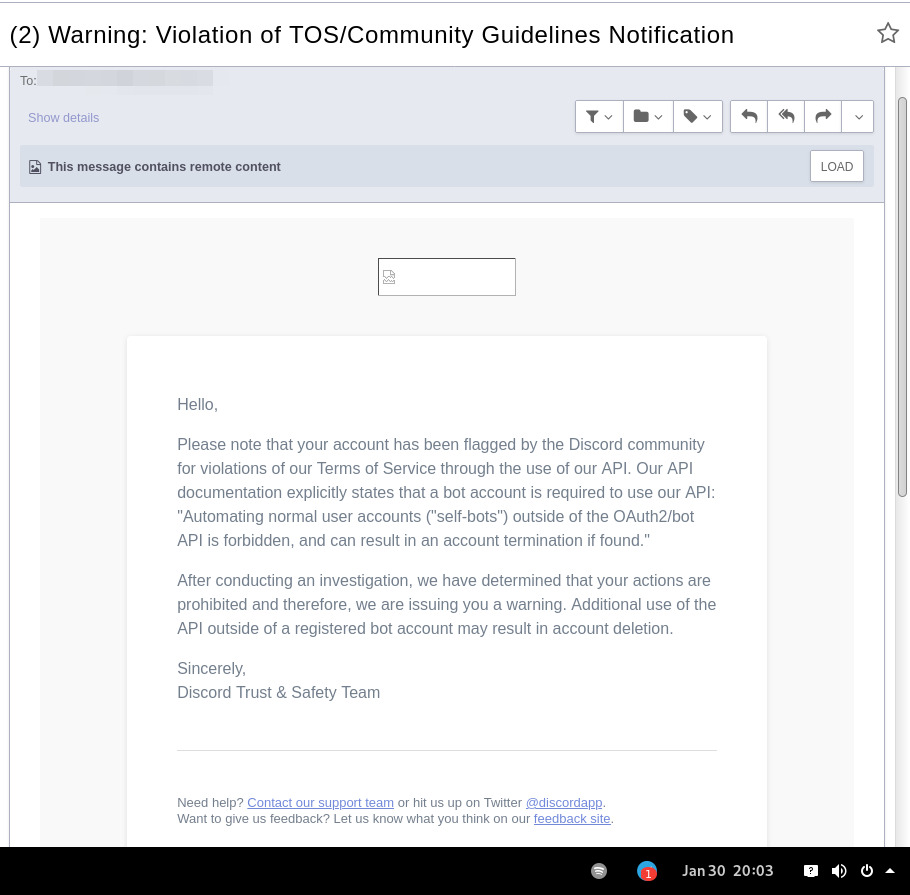
In September 2021 there was a bunch of issues with people using different third-party clients being asked to reset their passwords daily due to "suspicious activity", raised here in issue-18 (check out other links there too), which seem to have gone away within a week.
At least one person in that issue thread also reported being asked for phone account verification for roughly same reason about a week after that, so maybe "suspicious activity" triggering for 3p clients haven't really gone away.
Cordless client developer's acc apparently got blocked for ToS violation when initiating private chats. This client doesn't have such functionality, but maybe one should be more careful with private chats anyway, as that seem to be a major spam vector, so is more likely to be heavily-monitored, I think.
In the #rdircd IRC channel, a person mentioned that their discord account got some anti-spam mechanism enabled on it, disallowing to log-in without providing a phone number and SMS challenge (and services like Google Voice don't work there), immediately after they've initiated private chat with someone in Ripcord client.
"I contacted support at the time and they just responded that they can't undo the phone number requirement once it has been engaged"
It also seems like Ripcord currently might be trying to mimic official client way more closely than rdircd script here does (where latter even sends "client"/"User-Agent" fields as "rdircd" and appears that way under Devices in User Settings webui), and such similarity might look like Terms of Service violation to Discord (modifying official client), instead of Community Guidelines violation (third-party client), but obviously it's just a guess on my part as to whether it matters.
There are also some HN comments clarifying Discord staff position in a thread here, though none of the above should probably be taken as definitive, since third-party and even support staff's responses can be wrong/misleading or outdated, and such treatment can likely change anytime and in any direction, without explicit indication.
Note: only using this API here, only going by public info, can be wrong, and would appreciate any updates/suggestions/corrections via open issues.
Last updated: 2024-11-26
Discord API docs don't seem to cover "full-featured client" use-case, likely because such use of its API is explicitly not supported, and is against their rules/guidelines (see WARNING section above for details).
It's possible that more recent official OpenAPI spec in discord/discord-api-spec repo has a more complete documentation though.
Discord API protocol changes between versions, which are documented on Change Log page of the API docs.
Code has API number hardcoded as DiscordSession.api_ver, which has to be bumped there manually after updating it to handle new features as necessary.
Auth uses undocumented /api/auth/login endpoint for getting "token" value for email/password, which is not OAuth2 token and is usable for all other endpoints (eg POST URLs, Gateway, etc) without any prefix in HTTP Authorization header.
Found it being used in other clients, and dunno if there's any other way to authorize non-bot on eg Gateway websocket - only documented auth is OAuth2, and it doesn't seem to allow that.
Being apparently undocumented and available since the beginning, guess it might be heavily deprecated by now and go away at any point in the future.
There are some unofficial docs for officially-undocumented APIs and quirks:
Sent message delivery confirmation is done by matching unique "nonce" value in MESSAGE_CREATE event from gateway websocket with one sent out to REST API.
All messages are sent out in strict sequence (via one queue), waiting on confirmation for each one in order, aborting rest of the queue if first one fails/times-out to be delivered, with notices for each failed/discarded msg.
This is done to ensure that all messages either arrive in the same strict order they've been sent or not posted at all.
Discord message-posting API has enforce_nonce parameter (since 2024-02-12), which allows to retry posting messages safely from duplication, but at the moment retries are only performed here on API rate-limiting.
Fetching list of users for discord channel or even guild does not seem to be well-supported or intended by the API design.
There are multiple opcodes that allow doing that in a limited way, none of which work well for large discords (eg 10k+ users).
request_guild_members (8) doesn't return any results, request_sync (12) doesn't work, request_sync_chan (14) can be used to request small slice of the list, but only one at a time (disconnects on concurrent requests).
Latter is intended to only keep part of userlist that is visible synced in the client, doesn't support proper paging through whole thing, and only gets updates for last-requested part with indexes in it - basically "I'm in this guild/channel, what should I see?" request from the client.
Some events on gateway websocket are undocumented, maybe due to lag of docs behind implementation, or due to them not being deemed that useful to bots, idk.
Discord allows channels and users to have exactly same visible name, which is not a big deal for users (due to one-way translation), but still disambiguated irc-side.
Discord emojis like :smile: are handled in multiple different ways:
Looked up among unicode emoji names that work in all discords and translated to a unicode character, eg :smile: to
Can be found in current discord's custom emojis and replaced by a message formatting tag for it, like :debian: to a tag like <:debian:12345> , which discord clients will display as debian logo in a linux-related discord.
If user has Discord Nitro subscription, custom emoji from any discord works in any other discord as well.
rdircd doesn't handle last Nitro case at all (looks-up custom emojis in one discord), while first two cases are distinguished from each other via rdircd.unicode-emojis.txt.gz file (optional/configurable), which has list of all non-custom emojis (~6k of them), pulled from Discord WebUI using extract-unicode-emojis-from-js.py script.
If generic emojis stop working in the future (incorrectly treated as if they're discord-custom ones), due to renames or new additions, that script can be used to update the list of them easily.
Gateway websocket can use zlib compression (and zstd in non-browser apps), which makes inspecting protocol in browser devtools a bit inconvenient.
gw-ws-har-decode.py helper script in this repo can be used to decompress/decode websocket messages saved from chromium-engine browser devtools (pass -h/--help option for info on how to do it).
Run ./rdircd --test for info on some extra development/testing helper commands.
dev-cmds = yes under [debug] also enables some runtime helpers in #rdircd.control.
Adding support for initiating private chats might be a bad idea, as Cordless dev apparently got banned for that, and since these seem to be main spam vector, so more monitoring and anomaly detection is likely done there, leading to potentially higher risk for users.







