reliable discord client irc daemon
1.0.0

สารบัญ
คำอธิบาย
คำเตือน
คุณสมบัติ
ข้อ จำกัด
การใช้งาน
ข้อมูลคุณสมบัติอื่น ๆ
เคล็ดลับและกลเม็ดแบบสุ่ม
ลิงค์
ข้อมูลเพิ่มเติมเกี่ยวกับการบล็อกไคลเอนต์บุคคลที่สาม
API และบันทึกการใช้งาน
RDIRCD เป็น daemon ที่อนุญาตให้ใช้บัญชี Discord ส่วนบุคคลผ่านไคลเอนต์ IRC
มันแปลการแชทส่วนตัวทั้งหมดและช่องทาง/เธรดสาธารณะใน "เซิร์ฟเวอร์ discord" เป็นช่องทางบนเซิร์ฟเวอร์ IRC ที่สร้างและคุณสามารถเชื่อมต่อกับการใช้ไคลเอนต์ IRC ปกติแทนที่จะเป็นเบราว์เซอร์หรือแอพอิเล็กตรอน
"เชื่อถือได้" อยู่ในชื่อเพราะหนึ่งในเป้าหมายเริ่มต้นคือการยืนยันการส่งข้อความและแจ้งเกี่ยวกับปัญหาใด ๆ ในเรื่องนั้นซึ่งค่อนข้างขาดลูกค้าที่คล้ายกันอื่น ๆ ในเวลานั้น
มีช่อง IRC ที่จะพูดคุยเกี่ยวกับสิ่งที่ - เข้าร่วม #RDIRCD ที่ Libera.Chat
irc url: ircs: //irc.libera.chat/rdircd (GitHub ปฏิเสธที่จะสร้าง ircs: // ลิงก์)
ดูเพิ่มเติมที่ส่วนลิงก์ด้านล่างสำหรับรายการลูกค้าทางเลือกอื่น ๆ ที่ได้รับการอัปเดต
URL ที่เก็บ:
สุดท้ายมีรายการ Git-notes พร้อมรายการสิ่งที่ต้องทำและดังกล่าวที่การอ้างอิงเริ่มต้นสำหรับสิ่งเหล่านั้น
ในขณะที่ฉันจะไม่เรียกแอพนี้ว่า "บอท" หรือ "บัญชีผู้ใช้มาตรฐานโดยอัตโนมัติ" - เจตนาที่นี่ไม่ได้โพสต์ข้อความอัตโนมัติหรือขูดอะไร - พนักงาน Discord ค่อนข้างแน่ใจว่าลูกค้าของบุคคลที่สามทั้งหมดเป็น "บอท" และกำหนดให้พวกเขาใช้ API ชั้นสอง ไม่สามารถใช้งานได้สำหรับผู้ใช้ที่ไม่ใช่ผู้ดูแลระบบแบบสุ่ม
แอพนี้ไม่ได้นำเสนอตัวเองเป็น "บอท" และไม่ได้ใช้จุดสิ้นสุดเฉพาะของบอทดังนั้นการใช้มันอาจส่งผลให้มีการยกเลิกบัญชีหากค้นพบ
ดูเพิ่มเติมข้อมูลเพิ่มเติมเกี่ยวกับส่วนการปิดกั้นไคลเอนต์บุคคลที่สามด้านล่าง
คุณได้รับคำเตือนแล้ว! -
การสั่งซื้อข้อความขาออกที่เชื่อถือได้พร้อมการแจ้งเตือนที่ชัดเจนสำหรับปัญหาที่ตรวจพบทุกชนิด
สนับสนุนทั้งช่องส่วนตัวและสาธารณะการสั่งซื้อช่องเธรดฟอรัมยกเว้นการสร้างช่องใหม่ของสิ่งเหล่านี้
ช่องทางต่อเซิร์ฟเวอร์และช่องทางจับใจทั่วโลกเพื่อติดตามกิจกรรมทั่วไป
นามแฝงชื่อท้องถิ่นที่กำหนดค่าได้/การเปลี่ยนชื่อบล็อกข้อความขาออก/การเปลี่ยนการกรอง regexp สำหรับข้อความที่ได้รับ
รองรับการกำหนดค่าใหม่รันไทม์ที่ จำกัด ผ่าน #rdircd.control channel
ความไม่ลงรอยกันที่เรียบง่ายและสอดคล้องกับ IRC Guild/Channel/Channel Name Translation
สิ่งเหล่านี้จะไม่มีการเปลี่ยนแปลงหลังจากการเชื่อมต่อใหม่ช่องหรือเซิร์ฟเวอร์ reshuffling ฯลฯ - การแปลเป็นส่วนใหญ่กำหนดและไม่ได้ขึ้นอยู่กับชื่ออื่น
การแปลสำหรับการกล่าวถึงความไม่ลงรอยกันการตอบกลับสิ่งที่แนบมาสติกเกอร์และอิโมจิในข้อความที่เข้ามา, เหตุการณ์อื่น ๆ , คำอธิบายประกอบพื้นฐานสำหรับลิงก์ที่ฝังตัว
การสนับสนุนที่ จำกัด สำหรับการแปลผู้ใช้ Discord กล่าวถึงและอิโมจิในข้อความที่ส่งการแก้ไขและการลบ
คำสั่ง backlog ผ่าน/หัวข้อ (/t) ที่เข้าถึงได้ง่ายในช่องใด ๆ เช่น "/t log 2h" เพื่อแสดงใน backlog 2 ชั่วโมงสุดท้ายหรือ "/t log 2019-01-08" เพื่อทิ้ง backlog จากจุดนั้นไปจนถึงปัจจุบัน
ข้อความที่ส่งผ่านวิธีการอื่น (เช่นเบราว์เซอร์) จะถูกส่งไปยัง IRC ด้วยเช่นกันอาจมาจาก Nick Diff แม้ว่าถ้าชื่อ IRC ไม่ตรงกับการแปลนิค Discord-to-IRC
รองรับ/ใช้งานเต็มรูปแบบเต็มรูปแบบ
โปรโตคอล IRC ถูกนำไปใช้จากเอกสาร IRCV3 แต่ไม่ได้ใช้สิ่งใดที่ไม่ใช่ RFC ดังนั้นควรเข้ากันได้กับลูกค้าเก่า การห่อ TLS เสริม
โปรโตคอลที่กว้างขวางและตัวเลือกการบันทึกการดีบักบางอย่างสามารถเข้าถึงได้เมื่อรันไทม์ผ่านช่องสัญญาณ #rdircd.debug
สคริปต์ Python3 เดี่ยวที่ต้องใช้โมดูล AIOHTTP เท่านั้นซึ่งเป็นเรื่องเล็กน้อยในการเรียกใช้หรือปรับใช้ทุกที่
ทำงานในรอยเท้าหน่วยความจำ ~ 40m ที่ค่อนข้างเสถียรบน AMD64 ซึ่งอาจมากกว่าเช่น Bitlbee-Discord แต่ดีกว่าแท็บเบราว์เซอร์ที่รั่วไหล
ง่ายต่อการปรับแต่งและดีบักโดยไม่ต้องสร้างใหม่ GDB สนิมและอื่น ๆ
เฉพาะผู้ใช้ที่กล่าวถึงและอิโมจิที่ส่งจาก IRC จะถูกแปลเป็นแท็ก discord (ถ้าเปิดใช้งานและมีนิสัยใจคอบางอย่างดูด้านล่าง) - ไม่ใช่ช่องบทบาท, สติกเกอร์, ส่วนประกอบ ฯลฯ
ไม่มีการสนับสนุนสำหรับการส่งไฟล์แนบหรือฝังทุกชนิด - ใช้ webui สำหรับสิ่งนั้นไม่ใช่ IRC
แม้ว่า Discord จะใส่หมายเหตุประกอบการเชื่อมโยงโดยอัตโนมัติดังนั้นการโพสต์สื่อจึงง่ายอย่างที่
ไม่ได้รับการสนับสนุนการกระทำเฉพาะของความไม่ลงรอยกันนอกเหนือจากการอ่านและการส่งข้อความไปยังช่องทางที่มีอยู่ทุกชนิด - เช่นไม่มีการสร้างบัญชีหรือช่องทางบนความไม่ลงรอยกันการจัดการบทบาทการเชิญการห้ามการหมดเวลา ฯลฯ - ใช้ WebUI, Harmony
ไม่รองรับการแชทส่วนตัวและเธรดช่อง/ฟอรัมใหม่
สำหรับการแชทส่วนตัวอาจเป็นอันตรายต่อการสนับสนุน - ดูข้อมูลเพิ่มเติมเกี่ยวกับส่วนการปิดกั้นลูกค้าบุคคลที่สามด้านล่างสำหรับรายละเอียด
ไม่ได้ติดตามสถานะผู้ใช้ (ออนไลน์ออฟไลน์ AFK เล่นเกม ฯลฯ ) เลย
ไม่ปล่อยให้ผู้ใช้เข้าร่วมกิจกรรม /ชิ้นส่วนและจัดการกับ IRC /ชื่อในวิธีที่ง่ายมากมีเพียงรายการนิคที่ใช้ช่องสัญญาณตั้งแต่การเริ่มต้นแอปและภายใน IRC-Names-Timeout (1 วันโดยค่าเริ่มต้น)
ไม่สนใจสิ่งที่ไม่ใช่ข้อความทั้งหมดโดยทั่วไป (เช่นเสียง, โปรไฟล์ผู้ใช้, ห้องสมุดเกม, ร้านค้า, รายการเพื่อน ฯลฯ )
แทร็ก Discord "Read_State" ด้านเซิร์ฟเวอร์ซึ่งไม่ได้ใช้ที่นี่ในทางใด ๆ - การเรียกใช้ประวัติการเล่นซ้ำจะทำด้วยตนเองเท่านั้น (/t คำสั่งใน Chans) ดังนั้นบางครั้งอาจพลาดได้ง่ายในการเชื่อมต่อที่เงียบสงบ
ไม่รองรับโหมดการรับรองความถูกต้องของ Discord Multifactor แต่ Auth -Token ด้วยตนเองอาจจะสามารถแก้ไขได้ - ดูหมายเหตุเกี่ยวกับ Captchas ด้านล่าง
คำสั่งสแลช (สำหรับบอท) ไม่ได้รับการสนับสนุนในวิธีพิเศษใด ๆ แต่คุณอาจยังคงส่งพวกเขาได้หากไคลเอนต์ IRC จะผ่านสิ่งเหล่านี้ผ่าน
ไม่ใช่สิ่งที่ใช้งานง่ายที่สุด แต่อาจเหมือนกับ IRC เอง
ฉันใช้งานบน Linux เท่านั้นดังนั้นจึงไม่น่าจะ "แค่ทำงาน" บน OSX/Windows แต่ IDK
การใช้งานแบบเฉพาะกิจของทั้ง Discord และ IRC ไม่ได้รับประโยชน์จากการเปิดรับแสงและการทดสอบใด ๆ เกี่ยวกับ PYPI และความเข้ากันได้ของ WRT ข้อบกพร่องและกรณีมุม
ดูเหมือนจะขัดกับแนวทาง Discord ที่จะใช้ - ดูส่วนคำเตือนด้านบนสำหรับรายละเอียดเพิ่มเติม
บนแพลตฟอร์ม OpenBSD เมื่อใช้ password-hash= IRC ที่เข้ารหัสด้วย Scrypt-encoded อาจจำเป็นต้องติดตั้งโมดูล Scrypt แยกกัน (ผ่านเช่น pkg_add py3-scrypt ) เนื่องจากพอร์ต Python ดูเหมือนจะไม่มี hashlib.scrypt ใน stdlib
วิธีที่ง่ายที่สุดอาจใช้แพ็คเกจสำหรับ/จากการแจกแจง Linux ของคุณหากมีอยู่
แพ็คเกจ distro ที่รู้จักกันในปัจจุบัน (ณ ปี 2020-05-17):
นอกจากนี้ยังมี Dockerfile และ Docker-compose.yml สำหรับการเรียกใช้สิ่งนี้ใน Docker/Podman หรือสภาพแวดล้อมที่เข้ากันได้กับ OCI อื่น ๆ
(ดูเพิ่มเติม readme.docker-permissions.md doc สำหรับข้อมูลเกี่ยวกับปัญหาการเข้าถึงทั่วไปกับสิ่งเหล่านั้น)
ควรติดตั้งสคริปต์หนึ่งสคริปต์และการพึ่งพาเพียงไม่กี่ตัวด้วยตนเองเช่นกันตามที่อธิบายไว้ในส่วนที่เหลือของส่วนนี้ด้านล่าง
ใน Debian/Ubuntu การติดตั้งการอ้างอิงสามารถทำได้ด้วยคำสั่งนี้:
# apt install --no-install-recommends python3-minimal python3-aiohttp
linux distros อื่น ๆ น่าจะมีแพ็คเกจที่คล้ายกันเช่นกันและฉันขอแนะนำให้ลองใช้สิ่งเหล่านี้เป็นตัวเลือกแรกเพื่อให้พวกเขาได้รับการอัปเดตและเพื่อหลีกเลี่ยงภาระการบำรุงรักษาในท้องถิ่นพิเศษ
ในการติดตั้ง distro โดยพลการใด ๆ ที่ติดตั้ง Python (Python3) โดยใช้ PIP/VENV เพื่อติดตั้งโมดูล AIOHTTT (และ deps) เพื่อไม่ได้รับการรับรอง "RDIRCD" บ้านของผู้ใช้อาจใช้งานได้
 root # useradd -m rdircd
root # su - rdircd

## Option 1: use venv to install dependencies into "_venv" dir

rdircd % python3 -m venv _venv
rdircd % ./_venv/bin/pip install aiohttp

## Option 2: install pip (if missing) and use it directly

rdircd % python3 -m ensurepip --user
rdircd % python3 -m pip install --user aiohttp
หากคุณมี/ใช้ PIPX (เช่นจาก distro repos) มันสามารถใช้เรียกใช้แอพ Python เช่นนี้และการพึ่งพาอัตโนมัติ -Maintain -เพียงแค่ "pipx run" สคริปต์หลัก: pipx run rdircd --help -โดยไม่จำเป็นต้องแตะ Venv หรือ pip ทั้งหมด
หลังจากติดตั้งข้อกำหนดด้านบนสคริปต์เองสามารถนำมาจากที่เก็บนี้และเรียกใช้เช่นนี้:
 ## Ignore "useradd" if you've already created a user when running "pip" above
root # useradd -m rdircd
root # su - rdircd

## If using "venv" install example above - load its env vars
# Or alternatively run script via "./_venv/bin/python rdircd ..." command line
rdircd % source ./_venv/bin/activate

rdircd % curl -OL 'https://raw.githubusercontent.com/mk-fg/reliable-discord-client-irc-daemon/master/rdircd{,.unicode-emojis.txt.gz}'
rdircd % chmod +x rdircd

## Use "pipx run rdircd ..." here and below, if using pipx instead of pip/venv/distro-pkgs
rdircd % ./rdircd --help
...to test if it runs...

rdircd % ./rdircd --conf-dump-defaults
...for a full list of all supported options with some comments...
...alternatively, to create rdircd.ini template: ./rdircd -c rdircd.ini --conf-init

rdircd % nano rdircd.ini
...see below for configuration file info/example...

rdircd % ./rdircd --debug -c rdircd.ini
...drop --debug and use init system for a regular daemon...
สำหรับการตั้งค่า daemon/script เพื่อเรียกใช้บน OS Boot ไฟล์ RDIRCD.Service SystemD สามารถใช้งานได้ในสภาพแวดล้อม Linux ส่วนใหญ่ (แก้ไข ExecStart = ตัวเลือกและพา ธ ที่นั่น) หรืออาจผ่านสคริปต์ init.d หรือในเซสชัน "หน้าจอ" เป็นตัวเลือกล่าสุด ตรวจสอบให้แน่ใจว่ามันทำงานเป็นเช่น "RDIRCD" ผู้ใช้ที่สร้างขึ้นในตัวอย่างด้านบนไม่ใช่รูท
หากต้องการอัปเดตสคริปต์ในภายหลังหากจำเป็นให้แทนที่ด้วยเวอร์ชันล่าสุดเช่นผ่านการโหลดซ้ำด้วยคำสั่ง Curl ด้านบน Git-pull บน repo clone, docker-compose up --build สร้างอัปเดตแพ็คเกจ OS หรือในทางอื่น
สร้างไฟล์การกำหนดค่าด้วยข้อมูลรับรอง Discord และ IRCD Auth ใน ~/.rdircd.ini (ดูทั้งหมด --conf... opts wrt เหล่านี้):
 [irc]
password = hunter2

[auth]
email = [email protected]
password = discord-password
หมายเหตุ: รหัสผ่าน IRC สามารถละเว้นได้ แต่ให้แน่ใจว่าไฟร์วอลล์นั้นพอร์ตจากทุกสิ่งในระบบแล้ว (หรืออาจจะทำต่อไป)
หากคุณตั้งรหัสผ่านอาจจะไม่ใช้ password= ตัวเลือกด้านบนและใช้ password-hash= และ -H/--conf-pw-scrypt เพื่อสร้างแทน ไม่ว่าจะด้วยวิธีใดตรวจสอบให้แน่ใจว่าใช้รหัสผ่านนั้นเมื่อกำหนดค่าการเชื่อมต่อกับเซิร์ฟเวอร์นี้ในไคลเอนต์ IRC เช่นกัน
เริ่ม rdircd daemon: ./rdircd --debug
เชื่อมต่อไคลเอนต์ IRC เข้ากับ "LocalHost: 6667" - โฮสต์ฟัง/ผูกเริ่มต้นและพอร์ต
(ดู ./rdircd --conf-dump-defaults หรือ CLI -i/--irc-bind / -s/--irc-tls-pem-file สำหรับการเชื่อมต่อโฮสต์/พอร์ตที่แตกต่างกัน
ใช้คำสั่ง irc /list เพื่อดูแชนเนลสำหรับเซิร์ฟเวอร์ /กิลด์ที่เข้าร่วมทั้งหมด:
 Channel           Users Topic
-------           ----- -----
#rdircd.control       1  rdircd: control channel, type "help" for more info
#rdircd.debug         1  rdircd: debug logging channel, read-only
#rdircd.monitor       1  rdircd: read-only catch-all channel with messages from everywhere
#rdircd.leftover      1  rdircd: read-only channel for any discord messages in channels ...
#rdircd.voice         1  rdircd: read-only voice-chat notifications from all discords/channels
#rdircd.monitor.jvpp  1  rdircd: read-only catch-all channel for discord [ Server-A ]
#rdircd.leftover.jvpp 1  rdircd: read-only msgs for non-joined channels of discord [ Server-A ]
...
#me.chat.SomeUser     1  me: private chat - SomeUser
#me.chat.x2s456gl0t   3  me: private chat - some-other-user, another-user, user3
#jvpp.announcements   1  Server-A: Please keep this channel unmuted
#jvpp.info            1  Server-A:
#jvpp.rules           1  Server-A:
#jvpp.welcome         1  Server-A: Mute unless you like notification spam
...
#axsd.intro           1  Server-B: Server info and welcomes.
#axsd.offtopic        1  Server-B: Anything goes. Civility is expected.
หมายเหตุเกี่ยวกับข้อมูลที่นี่:
/j #axsd.offtopic ( /join ) ตามที่คุณทำกับ IRC ปกติเพื่อดู /โพสต์ข้อความที่นั่น
ช่องเข้าร่วม/ชิ้นส่วนในด้าน IRC ไม่ส่งผลกระทบต่อความไม่ลงรอยกันในทางใดทางหนึ่ง
run /topic (มักจะทำงานเป็น /t ) irc-command เพื่อแสดงข้อมูลเพิ่มเติมเกี่ยวกับคำสั่งเฉพาะช่องเช่นบันทึก /t log เพื่อดึงและเล่นซ้ำแบ็ค /t log 2h เริ่มต้นจากเหตุการณ์สุดท้ายก่อนที่จะปิด RDIRCD ครั้งสุดท้าย /t log list บันทึกเพื่อแสดงรายการเวลาทั้งหมด
คำสั่ง daemon control/config มีอยู่ใน #rdircd.control channel, #rdircd.debug chan สามารถใช้ในการปรับแต่งการบันทึกและตรวจสอบสถานะ daemon และโปรโตคอลอย่างใกล้ชิดยิ่งขึ้นส่ง "ช่วยเหลือ" ไปที่รายการคำสั่งที่มีอยู่
สำหรับโครงร่างที่กว้างของการตั้งค่าการกำหนดค่าที่รองรับต่างๆให้ดูไฟล์ rdircd.defaults.ini (เอาต์พุตของ ./rdircd --conf-dump-defaults ) และอื่น ๆ เกี่ยวกับการใช้งานเฉพาะด้านล่าง
หมายเหตุเกี่ยวกับคุณสมบัติทางเลือกที่หลากหลายและชัดเจนน้อยกว่าจะถูกรวบรวมที่นี่
ดูส่วน "การใช้งาน" สำหรับข้อมูลทั่วไปเพิ่มเติม
สามารถระบุไฟล์ INI หลายไฟล์ด้วยตัวเลือก -c ซึ่งจะเอาชนะซึ่งกันและกันตามลำดับ
อันสุดท้ายจะได้รับการอัปเดต WRT [state], token = และสิ่งที่คล้ายกันรันไทม์รวมถึงค่าใด ๆ ที่ตั้งค่าผ่านคำสั่ง #rdircd.control ช่องดังนั้นจึงมีประโยชน์ในการระบุการกำหนดค่าถาวรด้วยการรับรองความถูกต้องและตัวเลือก
เช่น ./rdircd -c config.ini -c state.ini จะทำเช่นนั้น
-สามารถเพิ่ม --conf-dump ในการพิมพ์ที่เกิดขึ้น Ini ประกอบจากสิ่งเหล่านี้ทั้งหมด
-การตั้งค่าสถานะ --conf-dump-defaults สามารถใช้เพื่อแสดงรายการตัวเลือกทั้งหมดและค่าเริ่มต้นของพวกเขา
การอัปเดตการประทับเวลาของสถานะบ่อยครั้งจะดำเนินการในสถานที่ (ค่าความยาวคงที่ขนาดเล็ก) แต่การตรวจสอบ ctime ก่อนเขียนดังนั้นควรปลอดภัยในการแก้ไขไฟล์เหล่านี้ด้วยตนเองได้ตลอดเวลา
การส่งคำสั่ง SIGHUP ไปยังสคริปต์หรือคำสั่ง "โหลด" ในช่องควบคุมควรโหลดและใช้ค่าจากไฟล์กำหนดค่าทั้งหมดในลำดับเดียวกัน โปรดทราบว่าการดำเนินการดังกล่าวจะไม่รีเซ็ตค่าใด ๆ ที่หายไปในไฟล์เป็นค่าเริ่มต้นของพวกเขาใช้เฉพาะสิ่งที่ตั้งค่าไว้อย่างชัดเจนที่ด้านบนของการกำหนดค่าปัจจุบัน
การแชททั้งหมดใน RDIRCD (และ Discord) เป็น ช่อง
IRC /Q, /Query และ /MSG ไม่สามารถใช้ ในวิธี IRC-typer
หากต้องการพูดคุยในการแชทส่วนตัวใด ๆ เข้าร่วมช่อง เช่น #me.chat. <ผู้ใช้> ซึ่งทำงานเหมือนช่อง Discord/RDIRCD อื่น ๆ
ขณะนี้ไม่มีวิธีสร้างแชทส่วนตัวใหม่จาก RDIRCD ใช้ลูกค้าอื่น ๆ หรือ WebUI สำหรับสิ่งนั้น (หรือขอให้ใครบางคนติดต่อคุณก่อน) แต่เมื่อสร้างช่องแชทส่วนตัวแล้วก็สามารถใช้ใน RDIRCD ได้เช่นกัน
ดูที่ช่องการเข้าร่วมอัตโนมัติและ /หรือ /เข้าร่วมเช่น #rdircd.leftover.me ช่องทางเพื่อตรวจสอบข้อความส่วนตัวอย่างน่าเชื่อถือหากจำเป็น
ในช่อง IRC ทั้งหมดที่เป็นตัวแทนของช่อง Discord - ส่ง /topic (หรือ /t - ชวเลขสำหรับมันมักจะรองรับในไคลเอนต์ IRC) - ซึ่งควรพิมพ์ข้อมูลที่ทันสมัยสำหรับคำสั่งเฉพาะช่องทั้งหมดเช่น:
/t info - แสดงข้อมูลกิลด์/ช่องทางภายในเช่น IDs และอื่น ๆ สำหรับการเปลี่ยนชื่อ
ควรพิมพ์ชื่อช่องทางที่แน่นอนบน Discord (โดยไม่มีการเปลี่ยนชื่อในท้องถิ่นหรือการแปลแบบ discord-to-IRC ที่ RDIRCD ทำ) หัวข้อของมันพิมพ์ ฯลฯ เหนือสิ่งอื่นใด
/t info {user-name...} - ข้อมูลการสืบค้นในชื่อผู้ใช้ (หรือส่วนหนึ่งของมัน) ในความไม่ลงรอยกันนี้
ตัวอย่างเช่น /t info joe137 จะค้นหาผู้ใช้ joe137 บนเซิร์ฟเวอร์ Discord ที่ช่องเป็นของการพิมพ์ข้อมูลเกี่ยวกับพวกเขาเช่นชื่อ Discord ต่างๆ
/t log [state] - ประวัติการเล่นซ้ำตั้งแต่จุด "สถานะ" (สุดท้าย RDIRCD หยุดโดยค่าเริ่มต้น)
/t log (เช่นเดียวกับ /t log 1 ) สามารถใช้เช่นหลังจาก RDIRCD รีสตาร์ทเพื่อสอบถามความไม่ลงรอยกันสำหรับข้อความใด ๆ ที่อาจถูกโพสต์หลังจากหยุดและก่อนที่มันจะเริ่มกลับมาอีกครั้ง (รวมถึงคนอื่น ๆ ตั้งแต่นั้นมา)
หรือ /t log 0 เพื่อตรวจสอบประวัติตั้งแต่ข้อความล่าสุดที่ RDIRCD ได้เห็นสำหรับกรณีที่ความไม่ลงรอยกัน /เครือข่ายเป็น Flakey และบางสิ่งบางอย่างอาจหายไปในแบบนั้น
(โดยที่หมายเลข 1 และ 0 เหล่านี้อ้างถึงการประทับเวลาที่บันทึกไว้จากเอาต์พุต /t log list , จัดเก็บ /อัปเดตภายใต้ [state] ในไฟล์ INI)
นอกจากนี้ยังสามารถใช้กับเวลาสัมบูรณ์หรือแบบสัมพัทธ์เช่น /t log 15m เพื่อร้องขอ /เล่นซ้ำประวัติช่องทางภายใน 15 นาทีที่ผ่านมาหรือ /t log 2019-01-08 12:30 เพื่อเล่นซ้ำประวัติศาสตร์เนื่องจากเวลาเฉพาะ RDIRCD-local
Just /t หรือ /topic ในช่องพร็อกซี Discord ใด ๆ จะแสดงรายการคำสั่งดังกล่าวเพิ่มเติมและข้อมูลเพิ่มเติมเกี่ยวกับวิธีการใช้งาน
ข้อความสุดท้ายที่ส่งไปยังช่อง Discord สามารถแก้ไขได้โดยใช้คำสั่ง SED-Replacement เช่น s/hoogle/google/ เพื่อแก้ไขการพิมพ์ผิดหรือแก้ไข/reword/ชี้แจงบรรทัดสุดท้ายได้อย่างรวดเร็ว
หรือ //del สามารถใช้เพื่อลบ - ดูส่วน "การแก้ไขด่วน/ลบ" ด้านล่าง
@silent คำนำหน้าคำสั่งในข้อความสามารถระงับการแจ้งเตือนของผู้ใช้เกี่ยวกับเรื่องนี้ (อธิบายด้านล่างที่ไหนสักแห่ง)
ในช่องพิเศษเช่น #rdircd.control และ #rdircd.debug: ส่ง h หรือ help
พวกเขาสามารถมีรายการคำสั่งที่รองรับได้ค่อนข้างยาวเช่นนี่คือคำสั่งบางส่วนสำหรับ #rdircd.control:
status (หรือ st ) สามารถใช้เพื่อตรวจสอบ Discord และ IRC Connection Infos
คำสั่ง connect / disconnect (หรือ on / off ) สามารถใช้เพื่อควบคุมการเชื่อมต่อที่ไม่ลงรอยกันด้วยตนเองเช่นสำหรับการใช้งานครั้งเดียวมากขึ้นหรือระงับการเตือนความล้มเหลวของ Conn ชั่วคราวในขณะที่เครือข่ายท้องถิ่น
set irc-disable-reacts-msgs yes -การแจ้งเตือนปฏิกิริยาที่ไม่ลงรอยกันอุณหภูมิ (ใช้คำสั่ง set )
หรือ set -s irc-disable-reacts-msgs yes เพื่อให้เป็นแบบถาวร ( -s/--save ค่าสถานะสำหรับการบันทึกค่าไปยังไฟล์ config ini) หรือ set ง่ายโดยไม่ต้องพารามิเตอร์เพื่อดูตัวเลือกการกำหนดค่าทั่วไปทั้งหมดและค่าของพวกเขา
rx Block mee6 bot-noise = (?i)^<MEE6> -อุณหภูมิบล็อกทั้งหมดจาก Mee6 Bot
(ดูหัวข้อเกี่ยวกับการกรองนี้ด้านล่างหรือตัวอย่างเพิ่มเติมของสิ่งเหล่านี้ภายใต้เคล็ดลับและแทร็ก)
... และมีอีกมาก-พิมพ์ help ที่นั่นสำหรับข้อมูลที่ทันสมัยเต็มรูปแบบ
#rdircd.monitor สามารถใช้เพื่อดูกิจกรรมจากเซิร์ฟเวอร์ที่เชื่อมต่อทั้งหมด - รับข้อความทั้งหมดนำหน้าด้วยชื่อช่อง IRC ที่เกี่ยวข้อง
#rdircd.monitor.guild (ที่ "กิลด์" เป็นแฮชหรือนามแฝงดูด้านบน) เป็นช่องทางที่คล้ายกันสำหรับเซิร์ฟเวอร์/กิลด์ที่เฉพาะเจาะจง
#rdircd.monitor.me มีประโยชน์เช่นเพื่อตรวจสอบการแชทส่วนตัวและข้อความสำหรับบัญชี Discord (ดูตัวอย่างช่องการเข้าร่วมอัตโนมัติ)
#rdircd.leftover และ #rdircd.leftover ช่องทางที่คล้ายกันเป็นเหมือนช่องทางการตรวจสอบ แต่ข้ามข้อความจากช่องทางใด ๆ ที่ไคลเอนต์ IRC มีการเข้าร่วม-รวมถึง EG /join #rdircd.leftover.game-x ซ่อนตัวอยู่ที่ "Game-X" "ที่เหลือ" ในทางใดทางหนึ่ง)
#rdircd.voice เป็นช่องทางที่คล้ายกับ #rdircd.monitor แต่เพียงแค่จับเหตุการณ์เสียงแชทด้วยเสียงเท่านั้นเพื่อให้สามารถติดตามสิ่งเหล่านั้นได้ในเวลาที่เหมาะสม
ช่องเหล่านี้สามารถละเว้นได้หากไม่จำเป็นหรือปิดการใช้งานทั้งหมดโดยการตั้งค่าเช่น chan-monitor เป็นค่าที่ว่างเปล่าภายใต้ [IRC] INI config-file ส่วน ตัวอย่างเช่นช่องสัญญาณเสียงต่อการแยกออกจากกันนั้นมีการปิดการใช้งานเริ่มต้นที่นั่น
ไฟล์การกำหนดค่ายังมีส่วน [unmonitor] สำหรับรายการเสริมของชื่อช่องทางที่จะละเว้นในช่องทางการตรวจสอบ/ที่เหลือเช่น:
 [unmonitor]
# All filters are applied to channel names and are case-insensitive
Ignore this particular " bot-commands " channel = game-X.bot-commands
skip forum threads in " game-X " guild = glob:game-X.forum.=*
" wordle " threads in any guild (and chans ending in .wordle) = glob:*.wordle
Don ' t show threads in any forum-like channels = re:^[^.]+ . (forum|discuss) . =.*
disregard all voice-chat stuff = glob:*.vc
คีย์ (ส่วนหนึ่งก่อนหน้า "=") ในส่วนการกำหนดค่าดังกล่าวจะถูกละเว้นและสามารถเป็นอะไรก็ได้เช่นความคิดเห็นที่อธิบายรูปแบบ (เช่นในตัวอย่างด้านบน) ในขณะที่ค่าเป็น <some-key/comment> = glob:<wildcard-pattern> แน่นอน <some-key/comment> = glob:<wildcard-pattern> หรือ <some-key/comment> = re:<regexp-pattern> บรรทัด-ดูตัวอย่างด้านบน
ชื่อช่องที่ตรงกับตัวกรองเหล่านั้นจะถูกทิ้งจากช่องทางการตรวจสอบดังนั้นจึงสามารถใช้ในการกำหนดรายการสิ่งต่าง ๆ ที่คุณไม่สนใจและไม่อยากเห็นแม้แต่ที่นั่น
"unmonitor" (หรือ "UM") คำสั่งใน #rdircd.Control สามารถเพิ่ม/ลบตัวกรองดังกล่าวได้ตลอดเวลา ดูเพิ่มเติมที่ตัวเลือกการกำหนดค่า match-counters เพื่อติดตามว่ากฎเฉพาะยังคงต้องการ/ใช้งานหรือไม่
ข้อความในช่องทางการตรวจสอบจะถูก จำกัด ไว้ที่ความยาว/เส้นเฉพาะเพื่อหลีกเลี่ยงการเกิดน้ำท่วมมากเกินไปโดยมีข้อความยาวและ/หรือหลายบรรทัด พารามิเตอร์ "Len-Monitor" และ "Len-Monitor-Lines" ภายใต้ส่วนการกำหนดค่า [IRC] สามารถใช้เพื่อควบคุมขีด จำกัด เหล่านี้ดู "./rdircd--Conf-Dump-Defaults" เอาต์พุตสำหรับค่าเริ่มต้น นอกจากนี้ยังมีตัวเลือกในการเปลี่ยนรูปแบบชื่อของช่องทางการตรวจสอบ
ใน IRC ทุกคนมีชื่อเดียว แต่นั่นไม่ใช่กรณีของ Discord ที่ผู้ใช้แต่ละคนสามารถมีชื่อต่อไปนี้:
login - Discord "ชื่อผู้ใช้" ระบุผู้ใช้ทุกคนโดยเฉพาะdisplay - "ชื่อแสดงชื่อ" ที่ผู้ใช้ตั้งค่าในการตั้งค่าบัญชี Discord ไม่ซ้ำกันnick - เซิร์ฟเวอร์และเพื่อน "ชื่อเล่น" ตั้งค่าในการตั้งค่าเซิร์ฟเวอร์ Discord ไม่ได้โดยคุณเสมอไป login เป็นแนวคิดที่ใกล้เคียงที่สุดกับชื่อเล่นของ IRC เนื่องจากสามารถใช้งานได้ทั่วโลก, สั้น, สั้น, ascii-only, และสามารถใช้โดยการตั้งค่าตัวเลือก name-preference-order = login ในส่วน [discord] (ไม่ใช่ค่าเริ่มต้น)
ไคลเอนต์ Discord อย่างเป็นทางการแสดงชื่ออื่นก่อนซึ่งเป็นเหตุผลว่าทำไมตัวเลือก name-preference-order เริ่มต้นไปที่ค่า nick display login Value ซึ่งใช้ชื่อเล่น Discord/Friend-specific ก่อนถ้ามีให้กลับไปที่ชื่อฟรีรูปแบบที่ผู้ใช้ตั้งค่าในการตั้งค่าบัญชีและชื่อเข้าสู่ระบบของพวกเขา
สิ่งอื่น ๆ ในชื่อเล่นที่ตั้งค่าไว้สำหรับผู้ใช้ที่ IRC ไม่อนุญาตให้ถูกแทนที่ด้วยอักขระ Unicode ทั่วไปช่องว่างที่มี "·" Middle-Dots เช่นหรือ <> วงเล็บ IRC-Nick ทั่วไปที่มี◄► Unicode Arrows Nicks Discord ยาวถูกตัดทอน
ไม่มีการแจ้งเตือน IRC เกี่ยวกับผู้ใช้ที่เปลี่ยนจอแสดงผล/ชื่อนิคที่เฉพาะเจาะจงในขณะนี้และพวกเขาไม่จำเป็นต้องไม่ซ้ำกันซึ่งอาจทำให้ยากที่จะบอกว่าใคร-ใครถ้าพวกเขาเปลี่ยนนิคต่อไปไม่ว่าด้วยเหตุผลใดก็ตาม
ทั้งหมดนี้สามารถกำหนดค่าได้ผ่านการตั้งค่าไฟล์ INI (หรือใน #rdircd.control channel) ดังนั้นหากมันโง่และน่าเบื่อเกินไปให้ตั้งค่า name-preference-order = login เพื่อใช้นิคที่เป็นมิตรกับ IRC ที่สอดคล้องกันสำหรับทุกคนแทน
ข้อมูลคำสั่ง IRC /who หรือ /topic info สามารถช่วยแปลระหว่างชื่อเหล่านี้ตัวอย่างเช่น /t info john1234 สามารถใช้ในการพิมพ์ข้อมูลสำหรับชื่อ /เข้าสู่ระบบในบัฟเฟอร์ช่องซึ่งควรรวมผู้ใช้ทั้งหมดที่มีการจับคู่บางส่วนของชื่อ /who ในความไม่ลงรอยกันเฉพาะ
(เหมือน "เปลี่ยนชื่อ" มากกว่า "นามแฝง" เนื่องจากชื่อเก่าไม่ได้ทำงานต่อไปสำหรับสิ่งเหล่านี้)
สามารถกำหนดได้ในไฟล์กำหนดค่าเพื่อแทนที่คำนำหน้า Discord ที่ใช้แฮชหรือชื่อช่องเซิร์ฟเวอร์ที่มีสิ่งที่อ่านได้/น่าจดจำมากขึ้นหรือมีความหมายสำหรับคุณ:
 [renames]
guild.jvpp = game-x
guild.sn3y = log-bot
guild.sn3y.chan-fmt = logs/{name}.log
chan.some-long-and-weird-name = weird
chan.@ 710035588048224269 = general-subs
user.noname123 = my-pal-bob
user.@ 123980071029577864 = joe
สิ่งนี้ควร:
เลี้ยวเช่น #jvpp.info เป็น #game-x.info-ตัวอักษร Guild-id เป็นคำนำหน้าความหมายมากขึ้น สิ่งนี้จะใช้กับทุกช่องทางในความไม่ลงรอยกัน - "Guild" เปลี่ยนชื่อ
เปลี่ยนรูปแบบสำหรับชื่อช่องของ "sn3y" discord จากบางสิ่งเช่น #sn3y.debug เป็น #logs/debug.log - การเปลี่ยนรูปแบบชื่อช่อง
รูปแบบเทมเพลตใช้ไวยากรณ์ Python str.format กับ "ชื่อ" (ชื่อช่อง) และ "คำนำหน้า" (คำนำหน้ากิลด์ - จะเป็น "บันทึกบอท" ในตัวอย่างนี้) ค่า รูปแบบเริ่มต้นคือ {prefix}.{name}
ตัวเลือกรูปแบบนี้ไม่ส่งผลกระทบต่อชื่อจอภาพ/ส่วนที่เหลือ (S) (เช่น #rdircd.monitor.log-bot หรือ #rdircd.leftover.game-x)-ดูตัวเลือก "Chan-Monitor-Guild" และ "Chan-Leftover-Guild-Guild" ภายใต้ส่วน [IRC] สำหรับการเปลี่ยนแปลง
เปลี่ยนชื่อช่องยาวนั้นให้มีชื่อที่สั้นกว่า (การรักษาคำนำหน้ากิลด์) - "Chan" เปลี่ยนชื่อ
โปรดทราบว่าสิ่งนี้มีผลต่อกิลด์ทั้งหมดที่มีชื่อช่องดังกล่าวและชื่อแหล่งที่มาควรอยู่ในรูปแบบ IRC เช่นเดียวกับใน /รายการและเป็น RFC1459-casemapped (เหมือนกับใน IRC)
Rename Channel ด้วย ID = 710035588048224269 เป็น "memes" (การรักษาคำนำหน้ากิลด์) - "chan" เปลี่ยนชื่อโดยใช้ @channel -id spec
ตัวระบุช่องสัญญาณ Discord Long (เรียกอีกอย่างว่า "Snowflake") สามารถพบได้โดยการพิมพ์ /t info หัวข้อในการสื่อสารในช่อง IRC ที่สอดคล้องกันและสามารถนำมาใช้เพื่ออ้างถึงช่องทางนั้นเช่นการเปลี่ยนชื่อ #เจเนอรัลนี้บนเซิร์ฟเวอร์ Discord หนึ่งนี้
สิ่งนี้มีประโยชน์อย่างยิ่งเมื่อสองช่องมีชื่อที่แน่นอนเหมือนกันในความไม่ลงรอยกันเดียวกันและโดยปกติจะได้รับการกำหนด .<id-hash> คำต่อท้ายที่ไม่ได้อธิบาย
เปลี่ยนชื่อผู้ใช้คู่ที่อ้างอิงโดยชื่อผู้ใช้และ ID ของพวกเขา
/t info <nick-or-part-of-it> คำสั่งใน Discord Channel หรือที่คล้ายกัน /who IRC-Command สามารถช่วยในการค้นหา ID Discord เช่นเดียวกับที่ใช้อยู่ที่นั่น
ปัจจุบันมีการใช้งานเฉพาะประเภทของการเปลี่ยนชื่อเท่านั้นสำหรับคำนำหน้าและช่องทาง discord แต่ยังมีตัวเลือกภายใต้ส่วน [IRC] เพื่อตั้งชื่อสำหรับระบบ/การตรวจสอบ/ช่องทางที่เหลือและช่องส่วนตัว-"Chan-Sys", "Chan-Private", "Chan-Monitor"
ตั้งค่า chan-monitor-guild = {prefix} ที่นั่นเพื่อให้มี #game-x channel ถูกจับได้ทั้งหมดสำหรับข้อความทั้งหมดในความไม่ลงรอยกันนั้นโดยไม่มีความยาวเริ่มต้น #rdircd.monitor* คำนำหน้า
ข้อความส่วนตัวของ Discord สร้างและรับโพสต์ไปยังช่องในเซิร์ฟเวอร์/Me "/กิลด์เช่นเดียวกับที่ทำใน Discord Webui และสามารถโต้ตอบได้ในลักษณะเดียวกับกิลด์/ช่องทางอื่น ๆ
เข้าร่วม #rdircd.monitor.me (หรือ #rdircd.monitor ดูด้านบน) เพื่อรับข้อความ/แชทใหม่ทั้งหมดที่นั่นรวมถึงการแจ้งเตือนการเปลี่ยนแปลงความสัมพันธ์ (คำขอเป็นเพื่อน/เพิ่ม/ลบ/ลบ) เป็นประกาศ
การยอมรับคำขอเป็นเพื่อนและการเพิ่ม/ลบสิ่งเหล่านี้สามารถทำได้ผ่าน Discord WebUI ปกติและไม่ได้ใช้งานในไคลเอนต์นี้ด้วยวิธีพิเศษใด ๆ
ดูเพิ่มเติมที่ส่วนช่องการเข้าร่วมอัตโนมัติด้านล่างสำหรับวิธีที่ง่ายในการป๊อปอัพแชทส่วนตัวใหม่ในไคลเอนต์ IRC ผ่านการเชิญ
"เธรด" เป็นคุณสมบัติ Discord ช่วยให้ผู้ใช้ที่ไม่ใช่ผู้บริหารสามารถสร้างช่องทางย่อยแบบ Ad-Hoc ชั่วคราวได้ตลอดเวลาสำหรับหัวข้อเฉพาะซึ่งได้รับการถอดถอนอัตโนมัติ ("เก็บถาวร") หลังจากหมดเวลาไม่ใช้งานสั้น (เช่นวัน)
ช่อง Discord "ฟอรัม" เป็นช่องทางโดยทั่วไปซึ่งผู้คนสามารถสร้างและพูดคุยใน Theads ได้เท่านั้นโดยมีรายชื่อของผู้ที่เปลี่ยนช่องสัญญาณเริ่มต้น
เธรดที่ไม่ได้เชื่อมต่อทั้งหมดควรแสดงในรายการช่อง RDIRCD เป็นช่อง IRC ปกติพร้อมชื่อเช่น #gg.general = vot5.lets ·อภิปราย·สิ่งของขยายชื่อผู้ปกครองชื่อ Chan ด้วยแท็ก ID เธรด ("= VOT5" ในตัวอย่างนี้) และชื่อเธรดที่ถูกตัด
มีตัวเลือกหลายอย่างสำหรับวิธีการดูและโต้ตอบกับเธรดจากช่องทางแม่ (ส่วนใหญ่อยู่ในส่วน [discord] ดู-เอาต์พุต -Conf-Dump-Defaults):
 [irc]
thread-chan-name-len = 30

[discord]
thread-id-prefix = =
thread-msgs-in-parent-chan = yes
thread-msgs-in-parent-chan-monitor = no
thread-msgs-in-parent-chan-full-prefix = no
thread-redirect-prefixed-responses-from-parent-chan = yes
...
แต่ถึงแม้จะมีการปิดการใช้งานทั้งหมดเหล่านี้ควรส่งการแจ้งเตือนง่ายๆไปยังช่องทางเมื่อเริ่มเธรดเพื่อที่จะไม่พลาดพวกเขาทั้งหมด
ไม่มีการสนับสนุนสำหรับการสร้างเธรดใหม่จาก IRC, Old Old ที่ไม่ได้ จำกัด หรือการจัดการสิ่งเหล่านี้และการเข้าร่วม Channel Thread ใน IRC ไม่ได้ "เข้าร่วมเธรด" ใน Discord UI
การตั้งค่า "chan-auto-join-re" ในส่วน [IRC] อนุญาตให้ระบุ regexp เพื่อจับคู่ชื่อช่อง (โดยไม่มี # คำนำหน้า) เพื่อเข้าร่วมอัตโนมัติเมื่อมีข้อความใด ๆ ปรากฏในพวกเขา
ตัวอย่างเช่นหากต้องการเข้าร่วม #me.* ช่องทาง (ข้อความโดยตรง) ตามค่านิพจน์ปกติ (Python "RE" ไวยากรณ์) สามารถใช้งานได้:
 [irc]
chan-auto-join-re = ^me.
หรือเพื่อให้ IRC ไคลเอนต์เข้าร่วมทุกช่องทางให้ใช้ chan-auto-join-re = .
ค่าว่างสำหรับตัวเลือกนี้ (ค่าเริ่มต้น) จะไม่ตรงกับอะไรเลย
สิ่งนี้สามารถใช้เป็นทางเลือกในการติดตามสิ่งใหม่ ๆ ผ่านทาง #rdircd.monitor/ช่องทางที่เหลือ
regexp นี้สามารถปรับแต่งได้ที่รันไทม์โดยใช้คำสั่ง "set" ใน #rdircd.control channel เช่นเดียวกับค่าอื่น ๆ เช่นการเปิดใช้งานชั่วคราว/ปิดใช้งานคุณสมบัตินี้สำหรับ discords หรือช่องทางเฉพาะ
การกล่าวถึงคือแท็ก @username บน Discord ออกแบบมาเพื่อแจ้งเตือนใครบางคนให้ส่งข้อความโดยตรง
ด้วยการกำหนดค่าเริ่มต้นเมื่อคุณเห็นเช่น <Galaxy?·Brain> Hi! และต้องการตอบกลับเน้นการส่ง Hey @galaxy and welcome น่าจะใช้ได้ ยังสามารถใช้ Nick IRC เต็มรูปแบบของพวกเขาเพื่อให้แน่ใจ
มันทำงานอย่างไร: ถ้า rdircd ตรงกับ msg-mention-re regexp conf-option กับบางสิ่งในข้อความที่ถูกส่ง (เช่น @galaxy @-mention ด้านบน) นั่นจะถือว่าเป็น "การกล่าวถึง" ซึ่งไม่เหมือนใคร
ค่าเริ่มต้นสำหรับมันควรจะเป็นเช่นนี้:
 [discord]
msg-mention-re = (?:^|s)(@)(?P<nick>[^s, ; @+!]+)
ซึ่งจะตรงกับพื้นที่ที่มีลักษณะเหมือนคำ-หรือเครื่องหมายวรรคตอนที่แยก @nick กล่าวถึงในบรรทัดที่ส่ง
regexp (Python "RE" ไวยากรณ์) ต้องตั้งชื่อกลุ่ม "Nick" กับสตริงการค้นหาชื่อ Nick/Username ซึ่งจะถูกแทนที่ด้วยแท็ก Discord กล่าวถึงและกลุ่มการจับภาพอื่น ๆ ทั้งหมด (เช่น @ ไม่มี ?: :) จะถูกถอดออก
ค่าเริ่มต้น regexp ด้านบนควรยังคงอนุญาตให้ส่งเช่น @something ที่จะปรากฏไม่ได้รับแสงสว่างใน WebApp (และไม่มี เนื่องจาก markdown) เนื่องจากจะไม่ถูกจับคู่โดย (?:^|s) เนื่องจากคำนำหน้า backslash
เป็นอีกตัวอย่างหนึ่งที่จะมีไฮไลท์สไตล์ IRC แบบคลาสสิกในช่วงเริ่มต้นของบรรทัด regexp เช่นนี้สามารถใช้งานได้:
msg-mention-re = ^(?P<nick>S+)(:)(?:s|$)
และควรแปลเช่น mk-fg: some msg เป็น @mk-fg some msg (ด้วย @-part กำลังพูดถึง-แท็ก) พื้นที่ต่อท้ายจะรวมอยู่ใน regexp ที่นั่นเพื่อหลีกเลี่ยงการจับคู่ลิงก์ URL ที่ตรงกัน
ในการใช้ ID ผู้ใช้ Discord เฉพาะกลุ่ม "Nick" จะถูกใช้ในรูปแบบต่อไปนี้:
การจับคู่ที่ไม่รู้สึกตัวกับชื่อ IRC ที่เกี่ยวข้องกับกิลด์ล่าสุดทั้งหมด (ผู้เขียนข้อความ, ปฏิกิริยา, ผู้ใช้ช่องส่วนตัว ฯลฯ ) ตัวเลือกการกำหนดค่าการกำหนดค่า user-mention-cache-timeout ควบคุมการหมดเวลา "ล่าสุด"
การค้นหาชื่อที่ไม่ซ้ำกันโดยคำนำหน้าเช่นเดียวกับ Discord ใน WebUI สำหรับการเติมอัตโนมัติหลังจากพิมพ์ @
หากไม่พบการจับคู่แคชหรือไม่ซ้ำกัน - จะมีการแจ้งเตือนข้อผิดพลาดและไม่ได้ส่งข้อความ
พฤติกรรมที่เข้มงวดดังกล่าวได้รับการออกแบบมาเพื่อหลีกเลี่ยงการแปลผิดโดยไม่ได้ตั้งใจและการเน้นคนผิดโดยทั่วไปควรเป็นไปได้ผ่านการสะกดผิดเท่านั้น
ตัวเลือก msg-mention-re-ignore ที่เกี่ยวข้อง (regexp เพื่อให้ตรงกับการจับรูปแบบเต็มรูปแบบด้านบน) ยังสามารถใช้เพื่อข้ามสิ่งที่ไม่ได้รับการรักษาจากการได้รับการปฏิบัติเช่นนี้ซึ่งจะถูกหยิบขึ้นมาโดย regexp ครั้งแรก
โปรดทราบว่ารายชื่อผู้ใช้ Discord นั้นค่อนข้างใหญ่ (ผู้ใช้ 500k+) ไม่ได้แยกตามช่องและไม่ได้มีวัตถุประสงค์เพื่อให้ลูกค้าได้รับการดึงล่วงหน้าเพียงแค่สอบถามสำหรับความสำเร็จหรือชิ้นส่วนที่มองเห็นได้ซึ่งไม่ได้แมปกับ IRC ดังนั้นเวทมนตร์ทั้งหมดนี้
regexp ที่คล้ายกันได้รับการกำหนดค่าสำหรับอีโมจิต่อการเขียน:
msg-emoji-re = (?:^|s)(:)(?P<emoji>w+)(:)(?=[^w]|$)
ตัวอย่างเช่น I use :Arch: btw จาก IRC จะตรงกับ regexp นั้นการค้นหา/แทนที่กลุ่ม "Emoji" ที่นั่นโดยใช้อิโมจิของ Discord (ตัวพิมพ์ใหญ่) และส่งมันแปลว่า I use ? btw หรือการแจ้งข้อผิดพลาดในการส่งคืนหากอิโมจิดังกล่าวไม่สามารถใช้งานได้ในความไม่ลงรอยกันนั้นและไม่ได้อยู่ในรายการของ Unicode ทั่วไป
ตั้ง msg-mention-re / msg-emoji-re เป็นค่าที่ว่างเปล่าเพื่อปิดใช้งานการแปลดังกล่าว
คล้ายกับผู้ใช้ Discord ที่กล่าวถึงข้างต้นมีตัวเลือก regexp พิเศษที่ตรงกับคำสั่งที่จะตีความว่าเป็นการแก้ไขหรือลบข้อความสุดท้ายที่ส่งไปยังช่องนี้
regexps เริ่มต้นมีลักษณะเช่นนี้ (ตรวจสอบ--Conf-Dump-Defaults JIC):
 [discord]
msg-edit-re = ^s*s(?P<sep>[/|:])(?P<aaa>.*)(? P =sep)(?P<bbb>.*)(? P =sep)s*$
msg-del-re = ^s*//dels*$
พวกเขาตรงกับบรรทัดการแก้ไขติดตาม SED/Perl/IRC เช่น s/spam/ham/ , และ //del LINE ซึ่งจะไม่ถูกส่งไปยัง Discord ใช้เป็นคำสั่งภายในเท่านั้น
( s|/some/path|/other/path| และ s:cat /dev/input/mouse0 | hexdump:hexdump </dev/input/mouse0: ไวยากรณ์ได้รับอนุญาตโดยค่าเริ่มต้น edit-regexp เช่นเดียวกับ SED
คำสั่งทั้งสองที่ตรงกับการใช้งานข้อความสุดท้ายที่ส่งโดย RDIRCD ไปยังช่อง Discord เดียวกันโดยมี //del เพียงแค่ลบข้อความสุดท้ายนั้นและแก้ไขฟังก์ชั่น Regexp-Replacement ที่เรียกใช้
"msg-edit-re" regexp option value matching sed-like command must have named "aaa" and "bbb" groups in it, which will be used as pattern and replacement args to re.sub(), respectively.
If edit doesn't seem to alter last-sent message in any way, it gets discarded, and also generates IRC notice response, to signal that replacement didn't work.
Successful edit/deletion should also be signaled as usual by discord, with [edit] or such prefix (configurable under [irc] section).
Any older-than-last messages can be edited through Discord WebUI - this client only tracks last one for easy quick follow-up oops-fixes, nothing more than that.
Somewhat similar to quick edits/deletes above, "msg-flag-silent-re" option is there to match/remove "@silent" prefix in messages (by default), which disables sending discord push notifications for it, same as with the official client.
That and similar message flags on incoming messages are not represented in any way, as they don't seem to be relevant for an irc client anyway.
Config can have a [send-replacements] section to block or regexp-replace parts of messages sent (by you) from IRC on per-discord basis.
This can be used to add discord-specific tags, unicode shorthands, emojis, stickers, block/replace specific links or maybe even words/language before proxying msg to discord.
Here's how it can look in the ini file(s):
 [send-replacements]

*. unicode-smiley = (^| ):)( |$) -> 1?2
*. twitter-to-nitter = ^(https?://)((mobile|www).)?twitter.com(/.*)?$ -> 1nitter.ir4

guildx.never-mention-rust! = (?i)brustb -> <block!>
guildx.localize-color-word = bcolor(ed|iS+)b -> colour1
Where each key has the form of discord-prefix> "." comment , with a special * prefix to apply rule to all discords, while values are regexp " -> " <replacement_or_action with one special <block!> action-value to block sending msg with error-notice on regexp match. "comment" part of the key can be any arbitrary unique string.
So when sending eg test :) msg on IRC, discord will get test ? -
Same as with other regex-using options, regexps have python "re" module syntax, applied via re.sub() function, using raw strings from config value as-is, without any special escapes or interpretations.
Replacements are applied in the same order as specified, but with * keys preceding per-discord ones, and before processing to add discord tags, so anything like @username that can normally be typed in messages can be used there too.
#rdircd.control channel has "repl" command to edit these rules on-the-fly.
If you join #rdircd.monitor channel, see - for example - a message like this:
<helper-bot> #pub.welcomes :: Welcome!
...and think "don't want to see messages like that again!" - config files' [recv-regexp-filters] section or corresponding "rx" command in #rdircd.control channel can help.
Depending on what "messages like that" means, here are some ways to filter those out:
 [recv-regexp-filters]
discard msgs from this bot = ^<helper-bot>
ignore all msgs in that channel of that discord = ^S+ # pub.welcomes ::
drop all msgs from " pub " discord = ^S+ # pub.
no messages from # welcomes channels of any discord pls = ^S+ #w+.welcomes ::
never see " Welcome! " message-text again!!! = ^S+ # S+ :: Welcome!$
some combination of the above = (?i)^<helper-bot> # w+.welcomes ::
...
(tweak eg last example on regex101.com for more hands-on understanding)
Lines in that section have the usual <key> = <regexp> form, where <key> part can be anything (eg comment to explain regexp, like in examples above), and <regexp> value is a regular expression to match against the message in <user> #discord.channel-name :: message text format like that helper-bot msg presented above, and same as can be seen in monitor-channels.
Any message received from discord will be matched against all regexps in order, stopping and discarding the message everywhere on first (any) match. So it might be a good idea to write as precise patterns as possible, to avoid them matching anything else and dropping unrelated messages accidentally.
Same as with some other conf options, basic knowledge of regular expressions might be needed to use such filters - here's a link to nice tutorial on those (though there are 100s of such tutorials on the web).
Particular regexps here use PCRE-like python re syntax, with re.DOTALL flag set ( . matches newlines in multiline messages). I'd also recommend commonly adding (?i) case-insensitive-match flag, as IRC nicks and channel names ignore character case and can be displayed in misleading/inprecise ways in the client.
More random examples of [recv-regexp-filters], incl. more advanced CNF weirdness:
 [recv-regexp-filters]
disregard wordle thread there = ^S+ # pub.general.=w8mk.wordle ::
ignore " wordle " threads everywhere = ^S+ # S+.=w{4}.wordle ::
activity-level bots are annoying = (?i) advanced to level d+[ !]
gif replies of YY in ZZ = (?i)^<YY> # ZZ.S+ :: (-- re:[^n]+n)?[att] .*/imaged.gif?

; ; Advanced stuff: connect multiple regexps via CNF logic (Conjunctive Normal Form)
; ; If key starts with "∧ " (conjunction symbol), it's AND'ed with previous regexp
; ; ¬ (negation) in that prefix inverts the logic, so e.g. "∧¬ ..." is "and not ..."
; ; Disjunction (∨) is the default behavior and doesn't need the (implied) prefix
; ; Any complex logical expression can be converted to such CNF form -
; ;  - use calculators like https://www.dcode.fr/boolean-expressions-calculator

Drop welcome msgs in welcome-chans = (?i)^S+ # w+.S*welcomeS* :: .*bwelcomeb.*
∧ but only if they have an exclaimation mark in them somewhere = :: .*!
∧¬ and not from this specific " lut " discord-prefix = ^S+ # lut.

Most channels here are not relevant = ^S+ # myc.
∧¬ except these ones = ^S+ # myc.(announcements|changelog|forum)[. ]
∨ but skip github CI logs there = ^<github> # myc.
Pretty much anything can be matched with clever regexps, so CNF-logic stuff like in last examples is seldom useful, but might still be simpler than expressing arbitrary ordering or negation in regexps.
See also match-counters config option to keep track of whether specific rule(s) are still needed/being-used.
Mostly useful for debugging - /who command can resolve specified ID (eg channel_id from protocol logs) to a channel/user/guild info:
/who #123456 - find/describe channel with id=123456./who %123456 - server/guild id info./who @123456 - user id lookup.All above ID values are unique across Discord service within their type.
/who @John·Mastodon - user IRC nick or name/login lookup.
Queries all joined discords for that name, and can return multiple results for same or similar non-unique names. Can be useful to check exact nick/display/login names corresponding to an IRC name, or other user info.
/who *665560022562111489 - translate discord snowflake-id to date/time.
Results of all these commands should be dumped into a server buffer (not into channels), regardless of where they were issued from.
In irc channels corresponding to ones on discord, /topic info command (often works as shortened /t info in clients too) can be used to print more information about linked discord channel and its server/guild.
/t info <username> can also print info on user in that discord (unlike /who @<username> which looks the name up in all connected discords), for example /t info john will print info for anyone with "john" in the name.
Usernames in these queries can match exact irc name or discord username, in which case that result is returned, or otherwise more general server-side lookup is made, which can return matches in any type of discord name(s) (see People's names on discord for more info on those).
Discord name translation is "mostly" deterministic due to one exception - channels with same (casemapped) IRC name within same server/guild, which discord allows for.
When there is a conflict, chan names are suffixed by .<id-hash> (see chan-dedup-* config options), to allow using both channels through IRC. Renaming conflicting channels on Discord will rename IRC chans to remove no-longer-necessary suffixes as well. Such renames affect thread-channels too.
Note that when channels are renamed (including name conflicts), IRC notice lines about it are always issued in affected channels, and any relevant monitor/leftover channels, topic should be changed to reflect that old-name channel is no longer useful, and posting msgs there should emit immediate warnings about it.
Discord CDN URLs for attachments can end up being quite long with same host, long discord/channel IDs in there, then actual filename, and ?ex=...&is=...&hm=... trail of CDN parameters after that.
Many Linux IRC clients run in Terminal Emulators though, which often support OSC 8 terminal hyperlink standard, so can display clickable links in a much more compact and readable form.
For example, this attachment URL to a Discord CDN:
https://cdn.discordapp.com/attachments/1183893786254905414/1206216641877377024/20240211_My_Cat_Photo.jpg?ex=65db33c9&is=65c8bec9&hm=9c1dbecbfb2f9edf2302ec078f5e62fffa7f8c2f32e5cd6e3563ae25d8a356e1&
Can be displayed in a terminal like this instead: 20240211_My_Cat_Photo.jpg
Ie same as how one would see hyperlinks displayed in a browser.
This is disabled by default, but if you use terminal IRC client that might support those, set terminal-links = yes option in config file or via set command in an #rdircd.control channel to try it out.
Adjacent terminal-links-re and terminal-links-tpl options can be used to control which part of the link to display as its visible name, which terminal-specific escape characters to use, and such customization.
Discord has voice channels, where in addition to text people can talk verbally, share camera or screen capture (aka streaming, screen sharing). IRC protocol does not support anything like this of course, but it can be useful to get notified when someone starts talking, to hop into different discord client (eg open it in a browser), and use these channels from there.
All IRC channels corresponding to discord voice chats automatically get .vc suffix (unless renamed), and get notice messages about voice activity in there, but limited to following events, to avoid being too spammy:
voice-notify-after-inactivity timeout of inactivity (ie since previous voice-status notification there), default = 20 minutes. And with additional rate-limit set by voice-notify-rate-limit-tbf value, to notify about up to 5 events in a row, but otherwise no more often than once in 5 minutes ("token bucket algorithm" is technically how this limit is implemented/works).
If description above sounds confusing, here's config tweaks to remove all limits on voice-activity event notifications - try those, and maybe re-read this section later if they get too spammy (maybe never!):
 [discord]
voice-notify-after-inactivity = 0
voice-notify-rate-limit-tbf = 0
#rdircd.voice monitor-channel(s) can also be used to only track voice-chat notifications across discords/channels, potentially filtered via "um" command in #rdircd.control or [unmonitor] in ini config(s).
IRC convention is to treat mention of a nickname as a "highlight" - a more notification-worthy event than a regular channel message, so it might be useful if messages in private channels did always highlight the nick for IRC client.
prefix-all-private option can be used for that:
 [irc]
prefix-all-private = mynick:
Might also be necessary to either join monitor/leftover channels or setup auto-joining channels for new PMs to be received by IRC client at all.
Private chats are not implemented via direct IRC messages for various practical reasons, ie to have everything work via channels, because it works that way on the discord side, they can have multiple users, to list those easily, to query topic/history/etc there, and such stuff.
There is a similar prefix-all option, to add prefix to all messages, if prefix-all-private doesn't go far enough.
By default, [discord] msg-ack=yes enables sending (delayed) ACKs for received messages in private chats, so that discord counts those as read and doesn't send an email notification about them. This can be disabled or adjusted in config file.
Messages blocked by eg [recv-regexp-filters] or received when there are no IRC clients connected don't count.
If IRC client supports IRCv3 typing notifications and has these enabled, rdircd will forward those from discord users/channels by default, which can be disabled by setting typing-interval = 0 in [irc] configuration section, or interval/timeout values can be adjusted there to work better for IRC app.
Separate typing-send-enabled option controls whether typing notifications from IRC are sent to a discord channel. It is disabled by default for privacy reasons, and likely needs to be explicitly enabled in IRC client as well.
Any IRCv3 features like that typing stuff can also be disabled via ircv3-caps option, eg if there're problems with them in rdircd or client.
This should happen by default when discord gateway responds with op=9 "invalid session" event to an authentication attempt, not reconnecting after that, as presumably it'd fail in the same way anyway.
This would normally mean that authentication with the discord server has failed, but on (quite frequent) discord service disruptions, gateway also returns that opcode for all logins after some timeout, presumably using it as a fallback when failing to access auth backends.
This can get annoying fast, as one'd have to manually force reconnection when discord itself is in limbo.
If auth data is supposed to be correct, can be fixed by setting ws-reconnect-on-auth-fail = yes option in [discord] ini section, which will force client to keep reconnecting regardless.
Don't know why or when it happens, but was reported by some users in this and other similar discord clients - see issue-1 here and links in there.
Fix is same as with bitlbee-discord - login via browser, maybe from the same IP Address, and put auth token extracted from this browser into configuration ini file's [auth] section, eg:
 [auth]
token = ...
See "Usage" in README of bitlbee-discord (scroll down on that link) for how to extract this token from various browsers.
Note that you can use multiple configuration files (see -c/--conf option) to specify this token via separate file, generated in whatever fashion, in addition to main one.
Extra token-manual = yes option can be added in that section to never try to request, update or refresh this token automatically in any way. Dunno if this option is needed, or if such captcha-login is only required once, and later automatic token requests/updates might work (maybe leave note on issue-1 if you'll test it one way or the other).
Never encountered this problem myself so far.
Most likely source of that should be missing handling for some new/uncommon discord events, or maybe a bug in the code somewhere - either can be reported as a github issue.
To get more information on the issue (so that report won't be unhelpful "don't work"), following things can be monitored and/or enabled:
Standard error stream (stderr) of the script when problem occurs and whether it crashes (unlikely).
If rdircd is run as a systemd service, eg journalctl -au rdircd should normally capture its output, but there are other ways to enable logs listed just below.
rdircd shouldn't normally ever crash, as it handles any errors within its own loop and just reconnects or whatever, but obviously bugs happen - there gotta be some python traceback printed to stderr on these.
Find a way to reproduce the issue.
When something weird happens, it's most useful to check whether it can be traced to some specific discord and event there (eg some new feature being used), or something specific you did at the time, and check whether same thing happens again on repeating that.
That's very useful to know, as then problem can be reproduced with any kind of extra logging and debugging aids enabled until it's perfectly clear what's going on there, or maybe how to avoid it, if fixing is not an option atm.
Join #rdircd.debug channel - any warnings/errors should be logged there.
Send "help" (or "h") msg to it to see a bunch of extra controls over it.
Sending "level debug" (or "d") there for example will enable verbose debug logging to that channel (can be disabled again via "level warning"/"w"), but it might be easier to use log files for that - see below.
Enable debug and protocol logs to files.
In any loaded rdircd ini file(s), add [debug] section with options like these:
 [debug]
log-file = /var/log/rdircd/debug.log
proto-log-shared = no
proto-log-file = /var/log/rdircd/proto.log
/var/log/rdircd dir in this example should be created and accessible only to running rdircd and ideally nothing else, eg creating it as: install -m700 -o rdircd -d /var/log/rdircd
Such opts should enable those auto-rotating log files, which will have a lot of very information about everything happening with the daemon at any time.
Both of these can also be enabled/controlled and/or queried at runtime from #rdircd.debug chan.
proto-log-shared option (defaults to "yes") and be used to send discord/irc protocol logging to same log-file or #rdircd.debug channel, but it might be easier to have two separate logs, as in example above.
Log file size and rotation count can be set via log-file-size , log-file-count , proto-log-file-size , proto-log-file-count options - run rdircd --conf-dump-defaults to see all those and their default values (rdircd.defaults.ini has some recent-ish copy too).
When running with protocol logs repeatedly or over long time, proto-log-filter-ws option can be handy to filter-out spammy uninteresting events there, like GUILD_MEMBER_LIST_UPDATE.
Note that these files will contain all sorts of sensitive information - from auth data to all chats and contacts - so should probably not be posted or shared freely on the internet in-full or as-is, but can definitely help to identify/fix any problems.
Running /version IRC-command should at least print something like host 351 mk-fg 22.05.1 rdircd rdircd discord-to-irc bridge on the first line, which is definitely useful to report, if it's not the latest one in this git repo.
Generally if an issue is easy to reproduce (eg "I send message X anywhere and get this error"), it can be reported without digging much deeper for more info, as presumably anyone debugging it should be able to do that as well, but maybe info above can still be helpful to identify any of the more non-obvious problems, or maybe give an idea where to look at for fixing or working around these.
Some configuration tweaks that I use, or mentioned in #rdircd on IRC and such.
Feel free to suggest any other lifehacks to add here.
Normally rdircd uses these long strange "#rdircd.monitor" channel name templates, as well as unnecessary "#me.chat." prefixes, instead of this:
 #DMs
#@some-friend
#@some-friend+other-friend+more-ppl
#rdircd
#rdircd.rest
#rdircd.voice
#rdircd.control
#rdircd.debug
#minecraft
#minecraft.general
#minecraft.modding
#minecraft.rest
Use these lines in any loaded ini config file to make it work like that:
 [irc]
chan-monitor = rdircd
chan-leftover = rdircd.rest
chan-monitor-guild = {prefix}
chan-leftover-guild = {prefix}.rest
chan-private = {names}

[renames]
guild.me = DMs
guild.me.chan-fmt = @{name}
What these options do, in the same order: rename "#rdircd.monitor" to "#rdircd", set names for all discord-specific monitor channels to just "{prefix}" (eg "#dm" or "#minecraft"), set private-chat channels to use people's name(s) without "chat." prefix, rename default "me" guild (private chats) to "DMs", use simpler @ + name format for any channels there.
Defaults are that way to try to be more explicit and descriptive, but once you know what all these channels are for, can easily rename them to something shorter/nicer and more convenient for yourself.
When message is edited, you normally get something like [edit] new msg text , but it can be ✍️ new msg text or new msg text instead:
 [irc]
prefix-edit =
prefix-embed = ?.{}
prefix-attachment = ?️
prefix-uis =
prefix-interact = ?
prefix-poll = ?️.{}
Note the "space and backslash" at the end in these options, which is to preserve trailing spaces in values, from both text editors that strip those and configuration file parser (which ignores any leading/trailing spaces, unless punctuated by backslash). prefix-embed and poll values need {} placeholder for where to put short id/tag.
Alternatively, set-command like set irc-prefix-edit '✍️ ' can be used in #rdircd.control to configure and tweak this stuff on-the-fly (or -s/--save into config too).
Unless OSC 8 hyperlinks for terminal IRC clients option is enabled, attachments normally are just a long link with a filename buried in there:
<user> ?️ https://cdn.discordapp.com/attachments/813633048368761786/1313964897464246919/cat-pic.jpg?ex=674e6959&is=674d17d9&hm=2519bb427b1392bce87a0749ed664520d25493e509b8272170a66512f9e143d2&
But same OSC8-formatting feature can be used to get a bit more readable version for eg GUI IRC clients:
<user> ?️ cat-pic.jpg LCak :: https://cdn.discordapp.com/attachments/813633048368761786/1313964897464246919/cat-pic.jpg?ex=674e6959&is=674d17d9&hm=2519bb427b1392bce87a0749ed664520d25493e509b8272170a66512f9e143d2&
Using config like this:
 [discord]
terminal-links = yes
terminal-links-emojis = no
terminal-links-tpl = {name} :: {url}
("LCak" bit at the end of "cat-pic.jpg LCak" is hash of the link, so that it's possible to tell different "image.jpg" attachments apart at a glance)
Using discord through IRC can be a bit noisy due to edits or spammy notifications ending up in various monitor/leftover channels or other un-irc-like features, which rdircd can help mitigate to some degree, but often doesn't by default, as it's hard to know what other people actually care about.
Here are some random commands to try out in #rdircd.control channel:
um Noise from any bot-channels = re:.bots?(-.*)?$
um Ignore welcome chans = glob:*.welcomes
um Disregard all voice-chat events = glob:*.vc
um Memes belong in a circus = glob:*.memes
um Make food channels opt-in = glob:*.food
um Internet "politics" can get really spammy = glob:*.politic*
um There're probably better places for porn = glob:*.nsfw
rx MEE6 bot-noise anywhere = (?i)^<MEE6>
rx THX discord: people spamming edits = (?i)^<(person1|person2)> #THX.S+ :: [edit]
rx NSC: don't care about deletes = ^S+ #NSC.S+ :: --- message was deleted ::
rx NSC/THX: disable reactions here = ^S+ #(NSC|THX).S+ :: --- reacts:
Enable rule-hit counters to check whether these rules are still relevant later:
set discord-match-counters '1d 2d 4d 1w 2w 1mo 2mo runtime'
With these enabled, running um or rx should show [ rule hits: ... ] under each rule, if there's anything to show (but reset on rdircd restarts!), otherwise it's probably safe to drop unused rules to keep lists more tidy.
Disable "reacts" noise everywhere: set irc-disable-reacts-msgs yes
Remove long, confusing and silly nicknames full of unicode junk:
set discord-name-preference-order 'login'
If even ascii logins of specific users get annoying, use [renames] in config to change those locally (see Local Name Aliases section for more info):
 [renames]
user.somereallylongandsillyloginbecausewhynot = bob
user.@ 374984273184829999 = andy
Keep threads only as channels, and in #rdircd.leftover.* and such:
set discord-thread-msgs-in-parent-chan no
Don't show voice-chats or "monitor" channels on the /list :
set irc-chan-voice '' set irc-chan-monitor ''
All of these examples are not persistent, just to try them out and see, but all commands used there support -s flag to save changed values to last .ini config file, or it can be done manually as well, if any of these are useful to keep around.
There is a good and well-maintained list of alternative clients here:
There are many alt-clients these days, with a lot of churn among them, and dedicated lists like that are probably best way to discover those.
As mentioned in the "WARNING" section above, Bot vs User Accounts section in API docs seem to prohibit people using third-party clients, same as Discord Community Guidelines. Also maybe against their Discord Developer Terms of Service, but dunno if those apply if you're just using the alt-client.
I did ask discord staff for clarification on the matter, and got this response around Nov 2020:
Is third-party discord client that uses same API as webapp, that does not have any kind of meaningful automation beyond what official discord app has, will be considered a "self-bot" or "user-bot"?
Ie are absolutely all third-party clients not using Bot API in violation of discord ToS, period?
Or does that "self-bot" or "user-bot" language applies only to a specific sub-class of clients that are intended to automate client/user behavior, beyond just allowing a person to connect and chat on discord normally?
Discord does not allow any form of third party client, and using a client like this can result in your account being disabled. Our API documentation explicitly states that a bot account is required to use our API: "Automating normal user accounts (generally called "self-bots") outside of the OAuth2/bot API is forbidden, and can result in an account termination if found."
Another thing you might want to keep in mind, is that apparently it's also considered to be responsibility of discord admins to enforce its Terms of Service, or - presumably - be at risk of whole guild/community being shut down.
Got clarification on this issue in the same email (Nov 2020):
Are discord server admins under obligation to not just follow discord Terms of Service themselves (obviously), but also enforce them within the server to the best of their knowledge?
Ie if discord server admin knows that some user is in violation of the ToS, are they considered to be under obligation to either report them to discord staff or take action to remove (ban) them from the server?
Should failing to do so (ie not taking action on known ToS violation) result in discord server (and maybe admins' account) termination or some similar punitive action, according to current discord ToS or internal policies?
Server owners and admin are responsible for moderating their servers in accordance with our Terms of Service and Community Guidelines. If content that violates our Terms or Guidelines is posted in your server, it is your responsibility to moderate it appropriately.
So unless something changes or I misread discord staff position, using this client can get your discord account terminated, and discord admins seem to have responsibility to ban/report its usage, if they are aware of it.
Few other datapoints and anecdotes on the subject:
Don't think Discord's "Terms of Service" document explicitly covers third-party client usage, but "Discord Community Guidelines" kinda does, if you consider this client to be "self-bot" or "user-bot" at least.
Only thing that matters in practice is likely the actual staff and specific server admins' position and actions on this matter, as of course it's a private platform/communities and everything is up to their discretion.
Unrelated to this client, one person received following warning (2020-01-30) after being reported (by another user) for mentioning that they're using BetterDiscord (which is/was mostly just a custom css theme at the time, afaik):
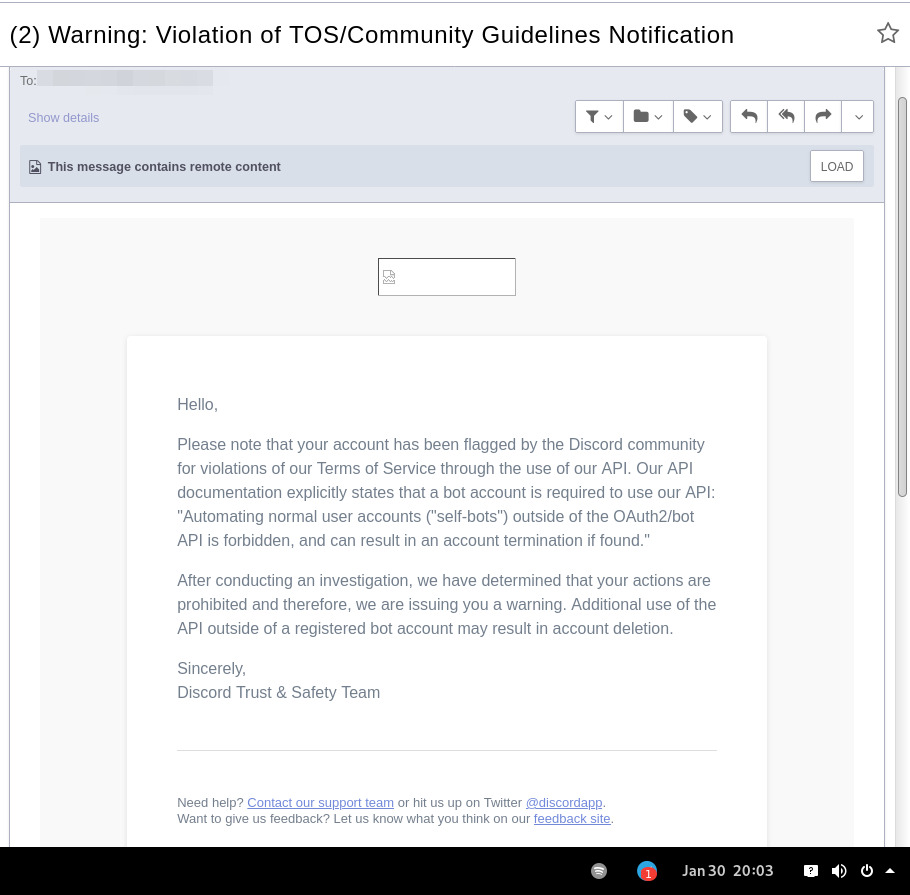
In September 2021 there was a bunch of issues with people using different third-party clients being asked to reset their passwords daily due to "suspicious activity", raised here in issue-18 (check out other links there too), which seem to have gone away within a week.
At least one person in that issue thread also reported being asked for phone account verification for roughly same reason about a week after that, so maybe "suspicious activity" triggering for 3p clients haven't really gone away.
Cordless client developer's acc apparently got blocked for ToS violation when initiating private chats. This client doesn't have such functionality, but maybe one should be more careful with private chats anyway, as that seem to be a major spam vector, so is more likely to be heavily-monitored, I think.
In the #rdircd IRC channel, a person mentioned that their discord account got some anti-spam mechanism enabled on it, disallowing to log-in without providing a phone number and SMS challenge (and services like Google Voice don't work there), immediately after they've initiated private chat with someone in Ripcord client.
"I contacted support at the time and they just responded that they can't undo the phone number requirement once it has been engaged"
It also seems like Ripcord currently might be trying to mimic official client way more closely than rdircd script here does (where latter even sends "client"/"User-Agent" fields as "rdircd" and appears that way under Devices in User Settings webui), and such similarity might look like Terms of Service violation to Discord (modifying official client), instead of Community Guidelines violation (third-party client), but obviously it's just a guess on my part as to whether it matters.
There are also some HN comments clarifying Discord staff position in a thread here, though none of the above should probably be taken as definitive, since third-party and even support staff's responses can be wrong/misleading or outdated, and such treatment can likely change anytime and in any direction, without explicit indication.
Note: only using this API here, only going by public info, can be wrong, and would appreciate any updates/suggestions/corrections via open issues.
Last updated: 2024-11-26
Discord API docs don't seem to cover "full-featured client" use-case, likely because such use of its API is explicitly not supported, and is against their rules/guidelines (see WARNING section above for details).
It's possible that more recent official OpenAPI spec in discord/discord-api-spec repo has a more complete documentation though.
Discord API protocol changes between versions, which are documented on Change Log page of the API docs.
Code has API number hardcoded as DiscordSession.api_ver, which has to be bumped there manually after updating it to handle new features as necessary.
Auth uses undocumented /api/auth/login endpoint for getting "token" value for email/password, which is not OAuth2 token and is usable for all other endpoints (eg POST URLs, Gateway, etc) without any prefix in HTTP Authorization header.
Found it being used in other clients, and dunno if there's any other way to authorize non-bot on eg Gateway websocket - only documented auth is OAuth2, and it doesn't seem to allow that.
Being apparently undocumented and available since the beginning, guess it might be heavily deprecated by now and go away at any point in the future.
There are some unofficial docs for officially-undocumented APIs and quirks:
Sent message delivery confirmation is done by matching unique "nonce" value in MESSAGE_CREATE event from gateway websocket with one sent out to REST API.
All messages are sent out in strict sequence (via one queue), waiting on confirmation for each one in order, aborting rest of the queue if first one fails/times-out to be delivered, with notices for each failed/discarded msg.
This is done to ensure that all messages either arrive in the same strict order they've been sent or not posted at all.
Discord message-posting API has enforce_nonce parameter (since 2024-02-12), which allows to retry posting messages safely from duplication, but at the moment retries are only performed here on API rate-limiting.
Fetching list of users for discord channel or even guild does not seem to be well-supported or intended by the API design.
There are multiple opcodes that allow doing that in a limited way, none of which work well for large discords (eg 10k+ users).
request_guild_members (8) doesn't return any results, request_sync (12) doesn't work, request_sync_chan (14) can be used to request small slice of the list, but only one at a time (disconnects on concurrent requests).
Latter is intended to only keep part of userlist that is visible synced in the client, doesn't support proper paging through whole thing, and only gets updates for last-requested part with indexes in it - basically "I'm in this guild/channel, what should I see?" request from the client.
Some events on gateway websocket are undocumented, maybe due to lag of docs behind implementation, or due to them not being deemed that useful to bots, idk.
Discord allows channels and users to have exactly same visible name, which is not a big deal for users (due to one-way translation), but still disambiguated irc-side.
Discord emojis like :smile: are handled in multiple different ways:
Looked up among unicode emoji names that work in all discords and translated to a unicode character, eg :smile: to
Can be found in current discord's custom emojis and replaced by a message formatting tag for it, like :debian: to a tag like <:debian:12345> , which discord clients will display as debian logo in a linux-related discord.
If user has Discord Nitro subscription, custom emoji from any discord works in any other discord as well.
rdircd doesn't handle last Nitro case at all (looks-up custom emojis in one discord), while first two cases are distinguished from each other via rdircd.unicode-emojis.txt.gz file (optional/configurable), which has list of all non-custom emojis (~6k of them), pulled from Discord WebUI using extract-unicode-emojis-from-js.py script.
If generic emojis stop working in the future (incorrectly treated as if they're discord-custom ones), due to renames or new additions, that script can be used to update the list of them easily.
Gateway websocket can use zlib compression (and zstd in non-browser apps), which makes inspecting protocol in browser devtools a bit inconvenient.
gw-ws-har-decode.py helper script in this repo can be used to decompress/decode websocket messages saved from chromium-engine browser devtools (pass -h/--help option for info on how to do it).
Run ./rdircd --test for info on some extra development/testing helper commands.
dev-cmds = yes under [debug] also enables some runtime helpers in #rdircd.control.
Adding support for initiating private chats might be a bad idea, as Cordless dev apparently got banned for that, and since these seem to be main spam vector, so more monitoring and anomaly detection is likely done there, leading to potentially higher risk for users.







