reliable discord client irc daemon
1.0.0

目次
説明
警告
特徴
制限
使用法
その他の機能情報
ランダムなヒントとトリック
リンク
サードパーティのクライアントブロッキングの詳細
APIおよび実装ノート
RDIRCDは、IRCクライアントを介して個人的なDiscordアカウントを使用できるデーモンです。
「Discord Servers」上のすべてのプライベートチャットとパブリックチャネル/スレッドを、作成するIRCサーバー上のチャネルに翻訳し、ブラウザや電子アプリの代わりに通常のIRCクライアントを使用することに接続できます。
最初の目標の1つは、メッセージの配信を確認し、その点で他の同様のクライアントにはやや不足していた問題について通知することであったため、「信頼できる」という名前です。
このことについて話すIRCチャンネルがあります - Libera.Chatに#RDIRCDに参加してください。
IRC URL:IRCS://irc.libera.chat/rdircd(githubはircs:// linksを作成することを拒否します)
他の代替クライアントのまれに設定されていないリストについては、以下のリンクセクションも参照してください。
リポジトリURL:
最後の1つには、TODOリストなどのgit-notesがあります。
このアプリを「ボット」または「標準ユーザーアカウントの自動化」と呼ぶことはしませんが、ここでの意図は自動化されたメッセージを投稿したり、何もスクレイプしたりしないことです。ランダムな非勤務ユーザー。
このアプリは「ボット」として存在せず、ボット固有のエンドポイントを使用していないため、それを使用すると、発見された場合にアカウント終了が発生する可能性があります。
以下のサードパーティのクライアントブロッキングセクションの詳細についても参照してください。
あなたは警告されています! :)
信頼できる発信メッセージの順序と配信。
これらの新しいものを作成することを除いて、プライベートチャネルとパブリックチャンネル、チャネル注文、スレッド、フォーラムの両方のサポート。
サーバーごとおよびグローバルキャッチオールチャネルは、一般的なアクティビティを追跡します。
構成可能なローカル名エイリアス/改名、発信メッセージブロック/交換、受信したメッセージの再gExpフィルタリング。
#rdircd.controlチャネルを介した限られたランタイム再構成のサポート。
IRCギルド/チャンネル/ユーザー名の翻訳に対するシンプルで一貫した不一致。
これらのいずれも、再接続、チャネル、またはサーバーの変更など後に変更されません。翻訳はほとんど決定論的であり、他の名前に依存しません。
不一致の言及、返信、添付ファイル、ステッカー、絵文字、その他のイベント、いくつかの組み込みリンクの基本的な注釈。
送信されたメッセージ、編集、削除におけるDiscordユーザーの言及と絵文字の翻訳に対する限定的なサポート。
任意のチャンネルの/トピック(/t)コマンド、たとえば「/t log 2h」で簡単にアクセスできるバックログ(/t)コマンドは、最後の2時間のバックログまたは「/t log 2019-01-08」を表示して、その時点から現在までバックログをダンプし、必要に応じて複数のバッチを取得します。
他の手段(例:ブラウザ)を介して送信されたメッセージは、IRC名が不一致からのニックへの翻訳と一致しない場合、Diff Nickから来るかもしれません。
どこでも完全なユニコードのサポート/使用。
IRCプロトコルはIRCV3 Docsから実装されていますが、RFC以外のものを使用していないため、古いクライアントと互換性があるはずです。オプションのTLSラッピング。
広範なプロトコルおよびデバッグロギングオプション。#rdircd.debugチャネルを介して実行時にアクセスできるもの。
AIOHTTPモジュールのみを必要とする単一のPython3スクリプトで、どこでも実行または展開するのに些細なことです。
AMD64の比較的安定したメモリフットプリントで実行されます。これは、おそらくBitlbee-Discordよりも多いが、それらの漏れやすいブラウザータブよりも優れている。
再構築、GDB、錆など、簡単に調整してデバッグできます。
IRCから送信されたユーザーの言及と絵文字のみが、チャネル、役割、ステッカー、コンポーネントなどではなく、不一致のタグ(有効である場合は以下を参照)に翻訳されます。
いかなる種類の添付ファイルや埋め込みを送信することをサポートしていません - IRCではなく、そのためにWebUIを使用してください。
ただし、Discordはリンクを自動的に注釈するため、メディアの投稿はそれと同じくらい簡単です。
あらゆる種類の読み取りおよび送信メッセージを超えた不一致固有のアクションはサポートされていません - つまり、不一致、招待、招待、禁止、タイムアウトなどのアカウントやチャネルの作成はありません - WebUI、ハーモニー、または適切なDiscordボットを使用します。
新しいプライベートチャットとチャンネル/フォーラムスレッドの作成はサポートされていません。
プライベートチャットについては、サポートするのは危険かもしれません。詳細については、以下のサードパーティのクライアントブロッキングセクションの詳細を参照してください。
ユーザーの存在(オンライン、オフライン、AFK、ゲームなど)をまったく追跡しません。
ユーザーがイベントに参加 /パーツイベントに参加し、IRC /名前を非常に簡単な方法で処理することはありません。アプリの起動以来、IRC-NamesTimeout(デフォルトでは1日)以降にチャンネルを使用したニックのみをリストします。
一般的なすべての非テキストチャットのもの(音声、ユーザープロファイル、ゲームライブラリ、ストア、友人リストなど)を完全に無視します。
Discordは「Read_state」サーバー側を追跡しますが、これはここではまったく使用されていません - 履歴リプレイのトリガーは手動でのみ行われます(/tコマンドでチャンで)。
Discord Multifactor認証モードをサポートしていませんが、マニュアルトークンAuthはおそらくそれを回避できます - 以下のCaptchasのメモを参照してください。
Slashコマンド(ボット用)は特別な方法でサポートされていませんが、IRCクライアントがこれらを通過する場合、おそらくそれらを送信できます。
おそらくIRC自体と同じですが、最もユーザーフレンドリーなものではありません。
Linuxでのみ実行するので、OSX/Windowsで「ただ機能」することはまずありませんが、IDKです。
DiscordとIRCの両方のカスタムアドホック実装。Pypi、およびそのようなWRT互換性、バグ、コーナーケースでのあらゆる種類の露出やテストの恩恵を受けることはありません。
それを使用するためのDiscordガイドラインに反対しているようです - 詳細については、上記の警告セクションを参照してください。
OpenBSDプラットフォームでは、Scrypt-Encoded IRC password-hash=使用する場合、Scryptモジュールを個別に( pkg_add py3-scryptなどを介して)インストールする必要がある場合があります。
最も簡単な方法は、Linuxディストリビューションが利用可能な場合、Packageの/for for for for for for for for for for for for for for linuxの使用です。
現在既知のディストリビューションパッケージ(2020-05-17の時点):
Docker/Podmanまたはその他のOCI互換コンテナ化された環境でこれを実行するためのDockerFileとDocker-Compose.ymlもあります。
(readme.docker-permissions.mdドキュメントも参照してください。
以下のこのセクションの残りの部分で説明されているように、1つのスクリプトとそのいくつかの依存関係も手動でインストールするのが簡単です。
Debian/ubuntuでは、この1つのコマンドで依存関係をインストールできます。
# apt install --no-install-recommends python3-minimal python3-aiohttp
他のLinuxディストリビューションにも同様のパッケージがある可能性があります。これらを最初のオプションとして使用することをお勧めします。これにより、更新を取得し、ローカルメンテナンスの負担を追加し、失敗した場合は「PIP」を介してモジュールをインストールするためのフォールバックのみを避けることをお勧めします。
Python(Python3)がインストールされた任意の任意のディストリビューションで、PIP/VENVを使用してAIOHTTPモジュール(およびそのDEPS)を使用して、ユーザーの家の監督を備えていない場合が機能する可能性があります(以下の例でもRDIRCDを実行するために使用されます)が、OSパッケージマネージャーを介して既にインストールした場合、これを既にインストールした場合、これを無視しました。
 root # useradd -m rdircd
root # su - rdircd

## Option 1: use venv to install dependencies into "_venv" dir

rdircd % python3 -m venv _venv
rdircd % ./_venv/bin/pip install aiohttp

## Option 2: install pip (if missing) and use it directly

rdircd % python3 -m ensurepip --user
rdircd % python3 -m pip install --user aiohttp
PIPX(ディストリビューションリポジトリなど)を使用している場合、このようなPython pipx run rdircd --helpと自動維持依存関係を実行するために使用できます。
上記の要件がインストールされた後、このリポジトリからスクリプト自体を取得し、次のように実行できます。
 ## Ignore "useradd" if you've already created a user when running "pip" above
root # useradd -m rdircd
root # su - rdircd

## If using "venv" install example above - load its env vars
# Or alternatively run script via "./_venv/bin/python rdircd ..." command line
rdircd % source ./_venv/bin/activate

rdircd % curl -OL 'https://raw.githubusercontent.com/mk-fg/reliable-discord-client-irc-daemon/master/rdircd{,.unicode-emojis.txt.gz}'
rdircd % chmod +x rdircd

## Use "pipx run rdircd ..." here and below, if using pipx instead of pip/venv/distro-pkgs
rdircd % ./rdircd --help
...to test if it runs...

rdircd % ./rdircd --conf-dump-defaults
...for a full list of all supported options with some comments...
...alternatively, to create rdircd.ini template: ./rdircd -c rdircd.ini --conf-init

rdircd % nano rdircd.ini
...see below for configuration file info/example...

rdircd % ./rdircd --debug -c rdircd.ini
...drop --debug and use init system for a regular daemon...
osブートで実行するデーモン/スクリプトを設定するために、rdircd.service systemdユニットファイルは、ほとんどのLinux環境(execstart = options and pathsの編集)で使用できます。 rootとしてではなく、上記のスニペットで作成された「rdircd」ユーザーのように実行されるようにしてください。
後でスクリプトを更新するには、必要に応じて、上記のCurlコマンド、Repo Cloneのgit-Pull、 docker-compose up --build 、またはosパッケージの更新、または他の方法で、通常は最初にインストールされた方法に関連する他の方法で、最新バージョンを最新バージョンに置き換えます。
〜/.rdircd.iniで、DiscordおよびIRCD Auth Credentialsを使用して構成ファイルを作成します(すべてを参照--conf... opts wrt these):
 [irc]
password = hunter2

[auth]
email = [email protected]
password = discord-password
注:IRCパスワードは省略できますが、システム内のすべてからそのポートをファイアウォールしてください(またはとにかく実行するかもしれません)。
ただし、パスワードを設定する場合は、上記のようなIRC password=オプションを使用しないでください。 password-hash=および-H/--conf-pw-scryptを使用して代わりに生成します。いずれにせよ、IRCクライアントのこのサーバーへの接続を構成するときは、必ずそのパスワードを使用してください。
rdircd daemon: ./rdircd --debugを起動します
IRCクライアントを「localhost:6667」に接続します - デフォルトのリッスン/バインドホストとポート。
( ./rdircd --conf-dump-defaultsまたは対応するCLI -i/--irc-bind /-S/ -s/--irc-tls-pem-fileオプションは、非ローカルホスト接続のために、さまざまなホスト/ポートおよびTLSソケットラッピングをバインドするためのオプションを参照してください)
IRC /listコマンドを使用して、結合されたすべてのDiscordサーバー /ギルドのチャネルを表示します。
 Channel           Users Topic
-------           ----- -----
#rdircd.control       1  rdircd: control channel, type "help" for more info
#rdircd.debug         1  rdircd: debug logging channel, read-only
#rdircd.monitor       1  rdircd: read-only catch-all channel with messages from everywhere
#rdircd.leftover      1  rdircd: read-only channel for any discord messages in channels ...
#rdircd.voice         1  rdircd: read-only voice-chat notifications from all discords/channels
#rdircd.monitor.jvpp  1  rdircd: read-only catch-all channel for discord [ Server-A ]
#rdircd.leftover.jvpp 1  rdircd: read-only msgs for non-joined channels of discord [ Server-A ]
...
#me.chat.SomeUser     1  me: private chat - SomeUser
#me.chat.x2s456gl0t   3  me: private chat - some-other-user, another-user, user3
#jvpp.announcements   1  Server-A: Please keep this channel unmuted
#jvpp.info            1  Server-A:
#jvpp.rules           1  Server-A:
#jvpp.welcome         1  Server-A: Mute unless you like notification spam
...
#axsd.intro           1  Server-B: Server info and welcomes.
#axsd.offtopic        1  Server-B: Anything goes. Civility is expected.
ここの情報に関するメモ:
/j #axsd.offtopic ( /join )は、通常のIRCを使用してMSGSを表示 /投稿します。
IRC側のチャンネルが結合/部品が結合します。
実行/topic (多くの場合/t )IRCコマンドは、チャネル固有のコマンドの詳細を表示します。たとえば、前回のrdircdシャットダウンの前に最後のイベントから開始するバック/t logをフェッチしてリプレイするためのバックログ、 /t log list /t log 2hのアクティビティタイムスタンプをリストします。
daemon Control/configコマンドは#rdircd.controlチャンネルで利用できます。#rdircd.debug chanを使用して、さまざまなロギングを調整し、デーモン状態とプロトコルをより詳細に検査し、「ヘルプ」を送信して利用可能なコマンドをリストします。
さまざまなサポートされている構成設定の幅広いアウトラインについては、rdircd.defaults.iniファイル( ./rdircd --conf-dump-defaults )などを参照してください。
ここでは、さまざまなオプションおよびそれほど明白でない機能に関するメモが収集されています。
より一般的な情報については、「使用法」セクションを参照してください。
複数のINIファイルを-cオプションで指定し、順番に互いにオーバーライドできます。
最後の1つは、wrt [状態]、token =、同様のランタイムのもの、および#rdircd.controlチャネルコマンドを介して設定された任意の値が更新されるため、Auth and Optionsを使用して永続的な構成を指定し、そのようなダイナミック状態に分離(最初に空)を指定することが役立ちます。
例./rdircd -c config.ini -c state.iniそれを行います。
--conf-dumpこれらすべてから組み立てられた結果として生じるINIを印刷に追加できます。
--conf-dump-defaultsフラグを使用して、すべてのオプションとそのデフォルトをリストできます。
頻繁な状態のタイムスタンプの更新は、内側に行われます(小さな固定長値)が行われますが、書き込みの前にCtimeをチェックするため、とにかくいつでもこれらのファイルを手動で編集する必要があります。
Control-Channelのスクリプトまたは「リロード」コマンドにSighupを送信するには、すべての構成ファイルから値を同じ順序でロードして適用する必要があります。このような操作は、ファイルに欠落している値をデフォルトにリセットしないため、現在の構成の上に明示的に設定されたもののみを適用することに注意してください。
Rdircd(およびDiscord)のすべてのチャットはチャンネルです。
IRCの /Q、 /Query、および /MSGは、IRC型の方法で使用できません。
プライベートチャットで話すには、#me.chat。<username>のようなチャンネルに参加してください。これは、他のDiscord/rdircdチャネルと同様に動作します。
現在、RDIRCDから新しいプライベートチャットを作成したり、他のクライアントやWebUIを使用したり(または誰かに連絡するように依頼する)方法はありませんが、プライベートチャットチャンネルを作成したら、RDIRCDでも使用できます。
必要に応じて、プライベートメッセージを確実に監視するために、自動接続チャネルおよび /または /eg#rdircd.leftover.meチャネルなども参照してください。
Discordチャンネルを表すすべてのIRCチャネル - 送信/topic (または/t速記)は、IRCクライアントでサポートされることが多い) - これは、次のようなすべてのチャネル固有のコマンドに関する最新情報を印刷する必要があります。
/t info名前を変更するために、IDSなどの内部ギルド/チャネル情報を表示します。
siscordに正確なチャネル名を印刷する必要があります(Rdircdが行うローカル改名や不一致からの翻訳なし)、そのトピック、タイプなど。
/t info {user-name...} - この不和のユーザー名(またはその一部)に関するクエリ情報。
たとえば、 /t info joe137チャンネルが属しているdiscordサーバーでjoe137ユーザーを検索し、さまざまな不一致の名前のように情報を印刷します。
/t log [state] - 「state」ポイント以来の履歴を再生します(最後のrdircdはデフォルトで停止します)。
/t log ( /t log 1と同じ)は、Rdircdの再起動後に使用できます。これは、停止した後に投稿された可能性のあるメッセージをDiscordに照会します。
または/t log 0 rdircdが見た最後のmsg以降の履歴を確認するには、不一致 /ネットワークが燃え上がり、何かがそのように失われた場合があります。
(これらの1および0数値は、INIファイルの[state]に保存 /更新された/t log list出力から保存されたタイムスタンプを指します)
また、過去15分以内にチャネル履歴を要求 /リプレイするために、絶対的または相対的な時間、EG /t log 15mで使用することも、 /t log 2019-01-08 12:30で履歴を再生して、その特定のRdircd-local時間以来履歴を再生することもできます(TimeZoneもそこに指定されていない限り)。
任意のDiscord ProxyチャンネルのJust /tまたは/topicそのようなコマンドとそれらの使用方法に関する詳細情報をリストします。
Discordチャンネルに送信された最後のメッセージはs/hoogle/google/などのSED-Replacementコマンドを使用して編集することができます。
または//delコマンドを使用して削除できます - 以下の「クイック編集/削除」セクションを参照してください。
メッセージの@silent Prefix-Commandは、それに関するユーザー通知を抑制することができます(以下のどこかで説明します)。
#rdircd.controlや#rdircd.debugなどの特別なチャネルで: hまたはhelpを送信します。
サポートされているコマンドのリストをやや長くすることができます。たとえば、#rdircd.controlのコマンドの一部があります。
status (またはst )を使用して、DiscordおよびIRC Connection Infosを確認できます。
connect / disconnect (またはon / off )コマンドを使用して、1回限りの使用法に対して、不一致の接続を手動で制御するか、ローカルネットワークがそのようにダウンしている間に失敗したconn警告を一時的に抑制することができます。
set irc-disable-reacts-msgs yes -temp-disable discord Raction通知( setコマンドを使用)を設定します。
または、 set -s irc-disable-reacts-msgs yesを永続的にする( -s/--save )、またはすべての一般的な構成オプションとその値を確認するためのパラメーターのない単純なsetを設定します。
rx Block mee6 bot-noise = (?i)^<MEE6> -mee6ボットからのすべてのメッセージをtempブロックします。
(以下のこのフィルタリングに関するセクション、またはそのようなもののより多くの例を参照してください。
...そしてそれらの多くがあります - 完全な最新情報のためにそこにタイプのhelp 。
#rdircd.monitorを使用して、関連するすべてのサーバーからアクティビティを表示できます。関連するIRCチャネル名が付いているすべてのメッセージを取得します。
#rdircd.monitor.guild(ここで、「ギルド」はハッシュまたはエイリアスです、上記参照)は、特定のDiscord Server/Guildの同様のキャッチオールチャネルです。
#rdircd.monitor.meは、たとえば、Discordアカウントのプライベートチャットやメッセージを監視するのに役立ちます(自動接続チャネルの例も参照)。
#rdircd.leftoverおよび同様の#rdircd.leftover.guildチャネルはモニターチャネルのようなものですが、 /join #rdircd.leftover.game-xクライアントが参加しているチャネルからのメッセージをスキップします。何らかの形で「残り」。
#rdircd.voiceは、#rdircd.monitorに似たチャネルですが、音声チャットのイベント通知のみをキャッチして、それらをタイムリーに追跡できるようにします。
これらのチャネルは、必要でない場合は無視することも、[IRC] INI Config-Fileセクションの下の空の値にchan-monitorを設定して完全に無効にすることもできます。たとえば、ディスコードごとの音声活性チャネルは、そこでデフォルトで障害者です。
構成ファイルには、モニター/レフトオーバーチャネルで無視するチャネル名のオプションリストの[Unmonitor]セクションもあります。
 [unmonitor]
# All filters are applied to channel names and are case-insensitive
Ignore this particular " bot-commands " channel = game-X.bot-commands
skip forum threads in " game-X " guild = glob:game-X.forum.=*
" wordle " threads in any guild (and chans ending in .wordle) = glob:*.wordle
Don ' t show threads in any forum-like channels = re:^[^.]+ . (forum|discuss) . =.*
disregard all voice-chat stuff = glob:*.vc
このような構成セクションのキー(「= "の前の部分)は無視され、例えばパターン(上記の例のように)を説明するコメント(上記のように)、値は正確なチャネル名(discord prefix、optional#-prefixを含む)または「re:」 - グローブ/regexpパターン(シェルのような<some-key/comment> = glob:<wildcard-pattern>または<some-key/comment> = re:<regexp-pattern>行 - 上の例を参照してください。
これらのフィルターが一致させるチャネル名はモニターチャネルから削除されるため、これを使用して、気にしないで見たくないスパムのようなもののリストを定義できます。
#rdircd.controlの「unnonitor」(または "um")コマンドは、いつでもフライでそのようなフィルターを追加/削除できます。特定のルールがまだ必要/使用されているかどうかを追跡するためのmatch-counters設定オプションも参照してください。
モニターチャネル内のメッセージは、長期および/またはマルチラインのMSGによる過度の洪水を回避するために、特定の長さ/線に限定されています。 [IRC]構成セクションの「Len-Monitor」および「Len-Monitor-Lines」パラメーターは、これらの制限を制御するために使用できます。モニターチャネルの名前形式を変更するオプションもあります。
IRCでは、誰もが1つの名前を持っていますが、それはDiscordの場合ではありません。各ユーザーは次の名前を持つことができます。
login - すべてのユーザーを一意に識別する「ユーザー名」の不一致。display - ユニークではなく、Discordアカウント設定でユーザーによって設定されています。nick - サーバーと友人の「ニックネーム」は、必ずしもあなたがそうではありません。 login IRCニックネームに最も近い概念です。これは、グローバルではない、一貫性があり、短く、ascii-onlyであり、[discord]セクションでname-preference-order = loginオプションを設定することで使用できます(デフォルトではありません)。
公式のDiscordクライアントは最初に他の名前を表示します。そのため、 name-preference-orderオプションはデフォルトでnick display login 。これは、Iscord/Friend固有のニックネームを最初に使用します。
IRCが許可しない派手なユーザーセットのニックネームの他のものは、一般的なUnicode文字、たとえば「・」ミドルドットのあるスペース、または<> unicode矢印のある一般的なIRC-nickブラケットにも置き換えられます。長い不一致のニックは切り捨てられます。
現時点で不一致固有のディスプレイ/ニックネームを変更するユーザーに関するIRC通知はありません。彼らはユニークである必要はありません。
これはすべて、INIファイル設定(または#rdircd.controlチャンネル)を介して構成可能であるため、愚かで狂ったようになった場合は、 name-preference-order = login nowe conding recフレンドリーニックを代わりに使用します。
IRC /whoコマンドまたは/topic info 、これらの名前間で翻訳するのに役立ちます。たとえば、 / /who /t info john1234使用して、その名前 /ログインの情報をチャネルバッファーに印刷できます。
(古い名前がこれらのために機能し続けないため、「エイリアス」よりも「改名」に似ています)
ハッシュベースの不一致のプレフィックスまたはサーバーチャンネル名をより読みやすい/記憶に残る、または意味のあるものに置き換えるために、構成ファイルで定義できます。
 [renames]
guild.jvpp = game-x
guild.sn3y = log-bot
guild.sn3y.chan-fmt = logs/{name}.log
chan.some-long-and-weird-name = weird
chan.@ 710035588048224269 = general-subs
user.noname123 = my-pal-bob
user.@ 123980071029577864 = joe
これは:
EG#jvpp.infoを#game-x.info-lettersoup guild-idにターンします。これは、その不一致のすべてのチャネル - 「ギルド」の改名に適用されます。
#sn3y.debugのようなものから#logs/debug.logのようなものから、「sn3y」のチャネル名のフォーマットを変更します - チャネル名形式の変更。
フォーマットテンプレートは、「名前」(チャンネル名)と「プレフィックス」(ギルドプレフィックス - この例では「ログボット」となる」と「name name)と「format syntax」を使用します。デフォルト形式は{prefix}.{name}です。
このフォーマットオプションは、モニター/レフトオーバー名(s)には影響しません(例:#rdircd.monitor.log-botまたは#rdircd.leftover.game-x) - 「chan-monitor-guild」および「chan-leftover-guild」オプションを[IRC]セクションで変更するためのセクションを参照してください。
その長いチャンネルを短い名前(ギルドプレフィックスを保持)に変更する - 「Chan」の改名。
これは、そのようなチャネル名が存在するすべてのギルドに影響し、ソース名は /リストと同じIRC形式であり、RFC1459-CASEMAPP(IRCと同じ)であることに注意してください。
ID = 71003588048224269を備えたチャネルを「ミーム」(ギルドプレフィックスの保持)に変更します。
その長いDiscordチャネル識別子(「Snowflake」とも呼ばれます)は、対応するIRCチャネルで/t infoトピックコマンドを入力することで見つけることができ、その特定のチャネルを参照するために使用できます。
これは、2つのチャンネルが同じ不一致内でまったく正確な名前を持ち、通常は割り当てられる場合に特に役立ちます.<id-hash>非記述的な接尾辞。
不一致のユーザー名とIDが参照するカップルユーザーの名前を変更します。
/t info <nick-or-part-of-it> command in discordチャンネルまたは類似のコマンド/who irc-commandは、そこで使用されているものと同様に、不一致IDを検索するのに役立ちます。
現在、リストされているタイプの変更のみが実装されていますが、不一致のプレフィックスとチャネルには実装されていますが、システム/モニター/レフトオーバーおよびプライベートチャットチャンネルの名前を設定する[IRC]セクションの下には、「Chan-sys」、「chan-monitor」、「see "./rdircd -dump-Defaults" outputsを参照)もあります。
たとえば、 chan-monitor-guild = {prefix}を設定します。デフォルトの長い#rdircd.monitor。
Discord Privateメッセージは、「Me」サーバー/ギルドのチャネルを作成して投稿し、Discord WebUIで行うのと同じように、他のギルド/チャンネル(リスト、参加/パート、送信/RECV MSGSなど)と同じ方法で対話できます。
#rdircd.monitor.me(または#rdircd.monitor、上記を参照)に参加して、そこにすべての新しいMSG/チャットを取得します。
友人のリクエストを受け入れ、これらを追加/削除することは、通常のDiscord WebUIを介して実行でき、このクライアントには特別な方法で実装されていません。
INVITESを介してIRCクライアントに新しいプライベートチャットを簡単にポップアップする簡単な方法については、以下の自動接続チャネルセクションも参照してください。
「スレッド」は不一致の機能であり、非アドミンユーザーが特定のトピックに対していつでも一時的なアドホックサブチャネルを作成できるようにします。これは、比較的短縮された非アクティブなタイムアウト(1日など)の後に自動削除(「アーカイブ」)です。
Discordの「フォーラム」チャンネルは基本的にチャンネルであり、人々はデフォルトのチャンネルのチャットに取って代わるもののリストとともに、テッドでのみ作成して話すことができます。
すべてのアーカイブスレッドは、#gg.generalのような名前を備えた通常のIRCチャネルとしてRdircdチャネルリストに表示する必要があります。
親チャネルのスレッドを表示して対話する方法にはいくつかのオプションがあります(主に[Discord]セクションで、-conf-dump-defaults出力を参照):
 [irc]
thread-chan-name-len = 30

[discord]
thread-id-prefix = =
thread-msgs-in-parent-chan = yes
thread-msgs-in-parent-chan-monitor = no
thread-msgs-in-parent-chan-full-prefix = no
thread-redirect-prefixed-responses-from-parent-chan = yes
...
しかし、これらすべてが無効になっていても、スレッドが開始されたときに簡単な通知をチャネルに送信する必要があります。そうすれば、それらを完全に見逃すことはありません。
IRCから新しいスレッドを作成したり、古いものを退職したり、これらを管理したり、IRCにスレッドチャネルに参加することは、実際にはDiscord UI(チャンネル名でピン留めする)で「スレッドに参加」することにサポートされていませんが、そこに何かを投稿することは自動的に行う必要があります。
[IRC]セクションの「Chan-auto-join-re」設定では、メッセージが表示されたときにチャネル名(#prefixなし)を自動結合するようにregexpを指定することができます。
たとえば、#me。*チャネル(直接メッセージ)を自動結合するには、正規表現値(python "re"構文)を使用できます。
 [irc]
chan-auto-join-re = ^me.
または、IRCクライアントにすべてのチャネルに自動結合するには、 chan-auto-join-re = .
このオプションの空の値(デフォルト)は何も一致しません。
これは、#rdircd.monitor/leftoverチャンネルを介して新しいものを追跡する代わりに使用できます。
このregexpは、他の値と同じ#rdircd.controlチャネルの「set」コマンドを使用して、実行時に微調整できます。たとえば、特定の不一致またはチャネルの一時的なこの機能を有効化/無効にします。
言及は、discordの@usernameタグで、誰かにメッセージを直接するように警告するように設計されています。
デフォルトの構成で、eg <Galaxy?·Brain> Hi!そして、それらを強調表示し、 Hey @galaxy and welcomeうまくいくはずです。確かに彼らの完全なIRCニックを使用することもできます。
どのように機能するか:RDIRCDが送信されたメッセージ( @galaxy @-mention上記)の何かに対してmsg-mention-re regexp conf-optionと一致する場合、それは「言及」として扱われます。
そのためのデフォルト値は次のようになります:
 [discord]
msg-mention-re = (?:^|s)(@)(?P<nick>[^s, ; @+!]+)これは、送られた行での単語のような空間または句読点で分離された@nick言及と一致します。
regexp(python "re" syntax)には?: nick/username lookup string @持つ「ニック」グループを挙げている必要があります。これは、discord言及タグに置き換えられます。
上記のデフォルトのregexpは、そのバックスラッシュプレフィックスのために(?:^|s)部分と一致しないため、eg @somethingをWebAppで(およびなしでなし)に表示するように送信する必要があります。
別の例として、ラインの開始時にクラシックなIRCスタイルのハイライトを作成するには、このようなregexpを使用できます。
msg-mention-re = ^(?P<nick>S+)(:)(?:s|$)
また、 mk-fg: some msg @mk-fg some msgに翻訳します( @-partはnection-tagです)。 URLリンクのマッチングを避けるために、その後のスペースがそこにあるRegexpに含まれています。
特定のDiscordユーザーをIDにするには、「Nick」グループは次の方法で使用されます。
最近のすべてのギルド関連のIRC名(メッセージ著者、反応、プライベートチャネルユーザーなど)とのケース非感受性マッチ。 user-mention-cache-timeout configオプションは、「最近の」タイムアウトを制御します。
@が入力された後の自動完了のために、DiscordがWebUIで行うのと同じように、接頭辞による一意の名前の完成。
キャッシュされたまたは一意の一致が見つからない場合 - エラー通知が発行され、メッセージが送信されません。
このような厳格な行動は、意図しない誤翻訳を避けるように設計されており、間違った人を強調することは一般にスペルミスによってのみ可能であるべきです。
関連するmsg-mention-re-ignoreオプション(上記のパターンの完全なキャプチャと一致するレオセックス)を使用して、そのように扱われることを何度もスキップすることもできます。
Discordユーザーリストは非常に大規模な(500K以上のユーザー)、チャネルによって分割されず、クライアントによって事前にフェッチされることを意図していないことに注意してください。
同様のregexpは、ディスコードごとの絵文字用に構成されています。
msg-emoji-re = (?:^|s)(:)(?P<emoji>w+)(:)(?=[^w]|$)
たとえば、 I use :Arch: btw from IRCは、このregexp、このdiscordの絵文字(ケース非感受性)を使用して「絵文字」グループをルックアップ/交換し、 I use ? btw 、そのような絵文字がその不一致で利用できず、一般的なユニコードのリストにない場合はエラー通知を返します。
msg-mention-re / msg-emoji-reを空の値に設定して、そのような翻訳を無効にします。
上記のDiscordユーザーの言及と同様に、このチャネルに送信された最後のメッセージの編集または削除として解釈されるコマンドに一致する特別な再オゲクタンオプションがあります。
デフォルトのregexpsは次のように見えます(Check -Conf-Dump-Defaults JIC):
 [discord]
msg-edit-re = ^s*s(?P<sep>[/|:])(?P<aaa>.*)(? P =sep)(?P<bbb>.*)(? P =sep)s*$
msg-del-re = ^s*//dels*$ SED/PERL/IRCのようなフォローアップ修正修正条項s/spam/ham/および//del Lineは、内部コマンドとしてのみ使用されることはなく、Discordに送信されることはありません。
( s|/some/path|/other/path| and s:cat /dev/input/mouse0 | hexdump:hexdump </dev/input/mouse0:構文はデフォルトで許可されます。
これらの両方のコマンドは、rdircdによって同じDiscordチャンネルに送信された最後のメッセージで動作し、 //delがその最後のメッセージを削除するだけで、python re.sub()(pcre-like)regexp-replacement関数を編集します。
"msg-edit-re" regexp option value matching sed-like command must have named "aaa" and "bbb" groups in it, which will be used as pattern and replacement args to re.sub(), respectively.
If edit doesn't seem to alter last-sent message in any way, it gets discarded, and also generates IRC notice response, to signal that replacement didn't work.
Successful edit/deletion should also be signaled as usual by discord, with [edit] or such prefix (configurable under [irc] section).
Any older-than-last messages can be edited through Discord WebUI - this client only tracks last one for easy quick follow-up oops-fixes, nothing more than that.
Somewhat similar to quick edits/deletes above, "msg-flag-silent-re" option is there to match/remove "@silent" prefix in messages (by default), which disables sending discord push notifications for it, same as with the official client.
That and similar message flags on incoming messages are not represented in any way, as they don't seem to be relevant for an irc client anyway.
Config can have a [send-replacements] section to block or regexp-replace parts of messages sent (by you) from IRC on per-discord basis.
This can be used to add discord-specific tags, unicode shorthands, emojis, stickers, block/replace specific links or maybe even words/language before proxying msg to discord.
Here's how it can look in the ini file(s):
 [send-replacements]

*. unicode-smiley = (^| ):)( |$) -> 1?2
*. twitter-to-nitter = ^(https?://)((mobile|www).)?twitter.com(/.*)?$ -> 1nitter.ir4

guildx.never-mention-rust! = (?i)brustb -> <block!>
guildx.localize-color-word = bcolor(ed|iS+)b -> colour1
Where each key has the form of discord-prefix> "." comment , with a special * prefix to apply rule to all discords, while values are regexp " -> " <replacement_or_action with one special <block!> action-value to block sending msg with error-notice on regexp match. "comment" part of the key can be any arbitrary unique string.
So when sending eg test :) msg on IRC, discord will get test ? 。
Same as with other regex-using options, regexps have python "re" module syntax, applied via re.sub() function, using raw strings from config value as-is, without any special escapes or interpretations.
Replacements are applied in the same order as specified, but with * keys preceding per-discord ones, and before processing to add discord tags, so anything like @username that can normally be typed in messages can be used there too.
#rdircd.control channel has "repl" command to edit these rules on-the-fly.
If you join #rdircd.monitor channel, see - for example - a message like this:
<helper-bot> #pub.welcomes :: Welcome!
...and think "don't want to see messages like that again!" - config files' [recv-regexp-filters] section or corresponding "rx" command in #rdircd.control channel can help.
Depending on what "messages like that" means, here are some ways to filter those out:
 [recv-regexp-filters]
discard msgs from this bot = ^<helper-bot>
ignore all msgs in that channel of that discord = ^S+ # pub.welcomes ::
drop all msgs from " pub " discord = ^S+ # pub.
no messages from # welcomes channels of any discord pls = ^S+ #w+.welcomes ::
never see " Welcome! " message-text again!!! = ^S+ # S+ :: Welcome!$
some combination of the above = (?i)^<helper-bot> # w+.welcomes ::
...
(tweak eg last example on regex101.com for more hands-on understanding)
Lines in that section have the usual <key> = <regexp> form, where <key> part can be anything (eg comment to explain regexp, like in examples above), and <regexp> value is a regular expression to match against the message in <user> #discord.channel-name :: message text format like that helper-bot msg presented above, and same as can be seen in monitor-channels.
Any message received from discord will be matched against all regexps in order, stopping and discarding the message everywhere on first (any) match. So it might be a good idea to write as precise patterns as possible, to avoid them matching anything else and dropping unrelated messages accidentally.
Same as with some other conf options, basic knowledge of regular expressions might be needed to use such filters - here's a link to nice tutorial on those (though there are 100s of such tutorials on the web).
Particular regexps here use PCRE-like python re syntax, with re.DOTALL flag set ( . matches newlines in multiline messages). I'd also recommend commonly adding (?i) case-insensitive-match flag, as IRC nicks and channel names ignore character case and can be displayed in misleading/inprecise ways in the client.
More random examples of [recv-regexp-filters], incl. more advanced CNF weirdness:
 [recv-regexp-filters]
disregard wordle thread there = ^S+ # pub.general.=w8mk.wordle ::
ignore " wordle " threads everywhere = ^S+ # S+.=w{4}.wordle ::
activity-level bots are annoying = (?i) advanced to level d+[ !]
gif replies of YY in ZZ = (?i)^<YY> # ZZ.S+ :: (-- re:[^n]+n)?[att] .*/imaged.gif?

; ; Advanced stuff: connect multiple regexps via CNF logic (Conjunctive Normal Form)
; ; If key starts with "∧ " (conjunction symbol), it's AND'ed with previous regexp
; ; ¬ (negation) in that prefix inverts the logic, so e.g. "∧¬ ..." is "and not ..."
; ; Disjunction (∨) is the default behavior and doesn't need the (implied) prefix
; ; Any complex logical expression can be converted to such CNF form -
; ;  - use calculators like https://www.dcode.fr/boolean-expressions-calculator

Drop welcome msgs in welcome-chans = (?i)^S+ # w+.S*welcomeS* :: .*bwelcomeb.*
∧ but only if they have an exclaimation mark in them somewhere = :: .*!
∧¬ and not from this specific " lut " discord-prefix = ^S+ # lut.

Most channels here are not relevant = ^S+ # myc.
∧¬ except these ones = ^S+ # myc.(announcements|changelog|forum)[. ]
∨ but skip github CI logs there = ^<github> # myc.
Pretty much anything can be matched with clever regexps, so CNF-logic stuff like in last examples is seldom useful, but might still be simpler than expressing arbitrary ordering or negation in regexps.
See also match-counters config option to keep track of whether specific rule(s) are still needed/being-used.
Mostly useful for debugging - /who command can resolve specified ID (eg channel_id from protocol logs) to a channel/user/guild info:
/who #123456 - find/describe channel with id=123456./who %123456 - server/guild id info./who @123456 - user id lookup.All above ID values are unique across Discord service within their type.
/who @John·Mastodon - user IRC nick or name/login lookup.
Queries all joined discords for that name, and can return multiple results for same or similar non-unique names. Can be useful to check exact nick/display/login names corresponding to an IRC name, or other user info.
/who *665560022562111489 - translate discord snowflake-id to date/time.
Results of all these commands should be dumped into a server buffer (not into channels), regardless of where they were issued from.
In irc channels corresponding to ones on discord, /topic info command (often works as shortened /t info in clients too) can be used to print more information about linked discord channel and its server/guild.
/t info <username> can also print info on user in that discord (unlike /who @<username> which looks the name up in all connected discords), for example /t info john will print info for anyone with "john" in the name.
Usernames in these queries can match exact irc name or discord username, in which case that result is returned, or otherwise more general server-side lookup is made, which can return matches in any type of discord name(s) (see People's names on discord for more info on those).
Discord name translation is "mostly" deterministic due to one exception - channels with same (casemapped) IRC name within same server/guild, which discord allows for.
When there is a conflict, chan names are suffixed by .<id-hash> (see chan-dedup-* config options), to allow using both channels through IRC. Renaming conflicting channels on Discord will rename IRC chans to remove no-longer-necessary suffixes as well. Such renames affect thread-channels too.
Note that when channels are renamed (including name conflicts), IRC notice lines about it are always issued in affected channels, and any relevant monitor/leftover channels, topic should be changed to reflect that old-name channel is no longer useful, and posting msgs there should emit immediate warnings about it.
Discord CDN URLs for attachments can end up being quite long with same host, long discord/channel IDs in there, then actual filename, and ?ex=...&is=...&hm=... trail of CDN parameters after that.
Many Linux IRC clients run in Terminal Emulators though, which often support OSC 8 terminal hyperlink standard, so can display clickable links in a much more compact and readable form.
For example, this attachment URL to a Discord CDN:
https://cdn.discordapp.com/attachments/1183893786254905414/1206216641877377024/20240211_My_Cat_Photo.jpg?ex=65db33c9&is=65c8bec9&hm=9c1dbecbfb2f9edf2302ec078f5e62fffa7f8c2f32e5cd6e3563ae25d8a356e1&
Can be displayed in a terminal like this instead: 20240211_My_Cat_Photo.jpg
Ie same as how one would see hyperlinks displayed in a browser.
This is disabled by default, but if you use terminal IRC client that might support those, set terminal-links = yes option in config file or via set command in an #rdircd.control channel to try it out.
Adjacent terminal-links-re and terminal-links-tpl options can be used to control which part of the link to display as its visible name, which terminal-specific escape characters to use, and such customization.
Discord has voice channels, where in addition to text people can talk verbally, share camera or screen capture (aka streaming, screen sharing). IRC protocol does not support anything like this of course, but it can be useful to get notified when someone starts talking, to hop into different discord client (eg open it in a browser), and use these channels from there.
All IRC channels corresponding to discord voice chats automatically get .vc suffix (unless renamed), and get notice messages about voice activity in there, but limited to following events, to avoid being too spammy:
voice-notify-after-inactivity timeout of inactivity (ie since previous voice-status notification there), default = 20 minutes. And with additional rate-limit set by voice-notify-rate-limit-tbf value, to notify about up to 5 events in a row, but otherwise no more often than once in 5 minutes ("token bucket algorithm" is technically how this limit is implemented/works).
If description above sounds confusing, here's config tweaks to remove all limits on voice-activity event notifications - try those, and maybe re-read this section later if they get too spammy (maybe never!):
 [discord]
voice-notify-after-inactivity = 0
voice-notify-rate-limit-tbf = 0
#rdircd.voice monitor-channel(s) can also be used to only track voice-chat notifications across discords/channels, potentially filtered via "um" command in #rdircd.control or [unmonitor] in ini config(s).
IRC convention is to treat mention of a nickname as a "highlight" - a more notification-worthy event than a regular channel message, so it might be useful if messages in private channels did always highlight the nick for IRC client.
prefix-all-private option can be used for that:
 [irc]
prefix-all-private = mynick:
Might also be necessary to either join monitor/leftover channels or setup auto-joining channels for new PMs to be received by IRC client at all.
Private chats are not implemented via direct IRC messages for various practical reasons, ie to have everything work via channels, because it works that way on the discord side, they can have multiple users, to list those easily, to query topic/history/etc there, and such stuff.
There is a similar prefix-all option, to add prefix to all messages, if prefix-all-private doesn't go far enough.
By default, [discord] msg-ack=yes enables sending (delayed) ACKs for received messages in private chats, so that discord counts those as read and doesn't send an email notification about them. This can be disabled or adjusted in config file.
Messages blocked by eg [recv-regexp-filters] or received when there are no IRC clients connected don't count.
If IRC client supports IRCv3 typing notifications and has these enabled, rdircd will forward those from discord users/channels by default, which can be disabled by setting typing-interval = 0 in [irc] configuration section, or interval/timeout values can be adjusted there to work better for IRC app.
Separate typing-send-enabled option controls whether typing notifications from IRC are sent to a discord channel. It is disabled by default for privacy reasons, and likely needs to be explicitly enabled in IRC client as well.
Any IRCv3 features like that typing stuff can also be disabled via ircv3-caps option, eg if there're problems with them in rdircd or client.
This should happen by default when discord gateway responds with op=9 "invalid session" event to an authentication attempt, not reconnecting after that, as presumably it'd fail in the same way anyway.
This would normally mean that authentication with the discord server has failed, but on (quite frequent) discord service disruptions, gateway also returns that opcode for all logins after some timeout, presumably using it as a fallback when failing to access auth backends.
This can get annoying fast, as one'd have to manually force reconnection when discord itself is in limbo.
If auth data is supposed to be correct, can be fixed by setting ws-reconnect-on-auth-fail = yes option in [discord] ini section, which will force client to keep reconnecting regardless.
Don't know why or when it happens, but was reported by some users in this and other similar discord clients - see issue-1 here and links in there.
Fix is same as with bitlbee-discord - login via browser, maybe from the same IP Address, and put auth token extracted from this browser into configuration ini file's [auth] section, eg:
 [auth]
token = ...
See "Usage" in README of bitlbee-discord (scroll down on that link) for how to extract this token from various browsers.
Note that you can use multiple configuration files (see -c/--conf option) to specify this token via separate file, generated in whatever fashion, in addition to main one.
Extra token-manual = yes option can be added in that section to never try to request, update or refresh this token automatically in any way. Dunno if this option is needed, or if such captcha-login is only required once, and later automatic token requests/updates might work (maybe leave note on issue-1 if you'll test it one way or the other).
Never encountered this problem myself so far.
Most likely source of that should be missing handling for some new/uncommon discord events, or maybe a bug in the code somewhere - either can be reported as a github issue.
To get more information on the issue (so that report won't be unhelpful "don't work"), following things can be monitored and/or enabled:
Standard error stream (stderr) of the script when problem occurs and whether it crashes (unlikely).
If rdircd is run as a systemd service, eg journalctl -au rdircd should normally capture its output, but there are other ways to enable logs listed just below.
rdircd shouldn't normally ever crash, as it handles any errors within its own loop and just reconnects or whatever, but obviously bugs happen - there gotta be some python traceback printed to stderr on these.
Find a way to reproduce the issue.
When something weird happens, it's most useful to check whether it can be traced to some specific discord and event there (eg some new feature being used), or something specific you did at the time, and check whether same thing happens again on repeating that.
That's very useful to know, as then problem can be reproduced with any kind of extra logging and debugging aids enabled until it's perfectly clear what's going on there, or maybe how to avoid it, if fixing is not an option atm.
Join #rdircd.debug channel - any warnings/errors should be logged there.
Send "help" (or "h") msg to it to see a bunch of extra controls over it.
Sending "level debug" (or "d") there for example will enable verbose debug logging to that channel (can be disabled again via "level warning"/"w"), but it might be easier to use log files for that - see below.
Enable debug and protocol logs to files.
In any loaded rdircd ini file(s), add [debug] section with options like these:
 [debug]
log-file = /var/log/rdircd/debug.log
proto-log-shared = no
proto-log-file = /var/log/rdircd/proto.log
/var/log/rdircd dir in this example should be created and accessible only to running rdircd and ideally nothing else, eg creating it as: install -m700 -o rdircd -d /var/log/rdircd
Such opts should enable those auto-rotating log files, which will have a lot of very information about everything happening with the daemon at any time.
Both of these can also be enabled/controlled and/or queried at runtime from #rdircd.debug chan.
proto-log-shared option (defaults to "yes") and be used to send discord/irc protocol logging to same log-file or #rdircd.debug channel, but it might be easier to have two separate logs, as in example above.
Log file size and rotation count can be set via log-file-size , log-file-count , proto-log-file-size , proto-log-file-count options - run rdircd --conf-dump-defaults to see all those and their default values (rdircd.defaults.ini has some recent-ish copy too).
When running with protocol logs repeatedly or over long time, proto-log-filter-ws option can be handy to filter-out spammy uninteresting events there, like GUILD_MEMBER_LIST_UPDATE.
Note that these files will contain all sorts of sensitive information - from auth data to all chats and contacts - so should probably not be posted or shared freely on the internet in-full or as-is, but can definitely help to identify/fix any problems.
Running /version IRC-command should at least print something like host 351 mk-fg 22.05.1 rdircd rdircd discord-to-irc bridge on the first line, which is definitely useful to report, if it's not the latest one in this git repo.
Generally if an issue is easy to reproduce (eg "I send message X anywhere and get this error"), it can be reported without digging much deeper for more info, as presumably anyone debugging it should be able to do that as well, but maybe info above can still be helpful to identify any of the more non-obvious problems, or maybe give an idea where to look at for fixing or working around these.
Some configuration tweaks that I use, or mentioned in #rdircd on IRC and such.
Feel free to suggest any other lifehacks to add here.
Normally rdircd uses these long strange "#rdircd.monitor" channel name templates, as well as unnecessary "#me.chat." prefixes, instead of this:
 #DMs
#@some-friend
#@some-friend+other-friend+more-ppl
#rdircd
#rdircd.rest
#rdircd.voice
#rdircd.control
#rdircd.debug
#minecraft
#minecraft.general
#minecraft.modding
#minecraft.rest
Use these lines in any loaded ini config file to make it work like that:
 [irc]
chan-monitor = rdircd
chan-leftover = rdircd.rest
chan-monitor-guild = {prefix}
chan-leftover-guild = {prefix}.rest
chan-private = {names}

[renames]
guild.me = DMs
guild.me.chan-fmt = @{name}
What these options do, in the same order: rename "#rdircd.monitor" to "#rdircd", set names for all discord-specific monitor channels to just "{prefix}" (eg "#dm" or "#minecraft"), set private-chat channels to use people's name(s) without "chat." prefix, rename default "me" guild (private chats) to "DMs", use simpler @ + name format for any channels there.
Defaults are that way to try to be more explicit and descriptive, but once you know what all these channels are for, can easily rename them to something shorter/nicer and more convenient for yourself.
When message is edited, you normally get something like [edit] new msg text , but it can be ✍️ new msg text or new msg text instead:
 [irc]
prefix-edit =
prefix-embed = ?.{}
prefix-attachment = ?️
prefix-uis =
prefix-interact = ?
prefix-poll = ?️.{}
Note the "space and backslash" at the end in these options, which is to preserve trailing spaces in values, from both text editors that strip those and configuration file parser (which ignores any leading/trailing spaces, unless punctuated by backslash). prefix-embed and poll values need {} placeholder for where to put short id/tag.
Alternatively, set-command like set irc-prefix-edit '✍️ ' can be used in #rdircd.control to configure and tweak this stuff on-the-fly (or -s/--save into config too).
Unless OSC 8 hyperlinks for terminal IRC clients option is enabled, attachments normally are just a long link with a filename buried in there:
<user> ?️ https://cdn.discordapp.com/attachments/813633048368761786/1313964897464246919/cat-pic.jpg?ex=674e6959&is=674d17d9&hm=2519bb427b1392bce87a0749ed664520d25493e509b8272170a66512f9e143d2&
But same OSC8-formatting feature can be used to get a bit more readable version for eg GUI IRC clients:
<user> ?️ cat-pic.jpg LCak :: https://cdn.discordapp.com/attachments/813633048368761786/1313964897464246919/cat-pic.jpg?ex=674e6959&is=674d17d9&hm=2519bb427b1392bce87a0749ed664520d25493e509b8272170a66512f9e143d2&
Using config like this:
 [discord]
terminal-links = yes
terminal-links-emojis = no
terminal-links-tpl = {name} :: {url}
("LCak" bit at the end of "cat-pic.jpg LCak" is hash of the link, so that it's possible to tell different "image.jpg" attachments apart at a glance)
Using discord through IRC can be a bit noisy due to edits or spammy notifications ending up in various monitor/leftover channels or other un-irc-like features, which rdircd can help mitigate to some degree, but often doesn't by default, as it's hard to know what other people actually care about.
Here are some random commands to try out in #rdircd.control channel:
um Noise from any bot-channels = re:.bots?(-.*)?$
um Ignore welcome chans = glob:*.welcomes
um Disregard all voice-chat events = glob:*.vc
um Memes belong in a circus = glob:*.memes
um Make food channels opt-in = glob:*.food
um Internet "politics" can get really spammy = glob:*.politic*
um There're probably better places for porn = glob:*.nsfw
rx MEE6 bot-noise anywhere = (?i)^<MEE6>
rx THX discord: people spamming edits = (?i)^<(person1|person2)> #THX.S+ :: [edit]
rx NSC: don't care about deletes = ^S+ #NSC.S+ :: --- message was deleted ::
rx NSC/THX: disable reactions here = ^S+ #(NSC|THX).S+ :: --- reacts:
Enable rule-hit counters to check whether these rules are still relevant later:
set discord-match-counters '1d 2d 4d 1w 2w 1mo 2mo runtime'
With these enabled, running um or rx should show [ rule hits: ... ] under each rule, if there's anything to show (but reset on rdircd restarts!), otherwise it's probably safe to drop unused rules to keep lists more tidy.
Disable "reacts" noise everywhere: set irc-disable-reacts-msgs yes
Remove long, confusing and silly nicknames full of unicode junk:
set discord-name-preference-order 'login'
If even ascii logins of specific users get annoying, use [renames] in config to change those locally (see Local Name Aliases section for more info):
 [renames]
user.somereallylongandsillyloginbecausewhynot = bob
user.@ 374984273184829999 = andy
Keep threads only as channels, and in #rdircd.leftover.* and such:
set discord-thread-msgs-in-parent-chan no
Don't show voice-chats or "monitor" channels on the /list :
set irc-chan-voice '' set irc-chan-monitor ''
All of these examples are not persistent, just to try them out and see, but all commands used there support -s flag to save changed values to last .ini config file, or it can be done manually as well, if any of these are useful to keep around.
There is a good and well-maintained list of alternative clients here:
There are many alt-clients these days, with a lot of churn among them, and dedicated lists like that are probably best way to discover those.
As mentioned in the "WARNING" section above, Bot vs User Accounts section in API docs seem to prohibit people using third-party clients, same as Discord Community Guidelines. Also maybe against their Discord Developer Terms of Service, but dunno if those apply if you're just using the alt-client.
I did ask discord staff for clarification on the matter, and got this response around Nov 2020:
Is third-party discord client that uses same API as webapp, that does not have any kind of meaningful automation beyond what official discord app has, will be considered a "self-bot" or "user-bot"?
Ie are absolutely all third-party clients not using Bot API in violation of discord ToS, period?
Or does that "self-bot" or "user-bot" language applies only to a specific sub-class of clients that are intended to automate client/user behavior, beyond just allowing a person to connect and chat on discord normally?
Discord does not allow any form of third party client, and using a client like this can result in your account being disabled. Our API documentation explicitly states that a bot account is required to use our API: "Automating normal user accounts (generally called "self-bots") outside of the OAuth2/bot API is forbidden, and can result in an account termination if found."
Another thing you might want to keep in mind, is that apparently it's also considered to be responsibility of discord admins to enforce its Terms of Service, or - presumably - be at risk of whole guild/community being shut down.
Got clarification on this issue in the same email (Nov 2020):
Are discord server admins under obligation to not just follow discord Terms of Service themselves (obviously), but also enforce them within the server to the best of their knowledge?
Ie if discord server admin knows that some user is in violation of the ToS, are they considered to be under obligation to either report them to discord staff or take action to remove (ban) them from the server?
Should failing to do so (ie not taking action on known ToS violation) result in discord server (and maybe admins' account) termination or some similar punitive action, according to current discord ToS or internal policies?
Server owners and admin are responsible for moderating their servers in accordance with our Terms of Service and Community Guidelines. If content that violates our Terms or Guidelines is posted in your server, it is your responsibility to moderate it appropriately.
So unless something changes or I misread discord staff position, using this client can get your discord account terminated, and discord admins seem to have responsibility to ban/report its usage, if they are aware of it.
Few other datapoints and anecdotes on the subject:
Don't think Discord's "Terms of Service" document explicitly covers third-party client usage, but "Discord Community Guidelines" kinda does, if you consider this client to be "self-bot" or "user-bot" at least.
Only thing that matters in practice is likely the actual staff and specific server admins' position and actions on this matter, as of course it's a private platform/communities and everything is up to their discretion.
Unrelated to this client, one person received following warning (2020-01-30) after being reported (by another user) for mentioning that they're using BetterDiscord (which is/was mostly just a custom css theme at the time, afaik):
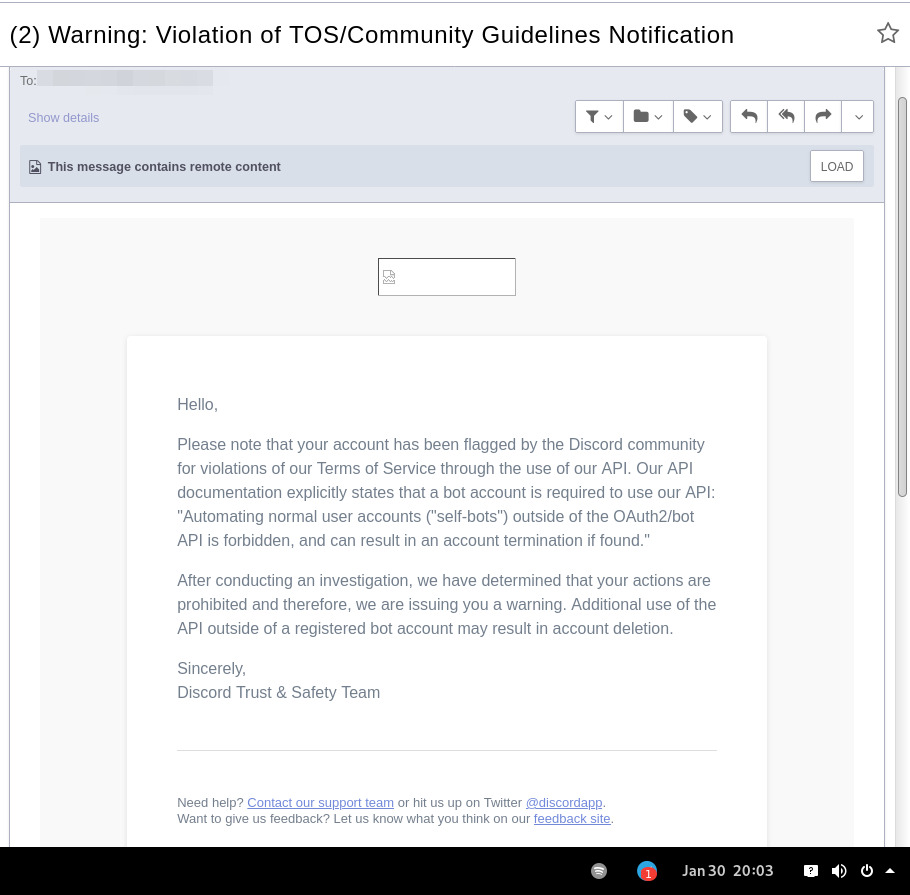
In September 2021 there was a bunch of issues with people using different third-party clients being asked to reset their passwords daily due to "suspicious activity", raised here in issue-18 (check out other links there too), which seem to have gone away within a week.
At least one person in that issue thread also reported being asked for phone account verification for roughly same reason about a week after that, so maybe "suspicious activity" triggering for 3p clients haven't really gone away.
Cordless client developer's acc apparently got blocked for ToS violation when initiating private chats. This client doesn't have such functionality, but maybe one should be more careful with private chats anyway, as that seem to be a major spam vector, so is more likely to be heavily-monitored, I think.
In the #rdircd IRC channel, a person mentioned that their discord account got some anti-spam mechanism enabled on it, disallowing to log-in without providing a phone number and SMS challenge (and services like Google Voice don't work there), immediately after they've initiated private chat with someone in Ripcord client.
"I contacted support at the time and they just responded that they can't undo the phone number requirement once it has been engaged"
It also seems like Ripcord currently might be trying to mimic official client way more closely than rdircd script here does (where latter even sends "client"/"User-Agent" fields as "rdircd" and appears that way under Devices in User Settings webui), and such similarity might look like Terms of Service violation to Discord (modifying official client), instead of Community Guidelines violation (third-party client), but obviously it's just a guess on my part as to whether it matters.
There are also some HN comments clarifying Discord staff position in a thread here, though none of the above should probably be taken as definitive, since third-party and even support staff's responses can be wrong/misleading or outdated, and such treatment can likely change anytime and in any direction, without explicit indication.
Note: only using this API here, only going by public info, can be wrong, and would appreciate any updates/suggestions/corrections via open issues.
Last updated: 2024-11-26
Discord API docs don't seem to cover "full-featured client" use-case, likely because such use of its API is explicitly not supported, and is against their rules/guidelines (see WARNING section above for details).
It's possible that more recent official OpenAPI spec in discord/discord-api-spec repo has a more complete documentation though.
Discord API protocol changes between versions, which are documented on Change Log page of the API docs.
Code has API number hardcoded as DiscordSession.api_ver, which has to be bumped there manually after updating it to handle new features as necessary.
Auth uses undocumented /api/auth/login endpoint for getting "token" value for email/password, which is not OAuth2 token and is usable for all other endpoints (eg POST URLs, Gateway, etc) without any prefix in HTTP Authorization header.
Found it being used in other clients, and dunno if there's any other way to authorize non-bot on eg Gateway websocket - only documented auth is OAuth2, and it doesn't seem to allow that.
Being apparently undocumented and available since the beginning, guess it might be heavily deprecated by now and go away at any point in the future.
There are some unofficial docs for officially-undocumented APIs and quirks:
Sent message delivery confirmation is done by matching unique "nonce" value in MESSAGE_CREATE event from gateway websocket with one sent out to REST API.
All messages are sent out in strict sequence (via one queue), waiting on confirmation for each one in order, aborting rest of the queue if first one fails/times-out to be delivered, with notices for each failed/discarded msg.
This is done to ensure that all messages either arrive in the same strict order they've been sent or not posted at all.
Discord message-posting API has enforce_nonce parameter (since 2024-02-12), which allows to retry posting messages safely from duplication, but at the moment retries are only performed here on API rate-limiting.
Fetching list of users for discord channel or even guild does not seem to be well-supported or intended by the API design.
There are multiple opcodes that allow doing that in a limited way, none of which work well for large discords (eg 10k+ users).
request_guild_members (8) doesn't return any results, request_sync (12) doesn't work, request_sync_chan (14) can be used to request small slice of the list, but only one at a time (disconnects on concurrent requests).
Latter is intended to only keep part of userlist that is visible synced in the client, doesn't support proper paging through whole thing, and only gets updates for last-requested part with indexes in it - basically "I'm in this guild/channel, what should I see?" request from the client.
Some events on gateway websocket are undocumented, maybe due to lag of docs behind implementation, or due to them not being deemed that useful to bots, idk.
Discord allows channels and users to have exactly same visible name, which is not a big deal for users (due to one-way translation), but still disambiguated irc-side.
Discord emojis like :smile: are handled in multiple different ways:
Looked up among unicode emoji names that work in all discords and translated to a unicode character, eg :smile: to
Can be found in current discord's custom emojis and replaced by a message formatting tag for it, like :debian: to a tag like <:debian:12345> , which discord clients will display as debian logo in a linux-related discord.
If user has Discord Nitro subscription, custom emoji from any discord works in any other discord as well.
rdircd doesn't handle last Nitro case at all (looks-up custom emojis in one discord), while first two cases are distinguished from each other via rdircd.unicode-emojis.txt.gz file (optional/configurable), which has list of all non-custom emojis (~6k of them), pulled from Discord WebUI using extract-unicode-emojis-from-js.py script.
If generic emojis stop working in the future (incorrectly treated as if they're discord-custom ones), due to renames or new additions, that script can be used to update the list of them easily.
Gateway websocket can use zlib compression (and zstd in non-browser apps), which makes inspecting protocol in browser devtools a bit inconvenient.
gw-ws-har-decode.py helper script in this repo can be used to decompress/decode websocket messages saved from chromium-engine browser devtools (pass -h/--help option for info on how to do it).
Run ./rdircd --test for info on some extra development/testing helper commands.
dev-cmds = yes under [debug] also enables some runtime helpers in #rdircd.control.
Adding support for initiating private chats might be a bad idea, as Cordless dev apparently got banned for that, and since these seem to be main spam vector, so more monitoring and anomaly detection is likely done there, leading to potentially higher risk for users.







