reliable discord client irc daemon
1.0.0

Índice
Descrição
AVISO
Características
Limitações
Uso
Informações de recurso MISC
Dicas e truques aleatórios
Links
Mais informações sobre bloqueio de clientes de terceiros
Notas de API e implementação
O RDIRCD é um daemon que permite usar uma conta de discórdia pessoal por meio de um cliente IRC.
Ele traduz todos os bate -papos privados e canais/threads públicos em "Discord Servers" em canais em um servidor IRC que ele cria e que você pode se conectar ao uso do cliente IRC regular, em vez de um navegador ou aplicativo Electron.
"Confiável" está em nome, porque um dos objetivos iniciais era fazer com que ele confirme a entrega de mensagens e notificar sobre quaisquer problemas nesse sentido, que faltava em outros clientes semelhantes na época.
Há um canal do IRC para falar sobre a coisa - junte -se a #rdircd em libera.chat.
IRC URL: IRCS: //irc.libera.chat/rdircd (o github se recusa a fazer IRCs: // links)
Consulte também Links Seção abaixo para uma lista raramente atualizada de outros clientes alternativos.
URLs de repositório:
O último tem nota Git com a lista de tarefas e tal na referência padrão para eles.
While I wouldn't call this app a "bot" or "automating standard user accounts" - intent here is not to post any automated messages or scrape anything - pretty sure Discord staff considers all third-party clients to be "bots", and requires them to use special second-class API (see Bot vs User Accounts section in API docs), where every account has to be separately approved by admins on every connected discord server/guild, making it effectively unusable Para um usuário aleatório não administrado.
Este aplicativo não se apresenta como um "bot" e não usa terminais específicos de bot, portanto, o uso pode resultar em terminação de contas se descoberto.
Veja também mais informações sobre a seção de bloqueio de clientes de terceiros abaixo.
Você foi avisado! :)
Ordem e entrega de mensagens de saída confiáveis, com notificações explícitas para questões detectadas de qualquer tipo.
Suporte para canais públicos e privados, pedidos de canal, threads, fóruns, exceto por criar novos deles.
Canais por servidor e gatil-all global para rastrear atividades gerais.
Aliases/renomeamentos de nome local configurável, blocos de mensagens/substituições de saída, filtragem de regexp para mensagens recebidas.
Suporte para reconfiguração de tempo de execução limitada via #rdircd.control canal.
Discordura simples e consistente para a Tradução do Nome do IRC/canal/nome do usuário.
Nenhuma dessas muda após a reconexão, a reorganização do canal ou do servidor, etc. - a tradução é principalmente determinística e não depende de outros nomes.
Tradução para mencionar a discórdia, respostas, anexos, adesivos e emojis em MSGs de entrada, outros eventos, anotações básicas para alguns links incorporados.
Suporte limitado para a tradução de menções do usuário da discórdia e emojis em mensagens, edições e exclusões enviadas.
Backlog facilmente acessível via comandos/tópico (/t) em qualquer canal, por exemplo, "/t log 2h" para mostrar as últimas 2 horas de backlog ou "/t log 2019-01-08" para despejar o backlog desse ponto até o presente, buscando vários lotes, se necessário.
As mensagens enviadas através de outros meios (por exemplo, navegador) serão transmitidas ao IRC também, talvez vindo de um diferencial, se o nome do IRC não corresponder à tradução Nick Discord-to-Ur.
Suporte completo do Unicode/Use em todos os lugares.
O protocolo IRC é implementado a partir de documentos do IRCV3, mas não usa nenhum material que não seja RFC, portanto, deve ser compatível com qualquer cliente antigo. TLS opcional embrulhando.
Opções extensas de protocolo e depuração de depuração, algumas acessíveis no tempo de execução via canal #rdircd.debug.
O script Python3 único que requer apenas o módulo AIOHTTP, trivial para executar ou implantar em qualquer lugar.
Executa em pegada de memória relativamente estável ~ 40m no AMD64, o que provavelmente é mais do que por exemplo, Bitlbee-Discord, mas melhor do que essas guias de navegador com vazamento.
Fácil de ajustar e depurar sem reconstruções, GDB, ferrugem e tal.
Somente as menções do usuário e os emojis enviados do IRC são traduzidos em tags de discórdia (se ativado e com algumas peculiaridades, veja abaixo) - não canais, funções, adesivos, componentes, etc.
Não há suporte para enviar anexos ou incorporação de qualquer tipo - use o WebUI para isso, não o IRC.
A Discord anote automaticamente os links, portanto, postar mídia é tão simples assim.
Nenhuma ação específica da discórdia além de todos os tipos de leitura e envio de mensagens para canais existentes é suportada - ou seja, sem criação de contas ou canais sobre discórdia, gerenciamento de funções, convites, proibições, tempo limite etc. - use webui, harmonia ou bots discord adequados.
Criar novos bate -papos privados e threads de canal/fórum não é suportado.
Para bate -papos privados, pode ser até perigoso apoiar - consulte mais informações sobre a seção de bloqueio de clientes de terceiros abaixo para obter detalhes.
Não rastreia a presença do usuário (online, offline, AFK, jogo, etc.).
Não emite o usuário que usa eventos e peças e lida com o IRC /nomes de uma maneira muito simples, listando apenas Nicks que usou o canal desde a inicialização do aplicativo e no IRC-names-timeout (1 dia por padrão).
Ignora completamente todas as coisas que não são do texto em geral (por exemplo, voz, perfis de usuário, biblioteca de jogos, lojas, listas de amigos etc.).
O Discord rastreia o lado do servidor "read_state", que não é usado aqui de forma alguma - o reprodução do histórico de acionamento é feito manualmente (/t comandos em chans), por isso, às vezes pode ser fácil perder em reconexões silenciosas.
Não suporta o modo de autenticação de multifator da discórdia, mas a autenticação manual provavelmente pode contornar isso - veja a nota no Captchas abaixo.
Os comandos Slash (para bots) não são suportados de maneira especial, mas você provavelmente ainda poderá enviá -los, se o cliente IRC passará.
Não é a coisa mais fácil de usar, embora provavelmente o mesmo que o próprio IRC.
Eu o executo apenas no Linux, então é improvável que "apenas trabalhe" no OSX/Windows, mas IDK.
A implementação ad-hoc personalizada da Discord e do IRC, não se beneficiando de qualquer tipo de exposição e teste no Pypi e na compatibilidade com WRT, bugs e casos de canto.
Parece ser contra as diretrizes da discórdia para usá -lo - consulte a seção de aviso acima para obter mais detalhes.
Na plataforma OpenBSD, ao usar o IRC password-hash= do SCRYPT, também pode precisar instalar o módulo SCRYPT separadamente (por exemplo, pkg_add py3-scrypt ), pois a porta Python não parece ter hashlib.script em seu stdlib.
A maneira mais simples pode ser usar o pacote para/da sua distribuição Linux, se estiver disponível.
Pacotes de distro atualmente conhecidos (a partir de 2020-05-17):
Há também um Dockerfile e Docker-Compose.yml para executar isso em um Docker/Podman ou em algum outro ambiente de contêiner compatível com OCI.
(Consulte também Readme.docker-ermissions.md Doc para obter informações sobre problemas de acesso comum com eles)
Deve ser fácil instalar um script e suas poucas dependências também manualmente, conforme descrito no restante desta seção abaixo.
No Debian/Ubuntu, a instalação de dependências pode ser feita com este comando:
# apt install --no-install-recommends python3-minimal python3-aiohttp
Outras distritos do Linux provavelmente também têm pacotes semelhantes, e eu recomendo tentar usá -las como uma primeira opção, para que obtenham atualizações e para evitar a carga de manutenção local extra e apenas fallback na instalação do (s) módulo (s) via "PIP" se isso falhar.
Em qualquer distribuição arbitrária com Python (Python3) instalado, usando o PIP/VENV para instalar o módulo AIOHTTP (e seus DEPs) para "RDIRCD" sem privilégios, o diretor da casa do usuário pode funcionar (que também é usado para executar o RDIRCD no próximo exemplo abaixo), mas ignore isso se você já o instalou via gerente de OS ou assim:
 root # useradd -m rdircd
root # su - rdircd

## Option 1: use venv to install dependencies into "_venv" dir

rdircd % python3 -m venv _venv
rdircd % ./_venv/bin/pip install aiohttp

## Option 2: install pip (if missing) and use it directly

rdircd % python3 -m ensurepip --user
rdircd % python3 -m pip install --user aiohttp
Se você possui/usa PIPX (por exemplo, de repositões de distro), ele pode ser usado para executar aplicativos Python como este e dependências de manutenção automática -apenas "Pipx Run" o script principal: pipx run rdircd --help -sem precisar tocar Venv ou Pip em todos (Pipx o fará "sob o capô").
Após a instalação dos requisitos acima, o próprio script pode ser buscado neste repositório e executado assim:
 ## Ignore "useradd" if you've already created a user when running "pip" above
root # useradd -m rdircd
root # su - rdircd

## If using "venv" install example above - load its env vars
# Or alternatively run script via "./_venv/bin/python rdircd ..." command line
rdircd % source ./_venv/bin/activate

rdircd % curl -OL 'https://raw.githubusercontent.com/mk-fg/reliable-discord-client-irc-daemon/master/rdircd{,.unicode-emojis.txt.gz}'
rdircd % chmod +x rdircd

## Use "pipx run rdircd ..." here and below, if using pipx instead of pip/venv/distro-pkgs
rdircd % ./rdircd --help
...to test if it runs...

rdircd % ./rdircd --conf-dump-defaults
...for a full list of all supported options with some comments...
...alternatively, to create rdircd.ini template: ./rdircd -c rdircd.ini --conf-init

rdircd % nano rdircd.ini
...see below for configuration file info/example...

rdircd % ./rdircd --debug -c rdircd.ini
...drop --debug and use init system for a regular daemon...
Para configurar o Daemon/Script para executar no sistema de inicialização, o arquivo unitário rdircd.Service Systemd pode ser usado na maioria dos ambientes Linux (editar execstart = opções e caminhos lá) ou provavelmente por meio de script init.d, ou talvez na sessão "Screen" como uma opção ad-hoc de último recurso. Verifique se ele é executado como o usuário "rdircd" criado no snippet acima, não como root.
Para atualizar o script posteriormente, se necessário, substitua-o por uma versão mais recente, por exemplo, através do carregamento novamente com um comando Curl acima, Git-Pull no clone repo, docker-compose up --build , atualizando o pacote do sistema operacional ou de alguma outra maneira, geralmente relacionado à forma como foi instalado em primeiro lugar.
Crie um arquivo de configuração com credenciais de autenticação de discórdia e IRCD em ~/.rdircd.ini (consulte tudo --conf... opta por isso):
 [irc]
password = hunter2

[auth]
email = [email protected]
password = discord-password
Nota: a senha do IRC pode ser omitida, mas certifique -se de firewall essa porta de tudo no sistema (ou talvez faça de qualquer maneira).
Se você definir a senha, talvez não use a opção IRC password= como acima e use password-hash= e -H/--conf-pw-scrypt para gerá-la. De qualquer forma, certifique -se de usar essa senha ao configurar a conexão com este servidor no cliente IRC também.
Inicie o daemon rdircd: ./rdircd --debug
Conecte o cliente IRC ao "localhost: 6667" - Listen/Bind Host e Port padrão.
(Veja ./rdircd --conf-dump-defaults ou CLI -i/--irc-bind / -s/--irc-tls-pem-file Options para ligação em diferentes soquetes de host/porta e TLS, para conexões não localizadas)
Use o comando IRC /list para ver os canais para todos os servidores /guildes da Discord:
 Channel           Users Topic
-------           ----- -----
#rdircd.control       1  rdircd: control channel, type "help" for more info
#rdircd.debug         1  rdircd: debug logging channel, read-only
#rdircd.monitor       1  rdircd: read-only catch-all channel with messages from everywhere
#rdircd.leftover      1  rdircd: read-only channel for any discord messages in channels ...
#rdircd.voice         1  rdircd: read-only voice-chat notifications from all discords/channels
#rdircd.monitor.jvpp  1  rdircd: read-only catch-all channel for discord [ Server-A ]
#rdircd.leftover.jvpp 1  rdircd: read-only msgs for non-joined channels of discord [ Server-A ]
...
#me.chat.SomeUser     1  me: private chat - SomeUser
#me.chat.x2s456gl0t   3  me: private chat - some-other-user, another-user, user3
#jvpp.announcements   1  Server-A: Please keep this channel unmuted
#jvpp.info            1  Server-A:
#jvpp.rules           1  Server-A:
#jvpp.welcome         1  Server-A: Mute unless you like notification spam
...
#axsd.intro           1  Server-B: Server info and welcomes.
#axsd.offtopic        1  Server-B: Anything goes. Civility is expected.
Notas sobre informações aqui:
/j #axsd.offtopic ( /join ) Como você faria com o IRC regular para ver /postar msgs lá.
Os canais se juntam/peças no lado do IRC não afetam a discórdia de forma alguma.
Run /topic (often works as /t ) irc-command to show more info on channel-specific commands, eg /t log to fetch and replay backlog starting from last event before last rdircd shutdown, /t log list to list all activity timestamps that rdircd tracks, or /t log 2h to fetch/dump channel log for/from specific time(stamp/span) (iso8601 or a simple relative format).
Os comandos de controle daemon/configuração estão disponíveis no canal #rdircd.control, #rdircd.debug chan pode ser usado para ajustar vários registros e inspecionar o estado e protocolos daemon mais de perto, enviar "ajuda" para listar os comandos disponíveis.
Para obter um contorno amplo de várias definições de configuração suportadas, consulte o arquivo rdircd.defaults.ini (saída de ./rdircd --conf-dump-defaults ) e mais sobre os usos específicos daqueles abaixo.
As notas sobre vários recursos opcionais e menos óbvios são coletados aqui.
Consulte a seção "Uso" para obter informações mais gerais.
Vários arquivos INI podem ser especificados com a opção -c , substituindo -se em sequência.
O último será atualizado WRT [estado], token = e coisas semelhantes de tempo de execução, bem como quaisquer valores definidos via #rdircd.control canal comandos, para que possa ser útil especificar uma configuração persistente com autenticação e opções e separar (inicialmente vazio) um para esse estado dinâmico.
Por exemplo ./rdircd -c config.ini -c state.ini fará isso.
--conf-dump pode ser adicionado à impressão resultante da INI montada a partir de tudo isso.
--conf-dump-defaults pode ser usado para listar todas as opções e seus padrões.
As atualizações frequentes de timestamp de estado são feitas no local (pequenos valores de comprimento fixo), mas checando o ctime antes das gravações, portanto, deve ser seguro editar qualquer um desses arquivos manualmente a qualquer momento.
Enviar Sighup para o comando Script ou "Reload" no controle de controle deve carregar e aplicar valores de todos os arquivos de configuração na mesma ordem. Observe que essa operação não redefinirá quaisquer valores ausentes nos arquivos para seus padrões, aplique apenas coisas definidas explicitamente lá em cima da configuração atual.
Todos os bate -papos no RDIRCD (e Discord) são um canal .
IRC's /q, /consulta e /msg não podem ser usados de maneira típica do IRC.
Para conversar em qualquer bate -papo privado, junte -se a um canal como #me.chat.
Atualmente, não há como criar novos bate -papos privados da RDIRCD, usar outros clientes ou webui para isso (ou peça a alguém para entrar em contato com você primeiro), mas depois que o canal de bate -papo privado for criado, ele também pode ser usado no RDIRCD.
Consulte também canais de união automática e /ou / / / / / / / / / / / / / / / / / / / / / / / / / / / / / / / / / / / / / / / / / / / / / / / / / / / / / / / / / / / / / / / / / / / / /ing #rdircd.leftover.me canal para monitorar mensagens privadas de maneira confiável, se necessário.
Em todos os canais do IRC, representando um canal Discord - send /topic (ou /t - abreviação, para ele frequentemente suportado em clientes do IRC) - que devem imprimir informações atualizadas sobre todos os comandos específicos do canal, como esses:
/t info - Mostre algumas informações internas da guilda/canal, como IDs e outros renomeados.
Deve imprimir o nome exato do canal no Discord (sem renomeamentos locais ou tradução para discórdia em circulação que o RDIRCD faz), seu tópico, tipo, etc., entre outras coisas.
/t info {user-name...} - Informações de consulta sobre nome de usuário (ou parte dele) nesta discórdia.
Por exemplo, /t info joe137 procurará o usuário joe137 em um servidor Discord ao qual o canal pertence, imprimindo informações sobre eles, como seus vários nomes de discórdios.
/t log [state] - reproduza o histórico desde o ponto "estado" (o último rdircd pare por padrão).
/t log (o mesmo que /t log 1 ) pode ser usado, por exemplo, após a reinicialização do RDIRCD para consultar a discórdia para qualquer mensagem que possa ter sido publicada após a interrupção e antes de ser iniciada novamente (além de outras pessoas desde então).
Ou /t log 0 para verificar o histórico desde a última msg que o RDIRCD viu, para os casos em que a discórdia /rede é flakey e algo pode ter sido perdido dessa maneira.
(onde esses números 1 e 0 se referem aos registros de data e hora salvos da saída /t log list , armazenados /atualizados em [state] no arquivo ini)
Ele também pode ser usado com um tempo absoluto ou relativo, por exemplo /t log 15m para solicitar /reproduzir o histórico do canal nos últimos 15 minutos ou /t log 2019-01-08 12:30 para reproduzir o histórico desde o tempo específico do RDIRCD-Local (a menos que o zona time também seja especificada lá).
Just /t ou /topic em qualquer canal de proxy da Discord listará mais esses comandos e mais informações sobre como usá -los.
A última mensagem enviada a um canal Discord pode ser editada usando o comando de substituição sed como s/hoogle/google/ para corrigir um erro de digitação ou alterar/reepor/re-palavras/esclarecer rapidamente essa última linha.
Ou //del pode ser usado para excluí -lo - consulte a seção "Edições/exclusão rápida" abaixo.
@silent prefix-command em mensagens pode suprimir as notificações do usuário sobre ele (também explicado abaixo em algum lugar).
Em canais especiais como #rdircd.control e #rdircd.debug: envie h ou help .
Eles podem ter uma lista um pouco longa de comandos suportados, por exemplo, aqui estão alguns dos comandos para #rdircd.control:
status (ou st ) pode ser usado para verificar o Discord e o IRC Connection Infos.
Os comandos connect / disconnect (ou on / off ) podem ser usados para controlar manualmente a conexão Discord, por exemplo, para um uso mais pontual ou para suprimir temporariamente os avisos de Conn com falha enquanto a rede local está descendo dessa maneira.
set irc-disable-reacts-msgs yes SIM-Notificações de reação de discórdia-disputas temporárias (usando o comando set ).
Ou set -s irc-disable-reacts-msgs yes para torná-lo permanente ( -s/--save sinalizador para salvar o valor no arquivo INI Config) ou set simples sem parâmetros para ver todas as opções de configuração geral e seus valores.
rx Block mee6 bot-noise = (?i)^<MEE6> -Block temp todas as mensagens do mee6 bot.
(Consulte a seção sobre esta filtragem abaixo, ou mais exemplos dessas coisas sob dicas e truques)
... e há mais desses tipos help para obter informações completas e atualizadas.
#rdircd.monitor pode ser usado para ver a atividade de todos os servidores conectados - recebe todas as mensagens, prefixadas pelo nome do canal do IRC relevante.
#rdircd.monitor.
#rdircd.monitor.me pode ser útil, por exemplo, para monitorar quaisquer bate-papos e mensagens privados para a conta do Discord (consulte também o exemplo de canais de união automática).
#rdircd.leftover e #rdircd.leftover.guild Os canais são como canais de monitor, mas pule mensagens de qualquer canal que o cliente do IRC se juntasse, incluindo por exemplo /join #rdircd.leftover.game-x hiding that "game-x" junção msgs do gobatd-all-all #Rdirc.left "restos" de qualquer maneira).
#rdircd.voice é um canal semelhante ao #rdircd.monitor, mas apenas capturando avisos de eventos de bate-papo, para poder rastreá-los em tempo hábil.
Esses canais podem ser ignorados se não forem necessários, ou desativados inteiramente, definindo, por exemplo, chan-monitor como um valor vazio na seção [IRC] INI Config-File. Por exemplo, os canais de atividade por voz por discórdia são desativados por padrão.
O arquivo de configuração também possui a seção [não monitor] para uma lista opcional de nomes de canais a serem ignorados nos canais de monitor/sobras, por exemplo:
 [unmonitor]
# All filters are applied to channel names and are case-insensitive
Ignore this particular " bot-commands " channel = game-X.bot-commands
skip forum threads in " game-X " guild = glob:game-X.forum.=*
" wordle " threads in any guild (and chans ending in .wordle) = glob:*.wordle
Don ' t show threads in any forum-like channels = re:^[^.]+ . (forum|discuss) . =.*
disregard all voice-chat stuff = glob:*.vc
Keys (as in part before "=") in such config section are ignored, and can be anything, eg comments explaining the patterns (like in example above), while values are either exact channel names (with discord prefix, optional #-prefix), or a "glob:"/"re:"-prefixed glob / regexp pattern (shell-like globs or python regexps), written as <some-key/comment> = glob:<wildcard-pattern> ou <some-key/comment> = re:<regexp-pattern> -Veja exemplos logo acima.
Os nomes dos canais combinados com esses filtros serão retirados de canais de monitor, para que isso possa ser usado para definir uma lista de coisas com spam com as quais você não se importa e não quer ver até lá.
Comando "não monitor" (ou "um") em #rdircd.control pode adicionar/remover esses filtros a qualquer momento. Consulte também Opção de configuração match-counters para acompanhar se as regras específicas ainda são necessárias/sendo usadas.
As mensagens nos canais de monitor são limitadas a comprimentos/linhas específicas, para evitar inundações excessivas por MSGs longos e/ou de várias linhas. Os parâmetros "Len-Monitor" e "Len-Monitor-Lines" na seção de configuração [IRC] podem ser usados para controlar esses limites, consulte "./rdircd ---conf-dump-Defaults" Saída para seus valores padrão. Também existem opções para alterar o formato de nome dos canais de monitor.
No IRC, todo mundo tem um nome, mas esse não é o caso da discórdia, onde cada usuário pode ter os seguintes nomes:
login - Discord "Nome de usuário", identificando exclusivamente todos os usuários.display - "Nome do Exibir" Definido pelo Usuário em Configurações da Conta Discord, não exclusivo.nick - servidor e amigo "apelidos", definido nas configurações do Discord Server, nem sempre por você. login é o conceito mais próximo dos apelidos do IRC, pois é globalmente, consistente, curto, ascii-apenas, e pode ser usado definindo a opção Definindo name-preference-order = login na seção [Discord] (não o padrão).
Os clientes oficiais da discórdia exibem outros nomes primeiro, e é por isso que a opção name-preference-order padrão é o valor do nick display login , que usa apelidos específicos de discórdia/amigo primeiro, se houver, voltando ao nome de forma livre que o usuário definiu nas configurações de conta e seu nome de login de outra forma.
Outras coisas em apelidos sofisticados de usuário sofisticados que o IRC não permite também ser substituído por caracteres unicode comuns, espaços com "· ·", por exemplo, ou <> suportes comuns de irc-nick com setas unicode. Os nicados de discórdia longos são truncados.
Não há notificações do IRC sobre os usuários alterarem seus exibições/nomes específicos da discórdia no momento, e eles não precisam ser únicos, o que pode dificultar o fato de dizer quem é-quem, se continuarem mudando de Nicks por qualquer motivo.
Tudo isso é configurável por meio de configurações de arquivo INI (ou no canal #rdircd.control); portanto, se ficar muito bobo e enlouquecedor, defina name-preference-order = login para usar o Nicks exclusivo para todos.
IRC /who comandando ou /topic info podem ajudar a traduzir entre esses nomes, por exemplo /t info john1234 pode ser usado para imprimir informações para esse nome /login no buffer de canal, que deve incluir todos os usuários com correspondência parcial desse nome nessa discórdia específica, enquanto /who comanda pesquisas todas as discorduras unidas.
(mais como "renomear" do que "aliases", pois os nomes antigos não continuam funcionando para eles)
Pode ser definido no arquivo de configuração para substituir prefixos de discórdios baseados em hash ou nomes de canais de servidores por algo mais legível/memorável ou significativo para você:
 [renames]
guild.jvpp = game-x
guild.sn3y = log-bot
guild.sn3y.chan-fmt = logs/{name}.log
chan.some-long-and-weird-name = weird
chan.@ 710035588048224269 = general-subs
user.noname123 = my-pal-bob
user.@ 123980071029577864 = joe
Isso deve:
Transforme EG #jvpp.info em #game-x.info-Lettersoup Guild-Id para prefixo mais significativo. Isso se aplicará a todos os canais nessa discórdia - "Guild" renomeia.
Altere o formato para os nomes de canais da discórdia "sn3y" de algo como #sn3y.debug para #logs/debug.log - alteração do formato de nome do canal.
O modelo de formato usa a sintaxe python str.format com "name" (nome do canal) e "prefixo" (prefixo da guilda - serão "os valores" log -bot "neste exemplo). O formato padrão é {prefix}.{name} .
Esta opção de formato não afeta o (s) nome (s) de canal de monitor/sobras (por exemplo, rdircd.monitor.log-bot ou #rdircd.leftover.game-x)-consulte as opções "chan-monitor-guild" e "chan-leftover-guild" na seção [IRC] para mudar isso.
Renomeie esse canal longo para ter um nome mais curto (prefixo de retenção da guilda) - "chan" renomeia.
Observe que isso afeta todas as guildas onde existe esse nome de canal, e o nome da fonte deve estar no formato IRC, o mesmo que em /list, e é RFC1459-Casemped (o mesmo que no IRC).
Renomeie o canal com ID = 710035588048224269 para "memes" (prefixo de retenção da guilda) - "chan" renomeia usando @canal -id spec.
Esse identificador de canal de longa discórdia (também chamado de "floco de neve") pode ser encontrado digitando /t info de comando de comando no canal IRC correspondente e pode ser usado para se referir a esse canal específico, ou seja, renomeando este #General neste servidor Discord em vez de renomear todos os canais gerais em todos os lugares.
Isso é especialmente útil quando dois canais têm o mesmo nome exato dentro da mesma discórdia e normalmente serão atribuídos .<id-hash> sufixos não descritivos.
Renomeie os usuários de casais, referenciados por seu nome de usuário e identificação da discórdia.
/t info <nick-or-part-of-it> Comando no canal Discord ou similar /who IRC-Command pode ajudar a procurar IDs Discord, como os usados lá.
Atualmente, somente os tipos listados de renomeação são implementados, para prefixos e canais da discórdia, mas também existem opções na seção [IRC] para definir nomes para canais de sistema/monitor/sobras e chat privado-"chan-sys", "chan-private", "chan-monitor" e tal (consulte "./rdircd----daquelancump-deffulds" e tais ".
Definir chan-monitor-guild = {prefix} lá, por exemplo, para que o canal #game-x seja abrangente para todas as mensagens nessa discórdia, sem padrão #rdircd.monitor.* Prefixo.
As mensagens privadas da discórdia criam e são publicadas nos canais no servidor/guilda "Me", o mesmo que no Discord Webui, e podem ser interagidos da mesma maneira que qualquer outra guilda/canais (listar, ingressar/parte, enviar/recv msgs, etc).
Junte -se a #rdircd.monitor.me (ou #rdircd.monitor, veja acima) para obter todas as novas msgs/bate -papos lá, bem como notificações de mudança de relacionamento (FIRE solicita/adiciona/remove) como avisos.
Aceitar solicitações de amizade e adicionar/remover eles pode ser feita por meio de discord Webui regular e não é implementado neste cliente de nenhuma maneira especial.
Consulte também a seção de canais de união automática abaixo para uma maneira fácil de exibir novos bate-papos privados no cliente IRC por convites.
"Threads" é um recurso Discord, permitindo que os usuários não adminados criem sub-canais ad-hoc transitórios a qualquer momento para um tópico específico, que é removido automaticamente ("arquivado") após um tempo limite de inatividade relativamente curto (como um dia).
Os canais de "fórum" da discórdia são basicamente canais, onde as pessoas só podem criar e conversar em Theads, com a lista daqueles que substituem as conversas do canal padrão.
Todos os threads não arquivados devem ser mostrados na lista de canais RDIRCD como canais IRC regulares, com nomes como #gg.general. = VOT5.Lets · Discuta · coisas, estendendo o nome do Chan dos pais com tag de identificação do thread ("= vot5" neste exemplo) e um nome de thread de thread-chan-chan-len-len "config).
Existem várias opções de como ver e interagir com os threads do canal pai (principalmente na seção [Discord], consulte-Saída de defesa-defasa-dev-dump):
 [irc]
thread-chan-name-len = 30

[discord]
thread-id-prefix = =
thread-msgs-in-parent-chan = yes
thread-msgs-in-parent-chan-monitor = no
thread-msgs-in-parent-chan-full-prefix = no
thread-redirect-prefixed-responses-from-parent-chan = yes
...
Mas mesmo com todos esses desativados, um aviso simples deve ser enviado ao canal quando os threads são iniciados, para que alguém não sinta falta deles completamente.
Não há suporte para criar novos threads a partir do IRC, desconhecer os antigos ou gerenciá -los e entrar no canal de threads no IRC, na verdade "ingressar o thread" na interface do usuário da Discord (prendendo -o em nome de canal), mas postar qualquer coisa que deve fazer isso automaticamente.
A configuração "chan-auto-join-re" na seção [IRC] permite especificar o regexp para corresponder ao nome do canal (sem # prefixo) para se Join automaticamente quando qualquer mensagem aparecer nelas.
Por exemplo, para Jogar automaticamente qualquer #me.
 [irc]
chan-auto-join-re = ^me.
Ou para que o cliente IRC jogue automaticamente todos os canais, use chan-auto-join-re = .
Valor vazio para esta opção (padrão) não corresponderá a nada.
Isso pode ser usado como uma alternativa para rastrear coisas novas via #rdircd.monitor/sobras de canais.
Este regexp pode ser ajustado no tempo de execução usando o comando "set" no canal #rdircd.control, o mesmo que quaisquer outros valores, para, por exemplo, ativar temporários/desativar esse recurso para discórdios ou canais específicos.
Menções são tags @username no Discord, projetadas para alertar alguém para direcionar a mensagem.
Com a configuração padrão, quando você vê, por exemplo <Galaxy?·Brain> Hi! E quero responder destacando -os, enviando Hey @galaxy and welcome provavelmente deve funcionar. Também pode usar seu IRC completo, com certeza.
Como funciona: se o RDIRCD corresponde msg-mention-re regexp confiram contra algo em uma mensagem que está sendo enviada (por exemplo, @galaxy @-mention acima), que seria tratada como uma "menção", que é de maneira única que corresponde a um pouco que combina que correspondem a um pouco que correspondem a um pouco que correspondem.
Valor padrão para se parecer assim:
 [discord]
msg-mention-re = (?:^|s)(@)(?P<nick>[^s, ; @+!]+)
O que corresponderia a qualquer menção @nick , separada por espaço ou pontuação, semelhante a uma palavra, nas linhas enviadas.
O Regexp (Python "RE" Syntax) deve ter nomeado o Grupo "Nick" com a String de pesquisa Nick/UserName, que será substituída pela tag de mencionação da discórdia, e todos os outros grupos de captura (ou seja, sem ?: :) serão despojados (como @ no regexp acima).
O regexp padrão acima ainda deve permitir que o EG @something pareça não-alto no WebApp (e sem devido ao Markdown), pois não será correspondente por (?:^|s) parte devido a esse prefixo de barragem.
Como outro exemplo, para ter destaques clássicos no estilo IRC no início da linha, o regexp como este pode ser usado:
msg-mention-re = ^(?P<nick>S+)(:)(?:s|$)
E deve traduzir por exemplo mk-fg: some msg em @mk-fg some msg (com @-part sendo mencionado). O espaço à direita está incluído no Regexp lá para evitar links de URL correspondentes.
Para identificar o usuário específico da discórdia, o grupo "Nick" será usado das seguintes maneiras:
Combinação insensível ao caso contra todos os nomes recentes de IRC relacionados à guilda (autores de mensagens, reações, usuários de canais privados etc.). A opção de configuração de user-mention-cache-timeout controla o tempo limite "recente".
Pesquise a conclusão exclusiva do nome do prefixo, o mesmo que o Discord no Webui para conclusão automática após o @ for digitado.
Se nenhuma correspondência exclusiva ou em cache encontrada - o aviso de erro será emitido e a mensagem não enviada.
Esse comportamento rigoroso é projetado para evitar translações incorretas não intencionais, e destacar a pessoa errada geralmente só deve ser possível por meio de erro de ortografia.
A opção relacionada msg-mention-re-ignore (REGEXP para corresponder contra a captura completa do padrão acima) também pode ser usada para pular algumas coisas sem meios por serem tratados como tais, que, de outra forma, seriam captados pela primeira vez, removendo grupos de captura deles, o que pode ser usado para desmarcar.
Observe que as listas de usuários da discórdia podem ser bastante enormes (500k+ usuários), não são divididas por canal e não devem ser pré-buscadas pelo cliente, consultadas apenas para conclusões ou peças visíveis, o que não mapeia bem para o IRC, portanto toda essa mágica.
Regexp semelhante é configurado para emojis por discordina:
msg-emoji-re = (?:^|s)(:)(?P<emoji>w+)(:)(?=[^w]|$)
Onde, por exemplo I use :Arch: btw do IRC corresponderá a esse grupo regexp, procurar/substituir "emoji" lá usando os emojis desse discórdio (insensível a casos) e enviá-lo traduzido conforme I use ? btw , ou Aviso de erro de retorno se esse emoji não estiver disponível nessa discórdia e não em uma lista de unicode genéricos.
Defina msg-mention-re / msg-emoji-re como um valor vazio para desativar essas traduções.
Semelhante às menções do usuário da discórdia acima, há uma opção REGEXP especial que corresponde aos comandos a serem interpretados como edição ou remoção da última mensagem enviada para este canal.
Os regexps padrão se parecem com isso (check-Con-Conf-Dump-Defaults JIC):
 [discord]
msg-edit-re = ^s*s(?P<sep>[/|:])(?P<aaa>.*)(? P =sep)(?P<bbb>.*)(? P =sep)s*$
msg-del-re = ^s*//dels*$
Eles combinam linhas de alteração de acompanhamento do tipo Sed/Perl/IRC como s/spam/ham/ e //del , que nunca serão enviadas para Discord, usadas apenas como comandos internos.
( s|/some/path|/other/path| e s:cat /dev/input/mouse0 | hexdump:hexdump </dev/input/mouse0: as sintaxes também são permitidas por edit-regexp padrão, assim como com sed, para facilitar o manuseio de coisas comuns, como caminhos que podem ter essas carras nessas)
Ambos os comandos correspondidos por estes operam na última mensagem enviada por rdircd para o mesmo canal Discord, com //del simplesmente removendo a última mensagem e edite a função de reposição de regexp em execução de Python () (tipo Pcre).
"msg-edit-re" regexp option value matching sed-like command must have named "aaa" and "bbb" groups in it, which will be used as pattern and replacement args to re.sub(), respectively.
If edit doesn't seem to alter last-sent message in any way, it gets discarded, and also generates IRC notice response, to signal that replacement didn't work.
Successful edit/deletion should also be signaled as usual by discord, with [edit] or such prefix (configurable under [irc] section).
Any older-than-last messages can be edited through Discord WebUI - this client only tracks last one for easy quick follow-up oops-fixes, nothing more than that.
Somewhat similar to quick edits/deletes above, "msg-flag-silent-re" option is there to match/remove "@silent" prefix in messages (by default), which disables sending discord push notifications for it, same as with the official client.
That and similar message flags on incoming messages are not represented in any way, as they don't seem to be relevant for an irc client anyway.
Config can have a [send-replacements] section to block or regexp-replace parts of messages sent (by you) from IRC on per-discord basis.
This can be used to add discord-specific tags, unicode shorthands, emojis, stickers, block/replace specific links or maybe even words/language before proxying msg to discord.
Here's how it can look in the ini file(s):
 [send-replacements]

*. unicode-smiley = (^| ):)( |$) -> 1?2
*. twitter-to-nitter = ^(https?://)((mobile|www).)?twitter.com(/.*)?$ -> 1nitter.ir4

guildx.never-mention-rust! = (?i)brustb -> <block!>
guildx.localize-color-word = bcolor(ed|iS+)b -> colour1
Where each key has the form of discord-prefix> "." comment , with a special * prefix to apply rule to all discords, while values are regexp " -> " <replacement_or_action with one special <block!> action-value to block sending msg with error-notice on regexp match. "comment" part of the key can be any arbitrary unique string.
So when sending eg test :) msg on IRC, discord will get test ? .
Same as with other regex-using options, regexps have python "re" module syntax, applied via re.sub() function, using raw strings from config value as-is, without any special escapes or interpretations.
Replacements are applied in the same order as specified, but with * keys preceding per-discord ones, and before processing to add discord tags, so anything like @username that can normally be typed in messages can be used there too.
#rdircd.control channel has "repl" command to edit these rules on-the-fly.
If you join #rdircd.monitor channel, see - for example - a message like this:
<helper-bot> #pub.welcomes :: Welcome!
...and think "don't want to see messages like that again!" - config files' [recv-regexp-filters] section or corresponding "rx" command in #rdircd.control channel can help.
Depending on what "messages like that" means, here are some ways to filter those out:
 [recv-regexp-filters]
discard msgs from this bot = ^<helper-bot>
ignore all msgs in that channel of that discord = ^S+ # pub.welcomes ::
drop all msgs from " pub " discord = ^S+ # pub.
no messages from # welcomes channels of any discord pls = ^S+ #w+.welcomes ::
never see " Welcome! " message-text again!!! = ^S+ # S+ :: Welcome!$
some combination of the above = (?i)^<helper-bot> # w+.welcomes ::
...
(tweak eg last example on regex101.com for more hands-on understanding)
Lines in that section have the usual <key> = <regexp> form, where <key> part can be anything (eg comment to explain regexp, like in examples above), and <regexp> value is a regular expression to match against the message in <user> #discord.channel-name :: message text format like that helper-bot msg presented above, and same as can be seen in monitor-channels.
Any message received from discord will be matched against all regexps in order, stopping and discarding the message everywhere on first (any) match. So it might be a good idea to write as precise patterns as possible, to avoid them matching anything else and dropping unrelated messages accidentally.
Same as with some other conf options, basic knowledge of regular expressions might be needed to use such filters - here's a link to nice tutorial on those (though there are 100s of such tutorials on the web).
Particular regexps here use PCRE-like python re syntax, with re.DOTALL flag set ( . matches newlines in multiline messages). I'd also recommend commonly adding (?i) case-insensitive-match flag, as IRC nicks and channel names ignore character case and can be displayed in misleading/inprecise ways in the client.
More random examples of [recv-regexp-filters], incl. more advanced CNF weirdness:
 [recv-regexp-filters]
disregard wordle thread there = ^S+ # pub.general.=w8mk.wordle ::
ignore " wordle " threads everywhere = ^S+ # S+.=w{4}.wordle ::
activity-level bots are annoying = (?i) advanced to level d+[ !]
gif replies of YY in ZZ = (?i)^<YY> # ZZ.S+ :: (-- re:[^n]+n)?[att] .*/imaged.gif?

; ; Advanced stuff: connect multiple regexps via CNF logic (Conjunctive Normal Form)
; ; If key starts with "∧ " (conjunction symbol), it's AND'ed with previous regexp
; ; ¬ (negation) in that prefix inverts the logic, so e.g. "∧¬ ..." is "and not ..."
; ; Disjunction (∨) is the default behavior and doesn't need the (implied) prefix
; ; Any complex logical expression can be converted to such CNF form -
; ;  - use calculators like https://www.dcode.fr/boolean-expressions-calculator

Drop welcome msgs in welcome-chans = (?i)^S+ # w+.S*welcomeS* :: .*bwelcomeb.*
∧ but only if they have an exclaimation mark in them somewhere = :: .*!
∧¬ and not from this specific " lut " discord-prefix = ^S+ # lut.

Most channels here are not relevant = ^S+ # myc.
∧¬ except these ones = ^S+ # myc.(announcements|changelog|forum)[. ]
∨ but skip github CI logs there = ^<github> # myc.
Pretty much anything can be matched with clever regexps, so CNF-logic stuff like in last examples is seldom useful, but might still be simpler than expressing arbitrary ordering or negation in regexps.
See also match-counters config option to keep track of whether specific rule(s) are still needed/being-used.
Mostly useful for debugging - /who command can resolve specified ID (eg channel_id from protocol logs) to a channel/user/guild info:
/who #123456 - find/describe channel with id=123456./who %123456 - server/guild id info./who @123456 - user id lookup.All above ID values are unique across Discord service within their type.
/who @John·Mastodon - user IRC nick or name/login lookup.
Queries all joined discords for that name, and can return multiple results for same or similar non-unique names. Can be useful to check exact nick/display/login names corresponding to an IRC name, or other user info.
/who *665560022562111489 - translate discord snowflake-id to date/time.
Results of all these commands should be dumped into a server buffer (not into channels), regardless of where they were issued from.
In irc channels corresponding to ones on discord, /topic info command (often works as shortened /t info in clients too) can be used to print more information about linked discord channel and its server/guild.
/t info <username> can also print info on user in that discord (unlike /who @<username> which looks the name up in all connected discords), for example /t info john will print info for anyone with "john" in the name.
Usernames in these queries can match exact irc name or discord username, in which case that result is returned, or otherwise more general server-side lookup is made, which can return matches in any type of discord name(s) (see People's names on discord for more info on those).
Discord name translation is "mostly" deterministic due to one exception - channels with same (casemapped) IRC name within same server/guild, which discord allows for.
When there is a conflict, chan names are suffixed by .<id-hash> (see chan-dedup-* config options), to allow using both channels through IRC. Renaming conflicting channels on Discord will rename IRC chans to remove no-longer-necessary suffixes as well. Such renames affect thread-channels too.
Note that when channels are renamed (including name conflicts), IRC notice lines about it are always issued in affected channels, and any relevant monitor/leftover channels, topic should be changed to reflect that old-name channel is no longer useful, and posting msgs there should emit immediate warnings about it.
Discord CDN URLs for attachments can end up being quite long with same host, long discord/channel IDs in there, then actual filename, and ?ex=...&is=...&hm=... trail of CDN parameters after that.
Many Linux IRC clients run in Terminal Emulators though, which often support OSC 8 terminal hyperlink standard, so can display clickable links in a much more compact and readable form.
For example, this attachment URL to a Discord CDN:
https://cdn.discordapp.com/attachments/1183893786254905414/1206216641877377024/20240211_My_Cat_Photo.jpg?ex=65db33c9&is=65c8bec9&hm=9c1dbecbfb2f9edf2302ec078f5e62fffa7f8c2f32e5cd6e3563ae25d8a356e1&
Can be displayed in a terminal like this instead: 20240211_My_Cat_Photo.jpg
Ie same as how one would see hyperlinks displayed in a browser.
This is disabled by default, but if you use terminal IRC client that might support those, set terminal-links = yes option in config file or via set command in an #rdircd.control channel to try it out.
Adjacent terminal-links-re and terminal-links-tpl options can be used to control which part of the link to display as its visible name, which terminal-specific escape characters to use, and such customization.
Discord has voice channels, where in addition to text people can talk verbally, share camera or screen capture (aka streaming, screen sharing). IRC protocol does not support anything like this of course, but it can be useful to get notified when someone starts talking, to hop into different discord client (eg open it in a browser), and use these channels from there.
All IRC channels corresponding to discord voice chats automatically get .vc suffix (unless renamed), and get notice messages about voice activity in there, but limited to following events, to avoid being too spammy:
voice-notify-after-inactivity timeout of inactivity (ie since previous voice-status notification there), default = 20 minutes. And with additional rate-limit set by voice-notify-rate-limit-tbf value, to notify about up to 5 events in a row, but otherwise no more often than once in 5 minutes ("token bucket algorithm" is technically how this limit is implemented/works).
If description above sounds confusing, here's config tweaks to remove all limits on voice-activity event notifications - try those, and maybe re-read this section later if they get too spammy (maybe never!):
 [discord]
voice-notify-after-inactivity = 0
voice-notify-rate-limit-tbf = 0
#rdircd.voice monitor-channel(s) can also be used to only track voice-chat notifications across discords/channels, potentially filtered via "um" command in #rdircd.control or [unmonitor] in ini config(s).
IRC convention is to treat mention of a nickname as a "highlight" - a more notification-worthy event than a regular channel message, so it might be useful if messages in private channels did always highlight the nick for IRC client.
prefix-all-private option can be used for that:
 [irc]
prefix-all-private = mynick:
Might also be necessary to either join monitor/leftover channels or setup auto-joining channels for new PMs to be received by IRC client at all.
Private chats are not implemented via direct IRC messages for various practical reasons, ie to have everything work via channels, because it works that way on the discord side, they can have multiple users, to list those easily, to query topic/history/etc there, and such stuff.
There is a similar prefix-all option, to add prefix to all messages, if prefix-all-private doesn't go far enough.
By default, [discord] msg-ack=yes enables sending (delayed) ACKs for received messages in private chats, so that discord counts those as read and doesn't send an email notification about them. This can be disabled or adjusted in config file.
Messages blocked by eg [recv-regexp-filters] or received when there are no IRC clients connected don't count.
If IRC client supports IRCv3 typing notifications and has these enabled, rdircd will forward those from discord users/channels by default, which can be disabled by setting typing-interval = 0 in [irc] configuration section, or interval/timeout values can be adjusted there to work better for IRC app.
Separate typing-send-enabled option controls whether typing notifications from IRC are sent to a discord channel. It is disabled by default for privacy reasons, and likely needs to be explicitly enabled in IRC client as well.
Any IRCv3 features like that typing stuff can also be disabled via ircv3-caps option, eg if there're problems with them in rdircd or client.
This should happen by default when discord gateway responds with op=9 "invalid session" event to an authentication attempt, not reconnecting after that, as presumably it'd fail in the same way anyway.
This would normally mean that authentication with the discord server has failed, but on (quite frequent) discord service disruptions, gateway also returns that opcode for all logins after some timeout, presumably using it as a fallback when failing to access auth backends.
This can get annoying fast, as one'd have to manually force reconnection when discord itself is in limbo.
If auth data is supposed to be correct, can be fixed by setting ws-reconnect-on-auth-fail = yes option in [discord] ini section, which will force client to keep reconnecting regardless.
Don't know why or when it happens, but was reported by some users in this and other similar discord clients - see issue-1 here and links in there.
Fix is same as with bitlbee-discord - login via browser, maybe from the same IP Address, and put auth token extracted from this browser into configuration ini file's [auth] section, eg:
 [auth]
token = ...
See "Usage" in README of bitlbee-discord (scroll down on that link) for how to extract this token from various browsers.
Note that you can use multiple configuration files (see -c/--conf option) to specify this token via separate file, generated in whatever fashion, in addition to main one.
Extra token-manual = yes option can be added in that section to never try to request, update or refresh this token automatically in any way. Dunno if this option is needed, or if such captcha-login is only required once, and later automatic token requests/updates might work (maybe leave note on issue-1 if you'll test it one way or the other).
Never encountered this problem myself so far.
Most likely source of that should be missing handling for some new/uncommon discord events, or maybe a bug in the code somewhere - either can be reported as a github issue.
To get more information on the issue (so that report won't be unhelpful "don't work"), following things can be monitored and/or enabled:
Standard error stream (stderr) of the script when problem occurs and whether it crashes (unlikely).
If rdircd is run as a systemd service, eg journalctl -au rdircd should normally capture its output, but there are other ways to enable logs listed just below.
rdircd shouldn't normally ever crash, as it handles any errors within its own loop and just reconnects or whatever, but obviously bugs happen - there gotta be some python traceback printed to stderr on these.
Find a way to reproduce the issue.
When something weird happens, it's most useful to check whether it can be traced to some specific discord and event there (eg some new feature being used), or something specific you did at the time, and check whether same thing happens again on repeating that.
That's very useful to know, as then problem can be reproduced with any kind of extra logging and debugging aids enabled until it's perfectly clear what's going on there, or maybe how to avoid it, if fixing is not an option atm.
Join #rdircd.debug channel - any warnings/errors should be logged there.
Send "help" (or "h") msg to it to see a bunch of extra controls over it.
Sending "level debug" (or "d") there for example will enable verbose debug logging to that channel (can be disabled again via "level warning"/"w"), but it might be easier to use log files for that - see below.
Enable debug and protocol logs to files.
In any loaded rdircd ini file(s), add [debug] section with options like these:
 [debug]
log-file = /var/log/rdircd/debug.log
proto-log-shared = no
proto-log-file = /var/log/rdircd/proto.log
/var/log/rdircd dir in this example should be created and accessible only to running rdircd and ideally nothing else, eg creating it as: install -m700 -o rdircd -d /var/log/rdircd
Such opts should enable those auto-rotating log files, which will have a lot of very information about everything happening with the daemon at any time.
Both of these can also be enabled/controlled and/or queried at runtime from #rdircd.debug chan.
proto-log-shared option (defaults to "yes") and be used to send discord/irc protocol logging to same log-file or #rdircd.debug channel, but it might be easier to have two separate logs, as in example above.
Log file size and rotation count can be set via log-file-size , log-file-count , proto-log-file-size , proto-log-file-count options - run rdircd --conf-dump-defaults to see all those and their default values (rdircd.defaults.ini has some recent-ish copy too).
When running with protocol logs repeatedly or over long time, proto-log-filter-ws option can be handy to filter-out spammy uninteresting events there, like GUILD_MEMBER_LIST_UPDATE.
Note that these files will contain all sorts of sensitive information - from auth data to all chats and contacts - so should probably not be posted or shared freely on the internet in-full or as-is, but can definitely help to identify/fix any problems.
Running /version IRC-command should at least print something like host 351 mk-fg 22.05.1 rdircd rdircd discord-to-irc bridge on the first line, which is definitely useful to report, if it's not the latest one in this git repo.
Generally if an issue is easy to reproduce (eg "I send message X anywhere and get this error"), it can be reported without digging much deeper for more info, as presumably anyone debugging it should be able to do that as well, but maybe info above can still be helpful to identify any of the more non-obvious problems, or maybe give an idea where to look at for fixing or working around these.
Some configuration tweaks that I use, or mentioned in #rdircd on IRC and such.
Feel free to suggest any other lifehacks to add here.
Normally rdircd uses these long strange "#rdircd.monitor" channel name templates, as well as unnecessary "#me.chat." prefixes, instead of this:
 #DMs
#@some-friend
#@some-friend+other-friend+more-ppl
#rdircd
#rdircd.rest
#rdircd.voice
#rdircd.control
#rdircd.debug
#minecraft
#minecraft.general
#minecraft.modding
#minecraft.rest
Use these lines in any loaded ini config file to make it work like that:
 [irc]
chan-monitor = rdircd
chan-leftover = rdircd.rest
chan-monitor-guild = {prefix}
chan-leftover-guild = {prefix}.rest
chan-private = {names}

[renames]
guild.me = DMs
guild.me.chan-fmt = @{name}
What these options do, in the same order: rename "#rdircd.monitor" to "#rdircd", set names for all discord-specific monitor channels to just "{prefix}" (eg "#dm" or "#minecraft"), set private-chat channels to use people's name(s) without "chat." prefix, rename default "me" guild (private chats) to "DMs", use simpler @ + name format for any channels there.
Defaults are that way to try to be more explicit and descriptive, but once you know what all these channels are for, can easily rename them to something shorter/nicer and more convenient for yourself.
When message is edited, you normally get something like [edit] new msg text , but it can be ✍️ new msg text or new msg text instead:
 [irc]
prefix-edit =
prefix-embed = ?.{}
prefix-attachment = ?️
prefix-uis =
prefix-interact = ?
prefix-poll = ?️.{}
Note the "space and backslash" at the end in these options, which is to preserve trailing spaces in values, from both text editors that strip those and configuration file parser (which ignores any leading/trailing spaces, unless punctuated by backslash). prefix-embed and poll values need {} placeholder for where to put short id/tag.
Alternatively, set-command like set irc-prefix-edit '✍️ ' can be used in #rdircd.control to configure and tweak this stuff on-the-fly (or -s/--save into config too).
Unless OSC 8 hyperlinks for terminal IRC clients option is enabled, attachments normally are just a long link with a filename buried in there:
<user> ?️ https://cdn.discordapp.com/attachments/813633048368761786/1313964897464246919/cat-pic.jpg?ex=674e6959&is=674d17d9&hm=2519bb427b1392bce87a0749ed664520d25493e509b8272170a66512f9e143d2&
But same OSC8-formatting feature can be used to get a bit more readable version for eg GUI IRC clients:
<user> ?️ cat-pic.jpg LCak :: https://cdn.discordapp.com/attachments/813633048368761786/1313964897464246919/cat-pic.jpg?ex=674e6959&is=674d17d9&hm=2519bb427b1392bce87a0749ed664520d25493e509b8272170a66512f9e143d2&
Using config like this:
 [discord]
terminal-links = yes
terminal-links-emojis = no
terminal-links-tpl = {name} :: {url}
("LCak" bit at the end of "cat-pic.jpg LCak" is hash of the link, so that it's possible to tell different "image.jpg" attachments apart at a glance)
Using discord through IRC can be a bit noisy due to edits or spammy notifications ending up in various monitor/leftover channels or other un-irc-like features, which rdircd can help mitigate to some degree, but often doesn't by default, as it's hard to know what other people actually care about.
Here are some random commands to try out in #rdircd.control channel:
um Noise from any bot-channels = re:.bots?(-.*)?$
um Ignore welcome chans = glob:*.welcomes
um Disregard all voice-chat events = glob:*.vc
um Memes belong in a circus = glob:*.memes
um Make food channels opt-in = glob:*.food
um Internet "politics" can get really spammy = glob:*.politic*
um There're probably better places for porn = glob:*.nsfw
rx MEE6 bot-noise anywhere = (?i)^<MEE6>
rx THX discord: people spamming edits = (?i)^<(person1|person2)> #THX.S+ :: [edit]
rx NSC: don't care about deletes = ^S+ #NSC.S+ :: --- message was deleted ::
rx NSC/THX: disable reactions here = ^S+ #(NSC|THX).S+ :: --- reacts:
Enable rule-hit counters to check whether these rules are still relevant later:
set discord-match-counters '1d 2d 4d 1w 2w 1mo 2mo runtime'
With these enabled, running um or rx should show [ rule hits: ... ] under each rule, if there's anything to show (but reset on rdircd restarts!), otherwise it's probably safe to drop unused rules to keep lists more tidy.
Disable "reacts" noise everywhere: set irc-disable-reacts-msgs yes
Remove long, confusing and silly nicknames full of unicode junk:
set discord-name-preference-order 'login'
If even ascii logins of specific users get annoying, use [renames] in config to change those locally (see Local Name Aliases section for more info):
 [renames]
user.somereallylongandsillyloginbecausewhynot = bob
user.@ 374984273184829999 = andy
Keep threads only as channels, and in #rdircd.leftover.* and such:
set discord-thread-msgs-in-parent-chan no
Don't show voice-chats or "monitor" channels on the /list :
set irc-chan-voice '' set irc-chan-monitor ''
All of these examples are not persistent, just to try them out and see, but all commands used there support -s flag to save changed values to last .ini config file, or it can be done manually as well, if any of these are useful to keep around.
There is a good and well-maintained list of alternative clients here:
There are many alt-clients these days, with a lot of churn among them, and dedicated lists like that are probably best way to discover those.
As mentioned in the "WARNING" section above, Bot vs User Accounts section in API docs seem to prohibit people using third-party clients, same as Discord Community Guidelines. Also maybe against their Discord Developer Terms of Service, but dunno if those apply if you're just using the alt-client.
I did ask discord staff for clarification on the matter, and got this response around Nov 2020:
Is third-party discord client that uses same API as webapp, that does not have any kind of meaningful automation beyond what official discord app has, will be considered a "self-bot" or "user-bot"?
Ie are absolutely all third-party clients not using Bot API in violation of discord ToS, period?
Or does that "self-bot" or "user-bot" language applies only to a specific sub-class of clients that are intended to automate client/user behavior, beyond just allowing a person to connect and chat on discord normally?
Discord does not allow any form of third party client, and using a client like this can result in your account being disabled. Our API documentation explicitly states that a bot account is required to use our API: "Automating normal user accounts (generally called "self-bots") outside of the OAuth2/bot API is forbidden, and can result in an account termination if found."
Another thing you might want to keep in mind, is that apparently it's also considered to be responsibility of discord admins to enforce its Terms of Service, or - presumably - be at risk of whole guild/community being shut down.
Got clarification on this issue in the same email (Nov 2020):
Are discord server admins under obligation to not just follow discord Terms of Service themselves (obviously), but also enforce them within the server to the best of their knowledge?
Ie if discord server admin knows that some user is in violation of the ToS, are they considered to be under obligation to either report them to discord staff or take action to remove (ban) them from the server?
Should failing to do so (ie not taking action on known ToS violation) result in discord server (and maybe admins' account) termination or some similar punitive action, according to current discord ToS or internal policies?
Server owners and admin are responsible for moderating their servers in accordance with our Terms of Service and Community Guidelines. If content that violates our Terms or Guidelines is posted in your server, it is your responsibility to moderate it appropriately.
So unless something changes or I misread discord staff position, using this client can get your discord account terminated, and discord admins seem to have responsibility to ban/report its usage, if they are aware of it.
Few other datapoints and anecdotes on the subject:
Don't think Discord's "Terms of Service" document explicitly covers third-party client usage, but "Discord Community Guidelines" kinda does, if you consider this client to be "self-bot" or "user-bot" at least.
Only thing that matters in practice is likely the actual staff and specific server admins' position and actions on this matter, as of course it's a private platform/communities and everything is up to their discretion.
Unrelated to this client, one person received following warning (2020-01-30) after being reported (by another user) for mentioning that they're using BetterDiscord (which is/was mostly just a custom css theme at the time, afaik):
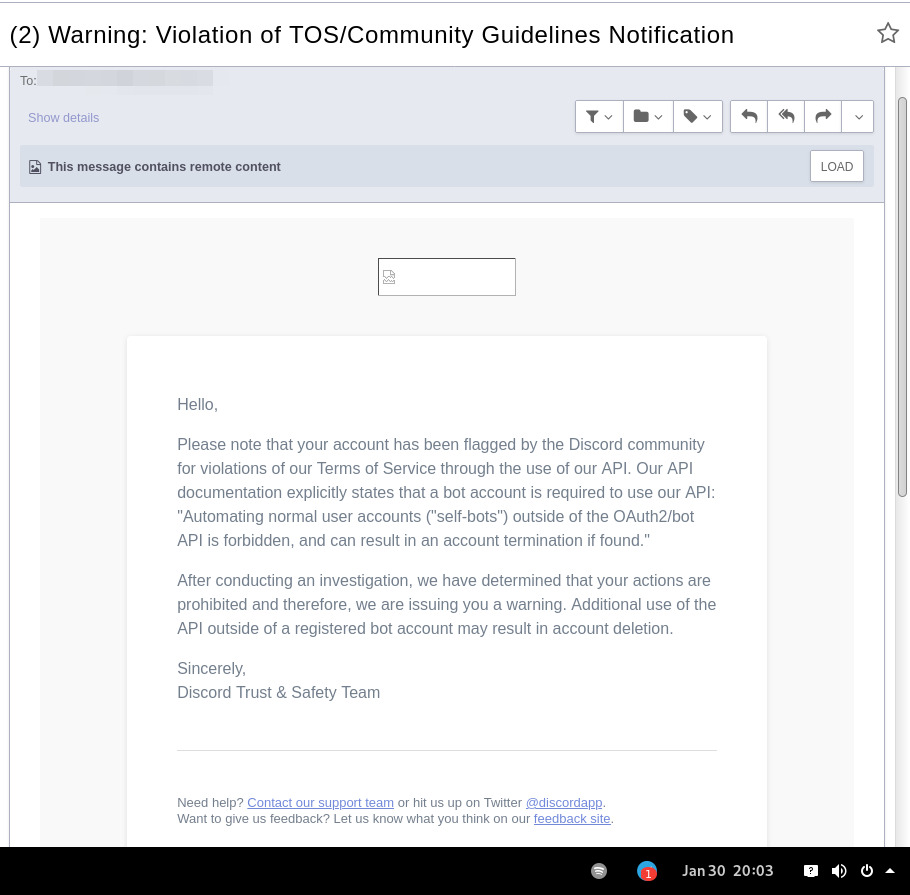
In September 2021 there was a bunch of issues with people using different third-party clients being asked to reset their passwords daily due to "suspicious activity", raised here in issue-18 (check out other links there too), which seem to have gone away within a week.
At least one person in that issue thread also reported being asked for phone account verification for roughly same reason about a week after that, so maybe "suspicious activity" triggering for 3p clients haven't really gone away.
Cordless client developer's acc apparently got blocked for ToS violation when initiating private chats. This client doesn't have such functionality, but maybe one should be more careful with private chats anyway, as that seem to be a major spam vector, so is more likely to be heavily-monitored, I think.
In the #rdircd IRC channel, a person mentioned that their discord account got some anti-spam mechanism enabled on it, disallowing to log-in without providing a phone number and SMS challenge (and services like Google Voice don't work there), immediately after they've initiated private chat with someone in Ripcord client.
"I contacted support at the time and they just responded that they can't undo the phone number requirement once it has been engaged"
It also seems like Ripcord currently might be trying to mimic official client way more closely than rdircd script here does (where latter even sends "client"/"User-Agent" fields as "rdircd" and appears that way under Devices in User Settings webui), and such similarity might look like Terms of Service violation to Discord (modifying official client), instead of Community Guidelines violation (third-party client), but obviously it's just a guess on my part as to whether it matters.
There are also some HN comments clarifying Discord staff position in a thread here, though none of the above should probably be taken as definitive, since third-party and even support staff's responses can be wrong/misleading or outdated, and such treatment can likely change anytime and in any direction, without explicit indication.
Note: only using this API here, only going by public info, can be wrong, and would appreciate any updates/suggestions/corrections via open issues.
Last updated: 2024-11-26
Discord API docs don't seem to cover "full-featured client" use-case, likely because such use of its API is explicitly not supported, and is against their rules/guidelines (see WARNING section above for details).
It's possible that more recent official OpenAPI spec in discord/discord-api-spec repo has a more complete documentation though.
Discord API protocol changes between versions, which are documented on Change Log page of the API docs.
Code has API number hardcoded as DiscordSession.api_ver, which has to be bumped there manually after updating it to handle new features as necessary.
Auth uses undocumented /api/auth/login endpoint for getting "token" value for email/password, which is not OAuth2 token and is usable for all other endpoints (eg POST URLs, Gateway, etc) without any prefix in HTTP Authorization header.
Found it being used in other clients, and dunno if there's any other way to authorize non-bot on eg Gateway websocket - only documented auth is OAuth2, and it doesn't seem to allow that.
Being apparently undocumented and available since the beginning, guess it might be heavily deprecated by now and go away at any point in the future.
There are some unofficial docs for officially-undocumented APIs and quirks:
Sent message delivery confirmation is done by matching unique "nonce" value in MESSAGE_CREATE event from gateway websocket with one sent out to REST API.
All messages are sent out in strict sequence (via one queue), waiting on confirmation for each one in order, aborting rest of the queue if first one fails/times-out to be delivered, with notices for each failed/discarded msg.
This is done to ensure that all messages either arrive in the same strict order they've been sent or not posted at all.
Discord message-posting API has enforce_nonce parameter (since 2024-02-12), which allows to retry posting messages safely from duplication, but at the moment retries are only performed here on API rate-limiting.
Fetching list of users for discord channel or even guild does not seem to be well-supported or intended by the API design.
There are multiple opcodes that allow doing that in a limited way, none of which work well for large discords (eg 10k+ users).
request_guild_members (8) doesn't return any results, request_sync (12) doesn't work, request_sync_chan (14) can be used to request small slice of the list, but only one at a time (disconnects on concurrent requests).
Latter is intended to only keep part of userlist that is visible synced in the client, doesn't support proper paging through whole thing, and only gets updates for last-requested part with indexes in it - basically "I'm in this guild/channel, what should I see?" request from the client.
Some events on gateway websocket are undocumented, maybe due to lag of docs behind implementation, or due to them not being deemed that useful to bots, idk.
Discord allows channels and users to have exactly same visible name, which is not a big deal for users (due to one-way translation), but still disambiguated irc-side.
Discord emojis like :smile: are handled in multiple different ways:
Looked up among unicode emoji names that work in all discords and translated to a unicode character, eg :smile: to
Can be found in current discord's custom emojis and replaced by a message formatting tag for it, like :debian: to a tag like <:debian:12345> , which discord clients will display as debian logo in a linux-related discord.
If user has Discord Nitro subscription, custom emoji from any discord works in any other discord as well.
rdircd doesn't handle last Nitro case at all (looks-up custom emojis in one discord), while first two cases are distinguished from each other via rdircd.unicode-emojis.txt.gz file (optional/configurable), which has list of all non-custom emojis (~6k of them), pulled from Discord WebUI using extract-unicode-emojis-from-js.py script.
If generic emojis stop working in the future (incorrectly treated as if they're discord-custom ones), due to renames or new additions, that script can be used to update the list of them easily.
Gateway websocket can use zlib compression (and zstd in non-browser apps), which makes inspecting protocol in browser devtools a bit inconvenient.
gw-ws-har-decode.py helper script in this repo can be used to decompress/decode websocket messages saved from chromium-engine browser devtools (pass -h/--help option for info on how to do it).
Run ./rdircd --test for info on some extra development/testing helper commands.
dev-cmds = yes under [debug] also enables some runtime helpers in #rdircd.control.
Adding support for initiating private chats might be a bad idea, as Cordless dev apparently got banned for that, and since these seem to be main spam vector, so more monitoring and anomaly detection is likely done there, leading to potentially higher risk for users.







