reliable discord client irc daemon
1.0.0

جدول المحتويات
وصف
تحذير
سمات
القيود
الاستخدام
معلومات ميزة MISC
نصائح وحيل عشوائية
الروابط
مزيد من المعلومات حول حظر عميل الطرف الثالث
API وملاحظات التنفيذ
RDIRCD هو خفي يسمح باستخدام حساب Discord الشخصي من خلال عميل IRC.
إنه يترجم جميع الدردشات الخاصة والقنوات/المواضيع العامة على "خوادم Discord" إلى قنوات على خادم IRC الذي ينشئه ويمكنك الاتصال باستخدام عميل IRC العادي ، بدلاً من المتصفح أو تطبيق الإلكترون.
"الموثوقة" في الاسم لأن أحد الأهداف الأولية هو جعلها تؤكد تسليم الرسائل وإخطار أي مشكلات في هذا الصدد ، والتي كانت تفتقر إلى حد ما في عملاء آخرين مشابهين في ذلك الوقت.
هناك قناة IRC للحديث عن الشيء - انضم إلى #rdircd في Libera.Chat.
IRC URL: IRCS: //irc.libera.chat/rdircd (يرفض github صنع IRCs: // links)
راجع أيضًا القسم الروابط أدناه للحصول على قائمة نادرة من العملاء البديلين الآخرين.
عناوين URL للمستودعات:
آخر واحد لديه git-notes مع قائمة todo وكذا في المرجع الافتراضي لهؤلاء.
على الرغم من أنني لن أسمي هذا التطبيق "روبوت" أو "أتمتة حسابات المستخدمين القياسيين" - لا تتمثل النية هنا في نشر أي رسائل آلية أو كشط أي شيء - على تأكيد تمامًا أن موظفي Discord يعتبرون جميع عملاء الجهات الخارجية "روبوتات" ، ويتطلب منهم استخدام API من الدرجة الثانية (انظر BOT VS AUSTORS DISS). مستخدم غير إدارة.
لا يقدم هذا التطبيق نفسه كـ "روبوت" ولا يستخدم نقاط النهاية الخاصة بـ BOT ، لذلك يمكن أن يؤدي استخدامه إلى إنهاء الحساب إذا تم اكتشافه.
راجع أيضًا مزيد من المعلومات حول قسم حظر عميل الطرف الثالث أدناه.
لقد تم تحذيرك! سائدا
طلب الرسائل الصادرة الموثوقة والتسليم ، مع إشعارات صريحة للقضايا المكتشفة من أي نوع.
دعم كل من القنوات الخاصة والعامة ، وترتيب القناة ، والمواضيع ، والمنتديات ، باستثناء إنشاء أي قوات جديدة من هذه.
لكل خادم وقنوات عالمية في كل شيء لتتبع النشاط العام.
الاسم المحلي القابل للتكوين الاسم المستعار/إعادة تسمية ، وكتل الرسائل الصادرة/بدائل ، والترشيح regexp للرسائل المستلمة.
دعم لإعادة تكوين وقت التشغيل المحدود عبر قناة #rdircd.control.
خلاف بسيط ومتسق لترجمة IRC Guild/Channel/المستخدم.
لن يتغير أي من هذه الأشياء بعد إعادة الاتصال أو إعادة توصيل القناة أو خادم ، إلخ - الترجمة في الغالب حتمية ولا تعتمد على أسماء أخرى.
ترجمة الإشارات والردود والمرفقات والملصقات والرموز التعبيرية في MSGs الواردة والأحداث الأخرى والشروح الأساسية لبعض الروابط المضمنة.
الدعم المحدود لترجمة الإشارات المستخدمة وروبية في الرسائل المرسلة والتعديلات والحذف.
أوامر التربية التي يمكن الوصول إليها بسهولة عبر/موضوع (/t) في أي قناة ، على سبيل المثال/t log 2H "لإظهار ساعتين آخر ساعتين أو"/t log 2019-01-08 "لتفريغ الأعمال المتراكمة من تلك النقطة إلى الوقت الحاضر ، تجلب في دفعات متعددة إذا لزم الأمر.
سيتم نقل الرسائل المرسلة عبر وسائل أخرى (على سبيل المثال متصفح) إلى IRC أيضًا ، وربما تأتي من Diff Nick ، إذا كان اسم IRC لا يتطابق مع ترجمة Discord to-circ.
الدعم الكامل Unicode/استخدام في كل مكان.
يتم تنفيذ بروتوكول IRC من مستندات IRCV3 ، لكنه لا يستخدم أي أشياء غير RFC ، لذلك يجب أن تكون متوافقة مع أي عملاء قديمين. اختياري TLS التفاف.
خيارات واسعة من البروتوكول وخيارات تسجيل الأخطاء ، بعضها يمكن الوصول إليه في وقت التشغيل عبر قناة #rdircd.debug.
نص Python3 واحد لا يتطلب سوى وحدة AIOHTTP ، تافهة لتشغيل أو نشر في أي مكان.
يعمل في بصمة ذاكرة مستقرة نسبيًا نسبيًا على AMD64 ، والتي ربما تكون أكثر من EG Bitlbee-Discord ، ولكنها أفضل من علامات التبويب المتصفح المتسربة.
من السهل التعديل والتصحيح دون إعادة البناء ، GDB ، الصدأ وما شابه.
يتم ترجمة فقط إشارات المستخدم والرموز التعبيرية المرسلة من IRC إلى علامات Discord (إذا تم تمكينها ومع بعض المراوغات ، انظر أدناه) - وليس القنوات ، الأدوار ، الملصقات ، المكونات ، إلخ.
لا يوجد دعم لإرسال المرفقات أو التضمينات من أي نوع - استخدم webui لذلك ، وليس IRC.
يقوم Discord تلقائيًا بتعليق الروابط ، لذا فإن نشر الوسائط بسيط مثل ذلك.
لا يتم دعم أي إجراءات خاصة بالخلاف تتجاوز جميع أنواع القراءة وإرسال الرسائل إلى القنوات الحالية - أي إنشاء حسابات أو قنوات على الخلاف ، أو إدارة الأدوار ، أو الدعوات ، أو الحظر ، أو المهلة ، وما إلى ذلك - استخدام Webui أو Harmony أو BOTS المناسبة.
لا يتم دعم إنشاء محادثات خاصة جديدة ومواضيع القنوات/المنتدى.
بالنسبة للدردشات الخاصة ، قد يكون من الخطر دعم - راجع المزيد من المعلومات حول قسم حظر عميل الطرف الثالث أدناه للحصول على التفاصيل.
لا يتتبع وجود المستخدم (عبر الإنترنت ، غير متصل ، AFK ، اللعب ، إلخ) على الإطلاق.
لا ينبعث من مستخدم ينضم إلى أحداث /قطع الغيار ويتعامل مع IRC /الأسماء بطريقة بسيطة للغاية ، فقط في إدراج النكات التي استخدمت القناة منذ بدء تشغيل التطبيق وداخل IRC-Names Timeout (يوم واحد افتراضيًا).
يتجاهل تمامًا جميع الأشياء غير النصية غير النصية بشكل عام (على سبيل المثال ، ملفات تعريف المستخدمين ، مكتبة الألعاب ، المتجر ، قوائم الأصدقاء ، إلخ).
يتتبع Discord من جانب الخادم "read_state" ، والذي لم يتم استخدامه هنا بأي شكل من الأشكال - لا يتم تشغيل إعادة تشغيل التاريخ يدويًا إلا (/t الأوامر في chans) ، لذلك يمكن أن يكون من السهل في بعض الأحيان تفويت إعادة الاتصال الهادئة.
لا يدعم وضع المصادقة متعددة العوامل Discord ، ولكن من المحتمل أن يتمكن المصادق اليدوي على الأرجح من حدوث ذلك - انظر الملاحظة على Captchas أدناه.
لا يتم دعم أوامر SLASH (للروبوتات) بأي طريقة خاصة ، ولكن ربما لا يزال بإمكانك إرسالها ، إذا كان عميل IRC سيمر بها.
ليس الشيء الأكثر سهولة في الاستخدام ، على الرغم من أن IRC نفسه ربما.
أنا فقط أقوم بتشغيله على Linux ، لذلك من غير المرجح أن "العمل فقط" على OSX/Windows ، ولكن IDK.
التنفيذ المخصص المخصص لكل من Discord و IRC ، لا يستفيد من أي نوع من التعرض والاختبار على PYPI وتوافق WRT مثل الحشرات وحالات الزاوية.
يبدو أنه ضد إرشادات Discord لاستخدامه - انظر قسم التحذير أعلاه لمزيد من التفاصيل.
على منصة OpenBSD ، عند استخدام password-hash= ، قد تحتاج أيضًا إلى تثبيت وحدة Scrypt بشكل منفصل (عبر EG pkg_add py3-scrypt ) ، حيث لا يبدو أن منفذ Python هناك يحتوي على hashlib.scrypt في stdlib.
قد تكون أبسط طريقة هي استخدام حزمة/من توزيع Linux الخاص بك ، إذا كانت متوفرة.
حزم توزيعة معروفة حاليًا (اعتبارًا من 2020-05-17):
هناك أيضًا Dockerfile و Docker-corm.yml لتشغيل هذا في Docker/Podman أو بعض بيئة الحاويات المتوافقة مع OCI.
(انظر أيضًا readme.docker- permissions.md doc للحصول على معلومات حول مشكلات الوصول المشتركة مع تلك)
يجب أن يكون من السهل تثبيت برنامج نصي واحد وتبعياته القليلة يدويًا أيضًا ، كما هو موضح في بقية هذا القسم أدناه.
على Debian/Ubuntu ، يمكن القيام بتثبيت التبعيات باستخدام هذا الأمر واحد:
# apt install --no-install-recommends python3-minimal python3-aiohttp
من المحتمل أيضًا أن يكون لدى توزيعات Linux الأخرى حزم مماثلة أيضًا ، وأوصي بمحاولة استخدامها كخيار أولي ، بحيث يحصلون على تحديثات وتجنب عبء الصيانة المحلي الإضافي ، والاحتفاظ فقط بتثبيت الوحدة النمطية عبر "PIP" إذا فشل ذلك.
على أي توزيعة تعسفية مع تثبيت Python (Python3) ، باستخدام PIP/VenV لتثبيت وحدة AIOHTTP (و DEPs) إلى "RDIRCD" غير محفوف "قد تعمل بالفعل على تثبيت".
 root # useradd -m rdircd
root # su - rdircd

## Option 1: use venv to install dependencies into "_venv" dir

rdircd % python3 -m venv _venv
rdircd % ./_venv/bin/pip install aiohttp

## Option 2: install pip (if missing) and use it directly

rdircd % python3 -m ensurepip --user
rdircd % python3 -m pip install --user aiohttp
إذا كان لديك/استخدام PIPX (على سبيل المثال من التوزيعات repos) ، يمكن استخدامه لتشغيل تطبيقات Python مثل هذه التبعيات التبعية التلقائية -فقط "Pipx Run" The Main Script: pipx run rdircd --help -دون الحاجة إلى لمس VenV أو PIP على الإطلاق (سيفعل Pipx "تحت" تحت ").
بعد تثبيت المتطلبات المذكورة أعلاه ، يمكن جلب البرنامج النصي نفسه من هذا المستودع وتشغيله مثل هذا:
 ## Ignore "useradd" if you've already created a user when running "pip" above
root # useradd -m rdircd
root # su - rdircd

## If using "venv" install example above - load its env vars
# Or alternatively run script via "./_venv/bin/python rdircd ..." command line
rdircd % source ./_venv/bin/activate

rdircd % curl -OL 'https://raw.githubusercontent.com/mk-fg/reliable-discord-client-irc-daemon/master/rdircd{,.unicode-emojis.txt.gz}'
rdircd % chmod +x rdircd

## Use "pipx run rdircd ..." here and below, if using pipx instead of pip/venv/distro-pkgs
rdircd % ./rdircd --help
...to test if it runs...

rdircd % ./rdircd --conf-dump-defaults
...for a full list of all supported options with some comments...
...alternatively, to create rdircd.ini template: ./rdircd -c rdircd.ini --conf-init

rdircd % nano rdircd.ini
...see below for configuration file info/example...

rdircd % ./rdircd --debug -c rdircd.ini
...drop --debug and use init system for a regular daemon...
لإعداد Daemon/Script لتشغيله على Boot OS ، يمكن استخدام ملف وحدة Service Systemd في معظم بيئات Linux (تحرير execstart = الخيارات والمسارات هناك) ، أو على الأرجح عبر البرنامج النصي init.d ، أو ربما في جلسة "Screen" كخيار إعلان الملاذ الأخير. تأكد من تشغيله كمستخدم على سبيل المثال "rdircd" الذي تم إنشاؤه في مقتطف أعلاه ، وليس كجذر.
لتحديث البرنامج النصي لاحقًا ، إذا لزم الأمر ، استبدله بأحدث إصدار ، على سبيل المثال عبر التنزيل باستخدام أمر Curl أعلاه ، GIT-Pull على استنساخ REPO ، أو docker-compose up --build ، أو تحديث حزمة نظام التشغيل ، أو بطريقة أخرى ، عادة ما تكون مرتبطة بكيفية تثبيتها في المقام الأول.
قم بإنشاء ملف تكوين مع بيانات اعتماد Discord و IRCD في ~/.rdircd.ini (انظر الكل --conf... opts wrt هذه):
 [irc]
password = hunter2

[auth]
email = [email protected]
password = discord-password
ملاحظة: يمكن حذف كلمة مرور IRC ، ولكن تأكد من جدار الحماية هذا المنفذ من كل شيء في النظام ثم (أو ربما تفعل ذلك على أي حال).
إذا قمت بتعيين كلمة مرور ، فربما لا تستخدم password= خيار كما هو مذكور أعلاه ، واستخدم password-hash= و-- -H/--conf-pw-scrypt لإنشاءها بدلاً من ذلك. في كلتا الحالتين ، تأكد من استخدام كلمة المرور هذه عند تكوين الاتصال بهذا الخادم في عميل IRC أيضًا.
ابدأ RDircd Daemon: ./rdircd --debug
قم بتوصيل عميل IRC بـ "LocalHost: 6667" - المضيف الافتراضي للاستماع/ربط المنفذ.
./rdircd --conf-dump-defaults -s/--irc-tls-pem-file -i/--irc-bind
استخدم الأمر IRC /list لمشاهدة القنوات لجميع خوادم /نقابات Discord المرتبطة:
 Channel           Users Topic
-------           ----- -----
#rdircd.control       1  rdircd: control channel, type "help" for more info
#rdircd.debug         1  rdircd: debug logging channel, read-only
#rdircd.monitor       1  rdircd: read-only catch-all channel with messages from everywhere
#rdircd.leftover      1  rdircd: read-only channel for any discord messages in channels ...
#rdircd.voice         1  rdircd: read-only voice-chat notifications from all discords/channels
#rdircd.monitor.jvpp  1  rdircd: read-only catch-all channel for discord [ Server-A ]
#rdircd.leftover.jvpp 1  rdircd: read-only msgs for non-joined channels of discord [ Server-A ]
...
#me.chat.SomeUser     1  me: private chat - SomeUser
#me.chat.x2s456gl0t   3  me: private chat - some-other-user, another-user, user3
#jvpp.announcements   1  Server-A: Please keep this channel unmuted
#jvpp.info            1  Server-A:
#jvpp.rules           1  Server-A:
#jvpp.welcome         1  Server-A: Mute unless you like notification spam
...
#axsd.intro           1  Server-B: Server info and welcomes.
#axsd.offtopic        1  Server-B: Anything goes. Civility is expected.
ملاحظات على المعلومات هنا:
/j #axsd.offtopic ( /join ) كما تفعل مع IRC العادية لرؤية /post msgs هناك.
لا تؤثر القنوات على/أجزاء في جانب IRC على الخلاف بأي شكل من الأشكال.
قم بتشغيل /topic (غالبًا ما يعمل /t ) IRC-Command لإظهار مزيد من المعلومات حول الأوامر الخاصة بالقنوات ، على سبيل المثال /t log لجلب وإعادة التشغيل المتراكمة بدءًا من الحدث الأخير قبل إيقاف تشغيل RDIRCD الأخير ، /t log list لسرد جميع TITESTAMPs النشاط التي يتم تتبعها ، أو /t log 2h من أجل الحصول على قناة محددة /سعة محددة (ISO860).
تتوفر أوامر التحكم/التكوين الخفي في قناة #rdircd.control ، يمكن استخدام #rdircd.debug chan لتعديل العديد من عمليات التسجيل وفحص حالة الخفيون والبروتوكولات بشكل أوثق ، وإرسال "مساعدة" هناك لإدراج الأوامر المتاحة.
للاطلاع على مخطط واسع من إعدادات التكوين المدعومة المختلفة ، راجع ملف rdircd.defaults.ini (إخراج ./rdircd --conf-dump-defaults ) ، وأكثر من ذلك على استخدامات خاصة من تلك أدناه.
يتم جمع الملاحظات على مختلف الميزات الاختيارية والأقل وضوحًا هنا.
انظر قسم "الاستخدام" للحصول على معلومات أكثر عمومية.
يمكن تحديد ملفات INI المتعددة مع خيار -c ، مما يتجاوز بعضها البعض بالتسلسل.
سيتم تحديث آخر واحد من WRT [State] ، Token = وأشياء مماثلة في وقت التشغيل ، وكذلك أي قيم تم تعيينها عبر أوامر قناة #rdircd.control ، لذلك قد يكون من المفيد تحديد التكوين المستمر مع المصادقة والخيارات ، وفصل (فارغ في البداية) لحالة ديناميكية.
على سبيل ./rdircd -c config.ini -c state.ini .
-يمكن إضافة --conf-dump إلى الطباعة الناتجة التي تم تجميعها من كل هذه.
-يمكن استخدام علامة --conf-dump-defaults لإدراج جميع الخيارات وافتراضياتها.
تتم تحديثات الطابع الزمني المتكرر في مكانها (قيم صغيرة ذات طول ثابتة) ، ولكن التحقق من CTIME قبل الكتابة ، لذلك يجب أن يكون آمنًا لتحرير أي من هذه الملفات يدويًا في أي وقت على أي حال.
يجب أن يتم إرسال تنهد إلى أمر البرنامج النصي أو "إعادة التحميل" في قناة التحكم تحميل وتطبيق القيم من جميع ملفات التكوين بنفس الترتيب. لاحظ أن هذه العملية لن تقوم بإعادة ضبط أي قيم مفقودة في الملفات إلى الإعدادات الافتراضية الخاصة بها ، فقط قم بتطبيق الأشياء التي تم تعيينها بشكل صريح على أعلى التكوين الحالي.
جميع الدردشات في rdircd (والخلاف) هي قناة .
لا يمكن استخدام IRC /Q ، /Query و /MSG بطريقة طبية IRC.
للتحدث في أي محادثة خاصة ، انضم إلى قناة مثل #me.chat.
لا توجد حاليًا طريقة لإنشاء دردشات خاصة جديدة من RDIRCD ، أو استخدام عملاء آخرين أو WebUI لذلك (أو اطلب من شخص ما الاتصال بك أولاً) ، ولكن بمجرد إنشاء قناة الدردشة الخاصة ، يمكن استخدامها في RDIRCD أيضًا.
راجع أيضًا القنوات التلقائية و /أو /الانضمام إلى قناة RDIRCD.LEFTOVER.ME لمراقبة الرسائل الخاصة بشكل موثوق ، إذا لزم الأمر.
في جميع قنوات IRC التي تمثل قناة Discord - إرسال /topic (أو /t - اختصار غالبًا ما يتم دعمها في عملاء IRC) - والتي يجب أن تطبع معلومات محدثة على جميع الأوامر الخاصة بالقنوات ، مثل تلك:
/t info - إظهار بعض معلومات النقابة/القناة الداخلية ، مثل IDS وما شابه لإعادة تسمية.
يجب طباعة اسم القناة الدقيق على Discord (دون أي إعادة تسمية محلية أو ترجمة Discord-to-circ التي يقوم بها RDIRCD) ، موضوعه ، نوعه ، إلخ ، من بين أشياء أخرى.
/t info {user-name...} - معلومات الاستعلام عن اسم المستخدم (أو جزء منه) في هذا الخلاف.
على سبيل المثال ، /t info joe137 سوف يبحث مستخدم joe137 على خادم Discord الذي تنتمي إليه القناة ، وطباعة معلومات عنها ، مثل أسماء Discord المختلفة.
/t log [state] - Replay History منذ نقطة "State" (توقف RDIRCD الأخير عن طريق الافتراضي).
/t log (مثل /t log 1 ) يمكن استخدامه على سبيل المثال بعد إعادة تشغيل RDIRCD للاستعلام عن أي رسائل قد تم نشرها بعد إيقافها ، وقبل أن تبدأ مرة أخرى (بالإضافة إلى أي آخرين منذ ذلك الحين).
أو /t log 0 للتحقق من السجل منذ آخر msg الذي شاهدته RDIrcd ، للحالات التي يكون فيها Discord /الشبكة flakey وربما فقد شيء بهذه الطريقة.
(حيث تشير هذه الأرقام 1 و 0 إلى الطوابع الزمنية المحفوظة من إخراج /t log list ، المخزنة /المحدثة تحت [state] في ملف INI)
يمكن أيضًا استخدامه مع وقت مطلق أو نسبي ، على سبيل المثال /t log 15m لطلب /إعادة تشغيل تاريخ القناة في غضون 15 دقيقة الماضية ، أو /t log 2019-01-08 12:30 لإعادة تشغيل السجل منذ ذلك الوقت المحدد المحدد المحدد (ما لم يتم تحديد المنطقة الزمنية هناك أيضًا).
Just /t أو /topic في أي قناة وكيل Discord سوف تدرج المزيد من هذه الأوامر ومزيد من المعلومات حول كيفية استخدامها.
يمكن تحرير الرسالة الأخيرة التي يتم إرسالها إلى قناة Discord باستخدام أمر SED-Replacement مثل s/hoogle/google/ لإصلاح خطأ مطبعي أو تعديل/إعادة صياغة/توضيح هذا السطر الأخير.
يمكن استخدام أمر //del لحذفه - راجع قسم "التعديلات/الحذف السريع" أدناه.
يمكن أن تقمع @silent Prefix-Command في الرسائل إشعارات المستخدم حول هذا الموضوع (الموضحة أيضًا أدناه في مكان ما).
في قنوات خاصة مثل #rdircd.control و #rdircd.debug: أرسل h أو help .
يمكن أن يكون لديهم قائمة طويلة إلى حد ما من الأوامر المدعومة ، على سبيل المثال ، فيما يلي بعض الأوامر لـ #rdircd.control:
يمكن استخدام status (أو st ) للتحقق من Discord و IRC Connection INFOS.
يمكن استخدام أوامر connect / disconnect (أو on / off ) للتحكم يدويًا في اتصال Discord ، على سبيل المثال لاستخدام أكثر لمرة واحدة ، أو لقمع تحذيرات CONN الفاشلة مؤقتًا أثناء الشبكة المحلية بهذه الطريقة.
set irc-disable-reacts-msgs yes إشعارات تفاعل Discord القابلة للتنقيب (باستخدام أمر set ).
أو set -s irc-disable-reacts-msgs yes لجعلها دائمة ( -s/--save العلامة لحفظ القيمة لملف التكوين ini) ، أو set بسيطة دون معلمات لرؤية جميع خيارات التكوين العامة وقيمها.
rx Block mee6 bot-noise = (?i)^<MEE6> -temp-block جميع الرسائل من mee6 bot.
(انظر القسم حول هذا التصفية أدناه ، أو المزيد من الأمثلة على هذه الأشياء بموجب النصائح والطرقات)
... وهناك المزيد من هذه help في الكتابة هناك للحصول على معلومات محدثة كاملة.
#rdircd.monitor يمكن استخدامه لرؤية النشاط من جميع الخوادم المتصلة - يحصل على جميع الرسائل ، المسبق باسم قناة IRC ذات الصلة.
#rdircd.monitor.guild (حيث "النقابة" عبارة عن تجزئة أو اسم مستعار ، انظر أعلاه) هي قنوات مشابهة لكل خادم/نقابة خلاف محددة.
#rdircd.monitor.me يمكن أن يكون مفيدًا ، على سبيل المثال ، لمراقبة أي دردشات ورسائل خاصة لحساب Discord (انظر أيضًا مثال القنوات التلقائية).
#rdircd.leftover و #rdircd.leftover.guild القنوات مثل قنوات الشاشة ، ولكن تخطي الرسائل من أي قنوات أن عميل IRC لديها Join-Ed ، بما في ذلك eg /join #rdircd.leftover.game-x يخفي أن "game-x" discord msgs من global catch-all rdircd.lefover. "بقايا" منها بأي شكل من الأشكال).
#rdircd.voice هي قناة مشابهة لـ #rdircd.monitor ، ولكنها مجرد اصطياد إشعارات الأحداث الصوتية ، لتكون قادرة على تتبع تلك في الوقت المناسب.
يمكن تجاهل هذه القنوات إذا لم تكن هناك حاجة ، أو تعطيلها بالكامل عن طريق تعيين مثل chan-monitor على قيمة فارغة ضمن قسم ملف التكوين INI [IRC]. على سبيل المثال ، تعتبر قنوات النشاط الصوتي لكل مستنقع معوّلًا افتراضيًا هناك.
يحتوي ملف التكوين أيضًا على قسم [Unmonitor] لقائمة اختيارية لأسماء القنوات التي يجب تجاهلها في القنوات الشاشة/بقاياها ، على سبيل المثال:
 [unmonitor]
# All filters are applied to channel names and are case-insensitive
Ignore this particular " bot-commands " channel = game-X.bot-commands
skip forum threads in " game-X " guild = glob:game-X.forum.=*
" wordle " threads in any guild (and chans ending in .wordle) = glob:*.wordle
Don ' t show threads in any forum-like channels = re:^[^.]+ . (forum|discuss) . =.*
disregard all voice-chat stuff = glob:*.vc
يتم تجاهل المفاتيح (كما هو الحال في الجزء قبل "=" في قسم التكوين هذا ، ويمكن أن يكون أي شيء ، على سبيل المثال ، التعليقات التي تشرح الأنماط (كما هو الحال في المثال أعلاه) ، في حين أن القيم إما أسماء القنوات الدقيقة (مع بادئة Discord ، أو اختياري #-prefix) ، أو "glob:"/"re:" <some-key/comment> = glob:<wildcard-pattern> أو <some-key/comment> = re:<regexp-pattern> خطوط-انظر الأمثلة أعلاه.
سيتم إسقاط أسماء القنوات التي تطابقها تلك المرشحات من قنوات الشاشة ، بحيث يمكن استخدامها لتحديد قائمة بأشياء غير مرغوب فيها لا تهتم بها ولا تريد رؤيتها هناك.
يمكن لـ "Unmonitor" (أو "UM") أمر في #rdircd.control إضافة/إزالة هذه المرشحات على أساس النحيل في أي وقت. راجع أيضًا خيار تكوين match-counters لتتبع ما إذا كانت هناك حاجة إلى استخدام قواعد (قواعد) محددة/يتم استخدامها.
تقتصر الرسائل الموجودة في قنوات الشاشة على الطول/الخطوط المحددة ، لتجنب الفيضانات المفرطة بواسطة MSGs الطويلة و/أو متعددة الخطوط. يمكن استخدام "Len-Monitor" و "Len-Monitor-Lines" في قسم التكوين ضمن [IRC] للتحكم في هذه الحدود ، انظر ". هناك أيضًا خيارات لتغيير تنسيق اسم قنوات الشاشة.
على IRC ، كل شخص لديه اسم واحد ، ولكن هذا ليس هو الحال مع Discord ، حيث يمكن لكل مستخدم الحصول على أسماء التالية:
login - Discord "اسم المستخدم" ، وتحديد كل مستخدم بشكل فريد.display - "اسم العرض" الذي تم تعيينه بواسطة المستخدم في إعدادات حساب Discord ، وليس فريدًا.nick - Server and Friend "الأسماء المستعارة" ، تعيين في إعدادات Discord Server ، وليس دائمًا. يعد login أقرب مفهوم إلى الأسماء المستعارة IRC ، حيث أنه غير متكافئ ، متسق ، قصير ، ASCII فقط ، ويمكن استخدامه عن طريق تعيين خيار name-preference-order = login في قسم [Discord] (وليس الافتراضي).
يعرض عملاء Discord الرسميين أسماء أخرى أولاً ، وهذا هو السبب في أن خيار name-preference-order nick display login ، والذي يستخدم ألقاب Discord/Friend الخاصة أولاً ، إن وجد ، مرة أخرى إلى اسم المستخدم المجاني الذي تم تعيينه في إعدادات الحساب ، واسم تسجيل الدخول الخاص بهم على خلاف ذلك.
أشياء أخرى في الأسماء المستعارة التي لا يتوهم المستخدم التي لا تسمح بها IRC أيضًا بالاستبدال بأحرف Unicode الشائعة ، والمسافات مع "·" على سبيل المثال ، أو <> أقواس IRC-Nick الشائعة مع سهام Unicode. يتم اقتطاع النكات طويلة الخلاف.
لا توجد إشعارات IRC حول تغيير المستخدمين مع العرض الخاص بالخلاف/Nick-Nick-Names في الوقت الحالي ، ولا يتعين عليهم أن يكونوا فريدين ، مما قد يجعل من الصعب إخبار من هو ، إذا استمروا في تغيير النكات لأي سبب من الأسباب.
كل هذا قابل للتكوين عبر إعدادات ملف INI (أو في قناة #rdircd.control) ، لذلك إذا كان الأمر سخيفًا للغاية ومجنونًا ، فقم بتعيين name-preference-order = login لاستخدام nicks فريدة من نوعها IRC للجميع بدلاً من ذلك.
يمكن أن تساعد IRC /who Command أو /topic info في الترجمة بين هذه الأسماء ، على سبيل المثال /t info john1234 لطباعة المعلومات لهذا الاسم /تسجيل الدخول في المخزن المؤقت للقناة ، والتي يجب أن تشمل جميع المستخدمين مع تطابق جزئي من هذا الاسم على هذا الخلاف المحدد ، بينما /who ORMAN SENCESTS LONDERS.
(أشبه بـ "إعادة تسمية" من "الاسم المستعار" ، لأن الأسماء القديمة لا تستمر في العمل من أجل هذه)
يمكن تعريفه في ملف التكوين لاستبدال بادئات Discord المستندة إلى التجزئة أو أسماء قناة الخادم بشيء أكثر قابلية للقراءة/لا تنسى أو ذات معنى لك:
 [renames]
guild.jvpp = game-x
guild.sn3y = log-bot
guild.sn3y.chan-fmt = logs/{name}.log
chan.some-long-and-weird-name = weird
chan.@ 710035588048224269 = general-subs
user.noname123 = my-pal-bob
user.@ 123980071029577864 = joe
هذا ينبغي:
Turn على سبيل المثال #jvpp.info إلى #game-x.info-lettersoup guild-id إلى بادئة أكثر جدوى. سوف ينطبق هذا على جميع القنوات في هذا الخلاف - "Guild" Renames.
تغيير تنسيق لأسماء القنوات من Discord "SN3Y" من شيء مثل #sn3y.debug إلى #logs/debug.log - تغيير تنسيق اسم القناة.
يستخدم قالب التنسيق بناء جملة Python str.format مع "الاسم" (اسم القناة) و "بادئة" (بادئة النقابة - سيكون "سجل السجل" في هذا المثال). التنسيق الافتراضي هو {prefix}.{name} .
لا يؤثر خيار التنسيق هذا على اسم (أسماء) القناة (مثل #rdircd.monitor.log-bot أو #rdircd.leftover.game-x)-راجع خيارات "chan-monitor-guild" و "chan-leftover-guild" تحت القسم [IRC] لتغيير ذلك.
أعد تسمية تلك القناة الطويلة للحصول على اسم أقصر (الاحتفاظ ببادئة النقابة) - "Chan" Renames.
لاحظ أن هذا يؤثر على جميع النقابات حيث يوجد اسم القناة هذا ، ويجب أن يكون اسم المصدر بتنسيق IRC ، كما هو الحال في /قائمة ، وهو RFC1459-CASEMPED (كما في IRC).
إعادة تسمية القناة مع معرف = 710035588048224269 إلى "الميمات" (الاحتفاظ ببادئة النقابة) - "تشان" إعادة تسمية باستخدام @قناة معرف المواصفات.
يمكن العثور على معرف قناة Discord الطويل (الذي يُطلق عليه أيضًا "Snowflake") عن طريق الكتابة /t info موضوعية في قناة IRC المقابلة ، ويمكن استخدامه للإشارة إلى تلك القناة المحددة ، أي إعادة تسمية هذه #General على خادم Discord هذا بدلاً من إعادة تسمية جميع القنوات الجينية في كل مكان.
يكون هذا مفيدًا بشكل خاص عندما يكون لقنتين نفس الاسم الدقيق في نفس الخلاف ، وعادة ما سيتم تعيينه .<id-hash>
أعد تسمية مستخدمي الزوجين ، المشار إليه بواسطة اسم مستخدم Discord و ID.
/t info <nick-or-part-of-it> الأمر في قناة Discord أو مماثلة /who Command يمكن أن تساعد في البحث عن معرفات Discord ، مثل تلك المستخدمة هناك.
في الوقت الحالي ، يتم تنفيذ الأنواع المدرجة فقط من إعادة تسمية ، من أجل بادئات وقنوات الخلاف ، ولكن هناك أيضًا خيارات ضمن قسم [IRC] لتعيين أسماء لنظام/شاشة/بقايا القنوات الخاصة والقطارات الخاصة-"Chan-sys" ، "chan-private" ، "chan-monitor" ومثل هذه (انظر ".
قم بتعيين chan-monitor-guild = {prefix} على سبيل المثال ، لتكون قناة #Game-X تكون جذابة لجميع الرسائل في هذا الخلاف ، دون الافتراضي طويل #rdircd.monitor.* بادئة.
تنشئ الرسائل الخاصة Discord وينشرها على القنوات في خادم/نقابة "ME" ، كما تفعل في Discord Webui ، ويمكن التفاعل معها بنفس الطريقة مثل أي نقابة/قنوات أخرى (قائمة ، انضمام/جزء ، إرسال/recv msgs ، إلخ).
انضم إلى #rdircd.monitor.me (أو #rdircd.monitor ، انظر أعلاه) للحصول على جميع msgs/الدردشات الجديدة هناك ، بالإضافة إلى إشعارات تغيير العلاقة (طلبات الصداقة/الإضافة/الإزالة) كإشعارات.
يمكن قبول طلبات الصداقة وإضافة/إزالةها عبر Discord Webui بشكل منتظم ولا يتم تنفيذها في هذا العميل بأي طريقة خاصة.
راجع أيضًا قسم القنوات التلقائية للانضمام أدناه للحصول على طريقة سهلة للدردشة الخاصة الجديدة في عميل IRC عبر الدعوات.
"المواضيع" هي ميزة Discord ، مما يتيح للمستخدمين من غير المنافسين إنشاء قنوات فرعية مخصصة عابرة في أي وقت لموضوع محدد ، والتي تتم تلقائيًا ("أرشفة") بعد مهلة عدم النشاط (مثل يوم واحد).
قنوات Discord "Forum" هي قنوات في الأساس ، حيث يمكن للأشخاص فقط إنشاء والتحدث في Theads ، مع قائمة أولئك الذين يستبدلون الثرثرة الافتراضية للقناة.
يجب عرض جميع مؤشرات الترابط غير المستقلة في قائمة قناة RDIRCD كقنوات IRC عادية ، مع أسماء مثل #gg.general. = VOT5.LETS · مناقشة · أشياء ، وتمديد اسم الشان الأصل مع علامة معرف الموضوع ("= VOT5" في هذا المثال) واسم خيط ربما تم تقليصه (انظر "مؤشرود تشان-نام لين" خيار التكوين).
هناك العديد من الخيارات لكيفية رؤية المواضيع والتفاعل معها من القناة الأصل (في الغالب في [Discord] ، انظر-إخراج defaults dumpumps):
 [irc]
thread-chan-name-len = 30

[discord]
thread-id-prefix = =
thread-msgs-in-parent-chan = yes
thread-msgs-in-parent-chan-monitor = no
thread-msgs-in-parent-chan-full-prefix = no
thread-redirect-prefixed-responses-from-parent-chan = yes
...
ولكن حتى مع كل هذه المعاقين ، يجب إرسال إشعار بسيط إلى القناة عند بدء تشغيل المواضيع ، بحيث لا يفوتك المرء تمامًا.
لا يوجد أي دعم لإنشاء مؤشرات ترابط جديدة من IRC ، أو إلغاء تركيزها أو إدارةها بطريقة أخرى ، والانضمام إلى قناة الخيوط في IRC في الواقع لا "انضم إلى سلسلة الرسائل" في Discord UI (قم بتثبيته تحت اسم القناة) ، ولكن يجب أن يفعل أي شيء هناك تلقائيًا.
يتيح إعداد "Chan-Auto-Join-RE" في قسم [IRC] تحديد RegexP لمطابقة اسم القناة (بدون # بادئة) للانضمام التلقائي عندما تظهر أي رسائل فيها.
على سبيل المثال ، للانضمام التلقائي أي #ME.* القنوات (الرسائل المباشرة) ، بعد قيمة التعبير العادية (بناء جملة Python "RE":
 [irc]
chan-auto-join-re = ^me.
أو للحصول على جميع القنوات تلقائيًا ، استخدم chan-auto-join-re = .
لا تتطابق القيمة الفارغة لهذا الخيار (الافتراضي).
يمكن استخدام هذا كبديل لتتبع أشياء جديدة عبر قنوات #rdircd.monitor/بقايا.
يمكن تعديل هذا regexp في وقت التشغيل باستخدام أمر "set" في قناة #rdircd.control ، مثل أي قيم أخرى ، على سبيل المثال ، تمكين/تعطيل هذه الميزة لضربات أو قنوات محددة.
الإشارات هي علامات @username على Discord ، مصممة لتنبيه شخص ما إلى رسالة مباشرة.
مع التكوين الافتراضي ، عندما ترى على سبيل المثال <Galaxy?·Brain> Hi! وترغب في الرد على تسليط الضوء عليهم ، وربما يجب أن يعمل إرسال Hey @galaxy and welcome . يمكن أيضًا استخدام IRC Nick الكامل ، للتأكد.
كيف تعمل: إذا كان RDIRCD يتطابق مع msg-mention-re REGEXP CONFOTION ضد شيء ما في رسالة يتم إرسالها (على سبيل المثال @galaxy @-mention أعلاه) ، سيتم التعامل مع ذلك على أنه "ذكر" ، وهو إما مطابقة بشكل فريد وترجمت إلى خلاف في الرسالة المرسلة ، أو يعود إلى إشعار خطأ (مع Nicks التي تم ذكرها.
يجب أن تبدو القيمة الافتراضية لذلك:
 [discord]
msg-mention-re = (?:^|s)(@)(?P<nick>[^s, ; @+!]+)
والتي من شأنها أن تتطابق مع أي كلمة تشبه الفضاء أو علامات الترقيم التي تم فصلها عن @nick ذكر في خطوط إرسال.
يجب أن يكون Regexp (بناء جملة Python "RE") اسم "Nick" مع سلسلة البحث عن اسم Nick/Username ، والتي سيتم استبدالها بعلامة Discord ذكر ، وسيتم تجريد جميع مجموعات التقاط الأخرى (أي بدونها ?: :) (مثل @ في regexp أعلاه).
يجب أن يسمح regexp الافتراضي أعلاه بإرسال EG @something لظهوره غير مضيء في WebApp (وبدون بسبب تخفيض الطلب) ، لأنه لن يتم مطابقته (?:^|s) بسبب بادئة backslash.
وكمثال آخر ، للحصول على أبرز على طراز IRC الكلاسيكي في بداية الخط ، يمكن استخدام regexp مثل هذا: يمكن استخدامه:
msg-mention-re = ^(?P<nick>S+)(:)(?:s|$)
ويجب أن تترجم على سبيل المثال mk-fg: some msg إلى @mk-fg some msg (مع @-part يجري ذكر tag). يتم تضمين المساحة الخلفية في regexp هناك لتجنب مطابقة روابط عناوين URL.
إلى معرف مستخدم Discord محدد ، سيتم استخدام مجموعة "Nick" بطرق التالية:
تطابق غير حساس للحالة ضد جميع أسماء IRC المرتبطة بالنقابة (مؤلفي الرسائل ، ردود الفعل ، مستخدمي القنوات الخاصة ، إلخ). يتحكم خيار التكوين في وقت user-mention-cache-timeout في المهلة "الحديثة".
البحث عن الاسم الفريد من نوعه عن طريق البادئة ، مثل Discord في WebUI من أجل الإكمال التلقائي بعد كتابة @.
إذا لم يتم العثور على مطابقة مخزنة مؤقتًا أو فريدة من نوعها - سيتم إصدار إشعار الخطأ وعدم إرسال الرسائل.
تم تصميم هذا السلوك الصارم لتجنب أي عمليات انتقال غير مقصودة ، ويجب أن يكون تسليط الضوء على الشخص الخطأ ممكنًا بشكل عام فقط من خلال الأخطاء في الاعاقة.
يمكن أيضًا استخدام خيار msg-mention-re-ignore (REGEXP لمطابقة مع التقاط النمط الكامل أعلاه) لتخطي بعض الأشياء غير المقيدة من المعاملة على هذا النحو ، والتي تم التقاطها بطريقة أخرى بواسطة REGEXP الأول ، وتجريد مجموعات التقاط منها أيضًا ، والتي يمكن استخدامها في الهروب من التراجع.
لاحظ أن قوائم مستخدمي Discord يمكن أن تكون ضخمة جدًا (500 ألف مستخدم+) ، ولا يتم تقسيمها بواسطة القناة ، ولا يُقصد بها أن يتم إحرازها مسبقًا من قبل العميل ، والتي يتم الاستعلام عنها فقط للحصول على إكمال أو أجزاء مرئية ، والتي لا تخطط جيدًا إلى IRC ، وبالتالي كل هذا السحر.
تم تكوين regexp مماثلة لتربية الرموز التعبيرية:
msg-emoji-re = (?:^|s)(:)(?P<emoji>w+)(:)(?=[^w]|$)
حيث I use :Arch: btw من IRC سوف يتطابق مع مجموعة REGEXP ، و Lookup/Relape "Emoji" هناك باستخدام الرموز التعبيرية لهذا الخلاف (غير حساسة للحالة) ، وإما إرسالها المترجمة أثناء I use ? btw ، أو إشعار خطأ الإرجاع إذا لم يكن هذا الرموز التعبيرية متوفرة في هذا الخلاف وليس على قائمة الأحاديات العامة.
قم بتعيين msg-mention-re / msg-emoji-re على قيمة فارغة لتعطيل مثل هذه الترجمات.
على غرار يذكر مستخدم Discord أعلاه ، هناك خيار regexp خاص يتطابق مع الأوامر التي سيتم تفسيرها على أنها تحرير أو إزالة الرسالة الأخيرة المرسلة إلى هذه القناة.
تبدو regexps الافتراضية شيئًا من هذا القبيل (تحقق-conf defaults jic):
 [discord]
msg-edit-re = ^s*s(?P<sep>[/|:])(?P<aaa>.*)(? P =sep)(?P<bbb>.*)(? P =sep)s*$
msg-del-re = ^s*//dels*$
إنها تتطابق مع خطوط متابعة SED/PERL/IRC مثل s/spam/ham/ ، و //del Line ، والتي لن يتم إرسالها إلى Discord ، والتي تستخدم فقط كأوامر داخلية.
( s|/some/path|/other/path| و s:cat /dev/input/mouse0 | hexdump:hexdump </dev/input/mouse0: يسمح أيضًا بناء الجملة عن طريق التحرير الافتراضي regexp
يعمل كلا الأوامر التي تتوافق مع هذين في الرسالة الأخيرة التي أرسلها RDIRCD إلى نفس قناة Discord ، مع //del ببساطة إزالة تلك الرسالة الأخيرة ، وتعديل تشغيل Python re.sub () (pcre-like) وظيفة إعادة تبديل regexp عليها.
"msg-edit-re" regexp option value matching sed-like command must have named "aaa" and "bbb" groups in it, which will be used as pattern and replacement args to re.sub(), respectively.
If edit doesn't seem to alter last-sent message in any way, it gets discarded, and also generates IRC notice response, to signal that replacement didn't work.
Successful edit/deletion should also be signaled as usual by discord, with [edit] or such prefix (configurable under [irc] section).
Any older-than-last messages can be edited through Discord WebUI - this client only tracks last one for easy quick follow-up oops-fixes, nothing more than that.
Somewhat similar to quick edits/deletes above, "msg-flag-silent-re" option is there to match/remove "@silent" prefix in messages (by default), which disables sending discord push notifications for it, same as with the official client.
That and similar message flags on incoming messages are not represented in any way, as they don't seem to be relevant for an irc client anyway.
Config can have a [send-replacements] section to block or regexp-replace parts of messages sent (by you) from IRC on per-discord basis.
This can be used to add discord-specific tags, unicode shorthands, emojis, stickers, block/replace specific links or maybe even words/language before proxying msg to discord.
Here's how it can look in the ini file(s):
 [send-replacements]

*. unicode-smiley = (^| ):)( |$) -> 1?2
*. twitter-to-nitter = ^(https?://)((mobile|www).)?twitter.com(/.*)?$ -> 1nitter.ir4

guildx.never-mention-rust! = (?i)brustb -> <block!>
guildx.localize-color-word = bcolor(ed|iS+)b -> colour1
Where each key has the form of discord-prefix> "." comment , with a special * prefix to apply rule to all discords, while values are regexp " -> " <replacement_or_action with one special <block!> action-value to block sending msg with error-notice on regexp match. "comment" part of the key can be any arbitrary unique string.
So when sending eg test :) msg on IRC, discord will get test ? .
Same as with other regex-using options, regexps have python "re" module syntax, applied via re.sub() function, using raw strings from config value as-is, without any special escapes or interpretations.
Replacements are applied in the same order as specified, but with * keys preceding per-discord ones, and before processing to add discord tags, so anything like @username that can normally be typed in messages can be used there too.
#rdircd.control channel has "repl" command to edit these rules on-the-fly.
If you join #rdircd.monitor channel, see - for example - a message like this:
<helper-bot> #pub.welcomes :: Welcome!
...and think "don't want to see messages like that again!" - config files' [recv-regexp-filters] section or corresponding "rx" command in #rdircd.control channel can help.
Depending on what "messages like that" means, here are some ways to filter those out:
 [recv-regexp-filters]
discard msgs from this bot = ^<helper-bot>
ignore all msgs in that channel of that discord = ^S+ # pub.welcomes ::
drop all msgs from " pub " discord = ^S+ # pub.
no messages from # welcomes channels of any discord pls = ^S+ #w+.welcomes ::
never see " Welcome! " message-text again!!! = ^S+ # S+ :: Welcome!$
some combination of the above = (?i)^<helper-bot> # w+.welcomes ::
...
(tweak eg last example on regex101.com for more hands-on understanding)
Lines in that section have the usual <key> = <regexp> form, where <key> part can be anything (eg comment to explain regexp, like in examples above), and <regexp> value is a regular expression to match against the message in <user> #discord.channel-name :: message text format like that helper-bot msg presented above, and same as can be seen in monitor-channels.
Any message received from discord will be matched against all regexps in order, stopping and discarding the message everywhere on first (any) match. So it might be a good idea to write as precise patterns as possible, to avoid them matching anything else and dropping unrelated messages accidentally.
Same as with some other conf options, basic knowledge of regular expressions might be needed to use such filters - here's a link to nice tutorial on those (though there are 100s of such tutorials on the web).
Particular regexps here use PCRE-like python re syntax, with re.DOTALL flag set ( . matches newlines in multiline messages). I'd also recommend commonly adding (?i) case-insensitive-match flag, as IRC nicks and channel names ignore character case and can be displayed in misleading/inprecise ways in the client.
More random examples of [recv-regexp-filters], incl. more advanced CNF weirdness:
 [recv-regexp-filters]
disregard wordle thread there = ^S+ # pub.general.=w8mk.wordle ::
ignore " wordle " threads everywhere = ^S+ # S+.=w{4}.wordle ::
activity-level bots are annoying = (?i) advanced to level d+[ !]
gif replies of YY in ZZ = (?i)^<YY> # ZZ.S+ :: (-- re:[^n]+n)?[att] .*/imaged.gif?

; ; Advanced stuff: connect multiple regexps via CNF logic (Conjunctive Normal Form)
; ; If key starts with "∧ " (conjunction symbol), it's AND'ed with previous regexp
; ; ¬ (negation) in that prefix inverts the logic, so e.g. "∧¬ ..." is "and not ..."
; ; Disjunction (∨) is the default behavior and doesn't need the (implied) prefix
; ; Any complex logical expression can be converted to such CNF form -
; ;  - use calculators like https://www.dcode.fr/boolean-expressions-calculator

Drop welcome msgs in welcome-chans = (?i)^S+ # w+.S*welcomeS* :: .*bwelcomeb.*
∧ but only if they have an exclaimation mark in them somewhere = :: .*!
∧¬ and not from this specific " lut " discord-prefix = ^S+ # lut.

Most channels here are not relevant = ^S+ # myc.
∧¬ except these ones = ^S+ # myc.(announcements|changelog|forum)[. ]
∨ but skip github CI logs there = ^<github> # myc.
Pretty much anything can be matched with clever regexps, so CNF-logic stuff like in last examples is seldom useful, but might still be simpler than expressing arbitrary ordering or negation in regexps.
See also match-counters config option to keep track of whether specific rule(s) are still needed/being-used.
Mostly useful for debugging - /who command can resolve specified ID (eg channel_id from protocol logs) to a channel/user/guild info:
/who #123456 - find/describe channel with id=123456./who %123456 - server/guild id info./who @123456 - user id lookup.All above ID values are unique across Discord service within their type.
/who @John·Mastodon - user IRC nick or name/login lookup.
Queries all joined discords for that name, and can return multiple results for same or similar non-unique names. Can be useful to check exact nick/display/login names corresponding to an IRC name, or other user info.
/who *665560022562111489 - translate discord snowflake-id to date/time.
Results of all these commands should be dumped into a server buffer (not into channels), regardless of where they were issued from.
In irc channels corresponding to ones on discord, /topic info command (often works as shortened /t info in clients too) can be used to print more information about linked discord channel and its server/guild.
/t info <username> can also print info on user in that discord (unlike /who @<username> which looks the name up in all connected discords), for example /t info john will print info for anyone with "john" in the name.
Usernames in these queries can match exact irc name or discord username, in which case that result is returned, or otherwise more general server-side lookup is made, which can return matches in any type of discord name(s) (see People's names on discord for more info on those).
Discord name translation is "mostly" deterministic due to one exception - channels with same (casemapped) IRC name within same server/guild, which discord allows for.
When there is a conflict, chan names are suffixed by .<id-hash> (see chan-dedup-* config options), to allow using both channels through IRC. Renaming conflicting channels on Discord will rename IRC chans to remove no-longer-necessary suffixes as well. Such renames affect thread-channels too.
Note that when channels are renamed (including name conflicts), IRC notice lines about it are always issued in affected channels, and any relevant monitor/leftover channels, topic should be changed to reflect that old-name channel is no longer useful, and posting msgs there should emit immediate warnings about it.
Discord CDN URLs for attachments can end up being quite long with same host, long discord/channel IDs in there, then actual filename, and ?ex=...&is=...&hm=... trail of CDN parameters after that.
Many Linux IRC clients run in Terminal Emulators though, which often support OSC 8 terminal hyperlink standard, so can display clickable links in a much more compact and readable form.
For example, this attachment URL to a Discord CDN:
https://cdn.discordapp.com/attachments/1183893786254905414/1206216641877377024/20240211_My_Cat_Photo.jpg?ex=65db33c9&is=65c8bec9&hm=9c1dbecbfb2f9edf2302ec078f5e62fffa7f8c2f32e5cd6e3563ae25d8a356e1&
Can be displayed in a terminal like this instead: 20240211_My_Cat_Photo.jpg
Ie same as how one would see hyperlinks displayed in a browser.
This is disabled by default, but if you use terminal IRC client that might support those, set terminal-links = yes option in config file or via set command in an #rdircd.control channel to try it out.
Adjacent terminal-links-re and terminal-links-tpl options can be used to control which part of the link to display as its visible name, which terminal-specific escape characters to use, and such customization.
Discord has voice channels, where in addition to text people can talk verbally, share camera or screen capture (aka streaming, screen sharing). IRC protocol does not support anything like this of course, but it can be useful to get notified when someone starts talking, to hop into different discord client (eg open it in a browser), and use these channels from there.
All IRC channels corresponding to discord voice chats automatically get .vc suffix (unless renamed), and get notice messages about voice activity in there, but limited to following events, to avoid being too spammy:
voice-notify-after-inactivity timeout of inactivity (ie since previous voice-status notification there), default = 20 minutes. And with additional rate-limit set by voice-notify-rate-limit-tbf value, to notify about up to 5 events in a row, but otherwise no more often than once in 5 minutes ("token bucket algorithm" is technically how this limit is implemented/works).
If description above sounds confusing, here's config tweaks to remove all limits on voice-activity event notifications - try those, and maybe re-read this section later if they get too spammy (maybe never!):
 [discord]
voice-notify-after-inactivity = 0
voice-notify-rate-limit-tbf = 0
#rdircd.voice monitor-channel(s) can also be used to only track voice-chat notifications across discords/channels, potentially filtered via "um" command in #rdircd.control or [unmonitor] in ini config(s).
IRC convention is to treat mention of a nickname as a "highlight" - a more notification-worthy event than a regular channel message, so it might be useful if messages in private channels did always highlight the nick for IRC client.
prefix-all-private option can be used for that:
 [irc]
prefix-all-private = mynick:
Might also be necessary to either join monitor/leftover channels or setup auto-joining channels for new PMs to be received by IRC client at all.
Private chats are not implemented via direct IRC messages for various practical reasons, ie to have everything work via channels, because it works that way on the discord side, they can have multiple users, to list those easily, to query topic/history/etc there, and such stuff.
There is a similar prefix-all option, to add prefix to all messages, if prefix-all-private doesn't go far enough.
By default, [discord] msg-ack=yes enables sending (delayed) ACKs for received messages in private chats, so that discord counts those as read and doesn't send an email notification about them. This can be disabled or adjusted in config file.
Messages blocked by eg [recv-regexp-filters] or received when there are no IRC clients connected don't count.
If IRC client supports IRCv3 typing notifications and has these enabled, rdircd will forward those from discord users/channels by default, which can be disabled by setting typing-interval = 0 in [irc] configuration section, or interval/timeout values can be adjusted there to work better for IRC app.
Separate typing-send-enabled option controls whether typing notifications from IRC are sent to a discord channel. It is disabled by default for privacy reasons, and likely needs to be explicitly enabled in IRC client as well.
Any IRCv3 features like that typing stuff can also be disabled via ircv3-caps option, eg if there're problems with them in rdircd or client.
This should happen by default when discord gateway responds with op=9 "invalid session" event to an authentication attempt, not reconnecting after that, as presumably it'd fail in the same way anyway.
This would normally mean that authentication with the discord server has failed, but on (quite frequent) discord service disruptions, gateway also returns that opcode for all logins after some timeout, presumably using it as a fallback when failing to access auth backends.
This can get annoying fast, as one'd have to manually force reconnection when discord itself is in limbo.
If auth data is supposed to be correct, can be fixed by setting ws-reconnect-on-auth-fail = yes option in [discord] ini section, which will force client to keep reconnecting regardless.
Don't know why or when it happens, but was reported by some users in this and other similar discord clients - see issue-1 here and links in there.
Fix is same as with bitlbee-discord - login via browser, maybe from the same IP Address, and put auth token extracted from this browser into configuration ini file's [auth] section, eg:
 [auth]
token = ...
See "Usage" in README of bitlbee-discord (scroll down on that link) for how to extract this token from various browsers.
Note that you can use multiple configuration files (see -c/--conf option) to specify this token via separate file, generated in whatever fashion, in addition to main one.
Extra token-manual = yes option can be added in that section to never try to request, update or refresh this token automatically in any way. Dunno if this option is needed, or if such captcha-login is only required once, and later automatic token requests/updates might work (maybe leave note on issue-1 if you'll test it one way or the other).
Never encountered this problem myself so far.
Most likely source of that should be missing handling for some new/uncommon discord events, or maybe a bug in the code somewhere - either can be reported as a github issue.
To get more information on the issue (so that report won't be unhelpful "don't work"), following things can be monitored and/or enabled:
Standard error stream (stderr) of the script when problem occurs and whether it crashes (unlikely).
If rdircd is run as a systemd service, eg journalctl -au rdircd should normally capture its output, but there are other ways to enable logs listed just below.
rdircd shouldn't normally ever crash, as it handles any errors within its own loop and just reconnects or whatever, but obviously bugs happen - there gotta be some python traceback printed to stderr on these.
Find a way to reproduce the issue.
When something weird happens, it's most useful to check whether it can be traced to some specific discord and event there (eg some new feature being used), or something specific you did at the time, and check whether same thing happens again on repeating that.
That's very useful to know, as then problem can be reproduced with any kind of extra logging and debugging aids enabled until it's perfectly clear what's going on there, or maybe how to avoid it, if fixing is not an option atm.
Join #rdircd.debug channel - any warnings/errors should be logged there.
Send "help" (or "h") msg to it to see a bunch of extra controls over it.
Sending "level debug" (or "d") there for example will enable verbose debug logging to that channel (can be disabled again via "level warning"/"w"), but it might be easier to use log files for that - see below.
Enable debug and protocol logs to files.
In any loaded rdircd ini file(s), add [debug] section with options like these:
 [debug]
log-file = /var/log/rdircd/debug.log
proto-log-shared = no
proto-log-file = /var/log/rdircd/proto.log
/var/log/rdircd dir in this example should be created and accessible only to running rdircd and ideally nothing else, eg creating it as: install -m700 -o rdircd -d /var/log/rdircd
Such opts should enable those auto-rotating log files, which will have a lot of very information about everything happening with the daemon at any time.
Both of these can also be enabled/controlled and/or queried at runtime from #rdircd.debug chan.
proto-log-shared option (defaults to "yes") and be used to send discord/irc protocol logging to same log-file or #rdircd.debug channel, but it might be easier to have two separate logs, as in example above.
Log file size and rotation count can be set via log-file-size , log-file-count , proto-log-file-size , proto-log-file-count options - run rdircd --conf-dump-defaults to see all those and their default values (rdircd.defaults.ini has some recent-ish copy too).
When running with protocol logs repeatedly or over long time, proto-log-filter-ws option can be handy to filter-out spammy uninteresting events there, like GUILD_MEMBER_LIST_UPDATE.
Note that these files will contain all sorts of sensitive information - from auth data to all chats and contacts - so should probably not be posted or shared freely on the internet in-full or as-is, but can definitely help to identify/fix any problems.
Running /version IRC-command should at least print something like host 351 mk-fg 22.05.1 rdircd rdircd discord-to-irc bridge on the first line, which is definitely useful to report, if it's not the latest one in this git repo.
Generally if an issue is easy to reproduce (eg "I send message X anywhere and get this error"), it can be reported without digging much deeper for more info, as presumably anyone debugging it should be able to do that as well, but maybe info above can still be helpful to identify any of the more non-obvious problems, or maybe give an idea where to look at for fixing or working around these.
Some configuration tweaks that I use, or mentioned in #rdircd on IRC and such.
Feel free to suggest any other lifehacks to add here.
Normally rdircd uses these long strange "#rdircd.monitor" channel name templates, as well as unnecessary "#me.chat." prefixes, instead of this:
 #DMs
#@some-friend
#@some-friend+other-friend+more-ppl
#rdircd
#rdircd.rest
#rdircd.voice
#rdircd.control
#rdircd.debug
#minecraft
#minecraft.general
#minecraft.modding
#minecraft.rest
Use these lines in any loaded ini config file to make it work like that:
 [irc]
chan-monitor = rdircd
chan-leftover = rdircd.rest
chan-monitor-guild = {prefix}
chan-leftover-guild = {prefix}.rest
chan-private = {names}

[renames]
guild.me = DMs
guild.me.chan-fmt = @{name}
What these options do, in the same order: rename "#rdircd.monitor" to "#rdircd", set names for all discord-specific monitor channels to just "{prefix}" (eg "#dm" or "#minecraft"), set private-chat channels to use people's name(s) without "chat." prefix, rename default "me" guild (private chats) to "DMs", use simpler @ + name format for any channels there.
Defaults are that way to try to be more explicit and descriptive, but once you know what all these channels are for, can easily rename them to something shorter/nicer and more convenient for yourself.
When message is edited, you normally get something like [edit] new msg text , but it can be ✍️ new msg text or new msg text instead:
 [irc]
prefix-edit =
prefix-embed = ?.{}
prefix-attachment = ?️
prefix-uis =
prefix-interact = ?
prefix-poll = ?️.{}
Note the "space and backslash" at the end in these options, which is to preserve trailing spaces in values, from both text editors that strip those and configuration file parser (which ignores any leading/trailing spaces, unless punctuated by backslash). prefix-embed and poll values need {} placeholder for where to put short id/tag.
Alternatively, set-command like set irc-prefix-edit '✍️ ' can be used in #rdircd.control to configure and tweak this stuff on-the-fly (or -s/--save into config too).
Unless OSC 8 hyperlinks for terminal IRC clients option is enabled, attachments normally are just a long link with a filename buried in there:
<user> ?️ https://cdn.discordapp.com/attachments/813633048368761786/1313964897464246919/cat-pic.jpg?ex=674e6959&is=674d17d9&hm=2519bb427b1392bce87a0749ed664520d25493e509b8272170a66512f9e143d2&
But same OSC8-formatting feature can be used to get a bit more readable version for eg GUI IRC clients:
<user> ?️ cat-pic.jpg LCak :: https://cdn.discordapp.com/attachments/813633048368761786/1313964897464246919/cat-pic.jpg?ex=674e6959&is=674d17d9&hm=2519bb427b1392bce87a0749ed664520d25493e509b8272170a66512f9e143d2&
Using config like this:
 [discord]
terminal-links = yes
terminal-links-emojis = no
terminal-links-tpl = {name} :: {url}
("LCak" bit at the end of "cat-pic.jpg LCak" is hash of the link, so that it's possible to tell different "image.jpg" attachments apart at a glance)
Using discord through IRC can be a bit noisy due to edits or spammy notifications ending up in various monitor/leftover channels or other un-irc-like features, which rdircd can help mitigate to some degree, but often doesn't by default, as it's hard to know what other people actually care about.
Here are some random commands to try out in #rdircd.control channel:
um Noise from any bot-channels = re:.bots?(-.*)?$
um Ignore welcome chans = glob:*.welcomes
um Disregard all voice-chat events = glob:*.vc
um Memes belong in a circus = glob:*.memes
um Make food channels opt-in = glob:*.food
um Internet "politics" can get really spammy = glob:*.politic*
um There're probably better places for porn = glob:*.nsfw
rx MEE6 bot-noise anywhere = (?i)^<MEE6>
rx THX discord: people spamming edits = (?i)^<(person1|person2)> #THX.S+ :: [edit]
rx NSC: don't care about deletes = ^S+ #NSC.S+ :: --- message was deleted ::
rx NSC/THX: disable reactions here = ^S+ #(NSC|THX).S+ :: --- reacts:
Enable rule-hit counters to check whether these rules are still relevant later:
set discord-match-counters '1d 2d 4d 1w 2w 1mo 2mo runtime'
With these enabled, running um or rx should show [ rule hits: ... ] under each rule, if there's anything to show (but reset on rdircd restarts!), otherwise it's probably safe to drop unused rules to keep lists more tidy.
Disable "reacts" noise everywhere: set irc-disable-reacts-msgs yes
Remove long, confusing and silly nicknames full of unicode junk:
set discord-name-preference-order 'login'
If even ascii logins of specific users get annoying, use [renames] in config to change those locally (see Local Name Aliases section for more info):
 [renames]
user.somereallylongandsillyloginbecausewhynot = bob
user.@ 374984273184829999 = andy
Keep threads only as channels, and in #rdircd.leftover.* and such:
set discord-thread-msgs-in-parent-chan no
Don't show voice-chats or "monitor" channels on the /list :
set irc-chan-voice '' set irc-chan-monitor ''
All of these examples are not persistent, just to try them out and see, but all commands used there support -s flag to save changed values to last .ini config file, or it can be done manually as well, if any of these are useful to keep around.
There is a good and well-maintained list of alternative clients here:
There are many alt-clients these days, with a lot of churn among them, and dedicated lists like that are probably best way to discover those.
As mentioned in the "WARNING" section above, Bot vs User Accounts section in API docs seem to prohibit people using third-party clients, same as Discord Community Guidelines. Also maybe against their Discord Developer Terms of Service, but dunno if those apply if you're just using the alt-client.
I did ask discord staff for clarification on the matter, and got this response around Nov 2020:
Is third-party discord client that uses same API as webapp, that does not have any kind of meaningful automation beyond what official discord app has, will be considered a "self-bot" or "user-bot"?
Ie are absolutely all third-party clients not using Bot API in violation of discord ToS, period?
Or does that "self-bot" or "user-bot" language applies only to a specific sub-class of clients that are intended to automate client/user behavior, beyond just allowing a person to connect and chat on discord normally?
Discord does not allow any form of third party client, and using a client like this can result in your account being disabled. Our API documentation explicitly states that a bot account is required to use our API: "Automating normal user accounts (generally called "self-bots") outside of the OAuth2/bot API is forbidden, and can result in an account termination if found."
Another thing you might want to keep in mind, is that apparently it's also considered to be responsibility of discord admins to enforce its Terms of Service, or - presumably - be at risk of whole guild/community being shut down.
Got clarification on this issue in the same email (Nov 2020):
Are discord server admins under obligation to not just follow discord Terms of Service themselves (obviously), but also enforce them within the server to the best of their knowledge?
Ie if discord server admin knows that some user is in violation of the ToS, are they considered to be under obligation to either report them to discord staff or take action to remove (ban) them from the server?
Should failing to do so (ie not taking action on known ToS violation) result in discord server (and maybe admins' account) termination or some similar punitive action, according to current discord ToS or internal policies?
Server owners and admin are responsible for moderating their servers in accordance with our Terms of Service and Community Guidelines. If content that violates our Terms or Guidelines is posted in your server, it is your responsibility to moderate it appropriately.
So unless something changes or I misread discord staff position, using this client can get your discord account terminated, and discord admins seem to have responsibility to ban/report its usage, if they are aware of it.
Few other datapoints and anecdotes on the subject:
Don't think Discord's "Terms of Service" document explicitly covers third-party client usage, but "Discord Community Guidelines" kinda does, if you consider this client to be "self-bot" or "user-bot" at least.
Only thing that matters in practice is likely the actual staff and specific server admins' position and actions on this matter, as of course it's a private platform/communities and everything is up to their discretion.
Unrelated to this client, one person received following warning (2020-01-30) after being reported (by another user) for mentioning that they're using BetterDiscord (which is/was mostly just a custom css theme at the time, afaik):
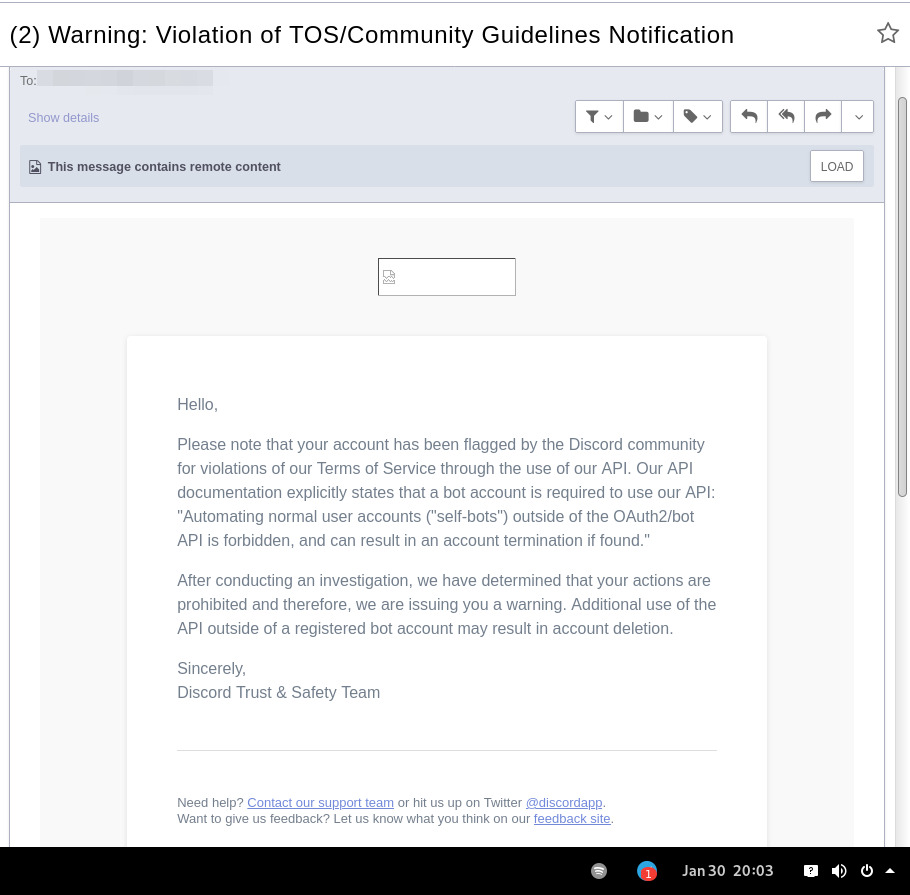
In September 2021 there was a bunch of issues with people using different third-party clients being asked to reset their passwords daily due to "suspicious activity", raised here in issue-18 (check out other links there too), which seem to have gone away within a week.
At least one person in that issue thread also reported being asked for phone account verification for roughly same reason about a week after that, so maybe "suspicious activity" triggering for 3p clients haven't really gone away.
Cordless client developer's acc apparently got blocked for ToS violation when initiating private chats. This client doesn't have such functionality, but maybe one should be more careful with private chats anyway, as that seem to be a major spam vector, so is more likely to be heavily-monitored, I think.
In the #rdircd IRC channel, a person mentioned that their discord account got some anti-spam mechanism enabled on it, disallowing to log-in without providing a phone number and SMS challenge (and services like Google Voice don't work there), immediately after they've initiated private chat with someone in Ripcord client.
"I contacted support at the time and they just responded that they can't undo the phone number requirement once it has been engaged"
It also seems like Ripcord currently might be trying to mimic official client way more closely than rdircd script here does (where latter even sends "client"/"User-Agent" fields as "rdircd" and appears that way under Devices in User Settings webui), and such similarity might look like Terms of Service violation to Discord (modifying official client), instead of Community Guidelines violation (third-party client), but obviously it's just a guess on my part as to whether it matters.
There are also some HN comments clarifying Discord staff position in a thread here, though none of the above should probably be taken as definitive, since third-party and even support staff's responses can be wrong/misleading or outdated, and such treatment can likely change anytime and in any direction, without explicit indication.
Note: only using this API here, only going by public info, can be wrong, and would appreciate any updates/suggestions/corrections via open issues.
Last updated: 2024-11-26
Discord API docs don't seem to cover "full-featured client" use-case, likely because such use of its API is explicitly not supported, and is against their rules/guidelines (see WARNING section above for details).
It's possible that more recent official OpenAPI spec in discord/discord-api-spec repo has a more complete documentation though.
Discord API protocol changes between versions, which are documented on Change Log page of the API docs.
Code has API number hardcoded as DiscordSession.api_ver, which has to be bumped there manually after updating it to handle new features as necessary.
Auth uses undocumented /api/auth/login endpoint for getting "token" value for email/password, which is not OAuth2 token and is usable for all other endpoints (eg POST URLs, Gateway, etc) without any prefix in HTTP Authorization header.
Found it being used in other clients, and dunno if there's any other way to authorize non-bot on eg Gateway websocket - only documented auth is OAuth2, and it doesn't seem to allow that.
Being apparently undocumented and available since the beginning, guess it might be heavily deprecated by now and go away at any point in the future.
There are some unofficial docs for officially-undocumented APIs and quirks:
Sent message delivery confirmation is done by matching unique "nonce" value in MESSAGE_CREATE event from gateway websocket with one sent out to REST API.
All messages are sent out in strict sequence (via one queue), waiting on confirmation for each one in order, aborting rest of the queue if first one fails/times-out to be delivered, with notices for each failed/discarded msg.
This is done to ensure that all messages either arrive in the same strict order they've been sent or not posted at all.
Discord message-posting API has enforce_nonce parameter (since 2024-02-12), which allows to retry posting messages safely from duplication, but at the moment retries are only performed here on API rate-limiting.
Fetching list of users for discord channel or even guild does not seem to be well-supported or intended by the API design.
There are multiple opcodes that allow doing that in a limited way, none of which work well for large discords (eg 10k+ users).
request_guild_members (8) doesn't return any results, request_sync (12) doesn't work, request_sync_chan (14) can be used to request small slice of the list, but only one at a time (disconnects on concurrent requests).
Latter is intended to only keep part of userlist that is visible synced in the client, doesn't support proper paging through whole thing, and only gets updates for last-requested part with indexes in it - basically "I'm in this guild/channel, what should I see?" request from the client.
Some events on gateway websocket are undocumented, maybe due to lag of docs behind implementation, or due to them not being deemed that useful to bots, idk.
Discord allows channels and users to have exactly same visible name, which is not a big deal for users (due to one-way translation), but still disambiguated irc-side.
Discord emojis like :smile: are handled in multiple different ways:
Looked up among unicode emoji names that work in all discords and translated to a unicode character, eg :smile: to
Can be found in current discord's custom emojis and replaced by a message formatting tag for it, like :debian: to a tag like <:debian:12345> , which discord clients will display as debian logo in a linux-related discord.
If user has Discord Nitro subscription, custom emoji from any discord works in any other discord as well.
rdircd doesn't handle last Nitro case at all (looks-up custom emojis in one discord), while first two cases are distinguished from each other via rdircd.unicode-emojis.txt.gz file (optional/configurable), which has list of all non-custom emojis (~6k of them), pulled from Discord WebUI using extract-unicode-emojis-from-js.py script.
If generic emojis stop working in the future (incorrectly treated as if they're discord-custom ones), due to renames or new additions, that script can be used to update the list of them easily.
Gateway websocket can use zlib compression (and zstd in non-browser apps), which makes inspecting protocol in browser devtools a bit inconvenient.
gw-ws-har-decode.py helper script in this repo can be used to decompress/decode websocket messages saved from chromium-engine browser devtools (pass -h/--help option for info on how to do it).
Run ./rdircd --test for info on some extra development/testing helper commands.
dev-cmds = yes under [debug] also enables some runtime helpers in #rdircd.control.
Adding support for initiating private chats might be a bad idea, as Cordless dev apparently got banned for that, and since these seem to be main spam vector, so more monitoring and anomaly detection is likely done there, leading to potentially higher risk for users.







