reliable discord client irc daemon
1.0.0

목차
설명
경고
특징
제한
용법
기타 기능 정보
임의의 팁과 요령
모래밭
타사 클라이언트 차단에 대한 자세한 정보
API 및 구현 노트
rdircd는 IRC 클라이언트를 통해 개인 불화 계정을 사용할 수있는 데몬입니다.
"Discord Servers"의 모든 개인 채팅 및 공개 채널/스레드를 생성하는 IRC 서버의 채널로 변환하고 브라우저 또는 전자 앱 대신 일반 IRC 클라이언트를 사용하는 데 연결할 수 있습니다.
초기 목표 중 하나는 메시지 전달을 확인하고 그와 관련하여 다른 문제에 대해 알리는 것이었기 때문에 "신뢰할 수있는"은 그 이름으로 이루어 졌기 때문에 당시 다른 유사한 클라이언트에서는 다소 부족했습니다.
IRC 채널이 있습니다.
irc url : ircs : //irc.libera.chat/rdircd (github는 ircs : // 링크를 거부합니다)
다른 대체 클라이언트의 거의 업데이트되지 않은 목록은 아래 링크 섹션도 참조하십시오.
저장소 URL :
마지막은 Todo 목록이있는 git-notes 등을 가지고 있습니다.
이 앱을 "봇"또는 "표준 사용자 계정 자동화"라고 부르지는 않지만 여기서 의도는 자동화 된 메시지를 게시하거나 아무것도 긁어내는 것이 아닙니다. 불화 직원은 모든 타사 클라이언트를 "봇"으로 간주하고 (API Docs의 봇 대 사용자 계정 참조), 모든 계정에 의해 Implins에 의해 개별적으로 Appord/Guild를 사용해야합니다. 비 admin 사용자.
이 앱은 "봇"으로 표시되지 않으며 봇 특이 적 엔드 포인트를 사용하지 않으므로 발견하면 계정 종료가 발생할 수 있습니다.
아래의 타사 클라이언트 차단 섹션에 대한 자세한 정보도 참조하십시오.
당신은 경고를 받았습니다! :)
모든 종류의 감지 된 문제에 대한 명시 적 알림을 통해 신뢰할 수있는 나가는 메시지 주문 및 전달.
새로운 채널 및 공공 채널, 채널 주문, 스레드, 포럼을 지원합니다.
일반 활동을 추적하기위한 서버 및 글로벌 캐치 아일 채널.
구성 가능한 로컬 이름 별명/이름, 발신 메시지 블록/교체, 수신 된 메시지에 대한 Regexp 필터링.
#rdircd.control 채널을 통해 제한된 런타임 재구성 지원.
IRC 길드/채널/사용자 이름 변환에 대한 간단하고 일관된 불화.
이 중 어느 것도 재 연결, 채널 또는 서버 재편성 등이 변경되지 않습니다. 번역은 대부분 결정적이며 다른 이름에 의존하지 않습니다.
불화에 대한 번역은 들어오는 MSG, 기타 이벤트, 일부 임베디드 링크에 대한 기본 주석을 언급, 답변, 첨부 파일, 스티커 및 이모티콘으로 언급합니다.
전송 된 메시지, 편집 및 삭제에서 불화 사용자 언급 및 이모티콘의 번역에 대한 제한된 지원.
모든 채널에서 쉽게 액세스 할 수있는 백 로그 (/t) 명령, 예를 들어 "/t log 2h"는 마지막 2 시간의 백 로그 또는 "/t log 2019-01-08"을 표시하여 해당 지점에서 백 로그를 현재까지 덤프하여 필요한 경우 여러 배치로 가져옵니다.
다른 수단 (예 : 브라우저)을 통해 전송 된 메시지는 IRC로 전달됩니다. IRC 이름이 불일치 대 에르크 Nick Translation과 일치하지 않으면 Diff Nick에서 나옵니다.
전체 유니 코드 지원/모든 곳에서 사용합니다.
IRC 프로토콜은 IRCV3 문서에서 구현되지만 RFC 비를 사용하지 않으므로 이전 클라이언트와 호환됩니다. 선택적 TLS 랩핑.
#rdircd.debug 채널을 통해 런타임에 액세스 할 수있는 광범위한 프로토콜 및 디버그 로깅 옵션.
AIOHTTP 모듈 만 필요한 단일 Python3 스크립트, 어디서나 실행하거나 배포 할 수 있습니다.
AMD64에서 비교적 안정적인 ~ 40m 메모리 풋 프린트에서 실행되며, 이는 아마도 Bitlbee-Discord보다 많지만 누출 된 브라우저 탭보다 낫습니다.
재 구축, GDB, 녹 등을 조정하고 디버그하기 쉽습니다.
IRC에서 전송 된 사용자 언급과 이모지만 불일치 태그로 변환됩니다 (활성화 된 경우 몇 가지 기발한 경우 아래 참조) - 채널, 역할, 스티커, 구성 요소 등이 아닙니다.
첨부 파일이나 임베드를 보내는 것을 지원하지 않음 - IRC가 아닌 Webui를 사용하십시오.
Discrord는 자동으로 링크를 주석으로 주석을 달므로 게시물을 게시하는 것이 간단합니다.
모든 종류의 읽기 및 기존 채널에 메시지를 보내는 것 외에는 불일치 별 동작이 지원되지 않습니다. 즉, 불화에 대한 계정 또는 채널 작성, 역할 관리, 초대, 금지, 타임 아웃 등 - Webui, Harmony 또는 적절한 불화 봇 사용에 대한 계정 또는 채널 작성이 없습니다.
새로운 개인 채팅 및 채널/포럼 스레드 생성은 지원되지 않습니다.
비공개 채팅의 경우 지원하는 것이 위험 할 수 있습니다. 자세한 내용은 아래의 타사 클라이언트 차단 섹션에 대한 자세한 정보를 참조하십시오.
사용자 존재 (온라인, 오프라인, AFK, 게임 게임 등)를 전혀 추적하지 않습니다.
사용자 조인 /부품 이벤트를 방출하지 않고 IRC /이름을 매우 간단한 방식으로 처리하지 않으며, 앱 시작 이후 및 IRC-Names-Timeout (기본적으로 1 일) 내에서 채널을 사용한 Nicks 만 나열합니다.
일반적으로 텍스트가 아닌 모든 차트를 완전히 무시합니다 (예 : 음성, 사용자 프로필, 게임 라이브러리, 상점, 친구 목록 등).
Discord는 "read_state"서버 사이드를 추적합니다. 여기서 어떤 식 으로든 사용되지 않습니다. 트리거 이력 재생은 수동으로 만 수행되므로 (Chans에서는/t 명령) 조용한 재 연결에서 쉽게 놓칠 수 있습니다.
Discrord Multifactor 인증 모드를 지원하지 않지만 수동 점수 인증은 아마도 그 문제를 해결할 수 있습니다. 아래의 보안 문자에 대한 참고 사항을 참조하십시오.
슬래시 명령 (봇)은 특별한 방식으로 지원되지 않지만 IRC 클라이언트가이를 통과하는 경우에도 여전히 보낼 수 있습니다.
IRC 자체와 동일하지만 가장 사용자 친화적 인 것은 아닙니다.
Linux에서만 실행하므로 OSX/Windows에서 "그냥 작동"할 가능성은 거의 없습니다.
불화 및 IRC의 맞춤형 임시 구현은 PYPI 및 이러한 WRT 호환성, 버그 및 코너 케이스에 대한 어떤 종류의 노출 및 테스트에서도 도움이되지 않습니다.
사용하려면 Discord 지침에 위배되는 것 같습니다. 자세한 내용은 위의 경고 섹션을 참조하십시오.
OpenBSD 플랫폼에서 Scrypt-Encoded IRC password-hash= 사용할 때는 Scrypt 모듈 (예 : pkg_add py3-scrypt 를 통해)을 별도로 설치해야 할 수도 있습니다. Python 포트는 stdlib에 hashlib.scrypt가없는 것 같습니다.
가장 간단한 방법은 사용 가능한 경우 Linux 배포판에 패키지를 사용하는 것입니다.
현재 알려진 배포판 패키지 (2020-05-17 기준) :
Docker/Podman 또는 기타 OCI 호환 컨테이너화 환경에서이를 실행하기위한 Dockerfile 및 Docker-Compose.yml도 있습니다.
(그와 관련된 일반적인 액세스 문제에 대한 정보는 readme.docker-permissions.md doc 참조)
아래의 나머지 부분에 설명 된대로 하나의 스크립트와 몇 가지 종속성을 수동으로 쉽게 설치해야합니다.
Debian/Ubuntu에서는이 하나의 명령으로 종속성을 설치할 수 있습니다.
# apt install --no-install-recommends python3-minimal python3-aiohttp
다른 Linux 배포판에는 비슷한 패키지도있을 수 있으며,이를 첫 번째 옵션으로 사용하여 업데이트를 받고 추가 로컬 유지 보수 부담을 피하고 실패한 경우 "PIP"를 통해 모듈 설치로 만 떨어지는 것이 좋습니다.
PIP/VENV를 사용하여 PITHON3 (Pythro)가 설치된 임의의 배포판에서 PIP/VENV를 사용하여 AIOHTTP 모듈 (및 DEP)을 설치하여 "RDIRCD"홈 디러어가 작동하지 않도록 (아래의 다음 예에서 rdircd를 실행하는 데 사용됨), OS 패키지 관리자를 통해 이미 설치 한 경우 무시하십시오.
 root # useradd -m rdircd
root # su - rdircd

## Option 1: use venv to install dependencies into "_venv" dir

rdircd % python3 -m venv _venv
rdircd % ./_venv/bin/pip install aiohttp

## Option 2: install pip (if missing) and use it directly

rdircd % python3 -m ensurepip --user
rdircd % python3 -m pip install --user aiohttp
PIPX (예 : 배포판의 REPOS)가 있거나 사용하는 경우, 이와 같은 Python 앱을 실행하는 데 사용될 수 있으며 자동 관리 종속성 -"PIPX RUN"THE MAIN SCRIPT : pipx run rdircd --help venV 또는 PIP를 전혀 터치하지 않아도됩니다 (PIPX는 후드 아래에서 "수행 할 필요가 없습니다).
위의 요구 사항이 설치된 후 스크립트 자체를이 저장소에서 가져와 다음과 같이 실행할 수 있습니다.
 ## Ignore "useradd" if you've already created a user when running "pip" above
root # useradd -m rdircd
root # su - rdircd

## If using "venv" install example above - load its env vars
# Or alternatively run script via "./_venv/bin/python rdircd ..." command line
rdircd % source ./_venv/bin/activate

rdircd % curl -OL 'https://raw.githubusercontent.com/mk-fg/reliable-discord-client-irc-daemon/master/rdircd{,.unicode-emojis.txt.gz}'
rdircd % chmod +x rdircd

## Use "pipx run rdircd ..." here and below, if using pipx instead of pip/venv/distro-pkgs
rdircd % ./rdircd --help
...to test if it runs...

rdircd % ./rdircd --conf-dump-defaults
...for a full list of all supported options with some comments...
...alternatively, to create rdircd.ini template: ./rdircd -c rdircd.ini --conf-init

rdircd % nano rdircd.ini
...see below for configuration file info/example...

rdircd % ./rdircd --debug -c rdircd.ini
...drop --debug and use init system for a regular daemon...
OS Boot에서 실행할 데몬/스크립트를 설정하려면 RDircd.Service SystemD 장치 파일을 대부분의 Linux 환경 (Edit Execstart = 옵션 및 경로)에서 사용하거나 아마도 init.d 스크립트를 통해 또는 아마도 "화면"세션에서 마지막 리조트 임시 옵션으로 사용할 수 있습니다. 루트가 아닌 위의 스 니펫에서 생성 된 "rdircd"사용자로 실행되는지 확인하십시오.
나중에 스크립트를 업데이트하려면 필요한 경우 위의 Curl 명령으로 다시 다운로드, Repo Clone의 Git-Pull, docker-compose up --build , OS 패키지 업데이트 또는 다른 방법으로는 일반적으로 처음에 설치된 방법과 관련된 최신 버전으로 대체하십시오.
~/.rdircd.ini에서 discord 및 ircd 인증 자격 증명으로 구성 파일을 만듭니다 (모든 --conf... Opts wrt 참조) :
 [irc]
password = hunter2

[auth]
email = [email protected]
password = discord-password
참고 : IRC 비밀번호를 생략 할 수 있지만 시스템의 모든 내용에서 포트를 제공하는 방화벽을 확인하십시오 (또는 어쨌든 할 수도 있음).
그래도 암호를 설정하면 위와 같이 IRC password= 옵션을 사용하지 않을 수도 있고 password-hash= 및 -H/--conf-pw-scrypt 사용하여 대신 생성하십시오. 어느 쪽이든, IRC 클라이언트 에서이 서버에 대한 연결을 구성 할 때도 암호를 사용해야합니다.
rdircd 데몬 : ./rdircd --debug 를 시작하십시오
IRC 클라이언트를 "LocalHost : 6667" - 기본 청취/바인드 호스트 및 포트에 연결하십시오.
(비 ./rdircd --conf-dump-defaults 코스트 연결을 위해 다른 호스트/포트 및 TLS 소켓 랩핑에 대한 바인딩을위한 -i/--irc-bind / -s/--irc-tls-pem-file 옵션을 참조하십시오.
IRC /list 명령을 사용하여 결합 된 모든 불일치 서버 /길드에 대한 채널을 확인하십시오.
 Channel           Users Topic
-------           ----- -----
#rdircd.control       1  rdircd: control channel, type "help" for more info
#rdircd.debug         1  rdircd: debug logging channel, read-only
#rdircd.monitor       1  rdircd: read-only catch-all channel with messages from everywhere
#rdircd.leftover      1  rdircd: read-only channel for any discord messages in channels ...
#rdircd.voice         1  rdircd: read-only voice-chat notifications from all discords/channels
#rdircd.monitor.jvpp  1  rdircd: read-only catch-all channel for discord [ Server-A ]
#rdircd.leftover.jvpp 1  rdircd: read-only msgs for non-joined channels of discord [ Server-A ]
...
#me.chat.SomeUser     1  me: private chat - SomeUser
#me.chat.x2s456gl0t   3  me: private chat - some-other-user, another-user, user3
#jvpp.announcements   1  Server-A: Please keep this channel unmuted
#jvpp.info            1  Server-A:
#jvpp.rules           1  Server-A:
#jvpp.welcome         1  Server-A: Mute unless you like notification spam
...
#axsd.intro           1  Server-B: Server info and welcomes.
#axsd.offtopic        1  Server-B: Anything goes. Civility is expected.
정보에 대한 참고 사항 :
/j #axsd.offtopic ( /join )은 일반 IRC와 마찬가지로 MSG를보고 게시합니다.
IRC 측의 채널 결합/부품은 어떤 식 으로든 불화에 영향을 미치지 않습니다.
run /topic (종종 /t 로 작동) IRC 명령은 채널 별 명령에 대한 더 많은 정보, 예를 들어 마지막 rdircd 종료 전에 마지막 이벤트에서 시작하여 시작하는 예를 들어, 백 로그를 재생하기위한 백 /t log , /t log list RDIRCD 트랙을 추적하는 모든 활동 타임 스탬프를 나열하기위한 / /t log 2h /덤프 채널 로그 /덤프 /덤프 로그 (stamp /span) (SO8601).
데몬 컨트롤/구성 명령은 #rdircd.control 채널, #rdircd.debug chan을 사용하여 다양한 로깅을 조정하고 데몬 상태와 프로토콜을보다 면밀히 검사하고 "도움말"을 보내서 사용 가능한 명령을 나열 할 수 있습니다.
지원되는 다양한 구성 설정에 대한 광범위한 개요는 rdircd.defaults.ini 파일 ( ./rdircd --conf-dump-defaults 의 출력) 및 아래의 특정 용도를 참조하십시오.
다양한 선택적 및 덜 명백한 기능에 대한 메모가 여기에서 수집됩니다.
보다 일반적인 정보는 "사용법"섹션을 참조하십시오.
-c 옵션으로 여러 INI 파일을 지정하여 서로 순서대로 재정의 할 수 있습니다.
마지막은 #rdircd.control 채널 명령을 통해 설정된 값뿐만 아니라 WRT [state], token = 및 유사한 런타임 물건을 업데이트하므로 인증 및 옵션으로 지속적인 구성을 지정하고 이러한 동적 상태에 대해 별도 (초기 비어 있음)를 지정하는 데 유용 할 수 있습니다.
예 ./rdircd -c config.ini -c state.ini 그렇게 할 것입니다.
--conf-dump 추가하여 인쇄 결과 INI 가이 모든 것에서 조립할 수 있습니다.
--conf-dump-defaults 플래그를 사용하여 모든 옵션 및 기본값을 나열 할 수 있습니다.
빈번한 상태 타임 스탬프 업데이트 업데이트는 내내 (작은 고정 길이 값)이지만 쓰기 전에 CTime을 확인하므로 어쨌든 언제든지 이러한 파일을 수동으로 편집하는 데 안전해야합니다.
컨트롤 채널에서 SighUp을 스크립트로 보내거나 "Reload"명령을 전송하면 모든 구성 파일에서 동일한 순서로 값을로드하고 적용해야합니다. 이러한 작업은 파일에 누락 된 값이 기본값으로 재설정되지 않으며 현재 구성 위에 명시 적으로 설정된 항목 만 적용합니다.
rdircd (및 discord)의 모든 채팅은 채널 입니다.
IRC의 /Q, /Query 및 /MSG는 IRC 형태로 사용할 수 없습니다 .
개인 채팅에서 이야기하려면 #me.chat. <username>과 같은 채널에 가입하여 다른 불화/rdircd 채널과 마찬가지로 작동합니다.
현재 rdircd에서 새로운 개인 채팅을 만들거나 다른 클라이언트 또는 WebUI를 사용하거나이를 위해 (또는 누군가에게 먼저 연락하도록 요청), 개인 채팅 채널이 만들어지면 rdircd에서도 사용할 수 있습니다.
필요한 경우 개인 메시지를 안정적으로 모니터링하려면 자동 조정 채널 및 /또는 조인 EG EG #rdircd.leftover.me 채널을 참조하십시오.
불일치 채널을 나타내는 모든 IRC 채널에서 (IRC 클라이언트에서 종종 지원되는 /t 에 대한 Send /topic ) - 모든 채널 별 명령에 대한 최신 정보를 인쇄해야합니다.
/t info 신분증 등의 이름과 같은 내부 길드/채널 정보를 표시합니다.
Discord에서 정확한 채널 이름을 인쇄해야합니다 (RDIRCD가하는 로컬 리나 이름이나 불일치 대기 시간 변환이 없음), 주제, 유형 등.
/t info {user-name...} -이 불화의 사용자 이름 (또는 그 일부)에 대한 쿼리 정보.
예를 들어, /t info joe137 채널이 속한 불화 서버에서 joe137 사용자가 다양한 불일치 이름과 같이 정보를 인쇄합니다.
/t log [state] - "State"포인트 이후의 히스토리 재생 (기본적으로 마지막 rdircd 중지).
/t log ( /t log 1 )는 rdircd 재시작 후 예를 들어, 중지 된 후에 게시 된 메시지에 대해 Discrord를 쿼리하기 위해, 그리고 다시 시작하기 전에 (그 이후로 다른 것들)를 사용할 수 있습니다.
rdircd가 보았던 마지막 MSG 이후 기록을 확인하기위한 OR /t log 0 , 불일치 /네트워크가 혹독한 경우에도 그런 식으로 잃어버린 경우.
(이 1 과 0 숫자는 INI 파일의 [state] 에 저장 /업데이트 된 /t log list 출력에서 저장된 타임 스탬프를 참조합니다)
또한 지난 15 분 이내에 채널 기록을 요청 /재생하기 위해 절대적 또는 상대적 시간 (예 : / /t log 2019-01-08 12:30 /t log 15m )과 함께 사용될 수 있습니다.
불일치 프록시 채널의 Just /t 또는 /topic 이러한 명령을 더 많이 나열하고 사용 방법에 대한 더 많은 정보를 나열합니다.
Discord 채널로 전송 된 마지막 메시지는 s/hoogle/google/ 와 같은 sed-replacement 명령을 사용하여 편집 할 수 있습니다.
또는 //del 명령을 사용하여 삭제할 수 있습니다. 아래의 "빠른 편집/삭제"섹션을 참조하십시오.
메시지의 @silent Prefix-Command는 이에 대한 사용자 알림을 억제 할 수 있습니다 (아래에서도 설명).
#rdircd.control 및 #rdircd.debug와 같은 특수 채널에서 : h 또는 help 보내기.
그들은 지원되는 명령 목록을 다소 가질 수 있습니다. 예를 들어 #rdircd.control의 명령 중 일부가 있습니다.
status (또는 st )를 사용하여 불화 및 IRC 연결 정보를 확인할 수 있습니다.
connect / disconnect (또는 on / off ) 명령을 사용하여 불일치 연결, 예를 들어보다 일회성 사용량을 위해 불일치 연결을 수동으로 제어하거나 로컬 네트워크가 그러한 방식으로 다운되는 동안 실패한 Conn 경고를 일시적으로 억제하는 데 사용할 수 있습니다.
set irc-disable-reacts-msgs yes 반응 알림 ( set 명령 사용).
또는 set -s irc-disable-reacts-msgs yes 를 영구적으로 만들려면 ( -s/--save ) 또는 모든 일반 구성 옵션 및 해당 값을 볼 수있는 매개 변수가없는 간단한 set .
rx Block mee6 bot-noise = (?i)^<MEE6> -Mee6 Bot의 모든 메시지를 temp-block합니다.
(아래 필터링에 대한 섹션 또는 팁 및 트릭 아래에 해당 재료의 더 많은 예를 참조하십시오)
... 그리고 최신 정보에 대한 유형의 help 더 많습니다.
#rdircd.monitor는 모든 연결된 서버에서 활동을 보는 데 사용될 수 있습니다. 관련 IRC 채널 이름으로 접두사를 가진 모든 메시지를 가져옵니다.
#rdircd.monitor.guild (여기서 "길드"는 해시 또는 별칭이며, 위의 참조)는 특정 불일치 서버/길드와 유사한 캐치 아일 채널입니다.
#rdircd.monitor.me는 예를 들어 불화 계정에 대한 개인 채팅 및 메시지를 모니터링하는 데 유용 할 수 있습니다 (자동 조정 채널 예제 참조).
#rdircd.leftover 및 유사한 #rdircd.leftover.guild 채널은 모니터 채널과 같지만 IRC 클라이언트가 결합 한 모든 채널에서 EG /join #rdircd.leftover.game-x 포함하여 "Gamex"Discord Msgs를 숨기는 것을 포함하여 모든 채널에서 메시지를 건너 뜁니다. 어떤 식 으로든 "남은"것에 영향을 미치지 않습니다).
#rdircd.voice는 #rdircd.monitor와 유사한 채널이지만 적시에 그것을 추적 할 수 있도록 음성 chat 이벤트 통지 만 잡을 수 있습니다.
이 채널은 필요하지 않은 경우 무시할 수 있으며, 예를 들어 chan-monitor [IRC] INI Config-File 섹션에서 빈 값으로 설정하여 전적으로 비활성화 할 수 있습니다. 예를 들어, 디스코드 당 음성 활성 채널은 기본 기능이 있습니다.
구성 파일은 또한 모니터/남은 채널에서 무시할 채널 이름의 선택 목록에 대한 [Unmonitor] 섹션도 있습니다.
 [unmonitor]
# All filters are applied to channel names and are case-insensitive
Ignore this particular " bot-commands " channel = game-X.bot-commands
skip forum threads in " game-X " guild = glob:game-X.forum.=*
" wordle " threads in any guild (and chans ending in .wordle) = glob:*.wordle
Don ' t show threads in any forum-like channels = re:^[^.]+ . (forum|discuss) . =.*
disregard all voice-chat stuff = glob:*.vc
이러한 구성 섹션의 키 (부분적으로 "=")와 같이, 예를 들어, 패턴을 설명하는 주석 (위의 예와 같이)은 값이 정확한 채널 이름 (discord prefix, 옵션 #-prefix) 또는 "Glob :"/"Re :"-"glok/regexp 패턴 (shell-ike-regexp pattern) (shell-kodps), <skey globps> as as as word as as with with word as as world as as wore as <some-key/comment> = glob:<wildcard-pattern> 또는 <some-key/comment> = re:<regexp-pattern> 라인-바로 위의 예를 참조하십시오.
해당 필터와 일치하는 채널 이름은 모니터 채널에서 삭제되므로 신경 쓰지 않고보고 싶지 않은 스팸성 목록을 정의하는 데 사용할 수 있습니다.
#rdircd.control의 "Unmonitor"(또는 "um") 명령은 언제든지 해당 필터를 추가/제거 할 수 있습니다. 특정 규칙이 여전히 필요하거나 사용되는지 여부를 추적하려면 match-counters 구성 옵션도 참조하십시오.
모니터 채널의 메시지는 길고 및/또는 멀티 라인 MSG에 의한 과도한 홍수를 피하기 위해 특정 길이/라인으로 제한됩니다. [IRC] 구성 섹션의 "Len-Monitor"및 "Len-Monitor-Lines"매개 변수는 이러한 한계를 제어하는 데 사용될 수 있습니다. "./rdircd ---conf-dump-defaults"기본값에 대한 출력을 참조하십시오. 모니터 채널의 이름 형식을 변경하는 옵션도 있습니다.
IRC에서는 모든 사람이 하나의 이름을 가지고 있지만, 각 사용자가 다음 이름을 가질 수있는 Discord의 경우는 아닙니다.
login - "사용자 이름"불일치, 모든 사용자를 고유하게 식별합니다.display - "디스플레이 이름"은 독특하지 않은 Discord 계정 설정에서 사용자가 설정합니다.nick -Server 및 친구 "닉네임"은 항상 당신에 의한 것은 아닙니다. login IRC 닉네임에 가장 가까운 개념이며, 전 세계적으로 일관성 있고, 짧고, 짧고, ascii-anly이며, [discord] 섹션 (기본값이 아님)에서 name-preference-order = login 옵션을 설정하여 사용할 수 있습니다.
공식 불일치 클라이언트는 다른 이름을 먼저 표시하므로 name-preference-order 옵션 옵션이 nick display login 값으로 기본값을 표시하는 이유는 Discord/Friend-Specific 닉네임을 사용하여 사용자가 설정 한 자유 형식 이름으로 돌아가서 로그인 이름을 사용하여 로그인 이름을 사용합니다.
IRC가 허용하지 않는 멋진 사용자 세트 닉네임의 다른 것들이 일반적인 유니 코드 문자, 예를 들어 "·"중간 점이있는 공백 또는 <> ► 유니 코드 화살표가있는 일반적인 IRC-Nick 브래킷으로 대체됩니다. 긴 불화 닉이 잘립니다.
현재 사용자가 Discord-Specific 디스플레이/닉 이름을 변경하는 것에 대한 IRC 알림이 없으며, 독특 할 필요는 없으므로 어떤 이유로 든 닉을 계속 바꾸면 누가 누구인지 말하기가 어려울 수 있습니다.
이 모든 것이 INI 파일 설정 (또는 #rdircd.control 채널)을 통해 구성 할 수 있으므로 너무 어리 석고 미친 듯이 표시되면 name-preference-order = login 설정하여 모든 사람을 위해 고유 한 일관된 IRC 친화적 인 Nicks를 사용하십시오.
IRC /who 명령 또는 /topic info 이러한 이름을 번역하는 데 도움이 될 수 있습니다. 예를 들어 /t info john1234 해당 이름 /로그인에 대한 정보를 인쇄하는 데 사용될 수 있으며, 여기에는 해당 불일치에 해당 이름의 부분 일치를 /who 모든 사용자가 포함되어 있어야하며
(오래된 이름이 계속 작동하지 않기 때문에 "별명"보다 "이름"과 같은 것들)
해시 기반 불일치 접두사 또는 서버 채널 이름을보다 읽기 쉬운/기억에 남거나 의미있는 것으로 바꾸기 위해 구성 파일에서 정의 할 수 있습니다.
 [renames]
guild.jvpp = game-x
guild.sn3y = log-bot
guild.sn3y.chan-fmt = logs/{name}.log
chan.some-long-and-weird-name = weird
chan.@ 710035588048224269 = general-subs
user.noname123 = my-pal-bob
user.@ 123980071029577864 = joe
이것은 :
예를 들어 #jvpp.info를 #game-x.info로 바꾸십시오. 이는 불일치 인 "길드"리나 이름의 모든 채널에 적용됩니다.
#sn3y.debug와 같은 것의 "sn3y"discord의 채널 이름에 대한 형식을 #logs/debug.log- 채널 이름 형식의 변경.
형식 템플릿은 "이름"(채널 이름) 및 "접두사"(Guild Prefix-이 예제에서 "로그 버전") 값으로 Python str.format 구문을 사용합니다. 기본 형식은 {prefix}.{name} 입니다.
이 형식 옵션은 모니터/남은 채널 이름 (예 : #rdircd.monitor.log-bot 또는 #rdircd.leftover.game-x에 영향을 미치지 않습니다.
짧은 이름 (Guild Prefix를 유지) - "Chan"Rename을 갖도록 긴 채널의 이름을 바꿉니다.
이는 해당 채널 이름이 존재하는 모든 길드에 영향을 미치며 소스 이름은 /목록과 동일한 IRC 형식이어야하며 RFC1459-CASEMPAPP (IRC와 동일)입니다.
id = 710035588048224269로 채널 이름을 "memes"(Guild Prefix를 유지) - "Chan" @channel -id spec를 사용하여 이름을 바꿉니다.
해당 IRC 채널에서 /t info 주제위원회를 입력하여 긴 불일치 채널 식별자 ( "Snowflake"라고도 함)를 찾을 수 있으며 해당 특정 채널을 참조하는 데 사용될 수 있습니다. 즉, 모든 #General Channel을 모든 #General Channel을 바꾸는 대신이 하나의 불일치 서버 에서이 #general을 이름 바꾸는 데 사용할 수 있습니다.
이것은 두 채널이 동일한 불화 내에 동일한 정확한 이름을 갖고 일반적으로 할당 될 때 특히 유용합니다 .<id-hash> 비 디스크로티브 접미사.
불일치 사용자 이름과 ID로 참조 된 커플 사용자 이름을 바꿉니다.
/t info <nick-or-part-of-it> <discord 채널 또는 이와 유사한 /who IRC 명령의 명령 <nick-or-part-of-it> 명령이 사용 된 것과 같은 Discord ID를 조회하는 데 도움이 될 수 있습니다.
현재 불일치 접두사 및 채널을 위해 나열된 유형의 이름이 구현되지만 [IRC] 섹션에는 시스템/모니터/남은 채널 및 개인 샤트 채널의 이름을 설정하는 옵션이 있습니다. "Chan-Sys", "Chan-Private", "Chan-Monitor"등 ( "./rdircd -conf-dump-defaults"output).
예를 들어 chan-monitor-guild = {prefix} 를 설정하십시오. 기본 Long #rdircd.monitor.
Discrord 개인 메시지는 Discord Webui와 마찬가지로 "ME"서버/길드에서 채널에 게시하고 게시되며 다른 길드/채널 (목록, 조인/부품, Send/RecV MSG 등)과 같은 방식으로 상호 작용할 수 있습니다.
#rdircd.monitor.me (또는 #rdircd.monitor, 위 참조)를 가입하려면 모든 새로운 MSG/채팅을 얻으려면 관계 변경 알림 (친구 요청/추가/제거)을 통지로 연결하십시오.
친구 요청을 수락하고이를 추가/제거하는 것은 정기적 인 불화 webui를 통해 수행 할 수 있으며이 클라이언트에서 특별한 방식으로 구현되지 않습니다.
초대를 통해 IRC 클라이언트에서 새로운 개인 채팅을 쉽게 팝업 할 수있는 방법은 아래의 자동 조정 채널 섹션을 참조하십시오.
"스레드"는 불일치 기능으로, 아드먼이 아닌 사용자는 특정 주제에 대해 언제든지 일시적인 임시 하위 채널을 생성 할 수 있으며, 이는 비교적 단축 비 활동 시간 초과 후 (예 : 하루와 같은) 자동 압수 ( "아카이브")입니다.
Discord "Forum"채널은 기본적으로 기본 채널 채터를 대체하는 사람들의 목록과 함께 사람들이 Theads에서만 만들고 대화 할 수있는 기본적으로 채널입니다.
#gg.general. = vot5.lets · 토론, 스레드 ID 태그 ( "= vot5")와 같은 스레드 이름 ( "스레드 chan-name-len"config 옵션 참조)과 같은 이름을 가진 모든 비 구조 스레드는 rdircd 채널 목록에 일반 IRC 채널로 표시되어야합니다.
상위 채널의 스레드를보고 상호 작용하는 방법에 대한 몇 가지 옵션이 있습니다 (주로 [Discord] 섹션에서-Conf-dump-defaults output 참조) :
 [irc]
thread-chan-name-len = 30

[discord]
thread-id-prefix = =
thread-msgs-in-parent-chan = yes
thread-msgs-in-parent-chan-monitor = no
thread-msgs-in-parent-chan-full-prefix = no
thread-redirect-prefixed-responses-from-parent-chan = yes
...
그러나 이러한 모든 장애가 있더라도 스레드가 시작될 때 간단한 통지를 채널로 전송하여 완전히 놓치지 않도록해야합니다.
IRC에서 새 스레드를 만들거나, 오래된 스레드를 만들거나, 오래된 스레드를 만들거나,이를 관리하고, IRC의 스레드 채널에 가입하는 것은 실제로 Discord UI (채널 이름으로 고정)에 "스레드가 결합"되지는 않지만 무엇이든 게시해야합니다.
[IRC] 섹션의 "Chan-Auto-Join-Re"설정을 사용하면 메시지가 나타날 때 regexp를 채널 이름 ( # prefix없이)과 일치하도록 지정할 수 있습니다.
예를 들어, 모든 #me.
 [irc]
chan-auto-join-re = ^me.
또는 IRC 클라이언트의 모든 채널을 자동 조인 시키려면 chan-auto-join-re = .
이 옵션 (기본값)의 빈 값은 아무것도 일치하지 않습니다.
이것은 #rdircd.monitor/남은 채널을 통해 새로운 물건을 추적하는 대안으로 사용할 수 있습니다.
이 regexp는 #rdircd.control 채널에서 "set"명령을 다른 값과 동일한 "set"명령을 사용하여 런타임에 조정하여 특정 불일치 또는 채널에 대해이 기능을 임시 활성화/비활성화 할 수 있습니다.
언급은 Discord의 @username 태그이며, 누군가에게 메시지를 지시하는 메시지를 알리도록 설계되었습니다.
기본 구성으로, 예를 들어 <Galaxy?·Brain> Hi! 그리고 그들을 강조하고, Hey @galaxy and welcome 것이 효과가있을 것입니다. 또한 전체 IRC Nick을 사용할 수 있습니다.
작동 방식 : RDIRCD가 msg-mention-re Regexp Conftion과 일치하는 경우 (위의 @galaxy @-mention), "언급"으로 취급되는 "언급"으로 취급되거나 전송 된 메시지에서 Discord 언급으로 번역되거나 (모호한 언급과 일치하는 Nicks와 일치하는 Nick과 일치하는) 오류 통지를 반환합니다.
기본값은 다음과 같습니다.
 [discord]
msg-mention-re = (?:^|s)(@)(?P<nick>[^s, ; @+!]+)
이는 모든 단어와 같은 공간 또는 구두점 구분 된 @nick 언급과 일치합니다.
Regexp (Python "Re"Syntax)는 Nick/Username Lookup String이있는 "Nick"그룹을 명명해야하며, 이는 Discrord 언급 태그로 대체 될 예정이며 다른 모든 캡처 그룹 (예 ?: @ 위의 Regexp에서와 같이)이 제거됩니다.
위의 기본 regexp는 여전히 백 슬래시 접두사로 인해 (?:^|s) 부분과 일치하지 않기 때문에 WebApp (Markdown으로 인해 )에 eg @something 보낼 수 있어야합니다.
또 다른 예로서, 라인의 시작 부분에 고전적인 IRC 스타일 하이라이트를 갖기 위해서는 이와 같은 regexp를 사용할 수 있습니다.
msg-mention-re = ^(?P<nick>S+)(:)(?:s|$)
예를 들어 mk-fg: some msg @mk-fg some msg ( @-part가 언급되어 있음)로 변환해야합니다. 일치하는 URL 링크를 피하기 위해 REGEXP에 후행 공간이 포함되어 있습니다.
ID 특정 불일치 사용자를 위해 "Nick"그룹은 다음과 같은 방식으로 사용됩니다.
최근의 모든 길드 관련 IRC 이름 (메시지 저자, 반응, 개인 채널 사용자 등)과의 사례에 민감한 일치. user-mention-cache-timeout 구성 옵션 컨트롤 "최근"타임 아웃.
조회 독특한 이름 만 접두사로 webui에서 @가 입력 한 후 자동 완성을 위해 Discord와 동일합니다.
캐시 또는 고유 한 일치가 발견되지 않은 경우 - 오류 통지가 발행되고 메시지가 전송되지 않습니다.
이러한 엄격한 행동은 의도하지 않은 오해를 피하기 위해 고안되었으며, 잘못된 사람을 강조하는 것은 일반적으로 철자를 통해서만 가능해야합니다.
관련 msg-mention-re-ignore 옵션 (위의 전체 패턴 캡처와 일치하는 REGEXP)을 사용하여 일부 비 멘션 물건을 건너 뛰는 데 사용될 수 있습니다. 그렇지 않으면 첫 번째 regexp에 의해 픽업되어 캡처 그룹을 제거하는 데 사용될 수 있습니다.
Discord 사용자 목록은 상당히 방대 할 수 있으며 (500k+ 사용자)는 채널로 분할되지 않으며 클라이언트가 사전 가져 오도록 의도되지 않으며 완료 또는 가시 부품에 대해서만 쿼리되어 IRC에 잘 매핑되지 않으므로이 모든 마법입니다.
비슷한 regexp는 디스크 코드 당 이모티콘에 대해 구성됩니다.
msg-emoji-re = (?:^|s)(:)(?P<emoji>w+)(:)(?=[^w]|$)
예를 들어 다음과 같은 I use :Arch: btw 해당 Regexp, Lookup/Replare "Emoji"그룹을 사용 하여이 Discord의 이모티콘 (Case-Insensentitive)을 사용하여 사용하여 I use ? btw 또는 반환 오류 통지 이러한 이모티콘이 해당 불일치에서 사용할 수없는 경우 일반 유니 코드 목록이 아닌 경우.
이러한 변환을 비활성화하기 위해 msg-mention-re / msg-emoji-re 빈 값으로 설정하십시오.
위의 Discord 사용자 언급과 마찬가지로이 채널로 전송 된 마지막 메시지의 편집 또는 제거로 해석 할 명령과 일치하는 특수 Regexp-Option이 있습니다.
Default Regexps는 다음과 비슷합니다 (Check--Conf-Dump-Defaults JIC) :
 [discord]
msg-edit-re = ^s*s(?P<sep>[/|:])(?P<aaa>.*)(? P =sep)(?P<bbb>.*)(? P =sep)s*$
msg-del-re = ^s*//dels*$
S/PERL/IRC- 유사 후속 개정 선이 s/spam/ham/ 및 //del line과 같은 내부 명령으로 만 사용되지 않습니다.
( s|/some/path|/other/path| 및 s:cat /dev/input/mouse0 | hexdump:hexdump </dev/input/mouse0: 구문은 기본적으로 SED와 마찬가지로 기본 편집 regexp에 의해 허용됩니다.
이들과 일치하는 두 명령은 rdircd가 동일한 불일치 채널로 보낸 마지막 메시지에서 작동하며, //del 그 마지막 메시지를 제거하고 Python Re.sub () (pcre-like) regexp-replacement 함수를 실행하는 것을 편집합니다.
"msg-edit-re" regexp option value matching sed-like command must have named "aaa" and "bbb" groups in it, which will be used as pattern and replacement args to re.sub(), respectively.
If edit doesn't seem to alter last-sent message in any way, it gets discarded, and also generates IRC notice response, to signal that replacement didn't work.
Successful edit/deletion should also be signaled as usual by discord, with [edit] or such prefix (configurable under [irc] section).
Any older-than-last messages can be edited through Discord WebUI - this client only tracks last one for easy quick follow-up oops-fixes, nothing more than that.
Somewhat similar to quick edits/deletes above, "msg-flag-silent-re" option is there to match/remove "@silent" prefix in messages (by default), which disables sending discord push notifications for it, same as with the official client.
That and similar message flags on incoming messages are not represented in any way, as they don't seem to be relevant for an irc client anyway.
Config can have a [send-replacements] section to block or regexp-replace parts of messages sent (by you) from IRC on per-discord basis.
This can be used to add discord-specific tags, unicode shorthands, emojis, stickers, block/replace specific links or maybe even words/language before proxying msg to discord.
Here's how it can look in the ini file(s):
 [send-replacements]

*. unicode-smiley = (^| ):)( |$) -> 1?2
*. twitter-to-nitter = ^(https?://)((mobile|www).)?twitter.com(/.*)?$ -> 1nitter.ir4

guildx.never-mention-rust! = (?i)brustb -> <block!>
guildx.localize-color-word = bcolor(ed|iS+)b -> colour1
Where each key has the form of discord-prefix> "." comment , with a special * prefix to apply rule to all discords, while values are regexp " -> " <replacement_or_action with one special <block!> action-value to block sending msg with error-notice on regexp match. "comment" part of the key can be any arbitrary unique string.
So when sending eg test :) msg on IRC, discord will get test ? .
Same as with other regex-using options, regexps have python "re" module syntax, applied via re.sub() function, using raw strings from config value as-is, without any special escapes or interpretations.
Replacements are applied in the same order as specified, but with * keys preceding per-discord ones, and before processing to add discord tags, so anything like @username that can normally be typed in messages can be used there too.
#rdircd.control channel has "repl" command to edit these rules on-the-fly.
If you join #rdircd.monitor channel, see - for example - a message like this:
<helper-bot> #pub.welcomes :: Welcome!
...and think "don't want to see messages like that again!" - config files' [recv-regexp-filters] section or corresponding "rx" command in #rdircd.control channel can help.
Depending on what "messages like that" means, here are some ways to filter those out:
 [recv-regexp-filters]
discard msgs from this bot = ^<helper-bot>
ignore all msgs in that channel of that discord = ^S+ # pub.welcomes ::
drop all msgs from " pub " discord = ^S+ # pub.
no messages from # welcomes channels of any discord pls = ^S+ #w+.welcomes ::
never see " Welcome! " message-text again!!! = ^S+ # S+ :: Welcome!$
some combination of the above = (?i)^<helper-bot> # w+.welcomes ::
...
(tweak eg last example on regex101.com for more hands-on understanding)
Lines in that section have the usual <key> = <regexp> form, where <key> part can be anything (eg comment to explain regexp, like in examples above), and <regexp> value is a regular expression to match against the message in <user> #discord.channel-name :: message text format like that helper-bot msg presented above, and same as can be seen in monitor-channels.
Any message received from discord will be matched against all regexps in order, stopping and discarding the message everywhere on first (any) match. So it might be a good idea to write as precise patterns as possible, to avoid them matching anything else and dropping unrelated messages accidentally.
Same as with some other conf options, basic knowledge of regular expressions might be needed to use such filters - here's a link to nice tutorial on those (though there are 100s of such tutorials on the web).
Particular regexps here use PCRE-like python re syntax, with re.DOTALL flag set ( . matches newlines in multiline messages). I'd also recommend commonly adding (?i) case-insensitive-match flag, as IRC nicks and channel names ignore character case and can be displayed in misleading/inprecise ways in the client.
More random examples of [recv-regexp-filters], incl. more advanced CNF weirdness:
 [recv-regexp-filters]
disregard wordle thread there = ^S+ # pub.general.=w8mk.wordle ::
ignore " wordle " threads everywhere = ^S+ # S+.=w{4}.wordle ::
activity-level bots are annoying = (?i) advanced to level d+[ !]
gif replies of YY in ZZ = (?i)^<YY> # ZZ.S+ :: (-- re:[^n]+n)?[att] .*/imaged.gif?

; ; Advanced stuff: connect multiple regexps via CNF logic (Conjunctive Normal Form)
; ; If key starts with "∧ " (conjunction symbol), it's AND'ed with previous regexp
; ; ¬ (negation) in that prefix inverts the logic, so e.g. "∧¬ ..." is "and not ..."
; ; Disjunction (∨) is the default behavior and doesn't need the (implied) prefix
; ; Any complex logical expression can be converted to such CNF form -
; ;  - use calculators like https://www.dcode.fr/boolean-expressions-calculator

Drop welcome msgs in welcome-chans = (?i)^S+ # w+.S*welcomeS* :: .*bwelcomeb.*
∧ but only if they have an exclaimation mark in them somewhere = :: .*!
∧¬ and not from this specific " lut " discord-prefix = ^S+ # lut.

Most channels here are not relevant = ^S+ # myc.
∧¬ except these ones = ^S+ # myc.(announcements|changelog|forum)[. ]
∨ but skip github CI logs there = ^<github> # myc.
Pretty much anything can be matched with clever regexps, so CNF-logic stuff like in last examples is seldom useful, but might still be simpler than expressing arbitrary ordering or negation in regexps.
See also match-counters config option to keep track of whether specific rule(s) are still needed/being-used.
Mostly useful for debugging - /who command can resolve specified ID (eg channel_id from protocol logs) to a channel/user/guild info:
/who #123456 - find/describe channel with id=123456./who %123456 - server/guild id info./who @123456 - user id lookup.All above ID values are unique across Discord service within their type.
/who @John·Mastodon - user IRC nick or name/login lookup.
Queries all joined discords for that name, and can return multiple results for same or similar non-unique names. Can be useful to check exact nick/display/login names corresponding to an IRC name, or other user info.
/who *665560022562111489 - translate discord snowflake-id to date/time.
Results of all these commands should be dumped into a server buffer (not into channels), regardless of where they were issued from.
In irc channels corresponding to ones on discord, /topic info command (often works as shortened /t info in clients too) can be used to print more information about linked discord channel and its server/guild.
/t info <username> can also print info on user in that discord (unlike /who @<username> which looks the name up in all connected discords), for example /t info john will print info for anyone with "john" in the name.
Usernames in these queries can match exact irc name or discord username, in which case that result is returned, or otherwise more general server-side lookup is made, which can return matches in any type of discord name(s) (see People's names on discord for more info on those).
Discord name translation is "mostly" deterministic due to one exception - channels with same (casemapped) IRC name within same server/guild, which discord allows for.
When there is a conflict, chan names are suffixed by .<id-hash> (see chan-dedup-* config options), to allow using both channels through IRC. Renaming conflicting channels on Discord will rename IRC chans to remove no-longer-necessary suffixes as well. Such renames affect thread-channels too.
Note that when channels are renamed (including name conflicts), IRC notice lines about it are always issued in affected channels, and any relevant monitor/leftover channels, topic should be changed to reflect that old-name channel is no longer useful, and posting msgs there should emit immediate warnings about it.
Discord CDN URLs for attachments can end up being quite long with same host, long discord/channel IDs in there, then actual filename, and ?ex=...&is=...&hm=... trail of CDN parameters after that.
Many Linux IRC clients run in Terminal Emulators though, which often support OSC 8 terminal hyperlink standard, so can display clickable links in a much more compact and readable form.
For example, this attachment URL to a Discord CDN:
https://cdn.discordapp.com/attachments/1183893786254905414/1206216641877377024/20240211_My_Cat_Photo.jpg?ex=65db33c9&is=65c8bec9&hm=9c1dbecbfb2f9edf2302ec078f5e62fffa7f8c2f32e5cd6e3563ae25d8a356e1&
Can be displayed in a terminal like this instead: 20240211_My_Cat_Photo.jpg
Ie same as how one would see hyperlinks displayed in a browser.
This is disabled by default, but if you use terminal IRC client that might support those, set terminal-links = yes option in config file or via set command in an #rdircd.control channel to try it out.
Adjacent terminal-links-re and terminal-links-tpl options can be used to control which part of the link to display as its visible name, which terminal-specific escape characters to use, and such customization.
Discord has voice channels, where in addition to text people can talk verbally, share camera or screen capture (aka streaming, screen sharing). IRC protocol does not support anything like this of course, but it can be useful to get notified when someone starts talking, to hop into different discord client (eg open it in a browser), and use these channels from there.
All IRC channels corresponding to discord voice chats automatically get .vc suffix (unless renamed), and get notice messages about voice activity in there, but limited to following events, to avoid being too spammy:
voice-notify-after-inactivity timeout of inactivity (ie since previous voice-status notification there), default = 20 minutes. And with additional rate-limit set by voice-notify-rate-limit-tbf value, to notify about up to 5 events in a row, but otherwise no more often than once in 5 minutes ("token bucket algorithm" is technically how this limit is implemented/works).
If description above sounds confusing, here's config tweaks to remove all limits on voice-activity event notifications - try those, and maybe re-read this section later if they get too spammy (maybe never!):
 [discord]
voice-notify-after-inactivity = 0
voice-notify-rate-limit-tbf = 0
#rdircd.voice monitor-channel(s) can also be used to only track voice-chat notifications across discords/channels, potentially filtered via "um" command in #rdircd.control or [unmonitor] in ini config(s).
IRC convention is to treat mention of a nickname as a "highlight" - a more notification-worthy event than a regular channel message, so it might be useful if messages in private channels did always highlight the nick for IRC client.
prefix-all-private option can be used for that:
 [irc]
prefix-all-private = mynick:
Might also be necessary to either join monitor/leftover channels or setup auto-joining channels for new PMs to be received by IRC client at all.
Private chats are not implemented via direct IRC messages for various practical reasons, ie to have everything work via channels, because it works that way on the discord side, they can have multiple users, to list those easily, to query topic/history/etc there, and such stuff.
There is a similar prefix-all option, to add prefix to all messages, if prefix-all-private doesn't go far enough.
By default, [discord] msg-ack=yes enables sending (delayed) ACKs for received messages in private chats, so that discord counts those as read and doesn't send an email notification about them. This can be disabled or adjusted in config file.
Messages blocked by eg [recv-regexp-filters] or received when there are no IRC clients connected don't count.
If IRC client supports IRCv3 typing notifications and has these enabled, rdircd will forward those from discord users/channels by default, which can be disabled by setting typing-interval = 0 in [irc] configuration section, or interval/timeout values can be adjusted there to work better for IRC app.
Separate typing-send-enabled option controls whether typing notifications from IRC are sent to a discord channel. It is disabled by default for privacy reasons, and likely needs to be explicitly enabled in IRC client as well.
Any IRCv3 features like that typing stuff can also be disabled via ircv3-caps option, eg if there're problems with them in rdircd or client.
This should happen by default when discord gateway responds with op=9 "invalid session" event to an authentication attempt, not reconnecting after that, as presumably it'd fail in the same way anyway.
This would normally mean that authentication with the discord server has failed, but on (quite frequent) discord service disruptions, gateway also returns that opcode for all logins after some timeout, presumably using it as a fallback when failing to access auth backends.
This can get annoying fast, as one'd have to manually force reconnection when discord itself is in limbo.
If auth data is supposed to be correct, can be fixed by setting ws-reconnect-on-auth-fail = yes option in [discord] ini section, which will force client to keep reconnecting regardless.
Don't know why or when it happens, but was reported by some users in this and other similar discord clients - see issue-1 here and links in there.
Fix is same as with bitlbee-discord - login via browser, maybe from the same IP Address, and put auth token extracted from this browser into configuration ini file's [auth] section, eg:
 [auth]
token = ...
See "Usage" in README of bitlbee-discord (scroll down on that link) for how to extract this token from various browsers.
Note that you can use multiple configuration files (see -c/--conf option) to specify this token via separate file, generated in whatever fashion, in addition to main one.
Extra token-manual = yes option can be added in that section to never try to request, update or refresh this token automatically in any way. Dunno if this option is needed, or if such captcha-login is only required once, and later automatic token requests/updates might work (maybe leave note on issue-1 if you'll test it one way or the other).
Never encountered this problem myself so far.
Most likely source of that should be missing handling for some new/uncommon discord events, or maybe a bug in the code somewhere - either can be reported as a github issue.
To get more information on the issue (so that report won't be unhelpful "don't work"), following things can be monitored and/or enabled:
Standard error stream (stderr) of the script when problem occurs and whether it crashes (unlikely).
If rdircd is run as a systemd service, eg journalctl -au rdircd should normally capture its output, but there are other ways to enable logs listed just below.
rdircd shouldn't normally ever crash, as it handles any errors within its own loop and just reconnects or whatever, but obviously bugs happen - there gotta be some python traceback printed to stderr on these.
Find a way to reproduce the issue.
When something weird happens, it's most useful to check whether it can be traced to some specific discord and event there (eg some new feature being used), or something specific you did at the time, and check whether same thing happens again on repeating that.
That's very useful to know, as then problem can be reproduced with any kind of extra logging and debugging aids enabled until it's perfectly clear what's going on there, or maybe how to avoid it, if fixing is not an option atm.
Join #rdircd.debug channel - any warnings/errors should be logged there.
Send "help" (or "h") msg to it to see a bunch of extra controls over it.
Sending "level debug" (or "d") there for example will enable verbose debug logging to that channel (can be disabled again via "level warning"/"w"), but it might be easier to use log files for that - see below.
Enable debug and protocol logs to files.
In any loaded rdircd ini file(s), add [debug] section with options like these:
 [debug]
log-file = /var/log/rdircd/debug.log
proto-log-shared = no
proto-log-file = /var/log/rdircd/proto.log
/var/log/rdircd dir in this example should be created and accessible only to running rdircd and ideally nothing else, eg creating it as: install -m700 -o rdircd -d /var/log/rdircd
Such opts should enable those auto-rotating log files, which will have a lot of very information about everything happening with the daemon at any time.
Both of these can also be enabled/controlled and/or queried at runtime from #rdircd.debug chan.
proto-log-shared option (defaults to "yes") and be used to send discord/irc protocol logging to same log-file or #rdircd.debug channel, but it might be easier to have two separate logs, as in example above.
Log file size and rotation count can be set via log-file-size , log-file-count , proto-log-file-size , proto-log-file-count options - run rdircd --conf-dump-defaults to see all those and their default values (rdircd.defaults.ini has some recent-ish copy too).
When running with protocol logs repeatedly or over long time, proto-log-filter-ws option can be handy to filter-out spammy uninteresting events there, like GUILD_MEMBER_LIST_UPDATE.
Note that these files will contain all sorts of sensitive information - from auth data to all chats and contacts - so should probably not be posted or shared freely on the internet in-full or as-is, but can definitely help to identify/fix any problems.
Running /version IRC-command should at least print something like host 351 mk-fg 22.05.1 rdircd rdircd discord-to-irc bridge on the first line, which is definitely useful to report, if it's not the latest one in this git repo.
Generally if an issue is easy to reproduce (eg "I send message X anywhere and get this error"), it can be reported without digging much deeper for more info, as presumably anyone debugging it should be able to do that as well, but maybe info above can still be helpful to identify any of the more non-obvious problems, or maybe give an idea where to look at for fixing or working around these.
Some configuration tweaks that I use, or mentioned in #rdircd on IRC and such.
Feel free to suggest any other lifehacks to add here.
Normally rdircd uses these long strange "#rdircd.monitor" channel name templates, as well as unnecessary "#me.chat." prefixes, instead of this:
 #DMs
#@some-friend
#@some-friend+other-friend+more-ppl
#rdircd
#rdircd.rest
#rdircd.voice
#rdircd.control
#rdircd.debug
#minecraft
#minecraft.general
#minecraft.modding
#minecraft.rest
Use these lines in any loaded ini config file to make it work like that:
 [irc]
chan-monitor = rdircd
chan-leftover = rdircd.rest
chan-monitor-guild = {prefix}
chan-leftover-guild = {prefix}.rest
chan-private = {names}

[renames]
guild.me = DMs
guild.me.chan-fmt = @{name}
What these options do, in the same order: rename "#rdircd.monitor" to "#rdircd", set names for all discord-specific monitor channels to just "{prefix}" (eg "#dm" or "#minecraft"), set private-chat channels to use people's name(s) without "chat." prefix, rename default "me" guild (private chats) to "DMs", use simpler @ + name format for any channels there.
Defaults are that way to try to be more explicit and descriptive, but once you know what all these channels are for, can easily rename them to something shorter/nicer and more convenient for yourself.
When message is edited, you normally get something like [edit] new msg text , but it can be ✍️ new msg text or new msg text instead:
 [irc]
prefix-edit =
prefix-embed = ?.{}
prefix-attachment = ?️
prefix-uis =
prefix-interact = ?
prefix-poll = ?️.{}
Note the "space and backslash" at the end in these options, which is to preserve trailing spaces in values, from both text editors that strip those and configuration file parser (which ignores any leading/trailing spaces, unless punctuated by backslash). prefix-embed and poll values need {} placeholder for where to put short id/tag.
Alternatively, set-command like set irc-prefix-edit '✍️ ' can be used in #rdircd.control to configure and tweak this stuff on-the-fly (or -s/--save into config too).
Unless OSC 8 hyperlinks for terminal IRC clients option is enabled, attachments normally are just a long link with a filename buried in there:
<user> ?️ https://cdn.discordapp.com/attachments/813633048368761786/1313964897464246919/cat-pic.jpg?ex=674e6959&is=674d17d9&hm=2519bb427b1392bce87a0749ed664520d25493e509b8272170a66512f9e143d2&
But same OSC8-formatting feature can be used to get a bit more readable version for eg GUI IRC clients:
<user> ?️ cat-pic.jpg LCak :: https://cdn.discordapp.com/attachments/813633048368761786/1313964897464246919/cat-pic.jpg?ex=674e6959&is=674d17d9&hm=2519bb427b1392bce87a0749ed664520d25493e509b8272170a66512f9e143d2&
Using config like this:
 [discord]
terminal-links = yes
terminal-links-emojis = no
terminal-links-tpl = {name} :: {url}
("LCak" bit at the end of "cat-pic.jpg LCak" is hash of the link, so that it's possible to tell different "image.jpg" attachments apart at a glance)
Using discord through IRC can be a bit noisy due to edits or spammy notifications ending up in various monitor/leftover channels or other un-irc-like features, which rdircd can help mitigate to some degree, but often doesn't by default, as it's hard to know what other people actually care about.
Here are some random commands to try out in #rdircd.control channel:
um Noise from any bot-channels = re:.bots?(-.*)?$
um Ignore welcome chans = glob:*.welcomes
um Disregard all voice-chat events = glob:*.vc
um Memes belong in a circus = glob:*.memes
um Make food channels opt-in = glob:*.food
um Internet "politics" can get really spammy = glob:*.politic*
um There're probably better places for porn = glob:*.nsfw
rx MEE6 bot-noise anywhere = (?i)^<MEE6>
rx THX discord: people spamming edits = (?i)^<(person1|person2)> #THX.S+ :: [edit]
rx NSC: don't care about deletes = ^S+ #NSC.S+ :: --- message was deleted ::
rx NSC/THX: disable reactions here = ^S+ #(NSC|THX).S+ :: --- reacts:
Enable rule-hit counters to check whether these rules are still relevant later:
set discord-match-counters '1d 2d 4d 1w 2w 1mo 2mo runtime'
With these enabled, running um or rx should show [ rule hits: ... ] under each rule, if there's anything to show (but reset on rdircd restarts!), otherwise it's probably safe to drop unused rules to keep lists more tidy.
Disable "reacts" noise everywhere: set irc-disable-reacts-msgs yes
Remove long, confusing and silly nicknames full of unicode junk:
set discord-name-preference-order 'login'
If even ascii logins of specific users get annoying, use [renames] in config to change those locally (see Local Name Aliases section for more info):
 [renames]
user.somereallylongandsillyloginbecausewhynot = bob
user.@ 374984273184829999 = andy
Keep threads only as channels, and in #rdircd.leftover.* and such:
set discord-thread-msgs-in-parent-chan no
Don't show voice-chats or "monitor" channels on the /list :
set irc-chan-voice '' set irc-chan-monitor ''
All of these examples are not persistent, just to try them out and see, but all commands used there support -s flag to save changed values to last .ini config file, or it can be done manually as well, if any of these are useful to keep around.
There is a good and well-maintained list of alternative clients here:
There are many alt-clients these days, with a lot of churn among them, and dedicated lists like that are probably best way to discover those.
As mentioned in the "WARNING" section above, Bot vs User Accounts section in API docs seem to prohibit people using third-party clients, same as Discord Community Guidelines. Also maybe against their Discord Developer Terms of Service, but dunno if those apply if you're just using the alt-client.
I did ask discord staff for clarification on the matter, and got this response around Nov 2020:
Is third-party discord client that uses same API as webapp, that does not have any kind of meaningful automation beyond what official discord app has, will be considered a "self-bot" or "user-bot"?
Ie are absolutely all third-party clients not using Bot API in violation of discord ToS, period?
Or does that "self-bot" or "user-bot" language applies only to a specific sub-class of clients that are intended to automate client/user behavior, beyond just allowing a person to connect and chat on discord normally?
Discord does not allow any form of third party client, and using a client like this can result in your account being disabled. Our API documentation explicitly states that a bot account is required to use our API: "Automating normal user accounts (generally called "self-bots") outside of the OAuth2/bot API is forbidden, and can result in an account termination if found."
Another thing you might want to keep in mind, is that apparently it's also considered to be responsibility of discord admins to enforce its Terms of Service, or - presumably - be at risk of whole guild/community being shut down.
Got clarification on this issue in the same email (Nov 2020):
Are discord server admins under obligation to not just follow discord Terms of Service themselves (obviously), but also enforce them within the server to the best of their knowledge?
Ie if discord server admin knows that some user is in violation of the ToS, are they considered to be under obligation to either report them to discord staff or take action to remove (ban) them from the server?
Should failing to do so (ie not taking action on known ToS violation) result in discord server (and maybe admins' account) termination or some similar punitive action, according to current discord ToS or internal policies?
Server owners and admin are responsible for moderating their servers in accordance with our Terms of Service and Community Guidelines. If content that violates our Terms or Guidelines is posted in your server, it is your responsibility to moderate it appropriately.
So unless something changes or I misread discord staff position, using this client can get your discord account terminated, and discord admins seem to have responsibility to ban/report its usage, if they are aware of it.
Few other datapoints and anecdotes on the subject:
Don't think Discord's "Terms of Service" document explicitly covers third-party client usage, but "Discord Community Guidelines" kinda does, if you consider this client to be "self-bot" or "user-bot" at least.
Only thing that matters in practice is likely the actual staff and specific server admins' position and actions on this matter, as of course it's a private platform/communities and everything is up to their discretion.
Unrelated to this client, one person received following warning (2020-01-30) after being reported (by another user) for mentioning that they're using BetterDiscord (which is/was mostly just a custom css theme at the time, afaik):
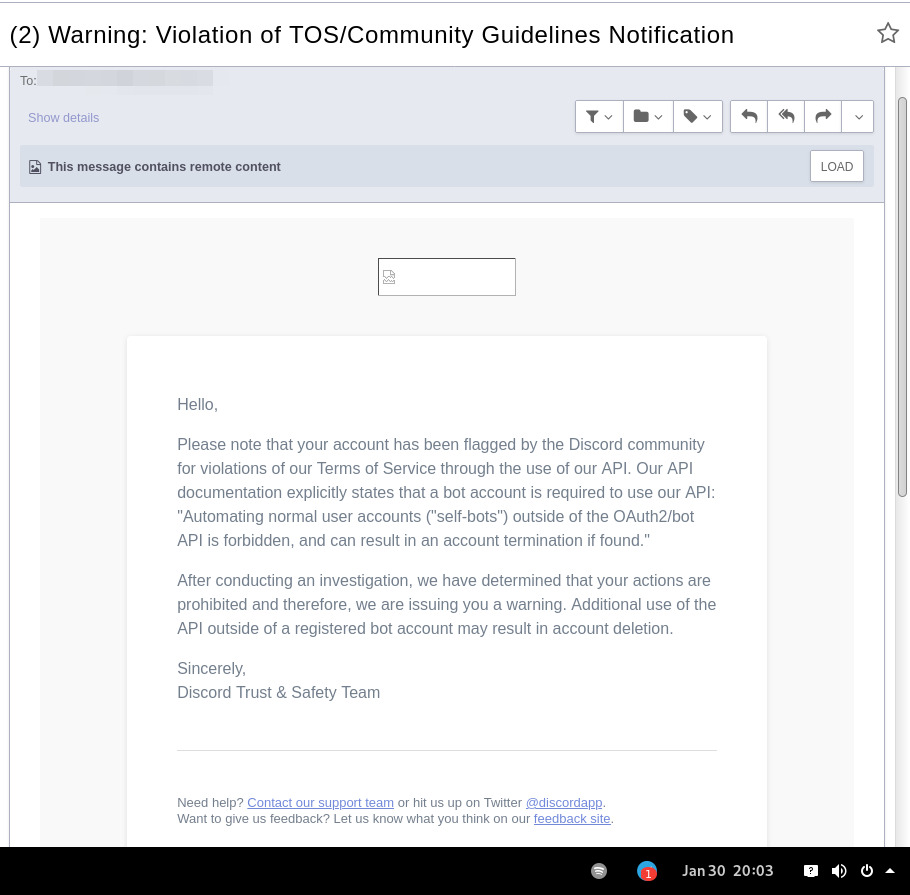
In September 2021 there was a bunch of issues with people using different third-party clients being asked to reset their passwords daily due to "suspicious activity", raised here in issue-18 (check out other links there too), which seem to have gone away within a week.
At least one person in that issue thread also reported being asked for phone account verification for roughly same reason about a week after that, so maybe "suspicious activity" triggering for 3p clients haven't really gone away.
Cordless client developer's acc apparently got blocked for ToS violation when initiating private chats. This client doesn't have such functionality, but maybe one should be more careful with private chats anyway, as that seem to be a major spam vector, so is more likely to be heavily-monitored, I think.
In the #rdircd IRC channel, a person mentioned that their discord account got some anti-spam mechanism enabled on it, disallowing to log-in without providing a phone number and SMS challenge (and services like Google Voice don't work there), immediately after they've initiated private chat with someone in Ripcord client.
"I contacted support at the time and they just responded that they can't undo the phone number requirement once it has been engaged"
It also seems like Ripcord currently might be trying to mimic official client way more closely than rdircd script here does (where latter even sends "client"/"User-Agent" fields as "rdircd" and appears that way under Devices in User Settings webui), and such similarity might look like Terms of Service violation to Discord (modifying official client), instead of Community Guidelines violation (third-party client), but obviously it's just a guess on my part as to whether it matters.
There are also some HN comments clarifying Discord staff position in a thread here, though none of the above should probably be taken as definitive, since third-party and even support staff's responses can be wrong/misleading or outdated, and such treatment can likely change anytime and in any direction, without explicit indication.
Note: only using this API here, only going by public info, can be wrong, and would appreciate any updates/suggestions/corrections via open issues.
Last updated: 2024-11-26
Discord API docs don't seem to cover "full-featured client" use-case, likely because such use of its API is explicitly not supported, and is against their rules/guidelines (see WARNING section above for details).
It's possible that more recent official OpenAPI spec in discord/discord-api-spec repo has a more complete documentation though.
Discord API protocol changes between versions, which are documented on Change Log page of the API docs.
Code has API number hardcoded as DiscordSession.api_ver, which has to be bumped there manually after updating it to handle new features as necessary.
Auth uses undocumented /api/auth/login endpoint for getting "token" value for email/password, which is not OAuth2 token and is usable for all other endpoints (eg POST URLs, Gateway, etc) without any prefix in HTTP Authorization header.
Found it being used in other clients, and dunno if there's any other way to authorize non-bot on eg Gateway websocket - only documented auth is OAuth2, and it doesn't seem to allow that.
Being apparently undocumented and available since the beginning, guess it might be heavily deprecated by now and go away at any point in the future.
There are some unofficial docs for officially-undocumented APIs and quirks:
Sent message delivery confirmation is done by matching unique "nonce" value in MESSAGE_CREATE event from gateway websocket with one sent out to REST API.
All messages are sent out in strict sequence (via one queue), waiting on confirmation for each one in order, aborting rest of the queue if first one fails/times-out to be delivered, with notices for each failed/discarded msg.
This is done to ensure that all messages either arrive in the same strict order they've been sent or not posted at all.
Discord message-posting API has enforce_nonce parameter (since 2024-02-12), which allows to retry posting messages safely from duplication, but at the moment retries are only performed here on API rate-limiting.
Fetching list of users for discord channel or even guild does not seem to be well-supported or intended by the API design.
There are multiple opcodes that allow doing that in a limited way, none of which work well for large discords (eg 10k+ users).
request_guild_members (8) doesn't return any results, request_sync (12) doesn't work, request_sync_chan (14) can be used to request small slice of the list, but only one at a time (disconnects on concurrent requests).
Latter is intended to only keep part of userlist that is visible synced in the client, doesn't support proper paging through whole thing, and only gets updates for last-requested part with indexes in it - basically "I'm in this guild/channel, what should I see?" request from the client.
Some events on gateway websocket are undocumented, maybe due to lag of docs behind implementation, or due to them not being deemed that useful to bots, idk.
Discord allows channels and users to have exactly same visible name, which is not a big deal for users (due to one-way translation), but still disambiguated irc-side.
Discord emojis like :smile: are handled in multiple different ways:
Looked up among unicode emoji names that work in all discords and translated to a unicode character, eg :smile: to
Can be found in current discord's custom emojis and replaced by a message formatting tag for it, like :debian: to a tag like <:debian:12345> , which discord clients will display as debian logo in a linux-related discord.
If user has Discord Nitro subscription, custom emoji from any discord works in any other discord as well.
rdircd doesn't handle last Nitro case at all (looks-up custom emojis in one discord), while first two cases are distinguished from each other via rdircd.unicode-emojis.txt.gz file (optional/configurable), which has list of all non-custom emojis (~6k of them), pulled from Discord WebUI using extract-unicode-emojis-from-js.py script.
If generic emojis stop working in the future (incorrectly treated as if they're discord-custom ones), due to renames or new additions, that script can be used to update the list of them easily.
Gateway websocket can use zlib compression (and zstd in non-browser apps), which makes inspecting protocol in browser devtools a bit inconvenient.
gw-ws-har-decode.py helper script in this repo can be used to decompress/decode websocket messages saved from chromium-engine browser devtools (pass -h/--help option for info on how to do it).
Run ./rdircd --test for info on some extra development/testing helper commands.
dev-cmds = yes under [debug] also enables some runtime helpers in #rdircd.control.
Adding support for initiating private chats might be a bad idea, as Cordless dev apparently got banned for that, and since these seem to be main spam vector, so more monitoring and anomaly detection is likely done there, leading to potentially higher risk for users.







