textratypist
1.1.0 "Deselected Tofu"

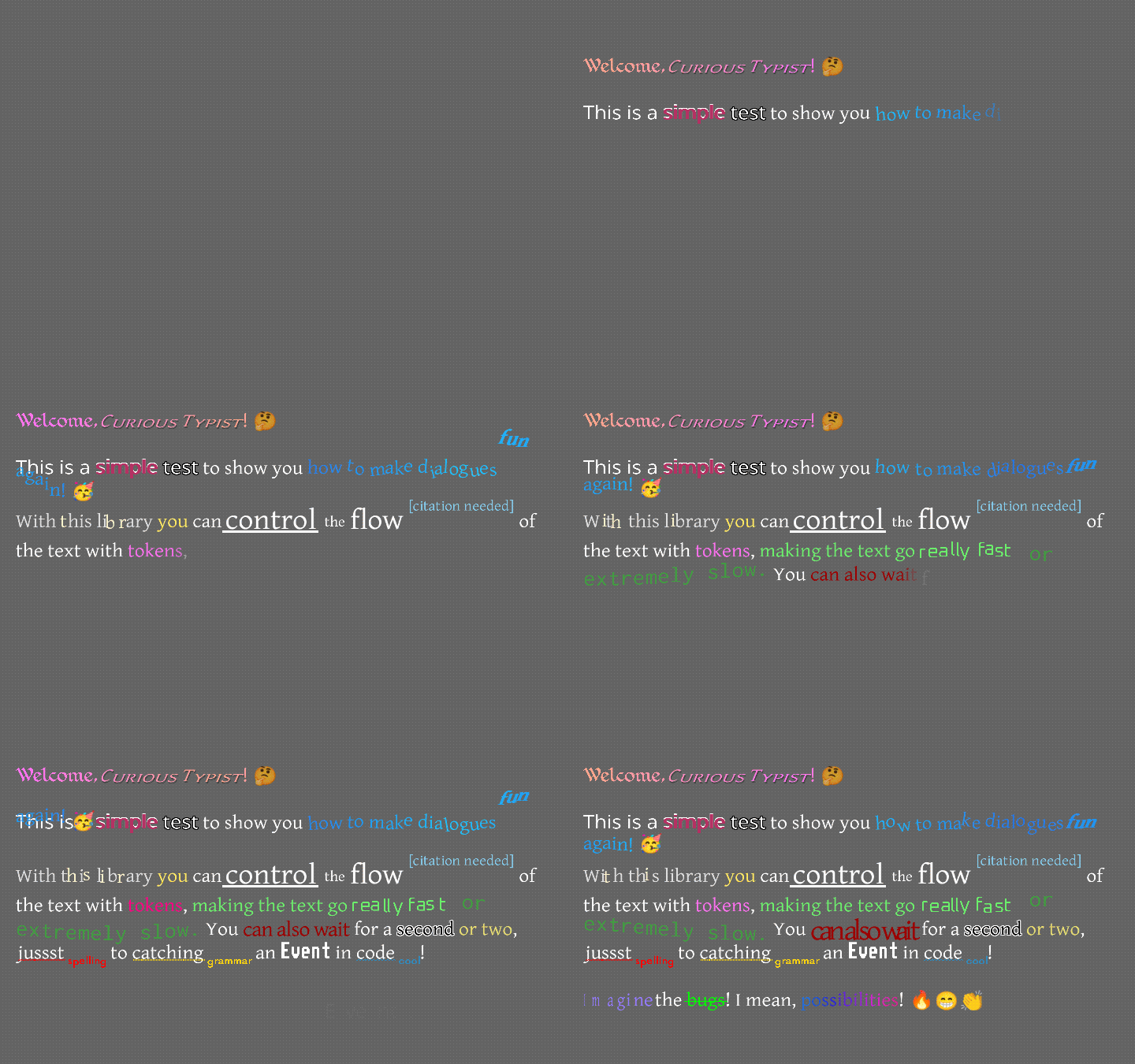
一个文本显示库围绕着一个标签,随着时间的流逝,效果和样式都会随着时间的流逝而打印。
换句话说,这为libgdx中的文本渲染带来了更多功能。
这是什么样的?有点像这样...
也许像这样...
如果您宁愿观看视频也不愿阅读本文,Raymond“ Raeleus” Buckley制作了一个涵盖大多数Textratypist的视频!它涵盖了该文件所没有的一些内容,例如使用皮肤作曲家,因此无论如何,这都是一个好手表。
这里有一个“普通”标签,形式是Textralabel的形式,它的作用几乎与scep2d.ui中的标签完全一样,但允许下面涵盖的样式。不过,很多用法可能更喜欢打字标签!
TypingLabel是一个相当普通的场景2D.UI小部件,并扩展了Textralabel。但是,除非被告知要跳过,否则它一次将字母放在屏幕上。这是许多较旧的文本游戏中发现的一种怀旧效果,看起来打字机以比一定速度较慢的速度张贴每个字母。
是的,它具有超过打字机模式!文本可以挂在上方,然后插入到位。它可以在长波中上下跳动。它会动摇和颤抖,好像病了。它可以用不同的颜色眨眼,在两种颜色之间平稳地移动,或者穿过整个彩虹。很多选择;很多乐趣。效果几乎与打字标签中的效果相同,但是有一些变化和增加。您可以查看Textratypist Wiki以获取更多信息。
截至0.10.0,有许多新效果。震动,螺旋,旋转,人群,收缩,出现,心跳,旋转木马,鳞片,鳞片,旋转,旋转,链接,链接,链接,触发器,造型师,大炮,海洋,溅射和瞬间都是Textratypest的新手(不是打字标签)。您可以在Textratypist Wiki的令牌页面上查看使用说明和示例GIF。这些效果中的大多数都利用了效果的平滑缩放和旋转选项,可以从Textratypist 0.5.1开始使用。有些使用鼠标跟踪,新的0.7.0,例如链接仅响应单击一系列文本。
即使在不需要打字效果的地方,您也可能需要创建TypingLabel S,因为TextraLabel无法处理任何效果。您可以在类型标签上调用skipToTheEnd()或(以0.7.0及以上)在其他类别上调用(以0.7.0及以上),以允许使用TypingLabel用于具有效果的静止文本。
也存在各种标准令牌,这些代币可以操纵打字效果,可变替代品和其他有用的东西:
{WAIT=f}导致打字效果暂停并等待f秒,作为浮子。{SPEED=f}更改键入典型字形所需的时间,从默认值为0.035到f 。{SLOWER}使所有字形都需要2倍的键入。{SLOW}使所有字形都需要1.5倍的键。{NORMAL}使所有字形都以正常的1倍的形式输入。{FAST}使所有字形的键入为0.5倍。{FASTER}使所有字形的键入为0.25倍。{NATURAL=f}使字形或多或少地需要键入时间,否则与{SPEED=f}相同。{COLOR=s}更改文本的颜色;这有很多选择,因此您可以拥有“深灰色粉红色”。{STYLE=s}更改文本样式(请参见下文);这有很多选择。{SIZE=f}更改文本的大小(以25%的增量为25%);这需要F的百分比从0到375。{FONT=name}通过查找name来更改字体,如果有fontfamily。{CLEARCOLOR}将文本颜色设置为默认颜色,该颜色通常是白色的。{CLEARSIZE}将大小设置为100%。{CLEARFONT}将字体设置为原始字体(不使用fontfamily)。{ENDCOLOR}将文本颜色设置为默认颜色,该颜色通常是白色的。这与{CLEARCOLOR}相同。{VAR=name}被与变量name关联的任何字符串所取代。{IF=name;choice0=cat;choice1=b;=default}检查变量名,并将其与令牌中的每个选择进行比较。name的值等于选择,则令牌将被选择值(例如cat所取代。default值。{EVENT=name}触发一个事件,当打字到达这一点时,将name发送到TypingListener。{RESET}将所有格式化和速度设置为其初始值的更改。label.setDefaultToken()可用于更改初始值,因此文本默认值为某些不同的设置。{SKIP=n}以打字效果跳过,立即显示n字符。效果默认使用卷曲括号,但是如果卷曲括号不是文本的好选择(例如在I18N文件中),则可以将[-EFFECT]用作等效的{EFFECT} 。
该库扩展了原始打字标签可以做的事情 - 它允许样式应用于文本,例如大胆,下划线,倾斜,上标等。与样式相关的是比例更改,它们可以在不更改字体的情况下缩小或扩大文本,以及“ Font family”功能。可以将字体分配给其他字体和名称的“家族”,用于指代它们;这就像正常样式一样,但实际上改变了字体用于绘制的内容。完整的样式列表很长,但不像效果令牌那样详细。您可以在[*]之类的方括号中使用libgdx颜色标记之类的样式启用样式,或(如果在TypingLabel中使用标记),则可以使用{STYLE=BOLD}来执行同样的事情。标签和样式名称都不敏感,但颜色名称对大小写。方形托架语法主要使用标点符号,并受到Markdown语法的启发(Github使用了其他位置)。
在下面的列表中,每个条目看起来像:
[*]切换粗体模式。可以使用样式名称* , B , BOLD , STRONG 。
这意味着您可以始终使用[*]打开或关闭BOLD模式,在打字标签中,您还可以使用对案例不敏感的语法{STYLE=*} , {STYLE=B} , {STYLE=BOLD}或{STYLE=STRONG}来做同一件事。
样式的完整列表和相关的方架标签:
[]删除了对样式/颜色/格式的最后更改,尽管它对打字标签效果没有任何作用。[]在libgdx bitmapfont标记中的作用一样,但不仅仅是颜色的作用。[ ]将所有样式/颜色/格式和效果重置为初始状态。[]更改为新[ ] 。[(label)]暂时将当前格式状态存储为label ,因此可以在以后重新应用。label可以是任何字母数字字符串。它可能不应该有空间,但可以强调。[ label]如果有一个格式,则将存储为label的格式化状态(如果有)。[*]切换粗体模式。可以使用样式名称* , B , BOLD , STRONG 。[/]切换斜模式(如斜体)。可以使用样式名称/ , I , OBLIQUE , ITALIC 。[^]切换上标模式(并关闭下标或中文模式)。可以使用样式名称^ , SUPER , SUPERSCRIPT 。[=]切换Midscript模式(并关闭上标或下标模式)。可以使用样式名称= , MID , MIDSCRIPT 。[.]切换下标模式(并关闭上标或中标模式)。可以使用样式名称. , SUB , SUBSCRIPT 。[_]切换下划线模式。可以使用样式名称_ , U , UNDER , UNDERLINE 。[~]切换罢工模式。可以使用样式名称~ , STRIKE , STRIKETHROUGH 。[!]切换所有上限模式(替换任何其他情况模式)。可以使用样式名称! , UP , UPPER 。[,]切换所有较低的案例模式(替换任何其他情况模式)。可以使用样式名称, LOW , LOWER 。[;]切换大写每个单词模式(替换任何其他情况模式)。可以使用样式名称; , EACH , TITLE 。[%DDD] ,其中DDD是从0到375的百分比,将文本缩放到该倍数。可以与{SIZE=150%} , {SIZE=%25}或类似地一起使用, {STYLE=200%}或{STYLE=%125} 。删除任何特殊模式。[%]自身将文本设置为默认的100%比例,并删除任何特殊模式。可以与{STYLE=%}一起使用。[%?MODE]删除规模并设置特殊模式;模式在下面列出。[%^MODE]删除比例并在与小型盖子模式的同时设置特殊模式;模式在下面列出。[@Name] ,其中名称是该字体的family变量中的键/名称,将当前字体切换到命名的字体。可以与{STYLE=@Name}一起使用。[@]自己重置该字体的字体,忽略了其家庭。可以与{STYLE=@}一起使用。[#HHHHHHHH] ,hhhhhhh是Hex RGB888或RGBA8888 int int颜色,会改变颜色。这是一个普通的{COLOR=#HHHHHHHH}标签。[COLORNAME] ,其中colorname是一个颜色名称或描述,将在外部查找,会改变颜色。ColorUtils.describe()一起查找了coRorname,它试图从Palette上找到任何颜色,并且还允许描述颜色或简单更改的混合物,例如“轻”或“沉闷”。Colors类中的所有upper_case名称,还包含大约50个其他小写颜色名称(来自彩色GDX)。Palette 。[RED] , [green yellow] , [light blue] , [duller orange] , [darker rich BLUE lavender] , [pale pink orange]和[deeper green navy] 。Font的setColorLookup()方法与您自己的ColorLookup实现一起使用,以在此处完成您想要的工作。| ,它允许使用包含标点符号的名称查找颜色。例如, [|;_;]会查找一种称为;_;的颜色; ,“悲伤的颜色”,不会像[;]那样。ColorLookup可能不会, ColorLookup.INSTANCE ,它在libgdx colors class class class class class classim clastim中均以colorlookup。{COLOR=SKY} (颜色可以立即处理)或描述,例如{COLOR=lighter orange-red} ,甚至在{GRADIENT}之类的标签中。[+region name] ,其中区域名称是从注册的纹理图中的纹理雷管的名称,不会改变样式,但会与文本一起在线产生纹理素。KnownFonts.addEmoji()一起使用,将3000多个Twemoji图标添加到字体中。[+saxophone]和[+?]每个都会显示一个萨克斯管图标。[+call me hand, medium-dark skin tone]和[+??] 。KnownFonts.addGameIcons() ,它添加了game-icons.net系列中的图标。这些使用相同的语法: [+crystal-wand] 。[-SOME_EFFECT]等同于在SOME_EFFECT周围使用卷曲括号;注意添加的破折号。可以用来代替缩放的特殊模式是:
black outline或blacken ,可以与样式名称BLACK OUTLINE或BLACKEN一起使用。white outline或whiten ,可以与样式名称WHITE OUTLINE或WHITEN使用。shiny ,可以与样式名称一起使用SHINY , SHINE或GLOSSY 。drop shadow或shadow ,可以与样式名称SHADOW , DROPSHADOW或DROP SHADOW一起使用。error ,可以与样式名称ERROR , REDLINE或RED LINE一起使用。Font.PACKED_ERROR_COLOR更改颜色。warn ,可以与样式名称一起使用WARN , YELLOWLINE或YELLOW LINE 。Font.PACKED_WARN_COLOR更改颜色。note ,可以与样式名称NOTE , INFO , BLUELINE或BLUE LINE一起使用。Font.PACKED_NOTE_COLOR更改颜色。jostle ,可以与样式名称JOSTLE , WOBBLE或SCATTER一起使用。[%?]一起使用。small caps ,可以与样式名称SMALLCAPS或SMALL CAPS一起使用。[%^]一起使用。它不能与[%?small caps]语法一起使用;它需要一个男人。小帽模式可以与其他任何模式一起使用,除了Jostle,通过更改%?到%^ 。除此之外,没有两种模式可以同时处于活动状态,并且不能同时使用缩放模式。
请注意,模式使用略有不同的语法来避免与颜色名称混淆。当使用方括号时,此处在下箱中给出的每个名称都应在%?大多数情况下(小帽子和摇摆很特别)。这意味着要启用红线模式“错误”,您可以使用Square-Gracket标签[%?error] 。如果使用curly-brace标记进行TypingLabel,则将使用上案例中给出的名称,并可以像其他样式名称一样使用它们: {STYLE=ERROR} 。如前所述,小帽子模式是特殊的;通常使用[%^small caps]启用它,但也可以通过[%^]启用,并且还可以与其他模式混合,而不是通过更改正常%?到%^ 。每当小帽子处于活动状态时,方形支架标签都会使用%^而不是%? 。争吵模式也很特别;通常以[%?jostle]启用它,但也可以单独使用[%?]启用。争吵不能与小帽子混合。
特殊模式在语法方面有点过于复杂,因为我无法使用标点符号。通过[WHITE][%?blacken]Outlined![%][GRAY] ,可以实现围绕白色文本的黑色轮廓的常见示例。 (该示例使用GRAY作为普通颜色,但是您也可以使用[ ] [ ]颜色重置为在Layout或持有它的标签上配置的任何基本颜色。
使用{VAR=ZOMBIE}urgh, brains...{VAR=ENDZOMBIE}语法:
{VAR=FIRE}将以下文本更改为具有烈火的颜色。您可以用{VAR=ENDFIRE}结束它。{VAR=SPUTTERINGFIRE}更改以下文本以具有烈火的颜色,并像弹出火焰一样调整大小。您可以用{VAR=ENDSPUTTERINGFIRE}结束它。{VAR=BLIZZARD}将以下文本更改为在风中动摇,并使用冰冷的颜色,白色至浅蓝色。您可以用{VAR=ENDBLIZZARD}结束它。{VAR=SHIVERINGBLIZZARD}将以下文本更改为在风中动摇,并使用冰冷的颜色,白色至浅蓝色,此外,它将随机使字形“发抖”,好像冷一样。您可以用{VAR=ENDSHIVERINGBLIZZARD}结束它。{VAR=ELECTRIFY}将以下文本更改为暗灰色紫色,并随机使字形变成浅黄色并振动。您可以用{VAR=ENDELECTRIFY}结束它。{VAR=ZOMBIE}将以下文本更改为“深色橄榄鼠尾草”(暗灰色绿色),使字形慢慢且随机地慢慢旋转,使字形下降并随机恢复,并且当它们首次出现时,出现的Glyphs会从基线中出来(就像从坟墓中脱落)。您可以用{VAR=ENDZOMBIE}结束它。这些定义在TypingConfig.initializeGlobalVars()中,您可以以完全相同的方式定义自己的组合。例如, FIRE被定义
        TypingConfig . GLOBAL_VARS . put ( "FIRE" , "{OCEAN=0.7;1.25;0.11;1.0;0.65}" );
TypingConfig . GLOBAL_VARS . put ( "ENDFIRE" , "{ENDOCEAN}" ); OCEAN效应不在乎它使用的颜色。它仅定义了如何在这些颜色之间过渡的大概模式。这意味着,违反直觉,最好用OCEAN而不是GRADIENT实施FIRE 。不过,使用FIRE名称可能比OCEAN更可取,因此出于这个原因,全球VAR在这里。
使用标签存储格式状态的能力可以使来自多个来源的标记字符串更复杂。您可以将诸如font.storeState("spooky", "[/][darker gray][@?blacken]")之font的东西称为永久存储格式化状态(斜灰色的灰色文本,黑色轮廓),然后可以通过输入[ spooky] (请注意开放空间)将其重置到该状态。您还可以创建一些可插入的文本,该文本在写入任何内容之前先存储当前格式,并在完成编写后重置格式。它将使用"[(previous)][ ][BLUE][^][[citation needed][ previous]"类的东西 - 如果将此字符串插入较大的文本块的中间,它不会改变周围的格式,但是将使用蓝色的超级字样来用于其自己的文本(不可或缺的[citation needed] ),并且不会使用周围的任何一个格式化的格式化。如果您具有具有相同标签的多个状态商店标签,则与该标签关联的值会随着这些标签而变化。您可能需要使用独特的标签来避免意外更改另一个标签的值,但这通常不需要。
Textratypist大量使用其新Font类,这是对LibGDX的Bitmapfont的全面大修,与其祖先基本上没有代码。字体具有多种质量,它比BitMapfont具有更多的功能,主要源自它如何存储(并使)Glyph映像作为地图中的纹理元素。只要将您的图像添加到字体的mapping中,只要它们将必要的信息用作文本字形,然后将这些图像放入文本中。作为一个例子,这用于实现表情符号,可用于自定义图标和表情符号。
Textratypist使用SDF或MSDF支持标准位图字体和距离字段字体。 TypingLabel将自动启用适当的距离字段类型所需的阴影程序(如果需要的话),并在渲染本身后将其禁用。您可以通过在字体上手动调用Font.enableShader(Batch)方法来更改此行为,并使用其Batch.setShader()方法将批处理更改回您选择的其他ShaderProgram(通常,您只需在此处通过NULL即可重置Shinder)。请注意,需要使用Font.resizeDistanceField()或调用resizeDistanceField()的任何其他幅度方法的方法,需要告知SDF和MSDF字体的更改。自1.0.0以来,您通常想使用接管Viewport的过载;如果您没有Viewport ,则不需要超载。您当前正在渲染的每个距离字段字体都需要在ApplicationListener.resize()中调整窗口大小时调整其距离字段。
KnownFonts中有几种预配置的字体设置;每个字体Getter的文档说明需要哪些文件才能使用该字体。旧的.fnt文件已移动到这里。您可以在此处看到所有已知字体的预览和描述。自1.0.0版以来,对于许多字体而言,拥有已知字体并不是必需的,因为现在由同一工具(Fontwriter)制成.dat字体,并且倾向于在开箱即用的外配置正确配置。各种字体类型并不令人惊讶,但这应该是一个很好的起点。值得注意的一件好事是KnownFonts.getStandardFamily()方法,它需要在您的资产中具有16个字体,但自然可以让您使用[@Medieval]语法在这16个字体中切换(中世纪是它知道的名称之一,在这种情况下为“ Kingthings Foundation”)。
此处的字体使用.DAT文件扩展名(这仅表示它的二进制数据没有特定的文件格式)。它们是Fontwriter生产的较大的.json字体的压缩版。它们使用的压缩是与GWT兼容的,因此这些.DAT文件可以在任何平台LibGDX目标上使用。您仍然可以不用问题就可以使用旧的.fnt文件,并且在此处仍然使用某些.fnt文件(主要用于像素字体)。通常,每种字体都需要一个.png,尽管它可以在地图集中。
每种字体的许可证文件都包含在同一文件夹中,此处的knownFonts中。检查了此处提供的所有字体,以确保其许可证允许商业使用,而所有这些字体都可以使用。大多数需要归因;检查许可证以获取详细信息。
NOWN FONTS还包括其他几种配置现有字体实例的方法,通过在他们所知道的字形中添加纹理图。这包括一些现有的图标和...表情符号!
Twemoji图标也存在于32032图像超过32x32图像中。 KnownFonts.addEmoji()可以用字体注册它们,因此上面提到的[+name]语法可以绘制表情符号内联。同样,从game-icons.net出现了超过4000 60x60图标的地图集,而KnownFonts.addGameIcons()可以用字体注册它们。 Twemoji和game-icons.net地图集都不能同时以一种字体注册;他们可以安全使用的Unicode部分中没有足够的自由空间。解决此问题的一种方法是使用Fontfamily功能,并仅为图标添加字体,或者仅为表情符号为家人添加字体。有一种现有方法; KnownFonts.getGameIconsFont()可让您获得仅显示游戏的字体,并在其使用情况下进行一些仪式。 [@Icons][+rooster][@]是一个快速示例,说明如何切换到getGameIconsFont()生成的字体,绘制图标和切换。
这里有Twemoji的预览,带有表情符号字符和名称以查找每个图像。同样,这里有game-icons.net图标的预览,只需查找每个图像所需的名称。请记住,由于Game-icons.net图像是纯白色具有透明度的纯白色,因此您可以使用标准[RED] , [light dull green]或[#0022EEFF]语法的任何颜色染色它们。
twemoji和game-icons.net映像的许可证文件包含在knownFonts旁边,旁边是字体的许可证文件。尽管Twemoji对归因有简单的要求,但Game-Icons需要归因于许多个人贡献者。请参阅列表的本文档的结尾,您可以并且应该复制以将其归功于所有人。
还有来自OpenMoji的线路表情符号,以及同一表情符号的全彩版本。这些可能更适合某些项目的艺术风格。
您可以使用Font.drawGlyph()或Font.drawGlyphs() 。 TypingLabel的自定义效果也可以单独更改任何字形的旋转,以及其在x和/或y上的位置和比例。您可以使用其setRotation()方法旋转Textralabel或TypingLabel旋转,并且现在旋转将对具有背景和/或具有不同对齐设置的标签正确起作用。旋转的原点可以在标签中设置,并且整个标签将围绕该原点旋转。
对于某些字体,您也可以自动生成盒装字符和块元素。这需要在ID 9608(Unicode Full Block索引, 'u2588' )的字体中存在一个实心的白色块字符(任何大小,通常为1x1)。这还可以更好地保证连接正确连接的下划线和撞击字符,而在不弄脏两个方面或连字符的情况下相互重叠。 Font尝试在某些情况下启用此功能,也可以使用参数设置,但是如果失败,则可以返回使用下划线和连字符的下划线和连字符。 KnownFonts中的所有字体都配置为使用实体块,或者是专门避免的,因为如果没有它,字体会更好。请注意,如果您从libgdx BitmapFont创建Font ,则默认情况下甚至不会尝试制作网格字形,因为bitmapfonts很少有合适的实心块char。
对于实际用于此目的的框绘图字符(不仅是下划线或罢工),可以进行一些额外的配置。您可以将boxDrawingBreadth在Font上设置为某些乘数,以使盒绘制线更厚或更薄,而不会更改它们相互连接的方式。
各种功能允许此处进行额外的配置。如果您想要从粗体样式中应用的额外空间,则可以将boldStrength设置为默认值1以外的一些值。您还可以设置obliqueStrength以更改倾斜文本所绘制的偏斜角度。可以改变各种效果的颜色; font.PACKED_SHADOW_COLOR可以更改以使用更暗,更轻,更不透明或更透明的阴影颜色。 font.PACKED_BLACK会影响黑色轮廓模式,而font.PACKED_WHITE会影响白色轮廓和闪亮模式。有类似的模式可以改变错误,警告和音符下划线的颜色。所有这些颜色配置都适用于每个字体实例,因此您可以使用相同字体但使用不同颜色配置的两个字体对象。
从0.4.0版本开始,有各种窗口小部件替换其Scene2D.UI对应物并将Label交换为TextraLabel ,从而使您可以在其中使用标记。小部件是ImageTextraButton , TextraButton , TextraCheckBox , TextraDialog , TextraLabel , TextraListBox , TextraTooltip和TextraWindow ,以及每个使用Typinglabel代替TypingLabel代替TextraLabel的替代版本,并具有其Typing 。
虽然尚未计划在TextArea支持TextArea的同行,但尚未奏效。 TextraLabel默认支持多条线,并且可以替代一些用法。 TypingLabel也允许输入跟踪,因此您可以使用它来制作可选的文本区域 - 请继续阅读!
输入跟踪一直是自0.7.0以来使用它的TypingLabel和代码的选项。这扩展为0.7.4,以允许使用label.setSelectable(true)选择TypingLabel中的文本。您可以使用label.getSelectedText()访问当前选择的文本,也可以使用label.copySelectedText()直接复制它。当用户完成单击并在TypingLabel上拖动手势(并且是可选的)时,也会触发事件。您可以在TypingListener中收听"*SELECTED" ,并在选择后立即复制文本,或者仅在按下某些键时复制。使用输入跟踪的其他有用功能包括{LINK}标签,该标签使一段单击的文本链接到Internet地址, {TRIGGER} ,该链接{trigger},它触发了单击的事件,以及其他一些响应鼠标悬停( {ATTENTION} }, {HIGHLIGHT}和{STYLIST} )的标签。这些仅适用于TypingLabel ,而不是TextraLabel ,因此您可能需要使用TypingLabel并调用skipToTheEnd()将其像对待它一样对待它,就像恰好响应用户输入的文本,并且可以使用{RAINBOW}之类的动画样式。
您可以在普通的Scene2D.UI皮肤JSON文件中阅读具有LibGDX的Skin类, FWSkin (或扩展它的类之一)的变体,并且这样做将加载正常的scep2d.ui风格和专业的TextrateSt Styles。专业样式通常仅不同,因为它们使用Font而不是BitmapFont ,并且在此处都嵌套在Styles类中。拥有专业风格意味着可以在更多的地方重复使用一种字体,而不必制作许多bitmapfont副本(有时是每个小部件)……在TexTratypist 1.0.0之前就是这种情况。通常,从皮肤变成FWSKIN的变化很简单。以前这样的代码:
Skin skin = new Skin ( Gdx . files . internal ( "my-skin.json" ));之后会更改为:
FWSkin skin = new FWSkin ( Gdx . files . internal ( "my-skin.json" ));您也可以将FWSkin分配给Skin变量,这是最兼容的选择,因为您的皮肤变量只是正常的Skin 。 FWSkin中有一些便利的方法可以更轻松地处理距离字体字体,因此在可能的情况下使用FWSkin是个好主意。
你想知道为什么被称为FWSkin ?好吧,它可以从.fnt文件(仅针对BitmapFont需要皮肤配置)加载字体和BITMAPFONT实例,并且可以对结构化的JSON字体进行相同的操作,该字体通常由FontWriter或FW创建。 FWSkin的初始目的只是从.fnt和.json/.dat字体文件中加载,但其范围扩大到包括新样式。
如果您习惯于使用条纹,则可以替换FWSkin所做的事情和Stripe可以做到的freetype处理。这是在单独的存储库中可用的额外的FreeTypist依赖性。它允许在皮肤JSON中使用"com.badlogic.gdx.graphics.g2d.freetype.FreeTypeFontGenerator"来配置freetype,这通常是由皮肤作曲家生产的。您可以使用Skycomposer生产的正常皮肤并与条纹兼容,并将其与Freetypist一起使用。
您可以通过Gradle获得它,但是可以将Freetypist中此文件夹中的两个文件中的两个文件复制到您自己的代码中,这可能是一个更好的选择。无论您如何依赖弗雷特医师,它都需要对弗雷特(Freetype)(包括适当的“平台”依赖关系)和Textratypist(当前1.0.0)的依赖性。当一般而言,当功能添加到FWSKIN和Textratypist中时,也应更新Freetypist。
您可能想与Gradle一起获得Textratypist! LIBGDX项目的核心模块的依赖性看起来像:
implementation " com.github.tommyettinger:textratypist:1.1.0 "这假定您已经依赖libgdx; Textratypist取决于版本1.12.1或更高版本。由于libgdx中的工具提示代码发生了一些破坏的变化,因此在Textratypist 0.5.0中添加了1.11.0的要求。 1.12.1的要求在1.0.0中添加,因为某些情况可能会发生变化,但是1.12.1(或后续快照版本)应该很容易更新到。
如果使用GWT,则应该兼容。它需要HTML模块中的这些依赖项:
implementation " com.github.tommyettinger:textratypist:1.1.0:sources "
implementation " com.github.tommyettinger:regexodus:0.1.16:sources "
GWT还需要GDXDEFINITION.GWT.XML文件(自版本0.7.7)中需要此:
< inherits name = " regexodus.regexodus " />
< inherits name = " com.github.tommyettinger.textratypist " />在版本0.7.4和更早的版本中,您将是两个依赖项的较早版本(请注意,这是一个旧版本):
 // OLD VERSION
implementation " com.github.tommyettinger:textratypist:0.7.4:sources "
implementation " com.github.tommyettinger:regexodus:0.1.13:sources "
并将使用这些GWT继承:
 <!-- OLD VERSION -->
< inherits name = " regexodus " />
< inherits name = " textratypist " />
Regexodus是与GWT兼容的常规表达库,用于内部匹配一些复杂模式。除了libgdx本身,Regexodus是该项目唯一的依赖性。 GWT继承更改为Textratypist和Regexodus,因为事实证明使用默认软件包可能会导致实际问题。
此存储库的发行部分中至少有一个版本,但是您仍然鼓励您使用Gradle来处理此库及其依赖关系。
您也可以使用Jitpack获得当前的提交,如果发行版之间的跨度很长,这可能很方便。 Current gdx-liftoff and gdx-setup projects all can use JitPack dependencies without needing any extra configuration. You would use this dependency in your core module:
implementation ' com.github.tommyettinger:textratypist:de5a52f340 ' You can change de5a52f340 to any commit in the Commits tab of https://jitpack.io/#tommyettinger/textratypist , but you should not use -SNAPSHOT -- it can change without your requesting it to, which is not what you want!
You can also depend on FreeTypist using:
implementation " com.github.tommyettinger:freetypist:1.1.0 "(Now, FreeTypist 1.1.0 uses TextraTypist 1.1.0 .)
And if you target HTML and have FreeType working somehow, you would use this Gradle dependency:
implementation " com.github.tommyettinger:freetypist:1.1.0:sources "And this inherits line:
< inherits name = " com.github.tommyettinger.freetypist " />FreeType doesn't work out-of-the-box on GWT, though there is this].
Some parts of TextraTypist act differently from their counterparts in scene2d.ui and Rafa Skoberg's typing-label.
A big quirk is that Font and BitmapFont have some core disagreements about how to parse a .fnt file, and the results of creating a Font with new Font("MyFont.fnt") can be different from new Font(new BitmapFont(Gdx.files.internal("MyFont.fnt"))) . BitmapFont reads in padding information (and does so incorrectly according to the BMFont spec), where Font ignores padding information entirely. Some .fnt files have been made so they look right in libGDX by using padding, but they will look wrong in other frameworks/engines without that padding. Font compromises by allowing manual adjustment of x and y position for all glyphs (y often needs to be adjusted, either to a positive or negative value), as well as the width and height of glyphs (these are useful less frequently, but can be helpful to stretch or squash a font). It may take some tweaking to get a Font made from a BitmapFont to line up correctly with other widgets. You also may need to adjust the offsetX, offsetY, and maybe xAdvance parameters if you load an atlas (such as with addEmoji() or addGameIcons() ), and the adjustments may be quite different for a Font made from a BitmapFont vs. a Font made directly from a .fnt file. Since 0.8.1, Font can parse an extended version of the .fnt format that permits floats for any spatial metrics, and not just ints. No files actually use this here and now, because the Structured JSON files produced by fontwriter all use floats internally for everything.
If you load text from a file and display it, you can sometimes get different results from creating that text in code, or loading it on a different machine. This should only happen if the file actually is different -- that is, the files' line endings use rn when checked out with Git on a Windows machine, or n on MacOS or Linux machines. TextraTypist uses r to mark some kinds of "soft" line breaks that can be re-wrapped, and n for "hard" line breaks that must always create a new line. Having rn present generally shows up as two lines for every line break. A simple solution that works for many projects is to include a .gitattributes file in your project root, like the one here. This can be used to force all text files or all text files with a certain file extension to use LF mode, where only a single n is used for line breaks. It's still recommended to keep .bat files using CRLF mode, with rn used, for compatibility. Using .gitattributes from the start is a good idea, and should keep files exactly the same on all current OSes. Older Windows programs (like Notepad from Windows 7) aren't able to read n line endings, but the versions distributed with recent Windows can use n easily, as can almost all code-oriented text editors.
Colors can be written out as hex strings, like #FF7700 or #9783EDFF , given by name, or described using a simple syntax. The full list of (case-sensitive!) names can be seen ordered by hue, by lightness, or by name. You can take one or more of these color names, optionally add adjectives like "light" or "dull", and get a color that mixes the named colors and applies changes from the adjectives. There are some tricky things here:
Colors class, and are ALL_CAPS , sometimes with underscores. Other names are from colorful-gdx, and are lowercased single words. In a few cases, the same word refers to a different color value if you use ALL_CAPS or use lowercase ( ORANGE and orange are a good example).ColorUtils.unevenMix() . You can have a number after any color name, which assigns a weight to that color for the mixing. Higher numbers will cause their preceding color to have more effect on the result; any non-negative integers are allowed.0x00000100 ), or fully transparent very dark blue, which is used as a placeholder because visually it is the same as transparent black. If a color does wind up as 256 at the time it is finally rendered, it will probably be ignored.Palette with its static addColor() method. This makes another color name usable, but won't retroactively make that color name parse correctly. You may have to call methods like Font.markup() again, so it's best if you can change colors before using them.If you encounter issues with TypingLabel tokens, and you use ProGuard, the configuration for that tool needs a small addition:
-keep class com.github.tommyettinger.textra.** { *; }
There may be more strict versions of this ProGuard instruction possible, but at the very least, the com.github.tommyettinger.textra.effects package needs to be kept as-is, for reflection reasons. You may also need to ensure the com.github.tommyettinger.textra.Effect class is kept. Keeping all of TextraTypist should be perfectly fine for obfuscation purposes because this is an open-source library, but it does add a small amount to the size of the final JAR or APK. Right now, that appears to be 202 KB if you don't include any assets, so I wouldn't worry about it.
Distance field fonts might not be worth the hassle of resizing each font's distance field, but they do look much better at very large sizes than standard fonts. Using a standard font actually can look better for small-to-moderate size adjustments. The best approach when you don't need large text seems to be to use a large standard font texture, without SDF or MSDF, and scale it down as needed. Since 1.0.0, all fonts support emoji. Older versions did not support emoji in MSDF fonts.
If you happen to use both tommyettinger's TextraTypist library and tommyettinger's colorful-gdx library, you may encounter various issues. ColorfulBatch appeared to be incompatible because it uses an extra attribute per-vertex (compared to SpriteBatch), but an adjustment it already does seems to make it compatible without changes. Color description can be done by both colorful-gdx's SimplePalette and ColorUtils.describe() here, but descriptions would really need to use the RGBA color space to work as expected. Alternative shaders from colorful-gdx's Shaders class generally won't work correctly with the known fonts here and the defaults for neutral colors (here, white is the neutral color, but in most shaders that allow lightening, 50% gray is the neutral color). The easiest solution for all this is to use a normal, vanilla SpriteBatch for TextraTypist rendering, and whatever ShaderProgram or ColorfulBatch you want for colorful-gdx rendering.
Games that use custom Batch classes with additional attributes don't work out-of-the-box with Font , but it provides an extension point to allow subclasses to function with whatever attributes the Batch needs. Overriding Font.drawVertices() allows quite a lot of flexibility to handle unusual batches, and you can generally leave the custom Font unchanged other than the drawVertices() override. If you implement Font 's copy constructor just by calling super(font); , and still allow it to take a Font argument, then you can quickly take Fonts from KnownFonts and make copies using your subclass. The JavaDocs for Font.drawVertices() detail what each of the 20 floats passed in via an array to drawVertices are expected to do; custom Batches could have 24 or more floats and so would need to put the 20 existing floats in the positions their Batch expects.
Sometimes, you may need to enable or disable integer positioning for certain fonts to avoid a strange GPU-related visual artifact that seems to only happen on some Nvidia GPUs. When this happens, glyphs may appear a half-pixel or so away from where they should be, in seemingly randomly-picked directions. It looks awful, and the integer position code at least should resolve it most of the time. Integer positions don't work well if you use world units that span multiple pixels in length, but this bug is an absolute mystery, and also doesn't happen at all on integrated GPUs, and may not happen on AMD GPUs. How it behaves on Apple Silicon graphics, I also do not know. The Issues tab is always available for anyone who wants to try to debug this! It is possible that some fixes introduced in the 0.7.x releases may have already eliminated this bug, but I'm not especially optimistic that it is always gone.
The gdx-freetype extension produces BitmapFont outputs, and you can create a Font from a BitmapFont without any issues. However, FreeType's "Auto" hinting settings both look worse than they normally should with Font, and can trigger the GPU artifact covered immediately above. Instead of "AutoSlight", "AutoMedium", or "AutoFull" hinting, you can choose "Slight", "Medium", or "Full", which makes the font look more legible and avoids the GPU half-pixel-offset issue. I don't have any idea why this happens, but because hinting can be set either in the FreeType generator parameters or (if you use Stripe or FreeTypist from this repo) set in a Skin file with "hinting": "Full" , it isn't hard to fix.
There are some known issues with scaling, rotation, and integer-positioning in 0.7.5 through 0.9.0. You may see labels slide a little relatively to their backgrounds when rotated smoothly, and some (typically very small) fonts may need integer positions enabled to keep a stable baseline. Font debug lines may be quite incorrect in some of these versions, also, even if the text displays correctly to users. Scaling has improved significantly in 0.7.8, as has the handling of debug lines, but rotation still has some subtle bugs. A bug was fixed starting in 0.8.0 that made extra images in a Font (such as emoji) scale differently and drift when the Font they were mixed with scaled. That same bug also made an ordinary Font drift slightly as its scale changed; this is also fixed. Positions and sizes for background color and for images from an atlas have improved in 0.8.2, so selecting text shouldn't cover up text as badly with the background, and emoji should be fully surrounded by their selection background. Positions along the line vertically, while the text is scaled, improved in 0.8.3 so that the scaling is relative to the center of the line, rather than the bottom of the line. Some other code already expected scaling to be centered like that, so this change makes scaling look better, usually. In 0.9.0, integer positioning can still be set, but it does nothing; in practice, setting it was causing more problems than improvements. The few fonts that one would think would need integer positions (pixel fonts) actually look better without it. There are still some rotation issues in 0.9.0, though they mostly happen when the descent is configured to an extreme value, or sometimes other metrics. Lining up underline/strikethrough with rotated text is also a challenge.
Word wrap periodically seems to break and need fixing across different releases. The most recent time this happened was in 0.7.9, which also affected 0.8.0 and was fixed (I hope) in 0.8.1. A different wrapping-related bug was fixed more recently, in 0.8.3 ; this was rare, and only affected TypingLabel when some effects were present.
There's other issues with word wrap if you expect it to behave exactly like Label in libGDX. Here, we don't break words, even if a single word is longer than the width of a TextraLabel or TypingLabel . The reason for this is twofold: first, breaking words without proper hyphenation logic can change the meaning of those words, and second, fixing this could be a ton of work. I do intend to try to make this configurable and match Label by default in some near-future version. The word wrap behavior for multiple whitespace characters changed in version 0.10.0, and should be essentially correct now. Remember that word wrap only makes sense in the context of scene2d.ui for a widget (such as a TypingLabel or TextraLabel) if that widget has been sized by scene2d.ui, usually by being in a Table cell, or sometimes by being in a Container. You may need to add a label to a Table or Container, then set the width and/or height of that Cell or Container, to get wrap to act correctly.
A possibly-frequent issue (with an easy fix) that may start occurring with version 0.9.0 and later is that TextraTypist now requires Java 8 or higher. All modern desktop OSes support Java 8, and this has been true for 9 years. Android has supported Java 8 (language level, though only some APIs) for several years, and older versions can use "desugaring" to translate more-recent Java code to be compatible with (much) older Android versions. GWT has supported language level 8 for years, as well; 2.8.2, which libGDX is built with, allows using Java 8 features, and 2.11.0, which an alternate libGDX backend supports, allows using even more. RoboVM doesn't support any new APIs added in Java 8, but it has supported language level 8 from the start. TextraTypist doesn't use any APIs from Java 8, but does now use functional interfaces and method references. Having these features allows us to remove some nasty reflection-based code, and that in turn helps usage on platforms where reflection is limited, such as GWT and Graal Native Image. GWT was able to work before, but Graal Native Image would have needed a lot of configuration to be added for every game/app that used TextraTypist. The other issue is that if TextraTypist continued to target Java 7 for its library code, it wouldn't compile with Java 20 or later, and the LTS release 21 has been out for almost a year.
If you're upgrading to TextraTypist 1.0.0 or later, and you haven't changed Skin usage at all, you'll probably encounter some bugs. These are quick to fix by changing Skin to FWSkin , or if you used Stripe, FreeTypistSkin from FreeTypist. There is also a FWSkinLoader for use with AssetManager , and FreeTypist has a FreeTypistSkinLoader . FWSkin allows loading the new types of scene2d.ui styles that reuse Font instances rather than making new ones often. It also allows loading BitmapFont and Font objects from .fnt, .json, and .dat files (where .dat is the compressed JSON format this repo uses), requiring only configuration for BitmapFont in the skin .json .
If you want to make your own Fonts, you can use Hiero or AngelCode BMFont as you always have been able to, but now you can also use FontWriter (though it is Windows-only for now). FontWriter can output SDF and MSDF distance field fonts, as well as standard bitmap fonts, and it always ensures the files have been processed how TextraTypist prefers them (they need a small white square in the lower right to use for block drawing and underline/strikethrough, plus a specific transparency change makes certain overlapping renders with alpha keep their intended colors). These processing changes could be done by running BlockStamper and TransparencyProcessor in the TextraTypist tests, but that's a hassle, so using FontWriter is preferred. It outputs .json and .dat font files, as well as a .png texture. You only need the .png file AND (the .dat file OR the .json file), but the .dat file is smaller, so it is usually preferred. The .json file can be hand-edited, but it isn't very easy to do that given how it is inside.
This is based very closely on typing-label, by Rafa Skoberg. Typing-label is MIT-licensed according to its repo LICENSE file, but (almost certainly unintentionally) does not include any license headers in any files. Since the only requirement of the MIT license is to leave any license text as-is, this Apache-licensed project is fully compliant with MIT. The full MIT license text is in the file typing-label.LICENSE , and the Apache 2 license for this project is in the file LICENSE . Apache license headers are also present in all library source files here. The Apache license does not typically apply to non-code resources in the src/test/resources folder; individual fonts have their own licenses stored in that directory.
Twemoji isn't a font, so it might be best to mention it separately. It's licensed under CC-BY 4.0, and requires attribution to Twitter if used. Twemoji's guidelines for attribution are here. (The documentation still says Twitter, not X, and to my knowledge X doesn't employ any of the active Twemoji team, so... I would link back to the Twemoji repo, so that it is up to them).
Like Twemoji, Game-Icons.png isn't a font, and it has quite a few contributors to the project. Because all icons in the project are on one PNG file, you must credit all the contributors who licensed their art under CC-BY, and it may be ideal just to credit all the contributors, period. The list is in the license.
OpenMoji is also not a font, but it clearly has a CC-BY-SA 4.0 license, and the BY clause should be satisfied by attributing the OpenMoji Project. The SA clause should be satisfied by any users of OpenMoji continuing to provide attribution. There isn't a non-commercial clause for any assets here.
The logo was made by Raymond "raeleus" Buckley and contributed to this project. It can be used freely for any purpose, but I request that it only be used to refer to this project unless substantially modified.
Wow, raeleus has really helped a tremendous amount. Both by testing TextraTypist in his Skin Composer app (which found quite a lot of bugs, small and large), and advising on proper scene2d.ui layout practices (which were not easy to get 100% right), the large 0.5.2 release (and those after it) would not be what it is today without his input.谢谢你!
Thanks to fraudo for helping me go step-by-step to figure out how badly I had screwed up rotation with backgrounds, and for writing most of LabelRotationTest . Release 0.5.5 would still probably be in development for months without that help, so thanks are in order.
Thanks to piotr-j (evilentity), mas omenos, and DMC from the libGDX Discord, for really thoroughly testing TextraTypist. IncongruityTest was originally piotr-j's work, and it helped me figure out which fonts in KnownFonts had incorrect bounds information. TableWrapTest was based closely on mas omenos' work, and was useful to locate a wrapping bug. DMC managed to track down a very elusive ProGuard issue, which is now documented in this README.md , as well as noticing and helping debug a variety of issues with code that I had no idea people were already using. Sanda Moen, fourlastor, tecksup, and Siavash Ranbar helped track down some maddening bugs affecting word wrap; thanks to everyone who's put up with those kinds of bug! IgorApplications has helped track down various SDF-related bugs and pointed out that a feature (full-color emoji in SDF fonts) was possible, so thanks as well!
Of course, I have to thank Rafa Skoberg for writing quite a lot of the code here! About 2/3 of the effects are almost purely by Rafa, much of the TypingLabel-related code is nearly unchanged from his work, and in general he showed what libGDX UIs could be just by making the initial code.
Thanks to all the font designers who made fonts we use here; by making your fonts freely available, you perform a great service to the people who depend on them.
Thanks to Twitter for generously contributing Twemoji to the world of open source; having broadly available emoji makes them much more usable. Note that because this was a generous action by Twitter, it happened before its acquisition/change to "X".
Thanks to the many contributors to game-icons.net for producing high-quality free icons to game developers everywhere. The icons in Game-Icons.png were made by:
(Projects that use TextraTypist can copy the above list of Game-Icons.png contributors to comply with its license.)
Thanks again to the OpenMoji project! That was clearly a lot of work. OpenMoji is licensed as CC BY-SA 4.0.
Thanks also to the developers of the Noto Fonts and Emoji! They are OFL 1.1 licensed. The Noto Color Emoji here also used data from the MIT-licensed EmojiBase project to create the atlas.








