textratypist
1.1.0 "Deselected Tofu"

エフェクトとスタイルの両方を備えた時間の経過とともに印刷されるラベルを中心としたテキストディスプレイライブラリ。
言い換えれば、これはLIBGDXでのテキストレンダリングにより多くの機能をもたらします。
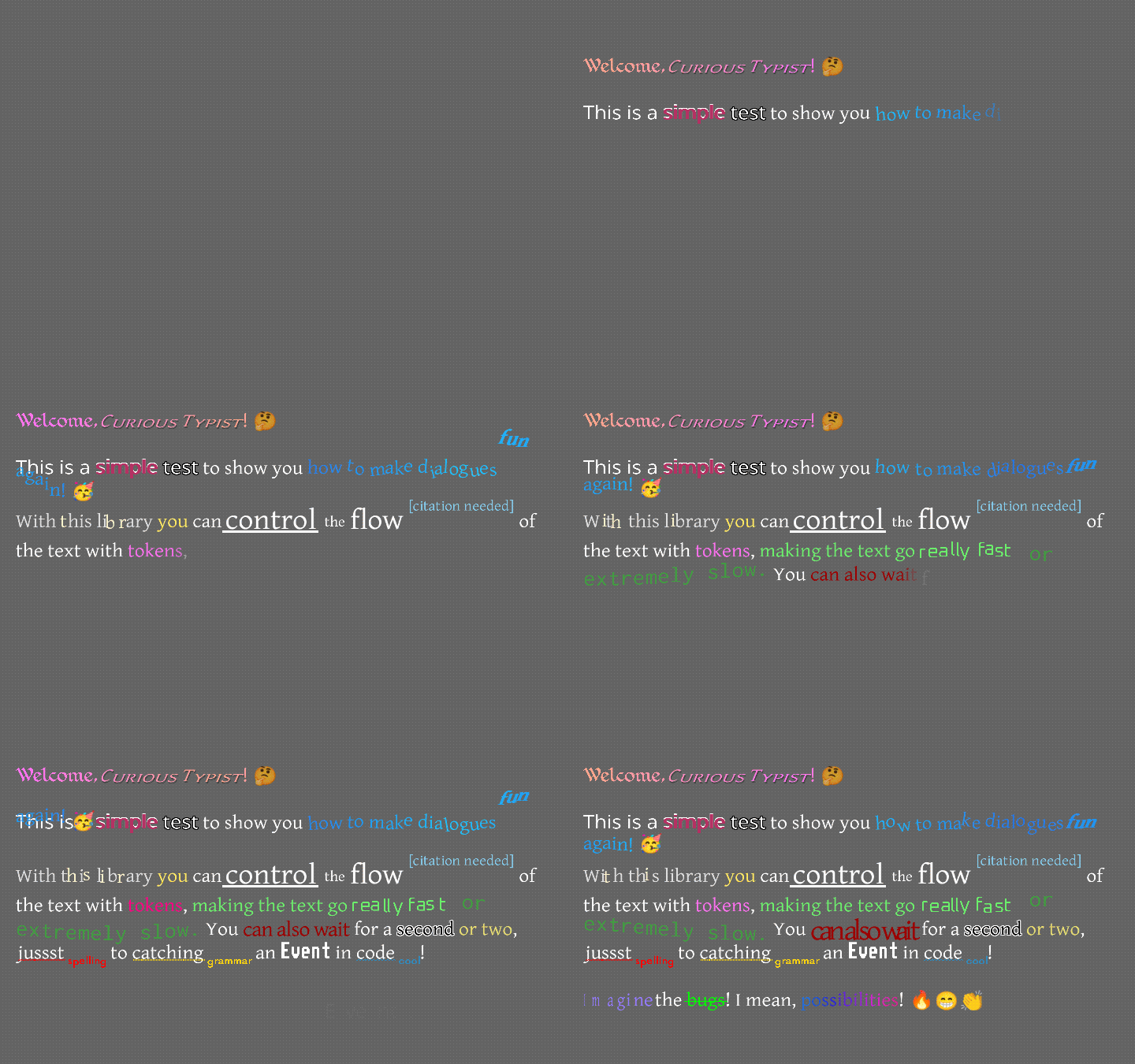
これはどのように見えますか?このような少し...
またはおそらくこのように...
このテキストを読むよりもビデオを見たい場合は、Raymond "Raeleus" Buckleyがほとんどのテキストラタイストをカバーするビデオを作成しました!スキンコンポーザーの使用など、このファイルがそうでないものをいくつかカバーするため、関係なく良い時計です。
ここには、Textralabelの形で「通常の」ラベルがあります。これは、Scene2d.uiのラベルとほぼ同じように機能しますが、下にあるスタイルを許可します。ただし、多くの使用法がTypingLabelを好むかもしれません!
TypingLabelはかなり正常なScene2d.uiウィジェットであり、Textralabelを拡張します。ただし、先にスキップするように言われない限り、1つずつ手紙を画面に置きます。これは、多くの古いテキストが多いゲームで見られるノスタルジックな効果であり、タイプライターが各文字を介入よりも遅い速度で掲載しているようです。
はい、タイプライターモード以上のものがあります!テキストは上に掛けてから、所定の位置にドロップできます。それは長い波で上下にジャンプすることができます。まるで病気であるかのように、揺れたり震えたりすることができます。さまざまな色で点滅したり、2色の間で滑らかに勾配で移動したり、虹全体を横切ったりします。たくさんのオプション。たくさんの楽しみ。効果はタイピングラベルとほぼ同じですが、いくつかの変更と追加がありました。詳細については、Textratypist Wikiを確認できます。
0.10.0の時点で、多くの新しい効果があります。衝撃、スパイラル、スピン、群衆、収縮、縮み、鼓動、ハートビート、カルーセル、スカッシュ、スケール、回転、注意、ハイライト、リンク、トリガー、スタイリスト、キャノン、海、スパッタ、およびインスタントはすべてテキストラタイピストにとって新しいものです(タイピングラベルではありません)。 Textratypist WikiのTokensページで使用法とサンプルGIFを確認できます。これらの効果のほとんどは、効果がテキストロタイスト0.5.1で使用できるスムーズなスケーリングおよび回転オプションを利用しています。リンクがテキストの範囲をクリックするためにのみ応答する方法など、0.7.0で新しいマウストラッキングを使用する人もいます。
TextraLabel効果を処理しないため、タイピング効果が必要ない場合でもTypingLabel Sを作成することをお勧めします。 TypingLabelでskipToTheEnd()を呼び出したり(0.7.0以降)他のクラスで(0.7.0以降)、TypingLabelをエフェクトのあるテキストに使用できるようにすることができます。
さまざまな標準トークンも存在し、これらはタイピング効果、可変交換、およびその他の便利なものを操作できます。
{WAIT=f}により、タイピング効果が一時停止し、フロートとしてf秒待機します。{SPEED=f} fデフォルトから0.035の典型的なグリフを入力するのにかかる時間を変更します。{SLOWER}は、すべてのグリフを入力するのに長い間2倍かかります。{SLOW}は、すべてのグリフを入力するのに長い間1.5倍かかります。{NORMAL}は、すべてのグリフがタイプまでの長さの場合に通常の1倍にします。{FAST}は、すべてのグリフを入力するのに長い間0.5倍かかります。{FASTER}すべてのグリフが入力するのに長い間0.25倍かかります。{NATURAL=f}は、グリフをタイプするのに多少る時間をランダムにかかるようにしますが、それ以外の場合は{SPEED=f}と同じです。{COLOR=s}テキストの色を変更します。これにはたくさんのオプションがあるので、「濃い灰色のピンク」を例えることができます。{STYLE=s}テキストのスタイルを変更します(以下を参照)。これには多くのオプションがあります。{SIZE=f}テキストのサイズを変更します(粗く、25%の増分で)。これにより、Fは0から375の割合としてかかります。{FONT=name} fontfamilyがある場合、 nameを調べてフォントを変更します。{CLEARCOLOR}テキスト色をデフォルトの色に設定します。これは通常白です。{CLEARSIZE}サイズを100%に設定します。{CLEARFONT}フォントを元のフォントに設定します(フォントファミリーを使用していません)。{ENDCOLOR}テキスト色をデフォルトの色に設定します。これは通常白です。これは{CLEARCOLOR}と同じです。{VAR=name}変数nameに関連付けられている文字列に置き換えられます。{IF=name;choice0=cat;choice1=b;=default}変数名をチェックし、トークンの各選択肢と比較します。nameに割り当てられた値が選択に等しい場合、トークンはcatなどの選択肢の値に置き換えられます。default値として使用されます。{EVENT=name}タイピングがこのポイントに到達したときに、タイピングリステナーにnameを送信し、イベントをトリガーします。{RESET}すべてのフォーマットと速度の変更を初期値に設定します。label.setDefaultToken()使用して初期値を変更できるため、テキストはデフォルトでいくつかの異なる設定になります。{SKIP=n} 、 n文字を即座に表示して、タイピング効果をスキップします。効果デフォルトではカーリーブレースを使用しますが、テキスト(I18Nファイルなど)の巻き装置が良い選択肢ではない場合は、 {EFFECT}に相当する[-EFFECT]を使用できます。
このライブラリは、元のタイピングラベルができることを拡張します。これにより、スタイルに関連する大胆な、下線、斜め、上付き文字など、テキストにスタイルを適用できます。スケールの変更は、フォントを変更せずにテキストを縮小または拡大することができます。フォントには、他のフォントと名前を参照するために使用する「家族」を割り当てることができます。これは通常のスタイルのように機能しますが、実際には描画に使用されるフォントが変更されます。スタイルの完全なリストは長いですが、効果トークンほど詳細ではありません。 [*] 、または( TypingLabelでマークアップが使用されている場合)のような正方形の括弧でLibgdxカラーマークアップのようなものを使用してスタイルを有効にすることができます{STYLE=BOLD}を使用して同じことをすることができます。タグとスタイルの名前はどちらもケースに依存しませんが、カラー名はケースに敏感です。 Square-Bracketの構文は、主に句読点を使用し、Markdown構文(Githubが使用する場所など)に触発されています。
次のリストでは、各エントリは次のようになります。
[*] Boldモードを切り替えます。スタイル名* 、 B 、 BOLD 、 STRONG使用を使用できます。
つまり、 [*]を常に使用して太字モードをオンまたはオフにすることができます。TypingLabelでは、ケースインスセンシティブ構文{STYLE=*} 、 {STYLE=B} 、 {STYLE=BOLD} 、または{STYLE=STRONG}を使用して同じことを行うことができます。
スタイルと関連するスクエアブラケットタグの完全なリスト:
[] 、スタイル/色/フォーマットの最後の変更を元に戻しますが、タイプラベルの効果には何もしません。[]がlibgdx bitmapfontマークアップで行うように機能しますが、色よりも機能します。[ ]すべてのスタイル/色/フォーマットと効果を初期状態にリセットします。[]新しい[ ]に変更する必要があります。[(label)]現在のフォーマット状態をlabelとして一時的に保存するため、後で再適用できます。label 、あらゆる英数字の文字列にすることができます。おそらくその中にスペースがあるはずですが、アンダースコアを持つことができます。[ label]ラベルがある場合、フォーマット状態をlabelとして再適用します。[*] Boldモードを切り替えます。スタイル名* 、 B 、 BOLD 、 STRONG使用を使用できます。[/]斜めモード(イタリック体のように)を切り替えます。スタイル名/ 、 I 、 OBLIQUE 、 ITALICを使用できます。[^] SuperScriptモードを切り替えます(そして、下付き文字またはMidscriptモードをオフにします)。スタイル名^ 、 SUPER 、 SUPERSCRIPT使用できます。[=]ミッドスクリプトモードを切り替えます(そして、上付き文字または添え字モードをオフにします)。スタイル名= 、 MID 、 MIDSCRIPT使用できます。[.]サブスクリプトモードを切り替えます(そして、SuperScriptまたはMidscriptモードをオフにします)。スタイル名を使用できます. 、 SUB 、 SUBSCRIPT 。[_]下線モードを切り替えます。スタイル名_ 、 U 、 UNDER 、 UNDERLINE使用できます。[~] Strikethroughモードを切り替えます。スタイル名~ 、 STRIKE 、 STRIKETHROUGH使用できます。[!]すべての上級モードを切り替えます(他のケースモードを置き換えます)。スタイル名を使用できます! 、 UP 、 UPPER 。[,]すべての低ケースモードを切り替えます(他のケースモードを置き換えます)。スタイル名, LOW 、 LOWERを使用できます。[;]トグル各単語モードを大文字にします(他のケースモードを置き換えます)。スタイル名を使用できます; 、 EACH 、 TITLE 。[%DDD] 、ここで、DDDは0から375までの割合で、その複数のテキストをスケールします。 {SIZE=150%} 、 {SIZE=%25} 、または同様に、 {STYLE=200%}または{STYLE=%125}で使用できます。特別なモードを削除します。[%]独自のテキストをデフォルトの100%スケールに設定し、特別なモードを削除します。 {STYLE=%}で使用できます。[%?MODE]スケールを削除し、特別なモードを設定します。モードは以下にリストされています。[%^MODE]スケールを削除し、Small-Capsモードと同時に特別なモードを設定します。モードは以下にリストされています。[@Name] 、名前はこのフォントのfamily変数のキー/名前であるため、現在の書体を指名された書体に切り替えます。 {STYLE=@Name}で使用できます。[@]は、家族を無視して、このフォントに書体をリセットします。 {STYLE=@}で使用できます。[#HHHHHHHH] 、hhhhhhhhhはhex rgb888またはrgba8888 int colorであり、色を変えます。これは通常の{COLOR=#HHHHHHHH}タグです。[COLORNAME] 、Colornameは色の名前または説明であり、外部から見上げられ、色が変わります。ColorUtils.describe()で検索します。これは、名前でPaletteから色を見つけようとし、「光」や「鈍い」などの色のミックスやシンプルな変更を説明することもできます。Colorsクラスのすべてのapper_case名が含まれています。また、約50の追加小文字名(Colorful-GDXから)も含まれています。Paletteプレビューできます。[RED] 、 [green yellow] 、 [light blue] 、 [duller orange] 、 [darker rich BLUE lavender] 、 [pale pink orange] 、 [deeper green navy] 。FontのsetColorLookup()メソッドを使用して、独自のColorLookup実装を使用して、ここでやりたいことを行うことができます。|があります、句読点を含む名前で色を検索できるようになります。たとえば、 [|;_;] ;_;と呼ばれる色を検索します。 、「悲しみの色」、そして[;]のように振る舞いません。ColorLookup libgdx colorsクラスのvbatimで文字列名を検索するColorLookup.INSTANCEもそうではない場合もありません。{COLOR=SKY} (色がすぐに処理できる)などのカラータグで、または{COLOR=lighter orange-red} {GRADIENT}の説明で使用することもできます。[+region name] 、領域名は登録されたテクスチャーリトラスからのテクスチャージオンの名前であるため、スタイルは変わりませんが、テキストとそのテクスチャージオンをインラインで生成します。KnownFonts.addEmoji()で使用され、3000+ Twemojiアイコンをフォントに追加します。[+saxophone]と[+?]というフレーズは、それぞれがサックスアイコンを表示します。[+call me hand, medium-dark skin tone]や[+??]などのマルチパート絵文字でも機能します。KnownFonts.addGameIcons()です。これらは同じ構文を使用します: [+crystal-wand] 。[-SOME_EFFECT] 、 SOME_EFFECTの周りに巻き毛のブレースを使用するのと同等です。追加されたダッシュに注意してください。スケーリングの代わりに使用できる特別なモードは次のとおりです。
black outlineまたはblacken 。これはBLACK OUTLINEまたはBLACKENスタイル名で使用できます。white outlineまたはwhiten 。これは、スタイル名WHITE OUTLINEまたはWHITENで使用できます。shiny 、 SHINY 、 SHINE GLOSSYあるスタイル名で使用できます。drop shadowまたはshadow 、スタイル名SHADOW 、 DROPSHADOW 、 DROP SHADOWで使用できます。error 、スタイル名ERROR 、 REDLINE 、またはRED LINEで使用できます。Font.PACKED_ERROR_COLORを使用して色を変更できます。warn 、スタイル名で使用できます。 WARN 、 YELLOWLINE 、またはYELLOW LINE 。Font.PACKED_WARN_COLORを使用して色を変更できます。note 。これは、スタイル名のNOTE 、 INFO 、 BLUELINE 、またはBLUE LINEで使用できます。Font.PACKED_NOTE_COLORを使用して色を変更できます。jostle 、スタイル名JOSTLE 、 WOBBLE 、またはSCATTERで使用できます。[%?]で使用することもできます。SMALLCAPSまたはSMALL CAPS small caps 。[%^]で使用することもできます。 [%?small caps]構文では使用できません。カレットが必要です。スモールキャップモードは、 %? %^へ。それ以外は、同時に2つのモードをアクティブにすることはできず、スケーリングと同時にモードを使用することはできません。
モードは、色名と混同されないように、わずかに異なる構文を使用していることに注意してください。正方形の括弧を使用する場合、ここで低いケースで与えられる各名前の前に%?ほとんどの場合(小さなキャップとジョストルは特別です)。つまり、レッドアンダーラインモード「エラー」を有効にするために、Square-Bracketタグ[%?error]を使用します。 TypingLabelにCurly-Brace Markupを使用する場合、上部ケースでここで与えられた名前を使用し、他のスタイル名のように使用できます: {STYLE=ERROR}など。スモールキャップモードは、前述のように特別です。通常、 [%^small caps]で有効になりますが、 [%^]でも有効にすることができ、通常の%? %^へ。小さなキャップがアクティブなときはいつでも、スクエアブラケットタグは%ではなく%^を使用しますか%? 。 Jostleモードも特別です。通常、 [%?jostle]で有効になりますが、 [%?]で単独で有効にすることもできます。 Jostleは小さなキャップと混ぜることはできません。
特別なモードは、私が使用できる句読点を使い果たしたため、構文の点で少し複雑です。白いテキストの周りの黒いアウトラインの一般的な例は[WHITE][%?blacken]Outlined![%][GRAY] 。 (この例では、 GRAY通常の色として使用しますが、 [ ] [ ]を使用して、 Layoutまたは保持するラベルで構成されたベース色に色をリセットすることもできます。
{VAR=ZOMBIE}urgh, brains...{VAR=ENDZOMBIE}構文を使用して、効果のいくつかの組み合わせが利用可能です。
{VAR=FIRE}次のテキストを変更して、燃えるような色を変えます。 {VAR=ENDFIRE}で終了できます。{VAR=SPUTTERINGFIRE}次のテキストを変更して、燃えるような色を変え、炎のようにサイズを変更します。 {VAR=ENDSPUTTERINGFIRE}で終了できます。{VAR=BLIZZARD}次のテキストを風に揺らし、氷のような色を使用して、白から水色を使用します。 {VAR=ENDBLIZZARD}で終了できます。{VAR=SHIVERINGBLIZZARD}次のテキストを風に揺らし、氷の色を使用し、白から水色を使用します。さらに、グリフが寒いようにランダムに「震え」します。 {VAR=ENDSHIVERINGBLIZZARD}で終了できます。{VAR=ELECTRIFY}次のテキストを鈍い灰色の紫色に変更し、ランダムにグリフを明るく黄色に変えて振動させます。 {VAR=ENDELECTRIFY}で終了できます。{VAR=ZOMBIE}は、次のテキストを「暗いオリーブセージ」(鈍い灰色の緑色)に変更し、グリフを左右にランダムに回転させ、グリフをドロップダウンしてランダムに戻し、最初に表示されると、グリフがベースラインから出現します(graiveを奪うように)。 {VAR=ENDZOMBIE}で終了できます。これらはTypingConfig.initializeGlobalVars()で定義されており、これらが定義されているのとまったく同じように、独自の組み合わせを定義できます。たとえば、 FIREはで定義されています
        TypingConfig . GLOBAL_VARS . put ( "FIRE" , "{OCEAN=0.7;1.25;0.11;1.0;0.65}" );
TypingConfig . GLOBAL_VARS . put ( "ENDFIRE" , "{ENDOCEAN}" ); OCEAN効果は、使用する色を気にしません。これらの色の間を移行する方法のおおよそのパターンのみを定義します。つまり、直感的には、 FIRE GRADIENTはなくOCEANで最もよく実装されます。ただし、 FIREを使用することはおそらくOCEANよりも好ましいので、グローバルVARはそのためにここにあります。
ラベルを使用してフォーマット状態を保存する機能により、複数のソースからのより複雑なマークアップ文字列のアセンブリが可能になります。 font.storeState("spooky", "[/][darker gray][@?blacken]") [ spooky]ようなものを呼び出すことができますfontまた、現在のフォーマットを格納する前に保存する挿入可能なテキストを作成し、書き込みが完了したときにフォーマットをリセットすることもできます。それは"[(previous)][ ][BLUE][^][[citation needed][ previous]"のようなものを使用します - この文字列がより大きなテキストのブロックの中央に挿入された場合、それは周囲のフォーマットを変更しませんが、独自のテキスト(不滅[citation needed] )を使用し、周囲のブロックの形式の補助金に使用することはありません。同じラベルを持つ複数のステートストアタグがある場合、そのラベルに関連付けられた値は、それらのタグに遭遇すると変更されます。ユニークなラベルを使用して、誤って別のラベルの価値を変更しないようにすることをお勧めしますが、通常は必要ありません。
Textratypistは、新しいFontクラスを多用しています。これは、祖先と本質的にコードを共有していないLibGDXのBitMapFontの完全なオーバーホールです。フォントには、ビットマップフォントよりも多くのパワーを与えるさまざまな品質があります。これは、主にグリフ画像をマップ内のテクスチャーとして保存する(および利用可能にする)方法から派生しています。テキストのグリフとして使用する必要がある必要な情報がある限り、フォントのmappingに独自の画像を追加することを厳密に妨げ、テキストにそれらの画像を配置することはありません。これは、一例として絵文字を実装するために使用され、カスタムアイコンや絵文字に使用できます。
Textratypistは、SDFまたはMSDFを使用して、標準のビットマップフォントと距離フィールドフォントをサポートします。 TypingLabel 、適切な距離フィールドタイプが必要なShaderProgramを自動的に有効にし、レンダリング後に無効にします。この動作は、フォントのFont.enableShader(Batch)メソッドを手動で呼び出し、バッチをBatch.setShader()メソッドで選択した他のShaderprogramにバッチを変更することで変更できます(多くの場合、ここでnullを渡してシェーダーをリセットします)。 SDFおよびMSDFフォントはresizeDistanceField() Font.resizeDistanceField()またはその他のさまざまな場所のいずれかを使用して、画面サイズの変更について通知する必要があることに注意してください。 1.0.0以降、通常、 Viewportを取得するオーバーロードを使用する必要があります。 Viewportがない場合、その過負荷は必要ありません。現在レンダリングしているすべての距離フィールドフォントは、 ApplicationListener.resize()で、ウィンドウのサイズが変更されたときに距離フィールドをサイズ変更する必要があります。
KnownFontsには、いくつかの事前設定されたフォント設定があります。各フォントゲッターのドキュメントには、そのフォントを使用するために必要なファイルが表示されます。古い.fntファイルはここに移動されました。ここでは、すべての既知のフォントのプレビューと説明を見ることができます。 .datフォントはすべて同じツール(FontWriter)によってすべて作成され、すぐに設定される傾向があるため、バージョン1.0.0以降、多くのフォントに既知のフォントを使用する必要はありません。さまざまなフォントタイプは驚くべきものではありませんが、良い出発点になるはずです。注意すべきことの1つは、 KnownFonts.getStandardFamily()メソッドです。これには、資産に16個のフォントが必要ですが、当然、 [@Medieval]構文を使用して16個のフォントのいずれかを切り替えることができます。
ここのフォントは.datファイル拡張子を使用します(これは、特定のファイル形式のないバイナリデータであることを意味します)。それらは、fontwriterが生成した大規模な.JSONフォントの圧縮バージョンです。彼らが使用する圧縮はGWT互換であるため、これらの.datファイルは、任意のプラットフォームlibgdxターゲットで使用できます。古い.fntファイルを問題なく使用できます。一部の.fntファイルはここで使用されます(主にピクセルフォント用)。また、通常、各フォントで.pngが必要ですが、ATLASにある可能性があります。
各フォントのライセンスファイルは、同じフォルダーのknownFontsに含まれています。ここで提供されるすべてのフォントは、ライセンスが手数料なしで商業使用を許可するようにチェックされました。ほとんどは帰属が必要です。詳細については、ライセンスを確認してください。
既知のフォントには、知り合いのグリフにテクスチャー剤を追加することにより、既存のフォントインスタンスを構成する他のいくつかの方法が含まれています。これには、アイコンと...絵文字のいくつかの既存のテクスチャートレイズが含まれます!
Twemojiのアイコンは、3000以上の32x32画像のアトラスにも存在します。 KnownFonts.addEmoji()上記の[+name]構文をインラインで描くことができるように、フォントでそれらを登録できます。同様に、4000以上の60x60アイコンのAtlasがgame-icons.netから存在し、 KnownFonts.addGameIcons()フォントでそれらを登録できます。 TwemojiとGame-Icons.netアトラーゼの両方を同時に1つのフォントに登録することはできません。安全に使用できるUnicodeの部分には、十分な空きスペースがありません。これを回避する方法は、フォントファミリー機能を使用し、アイコンのためだけにフォントを追加するか、家族に絵文字用に追加することです。これには既存の方法があります。 KnownFonts.getGameIconsFont()使用すると、使用法に関するいくつかのセレモニーで、ゲームアイコンを表示するためだけのフォントを取得できます。 [@Icons][+rooster][@] 、 getGameIconsFont()によって生成されたフォントに切り替え、アイコンを描画し、スイッチを戻す方法の簡単な例です。
ここには、Twemojiのプレビューがあり、絵文字チャーと名前があり、各画像を調べます。同様に、各画像を検索するために必要な名前だけで、Game-Icons.netアイコンのプレビューがあります。 Game-Icons.net画像は透明度のある純粋な白であるため、標準[RED] 、 [light dull green] 、または[#0022EEFF]構文を使用して必要な色を味わうことができることを忘れないでください。
TwemojiおよびGame-Icons.net画像のライセンスファイルは、フォントのライセンスファイルの横にあるknownFontsに含まれています。 Twemojiには帰属の単純な要件がありますが、Game-Iconsはかなりの数の個々の貢献者に帰属する必要があります。リストのこのドキュメントの終わりを参照してください。これについては、すべての人にクレジットを与えるためにコピーできます。
また、OpenMojiのラインアート絵文字や、同じ絵文字のフルカラーバージョンもあります。これらは、特定のプロジェクトのアートスタイルに適している可能性があります。
個々のグリフを(個別に描画する場合)回転したり、テキストのブロック全体をレイアウトとして回転させたりして、 Font.drawGlyph()またはFont.drawGlyphs()のオプションの過負荷を使用できます。 TypingLabelのカスタムエフェクトは、xおよび/またはyでの位置とスケールだけでなく、Glyphの回転を個別に変更することもできます。 TextralabelまたはTypingLabelをsetRotation()メソッドを使用して回転させると、回転が背景を持つラベルおよび/または異なるアライメント設定のラベルに対して正しく機能するようになります。回転の原点はラベルに設定でき、ラベル全体がその原点の周りを回転します。
また、一部のフォントの場合、ボックスドラウング文字を持ち、ブロック要素を自動的に生成することもできます。これには、ID 9608のフォント(Unicodeフルブロックインデックス'u2588' )のフォントに存在する固体白いブロック文字(通常は1x1)が必要です。これにより、2つのアンダースコアまたはハイフンが互いに重複する場所を汚すことなく、下線ラインとストリケスロフのキャラクターがより適切に接続することをより適切に保証することができます。 Font 、場合によってはこれを有効にしようとします。または、パラメーターで設定することもできますが、失敗した場合は、下線にアンダースコアを使用して、ストリケスラフにハイフンを使用します。 KnownFontsフォントのすべてのフォントは、ソリッドブロックを使用するように構成されているか、フォントがそれなしではより良くレンダリングされるため、特別に回避するように構成されています。 libgdx BitmapFontからFontを作成する場合、ビットマップフォントには適切なソリッドブロックcharがめったにないため、グリッドグリフを作成しようとさえしないデフォルトではありません。
実際にその目的に使用されるボックス描画文字(下線やストリケスラフだけでなく)には、いくつかの追加の構成が可能です。 boxDrawingBreadthをFontにいくつかの乗数に設定して、互いに接続する方法を変更せずに、ボックスドラウングラインを厚くまたは薄くすることができます。
さまざまな機能により、ここで追加の構成が可能になります。大胆なスタイルから多かれ少なかれ余分なスペースを適用する必要がある場合、デフォルト1以外の価値にboldStrength設定できます。また、斜めのテキストが描画される斜めの角度を変更するために、 obliqueStrength設定することもできます。さまざまな効果の色は、必要に応じて変更できます。 font.PACKED_SHADOW_COLOR 、たとえば、暗い、より明るく、より不透明な、またはより透明な影の色を使用するように変更できます。 font.PACKED_BLACKブラックアウトラインモードに影響し、 font.PACKED_WHITE白いアウトラインと光沢のあるモードに影響します。エラー、警告、ノートの下線の色を変更する同様のモードがあります。これらのカラー構成はすべてフォントインスタンスごとに適用されるため、同じ書体を使用して2つのフォントオブジェクトを使用すると構成されています。
0.4.0のリリースから、Scene2d.uiの対応物を置き換え、 TextraLabelのLabelを交換するさまざまなウィジェットがあり、それらにマークアップを使用できるようにします。ウィジェットは、 ImageTextraButton 、 TextraButton 、 TextraCheckBox 、 TextraDialog 、 TextraLabel 、 TextraListBox 、 TextraTooltip 、 TextraWindow 、さらにTextraLabelの代わりにTypingLabelを使用し、名前にTypingを使用しています。
TextAreaまだサポートされていませんが、 TextAreaのカウンターパートが計画されており、まだ機能していません。 TextraLabel 、複数の行をサポートするデフォルトであり、いくつかの使用に代わって順調に進むことができる場合があります。 TypingLabel入力追跡も許可しているため、それを使用して選択可能なテキストの領域を作成できます - 読み続けてください!
入力追跡は、0.7.0以降に使用するTypingLabelとコードのオプションです。これは0.7.4で拡張され、 TypingLabelのテキストをlabel.setSelectable(true)で選択可能にすることができます。 label.getSelectedText()を使用して現在選択されているテキストにアクセスするか、 label.copySelectedText()で直接コピーできます。ユーザーがクリックしてジェスチャーをtypinglabelの上にドラッグしたとき(および選択可能です)、イベントもトリガーされます。 TypingListenerで"*SELECTED"を聞いて、選択したらすぐにテキストをコピーするか、キーが押された場合にのみコピーすることができます。入力追跡を使用するその他の便利な機能には、 {LINK}タグが含まれます。これにより、テキストのスパンがインターネットアドレスへのクリック可能なリンク、 {TRIGGER} 、クリック時にイベントをトリガーし、マウスホバー( {ATTENTION} 、 {HIGHLIGHT} 、 {STYLIST} )に応答する他のタグをいくつかします。これらはTextraLabelではなくTypingLabelでのみ機能するため、 TypingLabel使用してskipToTheEnd()を呼び出して、ユーザー入力に応答し、 {RAINBOW}のようなアニメーションスタイルを使用できるテキストのように扱うことができます。
libgdxのSkinクラス、 FWSkin (または拡張するクラスの1つ)にバリアントを備えた通常のScene2d.uiスキンJSONファイルを読むことができ、それを行うと、通常のScene2D.UIスタイルと専門化されたテキストラティピストスタイルをロードできます。特殊なスタイルは、通常、 BitmapFont代わりにFontを使用するという点でのみ異なり、すべてここのStylesクラスにネストされています。特殊なスタイルを持つことは、ビットマップフォントの多くのコピーを作成することなく、1つのフォントをより多くの場所で再利用できることを意味します(ウィジェットごとに1つ、時には1つ)...これは、Textratypist 1.0.0の前の場合でした。通常、肌からfwskinに変更するのは簡単です。以前のこのようなコード:
Skin skin = new Skin ( Gdx . files . internal ( "my-skin.json" ));後にこれに変更します:
FWSkin skin = new FWSkin ( Gdx . files . internal ( "my-skin.json" ));また、肌の変数は通常のSkinになるため、 FWSkin Skin変数に割り当てることもできます。これは最も互換性のあるオプションです。ただし、 FWSkinには距離フィールドフォントをもう少し簡単に処理する便利な方法がいくつかありますので、可能な限りFWSkinを使用することは良い考えです。
なぜそれはFWSkinと呼ばれるのだろうか?まあ、それは.fntファイル( BitmapFontのみでスキン構成が必要)からフォントとビットマップフォントの両方のインスタンスをロードでき、構造化されたJSONフォントに対して同じことを行うことができます。 FWSkinの最初の目的は、.fntと.json/.datフォントファイルから等しくロードすることでしたが、そのスコープは新しいスタイルを含むように拡張されました。
Stripeの使用に慣れている場合は、 FWSkin行うこととStripeが行うFreetype処理の両方を行うドロップイン交換があります。これは、別のリポジトリで利用可能な追加のFreeTypist依存関係です。これは、スキンJSONに"com.badlogic.gdx.graphics.g2d.freetype.FreeTypeFontGenerator"を使用することで、Freetypeを構成できます。 Skincomposerによって生成され、ストライプと互換性のある通常のスキンを使用して、FreeTypistで使用できます。
Gradleを介して入手できますが、FreetyPistのこのフォルダーから2つのファイルを独自のコードにコピーするだけで、おそらくより良いオプションです。 Freetypistに依存する方法に関係なく、Freetype(適切な「プラットフォーム」依存関係を含む)とTextratypist(現在1.0.0)に依存する必要があります。一般的にFWSkinとTextratypistに機能が追加される場合、Freetypistも更新する必要があります。
おそらく、GradleでTextratypistを取得したいのでしょう! libgdxプロジェクトのコアモジュールの依存関係は次のように見えます。
implementation " com.github.tommyettinger:textratypist:1.1.0 "これは、あなたがすでにlibgdxに依存していることを前提としています。 Textratypistは、バージョン1.12.1以下に依存します。 LIBGDXのツールチップコードのいくつかの壊れた変化のために、1.11.0の要件がTextratypist 0.5.0に追加されました。 1.12.1の要件は1.0.0に追加されました。これはおそらく変更されたため、1.12.1(またはその後のスナップショットリリース)は非常に簡単に更新できます。
GWTを使用する場合、これは互換性があるはずです。 HTMLモジュールでこれらの依存関係が必要です。
implementation " com.github.tommyettinger:textratypist:1.1.0:sources "
implementation " com.github.tommyettinger:regexodus:0.1.16:sources "
GWTは、GDXDEFINITION.GWT.XMLファイル(バージョン0.7.7以降)にも必要です。
< inherits name = " regexodus.regexodus " />
< inherits name = " com.github.tommyettinger.textratypist " />バージョン0.7.4以前では、両方の依存関係の以前のバージョンになります(これは古いバージョンです):
 // OLD VERSION
implementation " com.github.tommyettinger:textratypist:0.7.4:sources "
implementation " com.github.tommyettinger:regexodus:0.1.13:sources "
代わりにこれらのGWT継承を使用します。
 <!-- OLD VERSION -->
< inherits name = " regexodus " />
< inherits name = " textratypist " />
Regexodusは、内部的にいくつかの複雑なパターンを一致させるために使用するGWT互換の通常の発現ライブラリです。 Libgdx自体以外に、Regexodusはこのプロジェクトが持っている唯一の依存関係です。 GWT継承は、テキストラタイプとregexodusの場合に変更されました。デフォルトのパッケージを使用すると実際の問題が発生する可能性があることが判明したためです。
このリポジトリのリリースセクションには、少なくとも1つのリリースがありますが、Gradleを使用してこのライブラリとその依存関係を処理することをお勧めします。
Jitpackを使用して現在のコミットを取得することもできます。これは、リリースの間に長いスパンがある場合に便利です。 Current gdx-liftoff and gdx-setup projects all can use JitPack dependencies without needing any extra configuration. You would use this dependency in your core module:
implementation ' com.github.tommyettinger:textratypist:de5a52f340 ' You can change de5a52f340 to any commit in the Commits tab of https://jitpack.io/#tommyettinger/textratypist , but you should not use -SNAPSHOT -- it can change without your requesting it to, which is not what you want!
You can also depend on FreeTypist using:
implementation " com.github.tommyettinger:freetypist:1.1.0 "(Now, FreeTypist 1.1.0 uses TextraTypist 1.1.0 .)
And if you target HTML and have FreeType working somehow, you would use this Gradle dependency:
implementation " com.github.tommyettinger:freetypist:1.1.0:sources "And this inherits line:
< inherits name = " com.github.tommyettinger.freetypist " />FreeType doesn't work out-of-the-box on GWT, though there is this].
Some parts of TextraTypist act differently from their counterparts in scene2d.ui and Rafa Skoberg's typing-label.
A big quirk is that Font and BitmapFont have some core disagreements about how to parse a .fnt file, and the results of creating a Font with new Font("MyFont.fnt") can be different from new Font(new BitmapFont(Gdx.files.internal("MyFont.fnt"))) . BitmapFont reads in padding information (and does so incorrectly according to the BMFont spec), where Font ignores padding information entirely. Some .fnt files have been made so they look right in libGDX by using padding, but they will look wrong in other frameworks/engines without that padding. Font compromises by allowing manual adjustment of x and y position for all glyphs (y often needs to be adjusted, either to a positive or negative value), as well as the width and height of glyphs (these are useful less frequently, but can be helpful to stretch or squash a font). It may take some tweaking to get a Font made from a BitmapFont to line up correctly with other widgets. You also may need to adjust the offsetX, offsetY, and maybe xAdvance parameters if you load an atlas (such as with addEmoji() or addGameIcons() ), and the adjustments may be quite different for a Font made from a BitmapFont vs. a Font made directly from a .fnt file. Since 0.8.1, Font can parse an extended version of the .fnt format that permits floats for any spatial metrics, and not just ints. No files actually use this here and now, because the Structured JSON files produced by fontwriter all use floats internally for everything.
If you load text from a file and display it, you can sometimes get different results from creating that text in code, or loading it on a different machine. This should only happen if the file actually is different -- that is, the files' line endings use rn when checked out with Git on a Windows machine, or n on MacOS or Linux machines. TextraTypist uses r to mark some kinds of "soft" line breaks that can be re-wrapped, and n for "hard" line breaks that must always create a new line. Having rn present generally shows up as two lines for every line break. A simple solution that works for many projects is to include a .gitattributes file in your project root, like the one here. This can be used to force all text files or all text files with a certain file extension to use LF mode, where only a single n is used for line breaks. It's still recommended to keep .bat files using CRLF mode, with rn used, for compatibility. Using .gitattributes from the start is a good idea, and should keep files exactly the same on all current OSes. Older Windows programs (like Notepad from Windows 7) aren't able to read n line endings, but the versions distributed with recent Windows can use n easily, as can almost all code-oriented text editors.
Colors can be written out as hex strings, like #FF7700 or #9783EDFF , given by name, or described using a simple syntax. The full list of (case-sensitive!) names can be seen ordered by hue, by lightness, or by name. You can take one or more of these color names, optionally add adjectives like "light" or "dull", and get a color that mixes the named colors and applies changes from the adjectives. There are some tricky things here:
Colors class, and are ALL_CAPS , sometimes with underscores. Other names are from colorful-gdx, and are lowercased single words. In a few cases, the same word refers to a different color value if you use ALL_CAPS or use lowercase ( ORANGE and orange are a good example).ColorUtils.unevenMix() . You can have a number after any color name, which assigns a weight to that color for the mixing. Higher numbers will cause their preceding color to have more effect on the result; any non-negative integers are allowed.0x00000100 ), or fully transparent very dark blue, which is used as a placeholder because visually it is the same as transparent black. If a color does wind up as 256 at the time it is finally rendered, it will probably be ignored.Palette with its static addColor() method. This makes another color name usable, but won't retroactively make that color name parse correctly. You may have to call methods like Font.markup() again, so it's best if you can change colors before using them.If you encounter issues with TypingLabel tokens, and you use ProGuard, the configuration for that tool needs a small addition:
-keep class com.github.tommyettinger.textra.** { *; }
There may be more strict versions of this ProGuard instruction possible, but at the very least, the com.github.tommyettinger.textra.effects package needs to be kept as-is, for reflection reasons. You may also need to ensure the com.github.tommyettinger.textra.Effect class is kept. Keeping all of TextraTypist should be perfectly fine for obfuscation purposes because this is an open-source library, but it does add a small amount to the size of the final JAR or APK. Right now, that appears to be 202 KB if you don't include any assets, so I wouldn't worry about it.
Distance field fonts might not be worth the hassle of resizing each font's distance field, but they do look much better at very large sizes than standard fonts. Using a standard font actually can look better for small-to-moderate size adjustments. The best approach when you don't need large text seems to be to use a large standard font texture, without SDF or MSDF, and scale it down as needed. Since 1.0.0, all fonts support emoji. Older versions did not support emoji in MSDF fonts.
If you happen to use both tommyettinger's TextraTypist library and tommyettinger's colorful-gdx library, you may encounter various issues. ColorfulBatch appeared to be incompatible because it uses an extra attribute per-vertex (compared to SpriteBatch), but an adjustment it already does seems to make it compatible without changes. Color description can be done by both colorful-gdx's SimplePalette and ColorUtils.describe() here, but descriptions would really need to use the RGBA color space to work as expected. Alternative shaders from colorful-gdx's Shaders class generally won't work correctly with the known fonts here and the defaults for neutral colors (here, white is the neutral color, but in most shaders that allow lightening, 50% gray is the neutral color). The easiest solution for all this is to use a normal, vanilla SpriteBatch for TextraTypist rendering, and whatever ShaderProgram or ColorfulBatch you want for colorful-gdx rendering.
Games that use custom Batch classes with additional attributes don't work out-of-the-box with Font , but it provides an extension point to allow subclasses to function with whatever attributes the Batch needs. Overriding Font.drawVertices() allows quite a lot of flexibility to handle unusual batches, and you can generally leave the custom Font unchanged other than the drawVertices() override. If you implement Font 's copy constructor just by calling super(font); , and still allow it to take a Font argument, then you can quickly take Fonts from KnownFonts and make copies using your subclass. The JavaDocs for Font.drawVertices() detail what each of the 20 floats passed in via an array to drawVertices are expected to do; custom Batches could have 24 or more floats and so would need to put the 20 existing floats in the positions their Batch expects.
Sometimes, you may need to enable or disable integer positioning for certain fonts to avoid a strange GPU-related visual artifact that seems to only happen on some Nvidia GPUs. When this happens, glyphs may appear a half-pixel or so away from where they should be, in seemingly randomly-picked directions. It looks awful, and the integer position code at least should resolve it most of the time. Integer positions don't work well if you use world units that span multiple pixels in length, but this bug is an absolute mystery, and also doesn't happen at all on integrated GPUs, and may not happen on AMD GPUs. How it behaves on Apple Silicon graphics, I also do not know. The Issues tab is always available for anyone who wants to try to debug this! It is possible that some fixes introduced in the 0.7.x releases may have already eliminated this bug, but I'm not especially optimistic that it is always gone.
The gdx-freetype extension produces BitmapFont outputs, and you can create a Font from a BitmapFont without any issues. However, FreeType's "Auto" hinting settings both look worse than they normally should with Font, and can trigger the GPU artifact covered immediately above. Instead of "AutoSlight", "AutoMedium", or "AutoFull" hinting, you can choose "Slight", "Medium", or "Full", which makes the font look more legible and avoids the GPU half-pixel-offset issue. I don't have any idea why this happens, but because hinting can be set either in the FreeType generator parameters or (if you use Stripe or FreeTypist from this repo) set in a Skin file with "hinting": "Full" , it isn't hard to fix.
There are some known issues with scaling, rotation, and integer-positioning in 0.7.5 through 0.9.0. You may see labels slide a little relatively to their backgrounds when rotated smoothly, and some (typically very small) fonts may need integer positions enabled to keep a stable baseline. Font debug lines may be quite incorrect in some of these versions, also, even if the text displays correctly to users. Scaling has improved significantly in 0.7.8, as has the handling of debug lines, but rotation still has some subtle bugs. A bug was fixed starting in 0.8.0 that made extra images in a Font (such as emoji) scale differently and drift when the Font they were mixed with scaled. That same bug also made an ordinary Font drift slightly as its scale changed; this is also fixed. Positions and sizes for background color and for images from an atlas have improved in 0.8.2, so selecting text shouldn't cover up text as badly with the background, and emoji should be fully surrounded by their selection background. Positions along the line vertically, while the text is scaled, improved in 0.8.3 so that the scaling is relative to the center of the line, rather than the bottom of the line. Some other code already expected scaling to be centered like that, so this change makes scaling look better, usually. In 0.9.0, integer positioning can still be set, but it does nothing; in practice, setting it was causing more problems than improvements. The few fonts that one would think would need integer positions (pixel fonts) actually look better without it. There are still some rotation issues in 0.9.0, though they mostly happen when the descent is configured to an extreme value, or sometimes other metrics. Lining up underline/strikethrough with rotated text is also a challenge.
Word wrap periodically seems to break and need fixing across different releases. The most recent time this happened was in 0.7.9, which also affected 0.8.0 and was fixed (I hope) in 0.8.1. A different wrapping-related bug was fixed more recently, in 0.8.3 ; this was rare, and only affected TypingLabel when some effects were present.
There's other issues with word wrap if you expect it to behave exactly like Label in libGDX. Here, we don't break words, even if a single word is longer than the width of a TextraLabel or TypingLabel . The reason for this is twofold: first, breaking words without proper hyphenation logic can change the meaning of those words, and second, fixing this could be a ton of work. I do intend to try to make this configurable and match Label by default in some near-future version. The word wrap behavior for multiple whitespace characters changed in version 0.10.0, and should be essentially correct now. Remember that word wrap only makes sense in the context of scene2d.ui for a widget (such as a TypingLabel or TextraLabel) if that widget has been sized by scene2d.ui, usually by being in a Table cell, or sometimes by being in a Container. You may need to add a label to a Table or Container, then set the width and/or height of that Cell or Container, to get wrap to act correctly.
A possibly-frequent issue (with an easy fix) that may start occurring with version 0.9.0 and later is that TextraTypist now requires Java 8 or higher. All modern desktop OSes support Java 8, and this has been true for 9 years. Android has supported Java 8 (language level, though only some APIs) for several years, and older versions can use "desugaring" to translate more-recent Java code to be compatible with (much) older Android versions. GWT has supported language level 8 for years, as well; 2.8.2, which libGDX is built with, allows using Java 8 features, and 2.11.0, which an alternate libGDX backend supports, allows using even more. RoboVM doesn't support any new APIs added in Java 8, but it has supported language level 8 from the start. TextraTypist doesn't use any APIs from Java 8, but does now use functional interfaces and method references. Having these features allows us to remove some nasty reflection-based code, and that in turn helps usage on platforms where reflection is limited, such as GWT and Graal Native Image. GWT was able to work before, but Graal Native Image would have needed a lot of configuration to be added for every game/app that used TextraTypist. The other issue is that if TextraTypist continued to target Java 7 for its library code, it wouldn't compile with Java 20 or later, and the LTS release 21 has been out for almost a year.
If you're upgrading to TextraTypist 1.0.0 or later, and you haven't changed Skin usage at all, you'll probably encounter some bugs. These are quick to fix by changing Skin to FWSkin , or if you used Stripe, FreeTypistSkin from FreeTypist. There is also a FWSkinLoader for use with AssetManager , and FreeTypist has a FreeTypistSkinLoader . FWSkin allows loading the new types of scene2d.ui styles that reuse Font instances rather than making new ones often. It also allows loading BitmapFont and Font objects from .fnt, .json, and .dat files (where .dat is the compressed JSON format this repo uses), requiring only configuration for BitmapFont in the skin .json .
If you want to make your own Fonts, you can use Hiero or AngelCode BMFont as you always have been able to, but now you can also use FontWriter (though it is Windows-only for now). FontWriter can output SDF and MSDF distance field fonts, as well as standard bitmap fonts, and it always ensures the files have been processed how TextraTypist prefers them (they need a small white square in the lower right to use for block drawing and underline/strikethrough, plus a specific transparency change makes certain overlapping renders with alpha keep their intended colors). These processing changes could be done by running BlockStamper and TransparencyProcessor in the TextraTypist tests, but that's a hassle, so using FontWriter is preferred. It outputs .json and .dat font files, as well as a .png texture. You only need the .png file AND (the .dat file OR the .json file), but the .dat file is smaller, so it is usually preferred. The .json file can be hand-edited, but it isn't very easy to do that given how it is inside.
This is based very closely on typing-label, by Rafa Skoberg. Typing-label is MIT-licensed according to its repo LICENSE file, but (almost certainly unintentionally) does not include any license headers in any files. Since the only requirement of the MIT license is to leave any license text as-is, this Apache-licensed project is fully compliant with MIT. The full MIT license text is in the file typing-label.LICENSE , and the Apache 2 license for this project is in the file LICENSE . Apache license headers are also present in all library source files here. The Apache license does not typically apply to non-code resources in the src/test/resources folder; individual fonts have their own licenses stored in that directory.
Twemoji isn't a font, so it might be best to mention it separately. It's licensed under CC-BY 4.0, and requires attribution to Twitter if used. Twemoji's guidelines for attribution are here. (The documentation still says Twitter, not X, and to my knowledge X doesn't employ any of the active Twemoji team, so... I would link back to the Twemoji repo, so that it is up to them).
Like Twemoji, Game-Icons.png isn't a font, and it has quite a few contributors to the project. Because all icons in the project are on one PNG file, you must credit all the contributors who licensed their art under CC-BY, and it may be ideal just to credit all the contributors, period. The list is in the license.
OpenMoji is also not a font, but it clearly has a CC-BY-SA 4.0 license, and the BY clause should be satisfied by attributing the OpenMoji Project. The SA clause should be satisfied by any users of OpenMoji continuing to provide attribution. There isn't a non-commercial clause for any assets here.
The logo was made by Raymond "raeleus" Buckley and contributed to this project. It can be used freely for any purpose, but I request that it only be used to refer to this project unless substantially modified.
Wow, raeleus has really helped a tremendous amount. Both by testing TextraTypist in his Skin Composer app (which found quite a lot of bugs, small and large), and advising on proper scene2d.ui layout practices (which were not easy to get 100% right), the large 0.5.2 release (and those after it) would not be what it is today without his input.ありがとう!
Thanks to fraudo for helping me go step-by-step to figure out how badly I had screwed up rotation with backgrounds, and for writing most of LabelRotationTest . Release 0.5.5 would still probably be in development for months without that help, so thanks are in order.
Thanks to piotr-j (evilentity), mas omenos, and DMC from the libGDX Discord, for really thoroughly testing TextraTypist. IncongruityTest was originally piotr-j's work, and it helped me figure out which fonts in KnownFonts had incorrect bounds information. TableWrapTest was based closely on mas omenos' work, and was useful to locate a wrapping bug. DMC managed to track down a very elusive ProGuard issue, which is now documented in this README.md , as well as noticing and helping debug a variety of issues with code that I had no idea people were already using. Sanda Moen, fourlastor, tecksup, and Siavash Ranbar helped track down some maddening bugs affecting word wrap; thanks to everyone who's put up with those kinds of bug! IgorApplications has helped track down various SDF-related bugs and pointed out that a feature (full-color emoji in SDF fonts) was possible, so thanks as well!
Of course, I have to thank Rafa Skoberg for writing quite a lot of the code here! About 2/3 of the effects are almost purely by Rafa, much of the TypingLabel-related code is nearly unchanged from his work, and in general he showed what libGDX UIs could be just by making the initial code.
Thanks to all the font designers who made fonts we use here; by making your fonts freely available, you perform a great service to the people who depend on them.
Thanks to Twitter for generously contributing Twemoji to the world of open source; having broadly available emoji makes them much more usable. Note that because this was a generous action by Twitter, it happened before its acquisition/change to "X".
Thanks to the many contributors to game-icons.net for producing high-quality free icons to game developers everywhere. The icons in Game-Icons.png were made by:
(Projects that use TextraTypist can copy the above list of Game-Icons.png contributors to comply with its license.)
Thanks again to the OpenMoji project! That was clearly a lot of work. OpenMoji is licensed as CC BY-SA 4.0.
Thanks also to the developers of the Noto Fonts and Emoji! They are OFL 1.1 licensed. The Noto Color Emoji here also used data from the MIT-licensed EmojiBase project to create the atlas.








