textratypist
1.1.0 "Deselected Tofu"

ไลบรารีการแสดงข้อความแสดงให้เห็นว่าอยู่ตรงกลางฉลากที่พิมพ์เมื่อเวลาผ่านไปทั้งเอฟเฟกต์และสไตล์
กล่าวอีกนัยหนึ่งสิ่งนี้นำคุณสมบัติเพิ่มเติมมาสู่การแสดงข้อความใน libgdx
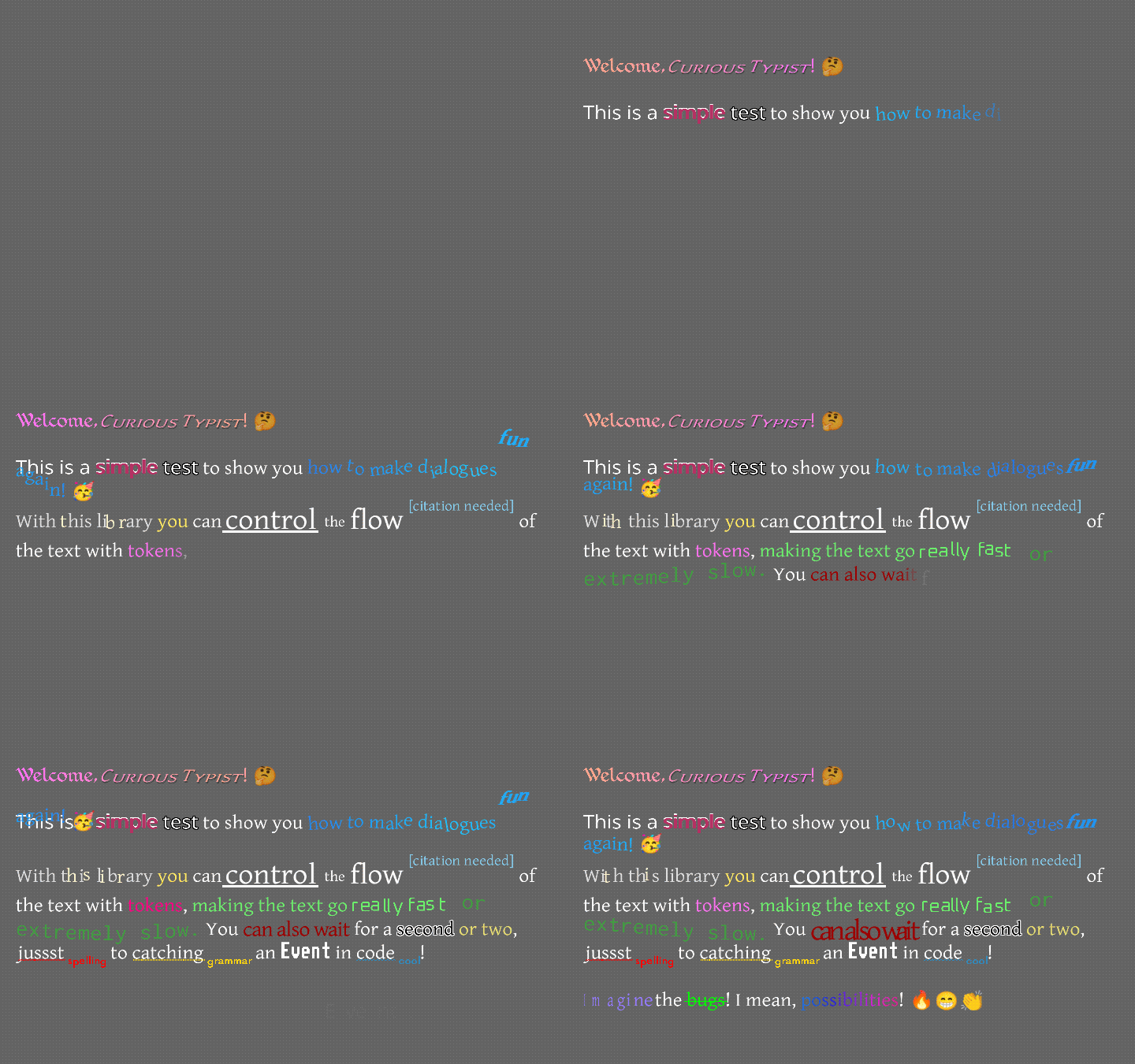
หน้าตานี้เป็นอย่างไร? เล็กน้อยเช่นนี้ ...
หรืออาจจะเป็นเช่นนี้ ...
หากคุณอยากดูวิดีโอมากกว่าอ่านข้อความนี้เรย์มอนด์ "Raeleus" Buckley ทำวิดีโอที่ครอบคลุม Textratypist ส่วนใหญ่! มันครอบคลุมบางสิ่งบางอย่างไฟล์นี้ไม่ได้เช่นการใช้งานของนักแต่งเพลงผิวดังนั้นมันจึงเป็นนาฬิกาที่ดีโดยไม่คำนึงถึง
มีฉลาก "ปกติ" ที่นี่ในรูปแบบของ Textralabel ซึ่งทำหน้าที่เหมือนฉลากใน Scene2d.ui แต่อนุญาตให้สไตล์ที่ครอบคลุมด้านล่าง การใช้งานจำนวนมากอาจชอบ TypingLabel!
TypingLabel เป็นวิดเจ็ต scene2d.ui ที่ค่อนข้างปกติและขยาย Textralabel อย่างไรก็ตามมันจะวางตัวอักษรบนหน้าจอทีละครั้งเว้นแต่จะได้รับคำสั่งให้ข้ามไปข้างหน้า นี่คือเอฟเฟกต์ความคิดถึงที่พบในเกมที่มีอายุมากกว่าหลายเกมและดูเหมือนว่าเครื่องพิมพ์ดีดจะวางตัวอักษรแต่ละตัวในอัตราที่ช้ากว่าที่เกิดขึ้น
ใช่มันมีมากกว่าโหมดพิมพ์ดีด! ข้อความสามารถแขวนไว้ด้านบนแล้ววางเข้าที่ มันสามารถกระโดดขึ้นและลงในคลื่นยาว มันสามารถสั่นคลอนและสั่นเทาราวกับว่ามันป่วย มันสามารถกระพริบในสีที่แตกต่างกันย้ายในการไล่ระดับสีอย่างราบรื่นระหว่างสองสีหรือข้ามรุ้งทั้งหมด ตัวเลือกมากมาย สนุกมาก เอฟเฟกต์เกือบจะเหมือนกับในการพิมพ์ฉลาก แต่มีการเปลี่ยนแปลงและเพิ่มเติมบางอย่าง คุณสามารถตรวจสอบ Wiki Textratypist สำหรับข้อมูลเพิ่มเติม
ณ 0.10.0 มีเอฟเฟกต์ใหม่มากมาย Jolt, เกลียว, สปิน, ฝูงชน, หด, โผล่ออกมา, การเต้นของหัวใจ, ม้าหมุน, สควอช, สเกล, หมุน, ความสนใจ, ไฮไลต์, ลิงค์, ทริกเกอร์, สไตลิสต์, ปืนใหญ่, มหาสมุทร, สปัตเตอร์และทันที คุณสามารถดูคำแนะนำการใช้งานและตัวอย่าง GIF ได้ที่หน้าโทเค็นของ Textratypist Wiki เอฟเฟกต์เหล่านี้ส่วนใหญ่ใช้ประโยชน์จากตัวเลือกการปรับขนาดและการหมุนที่ราบรื่นซึ่งเอฟเฟกต์สามารถใช้งานได้ใน Textratypist 0.5.1 บางคนใช้ประโยชน์จากการติดตามเมาส์ใหม่ใน 0.7.0 เช่นวิธีการที่ลิงค์ตอบสนองต่อการคลิกที่ช่วงของข้อความ
คุณอาจต้องการสร้าง TypingLabel S แม้ที่คุณไม่ต้องการเอฟเฟกต์การพิมพ์เพราะ TextraLabel ไม่ได้จัดการกับเอฟเฟกต์ใด ๆ คุณสามารถเรียก skipToTheEnd() บน typinglabel หรือ (ใน 0.7.0 ขึ้นไป) ในคลาสอื่น ๆ เพื่อให้สามารถใช้ typinglabel สำหรับข้อความนิ่งที่มีเอฟเฟกต์
โทเค็นมาตรฐานต่าง ๆ ยังมีอยู่และสิ่งเหล่านี้สามารถจัดการกับเอฟเฟกต์การพิมพ์การเปลี่ยนตัวแปรและสิ่งที่เป็นประโยชน์อื่น ๆ :
{WAIT=f} ทำให้เกิดเอฟเฟกต์การพิมพ์เพื่อหยุดชั่วคราวและรอสักครู่ f เป็นวินาทีเป็นลอย{SPEED=f} เปลี่ยนเวลาที่ใช้ในการพิมพ์ glyph ทั่วไปจากค่าเริ่มต้น 0.035 เป็น f{SLOWER} ทำให้ร่ายมนตร์ทั้งหมดใช้เวลา 2 เท่าในการพิมพ์{SLOW} ทำให้ร่ายมนตร์ทั้งหมดใช้เวลา 1.5x ตราบใดที่พิมพ์{NORMAL} ทำให้ร่ายมนตร์ทั้งหมดใช้เวลา 1x ปกติตราบเท่าที่จะพิมพ์{FAST} ทำให้ร่ายมนตร์ทั้งหมดใช้เวลา 0.5X ตราบใดที่พิมพ์{FASTER} ทำให้ร่ายมนตร์ทั้งหมดใช้เวลา 0.25x ตราบใดที่พิมพ์{NATURAL=f} ทำให้ Glyphs ใช้เวลาแบบสุ่มมากหรือน้อยในการพิมพ์ แต่อย่างอื่นเหมือนกับ {SPEED=f}{COLOR=s} เปลี่ยนสีของข้อความ; มีตัวเลือกมากมายดังนั้นคุณสามารถมีเช่น "สีชมพูสีเทาเข้ม"{STYLE=s} เปลี่ยนรูปแบบของข้อความ (ดูด้านล่าง); มีตัวเลือกมากมาย{SIZE=f} เปลี่ยนขนาดของข้อความ (หยาบ ๆ เพิ่มขึ้น 25%); นี่ใช้ F เป็นเปอร์เซ็นต์จาก 0 ถึง 375{FONT=name} เปลี่ยนแบบอักษรหากมี fontfamily พร้อมใช้งานโดยค้นหา name{CLEARCOLOR} ตั้งค่าสีข้อความเป็นสีเริ่มต้นซึ่งมักจะเป็นสีขาว{CLEARSIZE} กำหนดขนาดเป็น 100%{CLEARFONT} ตั้งค่าตัวอักษรเป็นตัวอักษรดั้งเดิม (ไม่ใช้ fontfamily){ENDCOLOR} ตั้งค่าสีข้อความเป็นสีเริ่มต้นซึ่งมักจะเป็นสีขาว นี่เป็นเช่นเดียวกับ {CLEARCOLOR}{VAR=name} ถูกแทนที่ด้วยสตริงใดก็ตามที่เชื่อมโยงกับ name ตัวแปร{IF=name;choice0=cat;choice1=b;=default} ตรวจสอบชื่อตัวแปรและเปรียบเทียบกับแต่ละตัวเลือกในโทเค็นname เท่ากับตัวเลือกโทเค็นจะถูกแทนที่ด้วยค่าตัวเลือกเช่น catdefault{EVENT=name} ทริกเกอร์เหตุการณ์ส่ง name ไปยัง TypingListener เมื่อการพิมพ์มาถึงจุดนี้{RESET} ตั้งค่าการจัดรูปแบบและการเปลี่ยนแปลงความเร็วทั้งหมดเป็นค่าเริ่มต้นlabel.setDefaultToken() สามารถใช้เพื่อเปลี่ยนค่าเริ่มต้นดังนั้นข้อความเริ่มต้นไปยังการตั้งค่าที่แตกต่างกัน{SKIP=n} ข้ามไปข้างหน้าในเอฟเฟกต์การพิมพ์โดยแสดงอักขระ n ทันที เอฟเฟกต์ใช้การจัดฟันแบบหยิกโดยค่าเริ่มต้น แต่หากการจัดฟันแบบหยิกไม่ใช่ตัวเลือกที่ดีสำหรับข้อความของคุณ (เช่นในไฟล์ i18n) คุณสามารถใช้ [-EFFECT] เทียบเท่ากับ {EFFECT}
ไลบรารีนี้ขยายสิ่งที่การพิมพ์ใบฉลากดั้งเดิมสามารถทำได้-ช่วยให้รูปแบบสามารถนำไปใช้กับข้อความเช่นตัวหนาขีดเส้นใต้, เอียง, ตัวยก, ฯลฯ ที่เกี่ยวข้องกับสไตล์คือการเปลี่ยนแปลงระดับซึ่งสามารถหดตัวหรือขยายข้อความได้โดยไม่ต้องเปลี่ยนฟอนต์ของคุณ ตัวอักษรสามารถกำหนด "ครอบครัว" ของแบบอักษรและชื่ออื่น ๆ เพื่อใช้เพื่ออ้างถึงพวกเขา; สิ่งนี้ทำหน้าที่เหมือนสไตล์ปกติ แต่จริง ๆ แล้วเปลี่ยนสิ่งที่ตัวอักษรใช้ในการวาด รายการสไตล์เต็มมีความยาว แต่ไม่ได้มีรายละเอียดเท่ากับโทเค็นเอฟเฟกต์ คุณสามารถเปิดใช้งานสไตล์ที่มีมาร์กอัปสี libgdx ในวงเล็บสี่เหลี่ยมจัตุรัสเช่น [*] หรือ (ถ้ามาร์กอัปถูกใช้ใน TypingLabel ) คุณสามารถใช้ {STYLE=BOLD} เพื่อทำสิ่งเดียวกัน แท็กและชื่อสไตล์เป็นทั้งตัวพิมพ์ใหญ่ แต่ชื่อสีมีความไวต่อตัวพิมพ์ใหญ่ ไวยากรณ์แบบสี่เหลี่ยมจัตุรัสใช้เครื่องหมายวรรคตอนเป็นหลักและได้รับแรงบันดาลใจจากไวยากรณ์ Markdown (ซึ่ง GitHub ใช้ในที่อื่น ๆ )
ในรายการต่อไปนี้แต่ละรายการมีลักษณะเช่น:
[*] สลับโหมดตัวหนา สามารถใช้ชื่อสไตล์ * , B , BOLD , STRONG
นั่นหมายความว่าคุณสามารถใช้ [*] เพื่อเปิดหรือปิดโหมด BOLD และใน TypingLabel คุณสามารถใช้ไวยากรณ์ที่ไม่ได้รับความอ่อนไหวต่อกรณี {STYLE=*} , {STYLE=B} , {STYLE=BOLD} หรือ {STYLE=STRONG} เพื่อทำสิ่งเดียวกัน
รายการสไตล์เต็มรูปแบบและแท็กสี่เหลี่ยมจัตุรัสที่เกี่ยวข้อง:
[] ยกเลิกการเปลี่ยนแปลงครั้งสุดท้ายเป็นสไตล์/สี/การจัดรูปแบบแม้ว่าจะไม่ได้ทำอะไรกับเอฟเฟกต์ TypingLabel[] ทำมาร์กอัป LiBGDX bitmapfont แต่ใช้งานได้มากกว่าสี[ ] รีเซ็ตรูปแบบ/สี/การจัดรูปแบบทั้งหมดและเอฟเฟกต์เป็นสถานะเริ่มต้น[] เก่าเป็น [ ][(label)] จัดเก็บสถานะการจัดรูปแบบปัจจุบันชั่วคราวเป็น label ดังนั้นจึงสามารถนำมาใช้ใหม่ได้ในภายหลังlabel สามารถเป็นสตริงตัวอักษรและตัวเลขใด ๆ มันอาจจะไม่ควรมีช่องว่างในนั้น แต่สามารถขีดเส้นใต้ได้[ label] ใช้สถานะการจัดรูปแบบอีกครั้งที่เก็บไว้เป็น label หากมีหนึ่ง[*] สลับโหมดตัวหนา สามารถใช้ชื่อสไตล์ * , B , BOLD , STRONG[/] สลับโหมดเอียง (เช่นตัวเอียง) สามารถใช้ชื่อสไตล์ / , I , OBLIQUE , ITALIC[^] โหมดสลับ SuperScript (และปิดโหมด Subscript หรือ Midscript) สามารถใช้ชื่อสไตล์ ^ , SUPER , SUPERSCRIPT[=] สลับโหมด midscript (และปิดโหมดตัวเลื่อนหรือโหมดตัวห้อย) สามารถใช้ชื่อสไตล์ = , MID , MIDSCRIPT[.] สลับโหมดตัวห้อย (และปิดโหมดตัวเลื่อนหรือโหมด midscript) สามารถใช้ชื่อ . , SUB , SUBSCRIPT[_] สลับโหมดขีดเส้นใต้ สามารถใช้ชื่อสไตล์ _ , U , UNDER , UNDERLINE[~] สลับโหมด Strikethrough สามารถใช้ชื่อสไตล์ ~ , STRIKE , STRIKETHROUGH[!] สลับโหมดตัวพิมพ์เล็กทั้งหมด (แทนที่โหมดเคสอื่น ๆ ) สามารถใช้ชื่อสไตล์ได้ ! , UP , UPPER .[,] สลับโหมดตัวพิมพ์เล็กทั้งหมด (แทนที่โหมดเคสอื่น ๆ ) สามารถใช้ชื่อ , LOW LOWER[;] สลับใช้ประโยชน์จากโหมดคำแต่ละโหมด (แทนที่โหมดเคสอื่น ๆ ) สามารถใช้ชื่อ ; EACH TITLE[%DDD] โดยที่ DDD เป็นเปอร์เซ็นต์จาก 0 ถึง 375, ปรับขนาดข้อความเป็นหลาย ๆ นั้น สามารถใช้กับ {SIZE=150%} , {SIZE=%25} หรือในทำนองเดียวกัน {STYLE=200%} หรือ {STYLE=%125} ลบโหมดพิเศษใด ๆ[%] ในการตั้งค่าข้อความของตัวเองเป็นระดับเริ่มต้น 100% และลบโหมดพิเศษใด ๆ สามารถใช้กับ {STYLE=%}[%?MODE] ลบสเกลและตั้งค่าโหมดพิเศษ โหมดแสดงอยู่ด้านล่าง[%^MODE] ลบสเกลและตั้งค่าโหมดพิเศษในเวลาเดียวกันกับโหมดขนาดเล็ก โหมดแสดงอยู่ด้านล่าง[@Name] โดยที่ชื่อเป็นคีย์/ชื่อในตัวแปร family ของตัวอักษรนี้สลับตัวอักษรปัจจุบันเป็นชื่อหนึ่ง สามารถใช้กับ {STYLE=@Name}[@] ด้วยตัวเองรีเซ็ตตัวอักษรเป็นตัวอักษรนี้โดยไม่สนใจครอบครัว สามารถใช้กับ {STYLE=@}[#HHHHHHHH] โดยที่ hhhhhhhh เป็น hex rgb888 หรือ rgba8888 int สีเปลี่ยนสี นี่คือแท็ก {COLOR=#HHHHHHHH} ปกติ[COLORNAME] ที่ Colorname เป็นชื่อสีหรือคำอธิบายที่จะค้นหาภายนอกเปลี่ยนสีColorUtils.describe() ซึ่งพยายามค้นหาสีใด ๆ จาก Palette ตามชื่อและยังช่วยอธิบายการผสมผสานของสีหรือการเปลี่ยนแปลงง่าย ๆ เช่น "แสง" หรือ "หมองคล้ำ"Colors ของ LibGDX และยังมีชื่อสีตัวพิมพ์เล็กเพิ่มเติมประมาณ 50 ชื่อ (จากสีสัน GDX)Palette โดย Hue โดย Lightness หรือตามชื่อ[RED] , [green yellow] , [light blue] , [duller orange] , [darker rich BLUE lavender] , [pale pink orange] และ [deeper green navy]setColorLookup() ของ Font ด้วยการใช้งาน ColorLookup ของคุณเองเพื่อทำสิ่งที่คุณต้องการที่นี่| ซึ่งช่วยให้มองหาสีที่มีชื่อที่มีเครื่องหมายวรรคตอน ตัวอย่างเช่น [|;_;] จะค้นหาสีที่เรียกว่า ;_; "สีแห่งความเศร้า" และจะไม่ทำตัวเหมือน [;]ColorLookup ที่กำหนดเองอาจไม่และไม่มี ColorLookup.INSTANCE ซึ่งค้นหาชื่อสตริงในคลาส Libgdx Colour Verbatim{COLOR=SKY} (สีซึ่งสามารถจัดการได้ทันที) หรือด้วยคำอธิบายเช่น {COLOR=lighter orange-red} แม้ในแท็กเช่น {GRADIENT}[+region name] ที่ชื่อภูมิภาคเป็นชื่อของ textureregion จาก textureatlas ที่ลงทะเบียนจะไม่เปลี่ยนสไตล์ แต่จะสร้าง textureregion ที่สอดคล้องกับข้อความKnownFonts.addEmoji() เพื่อเพิ่มไอคอน 3000+ twemoji ลงในตัวอักษร[+saxophone] และ [+?] แต่ละตัวจะแสดงไอคอนแซกโซโฟน[+call me hand, medium-dark skin tone] และ [+??]KnownFonts.addGameIcons() ซึ่งเพิ่มไอคอนจากคอลเลกชัน Game-icons.net สิ่งเหล่านี้ใช้ไวยากรณ์เดียวกัน: [+crystal-wand][-SOME_EFFECT] เทียบเท่ากับการใช้วงเล็บปีกการอบ SOME_EFFECT ; สังเกตเส้นประที่เพิ่มเข้ามาโหมดพิเศษที่สามารถใช้แทนการปรับขนาดได้คือ:
black outline หรือ blacken ซึ่งสามารถใช้กับชื่อสไตล์ BLACK OUTLINE หรือ BLACKENwhite outline หรือ whiten ซึ่งสามารถใช้กับชื่อสไตล์ WHITE OUTLINE หรือ WHITENshiny ซึ่งสามารถใช้กับชื่อสไตล์ SHINY SHINE หรือ GLOSSYdrop shadow หรือ shadow ซึ่งสามารถใช้กับชื่อ SHADOW , DROPSHADOW หรือ DROP SHADOWerror ซึ่งสามารถใช้กับข้อ ERROR ชื่อสไตล์, REDLINE หรือ RED LINEFont.PACKED_ERROR_COLORwarn ซึ่งสามารถใช้กับชื่อสไตล์ WARN , YELLOWLINE หรือ YELLOW LINEFont.PACKED_WARN_COLORnote ซึ่งสามารถใช้กับชื่อสไตล์ NOTE INFO BLUELINE หรือ BLUE LINEFont.PACKED_NOTE_COLORjostle ซึ่งสามารถใช้กับชื่อสไตล์ JOSTLE , WOBBLE หรือ SCATTER[%?]small caps ซึ่งสามารถใช้กับชื่อสไตล์ SMALLCAPS หรือ SMALL CAPS[%^] ไม่สามารถใช้กับไวยากรณ์ [%?small caps] ; มันต้องการการดูแล โหมดแคปขนาดเล็กสามารถใช้กับโหมดอื่น ๆ ได้ยกเว้น jostle โดยการเปลี่ยน %? ถึง %^ นอกเหนือจากนั้นไม่มีโหมดสองโหมดที่สามารถใช้งานได้ในเวลาเดียวกันและไม่สามารถใช้โหมดในเวลาเดียวกันกับการปรับขนาด
โปรดทราบว่าโหมดใช้ไวยากรณ์ที่แตกต่างกันเล็กน้อยเพื่อหลีกเลี่ยงการสับสนกับชื่อสี เมื่อใช้วงเล็บเหลี่ยมแต่ละชื่อที่ให้ไว้ที่นี่ในกรณีล่างควรนำหน้าด้วย %? เวลาส่วนใหญ่ (หมวกขนาดเล็กและการกระแทกเป็นพิเศษ) นั่นหมายถึงการเปิดใช้งานโหมด "ข้อผิดพลาด" สีแดงอันเดอร์ไลน์คุณใช้แท็กสแควร์แบรนด์ [%?error] หากใช้มาร์กอัปแบบโค้งงอสำหรับ TypingLabel คุณจะใช้ชื่อที่ให้ไว้ที่นี่ในกรณีบนและสามารถใช้เช่นชื่อสไตล์อื่น ๆ : {STYLE=ERROR} ตัวอย่างเช่น โหมดแคปขนาดเล็กเป็นไปตามที่กล่าวไว้พิเศษ; มันมักจะเปิดใช้งานด้วย [%^small caps] แต่ยังสามารถเปิดใช้งานได้ด้วย [%^] และยังสามารถผสมกับโหมดอื่น ๆ ยกเว้น jostle โดยการเปลี่ยน %? ถึง %^ เมื่อใดก็ตามที่หมวกขนาดเล็กเปิดใช้งานแท็กสแควร์-แบรนด์จะใช้ %^ แทน %? - โหมด Jostle ก็พิเศษเช่นกัน มันมักจะเปิดใช้งานด้วย [%?jostle] แต่สามารถเปิดใช้งานได้ด้วย [%?] ด้วยตัวเอง Jostle ไม่สามารถผสมกับหมวกขนาดเล็กได้
โหมดพิเศษนั้นค่อนข้างมากเกินไปในแง่ของไวยากรณ์เพราะฉันหมดเครื่องหมายวรรคตอนที่ฉันสามารถใช้ได้ ตัวอย่างทั่วไปของโครงร่างสีดำรอบ ๆ ข้อความสีขาวสามารถทำได้ด้วย [WHITE][%?blacken]Outlined![%][GRAY] (ตัวอย่างใช้สี GRAY เป็นสีปกติ แต่คุณสามารถใช้ [ ] เพื่อรีเซ็ตสีเป็นสีฐานใดก็ได้ที่กำหนดค่าไว้ใน Layout หรือฉลากที่ถือไว้โปรดทราบว่า [ ] ยังรีเซ็ตขนาดโหมดและทุกอย่าง)
มีการผสมผสานเอฟเฟกต์หลายอย่างโดยใช้ {VAR=ZOMBIE}urgh, brains...{VAR=ENDZOMBIE} ไวยากรณ์:
{VAR=FIRE} เปลี่ยนข้อความต่อไปนี้เพื่อให้มีการเปลี่ยนสีที่ร้อนแรง คุณสามารถจบลงด้วย {VAR=ENDFIRE}{VAR=SPUTTERINGFIRE} เปลี่ยนข้อความต่อไปนี้เพื่อให้มีการเปลี่ยนสีและปรับขนาดเช่นเปลวไฟ popping คุณสามารถจบลงด้วย {VAR=ENDSPUTTERINGFIRE}{VAR=BLIZZARD} เปลี่ยนข้อความต่อไปนี้เป็น waver ในลมและใช้สีน้ำแข็งสีขาวเป็นสีฟ้าอ่อน คุณสามารถจบลงด้วย {VAR=ENDBLIZZARD}{VAR=SHIVERINGBLIZZARD} เปลี่ยนข้อความต่อไปนี้เพื่อหวั่นไหวในสายลมและใช้สีน้ำแข็งสีขาวเป็นสีฟ้าอ่อนรวมทั้งจะทำให้ร่ายมนตร์ "ตัวสั่น" แบบสุ่มราวกับว่าเย็น คุณสามารถจบลงด้วย {VAR=ENDSHIVERINGBLIZZARD}{VAR=ELECTRIFY} เปลี่ยนข้อความต่อไปนี้เป็นสีม่วงสีเทาหมองคล้ำและสุ่มทำให้ glyphs เปลี่ยนเป็นสีเหลืองอ่อนและสั่นสะเทือนไปรอบ ๆ คุณสามารถจบลงด้วย {VAR=ENDELECTRIFY}{VAR=ZOMBIE} เปลี่ยนข้อความต่อไปนี้เป็น "sage มะกอกมืด" (สีเทาสีเขียวอมเทา) ทำให้ร่ายมนตร์หมุนไปทางซ้ายและขวาอย่างช้าๆและสุ่มทำให้ร่ายมนตร์หล่นลงมาและกลับมาแบบสุ่มและเมื่อพวกเขาปรากฏตัวครั้งแรก คุณสามารถจบลงด้วย {VAR=ENDZOMBIE} สิ่งเหล่านี้ถูกกำหนดไว้ใน TypingConfig.initializeGlobalVars() และคุณสามารถกำหนดชุดค่าผสมของคุณเองในลักษณะเดียวกับที่กำหนดไว้ ตัวอย่างเช่น FIRE ถูกกำหนดด้วย
        TypingConfig . GLOBAL_VARS . put ( "FIRE" , "{OCEAN=0.7;1.25;0.11;1.0;0.65}" );
        TypingConfig . GLOBAL_VARS . put ( "ENDFIRE" , "{ENDOCEAN}" );
เอฟเฟกต์ OCEAN ไม่สนใจว่าจะใช้สีอะไร มันกำหนดรูปแบบโดยประมาณสำหรับวิธีการเปลี่ยนระหว่างสีเหล่านั้น นั่นหมายความว่า FIRE ถูกนำไปใช้กับ OCEAN มากกว่า GRADIENT ที่ดีที่สุด แม้ว่าการใช้ชื่อ FIRE อาจจะดีกว่า OCEAN ดังนั้น VAR ทั่วโลกอยู่ที่นี่ด้วยเหตุผลนั้น
ความสามารถในการจัดเก็บสถานะการจัดรูปแบบโดยใช้ฉลากช่วยให้การประกอบที่ซับซ้อนมากขึ้นของสตริงมาร์กอัปจากหลายแหล่ง คุณสามารถเรียกบางอย่างเช่น font.storeState("spooky", "[/][darker gray][@?blacken]") font จัดเก็บสถานะการจัดรูปแบบอย่าง [ spooky] นอกจากนี้คุณยังสามารถสร้างข้อความที่สามารถแทรกได้ซึ่งจัดเก็บการจัดรูปแบบปัจจุบันก่อนที่จะเขียนอะไรและรีเซ็ตการจัดรูปแบบกลับเมื่อมีการเขียนเสร็จ นั่นจะใช้บางอย่างเช่น "[(previous)][ ][BLUE][^][[citation needed][ previous]" [citation needed] " - ถ้าสตริงนี้ได้รับการแทรกตรงกลางของบล็อกข้อความขนาดใหญ่มันจะไม่เปลี่ยนรูปแบบโดยรอบ แต่จะใช้ตัวยกสีน้ำเงินสำหรับข้อความของตัวเอง หากคุณมีแท็กร้านค้าหลายรัฐที่มีป้ายกำกับเดียวกันค่าที่เกี่ยวข้องกับฉลากนั้นจะเปลี่ยนเป็นแท็กเหล่านั้น คุณอาจต้องการใช้ฉลากที่ไม่ซ้ำกันเพื่อหลีกเลี่ยงการเปลี่ยนค่าของฉลากอื่นโดยไม่ตั้งใจ แต่มักจะไม่จำเป็น
Textratypist ใช้ประโยชน์จากคลาส Font ใหม่อย่างหนักซึ่งเป็นการยกเครื่องเต็มรูปแบบของ bitmapfont ของ LibGDX ที่แบ่งปันรหัสกับบรรพบุรุษของมันเป็นหลัก ตัวอักษรมีคุณสมบัติต่าง ๆ ที่ให้พลังมากกว่า bitmapfont ซึ่งส่วนใหญ่ได้มาจากวิธีการจัดเก็บ (และให้บริการ) ภาพ Glyph เป็น textureregions ในแผนที่ ไม่มีอะไรที่จะป้องกันไม่ให้คุณเพิ่มภาพของคุณเองลงใน mapping ของแบบอักษรตราบใดที่พวกเขามีข้อมูลที่จำเป็นที่จะใช้เป็นสัญลักษณ์ทางข้อความจากนั้นวางภาพเหล่านั้นไว้ในข้อความของคุณ สิ่งนี้ใช้ในการใช้อิโมจิเป็นตัวอย่างหนึ่งและสามารถใช้สำหรับไอคอนที่กำหนดเองและอิโมจิ
Textratypist รองรับฟอนต์บิตแมปมาตรฐานและแบบอักษรระยะไกลโดยใช้ SDF หรือ MSDF TypingLabel จะเปิดใช้งาน ShaderProgram โดยอัตโนมัติว่าประเภทของสนามระยะไกลที่เหมาะสมต้องการ (ถ้าต้องการหนึ่ง) และปิดการใช้งานหลังจากการเรนเดอร์ตัวเอง คุณสามารถเปลี่ยนพฤติกรรมนี้ได้โดยเรียกใช้วิธี Font.enableShader(Batch) ด้วยตนเองด้วยตนเองและเปลี่ยนแบทช์กลับไปเป็น shaderprogram อื่น ๆ ของคุณที่เลือกด้วย Batch.setShader() (บ่อยครั้ง โปรดทราบว่าต้องมีการบอกฟอนต์ SDF และ MSDF เกี่ยวกับการเปลี่ยนแปลงขนาดหน้าจอโดยใช้ Font.resizeDistanceField() หรือวิธีการอื่น ๆ ที่เรียกว่า resizeDistanceField() ตั้งแต่ 1.0.0 คุณต้องการใช้โอเวอร์โหลดที่ใช้ Viewport หากคุณไม่มี Viewport คุณไม่จำเป็นต้องใช้โอเวอร์โหลด ฟิลด์ระยะทางทุกตัวอักษรที่คุณกำลังเรนเดอร์ต้องมีการปรับขนาดระยะทางเมื่อหน้าต่างปรับขนาดใน ApplicationListener.resize()
มีการตั้งค่าแบบอักษรที่กำหนดไว้ล่วงหน้าหลายครั้งใน KnownFonts เอกสารสำหรับแต่ละฟอนต์ Getter บอกว่าต้องใช้ไฟล์ใดในการใช้แบบอักษรนั้น ไฟล์. fnt เก่าถูกย้ายมาที่นี่ คุณสามารถดูตัวอย่างและคำอธิบายของแบบอักษรที่รู้จักทั้งหมดได้ที่นี่ การมีรู้ว่าไม่จำเป็นสำหรับแบบอักษรจำนวนมากตั้งแต่เวอร์ชัน 1.0.0 เนื่องจากแบบอักษร .dat ถูกสร้างขึ้นโดยเครื่องมือเดียวกัน (FontWriter) และมีแนวโน้มที่จะกำหนดค่าอย่างถูกต้องนอกกรอบ ความหลากหลายของแบบอักษรไม่น่าอัศจรรย์ แต่ควรเป็นจุดเริ่มต้นที่ดี สิ่งหนึ่งที่ควรทราบคือวิธี KnownFonts.getStandardFamily() ซึ่งต้องมี 16 ฟอนต์ในสินทรัพย์ของคุณ แต่โดยธรรมชาติให้คุณสลับระหว่างตัวอักษร 16 ตัวใด ๆ ที่ใช้ [@Medieval] ไวยากรณ์ (ที่ยุคกลางเป็นหนึ่งในชื่อที่รู้ในกรณีนี้
แบบอักษรที่นี่ใช้ส่วนขยายไฟล์. dat (ซึ่งหมายความว่าเป็นข้อมูลไบนารีที่ไม่มีรูปแบบไฟล์เฉพาะ) พวกเขาถูกบีบอัดรุ่นที่มีขนาดใหญ่กว่า. JSON Fonts ที่ผลิตโดย FontWriter การบีบอัดที่ใช้นั้นเข้ากันได้กับ GWT ดังนั้นไฟล์. dat เหล่านี้สามารถใช้กับเป้าหมาย LIBGDX ของแพลตฟอร์มใด ๆ คุณยังสามารถใช้ไฟล์. fnt รุ่นเก่าโดยไม่มีปัญหาและไฟล์. fnt บางไฟล์ยังคงใช้ที่นี่ (ส่วนใหญ่สำหรับฟอนต์พิกเซล) โดยทั่วไปคุณต้องการ. png กับตัวอักษรแต่ละตัวแม้ว่ามันจะอยู่ในแผนที่
ไฟล์ใบอนุญาตสำหรับตัวอักษรแต่ละตัวจะรวมอยู่ในโฟลเดอร์เดียวกันใน knownFonts ในที่นี้ ฟอนต์ทั้งหมดที่ให้ไว้ที่นี่ได้รับการตรวจสอบเพื่อให้แน่ใจว่าใบอนุญาตของพวกเขาอนุญาตให้ใช้ในเชิงพาณิชย์โดยไม่มีค่าธรรมเนียมและทั้งหมดทำ ส่วนใหญ่ต้องการการระบุแหล่งที่มา ตรวจสอบใบอนุญาตสำหรับรายละเอียด
ที่รู้จักกันดีรวมถึงวิธีอื่น ๆ อีกมากมายในการกำหนดค่าอินสแตนซ์แบบอักษรที่มีอยู่โดยการเพิ่ม textureatlas ลงในร่องบินที่พวกเขารู้ ซึ่งรวมถึงไอคอน textureatlases ที่มีอยู่และ ... อีโมจิ!
ไอคอน Twemoji ยังมีอยู่ในแผนที่ของภาพมากกว่า 3000 32x32 KnownFonts.addEmoji() สามารถลงทะเบียนด้วยตัวอักษรดังนั้นไวยากรณ์ [+name] ที่กล่าวถึงข้างต้นสามารถวาดอีโมจิอินไลน์ได้ ในทำนองเดียวกันแอตลาสของไอคอนมากกว่า 4000 60x60 มีอยู่จาก game-icons.net และ KnownFonts.addGameIcons() สามารถลงทะเบียนพวกเขาด้วยตัวอักษร ทั้ง Twemoji และ game-icons.net Atlases ไม่สามารถลงทะเบียนในแบบอักษรเดียวในเวลาเดียวกัน; มีพื้นที่ว่างไม่เพียงพอในส่วนของ Unicode ที่สามารถใช้งานได้อย่างปลอดภัย วิธีการนี้คือการใช้คุณสมบัติ FontFamily และเพิ่มแบบอักษรสำหรับไอคอนหรือเพียงแค่อิโมจิให้กับครอบครัว มีวิธีการที่มีอยู่สำหรับสิ่งนี้ KnownFonts.getGameIconsFont() ช่วยให้คุณได้รับแบบอักษรที่มีจุดประสงค์เพื่อแสดงเกม-ไอซอนพร้อมพิธีรอบการใช้งาน [@Icons][+rooster][@] เป็นตัวอย่างที่รวดเร็วว่าคุณจะเปลี่ยนเป็นตัวอักษรที่ผลิตโดย getGameIconsFont() วาดไอคอนและสลับกลับ
มีตัวอย่างสำหรับ Twemoji ที่นี่พร้อมกับ Emoji Char และชื่อเพื่อค้นหาภาพแต่ละภาพ ในทำนองเดียวกันมีตัวอย่างสำหรับไอคอน game-icons.net ที่นี่โดยมีเพียงชื่อที่จำเป็นในการค้นหาแต่ละภาพ โปรดจำไว้ว่าเพราะภาพ game-icons.net เป็นสีขาวบริสุทธิ์ที่มีความโปร่งใสคุณสามารถย้อมสีให้กับสีใด ๆ ที่คุณต้องการโดยใช้มาตรฐาน [RED] , [light dull green] หรือ [#0022EEFF] ไวยากรณ์
ไฟล์ใบอนุญาตสำหรับ Twemoji และรูปภาพ game-icons.net จะรวมอยู่ใน knownFonts กันในไฟล์ใบอนุญาตสำหรับแบบอักษร ในขณะที่ Twemoji มีข้อกำหนดง่าย ๆ สำหรับการระบุแหล่งที่มา แต่เกมเกมต้องมีการระบุแหล่งที่มาให้กับผู้มีส่วนร่วมเพียงไม่กี่คน ดูจุดสิ้นสุดของเอกสารนี้สำหรับรายการที่คุณสามารถและควรคัดลอกเพื่อให้เครดิตกับทุกคน
นอกจากนี้ยังมีอีโมจิศิลปะจาก OpenMoji และรุ่นเต็มสีของอิโมจิเดียวกัน สิ่งเหล่านี้อาจเหมาะสมกว่าสำหรับสไตล์ศิลปะของโครงการบางอย่าง
คุณสามารถหมุนร่ายมนตร์แต่ละตัว (ถ้าคุณวาดเป็นรายบุคคล) หรือหมุนข้อความทั้งหมดของข้อความเป็นเลย์เอาต์โดยใช้ตัวอักษรเกินพิกัดที่เป็นตัวเลือก Font.drawGlyph() หรือ Font.drawGlyphs() เอฟเฟกต์ที่กำหนดเองสำหรับ TypingLabel ยังสามารถเปลี่ยนการหมุนของ glyph ใด ๆ รวมถึงตำแหน่งและมาตราส่วนของมันใน X และ/หรือ Y คุณสามารถหมุน textralabel หรือ typinglabel โดยใช้วิธี setRotation() และการหมุนจะทำหน้าที่อย่างถูกต้องสำหรับป้ายกำกับที่มีพื้นหลังและ/หรือด้วยการตั้งค่าการจัดตำแหน่งที่แตกต่างกัน ต้นกำเนิดสำหรับการหมุนสามารถตั้งค่าในฉลากและฉลากทั้งหมดจะหมุนไปรอบ ๆ จุดกำเนิดนั้น
นอกจากนี้คุณยังสามารถสร้างอักขระการวาดกล่องและองค์ประกอบบล็อกได้โดยอัตโนมัติ สิ่งนี้ต้องการอักขระบล็อกสีขาวทึบ (ทุกขนาดโดยทั่วไป 1x1) อยู่ในตัวอักษรที่ ID 9608 (ดัชนี UNICODE FULL BLOCK, 'u2588' ) นอกจากนี้ยังช่วยให้การรับประกันที่ดีขึ้นของอักขระขีดเส้นใต้และ strikethrough การเชื่อมต่ออย่างถูกต้องและโดยไม่ต้อง smudging ที่สองขีดเส้นหรือยัติภังค์ซ้อนทับกัน Font พยายามเปิดใช้งานสิ่งนี้ในบางกรณีหรือสามารถตั้งค่าด้วยพารามิเตอร์ แต่ถ้ามันล้มเหลวมันก็จะกลับไปที่การใช้ขีดเส้นใต้สำหรับขีดเส้นใต้และยัติภังค์สำหรับ Strikethrough แบบอักษรทั้งหมดใน KnownFonts ทั้งสองได้รับการกำหนดค่าให้ใช้บล็อกที่เป็นของแข็งหรือหลีกเลี่ยงโดยเฉพาะเพราะตัวอักษรนั้นดีขึ้นโดยไม่ต้องใช้ โปรดทราบว่าหากคุณสร้าง Font จาก LiBGDX BitmapFont สิ่งนี้จะไม่แม้แต่จะพยายามทำร่องรอยกริดเพราะ bitmapfonts ไม่ค่อยมีตัวบล็อกทึบที่เหมาะสม
การกำหนดค่าพิเศษบางอย่างเป็นไปได้สำหรับอักขระการวาดกล่องที่ใช้จริงเพื่อจุดประสงค์นั้น (ไม่ใช่แค่ขีดเส้นใต้หรือ strikethrough) คุณสามารถตั้งค่า boxDrawingBreadth บน Font เป็นตัวทวีคูณเพื่อให้เส้นวาดกล่องหนาขึ้นหรือบางลงโดยไม่ต้องเปลี่ยนวิธีการเชื่อมต่อซึ่งกันและกัน
คุณสมบัติต่าง ๆ อนุญาตให้มีการกำหนดค่าเพิ่มเติมได้ที่นี่ คุณสามารถตั้ง boldStrength ให้เป็นค่าอื่นนอกเหนือจากค่าเริ่มต้น 1 หากคุณต้องการใช้พื้นที่เพิ่มเติมเพิ่มเติมหรือน้อยลงจากสไตล์ตัวหนา นอกจากนี้คุณยังสามารถตั้ง obliqueStrength เพื่อเปลี่ยนมุมของความเบ้ที่ข้อความเอียงได้รับการวาดด้วย สีสำหรับเอฟเฟกต์ต่าง ๆ สามารถเปลี่ยนแปลงได้ตามต้องการ font.PACKED_SHADOW_COLOR สามารถเปลี่ยนเพื่อใช้สีที่เข้มกว่าเบาลงทึบแสงมากขึ้นหรือสีเงาที่โปร่งใสมากกว่า font.PACKED_BLACK ส่งผลกระทบต่อโหมดโครงร่างสีดำและ font.PACKED_WHITE ส่งผลกระทบต่อโครงร่างสีขาวและโหมดเงางาม มีโหมดที่คล้ายกันเพื่อเปลี่ยนสีของข้อผิดพลาดคำเตือนและหมายเหตุขีดเส้นใต้ การกำหนดค่าสีทั้งหมดเหล่านี้ใช้ต่ออินสแตนซ์แบบอักษรดังนั้นคุณสามารถมีวัตถุแบบอักษรสองตัวโดยใช้แบบอักษรเดียวกัน แต่มีการกำหนดค่าสีที่แตกต่างกัน
เริ่มต้นในการเปิดตัว 0.4.0 มีวิดเจ็ตต่าง ๆ ที่แทนที่ Scene2d.ui คู่และสลับ Label สำหรับ TextraLabel ทำให้คุณสามารถใช้มาร์กอัปได้ วิดเจ็ตคือ ImageTextraButton , TextraButton , TextraCheckBox , TextraDialog , TextraLabel , TextraListBox , TextraTooltip และ TextraWindow รวมถึงรุ่นสำรองของแต่ละรุ่นที่ Typing TypingLabel แทน TextraLabel
ในขณะที่ TextArea ยังไม่รองรับคู่กับ TextArea ได้รับการวางแผนและยังไม่ได้ทำงาน TextraLabel เริ่มต้นเพื่อรองรับหลายบรรทัดและอาจสามารถยืนสำหรับการใช้งานบางอย่าง TypingLabel อนุญาตให้ติดตามอินพุตได้เช่นกันเพื่อให้คุณสามารถใช้มันเพื่อทำให้ภูมิภาคที่เลือกได้ของข้อความ - อ่านต่อ!
การติดตามอินพุตเป็นตัวเลือกสำหรับ TypingLabel และรหัสที่ใช้ตั้งแต่ 0.7.0 สิ่งนี้ขยายตัวใน 0.7.4 เพื่อให้ข้อความใน TypingLabel สามารถเลือกได้ด้วย label.setSelectable(true) คุณสามารถเข้าถึงข้อความที่เลือกในปัจจุบันด้วย label.getSelectedText() หรือคัดลอกโดยตรงด้วย label.copySelectedText() เมื่อผู้ใช้เสร็จสิ้นการคลิกและลากท่าทางผ่าน TypingLabel (และสามารถเลือกได้) เหตุการณ์จะถูกทริกเกอร์เช่นกัน คุณสามารถฟัง "*SELECTED" ใน TypingListener และคัดลอกข้อความทันทีที่เลือกหรือคัดลอกเฉพาะเมื่อกดปุ่มบางตัว คุณสมบัติที่มีประโยชน์อื่น ๆ ที่ใช้การติดตามอินพุต ได้แก่ แท็ก {LINK} ซึ่งทำให้ช่วงของข้อความเป็นลิงค์ที่คลิกได้ไปยังที่อยู่อินเทอร์เน็ต {TRIGGER} ซึ่งทำให้เกิด {ATTENTION} ใน {HIGHLIGHT} และแท็ก {STYLIST} ๆ ที่ตอบสนองต่อเมาส์ สิ่งเหล่านี้ใช้ได้กับ TypingLabel ไม่ใช่ TextraLabel ดังนั้นคุณอาจต้องการใช้ TypingLabel และ Call skipToTheEnd() เพื่อรักษามันเหมือนข้อความที่ยังคงตอบสนองต่อการป้อนข้อมูลของผู้ใช้และสามารถใช้สไตล์ภาพเคลื่อนไหวเช่น {RAINBOW}
คุณสามารถอ่านได้ในไฟล์ Scene2d.ui Skin JSON ที่มีตัวแปรในคลาส Skin ของ LibGDX, FWSkin (หรือหนึ่งในชั้นเรียนที่ขยายออกไป) และการทำที่จะโหลดสไตล์ Scene2d.ui ปกติและสไตล์ Textratypist โดยทั่วไปแล้วรูปแบบเฉพาะจะแตกต่างกันในการใช้ Font แทน BitmapFont และซ้อนกันในคลาส Styles ที่นี่ การมีสไตล์พิเศษหมายถึงตัวอักษรหนึ่งตัวสามารถนำกลับมาใช้ใหม่ในสถานที่ได้มากขึ้นโดยไม่ต้องทำสำเนา Bitmapfont จำนวนมาก (หนึ่งต่อวิดเจ็ตบางครั้ง) ... ซึ่งเป็นกรณีก่อนที่ Textratypist 1.0.0 โดยทั่วไปการเปลี่ยนจากผิวเป็น fwskin นั้นตรงไปตรงมา รหัสเช่นนี้ก่อน:
Skin skin = new Skin ( Gdx . files . internal ( "my-skin.json" ));จะเปลี่ยนเป็นสิ่งนี้หลังจาก:
FWSkin skin = new FWSkin ( Gdx . files . internal ( "my-skin.json" )); นอกจากนี้คุณยังสามารถกำหนด FWSkin ให้กับตัวแปร Skin และนี่เป็นตัวเลือกที่เข้ากันได้มากที่สุดเนื่องจากตัวแปรผิวของคุณจะเป็น Skin ปกติ มีวิธีการอำนวยความสะดวกบางอย่างใน FWSkin เพื่อจัดการแบบอักษรระยะไกลได้ง่ายขึ้นเล็กน้อยดังนั้นการใช้ FWSkin ที่เป็นไปได้เป็นความคิดที่ดี
ทำไมจึงเรียกว่า FWSkin คุณสงสัย? มันสามารถโหลดทั้งอินสแตนซ์ตัวอักษรและ bitmapfont จากไฟล์ .fnt (ต้องการการกำหนดค่าผิวสำหรับ BitmapFont เท่านั้น) และสามารถทำเช่นเดียวกันกับแบบอักษร JSON ที่มีโครงสร้างซึ่งมักจะสร้างโดย FontWriter หรือ FW จุดประสงค์เริ่มต้นของ FWSkin เพียงแค่โหลดจาก. fnt และ. json/.dat font ไฟล์ได้ดีเท่ากัน แต่ขอบเขตของมันขยายไปถึงรูปแบบใหม่
หากคุณคุ้นเคยกับการใช้แถบมีการแทนที่แบบเลื่อนลงที่ทำทั้งสองอย่างที่ FWSkin ทำและการจัดการ Freetype ที่ Stripe ทำ นี่คือการพึ่งพา FreeTypist พิเศษซึ่งมีอยู่ในที่เก็บแยกต่างหาก ช่วยให้การกำหนดค่า freetype โดยมี "com.badlogic.gdx.graphics.g2d.freetype.FreeTypeFontGenerator" ในผิวของคุณ JSON ซึ่งมักผลิตโดยนักแต่งผิวผิว คุณสามารถใช้สกินปกติที่ผลิตโดย Skincomposer และเข้ากันได้กับ Stripe และใช้กับ Freetypist
คุณสามารถรับได้ผ่าน Gradle แต่อาจเป็นตัวเลือกที่ดีกว่าในการคัดลอกในสองไฟล์จากโฟลเดอร์นี้ใน Freetypist ลงในรหัสของคุณเอง ไม่ว่าคุณจะพึ่งพา freetypist อย่างไรก็ต้องการการพึ่งพา freetype (รวมถึงการพึ่งพา "แพลตฟอร์ม" ที่เหมาะสม) และบน Textratypist (ปัจจุบัน 1.0.0) เมื่อมีการเพิ่มคุณสมบัติลงใน FWSKIN และ Textratypist โดยทั่วไปแล้ว Freetypist ควรได้รับการปรับปรุงด้วย
คุณอาจต้องการให้ Textratypist กับ Gradle! การพึ่งพาโมดูลหลักของโครงการ LIBGDX ดูเหมือนว่า:
implementation " com.github.tommyettinger:textratypist:1.1.0 "สิ่งนี้จะถือว่าคุณขึ้นอยู่กับ libgdx แล้ว Textratypist ขึ้นอยู่กับเวอร์ชัน 1.12.1 หรือสูงกว่า มีการเพิ่มข้อกำหนดสำหรับ 1.11.0 ใน Textratypist 0.5.0 เนื่องจากการเปลี่ยนแปลงบางอย่างในรหัสคำแนะนำเครื่องมือใน libgdx ข้อกำหนดสำหรับ 1.12.1 ถูกเพิ่มใน 1.0.0 เนื่องจากบางสิ่งอาจเปลี่ยนไป แต่ 1.12.1 (หรือสแน็ปช็อตที่ตามมา) น่าจะง่ายต่อการอัปเดต
หากคุณใช้ GWT สิ่งนี้ควรเข้ากันได้ มันต้องการการพึ่งพาเหล่านี้ในโมดูล HTML:
implementation " com.github.tommyettinger:textratypist:1.1.0:sources "
implementation " com.github.tommyettinger:regexodus:0.1.16:sources "
GWT ยังต้องการสิ่งนี้ในไฟล์ gdxdefinition.gwt.xml (ตั้งแต่เวอร์ชัน 0.7.7):
< inherits name = " regexodus.regexodus " />
< inherits name = " com.github.tommyettinger.textratypist " />
ในเวอร์ชัน 0.7.4 และก่อนหน้านี้คุณจะได้รับการอ้างอิงทั้งสองรุ่นก่อนหน้า (หมายเหตุ นี่เป็นเวอร์ชันเก่า ):
 // OLD VERSION
implementation " com.github.tommyettinger:textratypist:0.7.4:sources "
implementation " com.github.tommyettinger:regexodus:0.1.13:sources "
และจะใช้ GWT เหล่านี้สืบทอดแทน:
 <!-- OLD VERSION -->
< inherits name = " regexodus " />
< inherits name = " textratypist " />
Regexodus เป็นไลบรารีการแสดงออกปกติที่เข้ากันได้ของ GWT ซึ่งใช้เพื่อให้ตรงกับรูปแบบที่ซับซ้อนภายใน นอกเหนือจาก libgdx แล้ว Regexodus เป็นเพียงการพึ่งพาโครงการนี้เท่านั้น GWT สืบทอดการเปลี่ยนแปลงสำหรับ Textratypist และสำหรับ Regexodus เนื่องจากปรากฎว่าใช้แพ็คเกจเริ่มต้นอาจทำให้เกิดปัญหาจริง
มีการเปิดตัวอย่างน้อยหนึ่งรายการในส่วนเผยแพร่ของ repo นี้ แต่คุณยังคงสนับสนุนให้ใช้ Gradle เพื่อจัดการกับห้องสมุดและการพึ่งพาของมัน
นอกจากนี้คุณยังสามารถใช้ jitpack เพื่อรับการกระทำในปัจจุบันซึ่งสามารถใช้งานได้หากมีช่วงเวลาที่ยาวนานระหว่างการเผยแพร่ Current gdx-liftoff and gdx-setup projects all can use JitPack dependencies without needing any extra configuration. You would use this dependency in your core module:
implementation ' com.github.tommyettinger:textratypist:de5a52f340 ' You can change de5a52f340 to any commit in the Commits tab of https://jitpack.io/#tommyettinger/textratypist , but you should not use -SNAPSHOT -- it can change without your requesting it to, which is not what you want!
You can also depend on FreeTypist using:
implementation " com.github.tommyettinger:freetypist:1.1.0 "(Now, FreeTypist 1.1.0 uses TextraTypist 1.1.0 .)
And if you target HTML and have FreeType working somehow, you would use this Gradle dependency:
implementation " com.github.tommyettinger:freetypist:1.1.0:sources "And this inherits line:
< inherits name = " com.github.tommyettinger.freetypist " />FreeType doesn't work out-of-the-box on GWT, though there is this].
Some parts of TextraTypist act differently from their counterparts in scene2d.ui and Rafa Skoberg's typing-label.
A big quirk is that Font and BitmapFont have some core disagreements about how to parse a .fnt file, and the results of creating a Font with new Font("MyFont.fnt") can be different from new Font(new BitmapFont(Gdx.files.internal("MyFont.fnt"))) . BitmapFont reads in padding information (and does so incorrectly according to the BMFont spec), where Font ignores padding information entirely. Some .fnt files have been made so they look right in libGDX by using padding, but they will look wrong in other frameworks/engines without that padding. Font compromises by allowing manual adjustment of x and y position for all glyphs (y often needs to be adjusted, either to a positive or negative value), as well as the width and height of glyphs (these are useful less frequently, but can be helpful to stretch or squash a font). It may take some tweaking to get a Font made from a BitmapFont to line up correctly with other widgets. You also may need to adjust the offsetX, offsetY, and maybe xAdvance parameters if you load an atlas (such as with addEmoji() or addGameIcons() ), and the adjustments may be quite different for a Font made from a BitmapFont vs. a Font made directly from a .fnt file. Since 0.8.1, Font can parse an extended version of the .fnt format that permits floats for any spatial metrics, and not just ints. No files actually use this here and now, because the Structured JSON files produced by fontwriter all use floats internally for everything.
If you load text from a file and display it, you can sometimes get different results from creating that text in code, or loading it on a different machine. This should only happen if the file actually is different -- that is, the files' line endings use rn when checked out with Git on a Windows machine, or n on MacOS or Linux machines. TextraTypist uses r to mark some kinds of "soft" line breaks that can be re-wrapped, and n for "hard" line breaks that must always create a new line. Having rn present generally shows up as two lines for every line break. A simple solution that works for many projects is to include a .gitattributes file in your project root, like the one here. This can be used to force all text files or all text files with a certain file extension to use LF mode, where only a single n is used for line breaks. It's still recommended to keep .bat files using CRLF mode, with rn used, for compatibility. Using .gitattributes from the start is a good idea, and should keep files exactly the same on all current OSes. Older Windows programs (like Notepad from Windows 7) aren't able to read n line endings, but the versions distributed with recent Windows can use n easily, as can almost all code-oriented text editors.
Colors can be written out as hex strings, like #FF7700 or #9783EDFF , given by name, or described using a simple syntax. The full list of (case-sensitive!) names can be seen ordered by hue, by lightness, or by name. You can take one or more of these color names, optionally add adjectives like "light" or "dull", and get a color that mixes the named colors and applies changes from the adjectives. There are some tricky things here:
Colors class, and are ALL_CAPS , sometimes with underscores. Other names are from colorful-gdx, and are lowercased single words. In a few cases, the same word refers to a different color value if you use ALL_CAPS or use lowercase ( ORANGE and orange are a good example).ColorUtils.unevenMix() . You can have a number after any color name, which assigns a weight to that color for the mixing. Higher numbers will cause their preceding color to have more effect on the result; any non-negative integers are allowed.0x00000100 ), or fully transparent very dark blue, which is used as a placeholder because visually it is the same as transparent black. If a color does wind up as 256 at the time it is finally rendered, it will probably be ignored.Palette with its static addColor() method. This makes another color name usable, but won't retroactively make that color name parse correctly. You may have to call methods like Font.markup() again, so it's best if you can change colors before using them.If you encounter issues with TypingLabel tokens, and you use ProGuard, the configuration for that tool needs a small addition:
-keep class com.github.tommyettinger.textra.** { *; }
There may be more strict versions of this ProGuard instruction possible, but at the very least, the com.github.tommyettinger.textra.effects package needs to be kept as-is, for reflection reasons. You may also need to ensure the com.github.tommyettinger.textra.Effect class is kept. Keeping all of TextraTypist should be perfectly fine for obfuscation purposes because this is an open-source library, but it does add a small amount to the size of the final JAR or APK. Right now, that appears to be 202 KB if you don't include any assets, so I wouldn't worry about it.
Distance field fonts might not be worth the hassle of resizing each font's distance field, but they do look much better at very large sizes than standard fonts. Using a standard font actually can look better for small-to-moderate size adjustments. The best approach when you don't need large text seems to be to use a large standard font texture, without SDF or MSDF, and scale it down as needed. Since 1.0.0, all fonts support emoji. Older versions did not support emoji in MSDF fonts.
If you happen to use both tommyettinger's TextraTypist library and tommyettinger's colorful-gdx library, you may encounter various issues. ColorfulBatch appeared to be incompatible because it uses an extra attribute per-vertex (compared to SpriteBatch), but an adjustment it already does seems to make it compatible without changes. Color description can be done by both colorful-gdx's SimplePalette and ColorUtils.describe() here, but descriptions would really need to use the RGBA color space to work as expected. Alternative shaders from colorful-gdx's Shaders class generally won't work correctly with the known fonts here and the defaults for neutral colors (here, white is the neutral color, but in most shaders that allow lightening, 50% gray is the neutral color). The easiest solution for all this is to use a normal, vanilla SpriteBatch for TextraTypist rendering, and whatever ShaderProgram or ColorfulBatch you want for colorful-gdx rendering.
Games that use custom Batch classes with additional attributes don't work out-of-the-box with Font , but it provides an extension point to allow subclasses to function with whatever attributes the Batch needs. Overriding Font.drawVertices() allows quite a lot of flexibility to handle unusual batches, and you can generally leave the custom Font unchanged other than the drawVertices() override. If you implement Font 's copy constructor just by calling super(font); , and still allow it to take a Font argument, then you can quickly take Fonts from KnownFonts and make copies using your subclass. The JavaDocs for Font.drawVertices() detail what each of the 20 floats passed in via an array to drawVertices are expected to do; custom Batches could have 24 or more floats and so would need to put the 20 existing floats in the positions their Batch expects.
Sometimes, you may need to enable or disable integer positioning for certain fonts to avoid a strange GPU-related visual artifact that seems to only happen on some Nvidia GPUs. When this happens, glyphs may appear a half-pixel or so away from where they should be, in seemingly randomly-picked directions. It looks awful, and the integer position code at least should resolve it most of the time. Integer positions don't work well if you use world units that span multiple pixels in length, but this bug is an absolute mystery, and also doesn't happen at all on integrated GPUs, and may not happen on AMD GPUs. How it behaves on Apple Silicon graphics, I also do not know. The Issues tab is always available for anyone who wants to try to debug this! It is possible that some fixes introduced in the 0.7.x releases may have already eliminated this bug, but I'm not especially optimistic that it is always gone.
The gdx-freetype extension produces BitmapFont outputs, and you can create a Font from a BitmapFont without any issues. However, FreeType's "Auto" hinting settings both look worse than they normally should with Font, and can trigger the GPU artifact covered immediately above. Instead of "AutoSlight", "AutoMedium", or "AutoFull" hinting, you can choose "Slight", "Medium", or "Full", which makes the font look more legible and avoids the GPU half-pixel-offset issue. I don't have any idea why this happens, but because hinting can be set either in the FreeType generator parameters or (if you use Stripe or FreeTypist from this repo) set in a Skin file with "hinting": "Full" , it isn't hard to fix.
There are some known issues with scaling, rotation, and integer-positioning in 0.7.5 through 0.9.0. You may see labels slide a little relatively to their backgrounds when rotated smoothly, and some (typically very small) fonts may need integer positions enabled to keep a stable baseline. Font debug lines may be quite incorrect in some of these versions, also, even if the text displays correctly to users. Scaling has improved significantly in 0.7.8, as has the handling of debug lines, but rotation still has some subtle bugs. A bug was fixed starting in 0.8.0 that made extra images in a Font (such as emoji) scale differently and drift when the Font they were mixed with scaled. That same bug also made an ordinary Font drift slightly as its scale changed; this is also fixed. Positions and sizes for background color and for images from an atlas have improved in 0.8.2, so selecting text shouldn't cover up text as badly with the background, and emoji should be fully surrounded by their selection background. Positions along the line vertically, while the text is scaled, improved in 0.8.3 so that the scaling is relative to the center of the line, rather than the bottom of the line. Some other code already expected scaling to be centered like that, so this change makes scaling look better, usually. In 0.9.0, integer positioning can still be set, but it does nothing; in practice, setting it was causing more problems than improvements. The few fonts that one would think would need integer positions (pixel fonts) actually look better without it. There are still some rotation issues in 0.9.0, though they mostly happen when the descent is configured to an extreme value, or sometimes other metrics. Lining up underline/strikethrough with rotated text is also a challenge.
Word wrap periodically seems to break and need fixing across different releases. The most recent time this happened was in 0.7.9, which also affected 0.8.0 and was fixed (I hope) in 0.8.1. A different wrapping-related bug was fixed more recently, in 0.8.3 ; this was rare, and only affected TypingLabel when some effects were present.
There's other issues with word wrap if you expect it to behave exactly like Label in libGDX. Here, we don't break words, even if a single word is longer than the width of a TextraLabel or TypingLabel . The reason for this is twofold: first, breaking words without proper hyphenation logic can change the meaning of those words, and second, fixing this could be a ton of work. I do intend to try to make this configurable and match Label by default in some near-future version. The word wrap behavior for multiple whitespace characters changed in version 0.10.0, and should be essentially correct now. Remember that word wrap only makes sense in the context of scene2d.ui for a widget (such as a TypingLabel or TextraLabel) if that widget has been sized by scene2d.ui, usually by being in a Table cell, or sometimes by being in a Container. You may need to add a label to a Table or Container, then set the width and/or height of that Cell or Container, to get wrap to act correctly.
A possibly-frequent issue (with an easy fix) that may start occurring with version 0.9.0 and later is that TextraTypist now requires Java 8 or higher. All modern desktop OSes support Java 8, and this has been true for 9 years. Android has supported Java 8 (language level, though only some APIs) for several years, and older versions can use "desugaring" to translate more-recent Java code to be compatible with (much) older Android versions. GWT has supported language level 8 for years, as well; 2.8.2, which libGDX is built with, allows using Java 8 features, and 2.11.0, which an alternate libGDX backend supports, allows using even more. RoboVM doesn't support any new APIs added in Java 8, but it has supported language level 8 from the start. TextraTypist doesn't use any APIs from Java 8, but does now use functional interfaces and method references. Having these features allows us to remove some nasty reflection-based code, and that in turn helps usage on platforms where reflection is limited, such as GWT and Graal Native Image. GWT was able to work before, but Graal Native Image would have needed a lot of configuration to be added for every game/app that used TextraTypist. The other issue is that if TextraTypist continued to target Java 7 for its library code, it wouldn't compile with Java 20 or later, and the LTS release 21 has been out for almost a year.
If you're upgrading to TextraTypist 1.0.0 or later, and you haven't changed Skin usage at all, you'll probably encounter some bugs. These are quick to fix by changing Skin to FWSkin , or if you used Stripe, FreeTypistSkin from FreeTypist. There is also a FWSkinLoader for use with AssetManager , and FreeTypist has a FreeTypistSkinLoader . FWSkin allows loading the new types of scene2d.ui styles that reuse Font instances rather than making new ones often. It also allows loading BitmapFont and Font objects from .fnt, .json, and .dat files (where .dat is the compressed JSON format this repo uses), requiring only configuration for BitmapFont in the skin .json .
If you want to make your own Fonts, you can use Hiero or AngelCode BMFont as you always have been able to, but now you can also use FontWriter (though it is Windows-only for now). FontWriter can output SDF and MSDF distance field fonts, as well as standard bitmap fonts, and it always ensures the files have been processed how TextraTypist prefers them (they need a small white square in the lower right to use for block drawing and underline/strikethrough, plus a specific transparency change makes certain overlapping renders with alpha keep their intended colors). These processing changes could be done by running BlockStamper and TransparencyProcessor in the TextraTypist tests, but that's a hassle, so using FontWriter is preferred. It outputs .json and .dat font files, as well as a .png texture. You only need the .png file AND (the .dat file OR the .json file), but the .dat file is smaller, so it is usually preferred. The .json file can be hand-edited, but it isn't very easy to do that given how it is inside.
This is based very closely on typing-label, by Rafa Skoberg. Typing-label is MIT-licensed according to its repo LICENSE file, but (almost certainly unintentionally) does not include any license headers in any files. Since the only requirement of the MIT license is to leave any license text as-is, this Apache-licensed project is fully compliant with MIT. The full MIT license text is in the file typing-label.LICENSE , and the Apache 2 license for this project is in the file LICENSE . Apache license headers are also present in all library source files here. The Apache license does not typically apply to non-code resources in the src/test/resources folder; individual fonts have their own licenses stored in that directory.
Twemoji isn't a font, so it might be best to mention it separately. It's licensed under CC-BY 4.0, and requires attribution to Twitter if used. Twemoji's guidelines for attribution are here. (The documentation still says Twitter, not X, and to my knowledge X doesn't employ any of the active Twemoji team, so... I would link back to the Twemoji repo, so that it is up to them).
Like Twemoji, Game-Icons.png isn't a font, and it has quite a few contributors to the project. Because all icons in the project are on one PNG file, you must credit all the contributors who licensed their art under CC-BY, and it may be ideal just to credit all the contributors, period. The list is in the license.
OpenMoji is also not a font, but it clearly has a CC-BY-SA 4.0 license, and the BY clause should be satisfied by attributing the OpenMoji Project. The SA clause should be satisfied by any users of OpenMoji continuing to provide attribution. There isn't a non-commercial clause for any assets here.
The logo was made by Raymond "raeleus" Buckley and contributed to this project. It can be used freely for any purpose, but I request that it only be used to refer to this project unless substantially modified.
Wow, raeleus has really helped a tremendous amount. Both by testing TextraTypist in his Skin Composer app (which found quite a lot of bugs, small and large), and advising on proper scene2d.ui layout practices (which were not easy to get 100% right), the large 0.5.2 release (and those after it) would not be what it is today without his input. ขอบคุณ!
Thanks to fraudo for helping me go step-by-step to figure out how badly I had screwed up rotation with backgrounds, and for writing most of LabelRotationTest . Release 0.5.5 would still probably be in development for months without that help, so thanks are in order.
Thanks to piotr-j (evilentity), mas omenos, and DMC from the libGDX Discord, for really thoroughly testing TextraTypist. IncongruityTest was originally piotr-j's work, and it helped me figure out which fonts in KnownFonts had incorrect bounds information. TableWrapTest was based closely on mas omenos' work, and was useful to locate a wrapping bug. DMC managed to track down a very elusive ProGuard issue, which is now documented in this README.md , as well as noticing and helping debug a variety of issues with code that I had no idea people were already using. Sanda Moen, fourlastor, tecksup, and Siavash Ranbar helped track down some maddening bugs affecting word wrap; thanks to everyone who's put up with those kinds of bug! IgorApplications has helped track down various SDF-related bugs and pointed out that a feature (full-color emoji in SDF fonts) was possible, so thanks as well!
Of course, I have to thank Rafa Skoberg for writing quite a lot of the code here! About 2/3 of the effects are almost purely by Rafa, much of the TypingLabel-related code is nearly unchanged from his work, and in general he showed what libGDX UIs could be just by making the initial code.
Thanks to all the font designers who made fonts we use here; by making your fonts freely available, you perform a great service to the people who depend on them.
Thanks to Twitter for generously contributing Twemoji to the world of open source; having broadly available emoji makes them much more usable. Note that because this was a generous action by Twitter, it happened before its acquisition/change to "X".
Thanks to the many contributors to game-icons.net for producing high-quality free icons to game developers everywhere. The icons in Game-Icons.png were made by:
(Projects that use TextraTypist can copy the above list of Game-Icons.png contributors to comply with its license.)
Thanks again to the OpenMoji project! That was clearly a lot of work. OpenMoji is licensed as CC BY-SA 4.0.
Thanks also to the developers of the Noto Fonts and Emoji! They are OFL 1.1 licensed. The Noto Color Emoji here also used data from the MIT-licensed EmojiBase project to create the atlas.








