textratypist
1.1.0 "Deselected Tofu"

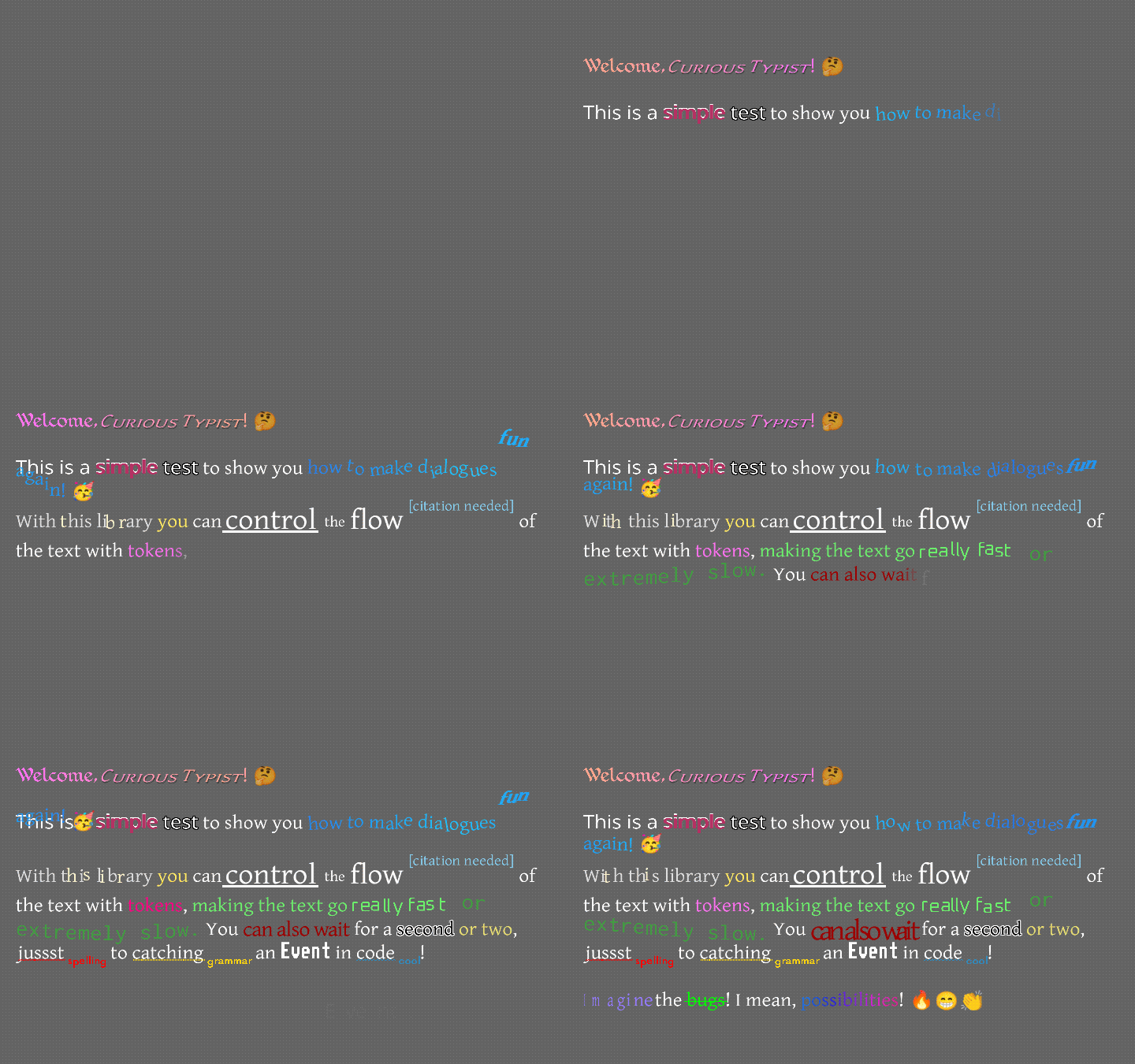
텍스트 디스플레이 라이브러리는 효과와 스타일이 모두 인쇄되는 레이블을 중심으로했습니다.
다시 말해, 이것은 libgdx에서 텍스트 렌더링에 더 많은 기능을 제공합니다.
이것은 어떻게 생겼습니까? 이런 작은 것 ...
아니면 아마도 ...
이 텍스트를 읽는 것보다 비디오를보고 싶다면 Raymond "Raeleus"Buckley는 대부분의 Textratypist를 다루는 비디오를 만들었습니다! 스킨 작곡가 사용과 같이이 파일이 그렇지 않은 몇 가지를 다루므로 좋은 시계입니다.
여기에는 Textralabel 형태의 "정상적인"레이블이 있으며, 이는 Scene2d.ui의 레이블과 거의 똑같이 작용하지만 아래에있는 스타일을 허용합니다. 그러나 많은 사용법이 타이핑 라벨을 선호 할 수도 있습니다!
TypingLabel은 상당히 일반적인 Scene2d.ui 위젯이며 Textralabel을 확장합니다. 그러나 앞서 건너 뛰는 것이 아니라면 한 번에 하나씩 화면에 글자를 올려 놓습니다. 이것은 많은 오래된 텍스트가 많은 게임에서 발견되는 향수 효과이며 타자기가 각 글자를 자발적인 속도로 느리게하는 것처럼 보입니다.
예, 타자기 모드 이상의 것이 있습니다! 텍스트는 위에 매달려서 제자리에 떨어질 수 있습니다. 장파에서 위아래로 점프 할 수 있습니다. 마치 마치 아프게 흔들리고 떨릴 수 있습니다. 다른 색상으로 깜박이거나 두 가지 색상 사이에서 부드럽게 그라디언트로 이동하거나 무지개 전체를 가로 질러 갈 수 있습니다. 많은 옵션; 많은 재미. 효과는 타이핑 라벨과 거의 동일하지만 몇 가지 변경 사항과 추가 사항이있었습니다. 자세한 내용은 Textratypist Wiki를 확인할 수 있습니다.
0.10.0 기준으로 많은 새로운 효과가 있습니다. 충격, 나선형, 스핀, 군중, 수축, 출현, 하트 비트, 회전 목마, 스쿼시, 스케일, 회전,주의, 하이라이트, 링크, 방아쇠, 스타일리스트, 대포, 바다, 스퍼터 및 즉석은 Textratypist (타이핑 레이블에 있지 않음)에 새로 사용됩니다. Textratypist Wiki 's Tokens 페이지에서 사용 지침 및 샘플 GIF를 볼 수 있습니다. 이러한 효과의 대부분은 Textratypist 0.5.1에서 시작하여 효과를 사용할 수있는 부드러운 스케일링 및 회전 옵션을 사용합니다. 일부는 링크가 다양한 텍스트에 대한 클릭에만 응답하는 방법과 같이 0.7.0의 새로운 마우스 추적을 사용합니다.
TextraLabel 효과를 처리하지 않기 때문에 타이핑 효과가 필요하지 않은 경우에도 TypingLabel 을 만들 수 있습니다. 타이핑 라벨에서 skipToTheEnd() 호출하거나 다른 클래스에서 (0.7.0 이상) 호출하여 타이핑 라벨을 효과가있는 텍스트에 사용할 수 있도록 할 수 있습니다.
다양한 표준 토큰도 존재하며 타이핑 효과, 가변 교체 및 기타 유용한 것들을 조작 할 수 있습니다.
{WAIT=f} 는 타이핑 효과가 플로트처럼 잠시 멈추고 f 초를 기다립니다.{SPEED=f} 일반적인 글리프를 입력하는 데 걸리는 시간을 기본값 0.035 에서 f 로 변경합니다.{SLOWER} 는 모든 글리프가 타이핑하는 데 오랫동안 2 배를 가져갑니다.{SLOW} 모든 글리프를 입력하는 데 오랫동안 1.5 배를 섭취하게합니다.{NORMAL} 은 모든 글리프가 정상 1 배를 입력 할 수 있도록합니다.{FAST} 는 모든 글리프가 입력하는 데 오랫동안 0.5 배를 가져갑니다.{FASTER} 는 모든 글리프가 입력하는 데 오랫동안 0.25 배를 가져갑니다.{NATURAL=f} 는 글리프가 입력하는 데 무작위로 시간이 걸리지 만 {SPEED=f} 와 동일합니다.{COLOR=s} 텍스트의 색상을 변경합니다. 이것은 많은 옵션이 있으므로 "Dark Grey Pink"를 가질 수 있습니다.{STYLE=s} 텍스트 스타일을 변경합니다 (아래 참조); 이것은 많은 옵션이 있습니다.{SIZE=f} 텍스트의 크기를 변경합니다 (25% 단위로 거칠게). 이것은 F를 0에서 375 사이의 백분율로 사용합니다.{FONT=name} name 찾아서 글꼴이있는 경우 글꼴을 변경합니다.{CLEARCOLOR} 텍스트 색상을 기본 색상으로 설정합니다.이 색상은 일반적으로 흰색입니다.{CLEARSIZE} 크기를 100%로 설정합니다.{CLEARFONT} 글꼴을 원래 글꼴로 설정합니다 (글꼴 패밀리 사용하지 않음).{ENDCOLOR} 텍스트 색상을 기본 색상으로 설정합니다.이 색상은 일반적으로 흰색입니다. 이것은 {CLEARCOLOR} 와 동일합니다.{VAR=name} 변수 name 과 관련된 문자열로 대체됩니다.{IF=name;choice0=cat;choice1=b;=default} 변수 이름을 확인하고 토큰의 각 선택과 비교합니다.name 에 지정된 값이 선택과 같으면 토큰은 cat 와 같은 선택의 값으로 대체됩니다.default 으로 사용됩니다.{EVENT=name} 타이핑 이이 시점에 도달하면 name TypingListener에 보내는 이벤트를 트리거합니다.{RESET} 모든 형식화 및 속도 변경을 초기 값으로 설정합니다.label.setDefaultToken() 사용하여 초기 값을 변경할 수 있으므로 텍스트 기본값은 다른 설정으로 기본적으로 표시됩니다.{SKIP=n} 타이핑 효과에서 앞서 나가서 즉시 n 문자를 표시합니다. 효과는 기본적으로 Curly Braces를 사용하지만 Curly Braces가 텍스트 (예 : i18N 파일)에 적합하지 않은 경우 {EFFECT} 와 동일하게 [-EFFECT] 사용할 수 있습니다.
이 라이브러리는 원래 타이핑 라벨이 할 수있는 일을 확장합니다. 대담한, 밑줄, 비스듬한, 슈퍼 스크립트 등과 같은 텍스트에 스타일을 적용 할 수 있습니다. 글꼴에는 다른 글꼴과 이름을 언급하는 데 사용할 다른 글꼴과 이름을 할당 할 수 있습니다. 이것은 정상적인 스타일처럼 작동하지만 실제로 글꼴을 그리는 데 사용되는 것을 변경합니다. 스타일의 전체 목록은 길지만 효과 토큰만큼 상세하지 않습니다. libgdx 컬러 마크 업, [*] 와 같은 사각형 괄호와 같은 스타일을 활성화하거나 (마크 업이 TypingLabel 에 사용되는 경우) {STYLE=BOLD} 사용하여 동일한 작업을 수행 할 수 있습니다. 태그와 스타일 이름은 모두 대소 문자를 사용하지 않지만 색상 이름은 대소 문자에 민감합니다. Square-Bracket Syntax는 주로 구두점을 사용하며 Markdown Syntax (Github가 사용하는)에서 영감을 얻습니다.
다음 목록에서 각 항목은 다음과 같습니다.
[*] 대담한 모드를 전환합니다. 스타일 이름 * , B , BOLD STRONG 사용할 수 있습니다.
즉, 항상 [*] 사용하여 대담한 모드를 켜거나 끄는 데 사용할 수 있으며, 타이핑 라벨에서는 케이스에 민감한 구문 {STYLE=*} , {STYLE=B} , {STYLE=BOLD} 또는 {STYLE=STRONG} 추가로 사용할 수 있습니다.
스타일 및 관련 사각형 브래킷 태그의 전체 목록 :
[] TypingLabel 효과에 아무것도하지 않지만 스타일/색상/서식으로의 마지막 변경 사항을 취소합니다.[] 가 libgdx bitmapfont markup에서하는 것처럼 작용하지만 색상보다 더 많이 작동합니다.[ ] 모든 스타일/색상/서식 및 효과를 초기 상태로 재설정합니다.[] 새 [ ] 로 변경하고 싶을 것입니다.[(label)] 현재 서식 상태를 label 로 임시로 저장하므로 나중에 다시 적용 할 수 있습니다.label 영숫자 문자열 일 수 있습니다. 그것은 아마도 그 안에 공백이 없어야하지만 밑줄이있을 수 있습니다.[ label] 이 label 로 저장된 서식 상태를 다시 적용합니다.[*] 대담한 모드를 전환합니다. 스타일 이름 * , B , BOLD STRONG 사용할 수 있습니다.[/] 비스듬한 모드 (이탤릭체와 같은). 스타일 이름 / , I , OBLIQUE , ITALIC 사용할 수 있습니다.[^] SUPERSCRIPT 모드를 전환하고 (첨자 또는 미드 스크립트 모드를 끕니다). 스타일 이름 ^ , SUPER , SUPERSCRIPT 사용할 수 있습니다.[=] 미드 스크립트 모드를 전환하고 (슈퍼 스크립트 또는 첨자 모드를 끕니다). 스타일 이름 = , MID , MIDSCRIPT 사용할 수 있습니다.[.] 첨자 모드를 전환하고 (슈퍼 스크립트 또는 미드 스크립트 모드를 끕니다). 스타일 이름을 사용할 수 있습니다 . , SUB , SUBSCRIPT .[_] 밑줄 모드를 전환합니다. 스타일 이름 _ , U , UNDER , UNDERLINE 사용할 수 있습니다.[~] Strikethrough 모드를 전환합니다. 스타일 이름을 사용할 수 있습니다 ~ , STRIKE , STRIKETHROUGH .[!] 모든 대문자 모드를 전환합니다 (다른 케이스 모드 교체). 스타일 이름을 사용할 수 있습니다 ! , UP , UPPER .[,] 모든 소문기 모드를 전환합니다 (다른 케이스 모드 교체). 스타일 이름 , LOW , LOWER 을 사용할 수 있습니다.[;] 토글은 각 단어 모드를 대문자로 대체합니다 (다른 케이스 모드 교체). 스타일 이름을 사용할 수 있습니다 ; , EACH , TITLE .[%DDD] , 여기서 DDD는 0에서 375 사이의 백분율이며 텍스트를 해당 다중으로 스케일링합니다. {SIZE=150%} , {SIZE=%25} 또는 유사하게 {STYLE=200%} 또는 {STYLE=%125} 와 함께 사용할 수 있습니다. 특수 모드를 제거합니다.[%] 자체 세트에서 텍스트는 기본 100% 스케일로 텍스트를하고 특수 모드를 제거합니다. {STYLE=%} 와 함께 사용할 수 있습니다.[%?MODE] 스케일을 제거하고 특수 모드를 설정합니다. 모드는 아래에 나열되어 있습니다.[%^MODE] 스케일을 제거하고 작은 캡 모드와 동시에 특수 모드를 설정합니다. 모드는 아래에 나열되어 있습니다.[@Name] ,이 글꼴의 family 변수에서 이름이 키/이름 인 곳에서는 현재 서체를 명명 된 것로 전환합니다. {STYLE=@Name} 과 함께 사용할 수 있습니다.[@] 자체적 으로이 글꼴에 서체를 재설정하여 가족을 무시합니다. {STYLE=@} 와 함께 사용할 수 있습니다.[#HHHHHHHH] , HHHHHHHH는 16 진 RGB888 또는 RGBA8888 INT 색상 인 경우 색상이 변경됩니다. 이것은 정상 {COLOR=#HHHHHHHH} 태그입니다.[COLORNAME] , Colorname은 외부에서 볼 수있는 색상 또는 설명 인 경우 색상이 변경됩니다.ColorUtils.describe() 가있는 Colorname을 찾아보고 Palette 에서 이름으로 모든 색상을 찾으려고 시도하며 색상의 혼합 또는 "Light"또는 "Dull"과 같은 간단한 변경 사항을 설명 할 수 있습니다.Colors Class의 모든 어퍼 _case 이름과 약 50 개의 추가 소문자 이름 (다채로운 GDX)이 포함되어 있습니다.Palette 미리 볼 수 있습니다.[RED] , [green yellow] , [light blue] , [duller orange] , [darker rich BLUE lavender] , [pale pink orange] 및 [deeper green navy] .ColorLookup 구현과 함께 Font 의 setColorLookup() 메소드를 사용하여 여기에서 원하는 작업을 수행 할 수 있습니다.| 구두점이 포함 된 이름으로 색상을 찾을 수 있습니다. 예를 들어, [|;_;] ;_; , "슬픔의 색상"은 [;] 처럼 행동하지 않을 것입니다.ColorLookup libgdx 색상 클래스 verbatim에서 문자열 이름을 찾는 ColorLookup.INSTANCE 도하지 않을 수도 있습니다.{COLOR=SKY} (색상이 즉시 처리 할 수있는 색상)과 같은 색상 태그 또는 {GRADIENT} 와 같은 태그 내부에서도 {COLOR=lighter orange-red} 와 같은 설명과 함께 사용할 수 있습니다.[+region name] , 지역 이름이 등록 된 TextUreatlas의 TexturereGion의 이름 인 경우 스타일은 변경되지 않지만 텍스트와 함께 해당 TextUreereGion을 내면으로 만듭니다.KnownFonts.addEmoji() 와 함께 사용하여 3000+ Twemoji 아이콘을 글꼴에 추가합니다.[+saxophone] 및 [+?] 문구가 각각 색소폰 아이콘을 표시합니다.[+call me hand, medium-dark skin tone] 및 [+??] 와 같은 멀티 파트 이모티콘과 함께 작동합니다.KnownFonts.addGameIcons() 입니다. 이것들은 동일한 구문을 사용합니다 : [+crystal-wand] .[-SOME_EFFECT] SOME_EFFECT 주변의 곱슬 괄호를 사용하는 것과 같습니다. 추가 된 대시를 기록하십시오.스케일링 대신 사용할 수있는 특수 모드는 다음과 같습니다.
black outline 또는 blacken . 스타일 이름 BLACK OUTLINE 또는 BLACKEN 으로 사용할 수 있습니다.white outline 또는 whiten , 스타일 이름 WHITE OUTLINE 또는 WHITEN 으로 사용할 수 있습니다.shiny SHINY SHINE 거나 GLOSSY 스타일 이름으로 사용할 수 있습니다.SHADOW , DROPSHADOW 또는 DROP SHADOW 스타일 이름으로 사용할 수있는 drop shadow 또는 shadow .ERROR , REDLINE 또는 RED LINE 함께 사용할 수있는 error .Font.PACKED_ERROR_COLOR 사용하여 색상을 변경할 수 있습니다.WARN , YELLOWLINE 또는 YELLOW LINE 으로 사용할 수있는 warn .Font.PACKED_WARN_COLOR 사용하여 색상을 변경할 수 있습니다.note , NOTE , BLUELINE 또는 BLUE LINE INFO 함께 사용할 수 있습니다.Font.PACKED_NOTE_COLOR 사용하여 색상을 변경할 수 있습니다.jostle 은 JOSTLE , WOBBLE 또는 SCATTER 스타일 이름으로 사용할 수 있습니다.[%?] 와 함께 사용할 수 있습니다.small caps , 스타일 이름 SMALLCAPS 또는 SMALL CAPS 과 함께 사용할 수있는 작은 캡.[%^] 와 함께 사용할 수도 있습니다. [%?small caps] 구문과 함께 사용할 수 없습니다. 케어가 필요합니다. 작은 캡 모드는 %? %^ . 그 외에는 두 모드가 동시에 활성화 될 수 없으며 스케일링과 동시에 모드를 사용할 수 없습니다.
모드는 색상 이름과 혼동되지 않도록 약간 다른 구문을 사용합니다. 사각형 괄호를 사용할 때, 여기에 여기에 주어진 각 이름은 %? 대부분의 경우 (작은 캡과 조스트는 특별합니다). 이는 Red-Dundline 모드 "Error"를 활성화하는 것을 의미하며 Square-Bracket 태그 [%?error] 를 사용합니다. TypingLabel에 Curly-Brace Markup을 사용하는 경우 여기에 상단에 주어진 이름을 사용하여 다른 스타일 이름처럼 사용할 수 있습니다. {STYLE=ERROR} (예 : 언급 한 바와 같이 작은 캡 모드는 특별합니다. 일반적으로 [%^small caps] 으로 활성화되지만 [%^] 로도 활성화 될 수 있으며 정상 %? %^ . 작은 캡이 활성화 될 때마다 Square-Bracket 태그는 %대신 %^ 사용합니까 %? . Jostle 모드도 특별합니다. 일반적으로 [%?jostle] 으로 활성화되지만 [%?] 자체로도 활성화 될 수 있습니다. Jostle은 작은 캡과 혼합 할 수 없습니다.
특수 모드는 내가 사용할 수있는 구두점이 부족하기 때문에 구문 측면에서 약간 과도하게 복잡합니다. 흰색 텍스트 주변의 검은 외곽선의 일반적인 예는 [WHITE][%?blacken]Outlined![%][GRAY] 달성 할 수 있습니다. (예제는 GRAY 일반 색상으로 사용하지만 [ ] 사용하여 Layout 이나 레이아웃에서 구성된 기본 색상으로 색상을 재설정 할 수도 있습니다. [ ] 도 크기, 모드 및 모든 것을 재설정합니다.)
{VAR=ZOMBIE}urgh, brains...{VAR=ENDZOMBIE} 구문을 사용하여 몇 가지 효과 조합을 사용할 수 있습니다.
{VAR=FIRE} 다음 텍스트를 변경하여 불 같은 색상을 변경합니다. {VAR=ENDFIRE} 로 끝날 수 있습니다.{VAR=SPUTTERINGFIRE} 다음 텍스트를 변경하여 불 같은 색상을 변경하고 팝핑 불꽃처럼 크기를 조정합니다. {VAR=ENDSPUTTERINGFIRE} 로 끝날 수 있습니다.{VAR=BLIZZARD} 바람의 흔들림으로 다음 텍스트를 변경하고 얼음 색상을 사용하여 흰색에서 밝은 파란색으로 사용합니다. {VAR=ENDBLIZZARD} 로 끝날 수 있습니다.{VAR=SHIVERINGBLIZZARD} 바람에서 흔들 리도록 다음 텍스트를 변경하고 얼음 색상을 사용하여 흰색에서 연한 파란색을 사용하며, 차가운 것처럼 무작위로 글리프를 "떨림"하게 만듭니다. {VAR=ENDSHIVERINGBLIZZARD} 로 끝날 수 있습니다.{VAR=ELECTRIFY} 다음 텍스트를 칙칙한 회색 자주색으로 변경하고 무작위로 글리프가 밝은 노란색으로 변하고 진동을 만듭니다. {VAR=ENDELECTRIFY} 로 끝날 수 있습니다.{VAR=ZOMBIE} 다음 텍스트를 "어두운 올리브 세이지"(둔한 회색 녹색)로 변경하고 글리프가 왼쪽과 오른쪽으로 천천히 그리고 무작위로 회전하게하고 글리프가 무작위로 떨어지고 무작위로 다시 등장하고 처음 나타나면 기준선에서 나오는 것처럼 글리프가 등장합니다 (무덤에서 발톱이 나오면). {VAR=ENDZOMBIE} 로 끝날 수 있습니다. 이것들은 TypingConfig.initializeGlobalVars() 에 정의되며 정의 된 것과 같은 방식으로 자신의 조합을 정의 할 수 있습니다. 예를 들어, FIRE 는 정의됩니다
        TypingConfig . GLOBAL_VARS . put ( "FIRE" , "{OCEAN=0.7;1.25;0.11;1.0;0.65}" );
        TypingConfig . GLOBAL_VARS . put ( "ENDFIRE" , "{ENDOCEAN}" );
OCEAN 효과는 어떤 색을 사용하는지 신경 쓰지 않습니다. 해당 색상을 전환하는 방법에 대한 대략적인 패턴 만 정의합니다. 즉, 반면 직관적으로 FIRE GRADIENT 보다는 OCEAN 로 가장 잘 구현됩니다. FIRE 이름을 사용하는 것은 아마도 OCEAN 보다 선호 될 수 있으므로 글로벌 var가 여기에 있습니다.
레이블을 사용하여 서식 상태를 저장하는 기능을 통해 여러 소스에서 더 복잡한 마크 업 문자열 조립이 가능합니다. font.storeState("spooky", "[/][darker gray][@?blacken]") 와 같은 것을 호출하여 font 에 그 상태 (검은 윤곽선이있는 어두운 회색 텍스트)를 영구적으로 저장 한 다음 [ spooky] 에 입력하여 해당 상태로 재설정 할 수 있습니다. 또한 무엇이든 쓰기 전에 현재 형식을 저장하는 삽입 가능한 텍스트를 만들고 서식을 작성할 때 형식을 다시 설정할 수도 있습니다. "[(previous)][ ][BLUE][^][[citation needed][ previous]" -이 문자열이 더 큰 텍스트 블록의 중간에 삽입되면 주변 형식을 변경하지 않지만 자체 텍스트 (불멸의 [인용 필요])와 같은 것을 사용하지 않으며 (불멸의 [citation needed] )와 같은 것을 사용하고 자체 텍스트에 Blue SuperScript를 사용하지 않으며 주변 블록의 형식을 사용하지 않습니다. 동일한 레이블이있는 여러 상태 매장 태그가있는 경우 해당 레이블과 관련된 값이 해당 태그가 발생할 때 변경됩니다. 우연히 다른 레이블의 값을 변경하지 않기 위해 고유 한 레이블을 사용하고 싶을 수도 있지만 일반적으로 필요하지 않습니다.
Textratypist는 새로운 Font 클래스를 많이 사용합니다.이 클래스는 조상과 본질적으로 코드를 공유하지 않는 Libgdx의 비트 맵 폰트를 완전히 점검합니다. 글꼴에는 비트 맵 폰트보다 더 많은 힘을주는 다양한 특성을 가지고 있으며, 주로 맵에서 글리프 이미지를 저장하고 사용 가능한 방식으로부터 유래 한 것입니다. 텍스트 Glyph로 사용해야 할 필요한 정보가있는 한 글꼴 mapping 에 자신의 이미지를 추가하지 못하게하는 것은 아무것도 없습니다. 이것은 한 예로 이모티콘을 구현하는 데 사용되며 사용자 정의 아이콘과 이모티콘에 사용될 수 있습니다.
Textratypist는 SDF 또는 MSDF를 사용하여 표준 비트 맵 글꼴과 거리 필드 글꼴도 지원합니다. TypingLabel 적절한 거리 필드 유형에 필요한 셰이더 프로그램을 자동으로 활성화하고 (필요한 경우) 자체를 렌더링 한 후 비활성화합니다. 글꼴에서 Font.enableShader(Batch) 메소드를 수동으로 호출하고 Batch.setShader() 메소드를 사용하여 선택한 다른 쉐이더 프로그램으로 배치를 다시 변경 하여이 동작을 변경할 수 있습니다 (종종 여기에서 널을 전달하여 셰이더를 재설정합니다). Font.resizeDistanceField() 또는 resizeDistanceField() 호출하는 다양한 다른 장소의 메소드를 사용하여 화면 크기 변경에 대해 SDF 및 MSDF 글꼴을 알려야합니다. 1.0.0 이후 일반적으로 Viewport 취하는 오버로드를 사용하려고합니다. Viewport 가 없으면 오버로드가 필요하지 않습니다. 현재 렌더링중인 모든 거리 필드 글꼴은 Window가 ApplicationListener.resize() 에서 창을 크기로 만들 때 거리 필드 조정을해야합니다.
KnownFonts 에는 몇 가지 미리 구성된 글꼴 설정이 있습니다. 각 글꼴 Getter에 대한 문서에 따르면 해당 글꼴을 사용하는 데 필요한 파일이 필요합니다. 이전 .fnt 파일이 여기에서 이동했습니다 . 여기에서 알려진 모든 글꼴의 미리보기 및 설명을 볼 수 있습니다. 버전 1.0.0 이후 많은 글꼴에 알려진 폰트가 필요하지는 않습니다. .dat 글꼴은 이제 동일한 도구 (FontWriter)에 의해 모두 만들어지고 상자를 올바르게 구성하는 경향이 있기 때문입니다. 다양한 글꼴 유형은 놀랍지 않지만 좋은 출발점이되어야합니다. 주목해야 할 좋은 점은 KnownFonts.getStandardFamily() 방법으로, 자산에 16 개의 글꼴이 필요하지만 당연히 [@Medieval] 구문을 사용하여 16 개의 글꼴 중 하나를 전환 할 수 있습니다 (중세가 "Kingthings Foundation"의 경우 중세가 알고있는 이름 중 하나 인 경우).
여기의 글꼴은 .dat 파일 확장자를 사용합니다 (이는 특정 파일 형식이없는 이진 데이터임을 의미합니다). 그것들은 fontwriter가 생성 한 더 큰 .json 글꼴의 압축 버전입니다. 그들이 사용하는 압축은 GWT 호환 이므로이 .DAT 파일은 모든 플랫폼 LIBGDX 대상에서 사용할 수 있습니다. 문제없이 오래된 .fnt 파일을 사용할 수 있으며 일부 .fnt 파일은 여전히 여기에서 여전히 사용됩니다 (주로 픽셀 글꼴 용). 또한 각 글꼴에 .png가 필요하지만 아틀라스에있을 수 있습니다.
각 글꼴의 라이센스 파일은 여기에 knownFonts 폴더에 동일한 폴더에 포함됩니다. 여기에 제공된 모든 글꼴은 라이센스가 수수료없이 상업적으로 사용할 수 있도록 확인하기 위해 확인되었습니다. 대부분 귀속이 필요합니다. 자세한 내용은 라이센스를 확인하십시오.
알려진 폰트에는 그들이 알고있는 글리프에 텍스처를 추가하여 기존 글꼴 인스턴스를 구성하는 몇 가지 다른 방법이 포함되어 있습니다. 여기에는 아이콘과 ... 이모티콘의 기존 텍스트 러리틀 라제가 포함됩니다!
Twemoji 아이콘은 3000 개가 넘는 32x32 이미지의 아틀라스에도 존재합니다. KnownFonts.addEmoji() 는 글꼴에 등록 할 수 있으므로 위에서 언급 한 [+name] 구문이 이모티콘 인라인을 그릴 수 있습니다. 마찬가지로, 4000 초과의 60x60 아이콘의 아틀라스는 game-icons.net에서 존재하며 KnownFonts.addGameIcons() 는 글꼴로 등록 할 수 있습니다. Twemoji와 Game-icons.net Atlases는 동시에 한 글꼴로 등록 할 수 없습니다. 안전하게 사용할 수있는 유니 코드 부분에는 여유 공간이 충분하지 않습니다. 이 주위의 방법은 Fontfamily 기능을 사용하고 아이콘이나 가족에게만 글꼴을 추가하는 것입니다. 이를위한 기존 방법이 있습니다. KnownFonts.getGameIconsFont() 사용하면 사용법에 대한 의식이있는 게임 아이콘을 표시하기위한 글꼴을 얻을 수 있습니다. [@Icons][+rooster][@] getGameIconsFont() 에서 생성 된 글꼴로 전환하고 아이콘을 그리며 다시 전환하는 방법의 빠른 예입니다.
여기에 Twemoji에 대한 미리보기가 있으며, 이모티콘 숯과 이름이 각 이미지를 찾을 수 있습니다. 마찬가지로 Game-icons.net 아이콘에 대한 미리보기가 있으며 각 이미지를 찾는 데 필요한 이름 만 있습니다. game-icons.net 이미지는 투명성이있는 순수한 흰색이므로 표준 [RED] , [light dull green] 또는 [#0022EEFF] 구문을 사용하여 원하는 색상을 착색 할 수 있습니다.
Twemoji 및 Game-icons.net 이미지의 라이센스 파일은 글꼴에 대한 라이센스 파일 옆에 knownFonts 폰트에 포함됩니다. Twemoji는 속성에 대한 간단한 요구 사항을 가지고 있지만 Game-Icons는 상당수의 개인 기고자에게 귀속이 필요합니다. 목록은이 문서의 끝을 참조하십시오.
Openmoji의 라인 아트 이모티콘도 있으며 동일한 이모티콘의 풀 컬러 버전이 있습니다. 이것은 특정 프로젝트의 예술 스타일에 더 잘 맞을 수 있습니다.
Font.drawGlyph() 또는 Font.drawGlyphs() 의 선택적 오버로드를 사용하여 개별 글리프 (개별적으로 그리는 경우) 또는 텍스트 블록을 레이아웃으로 회전 할 수 있습니다. TypingLabel 에 대한 사용자 정의 효과는 또한 X 및/또는 y에서의 위치 및 스케일뿐만 아니라 모든 글리프의 회전을 개별적으로 변경할 수 있습니다. setRotation() 메소드를 사용하여 Textralabel 또는 TypingLabel을 회전 할 수 있으며, 이제 회전은 배경 및/또는 다른 정렬 설정이있는 레이블에 올바르게 작동합니다. 회전 원점은 레이블로 설정 될 수 있으며 전체 레이블은 해당 원점을 중심으로 회전합니다.
또한 일부 글꼴의 경우 상자 드레임 문자와 블록 요소가 자동으로 생성 될 수 있습니다. 이를 위해서는 ID 9608 (유니 코드 전체 블록 인덱스, 'u2588' )의 글꼴에 존재하는 견고한 흰색 블록 문자 (일반적으로 1x1)가 필요합니다. 이것은 또한 제대로 연결하는 밑줄과 파업 캐릭터를 더 잘 보장 할 수 있으며, 두 개의 밑줄이나 하이픈이 서로 겹치는 곳에서 번지도없이 더 잘 보장 할 수 있습니다. Font 경우에 따라이를 활성화하려고 시도하거나 매개 변수로 설정할 수 있지만 실패하면 밑줄에 밑줄과 하이픈을 사용하여 Strikethrough의 하이픈을 사용하는 것으로 돌아갑니다. KnownFonts 의 모든 글꼴은 솔리드 블록을 사용하거나 글꼴이 없으면 더 잘 렌더링되기 때문에이를 피하도록 구성되어 있습니다. libgdx BitmapFont 에서 Font 만들면 비트 맵 폰트에는 적절한 견고한 블록 숯이 거의 없기 때문에 그리드 글리프를 만들려고하지 않아도됩니다.
실제로 해당 목적으로 사용되는 박스 그리기 문자 (밑줄 또는 strikethrough가 아닌)에는 일부 추가 구성이 가능합니다. boxDrawingBreadth Font 로 약간의 승수로 설정하여 상자를 그리는 선을 서로 연결하는 방식을 변경하지 않고 두껍거나 얇게 만듭니다.
다양한 기능을 사용하면 여기에서 추가 구성이 가능합니다. Bold Style에서 더 많은 여분의 공간을 적용하려는 경우 boldStrength 기본 1 이외의 값으로 설정할 수 있습니다. 비스듬한 텍스트가 그려지는 비스듬한 각도를 변경하도록 obliqueStrength 설정할 수도 있습니다. 다양한 효과에 대한 색상은 필요로 변경 될 수 있습니다. font.PACKED_SHADOW_COLOR 예를 들어 더 어둡고 가벼우거나 더 불투명하거나 투명한 그림자 색상을 사용하도록 변경할 수 있습니다. font.PACKED_BLACK 검은 색 개요 모드에 영향을 미치며 font.PACKED_WHITE 흰색 개요 및 반짝이는 모드에 영향을 미칩니다. 오류, 경고 및 메모의 색상을 변경하는 비슷한 모드가 있습니다. 이러한 모든 색상 구성은 글꼴 인스턴스 당 적용되므로 동일한 서체를 사용하여 두 개의 글꼴 객체를 가질 수 있지만 다른 색상이 구성 될 수 있습니다.
0.4.0 릴리스에서 시작하여 Scene2D.UI 상대방을 대체하고 TextraLabel 의 Label 교체하는 다양한 위젯이있어 마크 업을 사용할 수 있습니다. 위젯은 ImageTextraButton , TextraButton , TextraCheckBox , TextraDialog , TextraLabel , TextraListBox , TextraTooltip 및 TextraWindow 와 TextraLabel 대신 TypingLabel 사용하고 이름을 Typing 하는 대체 버전의 대체 버전입니다.
TextArea 아직 지원되지 않지만 TextArea 에 대한 대응자가 계획되었지만 아직 작동하지 않았습니다. TextraLabel 여러 줄을 지원하는 기본값을 기본적으로 사용하며 일부 사용을 위해 설 수 있습니다. TypingLabel 입력 추적도 허용하므로이를 사용하여 선택 가능한 텍스트 영역을 만들 수 있습니다.
입력 추적은 TypingLabel 및 0.7.0 이후 사용하는 코드의 옵션이었습니다. 이는 0.7.4로 확장되어 TypingLabel 의 텍스트를 label.setSelectable(true) 으로 선택할 수 있도록합니다. label.getSelectedText() 로 현재 선택된 텍스트에 액세스하거나 label.copySelectedText() 로 직접 복사 할 수 있습니다. 사용자가 클릭을 완료하고 타이핑 라벨을 통해 제스처를 드래그하면 이벤트도 트리거됩니다. TypingListener 에서 "*SELECTED" 를 듣고 선택하자마자 텍스트를 복사하거나 일부 키를 눌렀을 때만 복사 할 수 있습니다. 입력 추적을 사용하는 다른 유용한 기능으로는 {LINK} 태그는 인터넷 주소에 대한 클릭 가능한 링크, {TRIGGER} , 이벤트를 클릭 한 이벤트를 트리거하고 마우스 호버링 ( {ATTENTION} , {HIGHLIGHT} {STYLIST} )에 응답하는 몇 가지 다른 태그를 만듭니다. 이것들은 TextraLabel 아닌 TypingLabel 에만 작동하므로 TypingLabel 및 Call skipToTheEnd() 사용하여 사용자 입력에 응답하고 {RAINBOW} 와 같은 애니메이션 스타일을 사용할 수있는 스틸 텍스트처럼 취급 할 수 있습니다.
libgdx의 Skin 클래스, FWSkin (또는 그것을 확장하는 클래스 중 하나)에 변형 된 일반 Scene2d.ui 스킨 JSON 파일에서 읽을 수 있으며,이를 수행하면 정상적인 Scene2D.UI 스타일 및 특수 텍스트 스타일 스타일을로드 할 수 있습니다. 특수 스타일은 일반적으로 BitmapFont 대신 Font 사용한다는 점에서만 다르며 여기에서 Styles 클래스에 중첩됩니다. 특수 스타일을 갖는 것은 비트 맵 폰트 (위젯 당 하나)의 많은 사본을 만들지 않고도 더 많은 장소에서 하나의 글꼴을 재사용 할 수 있음을 의미합니다. 일반적으로 피부에서 fwskin로 변경하는 것은 간단합니다. 이전과 같은 코드 :
Skin skin = new Skin ( Gdx . files . internal ( "my-skin.json" ));이후에 변경됩니다.
FWSkin skin = new FWSkin ( Gdx . files . internal ( "my-skin.json" )); Skin 가변에 FWSkin 할당 할 수 있으며, 피부 변수가 정상적인 Skin 일뿐 때문에 가장 호환되는 옵션입니다. FWSkin 에는 거리 필드 글꼴을 조금 더 쉽게 처리하는 편의 방법이 있으므로 가능한 경우 FWSkin 사용하는 것이 좋습니다.
FWSkin 이라고하는 이유는 무엇입니까? 글쎄, .fnt 파일에서 글꼴과 비트 맵 폰트 인스턴스를 모두로드 할 수 있으며 ( BitmapFont 의 경우에만 스킨 구성이 필요 함) 구조화 된 JSON 글꼴에 대해서도 동일한 작업을 수행 할 수 있으며, 여기에서 일반적으로 FontWriter 또는 FW가 작성합니다. FWSkin 의 초기 목적은 .fnt 및 .json/.dat font 파일에서 똑같이 잘로드하는 것이었지만 그 범위는 새로운 스타일을 포함하도록 확장되었습니다.
Stripe을 사용하는 데 익숙하다면 FWSkin 이하는 일과 Stripe가하는 프리 타입 처리를 모두 수행하는 드롭 인 교체가 있습니다. 이것은 별도의 저장소로 제공되는 추가 FreeTypist 의존성입니다. 피부 작곡가에서 생성되는 Skin JSON의 "com.badlogic.gdx.graphics.g2d.freetype.FreeTypeFontGenerator" 를 사용하여 프리 타입을 구성 할 수 있습니다. Skincomposer에서 생산하고 스트라이프와 호환되는 일반적인 스킨을 가져 와서 freetypiSt와 함께 사용할 수 있습니다.
Gradle을 통해 얻을 수 있지만 Freetypist 의이 폴더에서 두 파일을 자신의 코드로 복사하는 것이 더 나은 옵션 일 것입니다. Freetypist에 의존하는 방법에 관계없이 Freetype (적절한 "플랫폼"의존성 포함) 및 Textratypist (현재 1.0.0)에 대한 종속성이 필요합니다. FWSKIN 및 TEXTRATYPIST에 기능이 일반적으로 추가되면 FreetyPypist도 업데이트해야합니다.
당신은 아마도 Gradle과 함께 Textratypist를 얻고 싶을 것입니다! LIBGDX 프로젝트의 핵심 모듈의 종속성은 다음과 같습니다.
implementation " com.github.tommyettinger:textratypist:1.1.0 "이것은 당신이 이미 libgdx에 의존한다고 가정합니다. Textratypist는 버전 1.12.1 이상에 따라 다릅니다. LIBGDX에서 툴팁 코드의 일부 변화가 발생하기 때문에 Textratypist 0.5.0에 1.11.0에 대한 요구 사항이 추가되었습니다. 일부는 아마도 변경되었지만 1.12.1의 요구 사항은 1.0.0으로 추가되었지만 1.12.1 (또는 후속 스냅 샷 릴리스)은 업데이트하기가 매우 쉽습니다.
GWT를 사용하는 경우 호환됩니다. HTML 모듈에서 이러한 종속성이 필요합니다.
implementation " com.github.tommyettinger:textratypist:1.1.0:sources "
implementation " com.github.tommyettinger:regexodus:0.1.16:sources "
gwt는 또한 gdxdefinition.gwt.xml 파일에서이를 필요로합니다 (버전 0.7.7 이후) :
< inherits name = " regexodus.regexodus " />
< inherits name = " com.github.tommyettinger.textratypist " />
버전 0.7.4 이상에서는 이전 버전의 두 가지 종속성을 두 버전으로 만들 것입니다 (참고, 기존 버전 ).
 // OLD VERSION
implementation " com.github.tommyettinger:textratypist:0.7.4:sources "
implementation " com.github.tommyettinger:regexodus:0.1.13:sources "
이 GWT 상속을 대신 사용합니다.
 <!-- OLD VERSION -->
< inherits name = " regexodus " />
< inherits name = " textratypist " />
Regexodus는 내부적으로 일부 복잡한 패턴과 일치하는 데 사용하는 GWT 호환 일반 표현 라이브러리입니다. libgdx 자체 외에도 Regexodus는이 프로젝트가 보유한 유일한 의존성입니다. GWT 상속은 Textratypist와 Regexodus의 경우 기본 패키지를 사용하면 실제 문제가 발생할 수 있기 때문에 변경되었습니다.
이 repo의 릴리스 섹션에는 적어도 하나의 릴리스가 있지만,이 라이브러리와 그 종속성을 처리하기 위해 Gradle을 사용하는 것이 좋습니다.
또한 Jitpack을 사용하여 현재 커밋을 얻을 수 있습니다. Current gdx-liftoff and gdx-setup projects all can use JitPack dependencies without needing any extra configuration. You would use this dependency in your core module:
implementation ' com.github.tommyettinger:textratypist:de5a52f340 ' You can change de5a52f340 to any commit in the Commits tab of https://jitpack.io/#tommyettinger/textratypist , but you should not use -SNAPSHOT -- it can change without your requesting it to, which is not what you want!
You can also depend on FreeTypist using:
implementation " com.github.tommyettinger:freetypist:1.1.0 "(Now, FreeTypist 1.1.0 uses TextraTypist 1.1.0 .)
And if you target HTML and have FreeType working somehow, you would use this Gradle dependency:
implementation " com.github.tommyettinger:freetypist:1.1.0:sources "And this inherits line:
< inherits name = " com.github.tommyettinger.freetypist " />FreeType doesn't work out-of-the-box on GWT, though there is this].
Some parts of TextraTypist act differently from their counterparts in scene2d.ui and Rafa Skoberg's typing-label.
A big quirk is that Font and BitmapFont have some core disagreements about how to parse a .fnt file, and the results of creating a Font with new Font("MyFont.fnt") can be different from new Font(new BitmapFont(Gdx.files.internal("MyFont.fnt"))) . BitmapFont reads in padding information (and does so incorrectly according to the BMFont spec), where Font ignores padding information entirely. Some .fnt files have been made so they look right in libGDX by using padding, but they will look wrong in other frameworks/engines without that padding. Font compromises by allowing manual adjustment of x and y position for all glyphs (y often needs to be adjusted, either to a positive or negative value), as well as the width and height of glyphs (these are useful less frequently, but can be helpful to stretch or squash a font). It may take some tweaking to get a Font made from a BitmapFont to line up correctly with other widgets. You also may need to adjust the offsetX, offsetY, and maybe xAdvance parameters if you load an atlas (such as with addEmoji() or addGameIcons() ), and the adjustments may be quite different for a Font made from a BitmapFont vs. a Font made directly from a .fnt file. Since 0.8.1, Font can parse an extended version of the .fnt format that permits floats for any spatial metrics, and not just ints. No files actually use this here and now, because the Structured JSON files produced by fontwriter all use floats internally for everything.
If you load text from a file and display it, you can sometimes get different results from creating that text in code, or loading it on a different machine. This should only happen if the file actually is different -- that is, the files' line endings use rn when checked out with Git on a Windows machine, or n on MacOS or Linux machines. TextraTypist uses r to mark some kinds of "soft" line breaks that can be re-wrapped, and n for "hard" line breaks that must always create a new line. Having rn present generally shows up as two lines for every line break. A simple solution that works for many projects is to include a .gitattributes file in your project root, like the one here. This can be used to force all text files or all text files with a certain file extension to use LF mode, where only a single n is used for line breaks. It's still recommended to keep .bat files using CRLF mode, with rn used, for compatibility. Using .gitattributes from the start is a good idea, and should keep files exactly the same on all current OSes. Older Windows programs (like Notepad from Windows 7) aren't able to read n line endings, but the versions distributed with recent Windows can use n easily, as can almost all code-oriented text editors.
Colors can be written out as hex strings, like #FF7700 or #9783EDFF , given by name, or described using a simple syntax. The full list of (case-sensitive!) names can be seen ordered by hue, by lightness, or by name. You can take one or more of these color names, optionally add adjectives like "light" or "dull", and get a color that mixes the named colors and applies changes from the adjectives. There are some tricky things here:
Colors class, and are ALL_CAPS , sometimes with underscores. Other names are from colorful-gdx, and are lowercased single words. In a few cases, the same word refers to a different color value if you use ALL_CAPS or use lowercase ( ORANGE and orange are a good example).ColorUtils.unevenMix() . You can have a number after any color name, which assigns a weight to that color for the mixing. Higher numbers will cause their preceding color to have more effect on the result; any non-negative integers are allowed.0x00000100 ), or fully transparent very dark blue, which is used as a placeholder because visually it is the same as transparent black. If a color does wind up as 256 at the time it is finally rendered, it will probably be ignored.Palette with its static addColor() method. This makes another color name usable, but won't retroactively make that color name parse correctly. You may have to call methods like Font.markup() again, so it's best if you can change colors before using them.If you encounter issues with TypingLabel tokens, and you use ProGuard, the configuration for that tool needs a small addition:
-keep class com.github.tommyettinger.textra.** { *; }
There may be more strict versions of this ProGuard instruction possible, but at the very least, the com.github.tommyettinger.textra.effects package needs to be kept as-is, for reflection reasons. You may also need to ensure the com.github.tommyettinger.textra.Effect class is kept. Keeping all of TextraTypist should be perfectly fine for obfuscation purposes because this is an open-source library, but it does add a small amount to the size of the final JAR or APK. Right now, that appears to be 202 KB if you don't include any assets, so I wouldn't worry about it.
Distance field fonts might not be worth the hassle of resizing each font's distance field, but they do look much better at very large sizes than standard fonts. Using a standard font actually can look better for small-to-moderate size adjustments. The best approach when you don't need large text seems to be to use a large standard font texture, without SDF or MSDF, and scale it down as needed. Since 1.0.0, all fonts support emoji. Older versions did not support emoji in MSDF fonts.
If you happen to use both tommyettinger's TextraTypist library and tommyettinger's colorful-gdx library, you may encounter various issues. ColorfulBatch appeared to be incompatible because it uses an extra attribute per-vertex (compared to SpriteBatch), but an adjustment it already does seems to make it compatible without changes. Color description can be done by both colorful-gdx's SimplePalette and ColorUtils.describe() here, but descriptions would really need to use the RGBA color space to work as expected. Alternative shaders from colorful-gdx's Shaders class generally won't work correctly with the known fonts here and the defaults for neutral colors (here, white is the neutral color, but in most shaders that allow lightening, 50% gray is the neutral color). The easiest solution for all this is to use a normal, vanilla SpriteBatch for TextraTypist rendering, and whatever ShaderProgram or ColorfulBatch you want for colorful-gdx rendering.
Games that use custom Batch classes with additional attributes don't work out-of-the-box with Font , but it provides an extension point to allow subclasses to function with whatever attributes the Batch needs. Overriding Font.drawVertices() allows quite a lot of flexibility to handle unusual batches, and you can generally leave the custom Font unchanged other than the drawVertices() override. If you implement Font 's copy constructor just by calling super(font); , and still allow it to take a Font argument, then you can quickly take Fonts from KnownFonts and make copies using your subclass. The JavaDocs for Font.drawVertices() detail what each of the 20 floats passed in via an array to drawVertices are expected to do; custom Batches could have 24 or more floats and so would need to put the 20 existing floats in the positions their Batch expects.
Sometimes, you may need to enable or disable integer positioning for certain fonts to avoid a strange GPU-related visual artifact that seems to only happen on some Nvidia GPUs. When this happens, glyphs may appear a half-pixel or so away from where they should be, in seemingly randomly-picked directions. It looks awful, and the integer position code at least should resolve it most of the time. Integer positions don't work well if you use world units that span multiple pixels in length, but this bug is an absolute mystery, and also doesn't happen at all on integrated GPUs, and may not happen on AMD GPUs. How it behaves on Apple Silicon graphics, I also do not know. The Issues tab is always available for anyone who wants to try to debug this! It is possible that some fixes introduced in the 0.7.x releases may have already eliminated this bug, but I'm not especially optimistic that it is always gone.
The gdx-freetype extension produces BitmapFont outputs, and you can create a Font from a BitmapFont without any issues. However, FreeType's "Auto" hinting settings both look worse than they normally should with Font, and can trigger the GPU artifact covered immediately above. Instead of "AutoSlight", "AutoMedium", or "AutoFull" hinting, you can choose "Slight", "Medium", or "Full", which makes the font look more legible and avoids the GPU half-pixel-offset issue. I don't have any idea why this happens, but because hinting can be set either in the FreeType generator parameters or (if you use Stripe or FreeTypist from this repo) set in a Skin file with "hinting": "Full" , it isn't hard to fix.
There are some known issues with scaling, rotation, and integer-positioning in 0.7.5 through 0.9.0. You may see labels slide a little relatively to their backgrounds when rotated smoothly, and some (typically very small) fonts may need integer positions enabled to keep a stable baseline. Font debug lines may be quite incorrect in some of these versions, also, even if the text displays correctly to users. Scaling has improved significantly in 0.7.8, as has the handling of debug lines, but rotation still has some subtle bugs. A bug was fixed starting in 0.8.0 that made extra images in a Font (such as emoji) scale differently and drift when the Font they were mixed with scaled. That same bug also made an ordinary Font drift slightly as its scale changed; this is also fixed. Positions and sizes for background color and for images from an atlas have improved in 0.8.2, so selecting text shouldn't cover up text as badly with the background, and emoji should be fully surrounded by their selection background. Positions along the line vertically, while the text is scaled, improved in 0.8.3 so that the scaling is relative to the center of the line, rather than the bottom of the line. Some other code already expected scaling to be centered like that, so this change makes scaling look better, usually. In 0.9.0, integer positioning can still be set, but it does nothing; in practice, setting it was causing more problems than improvements. The few fonts that one would think would need integer positions (pixel fonts) actually look better without it. There are still some rotation issues in 0.9.0, though they mostly happen when the descent is configured to an extreme value, or sometimes other metrics. Lining up underline/strikethrough with rotated text is also a challenge.
Word wrap periodically seems to break and need fixing across different releases. The most recent time this happened was in 0.7.9, which also affected 0.8.0 and was fixed (I hope) in 0.8.1. A different wrapping-related bug was fixed more recently, in 0.8.3 ; this was rare, and only affected TypingLabel when some effects were present.
There's other issues with word wrap if you expect it to behave exactly like Label in libGDX. Here, we don't break words, even if a single word is longer than the width of a TextraLabel or TypingLabel . The reason for this is twofold: first, breaking words without proper hyphenation logic can change the meaning of those words, and second, fixing this could be a ton of work. I do intend to try to make this configurable and match Label by default in some near-future version. The word wrap behavior for multiple whitespace characters changed in version 0.10.0, and should be essentially correct now. Remember that word wrap only makes sense in the context of scene2d.ui for a widget (such as a TypingLabel or TextraLabel) if that widget has been sized by scene2d.ui, usually by being in a Table cell, or sometimes by being in a Container. You may need to add a label to a Table or Container, then set the width and/or height of that Cell or Container, to get wrap to act correctly.
A possibly-frequent issue (with an easy fix) that may start occurring with version 0.9.0 and later is that TextraTypist now requires Java 8 or higher. All modern desktop OSes support Java 8, and this has been true for 9 years. Android has supported Java 8 (language level, though only some APIs) for several years, and older versions can use "desugaring" to translate more-recent Java code to be compatible with (much) older Android versions. GWT has supported language level 8 for years, as well; 2.8.2, which libGDX is built with, allows using Java 8 features, and 2.11.0, which an alternate libGDX backend supports, allows using even more. RoboVM doesn't support any new APIs added in Java 8, but it has supported language level 8 from the start. TextraTypist doesn't use any APIs from Java 8, but does now use functional interfaces and method references. Having these features allows us to remove some nasty reflection-based code, and that in turn helps usage on platforms where reflection is limited, such as GWT and Graal Native Image. GWT was able to work before, but Graal Native Image would have needed a lot of configuration to be added for every game/app that used TextraTypist. The other issue is that if TextraTypist continued to target Java 7 for its library code, it wouldn't compile with Java 20 or later, and the LTS release 21 has been out for almost a year.
If you're upgrading to TextraTypist 1.0.0 or later, and you haven't changed Skin usage at all, you'll probably encounter some bugs. These are quick to fix by changing Skin to FWSkin , or if you used Stripe, FreeTypistSkin from FreeTypist. There is also a FWSkinLoader for use with AssetManager , and FreeTypist has a FreeTypistSkinLoader . FWSkin allows loading the new types of scene2d.ui styles that reuse Font instances rather than making new ones often. It also allows loading BitmapFont and Font objects from .fnt, .json, and .dat files (where .dat is the compressed JSON format this repo uses), requiring only configuration for BitmapFont in the skin .json .
If you want to make your own Fonts, you can use Hiero or AngelCode BMFont as you always have been able to, but now you can also use FontWriter (though it is Windows-only for now). FontWriter can output SDF and MSDF distance field fonts, as well as standard bitmap fonts, and it always ensures the files have been processed how TextraTypist prefers them (they need a small white square in the lower right to use for block drawing and underline/strikethrough, plus a specific transparency change makes certain overlapping renders with alpha keep their intended colors). These processing changes could be done by running BlockStamper and TransparencyProcessor in the TextraTypist tests, but that's a hassle, so using FontWriter is preferred. It outputs .json and .dat font files, as well as a .png texture. You only need the .png file AND (the .dat file OR the .json file), but the .dat file is smaller, so it is usually preferred. The .json file can be hand-edited, but it isn't very easy to do that given how it is inside.
This is based very closely on typing-label, by Rafa Skoberg. Typing-label is MIT-licensed according to its repo LICENSE file, but (almost certainly unintentionally) does not include any license headers in any files. Since the only requirement of the MIT license is to leave any license text as-is, this Apache-licensed project is fully compliant with MIT. The full MIT license text is in the file typing-label.LICENSE , and the Apache 2 license for this project is in the file LICENSE . Apache license headers are also present in all library source files here. The Apache license does not typically apply to non-code resources in the src/test/resources folder; individual fonts have their own licenses stored in that directory.
Twemoji isn't a font, so it might be best to mention it separately. It's licensed under CC-BY 4.0, and requires attribution to Twitter if used. Twemoji's guidelines for attribution are here. (The documentation still says Twitter, not X, and to my knowledge X doesn't employ any of the active Twemoji team, so... I would link back to the Twemoji repo, so that it is up to them).
Like Twemoji, Game-Icons.png isn't a font, and it has quite a few contributors to the project. Because all icons in the project are on one PNG file, you must credit all the contributors who licensed their art under CC-BY, and it may be ideal just to credit all the contributors, period. The list is in the license.
OpenMoji is also not a font, but it clearly has a CC-BY-SA 4.0 license, and the BY clause should be satisfied by attributing the OpenMoji Project. The SA clause should be satisfied by any users of OpenMoji continuing to provide attribution. There isn't a non-commercial clause for any assets here.
The logo was made by Raymond "raeleus" Buckley and contributed to this project. It can be used freely for any purpose, but I request that it only be used to refer to this project unless substantially modified.
Wow, raeleus has really helped a tremendous amount. Both by testing TextraTypist in his Skin Composer app (which found quite a lot of bugs, small and large), and advising on proper scene2d.ui layout practices (which were not easy to get 100% right), the large 0.5.2 release (and those after it) would not be what it is today without his input. 감사합니다!
Thanks to fraudo for helping me go step-by-step to figure out how badly I had screwed up rotation with backgrounds, and for writing most of LabelRotationTest . Release 0.5.5 would still probably be in development for months without that help, so thanks are in order.
Thanks to piotr-j (evilentity), mas omenos, and DMC from the libGDX Discord, for really thoroughly testing TextraTypist. IncongruityTest was originally piotr-j's work, and it helped me figure out which fonts in KnownFonts had incorrect bounds information. TableWrapTest was based closely on mas omenos' work, and was useful to locate a wrapping bug. DMC managed to track down a very elusive ProGuard issue, which is now documented in this README.md , as well as noticing and helping debug a variety of issues with code that I had no idea people were already using. Sanda Moen, fourlastor, tecksup, and Siavash Ranbar helped track down some maddening bugs affecting word wrap; thanks to everyone who's put up with those kinds of bug! IgorApplications has helped track down various SDF-related bugs and pointed out that a feature (full-color emoji in SDF fonts) was possible, so thanks as well!
Of course, I have to thank Rafa Skoberg for writing quite a lot of the code here! About 2/3 of the effects are almost purely by Rafa, much of the TypingLabel-related code is nearly unchanged from his work, and in general he showed what libGDX UIs could be just by making the initial code.
Thanks to all the font designers who made fonts we use here; by making your fonts freely available, you perform a great service to the people who depend on them.
Thanks to Twitter for generously contributing Twemoji to the world of open source; having broadly available emoji makes them much more usable. Note that because this was a generous action by Twitter, it happened before its acquisition/change to "X".
Thanks to the many contributors to game-icons.net for producing high-quality free icons to game developers everywhere. The icons in Game-Icons.png were made by:
(Projects that use TextraTypist can copy the above list of Game-Icons.png contributors to comply with its license.)
Thanks again to the OpenMoji project! That was clearly a lot of work. OpenMoji is licensed as CC BY-SA 4.0.
Thanks also to the developers of the Noto Fonts and Emoji! They are OFL 1.1 licensed. The Noto Color Emoji here also used data from the MIT-licensed EmojiBase project to create the atlas.








