textratypist
1.1.0 "Deselected Tofu"

Una biblioteca de exhibición de texto se centró en una etiqueta que se imprime con el tiempo, con efectos y estilos.
En otras palabras, esto trae más características a la representación de texto en LibGDX.
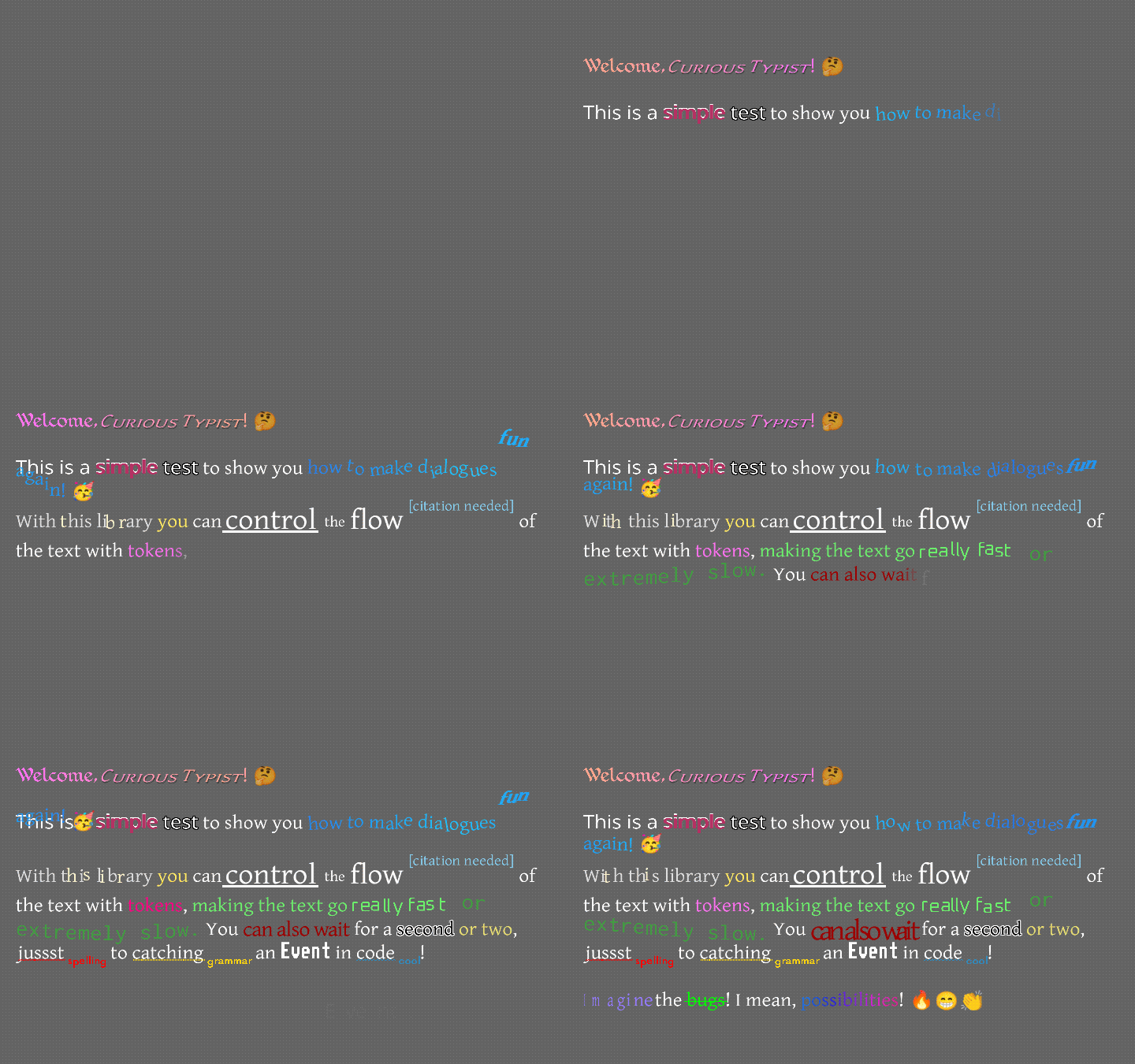
¿Cómo es esto? Algo como esto ...
O tal vez así ...
Si prefiere ver un video que leer este texto, ¡Raymond "Raeleus" Buckley hizo un video que cubría a la mayoría de Textratypist! Cubre algunas cosas que este archivo no, como el uso del compositor de la piel, por lo que es un buen reloj independientemente.
Hay una etiqueta "normal" aquí en forma de Textralabel, que actúa casi exactamente como la etiqueta en escena2d.ui, pero permite que los estilos cubieran a continuación. ¡Sin embargo, mucho uso puede preferir typinglabel!
TypingLabel es un widget de escena 2D.UI bastante normal, y extiende Textralabel. Sin embargo, pone letras en la pantalla una a la vez, a menos que se le diga que se salga adelante. Este es un efecto nostálgico que se encuentra en muchos juegos de texto más antiguos, y parece que una máquina de escribir está colocando cada letra a un ritmo más lento que instantáneo.
¡Sí, tiene más que el modo de máquina de escribir! El texto puede colgar arriba y luego caer en su lugar. Puede saltar hacia arriba y hacia abajo en una ola larga. Puede vacilar y estremecer, como si estuviera enfermo. Puede parpadear en diferentes colores, moverse en un gradiente suavemente entre dos colores o atravesar un arco iris entero. Muchas opciones; Mucha diversión. Los efectos son casi los mismos que en la etiqueta de la etiqueta, pero ha habido algunos cambios y adiciones. Puede consultar el Wiki Textratypist para obtener más información.
A partir de 0.10.0, hay muchos efectos nuevos. Jolt, espiral, giro, multitud, encogimiento, emergente, latidos del corazón, carrusel, calabaza, escala, giro, atención, resaltado, enlace, gatillo, estilista, cañón, océano, pulverización e instantáneo son nuevos para Textratypist (no en la etiqueta de etiqueta). Puede ver instrucciones de uso y GIF de muestra en la página de tokens de Wiki de Textratypist. La mayoría de estos efectos utilizan las opciones de escala y rotación suaves que los efectos pueden usar en TextratyPist 0.5.1. Algunos utilizan el seguimiento del mouse, nuevo en 0.7.0, como la forma en que Link solo responde a un clic en una gama de texto.
Es posible que desee crear TypingLabel s incluso donde no necesita el efecto de tipificación, porque TextraLabel no maneja ningún efecto. Puede llamar skipToTheEnd() en una Label TypingLabel o (en 0.7.0 y más) en otras clases para permitir que una Label de typing se use para Text With Effects.
También están presentes varios tokens estándar, y estos pueden manipular el efecto de tipificación, el reemplazo variable y otras cosas útiles:
{WAIT=f} hace que el efecto de tipificación se detenga y espere los segundos f , como un flotador.{SPEED=f} cambia el tiempo que lleva escribir un glifo típico, de un valor predeterminado de 0.035 a f .{SLOWER} hace que todos los glifos tomen 2 veces más tiempo en escribir.{SLOW} hace que todos los glifos tomen 1.5 veces más tiempo en escribir.{NORMAL} hace que todos los glifos tomen el 1X normal en el tipo de tipo.{FAST} hace que todos los glifos tomen 0.5x en lugar de escribir.{FASTER} hace que todos los glifos tomen 0.25x tanto tiempo.{NATURAL=f} hace que los glifos tomen al azar más o menos tiempo para escribir, pero de lo contrario es lo mismo que {SPEED=f} .{COLOR=s} cambia el color del texto; Esto tiene muchas opciones, por lo que puede tener, por ejemplo, "rosa gris oscuro".{STYLE=s} cambia el estilo de texto (ver más abajo); Esto tiene muchas opciones.{SIZE=f} cambia el tamaño del texto (grueso, en incrementos del 25%); Esto toma F como un porcentaje de 0 a 375.{FONT=name} cambia la fuente, si hay una Fontfamily disponible, mirando name .{CLEARCOLOR} Establece el color de texto en el color predeterminado, que generalmente es blanco.{CLEARSIZE} establece el tamaño al 100%.{CLEARFONT} establece la fuente en la fuente original (no usa la FontFamily).{ENDCOLOR} Establece el color de texto en el color predeterminado, que generalmente es blanco. Esto es lo mismo que {CLEARCOLOR} .{VAR=name} se reemplaza por cualquier cadena asociada con el name de la variable.{IF=name;choice0=cat;choice1=b;=default} Verifica el nombre de la variable y lo compara con cada opción en el token.name es igual a una opción, el token se reemplaza por el valor de la elección, como cat .default .{EVENT=name} desencadena un evento, enviando name al typingListener, cuando la tipificación alcanza este punto.{RESET} Establece todos los cambios de formato y velocidad a sus valores iniciales.label.setDefaultToken() se puede usar para cambiar los valores iniciales, por lo que el texto predeterminado se encuentra a algunas configuraciones diferentes.{SKIP=n} omita el futuro en el efecto de tipificación, mostrando instantáneamente n caracteres. Los efectos usan aparatos ortopédicos rizados de forma predeterminada, pero si los frenos rizados no son una buena opción para su texto (como en los archivos i18n), puede usar [-EFFECT] como un equivalente a {EFFECT} .
Esta biblioteca extiende lo que puede hacer la etiqueta de tipeo original: permite que los estilos se apliquen al texto, como Bold, subrayado, oblicuo, Superscript, etc. relacionados con los estilos son cambios en la escala, que pueden encoger o ampliar el texto sin cambiar su fuente y la característica de la "familia de fuentes". Se puede asignar a una fuente una "familia" de otras fuentes y nombres para que se referirán a ellas; Esto actúa como un estilo normal, pero en realidad cambia lo que se usa para dibujar. La lista completa de estilos es larga, pero no es tan detallada como el efecto tokens. Puede habilitar estilos con algo como el marcado de color libgdx, en soportes cuadrados como [*] , o (si el marcado se usa en un TypingLabel ), puede usar {STYLE=BOLD} para hacer lo mismo. Las etiquetas y los nombres de estilo son insensibles a los estuches, pero los nombres de los colores son sensibles a las carcasas. La sintaxis de Bracket cuadrada utiliza principalmente puntuación y está inspirada en la sintaxis de Markdown (que Github usa, entre otros lugares).
En la siguiente lista, cada entrada se parece a:
[*] Alternar el modo Bold. Puede usar nombres de estilo * , B , BOLD , STRONG .
Eso significa que siempre puede usar [*] para activar o desactivar el modo Bold, y en un typinglabel también puede usar la sintaxis insensible a la caja {STYLE=*} , {STYLE=B} , {STYLE=BOLD} o {STYLE=STRONG} para hacer lo mismo.
La lista completa de estilos y etiquetas relacionadas con el rango cuadrado:
[] deshace el último cambio al estilo/color/formato, aunque no hace nada a los efectos de la liquidación.[] en el marcado LibGDX Bitmapfont, pero funciona en más que colores.[ ] restablece todos los estilos/colores/formato y efectos al estado inicial.[] a lo nuevo [ ] .[(label)] almacena temporalmente el estado de formato actual como label , por lo que se puede volver a aplicar más tarde.label puede ser cualquier cadena alfanumérica. Probablemente no debería tener espacios, pero puede tener subrayos.[ label] vuelve a aplicar el estado de formato almacenado como label , si hay una.[*] Alternar el modo Bold. Puede usar nombres de estilo * , B , BOLD , STRONG .[/] Alterna el modo oblicuo (como cursiva). Puede usar nombres de estilo / , I , OBLIQUE , ITALIC .[^] Alterna el modo superscript (y apaga el modo de subíndice o midscript). Puede usar nombres de estilo ^ , SUPER , SUPERSCRIPT .[=] Alterna el modo MidScript (y apaga el modo superscript o subíndice). Puede usar nombres de estilo = , MID , MIDSCRIPT .[.] Alterna el modo subíndice (y apaga el modo SuperScript o MidScript). Puede usar nombres de estilo . , SUB , SUBSCRIPT .[_] Alternar el modo subrayado. Puede usar nombres de estilo _ , U , UNDER , UNDERLINE .[~] Alterna el modo Strikethrough. Puede usar nombres de estilo ~ , STRIKE , STRIKETHROUGH .[!] Alterna todo el modo de caja superior (reemplazando cualquier otro modo de caso). ¡Puede usar nombres de estilo ! , UP , UPPER .[,] Alterna todo el modo minúscula (reemplazando cualquier otro modo de caso). Puede usar nombres de estilo , LOW , LOWER .[;] Alternar capitalice cada modo de palabra (reemplazando cualquier otro modo de caso). Puede usar nombres de estilo ; , EACH TITLE .[%DDD] , donde DDD es un porcentaje de 0 a 375, escala el texto a ese múltiplo. Se puede usar con {SIZE=150%} , {SIZE=%25} , o de manera similar, {STYLE=200%} o {STYLE=%125} . Elimina cualquier modo especial.[%] En su propio texto establece la escala predeterminada del 100% y elimina cualquier modo especial. Se puede usar con {STYLE=%} .[%?MODE] Elimina la escala y establece un modo especial; Los modos se enumeran a continuación.[%^MODE] Elimina la escala y establece un modo especial al mismo tiempo que el modo de pequeña capitalización; Los modos se enumeran a continuación.[@Name] , donde el nombre es una clave/nombre en la variable family de esta fuente, cambia el tipo de letra actual al nombrado uno. Se puede usar con {STYLE=@Name} .[@] Por su cuenta restablece la letra de esta fuente, ignorando a su familia. Se puede usar con {STYLE=@} .[#HHHHHHHH] , donde hhhhhhhh es un hex rgb888 o rgba8888 int color, cambia el color. Esta es una etiqueta normal {COLOR=#HHHHHHHH} .[COLORNAME] , donde el nombre de colorne es un nombre de color o una descripción que se buscará externamente, cambia el color.ColorUtils.describe() , que intenta encontrar cualquier color de Palette por su nombre, y también permite describir mezclas de colores o cambios simples como "luz" o "aburrido".Colors de Libgdx, y también alrededor de 50 nombres de color minúsculas adicionales (de Colorful-GDX).Palette de Hue, por ligereza o por su nombre.[RED] , [green yellow] , [light blue] , [duller orange] , [darker rich BLUE lavender] , [pale pink orange] y [deeper green navy] .setColorLookup() de Font con su propia implementación ColorLookup para hacer lo que desea aquí.| , que permite buscar colores con nombres que contienen puntuación. Por ejemplo, [|;_;] buscaría un color llamado ;_; , "El color de la tristeza", y no actuaría como [;] .ColorLookup personalizado puede no, ni ColorLookup.INSTANCE , que busca los nombres de las cadenas en la clase LibGDX Colors textualmente.{COLOR=SKY} (que los colores pueden manejar de inmediato) o con una descripción, como {COLOR=lighter orange-red} , incluso dentro de una etiqueta como {GRADIENT} .[+region name] , donde el nombre de la región es el nombre de un TextureRegion de un TextureAtlas registrado, no cambiará el estilo, pero producirá ese TextureRegion en línea con el texto.KnownFonts.addEmoji() para agregar los más de 3000 iconos twemoji a una fuente.[+saxophone] y [+?] Mostrarán un icono de saxofón.[+call me hand, medium-dark skin tone] y [+??] .KnownFonts.addGameIcons() , que agrega iconos de la colección Game-icons.net. Estos usan la misma sintaxis: [+crystal-wand] .[-SOME_EFFECT] es equivalente a usar aparatos ortopédicos rizados alrededor de SOME_EFFECT ; Tenga en cuenta el tablero agregado.Los modos especiales que se pueden usar en lugar de escala son:
black outline o blacken , que se puede usar con los nombres de estilo BLACK OUTLINE o BLACKEN .white outline o whiten blanco, que se puede usar con los nombres de estilo WHITE OUTLINE o WHITEN .shiny , que se puede usar con los nombres de estilo SHINY , SHINE o GLOSSY .drop shadow o shadow , que se puede usar con los nombres de estilo SHADOW , DROPSHADOW o DROP SHADOW .error , que se puede usar con el ERROR de nombres de estilo, REDLINE o RED LINE .Font.PACKED_ERROR_COLOR .warn , que se puede usar con los nombres de estilo WARN , YELLOWLINE o YELLOW LINE .Font.PACKED_WARN_COLOR .note que se puede usar con la NOTE de nombres de estilo, INFO , BLUELINE o BLUE LINE .Font.PACKED_NOTE_COLOR .jostle , que se puede usar con los nombres de estilo JOSTLE , WOBBLE o SCATTER .[%?] .small caps , que se pueden usar con los nombres de estilo SMALLCAPS o SMALL CAPS .[%^] . No se puede usar con la sintaxis [%?small caps] ; Necesita un careto. El modo de capas pequeñas se puede usar con cualquiera de los otros modos, excepto Jostle, cambiando %? %^ . Aparte de eso, no se pueden actuar dos modos al mismo tiempo, y no se pueden usar modos al mismo tiempo que la escala.
Tenga en cuenta que los modos usan una sintaxis ligeramente diferente para evitar confundirse con los nombres de color. Cuando se usa soportes cuadrados, cada uno de los nombres dados aquí en caso inferior debe ser precedido por %? La mayoría de las veces (pequeñas gorras y jostle son especiales). Eso significa que para habilitar el "error" del modo de bajo línea, usa la etiqueta de tracket cuadrado [%?error] . Si usa el marcado de la cabeza de curly para TypingLabel, usaría los nombres dados aquí en el caso superior, y puede usarlos como otros nombres de estilo: {STYLE=ERROR} , por ejemplo. El modo de tapas pequeñas es, como se mencionó, especial; Por lo general, se habilita con [%^small caps] , pero también se puede habilitar con [%^] , y también se puede mezclar con cualquier otro modo excepto Jostle cambiando el %? %^ . Cada vez que las tapas pequeñas están activas, la etiqueta de tracket cuadrada usa %^ en lugar de %? . El modo Jostle también es especial; Por lo general, está habilitado con [%?jostle] , pero también se puede habilitar con [%?] Por sí solo. Jostle no se puede mezclar con pequeñas tapas.
Los modos especiales están un poco sobrecomplicados en términos de sintaxis porque me quedé sin puntuación que podría usar. ¡El ejemplo común de un esquema negro alrededor del texto blanco se puede lograr con [WHITE][%?blacken]Outlined![%][GRAY] . (El ejemplo usa GRAY como color normal, pero también podría usar [ ] para restablecer el color a cualquier color base se configuró en un Layout o la etiqueta que lo contiene. Tenga en cuenta que [ ] también restablece el tamaño, el modo y, bueno, todo).
Varias combinaciones de efectos están disponibles usando {VAR=ZOMBIE}urgh, brains...{VAR=ENDZOMBIE} sintaxis:
{VAR=FIRE} cambia el siguiente texto para tener colores ardientes. Puede finalizarlo con {VAR=ENDFIRE} .{VAR=SPUTTERINGFIRE} cambia el siguiente texto para tener colores de cambio ardientes y cambiar el tamaño como las llamas de estallido. Puede finalizarlo con {VAR=ENDSPUTTERINGFIRE} .{VAR=BLIZZARD} cambia el siguiente texto para flaquear en el viento y usar colores helados, blanco a azul claro. Puede finalizarlo con {VAR=ENDBLIZZARD} .{VAR=SHIVERINGBLIZZARD} Cambia el siguiente texto para flaquear en el viento y usar colores helados, blanco a azul claro, además hará que los glifos se "temble" al azar como si estuvieran fríos. Puede finalizarlo con {VAR=ENDSHIVERINGBLIZZARD} .{VAR=ELECTRIFY} cambia el siguiente texto como un color púrpura gris opaco y hace que los glifos se vuelvan amarillos claros y vibren. Puede finalizarlo con {VAR=ENDELECTRIFY} .{VAR=ZOMBIE} cambia el siguiente texto para que sea "salvia de oliva oscura" (un color verde gris opaco), hace que los glifos giren a la izquierda y a la derecha lentamente y al azar, hace que los glifos caigan y vuelvan a subir al azar, y cuando aparecen por primera vez, los glifos emergen de la línea inicial (como si se pone en cuenta de una lata). Puede finalizarlo con {VAR=ENDZOMBIE} . Estos se definen en TypingConfig.initializeGlobalVars() , y puede definir sus propias combinaciones exactamente de la misma manera que se definen. Por ejemplo, FIRE se define con
        TypingConfig . GLOBAL_VARS . put ( "FIRE" , "{OCEAN=0.7;1.25;0.11;1.0;0.65}" );
        TypingConfig . GLOBAL_VARS . put ( "ENDFIRE" , "{ENDOCEAN}" );
El efecto OCEAN no le importa qué colores usa; Solo define un patrón aproximado sobre cómo hacer la transición entre esos colores. Eso significa que, contraintuitivamente, FIRE se implementa mejor con OCEAN en lugar de GRADIENT . Sin embargo, usar el nombre FIRE es probablemente preferible al OCEAN , por lo que el VAR global está aquí por esa razón.
La capacidad de almacenar estados de formato utilizando una etiqueta permite un ensamblaje más complejo de cadenas de marcado de múltiples fuentes. Puede llamar a algo como font.storeState("spooky", "[/][darker gray][@?blacken]") para almacenar permanentemente ese estado de formateo (texto oblicuo de gris oscuro con un contorno negro) en font , y luego puede reiniciar a ese estado entrando [ spooky] (tenga en cuenta el espacio de apertura). También puede crear algún texto insertable que almacene el formato actual antes de escribir algo, y restablece el formato cuando termine de escribir. Eso usaría algo como "[(previous)][ ][BLUE][^][[citation needed][ previous]" - Si esta cadena se inserta en el medio de un bloque de texto más grande, no cambiará el formato circundante, pero usará Superscript Blue para su propio texto (la Inmortal [citation needed] ) y no usará ninguno de los formatos de formato del Bloque de Bloque para su propia nota de Superscript. Si tiene múltiples etiquetas de la tienda estatal con la misma etiqueta, el valor asociado con esa etiqueta cambiará a medida que se encuentren esas etiquetas. Es posible que desee usar etiquetas únicas para evitar cambiar accidentalmente el valor de otra etiqueta, pero esto generalmente no es necesario.
Textratypist hace un uso intensivo de su nueva clase Font , que es una revisión completa de BitmapFont de Libgdx que no comparte esencialmente ningún código con su antepasado. Una fuente tiene varias cualidades que le dan más potencia que BitmapFont, en su mayoría derivada de cómo almacena (y pone a disposición) las imágenes de glifo como TextureReregions en un mapa. No hay nada estrictamente que le impida agregar sus propias imágenes a la mapping de una fuente, siempre que tengan la información necesaria para ser utilizada como un glifo textual, y luego colocar esas imágenes con su texto. Esto se utiliza para implementar emoji, como un ejemplo, y puede usarse para iconos y emoji personalizados.
TextratyPist admite fuentes de mapa de bits estándar y también fuentes de campo de distancia, utilizando SDF o MSDF. TypingLabel habilitará automáticamente el programa de sombreado que necesita el tipo de campo de distancia apropiado (si necesita uno) y lo deshabilitará después de representarse. Puede cambiar este comportamiento llamando manualmente el método Batch.setShader() Font.enableShader(Batch) . Tenga en cuenta que las fuentes SDF y MSDF deben informarse sobre los cambios en el tamaño de la pantalla, utilizando Font.resizeDistanceField() o cualquiera de los otros métodos de otros lugares que llaman resizeDistanceField() . Desde 1.0.0, generalmente desea usar la sobrecarga que toma una Viewport ; Si no tiene una Viewport , no necesita esa sobrecarga. Cada fuente de campo de distancia que actualmente está representando que su campo de distancia cambia de tamaño cuando la ventana cambia de tamaño, en ApplicationListener.resize() .
Hay varias configuraciones de fuentes preconfiguradas en KnownFonts ; La documentación para cada getter de fuentes dice qué archivos se necesitan para usar esa fuente. Los viejos archivos .fnt se han movido aquí . Puede ver vistas previas y descripciones de todas las fuentes conocidas aquí. Haber conocido no es necesario para muchas fuentes desde la versión 1.0.0, porque las fuentes .dat ahora se hacen todo con la misma herramienta (Fontwriter), y tienden a configurarse correctamente fuera de la caja. La variedad de tipos de fuentes no es sorprendente, pero debería ser un buen punto de partida. Una buena cosa a tener en cuenta es el método KnownFonts.getStandardFamily() , que requiere tener 16 fuentes en sus activos, pero naturalmente le permite cambiar entre cualquiera de esas 16 fuentes utilizando la sintaxis [@Medieval] (donde Medieval es uno de los nombres que conoce, en este caso para la "Fundación Kingthings").
Las fuentes aquí usan la extensión del archivo .dat (lo que solo significa que son datos binarios sin formato de archivo particular). Son versiones comprimidas de fuentes .json más grandes producidas por FontWriter. La compresión que usan es compatible con GWT, por lo que estos archivos .dat se pueden usar en cualquier plataforma LibGDX. Todavía puede usar los archivos .fnt más antiguos sin problemas, y algunos archivos .fnt todavía se usan aquí (principalmente para fuentes de píxeles). En general, también necesita un .png con cada fuente, aunque puede estar en un atlas.
Los archivos de licencia para cada fuente están incluidos en la misma carpeta, en knownFonts aquí. Todas las fuentes proporcionadas aquí fueron verificadas para garantizar que sus licencias permitan el uso comercial sin tarifas, y todas lo hacen. La mayoría requiere atribución; Revise las licencias para obtener más detalles.
KnowFonts incluye varias otras formas de configurar las instancias de fuentes existentes agregando un TextureAtlas a los glifos que conocen. Esto incluye algunas texturas de iconos existentes y ... ¡emoji!
Los iconos twemoji también están presentes en un atlas de imágenes de más de 3000 32x32; KnownFonts.addEmoji() puede registrarlos con una fuente para que la sintaxis [+name] mencionada anteriormente pueda dibujar emoji en línea. Del mismo modo, un Atlas de iconos de más de 4000 60x60 está presente en Game-icons.net, y KnownFonts.addGameIcons() puede registrarlos con una fuente. Los atlas de Twemoji y Game-icons.net no pueden registrarse en una fuente al mismo tiempo; No hay suficiente espacio libre en la parte de Unicode que puedan usar de manera segura. Una forma de evitar esto es usar la función Fontfamily y agregar una fuente solo para íconos o solo para emoji a la familia. Hay un método existente para esto; KnownFonts.getGameIconsFont() le permite obtener una fuente que está destinada a mostrar los índices de juego, con cierta ceremonia en torno a su uso. [@Icons][+rooster][@] es un ejemplo rápido de cómo podría cambiar a la fuente producida por getGameIconsFont() , dibujar un icono y volver a cambiar.
Hay vistas previas para Twemoji aquí, con el Emoji Char y el nombre para buscar cada imagen. Del mismo modo, hay vistas previas para iconos de Game-icons.net aquí, con el nombre necesario para buscar cada imagen. Recuerde que debido a que las imágenes game-icons.net son blancas puras con transparencia, puede teñirles cualquier color que desee usar la sintaxis estándar [RED] , [light dull green] o [#0022EEFF] .
Los archivos de licencia para Twemoji y las imágenes de Game-icons.net se incluyen en knownFonts , junto a los archivos de licencia para fuentes. Mientras que Twemoji tiene requisitos simples para la atribución, Game-Icons requiere atribución a bastantes contribuyentes individuales; Vea el final de este documento para la lista, que puede y debe copiar para dar crédito a todos.
También hay emoji de arte de línea de OpenMoji y versiones a todo color del mismo emoji. Estos pueden ser mejor para los estilos de arte de ciertos proyectos.
Puede rotar glifos individuales (si los dibuja individualmente) o girar bloques enteros de texto como diseño, utilizando una sobrecarga opcional de Font.drawGlyph() o Font.drawGlyphs() . Los efectos personalizados para TypingLabel también pueden cambiar individualmente la rotación de cualquier glifo, así como su posición y escala en X y/o Y. Puede rotar un Textralabel o typingLabel utilizando sus métodos setRotation() , y la rotación ahora actuará correctamente para etiquetas con fondos y/o con diferentes configuraciones de alineación. El origen para las rotaciones se puede configurar en la etiqueta, y toda la etiqueta girará alrededor de ese punto de origen.
También puede, para algunas fuentes, hacer que los caracteres de dibujo de caja y los elementos de bloque se generen automáticamente. Esto necesita un carácter de bloque blanco sólido (de cualquier tamaño, típicamente 1x1) presente en la fuente AT ID 9608 (el índice de bloque completo Unicode, 'u2588' ). Esto también permite una mejor garantía de los caracteres subrayados y de strikethrough que se conectan correctamente, y sin manchar dónde dos subrayos o guiones se superponen entre sí. Font intenta habilitar esto en algunos casos, o se puede configurar con un parámetro, pero si falla, se vuelve a usar subrayos para subrayar y guiones para Strikethrough. Todas las fuentes en KnownFonts están configuradas para usar un bloque sólido o para evitarlo específicamente porque esa fuente aumenta mejor sin él. Tenga en cuenta que si crea una Font a partir de un BitmapFont libgdx, este valor predeterminado ni siquiera intenta hacer glifos de cuadrícula, porque bitmapfonts rara vez tiene un carbón de bloque sólido adecuado.
Es posible una configuración adicional para caracteres de dibujo de caja que realmente se usan para ese propósito (no solo subrayado o húmedo). Puede colocar boxDrawingBreadth en una Font a un multiplicador para hacer que las líneas de dibujo de caja sean más gruesas o delgadas, sin cambiar la forma en que se conectan entre sí.
Varias características permiten una configuración adicional aquí. Puede establecer boldStrength en algún valor que no sea el 1 predeterminado si desea un espacio más o menos adicional aplicado desde el estilo en negrita. También puede configurar obliqueStrength para cambiar el ángulo del sesgo con el que se dibuja el texto oblicuo. Los colores para varios efectos se pueden cambiar como se necesita; font.PACKED_SHADOW_COLOR se puede cambiar para usar un color de sombra más oscuro, más claro, más opaco o más transparente, por ejemplo. font.PACKED_BLACK afecta el modo de esquema negro, y font.PACKED_WHITE afecta el contorno blanco y los modos brillantes. Hay modos similares para cambiar los colores de error, advertencia y nota subrayados. Todas estas configuraciones de color se aplican por instancia de fuente, por lo que podría tener dos objetos de fuentes utilizando el mismo tipo de letra pero con diferentes colores configurados.
Comenzando en la versión 0.4.0, hay varios widgets que reemplazan sus homólogos de escena2d.ui e intercambian Label para TextraLabel , lo que le permite usar el marcado en ellos. Los widgets son ImageTextraButton , TextraButton , TextraCheckBox , TextraDialog , TextraLabel , TextraListBox , TextraTooltip y TextraWindow , además de versiones alternativas de cada uno que usan un TypingLabel en lugar de un TextraLabel y tienen Typing sus nombres.
Si bien TextArea aún no es compatible con la contraparte de TextArea , y aún no ha funcionado. TextraLabel predetermina admitir múltiples líneas, y puede ser capaz de mantener un poco de uso. TypingLabel también permite el seguimiento de la entrada, por lo que puede usarlo para hacer regiones seleccionables de texto, ¡siga leyendo!
El seguimiento de la entrada ha sido una opción para TypingLabel y código que lo usa desde 0.7.0. Esto se expandió en 0.7.4 para permitir que el texto en una TypingLabel se haga seleccionar con label.setSelectable(true) . Puede acceder al texto seleccionado actualmente con label.getSelectedText() o copiarlo directamente con label.copySelectedText() . Cuando el usuario completa un gesto de clic y arrastre a través de TypingLabel (y se puede seleccionar), también se activa un evento; Puede escuchar "*SELECTED" en un TypingListener y copiar texto tan pronto como se seleccione, o solo copiar cuando se presiona alguna tecla. Otras características útiles que usan el seguimiento de entradas incluyen la etiqueta {LINK} , que hace que un tramo de texto sea un enlace haciendo clic a una dirección de Internet, {TRIGGER} , que desencadena un evento en el clic, y algunas otras etiquetas que responden al mouse que se desplaza ( {ATTENTION} , {HIGHLIGHT} y {STYLIST} ). Estos solo funcionan para TypingLabel , no TextraLabel , por lo que es posible que desee usar un TypingLabel y llamar skipToTheEnd() para tratarlo como un texto fijo que responde a la entrada del usuario y puede usar estilos animados como {RAINBOW} .
Puede leer en una escena normal2d.ui skin json json con una variante en la clase Skin de Libgdx, FWSkin (o una de las clases que lo extiende), y hacerlo cargará los estilos normales de escena2d.ui y los estilos especializados de textratypist. Los estilos especializados suelen ser diferentes en que usan Font en lugar de BitmapFont , y todos están anidados en la clase Styles aquí. Tener un estilo especializado significa que una fuente se puede reutilizar en más lugares, sin tener que hacer muchas copias de un mapa de bits (uno por widget, a veces) ... que era el caso ante Textratypist 1.0.0. Por lo general, cambiar de piel a FWSkin es sencillo. Código como este antes:
Skin skin = new Skin ( Gdx . files . internal ( "my-skin.json" ));Cambiaría a esto después de:
FWSkin skin = new FWSkin ( Gdx . files . internal ( "my-skin.json" )); También puede asignar una FWSkin a una variable Skin , y esta es la opción más compatible, ya que su variable de piel será una Skin normal. Sin embargo, hay algunos métodos de conveniencia en FWSkin para manejar las fuentes de campo de distancia un poco más fácilmente, por lo que usar FWSkin siempre que sea posible es una buena idea.
¿Por qué se llama FWSkin , te preguntas? Bueno, puede cargar instancias de fuentes y mapas de bits desde archivos .fnt (que necesitan configuración de la piel solo para BitmapFont ), y puede hacer lo mismo para las fuentes JSON estructuradas, que aquí generalmente son creadas por FontWriter o FW. El propósito inicial de FWSkin era cargar de los archivos de fuente .fnt y .json/.dat igualmente bien, pero su alcance se expandió para incluir los nuevos estilos.
Si está acostumbrado a usar Stripe, hay un reemplazo de entrega que hace tanto lo que hace FWSkin como el Manejo de Tipo Freet que hace esa Stripe. Esta es la dependencia adicional FreeTypist , disponible en un repositorio separado. Permite la configuración de FreeType teniendo un "com.badlogic.gdx.graphics.g2d.freetype.FreeTypeFontGenerator" en su piel JSON, que a menudo es producida por el compositor de la piel. Puede tomar máscaras normales producidas por Skincomposer y compatible con Stripe y usarlas con FreetyPist.
Puede obtenerlo a través de Gradle, pero probablemente sea una mejor opción para copiar en los dos archivos de esta carpeta en FreetyPist en su propio código. Independientemente de cómo dependa de FreeTyPist, necesita una dependencia de FreeType (incluidas las dependencias de "plataforma" apropiadas) y de TextratyPist (actualmente 1.0.0). Cuando se agregan características a FWSKin y TextratyPist en general, FreetyPist también debe actualizarse.
¡Probablemente quieras conseguir textratypist con Gradle! La dependencia del módulo central de un proyecto libgdx parece:
implementation " com.github.tommyettinger:textratypist:1.1.0 "Esto supone que ya depende de libgdx; Textratypist depende de la versión 1.12.1 o superior. Se agregó un requisito para 1.11.0 en Textratypist 0.5.0 debido a algunos cambios de ruptura en el código de información sobre herramientas en libgdx. El requisito para 1.12.1 se agregó en 1.0.0 porque algunas cosas probablemente cambiaron, pero 1.12.1 (o las versiones de instantáneas posteriores) debería ser bastante fácil de actualizar.
Si usa GWT, esto debería ser compatible. Necesita estas dependencias en el módulo HTML:
implementation " com.github.tommyettinger:textratypist:1.1.0:sources "
implementation " com.github.tommyettinger:regexodus:0.1.16:sources "
GWT también necesita esto en el archivo gdxdefinition.gwt.xml (desde la versión 0.7.7):
< inherits name = " regexodus.regexodus " />
< inherits name = " com.github.tommyettinger.textratypist " />
En la versión 0.7.4 y anterior, usted sería una versión anterior de ambas dependencias (nota, esta es una versión anterior ):
 // OLD VERSION
implementation " com.github.tommyettinger:textratypist:0.7.4:sources "
implementation " com.github.tommyettinger:regexodus:0.1.13:sources "
y usaría estos GWT heredes en su lugar:
 <!-- OLD VERSION -->
< inherits name = " regexodus " />
< inherits name = " textratypist " />
Regexodus es la biblioteca de expresión regular compatible con GWT que esto usa para coincidir con algunos patrones complejos internamente. Además de LibGDX en sí, Regexodus es la única dependencia que tiene este proyecto. El GWT hereda el cambio para TextratyPist y para Regexodus porque resulta que usar el paquete predeterminado puede causar problemas reales.
Hay al menos un lanzamiento en la sección de lanzamientos de este repositorio, pero aún se recomienda usar Gradle para manejar esta biblioteca y sus dependencias.
También puede usar Jitpack para obtener una confirmación actual, que puede ser útil si hay un largo lapso entre las versiones. Current gdx-liftoff and gdx-setup projects all can use JitPack dependencies without needing any extra configuration. You would use this dependency in your core module:
implementation ' com.github.tommyettinger:textratypist:de5a52f340 ' You can change de5a52f340 to any commit in the Commits tab of https://jitpack.io/#tommyettinger/textratypist , but you should not use -SNAPSHOT -- it can change without your requesting it to, which is not what you want!
You can also depend on FreeTypist using:
implementation " com.github.tommyettinger:freetypist:1.1.0 "(Now, FreeTypist 1.1.0 uses TextraTypist 1.1.0 .)
And if you target HTML and have FreeType working somehow, you would use this Gradle dependency:
implementation " com.github.tommyettinger:freetypist:1.1.0:sources "And this inherits line:
< inherits name = " com.github.tommyettinger.freetypist " />FreeType doesn't work out-of-the-box on GWT, though there is this].
Some parts of TextraTypist act differently from their counterparts in scene2d.ui and Rafa Skoberg's typing-label.
A big quirk is that Font and BitmapFont have some core disagreements about how to parse a .fnt file, and the results of creating a Font with new Font("MyFont.fnt") can be different from new Font(new BitmapFont(Gdx.files.internal("MyFont.fnt"))) . BitmapFont reads in padding information (and does so incorrectly according to the BMFont spec), where Font ignores padding information entirely. Some .fnt files have been made so they look right in libGDX by using padding, but they will look wrong in other frameworks/engines without that padding. Font compromises by allowing manual adjustment of x and y position for all glyphs (y often needs to be adjusted, either to a positive or negative value), as well as the width and height of glyphs (these are useful less frequently, but can be helpful to stretch or squash a font). It may take some tweaking to get a Font made from a BitmapFont to line up correctly with other widgets. You also may need to adjust the offsetX, offsetY, and maybe xAdvance parameters if you load an atlas (such as with addEmoji() or addGameIcons() ), and the adjustments may be quite different for a Font made from a BitmapFont vs. a Font made directly from a .fnt file. Since 0.8.1, Font can parse an extended version of the .fnt format that permits floats for any spatial metrics, and not just ints. No files actually use this here and now, because the Structured JSON files produced by fontwriter all use floats internally for everything.
If you load text from a file and display it, you can sometimes get different results from creating that text in code, or loading it on a different machine. This should only happen if the file actually is different -- that is, the files' line endings use rn when checked out with Git on a Windows machine, or n on MacOS or Linux machines. TextraTypist uses r to mark some kinds of "soft" line breaks that can be re-wrapped, and n for "hard" line breaks that must always create a new line. Having rn present generally shows up as two lines for every line break. A simple solution that works for many projects is to include a .gitattributes file in your project root, like the one here. This can be used to force all text files or all text files with a certain file extension to use LF mode, where only a single n is used for line breaks. It's still recommended to keep .bat files using CRLF mode, with rn used, for compatibility. Using .gitattributes from the start is a good idea, and should keep files exactly the same on all current OSes. Older Windows programs (like Notepad from Windows 7) aren't able to read n line endings, but the versions distributed with recent Windows can use n easily, as can almost all code-oriented text editors.
Colors can be written out as hex strings, like #FF7700 or #9783EDFF , given by name, or described using a simple syntax. The full list of (case-sensitive!) names can be seen ordered by hue, by lightness, or by name. You can take one or more of these color names, optionally add adjectives like "light" or "dull", and get a color that mixes the named colors and applies changes from the adjectives. There are some tricky things here:
Colors class, and are ALL_CAPS , sometimes with underscores. Other names are from colorful-gdx, and are lowercased single words. In a few cases, the same word refers to a different color value if you use ALL_CAPS or use lowercase ( ORANGE and orange are a good example).ColorUtils.unevenMix() . You can have a number after any color name, which assigns a weight to that color for the mixing. Higher numbers will cause their preceding color to have more effect on the result; any non-negative integers are allowed.0x00000100 ), or fully transparent very dark blue, which is used as a placeholder because visually it is the same as transparent black. If a color does wind up as 256 at the time it is finally rendered, it will probably be ignored.Palette with its static addColor() method. This makes another color name usable, but won't retroactively make that color name parse correctly. You may have to call methods like Font.markup() again, so it's best if you can change colors before using them.If you encounter issues with TypingLabel tokens, and you use ProGuard, the configuration for that tool needs a small addition:
-keep class com.github.tommyettinger.textra.** { *; }
There may be more strict versions of this ProGuard instruction possible, but at the very least, the com.github.tommyettinger.textra.effects package needs to be kept as-is, for reflection reasons. You may also need to ensure the com.github.tommyettinger.textra.Effect class is kept. Keeping all of TextraTypist should be perfectly fine for obfuscation purposes because this is an open-source library, but it does add a small amount to the size of the final JAR or APK. Right now, that appears to be 202 KB if you don't include any assets, so I wouldn't worry about it.
Distance field fonts might not be worth the hassle of resizing each font's distance field, but they do look much better at very large sizes than standard fonts. Using a standard font actually can look better for small-to-moderate size adjustments. The best approach when you don't need large text seems to be to use a large standard font texture, without SDF or MSDF, and scale it down as needed. Since 1.0.0, all fonts support emoji. Older versions did not support emoji in MSDF fonts.
If you happen to use both tommyettinger's TextraTypist library and tommyettinger's colorful-gdx library, you may encounter various issues. ColorfulBatch appeared to be incompatible because it uses an extra attribute per-vertex (compared to SpriteBatch), but an adjustment it already does seems to make it compatible without changes. Color description can be done by both colorful-gdx's SimplePalette and ColorUtils.describe() here, but descriptions would really need to use the RGBA color space to work as expected. Alternative shaders from colorful-gdx's Shaders class generally won't work correctly with the known fonts here and the defaults for neutral colors (here, white is the neutral color, but in most shaders that allow lightening, 50% gray is the neutral color). The easiest solution for all this is to use a normal, vanilla SpriteBatch for TextraTypist rendering, and whatever ShaderProgram or ColorfulBatch you want for colorful-gdx rendering.
Games that use custom Batch classes with additional attributes don't work out-of-the-box with Font , but it provides an extension point to allow subclasses to function with whatever attributes the Batch needs. Overriding Font.drawVertices() allows quite a lot of flexibility to handle unusual batches, and you can generally leave the custom Font unchanged other than the drawVertices() override. If you implement Font 's copy constructor just by calling super(font); , and still allow it to take a Font argument, then you can quickly take Fonts from KnownFonts and make copies using your subclass. The JavaDocs for Font.drawVertices() detail what each of the 20 floats passed in via an array to drawVertices are expected to do; custom Batches could have 24 or more floats and so would need to put the 20 existing floats in the positions their Batch expects.
Sometimes, you may need to enable or disable integer positioning for certain fonts to avoid a strange GPU-related visual artifact that seems to only happen on some Nvidia GPUs. When this happens, glyphs may appear a half-pixel or so away from where they should be, in seemingly randomly-picked directions. It looks awful, and the integer position code at least should resolve it most of the time. Integer positions don't work well if you use world units that span multiple pixels in length, but this bug is an absolute mystery, and also doesn't happen at all on integrated GPUs, and may not happen on AMD GPUs. How it behaves on Apple Silicon graphics, I also do not know. The Issues tab is always available for anyone who wants to try to debug this! It is possible that some fixes introduced in the 0.7.x releases may have already eliminated this bug, but I'm not especially optimistic that it is always gone.
The gdx-freetype extension produces BitmapFont outputs, and you can create a Font from a BitmapFont without any issues. However, FreeType's "Auto" hinting settings both look worse than they normally should with Font, and can trigger the GPU artifact covered immediately above. Instead of "AutoSlight", "AutoMedium", or "AutoFull" hinting, you can choose "Slight", "Medium", or "Full", which makes the font look more legible and avoids the GPU half-pixel-offset issue. I don't have any idea why this happens, but because hinting can be set either in the FreeType generator parameters or (if you use Stripe or FreeTypist from this repo) set in a Skin file with "hinting": "Full" , it isn't hard to fix.
There are some known issues with scaling, rotation, and integer-positioning in 0.7.5 through 0.9.0. You may see labels slide a little relatively to their backgrounds when rotated smoothly, and some (typically very small) fonts may need integer positions enabled to keep a stable baseline. Font debug lines may be quite incorrect in some of these versions, also, even if the text displays correctly to users. Scaling has improved significantly in 0.7.8, as has the handling of debug lines, but rotation still has some subtle bugs. A bug was fixed starting in 0.8.0 that made extra images in a Font (such as emoji) scale differently and drift when the Font they were mixed with scaled. That same bug also made an ordinary Font drift slightly as its scale changed; this is also fixed. Positions and sizes for background color and for images from an atlas have improved in 0.8.2, so selecting text shouldn't cover up text as badly with the background, and emoji should be fully surrounded by their selection background. Positions along the line vertically, while the text is scaled, improved in 0.8.3 so that the scaling is relative to the center of the line, rather than the bottom of the line. Some other code already expected scaling to be centered like that, so this change makes scaling look better, usually. In 0.9.0, integer positioning can still be set, but it does nothing; in practice, setting it was causing more problems than improvements. The few fonts that one would think would need integer positions (pixel fonts) actually look better without it. There are still some rotation issues in 0.9.0, though they mostly happen when the descent is configured to an extreme value, or sometimes other metrics. Lining up underline/strikethrough with rotated text is also a challenge.
Word wrap periodically seems to break and need fixing across different releases. The most recent time this happened was in 0.7.9, which also affected 0.8.0 and was fixed (I hope) in 0.8.1. A different wrapping-related bug was fixed more recently, in 0.8.3 ; this was rare, and only affected TypingLabel when some effects were present.
There's other issues with word wrap if you expect it to behave exactly like Label in libGDX. Here, we don't break words, even if a single word is longer than the width of a TextraLabel or TypingLabel . The reason for this is twofold: first, breaking words without proper hyphenation logic can change the meaning of those words, and second, fixing this could be a ton of work. I do intend to try to make this configurable and match Label by default in some near-future version. The word wrap behavior for multiple whitespace characters changed in version 0.10.0, and should be essentially correct now. Remember that word wrap only makes sense in the context of scene2d.ui for a widget (such as a TypingLabel or TextraLabel) if that widget has been sized by scene2d.ui, usually by being in a Table cell, or sometimes by being in a Container. You may need to add a label to a Table or Container, then set the width and/or height of that Cell or Container, to get wrap to act correctly.
A possibly-frequent issue (with an easy fix) that may start occurring with version 0.9.0 and later is that TextraTypist now requires Java 8 or higher. All modern desktop OSes support Java 8, and this has been true for 9 years. Android has supported Java 8 (language level, though only some APIs) for several years, and older versions can use "desugaring" to translate more-recent Java code to be compatible with (much) older Android versions. GWT has supported language level 8 for years, as well; 2.8.2, which libGDX is built with, allows using Java 8 features, and 2.11.0, which an alternate libGDX backend supports, allows using even more. RoboVM doesn't support any new APIs added in Java 8, but it has supported language level 8 from the start. TextraTypist doesn't use any APIs from Java 8, but does now use functional interfaces and method references. Having these features allows us to remove some nasty reflection-based code, and that in turn helps usage on platforms where reflection is limited, such as GWT and Graal Native Image. GWT was able to work before, but Graal Native Image would have needed a lot of configuration to be added for every game/app that used TextraTypist. The other issue is that if TextraTypist continued to target Java 7 for its library code, it wouldn't compile with Java 20 or later, and the LTS release 21 has been out for almost a year.
If you're upgrading to TextraTypist 1.0.0 or later, and you haven't changed Skin usage at all, you'll probably encounter some bugs. These are quick to fix by changing Skin to FWSkin , or if you used Stripe, FreeTypistSkin from FreeTypist. There is also a FWSkinLoader for use with AssetManager , and FreeTypist has a FreeTypistSkinLoader . FWSkin allows loading the new types of scene2d.ui styles that reuse Font instances rather than making new ones often. It also allows loading BitmapFont and Font objects from .fnt, .json, and .dat files (where .dat is the compressed JSON format this repo uses), requiring only configuration for BitmapFont in the skin .json .
If you want to make your own Fonts, you can use Hiero or AngelCode BMFont as you always have been able to, but now you can also use FontWriter (though it is Windows-only for now). FontWriter can output SDF and MSDF distance field fonts, as well as standard bitmap fonts, and it always ensures the files have been processed how TextraTypist prefers them (they need a small white square in the lower right to use for block drawing and underline/strikethrough, plus a specific transparency change makes certain overlapping renders with alpha keep their intended colors). These processing changes could be done by running BlockStamper and TransparencyProcessor in the TextraTypist tests, but that's a hassle, so using FontWriter is preferred. It outputs .json and .dat font files, as well as a .png texture. You only need the .png file AND (the .dat file OR the .json file), but the .dat file is smaller, so it is usually preferred. The .json file can be hand-edited, but it isn't very easy to do that given how it is inside.
This is based very closely on typing-label, by Rafa Skoberg. Typing-label is MIT-licensed according to its repo LICENSE file, but (almost certainly unintentionally) does not include any license headers in any files. Since the only requirement of the MIT license is to leave any license text as-is, this Apache-licensed project is fully compliant with MIT. The full MIT license text is in the file typing-label.LICENSE , and the Apache 2 license for this project is in the file LICENSE . Apache license headers are also present in all library source files here. The Apache license does not typically apply to non-code resources in the src/test/resources folder; individual fonts have their own licenses stored in that directory.
Twemoji isn't a font, so it might be best to mention it separately. It's licensed under CC-BY 4.0, and requires attribution to Twitter if used. Twemoji's guidelines for attribution are here. (The documentation still says Twitter, not X, and to my knowledge X doesn't employ any of the active Twemoji team, so... I would link back to the Twemoji repo, so that it is up to them).
Like Twemoji, Game-Icons.png isn't a font, and it has quite a few contributors to the project. Because all icons in the project are on one PNG file, you must credit all the contributors who licensed their art under CC-BY, and it may be ideal just to credit all the contributors, period. The list is in the license.
OpenMoji is also not a font, but it clearly has a CC-BY-SA 4.0 license, and the BY clause should be satisfied by attributing the OpenMoji Project. The SA clause should be satisfied by any users of OpenMoji continuing to provide attribution. There isn't a non-commercial clause for any assets here.
The logo was made by Raymond "raeleus" Buckley and contributed to this project. It can be used freely for any purpose, but I request that it only be used to refer to this project unless substantially modified.
Wow, raeleus has really helped a tremendous amount. Both by testing TextraTypist in his Skin Composer app (which found quite a lot of bugs, small and large), and advising on proper scene2d.ui layout practices (which were not easy to get 100% right), the large 0.5.2 release (and those after it) would not be what it is today without his input. ¡Gracias!
Thanks to fraudo for helping me go step-by-step to figure out how badly I had screwed up rotation with backgrounds, and for writing most of LabelRotationTest . Release 0.5.5 would still probably be in development for months without that help, so thanks are in order.
Thanks to piotr-j (evilentity), mas omenos, and DMC from the libGDX Discord, for really thoroughly testing TextraTypist. IncongruityTest was originally piotr-j's work, and it helped me figure out which fonts in KnownFonts had incorrect bounds information. TableWrapTest was based closely on mas omenos' work, and was useful to locate a wrapping bug. DMC managed to track down a very elusive ProGuard issue, which is now documented in this README.md , as well as noticing and helping debug a variety of issues with code that I had no idea people were already using. Sanda Moen, fourlastor, tecksup, and Siavash Ranbar helped track down some maddening bugs affecting word wrap; thanks to everyone who's put up with those kinds of bug! IgorApplications has helped track down various SDF-related bugs and pointed out that a feature (full-color emoji in SDF fonts) was possible, so thanks as well!
Of course, I have to thank Rafa Skoberg for writing quite a lot of the code here! About 2/3 of the effects are almost purely by Rafa, much of the TypingLabel-related code is nearly unchanged from his work, and in general he showed what libGDX UIs could be just by making the initial code.
Thanks to all the font designers who made fonts we use here; by making your fonts freely available, you perform a great service to the people who depend on them.
Thanks to Twitter for generously contributing Twemoji to the world of open source; having broadly available emoji makes them much more usable. Note that because this was a generous action by Twitter, it happened before its acquisition/change to "X".
Thanks to the many contributors to game-icons.net for producing high-quality free icons to game developers everywhere. The icons in Game-Icons.png were made by:
(Projects that use TextraTypist can copy the above list of Game-Icons.png contributors to comply with its license.)
Thanks again to the OpenMoji project! That was clearly a lot of work. OpenMoji is licensed as CC BY-SA 4.0.
Thanks also to the developers of the Noto Fonts and Emoji! They are OFL 1.1 licensed. The Noto Color Emoji here also used data from the MIT-licensed EmojiBase project to create the atlas.








