textratypist
1.1.0 "Deselected Tofu"

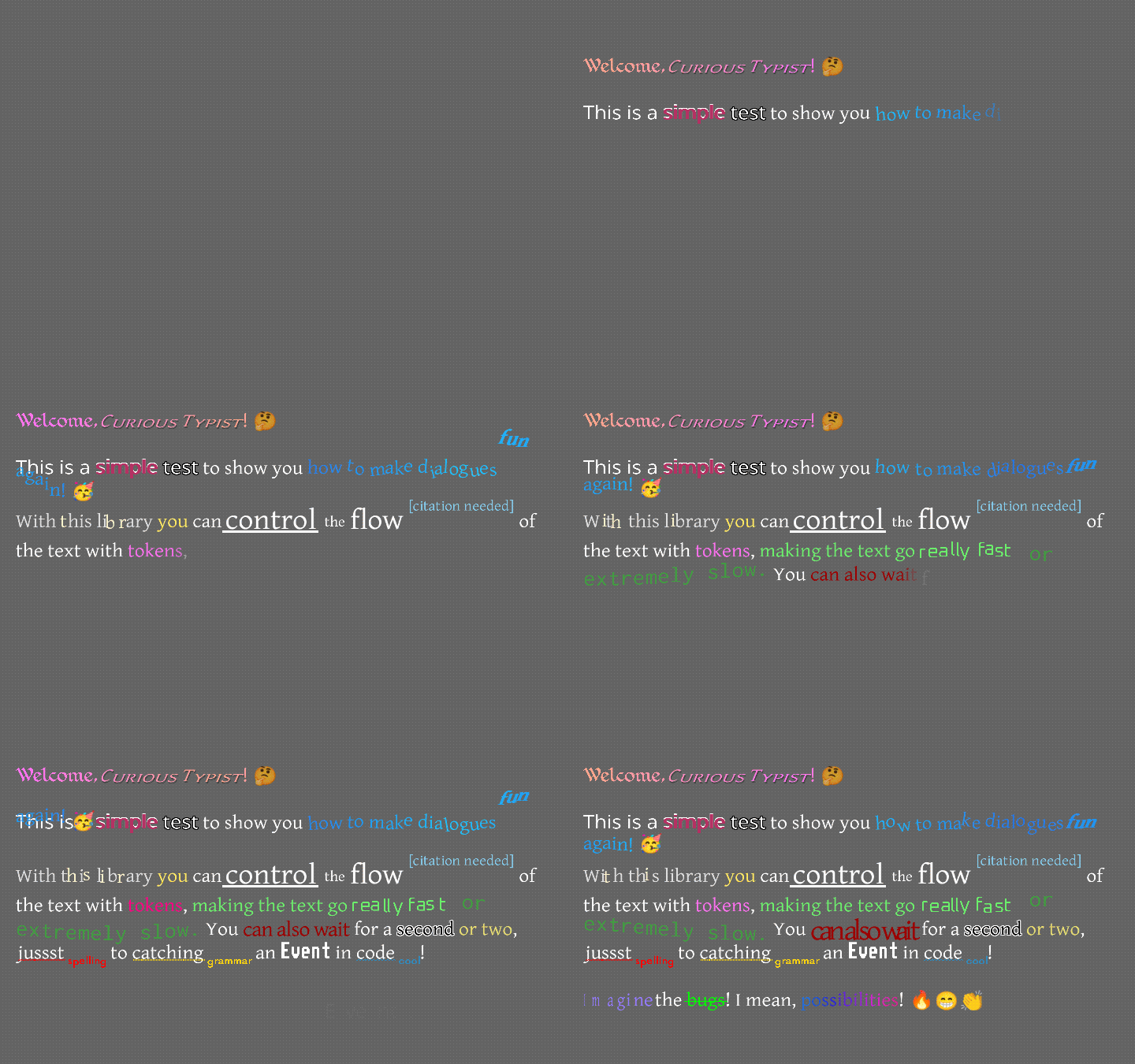
تركزت مكتبة Display حول ملصق يطبع مع مرور الوقت ، مع كل من التأثيرات والأنماط.
وبعبارة أخرى ، فإن هذا يجلب المزيد من الميزات لتقديم النصوص في libgdx.
كيف يبدو هذا؟ شيء صغير مثل هذا ...
أو ربما مثل هذا ...
إذا كنت تفضل مشاهدة مقطع فيديو بدلاً من قراءة هذا النص ، فقد صنع Raymond "Raeleus" Buckley مقطع فيديو يغطي معظم أخصائي Textratypist! إنه يغطي بعض الأشياء التي لا يقوم بها هذا الملف ، مثل استخدام ملحن الجلد ، لذلك فهي ساعة جيدة بغض النظر.
هناك علامة "طبيعية" هنا في شكل Textralabel ، والتي تعمل تمامًا مثل التسمية في المشهد 2d.ui ، ولكنها تسمح للأنماط المغطاة أدناه. قد يفضل الكثير من الاستخدام TypingLabel ، على الرغم من!
TypingLabel هو عنصر واجهة مستخدم طبيعي إلى حد ما ، ويمتد Textralabel. ومع ذلك ، فإنه يضع الحروف على الشاشة واحدة تلو الأخرى ، ما لم يتم إخباره بالتخطي. هذا تأثير حنين موجود في العديد من الألعاب القديم للثقيلة النصية ، ويبدو أن الآلة الكاتبة تضع كل حرف في معدل أبطأ من الثابت.
نعم ، لديها أكثر من وضع الآلة الكاتبة! يمكن أن يتم تعليق النص أعلاه ثم يسقط في مكانه. يمكن أن تقفز لأعلى ولأسفل في موجة طويلة. يمكن أن يتردد وترتجف ، كما لو كان مريضا. يمكن أن تومض بألوان مختلفة ، أو تتحرك بسلاسة بين لونين ، أو تجاوز قوس قزح كامل. الكثير من الخيارات ؛ الكثير من المرح. التأثيرات هي نفسها تقريبًا كما هو الحال في كتابة العلامات ، ولكن كانت هناك بعض التغييرات والإضافات. يمكنك التحقق من Wiki TextRatyPist لمزيد من المعلومات.
اعتبارا من 0.10.0 ، هناك العديد من التأثيرات الجديدة. الهز ، دوامة ، تدور ، حشد ، يتقلص ، يظهر ، نبضات القلب ، كاروسيل ، الاسكواش ، المقياس ، الدوران ، الاهتمام ، التوضيح ، الرابط ، المشغل ، المصمم ، المدفع ، المحيط ، الظهر ، والفورية كلها جديدة على textratypist (ليس في كتابة الطالب). يمكنك رؤية تعليمات الاستخدام وتجربة صور GIF في صفحة الرموز المميزة لـ TextRatyPist Wiki. تستفيد معظم هذه التأثيرات من خيارات التحجيم والتناوب السلس التي يمكن أن تستخدم التأثيرات بدءًا من عازف TextRatypist 0.5.1. يستفيد البعض من تتبع الماوس ، جديد في 0.7.0 ، مثل كيفية استجابة Link فقط للنقرة على مجموعة من النص.
قد ترغب في إنشاء TypingLabel S حتى عندما لا تحتاج إلى تأثير الكتابة ، لأن TextraLabel لا يتعامل مع أي تأثيرات. يمكنك استدعاء skipToTheEnd() على typinglabel أو (في 0.7.0 وما فوق) على بعض الفئات الأخرى للسماح باستخدام TypingLabel لاستخدام النص مع التأثيرات.
هناك الرموز القياسية المختلفة موجودة أيضًا ، ويمكن أن تتلاعب بتأثير الكتابة ، والاستبدال المتغير ، وغيرها من الأشياء المفيدة:
{WAIT=f} يؤدي إلى توقف تأثير الكتابة وانتظار ثواني f ، كتعويم.{SPEED=f} يغير الوقت الذي يستغرقه كتابة الرسول الرسمية النموذجية ، من 0.035 إلى f{SLOWER} يجعل جميع الحروف الرسومية تأخذ 2x طالما للكتابة.{SLOW} يجعل جميع الحروف الرسومية تستغرق 1.5x طالما للكتابة.{NORMAL} يجعل جميع الحروف الرسومية تأخذ 1x العادية طالما للكتابة.{FAST} يجعل جميع الحروف الرسومية تستغرق 0.5x طالما للكتابة.{FASTER} يجعل جميع الحروف الرسومية تستغرق 0.25x طالما للكتابة.{NATURAL=f} يجعل الرسوم الحرارية تستغرق وقتًا أكثر أو أقل من الوقت للكتابة ، ولكن على خلاف ذلك هو نفس {SPEED=f} .{COLOR=s} يغير لون النص ؛ هذا يحتوي على الكثير من الخيارات ، بحيث يمكنك الحصول على "اللون الوردي الداكن الرمادي".{STYLE=s} يغير نمط النص (انظر أدناه) ؛ هذا لديه الكثير من الخيارات.{SIZE=f} يغير حجم النص (بشكل خشن ، بزيادات بنسبة 25 ٪) ؛ هذا يستغرق F كنسبة مئوية من 0 إلى 375.{FONT=name} يغير الخط ، إذا كان هناك fontfamily متاح ، من خلال البحث عن name .{CLEARCOLOR} يعين لون النص على اللون الافتراضي ، والذي عادة ما يكون أبيض.{CLEARSIZE} يحدد الحجم إلى 100 ٪.{CLEARFONT} يعين الخط على الخط الأصلي (لا تستخدم fontfamily).{ENDCOLOR} يعين لون النص على اللون الافتراضي ، والذي عادة ما يكون أبيض. هذا هو نفس {CLEARCOLOR} .{VAR=name} يتم استبداله بأي سلسلة كانت مرتبطة name المتغير.{IF=name;choice0=cat;choice1=b;=default} يتحقق من الاسم المتغير ، ويقارنه بكل خيار في الرمز المميز.name مساوية للاختيار ، فسيتم استبدال الرمز المميز بقيمة الاختيار ، مثل cat .default .{EVENT=name} يؤدي إلى حدوث حدث ، وإرسال name إلى قائمة TypingListener ، عندما تصل الكتابة إلى هذه النقطة.{RESET} يضبط كل التغييرات في التنسيق والسرعة على قيمها الأولية.label.setDefaultToken() لتغيير القيم الأولية ، لذلك النصوص الافتراضية لبعض الإعدادات المختلفة.{SKIP=n} يتخطى الأمام في تأثير الكتابة ، وعرض أحرف n على الفور. تستخدم التأثيرات أقواس مجعد بشكل افتراضي ، ولكن إذا لم تكن الأقواس المجعد خيارًا جيدًا للنص الخاص بك (كما هو الحال في ملفات I18N) ، فيمكنك استخدام [-EFFECT] كمكافئ لـ {EFFECT} .
تقوم هذه المكتبة بتوسيع ما يمكن أن تفعله علامة الكتابة الأصلية-فهي تتيح تطبيق الأنماط على النص ، مثل Bold أو Thankline و Operique أو superScript ، وما إلى ذلك ، المتعلقة بالتغييرات المقيسة ، والتي يمكن أن تتقلص أو تكبير النص دون تغيير الخط ، وميزة "Font Family". يمكن تعيين خط "عائلة" من الخطوط والأسماء الأخرى لاستخدامها للإشارة إليها ؛ هذا يعمل مثل النمط الطبيعي ، ولكن في الواقع يغير ما يستخدم الخط لرسم. القائمة الكاملة للأنماط طويلة ، ولكنها ليست مفصلة مثل الرموز المميزة. يمكنك تمكين الأنماط بشيء مثل علامة LIBGDX Color ، أو بين قوسين مربعة مثل [*] ، أو (إذا تم استخدام العلامات في TypingLabel ) ، يمكنك استخدام {STYLE=BOLD} للقيام بنفس الشيء. العلامات وأسماء النمط على حد سواء غير حساسة للحالة ، ولكن أسماء الألوان حساسة للحالة. يستخدم بناء الجملة المربع في المقام الأول علامات الترقيم ، وهو مستوحى من بناء جملة التخفيض (الذي يستخدمه Github ، من بين أماكن أخرى).
في القائمة التالية ، يبدو كل إدخال مثل:
[*] تبديل الوضع الجريء. يمكن استخدام أسماء النمط * ، B ، BOLD ، STRONG .
هذا يعني أنه يمكنك دائمًا استخدام [*] لتشغيل الوضع الغامق أو إيقاف تشغيله ، وفي typingLabel ، يمكنك بالإضافة إلى ذلك استخدام بناء الجملة غير الحساسة {STYLE=*} ، {STYLE=B} ، {STYLE=BOLD} ، أو {STYLE=STRONG} للقيام بنفس الشيء.
القائمة الكاملة للأنماط وعلامات الطوابع المربعة ذات الصلة:
[][] في libgdx bitmapfont علامة ، ولكنه يعمل على أكثر من الألوان.[ ] إعادة تعيين جميع الأنماط/الألوان/التنسيق والتأثيرات على الحالة الأولية.[] إلى الجديد [ ] .[(label)] يخزن مؤقتًا حالة التنسيق الحالية label ، بحيث يمكن إعادة تطبيقها لاحقًا.label أي سلسلة أبجدية رقمية. ربما لا ينبغي أن يكون لها مسافات فيه ، ولكن يمكن أن يكون لها السطح.[ label] إعادة تطبيق حالة التنسيق المخزنة label ، إذا كان هناك واحدة.[*] تبديل الوضع الجريء. يمكن استخدام أسماء النمط * ، B ، BOLD ، STRONG .[/] تبديل الوضع المائل (مثل المائل). يمكن استخدام أسماء النمط / ، I ، OBLIQUE ، ITALIC .[^] تبديل وضع SuperScript (ويقوم بإيقاف تشغيل وضع التراكب أو وضع Midscript). يمكن استخدام أسماء النمط ^ ، SUPER ، SUPERSCRIPT .[=] تبديل وضع midscript (ويقوم بإيقاف تشغيل وضع SuperScript أو Subcript). يمكن استخدام أسماء النمط = ، MID ، MIDSCRIPT .[.] يمكن استخدام أسماء النمط . ، SUB ، SUBSCRIPT .[_] تبديل الوضع السطحي. يمكن استخدام أسماء النمط _ ، U ، UNDER ، UNDERLINE .[~] تبديل وضع الضرب. يمكن استخدام أسماء النمط ~ ، STRIKE ، STRIKETHROUGH .[!] يبطح جميع وضع الحالة العلوي (استبدال أي وضع حالة آخر). يمكن استخدام أسماء النمط ! ، UP ، UPPER .[,] يتبدل جميع وضع الحالة السفلي (استبدال أي وضع حالة آخر). يمكن استخدام أسماء النمط , LOW ، LOWER .[;] تبديل الاستفادة من كل وضع كلمة (استبدال أي وضع حالة آخر). يمكن استخدام أسماء النمط ; ، EACH ، TITLE .[%DDD] ، حيث تكون DDD نسبة مئوية من 0 إلى 375 ، تقوم بإعداد النص إلى ذلك المضاعف. يمكن استخدامها مع {SIZE=150%} ، {SIZE=%25} ، أو بالمثل ، {STYLE=200%} أو {STYLE=%125} . يزيل أي وضع خاص.[%] على مجموعة النصوص الخاصة بها إلى مقياس 100 ٪ الافتراضي ويزيل أي وضع خاص. يمكن استخدامها مع {STYLE=%} .[%?MODE] يزيل المقياس ويضع وضعًا خاصًا ؛ الأوضاع مدرجة أدناه.[%^MODE] يزيل المقياس ويضع وضعًا خاصًا في نفس الوقت مثل وضع الكفرات الصغيرة ؛ الأوضاع مدرجة أدناه.[@Name] ، حيث يكون الاسم مفتاحًا/اسمًا في متغير family هذا الخط ، يقوم بتبديل المحرف الحالي إلى واحد اسمه. يمكن استخدامها مع {STYLE=@Name} .[@] على إعادة تعيين محرف هذا الخط ، متجاهلة عائلته. يمكن استخدامها مع {STYLE=@} .[#HHHHHHHH] ، حيث Hhhhhhhhh هو Hex Rgb888 أو RGBA8888 INT ، يغير اللون. هذه علامة {COLOR=#HHHHHHHH} .[COLORNAME] ، حيث يكون Colorname اسمًا أو وصفًا سيتم البحث عنه خارجيًا ، يغير اللون.ColorUtils.describe() ، والذي يحاول العثور على أي ألوان من Palette بالاسم ، ويسمح أيضًا بوصف مزيج من الألوان أو التغييرات البسيطة مثل "الضوء" أو "مملة".Colors LibgDx ، وأيضًا حوالي 50 من أسماء الألوان الصغيرة الإضافية (من GDX ملونة).Palette بواسطة Hue ، عن طريق الخفة ، أو بالاسم.[RED] ، [green yellow] ، [light blue] ، [duller orange] ، [darker rich BLUE lavender] ، [pale pink orange] ، و [deeper green navy] .setColorLookup() Font مع تطبيق ColorLookup الخاص بك للقيام بما تريد هنا.| والتي تسمح بالبحث عن الألوان مع الأسماء التي تحتوي على علامات الترقيم. على سبيل المثال ، [|;_;] سوف يبحث عن لون يسمى ;_; ، "لون الحزن" ، ولن يتصرف مثل [;] .ColorLookup مخصصًا ، كما أنه لا ، ColorLookup.INSTANCE .{COLOR=SKY} (والتي يمكن أن تتعامل عليها الألوان على الفور) أو مع وصف ، مثل {COLOR=lighter orange-red} ، حتى داخل علامة مثل {GRADIENT} .[+region name] ، حيث اسم المنطقة هو اسم texturereRegion من textureatlas المسجلة ، لن يغير النمط ، ولكنه سوف ينتج هذا textureregion يتماشى مع النص.KnownFonts.addEmoji() لإضافة أيقونات Twemoji 3000+ إلى خط.[+saxophone] و [+?] هل سيظهر كل منها أيقونة الساكسفون.[+call me hand, medium-dark skin tone] و [+??] .KnownFonts.addGameIcons() ، والتي تضيف أيقونات من مجموعة Game-icons.net. هذه تستخدم نفس بناء الجملة: [+crystal-wand] .[-SOME_EFFECT] يعادل استخدام الأقواس المجعد حول SOME_EFFECT ؛ لاحظ اندفاعة المضافة.الأوضاع الخاصة التي يمكن استخدامها بدلاً من التحجيم هي:
black outline أو blacken ، والذي يمكن استخدامه مع أسماء الأنماط BLACK OUTLINE أو BLACKEN .white outline أو whiten ، والذي يمكن استخدامه مع أسماء الأنماط WHITE OUTLINE أو WHITEN .shiny ، والتي يمكن استخدامها مع أسماء الأنماط SHINY ، SHINE ، أو GLOSSY .drop shadow أو shadow ، الذي يمكن استخدامه مع أسماء الأنماط SHADOW أو DROPSHADOW أو DROP SHADOW .error ، والذي يمكن استخدامه مع ERROR أسماء النمط أو REDLINE أو RED LINE .Font.PACKED_ERROR_COLOR .warn ، والذي يمكن استخدامه مع أسماء الأنماط WARN أو YELLOWLINE أو YELLOW LINE .Font.PACKED_WARN_COLOR .note ، والتي يمكن استخدامها مع خط أسماء الأنماط NOTE INFO أو BLUELINE أو BLUE LINE .Font.PACKED_NOTE_COLOR .jostle ، التي يمكن استخدامها مع أسماء الأنماط JOSTLE أو WOBBLE أو SCATTER .[%?] .small caps ، والتي يمكن استخدامها مع أسماء الأنماط SMALLCAPS أو SMALL CAPS .[%^] . لا يمكن استخدامه مع بناء الجملة [%?small caps] ؛ إنه يحتاج إلى سيارة مياه. يمكن استخدام وضع CAPS الصغير مع أي من الأوضاع الأخرى باستثناء Jostle ، عن طريق تغيير %? إلى %^ . بخلاف ذلك ، لا يمكن أن يكون هناك وضعان نشطان في نفس الوقت ، ولا يمكن استخدام أوضاع في نفس الوقت الذي يتم فيه التحجيم.
لاحظ أن الأوضاع تستخدم بناء جملة مختلف قليلاً لتجنب الخلط بين أسماء الألوان. عند استخدام أقواس مربعة ، يجب أن يسبق كل من الأسماء الواردة هنا في الحالة السفلية %? معظم الوقت (قبعات صغيرة وموزعة خاصة). هذا يعني تمكين وضع "خطأ" الأحمر "خطأ" ، يمكنك استخدام علامة السائق المربع [%?error] . إذا كنت تستخدم علامة ترميز مجعد لـ TypingLabel ، فسوف تستخدم الأسماء الواردة هنا في الحالة العلوية ، ويمكنك استخدامها مثل أسماء الأنماط الأخرى: {STYLE=ERROR} ، على سبيل المثال. وضع القبعات الصغيرة ، كما ذكرنا ، خاص ؛ عادة ما يتم تمكينه باستخدام [%^small caps] ، ولكن يمكن أيضًا تمكينه باستخدام [%^] ، ويمكن خلطه أيضًا مع أي وضع آخر باستثناء Jostle عن طريق تغيير %? إلى %^ . كلما كانت القبعات الصغيرة نشطة ، تستخدم علامة السمك المربعة %^ بدلاً من %? . وضع Jostle هو أيضا مميز. عادة ما يتم تمكينه مع [%?jostle] ، ولكن يمكن أيضًا تمكينه [%?] من تلقاء نفسه. لا يمكن خلط Jostle مع قبعات صغيرة.
الأوضاع الخاصة معقولة بعض الشيء من حيث بناء الجملة لأنني نفدت علامات الترقيم التي يمكنني استخدامها. يمكن تحقيق المثال الشائع لمخطط أسود حول النص الأبيض مع [WHITE][%?blacken]Outlined![%][GRAY] . (يستخدم المثال GRAY كأنه اللون العادي ، ولكن يمكنك أيضًا استخدام [ ] لإعادة ضبط اللون إلى أي لون أساسي تم تكوينه على Layout أو الملصق الذي يحمله. لاحظ أن [ ] يعيد أيضًا ضبط الحجم والوضع ، وكذلك ، كل شيء.)
تتوفر عدة مجموعات من التأثيرات باستخدام {VAR=ZOMBIE}urgh, brains...{VAR=ENDZOMBIE} بناء جملة:
{VAR=FIRE} يغير النص التالي للحصول على ألوان تغيير نارية. يمكنك إنهاءها باستخدام {VAR=ENDFIRE} .{VAR=SPUTTERINGFIRE} يغير النص التالي للحصول على ألوان تغيير نارية وتغيير حجمها مثل النيران. يمكنك إنهاءها باستخدام {VAR=ENDSPUTTERINGFIRE} .{VAR=BLIZZARD} يغير النص التالي للتردد في الريح واستخدام الألوان الجليدية ، أبيض إلى أزرق فاتح. يمكنك إنهاءها باستخدام {VAR=ENDBLIZZARD} .{VAR=SHIVERINGBLIZZARD} يغير النص التالي للتردد في الريح واستخدام الألوان الجليدية ، باللون الأبيض إلى الأزرق الفاتح ، بالإضافة إلى أنه سيجعل الرسوم المتحركة "ارتعاش" بشكل عشوائي كما لو كانت باردة. يمكنك إنهاءها باستخدام {VAR=ENDSHIVERINGBLIZZARD} .{VAR=ELECTRIFY} يغير النص التالي ليكون لونًا أرجوانيًا رماديًا مملًا ويجعل الحروف الرسومية بشكل عشوائي تتحول إلى اللون الأصفر والاهتزاز. يمكنك إنهاءها باستخدام {VAR=ENDELECTRIFY} .{VAR=ZOMBIE} يغير النص التالي ليكون "Sage Dark Olive" (لون رمادي أخضر رمادي ممل) ، ويجعل الحروف الرسومية تدور اليسار واليمين ببطء وعشوائي ، مما يجعل الحروف الرخمية تنخفض وتتراجع بشكل عشوائي ، وعندما تظهر لأول مرة ، هل تظهر الرسوم الرسومية من خط الأساس (كما لو كانت مخالبًا من قبر). يمكنك إنهاءها باستخدام {VAR=ENDZOMBIE} . يتم تعريفها في TypingConfig.initializeGlobalVars() ، ويمكنك تحديد مجموعاتك الخاصة بنفس الطريقة التي يتم بها تعريفها تمامًا. على سبيل المثال ، يتم تعريف FIRE مع
        TypingConfig . GLOBAL_VARS . put ( "FIRE" , "{OCEAN=0.7;1.25;0.11;1.0;0.65}" );
        TypingConfig . GLOBAL_VARS . put ( "ENDFIRE" , "{ENDOCEAN}" );
تأثير OCEAN لا يهتم بالألوان التي يستخدمها ؛ إنه يحدد نمطًا تقريبيًا فقط لكيفية الانتقال بين تلك الألوان. وهذا يعني ، على نحو مضاد ، يتم تنفيذ FIRE مع OCEAN بدلاً من GRADIENT . من المحتمل أن يكون استخدام اسم FIRE هو الأفضل من OCEAN ، لذا فإن VAR العالمي موجود هنا لهذا السبب.
تتيح القدرة على تخزين حالات التنسيق باستخدام ملصق بعضًا أكثر تعقيدًا لسلاسل الترميز من مصادر متعددة. يمكنك تسمية شيء مثل font.storeState("spooky", "[/][darker gray][@?blacken]") لتخزين حالة تنسيق هذه (نص رمادي أغمق المائل مع مخطط أسود) font ، ثم يمكنه إعادة ضبط تلك الحالة فقط عن طريق إدخال [ spooky] (لاحظ مساحة الافتتاح). يمكنك أيضًا إنشاء بعض النص الإدراج الذي يخزن التنسيق الحالي قبل أن يكتب أي شيء ، وإعادة ضبط التنسيق مرة أخرى عند القيام به. من شأن ذلك أن يستخدم شيئًا مثل "[(previous)][ ][BLUE][^][[citation needed][ previous]" - إذا تم إدراج هذه السلسلة في منتصف كتلة أكبر من النص ، فلن يغير التنسيق المحيط ، ولكنه سيستخدم الأزرق الفائق لنصه الخاص (المطلوب [citation needed] ) ولن يستخدم أي من طيبة الكتلة المحيطة بها. إذا كان لديك العديد من علامات متجر الحالة مع نفس التسمية ، فستتغير القيمة المرتبطة بهذه التسمية مع مواجهة تلك العلامات. قد ترغب في استخدام ملصقات فريدة لتجنب تغيير قيمة ملصق آخر عن طريق الخطأ ، ولكن هذا غير مطلوب عادة.
يستفيد TextRatyPist بشكل كبير من فئة Font الجديدة ، والتي تعد عملية إصلاح شاملة لـ LibgDx's Bitmapfont التي لا تشارك أي رمز بشكل أساسي مع أسلافه. يحتوي الخط على العديد من الصفات التي تمنحها قوة أكبر من Bitmapfont ، والمستمدة في الغالب من كيفية تخزين (ويتيح) صور Glyph كإجراءات نصية في الخريطة. لا يوجد شيء يمنعك بدقة من إضافة صورك الخاصة إلى mapping خط ، طالما أن لديهم المعلومات المطلوبة لاستخدامها كخارف نصية ، ثم وضع تلك الصور في النص الخاص بك. يتم استخدام هذا لتنفيذ الرموز التعبيرية ، كمثال واحد ، ويمكن استخدامه في الرموز المخصصة وعلماقي.
يدعم TextRatyPist خطوط Bitmap القياسية وأيضًا خطوط حقل المسافة ، باستخدام SDF أو MSDF. ستمكّن TypingLabel تلقائيًا من البرمجة التي يحتاجها نوع حقل المسافة المناسب (إذا كان بحاجة إلى واحدة) وتعطيله بعد تقديم نفسه. يمكنك تغيير هذا السلوك عن طريق استدعاء Font.enableShader(Batch) يدويًا على خطك ، وتغيير الدُفعة مرة أخرى إلى برنامج التظليل الآخر المفضل لديك باستخدام طريقة Batch.setShader() (غالبًا ، يمكنك فقط تمريرها هنا لإعادة تعيين التظليل). لاحظ أنه يجب إخبار خطوط SDF و MSDF حول التغييرات في حجم الشاشة ، باستخدام Font.resizeDistanceField() أو أي من أساليب الأماكن الأخرى التي تستدعي resizeDistanceField() . منذ 1.0.0 ، تريد عادة استخدام الحمل الزائد الذي يأخذ Viewport ؛ إذا لم يكن لديك Viewport ، فلن تحتاج إلى هذا الحمل الزائد. يحتاج كل خط حقل المسافة الذي تقدمه حاليًا إلى تغيير حجم حقل المسافة عند تغيير حجم النافذة ، في ApplicationListener.resize() .
هناك العديد من إعدادات الخطوط المسبقة في KnownFonts ؛ تقول الوثائق لكل خط خط ما هي الملفات اللازمة لاستخدام هذا الخط. تم نقل ملفات .fnt القديمة هنا . يمكنك رؤية المعاينات والأوصاف لجميع الخطوط المعروفة هنا. وجود معروفة ليس ضروريًا للعديد من الخطوط منذ الإصدار 1.0.0 ، لأن خطوط .dat أصبحت الآن جميعها بواسطة نفس الأداة (FontWriter) ، وتميل إلى تكوينها بشكل صحيح خارج الصندوق. مجموعة متنوعة من أنواع الخطوط ليست مذهلة ، ولكن يجب أن تكون نقطة انطلاق جيدة. أحد الأشياء [@Medieval] التي يجب ملاحظتها هي طريقة KnownFonts.getStandardFamily() .
تستخدم الخطوط هنا ملحق ملف .DAT (مما يعني فقط أنه بيانات ثنائية بدون تنسيق ملف معين). فهي إصدارات مضغوطة من خطوط json الكبيرة التي تنتجها FontWriter. الضغط الذي يستخدمونه متوافق مع GWT ، بحيث يمكن استخدام ملفات .DAT هذه على أي منصة LIBGDX. لا يزال بإمكانك استخدام ملفات .fnt القديمة بدون مشكلة ، ولا تزال بعض ملفات .fnt تستخدم هنا (في الغالب لخطوط البكسل). أنت أيضًا تحتاج بشكل عام إلى الحصول على .png مع كل خط ، على الرغم من أنه يمكن أن يكون في أطلس.
يتم تضمين ملفات الترخيص لكل خط في نفس المجلد ، في knownFonts هنا. تم التحقق من جميع الخطوط المقدمة هنا لضمان سمح تراخيصهم بالاستخدام التجاري دون رسوم ، وكل ذلك. معظم يتطلب الإسناد. تحقق من التراخيص للحصول على التفاصيل.
يتضمن المعروفون عدة طرق أخرى لتكوين مثيلات الخطوط الموجودة عن طريق إضافة textureatlas إلى الحروف الرسومية التي يعرفونها. ويشمل ذلك عدد قليل من extureatlases من الرموز و ... الرموز التعبيرية!
توجد أيقونات Twemoji أيضًا في أطلس يزيد عن 3000 صورة 32x32 ؛ يمكن لـ KnownFonts.addEmoji() تسجيلها بخط بحيث يمكن أن يرسم بناء الجملة [+name] المذكور أعلاه. وبالمثل ، يوجد أطلس يزيد عن 4000 60 × 60 أيقونات من game-icons.net ، ويمكن KnownFonts.addGameIcons() تسجيلها بخط. لا يمكن تسجيل كل من Twemoji و Game-icons.net في خط واحد في نفس الوقت ؛ لا يوجد مساحة حرة كافية في جزء Unicode الذي يمكنهم استخدامه بأمان. هناك طريقة للتغلب على هذا هو استخدام ميزة Fontfamily ، وإضافة خط فقط للأيقونات أو فقط للعلوم التعبيرية للعائلة. هناك طريقة موجودة لهذا ؛ يتيح لك KnownFonts.getGameIconsFont() الحصول على خط يهدف فقط إلى عرض ألعاب اللعبة ، مع بعض الاحتفالات حول استخدامها. [@Icons][+rooster][@] هو مثال سريع على كيفية التبديل إلى الخط الذي تنتجه getGameIconsFont() ، ورسم أيقونة ، والتبديل.
هناك معاينات لـ Twemoji هنا ، مع char char والاسم للبحث عن كل صورة. وبالمثل ، هناك معاينات لأيقونات Game-icons.net هنا ، مع فقط الاسم اللازم للبحث عن كل صورة. تذكر أنه نظرًا لأن صور Game-icons.net هي بيضاء نقية ذات شفافية ، يمكنك تلميخها أي لون تريده باستخدام بناء الجملة المعياري [RED] أو [light dull green] أو [#0022EEFF] .
يتم تضمين ملفات الترخيص الخاصة بـ Twemoji وصور Game-icons.net في knownFonts ، بجانب ملفات الترخيص للخطوط. في حين أن Twemoji لديه متطلبات بسيطة للإسناد ، فإن ألعاب اللعبة تتطلب إسناد إلى عدد قليل من المساهمين الفرديين ؛ راجع نهاية هذا المستند للقائمة ، والتي يمكنك ويجب أن تنسخها لإعطاء الائتمان للجميع.
هناك أيضًا رموز تعبيرية من فئة OpenMoji ، والإصدارات الكاملة من نفس الرموز التعبيرية. قد تكون هذه مناسبة بشكل أفضل لأنماط الفن بعض المشاريع.
يمكنك تدوير الحروف الحربية الفردية (إذا قمت برسمها بشكل فردي) أو تدوير كتل كاملة من النص كتخطيط ، باستخدام الحمل الزائد الاختياري من Font.drawGlyph() أو Font.drawGlyphs() . يمكن أن تؤدي التأثيرات المخصصة لـ TypingLabel أيضًا إلى تغيير دوران أي غليف ، بالإضافة إلى موضعه وحجمه على X و/أو Y. يمكنك تدوير Textralabel أو TypingLabel باستخدام أساليب setRotation() ، وسيعمل الدوران الآن بشكل صحيح للتسميات مع خلفيات و/أو مع إعدادات محاذاة مختلفة. يمكن تعيين أصل التناوب في الملصق ، وسيتم تدوير الملصق بأكمله حول نقطة الأصل هذه.
يمكنك أيضًا ، بالنسبة لبعض الخطوط ، أن يتم إنشاء أحرف السحب مربعًا وعناصر الحظر تلقائيًا. يحتاج هذا إلى حرف بلوك أبيض صلب (من أي حجم ، عادة 1 × 1) موجود في الخط في المعرف 9608 (مؤشر كتلة Unicode الكامل ، 'u2588' ). يتيح هذا أيضًا ضمانًا أفضل للتطويع والحروف المتصل بشكل صحيح ، ودون تلطيخ حيث يتداخل اثنان من العوامل أو الواصلين مع بعضهما البعض. يحاول Font تمكين ذلك في بعض الحالات ، أو يمكن تعيينه بمعلمة ، ولكن إذا فشلت ، فإنه يعود إلى استخدام السطح السفلي للتطويع والوصلات للضرب. يتم تكوين جميع الخطوط الموجودة في KnownFonts إما لاستخدام كتلة صلبة أو لتجنب ذلك على وجه التحديد لأن هذا الخط يجعل أفضل بدونها. لاحظ أنه إذا قمت بإنشاء Font من libgdx BitmapFont ، فإن هذا الافتراضيات حتى لا تحاول صنع رسومات الشبكة ، لأن Bitmapfonts نادراً ما يكون لها كتلة صلبة مناسبة.
من الممكن بعض التكوين الإضافي لأحرف رسم مربع المستخدمة بالفعل لهذا الغرض (وليس فقط التأكيد أو الإرهاق). يمكنك ضبط boxDrawingBreadth على Font لبعض المضاعفات لجعل خطوط السحب مربعًا أكثر سمكًا أو أرق ، دون تغيير كيفية الاتصال ببعضها البعض.
الميزات المختلفة تسمح بتكوين إضافي هنا. يمكنك ضبط boldStrength على بعض القيمة بخلاف الافتراضي 1 إذا كنت تريد مساحة إضافية أو أقل تم تطبيقها من النمط الغامق. يمكنك أيضًا تعيين obliqueStrength لتغيير زاوية الانحراف الذي يتم رسم النص المائل به. يمكن تغيير الألوان لتأثيرات مختلفة حسب الحاجة. font.PACKED_SHADOW_COLOR يمكن تغييره لاستخدام لون الظل الداكن أو الأخف أو أكثر غموضًا أو أكثر شفافية ، على سبيل المثال. يؤثر font.PACKED_BLACK على وضع الأسود الأسود ، ويؤثر font.PACKED_WHITE على المخطط الأبيض والأوضاع اللامعة. هناك أوضاع مماثلة لتغيير ألوان الخطأ والتحذير والملاحظة. تنطبق كل تكوينات الألوان هذه لكل مثيل خط ، لذلك يمكن أن يكون لديك كائنين خطين باستخدام نفس المحرف ولكن مع تكوين ألوان مختلفة.
بدءًا من الإصدار 0.4.0 ، هناك العديد من الأدوات التي تحل محل نظيرات المشهد 2D.UI وتتبادل Label لـ TextraLabel ، مما يتيح لك استخدام الترميز فيها. الأدوات المصغرة هي ImageTextraButton و TextraButton و TextraCheckBox و TextraDialog و TextraLabel و TextraListBox و TextraTooltip و TextraWindow ، بالإضافة إلى إصدارات بديلة من كل منها تستخدم TypingLabel بدلاً من TextraLabel و Was Typing بأسمائها.
على الرغم من أن TextArea لم يتم دعم نظيره بعد إلى TextArea ، ولم ينجح بعد. تتخلف TextraLabel عن دعم خطوط متعددة ، وقد تكون قادرة على الاحتفاظ ببعض الاستخدام. يسمح TypingLabel بتتبع الإدخال أيضًا ، بحيث يمكنك استخدامه لإنشاء مناطق نصية قابلة للتحديد - اقرأ!
كان تتبع الإدخال خيارًا لـ TypingLabel والرمز الذي يستخدمه منذ 0.7.0. تم توسيع هذا في 0.7.4 للسماح للنص في TypingLabel أن يتم تحديده باستخدام label.setSelectable(true) . يمكنك الوصول إلى النص الذي تم اختياره حاليًا باستخدام label.getSelectedText() أو نسخه مباشرة باستخدام label.copySelectedText() . عندما يكمل المستخدم إيماءة النقر والسحب فوق TypingLabel (ويمكن اختياره) ، يتم تشغيل حدث أيضًا ؛ يمكنك الاستماع إلى "*SELECTED" في قائمة TypingListener ونص نسخها بمجرد تحديدها ، أو نسخها فقط عند الضغط على بعض المفاتيح. تتضمن الميزات المفيدة الأخرى التي تستخدم تتبع الإدخال علامة {LINK} ، والتي تجعل من النص رابطًا قابل للنقر على عنوان إنترنت ، {TRIGGER} ، الذي يؤدي إلى انقر فوق الحدث ، وبعض العلامات الأخرى التي تستجيب للماوس تحوم ( {ATTENTION} ، {HIGHLIGHT} ، و {STYLIST} ). هذه العمل فقط من أجل TypingLabel ، وليس TextraLabel ، لذلك قد ترغب في استخدام TypingLabel و Call skipToTheEnd() لمعاملته مثل النص الذي لا يزال يستجيب لإدخال المستخدم ويمكنه استخدام أنماط الرسوم المتحركة مثل {RAINBOW} .
يمكنك القراءة في ملف Scene2d.ui Skin Json مع متغير على فئة Skin LibgDx ، FWSkin (أو أحد الفصول التي تمتد) ، والقيام بذلك سيحمل أنماط Scene2D.UI العادية وأحمام أخصائي التكرار المتخصصة. عادة ما تختلف الأنماط المتخصصة فقط من حيث أنها تستخدم Font بدلاً من BitmapFont ، وكلها متداخلة في فئة Styles هنا. إن وجود نمط متخصص يعني إعادة استخدام خط واحد في المزيد من الأماكن ، دون الحاجة إلى عمل العديد من النسخ من صورة نقطية (واحدة لكل عنصر واجهة مستخدم ، في بعض الأحيان) ... وهذا هو الحال قبل Textratypist 1.0.0. عادة ، فإن التغيير من الجلد إلى FWSKIN واضح ومباشر. كود مثل هذا من قبل:
Skin skin = new Skin ( Gdx . files . internal ( "my-skin.json" ));سوف يتغير إلى هذا بعد:
FWSkin skin = new FWSkin ( Gdx . files . internal ( "my-skin.json" )); يمكنك أيضًا تعيين FWSkin لمتغير Skin ، وهذا هو الخيار الأكثر توافقًا ، لأن متغير بشرتك سيكون مجرد Skin طبيعية. هناك بعض الطرق الراحة في FWSkin للتعامل مع خطوط حقل المسافة بسهولة أكبر ، لذا فإن استخدام FWSkin حيثما أمكن هو فكرة جيدة.
لماذا يطلق عليه FWSkin ، هل تتساءل؟ حسنًا ، يمكنه تحميل كل من مثيلات الخط والخطوط من ملفات .fnt (تحتاج إلى تكوين الجلد فقط BitmapFont ) ، ويمكن أن تفعل الشيء نفسه لخطوط JSON المهيكلة ، والتي عادة ما يتم إنشاؤها بواسطة FontWriter ، أو FW. كان الغرض الأولي من FWSkin هو التحميل فقط من ملفات الخطوط.
إذا كنت معتادًا على استخدام Stripe ، فهناك بديل يتم إيقاف تشغيله وهو ما يفعله FWSkin ومعالجة Freetype التي تقوم بها هذا الشريط. هذا هو التبعية الإضافية FreeTypist ، متوفرة في مستودع منفصل. يسمح بتكوين freetype من خلال وجود "com.badlogic.gdx.graphics.g2d.freetype.FreeTypeFontGenerator" في جلدك JSON ، والذي يتم إنتاجه غالبًا بواسطة ملحن الجلد. يمكنك أن تأخذ جلودًا طبيعية تنتجها Skincomposer ومتوافق مع الشريط واستخدامها مع FreeTypist.
يمكنك الحصول عليها عبر Gradle ، ولكن من المحتمل أن يكون هناك خيار أفضل لنسخه في الملفان من هذا المجلد في Freetypist إلى الكود الخاص بك. بغض النظر عن الطريقة التي تعتمد بها على freetypist ، فإنها تحتاج إلى اعتماد على Freetype (بما في ذلك تبعيات "النظام الأساسي" المناسبة) وعلى TextRatypist (حاليًا 1.0.0). عند إضافة الميزات إلى FWSKIN و TextRatyPist بشكل عام ، يجب تحديث FreetyPist أيضًا.
ربما تريد الحصول على Textratypist مع Gradle! يبدو أن الاعتماد على الوحدة الأساسية لمشروع LIBGDX:
implementation " com.github.tommyettinger:textratypist:1.1.0 "هذا يفترض أنك تعتمد بالفعل على libgdx ؛ يعتمد TextRatyPist على الإصدار 1.12.1 أو أعلى. تمت إضافة مطلب 1.11.0 في TextRatyPist 0.5.0 بسبب بعض التغييرات في رمز ترتيب الأدوات في libgdx. تمت إضافة شرط 1.12.1 في 1.0.0 لأن بعض الأشياء قد تغيرت ، ولكن يجب أن يكون 1.12.1 (أو إصدارات اللقطة اللاحقة) سهلة التحديث إليها.
إذا كنت تستخدم GWT ، فيجب أن يكون هذا متوافقًا. يحتاج إلى هذه التبعيات في وحدة HTML:
implementation " com.github.tommyettinger:textratypist:1.1.0:sources "
implementation " com.github.tommyettinger:regexodus:0.1.16:sources "
يحتاج GWT أيضًا إلى ذلك في ملف gdxdefinition.gwt.xml (منذ الإصدار 0.7.7):
< inherits name = " regexodus.regexodus " />
< inherits name = " com.github.tommyettinger.textratypist " />
في الإصدار 0.7.4 وقبل ذلك ، يمكنك إصدار سابق من التبعيات (ملاحظة ، هذا إصدار قديم ):
 // OLD VERSION
implementation " com.github.tommyettinger:textratypist:0.7.4:sources "
implementation " com.github.tommyettinger:regexodus:0.1.13:sources "
وسوف تستخدم وراثة GWT هذه بدلاً من ذلك:
 <!-- OLD VERSION -->
< inherits name = " regexodus " />
< inherits name = " textratypist " />
REGEXODUS هي مكتبة التعبير العادية المتوافقة مع GWT ، وهذا يستخدم هذا لمطابقة بعض الأنماط المعقدة داخليًا. بخلاف libgdx نفسها ، فإن regexodus هو التبعية الوحيدة التي يتمتع بها المشروع. تم تغيير ورث GWT بالنسبة إلى TextRatyPist و REGEXODUS لأنه اتضح باستخدام الحزمة الافتراضية يمكن أن يسبب مشاكل حقيقية.
يوجد إصدار واحد على الأقل في قسم الإصدارات من هذا الريبو ، لكن لا يزال من شجعك على استخدام Gradle للتعامل مع هذه المكتبة وتبعياتها.
يمكنك أيضًا استخدام JitPack للحصول على التزام حالي ، والذي يمكن أن يكون مفيدًا إذا كان هناك فترة طويلة بين الإصدارات. Current gdx-liftoff and gdx-setup projects all can use JitPack dependencies without needing any extra configuration. You would use this dependency in your core module:
implementation ' com.github.tommyettinger:textratypist:de5a52f340 ' You can change de5a52f340 to any commit in the Commits tab of https://jitpack.io/#tommyettinger/textratypist , but you should not use -SNAPSHOT -- it can change without your requesting it to, which is not what you want!
You can also depend on FreeTypist using:
implementation " com.github.tommyettinger:freetypist:1.1.0 "(Now, FreeTypist 1.1.0 uses TextraTypist 1.1.0 .)
And if you target HTML and have FreeType working somehow, you would use this Gradle dependency:
implementation " com.github.tommyettinger:freetypist:1.1.0:sources "And this inherits line:
< inherits name = " com.github.tommyettinger.freetypist " />FreeType doesn't work out-of-the-box on GWT, though there is this].
Some parts of TextraTypist act differently from their counterparts in scene2d.ui and Rafa Skoberg's typing-label.
A big quirk is that Font and BitmapFont have some core disagreements about how to parse a .fnt file, and the results of creating a Font with new Font("MyFont.fnt") can be different from new Font(new BitmapFont(Gdx.files.internal("MyFont.fnt"))) . BitmapFont reads in padding information (and does so incorrectly according to the BMFont spec), where Font ignores padding information entirely. Some .fnt files have been made so they look right in libGDX by using padding, but they will look wrong in other frameworks/engines without that padding. Font compromises by allowing manual adjustment of x and y position for all glyphs (y often needs to be adjusted, either to a positive or negative value), as well as the width and height of glyphs (these are useful less frequently, but can be helpful to stretch or squash a font). It may take some tweaking to get a Font made from a BitmapFont to line up correctly with other widgets. You also may need to adjust the offsetX, offsetY, and maybe xAdvance parameters if you load an atlas (such as with addEmoji() or addGameIcons() ), and the adjustments may be quite different for a Font made from a BitmapFont vs. a Font made directly from a .fnt file. Since 0.8.1, Font can parse an extended version of the .fnt format that permits floats for any spatial metrics, and not just ints. No files actually use this here and now, because the Structured JSON files produced by fontwriter all use floats internally for everything.
If you load text from a file and display it, you can sometimes get different results from creating that text in code, or loading it on a different machine. This should only happen if the file actually is different -- that is, the files' line endings use rn when checked out with Git on a Windows machine, or n on MacOS or Linux machines. TextraTypist uses r to mark some kinds of "soft" line breaks that can be re-wrapped, and n for "hard" line breaks that must always create a new line. Having rn present generally shows up as two lines for every line break. A simple solution that works for many projects is to include a .gitattributes file in your project root, like the one here. This can be used to force all text files or all text files with a certain file extension to use LF mode, where only a single n is used for line breaks. It's still recommended to keep .bat files using CRLF mode, with rn used, for compatibility. Using .gitattributes from the start is a good idea, and should keep files exactly the same on all current OSes. Older Windows programs (like Notepad from Windows 7) aren't able to read n line endings, but the versions distributed with recent Windows can use n easily, as can almost all code-oriented text editors.
Colors can be written out as hex strings, like #FF7700 or #9783EDFF , given by name, or described using a simple syntax. The full list of (case-sensitive!) names can be seen ordered by hue, by lightness, or by name. You can take one or more of these color names, optionally add adjectives like "light" or "dull", and get a color that mixes the named colors and applies changes from the adjectives. There are some tricky things here:
Colors class, and are ALL_CAPS , sometimes with underscores. Other names are from colorful-gdx, and are lowercased single words. In a few cases, the same word refers to a different color value if you use ALL_CAPS or use lowercase ( ORANGE and orange are a good example).ColorUtils.unevenMix() . You can have a number after any color name, which assigns a weight to that color for the mixing. Higher numbers will cause their preceding color to have more effect on the result; any non-negative integers are allowed.0x00000100 ), or fully transparent very dark blue, which is used as a placeholder because visually it is the same as transparent black. If a color does wind up as 256 at the time it is finally rendered, it will probably be ignored.Palette with its static addColor() method. This makes another color name usable, but won't retroactively make that color name parse correctly. You may have to call methods like Font.markup() again, so it's best if you can change colors before using them.If you encounter issues with TypingLabel tokens, and you use ProGuard, the configuration for that tool needs a small addition:
-keep class com.github.tommyettinger.textra.** { *; }
There may be more strict versions of this ProGuard instruction possible, but at the very least, the com.github.tommyettinger.textra.effects package needs to be kept as-is, for reflection reasons. You may also need to ensure the com.github.tommyettinger.textra.Effect class is kept. Keeping all of TextraTypist should be perfectly fine for obfuscation purposes because this is an open-source library, but it does add a small amount to the size of the final JAR or APK. Right now, that appears to be 202 KB if you don't include any assets, so I wouldn't worry about it.
Distance field fonts might not be worth the hassle of resizing each font's distance field, but they do look much better at very large sizes than standard fonts. Using a standard font actually can look better for small-to-moderate size adjustments. The best approach when you don't need large text seems to be to use a large standard font texture, without SDF or MSDF, and scale it down as needed. Since 1.0.0, all fonts support emoji. Older versions did not support emoji in MSDF fonts.
If you happen to use both tommyettinger's TextraTypist library and tommyettinger's colorful-gdx library, you may encounter various issues. ColorfulBatch appeared to be incompatible because it uses an extra attribute per-vertex (compared to SpriteBatch), but an adjustment it already does seems to make it compatible without changes. Color description can be done by both colorful-gdx's SimplePalette and ColorUtils.describe() here, but descriptions would really need to use the RGBA color space to work as expected. Alternative shaders from colorful-gdx's Shaders class generally won't work correctly with the known fonts here and the defaults for neutral colors (here, white is the neutral color, but in most shaders that allow lightening, 50% gray is the neutral color). The easiest solution for all this is to use a normal, vanilla SpriteBatch for TextraTypist rendering, and whatever ShaderProgram or ColorfulBatch you want for colorful-gdx rendering.
Games that use custom Batch classes with additional attributes don't work out-of-the-box with Font , but it provides an extension point to allow subclasses to function with whatever attributes the Batch needs. Overriding Font.drawVertices() allows quite a lot of flexibility to handle unusual batches, and you can generally leave the custom Font unchanged other than the drawVertices() override. If you implement Font 's copy constructor just by calling super(font); , and still allow it to take a Font argument, then you can quickly take Fonts from KnownFonts and make copies using your subclass. The JavaDocs for Font.drawVertices() detail what each of the 20 floats passed in via an array to drawVertices are expected to do; custom Batches could have 24 or more floats and so would need to put the 20 existing floats in the positions their Batch expects.
Sometimes, you may need to enable or disable integer positioning for certain fonts to avoid a strange GPU-related visual artifact that seems to only happen on some Nvidia GPUs. When this happens, glyphs may appear a half-pixel or so away from where they should be, in seemingly randomly-picked directions. It looks awful, and the integer position code at least should resolve it most of the time. Integer positions don't work well if you use world units that span multiple pixels in length, but this bug is an absolute mystery, and also doesn't happen at all on integrated GPUs, and may not happen on AMD GPUs. How it behaves on Apple Silicon graphics, I also do not know. The Issues tab is always available for anyone who wants to try to debug this! It is possible that some fixes introduced in the 0.7.x releases may have already eliminated this bug, but I'm not especially optimistic that it is always gone.
The gdx-freetype extension produces BitmapFont outputs, and you can create a Font from a BitmapFont without any issues. However, FreeType's "Auto" hinting settings both look worse than they normally should with Font, and can trigger the GPU artifact covered immediately above. Instead of "AutoSlight", "AutoMedium", or "AutoFull" hinting, you can choose "Slight", "Medium", or "Full", which makes the font look more legible and avoids the GPU half-pixel-offset issue. I don't have any idea why this happens, but because hinting can be set either in the FreeType generator parameters or (if you use Stripe or FreeTypist from this repo) set in a Skin file with "hinting": "Full" , it isn't hard to fix.
There are some known issues with scaling, rotation, and integer-positioning in 0.7.5 through 0.9.0. You may see labels slide a little relatively to their backgrounds when rotated smoothly, and some (typically very small) fonts may need integer positions enabled to keep a stable baseline. Font debug lines may be quite incorrect in some of these versions, also, even if the text displays correctly to users. Scaling has improved significantly in 0.7.8, as has the handling of debug lines, but rotation still has some subtle bugs. A bug was fixed starting in 0.8.0 that made extra images in a Font (such as emoji) scale differently and drift when the Font they were mixed with scaled. That same bug also made an ordinary Font drift slightly as its scale changed; this is also fixed. Positions and sizes for background color and for images from an atlas have improved in 0.8.2, so selecting text shouldn't cover up text as badly with the background, and emoji should be fully surrounded by their selection background. Positions along the line vertically, while the text is scaled, improved in 0.8.3 so that the scaling is relative to the center of the line, rather than the bottom of the line. Some other code already expected scaling to be centered like that, so this change makes scaling look better, usually. In 0.9.0, integer positioning can still be set, but it does nothing; in practice, setting it was causing more problems than improvements. The few fonts that one would think would need integer positions (pixel fonts) actually look better without it. There are still some rotation issues in 0.9.0, though they mostly happen when the descent is configured to an extreme value, or sometimes other metrics. Lining up underline/strikethrough with rotated text is also a challenge.
Word wrap periodically seems to break and need fixing across different releases. The most recent time this happened was in 0.7.9, which also affected 0.8.0 and was fixed (I hope) in 0.8.1. A different wrapping-related bug was fixed more recently, in 0.8.3 ; this was rare, and only affected TypingLabel when some effects were present.
There's other issues with word wrap if you expect it to behave exactly like Label in libGDX. Here, we don't break words, even if a single word is longer than the width of a TextraLabel or TypingLabel . The reason for this is twofold: first, breaking words without proper hyphenation logic can change the meaning of those words, and second, fixing this could be a ton of work. I do intend to try to make this configurable and match Label by default in some near-future version. The word wrap behavior for multiple whitespace characters changed in version 0.10.0, and should be essentially correct now. Remember that word wrap only makes sense in the context of scene2d.ui for a widget (such as a TypingLabel or TextraLabel) if that widget has been sized by scene2d.ui, usually by being in a Table cell, or sometimes by being in a Container. You may need to add a label to a Table or Container, then set the width and/or height of that Cell or Container, to get wrap to act correctly.
A possibly-frequent issue (with an easy fix) that may start occurring with version 0.9.0 and later is that TextraTypist now requires Java 8 or higher. All modern desktop OSes support Java 8, and this has been true for 9 years. Android has supported Java 8 (language level, though only some APIs) for several years, and older versions can use "desugaring" to translate more-recent Java code to be compatible with (much) older Android versions. GWT has supported language level 8 for years, as well; 2.8.2, which libGDX is built with, allows using Java 8 features, and 2.11.0, which an alternate libGDX backend supports, allows using even more. RoboVM doesn't support any new APIs added in Java 8, but it has supported language level 8 from the start. TextraTypist doesn't use any APIs from Java 8, but does now use functional interfaces and method references. Having these features allows us to remove some nasty reflection-based code, and that in turn helps usage on platforms where reflection is limited, such as GWT and Graal Native Image. GWT was able to work before, but Graal Native Image would have needed a lot of configuration to be added for every game/app that used TextraTypist. The other issue is that if TextraTypist continued to target Java 7 for its library code, it wouldn't compile with Java 20 or later, and the LTS release 21 has been out for almost a year.
If you're upgrading to TextraTypist 1.0.0 or later, and you haven't changed Skin usage at all, you'll probably encounter some bugs. These are quick to fix by changing Skin to FWSkin , or if you used Stripe, FreeTypistSkin from FreeTypist. There is also a FWSkinLoader for use with AssetManager , and FreeTypist has a FreeTypistSkinLoader . FWSkin allows loading the new types of scene2d.ui styles that reuse Font instances rather than making new ones often. It also allows loading BitmapFont and Font objects from .fnt, .json, and .dat files (where .dat is the compressed JSON format this repo uses), requiring only configuration for BitmapFont in the skin .json .
If you want to make your own Fonts, you can use Hiero or AngelCode BMFont as you always have been able to, but now you can also use FontWriter (though it is Windows-only for now). FontWriter can output SDF and MSDF distance field fonts, as well as standard bitmap fonts, and it always ensures the files have been processed how TextraTypist prefers them (they need a small white square in the lower right to use for block drawing and underline/strikethrough, plus a specific transparency change makes certain overlapping renders with alpha keep their intended colors). These processing changes could be done by running BlockStamper and TransparencyProcessor in the TextraTypist tests, but that's a hassle, so using FontWriter is preferred. It outputs .json and .dat font files, as well as a .png texture. You only need the .png file AND (the .dat file OR the .json file), but the .dat file is smaller, so it is usually preferred. The .json file can be hand-edited, but it isn't very easy to do that given how it is inside.
This is based very closely on typing-label, by Rafa Skoberg. Typing-label is MIT-licensed according to its repo LICENSE file, but (almost certainly unintentionally) does not include any license headers in any files. Since the only requirement of the MIT license is to leave any license text as-is, this Apache-licensed project is fully compliant with MIT. The full MIT license text is in the file typing-label.LICENSE , and the Apache 2 license for this project is in the file LICENSE . Apache license headers are also present in all library source files here. The Apache license does not typically apply to non-code resources in the src/test/resources folder; individual fonts have their own licenses stored in that directory.
Twemoji isn't a font, so it might be best to mention it separately. It's licensed under CC-BY 4.0, and requires attribution to Twitter if used. Twemoji's guidelines for attribution are here. (The documentation still says Twitter, not X, and to my knowledge X doesn't employ any of the active Twemoji team, so... I would link back to the Twemoji repo, so that it is up to them).
Like Twemoji, Game-Icons.png isn't a font, and it has quite a few contributors to the project. Because all icons in the project are on one PNG file, you must credit all the contributors who licensed their art under CC-BY, and it may be ideal just to credit all the contributors, period. The list is in the license.
OpenMoji is also not a font, but it clearly has a CC-BY-SA 4.0 license, and the BY clause should be satisfied by attributing the OpenMoji Project. The SA clause should be satisfied by any users of OpenMoji continuing to provide attribution. There isn't a non-commercial clause for any assets here.
The logo was made by Raymond "raeleus" Buckley and contributed to this project. It can be used freely for any purpose, but I request that it only be used to refer to this project unless substantially modified.
Wow, raeleus has really helped a tremendous amount. Both by testing TextraTypist in his Skin Composer app (which found quite a lot of bugs, small and large), and advising on proper scene2d.ui layout practices (which were not easy to get 100% right), the large 0.5.2 release (and those after it) would not be what it is today without his input. شكرًا لك!
Thanks to fraudo for helping me go step-by-step to figure out how badly I had screwed up rotation with backgrounds, and for writing most of LabelRotationTest . Release 0.5.5 would still probably be in development for months without that help, so thanks are in order.
Thanks to piotr-j (evilentity), mas omenos, and DMC from the libGDX Discord, for really thoroughly testing TextraTypist. IncongruityTest was originally piotr-j's work, and it helped me figure out which fonts in KnownFonts had incorrect bounds information. TableWrapTest was based closely on mas omenos' work, and was useful to locate a wrapping bug. DMC managed to track down a very elusive ProGuard issue, which is now documented in this README.md , as well as noticing and helping debug a variety of issues with code that I had no idea people were already using. Sanda Moen, fourlastor, tecksup, and Siavash Ranbar helped track down some maddening bugs affecting word wrap; thanks to everyone who's put up with those kinds of bug! IgorApplications has helped track down various SDF-related bugs and pointed out that a feature (full-color emoji in SDF fonts) was possible, so thanks as well!
Of course, I have to thank Rafa Skoberg for writing quite a lot of the code here! About 2/3 of the effects are almost purely by Rafa, much of the TypingLabel-related code is nearly unchanged from his work, and in general he showed what libGDX UIs could be just by making the initial code.
Thanks to all the font designers who made fonts we use here; by making your fonts freely available, you perform a great service to the people who depend on them.
Thanks to Twitter for generously contributing Twemoji to the world of open source; having broadly available emoji makes them much more usable. Note that because this was a generous action by Twitter, it happened before its acquisition/change to "X".
Thanks to the many contributors to game-icons.net for producing high-quality free icons to game developers everywhere. The icons in Game-Icons.png were made by:
(Projects that use TextraTypist can copy the above list of Game-Icons.png contributors to comply with its license.)
Thanks again to the OpenMoji project! That was clearly a lot of work. OpenMoji is licensed as CC BY-SA 4.0.
Thanks also to the developers of the Noto Fonts and Emoji! They are OFL 1.1 licensed. The Noto Color Emoji here also used data from the MIT-licensed EmojiBase project to create the atlas.








