alpaca_eval
v0.6.5

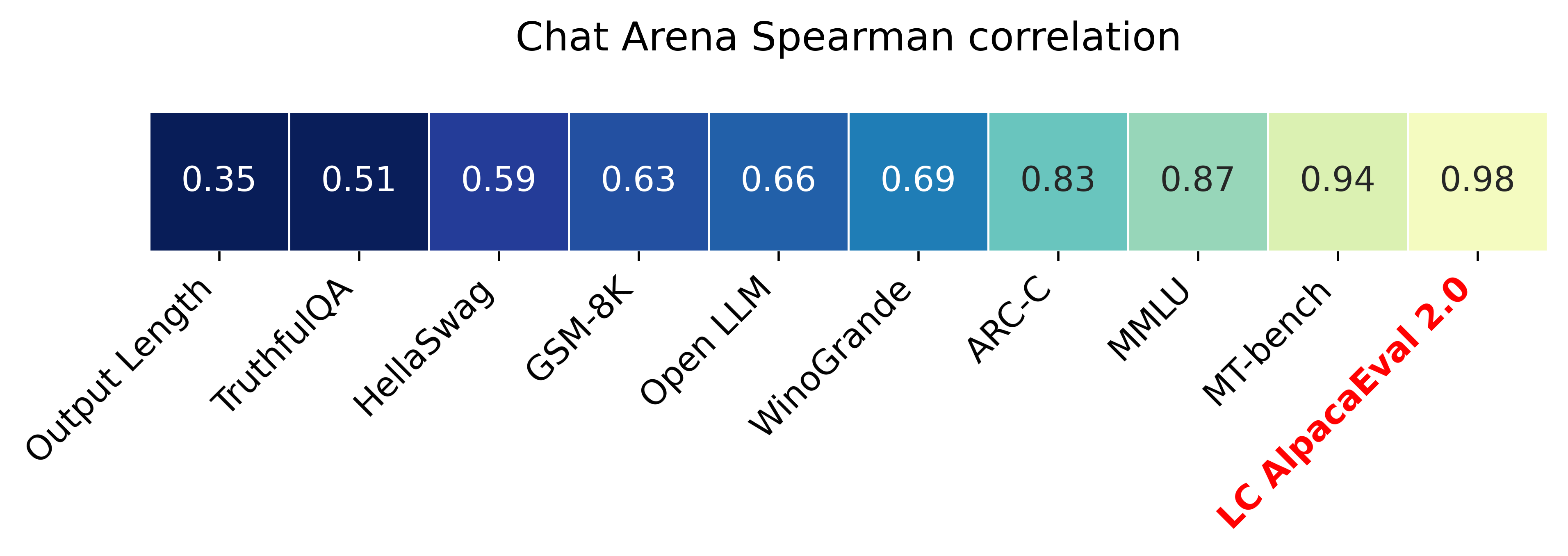
具有长度控制的胜利率(Paper)的Alpacaeval 2.0与Chatbot Arena的Spearman相关性为0.98 ,而OpenAI积分的成本不到10美元,在不到3分钟的时间内运行和运行。我们的目标是为CHAT LLM提供一个基准:快速(<5分钟),便宜(<$ 10),并且与人类高度相关(0.98)。这是与其他基准的比较:
更新:
?默认情况下,长度控制的获胜率已超出并使用!这将与聊天机器人竞技场的相关性从0.93提高到0.98,同时大大降低了连续连续性。原始的获胜率仍在网站和CLI上显示。更多详细信息。
?灰木瓦尔2.0默认情况下使用并使用!我们改进了自动通信器(更好,更便宜),并将GPT-4预览用作基线。更多详细信息。对于旧版本,设置您的环境变量IS_ALPACA_EVAL_2=False 。
指导跟随模型(例如,chatgpt)的评估通常需要人类互动。这是耗时的,昂贵的且难以复制的。基于LLM的自动评估中的羊驼羊角,该评估是快速,便宜,可复制的,并且可以针对20K人类注释进行验证。它对于模型开发特别有用。尽管我们在先前的自动评估管道上有所改善,但仍然存在基本限制,例如偏爱更长的产出。羊驼谷提供以下内容:
何时使用羊驼毛?我们的自动评估器是一个快速,便宜的代理人,可用于评估简单的指导跟踪任务。如果您必须在模型开发过程中快速运行许多评估,那么这将很有用。
何时不使用山帕卡瓦尔?作为任何其他自动评估者,Alpacaeval不应在高风险决策中取代人类评估,例如决定模型释放。特别是,阿尔帕卡瓦尔受到以下事实的限制:(1)评估集中的指示可能无法代表LLM的高级使用; (2)自动评估者可能有偏见,例如偏爱答案的样式; (3)Alpacaeval不能衡量模型可能引起的风险。限制的详细信息。
要安装稳定版本,请运行
pip install alpaca-eval要安装夜间版本,请运行
pip install git+https://github.com/tatsu-lab/alpaca_eval然后,您可以按以下方式使用它:
 export OPENAI_API_KEY= < your_api_key > # for more complex configs, e.g. using Azure or switching clients see client_configs/README.md
alpaca_eval --model_outputs ' example/outputs.json ' 这将将排行榜打印到控制台,并将排行榜和注释保存到与model_outputs文件相同的目录中。重要参数如下:
instruction和output 。weighted_alpaca_eval_gpt4_turbo (Alpacaeval 2.0的默认值),该量与我们的人类注释数据,大的上下文大小具有很高的一致性率,并且非常便宜。有关所有注释者的比较,请参见此处。model_outputs相同的格式。默认情况下,这是Alpacaeval 2.0的gpt4_turbo 。如果您没有模型输出,则可以使用evaluate_from_model并传递本地路径或拥抱面模型的名称,或者来自标准API(OpenAI,Anthropic,Anthropic,cohere,cohere,Google,...)的模型。其他命令:
>>> alpaca_eval -- --help SYNOPSIS
alpaca_eval COMMAND
COMMANDS
COMMAND is one of the following:
evaluate
Evaluate a model based on its outputs. This is the default entrypoint if no command is specified.
evaluate_from_model
Evaluate a model from HuggingFace or an API provider. This is a wrapper around `evaluate` which includes generating from a desired model.
make_leaderboard
Precompute and save an entire leaderboard for a given dataset / evaluator / set of models generations.
analyze_evaluators
Analyze an evaluator and populates the evaluators leaderboard (agreement with human, speed, price,...).
有关每个功能的更多信息,请使用alpaca_eval <command> -- --help 。
我们的排行榜是在Alpacaeval数据集上计算的。我们使用不同的基线模型和自动通道者预先计算重要模型的排行榜。我们的两个主要排行榜(“ Alpacaeval 2.0”和“ Alpacaeval”)可以在此页面上找到。 “ Alpacaeval 2.0”使用weighted_alpaca_eval_gpt4_turbo作为注释器,而gpt4_turbo用于基线。 “ Alpacaeval”使用alpaca_eval_gpt4用于注释器,而text_davinci_003用于基线。对于所有预先计算的排行榜,请参见此处。稍后,我们还展示了如何将您的模型添加到排行榜中,以及如何为您的评估员/数据集制作新的排行榜。有关所有可用型号的配置,请参见此处。
羊角谷山羊角板最小排行榜:
| 获胜率 | 性病错误 | |
|---|---|---|
| GPT4 | 95.3 | 0.7 |
| 克劳德 | 88.4 | 1.1 |
| chatgpt | 86.1 | 1.2 |
| 瓜纳科65B | 71.8 | 1.6 |
| Vicuna-13b | 70.4 | 1.6 |
| text_davinci_003 | 50.0 | 0.0 |
| 羊驼农业ppo-human | 41.2 | 1.7 |
| 羊驼-7b | 26.5 | 1.5 |
| text_davinci_001 | 15.2 | 1.2 |
获胜率:赢率测量模型输出的时间比参考的输出(alpacaeval的test-davinci-003 )和alpacaeval 2.0的gpt4_turbo所优于使用。更具体地说,要计算apacaeval数据集中每个指令中所需模型的输出对的获胜率。然后,我们将每个输出与参考模型的输出(例如text-davinci-003 )的输出配对。然后,我们询问我们的自动评估器他们更喜欢哪种输出。参见Alpacaeval的和Alpacaeval 2.0的提示和配置,特别是我们随机对输出顺序进行随机,以避免位置偏差。然后,我们平均比数据集中所有指令的偏好平均获得基线的胜利率。如果两个输出完全相同,我们对这两个模型都使用一半偏好。
标准错误:这是获胜率的标准错误(按N-1归一化),即,与不同指令相比的偏好平均。
alpaca_eval_gpt4我们的alpaca_eval_gpt4 (请参阅配置)注释者平均比首选项,其中偏好的获得如下:
temperature=0 GPT4完成提示注释者是Alpacafarm和鸟舍评估者(受高度影响)之间的混合。特别是,我们使用与Alpacafarm相同的代码(缓存/随机化/超参数),但使用类似于Aviary的排名提示。我们对鸟舍的提示进行更改,以减少更长输出的偏差。相关工作的详细信息。
对于Alpacaeval 2.0,我们使用weighted_alpaca_eval_gpt4_turbo ,它使用logprobs来计算连续的偏好,并将gpt4_turbo用作模型(请参阅配置)。
我们通过与收集的2.5k人类注释进行比较(每个人的4个人类注释),评估了Alpacaeval设置的不同自动注释。 Below we show metrics for our suggested evaluators ( weighted_alpaca_eval_gpt4_turbo , alpaca_eval_gpt4 ), for prior automatic evaluators ( alpaca_farm_greedy_gpt4 , aviary_gpt4 , lmsys_gpt4 ), for humans ( humans ), and for different base models with essentially the same prompt ( gpt4 , claude , text_davinci_003 , chatgpt_fn , guanaco_33b , chatgpt )。请参阅此处的所有评估器的配置,这些评估器及其相关指标可用。
| 人类协议 | 价格[$/1000个示例] | 时间[秒/1000个示例] | Spearman Corr。 | 皮尔逊·柯尔森(Pearson Corr) | 偏见 | 方差 | proba。喜欢更长的时间 | |
|---|---|---|---|---|---|---|---|---|
| 羊Alpaca_eval_gpt4 | 69.2 | 13.6 | 1455 | 0.97 | 0.93 | 28.4 | 14.6 | 0.68 |
| alpaca_eval_cot_gpt4_turbo_fn | 68.6 | 6.3 | 1989 | 0.97 | 0.90 | 29.3 | 18.4 | 0.67 |
| alpaca_eval_gpt4_turbo_fn | 68.1 | 5.5 | 864 | 0.93 | 0.82 | 30.2 | 15.6 | 0.65 |
| Alpaca_eval_llama3_70b_fn | 67.5 | 0.4 | 209 | 0.90 | 0.86 | 32.3 | 8.2 | 0.79 |
| GPT4 | 66.9 | 12.5 | 1037 | 0.88 | 0.87 | 31.5 | 14.6 | 0.65 |
| 羊Alpaca_farm_greedy_gpt4 | 66.4 | 15.3 | 878 | 0.85 | 0.75 | 30.2 | 19.3 | 0.60 |
| alpaca_eval_cot_gpt4_turbo_fn | 65.7 | 4.3 | 228 | 0.78 | 0.77 | 33.9 | 23.7 | 0.61 |
| 人类 | 65.7 | 300.0 | 36800 | 1.00 | 1.00 | 0.0 | 34.3 | 0.64 |
| 克劳德 | 65.3 | 3.3 | 173 | 0.93 | 0.90 | 32.4 | 18.5 | 0.66 |
| lmsys_gpt4 | 65.3 | 13.9 | 17982 | 0.98 | 0.97 | 31.6 | 15.9 | 0.74 |
| text_davinci_003 | 64.1 | 8.7 | 121 | 0.85 | 0.83 | 33.8 | 22.7 | 0.70 |
| 最长 | 62.2 | 0.0 | 0 | 0.27 | 0.56 | 37.8 | 0.0 | 1.00 |
| chatgpt | 57.3 | 0.8 | 285 | 0.72 | 0.71 | 39.4 | 34.1 | 0.59 |
现在,我们用文字解释如何计算上表中的指标。代码在这里。
人类的同意:这衡量了当前注释者与人类的大多数偏好之间的一致性在我们的跨通道集中的约650个注释中,该杂交包含4个人类注释。为了估算单个人(上表中的humans行)与大多数人之间的一致性,我们采用了4个注释之一,并计算预测其他3个注释模式时它具有的准确性。然后,我们在所有4个注释和650个指令中平均达到这种准确性,以获得人类协议,即,我们计算了预期的(超过人类和样本)保留的协议。如果该模式不是唯一的,我们将随机采用其中一种模式。我们为自动注释者执行完全相同的计算,以便最终数字可比。
价格[$/1000示例] :这是每1000个注释的平均价格。对于人类而言,这是我们付给机械土耳其人收集这些注释的价格(每小时21美元)。如果价格取决于用于计算注释的计算机(例如鸟根),我们将其留空。
时间[秒/1000个示例] :这是计算1000个注释所需的平均时间。对于人类而言,每个机械Turker都以1000个例子为例,这是估计的中位时间。对于自动注释,这是我们运行注释时所花费的平均时间。请注意,这可能取决于不同用户不同的API限制以及簇正在处理的请求数量。
Spearman Corr。 :这可以衡量使用自动通信器的偏好计算的排行榜与以人类偏好计算的排行榜之间的相关性。与Human agreement一样,我们使用alpacafarm的人类注释,但现在我们考虑了方法级的协议,而不仅仅是与人类的样本协议。请注意,我们只使用9个型号,因此相关性不是很可靠。
皮尔逊·柯尔森(Pearson Corr) :与Spearman corr.但是与皮尔逊相关。
偏见:最有可能的人类标签与最可能的自动标签之间的一致。对于自动注释,我们通过为每个示例对4个不同的注释进行采样来估算它。此处的随机性来自提示中输出的顺序,从LLM进行采样,如果适用,则在批处理中的指令顺序以及在池中选择注释器。然后,我们采用4个注释的模式,并在预测4个人注释的模式时计算模式的准确性。请注意,如果我们拥有“无限”的盘通道数量,这可能是对我们将得到的真正偏见的高估。低偏见意味着注释者的期望与人类相同。对于人类,偏见为零。请注意,这与标准的统计偏差无关,但无关,因为我们采用该模式而不是平均注释,并且我们考虑0-1损失而不是平方损失。
差异:预期协议单个自动偏好,最有可能的偏好。我们以与估计人类的“人类协议”相同的方式估计它,即,在使用第四次注释预测3个注释的模式时,我们会在预期的一个出现错误中估算。较低的差异意味着注释与其偏好相一致,即,如果您用不同的种子对其进行采样,则会产生相同的结果。与偏差一样,这并不是标准统计差异,因为我们采用模式而不是平均注释,我们考虑0-1损失而不是平方损失。
请注意,“人类一致”与偏见和差异密切相关。特别是,由于我们仅使用单个注释,而偏见旨在测量当前注释者的不可约误差,因此该方差衡量了误差。
proba。偏爱更长的时间:这是当两个输出之一明显长于另一个输出时,注释者更喜欢较长的输出(超过30个字符的差异)。
在整个表中,我们还提供以下指标:
proba。优先列表:这是注释者更喜欢输出包含列表/项目符号点的概率,而一个输出则不是另一个输出。
proba。优先1 :这是注释者更喜欢第一对输出的概率。我们所有提出的注释者在提示中随机对输出进行随机,因此应为0.5。先前的注释者,例如lmsys和aviary ,都没有。
#解析:这是注释者能够解析的示例数。
请注意,如果差异和偏差为空,则意味着由于资源(时间和价格)约束,我们只为每个648示例执行一个单个注释。这解释了为什么#Parsed为648,否则应为2592。
总体而言,我们建议使用annotators_config=weighted_alpaca_eval_gpt4_turbo如果您想要与人类达成的高度协议,并且如果预算紧张,则annotators_config=chatgpt_fn 。
选择注释者时,我们建议您考虑以下内容(前三个很明显):
"Human agreement [%]""Price [$/1000 examples]""Time [seconds/1000 examples]""* corr."大约> 0.7。重要的是,相关性不是太低,但是我们不建议将其用作主要指标,因为仅在9个模型上计算相关性。"Proba. prefer longer" 。 <0.7。确实,我们发现,人类注释者的大多数偏好对更长的答案具有强大的偏见(如"longest"评估者的高性能= 62.2,始终更喜欢最长的输出)。这表明它可能与人类注释者更有偏见。为了避免具有长度偏见的排行榜,我们建议使用低于0.7“ proba。更喜欢更长的自动注释者”。"Variance"大约<0.2。我们认为,良好的评估者应具有尽可能少的差异,以使结果大多可再现。请注意,在我们正在模拟人类的情况下,如Alpacafarm中所示,这是可取的。我们过滤了不满足上表中这些要求的注释者(除了人类 / chatgpt / 003 / lmsys以外,出于参考目的)。有关所有结果,请参见此处。通常,我们发现weighted_alpaca_eval_gpt4_turbo是质量 /价格 /时间 /差异 /长度偏差之间的良好权衡。
上述指标是根据人群工人的注释计算的。尽管有用,但这些注释并不完美,例如,人群工作者通常偏爱风格而不是事实。因此,我们建议用户根据自己的说明和人类注释来验证自动评估者。限制的详细信息。
>>> alpaca_eval evaluate -- --help NAME
alpaca_eval evaluate - Evaluate a model based on its outputs. This is the default entrypoint if no command is specified.
SYNOPSIS
alpaca_eval evaluate <flags>
DESCRIPTION
Evaluate a model based on its outputs. This is the default entrypoint if no command is specified.
FLAGS
--model_outputs=MODEL_OUTPUTS
Type: Optional[Union]
Default: None
The outputs of the model to add to the leaderboard. Accepts data (list of dictionary, pd.dataframe, datasets.Dataset) or a path to read those (json, csv, tsv) or a function to generate those. Each dictionary (or row of dataframe) should contain the keys that are formatted in the prompts. E.g. by default `instruction` and `output` with optional `input`. If None, we just print the leaderboard.
-r, --reference_outputs=REFERENCE_OUTPUTS
Type: Union
Default: <func...
The outputs of the reference model. Same format as `model_outputs`. If None, the reference outputs are a specific set of Davinci 003 outputs on the AlpacaEval set:
--annotators_config=ANNOTATORS_CONFIG
Type: Union
Default: 'alpaca_eval_gpt4_turbo_fn'
The path the (or list of dict of) the annotator's config file. For details see the docstring of `PairwiseAnnotator`.
-n, --name=NAME
Type: Optional[Optional]
Default: None
The name of the model to add to the leaderboard. If None we check if `generator is in model_outputs` if not we use "Current model".
-o, --output_path=OUTPUT_PATH
Type: Union
Default: 'auto'
Path to the directory where the new leaderboard and the annotations should be stored. If None we don't save. If `auto` we use `model_outputs` if it is a path, and otherwise use the directory from which we call the script.
-p, --precomputed_leaderboard=PRECOMPUTED_LEADERBOARD
Type: Union
Default: 'auto'
The precomputed leaderboard or a path to it (json, csv, or tsv). The leaderboard should contain at least the column `win_rate`. If `auto` we will try to use the corresponding leaderboard for the reference outputs (only if in CORRESPONDING_OUTPUTS_LEADERBOARDS). If `None` we won't add other models from the leaderboard.
--is_overwrite_leaderboard=IS_OVERWRITE_LEADERBOARD
Type: bool
Default: False
Whether to overwrite the leaderboard if the model is already in it.
-l, --leaderboard_mode_to_print=LEADERBOARD_MODE_TO_PRINT
Type: Optional
Default: 'minimal'
The mode of the leaderboard to use. Only used if the precomputed leaderboard has a column `mode`, in which case it will filter the leaderboard by this mode. If None keeps all.
-c, --current_leaderboard_mode=CURRENT_LEADERBOARD_MODE
Type: str
Default: 'community'
The mode of the leaderboard for the current method.
--is_return_instead_of_print=IS_RETURN_INSTEAD_OF_PRINT
Type: bool
Default: False
Whether to return the metrics instead of printing the results.
-f, --fn_metric=FN_METRIC
Type: Union
Default: 'pairwise_to_winrate'
The function or function name in `metrics.py` that will be used to convert preference to metrics. The function should take a sequence of preferences (0 for draw, 1 for base win, 2 when the model to compare wins) and return a dictionary of metrics and the key by which to sort the leaderboard.
-s, --sort_by=SORT_BY
Type: str
Default: 'win_rate'
The key by which to sort the leaderboard.
--is_cache_leaderboard=IS_CACHE_LEADERBOARD
Type: Optional[Optional]
Default: None
Whether to save the result leaderboard to `precomputed_leaderboard`. If None we save only if max_instances not None. A preferred way of adding models to the leaderboard is to set `precomputed_leaderboard` to the previously saved leaderboard at `<output_path>/leaderboard.csv`.
--max_instances=MAX_INSTANCES
Type: Optional[Optional]
Default: None
The maximum number of instances to annotate. Useful for testing.
--annotation_kwargs=ANNOTATION_KWARGS
Type: Optional[Optional]
Default: None
Additional arguments to pass to `PairwiseAnnotator.annotate_head2head`.
-A, --Annotator=ANNOTATOR
Default: <class 'alpaca_eval.annotators.pairwise_evaluator.PairwiseAn...
The annotator class to use.
Additional flags are accepted.
Additional arguments to pass to `PairwiseAnnotator`.
>>> alpaca_eval evaluate_from_model -- --help NAME
alpaca_eval evaluate_from_model - Evaluate a model from HuggingFace or an API provider. This is a wrapper around `evaluate` which includes generating from a desired model.
SYNOPSIS
alpaca_eval evaluate_from_model MODEL_CONFIGS <flags>
DESCRIPTION
Evaluate a model from HuggingFace or an API provider. This is a wrapper around `evaluate` which includes generating from a desired model.
POSITIONAL ARGUMENTS
MODEL_CONFIGS
Type: Union
A dictionary or path (relative to `models_configs`) to a yaml file containing the configuration of the model to decode from. If a directory,we search for 'configs.yaml' in it. The keys in the first dictionary should be the generator's name, and the value should be a dictionary of the generator's configuration which should have the
FLAGS
-r, --reference_model_configs=REFERENCE_MODEL_CONFIGS
Type: Optional[Union]
Default: None
Same as in `model_configs` but for the reference model. If None, we use the default Davinci003 outputs.
-e, --evaluation_dataset=EVALUATION_DATASET
Type: Union
Default: <func...
Path to the evaluation dataset or a function that returns a dataframe. If None, we use the default evaluation
-a, --annotators_config=ANNOTATORS_CONFIG
Type: Union
Default: 'alpaca_eval_gpt4_turbo_fn'
Path to the annotators configuration or a dictionary. If None, we use the default annotators configuration.
-o, --output_path=OUTPUT_PATH
Type: Union
Default: 'auto'
Path to save the generations, annotations and leaderboard. If auto saves at `results/<model_name>`
-m, --max_instances=MAX_INSTANCES
Type: Optional[int]
Default: None
Maximum number of instances to generate and evaluate. If None, we evaluate all instances.
--is_strip_output=IS_STRIP_OUTPUT
Type: bool
Default: True
Whether to strip trailing and leading whitespaces from the outputs.
--is_load_outputs=IS_LOAD_OUTPUTS
Type: bool
Default: True
Whether to try to load outputs from the output path. If True and outputs exist we only generate outputs for instructions that don't have outputs yet.
-c, --chunksize=CHUNKSIZE
Type: int
Default: 64
Number of instances to generate before saving. If None, we save after all generations.
Additional flags are accepted.
Other kwargs to `evaluate`
NOTES
You can also use flags syntax for POSITIONAL ARGUMENTS
要评估一个模型,您需要:
model_outputs输出。默认情况下,我们使用来自Alpacaeval的805个示例。计算山帕瓦尔的输出: import datasets
eval_set = datasets . load_dataset ( "tatsu-lab/alpaca_eval" , "alpaca_eval" )[ "eval" ]
for example in eval_set :
# generate here is a placeholder for your models generations
example [ "output" ] = generate ( example [ "instruction" ])
example [ "generator" ] = "my_model" # name of your model如果您的型号是拥抱面模型或来自标准API提供商(OpenAI,Anthropic,Cohere)。然后,您可以直接使用alpaca_eval evaluate_from_model来照顾产生输出。
reference_outputs 。默认情况下,我们在Alpacaeval上使用gpt4_turbo的预算输出。如果要使用其他模型或其他数据集,则遵循与(1.)相同的步骤。annotators_config指定的评估器。我们建议使用alpaca_eval_gpt4_turbo_fn 。有关其他选项和比较,请参见此表。根据评估器,您可能需要在环境中或int client_configs中设置适当的API_KEY。一起运行:
alpaca_eval --model_outputs ' example/outputs.json '
--annotators_config ' alpaca_eval_gpt4_turbo_fn '如果您没有解码的输出,则可以使用evaluate_from_model ,以照顾您的解码(模型和参考)。这是一个例子:
 # need a GPU for local models
alpaca_eval evaluate_from_model
  --model_configs ' oasst_pythia_12b '
  --annotators_config ' alpaca_eval_gpt4_turbo_fn '
在这里, model_configs和reference_model_configs (可选)是指定提示的目录的路径,该路径指定了提示,模型提供商(此处为HuggingFace)和解码参数。请参阅此目录以获取示例。对于所有可用开箱即用的模型提供商,请参见此处。
caching_path磁盘上缓存。因此,注释永远不会重新计算,这使注释更快,更便宜并允许可重复性。即使评估不同的模型,这也有帮助,因为许多模型具有相同的输出。>>> alpaca_eval make_leaderboard -- --help NAME
alpaca_eval make_leaderboard - Precompute and save an entire leaderboard for a given dataset / evaluator / set of models generations.
SYNOPSIS
alpaca_eval make_leaderboard <flags>
DESCRIPTION
Precompute and save an entire leaderboard for a given dataset / evaluator / set of models generations.
FLAGS
--leaderboard_path=LEADERBOARD_PATH
Type: Optional[Union]
Default: None
The path to save the leaderboard to. The leaderboard will be saved as a csv file, if it already exists it will
--annotators_config=ANNOTATORS_CONFIG
Type: Union
Default: 'alpaca_eval_gpt4_turbo_fn'
The path the (or list of dict of) the annotator's config file.
--all_model_outputs=ALL_MODEL_OUTPUTS
Type: Union
Default: <fu...
The outputs of all models to add to the leaderboard. Accepts data (list of dictionary, pd.dataframe, datasets.Dataset) or a path to read those (json, csv, tsv potentially with globbing) or a function to generate those. If the path contains a globbing pattern, we will read all files matching the pattern and concatenate them. Each dictionary (or row of dataframe) should contain the keys that are formatted in the prompts. E.g. by default `instruction` and `output` with optional `input`. It should also contain a column `generator` with the name of the current model.
-r, --reference_outputs=REFERENCE_OUTPUTS
Type: Union
Default: <func...
The outputs of the reference model. Same format as `all_model_outputs` but without needing `generator`. By default, the reference outputs are the 003 outputs on AlpacaEval set.
-f, --fn_add_to_leaderboard=FN_ADD_TO_LEADERBOARD
Type: Callable
Default: 'evaluate'
The function to use to add a model to the leaderboard. If a string, it should be the name of a function in `main.py`. The function should take the arguments: `model_outputs`, `annotators_config`, `name`, `precomputed_leaderboard`, `is_return_instead_of_print`, `reference_outputs`.
--leaderboard_mode=LEADERBOARD_MODE
Type: str
Default: 'verified'
The mode of the leaderboard to save all new entries with.
-i, --is_return_instead_of_print=IS_RETURN_INSTEAD_OF_PRINT
Type: bool
Default: False
Whether to return the metrics instead of printing the results.
Additional flags are accepted.
Additional arguments to pass to `fn_add_to_leaderboard`.
如果要使用单个命令(而不是多个alpaca_eval调用)进行新的排行榜,则可以使用以下内容:
alpaca_eval make_leaderboard
  --leaderboard_path < path_to_save_leaderboard >
  --all_model_outputs < model_outputs_path >
  --reference_outputs < reference_outputs_path >
  --annotators_config < path_to_config.yaml >
在哪里:
leaderboard_path :将排行榜保存到的路径。排行榜将作为CSV文件保存,如果它已经存在,则将附加。all_model_outputs :所有模型输出的JSON路径要添加到排行榜中(作为单个文件或通过包围多个文件)。每个字典应包含在提示中格式化的键( instruction和output ),并包含带有当前模型名称的列generator 。例如,请参见此文件。reference_outputs参考模型输出的路径。每个字典应包含提示中格式的键( instruction和output )。默认情况下,参考输出是Alpacaeval集合的003输出。annotators_config :注释器配置文件的路径。默认为alpaca_eval_gpt4 。 >>> alpaca_eval analyze_evaluators -- --help NAME
alpaca_eval analyze_evaluators - Analyze an evaluator and populates the evaluators leaderboard (agreement with human, speed, price,...).
SYNOPSIS
alpaca_eval analyze_evaluators <flags>
DESCRIPTION
Analyze an evaluator and populates the evaluators leaderboard (agreement with human, speed, price,...).
FLAGS
--annotators_config=ANNOTATORS_CONFIG
Type: Union
Default: 'alpaca_eval_gpt4_turbo_fn'
The path the (or list of dict of) the annotator's config file.
-A, --Annotator=ANNOTATOR
Default: <class 'alpaca_eval.annotators.pairwise_evaluator.PairwiseAn...
The annotator class to use.
--analyzer_kwargs=ANALYZER_KWARGS
Type: Optional[Optional]
Default: None
Additional arguments to pass to the analyzer.
-p, --precomputed_leaderboard=PRECOMPUTED_LEADERBOARD
Type: Union
Default: PosixPath('/Users/yanndubois/Desktop/GitHub/alpaca_eval/src/...
The precomputed (meta)leaderboard of annotators or a path to it (json, csv, or tsv).
--is_save_leaderboard=IS_SAVE_LEADERBOARD
Type: bool
Default: False
Whether to save the leaderboard (ie analyzed results).
--is_return_instead_of_print=IS_RETURN_INSTEAD_OF_PRINT
Type: bool
Default: False
Whether to return the leaderboard (ie analyzed results). If True, it will not print the results.
--is_overwrite_leaderboard=IS_OVERWRITE_LEADERBOARD
Type: bool
Default: False
Whether to overwrite the leaderboard if it already exists.
-m, --max_instances=MAX_INSTANCES
Type: Optional[Optional]
Default: None
The maximum number of instances to analyze.
--is_single_annotator=IS_SINGLE_ANNOTATOR
Type: bool
Default: False
Whether to analyze a single annotator. If True, will not be able to estimate the annotator's bias.
-l, --leaderboard_mode_to_print=LEADERBOARD_MODE_TO_PRINT
Type: str
Default: 'minimal'
The mode of the leaderboard to print.
-c, --current_leaderboard_mode=CURRENT_LEADERBOARD_MODE
Type: str
Default: 'minimal'
The mode of the leaderboard to save all new entries with.
-o, --output_path=OUTPUT_PATH
Type: Union
Default: 'auto'
Path to save the leaderboard and annotataions. If None, we don't save.
Additional flags are accepted.
Additional arguments to pass to `Annotator`.
Alpacaeval提供了一种制作新评估者的简单方法。您需要的只是制作一个新的configs.yaml配置文件,然后将其作为--annotators_config <path_to_config.yaml>传递给alpaca_eval 。以下是您可以制作新评估者的一些方法:
prompt_template中指定路径。路径相对于配置文件。completions_kwargs中的所需参数。要查看所有可用参数,请参阅该文件中fn_completions在配置文件中指定的相应函数的DOCSTRINGS。model_name中指定所需的模型,并在prompt_template中的相应提示。如果该模型来自另一个提供商,则必须更改fn_completions ,以将其映射到该文件中的相应函数。我们提供fn_completions功能,以使用OpenAI,人类,cohere或HuggingFace的模型。要安装所有提供商所需的软件包,请使用pip install alpaca_eval[all] 。最简单的是检查SinglePairwiseAnnotator的docstrings。这是一些重要的:
 Parameters
----------
prompt_template : path
    A prompt that will be given to `fn_prompter` or path to the prompts. Path is relative to
    `evaluators_configs/`

fn_completion_parser : callable or str
    Function in `completion_parsers.py` to use for parsing the completions into preferences. For each completion,
    the number of preferences should be equal to the batch_size if not we set all the preferences in that batch to
    NaN.

completion_parser_kwargs : dict
    Kwargs for fn_completion_parser.

fn_completions : callable or str
    Function in `decoders.py` to use for decoding the output.

completions_kwargs : dict
    kwargs for fn_completions. E.g. model_name, max_tokens, temperature, top_p, top_k, stop_seq.

is_randomize_output_order : bool
    Whether to randomize output_1, output_2 when formatting.

batch_size : int
    Number of examples that will be added in a single prompt.
制作评估者后,您还可以使用以下命令将其分析并将其添加到评估人员的排行榜中:
alpaca_eval analyze_evaluators --annotators_config ' <path_to_config.yaml> ' 为了估计偏见和差异,这将评估4个种子的每个例子,即2.5k评估。如果您想要廉价的评估,则可以使用--is_single_annotator True使用单个种子,这将跳过偏差和差异的估计。
除错误修复外,我们还接受新模型,评估人员和评估集的PR。我们将定期使用新的社区捐款更新排行榜网站。如果您遇到任何问题并希望向社区询问帮助,我们还为Alpacaeval创建了一个支持分歧。
要开始,请首先分配存储库,然后从源pip install -e .
首先,您需要在Models_configs文件夹中添加模型配置定义。例如,您可以查看Falcon-7b-Instruct YAML。请确保YAML匹配中的文件夹名称和密钥名称。
然后,请按照评估模型的步骤来运行模型的推断,以在评估集中产生输出并根据评估者之一对模型进行评分。一个示例命令可能看起来像:
alpaca_eval evaluate_from_model
  --model_configs ' falcon-7b-instruct '
运行此命令后,您应该在相应的排行榜文件中生成一个输出JSON和新条目。请使用配置,输出文件和更新的排行榜进行PR。
具体而言,您应该做类似的事情:
git clone <URL>src/alpaca_eval/models_configs/<model_name>上制作模型配置,然后评估它evaluate_from_model --model_configs '<model_name>'git add src/alpaca_eval/models_configs/ < model_name > # add the model config
git add src/alpaca_eval/leaderboards/ # add the actual leaderboard entry
git add src/alpaca_eval/metrics/weights # add the weights for LC
git add -f results/ < model_name > /model_outputs.json # force add the outputs on the dataset
git add -f results/ < model_name > / * /annotations.json # force add the evaluations from the annotators
git commit -m " Add <model_name> to AlpacaEval "
git push注意:如果要在Alpacaeval之外生成输出,则仍应添加模型配置,但使用fn_completions: null 。有关一个示例,请参见此配置。
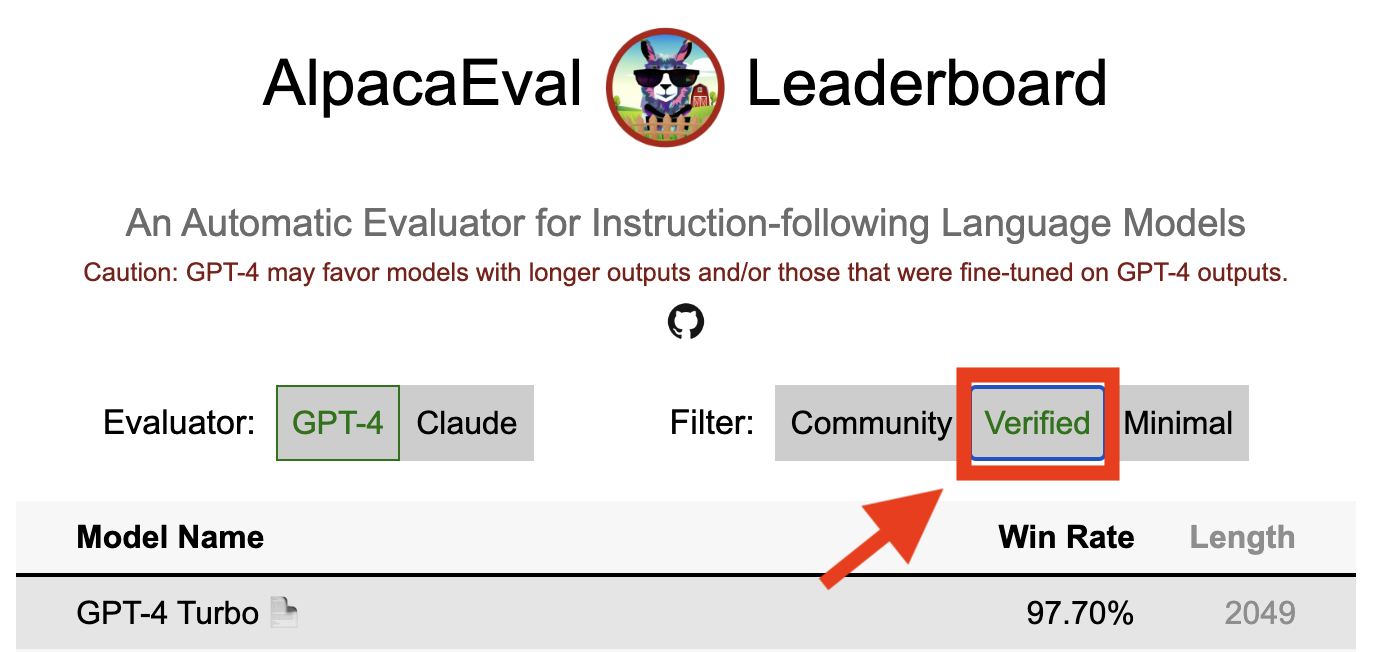
Alpacaeval的验证结果表明,核心维护者已解码了模型的输出并进行了评估。不幸的是,我们是山地肌维护者,缺乏验证所有模型的资源,因此我们只能为排行榜前5名的模型做到这一点。对于给您带来的任何不便,我们深表歉意,并感谢您的理解。要验证您的模型,请按照以下步骤操作:
@yann在Discord上,或者如果您有我们的电子邮件,请给我们发送电子邮件,提供一个简短的理由,说明为什么要验证您的模型。alpaca_eval evaluate_from_model --model_configs '<your_model_name>'运行,而无需本地GPU。alpaca_eval evaluate_from_model --model_configs '<your_model_name>' ,更新结果并通知您,以便您可以撤销临时密钥。请注意,我们不会重新评估相同的模型。由于采样差异,结果可能与您的初始结果略有不同。我们将用经过验证的结果替换您以前的社区结果。
请首先遵循制作新评估者的指示。创建注释器配置后,我们要求您通过评估最小模型集为注释者创建一个新的排行榜。这些模型的输出可以通过下载alpaca_eval_all_outputs.json找到。
alpaca_eval make_leaderboard
  --leaderboard_path src/alpaca_eval/leaderboards/data_AlpacaEval/ < evaluator > _leaderboard.csv
  --all_model_outputs alpaca_eval_all_outputs.json
  --annotators_config < evaluator_config >
然后,请使用注释器配置和排行榜CSV创建PR。
为了贡献新的评估集,您首先需要指定一组文本说明。然后,您需要指定一组参考输出(根据此参考计算模型赢率)。为了易于使用,您可以使用默认的Text-Davinci-003参考配置。
将它们放在JSON中,每个条目都指定字段instruction , output和generator 。您可以将alpaca_eval.json视为指南(不需要dataset集字段)。
最后,我们要求您在此新评估集中创建最小的排行榜。您可以使用以下操作:
alpaca_eval make_leaderboard
  --leaderboard_path < src/alpaca_eval/leaderboards/data_AlpacaEval/your_leaderboard_name.csv >
  --all_model_outputs alpaca_eval_all_outputs.json
  --reference_outputs < path_to_json_file >
请与评估集JSON和相应的排行榜CSV一起提交PR。
当前,我们允许不同的完成功能,例如, openai , anthropic , huggingface_local , huggingface_hub_api ...如果您想贡献一个新的完成函数 /可以执行推断的新完成功能 / API,请按照以下步骤操作:
<name>_completions(prompts : Sequence[str], model_name :str, ... ) 。此功能应作为参数提示 + kwargs并返回完成。请查看目录中的其他完成功能的模板。例如,huggingface_local_completions或人类。<name>_completions和依赖项。再次,您可以按照huggingface_local_completions的示例alpaca_eval evaluate_from_model --model_configs '<model_configs>'评估模型随意提早开始PR,我们将能够在此过程中提供一些帮助!
与其他当前评估者一样,羊角谷评估管道具有重要的局限性,因此不应用作重要环境中人类评估的替代,例如决定是否准备部署模型。这些可以大致分为三类:
指令可能无法代表现实意见:alpacaeval集合包含来自各种数据集(自我指导,开放式辅助,Vicuna,vicuna,koala,hh-rlHF)的示例,这些示例可能不代表现实通用和诸如GPT4之类的更好模型的现实使用和高级应用。这可能会使最佳的封闭模型(GPT4 / Claude / Chatgpt / ...)看起来比开放型模型更相似。实际上,这些封闭的模型似乎在更多样化的数据上审计/填充。例如,有关更复杂的说明的初步结果,请参见此博客。但是,请注意,在Alpacafarm中,我们表明我们的评估集中的获胜率高度相关(0.97 R2),并在用户与羊驼演示的用户互动中进行了赢率。此外,与其他排行榜(例如LMSYS)相比,山帕瓦尔排行榜在开放型和OpenAI模型之间显示出更大的差距。
自动注释者的偏见:原始自动注释者似乎具有隐式偏见。特别是,我们发现它们倾向于更喜欢包含列表的更长输出和输出(例如,羊alpaca_eval_gpt4的0.68 / 0.69, claude的0.62 / 0.58)。尽管我们发现人类具有相似的偏见(0.64 / 0.61),但我们认为,这可能更多地是人类注释管道的限制,我们使用的而不是真正的人类偏见。更普遍的是,通过定性分析,我们发现自动注释者比其内容(例如,事实)更重要。最后,我们发现自动评估者倾向于喜欢与claude和alpaca_eval_gpt4排行榜上的ChatGPT/GPT4之间的很大差异所暗示的相似模型(可能是在相同数据上进行训练)的输出。请注意,在我们的长度控制的胜利率中,长度偏差部分缓解。
缺乏安全性评估:重要的是,Alpacaeval仅评估模型的指令跟踪功能,而不是它们可能造成的危害(例如有毒行为或偏见)。结果,当前Chatgpt和最佳开源模型之间的微小差距不应被解释,就好像后者准备好部署一样。
除了对评估管道的限制之外,我们对评估者的验证以及我们建议的选择评估集的方法还有局限性。
首先,我们基于人类交叉通道的评估者的验证受到以下局限性:(1)我们定性地发现,我们的人群工人也倾向于偏爱诸如长度和列表的风格,而不是事实; (2)这没有验证针对参考模型的胜利率首先是良好的评估策略; (3)16名群众的偏好并不代表所有人类的偏好。
其次,我们建议根据统计能力选择评估集的建议方法受到以下局限性:(1)统计功率不能确保正确的方向,例如,您可以拥有一套不自然的指令,而羊驼“执行”比更好的模型更好; (2)这可以推动用户选择数据以支持他们想要验证的假设。
长度控制的羊石瓦尔可视化:
长度控制的谷泊瓦尔发展:
该笔记本显示了我们考虑的不同选项,以减轻自动注释者的长度偏差。
在这里,我们简要总结了主要结果。即:
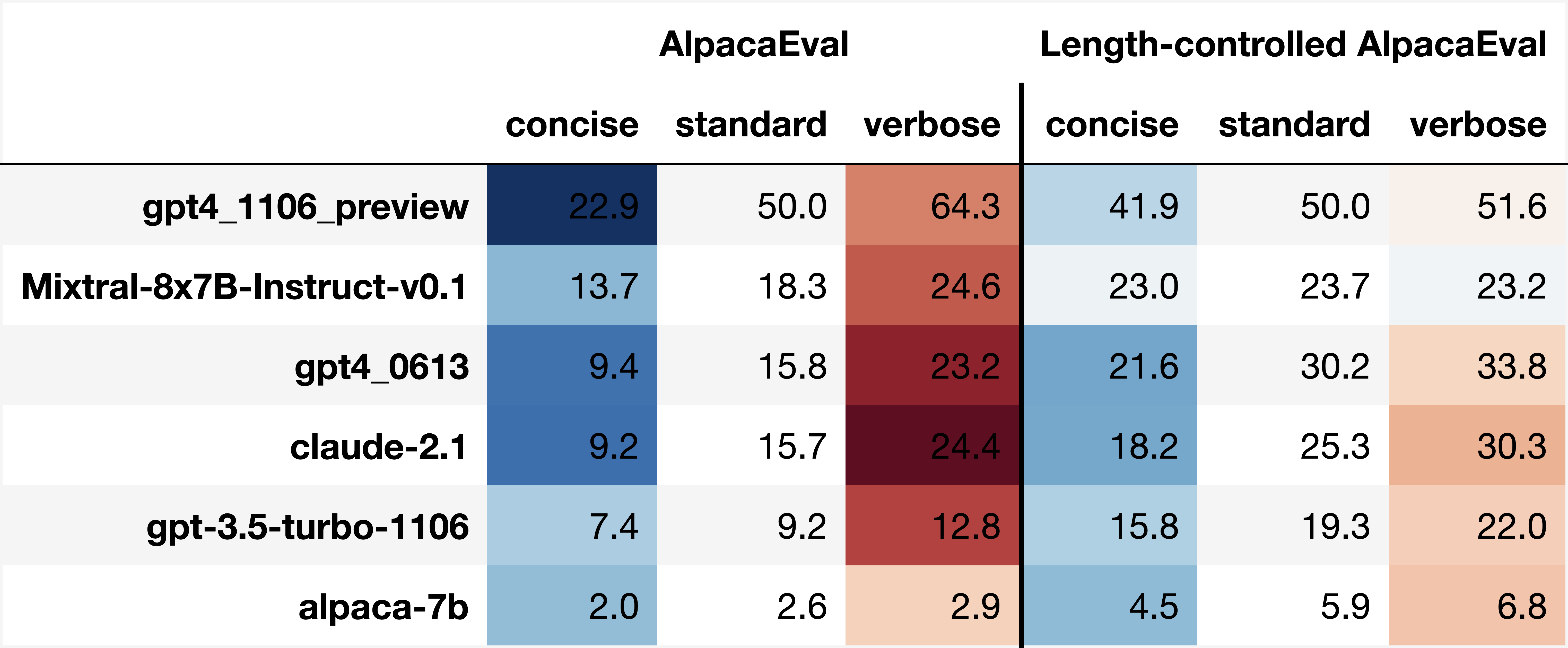
win_rate(m,b) = 1 - win_rate(b,m) in [0,1]和win_rate(m,m) = 0.5 。这在下面的图中显示。 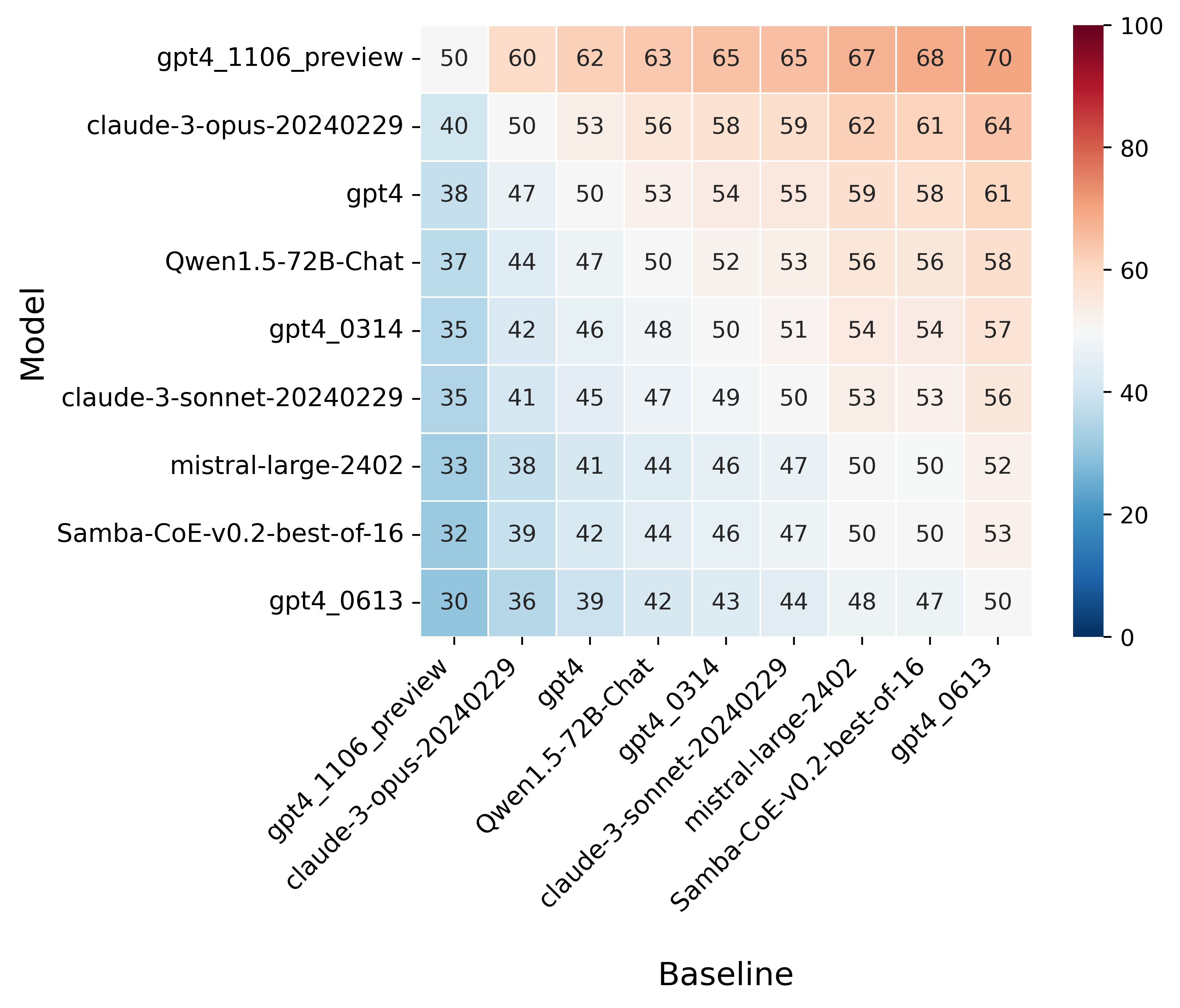
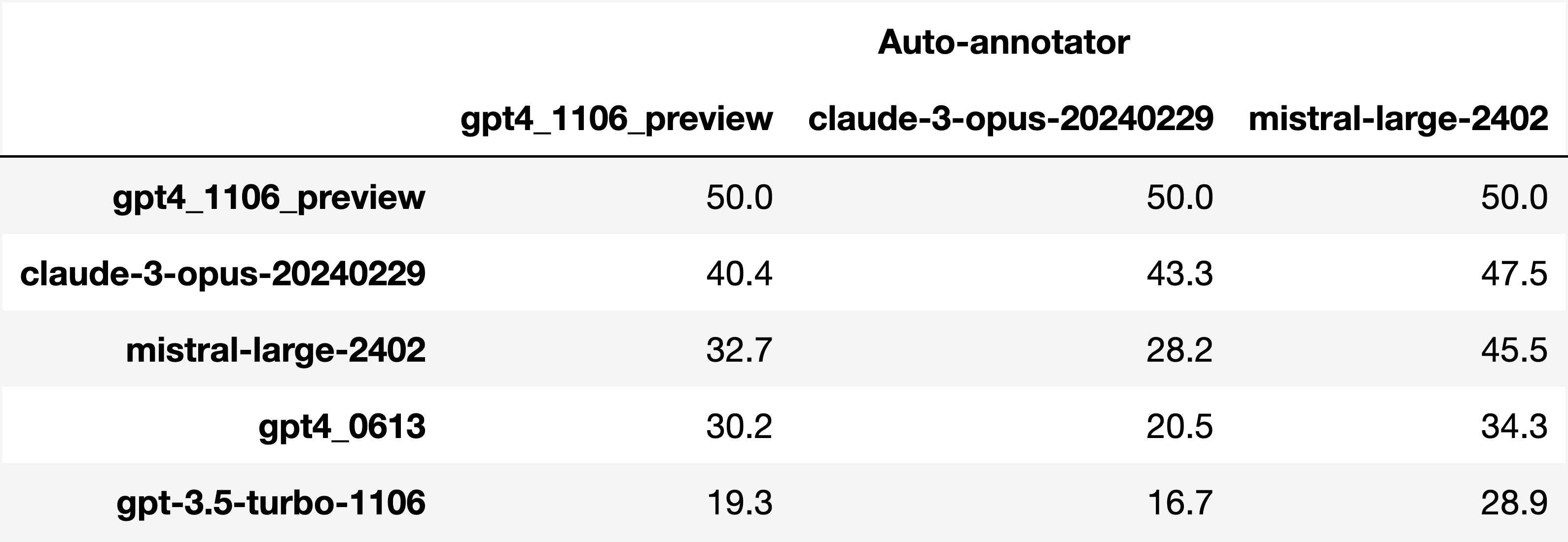
Finally, note that we are only controlling for length bias. There are other known biases that we are not controlling for, such as the fact that auto-annotators prefer outputs similar to their model. Although we could control for that, in practice we have found that to be less of an issue than length bias. For two reasons (1) this mostly a single model in the leaderboard because fine-tuning on outputs from the auto-annotator doesn't seem to have doesn't seem to impact the win-rate as much, and (2) the bias is actually less strong that what one could think. For example we show below a subset of the leaderboards auto-annotated by three different models, and we see that the ranking of models is exactly the same. In particular, claude-3-opus prefers gpt4_preview , and mistral-large prefers the former two.
Caution : all the following results are about AlpacaEval 1.0 and have not been updated since
Analyzing evaluators:
As we saw in the evaluator's leaderboard, there are many metrics to consider when selecting an evaluator, eg the quality, price, and speed. To assist with selection of the evaluator we provide a few functions to plot those metrics. The following shows for example the price/time/agreement of the different evaluators.
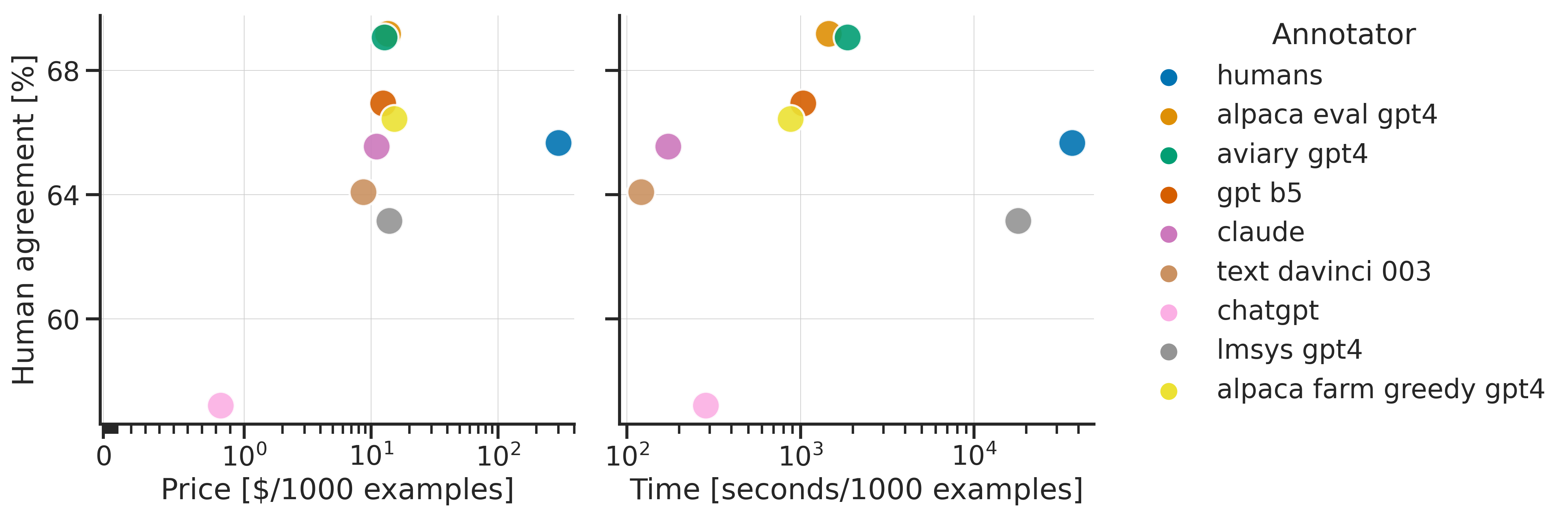
Here we see that alpaca_eval_gpt4 performs very well and is better than humans on all the considered metrics.
Previously we only considered the agreement with human annotators overall. An additional validation that one could do is checking whether making a leaderboard using our automatic annotator gives similar results as a leaderboard from humans. To enable such analysis, we release human annotations of outputs from 22 methods from AlpacaFarm => 22*805 = ~18K annotations. As a result we can test the correlation between the win-rates of the 22 models as evaluated by the humans and our automatic annotator. Note that this is arguably a better way of selecting an automatic evaluator than using "human agreement [%]" but is expensive given that it requires 18K annotations. The plot below shows such correlation for the alpaca_eval_gpt4 evaluator.
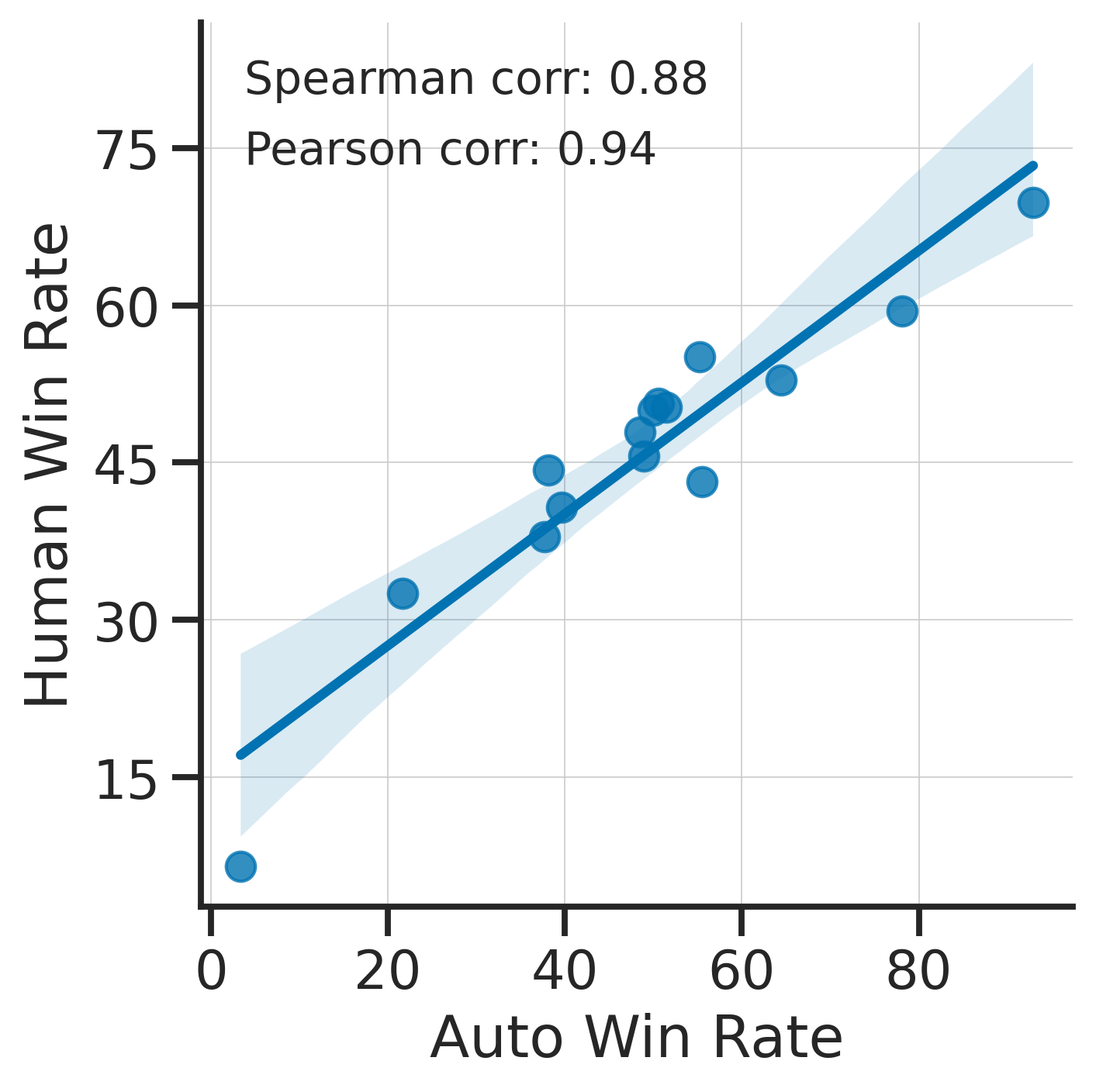
We see that the alpaca_eval_gpt4 leaderboard is highly correlated (0.94 Pearson correlation) to the leaderboard from humans, which further suggests that automatic evaluation is a good proxy for human evaluation. For the code and more analysis, see this notebook, or the colab notebook above.
Caution : all the following results are about AlpacaEval 1.0 and have not been updated since.
Making evaluation sets:
When creating an evaluation set there are two main factors to consider: how much data to use? and what data?
One way of answering those question is by considering a leaderboard of models that you believe are of different quality and checking what and how much data is needed to distinguish between them in a statistically significant way. We will do so below using a paired t-test to test if the difference in win-rates between every pair of models is statistically significant.
First, let us consider the question of how much data to use. Below we show the number of random samples needed from AlpacaEval for the paired t-test to give a p-value < 0.05 for each pair of models in the minimal alpaca_eval_gpt4 leaderboard. Grey cells correspond to pairs that are not significantly different on the 805 samples. y- and x-axis are ordered by the win-rate of the first and second model respectively.
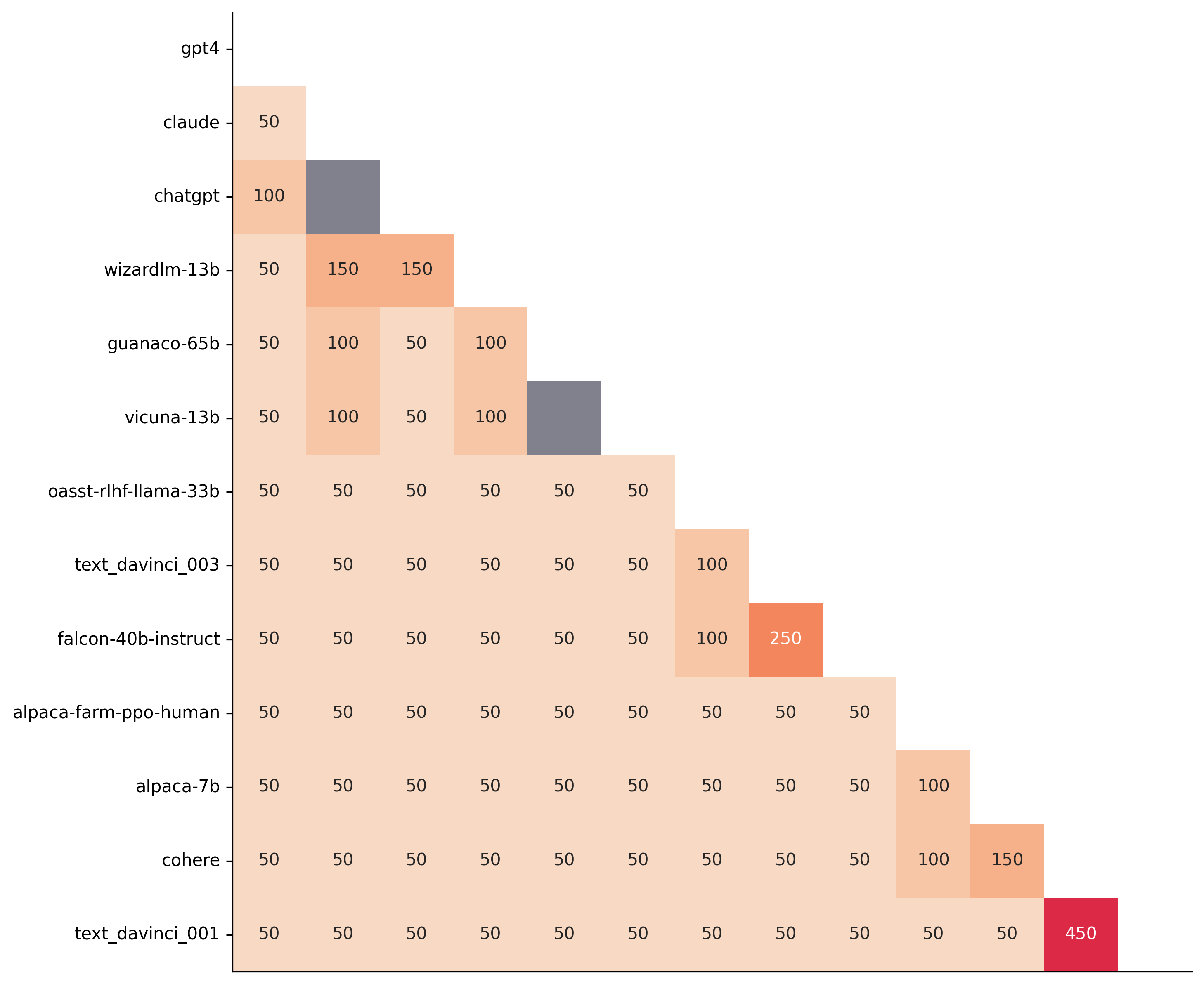
We see that most models can already be distinguished with 50 samples, and that 150 samples allows distinguishing the majority of pairs (74 out of 78). This suggests that we can decrease the evaluation set size by a factor of 4 when testing two models that have similar performance gaps as those on the minimal alpaca_eval_gpt4 leaderboard.
The second question is what data to use. Again we can try to answer this question from a statistical power perspective: what data allows to best distinguish between models. Let's consider this for all the datasets that are part of AlpacaEval, but let us control for the size of the evaluation sets as we only care about the quality of the data. The following plot shows the p-values from the paired t-test of each pairs of models on 80 examples of each subset of AlpacaEval.
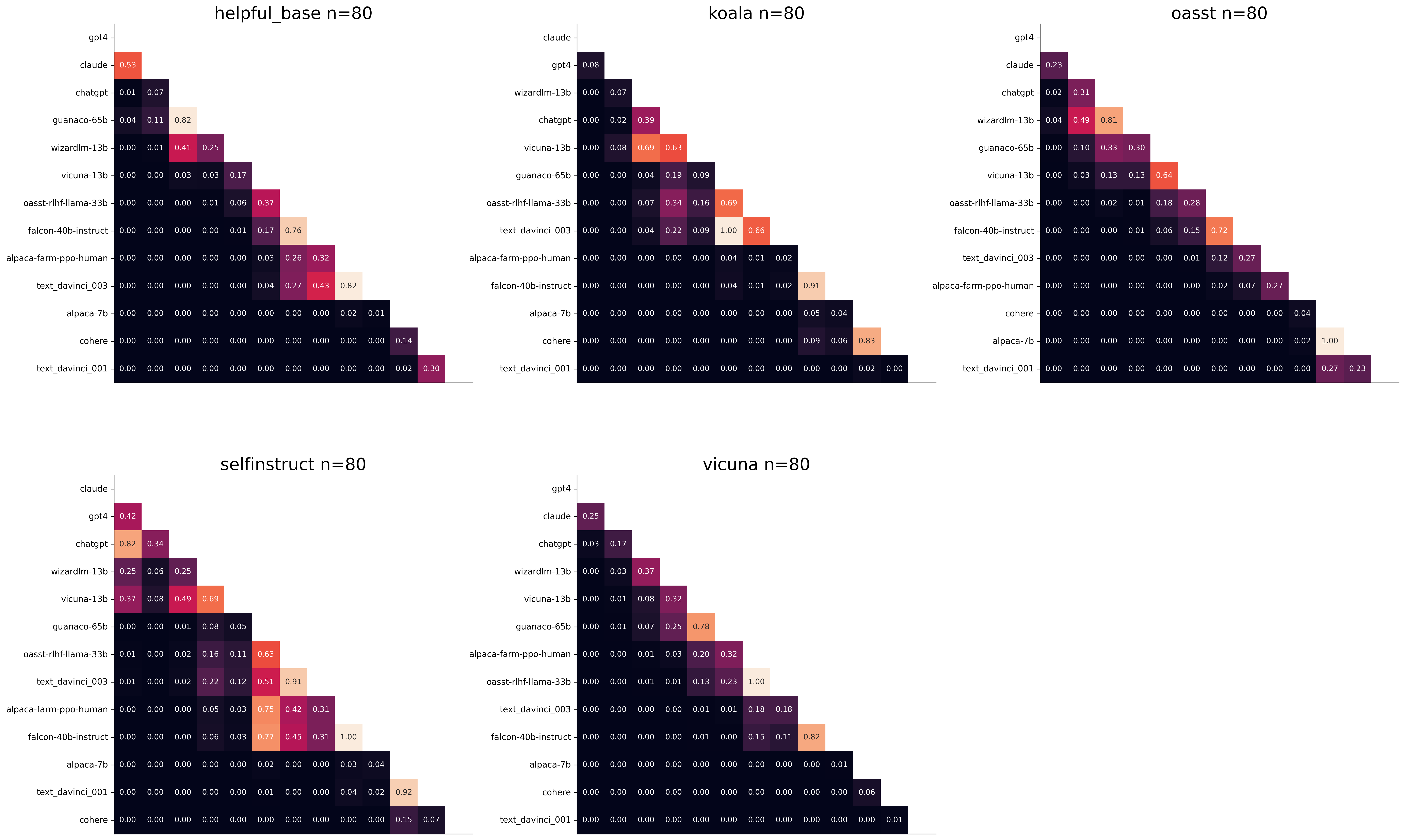
We see for example that the self-instruct dataset yields the least statistical power, which suggests that one could remove this dataset from the evaluation set. The exact reason should be analyzed in future work. For the code and more analysis see this notebook, or the colab notebook above.
Please consider citing the following depending on what you are using and referring to:
alpaca_eval (this repo). Specify whether you are using AlpacaEval or AlpacaEval 2.0. For length-controlled win-rates see below.alpaca_eval_length .dubois2023alpacafarm (AlpacaFarm)alpaca_eval and self-instruct, open-assistant, vicuna, koala, hh-rlhf.Here are the bibtex entries:
 @misc{alpaca_eval,
  author = {Xuechen Li and Tianyi Zhang and Yann Dubois and Rohan Taori and Ishaan Gulrajani and Carlos Guestrin and Percy Liang and Tatsunori B. Hashimoto },
  title = {AlpacaEval: An Automatic Evaluator of Instruction-following Models},
  year = {2023},
  month = {5},
  publisher = {GitHub},
  journal = {GitHub repository},
  howpublished = {url{https://github.com/tatsu-lab/alpaca_eval}}
}
 @article{dubois2024length,
  title={Length-Controlled AlpacaEval: A Simple Way to Debias Automatic Evaluators},
  author={Dubois, Yann and Galambosi, Bal{'a}zs and Liang, Percy and Hashimoto, Tatsunori B},
  journal={arXiv preprint arXiv:2404.04475},
  year={2024}
}
 @misc{dubois2023alpacafarm,
  title={AlpacaFarm: A Simulation Framework for Methods that Learn from Human Feedback},
  author={Yann Dubois and Xuechen Li and Rohan Taori and Tianyi Zhang and Ishaan Gulrajani and Jimmy Ba and Carlos Guestrin and Percy Liang and Tatsunori B. Hashimoto},
  year={2023},
  eprint={2305.14387},
  archivePrefix={arXiv},
  primaryClass={cs.LG}
}
Length controlled (LC) win-rates are a debiased version of the win-rates that control for the length of the outputs.
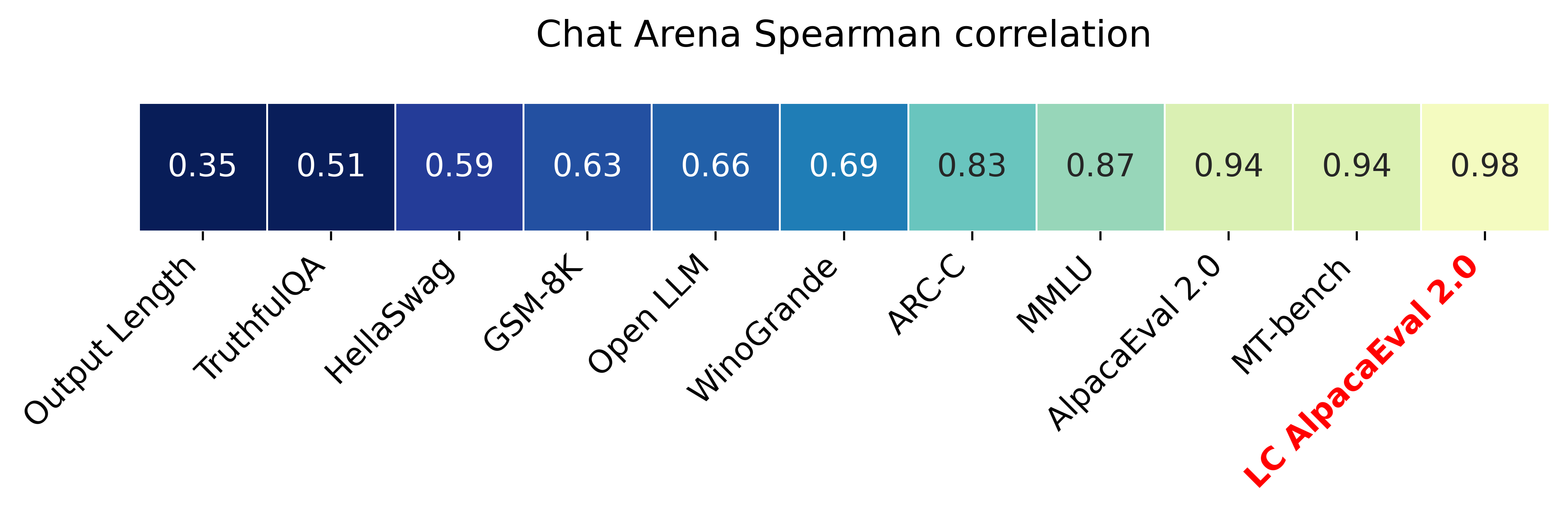
The main idea is that for each model we will fit a logistic regression to predict the preference of the autoannotator given: (1) the instruction, (2) the model, and (3) the difference of length between the baseline and model output. Given such a logistic regression we can then try to predict the counterfactual "what would the preference be if the model's output had the same length as the baseline" by setting the length difference to 0. By averaging over this length-controlled preference, we then obtain the length-controlled win-rate. The exact form of the logistic regression is taken such that the interpretation of LC win rates is similar to the raw win rates, for example for any model m1 and m2 we have win_rate(m1, m2) = 1 - win_rate(m2, m1) in [0,100] and win_rate(m1, m1) = 0.5 . Length controlled win-rates increase the correlation between AlpacaEval's leaderboard and Chat Arena from 0.93 to 0.98 Spearman correlation, while significantly decreasing the length gameability of the annotator . For more information and results about length controlled win-rates see this notebook.
This idea of estimating the controlled direct effect, by predicting the outcome while conditioning on the mediator (the length difference), is common in statistical inference.
To get LC win rates on previously annotated models, you can use the following command:
pip install -U alpaca_eval
alpaca_eval --model_outputs … --is_recompute_metrics_only TrueAlpacaEval 2.0 is a new version of AlpacaEval. Here are the differences:
gpt4_turbo : we upgraded the baseline from text-davinci-003 to gpt4_turbo to make the benchmark more challenging and have a metric that better reflects the current state of the art.weighted_alpaca_eval_gpt4_turbo : we improved the annotator in quality and price. First, we use the gpt4_turbo model for annotating, which is approximately 2x cheaper than gpt4 . Second, we changed the prompt such that the model outputs a single token, which further reduced cost and speed. Finally, instead of using a binary preference, we used the logprobs to compute a continuous preference, which gives the final weighted win-rate. Note that the latter two changes had the surprising effect of decreasing the annotators' length biased. By default, AlpacaEval 2.0 will be used from pip install alpaca_eval==0.5 . If you wish to use the old configs by default, you can set IS_ALPACA_EVAL_2=False in your environment.
As part of AlpacaEval, we release the following data:
text-davinci-003 reference on the AlpacaFarm evaluation set. Annotations are from a pool of 16 crowd workers on Amazon Mechanical Turk. The different models are: 6 from OpenAI, 2 SFT models from AlpacaFarm, 13 RLHF methods from AlpacaFarm, and LLaMA 7B.For more details about the human annotations refer to the AlpacaFarm paper.
AlpacaEval is an improvement and simplification of the automatic pairwise preference simulator from AlpacaFarm. Outside AlpacaFarm, you should be using AlpacaEval. Here are the main differences:
{instruction}nn{input} . This affects 1/4 of the examples in the AlpacaFarm evaluation set (the self-instruct subset). This simplification provides a more fair comparison for models that were not trained by distinguishing between the two fields.text-davinci-003 ), so the results on AlpacaEval are not comparable to those on AlpacaFarm even for examples that had no input field.--anotators_config 'alpaca_farm' and --p_label_flip 0.25 when creating an evaluator. There have been several work that propose new automatic annotators for instruction-following models. Here we list the ones that we are aware of and discuss how they differ from ours. We evaluated all of those in our evaluator's leaderboard.
lmsys_gpt4 ) evaluates the pair by asking the annotator a score from 1-10 for each output, and then selecting the output with the highest score as preferred. They do not randomize over output order and they ask an explanation after the score. Overall, we found that this annotator has strong bias towards longer outputs (0.74) and relatively low correlation with human annotations (63.2).alpaca_farm_greedy_gpt4 ) evaluates the pair by directly asking the annotator which output it prefers. Furthermore, it batches 5 examples together to amortize the length of the prompt and randomizes the order of outputs. Overall, we found that this annotator has much less bias towards longer outputs (0.60) and is faster (878 seconds/1000 examples) than others. It has a slightly higher correlation with the majority of human annotations (66.4) than humans themselves (65.7). However, it is more expensive ($15.3/1000 examples) and doesn't work with very long outputs given the batching.aviary_gpt4 ) asks the annotator to order the output by its preference, rather than simply selecting the preferred output. It does not randomize the order of outputs and uses high temperature for decoding (0.9). Overall, we found that this annotator has relatively strong bias towards longer outputs (0.70) and very high correlation with human annotations (69.1). By decreasing the temperature and randomizing the order of outputs, we further improved the correlation to 69.8 ( improved_aviary_gpt4 ) but this further increased the length bias to 0.73. Our alpaca_eval_gpt4 is a mix between the AlpacaFarm and Aviary annotators. It asks the annotator to order the outputs by preference, but it uses temperature 0, randomizes over outputs, and made some modifications to the prompt to decrease length bias to 0.68.
Other related work include recent papers which analyze automatic evaluators.例如:
For all models you can find the auto-annotations under results/<model_name>/*/annotations.json . The annotations have the following columns:
instruction : the promptgenerator_1 : the baseline modeloutput_1 : the output of the baseline modelgenerator_2 : the model being evaluatedoutput_2 : the output of the model being evaluatedannotator : the auto-annotatorpreference : the result of the auto-annotator. This is a float between 1 and 2. Closer to 1 means that the auto-annotator prefers output_1 , closer to 2 means that it prefers output_2 . For AlpacaEval 2.0, preference-1 corresponds to the probability of output_1 being preferred. For AlpacaEval 1.0, preference is 1 if output_1 is preferred, 2 if output_2 is preferred, and 1.5 if they are the same. The win rate is always (preference -1).mean() .raw_completion : the raw output of the auto-annotator. This is field contains the completions before de-randomization of the order between output_1 and output_2 ! It is thus much harder to interpret, see below for more information.思想链
For some annotators, eg alpaca_eval_cot_gpt4_turbo_fn we use chain of thought reasoning to make the models preferences more interpretable. Those can then be found under concise_explanation . To interpret them, you should also look at referenced_models which translates the temporary model name (in the prompt) to the actual output. Below, we provide more explanation as to what is happening behind the scenes.
You can check the raw_annotations["concise_explanation] column in annotations.json (eg here) which contains the chain of thought reasoning of the auto annotator. Note that the raw_annotations is not modified by the randomization of the order of the outputs. In particular, "m" and "M" can sometime refer to the first model (the reference) and sometime to the second model (the model being evaluated). To understand which model is being referred to, you should use the column preference and ordered_models . To make it easier we add a column "referenced_models" mapping the model names to the corresponding outputs. For example in the following annotation we see that the preference is 1.0 (ie output_1 ) and corresponds to model M in concise_explanation (see ordered_models ).
{
  "instruction" : " How did US states get their names? " ,
  "output_1" : " The names of U.S. states are derived from a variety of languages and sources, including indigenous American languages, European languages (primarily English, Spanish, and French), as well as other historical influences. Here is a brief overview of how some states got their names: nn 1. **Indigenous American Languages**: Many state names come from Native American words or names of tribes, often from the languages of the indigenous peoples who lived in or near those areas. n   - **Alabama**: Possibly derived from the Choctaw language, meaning " thicket clearers. "n   - **Connecticut**: From a Mohegan-Pequot word meaning " long tidal river. "n   - **Massachusetts**: [...] " ,
  "generator_1" : " gpt4_1106_preview " ,
  "dataset" : " helpful_base " ,
  "output_2" : " The names of the 50 U.S. states come from a variety of sources, including Native American languages, European languages, and historical figures. Here's a brief overview of how some states got their names: nn 1. Native American origins: Many states have names derived from Native American languages. For example, Alabama comes from the Choctaw word " Albah amo, " meaning " plant gatherers " or " herb gatherers. " Similarly, the name Mississippi comes from the Ojibwe word " Misi-ziibi, " meaning " great river. "nn 2. European languages: [...]. " ,
  "generator_2" : " gpt4 " ,
  "annotator" : " alpaca_eval_cot_gpt4_turbo_fn " ,
  "preference" : 1.0 ,
  "raw_completion" : {
    "concise_explanation" : " Model M provided a more detailed and structured response, including bold headings for each category and a wider range of examples. It also included additional categories such as 'Other European Languages' and 'Combination of Languages and Influences', which added depth to the explanation. Model m's response was accurate but less comprehensive and lacked the clear structure found in Model M's output. " ,
    "ordered_models" : [
      {
        "model" : " M " ,
        "rank" : 1
      },
      {
        "model" : " m " ,
        "rank" : 2
      }
    ]
  },
  "referenced_models" : {
    "M" : " output_1 " ,
    "m" : " output_2 "
  }
}chatgpt_fn that anyone can use (no waiting lists).chatgpt_fn or alpaca_eval_gpt4_fn .




