alpaca_eval
v0.6.5

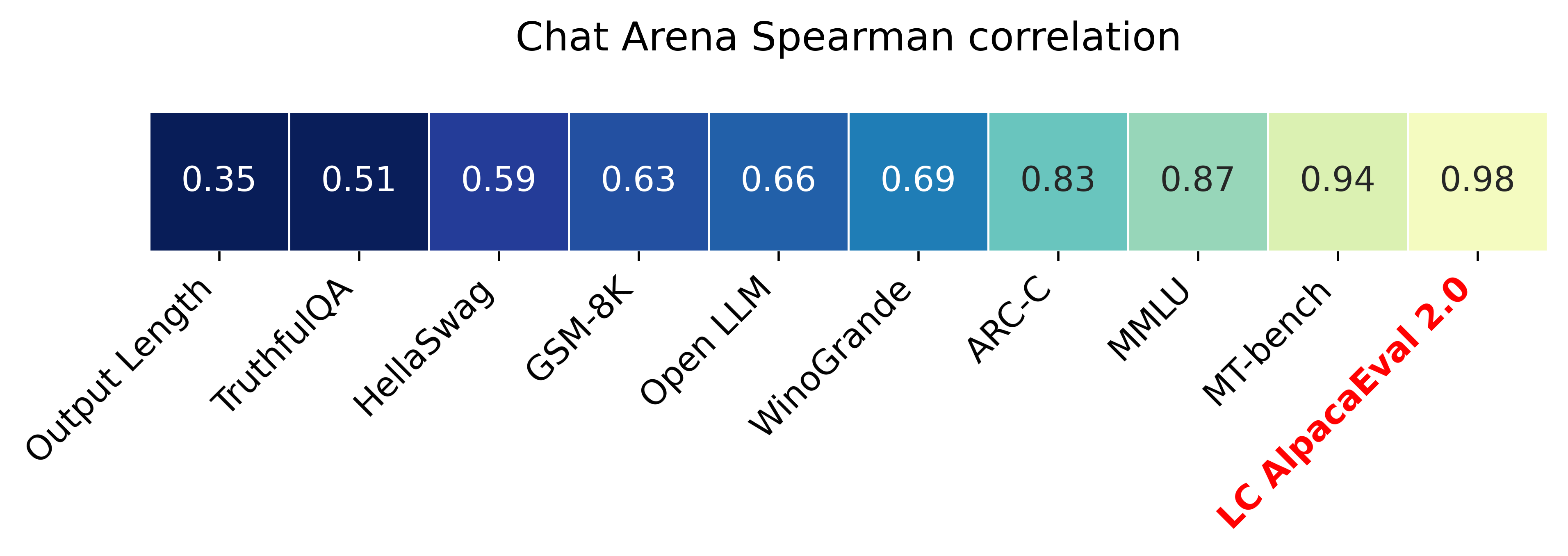
Alpacaeval 2.0 с контролируемыми длиной выигрышной ставки (бумага) имеет корреляцию Spearman 0,98 с ареной Chatbot, в то время как стоит менее 10 долларов США из кредитов Openai и работает менее чем за 3 минуты. Наша цель состоит в том, чтобы иметь эталон для чат LLMS: Fast (<5min), дешевый (<10 долларов) и сильно коррелирует с людьми (0,98). Вот сравнение с другими тестами:
Обновления:
? Контролируемые длины ставки победы вышли и используются по умолчанию! Это увеличивает корреляцию с ареной Chatbot с 0,93 до 0,98, в то же время значительно снижая игровую длину. Сырые показатели побед все еще отображаются на веб -сайте и в CLI. Подробнее здесь.
? Alpacaeval 2.0 вышел и используется по умолчанию! Мы улучшили автонотатор (лучше и дешевле) и используем предварительный просмотр GPT-4 в качестве базового уровня. Подробнее здесь. Для старой версии установите переменную среды IS_ALPACA_EVAL_2=False .
Оценка моделей, связанных с инструкциями (например, CHATGPT), как правило, требует взаимодействия человека. Это трудоемкое, дорогое и трудно воспроизвести. Alpacaeval в автоматической оценке на основе LLM, которая быстрая, дешевая, воспроизводимая и подтверждена против 20 тыс. Человеческих аннотаций. Это особенно полезно для разработки моделей. Несмотря на то, что мы улучшили предшествующие автоматические конвейеры оценки, все еще существуют фундаментальные ограничения, такие как предпочтение для более длительных результатов. Alpacaeval предоставляет следующее:
Когда использовать Alpacaeval? Наш автоматический оценщик-это быстрый и дешевый прокси для человеческой оценки простых задач, связанных с инструкциями. Это полезно, если вам нужно быстро провести много оценок, например, во время разработки модели.
Когда не использовать альпакаэвой? Как и любой другой автоматический оценщик, Alpacaeval не должен заменять человеческую оценку в принятии решений с высоким содержанием , например, для определения выпуска модели. В частности, Alpacaeval ограничен тем фактом, что (1) инструкции в наборе Eval могут не быть репрезентативными для расширенного использования LLMS; (2) Автоматические оценщики могут иметь смещения, такие как предпочтение стилю, а не фактической, ответа; и (3) Alpacaeval не измеряет риски, которые модель может вызвать. Детали в ограничениях.
Чтобы установить стабильный релиз, запустите
pip install alpaca-evalЧтобы установить ночную версию, запустите
pip install git+https://github.com/tatsu-lab/alpaca_evalТогда вы можете использовать его следующим образом:
 export OPENAI_API_KEY= < your_api_key > # for more complex configs, e.g. using Azure or switching clients see client_configs/README.md
alpaca_eval --model_outputs ' example/outputs.json '
Это распечатает таблицу лидеров в консоли и сохранит как таблицу лидеров, так и аннотации в тот же каталог, что и файл model_outputs . Важными параметрами являются следующие:
instruction и output клавиш.weighted_alpaca_eval_gpt4_turbo (по умолчанию для Alpacaeval 2.0), который имеет высокий уровень согласия с нашими данными аннотации человека, большой размер контекста и довольно дешево. Для сравнения всех аннотаторов видят здесь.model_outputs . По умолчанию это gpt4_turbo для Alpacaeval 2.0. Если у вас нет выходов модели, вы можете использовать evaluate_from_model и пройти локальный путь или имя модели Huggingfice или модель из стандартного API (OpenAI, антропический, cohere, Google, ...). Другие команды:
>>> alpaca_eval -- --help SYNOPSIS
alpaca_eval COMMAND
COMMANDS
COMMAND is one of the following:
evaluate
Evaluate a model based on its outputs. This is the default entrypoint if no command is specified.
evaluate_from_model
Evaluate a model from HuggingFace or an API provider. This is a wrapper around `evaluate` which includes generating from a desired model.
make_leaderboard
Precompute and save an entire leaderboard for a given dataset / evaluator / set of models generations.
analyze_evaluators
Analyze an evaluator and populates the evaluators leaderboard (agreement with human, speed, price,...).
Для получения дополнительной информации о каждой функции используйте alpaca_eval <command> -- --help .
Наши таблицы лидеров рассчитываются на наборе данных Alpacaeval. Мы предварительно рассчитывали таблицу лидеров для важных моделей, используя различные базовые модели и автонотаторы. Наши два основных таблица лидеров («Alpacaeval 2.0» и «Alpacaeval») можно найти на этой странице. «Alpacaeval 2.0» использует weighted_alpaca_eval_gpt4_turbo для аннотатора и gpt4_turbo для базовой линии. «Alpacaeval» использует alpaca_eval_gpt4 для аннотатора и text_davinci_003 для базовой линии. Для всех предварительно рассчитанных таблиц лидера можно увидеть здесь. Позже мы также показываем, как добавить вашу модель в таблицу лидеров и как сделать новую таблицу лидеров для вашего оценщика/набора данных. Смотрите здесь для конфигураций всех моделей, которые доступны из коробки.
Альпакаевальный минимальный таблица лидеров :
| Выигрыш | Ошибка STD | |
|---|---|---|
| GPT4 | 95.3 | 0,7 |
| Клод | 88.4 | 1.1 |
| Чатгпт | 86.1 | 1.2 |
| Гуанако-65b | 71.8 | 1.6 |
| Vicuna-13b | 70.4 | 1.6 |
| text_davinci_003 | 50.0 | 0,0 |
| Альпака-Фарм-По-хуман | 41.2 | 1.7 |
| альпака-7B | 26.5 | 1.5 |
| text_davinci_001 | 15.2 | 1.2 |
Коэффициент выигрыша : показатель победы измеряет долю времени, когда выход модели предпочтительнее выходов ссылки ( test-davinci-003 для Alpacaeval и gpt4_turbo для Alpacaeval 2.0). Более конкретно, чтобы вычислить скорость победы, мы собираем пары выходов желаемой модели по каждой инструкции из набора данных Apacaeval. Затем мы соединяем каждый вывод с выводом нашей справочной модели (например, text-davinci-003 ) в одной и той же инструкции. Затем мы спрашиваем нашего автоматического оценщика, какой вывод они предпочитают. См. Подсказки и конфигурации Alpacaeval и Alpacaeval 2.0, в частности, мы рандомизируем порядок выходов, чтобы избежать смещения позиции. Затем мы усредняем предпочтения по всем инструкциям в наборе данных, чтобы получить показатель победы модели над базовой линией. Если оба выхода точно одинаковы, мы используем наполовину предпочтения для обеих моделей.
Стандартная ошибка : это стандартная ошибка (нормализованная по N-1) показателя выигрыша, то есть предпочтения, усредненные по различным инструкциям.
alpaca_eval_gpt4 Наш средние значения аннотаторов alpaca_eval_gpt4 (см. Configs) по предпочтениям, где предпочтения получаются следующим образом:
temperature=0Аннотатор представляет собой смесь между (и находился под сильным влиянием) альпакафарми и оценщиками воарных баллов. В частности, мы используем тот же код, что и для альпакафарма (кэширование/рандомизация/гиперпараметры), но используем подсказку рейтинга, аналогичное приводу Aviary. Мы вносим изменения в подсказку Aviary по уменьшению смещения для более длительных выходов. Детали в соответствующей работе.
Для Alpacaeval 2.0 мы используем weighted_alpaca_eval_gpt4_turbo , который использует logprobs для вычисления непрерывных предпочтений и использует gpt4_turbo в качестве модели (см. Configs).
Мы оцениваем различные автоматические аннотаторы на альпакаэвальном наборе, сравнивая 2,5 тыс. Человеческих аннотаций, которые мы собрали (~ 650 инструкций с 4 человеческими аннотациями). Ниже мы показываем метрики для наших предлагаемых оценщиков ( weighted_alpaca_eval_gpt4_turbo , alpaca_eval_gpt4 ), для предыдущих автоматических оценщиков ( alpaca_farm_greedy_gpt4 , aviary_gpt4 , lmsys_gpt4 ), для людей ( humans ), и для различных базовых моделей с энейски, gpt4 ), gtpt4, claude ), и для разных моделей, по -настоящему. text_davinci_003 , chatgpt_fn , guanaco_33b , chatgpt ). См. Здесь для конфигураций всех оценщиков, которые доступны из коробки и связанных с ними метрик.
| Человеческое соглашение | Цена [$/1000 примеров] | Время [секунд/1000 примеров] | Spearman Corr. | Пирсон Корр. | Предвзятость | Дисперсия | Вероятность предпочитаю дольше | |
|---|---|---|---|---|---|---|---|---|
| alpaca_eval_gpt4 | 69,2 | 13.6 | 1455 | 0,97 | 0,93 | 28.4 | 14.6 | 0,68 |
| alpaca_eval_cot_gpt4_turbo_fn | 68.6 | 6.3 | 1989 | 0,97 | 0,90 | 29.3 | 18.4 | 0,67 |
| alpaca_eval_gpt4_turbo_fn | 68.1 | 5.5 | 864 | 0,93 | 0,82 | 30.2 | 15.6 | 0,65 |
| alpaca_eval_llama3_70b_fn | 67.5 | 0,4 | 209 | 0,90 | 0,86 | 32.3 | 8.2 | 0,79 |
| GPT4 | 66.9 | 12.5 | 1037 | 0,88 | 0,87 | 31.5 | 14.6 | 0,65 |
| alpaca_farm_greedy_gpt4 | 66.4 | 15.3 | 878 | 0,85 | 0,75 | 30.2 | 19.3 | 0,60 |
| alpaca_eval_cot_gpt4_turbo_fn | 65,7 | 4.3 | 228 | 0,78 | 0,77 | 33,9 | 23.7 | 0,61 |
| люди | 65,7 | 300.0 | 36800 | 1,00 | 1,00 | 0,0 | 34.3 | 0,64 |
| Клод | 65,3 | 3.3 | 173 | 0,93 | 0,90 | 32.4 | 18.5 | 0,66 |
| lmsys_gpt4 | 65,3 | 13.9 | 17982 | 0,98 | 0,97 | 31.6 | 15.9 | 0,74 |
| text_davinci_003 | 64.1 | 8.7 | 121 | 0,85 | 0,83 | 33,8 | 22.7 | 0,70 |
| самый длинный | 62,2 | 0,0 | 0 | 0,27 | 0,56 | 37.8 | 0,0 | 1,00 |
| Чатгпт | 57.3 | 0,8 | 285 | 0,72 | 0,71 | 39,4 | 34.1 | 0,59 |
Теперь мы объясняем словами, как мы вычисляем метрики в таблице выше. Код здесь.
Человеческое соглашение : это измеряет соглашение между нынешним аннотатором и большинством предпочтений людей на наших аннотациях ~ 650 из нашего набора перекрестных аннотаций, который содержит 4 человеческих аннотации на пример. Чтобы оценить согласие между одним человеком ( humans Row в таблице выше) и большинством людей, мы принимаем одну из 4 аннотаций и вычисляем точность, которую он имеет при прогнозировании режима других 3 аннотаций. Затем мы усредняем эту точность по сравнению с всеми 4 аннотациями и по 650 инструкциям, чтобы получить человеческое соглашение, то есть мы рассчитываем ожидаемое (над людьми и образцы) соглашение о выпуске. Если режим не является уникальным, мы принимаем один из режимов случайным образом. Мы выполняем точно одинаковые вычисления для автоматических аннотаторов, так что окончательные числа сопоставимы.
Цена [$/1000 примеров] : Это средняя цена каждых 1000 аннотаций. Для людей это цена, которую мы заплатили механическим туркерам, чтобы собрать эти аннотации (21 доллар в час). Если цена зависит от машины, используемой для вычисления аннотаций (например, гуанако), мы оставляем ее пустой.
Время [секунды/1000 примеров] : Это среднее время, необходимое для вычисления 1000 аннотаций. Для людей это предполагаемое среднее время, когда каждый механический туркер принимал 1000 примеров. Для автоматических аннотаторов это среднее время, которое потребовалось при запуске аннотаций. Обратите внимание, что это может зависеть от пределов API, которые различны для разных пользователей, и количество запросов, которые кластеры обрабатывают.
Spearman Corr. : Это измеряет корреляцию Spearman между лидером, рассчитанной с предпочтениями автонотатора, и таблицей лидеров, рассчитанной с человеческими предпочтениями. Как и в случае с Human agreement , мы используем человеческие аннотации из альпакафарма, но теперь мы рассматриваем соглашение на уровне метода, а не только в выборке с людьми. Обратите внимание, что мы используем только 9 моделей, и поэтому корреляция не очень надежна.
Пирсон Корр. : То же, что и у Spearman corr. Но с корреляцией Пирсона.
Предвзятость : согласие между наиболее вероятным человеческим ярлыком и наиболее вероятным автоматическим. Для автоматических аннотаторов мы оцениваем его, отбирая 4 различных аннотации для каждого примера. Случайность здесь происходит из -за порядка выходов в подсказке, отбора проб из LLM и, если применимо, порядок инструкции в партии и выбор аннотатора в пуле. Затем мы принимаем режим 4 аннотаций и вычисляем точность режима при прогнозировании режима 4 -человеческих аннотаций. Обратите внимание, что это, вероятно, переоценивает реальную предвзятость, которую мы получили бы, если бы у нас было «бесконечное» количество перекрестных аннотаций. Низкий уклон означает, что аннотатор в ожидании тех же предпочтений, что и люди. Для случая людей предвзятость по определению равна нулю. Обратите внимание, что это связано с, но не стандартным статистическим уклоном, потому что мы принимаем режим вместо среднего по сравнению с аннотациями и рассматриваем потерю 0-1 вместо потери квадратов.
Дисперсия : ожидаемое согласие. Одно автоматическое предпочтение и наиболее вероятное. Мы оцениваем это так же, как мы оценили «человеческое согласие» для людей, то есть мы принимаем ожидаемую ошибку, когда предсказали режим 3 аннотаций с использованием 4 -й аннотации. Низкая дисперсия означает, что аннотатор согласуется с его предпочтением, т. Е. Если вы выберу из него с разными семенами, он даст тот же результат. Как и в случае с предвзятостью, это не совсем стандартная статистическая дисперсия, потому что мы принимаем режим вместо среднего по поводу аннотаций и рассматриваем потерю 0-1 вместо потери в квадрате.
Обратите внимание, что «человеческое согласие» тесно связано с предвзятостью и дисперсией. В частности, дисперсия измеряет ошибку из -за того, что мы используем только одну аннотацию, в то время как смещение направлено на измерение неприводимой ошибки для текущего аннотатора.
Вероятность Предпочитает дольше : это вероятность того, что аннотатор предпочитает более длительный вывод, когда один из двух выходов значительно длиннее другого (разница в более чем 30 символах).
В полной таблице мы также предоставляем следующие показатели:
Вероятность Предпочитают списки : это вероятность того, что аннотатор предпочитает вывод, который содержит точки списка/пуль, когда один вывод делает, но не другой.
Вероятность Предпочитаю 1 : это вероятность того, что аннотатор предпочитает первую из пары выходов. Все наши предлагаемые нами аннотаторы рандомизируют выходы в подсказке, так что это должно быть 0,5. Предыдущие аннотаторы, такие как lmsys и aviary , нет.
# Parsed : Это количество примеров, которые аннотатор смог проанализировать.
Обратите внимание, что если дисперсия и смещение пусты, это означает, что мы выполнили только одну единую аннотацию для каждого примера 648 из -за ограничений ресурса (время и цены). Это объясняет, почему #Parsed составляет 648, в противном случае это должно быть 2592.
В целом, мы рекомендуем использовать annotators_config=weighted_alpaca_eval_gpt4_turbo если вы хотите, чтобы высокое согласие с людьми и annotators_config=chatgpt_fn если у вас ограниченный бюджет.
При выборе аннотатора мы рекомендуем рассмотреть следующее (первые три очевидны):
"Human agreement [%]""Price [$/1000 examples]""Time [seconds/1000 examples]""* corr." примерно > 0,7. Важно, чтобы корреляция не была слишком низкой, но мы не рекомендуем использовать ее в качестве основной метрики, поскольку корреляция вычисляется только на 9 моделях."Proba. prefer longer" ок. <0,7. Действительно, мы обнаружили, что большинство предпочтений человеческих аннотаторов имеют сильную предвзятость к более длинным ответам (как показано высокой производительностью = 62,2 из "longest" оценщика, который всегда предпочитает самый длинный результат). Это говорит о том, что это может быть скорее предвзятостью с человеческими аннотаторами. Чтобы избежать наличия таблиц лидеров с сильными предубеждениями в течение длины, мы предлагаем использовать автоматические аннотаторы с менее чем 0,7 «вероятность. Предпочитают дольше»."Variance" ок. <0,2. Мы считаем, что хороший оценщик должен иметь как можно меньше дисперсии, чтобы результаты в основном воспроизводимы. Обратите внимание, что дисперсия может быть желательной в случае, когда мы моделируем людей, как показано в альпакафарме. Мы отфильтровали аннотаторы, которые не удовлетворяют эти требования в таблице выше (помимо людей / Chatgpt / 003 / lmsys для справочных целей). Для всех результатов см. Здесь. В общем, мы обнаружили, что weighted_alpaca_eval_gpt4_turbo является хорошим компромиссом между качеством / ценой / временем / дисперсией / смещением длины.
Приведенные выше показатели рассчитываются в отношении аннотаций от толпы. Несмотря на то, что эти аннотации не являются идеальными, например, рабочие толпы часто предпочитают стиль над фактической. Таким образом, мы рекомендуем пользователям проверять автоматические оценщики по своим собственным инструкциям и человеческим аннотациям. Детали в ограничениях.
>>> alpaca_eval evaluate -- --help NAME
alpaca_eval evaluate - Evaluate a model based on its outputs. This is the default entrypoint if no command is specified.
SYNOPSIS
alpaca_eval evaluate <flags>
DESCRIPTION
Evaluate a model based on its outputs. This is the default entrypoint if no command is specified.
FLAGS
--model_outputs=MODEL_OUTPUTS
Type: Optional[Union]
Default: None
The outputs of the model to add to the leaderboard. Accepts data (list of dictionary, pd.dataframe, datasets.Dataset) or a path to read those (json, csv, tsv) or a function to generate those. Each dictionary (or row of dataframe) should contain the keys that are formatted in the prompts. E.g. by default `instruction` and `output` with optional `input`. If None, we just print the leaderboard.
-r, --reference_outputs=REFERENCE_OUTPUTS
Type: Union
Default: <func...
The outputs of the reference model. Same format as `model_outputs`. If None, the reference outputs are a specific set of Davinci 003 outputs on the AlpacaEval set:
--annotators_config=ANNOTATORS_CONFIG
Type: Union
Default: 'alpaca_eval_gpt4_turbo_fn'
The path the (or list of dict of) the annotator's config file. For details see the docstring of `PairwiseAnnotator`.
-n, --name=NAME
Type: Optional[Optional]
Default: None
The name of the model to add to the leaderboard. If None we check if `generator is in model_outputs` if not we use "Current model".
-o, --output_path=OUTPUT_PATH
Type: Union
Default: 'auto'
Path to the directory where the new leaderboard and the annotations should be stored. If None we don't save. If `auto` we use `model_outputs` if it is a path, and otherwise use the directory from which we call the script.
-p, --precomputed_leaderboard=PRECOMPUTED_LEADERBOARD
Type: Union
Default: 'auto'
The precomputed leaderboard or a path to it (json, csv, or tsv). The leaderboard should contain at least the column `win_rate`. If `auto` we will try to use the corresponding leaderboard for the reference outputs (only if in CORRESPONDING_OUTPUTS_LEADERBOARDS). If `None` we won't add other models from the leaderboard.
--is_overwrite_leaderboard=IS_OVERWRITE_LEADERBOARD
Type: bool
Default: False
Whether to overwrite the leaderboard if the model is already in it.
-l, --leaderboard_mode_to_print=LEADERBOARD_MODE_TO_PRINT
Type: Optional
Default: 'minimal'
The mode of the leaderboard to use. Only used if the precomputed leaderboard has a column `mode`, in which case it will filter the leaderboard by this mode. If None keeps all.
-c, --current_leaderboard_mode=CURRENT_LEADERBOARD_MODE
Type: str
Default: 'community'
The mode of the leaderboard for the current method.
--is_return_instead_of_print=IS_RETURN_INSTEAD_OF_PRINT
Type: bool
Default: False
Whether to return the metrics instead of printing the results.
-f, --fn_metric=FN_METRIC
Type: Union
Default: 'pairwise_to_winrate'
The function or function name in `metrics.py` that will be used to convert preference to metrics. The function should take a sequence of preferences (0 for draw, 1 for base win, 2 when the model to compare wins) and return a dictionary of metrics and the key by which to sort the leaderboard.
-s, --sort_by=SORT_BY
Type: str
Default: 'win_rate'
The key by which to sort the leaderboard.
--is_cache_leaderboard=IS_CACHE_LEADERBOARD
Type: Optional[Optional]
Default: None
Whether to save the result leaderboard to `precomputed_leaderboard`. If None we save only if max_instances not None. A preferred way of adding models to the leaderboard is to set `precomputed_leaderboard` to the previously saved leaderboard at `<output_path>/leaderboard.csv`.
--max_instances=MAX_INSTANCES
Type: Optional[Optional]
Default: None
The maximum number of instances to annotate. Useful for testing.
--annotation_kwargs=ANNOTATION_KWARGS
Type: Optional[Optional]
Default: None
Additional arguments to pass to `PairwiseAnnotator.annotate_head2head`.
-A, --Annotator=ANNOTATOR
Default: <class 'alpaca_eval.annotators.pairwise_evaluator.PairwiseAn...
The annotator class to use.
Additional flags are accepted.
Additional arguments to pass to `PairwiseAnnotator`.
>>> alpaca_eval evaluate_from_model -- --help NAME
alpaca_eval evaluate_from_model - Evaluate a model from HuggingFace or an API provider. This is a wrapper around `evaluate` which includes generating from a desired model.
SYNOPSIS
alpaca_eval evaluate_from_model MODEL_CONFIGS <flags>
DESCRIPTION
Evaluate a model from HuggingFace or an API provider. This is a wrapper around `evaluate` which includes generating from a desired model.
POSITIONAL ARGUMENTS
MODEL_CONFIGS
Type: Union
A dictionary or path (relative to `models_configs`) to a yaml file containing the configuration of the model to decode from. If a directory,we search for 'configs.yaml' in it. The keys in the first dictionary should be the generator's name, and the value should be a dictionary of the generator's configuration which should have the
FLAGS
-r, --reference_model_configs=REFERENCE_MODEL_CONFIGS
Type: Optional[Union]
Default: None
Same as in `model_configs` but for the reference model. If None, we use the default Davinci003 outputs.
-e, --evaluation_dataset=EVALUATION_DATASET
Type: Union
Default: <func...
Path to the evaluation dataset or a function that returns a dataframe. If None, we use the default evaluation
-a, --annotators_config=ANNOTATORS_CONFIG
Type: Union
Default: 'alpaca_eval_gpt4_turbo_fn'
Path to the annotators configuration or a dictionary. If None, we use the default annotators configuration.
-o, --output_path=OUTPUT_PATH
Type: Union
Default: 'auto'
Path to save the generations, annotations and leaderboard. If auto saves at `results/<model_name>`
-m, --max_instances=MAX_INSTANCES
Type: Optional[int]
Default: None
Maximum number of instances to generate and evaluate. If None, we evaluate all instances.
--is_strip_output=IS_STRIP_OUTPUT
Type: bool
Default: True
Whether to strip trailing and leading whitespaces from the outputs.
--is_load_outputs=IS_LOAD_OUTPUTS
Type: bool
Default: True
Whether to try to load outputs from the output path. If True and outputs exist we only generate outputs for instructions that don't have outputs yet.
-c, --chunksize=CHUNKSIZE
Type: int
Default: 64
Number of instances to generate before saving. If None, we save after all generations.
Additional flags are accepted.
Other kwargs to `evaluate`
NOTES
You can also use flags syntax for POSITIONAL ARGUMENTS
Чтобы оценить модель, вам нужно:
model_outputs . По умолчанию мы используем 805 примеров из Alpacaeval. Чтобы вычислить выходы на альпакаевальном использовании: import datasets
eval_set = datasets . load_dataset ( "tatsu-lab/alpaca_eval" , "alpaca_eval" )[ "eval" ]
for example in eval_set :
# generate here is a placeholder for your models generations
example [ "output" ] = generate ( example [ "instruction" ])
example [ "generator" ] = "my_model" # name of your model Если ваша модель является моделью HuggingFace или от стандартного поставщика API (OpenAI, антропоя, кожура). Затем вы можете напрямую использовать alpaca_eval evaluate_from_model чтобы также позаботиться о создании выходов.
reference_outputs . По умолчанию мы используем предварительные выходы gpt4_turbo на Alpacaeval. Если вы хотите использовать другую модель или другой набор данных, выполните те же шаги, что и (1.).annotators_config . Мы рекомендуем использовать alpaca_eval_gpt4_turbo_fn . Для других вариантов и сравнений см. Эта таблица. В зависимости от оценщика, вам может потребоваться установить соответствующий API_KEY в вашей среде или int client_configs.Бег все вместе:
alpaca_eval --model_outputs ' example/outputs.json '
  --annotators_config ' alpaca_eval_gpt4_turbo_fn '
Если у вас нет декодированных выходов, вы можете использовать evaluate_from_model , который заботится о декодировании (модели и ссылке) для вас. Вот пример:
 # need a GPU for local models
alpaca_eval evaluate_from_model
  --model_configs ' oasst_pythia_12b '
  --annotators_config ' alpaca_eval_gpt4_turbo_fn '
Здесь model_configs и reference_model_configs (необязательно) являются путями к каталогу, который указывает подсказку, поставщик моделей (здесь HuggingFace) и параметры декодирования. Смотрите этот каталог для примеров. Для всех поставщиков моделей, которые доступны из коробки, см. Здесь видите здесь.
caching_path . Таким образом, аннотации никогда не пересчитываются, что делает аннотации быстрее, дешевле и позволяет воспроизводить. Это помогает даже при оценке различных моделей, так как многие модели имеют одинаковые выходы.>>> alpaca_eval make_leaderboard -- --help NAME
alpaca_eval make_leaderboard - Precompute and save an entire leaderboard for a given dataset / evaluator / set of models generations.
SYNOPSIS
alpaca_eval make_leaderboard <flags>
DESCRIPTION
Precompute and save an entire leaderboard for a given dataset / evaluator / set of models generations.
FLAGS
--leaderboard_path=LEADERBOARD_PATH
Type: Optional[Union]
Default: None
The path to save the leaderboard to. The leaderboard will be saved as a csv file, if it already exists it will
--annotators_config=ANNOTATORS_CONFIG
Type: Union
Default: 'alpaca_eval_gpt4_turbo_fn'
The path the (or list of dict of) the annotator's config file.
--all_model_outputs=ALL_MODEL_OUTPUTS
Type: Union
Default: <fu...
The outputs of all models to add to the leaderboard. Accepts data (list of dictionary, pd.dataframe, datasets.Dataset) or a path to read those (json, csv, tsv potentially with globbing) or a function to generate those. If the path contains a globbing pattern, we will read all files matching the pattern and concatenate them. Each dictionary (or row of dataframe) should contain the keys that are formatted in the prompts. E.g. by default `instruction` and `output` with optional `input`. It should also contain a column `generator` with the name of the current model.
-r, --reference_outputs=REFERENCE_OUTPUTS
Type: Union
Default: <func...
The outputs of the reference model. Same format as `all_model_outputs` but without needing `generator`. By default, the reference outputs are the 003 outputs on AlpacaEval set.
-f, --fn_add_to_leaderboard=FN_ADD_TO_LEADERBOARD
Type: Callable
Default: 'evaluate'
The function to use to add a model to the leaderboard. If a string, it should be the name of a function in `main.py`. The function should take the arguments: `model_outputs`, `annotators_config`, `name`, `precomputed_leaderboard`, `is_return_instead_of_print`, `reference_outputs`.
--leaderboard_mode=LEADERBOARD_MODE
Type: str
Default: 'verified'
The mode of the leaderboard to save all new entries with.
-i, --is_return_instead_of_print=IS_RETURN_INSTEAD_OF_PRINT
Type: bool
Default: False
Whether to return the metrics instead of printing the results.
Additional flags are accepted.
Additional arguments to pass to `fn_add_to_leaderboard`.
Если вы хотите сделать новую таблицу лидеров, используя одну команду (а не несколько вызовов alpaca_eval ), для вашего желаемого набора оценки и оценщиков вы можете использовать следующее:
alpaca_eval make_leaderboard
  --leaderboard_path < path_to_save_leaderboard >
  --all_model_outputs < model_outputs_path >
  --reference_outputs < reference_outputs_path >
  --annotators_config < path_to_config.yaml >
где:
leaderboard_path : Путь к сохранению таблицы лидеров. Таблица лидеров будет сохранена как файл CSV, если он уже существует, он добавит.all_model_outputs : путь JSON к выходам всех моделей, чтобы добавить в таблицу лидеров (в качестве единого файла или с помощью нескольких файлов). Каждый словарь должен содержать ключи ( instruction и output ), которые отформатированы в подсказках, и generator столбцов с именем текущей модели. В качестве примера см. Этот файл.reference_outputs Путь к выходам эталонной модели. Каждый словарь должен содержать клавиши ( instruction и output ), которые отформатированы в подсказках. По умолчанию эталонные выходы являются выходами 003 на альпакаэвальном наборе.annotators_config : путь к файлу конфигурации аннотатора. По умолчанию alpaca_eval_gpt4 . >>> alpaca_eval analyze_evaluators -- --help NAME
alpaca_eval analyze_evaluators - Analyze an evaluator and populates the evaluators leaderboard (agreement with human, speed, price,...).
SYNOPSIS
alpaca_eval analyze_evaluators <flags>
DESCRIPTION
Analyze an evaluator and populates the evaluators leaderboard (agreement with human, speed, price,...).
FLAGS
--annotators_config=ANNOTATORS_CONFIG
Type: Union
Default: 'alpaca_eval_gpt4_turbo_fn'
The path the (or list of dict of) the annotator's config file.
-A, --Annotator=ANNOTATOR
Default: <class 'alpaca_eval.annotators.pairwise_evaluator.PairwiseAn...
The annotator class to use.
--analyzer_kwargs=ANALYZER_KWARGS
Type: Optional[Optional]
Default: None
Additional arguments to pass to the analyzer.
-p, --precomputed_leaderboard=PRECOMPUTED_LEADERBOARD
Type: Union
Default: PosixPath('/Users/yanndubois/Desktop/GitHub/alpaca_eval/src/...
The precomputed (meta)leaderboard of annotators or a path to it (json, csv, or tsv).
--is_save_leaderboard=IS_SAVE_LEADERBOARD
Type: bool
Default: False
Whether to save the leaderboard (ie analyzed results).
--is_return_instead_of_print=IS_RETURN_INSTEAD_OF_PRINT
Type: bool
Default: False
Whether to return the leaderboard (ie analyzed results). If True, it will not print the results.
--is_overwrite_leaderboard=IS_OVERWRITE_LEADERBOARD
Type: bool
Default: False
Whether to overwrite the leaderboard if it already exists.
-m, --max_instances=MAX_INSTANCES
Type: Optional[Optional]
Default: None
The maximum number of instances to analyze.
--is_single_annotator=IS_SINGLE_ANNOTATOR
Type: bool
Default: False
Whether to analyze a single annotator. If True, will not be able to estimate the annotator's bias.
-l, --leaderboard_mode_to_print=LEADERBOARD_MODE_TO_PRINT
Type: str
Default: 'minimal'
The mode of the leaderboard to print.
-c, --current_leaderboard_mode=CURRENT_LEADERBOARD_MODE
Type: str
Default: 'minimal'
The mode of the leaderboard to save all new entries with.
-o, --output_path=OUTPUT_PATH
Type: Union
Default: 'auto'
Path to save the leaderboard and annotataions. If None, we don't save.
Additional flags are accepted.
Additional arguments to pass to `Annotator`.
Alpacaeval предоставляет простой способ создания новых оценщиков. Все, что вам нужно, -это сделать новый файл конфигурации configs.yaml , который затем вы передадите как --annotators_config <path_to_config.yaml> alpaca_eval . Вот несколько способов сделать новый оценщик:
prompt_template файла конфигурации. Пути относятся к файлу конфигурации.completions_kwargs в файле конфигурации. Чтобы увидеть все доступные параметры, см. DocStrings соответствующей функции в этом файле, указанном fn_completions в файле конфигурации.model_name и соответствующую подсказку в prompt_template . Если модель поступает от другого поставщика, вам придется изменить fn_completions , которые отображаются на соответствующую функцию в этом файле. Мы предоставляем функции fn_completions для использования моделей из OpenAI, антропного, кожура или объятия. Для установки пакетов, необходимых для всех поставщиков, используйте pip install alpaca_eval[all] . Самое простое - проверить Docstrings of SinglePairwiseAnnotator . Вот несколько важных:
 Parameters
----------
prompt_template : path
    A prompt that will be given to `fn_prompter` or path to the prompts. Path is relative to
    `evaluators_configs/`

fn_completion_parser : callable or str
    Function in `completion_parsers.py` to use for parsing the completions into preferences. For each completion,
    the number of preferences should be equal to the batch_size if not we set all the preferences in that batch to
    NaN.

completion_parser_kwargs : dict
    Kwargs for fn_completion_parser.

fn_completions : callable or str
    Function in `decoders.py` to use for decoding the output.

completions_kwargs : dict
    kwargs for fn_completions. E.g. model_name, max_tokens, temperature, top_p, top_k, stop_seq.

is_randomize_output_order : bool
    Whether to randomize output_1, output_2 when formatting.

batch_size : int
    Number of examples that will be added in a single prompt.
После того, как вы сделаете оценщика, вы также можете проанализировать его и добавить в таблицу лидеров оценщика, используя следующую команду:
alpaca_eval analyze_evaluators --annotators_config ' <path_to_config.yaml> ' Чтобы оценить предвзятость и дисперсию, это оценивает каждый пример с 4 семенами, то есть 2,5 тыс. Оценки. Если вам нужна более дешевая оценка, вы можете использовать одно семя, используя --is_single_annotator True , которая пропустит оценку смещения и дисперсии.
Мы принимаем PRS для новых моделей, оценщиков и наборов Eval, в дополнение к исправлениям ошибок. Мы регулярно обновляем веб -сайт лидеров с новыми вкладами сообщества. Мы также создали разногласие поддержки для Alpacaeval, если вы столкнетесь с любыми проблемами и хотите попросить помощь от сообщества.
Чтобы начать, пожалуйста, сначала разветвляйте репо и установите пакет из pip install -e .
Во -первых, вам нужно добавить определение конфигурации модели в папку Models_configs. Например, вы можете посмотреть на Yaml Falcon-7B-Instruct. Пожалуйста, убедитесь, что имя папки и имя ключа в Yaml Match точно.
Затем, пожалуйста, выполните шаги в оценке модели для выполнения вывода на модели для создания выходов в наборе Eval и оценки модели в соответствии с одним из оценщиков. Пример команда может выглядеть как:
alpaca_eval evaluate_from_model
  --model_configs ' falcon-7b-instruct '
После запуска этой команды вы должны были сгенерировать выходы JSON и новую запись в соответствующем файле лидеров. Пожалуйста, сделайте PR с файлом конфигурации, выходов и обновленным таблицей лидеров.
Конкретно вы должны сделать что -то вроде:
git clone <URL>src/alpaca_eval/models_configs/<model_name> и оценить его evaluate_from_model --model_configs '<model_name>'git add src/alpaca_eval/models_configs/ < model_name > # add the model config
git add src/alpaca_eval/leaderboards/ # add the actual leaderboard entry
git add src/alpaca_eval/metrics/weights # add the weights for LC
git add -f results/ < model_name > /model_outputs.json # force add the outputs on the dataset
git add -f results/ < model_name > / * /annotations.json # force add the evaluations from the annotators
git commit -m " Add <model_name> to AlpacaEval "
git push ПРИМЕЧАНИЕ. Если вы генерируете выходы за пределами Alpacaeval, вы все равно должны добавить конфигурацию модели, но с fn_completions: null . Смотрите эту конфигурацию для примера.
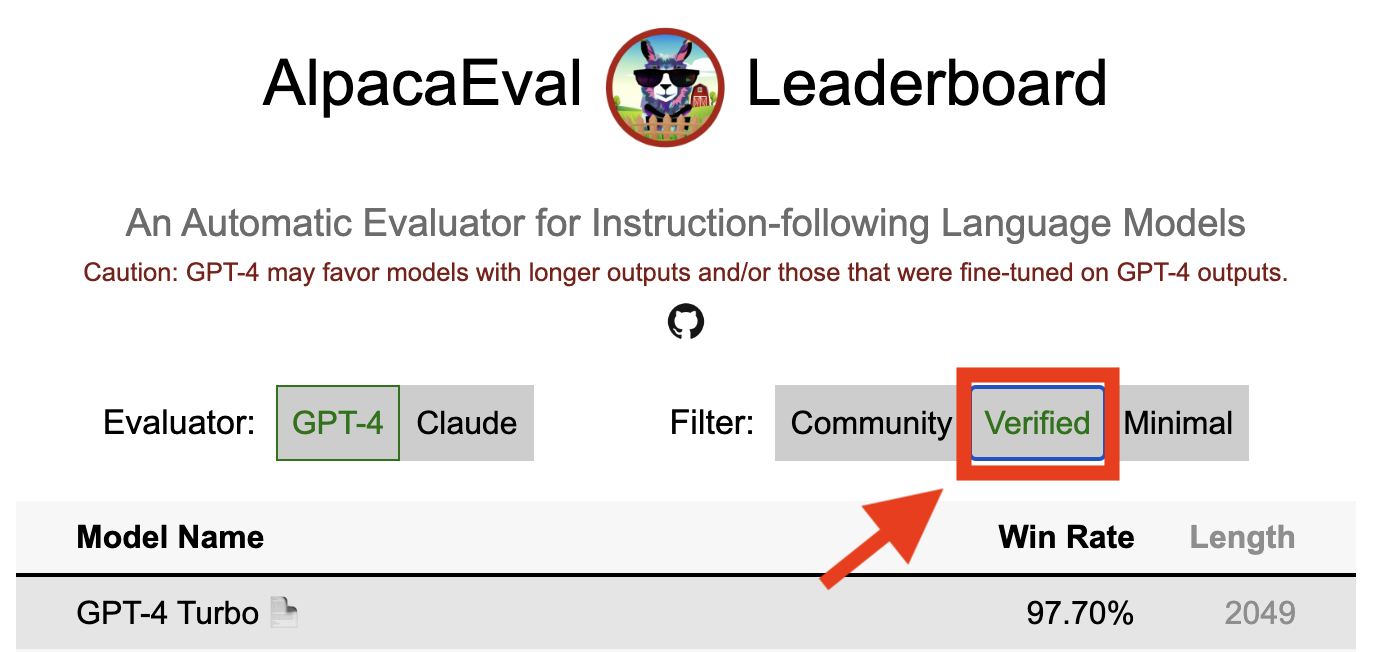
Проверенный результат в Alpacaeval указывает на то, что сердечный содействие декодировал выходы из модели и выполнил оценку. К сожалению, у нас, альпакаэво-сопровождающих, не хватает ресурсов для проверки всех моделей, и поэтому мы сделаем это только для моделей, которые находятся в топ-5 в списке лидеров. Приносим извинения за неудобства, это может вызвать и оценить ваше понимание. Чтобы проверить вашу модель, следуйте приведенным ниже шагам:
@yann по Discord или напишите нам, если у вас есть электронное письмо, предоставив краткое обоснование того, почему ваша модель должна быть проверена.alpaca_eval evaluate_from_model --model_configs '<your_model_name>' без требуния локального графического процессора.alpaca_eval evaluate_from_model --model_configs '<your_model_name>' , обновите результаты и сообщили вам, чтобы вы могли отозвать временные ключи.Обратите внимание, что мы не будем переоценить ту же модель. Из -за дисперсии выборки результаты могут немного отличаться от ваших начальных. Мы заменим ваши предыдущие результаты сообщества на проверенные.
Пожалуйста, сначала следуйте указаниям в создании нового оценщика. Как только вы создаете конфигурацию аннотатора, мы просим вас создать новую таблицу лидеров для аннотатора, оценив минимальный набор моделей. Выходы для этих моделей можно найти путем загрузки alpaca_eval_all_outputs.json.
alpaca_eval make_leaderboard
  --leaderboard_path src/alpaca_eval/leaderboards/data_AlpacaEval/ < evaluator > _leaderboard.csv
  --all_model_outputs alpaca_eval_all_outputs.json
  --annotators_config < evaluator_config >
Затем, пожалуйста, создайте PR с конфигурацией аннотаторов и CSV CSV.
Чтобы внести новый набор Eval, вам сначала необходимо указать набор текстовых инструкций. Затем вам необходимо указать набор эталонных выходов (с этой ссылкой вычисляются показатели победы модели). Для простоты использования вы можете использовать конфигурацию эталона текстового Davinci-003 по умолчанию.
Поместите их вместе в JSON, где каждая запись указывает instruction поля, output и generator . Вы можете обратиться к Alpaca_eval.json в качестве руководства (поле dataset не требуется).
Наконец, мы просим вас создать минимальную таблицу лидеров в этом новом наборе оценки. Вы можете сделать это со следующим:
alpaca_eval make_leaderboard
  --leaderboard_path < src/alpaca_eval/leaderboards/data_AlpacaEval/your_leaderboard_name.csv >
  --all_model_outputs alpaca_eval_all_outputs.json
  --reference_outputs < path_to_json_file >
Пожалуйста, отправьте PR с набором Eval JSON и соответствующим таблицей лидеров CSV.
В настоящее время мы разрешаем различные функции завершения, например, openai , anthropic , huggingface_local , huggingface_hub_api ... если вы хотите внести новую функцию завершения / API, с помощью которого можно выполнить вывод, затем выполните эти шаги:
<name>_completions(prompts : Sequence[str], model_name :str, ... ) в папке декодера. Эта функция должна воспринимать в качестве аргумента подсказки + kwargs и вернуть завершения. Пожалуйста, посмотрите на другие функции завершения в каталоге для шаблонов. Например, guggingface_local_completions или антроп.<name>_completions и зависимости в init . Снова вы можете следовать примеру uggingface_local_completionsalpaca_eval evaluate_from_model --model_configs '<model_configs>'Не стесняйтесь начинать PR рано, мы сможем оказать некоторую помощь в процессе!
Альпакаэвовый трубопровод оценки, как и другие текущие оценщики, имеют важные ограничения и, следовательно, не должны использоваться в качестве замены для оценки человека в важных условиях, таких как решать, готова ли модель для развертывания. Они в целом можно сгруппировать в 3 категории:
Инструкции могут не быть репрезентативными для реального использования : набор альпакавеля содержит примеры из различных наборов данных (самостоятельный вторник, открытый помощник, Vicuna, Koala, HH-RLHF), которые не могут быть представительными для реальных и передовых применений лучших моделей, таких как GPT4. Это, вероятно, делает лучшие закрытые модели (GPT4 / Claude / Chatgpt / ...) более похожи на открытые модели, чем то, что они есть. Действительно, эти закрытые модели, по -видимому, предварительно проведены/созданы для гораздо более разнообразных данных. Смотрите, например, этот блог для предварительных результатов по более сложным инструкциям. Обратите внимание, однако, что в Alpacafarm мы показали, что выигрышные ставки в нашем наборе оценки сильно коррелируют (0,97 R2) с уровнями выигрыша в инструкциях от взаимодействия пользователей с демонстрацией Alpaca. Кроме того, таблица лидеров альпакавеля показывает больший разрыв между открытыми моделями и моделями OpenaI, чем другие списки лидеров (например, LMSYS).
Предвзятость автоматических аннотаторов : необработанные автоматические аннотаторы, похоже, имеют неявные предубеждения. В частности, мы обнаружили, что они, как правило, предпочитают более длинные выходы и выходы, которые содержат списки (например, 0,68 / 0,69 для alpaca_eval_gpt4 и 0,62 / 0,58 для claude ). Хотя мы обнаружили, что люди имеют сходные смещения (0,64 / 0,61), мы считаем, что это может быть скорее ограничением трубопровода аннотаций человека, который мы использовали, а не истинный человеческий уклон. В более общем плане, благодаря качественному анализу, мы обнаружили, что автоматические аннотаторы придают большее значение стилю вывода, чем его содержание (например, факт). Наконец, мы обнаружили, что автоматические оценщики, как правило, предпочитают выходы из моделей, которые схожи (вероятно, обучаются на одних и тех же данных), как это предполагает большая разница между CHATGPT/GPT4 на уровне лидеров claude и alpaca_eval_gpt4 . Обратите внимание, что смещение длины частично смягчается в наших выигрышах с контролем длины.
Отсутствие оценки безопасности : Важно отметить, что Alpacaeval только оценивает возможности для следования инструкции моделей, а не причинение вреда, которое они могут причинить (например, токсическое поведение или предвзятость). В результате небольшой разрыв между текущими CHATGPT и лучшими моделями с открытым исходным кодом не должен интерпретироваться, как если бы последние были готовы к развертыванию.
Помимо этих ограничений в отношении оценочных трубопроводов, существуют также ограничения в отношении нашей проверки оценщиков и предлагаемого нашего подхода к выбору наборов оценки.
Во-первых, наша проверка оценщиков, основанных на перекрестных аннотациях человека, страдает от следующих ограничений: (1) мы качественно обнаружили, что наши толпы, как правило, также благоприятствуют стилю, таким как длина и наличие списков над фактической зависимостью; (2) Это не подтверждает, является ли выигрыш в отношении эталонной модели хорошей стратегией оценки в первую очередь; (3) Предпочтения 16 толпы не являются репрезентативными предпочтениями всех людей.
Во -вторых, наш предлагаемый подход к выбору наборов оценки на основе статистической мощности страдает от следующих ограничений: (1) Статистическая мощность не обеспечивает правильного направления, например, вы можете иметь неестественный набор инструкций, в которых альпака «лучше, чем лучшая модель; и (2) это может подтолкнуть пользователей выбрать данные для поддержки гипотезы, которую они хотят проверить.
Контролируемая длина альпакавольная визуализация:
Контролируемая длиной альпакавовой развитие:
В ноутбуке показаны разные варианты, которые мы рассмотрели для смягчения смещения длины автоматических аннотаторов.
Здесь мы кратко суммируем основные результаты. А именно:
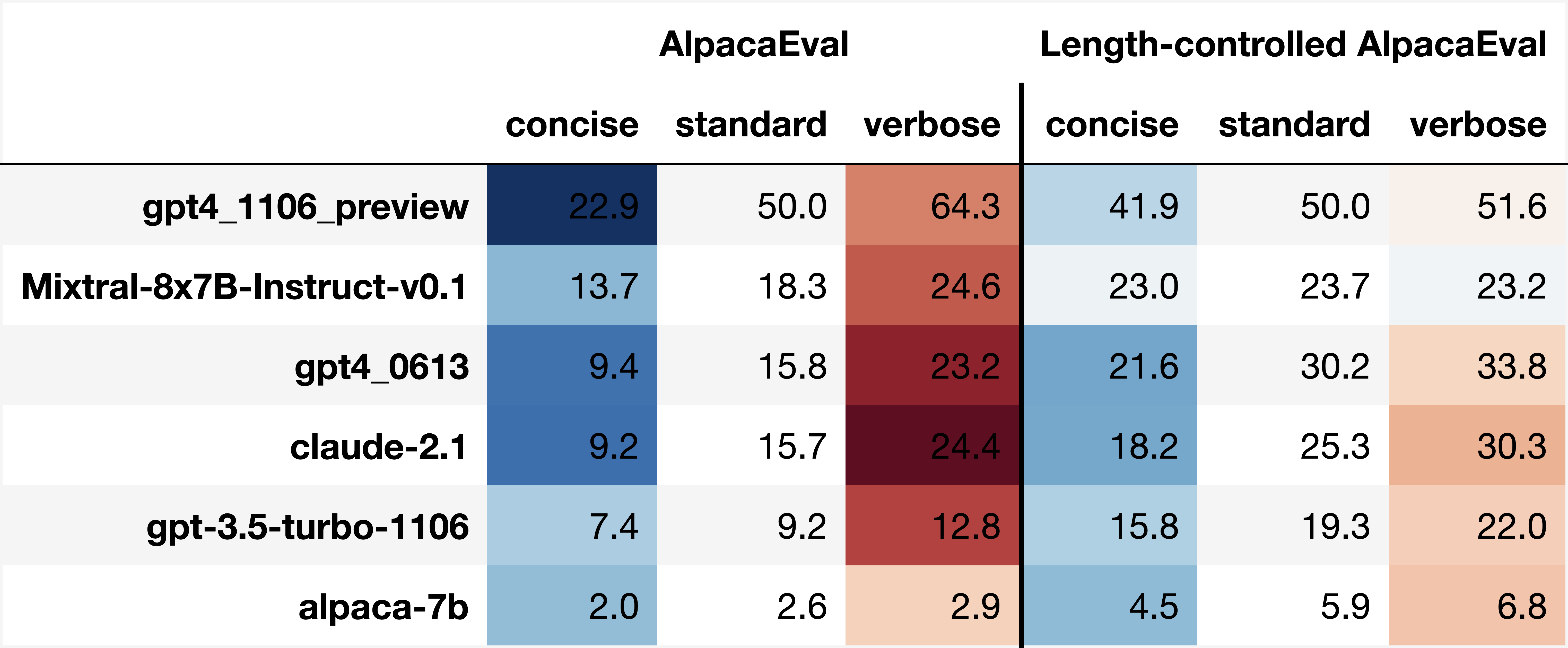
win_rate(m,b) = 1 - win_rate(b,m) in [0,1] and win_rate(m,m) = 0.5 . This is shown in the plot below. 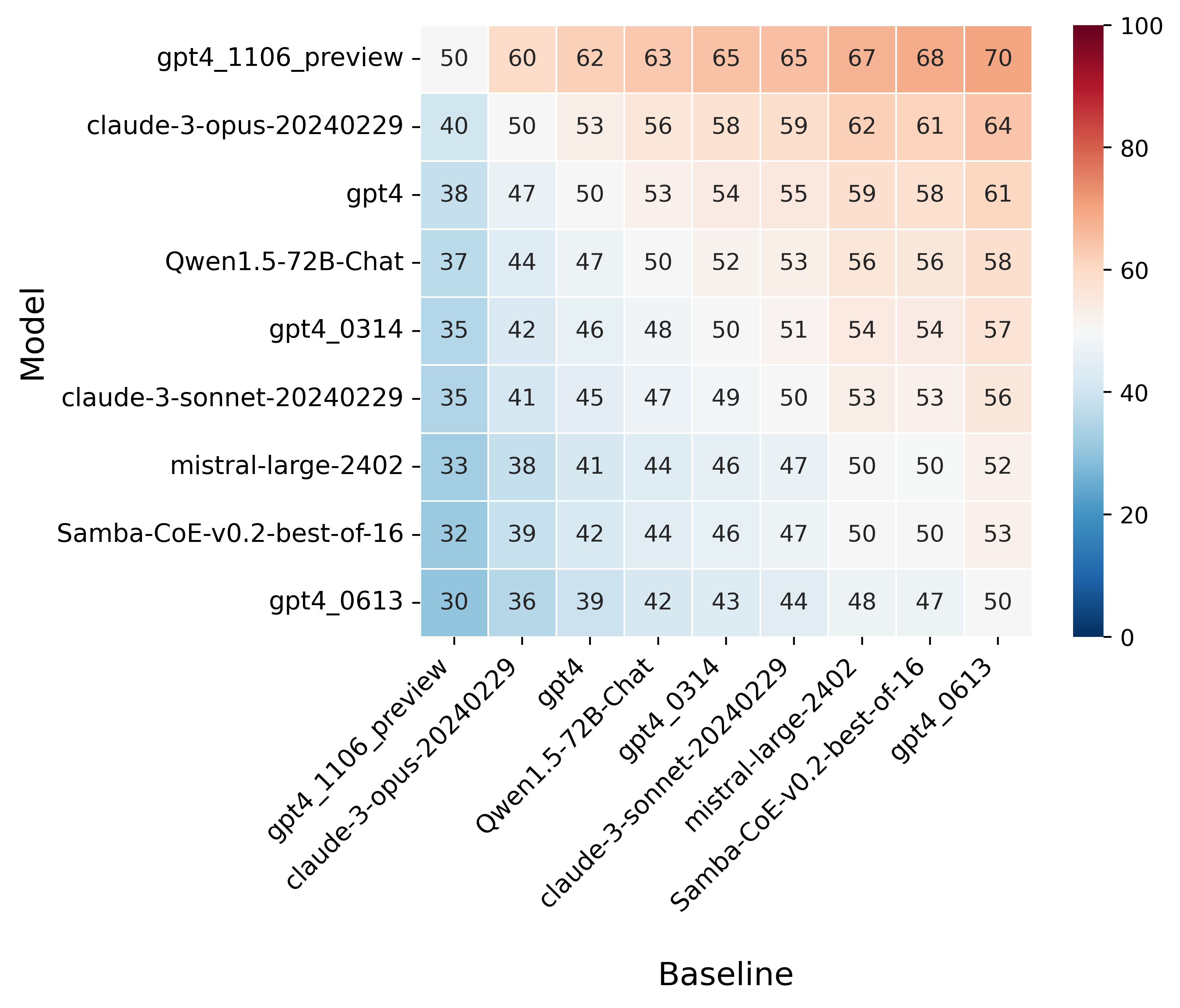
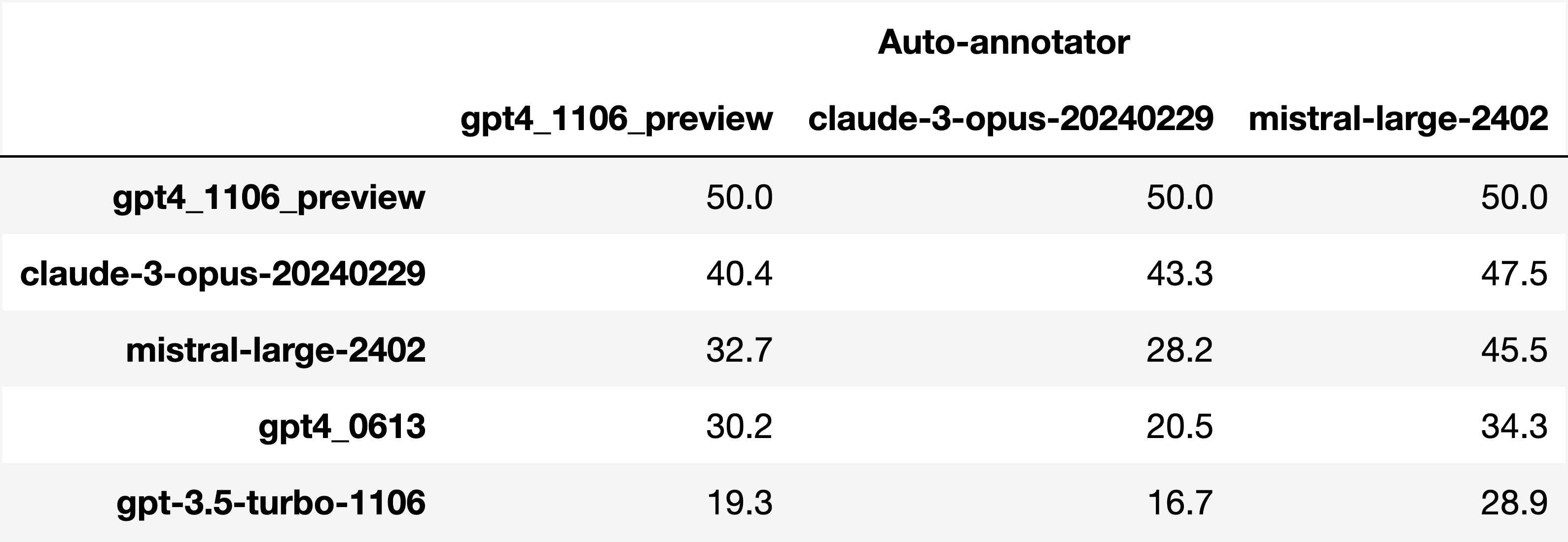
Finally, note that we are only controlling for length bias. There are other known biases that we are not controlling for, such as the fact that auto-annotators prefer outputs similar to their model. Although we could control for that, in practice we have found that to be less of an issue than length bias. For two reasons (1) this mostly a single model in the leaderboard because fine-tuning on outputs from the auto-annotator doesn't seem to have doesn't seem to impact the win-rate as much, and (2) the bias is actually less strong that what one could think. For example we show below a subset of the leaderboards auto-annotated by three different models, and we see that the ranking of models is exactly the same. In particular, claude-3-opus prefers gpt4_preview , and mistral-large prefers the former two.
Caution : all the following results are about AlpacaEval 1.0 and have not been updated since
Analyzing evaluators:
As we saw in the evaluator's leaderboard, there are many metrics to consider when selecting an evaluator, eg the quality, price, and speed. To assist with selection of the evaluator we provide a few functions to plot those metrics. The following shows for example the price/time/agreement of the different evaluators.
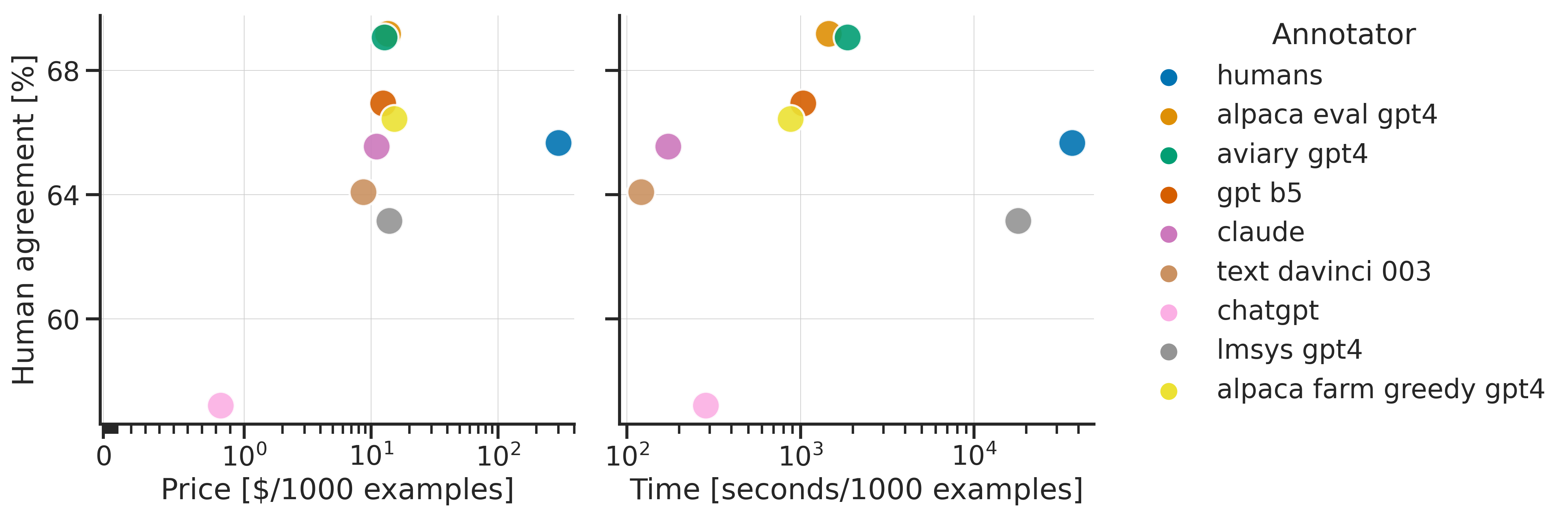
Here we see that alpaca_eval_gpt4 performs very well and is better than humans on all the considered metrics.
Previously we only considered the agreement with human annotators overall. An additional validation that one could do is checking whether making a leaderboard using our automatic annotator gives similar results as a leaderboard from humans. To enable such analysis, we release human annotations of outputs from 22 methods from AlpacaFarm => 22*805 = ~18K annotations. As a result we can test the correlation between the win-rates of the 22 models as evaluated by the humans and our automatic annotator. Note that this is arguably a better way of selecting an automatic evaluator than using "human agreement [%]" but is expensive given that it requires 18K annotations. The plot below shows such correlation for the alpaca_eval_gpt4 evaluator.
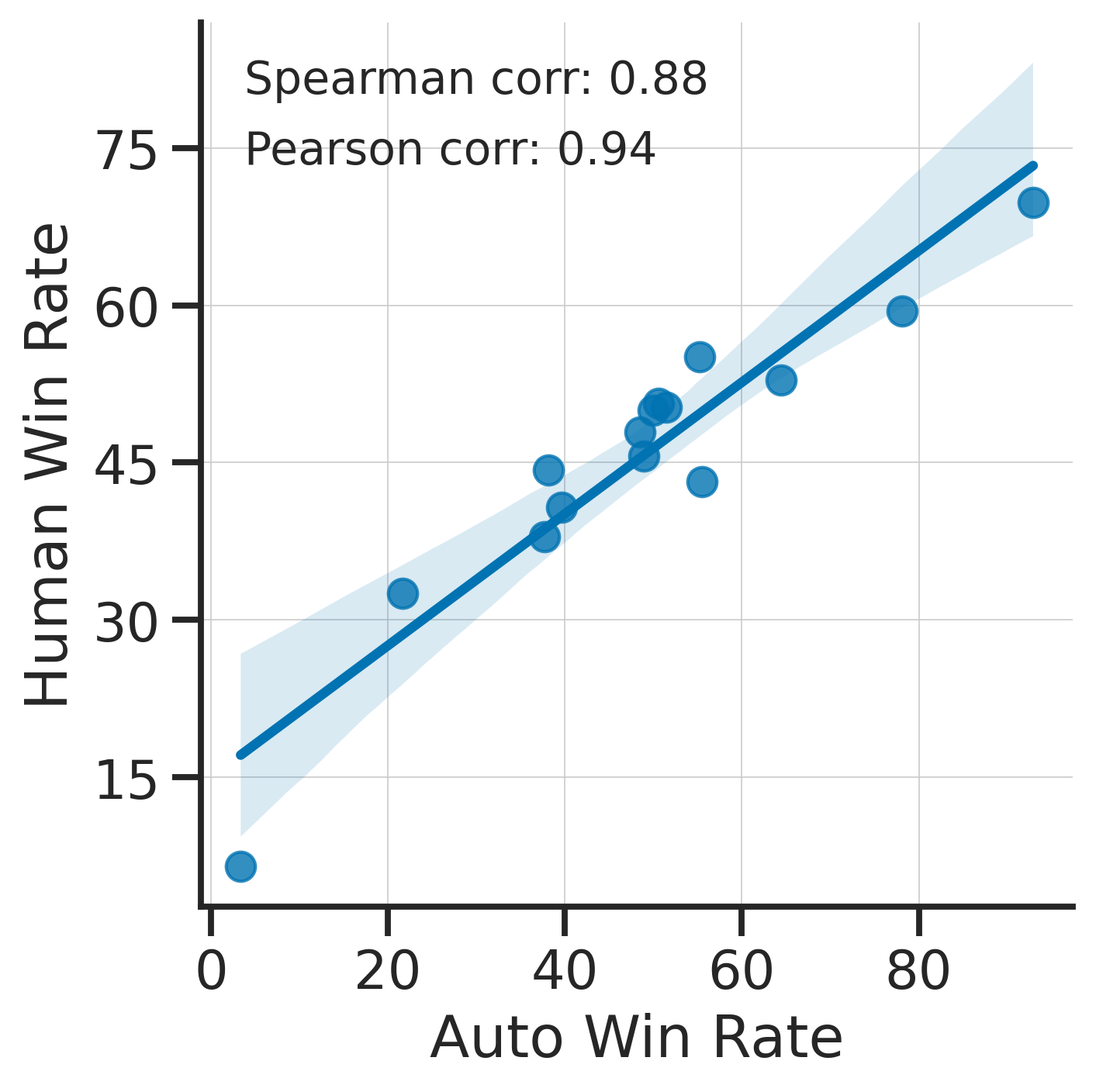
We see that the alpaca_eval_gpt4 leaderboard is highly correlated (0.94 Pearson correlation) to the leaderboard from humans, which further suggests that automatic evaluation is a good proxy for human evaluation. For the code and more analysis, see this notebook, or the colab notebook above.
Caution : all the following results are about AlpacaEval 1.0 and have not been updated since.
Making evaluation sets:
When creating an evaluation set there are two main factors to consider: how much data to use? and what data?
One way of answering those question is by considering a leaderboard of models that you believe are of different quality and checking what and how much data is needed to distinguish between them in a statistically significant way. We will do so below using a paired t-test to test if the difference in win-rates between every pair of models is statistically significant.
First, let us consider the question of how much data to use. Below we show the number of random samples needed from AlpacaEval for the paired t-test to give a p-value < 0.05 for each pair of models in the minimal alpaca_eval_gpt4 leaderboard. Grey cells correspond to pairs that are not significantly different on the 805 samples. y- and x-axis are ordered by the win-rate of the first and second model respectively.
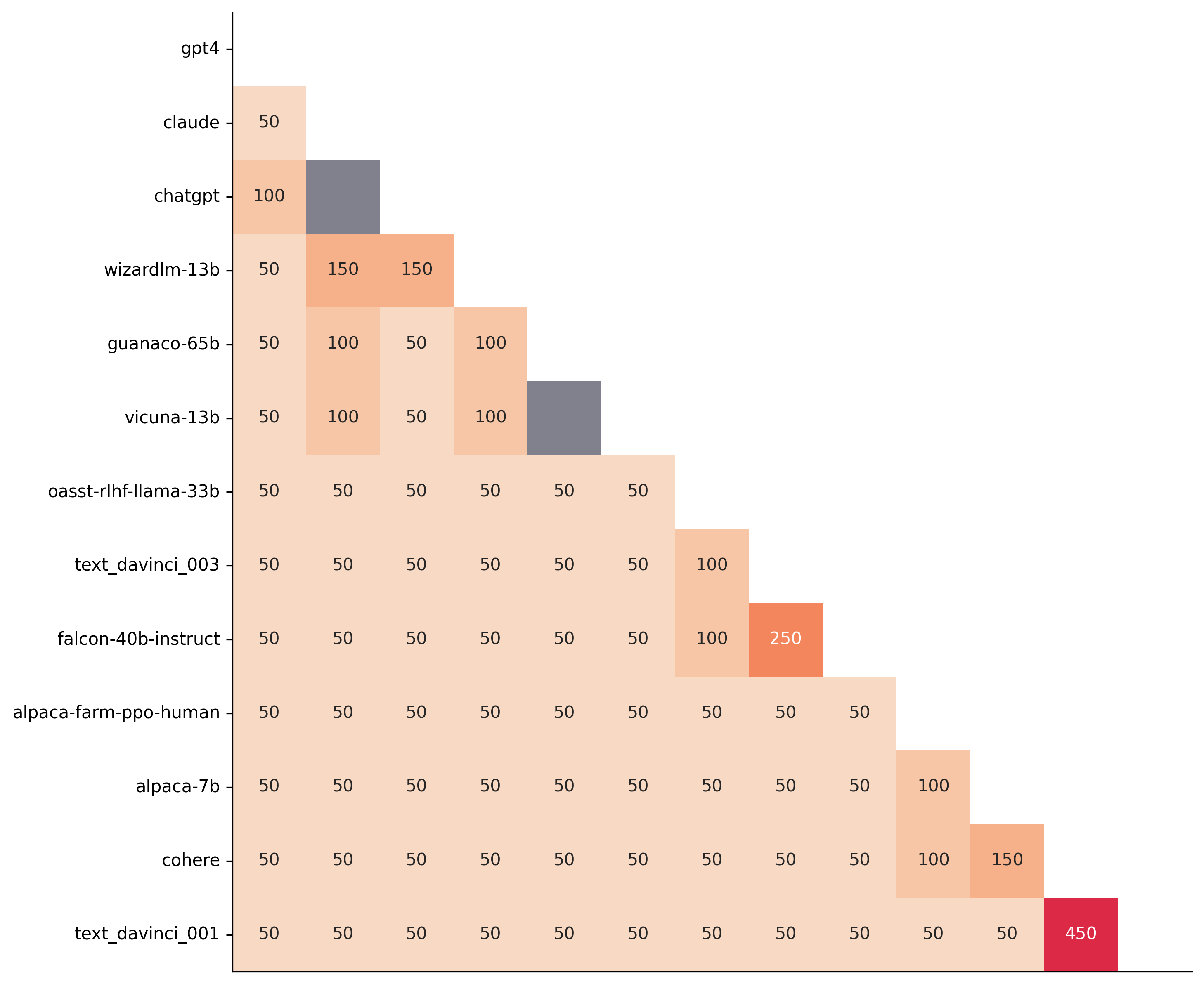
We see that most models can already be distinguished with 50 samples, and that 150 samples allows distinguishing the majority of pairs (74 out of 78). This suggests that we can decrease the evaluation set size by a factor of 4 when testing two models that have similar performance gaps as those on the minimal alpaca_eval_gpt4 leaderboard.
The second question is what data to use. Again we can try to answer this question from a statistical power perspective: what data allows to best distinguish between models. Let's consider this for all the datasets that are part of AlpacaEval, but let us control for the size of the evaluation sets as we only care about the quality of the data. The following plot shows the p-values from the paired t-test of each pairs of models on 80 examples of each subset of AlpacaEval.
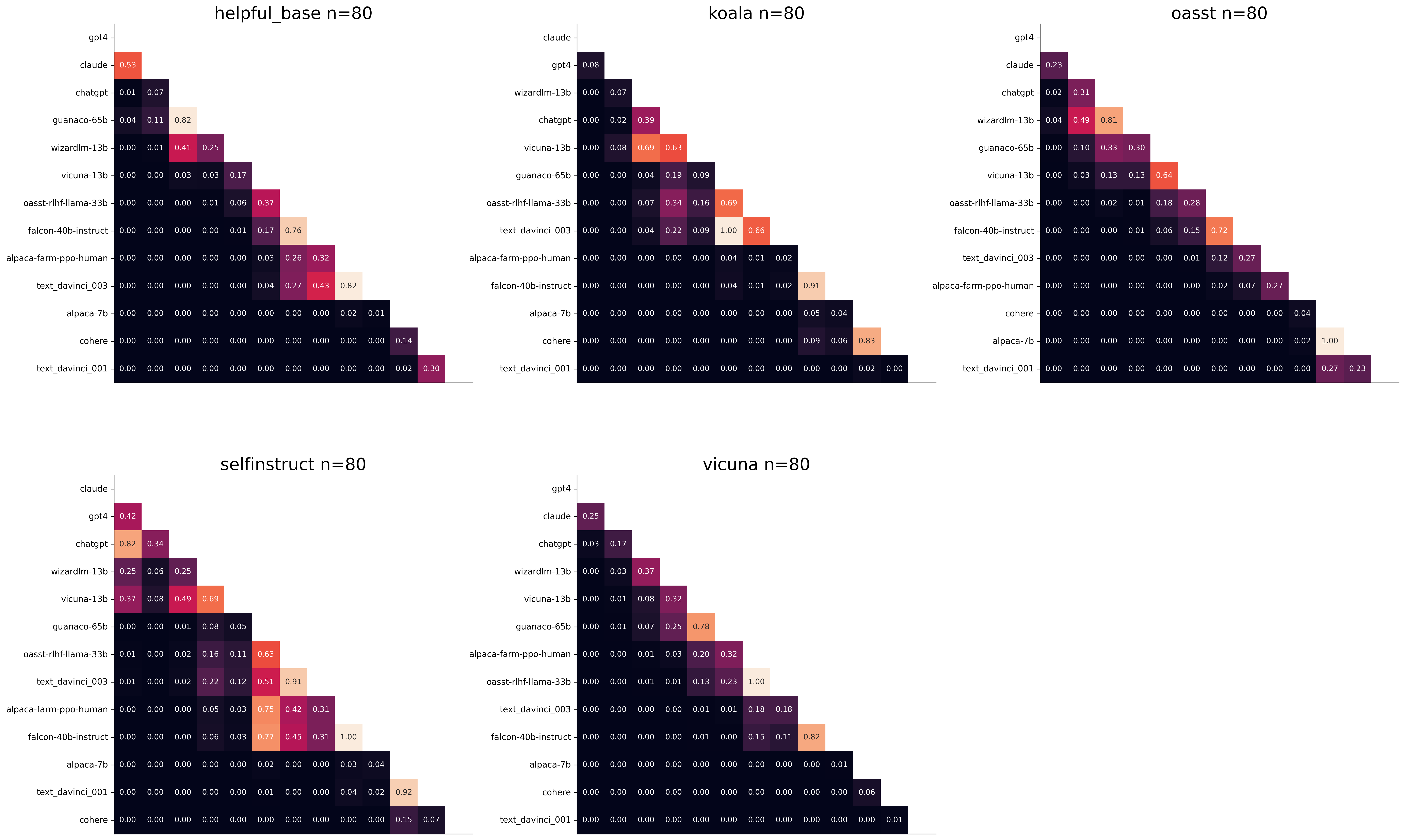
We see for example that the self-instruct dataset yields the least statistical power, which suggests that one could remove this dataset from the evaluation set. The exact reason should be analyzed in future work. For the code and more analysis see this notebook, or the colab notebook above.
Please consider citing the following depending on what you are using and referring to:
alpaca_eval (this repo). Specify whether you are using AlpacaEval or AlpacaEval 2.0. For length-controlled win-rates see below.alpaca_eval_length .dubois2023alpacafarm (AlpacaFarm)alpaca_eval and self-instruct, open-assistant, vicuna, koala, hh-rlhf.Here are the bibtex entries:
 @misc{alpaca_eval,
  author = {Xuechen Li and Tianyi Zhang and Yann Dubois and Rohan Taori and Ishaan Gulrajani and Carlos Guestrin and Percy Liang and Tatsunori B. Hashimoto },
  title = {AlpacaEval: An Automatic Evaluator of Instruction-following Models},
  year = {2023},
  month = {5},
  publisher = {GitHub},
  journal = {GitHub repository},
  howpublished = {url{https://github.com/tatsu-lab/alpaca_eval}}
}
 @article{dubois2024length,
  title={Length-Controlled AlpacaEval: A Simple Way to Debias Automatic Evaluators},
  author={Dubois, Yann and Galambosi, Bal{'a}zs and Liang, Percy and Hashimoto, Tatsunori B},
  journal={arXiv preprint arXiv:2404.04475},
  year={2024}
}
 @misc{dubois2023alpacafarm,
  title={AlpacaFarm: A Simulation Framework for Methods that Learn from Human Feedback},
  author={Yann Dubois and Xuechen Li and Rohan Taori and Tianyi Zhang and Ishaan Gulrajani and Jimmy Ba and Carlos Guestrin and Percy Liang and Tatsunori B. Hashimoto},
  year={2023},
  eprint={2305.14387},
  archivePrefix={arXiv},
  primaryClass={cs.LG}
}
Length controlled (LC) win-rates are a debiased version of the win-rates that control for the length of the outputs.
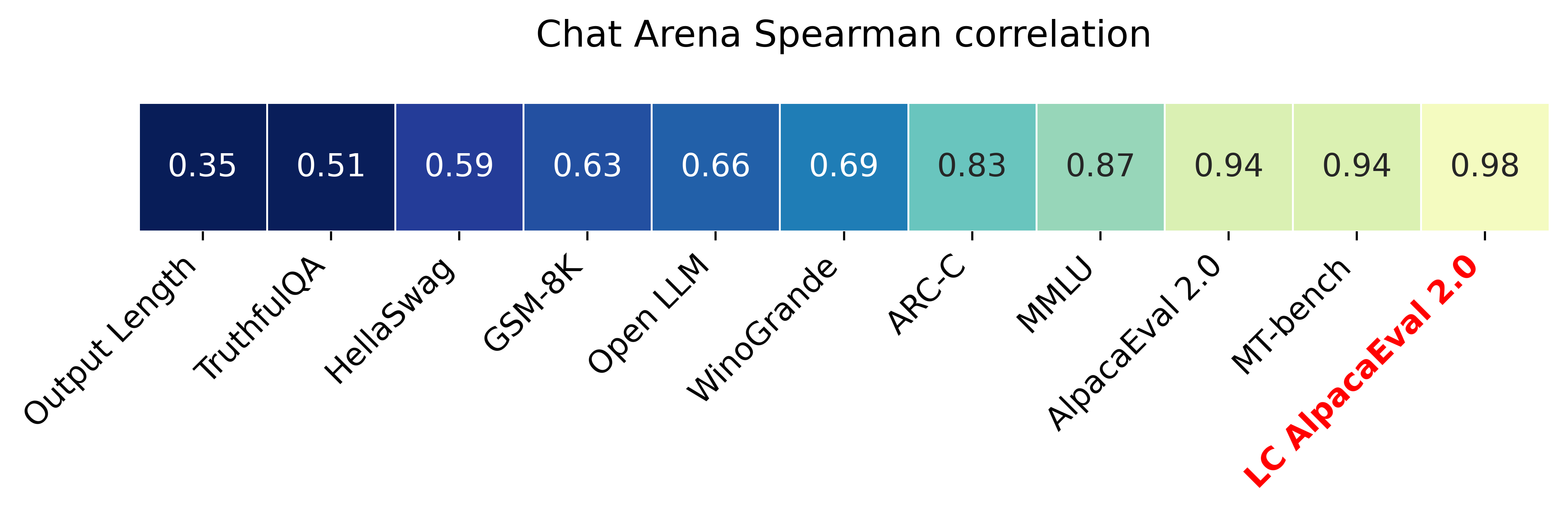
The main idea is that for each model we will fit a logistic regression to predict the preference of the autoannotator given: (1) the instruction, (2) the model, and (3) the difference of length between the baseline and model output. Given such a logistic regression we can then try to predict the counterfactual "what would the preference be if the model's output had the same length as the baseline" by setting the length difference to 0. By averaging over this length-controlled preference, we then obtain the length-controlled win-rate. The exact form of the logistic regression is taken such that the interpretation of LC win rates is similar to the raw win rates, for example for any model m1 and m2 we have win_rate(m1, m2) = 1 - win_rate(m2, m1) in [0,100] and win_rate(m1, m1) = 0.5 . Length controlled win-rates increase the correlation between AlpacaEval's leaderboard and Chat Arena from 0.93 to 0.98 Spearman correlation, while significantly decreasing the length gameability of the annotator . For more information and results about length controlled win-rates see this notebook.
This idea of estimating the controlled direct effect, by predicting the outcome while conditioning on the mediator (the length difference), is common in statistical inference.
To get LC win rates on previously annotated models, you can use the following command:
pip install -U alpaca_eval
alpaca_eval --model_outputs … --is_recompute_metrics_only True
AlpacaEval 2.0 is a new version of AlpacaEval. Here are the differences:
gpt4_turbo : we upgraded the baseline from text-davinci-003 to gpt4_turbo to make the benchmark more challenging and have a metric that better reflects the current state of the art.weighted_alpaca_eval_gpt4_turbo : we improved the annotator in quality and price. First, we use the gpt4_turbo model for annotating, which is approximately 2x cheaper than gpt4 . Second, we changed the prompt such that the model outputs a single token, which further reduced cost and speed. Finally, instead of using a binary preference, we used the logprobs to compute a continuous preference, which gives the final weighted win-rate. Note that the latter two changes had the surprising effect of decreasing the annotators' length biased. By default, AlpacaEval 2.0 will be used from pip install alpaca_eval==0.5 . If you wish to use the old configs by default, you can set IS_ALPACA_EVAL_2=False in your environment.
As part of AlpacaEval, we release the following data:
text-davinci-003 reference on the AlpacaFarm evaluation set. Annotations are from a pool of 16 crowd workers on Amazon Mechanical Turk. The different models are: 6 from OpenAI, 2 SFT models from AlpacaFarm, 13 RLHF methods from AlpacaFarm, and LLaMA 7B.For more details about the human annotations refer to the AlpacaFarm paper.
AlpacaEval is an improvement and simplification of the automatic pairwise preference simulator from AlpacaFarm. Outside AlpacaFarm, you should be using AlpacaEval. Here are the main differences:
{instruction}nn{input} . This affects 1/4 of the examples in the AlpacaFarm evaluation set (the self-instruct subset). This simplification provides a more fair comparison for models that were not trained by distinguishing between the two fields.text-davinci-003 ), so the results on AlpacaEval are not comparable to those on AlpacaFarm even for examples that had no input field.--anotators_config 'alpaca_farm' and --p_label_flip 0.25 when creating an evaluator. There have been several work that propose new automatic annotators for instruction-following models. Here we list the ones that we are aware of and discuss how they differ from ours. We evaluated all of those in our evaluator's leaderboard.
lmsys_gpt4 ) evaluates the pair by asking the annotator a score from 1-10 for each output, and then selecting the output with the highest score as preferred. They do not randomize over output order and they ask an explanation after the score. Overall, we found that this annotator has strong bias towards longer outputs (0.74) and relatively low correlation with human annotations (63.2).alpaca_farm_greedy_gpt4 ) evaluates the pair by directly asking the annotator which output it prefers. Furthermore, it batches 5 examples together to amortize the length of the prompt and randomizes the order of outputs. Overall, we found that this annotator has much less bias towards longer outputs (0.60) and is faster (878 seconds/1000 examples) than others. It has a slightly higher correlation with the majority of human annotations (66.4) than humans themselves (65.7). However, it is more expensive ($15.3/1000 examples) and doesn't work with very long outputs given the batching.aviary_gpt4 ) asks the annotator to order the output by its preference, rather than simply selecting the preferred output. It does not randomize the order of outputs and uses high temperature for decoding (0.9). Overall, we found that this annotator has relatively strong bias towards longer outputs (0.70) and very high correlation with human annotations (69.1). By decreasing the temperature and randomizing the order of outputs, we further improved the correlation to 69.8 ( improved_aviary_gpt4 ) but this further increased the length bias to 0.73. Our alpaca_eval_gpt4 is a mix between the AlpacaFarm and Aviary annotators. It asks the annotator to order the outputs by preference, but it uses temperature 0, randomizes over outputs, and made some modifications to the prompt to decrease length bias to 0.68.
Other related work include recent papers which analyze automatic evaluators. Например:
For all models you can find the auto-annotations under results/<model_name>/*/annotations.json . The annotations have the following columns:
instruction : the promptgenerator_1 : the baseline modeloutput_1 : the output of the baseline modelgenerator_2 : the model being evaluatedoutput_2 : the output of the model being evaluatedannotator : the auto-annotatorpreference : the result of the auto-annotator. This is a float between 1 and 2. Closer to 1 means that the auto-annotator prefers output_1 , closer to 2 means that it prefers output_2 . For AlpacaEval 2.0, preference-1 corresponds to the probability of output_1 being preferred. For AlpacaEval 1.0, preference is 1 if output_1 is preferred, 2 if output_2 is preferred, and 1.5 if they are the same. The win rate is always (preference -1).mean() .raw_completion : the raw output of the auto-annotator. This is field contains the completions before de-randomization of the order between output_1 and output_2 ! It is thus much harder to interpret, see below for more information.Chain of thought
For some annotators, eg alpaca_eval_cot_gpt4_turbo_fn we use chain of thought reasoning to make the models preferences more interpretable. Those can then be found under concise_explanation . To interpret them, you should also look at referenced_models which translates the temporary model name (in the prompt) to the actual output. Below, we provide more explanation as to what is happening behind the scenes.
You can check the raw_annotations["concise_explanation] column in annotations.json (eg here) which contains the chain of thought reasoning of the auto annotator. Note that the raw_annotations is not modified by the randomization of the order of the outputs. In particular, "m" and "M" can sometime refer to the first model (the reference) and sometime to the second model (the model being evaluated). To understand which model is being referred to, you should use the column preference and ordered_models . To make it easier we add a column "referenced_models" mapping the model names to the corresponding outputs. For example in the following annotation we see that the preference is 1.0 (ie output_1 ) and corresponds to model M in concise_explanation (see ordered_models ).
{
  "instruction" : " How did US states get their names? " ,
  "output_1" : " The names of U.S. states are derived from a variety of languages and sources, including indigenous American languages, European languages (primarily English, Spanish, and French), as well as other historical influences. Here is a brief overview of how some states got their names: nn 1. **Indigenous American Languages**: Many state names come from Native American words or names of tribes, often from the languages of the indigenous peoples who lived in or near those areas. n   - **Alabama**: Possibly derived from the Choctaw language, meaning " thicket clearers. "n   - **Connecticut**: From a Mohegan-Pequot word meaning " long tidal river. "n   - **Massachusetts**: [...] " ,
  "generator_1" : " gpt4_1106_preview " ,
  "dataset" : " helpful_base " ,
  "output_2" : " The names of the 50 U.S. states come from a variety of sources, including Native American languages, European languages, and historical figures. Here's a brief overview of how some states got their names: nn 1. Native American origins: Many states have names derived from Native American languages. For example, Alabama comes from the Choctaw word " Albah amo, " meaning " plant gatherers " or " herb gatherers. " Similarly, the name Mississippi comes from the Ojibwe word " Misi-ziibi, " meaning " great river. "nn 2. European languages: [...]. " ,
  "generator_2" : " gpt4 " ,
  "annotator" : " alpaca_eval_cot_gpt4_turbo_fn " ,
  "preference" : 1.0 ,
  "raw_completion" : {
    "concise_explanation" : " Model M provided a more detailed and structured response, including bold headings for each category and a wider range of examples. It also included additional categories such as 'Other European Languages' and 'Combination of Languages and Influences', which added depth to the explanation. Model m's response was accurate but less comprehensive and lacked the clear structure found in Model M's output. " ,
    "ordered_models" : [
      {
        "model" : " M " ,
        "rank" : 1
      },
      {
        "model" : " m " ,
        "rank" : 2
      }
    ]
  },
  "referenced_models" : {
    "M" : " output_1 " ,
    "m" : " output_2 "
  }
}chatgpt_fn that anyone can use (no waiting lists).chatgpt_fn or alpaca_eval_gpt4_fn .




