alpaca_eval
v0.6.5

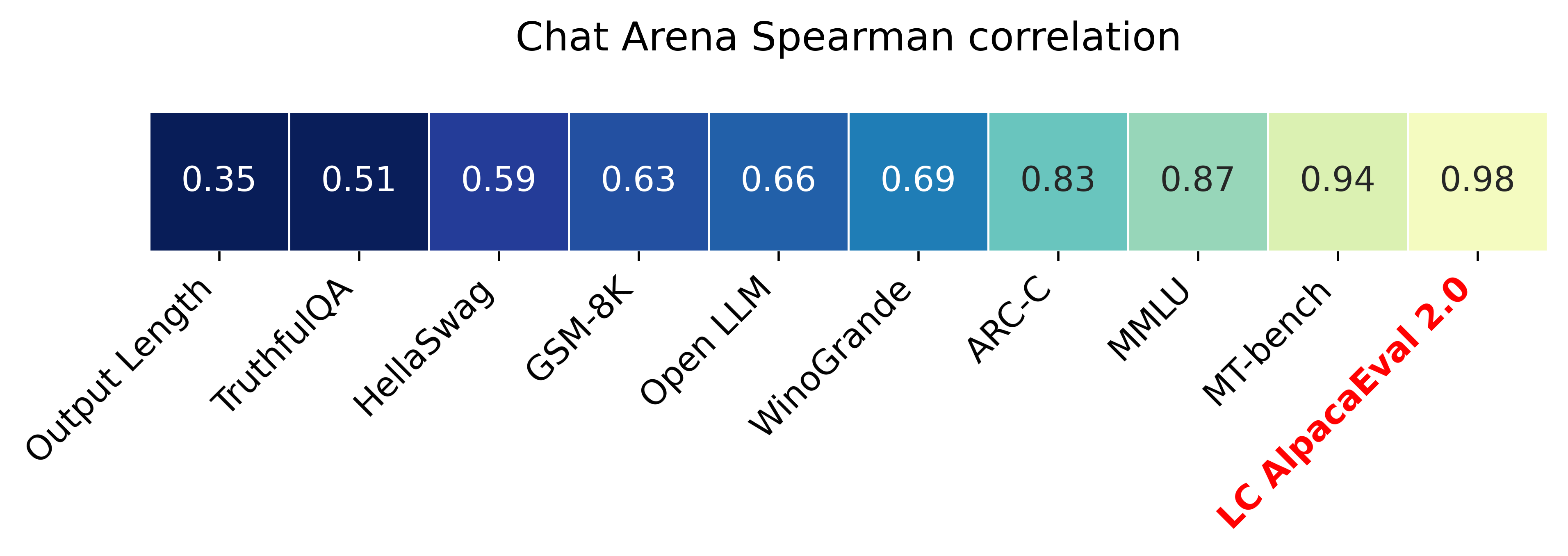
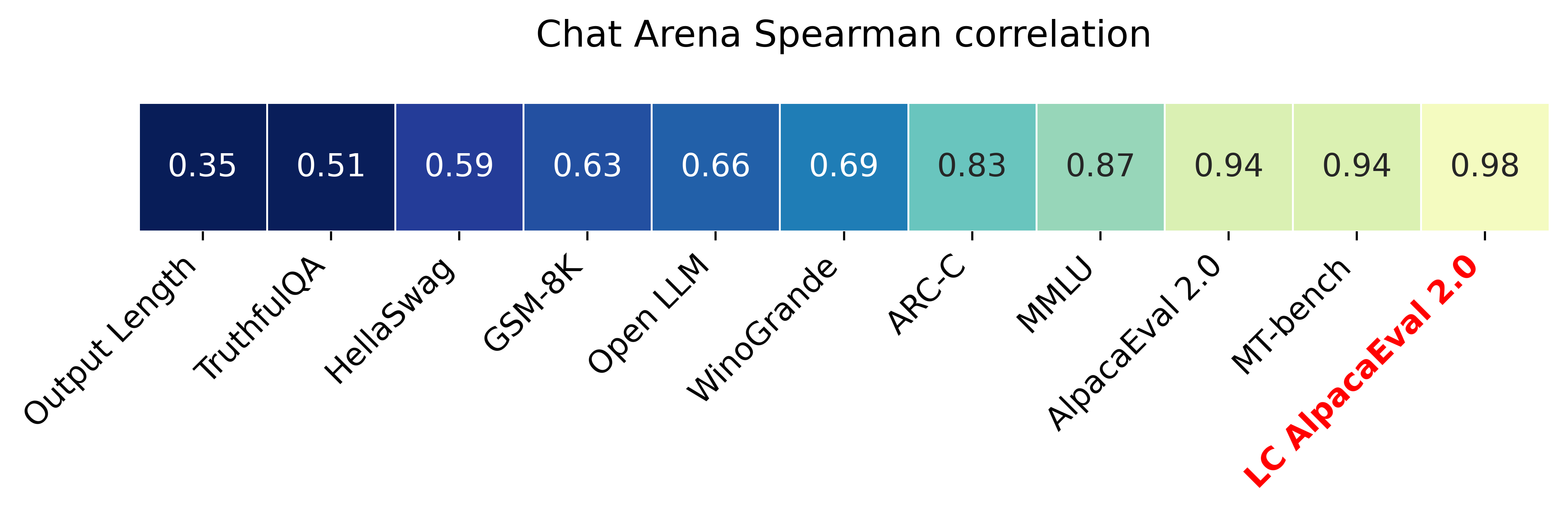
長さ制御されたウィンレート(Paper)を備えたAlpacaeval 2.0は、 Spearmanの相関が0.98とChatbot Arenaと3分未満のOpenaiクレジットの10ドル未満の費用がかかります。私たちの目標は、チャットLLMSのベンチマークを持つことです。つまり、高速(<5分)、安価(<$ 10)、および人間(0.98)と高い相関があります。他のベンチマークとの比較は次のとおりです。
更新:
?長さ制御された勝利率は発売され、デフォルトで使用されています!これにより、チャットボットアリーナとの相関が0.93から0.98に増加し、長さのギャビリティが大幅に減少します。生の勝利率は、ウェブサイトとCLIにまだ表示されています。詳細はこちらです。
? Alpacaeval 2.0は外出しており、デフォルトで使用されています!自動アノテーター(より良く安く)を改善し、GPT-4プレビューをベースラインとして使用しました。詳細はこちらです。古いバージョンの場合、環境変数IS_ALPACA_EVAL_2=False設定します。
命令に従うモデル(たとえば、ChatGPT)の評価には、通常、人間の相互作用が必要です。これは時間がかかり、高価で、複製が困難です。 LLMベースの自動評価では、高速で安価で、複製可能で、20Kの人間の注釈に対して検証されているアルパカエバル。モデル開発に特に役立ちます。以前の自動評価パイプラインよりも改善しましたが、より長い出力の好みのような基本的な制限がまだあります。 Alpacaevalは以下を提供します。
アルパカエバルをいつ使用するのですか?私たちの自動評価者は、単純な指導に従うタスクの人間の評価のための迅速で安価なプロキシです。モデル開発中に、多くの評価を迅速に実行する必要がある場合に役立ちます。
アルパカエバルを使用しないのはいつですか?他の自動評価者と同様に、アルパカエバルは、モデルのリリースを決定するために、高ステークの意思決定において人間の評価に取って代わるべきではありません。特に、アルパカエバルは、(1)評価セットの指示がLLMの高度な使用法を表していない可能性があるという事実によって制限されています。 (2)自動評価者は、答えの事実よりもスタイルを支持するなどのバイアスを持っている可能性があります。 (3)Alpacaevalは、モデルが引き起こす可能性のあるリスクを測定しません。制限の詳細。
安定したリリースをインストールするには、実行します
pip install alpaca-eval毎晩バージョンをインストールするには、実行します
pip install git+https://github.com/tatsu-lab/alpaca_eval次に、次のように使用できます。
 export OPENAI_API_KEY= < your_api_key > # for more complex configs, e.g. using Azure or switching clients see client_configs/README.md
alpaca_eval --model_outputs ' example/outputs.json '
これにより、リーダーボードがコンソールに印刷され、 model_outputsファイルと同じディレクトリにリーダーボードと注釈の両方を保存します。重要なパラメーターは次のとおりです。
instructionとoutputが含まれている必要があります。weighted_alpaca_eval_gpt4_turbo (alpacaeval 2.0のデフォルト)を使用することをお勧めします。すべてのアノテーターの比較については、こちらをご覧ください。model_outputsと同じ形式。デフォルトでは、これはAlpacaeval 2.0のgpt4_turboです。モデルの出力がない場合は、 evaluate_from_modelを使用して、ローカルパスまたはハギングフェイスモデルの名前、または標準のAPI(Openai、Anthropic、Cohere、Google、...)のモデルを渡すことができます。その他のコマンド:
>>> alpaca_eval -- --help SYNOPSIS
alpaca_eval COMMAND
COMMANDS
COMMAND is one of the following:
evaluate
Evaluate a model based on its outputs. This is the default entrypoint if no command is specified.
evaluate_from_model
Evaluate a model from HuggingFace or an API provider. This is a wrapper around `evaluate` which includes generating from a desired model.
make_leaderboard
Precompute and save an entire leaderboard for a given dataset / evaluator / set of models generations.
analyze_evaluators
Analyze an evaluator and populates the evaluators leaderboard (agreement with human, speed, price,...).
各関数の詳細についてはalpaca_eval <command> -- --help 。
リーダーボードは、アルパカエバルデータセットで計算されます。さまざまなベースラインモデルとオートオノテーターを使用して、重要なモデルのリーダーボードを事前に計算しました。このページには、2つの主要なリーダーボード(「Alpacaeval 2.0」と「Alpacaeval」)があります。 「Alpacaeval 2.0」は、Antatorにweighted_alpaca_eval_gpt4_turboを使用し、ベースラインにはgpt4_turbo使用します。 「ALPACAEVAL」は、 alpaca_eval_gpt4アノテーターに使用し、ベースラインにはtext_davinci_003使用します。事前に計算されたすべてのリーダーボードについては、こちらをご覧ください。後で、モデルをリーダーボードに追加する方法と、評価者/データセット用の新しいリーダーボードを作成する方法も示します。箱から出して利用できるすべてのモデルの構成については、こちらをご覧ください。
Alpacaeval Minimal Leaderboard :
| 勝利率 | STDエラー | |
|---|---|---|
| GPT4 | 95.3 | 0.7 |
| クロード | 88.4 | 1.1 |
| chatgpt | 86.1 | 1.2 |
| グアナコ-65b | 71.8 | 1.6 |
| Vicuna-13b | 70.4 | 1.6 |
| text_davinci_003 | 50.0 | 0.0 |
| Alpaca-Farm-Ppo-Human | 41.2 | 1.7 |
| Alpaca-7B | 26.5 | 1.5 |
| text_davinci_001 | 15.2 | 1.2 |
勝利率:勝利率は、モデルの出力が参照の出力よりも優先される時間の割合(アルパカエバルの場合はtest-davinci-003およびAlpacaeval 2.0のgpt4_turbo )よりも優先されます。より具体的には、勝利率を計算するために、Apacaevalデータセットからのすべての命令で目的モデルの出力のペアを収集します。次に、同じ命令で各出力を参照モデル( text-davinci-003など)の出力とペアリングします。次に、自動評価者にどの出力を好むか尋ねます。 AlpacaevalおよびAlpacaeval 2.0のプロンプトと構成を参照してください。特に、出力の順序をランダム化して、位置バイアスを回避します。次に、データセット内のすべての命令よりも優先順位を平均して、ベースラインでモデルの勝利率を取得します。両方の出力がまったく同じ場合、両方のモデルに対して半分優先されます。
標準誤差:これは、勝利率の標準誤差(n-1で正規化)、つまり、異なる命令で平均化された設定です。
alpaca_eval_gpt4 alpaca_eval_gpt4 (configsを参照)アノテーターは、好みを平均して平均します。
temperature=0でGPT4を使用してプロンプトを完了しますアノテーターは、AlpacafarmとAviaryの評価者の間の混合(および大きな影響を受けた)です。特に、Alpacafarm(キャッシュ/ランダム化/ハイパーパラメーター)の場合と同じコードを使用しますが、Aviaryと同様のランキングプロンプトを使用します。より長い出力のバイアスを減らすために、鳥類のプロンプトに変更を加えます。関連作業の詳細。
ALPACAEVAL 2.0の場合、 weighted_alpaca_eval_gpt4_turboを使用します。これは、logProbsを使用して連続好みを計算し、GPT4_TURBOをモデルとして使用します(構成を参照)。
収集した2.5kのヒト注釈と比較することにより、アルパカエバルセットのさまざまな自動アノテーターを評価します(それぞれ4つの人間の注釈を持つ〜650の指示)。以下にaviary_gpt4提案claudeれweighted_alpaca_eval_gpt4_turbo評価alpaca_eval_gpt4 gpt4メトリックlmsys_gpt4示していalpaca_farm_greedy_gpt4 humans text_davinci_003 、 chatgpt_fn 、 guanaco_33b 、 chatgpt )。箱から出して利用できるすべての評価者の構成とそれに関連するメトリックについては、こちらをご覧ください。
| 人間の合意 | 価格[$/1000の例] | 時間[秒/1000の例] | Spearman Corr。 | Pearson Corr。 | バイアス | 分散 | 確率。より長く好む | |
|---|---|---|---|---|---|---|---|---|
| alpaca_eval_gpt4 | 69.2 | 13.6 | 1455 | 0.97 | 0.93 | 28.4 | 14.6 | 0.68 |
| alpaca_eval_cot_gpt4_turbo_fn | 68.6 | 6.3 | 1989年 | 0.97 | 0.90 | 29.3 | 18.4 | 0.67 |
| alpaca_eval_gpt4_turbo_fn | 68.1 | 5.5 | 864 | 0.93 | 0.82 | 30.2 | 15.6 | 0.65 |
| alpaca_eval_llama3_70b_fn | 67.5 | 0.4 | 209 | 0.90 | 0.86 | 32.3 | 8.2 | 0.79 |
| GPT4 | 66.9 | 12.5 | 1037 | 0.88 | 0.87 | 31.5 | 14.6 | 0.65 |
| alpaca_farm_greedy_gpt4 | 66.4 | 15.3 | 878 | 0.85 | 0.75 | 30.2 | 19.3 | 0.60 |
| alpaca_eval_cot_gpt4_turbo_fn | 65.7 | 4.3 | 228 | 0.78 | 0.77 | 33.9 | 23.7 | 0.61 |
| 人間 | 65.7 | 300.0 | 36800 | 1.00 | 1.00 | 0.0 | 34.3 | 0.64 |
| クロード | 65.3 | 3.3 | 173 | 0.93 | 0.90 | 32.4 | 18.5 | 0.66 |
| lmsys_gpt4 | 65.3 | 13.9 | 17982 | 0.98 | 0.97 | 31.6 | 15.9 | 0.74 |
| text_davinci_003 | 64.1 | 8.7 | 121 | 0.85 | 0.83 | 33.8 | 22.7 | 0.70 |
| 最長 | 62.2 | 0.0 | 0 | 0.27 | 0.56 | 37.8 | 0.0 | 1.00 |
| chatgpt | 57.3 | 0.8 | 285 | 0.72 | 0.71 | 39.4 | 34.1 | 0.59 |
ここで、上記の表のメトリックをどのように計算するかを言葉で説明します。コードはこちらです。
人間の合意:これは、現在のアノテーターと、例ごとに4つの人間の注釈が含まれるクロスアノテーションセットからの〜650注釈に対する人間の多数派の好みとの間の合意を測定します。単一の人間(上記の表のhumans列)と大多数の人間の間の合意を推定するために、4つの注釈のうちの1つを取り、他の3つの注釈のモードを予測するときに持っている精度を計算します。次に、4つの注釈すべてと650の指示にわたってこの精度を平均して、人間の合意を得るための指示、つまり、予想される(人間とサンプルを超える)休暇を計算します。モードが一意でない場合、モードの1つをランダムに使用します。自動アノテーターに対してまったく同じ計算を実行するため、最終的な数値が同等になります。
価格[$/1000の例] :これは、1000の注釈ごとの平均価格です。人間の場合、これらの注釈を集めるために機械的なターカーに支払った価格(21ドルあたり)です。価格がアノテーションの計算に使用されるマシン(グアナコなど)に依存する場合、空のままにします。
時間[秒/1000例] :これは、1000の注釈を計算するのにかかる平均時間です。人間の場合、それぞれの機械的なターカーが1000の例に注釈を付けたのは、推定時間の中央値です。自動アノテーターの場合、アノテーションを実行するときにかかった平均時間です。これは、異なるユーザーの場合、クラスターが処理しているリクエストの数に異なるAPI制限に依存する可能性があることに注意してください。
Spearman Corr。 :これは、オートアノテーターの好みで計算されたリーダーボードと、人間の好みで計算されたリーダーボードとの間のスピアマンの相関を測定します。 Human agreementと同様に、私たちはAlpacafarmからの人間の注釈を使用しますが、現在、人間とのサンプルごとの一致のみではなく、方法レベルの合意を検討しています。使用しているのは9つのモデルのみであるため、相関はあまり信頼できないことに注意してください。
Pearson Corr。 : Spearman corr.しかし、ピアソンの相関と。
バイアス:最も可能性の高い人間のラベルと最も可能性の高い自動的なラベルとの間の一致。自動アノテーターの場合、各例に4つの異なる注釈をサンプリングすることで推定します。ここでのランダム性は、プロンプトの出力の順序、LLMからのサンプリング、およびバッチでの命令の順序とプールでのアノテーターの選択に由来します。次に、4つのアノテーションのモードを使用して、4つの人間の注釈のモードを予測するときにモードの精度を計算します。これは、「無限の」数の相互承認があった場合に得られる実際のバイアスの過大評価である可能性が高いことに注意してください。低いバイアスとは、アノテーターが人間と同じ好みを期待していることを意味します。人間の場合、バイアスは定義上ゼロです。これは、標準的な統計的バイアスに関連しているが関連しているが、アノテーションを平均的にするのではなくモードを採取し、2乗損失ではなく0-1の損失を考慮するため、これに関連していることに注意してください。
分散:予想される合意は、単一の自動選好と最も可能性の高いものです。人間の「人間の合意」を推定したのと同じように推定します。つまり、4回目の注釈を使用して3つの注釈のモードを予測するときに、予想される1つのエラーを実行します。分散が低いということは、アノテーターがその好みと一致していることを意味します。つまり、異なる種子でサンプリングすると同じ結果が得られます。バイアスと同様に、これは標準の統計的分散ではありません。これは、アノテーションを平均してではなくモードを取得し、二乗損失ではなく0-1の損失を考慮するためです。
「人間の合意」は、バイアスと分散に密接に関連していることに注意してください。特に、バイアスが現在のアノテーターの還元不可能な誤差を測定することを目的としている間、単一の注釈のみを使用するという事実により、分散はエラーを測定します。
確率。より長く好む:これは、2つの出力のうちの1つが他の出力よりも大幅に長い場合に、アノテーターがより長い出力を好む可能性です(30文字を超える文字差)。
完全なテーブルでは、次のメトリックも提供します。
確率。優先リスト:これは、アノテーターが、ある出力が他の出力ではなく、リスト/箇条書きを含む出力を好む確率です。
確率。優先1 :これは、アノテーターが出力の最初のペアを好む可能性です。提案されているすべてのアノテーターは、プロンプトの出力上でランダム化するため、これは0.5でなければなりません。 lmsysやaviaryなどの以前のアノテーターはそうではありません。
#解析:これは、アノテーターが解析できた例の数です。
分散とバイアスが空である場合、リソース(時間と価格)の制約により、648例ごとに1つの注釈のみを実行したことを意味することに注意してください。これは、#Parsedが648である理由を説明します。そうでなければ2592でなければなりません。
全体としてannotators_config=chatgpt_fn annotators_config=weighted_alpaca_eval_gpt4_turboを使用することをお勧めします。
アノテーターを選択するときは、次のことを検討することをお勧めします(最初の3つは明らかです):
"Human agreement [%]""Price [$/1000 examples]""Time [seconds/1000 examples]""* corr."約> 0.7。相関が低すぎないことが重要ですが、相関は9つのモデルのみで計算されるため、メインメトリックとして使用することをお勧めしません。"Proba. prefer longer"約<0.7。確かに、人間のアノテーターの選好の大部分は、より長い答えに対して強いバイアスを持っていることがわかりました(常に最長の出力を好む"longest"評価者の高性能= 62.2で示されています)。これは、人間のアノテーターに対するバイアスのようなものかもしれないことを示唆しています。長さの強いバイアスを持つリーダーボードを持つことを避けるために、0.7未満のProba。Peedreaid rease "未満の自動アノテーターを使用することをお勧めします。"Variance"約<0.2。良い評価者は、結果がほとんど再現可能であるように、可能な限り少ない分散を持つべきであると考えています。 Alpacafarmに示されているように、人間をシミュレートしている場合には、分散が望ましいことに注意してください。上記の表のこれらの要件を満たさないアノテーターをフィルタリングしました(参照目的で人間 / chatgpt / 003 / lmsys以外)。すべての結果については、こちらをご覧ください。一般に、 weighted_alpaca_eval_gpt4_turbo 、品質 /価格 /時間 /分散 /長さのバイアスの良いトレードオフであることがわかりました。
上記のメトリックは、群衆労働者からの注釈に関して計算されます。有用ですが、これらの注釈は完璧ではありません。たとえば、群衆労働者はしばしば事実よりもスタイルを好みます。したがって、ユーザーは、独自の指示と人間の注釈で自動評価者を検証することをお勧めします。制限の詳細。
>>> alpaca_eval evaluate -- --help NAME
alpaca_eval evaluate - Evaluate a model based on its outputs. This is the default entrypoint if no command is specified.
SYNOPSIS
alpaca_eval evaluate <flags>
DESCRIPTION
Evaluate a model based on its outputs. This is the default entrypoint if no command is specified.
FLAGS
--model_outputs=MODEL_OUTPUTS
Type: Optional[Union]
Default: None
The outputs of the model to add to the leaderboard. Accepts data (list of dictionary, pd.dataframe, datasets.Dataset) or a path to read those (json, csv, tsv) or a function to generate those. Each dictionary (or row of dataframe) should contain the keys that are formatted in the prompts. E.g. by default `instruction` and `output` with optional `input`. If None, we just print the leaderboard.
-r, --reference_outputs=REFERENCE_OUTPUTS
Type: Union
Default: <func...
The outputs of the reference model. Same format as `model_outputs`. If None, the reference outputs are a specific set of Davinci 003 outputs on the AlpacaEval set:
--annotators_config=ANNOTATORS_CONFIG
Type: Union
Default: 'alpaca_eval_gpt4_turbo_fn'
The path the (or list of dict of) the annotator's config file. For details see the docstring of `PairwiseAnnotator`.
-n, --name=NAME
Type: Optional[Optional]
Default: None
The name of the model to add to the leaderboard. If None we check if `generator is in model_outputs` if not we use "Current model".
-o, --output_path=OUTPUT_PATH
Type: Union
Default: 'auto'
Path to the directory where the new leaderboard and the annotations should be stored. If None we don't save. If `auto` we use `model_outputs` if it is a path, and otherwise use the directory from which we call the script.
-p, --precomputed_leaderboard=PRECOMPUTED_LEADERBOARD
Type: Union
Default: 'auto'
The precomputed leaderboard or a path to it (json, csv, or tsv). The leaderboard should contain at least the column `win_rate`. If `auto` we will try to use the corresponding leaderboard for the reference outputs (only if in CORRESPONDING_OUTPUTS_LEADERBOARDS). If `None` we won't add other models from the leaderboard.
--is_overwrite_leaderboard=IS_OVERWRITE_LEADERBOARD
Type: bool
Default: False
Whether to overwrite the leaderboard if the model is already in it.
-l, --leaderboard_mode_to_print=LEADERBOARD_MODE_TO_PRINT
Type: Optional
Default: 'minimal'
The mode of the leaderboard to use. Only used if the precomputed leaderboard has a column `mode`, in which case it will filter the leaderboard by this mode. If None keeps all.
-c, --current_leaderboard_mode=CURRENT_LEADERBOARD_MODE
Type: str
Default: 'community'
The mode of the leaderboard for the current method.
--is_return_instead_of_print=IS_RETURN_INSTEAD_OF_PRINT
Type: bool
Default: False
Whether to return the metrics instead of printing the results.
-f, --fn_metric=FN_METRIC
Type: Union
Default: 'pairwise_to_winrate'
The function or function name in `metrics.py` that will be used to convert preference to metrics. The function should take a sequence of preferences (0 for draw, 1 for base win, 2 when the model to compare wins) and return a dictionary of metrics and the key by which to sort the leaderboard.
-s, --sort_by=SORT_BY
Type: str
Default: 'win_rate'
The key by which to sort the leaderboard.
--is_cache_leaderboard=IS_CACHE_LEADERBOARD
Type: Optional[Optional]
Default: None
Whether to save the result leaderboard to `precomputed_leaderboard`. If None we save only if max_instances not None. A preferred way of adding models to the leaderboard is to set `precomputed_leaderboard` to the previously saved leaderboard at `<output_path>/leaderboard.csv`.
--max_instances=MAX_INSTANCES
Type: Optional[Optional]
Default: None
The maximum number of instances to annotate. Useful for testing.
--annotation_kwargs=ANNOTATION_KWARGS
Type: Optional[Optional]
Default: None
Additional arguments to pass to `PairwiseAnnotator.annotate_head2head`.
-A, --Annotator=ANNOTATOR
Default: <class 'alpaca_eval.annotators.pairwise_evaluator.PairwiseAn...
The annotator class to use.
Additional flags are accepted.
Additional arguments to pass to `PairwiseAnnotator`.
>>> alpaca_eval evaluate_from_model -- --help NAME
alpaca_eval evaluate_from_model - Evaluate a model from HuggingFace or an API provider. This is a wrapper around `evaluate` which includes generating from a desired model.
SYNOPSIS
alpaca_eval evaluate_from_model MODEL_CONFIGS <flags>
DESCRIPTION
Evaluate a model from HuggingFace or an API provider. This is a wrapper around `evaluate` which includes generating from a desired model.
POSITIONAL ARGUMENTS
MODEL_CONFIGS
Type: Union
A dictionary or path (relative to `models_configs`) to a yaml file containing the configuration of the model to decode from. If a directory,we search for 'configs.yaml' in it. The keys in the first dictionary should be the generator's name, and the value should be a dictionary of the generator's configuration which should have the
FLAGS
-r, --reference_model_configs=REFERENCE_MODEL_CONFIGS
Type: Optional[Union]
Default: None
Same as in `model_configs` but for the reference model. If None, we use the default Davinci003 outputs.
-e, --evaluation_dataset=EVALUATION_DATASET
Type: Union
Default: <func...
Path to the evaluation dataset or a function that returns a dataframe. If None, we use the default evaluation
-a, --annotators_config=ANNOTATORS_CONFIG
Type: Union
Default: 'alpaca_eval_gpt4_turbo_fn'
Path to the annotators configuration or a dictionary. If None, we use the default annotators configuration.
-o, --output_path=OUTPUT_PATH
Type: Union
Default: 'auto'
Path to save the generations, annotations and leaderboard. If auto saves at `results/<model_name>`
-m, --max_instances=MAX_INSTANCES
Type: Optional[int]
Default: None
Maximum number of instances to generate and evaluate. If None, we evaluate all instances.
--is_strip_output=IS_STRIP_OUTPUT
Type: bool
Default: True
Whether to strip trailing and leading whitespaces from the outputs.
--is_load_outputs=IS_LOAD_OUTPUTS
Type: bool
Default: True
Whether to try to load outputs from the output path. If True and outputs exist we only generate outputs for instructions that don't have outputs yet.
-c, --chunksize=CHUNKSIZE
Type: int
Default: 64
Number of instances to generate before saving. If None, we save after all generations.
Additional flags are accepted.
Other kwargs to `evaluate`
NOTES
You can also use flags syntax for POSITIONAL ARGUMENTS
必要なモデルを評価するには:
model_outputsとして指定された評価セットと計算出力を選択します。デフォルトでは、Alpacaevalの805の例を使用します。アルパカエバルの使用に関する出力を計算するには: import datasets
eval_set = datasets . load_dataset ( "tatsu-lab/alpaca_eval" , "alpaca_eval" )[ "eval" ]
for example in eval_set :
# generate here is a placeholder for your models generations
example [ "output" ] = generate ( example [ "instruction" ])
example [ "generator" ] = "my_model" # name of your modelモデルがハグFaceモデルであるか、標準のAPIプロバイダー(Openai、人類、coも)からの場合。次に、 alpaca_eval evaluate_from_model直接使用して、生成出力も処理できます。
reference_outputs 。デフォルトでは、Alpacaevalでgpt4_turboの事前計算出力を使用します。別のモデルまたは別のデータセットを使用する場合は、(1.)と同じ手順に従ってください。annotators_configを介して指定された評価者を選択します。 alpaca_eval_gpt4_turbo_fnを使用することをお勧めします。他のオプションと比較については、このテーブルを参照してください。評価者に応じて、環境に適切なAPI_KEYを設定する必要があるか、client_configsをintする必要があります。一緒に走る:
alpaca_eval --model_outputs ' example/outputs.json '
--annotators_config ' alpaca_eval_gpt4_turbo_fn 'デコードされた出力がない場合は、デコード(モデルと参照)を処理するevaluate_from_model使用できます。これが例です:
 # need a GPU for local models
alpaca_eval evaluate_from_model
  --model_configs ' oasst_pythia_12b '
  --annotators_config ' alpaca_eval_gpt4_turbo_fn '
ここで、 model_configsとreference_model_configs (オプション)は、プロンプト、モデルプロバイダー(ここではHuggingFace)、およびパラメーターのデコードを指定するディレクトリへのパスです。例については、このディレクトリを参照してください。すぐに利用できるすべてのモデルプロバイダーについては、こちらをご覧ください。
caching_pathのディスクでキャッシュされています。したがって、注釈は再計算されることはないため、注釈はより速く、安価になり、再現性が可能になります。これは、多くのモデルが同じ出力を持っているため、異なるモデルを評価する場合でも役立ちます。>>> alpaca_eval make_leaderboard -- --help NAME
alpaca_eval make_leaderboard - Precompute and save an entire leaderboard for a given dataset / evaluator / set of models generations.
SYNOPSIS
alpaca_eval make_leaderboard <flags>
DESCRIPTION
Precompute and save an entire leaderboard for a given dataset / evaluator / set of models generations.
FLAGS
--leaderboard_path=LEADERBOARD_PATH
Type: Optional[Union]
Default: None
The path to save the leaderboard to. The leaderboard will be saved as a csv file, if it already exists it will
--annotators_config=ANNOTATORS_CONFIG
Type: Union
Default: 'alpaca_eval_gpt4_turbo_fn'
The path the (or list of dict of) the annotator's config file.
--all_model_outputs=ALL_MODEL_OUTPUTS
Type: Union
Default: <fu...
The outputs of all models to add to the leaderboard. Accepts data (list of dictionary, pd.dataframe, datasets.Dataset) or a path to read those (json, csv, tsv potentially with globbing) or a function to generate those. If the path contains a globbing pattern, we will read all files matching the pattern and concatenate them. Each dictionary (or row of dataframe) should contain the keys that are formatted in the prompts. E.g. by default `instruction` and `output` with optional `input`. It should also contain a column `generator` with the name of the current model.
-r, --reference_outputs=REFERENCE_OUTPUTS
Type: Union
Default: <func...
The outputs of the reference model. Same format as `all_model_outputs` but without needing `generator`. By default, the reference outputs are the 003 outputs on AlpacaEval set.
-f, --fn_add_to_leaderboard=FN_ADD_TO_LEADERBOARD
Type: Callable
Default: 'evaluate'
The function to use to add a model to the leaderboard. If a string, it should be the name of a function in `main.py`. The function should take the arguments: `model_outputs`, `annotators_config`, `name`, `precomputed_leaderboard`, `is_return_instead_of_print`, `reference_outputs`.
--leaderboard_mode=LEADERBOARD_MODE
Type: str
Default: 'verified'
The mode of the leaderboard to save all new entries with.
-i, --is_return_instead_of_print=IS_RETURN_INSTEAD_OF_PRINT
Type: bool
Default: False
Whether to return the metrics instead of printing the results.
Additional flags are accepted.
Additional arguments to pass to `fn_add_to_leaderboard`.
目的の評価セットと評価者に対して、単一のコマンド(複数のalpaca_eval呼び出しではなく)を使用して新しいリーダーボードを作成したい場合は、以下を使用できます。
alpaca_eval make_leaderboard
  --leaderboard_path < path_to_save_leaderboard >
  --all_model_outputs < model_outputs_path >
  --reference_outputs < reference_outputs_path >
  --annotators_config < path_to_config.yaml >
どこ:
leaderboard_path :リーダーボードを保存するパス。リーダーボードはCSVファイルとして保存され、既に存在する場合は追加されます。all_model_outputs :すべてのモデルの出力へのJSONパスは、リーダーボードに追加されます(単一のファイルとして、または複数のファイルをグローブすることによって)。各辞書には、プロンプトにフォーマットされたキー( instructionとoutput )と、現在のモデルの名前の列generatorが含まれている必要があります。例として、このファイルを参照してください。reference_outputs参照モデルの出力へのパス。各辞書には、プロンプトでフォーマットされたキー( instructionとoutput )が含まれている必要があります。デフォルトでは、参照出力はAlpacaevalセットの003出力です。annotators_config :アノテーターの構成ファイルへのパス。デフォルトはalpaca_eval_gpt4です。 >>> alpaca_eval analyze_evaluators -- --help NAME
alpaca_eval analyze_evaluators - Analyze an evaluator and populates the evaluators leaderboard (agreement with human, speed, price,...).
SYNOPSIS
alpaca_eval analyze_evaluators <flags>
DESCRIPTION
Analyze an evaluator and populates the evaluators leaderboard (agreement with human, speed, price,...).
FLAGS
--annotators_config=ANNOTATORS_CONFIG
Type: Union
Default: 'alpaca_eval_gpt4_turbo_fn'
The path the (or list of dict of) the annotator's config file.
-A, --Annotator=ANNOTATOR
Default: <class 'alpaca_eval.annotators.pairwise_evaluator.PairwiseAn...
The annotator class to use.
--analyzer_kwargs=ANALYZER_KWARGS
Type: Optional[Optional]
Default: None
Additional arguments to pass to the analyzer.
-p, --precomputed_leaderboard=PRECOMPUTED_LEADERBOARD
Type: Union
Default: PosixPath('/Users/yanndubois/Desktop/GitHub/alpaca_eval/src/...
The precomputed (meta)leaderboard of annotators or a path to it (json, csv, or tsv).
--is_save_leaderboard=IS_SAVE_LEADERBOARD
Type: bool
Default: False
Whether to save the leaderboard (ie analyzed results).
--is_return_instead_of_print=IS_RETURN_INSTEAD_OF_PRINT
Type: bool
Default: False
Whether to return the leaderboard (ie analyzed results). If True, it will not print the results.
--is_overwrite_leaderboard=IS_OVERWRITE_LEADERBOARD
Type: bool
Default: False
Whether to overwrite the leaderboard if it already exists.
-m, --max_instances=MAX_INSTANCES
Type: Optional[Optional]
Default: None
The maximum number of instances to analyze.
--is_single_annotator=IS_SINGLE_ANNOTATOR
Type: bool
Default: False
Whether to analyze a single annotator. If True, will not be able to estimate the annotator's bias.
-l, --leaderboard_mode_to_print=LEADERBOARD_MODE_TO_PRINT
Type: str
Default: 'minimal'
The mode of the leaderboard to print.
-c, --current_leaderboard_mode=CURRENT_LEADERBOARD_MODE
Type: str
Default: 'minimal'
The mode of the leaderboard to save all new entries with.
-o, --output_path=OUTPUT_PATH
Type: Union
Default: 'auto'
Path to save the leaderboard and annotataions. If None, we don't save.
Additional flags are accepted.
Additional arguments to pass to `Annotator`.
Alpacaevalは、新しい評価者を作成する簡単な方法を提供します。必要なのは、新しいconfigs.yaml configurationファイルを作成することだけです。これは、 --annotators_config <path_to_config.yaml>をalpaca_evalに渡します。新しい評価者を作成できる方法は次のとおりです。
prompt_templateでパスを指定します。パスは構成ファイルに関連しています。completions_kwargsで目的のパラメーターを指定します。利用可能なすべてのパラメーターを確認するには、構成ファイルのfn_completionsで指定されたこのファイルの対応する関数のドキュストリングを参照してください。model_nameで目的のモデルと、 prompt_templateで対応するプロンプトを指定します。モデルが別のプロバイダーから来た場合、このファイルの対応する関数にマップするfn_completions変更する必要があります。 fn_completions関数を提供して、Openai、人類、協力、またはハギングフェイスのモデルを使用します。すべてのプロバイダーに必要なパッケージをインストールするにはpip install alpaca_eval[all]を使用します。最も簡単なのは、 SinglePairwiseAnnotatorの文書を確認することです。ここにいくつかの重要なものがあります:
 Parameters
----------
prompt_template : path
    A prompt that will be given to `fn_prompter` or path to the prompts. Path is relative to
    `evaluators_configs/`

fn_completion_parser : callable or str
    Function in `completion_parsers.py` to use for parsing the completions into preferences. For each completion,
    the number of preferences should be equal to the batch_size if not we set all the preferences in that batch to
    NaN.

completion_parser_kwargs : dict
    Kwargs for fn_completion_parser.

fn_completions : callable or str
    Function in `decoders.py` to use for decoding the output.

completions_kwargs : dict
    kwargs for fn_completions. E.g. model_name, max_tokens, temperature, top_p, top_k, stop_seq.

is_randomize_output_order : bool
    Whether to randomize output_1, output_2 when formatting.

batch_size : int
    Number of examples that will be added in a single prompt.
評価者を作成したら、それを分析し、次のコマンドを使用して評価者のリーダーボードに追加することもできます。
alpaca_eval analyze_evaluators --annotators_config ' <path_to_config.yaml> ' バイアスと分散を推定するために、これはすべての例を4つの種子、すなわち2.5K評価で評価します。より安価な評価が必要な場合は、バイアスと分散の推定をスキップする--is_single_annotator Trueを使用して単一のシードを使用できます。
バグの修正に加えて、新しいモデル、評価者、および評価セットのPRSを受け入れています。新しいコミュニティの貢献により、リーダーボードのウェブサイトを定期的に更新します。また、あなたが問題に遭遇し、コミュニティから助けを求めたい場合に備えて、アルパカエバルのためのサポートの不一致を作成しました。
開始するには、まずリポジトリをフォークし、ソースpip install -e .
まず、Models_Configsフォルダーにモデル構成定義を追加する必要があります。例として、Falcon-7B-Instruct Yamlを見ることができます。 YAMLマッチのフォルダー名とキー名が正確に確認されていることを確認してください。
次に、モデルを評価するための手順に従って、モデルに推論を実行して、評価セットに出力を生成し、評価者の1人に従ってモデルをスコアリングします。例コマンドは次のようになります。
alpaca_eval evaluate_from_model
  --model_configs ' falcon-7b-instruct '
このコマンドを実行した後、出力JSONと対応するリーダーボードファイルに新しいエントリを生成する必要があります。構成、出力ファイル、および更新されたリーダーボードでPRを作成してください。
具体的には、次のようなことをする必要があります。
git clone <URL>をクローンしますsrc/alpaca_eval/models_configs/<model_name>でモデル構成を作成し、それをevaluate_from_model --model_configs '<model_name>'git add src/alpaca_eval/models_configs/ < model_name > # add the model config
git add src/alpaca_eval/leaderboards/ # add the actual leaderboard entry
git add src/alpaca_eval/metrics/weights # add the weights for LC
git add -f results/ < model_name > /model_outputs.json # force add the outputs on the dataset
git add -f results/ < model_name > / * /annotations.json # force add the evaluations from the annotators
git commit -m " Add <model_name> to AlpacaEval "
git push注:Alpacaeval以外で出力を生成している場合は、 fn_completions: nullを使用してモデル構成を追加する必要があります。例については、この構成を参照してください。
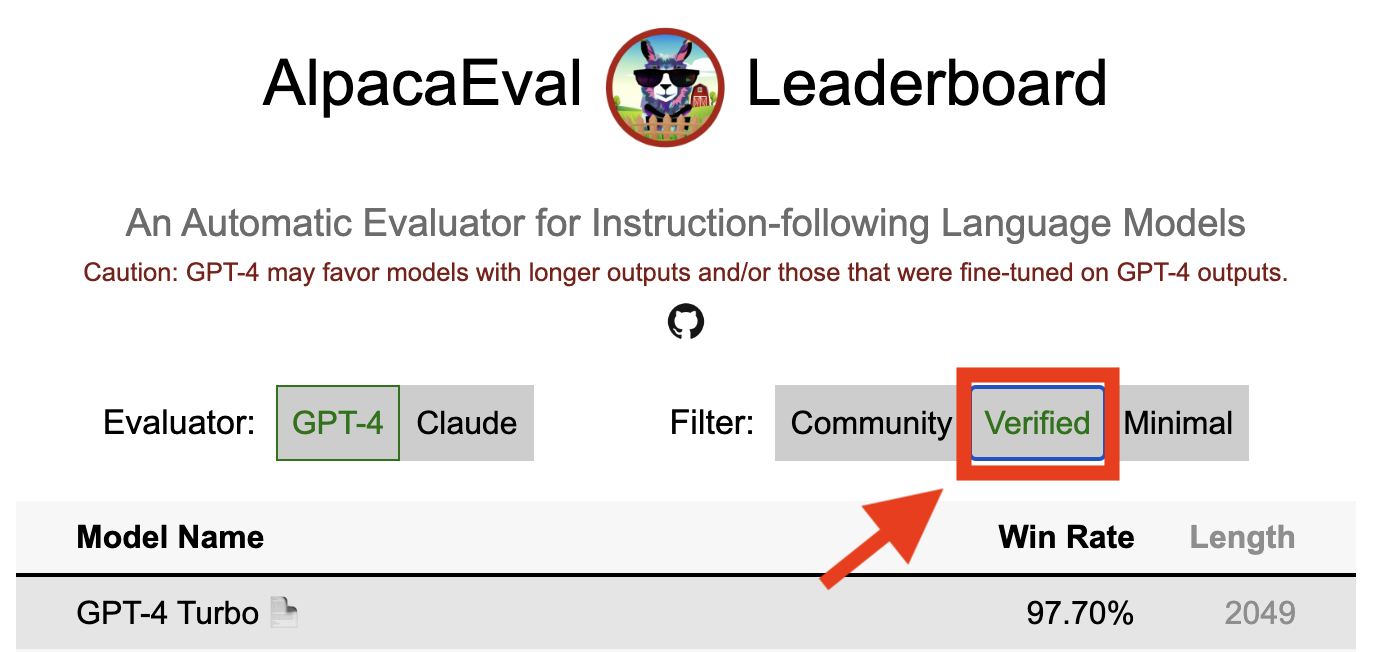
アルパカエバルの検証済みの結果は、コアメンテナーがモデルからの出力を解読し、評価を実行したことを示しています。残念ながら、私たちは、アルパカエバルメンテナーには、すべてのモデルを検証するためのリソースが不足しているため、リーダーボードのトップ5にあるモデルに対してのみそれを行います。ご不便をおかけして申し訳ございませんが、ご不便をおかけし、ご理解の高まりに感謝します。モデルを確認するには、以下の手順に従ってください。
@yannにdiscordに連絡するか、メールがある場合はメールでお問い合わせください。モデルを検証する必要がある理由について簡単な理論的根拠を提供してください。alpaca_eval evaluate_from_model --model_configs '<your_model_name>'を使用して実行する必要があります。alpaca_eval evaluate_from_model --model_configs '<your_model_name>'を実行し、結果を更新し、一時的なキーを取り消すことができるようにお知らせします。同じモデルを再評価しないことに注意してください。サンプリングの差異により、結果は最初の結果とわずかに異なる場合があります。以前のコミュニティの結果を確認したコミュニティの結果に置き換えます。
まず、新しい評価者を作成する指示に従ってください。アノテーター構成を作成したら、モデルの最小セットを評価することにより、アノテーター用の新しいリーダーボードを作成するようお願いします。これらのモデルの出力は、alpaca_eval_all_outputs.jsonをダウンロードすることで見つけることができます。
alpaca_eval make_leaderboard
  --leaderboard_path src/alpaca_eval/leaderboards/data_AlpacaEval/ < evaluator > _leaderboard.csv
  --all_model_outputs alpaca_eval_all_outputs.json
  --annotators_config < evaluator_config >
次に、アノテーター構成とリーダーボードCSVを使用してPRを作成してください。
新しい評価セットを提供するには、最初に一連のテキスト指示を指定する必要があります。次に、一連の参照出力を指定する必要があります(この参照に対してモデルの勝率が計算されます)。使いやすさのために、デフォルトのText-Davinci-003リファレンス構成を使用できます。
これらをJSONにまとめて、各エントリがフィールドinstruction 、 output 、およびgeneratorを指定します。 Alpaca_eval.jsonをガイドとして見ることができます( datasetフィールドは必要ありません)。
最後に、この新しい評価セットで最小限のリーダーボードを作成するようお願いします。これを次のように行うことができます。
alpaca_eval make_leaderboard
  --leaderboard_path < src/alpaca_eval/leaderboards/data_AlpacaEval/your_leaderboard_name.csv >
  --all_model_outputs alpaca_eval_all_outputs.json
  --reference_outputs < path_to_json_file >
評価セットJSONと対応するリーダーボードCSVを使用してPRを提出してください。
現在、 openai 、 anthropic 、 huggingface_local 、 huggingface_hub_apiなど、さまざまな完了関数を許可します。
<name>_completions(prompts : Sequence[str], model_name :str, ... )を使用してファイルを追加します。この関数は、プロンプト + Kwargsを引数として取得し、完了を返します。テンプレートのディレクトリ内の他の完了関数をご覧ください。例:Huggingface_local_completionsまたは人類。<name>_completionsと依存関係をinitに追加します。繰り返しますが、huggingface_local_completionsの例に従うことができますalpaca_eval evaluate_from_model --model_configs '<model_configs>'PRを早めに開始してください。プロセスで何らかのヘルプを提供できるようになります。
他の現在の評価者と同様に、アルパカエバル評価パイプラインには重要な制限があるため、モデルを展開する準備ができているかどうかを決定するなど、重要な設定での人間の評価に代わるものとして使用すべきではありません。これらは、3つのカテゴリに大幅にクラスター化できます。
命令は実数の代表ではないかもしれません。アルパカエバルセットには、さまざまなデータセット(自己インストラクション、オープンアシスタント、Vicuna、Koala、HH-RLHF)の例が含まれています。これにより、最高の閉じたモデル(gpt4 / claude / chatgpt / ...)がオープンモデルよりもオープンモデルに似ているように見える可能性があります。実際、これらの閉じたモデルは、はるかに多様なデータで前処理されている/微調整されているようです。たとえば、より複雑な指示に関する予備的な結果については、このブログを参照してください。ただし、Alpacafarmでは、評価セットのWINRATEは、Alpacaデモとのユーザーインタラクションからの指示に関するWINRATEと高い相関(0.97 R2)であることを示しました。さらに、アルパカエバルリーダーボードは、他のリーダーボード(LMSYSなど)よりもオープンモデルとOpenaiモデルの間に大きなギャップを示しています。
自動アノテーターのバイアス:生の自動アノテーターには暗黙のバイアスがあるようです。特に、リストを含むより長い出力と出力を好む傾向があることがわかりました(例: alpaca_eval_gpt4の場合は0.68 / 0.69、 claudeで0.62 / 0.58)。人間は同様のバイアス(0.64 / 0.61)を持っていることがわかりましたが、これは真の人間のバイアスではなく、使用した人間の注釈パイプラインの制限になる可能性があると考えています。より一般的には、定性分析を通じて、自動アノテーターがその内容よりも出力のスタイルをより重要にすることがわかりました(たとえば、事実性)。最後に、自動評価者は、 claudeのshatgpt/gpt4とalpaca_eval_gpt4のリーダーボードのchatgpt/gpt4の大きな違いが示唆されているように(同じデータでトレーニングされる可能性が高い)モデルからの出力を好む傾向があることがわかりました。長さのバイアスは、長さが制御された勝利で部分的に軽減されていることに注意してください。
安全評価の欠如:重要なことに、アルパカエバルは、それらが引き起こす可能性のある害ではなく、モデルの指導に従う能力を評価するだけです(例えば、毒性行動やバイアス)。その結果、現在のChatGPTと最高のオープンソースモデルの間の小さなギャップは、後者が展開する準備ができているかのように解釈されるべきではありません。
評価パイプラインに関するこれらの制限を超えて、評価者の検証と評価セットを選択する提案されたアプローチについても制限があります。
第一に、人間の交差解釈に基づいた評価者の検証は、次の限界に苦しんでいます。(1)群衆の労働者は、事実上の長さやリストの存在などのスタイルも好む傾向があることを定性的に発見しました。 (2)これは、参照モデルに対する勝率がそもそも優れた評価戦略であるかどうかを検証しません。 (3)16人の群衆労働者からの選好は、すべての人間の好みを表していません。
第二に、統計力に基づいて評価セットを選択するための提案されたアプローチは、以下の制限に苦しんでいます。(1)統計力は正しい方向を保証しません。 (2)これにより、ユーザーがデータを選択して、検証したい仮説をサポートするデータを選択できます。
長さ制御されたアルパカエバルの視覚化:
長さ制御されたアルパカエバル発達:
ノートブックには、自動アノテーターの長さバイアスを軽減するために検討したさまざまなオプションが表示されます。
ここでは、主な結果を簡単に要約します。すなわち:
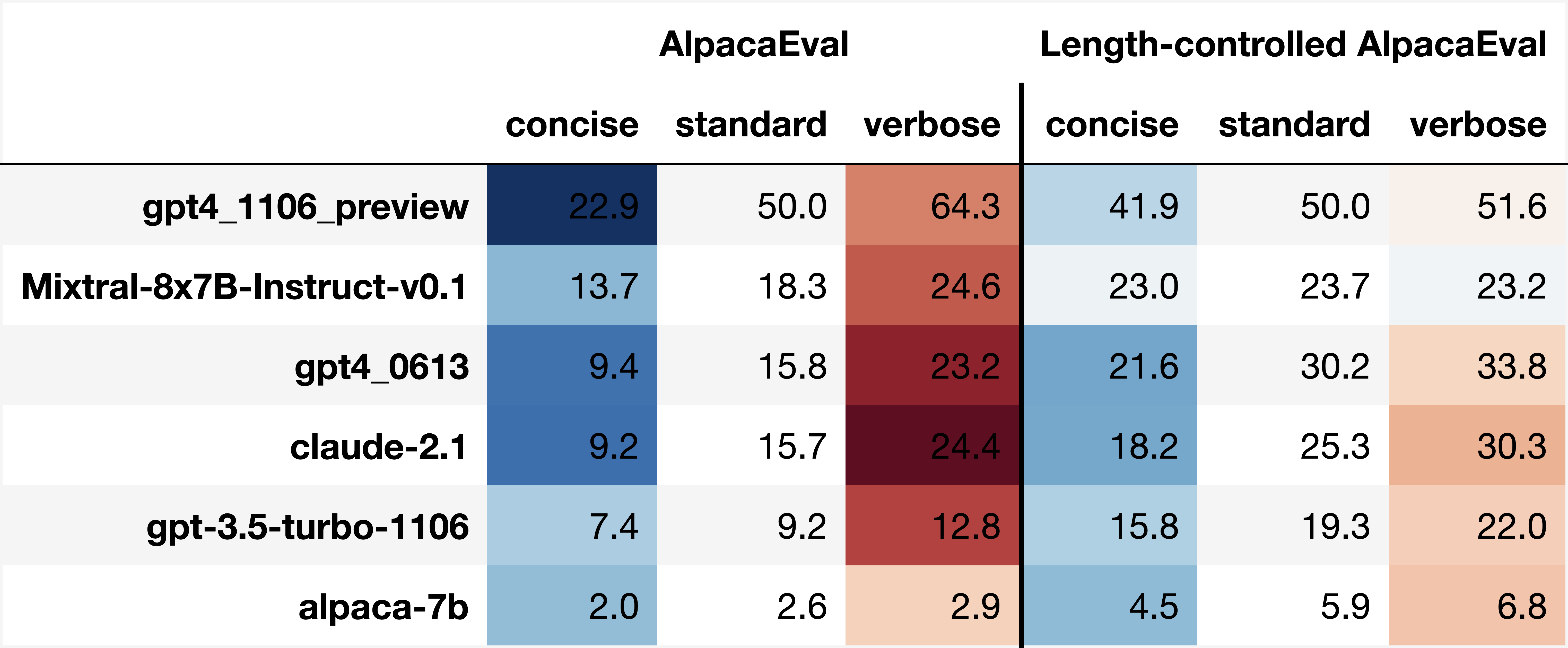
win_rate(m,b) = 1 - win_rate(b,m) in [0,1] and win_rate(m,m) = 0.5 . This is shown in the plot below. 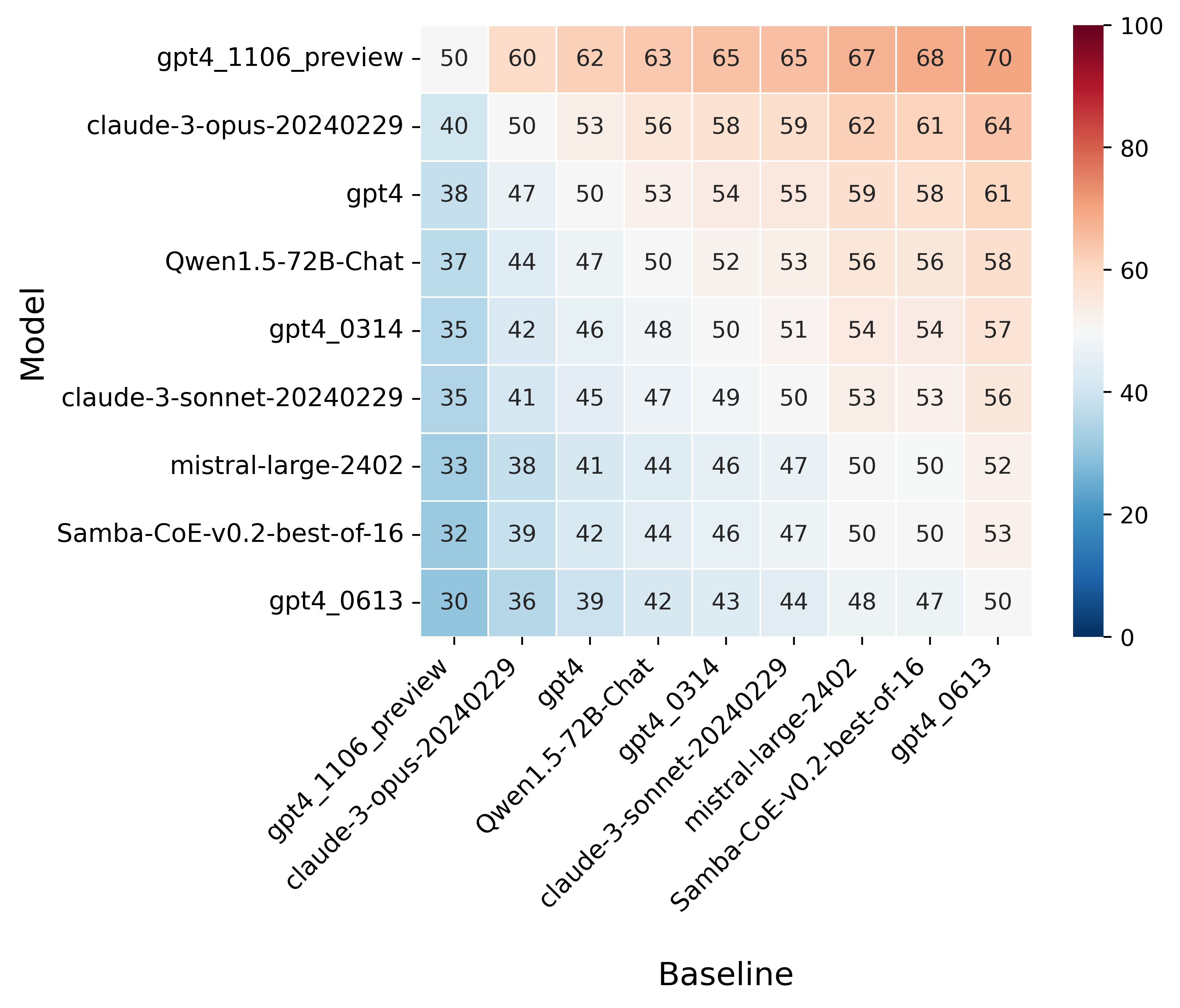
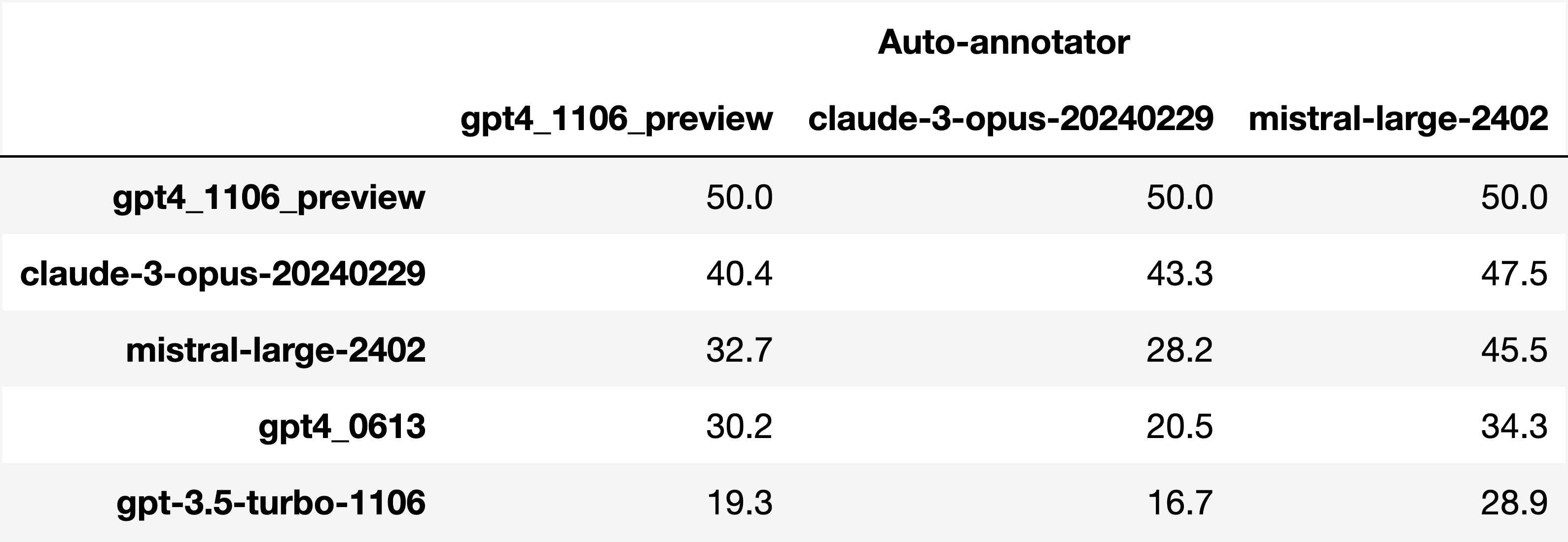
Finally, note that we are only controlling for length bias. There are other known biases that we are not controlling for, such as the fact that auto-annotators prefer outputs similar to their model. Although we could control for that, in practice we have found that to be less of an issue than length bias. For two reasons (1) this mostly a single model in the leaderboard because fine-tuning on outputs from the auto-annotator doesn't seem to have doesn't seem to impact the win-rate as much, and (2) the bias is actually less strong that what one could think. For example we show below a subset of the leaderboards auto-annotated by three different models, and we see that the ranking of models is exactly the same. In particular, claude-3-opus prefers gpt4_preview , and mistral-large prefers the former two.
Caution : all the following results are about AlpacaEval 1.0 and have not been updated since
Analyzing evaluators:
As we saw in the evaluator's leaderboard, there are many metrics to consider when selecting an evaluator, eg the quality, price, and speed. To assist with selection of the evaluator we provide a few functions to plot those metrics. The following shows for example the price/time/agreement of the different evaluators.
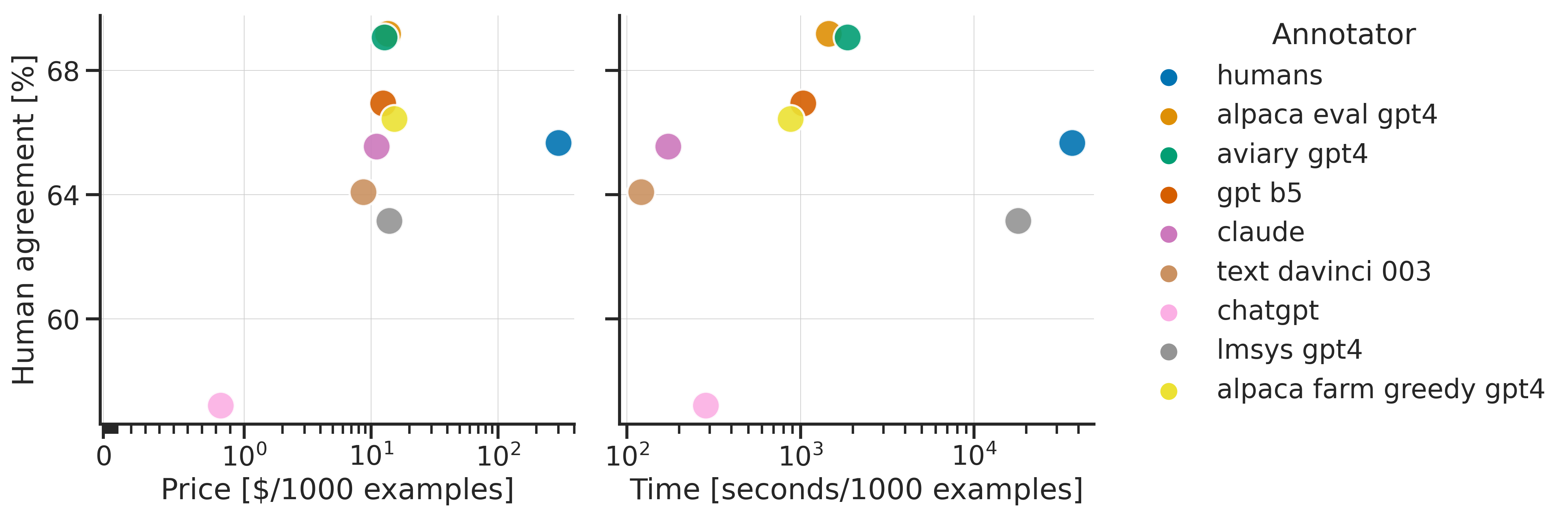
Here we see that alpaca_eval_gpt4 performs very well and is better than humans on all the considered metrics.
Previously we only considered the agreement with human annotators overall. An additional validation that one could do is checking whether making a leaderboard using our automatic annotator gives similar results as a leaderboard from humans. To enable such analysis, we release human annotations of outputs from 22 methods from AlpacaFarm => 22*805 = ~18K annotations. As a result we can test the correlation between the win-rates of the 22 models as evaluated by the humans and our automatic annotator. Note that this is arguably a better way of selecting an automatic evaluator than using "human agreement [%]" but is expensive given that it requires 18K annotations. The plot below shows such correlation for the alpaca_eval_gpt4 evaluator.
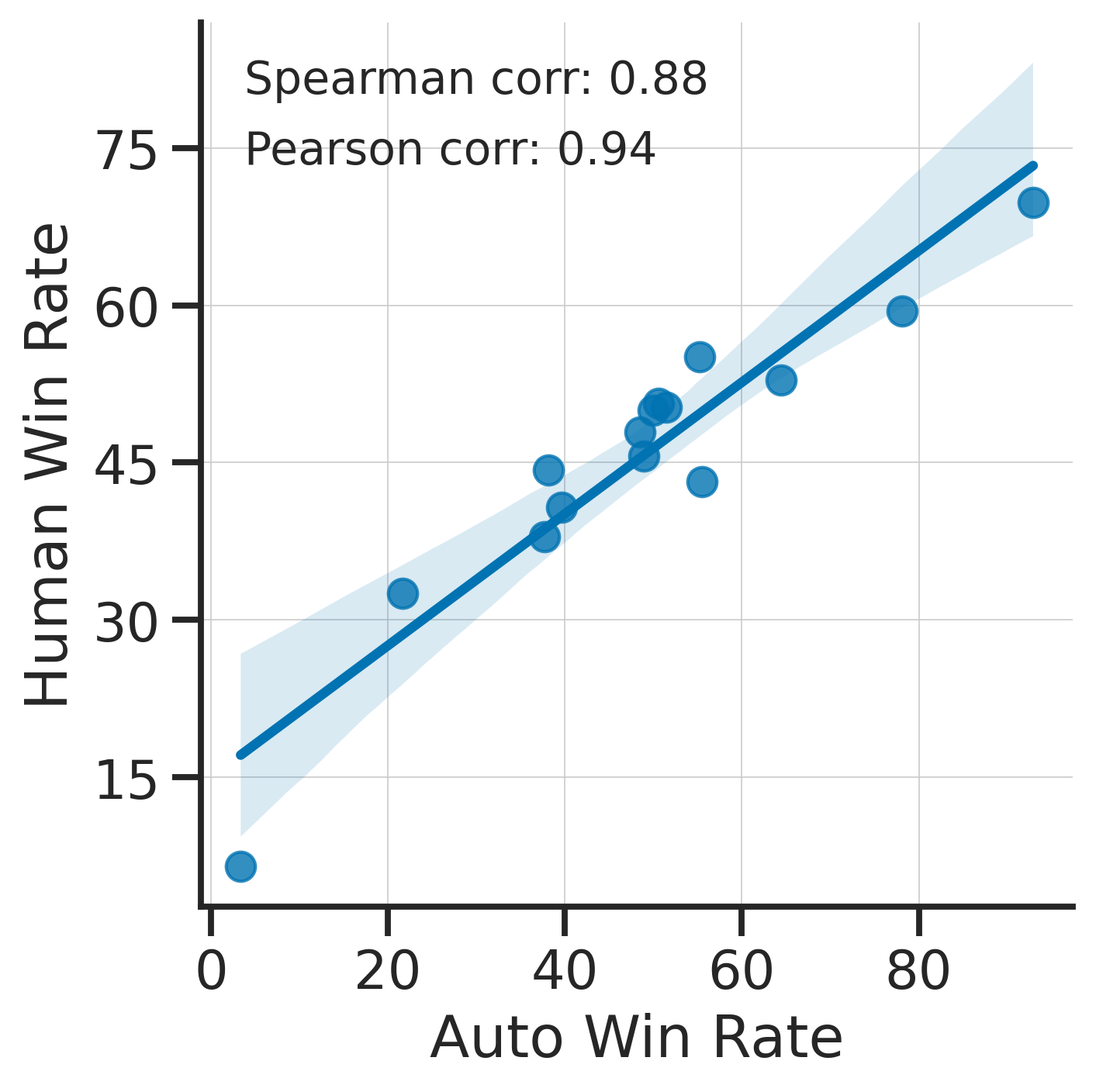
We see that the alpaca_eval_gpt4 leaderboard is highly correlated (0.94 Pearson correlation) to the leaderboard from humans, which further suggests that automatic evaluation is a good proxy for human evaluation. For the code and more analysis, see this notebook, or the colab notebook above.
Caution : all the following results are about AlpacaEval 1.0 and have not been updated since.
Making evaluation sets:
When creating an evaluation set there are two main factors to consider: how much data to use? and what data?
One way of answering those question is by considering a leaderboard of models that you believe are of different quality and checking what and how much data is needed to distinguish between them in a statistically significant way. We will do so below using a paired t-test to test if the difference in win-rates between every pair of models is statistically significant.
First, let us consider the question of how much data to use. Below we show the number of random samples needed from AlpacaEval for the paired t-test to give a p-value < 0.05 for each pair of models in the minimal alpaca_eval_gpt4 leaderboard. Grey cells correspond to pairs that are not significantly different on the 805 samples. y- and x-axis are ordered by the win-rate of the first and second model respectively.
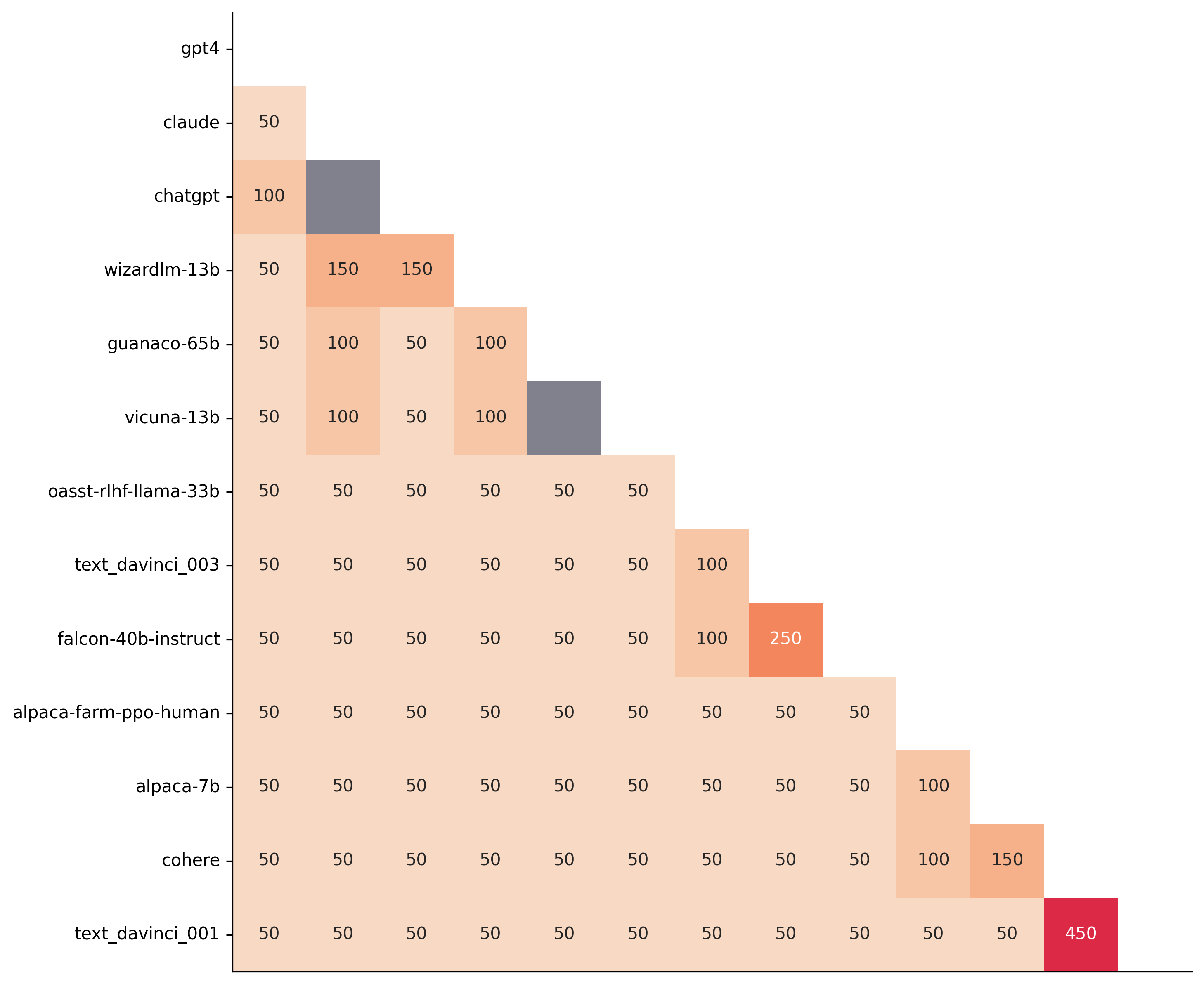
We see that most models can already be distinguished with 50 samples, and that 150 samples allows distinguishing the majority of pairs (74 out of 78). This suggests that we can decrease the evaluation set size by a factor of 4 when testing two models that have similar performance gaps as those on the minimal alpaca_eval_gpt4 leaderboard.
The second question is what data to use. Again we can try to answer this question from a statistical power perspective: what data allows to best distinguish between models. Let's consider this for all the datasets that are part of AlpacaEval, but let us control for the size of the evaluation sets as we only care about the quality of the data. The following plot shows the p-values from the paired t-test of each pairs of models on 80 examples of each subset of AlpacaEval.
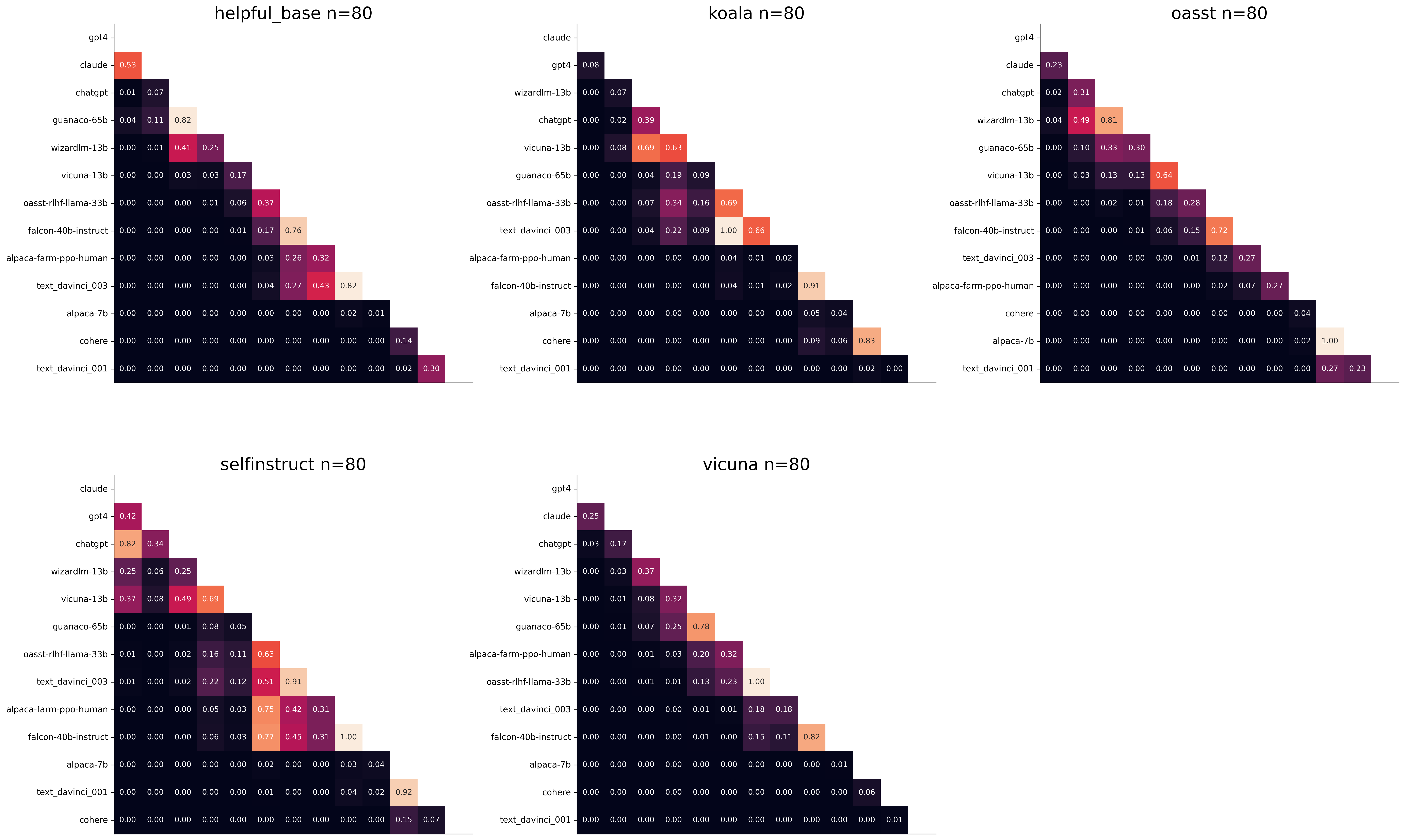
We see for example that the self-instruct dataset yields the least statistical power, which suggests that one could remove this dataset from the evaluation set. The exact reason should be analyzed in future work. For the code and more analysis see this notebook, or the colab notebook above.
Please consider citing the following depending on what you are using and referring to:
alpaca_eval (this repo). Specify whether you are using AlpacaEval or AlpacaEval 2.0. For length-controlled win-rates see below.alpaca_eval_length .dubois2023alpacafarm (AlpacaFarm)alpaca_eval and self-instruct, open-assistant, vicuna, koala, hh-rlhf.Here are the bibtex entries:
 @misc{alpaca_eval,
  author = {Xuechen Li and Tianyi Zhang and Yann Dubois and Rohan Taori and Ishaan Gulrajani and Carlos Guestrin and Percy Liang and Tatsunori B. Hashimoto },
  title = {AlpacaEval: An Automatic Evaluator of Instruction-following Models},
  year = {2023},
  month = {5},
  publisher = {GitHub},
  journal = {GitHub repository},
  howpublished = {url{https://github.com/tatsu-lab/alpaca_eval}}
}
 @article{dubois2024length,
  title={Length-Controlled AlpacaEval: A Simple Way to Debias Automatic Evaluators},
  author={Dubois, Yann and Galambosi, Bal{'a}zs and Liang, Percy and Hashimoto, Tatsunori B},
  journal={arXiv preprint arXiv:2404.04475},
  year={2024}
}
 @misc{dubois2023alpacafarm,
  title={AlpacaFarm: A Simulation Framework for Methods that Learn from Human Feedback},
  author={Yann Dubois and Xuechen Li and Rohan Taori and Tianyi Zhang and Ishaan Gulrajani and Jimmy Ba and Carlos Guestrin and Percy Liang and Tatsunori B. Hashimoto},
  year={2023},
  eprint={2305.14387},
  archivePrefix={arXiv},
  primaryClass={cs.LG}
}
Length controlled (LC) win-rates are a debiased version of the win-rates that control for the length of the outputs.
The main idea is that for each model we will fit a logistic regression to predict the preference of the autoannotator given: (1) the instruction, (2) the model, and (3) the difference of length between the baseline and model output. Given such a logistic regression we can then try to predict the counterfactual "what would the preference be if the model's output had the same length as the baseline" by setting the length difference to 0. By averaging over this length-controlled preference, we then obtain the length-controlled win-rate. The exact form of the logistic regression is taken such that the interpretation of LC win rates is similar to the raw win rates, for example for any model m1 and m2 we have win_rate(m1, m2) = 1 - win_rate(m2, m1) in [0,100] and win_rate(m1, m1) = 0.5 . Length controlled win-rates increase the correlation between AlpacaEval's leaderboard and Chat Arena from 0.93 to 0.98 Spearman correlation, while significantly decreasing the length gameability of the annotator . For more information and results about length controlled win-rates see this notebook.
This idea of estimating the controlled direct effect, by predicting the outcome while conditioning on the mediator (the length difference), is common in statistical inference.
To get LC win rates on previously annotated models, you can use the following command:
pip install -U alpaca_eval
alpaca_eval --model_outputs … --is_recompute_metrics_only True
AlpacaEval 2.0 is a new version of AlpacaEval. Here are the differences:
gpt4_turbo : we upgraded the baseline from text-davinci-003 to gpt4_turbo to make the benchmark more challenging and have a metric that better reflects the current state of the art.weighted_alpaca_eval_gpt4_turbo : we improved the annotator in quality and price. First, we use the gpt4_turbo model for annotating, which is approximately 2x cheaper than gpt4 . Second, we changed the prompt such that the model outputs a single token, which further reduced cost and speed. Finally, instead of using a binary preference, we used the logprobs to compute a continuous preference, which gives the final weighted win-rate. Note that the latter two changes had the surprising effect of decreasing the annotators' length biased. By default, AlpacaEval 2.0 will be used from pip install alpaca_eval==0.5 . If you wish to use the old configs by default, you can set IS_ALPACA_EVAL_2=False in your environment.
As part of AlpacaEval, we release the following data:
text-davinci-003 reference on the AlpacaFarm evaluation set. Annotations are from a pool of 16 crowd workers on Amazon Mechanical Turk. The different models are: 6 from OpenAI, 2 SFT models from AlpacaFarm, 13 RLHF methods from AlpacaFarm, and LLaMA 7B.For more details about the human annotations refer to the AlpacaFarm paper.
AlpacaEval is an improvement and simplification of the automatic pairwise preference simulator from AlpacaFarm. Outside AlpacaFarm, you should be using AlpacaEval. Here are the main differences:
{instruction}nn{input} . This affects 1/4 of the examples in the AlpacaFarm evaluation set (the self-instruct subset). This simplification provides a more fair comparison for models that were not trained by distinguishing between the two fields.text-davinci-003 ), so the results on AlpacaEval are not comparable to those on AlpacaFarm even for examples that had no input field.--anotators_config 'alpaca_farm' and --p_label_flip 0.25 when creating an evaluator. There have been several work that propose new automatic annotators for instruction-following models. Here we list the ones that we are aware of and discuss how they differ from ours. We evaluated all of those in our evaluator's leaderboard.
lmsys_gpt4 ) evaluates the pair by asking the annotator a score from 1-10 for each output, and then selecting the output with the highest score as preferred. They do not randomize over output order and they ask an explanation after the score. Overall, we found that this annotator has strong bias towards longer outputs (0.74) and relatively low correlation with human annotations (63.2).alpaca_farm_greedy_gpt4 ) evaluates the pair by directly asking the annotator which output it prefers. Furthermore, it batches 5 examples together to amortize the length of the prompt and randomizes the order of outputs. Overall, we found that this annotator has much less bias towards longer outputs (0.60) and is faster (878 seconds/1000 examples) than others. It has a slightly higher correlation with the majority of human annotations (66.4) than humans themselves (65.7). However, it is more expensive ($15.3/1000 examples) and doesn't work with very long outputs given the batching.aviary_gpt4 ) asks the annotator to order the output by its preference, rather than simply selecting the preferred output. It does not randomize the order of outputs and uses high temperature for decoding (0.9). Overall, we found that this annotator has relatively strong bias towards longer outputs (0.70) and very high correlation with human annotations (69.1). By decreasing the temperature and randomizing the order of outputs, we further improved the correlation to 69.8 ( improved_aviary_gpt4 ) but this further increased the length bias to 0.73. Our alpaca_eval_gpt4 is a mix between the AlpacaFarm and Aviary annotators. It asks the annotator to order the outputs by preference, but it uses temperature 0, randomizes over outputs, and made some modifications to the prompt to decrease length bias to 0.68.
Other related work include recent papers which analyze automatic evaluators.例えば:
For all models you can find the auto-annotations under results/<model_name>/*/annotations.json . The annotations have the following columns:
instruction : the promptgenerator_1 : the baseline modeloutput_1 : the output of the baseline modelgenerator_2 : the model being evaluatedoutput_2 : the output of the model being evaluatedannotator : the auto-annotatorpreference : the result of the auto-annotator. This is a float between 1 and 2. Closer to 1 means that the auto-annotator prefers output_1 , closer to 2 means that it prefers output_2 . For AlpacaEval 2.0, preference-1 corresponds to the probability of output_1 being preferred. For AlpacaEval 1.0, preference is 1 if output_1 is preferred, 2 if output_2 is preferred, and 1.5 if they are the same. The win rate is always (preference -1).mean() .raw_completion : the raw output of the auto-annotator. This is field contains the completions before de-randomization of the order between output_1 and output_2 ! It is thus much harder to interpret, see below for more information.Chain of thought
For some annotators, eg alpaca_eval_cot_gpt4_turbo_fn we use chain of thought reasoning to make the models preferences more interpretable. Those can then be found under concise_explanation . To interpret them, you should also look at referenced_models which translates the temporary model name (in the prompt) to the actual output. Below, we provide more explanation as to what is happening behind the scenes.
You can check the raw_annotations["concise_explanation] column in annotations.json (eg here) which contains the chain of thought reasoning of the auto annotator. Note that the raw_annotations is not modified by the randomization of the order of the outputs. In particular, "m" and "M" can sometime refer to the first model (the reference) and sometime to the second model (the model being evaluated). To understand which model is being referred to, you should use the column preference and ordered_models . To make it easier we add a column "referenced_models" mapping the model names to the corresponding outputs. For example in the following annotation we see that the preference is 1.0 (ie output_1 ) and corresponds to model M in concise_explanation (see ordered_models ).
{
  "instruction" : " How did US states get their names? " ,
  "output_1" : " The names of U.S. states are derived from a variety of languages and sources, including indigenous American languages, European languages (primarily English, Spanish, and French), as well as other historical influences. Here is a brief overview of how some states got their names: nn 1. **Indigenous American Languages**: Many state names come from Native American words or names of tribes, often from the languages of the indigenous peoples who lived in or near those areas. n   - **Alabama**: Possibly derived from the Choctaw language, meaning " thicket clearers. "n   - **Connecticut**: From a Mohegan-Pequot word meaning " long tidal river. "n   - **Massachusetts**: [...] " ,
  "generator_1" : " gpt4_1106_preview " ,
  "dataset" : " helpful_base " ,
  "output_2" : " The names of the 50 U.S. states come from a variety of sources, including Native American languages, European languages, and historical figures. Here's a brief overview of how some states got their names: nn 1. Native American origins: Many states have names derived from Native American languages. For example, Alabama comes from the Choctaw word " Albah amo, " meaning " plant gatherers " or " herb gatherers. " Similarly, the name Mississippi comes from the Ojibwe word " Misi-ziibi, " meaning " great river. "nn 2. European languages: [...]. " ,
  "generator_2" : " gpt4 " ,
  "annotator" : " alpaca_eval_cot_gpt4_turbo_fn " ,
  "preference" : 1.0 ,
  "raw_completion" : {
    "concise_explanation" : " Model M provided a more detailed and structured response, including bold headings for each category and a wider range of examples. It also included additional categories such as 'Other European Languages' and 'Combination of Languages and Influences', which added depth to the explanation. Model m's response was accurate but less comprehensive and lacked the clear structure found in Model M's output. " ,
    "ordered_models" : [
      {
        "model" : " M " ,
        "rank" : 1
      },
      {
        "model" : " m " ,
        "rank" : 2
      }
    ]
  },
  "referenced_models" : {
    "M" : " output_1 " ,
    "m" : " output_2 "
  }
}chatgpt_fn that anyone can use (no waiting lists).chatgpt_fn or alpaca_eval_gpt4_fn .




