alpaca_eval
v0.6.5

Alpacaeval 2.0 dengan laju win (kertas) yang dikendalikan panjang memiliki korelasi spearman 0,98 dengan chatbot arena sementara harganya kurang dari $ 10 kredit OpenAI berjalan dan berjalan dalam waktu kurang dari 3 menit. Tujuan kami adalah memiliki tolok ukur untuk obrolan LLMS yaitu: cepat (<5 menit), murah (<$ 10), dan sangat berkorelasi dengan manusia (0,98). Berikut perbandingan dengan tolok ukur lain:
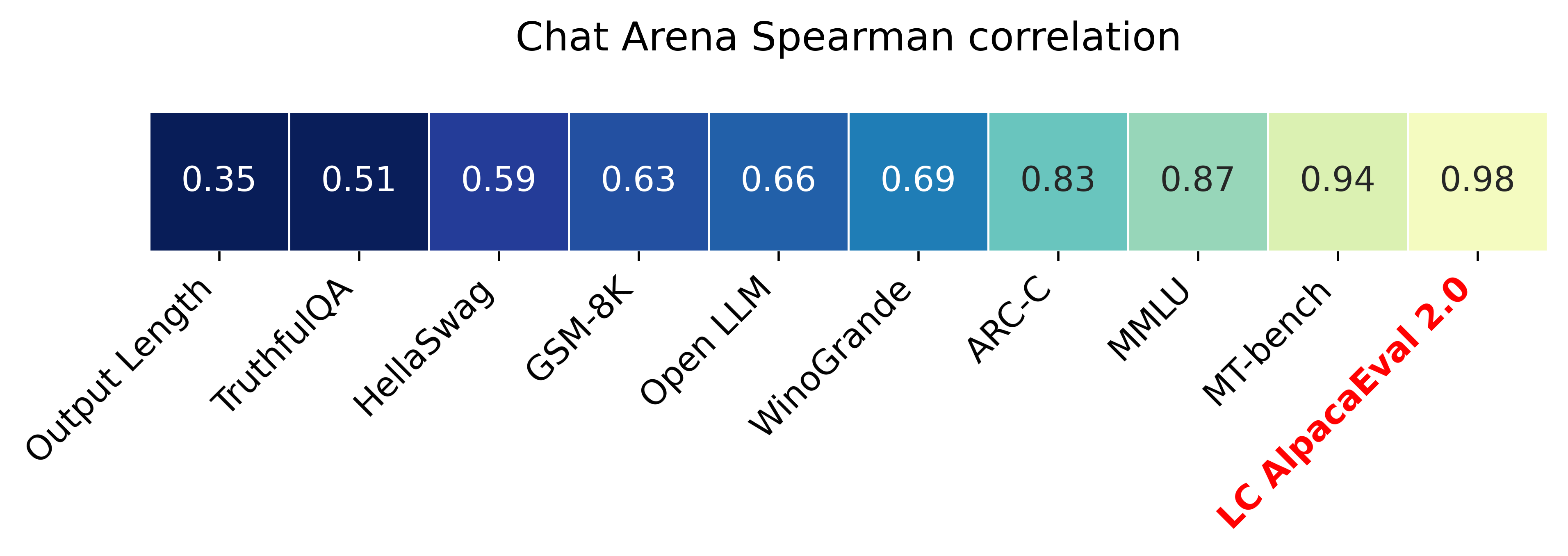
Pembaruan:
? Tarif kemenangan yang dikendalikan panjang keluar dan digunakan secara default! Ini meningkatkan korelasi dengan arena chatbot dari 0,93 menjadi 0,98, sementara secara signifikan mengurangi permainan panjang. Tarif kemenangan mentah masih ditampilkan di situs web dan CLI. Lebih detail di sini.
? Alpacaeval 2.0 keluar dan digunakan secara default! Kami meningkatkan annotator otomatis (lebih baik dan lebih murah) dan menggunakan pratinjau GPT-4 sebagai baseline. Lebih detail di sini. Untuk versi lama, atur variabel lingkungan Anda IS_ALPACA_EVAL_2=False .
Evaluasi model mengikuti instruksi (misalnya, chatgpt) biasanya membutuhkan interaksi manusia. Ini memakan waktu, mahal, dan sulit ditiru. Alpacaeval dalam evaluasi otomatis berbasis LLM yang cepat, murah, dapat ditiru, dan divalidasi terhadap 20K anotasi manusia. Ini sangat berguna untuk pengembangan model. Meskipun kami meningkatkan pipa evaluasi otomatis sebelumnya, masih ada batasan mendasar seperti preferensi untuk output yang lebih lama. Alpacaeval memberikan yang berikut:
Kapan Menggunakan Alpacaeval? Evaluator otomatis kami adalah proxy cepat dan murah untuk evaluasi manusia dari tugas mengikuti instruksi sederhana. Ini berguna jika Anda harus menjalankan banyak evaluasi dengan cepat, misalnya, selama pengembangan model.
Kapan tidak menggunakan alpacaeval? Sebagai evaluator otomatis lainnya, alpacaeval tidak boleh menggantikan evaluasi manusia dalam pengambilan keputusan bergaris tinggi , misalnya, untuk memutuskan rilis model. Secara khusus, alpacaeval dibatasi oleh fakta bahwa (1) instruksi dalam set eval mungkin tidak mewakili penggunaan lanjutan LLM; (2) evaluator otomatis mungkin memiliki bias seperti mendukung gaya daripada faktualitas jawaban; dan (3) alpacaeval tidak mengukur risiko yang dapat ditimbulkan oleh suatu model. Detail dalam batasan.
Untuk menginstal rilis stabil, jalankan
pip install alpaca-evalUntuk menginstal versi Nightly, jalankan
pip install git+https://github.com/tatsu-lab/alpaca_evalMaka Anda dapat menggunakannya sebagai berikut:
 export OPENAI_API_KEY= < your_api_key > # for more complex configs, e.g. using Azure or switching clients see client_configs/README.md
alpaca_eval --model_outputs ' example/outputs.json '
Ini akan mencetak papan peringkat ke konsol, dan menyimpan papan peringkat dan anotasi ke direktori yang sama dengan file model_outputs . Parameter penting adalah sebagai berikut:
instruction dan output kunci.weighted_alpaca_eval_gpt4_turbo (default untuk alpacaeval 2.0), yang memiliki tingkat kesepakatan tinggi dengan data anotasi manusia kami, ukuran konteks yang besar, dan cukup murah. Untuk perbandingan semua annotator lihat di sini.model_outputs . Secara default, ini adalah gpt4_turbo untuk Alpacaeval 2.0. Jika Anda tidak memiliki output model, Anda dapat menggunakan evaluate_from_model dan melewati jalur lokal atau nama model huggingface, atau model dari API standar (OpenAi, Anthropic, Cohere, Google, ...). Perintah lain:
>>> alpaca_eval -- --help SYNOPSIS
alpaca_eval COMMAND
COMMANDS
COMMAND is one of the following:
evaluate
Evaluate a model based on its outputs. This is the default entrypoint if no command is specified.
evaluate_from_model
Evaluate a model from HuggingFace or an API provider. This is a wrapper around `evaluate` which includes generating from a desired model.
make_leaderboard
Precompute and save an entire leaderboard for a given dataset / evaluator / set of models generations.
analyze_evaluators
Analyze an evaluator and populates the evaluators leaderboard (agreement with human, speed, price,...).
Untuk informasi lebih lanjut tentang setiap fungsi, gunakan alpaca_eval <command> -- --help .
Papan peringkat kami dihitung pada dataset alpacaeval. Kami memperkirakan papan peringkat untuk model penting menggunakan model dasar dan autoannotator yang berbeda. Dua papan peringkat utama kami ("Alpacaeval 2.0" dan "Alpacaeval") dapat ditemukan di halaman ini. "Alpacaeval 2.0" menggunakan weighted_alpaca_eval_gpt4_turbo untuk annotator dan gpt4_turbo untuk baseline. "Alpacaeval" menggunakan alpaca_eval_gpt4 untuk annotator dan text_davinci_003 untuk baseline. Untuk semua papan peringkat yang dikomputasi di sini. Kemudian kami juga menunjukkan cara menambahkan model Anda ke papan peringkat dan cara membuat papan peringkat baru untuk evaluator/dataset Anda. Lihat di sini untuk konfigurasi semua model yang tersedia di luar kotak.
Papan peringkat minimal Alpacaeval :
| Tingkat Menang | Kesalahan STD | |
|---|---|---|
| GPT4 | 95.3 | 0.7 |
| Claude | 88.4 | 1.1 |
| chatgpt | 86.1 | 1.2 |
| Guanaco-65b | 71.8 | 1.6 |
| Vicuna-13b | 70.4 | 1.6 |
| text_davinci_003 | 50.0 | 0,0 |
| Alpaca-Farm-PPO-Human | 41.2 | 1.7 |
| Alpaca-7b | 26.5 | 1.5 |
| text_davinci_001 | 15.2 | 1.2 |
Tingkat Win : Tingkat Win mengukur fraksi waktu output model lebih disukai daripada output referensi ( test-davinci-003 untuk alpacaeval dan gpt4_turbo untuk alpacaeval 2.0). Lebih khusus lagi, untuk menghitung tingkat kemenangan, kami mengumpulkan pasangan output dari model yang diinginkan pada setiap instruksi dari dataset Apacaeval. Kami kemudian memasangkan setiap output dengan output dari model referensi kami (misalnya text-davinci-003 ) pada instruksi yang sama. Kami kemudian bertanya kepada evaluator otomatis kami output mana yang mereka sukai. Lihat permintaan dan konfigurasi Alpacaeval dan Alpacaeval 2.0, khususnya kami mengacak urutan output untuk menghindari bias posisi. Kami kemudian rata -rata preferensi daripada semua instruksi dalam dataset untuk mendapatkan tingkat kemenangan model di atas baseline. Jika kedua output persis sama, kami menggunakan preferensi setengah untuk kedua model.
Kesalahan Standar : Ini adalah kesalahan standar (dinormalisasi oleh N-1) dari tingkat win, yaitu, preferensi rata-rata dibandingkan instruksi yang berbeda.
alpaca_eval_gpt4 AVERAGES alpaca_eval_gpt4 (lihat konfigurasi) kami lebih dari preferensi, di mana preferensi diperoleh sebagai berikut:
temperature=0Annotator adalah campuran antara (dan sangat dipengaruhi oleh) evaluator Alpacafarm dan Aviary. Secara khusus, kami menggunakan kode yang sama seperti untuk alpacafarm (caching/randomisasi/hyperparameters) tetapi menggunakan prompt peringkat yang mirip dengan Aviary. Kami membuat perubahan pada prompt Aviary untuk mengurangi bias untuk output yang lebih lama. Detail dalam pekerjaan terkait.
Untuk alpacaeval 2.0 kami menggunakan weighted_alpaca_eval_gpt4_turbo , yang menggunakan logProbs untuk menghitung preferensi kontinu dan menggunakan GPT4_turbo sebagai model (lihat konfigurasi).
Kami mengevaluasi annotator otomatis yang berbeda pada alpacaeval yang ditetapkan dengan membandingkan dengan 2.5K anotasi manusia yang kami kumpulkan (~ 650 instruksi masing -masing dengan 4 anotasi manusia). Di bawah ini kami menunjukkan metrik untuk evaluator yang kami sarankan ( weighted_alpaca_eval_gpt4_turbo , alpaca_eval_gpt4 ), untuk evaluator otomatis sebelumnya ( alpaca_farm_greedy_gpt4 , aviary_gpt4 , lmsys_gpt4), untuk humans (humans), dan aviary_gpt4, lmsys_gpt4), untuk humans (humans), dan aviary_gpt4, lmsys_gpt4), untuk humans (humans), dan aviary_gpt4, lmsys_gpt4 ), untuk humans (humans), dan aviary_gpt4, gpt4 ), untuk humans ( humans ), dan f untuk pangkalan, dan f untuk pangkalan, dan claude ), untuk humans), dan fortiary, dan humans (dan humans untuk humans (human), dan f untuk humans (dan humans. text_davinci_003 , chatgpt_fn , guanaco_33b , chatgpt ). Lihat di sini untuk konfigurasi semua evaluator yang tersedia di luar kotak dan metrik yang terkait.
| Perjanjian manusia | Harga [$/1000 contoh] | Waktu [detik/1000 contoh] | Spearman Corr. | Pearson Corr. | Bias | Perbedaan | Proba. lebih suka lebih lama | |
|---|---|---|---|---|---|---|---|---|
| alpaca_eval_gpt4 | 69.2 | 13.6 | 1455 | 0.97 | 0.93 | 28.4 | 14.6 | 0.68 |
| alpaca_eval_cot_gpt4_turbo_fn | 68.6 | 6.3 | 1989 | 0.97 | 0,90 | 29.3 | 18.4 | 0.67 |
| alpaca_eval_gpt4_turbo_fn | 68.1 | 5.5 | 864 | 0.93 | 0.82 | 30.2 | 15.6 | 0.65 |
| alpaca_eval_llama3_70b_fn | 67.5 | 0.4 | 209 | 0,90 | 0.86 | 32.3 | 8.2 | 0.79 |
| GPT4 | 66.9 | 12.5 | 1037 | 0.88 | 0.87 | 31.5 | 14.6 | 0.65 |
| alpaca_farm_greedy_gpt4 | 66.4 | 15.3 | 878 | 0.85 | 0,75 | 30.2 | 19.3 | 0.60 |
| alpaca_eval_cot_gpt4_turbo_fn | 65.7 | 4.3 | 228 | 0.78 | 0.77 | 33.9 | 23.7 | 0.61 |
| manusia | 65.7 | 300.0 | 36800 | 1.00 | 1.00 | 0,0 | 34.3 | 0.64 |
| Claude | 65.3 | 3.3 | 173 | 0.93 | 0,90 | 32.4 | 18.5 | 0.66 |
| lmsys_gpt4 | 65.3 | 13.9 | 17982 | 0.98 | 0.97 | 31.6 | 15.9 | 0.74 |
| text_davinci_003 | 64.1 | 8.7 | 121 | 0.85 | 0.83 | 33.8 | 22.7 | 0,70 |
| terpanjang | 62.2 | 0,0 | 0 | 0.27 | 0,56 | 37.8 | 0,0 | 1.00 |
| chatgpt | 57.3 | 0.8 | 285 | 0.72 | 0.71 | 39.4 | 34.1 | 0,59 |
Kami sekarang menjelaskan dengan kata -kata bagaimana kami menghitung metrik dalam tabel di atas. Kode ada di sini.
Perjanjian Manusia : Ini mengukur perjanjian antara Annotator saat ini dan preferensi mayoritas manusia pada ~ 650 anotasi kami dari set anotasi silang kami, yang berisi 4 anotasi manusia per contoh. Untuk memperkirakan kesepakatan antara satu manusia ( humans baris dalam tabel di atas) dan mayoritas manusia, kami mengambil salah satu dari 4 anotasi dan menghitung keakuratan yang dimilikinya ketika memprediksi mode 3 anotasi lainnya. Kami kemudian rata-rata akurasi ini atas semua 4 anotasi dan lebih dari 650 instruksi untuk mendapatkan perjanjian manusia, yaitu, kami menghitung perjanjian cuti yang diharapkan (lebih dari manusia dan sampel). Jika mode tidak unik, kami mengambil salah satu mode secara acak. Kami melakukan perhitungan yang persis sama untuk annotator otomatis, sehingga angka akhir sebanding.
Harga [$/1000 Contoh] : Ini adalah harga rata -rata setiap 1000 anotasi. Bagi manusia, itu adalah harga yang kami bayar turker mekanik untuk mengumpulkan anotasi tersebut ($ 21/jam). Jika harga tergantung pada mesin yang digunakan untuk menghitung anotasi (misalnya guanaco) kami membiarkannya kosong.
Waktu [detik/1000 contoh] : Ini adalah waktu rata -rata yang diperlukan untuk menghitung 1000 anotasi. Bagi manusia, ini adalah perkiraan waktu rata -rata yang diambil oleh setiap turker mekanik untuk membuat anotasi 1000 contoh. Untuk annotator otomatis, ini adalah waktu rata -rata yang dibutuhkan kami saat menjalankan anotasi. Perhatikan bahwa ini dapat tergantung pada batas API yang berbeda untuk pengguna yang berbeda dan jumlah permintaan yang diproses oleh cluster.
Spearman Corr. : Ini mengukur korelasi Spearman antara papan peringkat yang dihitung dengan preferensi otomatis anotator dan papan peringkat yang dihitung dengan preferensi manusia. Seperti halnya Human agreement , kami menggunakan anotasi manusia dari Alpacafarm tetapi kami sekarang mempertimbangkan perjanjian tingkat metode daripada hanya perjanjian sampel dengan manusia. Perhatikan bahwa kami hanya menggunakan memiliki 9 model sehingga korelasinya tidak terlalu dapat diandalkan.
Pearson Corr. : Sama seperti dengan Spearman corr. tetapi dengan korelasi Pearson.
Bias : Kesepakatan antara label manusia yang paling mungkin dan yang paling mungkin otomatis. Untuk annotator otomatis kami memperkirakannya dengan mencicipi 4 anotasi berbeda untuk setiap contoh. Keacakan di sini berasal dari urutan output dalam prompt, pengambilan sampel dari LLM, dan jika berlaku urutan instruksi dalam batch dan pilihan annotator di kumpulan. Kami kemudian mengambil mode anotasi 4 dan menghitung keakuratan mode ketika memprediksi mode 4 anotasi manusia. Perhatikan bahwa ini kemungkinan terlalu tinggi pada bias nyata yang akan kita dapatkan jika kita memiliki jumlah silang "tak terbatas". Bias yang rendah berarti bahwa Annotator memiliki harapan preferensi yang sama dengan manusia. Untuk kasus manusia, biasnya nol menurut definisi. Perhatikan bahwa ini terkait dengan tetapi tidak bias statistik standar, karena kami mengambil mode alih-alih rata-rata atas anotasi dan kami mempertimbangkan kerugian 0-1 alih-alih kerugian kuadrat.
Varians : Kesepakatan yang Diharapkan Satu preferensi otomatis tunggal dan yang paling mungkin. Kami memperkirakannya dengan cara yang sama seperti yang kami perkirakan "perjanjian manusia" untuk manusia, yaitu, kami mengambil kesalahan cuti yang diharapkan ketika memprediksi mode 3 anotasi menggunakan anotasi ke -4. Varian rendah berarti bahwa anotator konsisten dengan preferensi, yaitu, jika Anda mencicipi darinya dengan biji yang berbeda itu akan memberikan hasil yang sama. Seperti halnya bias, ini bukan varian statistik standar, karena kami mengambil mode alih-alih rata-rata atas anotasi dan kami mempertimbangkan kerugian 0-1 alih-alih kerugian kuadrat.
Perhatikan bahwa "perjanjian manusia" terkait erat dengan bias dan varian. Secara khusus, varians mengukur kesalahan karena fakta bahwa kami hanya menggunakan anotasi tunggal sementara bias bertujuan untuk mengukur kesalahan yang tidak dapat direduksi untuk annotator saat ini.
Proba. Lebih lama lebih lama : Ini adalah probabilitas bahwa annotator lebih memilih output yang lebih lama ketika salah satu dari dua output secara signifikan lebih lama dari yang lain (lebih dari 30 perbedaan karakter).
Di tabel lengkap kami juga menyediakan metrik berikut:
Proba. Daftar Pilihan : Ini adalah probabilitas bahwa annotator lebih memilih output yang berisi daftar/poin peluru ketika satu output tidak tetapi tidak yang lain.
Proba. Lebih suka 1 : Ini adalah probabilitas bahwa annotator lebih memilih yang pertama dari pasangan output. Semua annotator yang kami usulkan mengacak output di prompt, jadi ini harus 0,5. Annotator sebelumnya, seperti lmsys dan aviary , tidak.
# Parsed : Ini adalah jumlah contoh yang dapat diurai annotator.
Perhatikan bahwa jika varians dan bias kosong, itu berarti bahwa kami hanya melakukan satu anotasi tunggal untuk setiap 648 contoh karena kendala sumber daya (waktu dan harga). Ini menjelaskan mengapa #Parsed adalah 648, jika tidak seharusnya 2592.
Secara keseluruhan kami merekomendasikan penggunaan annotators_config=weighted_alpaca_eval_gpt4_turbo jika Anda ingin kesepakatan tinggi dengan manusia, dan annotators_config=chatgpt_fn jika Anda memiliki anggaran yang ketat.
Saat memilih annotator, kami menyarankan Anda untuk mempertimbangkan yang berikut (tiga yang pertama jelas):
"Human agreement [%]""Price [$/1000 examples]""Time [seconds/1000 examples]""* corr." kira -kira. > 0,7. Penting bahwa korelasi tidak terlalu rendah, tetapi kami tidak merekomendasikan menggunakannya sebagai metrik utama karena korelasi dihitung hanya pada 9 model."Proba. prefer longer" kira -kira. <0,7. Memang, kami menemukan melihat bahwa mayoritas preferensi annotator manusia memiliki bias yang kuat untuk jawaban yang lebih lama (seperti yang ditunjukkan oleh kinerja tinggi = 62.2 dari evaluator "longest" yang selalu lebih suka output terpanjang). Ini menunjukkan bahwa itu mungkin lebih bias dengan annotator manusia. Untuk menghindari papan peringkat dengan bias yang kuat untuk panjang, kami sarankan menggunakan annotator otomatis dengan proba kurang dari 0,7 ". Lebih disukai lebih lama"."Variance" kira -kira. <0,2. Kami percaya bahwa evaluator yang baik harus memiliki varian sesedikit mungkin sehingga hasilnya sebagian besar dapat direproduksi. Perhatikan bahwa varian dapat diinginkan dalam kasus di mana kami mensimulasikan manusia seperti yang ditunjukkan di Alpacafarm. Kami memfilter annotator yang tidak memenuhi persyaratan tersebut dalam tabel di atas (selain manusia / chatgpt / 003 / lmsys untuk tujuan referensi). Untuk semua hasil, lihat di sini. Secara umum, kami menemukan weighted_alpaca_eval_gpt4_turbo menjadi trade-off yang baik antara kualitas / harga / waktu / varian / bias panjang.
Metrik di atas dihitung sehubungan dengan anotasi dari pekerja kerumunan. Meskipun bermanfaat, anotasi itu tidak sempurna, misalnya, pekerja kerumunan sering mendukung gaya daripada faktualitas. Dengan demikian, kami merekomendasikan pengguna untuk memvalidasi evaluator otomatis pada instruksi dan anotasi manusia mereka sendiri. Detail dalam batasan.
>>> alpaca_eval evaluate -- --help NAME
alpaca_eval evaluate - Evaluate a model based on its outputs. This is the default entrypoint if no command is specified.
SYNOPSIS
alpaca_eval evaluate <flags>
DESCRIPTION
Evaluate a model based on its outputs. This is the default entrypoint if no command is specified.
FLAGS
--model_outputs=MODEL_OUTPUTS
Type: Optional[Union]
Default: None
The outputs of the model to add to the leaderboard. Accepts data (list of dictionary, pd.dataframe, datasets.Dataset) or a path to read those (json, csv, tsv) or a function to generate those. Each dictionary (or row of dataframe) should contain the keys that are formatted in the prompts. E.g. by default `instruction` and `output` with optional `input`. If None, we just print the leaderboard.
-r, --reference_outputs=REFERENCE_OUTPUTS
Type: Union
Default: <func...
The outputs of the reference model. Same format as `model_outputs`. If None, the reference outputs are a specific set of Davinci 003 outputs on the AlpacaEval set:
--annotators_config=ANNOTATORS_CONFIG
Type: Union
Default: 'alpaca_eval_gpt4_turbo_fn'
The path the (or list of dict of) the annotator's config file. For details see the docstring of `PairwiseAnnotator`.
-n, --name=NAME
Type: Optional[Optional]
Default: None
The name of the model to add to the leaderboard. If None we check if `generator is in model_outputs` if not we use "Current model".
-o, --output_path=OUTPUT_PATH
Type: Union
Default: 'auto'
Path to the directory where the new leaderboard and the annotations should be stored. If None we don't save. If `auto` we use `model_outputs` if it is a path, and otherwise use the directory from which we call the script.
-p, --precomputed_leaderboard=PRECOMPUTED_LEADERBOARD
Type: Union
Default: 'auto'
The precomputed leaderboard or a path to it (json, csv, or tsv). The leaderboard should contain at least the column `win_rate`. If `auto` we will try to use the corresponding leaderboard for the reference outputs (only if in CORRESPONDING_OUTPUTS_LEADERBOARDS). If `None` we won't add other models from the leaderboard.
--is_overwrite_leaderboard=IS_OVERWRITE_LEADERBOARD
Type: bool
Default: False
Whether to overwrite the leaderboard if the model is already in it.
-l, --leaderboard_mode_to_print=LEADERBOARD_MODE_TO_PRINT
Type: Optional
Default: 'minimal'
The mode of the leaderboard to use. Only used if the precomputed leaderboard has a column `mode`, in which case it will filter the leaderboard by this mode. If None keeps all.
-c, --current_leaderboard_mode=CURRENT_LEADERBOARD_MODE
Type: str
Default: 'community'
The mode of the leaderboard for the current method.
--is_return_instead_of_print=IS_RETURN_INSTEAD_OF_PRINT
Type: bool
Default: False
Whether to return the metrics instead of printing the results.
-f, --fn_metric=FN_METRIC
Type: Union
Default: 'pairwise_to_winrate'
The function or function name in `metrics.py` that will be used to convert preference to metrics. The function should take a sequence of preferences (0 for draw, 1 for base win, 2 when the model to compare wins) and return a dictionary of metrics and the key by which to sort the leaderboard.
-s, --sort_by=SORT_BY
Type: str
Default: 'win_rate'
The key by which to sort the leaderboard.
--is_cache_leaderboard=IS_CACHE_LEADERBOARD
Type: Optional[Optional]
Default: None
Whether to save the result leaderboard to `precomputed_leaderboard`. If None we save only if max_instances not None. A preferred way of adding models to the leaderboard is to set `precomputed_leaderboard` to the previously saved leaderboard at `<output_path>/leaderboard.csv`.
--max_instances=MAX_INSTANCES
Type: Optional[Optional]
Default: None
The maximum number of instances to annotate. Useful for testing.
--annotation_kwargs=ANNOTATION_KWARGS
Type: Optional[Optional]
Default: None
Additional arguments to pass to `PairwiseAnnotator.annotate_head2head`.
-A, --Annotator=ANNOTATOR
Default: <class 'alpaca_eval.annotators.pairwise_evaluator.PairwiseAn...
The annotator class to use.
Additional flags are accepted.
Additional arguments to pass to `PairwiseAnnotator`.
>>> alpaca_eval evaluate_from_model -- --help NAME
alpaca_eval evaluate_from_model - Evaluate a model from HuggingFace or an API provider. This is a wrapper around `evaluate` which includes generating from a desired model.
SYNOPSIS
alpaca_eval evaluate_from_model MODEL_CONFIGS <flags>
DESCRIPTION
Evaluate a model from HuggingFace or an API provider. This is a wrapper around `evaluate` which includes generating from a desired model.
POSITIONAL ARGUMENTS
MODEL_CONFIGS
Type: Union
A dictionary or path (relative to `models_configs`) to a yaml file containing the configuration of the model to decode from. If a directory,we search for 'configs.yaml' in it. The keys in the first dictionary should be the generator's name, and the value should be a dictionary of the generator's configuration which should have the
FLAGS
-r, --reference_model_configs=REFERENCE_MODEL_CONFIGS
Type: Optional[Union]
Default: None
Same as in `model_configs` but for the reference model. If None, we use the default Davinci003 outputs.
-e, --evaluation_dataset=EVALUATION_DATASET
Type: Union
Default: <func...
Path to the evaluation dataset or a function that returns a dataframe. If None, we use the default evaluation
-a, --annotators_config=ANNOTATORS_CONFIG
Type: Union
Default: 'alpaca_eval_gpt4_turbo_fn'
Path to the annotators configuration or a dictionary. If None, we use the default annotators configuration.
-o, --output_path=OUTPUT_PATH
Type: Union
Default: 'auto'
Path to save the generations, annotations and leaderboard. If auto saves at `results/<model_name>`
-m, --max_instances=MAX_INSTANCES
Type: Optional[int]
Default: None
Maximum number of instances to generate and evaluate. If None, we evaluate all instances.
--is_strip_output=IS_STRIP_OUTPUT
Type: bool
Default: True
Whether to strip trailing and leading whitespaces from the outputs.
--is_load_outputs=IS_LOAD_OUTPUTS
Type: bool
Default: True
Whether to try to load outputs from the output path. If True and outputs exist we only generate outputs for instructions that don't have outputs yet.
-c, --chunksize=CHUNKSIZE
Type: int
Default: 64
Number of instances to generate before saving. If None, we save after all generations.
Additional flags are accepted.
Other kwargs to `evaluate`
NOTES
You can also use flags syntax for POSITIONAL ARGUMENTS
Untuk mengevaluasi model yang Anda butuhkan:
model_outputs . Secara default, kami menggunakan 805 contoh dari Alpacaeval. Untuk menghitung output pada penggunaan alpacaeval: import datasets
eval_set = datasets . load_dataset ( "tatsu-lab/alpaca_eval" , "alpaca_eval" )[ "eval" ]
for example in eval_set :
# generate here is a placeholder for your models generations
example [ "output" ] = generate ( example [ "instruction" ])
example [ "generator" ] = "my_model" # name of your model Jika model Anda adalah model huggingface atau dari penyedia API standar (openai, antropik, cohere). Maka Anda dapat secara langsung menggunakan alpaca_eval evaluate_from_model untuk juga mengurus menghasilkan output.
reference_outputs . Secara default, kami menggunakan output precomputed dari gpt4_turbo di alpacaeval. Jika Anda ingin menggunakan model yang berbeda atau dataset yang berbeda, ikuti langkah -langkah yang sama dengan (1.).annotators_config . Kami merekomendasikan menggunakan alpaca_eval_gpt4_turbo_fn . Untuk opsi dan perbandingan lain, lihat tabel ini. Bergantung pada evaluator, Anda mungkin perlu mengatur API_Key yang sesuai di lingkungan Anda atau int klien_configs.Berlari bersama:
alpaca_eval --model_outputs ' example/outputs.json '
  --annotators_config ' alpaca_eval_gpt4_turbo_fn '
Jika Anda tidak memiliki output decoded, Anda dapat menggunakan evaluate_from_model yang menangani decoding (model dan referensi) untuk Anda. Inilah contohnya:
 # need a GPU for local models
alpaca_eval evaluate_from_model
  --model_configs ' oasst_pythia_12b '
  --annotators_config ' alpaca_eval_gpt4_turbo_fn '
Di sini model_configs dan reference_model_configs (opsional) adalah jalur ke direktori yang menentukan prompt, penyedia model (di sini huggingface) dan parameter decoding. Lihat direktori ini untuk contoh. Untuk semua penyedia model yang tersedia di luar kotak lihat di sini.
caching_path . Anotasi dengan demikian tidak pernah dihitung ulang, yang membuat anotasi lebih cepat, lebih murah dan memungkinkan reproduktifitas. Ini membantu bahkan ketika mengevaluasi model yang berbeda karena banyak model memiliki output yang sama.>>> alpaca_eval make_leaderboard -- --help NAME
alpaca_eval make_leaderboard - Precompute and save an entire leaderboard for a given dataset / evaluator / set of models generations.
SYNOPSIS
alpaca_eval make_leaderboard <flags>
DESCRIPTION
Precompute and save an entire leaderboard for a given dataset / evaluator / set of models generations.
FLAGS
--leaderboard_path=LEADERBOARD_PATH
Type: Optional[Union]
Default: None
The path to save the leaderboard to. The leaderboard will be saved as a csv file, if it already exists it will
--annotators_config=ANNOTATORS_CONFIG
Type: Union
Default: 'alpaca_eval_gpt4_turbo_fn'
The path the (or list of dict of) the annotator's config file.
--all_model_outputs=ALL_MODEL_OUTPUTS
Type: Union
Default: <fu...
The outputs of all models to add to the leaderboard. Accepts data (list of dictionary, pd.dataframe, datasets.Dataset) or a path to read those (json, csv, tsv potentially with globbing) or a function to generate those. If the path contains a globbing pattern, we will read all files matching the pattern and concatenate them. Each dictionary (or row of dataframe) should contain the keys that are formatted in the prompts. E.g. by default `instruction` and `output` with optional `input`. It should also contain a column `generator` with the name of the current model.
-r, --reference_outputs=REFERENCE_OUTPUTS
Type: Union
Default: <func...
The outputs of the reference model. Same format as `all_model_outputs` but without needing `generator`. By default, the reference outputs are the 003 outputs on AlpacaEval set.
-f, --fn_add_to_leaderboard=FN_ADD_TO_LEADERBOARD
Type: Callable
Default: 'evaluate'
The function to use to add a model to the leaderboard. If a string, it should be the name of a function in `main.py`. The function should take the arguments: `model_outputs`, `annotators_config`, `name`, `precomputed_leaderboard`, `is_return_instead_of_print`, `reference_outputs`.
--leaderboard_mode=LEADERBOARD_MODE
Type: str
Default: 'verified'
The mode of the leaderboard to save all new entries with.
-i, --is_return_instead_of_print=IS_RETURN_INSTEAD_OF_PRINT
Type: bool
Default: False
Whether to return the metrics instead of printing the results.
Additional flags are accepted.
Additional arguments to pass to `fn_add_to_leaderboard`.
Jika Anda ingin membuat papan peringkat baru menggunakan satu perintah (bukan beberapa panggilan alpaca_eval ), untuk set evaluasi dan evaluator yang Anda inginkan, Anda dapat menggunakan yang berikut:
alpaca_eval make_leaderboard
  --leaderboard_path < path_to_save_leaderboard >
  --all_model_outputs < model_outputs_path >
  --reference_outputs < reference_outputs_path >
  --annotators_config < path_to_config.yaml >
Di mana:
leaderboard_path : jalur untuk menyelamatkan papan peringkat ke. Papan peringkat akan disimpan sebagai file CSV, jika sudah ada akan ditambahkan.all_model_outputs : Jalur JSON ke output semua model untuk ditambahkan ke papan peringkat (sebagai satu file atau dengan melibatkan beberapa file). Setiap kamus harus berisi kunci ( instruction dan output ) yang diformat dalam prompt dan generator kolom dengan nama model saat ini. Sebagai contoh, lihat file ini.reference_outputs Path ke output dari model referensi. Setiap kamus harus berisi kunci ( instruction dan output ) yang diformat dalam petunjuk. Secara default, output referensi adalah output 003 pada set Alpacaeval.annotators_config : Jalur ke file konfigurasi annotator. Default ke alpaca_eval_gpt4 . >>> alpaca_eval analyze_evaluators -- --help NAME
alpaca_eval analyze_evaluators - Analyze an evaluator and populates the evaluators leaderboard (agreement with human, speed, price,...).
SYNOPSIS
alpaca_eval analyze_evaluators <flags>
DESCRIPTION
Analyze an evaluator and populates the evaluators leaderboard (agreement with human, speed, price,...).
FLAGS
--annotators_config=ANNOTATORS_CONFIG
Type: Union
Default: 'alpaca_eval_gpt4_turbo_fn'
The path the (or list of dict of) the annotator's config file.
-A, --Annotator=ANNOTATOR
Default: <class 'alpaca_eval.annotators.pairwise_evaluator.PairwiseAn...
The annotator class to use.
--analyzer_kwargs=ANALYZER_KWARGS
Type: Optional[Optional]
Default: None
Additional arguments to pass to the analyzer.
-p, --precomputed_leaderboard=PRECOMPUTED_LEADERBOARD
Type: Union
Default: PosixPath('/Users/yanndubois/Desktop/GitHub/alpaca_eval/src/...
The precomputed (meta)leaderboard of annotators or a path to it (json, csv, or tsv).
--is_save_leaderboard=IS_SAVE_LEADERBOARD
Type: bool
Default: False
Whether to save the leaderboard (ie analyzed results).
--is_return_instead_of_print=IS_RETURN_INSTEAD_OF_PRINT
Type: bool
Default: False
Whether to return the leaderboard (ie analyzed results). If True, it will not print the results.
--is_overwrite_leaderboard=IS_OVERWRITE_LEADERBOARD
Type: bool
Default: False
Whether to overwrite the leaderboard if it already exists.
-m, --max_instances=MAX_INSTANCES
Type: Optional[Optional]
Default: None
The maximum number of instances to analyze.
--is_single_annotator=IS_SINGLE_ANNOTATOR
Type: bool
Default: False
Whether to analyze a single annotator. If True, will not be able to estimate the annotator's bias.
-l, --leaderboard_mode_to_print=LEADERBOARD_MODE_TO_PRINT
Type: str
Default: 'minimal'
The mode of the leaderboard to print.
-c, --current_leaderboard_mode=CURRENT_LEADERBOARD_MODE
Type: str
Default: 'minimal'
The mode of the leaderboard to save all new entries with.
-o, --output_path=OUTPUT_PATH
Type: Union
Default: 'auto'
Path to save the leaderboard and annotataions. If None, we don't save.
Additional flags are accepted.
Additional arguments to pass to `Annotator`.
Alpacaeval menyediakan cara sederhana untuk membuat evaluator baru. Yang Anda butuhkan hanyalah membuat file konfigurasi configs.yaml baru, yang kemudian akan Anda lewati sebagai --annotators_config <path_to_config.yaml> ke alpaca_eval . Berikut adalah beberapa cara Anda dapat membuat evaluator baru:
prompt_template dari file konfigurasi. Jalur relatif terhadap file konfigurasi.completions_kwargs dalam file konfigurasi. Untuk melihat semua parameter yang tersedia, lihat Docstrings dari fungsi yang sesuai dalam file ini yang ditentukan oleh fn_completions dalam file konfigurasi.model_name dan prompt yang sesuai di prompt_template . Jika model berasal dari penyedia lain, Anda harus mengubah fn_completions yang memetakan ke fungsi yang sesuai dalam file ini. Kami menyediakan fungsi fn_completions untuk menggunakan model dari OpenAi, Anthropic, Cohere, atau Huggingface. Untuk menginstal paket yang diperlukan untuk semua penyedia menggunakan pip install alpaca_eval[all] . Yang termudah adalah memeriksa Docstrings of SinglePairwiseAnnotator . Berikut beberapa yang penting:
 Parameters
----------
prompt_template : path
    A prompt that will be given to `fn_prompter` or path to the prompts. Path is relative to
    `evaluators_configs/`

fn_completion_parser : callable or str
    Function in `completion_parsers.py` to use for parsing the completions into preferences. For each completion,
    the number of preferences should be equal to the batch_size if not we set all the preferences in that batch to
    NaN.

completion_parser_kwargs : dict
    Kwargs for fn_completion_parser.

fn_completions : callable or str
    Function in `decoders.py` to use for decoding the output.

completions_kwargs : dict
    kwargs for fn_completions. E.g. model_name, max_tokens, temperature, top_p, top_k, stop_seq.

is_randomize_output_order : bool
    Whether to randomize output_1, output_2 when formatting.

batch_size : int
    Number of examples that will be added in a single prompt.
Setelah Anda membuat evaluator, Anda juga dapat menganalisisnya dan menambahkannya ke papan peringkat evaluator menggunakan perintah berikut:
alpaca_eval analyze_evaluators --annotators_config ' <path_to_config.yaml> ' Untuk memperkirakan bias dan varian ini mengevaluasi setiap contoh dengan 4 biji, yaitu evaluasi 2.5k. Jika Anda ingin evaluasi yang lebih murah, Anda dapat menggunakan benih tunggal menggunakan --is_single_annotator True yang akan melewatkan estimasi bias dan varian.
Kami menerima PRS untuk model baru, evaluator, dan set eval, selain perbaikan bug. Kami akan memperbarui situs web papan peringkat secara teratur dengan kontribusi komunitas baru. Kami juga telah membuat perselisihan dukungan untuk Alpacaeval jika Anda mengalami masalah apa pun dan ingin meminta bantuan dari masyarakat.
Untuk memulai, silakan garpu pertama repo, dan instal paket dari Source pip install -e .
Pertama, Anda harus menambahkan definisi konfigurasi model di folder model_configs. Sebagai contoh, Anda dapat melihat YAML Falcon-7b-instruct. Pastikan nama folder dan nama kunci di YAML Match dengan tepat.
Kemudian, ikuti langkah -langkah dalam mengevaluasi model untuk menjalankan inferensi pada model untuk menghasilkan output pada set eval dan skor model sesuai dengan salah satu evaluator. Perintah contoh mungkin terlihat seperti:
alpaca_eval evaluate_from_model
  --model_configs ' falcon-7b-instruct '
Setelah menjalankan perintah ini, Anda seharusnya menghasilkan output JSON dan entri baru dalam file papan peringkat yang sesuai. Harap buat PR dengan file konfigurasi, output, dan papan peringkat yang diperbarui.
Konkretnya Anda harus melakukan sesuatu seperti:
git clone <URL>src/alpaca_eval/models_configs/<model_name> dan evaluasi evaluate_from_model --model_configs '<model_name>'git add src/alpaca_eval/models_configs/ < model_name > # add the model config
git add src/alpaca_eval/leaderboards/ # add the actual leaderboard entry
git add src/alpaca_eval/metrics/weights # add the weights for LC
git add -f results/ < model_name > /model_outputs.json # force add the outputs on the dataset
git add -f results/ < model_name > / * /annotations.json # force add the evaluations from the annotators
git commit -m " Add <model_name> to AlpacaEval "
git push Catatan: Jika Anda menghasilkan output di luar alpacaeval, Anda masih harus menambahkan konfigurasi model tetapi dengan fn_completions: null . Lihat konfigurasi ini untuk contoh.
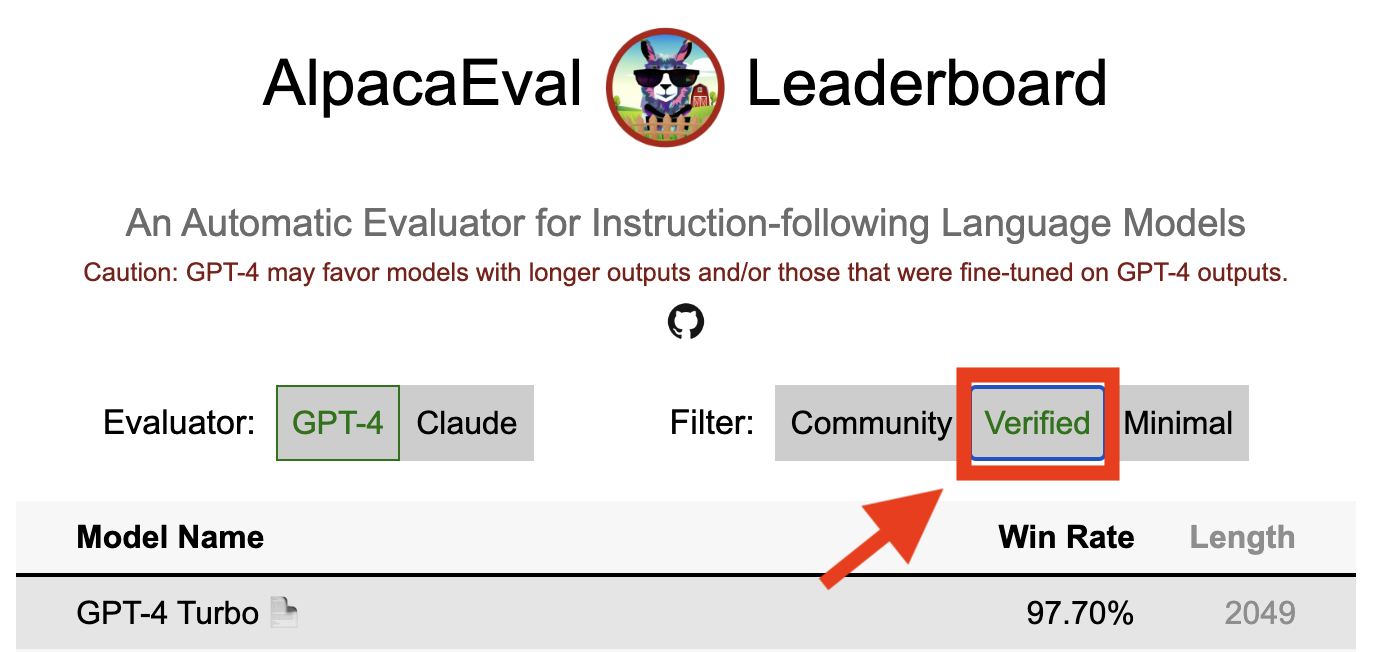
Hasil terverifikasi dalam alpacaeval menunjukkan bahwa pemelihara inti telah mendekodekan output dari model dan melakukan evaluasi. Sayangnya, kami, pengelola alpacaeval, tidak memiliki sumber daya untuk memverifikasi semua model dan jadi kami hanya akan melakukannya untuk model yang berada di 5 besar papan peringkat. Kami mohon maaf atas ketidaknyamanan ini dapat menyebabkan dan menghargai pemahaman Anda. Agar model Anda diverifikasi, silakan ikuti langkah -langkah di bawah ini:
@yann di Perselisihan, atau email kami jika Anda memiliki email kami, memberikan alasan singkat mengapa model Anda harus diverifikasi.alpaca_eval evaluate_from_model --model_configs '<your_model_name>' tanpa memerlukan GPU lokal.alpaca_eval evaluate_from_model --model_configs '<your_model_name>' , perbarui hasilnya, dan beri tahu Anda sehingga Anda dapat mencabut kunci sementara.Perhatikan bahwa kami tidak akan mengevaluasi kembali model yang sama. Karena varian pengambilan sampel, hasilnya mungkin sedikit berbeda dari yang awal Anda. Kami akan mengganti hasil komunitas Anda sebelumnya dengan yang terverifikasi.
Pertama -tama ikuti arahan dalam membuat evaluator baru. Setelah Anda membuat konfigurasi Annotator, kami meminta Anda membuat papan peringkat baru untuk Annotator dengan mengevaluasi serangkaian model minimal. Output untuk model ini dapat ditemukan dengan mengunduh alpaca_eval_all_outputs.json.
alpaca_eval make_leaderboard
  --leaderboard_path src/alpaca_eval/leaderboards/data_AlpacaEval/ < evaluator > _leaderboard.csv
  --all_model_outputs alpaca_eval_all_outputs.json
  --annotators_config < evaluator_config >
Kemudian, buat PR dengan konfigurasi annotator dan CSV papan peringkat.
Untuk menyumbangkan set eval baru, pertama -tama Anda harus menentukan satu set instruksi tekstual. Kemudian, Anda harus menentukan satu set output referensi (model-rating-rates dihitung terhadap referensi ini). Untuk kemudahan penggunaan, Anda dapat menggunakan konfigurasi referensi Text-Davinci-003 default.
Tempatkan ini bersama -sama ke dalam JSON, di mana setiap entri menentukan instruction bidang, output , dan generator . Anda dapat melihat ke alpaca_eval.json sebagai panduan (bidang dataset tidak diperlukan).
Akhirnya, kami meminta Anda membuat papan peringkat minimal pada set evaluasi baru ini. Anda dapat melakukan ini dengan yang berikut:
alpaca_eval make_leaderboard
  --leaderboard_path < src/alpaca_eval/leaderboards/data_AlpacaEval/your_leaderboard_name.csv >
  --all_model_outputs alpaca_eval_all_outputs.json
  --reference_outputs < path_to_json_file >
Harap kirimkan PR dengan set eval JSON dan CSV Papan Tinggi yang sesuai.
Saat ini, kami mengizinkan fungsi penyelesaian yang berbeda, misalnya, openai , anthropic , huggingface_local , huggingface_hub_api ... jika Anda ingin berkontribusi fungsi penyelesaian baru / API untuk melakukan inferensi, ikuti langkah -langkah tersebut:
<name>_completions(prompts : Sequence[str], model_name :str, ... ) di folder decoder. Fungsi ini harus mengambil sebagai argumen prompt + kwargs dan mengembalikan penyelesaian. Silakan lihat fungsi penyelesaian lainnya di direktori untuk templat. Misalnya huggingface_local_completions atau antropik.<name>_completions dan dependensi di Init . Sekali lagi Anda dapat mengikuti contoh HuggingFace_Local_Completionsalpaca_eval evaluate_from_model --model_configs '<model_configs>'Jangan ragu untuk memulai PR lebih awal, kami dapat memberikan bantuan dalam prosesnya!
Pipa evaluasi alpacaeval, seperti evaluator saat ini memiliki keterbatasan penting dan karenanya tidak boleh digunakan sebagai pengganti untuk evaluasi manusia dalam pengaturan penting, seperti memutuskan apakah model siap digunakan. Itu secara luas dapat dikelompokkan ke dalam 3 kategori:
Instruksi mungkin tidak mewakili penggunaan nyata : set alpacaeval berisi contoh-contoh dari berbagai dataset (instruksikan diri, terbuka, vicuna, koala, hh-rlhf) yang mungkin tidak mewakili penggunaan nyata dan aplikasi canggih dari model yang lebih baik seperti GPT4. Ini kemungkinan membuat model tertutup terbaik (GPT4 / Claude / Chatgpt / ...) tampak lebih mirip dengan model terbuka daripada apa adanya. Memang, model -model tertutup itu tampaknya diprasangka/finetuned pada data yang jauh lebih beragam. Lihat misalnya blog ini untuk hasil awal pada instruksi yang lebih kompleks. Perhatikan, bagaimanapun, bahwa di Alpacafarm kami menunjukkan bahwa laju menang pada set evaluasi kami sangat berkorelasi (0,97 R2) dengan tingkat menang pada instruksi dari interaksi pengguna dengan demo Alpaca. Selain itu, papan peringkat alpacaeval menunjukkan kesenjangan yang lebih besar antara model terbuka dan model openai daripada papan peringkat lainnya (misalnya LMSys).
Bias Annotator Otomatis : Annotator otomatis mentah tampaknya memiliki bias implisit. Secara khusus, kami menemukan bahwa mereka cenderung lebih suka output dan output yang lebih lama yang berisi daftar (misalnya 0,68 / 0,69 untuk alpaca_eval_gpt4 dan 0,62 / 0,58 untuk claude ). Meskipun kami menemukan bahwa manusia memiliki bias yang sama (0,64 / 0,61), kami percaya bahwa ini bisa lebih merupakan batasan pipa anotasi manusia yang kami gunakan daripada bias manusia sejati. Secara lebih umum, melalui analisis kualitatif, kami menemukan bahwa annotator otomatis lebih penting pada gaya output daripada isinya (misalnya faktualitas). Akhirnya, kami menemukan bahwa evaluator otomatis cenderung lebih memilih output dari model yang serupa (kemungkinan dilatih pada data yang sama) seperti yang disarankan oleh perbedaan besar antara chatgpt/gpt4 pada papan peringkat claude dan alpaca_eval_gpt4 . Perhatikan bahwa bias panjang sebagian dikurangi dalam tingkat win yang dikendalikan panjang kami.
Kurangnya evaluasi keamanan : Yang penting, alpacaeval hanya mengevaluasi kemampuan mengikuti instruksi model daripada kerugian yang dapat mereka sebabkan (misalnya perilaku atau bias beracun). Akibatnya kesenjangan kecil antara chatgpt saat ini dan model open source terbaik tidak boleh diartikan seolah -olah yang terakhir siap digunakan.
Di luar keterbatasan tentang pipa evaluasi, ada juga keterbatasan tentang validasi evaluator kami dan pendekatan yang kami usulkan untuk memilih set evaluasi.
Pertama, validasi evaluator kami berdasarkan anotasi silang manusia yang menderita dari batasan berikut: (1) Kami secara kualitatif menemukan bahwa pekerja kerumunan kami cenderung juga mendukung gaya seperti panjang dan keberadaan daftar atas faktualitas; (2) Ini tidak memvalidasi apakah tingkat menang terhadap model referensi adalah strategi evaluasi yang baik di tempat pertama; (3) Preferensi dari 16 pekerja kerumunan tidak mewakili preferensi semua manusia.
Kedua, pendekatan kami yang disarankan untuk memilih set evaluasi berdasarkan kekuatan statistik yang menderita dari batasan berikut: (1) Kekuatan statistik tidak memastikan arah yang benar, misalnya Anda dapat memiliki serangkaian instruksi yang tidak wajar di mana alpaca "melakukan" lebih baik daripada model yang lebih baik; dan (2) ini dapat mendorong pengguna untuk memilih data untuk mendukung hipotesis yang ingin mereka validasi.
Visualisasi alpacaeval yang dikendalikan panjang:
Pengembangan alpacaeval yang dikendalikan panjang:
Notebook menunjukkan berbagai opsi yang kami pertimbangkan untuk mengurangi bias panjang annotator otomatis.
Di sini kami merangkum hasil utama secara singkat. Yaitu:
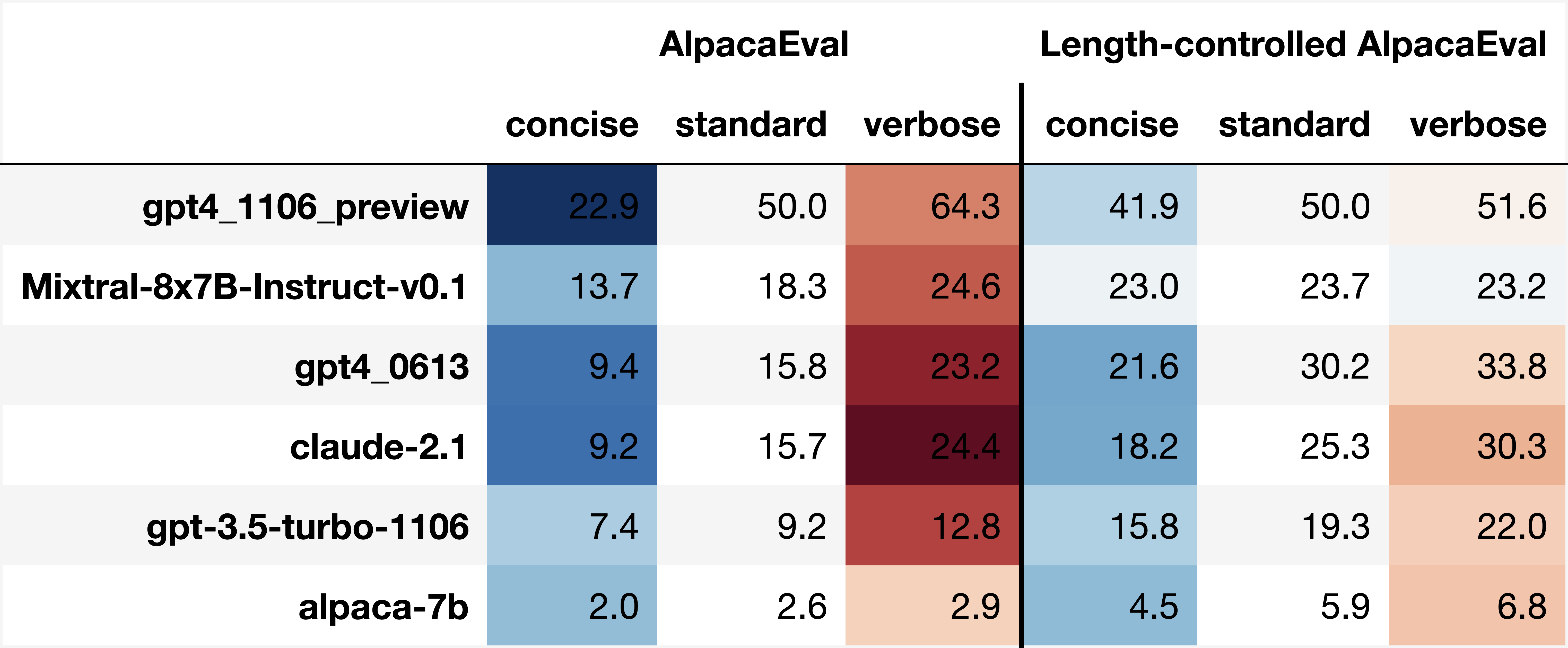
win_rate(m,b) = 1 - win_rate(b,m) in [0,1] and win_rate(m,m) = 0.5 . This is shown in the plot below. 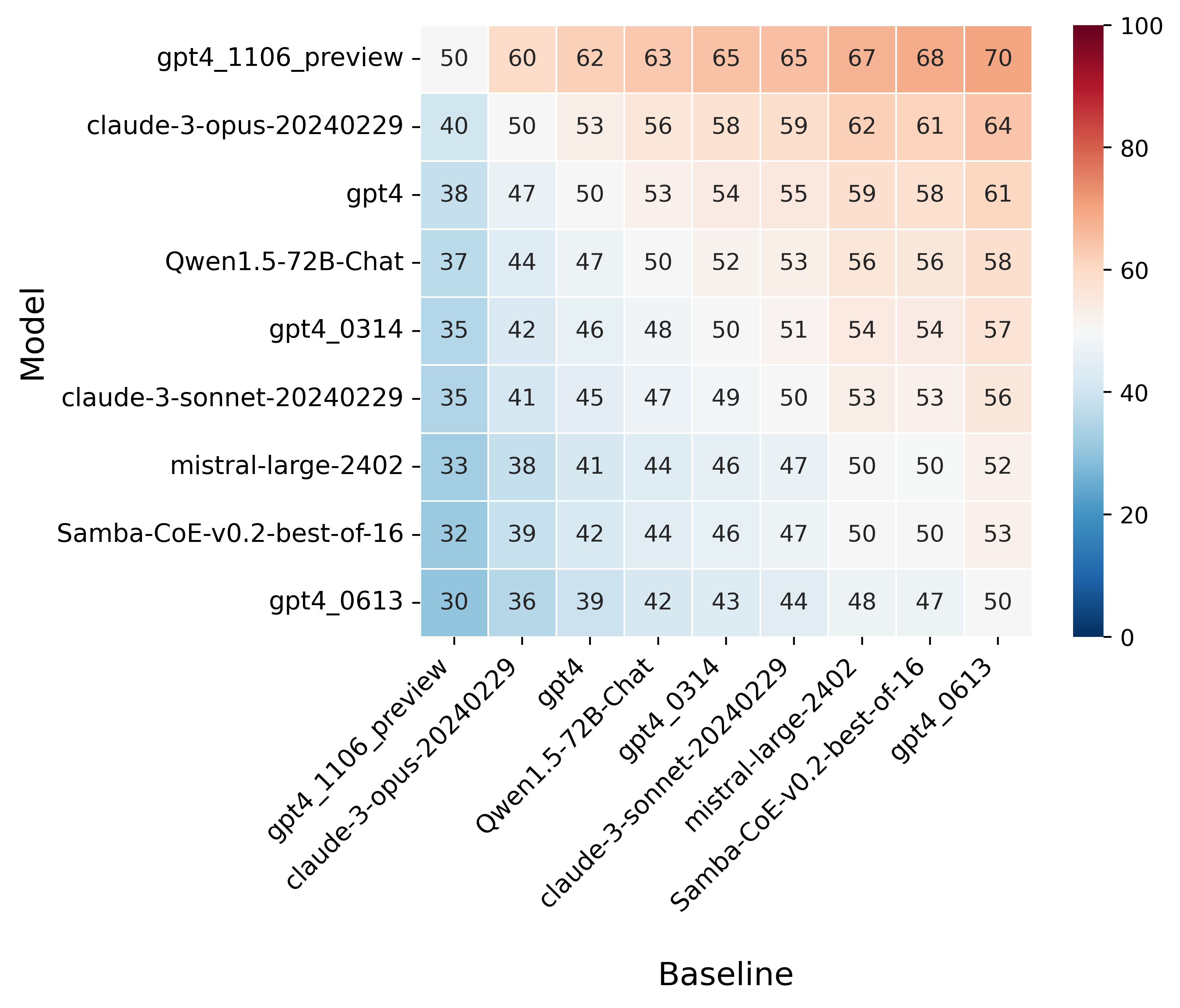
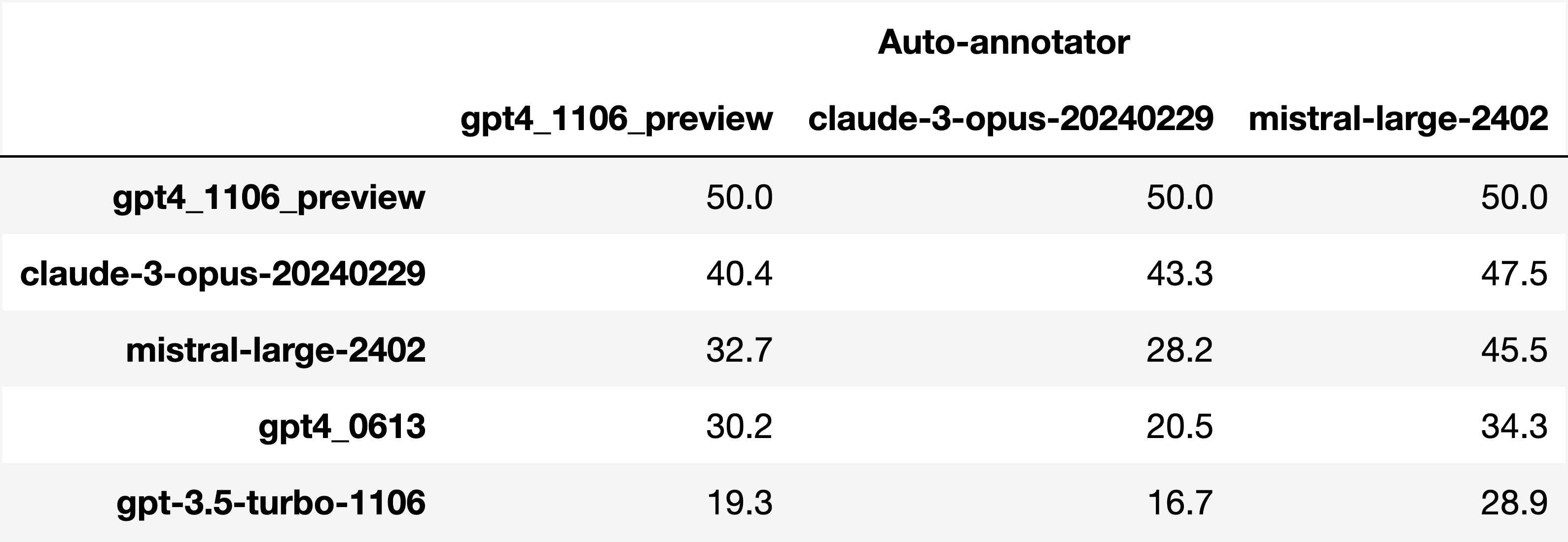
Finally, note that we are only controlling for length bias. There are other known biases that we are not controlling for, such as the fact that auto-annotators prefer outputs similar to their model. Although we could control for that, in practice we have found that to be less of an issue than length bias. For two reasons (1) this mostly a single model in the leaderboard because fine-tuning on outputs from the auto-annotator doesn't seem to have doesn't seem to impact the win-rate as much, and (2) the bias is actually less strong that what one could think. For example we show below a subset of the leaderboards auto-annotated by three different models, and we see that the ranking of models is exactly the same. In particular, claude-3-opus prefers gpt4_preview , and mistral-large prefers the former two.
Caution : all the following results are about AlpacaEval 1.0 and have not been updated since
Analyzing evaluators:
As we saw in the evaluator's leaderboard, there are many metrics to consider when selecting an evaluator, eg the quality, price, and speed. To assist with selection of the evaluator we provide a few functions to plot those metrics. The following shows for example the price/time/agreement of the different evaluators.
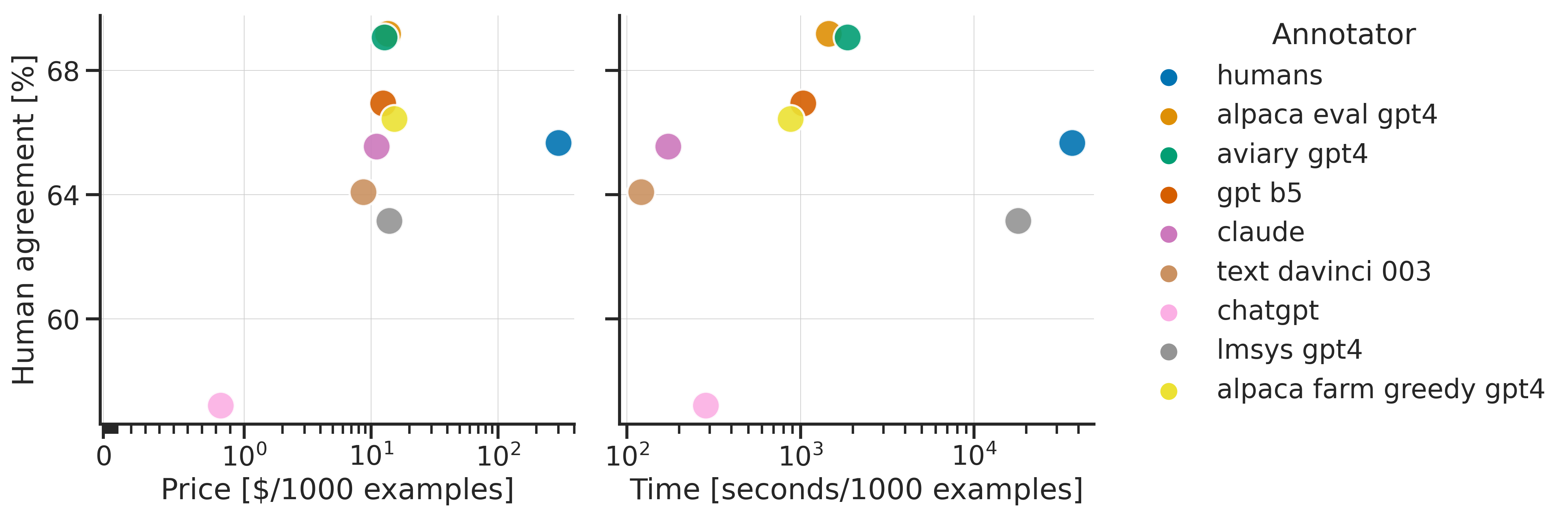
Here we see that alpaca_eval_gpt4 performs very well and is better than humans on all the considered metrics.
Previously we only considered the agreement with human annotators overall. An additional validation that one could do is checking whether making a leaderboard using our automatic annotator gives similar results as a leaderboard from humans. To enable such analysis, we release human annotations of outputs from 22 methods from AlpacaFarm => 22*805 = ~18K annotations. As a result we can test the correlation between the win-rates of the 22 models as evaluated by the humans and our automatic annotator. Note that this is arguably a better way of selecting an automatic evaluator than using "human agreement [%]" but is expensive given that it requires 18K annotations. The plot below shows such correlation for the alpaca_eval_gpt4 evaluator.
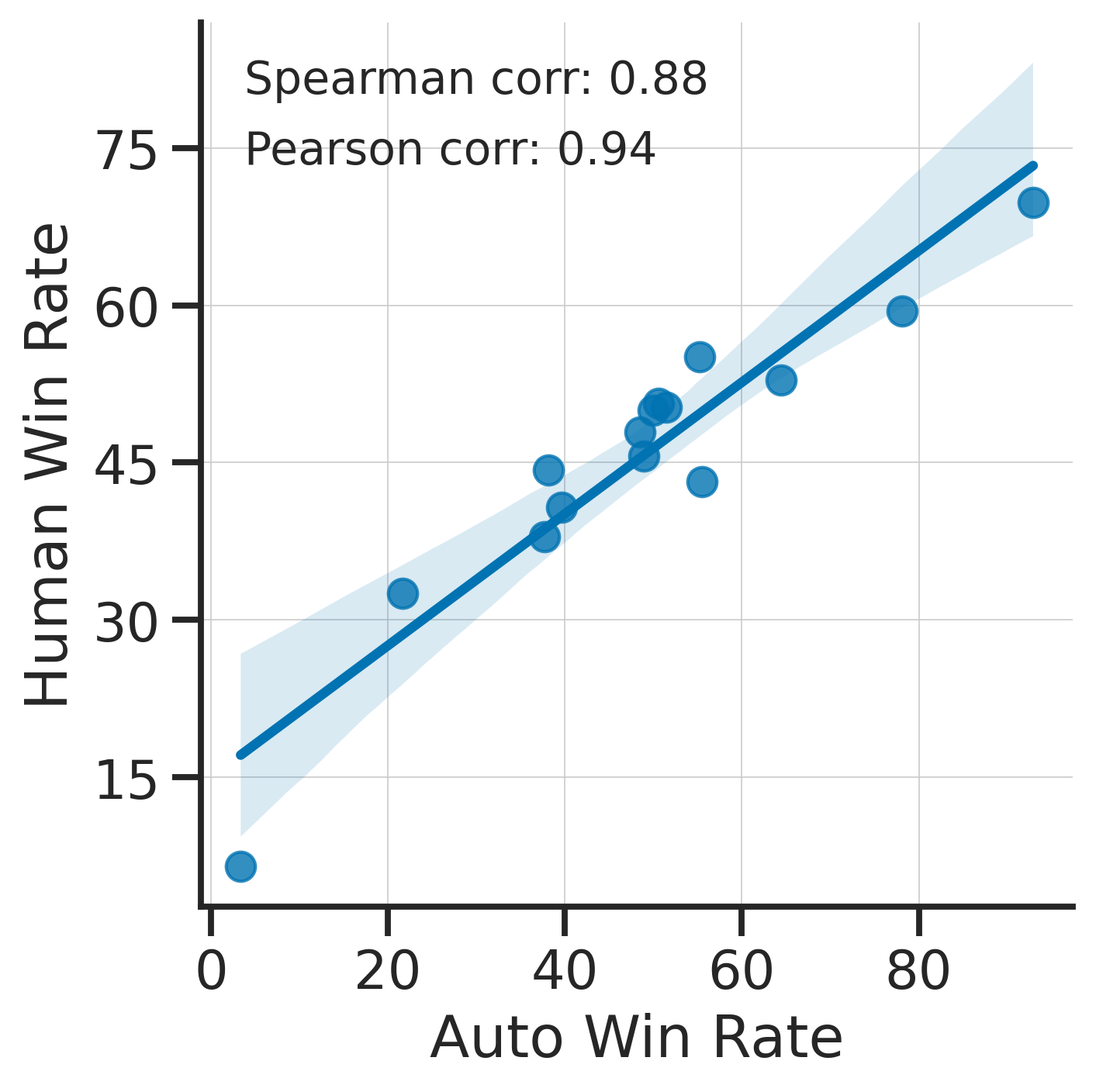
We see that the alpaca_eval_gpt4 leaderboard is highly correlated (0.94 Pearson correlation) to the leaderboard from humans, which further suggests that automatic evaluation is a good proxy for human evaluation. For the code and more analysis, see this notebook, or the colab notebook above.
Caution : all the following results are about AlpacaEval 1.0 and have not been updated since.
Making evaluation sets:
When creating an evaluation set there are two main factors to consider: how much data to use? and what data?
One way of answering those question is by considering a leaderboard of models that you believe are of different quality and checking what and how much data is needed to distinguish between them in a statistically significant way. We will do so below using a paired t-test to test if the difference in win-rates between every pair of models is statistically significant.
First, let us consider the question of how much data to use. Below we show the number of random samples needed from AlpacaEval for the paired t-test to give a p-value < 0.05 for each pair of models in the minimal alpaca_eval_gpt4 leaderboard. Grey cells correspond to pairs that are not significantly different on the 805 samples. y- and x-axis are ordered by the win-rate of the first and second model respectively.
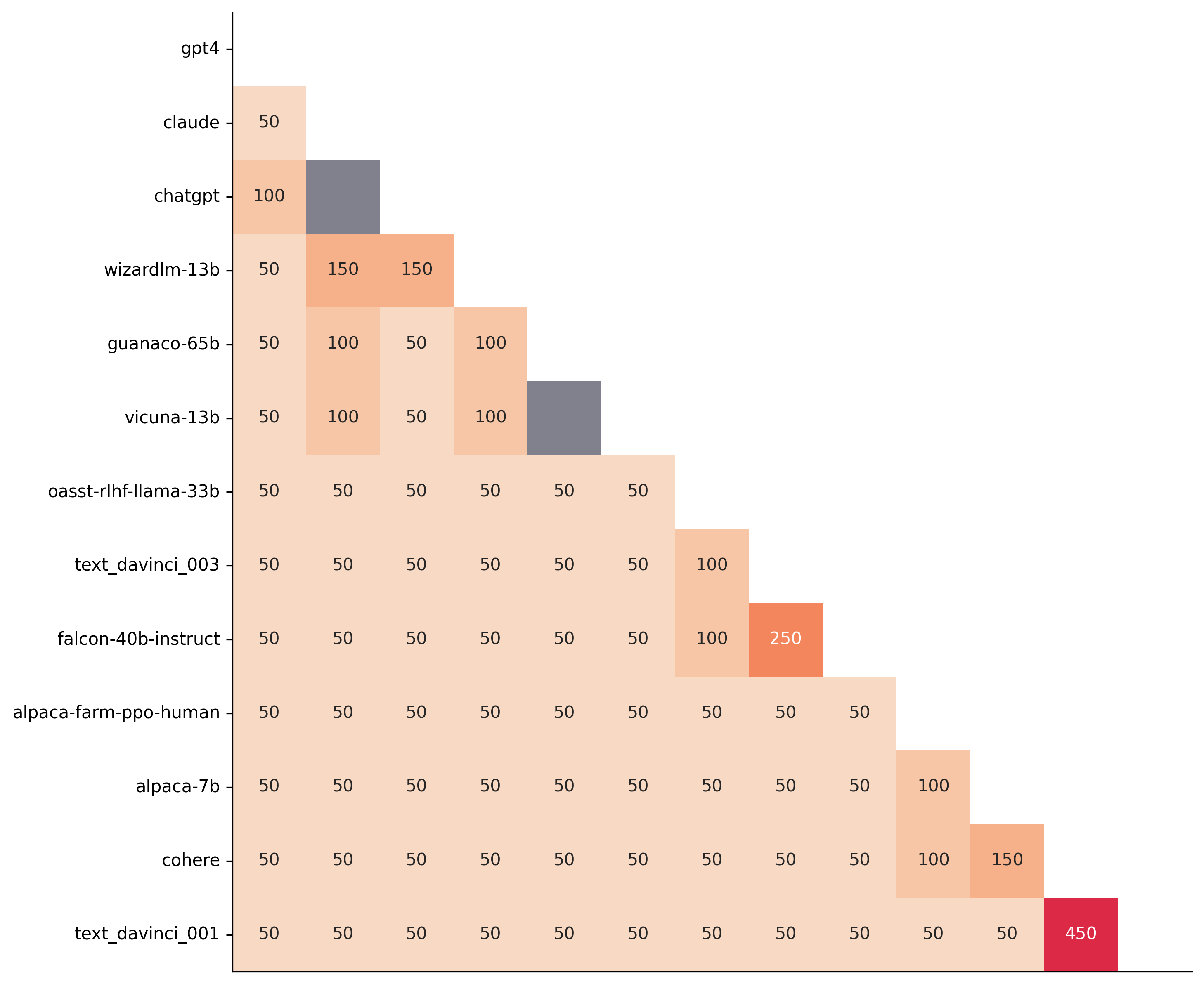
We see that most models can already be distinguished with 50 samples, and that 150 samples allows distinguishing the majority of pairs (74 out of 78). This suggests that we can decrease the evaluation set size by a factor of 4 when testing two models that have similar performance gaps as those on the minimal alpaca_eval_gpt4 leaderboard.
The second question is what data to use. Again we can try to answer this question from a statistical power perspective: what data allows to best distinguish between models. Let's consider this for all the datasets that are part of AlpacaEval, but let us control for the size of the evaluation sets as we only care about the quality of the data. The following plot shows the p-values from the paired t-test of each pairs of models on 80 examples of each subset of AlpacaEval.
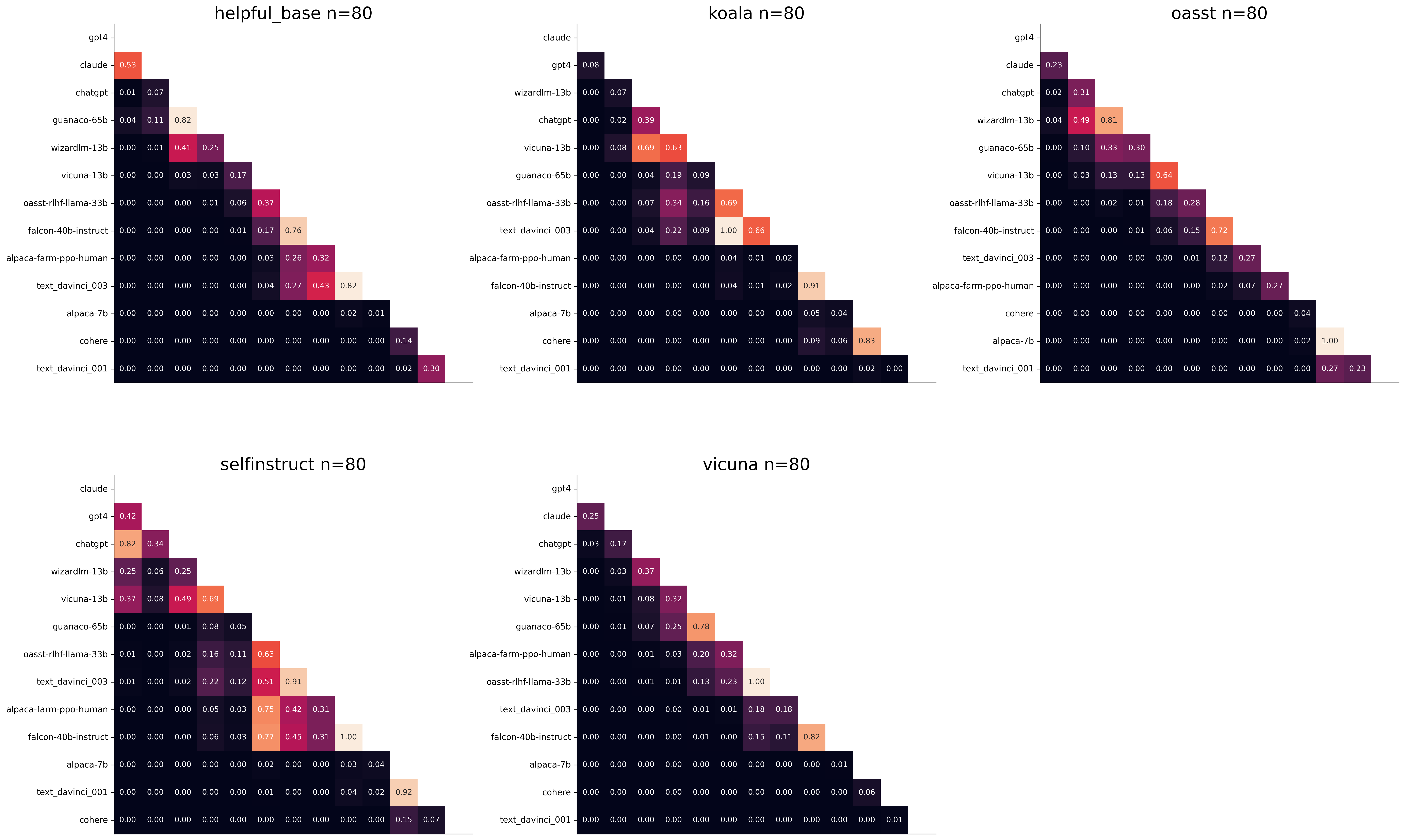
We see for example that the self-instruct dataset yields the least statistical power, which suggests that one could remove this dataset from the evaluation set. The exact reason should be analyzed in future work. For the code and more analysis see this notebook, or the colab notebook above.
Please consider citing the following depending on what you are using and referring to:
alpaca_eval (this repo). Specify whether you are using AlpacaEval or AlpacaEval 2.0. For length-controlled win-rates see below.alpaca_eval_length .dubois2023alpacafarm (AlpacaFarm)alpaca_eval and self-instruct, open-assistant, vicuna, koala, hh-rlhf.Here are the bibtex entries:
 @misc{alpaca_eval,
  author = {Xuechen Li and Tianyi Zhang and Yann Dubois and Rohan Taori and Ishaan Gulrajani and Carlos Guestrin and Percy Liang and Tatsunori B. Hashimoto },
  title = {AlpacaEval: An Automatic Evaluator of Instruction-following Models},
  year = {2023},
  month = {5},
  publisher = {GitHub},
  journal = {GitHub repository},
  howpublished = {url{https://github.com/tatsu-lab/alpaca_eval}}
}
 @article{dubois2024length,
  title={Length-Controlled AlpacaEval: A Simple Way to Debias Automatic Evaluators},
  author={Dubois, Yann and Galambosi, Bal{'a}zs and Liang, Percy and Hashimoto, Tatsunori B},
  journal={arXiv preprint arXiv:2404.04475},
  year={2024}
}
 @misc{dubois2023alpacafarm,
  title={AlpacaFarm: A Simulation Framework for Methods that Learn from Human Feedback},
  author={Yann Dubois and Xuechen Li and Rohan Taori and Tianyi Zhang and Ishaan Gulrajani and Jimmy Ba and Carlos Guestrin and Percy Liang and Tatsunori B. Hashimoto},
  year={2023},
  eprint={2305.14387},
  archivePrefix={arXiv},
  primaryClass={cs.LG}
}
Length controlled (LC) win-rates are a debiased version of the win-rates that control for the length of the outputs.
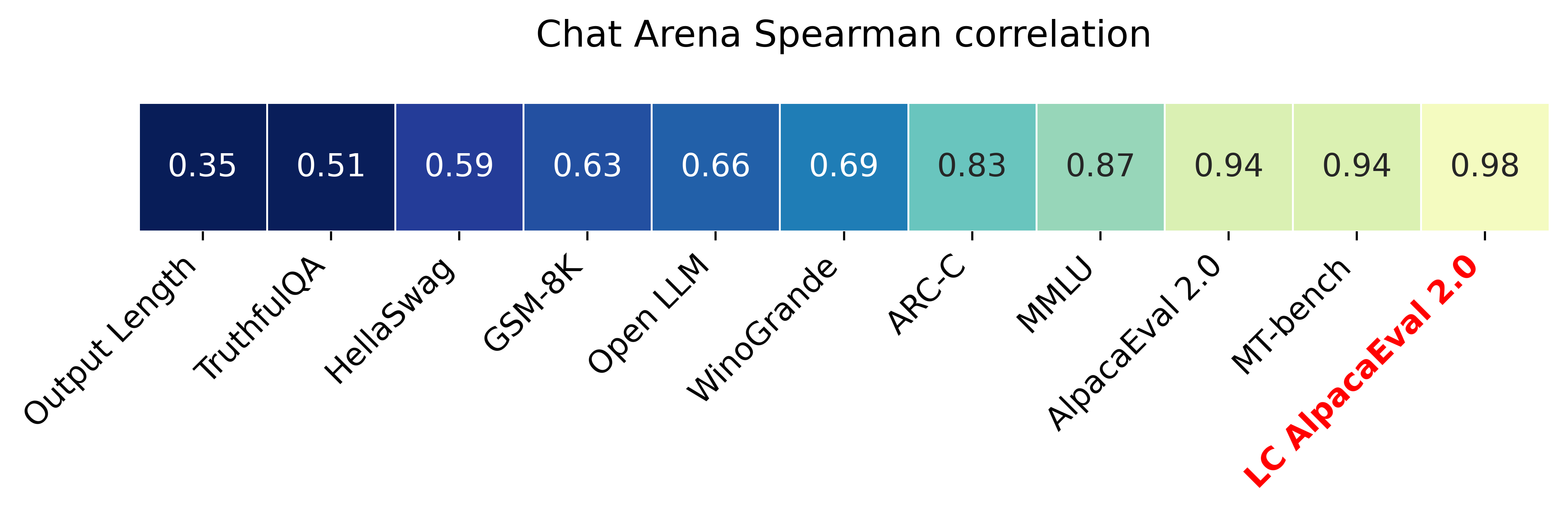
The main idea is that for each model we will fit a logistic regression to predict the preference of the autoannotator given: (1) the instruction, (2) the model, and (3) the difference of length between the baseline and model output. Given such a logistic regression we can then try to predict the counterfactual "what would the preference be if the model's output had the same length as the baseline" by setting the length difference to 0. By averaging over this length-controlled preference, we then obtain the length-controlled win-rate. The exact form of the logistic regression is taken such that the interpretation of LC win rates is similar to the raw win rates, for example for any model m1 and m2 we have win_rate(m1, m2) = 1 - win_rate(m2, m1) in [0,100] and win_rate(m1, m1) = 0.5 . Length controlled win-rates increase the correlation between AlpacaEval's leaderboard and Chat Arena from 0.93 to 0.98 Spearman correlation, while significantly decreasing the length gameability of the annotator . For more information and results about length controlled win-rates see this notebook.
This idea of estimating the controlled direct effect, by predicting the outcome while conditioning on the mediator (the length difference), is common in statistical inference.
To get LC win rates on previously annotated models, you can use the following command:
pip install -U alpaca_eval
alpaca_eval --model_outputs … --is_recompute_metrics_only True
AlpacaEval 2.0 is a new version of AlpacaEval. Here are the differences:
gpt4_turbo : we upgraded the baseline from text-davinci-003 to gpt4_turbo to make the benchmark more challenging and have a metric that better reflects the current state of the art.weighted_alpaca_eval_gpt4_turbo : we improved the annotator in quality and price. First, we use the gpt4_turbo model for annotating, which is approximately 2x cheaper than gpt4 . Second, we changed the prompt such that the model outputs a single token, which further reduced cost and speed. Finally, instead of using a binary preference, we used the logprobs to compute a continuous preference, which gives the final weighted win-rate. Note that the latter two changes had the surprising effect of decreasing the annotators' length biased. By default, AlpacaEval 2.0 will be used from pip install alpaca_eval==0.5 . If you wish to use the old configs by default, you can set IS_ALPACA_EVAL_2=False in your environment.
As part of AlpacaEval, we release the following data:
text-davinci-003 reference on the AlpacaFarm evaluation set. Annotations are from a pool of 16 crowd workers on Amazon Mechanical Turk. The different models are: 6 from OpenAI, 2 SFT models from AlpacaFarm, 13 RLHF methods from AlpacaFarm, and LLaMA 7B.For more details about the human annotations refer to the AlpacaFarm paper.
AlpacaEval is an improvement and simplification of the automatic pairwise preference simulator from AlpacaFarm. Outside AlpacaFarm, you should be using AlpacaEval. Here are the main differences:
{instruction}nn{input} . This affects 1/4 of the examples in the AlpacaFarm evaluation set (the self-instruct subset). This simplification provides a more fair comparison for models that were not trained by distinguishing between the two fields.text-davinci-003 ), so the results on AlpacaEval are not comparable to those on AlpacaFarm even for examples that had no input field.--anotators_config 'alpaca_farm' and --p_label_flip 0.25 when creating an evaluator. There have been several work that propose new automatic annotators for instruction-following models. Here we list the ones that we are aware of and discuss how they differ from ours. We evaluated all of those in our evaluator's leaderboard.
lmsys_gpt4 ) evaluates the pair by asking the annotator a score from 1-10 for each output, and then selecting the output with the highest score as preferred. They do not randomize over output order and they ask an explanation after the score. Overall, we found that this annotator has strong bias towards longer outputs (0.74) and relatively low correlation with human annotations (63.2).alpaca_farm_greedy_gpt4 ) evaluates the pair by directly asking the annotator which output it prefers. Furthermore, it batches 5 examples together to amortize the length of the prompt and randomizes the order of outputs. Overall, we found that this annotator has much less bias towards longer outputs (0.60) and is faster (878 seconds/1000 examples) than others. It has a slightly higher correlation with the majority of human annotations (66.4) than humans themselves (65.7). However, it is more expensive ($15.3/1000 examples) and doesn't work with very long outputs given the batching.aviary_gpt4 ) asks the annotator to order the output by its preference, rather than simply selecting the preferred output. It does not randomize the order of outputs and uses high temperature for decoding (0.9). Overall, we found that this annotator has relatively strong bias towards longer outputs (0.70) and very high correlation with human annotations (69.1). By decreasing the temperature and randomizing the order of outputs, we further improved the correlation to 69.8 ( improved_aviary_gpt4 ) but this further increased the length bias to 0.73. Our alpaca_eval_gpt4 is a mix between the AlpacaFarm and Aviary annotators. It asks the annotator to order the outputs by preference, but it uses temperature 0, randomizes over outputs, and made some modifications to the prompt to decrease length bias to 0.68.
Other related work include recent papers which analyze automatic evaluators. Misalnya:
For all models you can find the auto-annotations under results/<model_name>/*/annotations.json . The annotations have the following columns:
instruction : the promptgenerator_1 : the baseline modeloutput_1 : the output of the baseline modelgenerator_2 : the model being evaluatedoutput_2 : the output of the model being evaluatedannotator : the auto-annotatorpreference : the result of the auto-annotator. This is a float between 1 and 2. Closer to 1 means that the auto-annotator prefers output_1 , closer to 2 means that it prefers output_2 . For AlpacaEval 2.0, preference-1 corresponds to the probability of output_1 being preferred. For AlpacaEval 1.0, preference is 1 if output_1 is preferred, 2 if output_2 is preferred, and 1.5 if they are the same. The win rate is always (preference -1).mean() .raw_completion : the raw output of the auto-annotator. This is field contains the completions before de-randomization of the order between output_1 and output_2 ! It is thus much harder to interpret, see below for more information.Chain of thought
For some annotators, eg alpaca_eval_cot_gpt4_turbo_fn we use chain of thought reasoning to make the models preferences more interpretable. Those can then be found under concise_explanation . To interpret them, you should also look at referenced_models which translates the temporary model name (in the prompt) to the actual output. Below, we provide more explanation as to what is happening behind the scenes.
You can check the raw_annotations["concise_explanation] column in annotations.json (eg here) which contains the chain of thought reasoning of the auto annotator. Note that the raw_annotations is not modified by the randomization of the order of the outputs. In particular, "m" and "M" can sometime refer to the first model (the reference) and sometime to the second model (the model being evaluated). To understand which model is being referred to, you should use the column preference and ordered_models . To make it easier we add a column "referenced_models" mapping the model names to the corresponding outputs. For example in the following annotation we see that the preference is 1.0 (ie output_1 ) and corresponds to model M in concise_explanation (see ordered_models ).
{
  "instruction" : " How did US states get their names? " ,
  "output_1" : " The names of U.S. states are derived from a variety of languages and sources, including indigenous American languages, European languages (primarily English, Spanish, and French), as well as other historical influences. Here is a brief overview of how some states got their names: nn 1. **Indigenous American Languages**: Many state names come from Native American words or names of tribes, often from the languages of the indigenous peoples who lived in or near those areas. n   - **Alabama**: Possibly derived from the Choctaw language, meaning " thicket clearers. "n   - **Connecticut**: From a Mohegan-Pequot word meaning " long tidal river. "n   - **Massachusetts**: [...] " ,
  "generator_1" : " gpt4_1106_preview " ,
  "dataset" : " helpful_base " ,
  "output_2" : " The names of the 50 U.S. states come from a variety of sources, including Native American languages, European languages, and historical figures. Here's a brief overview of how some states got their names: nn 1. Native American origins: Many states have names derived from Native American languages. For example, Alabama comes from the Choctaw word " Albah amo, " meaning " plant gatherers " or " herb gatherers. " Similarly, the name Mississippi comes from the Ojibwe word " Misi-ziibi, " meaning " great river. "nn 2. European languages: [...]. " ,
  "generator_2" : " gpt4 " ,
  "annotator" : " alpaca_eval_cot_gpt4_turbo_fn " ,
  "preference" : 1.0 ,
  "raw_completion" : {
    "concise_explanation" : " Model M provided a more detailed and structured response, including bold headings for each category and a wider range of examples. It also included additional categories such as 'Other European Languages' and 'Combination of Languages and Influences', which added depth to the explanation. Model m's response was accurate but less comprehensive and lacked the clear structure found in Model M's output. " ,
    "ordered_models" : [
      {
        "model" : " M " ,
        "rank" : 1
      },
      {
        "model" : " m " ,
        "rank" : 2
      }
    ]
  },
  "referenced_models" : {
    "M" : " output_1 " ,
    "m" : " output_2 "
  }
}chatgpt_fn that anyone can use (no waiting lists).chatgpt_fn or alpaca_eval_gpt4_fn .




