alpaca_eval
v0.6.5

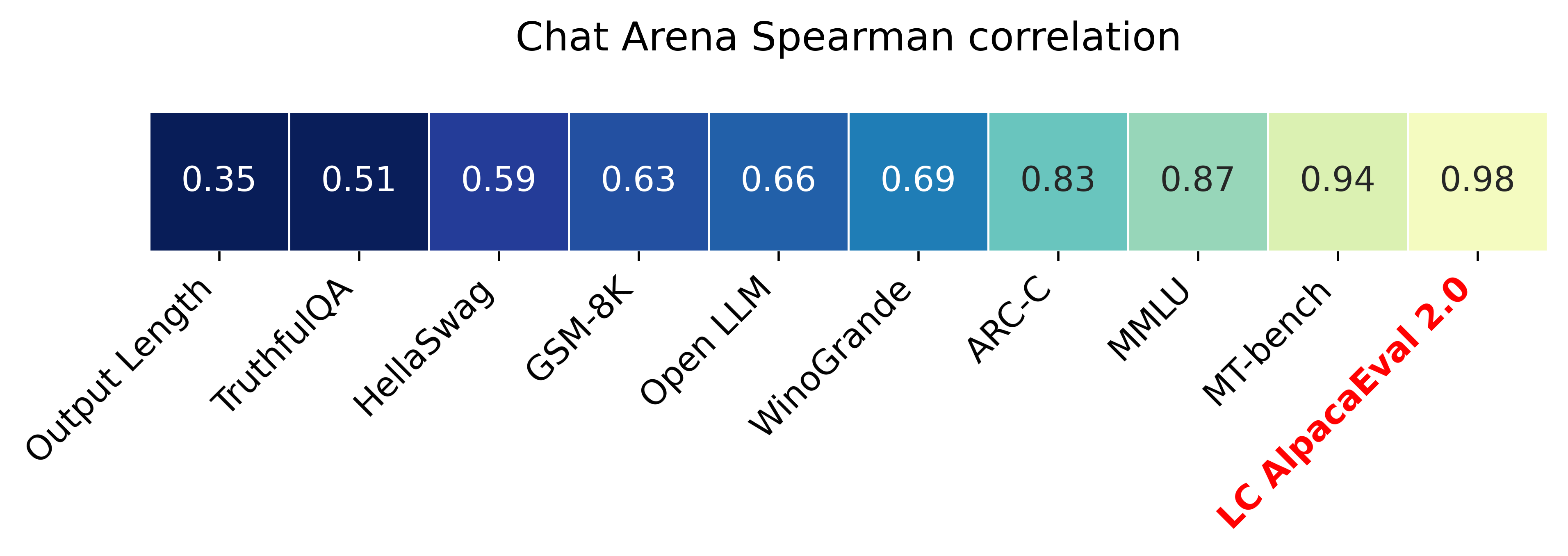
Alpacaeval 2.0 ที่มีการควบคุมความยาว (กระดาษ) มีความสัมพันธ์สเปียร์แมน 0.98 กับ Chatbot Arena ในขณะที่ราคาน้อยกว่า $ 10 ของเครดิต OpenAI ทำงานและทำงานในเวลาน้อยกว่า 3 นาที เป้าหมายของเราคือการมีเกณฑ์มาตรฐานสำหรับการแชท LLMS นั่นคือ: เร็ว (<5 นาที), ราคาถูก (<$ 10) และมีความสัมพันธ์อย่างมากกับมนุษย์ (0.98) นี่คือการเปรียบเทียบกับเกณฑ์มาตรฐานอื่น ๆ :
อัปเดต:
- อัตราการชนะที่ควบคุมด้วยความยาว จะถูกนำไปใช้โดยค่าเริ่มต้น! สิ่งนี้จะเพิ่มความสัมพันธ์กับ Chatbot Arena จาก 0.93 เป็น 0.98 ในขณะที่ลดความสามารถในการเล่นเกมที่มีความยาวลดลงอย่างมีนัยสำคัญ อัตราการชนะแบบดิบยังคงแสดงอยู่ในเว็บไซต์และ CLI รายละเอียดเพิ่มเติมที่นี่
- Alpacaeval 2.0 ออกและใช้โดยค่าเริ่มต้น! เราปรับปรุง Auto-Annotator (ดีกว่าและราคาถูก) และใช้ GPT-4 Preview เป็นพื้นฐาน รายละเอียดเพิ่มเติมที่นี่ สำหรับรุ่นเก่าตั้งค่าตัวแปรสภาพแวดล้อมของคุณ IS_ALPACA_EVAL_2=False
การประเมินแบบจำลองการเรียนการสอน (เช่น CHATGPT) มักจะต้องมีปฏิสัมพันธ์ของมนุษย์ นี่คือเวลาที่ใช้เวลานานราคาแพงและยากที่จะทำซ้ำ Alpacaeval ในการประเมินอัตโนมัติที่ใช้ LLM ซึ่งเป็นอย่างรวดเร็วราคาถูกทำซ้ำและตรวจสอบความถูกต้องกับคำอธิบายประกอบมนุษย์ 20K มันมีประโยชน์อย่างยิ่งสำหรับการพัฒนาแบบจำลอง แม้ว่าเราจะได้รับการปรับปรุงจากท่อประเมินอัตโนมัติก่อนหน้านี้ แต่ก็ยังมีข้อ จำกัด พื้นฐานเช่นการตั้งค่าสำหรับเอาต์พุตที่ยาวนานขึ้น Alpacaeval ให้สิ่งต่อไปนี้:
ควรใช้ Alpacaeval เมื่อใด ผู้ประเมินอัตโนมัติของเราเป็นพร็อกซีที่รวดเร็วและราคาถูกสำหรับการประเมินผลงานการเรียนการสอนแบบง่าย ๆ ของมนุษย์ มันมีประโยชน์หากคุณต้องดำเนินการประเมินจำนวนมากอย่างรวดเร็วเช่นระหว่างการพัฒนาแบบจำลอง
เมื่อไม่ใช้ Alpacaeval? ในฐานะผู้ประเมินอัตโนมัติอื่น ๆ Alpacaeval ไม่ควรแทนที่การประเมินผลของมนุษย์ในการตัดสินใจที่มีสเต็ปสูง เช่นเพื่อตัดสินใจเกี่ยวกับการเปิดตัวแบบจำลอง โดยเฉพาะอย่างยิ่ง Alpacaeval ถูก จำกัด ด้วยข้อเท็จจริงที่ว่า (1) คำแนะนำในชุดประเมินอาจไม่ได้เป็นตัวแทนของการใช้งานขั้นสูงของ LLMs; (2) ผู้ประเมินอัตโนมัติอาจมีอคติเช่นรูปแบบที่เป็นที่นิยมมากกว่าข้อเท็จจริงของคำตอบ; และ (3) Alpacaeval ไม่ได้วัดความเสี่ยงที่แบบจำลองอาจทำให้เกิด รายละเอียดในข้อ จำกัด
หากต้องการติดตั้งรีลีสที่เสถียรให้เรียกใช้
pip install alpaca-evalหากต้องการติดตั้งเวอร์ชันทุกคืนให้เรียกใช้
pip install git+https://github.com/tatsu-lab/alpaca_evalจากนั้นคุณสามารถใช้ดังนี้:
 export OPENAI_API_KEY= < your_api_key > # for more complex configs, e.g. using Azure or switching clients see client_configs/README.md
alpaca_eval --model_outputs ' example/outputs.json '
สิ่งนี้จะพิมพ์ลีดเดอร์บอร์ดไปยังคอนโซลและบันทึกทั้งลีดเดอร์บอร์ดและคำอธิบายประกอบลงในไดเรกทอรีเดียวกับไฟล์ model_outputs พารามิเตอร์ที่สำคัญมีดังต่อไปนี้:
instruction และ output คีย์weighted_alpaca_eval_gpt4_turbo (ค่าเริ่มต้นสำหรับ Alpacaeval 2.0) ซึ่งมีอัตราข้อตกลงที่สูงกับข้อมูลคำอธิบายประกอบของมนุษย์ขนาดบริบทขนาดใหญ่และราคาค่อนข้างถูก สำหรับการเปรียบเทียบคำอธิบายประกอบทั้งหมดดูที่นี่model_outputs โดยค่าเริ่มต้นนี่คือ gpt4_turbo สำหรับ alpacaeval 2.0 หากคุณไม่มีเอาต์พุตโมเดลคุณสามารถใช้ evaluate_from_model และผ่านเส้นทางท้องถิ่นหรือชื่อของโมเดล HuggingFace หรือโมเดลจาก API มาตรฐาน (Openai, anthropic, Cohere, Google, ... ) คำสั่งอื่น ๆ :
>>> alpaca_eval -- --help SYNOPSIS
alpaca_eval COMMAND
COMMANDS
COMMAND is one of the following:
evaluate
Evaluate a model based on its outputs. This is the default entrypoint if no command is specified.
evaluate_from_model
Evaluate a model from HuggingFace or an API provider. This is a wrapper around `evaluate` which includes generating from a desired model.
make_leaderboard
Precompute and save an entire leaderboard for a given dataset / evaluator / set of models generations.
analyze_evaluators
Analyze an evaluator and populates the evaluators leaderboard (agreement with human, speed, price,...).
สำหรับข้อมูลเพิ่มเติมเกี่ยวกับแต่ละฟังก์ชั่นใช้ alpaca_eval <command> -- --help
กระดานผู้นำของเราคำนวณจากชุดข้อมูล Alpacaeval เราคำนวณลีดเดอร์บอร์ดสำหรับโมเดลที่สำคัญโดยใช้โมเดลพื้นฐานที่แตกต่างกันและ autoannotators กระดานผู้นำหลักสองตัวของเรา ("Alpacaeval 2.0" และ "Alpacaeval") สามารถพบได้ในหน้านี้ "Alpacaeval 2.0" ใช้ weighted_alpaca_eval_gpt4_turbo สำหรับ Annotator และ gpt4_turbo สำหรับพื้นฐาน "Alpacaeval" ใช้ alpaca_eval_gpt4 สำหรับ Annotator และ text_davinci_003 สำหรับพื้นฐาน สำหรับกระดานผู้นำที่คำนวณล่วงหน้าทั้งหมดดูที่นี่ ต่อมาเรายังแสดงวิธีเพิ่มโมเดลของคุณลงในกระดานผู้นำและวิธีการสร้างลีดเดอร์บอร์ดใหม่สำหรับชุดประเมิน/ชุดข้อมูลของคุณ ดูที่นี่สำหรับการกำหนดค่าของทุกรุ่นที่มีอยู่นอกกรอบ
Alpacaeval Leaderboard Minimal :
| อัตราการชนะ | ข้อผิดพลาด std | |
|---|---|---|
| GPT4 | 95.3 | 0.7 |
| ไคลด์ | 88.4 | 1.1 |
| CHATGPT | 86.1 | 1.2 |
| Guanaco-65b | 71.8 | 1.6 |
| Vicuna-13b | 70.4 | 1.6 |
| text_davinci_003 | 50.0 | 0.0 |
| Alpaca-Farm-Ppo-Human | 41.2 | 1.7 |
| Alpaca-7b | 26.5 | 1.5 |
| text_davinci_001 | 15.2 | 1.2 |
อัตราการชนะ : อัตราการชนะวัดระยะเวลาที่เอาต์พุตของโมเดลเป็นที่ต้องการมากกว่าผลลัพธ์ของการอ้างอิง ( test-davinci-003 สำหรับ Alpacaeval และ gpt4_turbo สำหรับ Alpacaeval 2.0) โดยเฉพาะอย่างยิ่งในการคำนวณอัตราการชนะเรารวบรวมคู่ของผลลัพธ์ที่ต้องการในทุกคำสั่งจากชุดข้อมูล Apacaeval จากนั้นเราจับคู่เอาต์พุตแต่ละรายการกับเอาต์พุตของโมเดลอ้างอิงของเรา (เช่น text-davinci-003 ) ในคำสั่งเดียวกัน จากนั้นเราถามผู้ประเมินอัตโนมัติของเราว่าเอาต์พุตที่พวกเขาต้องการ ดูการแจ้งเตือนและการกำหนดค่าของ Alpacaeval และ Alpacaeval 2.0 โดยเฉพาะอย่างยิ่งเราจะสุ่มลำดับของเอาต์พุตเพื่อหลีกเลี่ยงอคติตำแหน่ง จากนั้นเราเฉลี่ยการตั้งค่าสำหรับคำแนะนำทั้งหมดในชุดข้อมูลเพื่อให้ได้อัตราการชนะของโมเดลผ่านพื้นฐาน หากเอาต์พุตทั้งสองเท่ากันเราใช้การตั้งค่าครึ่งหนึ่งสำหรับทั้งสองรุ่น
ข้อผิดพลาดมาตรฐาน : นี่คือข้อผิดพลาดมาตรฐาน (ทำให้เป็นมาตรฐานโดย N-1) ของอัตราการชนะเช่นการตั้งค่าโดยเฉลี่ยตามคำแนะนำที่แตกต่างกัน
alpaca_eval_gpt4 ANNOTATOR alpaca_eval_gpt4 ของเราค่าเฉลี่ยของคำอธิบายประกอบการตั้งค่าคำอธิบาย
temperature=0Annotator เป็นการผสมผสานระหว่าง (และได้รับอิทธิพลอย่างมากจาก) Alpacafarm และ Aviary Evaluators โดยเฉพาะอย่างยิ่งเราใช้รหัสเดียวกับ Alpacafarm (การแคช/การสุ่ม/hyperparameters) แต่ใช้การจัดอันดับที่คล้ายกับของ Aviary เราทำการเปลี่ยนแปลงพรอมต์ของ Aviary เพื่อลดอคติสำหรับเอาต์พุตที่ยาวนานขึ้น รายละเอียดในงานที่เกี่ยวข้อง
สำหรับ Alpacaeval 2.0 เราใช้ weighted_alpaca_eval_gpt4_turbo ซึ่งใช้ logprobs เพื่อคำนวณการตั้งค่าอย่างต่อเนื่องและใช้ gpt4_turbo เป็นรุ่น (ดูการกำหนดค่า)
เราประเมินคำอธิบายประกอบอัตโนมัติที่แตกต่างกันในชุด Alpacaeval โดยเปรียบเทียบกับคำอธิบายประกอบของมนุษย์ 2.5K ที่เรารวบรวม (~ 650 คำแนะนำแต่ละคำมีคำอธิบายประกอบมนุษย์ 4 คำ) ด้านล่างเราแสดงตัวชี้วัดสำหรับผู้ประเมินที่แนะนำ ( weighted_alpaca_eval_gpt4_turbo , alpaca_eval_gpt4 ) สำหรับ humans ประเมินอัตโนมัติก่อนหน้า claude alpaca_farm_greedy_gpt4 , aviary_gpt4 , lmsys_gpt4 gpt4 text_davinci_003 , chatgpt_fn , guanaco_33b , chatgpt ) ดูที่นี่สำหรับการกำหนดค่าของผู้ประเมินทั้งหมดที่มีอยู่นอกกรอบและตัวชี้วัดที่เกี่ยวข้อง
| ข้อตกลงของมนุษย์ | ราคา [$/1,000 ตัวอย่าง] | เวลา [วินาที/1,000 ตัวอย่าง] | Spearman Corr. | Pearson Corr. | อคติ | ความแปรปรวน | โพรบ ชอบอีกต่อไป | |
|---|---|---|---|---|---|---|---|---|
| alpaca_eval_gpt4 | 69.2 | 13.6 | 1455 | 0.97 | 0.93 | 28.4 | 14.6 | 0.68 |
| alpaca_eval_cot_gpt4_turbo_fn | 68.6 | 6.3 | 2532 | 0.97 | 0.90 | 29.3 | 18.4 | 0.67 |
| alpaca_eval_gpt4_turbo_fn | 68.1 | 5.5 | 864 | 0.93 | 0.82 | 30.2 | 15.6 | 0.65 |
| alpaca_eval_llama3_70b_fn | 67.5 | 0.4 | 209 | 0.90 | 0.86 | 32.3 | 8.2 | 0.79 |
| GPT4 | 66.9 | 12.5 | 1037 | 0.88 | 0.87 | 31.5 | 14.6 | 0.65 |
| alpaca_farm_greedy_gpt4 | 66.4 | 15.3 | 878 | 0.85 | 0.75 | 30.2 | 19.3 | 0.60 |
| alpaca_eval_cot_gpt4_turbo_fn | 65.7 | 4.3 | 228 | 0.78 | 0.77 | 33.9 | 23.7 | 0.61 |
| มนุษย์ | 65.7 | 300.0 | 36800 | 1.00 | 1.00 | 0.0 | 34.3 | 0.64 |
| ไคลด์ | 65.3 | 3.3 | 173 | 0.93 | 0.90 | 32.4 | 18.5 | 0.66 |
| lmsys_gpt4 | 65.3 | 13.9 | พ.ศ. 17982 | 0.98 | 0.97 | 31.6 | 15.9 | 0.74 |
| text_davinci_003 | 64.1 | 8.7 | 121 | 0.85 | 0.83 | 33.8 | 22.7 | 0.70 |
| ยาวนานที่สุด | 62.2 | 0.0 | 0 | 0.27 | 0.56 | 37.8 | 0.0 | 1.00 |
| CHATGPT | 57.3 | 0.8 | 285 | 0.72 | 0.71 | 39.4 | 34.1 | 0.59 |
ตอนนี้เราอธิบายด้วยคำพูดว่าเราคำนวณตัวชี้วัดในตารางด้านบนได้อย่างไร รหัสอยู่ที่นี่
ข้อตกลงของมนุษย์ : นี่เป็นการวัดข้อตกลงระหว่างคำอธิบายประกอบในปัจจุบันและการตั้งค่าส่วนใหญ่ของมนุษย์ในคำอธิบายประกอบ ~ 650 ของเราจากชุดคำอธิบายประกอบข้ามของเราซึ่งมี 4 คำอธิบายประกอบมนุษย์ต่อตัวอย่าง ในการประเมินข้อตกลงระหว่างมนุษย์คนเดียว (แถว humans ในตารางด้านบน) และมนุษย์ส่วนใหญ่เราใช้หนึ่งใน 4 คำอธิบายประกอบและคำนวณความแม่นยำที่มีเมื่อทำนายโหมดของคำอธิบายประกอบอีก 3 ข้อ จากนั้นเราเฉลี่ยความถูกต้องนี้มากกว่าคำอธิบายประกอบทั้งหมด 4 ข้อและมากกว่า 650 คำแนะนำเพื่อให้ได้ข้อตกลงของมนุษย์เช่นเราคำนวณข้อตกลงที่คาดหวัง (มากกว่ามนุษย์และตัวอย่าง) หากโหมดไม่ซ้ำกันเราจะใช้โหมดหนึ่งแบบสุ่ม เราทำการคำนวณแบบเดียวกันกับคำอธิบายประกอบอัตโนมัติเพื่อให้ตัวเลขสุดท้ายเทียบเคียงได้
ราคา [$/1,000 ตัวอย่าง] : นี่คือราคาเฉลี่ยของทุก 1,000 คำอธิบายประกอบ สำหรับมนุษย์มันเป็นราคาที่เราจ่ายเงินให้ชาวเติร์กนักปราชญ์เพื่อรวบรวมคำอธิบายประกอบเหล่านั้น ($ 21/ชั่วโมง) หากราคาขึ้นอยู่กับเครื่องที่ใช้ในการคำนวณคำอธิบายประกอบ (เช่น guanaco) เราปล่อยให้มันว่างเปล่า
เวลา [วินาที/1,000 ตัวอย่าง] : นี่เป็นเวลาเฉลี่ยที่ใช้ในการคำนวณ 1,000 คำอธิบายประกอบ สำหรับมนุษย์มันเป็นเวลาเฉลี่ยโดยประมาณที่แต่ละ Turker เชิงกลนำไปใช้เพื่อเพิ่มจำนวนตัวอย่าง 1,000 ตัวอย่าง สำหรับคำอธิบายประกอบอัตโนมัติมันเป็นเวลาเฉลี่ยที่เราต้องใช้เมื่อใช้คำอธิบายประกอบ โปรดทราบว่าสิ่งนี้สามารถขึ้นอยู่กับขีด จำกัด API ที่แตกต่างกันสำหรับผู้ใช้ที่แตกต่างกันและจำนวนคำขอที่กลุ่มกำลังประมวลผล
Spearman Corr. : นี่เป็นการวัดความสัมพันธ์ของสเปียร์แมนระหว่างกระดานผู้นำที่คำนวณด้วยการตั้งค่าของ Auto-Annotator และกระดานผู้นำที่คำนวณด้วยความชอบของมนุษย์ เช่นเดียวกับ Human agreement เราใช้คำอธิบายประกอบของมนุษย์จาก Alpacafarm แต่ตอนนี้เราพิจารณาข้อตกลงระดับวิธีการมากกว่าเฉพาะข้อตกลงตัวอย่างที่ชาญฉลาดกับมนุษย์ โปรดทราบว่าเราใช้เพียง 9 รุ่นเท่านั้นและความสัมพันธ์จึงไม่น่าเชื่อถือมาก
Pearson Corr. : เหมือนกับ Spearman corr. แต่มีความสัมพันธ์กับเพียร์สัน
อคติ : ข้อตกลงระหว่างฉลากของมนุษย์ที่เป็นไปได้มากที่สุดและระบบอัตโนมัติที่เป็นไปได้มากที่สุด สำหรับคำอธิบายประกอบอัตโนมัติเราประเมินโดยการสุ่มตัวอย่าง 4 คำอธิบายประกอบที่แตกต่างกันสำหรับแต่ละตัวอย่าง การสุ่มที่นี่มาจากลำดับของเอาต์พุตในพรอมต์การสุ่มตัวอย่างจาก LLM และหากมีคำสั่งของคำสั่งในชุดและตัวเลือกของ Annotator ในพูล จากนั้นเราจะใช้โหมดของคำอธิบายประกอบ 4 คำและคำนวณความแม่นยำของโหมดเมื่อทำนายโหมดของคำอธิบายประกอบมนุษย์ทั้ง 4 โปรดทราบว่านี่น่าจะเป็นการประเมินค่าสูงเกินไปเกี่ยวกับอคติที่แท้จริงที่เราจะได้รับหากเรามีจำนวนคำอธิบายประกอบข้าม "อนันต์" อคติต่ำหมายความว่า Annotator มีความคาดหวังในการตั้งค่าเช่นเดียวกับมนุษย์ สำหรับกรณีของมนุษย์อคตินั้นเป็นศูนย์ตามคำจำกัดความ โปรดทราบว่าสิ่งนี้เกี่ยวข้องกับ แต่ไม่ใช่อคติทางสถิติมาตรฐานเพราะเราใช้โหมดแทนที่จะเป็นค่าเฉลี่ยมากกว่าคำอธิบายประกอบและเราพิจารณาการสูญเสีย 0-1 แทนการสูญเสียกำลังสอง
ความแปรปรวน : ข้อตกลงที่คาดหวังการตั้งค่าอัตโนมัติครั้งเดียวและเป็นไปได้มากที่สุด เราประเมินมันในลักษณะเดียวกับที่เราประเมิน "ข้อตกลงมนุษย์" สำหรับมนุษย์เช่นเราใช้ข้อผิดพลาดที่คาดหวังไว้เมื่อทำนายโหมดของคำอธิบายประกอบ 3 ข้อโดยใช้คำอธิบายประกอบที่ 4 ความแปรปรวนต่ำหมายความว่า Annotator สอดคล้องกับการตั้งค่าของมันเช่นถ้าคุณสุ่มตัวอย่างจากมันด้วยเมล็ดที่แตกต่างกันมันจะให้ผลลัพธ์เดียวกัน เช่นเดียวกับอคตินี่ไม่ใช่ความแปรปรวนทางสถิติมาตรฐานอย่างแน่นอนเพราะเราใช้โหมดแทนที่จะเป็นค่าเฉลี่ยมากกว่าคำอธิบายประกอบและเราพิจารณาการสูญเสีย 0-1 แทนการสูญเสียกำลังสอง
โปรดทราบว่า "ข้อตกลงของมนุษย์" นั้นเกี่ยวข้องกับอคติและความแปรปรวนอย่างแน่นหนา โดยเฉพาะอย่างยิ่งความแปรปรวนวัดข้อผิดพลาดเนื่องจากข้อเท็จจริงที่ว่าเราใช้คำอธิบายประกอบเดียวในขณะที่อคติมีจุดมุ่งหมายเพื่อวัดข้อผิดพลาดที่ลดลงไม่ได้สำหรับคำอธิบายประกอบปัจจุบัน
โพรบ ชอบอีกต่อไป : นี่คือความน่าจะเป็นที่ Annotator ชอบเอาต์พุตอีกต่อไปเมื่อหนึ่งในสองเอาต์พุตนั้นยาวกว่าอีกอย่างหนึ่ง (ความแตกต่างมากกว่า 30 อักขระ)
ในตารางเต็มเรายังมีตัวชี้วัดต่อไปนี้:
โพรบ ต้องการรายการ : นี่คือความน่าจะเป็นที่ Annotator ชอบเอาต์พุตที่มีรายการ/กระสุนปืนเมื่อเอาต์พุตหนึ่งทำ แต่ไม่ใช่อีกรายการหนึ่ง
โพรบ ชอบ 1 : นี่คือความน่าจะเป็นที่ Annotator ชอบคู่แรกของเอาต์พุต คำอธิบายประกอบทั้งหมดที่เราเสนอทั้งหมดจะสุ่มมากกว่าเอาต์พุตในพรอมต์ดังนั้นควรเป็น 0.5 คำอธิบายประกอบก่อนหน้าเช่น lmsys และ aviary ไม่ได้
# แยกวิเคราะห์ : นี่คือจำนวนตัวอย่างที่ Annotator สามารถแยกวิเคราะห์ได้
โปรดทราบว่าหากความแปรปรวนและอคตินั้นว่างเปล่าหมายความว่าเราได้ทำคำอธิบายประกอบเดียวเพียงครั้งเดียวสำหรับแต่ละตัวอย่าง 648 เนื่องจากทรัพยากร (เวลาและราคา) ข้อ จำกัด สิ่งนี้อธิบายได้ว่าทำไม #Parsed คือ 648 มิฉะนั้นควรเป็น 2592
โดยรวมแล้วเราขอแนะนำให้ใช้ annotators_config=weighted_alpaca_eval_gpt4_turbo หากคุณต้องการข้อตกลงที่สูงกับมนุษย์และ annotators_config=chatgpt_fn หากคุณมีงบประมาณ จำกัด
เมื่อเลือก Annotator เราขอแนะนำให้คุณพิจารณาสิ่งต่อไปนี้ (สามคนแรกนั้นชัดเจน):
"Human agreement [%]""Price [$/1000 examples]""Time [seconds/1000 examples]""* corr." ประมาณ > 0.7. เป็นสิ่งสำคัญที่ความสัมพันธ์ไม่ต่ำเกินไป แต่เราไม่แนะนำให้ใช้เป็นตัวชี้วัดหลักเนื่องจากความสัมพันธ์ถูกคำนวณในรุ่นเดียวเท่านั้น"Proba. prefer longer" ประมาณ <0.7. อันที่จริงเราพบว่าเห็นว่าการตั้งค่าส่วนใหญ่ของผู้ใส่คำอธิบายประกอบของมนุษย์มีอคติที่แข็งแกร่งสำหรับคำตอบที่ยาวขึ้น (ดังแสดงโดยประสิทธิภาพสูง = 62.2 ของผู้ประเมิน "longest" ที่มักจะชอบเอาต์พุตที่ยาวที่สุด) สิ่งนี้ชี้ให้เห็นว่ามันอาจจะมีอคติกับผู้ใส่คำอธิบายประกอบของมนุษย์มากกว่า เพื่อหลีกเลี่ยงการมีลีดเดอร์บอร์ดที่มีอคติที่แข็งแกร่งสำหรับความยาวเราขอแนะนำให้ใช้คำอธิบายประกอบอัตโนมัติที่มี proba น้อยกว่า 0.7 "ชอบอีกต่อไป""Variance" โดยประมาณ <0.2. เราเชื่อว่าผู้ประเมินที่ดีควรมีความแปรปรวนน้อยที่สุดเท่าที่จะเป็นไปได้เพื่อให้ผลลัพธ์ส่วนใหญ่ทำซ้ำได้ โปรดทราบว่าความแปรปรวนสามารถเป็นที่ต้องการในกรณีที่เราจำลองมนุษย์ดังที่แสดงใน alpacafarm เรากรองคำอธิบายประกอบที่ไม่เป็นไปตามข้อกำหนดเหล่านั้นในตารางด้านบน (นอกเหนือจากมนุษย์ / chatgpt / 003 / lmsys เพื่อวัตถุประสงค์ในการอ้างอิง) สำหรับผลลัพธ์ทั้งหมดดูที่นี่ โดยทั่วไปเราพบว่า weighted_alpaca_eval_gpt4_turbo เป็นการแลกเปลี่ยนที่ดีระหว่างคุณภาพ / ราคา / เวลา / ความแปรปรวน / ความยาวอคติ
ตัวชี้วัดข้างต้นคำนวณด้วยความเคารพต่อคำอธิบายประกอบจากผู้คนจำนวนมาก แม้ว่าจะมีประโยชน์ แต่คำอธิบายประกอบเหล่านั้นไม่สมบูรณ์แบบเช่นคนงานฝูงชนมักจะชอบสไตล์มากกว่าข้อเท็จจริง เราขอแนะนำให้ผู้ใช้ตรวจสอบผู้ประเมินอัตโนมัติเกี่ยวกับคำแนะนำของตนเองและคำอธิบายประกอบของมนุษย์ รายละเอียดในข้อ จำกัด
>>> alpaca_eval evaluate -- --help NAME
alpaca_eval evaluate - Evaluate a model based on its outputs. This is the default entrypoint if no command is specified.
SYNOPSIS
alpaca_eval evaluate <flags>
DESCRIPTION
Evaluate a model based on its outputs. This is the default entrypoint if no command is specified.
FLAGS
--model_outputs=MODEL_OUTPUTS
Type: Optional[Union]
Default: None
The outputs of the model to add to the leaderboard. Accepts data (list of dictionary, pd.dataframe, datasets.Dataset) or a path to read those (json, csv, tsv) or a function to generate those. Each dictionary (or row of dataframe) should contain the keys that are formatted in the prompts. E.g. by default `instruction` and `output` with optional `input`. If None, we just print the leaderboard.
-r, --reference_outputs=REFERENCE_OUTPUTS
Type: Union
Default: <func...
The outputs of the reference model. Same format as `model_outputs`. If None, the reference outputs are a specific set of Davinci 003 outputs on the AlpacaEval set:
--annotators_config=ANNOTATORS_CONFIG
Type: Union
Default: 'alpaca_eval_gpt4_turbo_fn'
The path the (or list of dict of) the annotator's config file. For details see the docstring of `PairwiseAnnotator`.
-n, --name=NAME
Type: Optional[Optional]
Default: None
The name of the model to add to the leaderboard. If None we check if `generator is in model_outputs` if not we use "Current model".
-o, --output_path=OUTPUT_PATH
Type: Union
Default: 'auto'
Path to the directory where the new leaderboard and the annotations should be stored. If None we don't save. If `auto` we use `model_outputs` if it is a path, and otherwise use the directory from which we call the script.
-p, --precomputed_leaderboard=PRECOMPUTED_LEADERBOARD
Type: Union
Default: 'auto'
The precomputed leaderboard or a path to it (json, csv, or tsv). The leaderboard should contain at least the column `win_rate`. If `auto` we will try to use the corresponding leaderboard for the reference outputs (only if in CORRESPONDING_OUTPUTS_LEADERBOARDS). If `None` we won't add other models from the leaderboard.
--is_overwrite_leaderboard=IS_OVERWRITE_LEADERBOARD
Type: bool
Default: False
Whether to overwrite the leaderboard if the model is already in it.
-l, --leaderboard_mode_to_print=LEADERBOARD_MODE_TO_PRINT
Type: Optional
Default: 'minimal'
The mode of the leaderboard to use. Only used if the precomputed leaderboard has a column `mode`, in which case it will filter the leaderboard by this mode. If None keeps all.
-c, --current_leaderboard_mode=CURRENT_LEADERBOARD_MODE
Type: str
Default: 'community'
The mode of the leaderboard for the current method.
--is_return_instead_of_print=IS_RETURN_INSTEAD_OF_PRINT
Type: bool
Default: False
Whether to return the metrics instead of printing the results.
-f, --fn_metric=FN_METRIC
Type: Union
Default: 'pairwise_to_winrate'
The function or function name in `metrics.py` that will be used to convert preference to metrics. The function should take a sequence of preferences (0 for draw, 1 for base win, 2 when the model to compare wins) and return a dictionary of metrics and the key by which to sort the leaderboard.
-s, --sort_by=SORT_BY
Type: str
Default: 'win_rate'
The key by which to sort the leaderboard.
--is_cache_leaderboard=IS_CACHE_LEADERBOARD
Type: Optional[Optional]
Default: None
Whether to save the result leaderboard to `precomputed_leaderboard`. If None we save only if max_instances not None. A preferred way of adding models to the leaderboard is to set `precomputed_leaderboard` to the previously saved leaderboard at `<output_path>/leaderboard.csv`.
--max_instances=MAX_INSTANCES
Type: Optional[Optional]
Default: None
The maximum number of instances to annotate. Useful for testing.
--annotation_kwargs=ANNOTATION_KWARGS
Type: Optional[Optional]
Default: None
Additional arguments to pass to `PairwiseAnnotator.annotate_head2head`.
-A, --Annotator=ANNOTATOR
Default: <class 'alpaca_eval.annotators.pairwise_evaluator.PairwiseAn...
The annotator class to use.
Additional flags are accepted.
Additional arguments to pass to `PairwiseAnnotator`.
>>> alpaca_eval evaluate_from_model -- --help NAME
alpaca_eval evaluate_from_model - Evaluate a model from HuggingFace or an API provider. This is a wrapper around `evaluate` which includes generating from a desired model.
SYNOPSIS
alpaca_eval evaluate_from_model MODEL_CONFIGS <flags>
DESCRIPTION
Evaluate a model from HuggingFace or an API provider. This is a wrapper around `evaluate` which includes generating from a desired model.
POSITIONAL ARGUMENTS
MODEL_CONFIGS
Type: Union
A dictionary or path (relative to `models_configs`) to a yaml file containing the configuration of the model to decode from. If a directory,we search for 'configs.yaml' in it. The keys in the first dictionary should be the generator's name, and the value should be a dictionary of the generator's configuration which should have the
FLAGS
-r, --reference_model_configs=REFERENCE_MODEL_CONFIGS
Type: Optional[Union]
Default: None
Same as in `model_configs` but for the reference model. If None, we use the default Davinci003 outputs.
-e, --evaluation_dataset=EVALUATION_DATASET
Type: Union
Default: <func...
Path to the evaluation dataset or a function that returns a dataframe. If None, we use the default evaluation
-a, --annotators_config=ANNOTATORS_CONFIG
Type: Union
Default: 'alpaca_eval_gpt4_turbo_fn'
Path to the annotators configuration or a dictionary. If None, we use the default annotators configuration.
-o, --output_path=OUTPUT_PATH
Type: Union
Default: 'auto'
Path to save the generations, annotations and leaderboard. If auto saves at `results/<model_name>`
-m, --max_instances=MAX_INSTANCES
Type: Optional[int]
Default: None
Maximum number of instances to generate and evaluate. If None, we evaluate all instances.
--is_strip_output=IS_STRIP_OUTPUT
Type: bool
Default: True
Whether to strip trailing and leading whitespaces from the outputs.
--is_load_outputs=IS_LOAD_OUTPUTS
Type: bool
Default: True
Whether to try to load outputs from the output path. If True and outputs exist we only generate outputs for instructions that don't have outputs yet.
-c, --chunksize=CHUNKSIZE
Type: int
Default: 64
Number of instances to generate before saving. If None, we save after all generations.
Additional flags are accepted.
Other kwargs to `evaluate`
NOTES
You can also use flags syntax for POSITIONAL ARGUMENTS
เพื่อประเมินรูปแบบที่คุณต้องการ:
model_outputs โดยค่าเริ่มต้นเราใช้ตัวอย่าง 805 จาก Alpacaeval ในการคำนวณเอาต์พุตเกี่ยวกับการใช้งาน alpacaeval: import datasets
eval_set = datasets . load_dataset ( "tatsu-lab/alpaca_eval" , "alpaca_eval" )[ "eval" ]
for example in eval_set :
# generate here is a placeholder for your models generations
example [ "output" ] = generate ( example [ "instruction" ])
example [ "generator" ] = "my_model" # name of your model หากโมเดลของคุณเป็นโมเดล HuggingFace หรือจากผู้ให้บริการ API มาตรฐาน (OpenAI, Manthropic, Cohere) จากนั้นคุณสามารถใช้ alpaca_eval evaluate_from_model โดยตรงเพื่อดูแลการสร้างผลลัพธ์
reference_outputs โดยค่าเริ่มต้นเราใช้เอาต์พุตที่คำนวณล่วงหน้าของ gpt4_turbo บน Alpacaeval หากคุณต้องการใช้โมเดลอื่นหรือชุดข้อมูลอื่นทำตามขั้นตอนเดียวกันกับ (1. )annotators_config เราขอแนะนำให้ใช้ alpaca_eval_gpt4_turbo_fn สำหรับตัวเลือกอื่น ๆ และการเปรียบเทียบดูตารางนี้ ขึ้นอยู่กับผู้ประเมินคุณอาจต้องตั้งค่า API_KEY ที่เหมาะสมในสภาพแวดล้อมของคุณหรือ int the client_configsทำงานด้วยกันทั้งหมด:
alpaca_eval --model_outputs ' example/outputs.json '
  --annotators_config ' alpaca_eval_gpt4_turbo_fn '
หากคุณไม่ได้ถอดรหัสเอาต์พุตคุณสามารถใช้ evaluate_from_model ซึ่งดูแลการถอดรหัส (แบบจำลองและการอ้างอิง) สำหรับคุณ นี่คือตัวอย่าง:
 # need a GPU for local models
alpaca_eval evaluate_from_model
  --model_configs ' oasst_pythia_12b '
  --annotators_config ' alpaca_eval_gpt4_turbo_fn '
ที่นี่ model_configs และ reference_model_configs (ไม่บังคับ) เป็นพา ธ ไปยังไดเรกทอรีที่ระบุพรอมต์ผู้ให้บริการโมเดล (ที่นี่ huggingface) และพารามิเตอร์การถอดรหัส ดูไดเรกทอรีนี้สำหรับตัวอย่าง สำหรับผู้ให้บริการทุกรุ่นที่มีอยู่นอกกรอบดูที่นี่
caching_path คำอธิบายประกอบจึงไม่เคยคำนวณใหม่ซึ่งทำให้คำอธิบายประกอบเร็วขึ้นราคาถูกกว่าและอนุญาตให้ทำซ้ำได้ สิ่งนี้จะช่วยได้แม้ในขณะที่ประเมินโมเดลที่แตกต่างกันเนื่องจากโมเดลหลายรุ่นมีเอาต์พุตเท่ากัน>>> alpaca_eval make_leaderboard -- --help NAME
alpaca_eval make_leaderboard - Precompute and save an entire leaderboard for a given dataset / evaluator / set of models generations.
SYNOPSIS
alpaca_eval make_leaderboard <flags>
DESCRIPTION
Precompute and save an entire leaderboard for a given dataset / evaluator / set of models generations.
FLAGS
--leaderboard_path=LEADERBOARD_PATH
Type: Optional[Union]
Default: None
The path to save the leaderboard to. The leaderboard will be saved as a csv file, if it already exists it will
--annotators_config=ANNOTATORS_CONFIG
Type: Union
Default: 'alpaca_eval_gpt4_turbo_fn'
The path the (or list of dict of) the annotator's config file.
--all_model_outputs=ALL_MODEL_OUTPUTS
Type: Union
Default: <fu...
The outputs of all models to add to the leaderboard. Accepts data (list of dictionary, pd.dataframe, datasets.Dataset) or a path to read those (json, csv, tsv potentially with globbing) or a function to generate those. If the path contains a globbing pattern, we will read all files matching the pattern and concatenate them. Each dictionary (or row of dataframe) should contain the keys that are formatted in the prompts. E.g. by default `instruction` and `output` with optional `input`. It should also contain a column `generator` with the name of the current model.
-r, --reference_outputs=REFERENCE_OUTPUTS
Type: Union
Default: <func...
The outputs of the reference model. Same format as `all_model_outputs` but without needing `generator`. By default, the reference outputs are the 003 outputs on AlpacaEval set.
-f, --fn_add_to_leaderboard=FN_ADD_TO_LEADERBOARD
Type: Callable
Default: 'evaluate'
The function to use to add a model to the leaderboard. If a string, it should be the name of a function in `main.py`. The function should take the arguments: `model_outputs`, `annotators_config`, `name`, `precomputed_leaderboard`, `is_return_instead_of_print`, `reference_outputs`.
--leaderboard_mode=LEADERBOARD_MODE
Type: str
Default: 'verified'
The mode of the leaderboard to save all new entries with.
-i, --is_return_instead_of_print=IS_RETURN_INSTEAD_OF_PRINT
Type: bool
Default: False
Whether to return the metrics instead of printing the results.
Additional flags are accepted.
Additional arguments to pass to `fn_add_to_leaderboard`.
หากคุณต้องการสร้างลีดเดอร์บอร์ดใหม่โดยใช้คำสั่งเดียว (มากกว่าการโทร alpaca_eval หลายรายการ) สำหรับชุดการประเมินผลและผู้ประเมินผลที่คุณต้องการคุณสามารถใช้สิ่งต่อไปนี้:
alpaca_eval make_leaderboard
  --leaderboard_path < path_to_save_leaderboard >
  --all_model_outputs < model_outputs_path >
  --reference_outputs < reference_outputs_path >
  --annotators_config < path_to_config.yaml >
ที่ไหน:
leaderboard_path : เส้นทางเพื่อบันทึกลีดเดอร์บอร์ดไป ลีดเดอร์บอร์ดจะถูกบันทึกเป็นไฟล์ CSV หากมีอยู่แล้วมันจะต่อท้ายall_model_outputs : เส้นทาง JSON ไปยังเอาต์พุตของทุกรุ่นเพื่อเพิ่มลงในลีดเดอร์บอร์ด (เป็นไฟล์เดียวหรือโดยรอบหลายไฟล์) แต่ละพจนานุกรมควรมีคีย์ ( instruction และ output ) ที่จัดรูปแบบในพรอมต์และ generator คอลัมน์ที่มีชื่อของรุ่นปัจจุบัน เป็นตัวอย่างดูไฟล์นี้reference_outputs พา ธ ไปยังเอาต์พุตของโมเดลอ้างอิง แต่ละพจนานุกรมควรมีคีย์ ( instruction และ output ) ที่จัดรูปแบบในพรอมต์ โดยค่าเริ่มต้นเอาต์พุตอ้างอิงคือเอาต์พุต 003 ในชุด Alpacaevalannotators_config : พา ธ ไปยังไฟล์กำหนดค่าของ Annotator ค่าเริ่มต้นเป็น alpaca_eval_gpt4 >>> alpaca_eval analyze_evaluators -- --help NAME
alpaca_eval analyze_evaluators - Analyze an evaluator and populates the evaluators leaderboard (agreement with human, speed, price,...).
SYNOPSIS
alpaca_eval analyze_evaluators <flags>
DESCRIPTION
Analyze an evaluator and populates the evaluators leaderboard (agreement with human, speed, price,...).
FLAGS
--annotators_config=ANNOTATORS_CONFIG
Type: Union
Default: 'alpaca_eval_gpt4_turbo_fn'
The path the (or list of dict of) the annotator's config file.
-A, --Annotator=ANNOTATOR
Default: <class 'alpaca_eval.annotators.pairwise_evaluator.PairwiseAn...
The annotator class to use.
--analyzer_kwargs=ANALYZER_KWARGS
Type: Optional[Optional]
Default: None
Additional arguments to pass to the analyzer.
-p, --precomputed_leaderboard=PRECOMPUTED_LEADERBOARD
Type: Union
Default: PosixPath('/Users/yanndubois/Desktop/GitHub/alpaca_eval/src/...
The precomputed (meta)leaderboard of annotators or a path to it (json, csv, or tsv).
--is_save_leaderboard=IS_SAVE_LEADERBOARD
Type: bool
Default: False
Whether to save the leaderboard (ie analyzed results).
--is_return_instead_of_print=IS_RETURN_INSTEAD_OF_PRINT
Type: bool
Default: False
Whether to return the leaderboard (ie analyzed results). If True, it will not print the results.
--is_overwrite_leaderboard=IS_OVERWRITE_LEADERBOARD
Type: bool
Default: False
Whether to overwrite the leaderboard if it already exists.
-m, --max_instances=MAX_INSTANCES
Type: Optional[Optional]
Default: None
The maximum number of instances to analyze.
--is_single_annotator=IS_SINGLE_ANNOTATOR
Type: bool
Default: False
Whether to analyze a single annotator. If True, will not be able to estimate the annotator's bias.
-l, --leaderboard_mode_to_print=LEADERBOARD_MODE_TO_PRINT
Type: str
Default: 'minimal'
The mode of the leaderboard to print.
-c, --current_leaderboard_mode=CURRENT_LEADERBOARD_MODE
Type: str
Default: 'minimal'
The mode of the leaderboard to save all new entries with.
-o, --output_path=OUTPUT_PATH
Type: Union
Default: 'auto'
Path to save the leaderboard and annotataions. If None, we don't save.
Additional flags are accepted.
Additional arguments to pass to `Annotator`.
Alpacaeval เป็นวิธีง่ายๆในการสร้างผู้ประเมินใหม่ สิ่งที่คุณต้องมีคือการสร้างไฟล์กำหนดค่า configs.yaml ใหม่ซึ่งคุณจะผ่านเป็น --annotators_config <path_to_config.yaml> ไปยัง alpaca_eval นี่คือวิธีที่คุณสามารถสร้างผู้ประเมินใหม่ได้:
prompt_template ของไฟล์การกำหนดค่า พา ธ นั้นสัมพันธ์กับไฟล์การกำหนดค่าcompletions_kwargs ในไฟล์การกำหนดค่า หากต้องการดูพารามิเตอร์ที่มีอยู่ทั้งหมดอ้างถึงเอกสารของฟังก์ชั่นที่เกี่ยวข้องในไฟล์นี้ที่ระบุโดย fn_completions ในไฟล์การกำหนดค่าmodel_name และพรอมต์ที่สอดคล้องกันใน prompt_template หากโมเดลมาจากผู้ให้บริการรายอื่นคุณจะต้องเปลี่ยน fn_completions ซึ่งแมปกับฟังก์ชั่นที่เกี่ยวข้องในไฟล์นี้ เรามีฟังก์ชั่น fn_completions เพื่อใช้โมเดลจาก OpenAI, Manthropic, Cohere หรือ HuggingFace ในการติดตั้งแพ็คเกจที่จำเป็นสำหรับผู้ให้บริการทั้งหมดใช้ pip install alpaca_eval[all] วิธีที่ง่ายที่สุดคือตรวจสอบเอกสารของ SinglePairwiseAnnotator นี่คือสิ่งสำคัญบางอย่าง:
 Parameters
----------
prompt_template : path
    A prompt that will be given to `fn_prompter` or path to the prompts. Path is relative to
    `evaluators_configs/`

fn_completion_parser : callable or str
    Function in `completion_parsers.py` to use for parsing the completions into preferences. For each completion,
    the number of preferences should be equal to the batch_size if not we set all the preferences in that batch to
    NaN.

completion_parser_kwargs : dict
    Kwargs for fn_completion_parser.

fn_completions : callable or str
    Function in `decoders.py` to use for decoding the output.

completions_kwargs : dict
    kwargs for fn_completions. E.g. model_name, max_tokens, temperature, top_p, top_k, stop_seq.

is_randomize_output_order : bool
    Whether to randomize output_1, output_2 when formatting.

batch_size : int
    Number of examples that will be added in a single prompt.
เมื่อคุณสร้างผู้ประเมินคุณสามารถวิเคราะห์และเพิ่มลงในกระดานผู้นำ ของผู้ประเมิน โดยใช้คำสั่งต่อไปนี้:
alpaca_eval analyze_evaluators --annotators_config ' <path_to_config.yaml> ' ในการประเมินอคติและความแปรปรวนสิ่งนี้จะประเมินทุกตัวอย่างด้วย 4 เมล็ดคือการประเมิน 2.5K หากคุณต้องการการประเมินที่ถูกกว่าคุณสามารถใช้เมล็ดพันธุ์เดียวโดยใช้ --is_single_annotator True ซึ่งจะข้ามการประมาณค่าอคติและความแปรปรวน
เรากำลังรับ PRS สำหรับรุ่นใหม่ผู้ประเมินและชุดประเมินนอกเหนือจากการแก้ไขข้อบกพร่อง เราจะอัปเดตเว็บไซต์ลีดเดอร์บอร์ดเป็นประจำด้วยการบริจาคชุมชนใหม่ นอกจากนี้เรายังได้สร้างความไม่ลงรอยกันการสนับสนุนสำหรับ Alpacaeval ในกรณีที่คุณพบปัญหาใด ๆ และต้องการขอความช่วยเหลือจากชุมชน
ในการเริ่มต้นใช้งานโปรดแยก repo ก่อนและติดตั้งแพ็คเกจจาก Source pip install -e .
ก่อนอื่นคุณจะต้องเพิ่มนิยามการกำหนดค่าแบบจำลองในโฟลเดอร์ models_configs ตัวอย่างเช่นคุณสามารถดู Yaml Falcon-7b-Instruct โปรดตรวจสอบให้แน่ใจว่าชื่อโฟลเดอร์และชื่อคีย์ใน Yaml Match อย่างแน่นอน
จากนั้นโปรดทำตามขั้นตอนในการประเมินแบบจำลองเพื่อเรียกใช้การอนุมานบนโมเดลเพื่อสร้างผลลัพธ์ในชุดประเมินและให้คะแนนแบบจำลองตามหนึ่งในผู้ประเมิน คำสั่งตัวอย่างอาจมีลักษณะ:
alpaca_eval evaluate_from_model
  --model_configs ' falcon-7b-instruct '
หลังจากเรียกใช้คำสั่งนี้คุณควรสร้างเอาต์พุต JSON และรายการใหม่ในไฟล์กระดานผู้นำที่เกี่ยวข้อง โปรดสร้างประชาสัมพันธ์ด้วยไฟล์ config, outputs และ updated leadboard
คุณควรทำอย่างเป็นรูปธรรม:
git clone <URL>src/alpaca_eval/models_configs/<model_name> และประเมินมัน evaluate_from_model --model_configs '<model_name>'git add src/alpaca_eval/models_configs/ < model_name > # add the model config
git add src/alpaca_eval/leaderboards/ # add the actual leaderboard entry
git add src/alpaca_eval/metrics/weights # add the weights for LC
git add -f results/ < model_name > /model_outputs.json # force add the outputs on the dataset
git add -f results/ < model_name > / * /annotations.json # force add the evaluations from the annotators
git commit -m " Add <model_name> to AlpacaEval "
git push หมายเหตุ: หากคุณกำลังสร้างเอาต์พุตนอก Alpacaeval คุณควรเพิ่มการกำหนดค่าแบบจำลอง แต่ด้วย fn_completions: null ดูการกำหนดค่านี้สำหรับตัวอย่าง
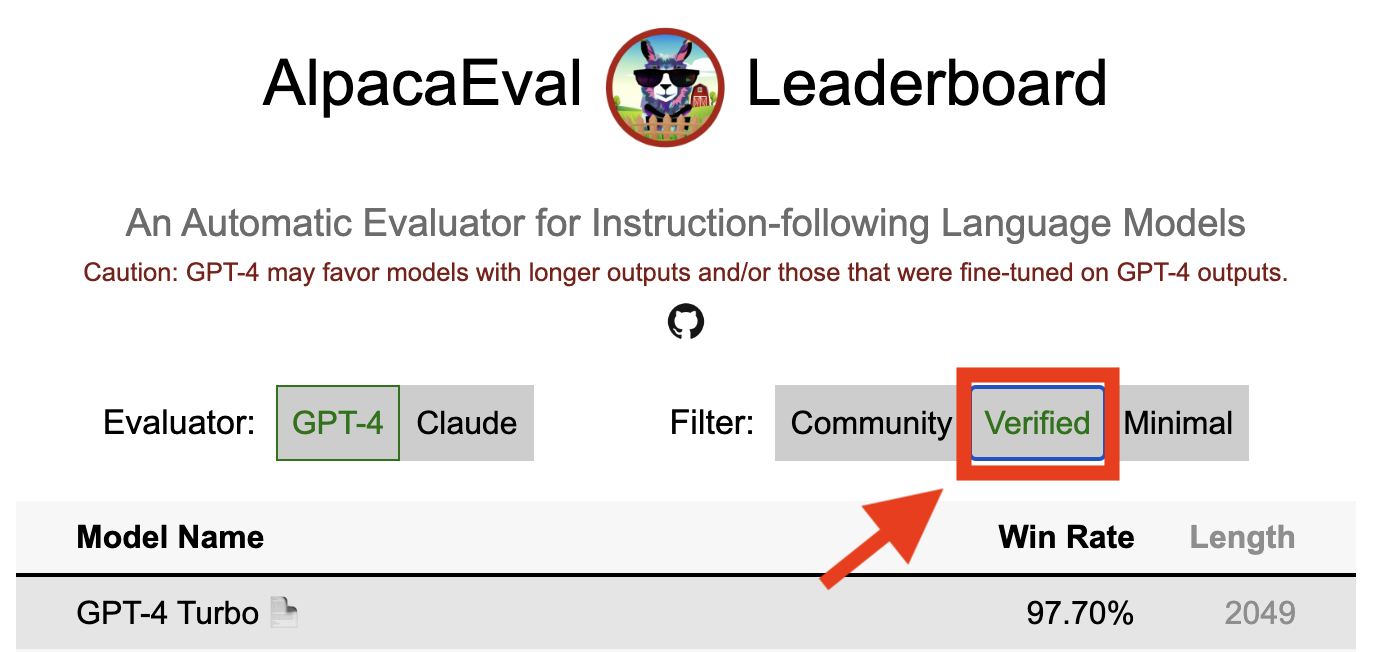
ผลการตรวจสอบใน alpacaeval บ่งชี้ว่าผู้ดูแลหลักได้ถอดรหัสเอาต์พุตจากโมเดลและทำการประเมิน น่าเสียดายที่เราผู้ดูแลระบบ Alpacaeval ขาดทรัพยากรในการตรวจสอบแบบจำลองทั้งหมดและดังนั้นเราจะทำเช่นนั้นสำหรับแบบจำลองที่อยู่ใน 5 อันดับแรกของลีดเดอร์บอร์ด ขออภัยในความไม่สะดวกที่อาจเกิดขึ้นและขอบคุณความเข้าใจของคุณ หากต้องการตรวจสอบโมเดลของคุณโปรดทำตามขั้นตอนด้านล่าง:
@yann บน Discord หรือส่งอีเมลถึงเราหากคุณมีอีเมลของเราให้เหตุผลสั้น ๆ ว่าทำไมรุ่นของคุณควรได้รับการยืนยันalpaca_eval evaluate_from_model --model_configs '<your_model_name>' โดยไม่ต้องใช้ GPU ในเครื่องalpaca_eval evaluate_from_model --model_configs '<your_model_name>' อัปเดตผลลัพธ์และแจ้งให้คุณทราบเพื่อให้คุณสามารถเพิกถอนคีย์ชั่วคราวได้โปรดทราบว่าเราจะไม่ประเมินโมเดลเดียวกันอีกครั้ง เนื่องจากความแปรปรวนของการสุ่มตัวอย่างผลลัพธ์อาจแตกต่างจากครั้งแรกของคุณเล็กน้อย เราจะแทนที่ผลลัพธ์ชุมชนก่อนหน้าของคุณด้วยการตรวจสอบแล้ว
โปรดทำตามคำแนะนำในการสร้างผู้ประเมินใหม่ เมื่อคุณสร้าง Annotator config เราขอให้คุณสร้างลีดเดอร์บอร์ดใหม่สำหรับ Annotator โดยการประเมินชุดโมเดลน้อยที่สุด เอาต์พุตสำหรับรุ่นเหล่านี้สามารถพบได้โดยการดาวน์โหลด alpaca_eval_all_outputs.json
alpaca_eval make_leaderboard
  --leaderboard_path src/alpaca_eval/leaderboards/data_AlpacaEval/ < evaluator > _leaderboard.csv
  --all_model_outputs alpaca_eval_all_outputs.json
  --annotators_config < evaluator_config >
จากนั้นโปรดสร้างประชาสัมพันธ์ด้วย config annotator และ ladyboard csv
ในการมีส่วนร่วมในชุดประเมินใหม่คุณจะต้องระบุชุดคำแนะนำที่เป็นข้อความก่อน จากนั้นคุณจะต้องระบุชุดของเอาต์พุตอ้างอิง (อัตราการชนะแบบจำลองจะถูกคำนวณกับการอ้างอิงนี้) เพื่อความสะดวกในการใช้งานคุณสามารถใช้การกำหนดค่าอ้างอิง Davinci-003 เริ่มต้น
รวมสิ่งเหล่านี้เข้าด้วยกันเป็น JSON ซึ่งแต่ละรายการจะระบุ instruction ฟิลด์ output และ generator คุณสามารถดู ALPACA_EVAL.JSON เป็นคู่มือ (ไม่จำเป็นต้องมีฟิลด์ dataset )
ในที่สุดเราขอให้คุณสร้างกระดานผู้นำขั้นต่ำในชุดการประเมินผลใหม่นี้ คุณสามารถทำได้ด้วยสิ่งต่อไปนี้:
alpaca_eval make_leaderboard
  --leaderboard_path < src/alpaca_eval/leaderboards/data_AlpacaEval/your_leaderboard_name.csv >
  --all_model_outputs alpaca_eval_all_outputs.json
  --reference_outputs < path_to_json_file >
โปรดส่ง PR พร้อมชุดประเมิน JSON และ CSV ลีดเดอร์บอร์ดที่เกี่ยวข้อง
ขณะนี้เราอนุญาตให้ใช้ฟังก์ชั่นความสำเร็จที่แตกต่างกันเช่น openai , anthropic , huggingface_local , huggingface_hub_api ... หากคุณต้องการมีส่วนร่วมฟังก์ชันความสำเร็จใหม่ / API ที่จะทำการอนุมานแล้วทำตามขั้นตอนเหล่านั้น:
<name>_completions(prompts : Sequence[str], model_name :str, ... ) ในโฟลเดอร์ตัวถอดรหัส ฟังก์ชั่นนี้ควรใช้เป็นอาร์กิวเมนต์ที่แจ้ง + kwargs และส่งคืนความสำเร็จ โปรดดูฟังก์ชั่นความสำเร็จอื่น ๆ ในไดเรกทอรีสำหรับแม่แบบ เช่น huggingface_local_completions หรือมานุษยวิทยา<name>_completions และการพึ่งพาใน init อีกครั้งคุณสามารถติดตามตัวอย่างของ huggingface_local_completions อีกครั้งalpaca_eval evaluate_from_model --model_configs '<model_configs>'อย่าลังเลที่จะเริ่มต้นการประชาสัมพันธ์ก่อนกำหนดเราจะสามารถให้ความช่วยเหลือในกระบวนการ!
ไปป์ไลน์การประเมิน Alpacaeval เช่นเดียวกับผู้ประเมินผลในปัจจุบันอื่น ๆ มีข้อ จำกัด ที่สำคัญดังนั้นจึงไม่ควรใช้แทนการประเมินผลของมนุษย์ในการตั้งค่าที่สำคัญเช่นการตัดสินใจว่าแบบจำลองพร้อมที่จะนำไปใช้งานหรือไม่ สิ่งเหล่านั้นสามารถจัดกลุ่มในวงกว้างเป็น 3 หมวดหมู่:
คำแนะนำอาจไม่ได้เป็นตัวแทนของการใช้งานจริง : ชุด Alpacaeval มีตัวอย่างจากชุดข้อมูลที่หลากหลาย (Intruct ตัวเอง, ตัวช่วยแบบเปิด, Vicuna, Koala, HH-RLHF) ซึ่งอาจไม่ได้เป็นตัวแทนของการใช้งานจริงและการใช้งานขั้นสูงของแบบจำลองที่ดีกว่าเช่น GPT4 สิ่งนี้น่าจะทำให้โมเดลปิดที่ดีที่สุด (GPT4 / Claude / CHATGPT / ... ) ดูเหมือนจะคล้ายกับโมเดลเปิดมากกว่าที่พวกเขาเป็น อันที่จริงโมเดลที่ปิดเหล่านั้นดูเหมือนจะได้รับการฝึกฝน/finetuned บนข้อมูลที่หลากหลายมากขึ้น ดูตัวอย่างบล็อกนี้สำหรับผลลัพธ์เบื้องต้นเกี่ยวกับคำแนะนำที่ซับซ้อนมากขึ้น อย่างไรก็ตามโปรดทราบว่าใน Alpacafarm เราแสดงให้เห็นว่าอัตราการชนะในชุดการประเมินผลของเรามีความสัมพันธ์สูง (0.97 R2) ที่มีอัตราการชนะในคำแนะนำจากการโต้ตอบของผู้ใช้กับการสาธิต Alpaca นอกจากนี้กระดานผู้นำ Alpacaeval ยังแสดงช่องว่างที่ใหญ่กว่าระหว่างรุ่นเปิดและโมเดล OpenAI กว่ากระดานผู้นำอื่น ๆ (เช่น LMSYS)
อคติของคำอธิบายประกอบอัตโนมัติ : คำอธิบายประกอบอัตโนมัติดิบดูเหมือนจะมีอคติโดยนัย โดยเฉพาะอย่างยิ่งเราพบว่าพวกเขามีแนวโน้มที่จะชอบเอาต์พุตและเอาต์พุตที่ยาวนานขึ้นที่มีรายการ (เช่น 0.68 / 0.69 สำหรับ alpaca_eval_gpt4 และ 0.62 / 0.58 สำหรับ claude ) แม้ว่าเราจะพบว่ามนุษย์มีอคติที่คล้ายกัน (0.64 / 0.61) แต่เราเชื่อว่านี่อาจเป็นข้อ จำกัด ของท่อบันทึกย่อของมนุษย์ที่เราใช้มากกว่าอคติของมนุษย์ที่แท้จริง โดยทั่วไปจากการวิเคราะห์เชิงคุณภาพเราพบว่าคำอธิบายประกอบอัตโนมัติให้ความสำคัญกับรูปแบบของผลลัพธ์มากกว่าเนื้อหา (เช่นข้อเท็จจริง) ในที่สุดเราพบว่าผู้ประเมินอัตโนมัติมีแนวโน้มที่จะชอบเอาต์พุตจากรุ่นที่คล้ายกัน (มีแนวโน้มที่จะได้รับการฝึกฝนในข้อมูลเดียวกัน) ตามที่แนะนำโดยความแตกต่างใหญ่ระหว่าง chatGPT/GPT4 บนกระดานผู้นำของ claude และ alpaca_eval_gpt4 โปรดทราบว่าอคติความยาวจะลดลงบางส่วนในอัตราการชนะที่ควบคุมความยาวของเรา
การขาดการประเมินความปลอดภัย : ที่สำคัญ Alpacaeval ประเมินความสามารถในการติดตามคำสั่งของแบบจำลองมากกว่าอันตรายที่อาจเกิดขึ้น (เช่นพฤติกรรมที่เป็นพิษหรืออคติ) เป็นผลให้ช่องว่างเล็ก ๆ ระหว่าง CHATGPT ปัจจุบันและโมเดลโอเพ่นซอร์สที่ดีที่สุด ไม่ควร ตีความราวกับว่าหลังพร้อมที่จะปรับใช้
นอกเหนือจากข้อ จำกัด เหล่านั้นเกี่ยวกับท่อประเมินแล้วยังมีข้อ จำกัด เกี่ยวกับการตรวจสอบความถูกต้องของผู้ประเมินและวิธีการที่เราเสนอในการเลือกชุดการประเมินผล
ประการแรกการตรวจสอบความถูกต้องของผู้ประเมินผลของเราตามคำอธิบายประกอบข้ามของมนุษย์ได้รับความทุกข์ทรมานจากข้อ จำกัด ดังต่อไปนี้: (1) เราพบว่าผู้ทำงานฝูงชนของเรามีแนวโน้มที่จะชอบสไตล์เช่นความยาวและการปรากฏตัวของรายการมากกว่าข้อเท็จจริง (2) สิ่งนี้ไม่ได้ตรวจสอบว่าอัตราการชนะกับโมเดลอ้างอิงเป็นกลยุทธ์การประเมินที่ดีในตอนแรกหรือไม่ (3) การตั้งค่าจากผู้คนจำนวนมาก 16 คนไม่ได้เป็นตัวแทนของการตั้งค่าของมนุษย์ทุกคน
ประการที่สองวิธีที่เราแนะนำในการเลือกชุดการประเมินผลตามพลังทางสถิติได้รับความทุกข์ทรมานจากข้อ จำกัด ดังต่อไปนี้: (1) พลังทางสถิติไม่มั่นใจในทิศทางที่ถูกต้องเช่นคุณสามารถมีชุดคำสั่งที่ผิดธรรมชาติ และ (2) สิ่งนี้สามารถผลักดันผู้ใช้เพื่อเลือกข้อมูลเพื่อสนับสนุนสมมติฐานที่พวกเขาต้องการตรวจสอบ
การสร้างภาพอัลปาเควัลที่ควบคุมความยาว:
การพัฒนา alpacaeval ที่ควบคุมความยาว:
โน้ตบุ๊กแสดงตัวเลือกต่าง ๆ ที่เราพิจารณาเพื่อลดความยาวอคติของผู้ใส่คำอธิบายอัตโนมัติ
ที่นี่เราสรุปผลลัพธ์หลักสั้น ๆ คือ:
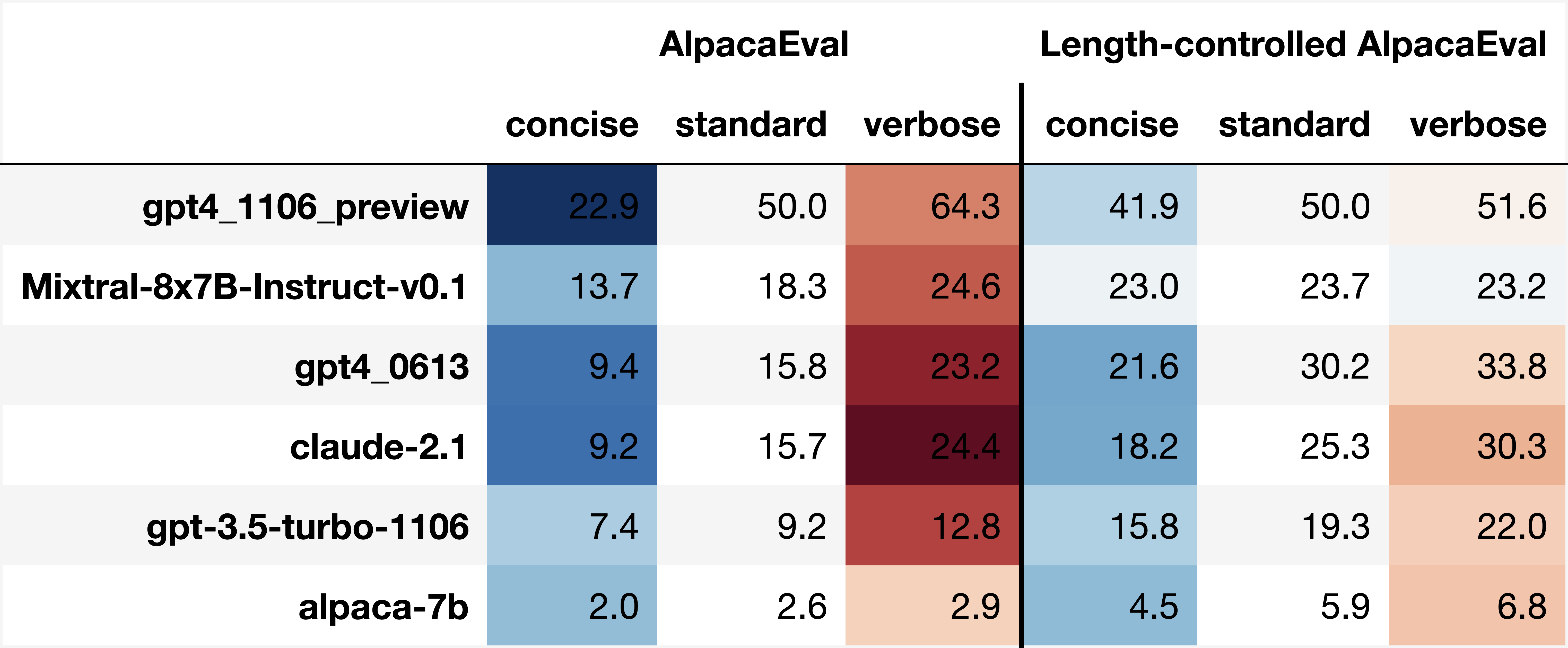
win_rate(m,b) = 1 - win_rate(b,m) in [0,1] and win_rate(m,m) = 0.5 . This is shown in the plot below. 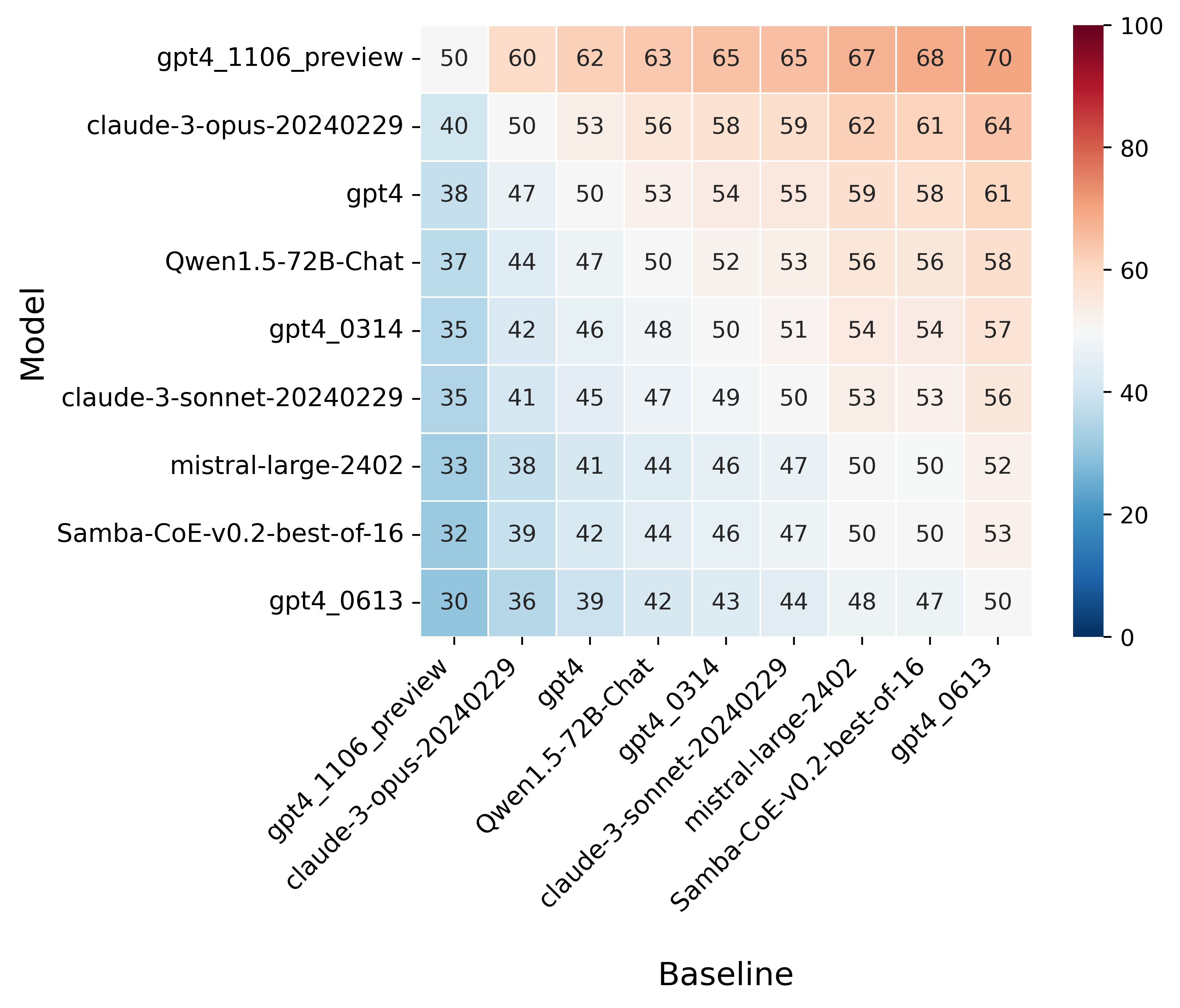
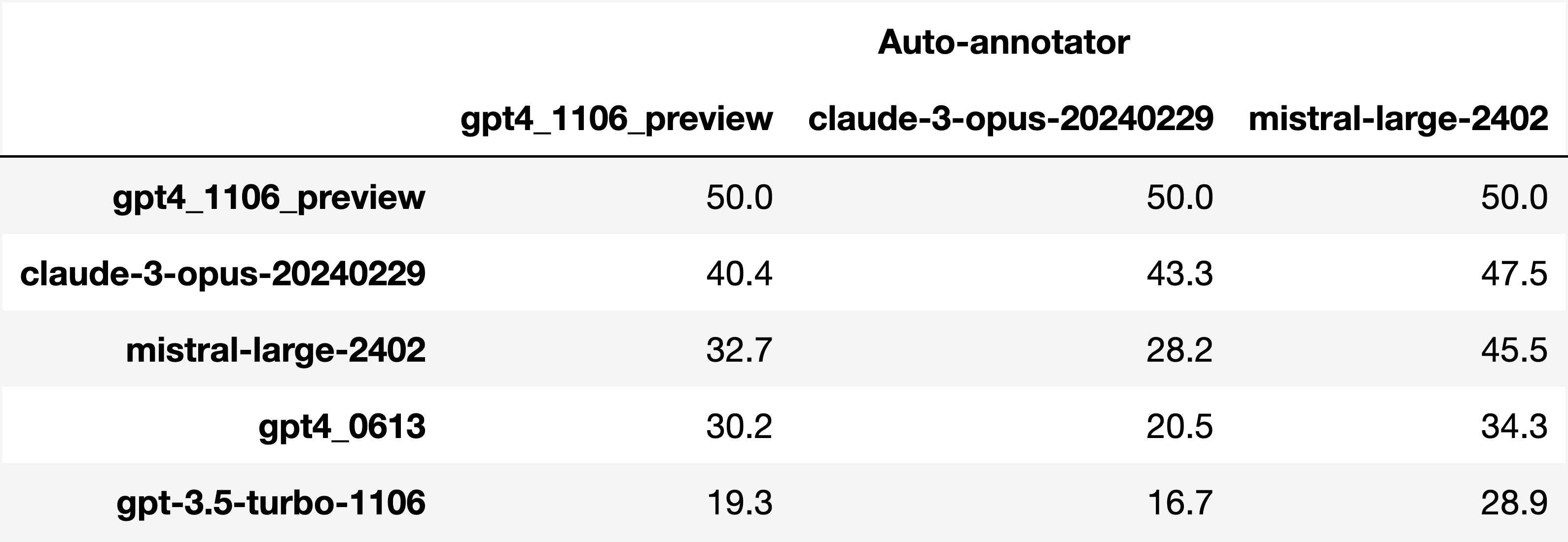
Finally, note that we are only controlling for length bias. There are other known biases that we are not controlling for, such as the fact that auto-annotators prefer outputs similar to their model. Although we could control for that, in practice we have found that to be less of an issue than length bias. For two reasons (1) this mostly a single model in the leaderboard because fine-tuning on outputs from the auto-annotator doesn't seem to have doesn't seem to impact the win-rate as much, and (2) the bias is actually less strong that what one could think. For example we show below a subset of the leaderboards auto-annotated by three different models, and we see that the ranking of models is exactly the same. In particular, claude-3-opus prefers gpt4_preview , and mistral-large prefers the former two.
Caution : all the following results are about AlpacaEval 1.0 and have not been updated since
Analyzing evaluators:
As we saw in the evaluator's leaderboard, there are many metrics to consider when selecting an evaluator, eg the quality, price, and speed. To assist with selection of the evaluator we provide a few functions to plot those metrics. The following shows for example the price/time/agreement of the different evaluators.
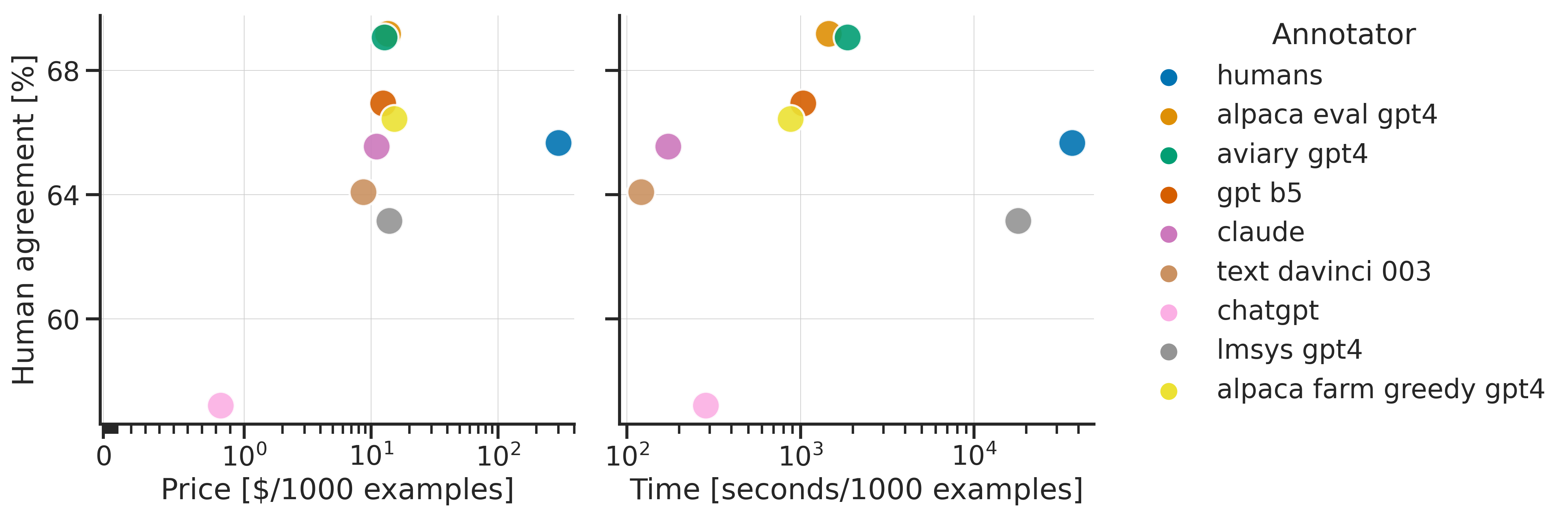
Here we see that alpaca_eval_gpt4 performs very well and is better than humans on all the considered metrics.
Previously we only considered the agreement with human annotators overall. An additional validation that one could do is checking whether making a leaderboard using our automatic annotator gives similar results as a leaderboard from humans. To enable such analysis, we release human annotations of outputs from 22 methods from AlpacaFarm => 22*805 = ~18K annotations. As a result we can test the correlation between the win-rates of the 22 models as evaluated by the humans and our automatic annotator. Note that this is arguably a better way of selecting an automatic evaluator than using "human agreement [%]" but is expensive given that it requires 18K annotations. The plot below shows such correlation for the alpaca_eval_gpt4 evaluator.
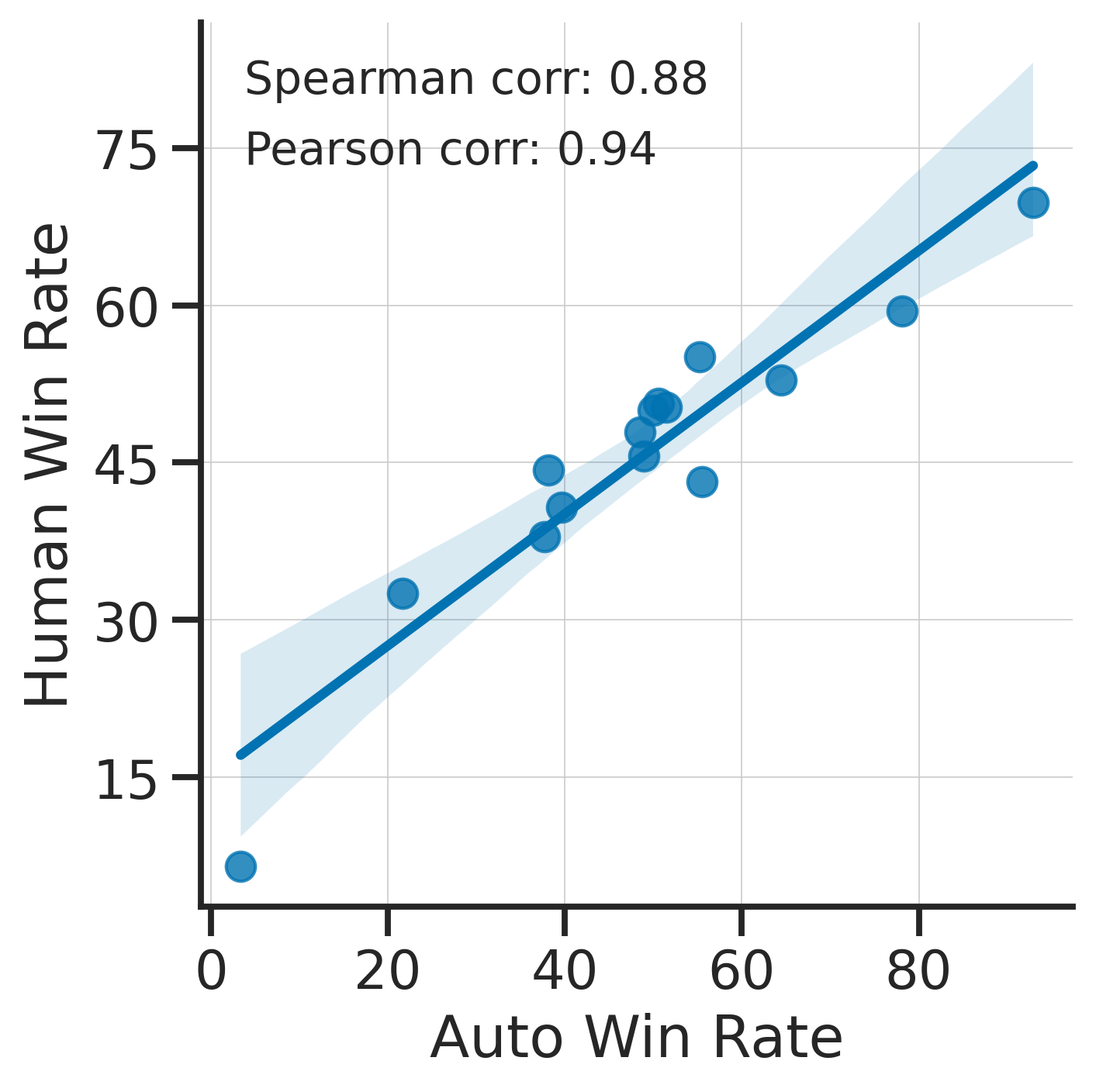
We see that the alpaca_eval_gpt4 leaderboard is highly correlated (0.94 Pearson correlation) to the leaderboard from humans, which further suggests that automatic evaluation is a good proxy for human evaluation. For the code and more analysis, see this notebook, or the colab notebook above.
Caution : all the following results are about AlpacaEval 1.0 and have not been updated since.
Making evaluation sets:
When creating an evaluation set there are two main factors to consider: how much data to use? and what data?
One way of answering those question is by considering a leaderboard of models that you believe are of different quality and checking what and how much data is needed to distinguish between them in a statistically significant way. We will do so below using a paired t-test to test if the difference in win-rates between every pair of models is statistically significant.
First, let us consider the question of how much data to use. Below we show the number of random samples needed from AlpacaEval for the paired t-test to give a p-value < 0.05 for each pair of models in the minimal alpaca_eval_gpt4 leaderboard. Grey cells correspond to pairs that are not significantly different on the 805 samples. y- and x-axis are ordered by the win-rate of the first and second model respectively.
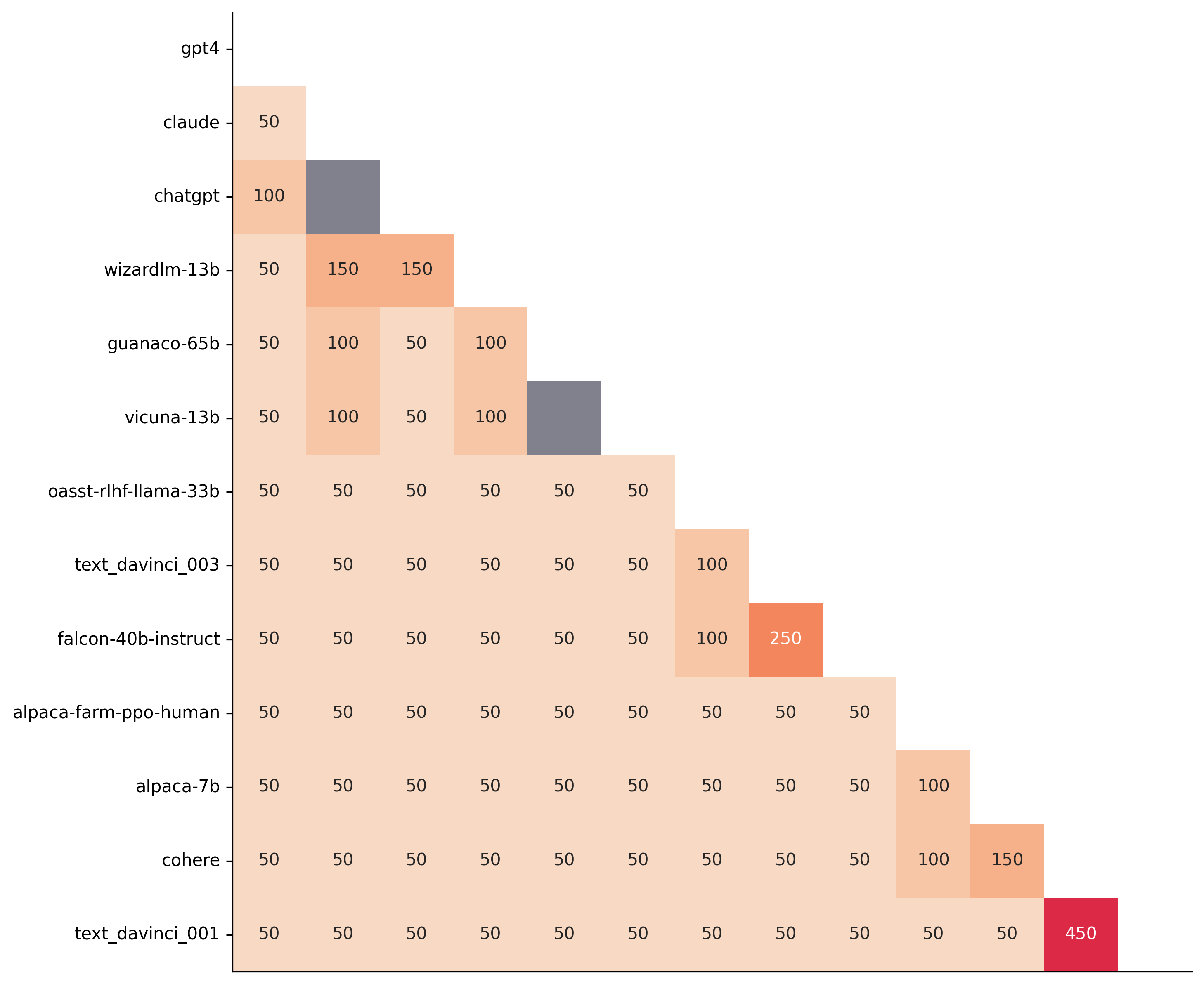
We see that most models can already be distinguished with 50 samples, and that 150 samples allows distinguishing the majority of pairs (74 out of 78). This suggests that we can decrease the evaluation set size by a factor of 4 when testing two models that have similar performance gaps as those on the minimal alpaca_eval_gpt4 leaderboard.
The second question is what data to use. Again we can try to answer this question from a statistical power perspective: what data allows to best distinguish between models. Let's consider this for all the datasets that are part of AlpacaEval, but let us control for the size of the evaluation sets as we only care about the quality of the data. The following plot shows the p-values from the paired t-test of each pairs of models on 80 examples of each subset of AlpacaEval.
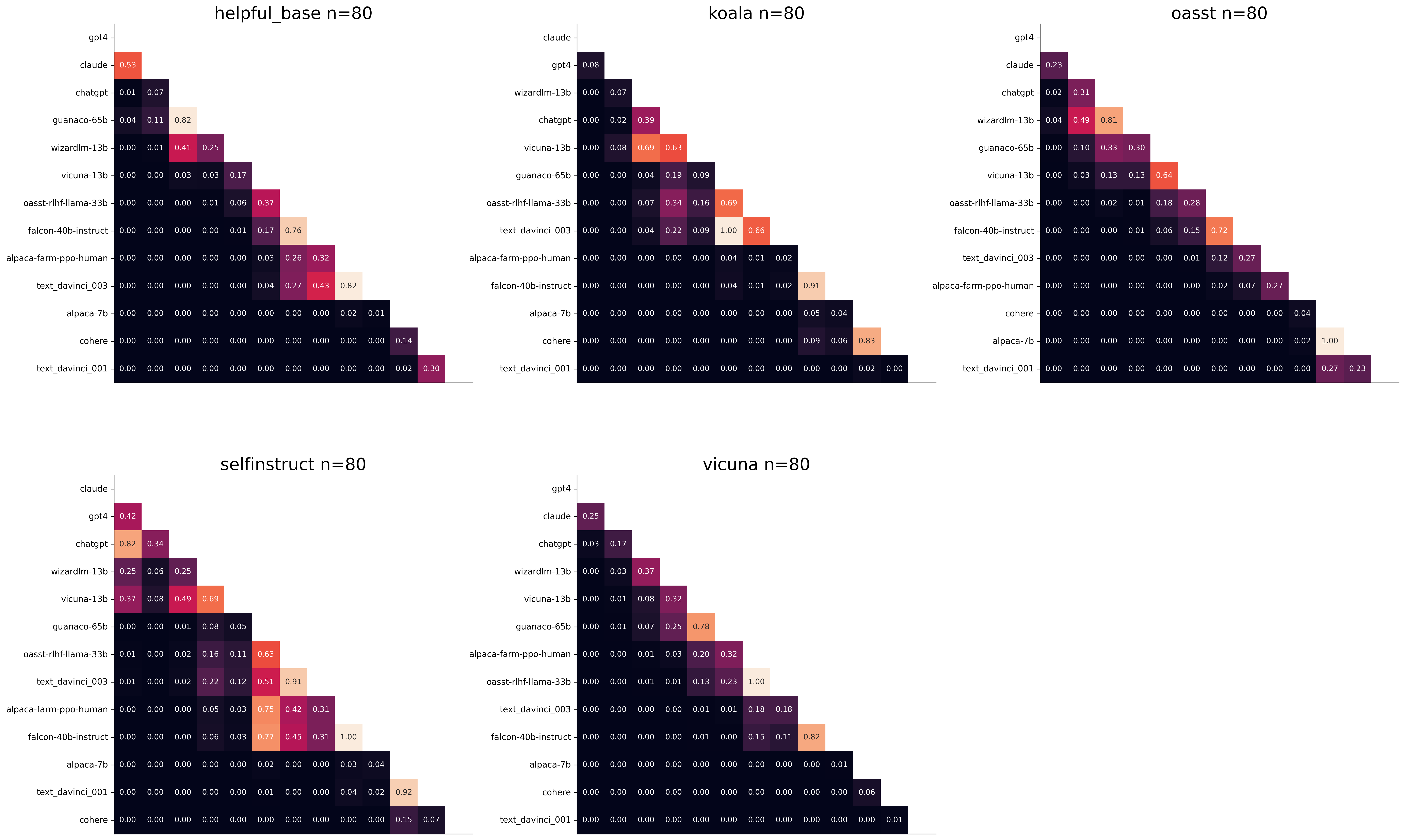
We see for example that the self-instruct dataset yields the least statistical power, which suggests that one could remove this dataset from the evaluation set. The exact reason should be analyzed in future work. For the code and more analysis see this notebook, or the colab notebook above.
Please consider citing the following depending on what you are using and referring to:
alpaca_eval (this repo). Specify whether you are using AlpacaEval or AlpacaEval 2.0. For length-controlled win-rates see below.alpaca_eval_length .dubois2023alpacafarm (AlpacaFarm)alpaca_eval and self-instruct, open-assistant, vicuna, koala, hh-rlhf.Here are the bibtex entries:
 @misc{alpaca_eval,
  author = {Xuechen Li and Tianyi Zhang and Yann Dubois and Rohan Taori and Ishaan Gulrajani and Carlos Guestrin and Percy Liang and Tatsunori B. Hashimoto },
  title = {AlpacaEval: An Automatic Evaluator of Instruction-following Models},
  year = {2023},
  month = {5},
  publisher = {GitHub},
  journal = {GitHub repository},
  howpublished = {url{https://github.com/tatsu-lab/alpaca_eval}}
}
 @article{dubois2024length,
  title={Length-Controlled AlpacaEval: A Simple Way to Debias Automatic Evaluators},
  author={Dubois, Yann and Galambosi, Bal{'a}zs and Liang, Percy and Hashimoto, Tatsunori B},
  journal={arXiv preprint arXiv:2404.04475},
  year={2024}
}
 @misc{dubois2023alpacafarm,
  title={AlpacaFarm: A Simulation Framework for Methods that Learn from Human Feedback},
  author={Yann Dubois and Xuechen Li and Rohan Taori and Tianyi Zhang and Ishaan Gulrajani and Jimmy Ba and Carlos Guestrin and Percy Liang and Tatsunori B. Hashimoto},
  year={2023},
  eprint={2305.14387},
  archivePrefix={arXiv},
  primaryClass={cs.LG}
}
Length controlled (LC) win-rates are a debiased version of the win-rates that control for the length of the outputs.
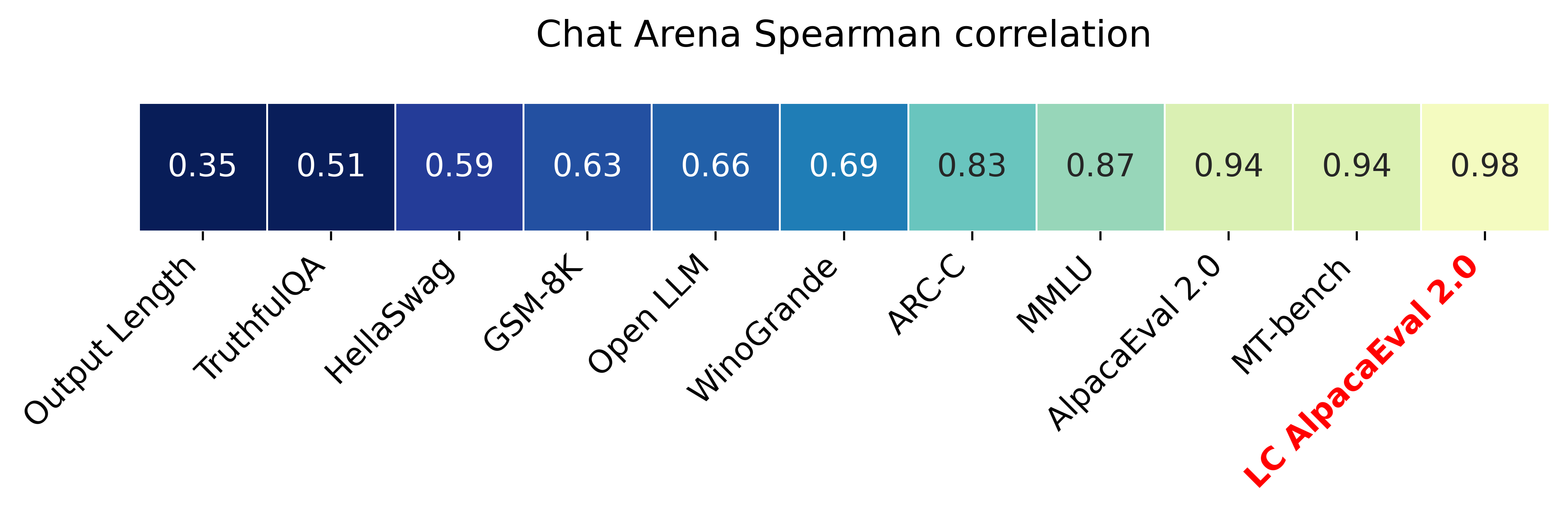
The main idea is that for each model we will fit a logistic regression to predict the preference of the autoannotator given: (1) the instruction, (2) the model, and (3) the difference of length between the baseline and model output. Given such a logistic regression we can then try to predict the counterfactual "what would the preference be if the model's output had the same length as the baseline" by setting the length difference to 0. By averaging over this length-controlled preference, we then obtain the length-controlled win-rate. The exact form of the logistic regression is taken such that the interpretation of LC win rates is similar to the raw win rates, for example for any model m1 and m2 we have win_rate(m1, m2) = 1 - win_rate(m2, m1) in [0,100] and win_rate(m1, m1) = 0.5 . Length controlled win-rates increase the correlation between AlpacaEval's leaderboard and Chat Arena from 0.93 to 0.98 Spearman correlation, while significantly decreasing the length gameability of the annotator . For more information and results about length controlled win-rates see this notebook.
This idea of estimating the controlled direct effect, by predicting the outcome while conditioning on the mediator (the length difference), is common in statistical inference.
To get LC win rates on previously annotated models, you can use the following command:
pip install -U alpaca_eval
alpaca_eval --model_outputs … --is_recompute_metrics_only True
AlpacaEval 2.0 is a new version of AlpacaEval. Here are the differences:
gpt4_turbo : we upgraded the baseline from text-davinci-003 to gpt4_turbo to make the benchmark more challenging and have a metric that better reflects the current state of the art.weighted_alpaca_eval_gpt4_turbo : we improved the annotator in quality and price. First, we use the gpt4_turbo model for annotating, which is approximately 2x cheaper than gpt4 . Second, we changed the prompt such that the model outputs a single token, which further reduced cost and speed. Finally, instead of using a binary preference, we used the logprobs to compute a continuous preference, which gives the final weighted win-rate. Note that the latter two changes had the surprising effect of decreasing the annotators' length biased. By default, AlpacaEval 2.0 will be used from pip install alpaca_eval==0.5 . If you wish to use the old configs by default, you can set IS_ALPACA_EVAL_2=False in your environment.
As part of AlpacaEval, we release the following data:
text-davinci-003 reference on the AlpacaFarm evaluation set. Annotations are from a pool of 16 crowd workers on Amazon Mechanical Turk. The different models are: 6 from OpenAI, 2 SFT models from AlpacaFarm, 13 RLHF methods from AlpacaFarm, and LLaMA 7B.For more details about the human annotations refer to the AlpacaFarm paper.
AlpacaEval is an improvement and simplification of the automatic pairwise preference simulator from AlpacaFarm. Outside AlpacaFarm, you should be using AlpacaEval. Here are the main differences:
{instruction}nn{input} . This affects 1/4 of the examples in the AlpacaFarm evaluation set (the self-instruct subset). This simplification provides a more fair comparison for models that were not trained by distinguishing between the two fields.text-davinci-003 ), so the results on AlpacaEval are not comparable to those on AlpacaFarm even for examples that had no input field.--anotators_config 'alpaca_farm' and --p_label_flip 0.25 when creating an evaluator. There have been several work that propose new automatic annotators for instruction-following models. Here we list the ones that we are aware of and discuss how they differ from ours. We evaluated all of those in our evaluator's leaderboard.
lmsys_gpt4 ) evaluates the pair by asking the annotator a score from 1-10 for each output, and then selecting the output with the highest score as preferred. They do not randomize over output order and they ask an explanation after the score. Overall, we found that this annotator has strong bias towards longer outputs (0.74) and relatively low correlation with human annotations (63.2).alpaca_farm_greedy_gpt4 ) evaluates the pair by directly asking the annotator which output it prefers. Furthermore, it batches 5 examples together to amortize the length of the prompt and randomizes the order of outputs. Overall, we found that this annotator has much less bias towards longer outputs (0.60) and is faster (878 seconds/1000 examples) than others. It has a slightly higher correlation with the majority of human annotations (66.4) than humans themselves (65.7). However, it is more expensive ($15.3/1000 examples) and doesn't work with very long outputs given the batching.aviary_gpt4 ) asks the annotator to order the output by its preference, rather than simply selecting the preferred output. It does not randomize the order of outputs and uses high temperature for decoding (0.9). Overall, we found that this annotator has relatively strong bias towards longer outputs (0.70) and very high correlation with human annotations (69.1). By decreasing the temperature and randomizing the order of outputs, we further improved the correlation to 69.8 ( improved_aviary_gpt4 ) but this further increased the length bias to 0.73. Our alpaca_eval_gpt4 is a mix between the AlpacaFarm and Aviary annotators. It asks the annotator to order the outputs by preference, but it uses temperature 0, randomizes over outputs, and made some modifications to the prompt to decrease length bias to 0.68.
Other related work include recent papers which analyze automatic evaluators. ตัวอย่างเช่น:
For all models you can find the auto-annotations under results/<model_name>/*/annotations.json . The annotations have the following columns:
instruction : the promptgenerator_1 : the baseline modeloutput_1 : the output of the baseline modelgenerator_2 : the model being evaluatedoutput_2 : the output of the model being evaluatedannotator : the auto-annotatorpreference : the result of the auto-annotator. This is a float between 1 and 2. Closer to 1 means that the auto-annotator prefers output_1 , closer to 2 means that it prefers output_2 . For AlpacaEval 2.0, preference-1 corresponds to the probability of output_1 being preferred. For AlpacaEval 1.0, preference is 1 if output_1 is preferred, 2 if output_2 is preferred, and 1.5 if they are the same. The win rate is always (preference -1).mean() .raw_completion : the raw output of the auto-annotator. This is field contains the completions before de-randomization of the order between output_1 and output_2 ! It is thus much harder to interpret, see below for more information.Chain of thought
For some annotators, eg alpaca_eval_cot_gpt4_turbo_fn we use chain of thought reasoning to make the models preferences more interpretable. Those can then be found under concise_explanation . To interpret them, you should also look at referenced_models which translates the temporary model name (in the prompt) to the actual output. Below, we provide more explanation as to what is happening behind the scenes.
You can check the raw_annotations["concise_explanation] column in annotations.json (eg here) which contains the chain of thought reasoning of the auto annotator. Note that the raw_annotations is not modified by the randomization of the order of the outputs. In particular, "m" and "M" can sometime refer to the first model (the reference) and sometime to the second model (the model being evaluated). To understand which model is being referred to, you should use the column preference and ordered_models . To make it easier we add a column "referenced_models" mapping the model names to the corresponding outputs. For example in the following annotation we see that the preference is 1.0 (ie output_1 ) and corresponds to model M in concise_explanation (see ordered_models ).
{
  "instruction" : " How did US states get their names? " ,
  "output_1" : " The names of U.S. states are derived from a variety of languages and sources, including indigenous American languages, European languages (primarily English, Spanish, and French), as well as other historical influences. Here is a brief overview of how some states got their names: nn 1. **Indigenous American Languages**: Many state names come from Native American words or names of tribes, often from the languages of the indigenous peoples who lived in or near those areas. n   - **Alabama**: Possibly derived from the Choctaw language, meaning " thicket clearers. "n   - **Connecticut**: From a Mohegan-Pequot word meaning " long tidal river. "n   - **Massachusetts**: [...] " ,
  "generator_1" : " gpt4_1106_preview " ,
  "dataset" : " helpful_base " ,
  "output_2" : " The names of the 50 U.S. states come from a variety of sources, including Native American languages, European languages, and historical figures. Here's a brief overview of how some states got their names: nn 1. Native American origins: Many states have names derived from Native American languages. For example, Alabama comes from the Choctaw word " Albah amo, " meaning " plant gatherers " or " herb gatherers. " Similarly, the name Mississippi comes from the Ojibwe word " Misi-ziibi, " meaning " great river. "nn 2. European languages: [...]. " ,
  "generator_2" : " gpt4 " ,
  "annotator" : " alpaca_eval_cot_gpt4_turbo_fn " ,
  "preference" : 1.0 ,
  "raw_completion" : {
    "concise_explanation" : " Model M provided a more detailed and structured response, including bold headings for each category and a wider range of examples. It also included additional categories such as 'Other European Languages' and 'Combination of Languages and Influences', which added depth to the explanation. Model m's response was accurate but less comprehensive and lacked the clear structure found in Model M's output. " ,
    "ordered_models" : [
      {
        "model" : " M " ,
        "rank" : 1
      },
      {
        "model" : " m " ,
        "rank" : 2
      }
    ]
  },
  "referenced_models" : {
    "M" : " output_1 " ,
    "m" : " output_2 "
  }
}chatgpt_fn that anyone can use (no waiting lists).chatgpt_fn or alpaca_eval_gpt4_fn .




