alpaca_eval
v0.6.5

يحتوي Alpacaeval 2.0 مع معدلات الفوز التي تسيطر عليها الطول (Paper) على ارتباط Spearman قدره 0.98 مع chatbot Arena بينما تكلف أقل من 10 دولارات من الاعتمادات Openai التي يتم تشغيلها في أقل من 3 دقائق. هدفنا هو الحصول على معيار لـ Chat LLMS وهو: سريع (<5 دقائق) ، ورخيصة (<10 دولارات) ، وترتبط ارتباطًا وثيقًا بالبشر (0.98). إليك مقارنة مع المعايير الأخرى:
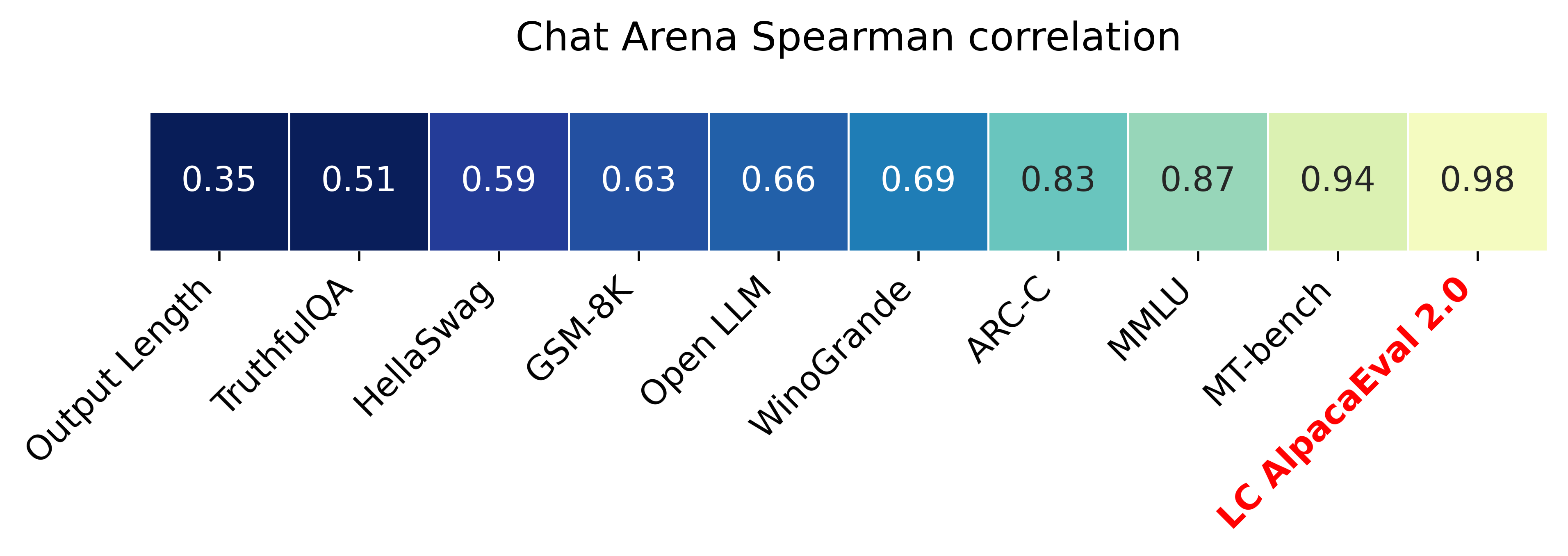
التحديثات:
؟ معدلات الفوز التي تسيطر عليها الطول خارج واستخدامها افتراضيا! هذا يزيد من الارتباط مع chatbot Arena من 0.93 إلى 0.98 ، مع انخفاض كبير في الطول. لا تزال معدلات الفوز الخام معروضة على الموقع و CLI. مزيد من التفاصيل هنا.
؟ alpacaeval 2.0 خارج ويستخدم افتراضيا! قمنا بتحسين المحتوى التلقائي (أفضل وأرخص) ونستخدم معاينة GPT-4 كخط أساسي. مزيد من التفاصيل هنا. بالنسبة للإصدار القديم ، اضبط متغير البيئة الخاص بك IS_ALPACA_EVAL_2=False .
يتطلب تقييم نماذج تتبع التعليمات (على سبيل المثال ، ChatGPT) تفاعلات بشرية. هذا يستغرق وقتًا طويلاً ومكلفًا ويصعب تكراره. alpacaeval في تقييم تلقائي قائم على LLM وهو سريع ، رخيص ، قابل للتكرار ، ويتم التحقق من صحته مقابل التعليقات التوضيحية البشرية 20k. إنه مفيد بشكل خاص لتطوير النموذج. على الرغم من أننا تحسننا على خطوط أنابيب التقييم التلقائية السابقة ، لا تزال هناك قيود أساسية مثل تفضيل المخرجات الأطول. يوفر Alpacaeval ما يلي:
متى تستخدم alpacaeval؟ التقييم التلقائي لدينا هو وكيل سريع ورخيص للتقييم البشري لمهام متابعة التعليمات البسيطة. من المفيد إذا كان عليك تشغيل العديد من التقييمات بسرعة ، على سبيل المثال ، أثناء تطوير النموذج.
متى عدم استخدام الألباكيفال؟ كأي تقييم تلقائي آخر ، يجب ألا تحل Alpacaeval محل التقييم البشري في اتخاذ القرارات عالية الجودة ، على سبيل المثال ، لاتخاذ قرار بشأن إصدار النموذج. على وجه الخصوص ، يقتصر Alpacaeval على حقيقة أن (1) التعليمات الواردة في مجموعة EVAL قد لا تمثل الاستخدام المتقدم لـ LLMs ؛ (2) قد يكون للمقيمين التلقائيين تحيزات مثل تفضيل الأسلوب على واقعية الإجابة ؛ و (3) لا يقيس الألباكيفال المخاطر التي يمكن أن يسببها النموذج. التفاصيل في القيود.
لتثبيت الإصدار المستقر ، قم بتشغيل
pip install alpaca-evalلتثبيت الإصدار الليلي ، قم بتشغيل
pip install git+https://github.com/tatsu-lab/alpaca_evalثم يمكنك استخدامه على النحو التالي:
 export OPENAI_API_KEY= < your_api_key > # for more complex configs, e.g. using Azure or switching clients see client_configs/README.md
alpaca_eval --model_outputs ' example/outputs.json '
سيؤدي ذلك إلى طباعة لوحة المتصدرين إلى وحدة التحكم ، وإنقاذ كل من المتصدرين والشروح إلى نفس الدليل مثل ملف model_outputs . المعلمات المهمة هي ما يلي:
instruction المفاتيح output .weighted_alpaca_eval_gpt4_turbo (الافتراضي لـ Alpacaeval 2.0) ، الذي له معدل اتفاق مرتفع مع بيانات التعليقات التوضيحية البشرية الخاصة بنا ، وحجم السياق الكبير ، وهو رخيص جدًا. لمقارنة جميع المذيعين انظر هنا.model_outputs . بشكل افتراضي ، هذا هو gpt4_turbo لألباكايفال 2.0. إذا لم يكن لديك مخرجات النموذج ، فيمكنك استخدام evaluate_from_model وتمرير مسار محلي أو اسم نموذج عناق ، أو نموذج من واجهة برمجة تطبيقات قياسية (Openai ، أنثروبور ، Cohere ، Google ، ...). أوامر أخرى:
>>> alpaca_eval -- --help SYNOPSIS
alpaca_eval COMMAND
COMMANDS
COMMAND is one of the following:
evaluate
Evaluate a model based on its outputs. This is the default entrypoint if no command is specified.
evaluate_from_model
Evaluate a model from HuggingFace or an API provider. This is a wrapper around `evaluate` which includes generating from a desired model.
make_leaderboard
Precompute and save an entire leaderboard for a given dataset / evaluator / set of models generations.
analyze_evaluators
Analyze an evaluator and populates the evaluators leaderboard (agreement with human, speed, price,...).
لمزيد من المعلومات حول كل وظيفة ، استخدم alpaca_eval <command> -- --help .
يتم حساب ألواح المتصدرين لدينا على مجموعة بيانات الألباكيفال. لقد قمنا بحساب المتصدرين للنماذج المهمة باستخدام نماذج أساسية مختلفة ومصنوعات تلقائية. يمكن العثور على اثنين من المتصدرين الرئيسيين ("Alpacaeval 2.0" و "Alpacaeval") في هذه الصفحة. يستخدم "Alpacaeval 2.0" weighted_alpaca_eval_gpt4_turbo للشرح و gpt4_turbo لخط الأساس. يستخدم "alpacaeval" alpaca_eval_gpt4 للشرح و text_davinci_003 لخط الأساس. لجميع ألواح المتصدرين مسبقا انظر هنا. في وقت لاحق ، نعرض أيضًا كيفية إضافة نموذجك إلى لوحة المتصدرين وكيفية إنشاء لوحة المتصدرين الجديدة لمجموعة المقيِّم/البيانات الخاصة بك. انظر هنا للاطلاع على التكوينات لجميع النماذج المتوفرة خارج المربع.
ألباكايفال الحد الأدنى من المتصدرين :
| معدل الفوز | خطأ STD | |
|---|---|---|
| GPT4 | 95.3 | 0.7 |
| كلود | 88.4 | 1.1 |
| chatgpt | 86.1 | 1.2 |
| Guanaco-65b | 71.8 | 1.6 |
| Vicuna-13B | 70.4 | 1.6 |
| text_davinci_003 | 50.0 | 0.0 |
| الألبكة فيرب-غو هومان | 41.2 | 1.7 |
| الألبكة-7 ب | 26.5 | 1.5 |
| text_davinci_001 | 15.2 | 1.2 |
معدل الفوز : يقيس معدل الفوز جزء الوقت الذي يفضل فيه ناتج النموذج على مخرجات المرجع ( test-davinci-003 لـ Alpacaeval و gpt4_turbo لـ Alpacaeval 2.0). وبشكل أكثر تحديدًا ، لحساب معدل الفوز ، نجمع أزواج من مخرجات النموذج المطلوب على كل تعليمات من مجموعة بيانات Apacaeval. ثم نقوم بإقران كل إخراج مع إخراج نموذج المرجع لدينا (على سبيل المثال text-davinci-003 ) على نفس التعليمات. ثم نسأل المقيِّم التلقائي عن الإخراج الذي يفضلونه. راجع مطالبات وتكوينات Alpacaeval's و Alpacaeval 2.0 ، ولا سيما نقوم بعشوائية ترتيب المخرجات لتجنب تحيز الموضع. ثم نقوم بتقييم التفضيلات على جميع الإرشادات في مجموعة البيانات للحصول على معدل الفوز للنموذج على خط الأساس. إذا كانت كلا المخرجين هي نفسها تمامًا ، فسنستخدم نصف تفضيل لكلا النموذجين.
الخطأ القياسي : هذا هو الخطأ القياسي (الذي تم تطبيعه بواسطة N-1) لمعدل الفوز ، أي التفضيلات المتوسطة على التعليمات المختلفة.
alpaca_eval_gpt4 لدينا متوسطات alpaca_eval_gpt4 (انظر التكوينات) المتوسطات على التفضيلات ، حيث يتم الحصول على التفضيلات على النحو التالي:
temperature=0الملحق هو مزيج بين (وكان يتأثر بشدة) ألباكافارم وموظفي القفص. على وجه الخصوص ، نستخدم نفس الرمز كما هو الحال بالنسبة إلى الألباكافارم (التخزين المؤقت/التوزيع العشوائي/المقاييس الفائقة) ولكن نستخدم مطالبة تصنيف مماثلة لتلك الموجودة في Aviary. نقوم بإجراء تغييرات على مطالبة Aviary بتقليل التحيز للمخرجات الأطول. التفاصيل في العمل ذي الصلة.
بالنسبة إلى Alpacaeval 2.0 ، نستخدم weighted_alpaca_eval_gpt4_turbo ، والذي يستخدم logprobs لحساب التفضيل المستمر ويستخدم GPT4_Turbo كنموذج (انظر التكوينات).
نقوم بتقييم مراجعات أوتوماتيكية مختلفة على مجموعة Alpacaeval من خلال مقارنة التعليقات التوضيحية البشرية 2.5k التي جمعناها (~ 650 تعليمات لكل منها 4 تعليقات إنسانية). أدناه gpt4 نعرض مقاييس للمقيمين المقترحين لدينا ( weighted_alpaca_eval_gpt4_turbo ، alpaca_eval_gpt4 ) ، للمقيمين التلقائيين المسبق ( alpaca_farm_greedy_gpt4 ، و aviary_gpt4 ، و lmsys_gpt4 ) claude و humans ). text_davinci_003 ، chatgpt_fn ، guanaco_33b ، chatgpt ). انظر هنا للاطلاع على التكوينات لجميع المقيمين المتوفرة خارج المربع والمقاييس المرتبطة بها.
| اتفاق الإنسان | السعر [$/1000 أمثلة] | الوقت [ثواني/1000 أمثلة] | سبيرمان كور. | بيرسون كور. | تحيز | التباين | proba. تفضل لفترة أطول | |
|---|---|---|---|---|---|---|---|---|
| alpaca_eval_gpt4 | 69.2 | 13.6 | 1455 | 0.97 | 0.93 | 28.4 | 14.6 | 0.68 |
| alpaca_eval_cot_gpt4_turbo_fn | 68.6 | 6.3 | 1989 | 0.97 | 0.90 | 29.3 | 18.4 | 0.67 |
| alpaca_eval_gpt4_turbo_fn | 68.1 | 5.5 | 864 | 0.93 | 0.82 | 30.2 | 15.6 | 0.65 |
| alpaca_eval_llama3_70b_fn | 67.5 | 0.4 | 209 | 0.90 | 0.86 | 32.3 | 8.2 | 0.79 |
| GPT4 | 66.9 | 12.5 | 1037 | 0.88 | 0.87 | 31.5 | 14.6 | 0.65 |
| alpaca_farm_greedy_gpt4 | 66.4 | 15.3 | 878 | 0.85 | 0.75 | 30.2 | 19.3 | 0.60 |
| alpaca_eval_cot_gpt4_turbo_fn | 65.7 | 4.3 | 228 | 0.78 | 0.77 | 33.9 | 23.7 | 0.61 |
| البشر | 65.7 | 300.0 | 36800 | 1.00 | 1.00 | 0.0 | 34.3 | 0.64 |
| كلود | 65.3 | 3.3 | 173 | 0.93 | 0.90 | 32.4 | 18.5 | 0.66 |
| LMSYS_GPT4 | 65.3 | 13.9 | 17982 | 0.98 | 0.97 | 31.6 | 15.9 | 0.74 |
| text_davinci_003 | 64.1 | 8.7 | 121 | 0.85 | 0.83 | 33.8 | 22.7 | 0.70 |
| أطول | 62.2 | 0.0 | 0 | 0.27 | 0.56 | 37.8 | 0.0 | 1.00 |
| chatgpt | 57.3 | 0.8 | 285 | 0.72 | 0.71 | 39.4 | 34.1 | 0.59 |
نوضح الآن بالكلمات كيف نحسب المقاييس في الجدول أعلاه. الكود هنا.
الاتفاق البشري : هذا يقيس الاتفاق بين المعلم الحالي وتفضيلات الأغلبية للبشر على التعليقات التوضيحية ~ 650 من مجموعة التقاطع المتقاطع لدينا ، والتي تحتوي على 4 تعليقات إنسانية على سبيل المثال. لتقدير الاتفاق بين إنسان واحد (صف humans في الجدول أعلاه) وغالبية البشر ، نأخذ واحدة من التعليقات التوضيحية الأربعة ونحسب الدقة التي يتمتع بها عند التنبؤ بوضع التعليقات التوضيحية الثلاثة الأخرى. ثم نقوم بمتوسط هذه الدقة على جميع التعليقات التوضيحية الأربعة وعلى مدى 650 تعليمات للحصول على الاتفاق البشري ، أي أننا نحسب اتفاقية الإجازة المتوقعة (على البشر والعينات). إذا لم يكن الوضع فريدًا ، فنحن نأخذ أحد الأوضاع بشكل عشوائي. نقوم بنفس الحساب بالضبط للشرح التلقائي ، بحيث تكون الأرقام النهائية قابلة للمقارنة.
السعر [$/1000 أمثلة] : هذا هو متوسط سعر كل 1000 تعليق. بالنسبة للبشر ، فإن الثمن الذي دفعناه للتركين الميكانيكيين لجمع هذه التعليقات التوضيحية (21 دولارًا في الساعة). إذا كان السعر يعتمد على الجهاز المستخدم لحساب التعليقات التوضيحية (مثل Guanaco) ، فإننا نتركه فارغًا.
الوقت [Seconds/1000 أمثلة] : هذا هو متوسط الوقت الذي يستغرقه حساب 1000 التعليقات التوضيحية. بالنسبة للبشر ، فإن الوقت المتوسط المقدر الذي استغرقه كل تركي ميكانيكي للتعليق على 1000 مثال. بالنسبة للشرائين التلقائيين ، فإن هذا هو متوسط الوقت الذي استغرقه الأمر عند تشغيل التعليقات التوضيحية. لاحظ أن هذا يمكن أن يعتمد على حدود واجهة برمجة التطبيقات التي تختلف بالنسبة للمستخدمين المختلفين وعدد الطلبات التي تقوم بها المجموعات معالجتها.
سبيرمان كور. : يقيس هذا ارتباط سبيرمان بين لوحة المتصدرين المحسوبة بتفضيلات القالب التلقائي ولوحة المتصدرين المحسوبة بالتفضيلات البشرية. كما هو الحال مع Human agreement ، نستخدم التعليقات التوضيحية البشرية من Alpacafarm ، لكننا نعتبر الآن اتفاقية مستوى الطريقة بدلاً من الاتفاقية الحكيمة مع البشر فقط. لاحظ أننا نستخدم فقط 9 نماذج وبالتالي فإن الارتباط غير موثوق للغاية.
بيرسون كور. : كما هو الحال مع Spearman corr. ولكن مع ارتباط بيرسون.
التحيز : الاتفاق بين العلامة البشرية الأكثر احتمالا والآلة التلقائية على الأرجح. بالنسبة للشرائين التلقائيين ، نقدر ذلك عن طريق أخذ عينات 4 تعليقات توضيحية مختلفة لكل مثال. يأتي العشوائية هنا من ترتيب المخرجات في المطالبة ، وأخذ العينات من LLM ، وإذا كان ذلك ممكنًا ، فإن ترتيب التعليمات في الدفعة واختيار التعليقات في المجمع. نأخذ بعد ذلك وضع التعليقات التوضيحية الأربعة وحساب دقة الوضع عند التنبؤ بوضع التعليقات التوضيحية البشرية الأربعة. لاحظ أن هذا من المحتمل أن يكون مبالغًا فيه على التحيز الحقيقي الذي سنحصل عليه إذا كان لدينا عدد "لا حصر له" من عمليات التقاطع. التحيز المنخفض يعني أن الملحق له يتوقع نفس التفضيلات مثل البشر. بالنسبة لحالة البشر ، فإن التحيز هو الصفر بحكم التعريف. لاحظ أن هذا يرتبط بالتحيز الإحصائي القياسي ، لأننا نأخذ الوضع بدلاً من متوسط التعليقات التوضيحية وننظر في خسارة 0-1 بدلاً من الخسارة المربعة.
التباين : اتفاق متوقع تفضيل تلقائي واحد والأكثر احتمالا. نحن نقدر ذلك بنفس الطريقة التي قدرنا بها "الاتفاق البشري" للبشر ، أي أننا نأخذ اترك خطأً واحدًا عند التنبؤ بوضع التعليقات التوضيحية الثلاثة باستخدام التعليقات التوضيحية الرابعة. يعني التباين المنخفض أن الملحق يتوافق مع تفضيلاته ، أي إذا قمت بتجربة منه مع بذور مختلفة ، فسوف يعطي نفس النتيجة. كما هو الحال مع التحيز ، فإن هذا ليس بالضبط التباين الإحصائي القياسي ، لأننا نأخذ الوضع بدلاً من المتوسط الزائد ونتنظر إلى خسارة 0-1 بدلاً من الخسارة المربعة.
لاحظ أن "الاتفاق البشري" يرتبط ارتباطًا وثيقًا بالتحيز والتباين. على وجه الخصوص ، يقيس التباين الخطأ بسبب حقيقة أننا نستخدم فقط تعليقًا توضيحيًا واحدًا بينما يهدف التحيز إلى قياس الخطأ غير القابل للاختزال للسترون الحالي.
proba. تفضل لفترة أطول : هذا هو احتمال أن يفضل المشروع الإخراج الأطول عندما يكون أحد المخرجين أطول بكثير من الآخر (أكثر من 30 حرفًا).
في الجدول الكامل ، نقدم أيضًا المقاييس التالية:
proba. تفضيل القوائم : هذا هو احتمال أن يفضل المشروع الإخراج الذي يحتوي على قائمة/نقاط رصاصة عندما يكون الناتج واحد ولكن ليس الآخر.
proba. تفضل 1 : هذا هو احتمال أن يفضل المذيع أول زوج من المخرجات. جميع الشروط المقترحة لدينا عشوائيا على المخرجات في المطالبة ، لذلك يجب أن يكون 0.5. المذيعون السابقون ، مثل lmsys و aviary ، لا.
# محلل : هذا هو عدد الأمثلة التي تمكنت التعليق عليها من التحليل.
لاحظ أنه إذا كان التباين والتحيز فارغًا ، فهذا يعني أننا قمنا فقط بإجراء تعليق توضيحي واحد لكل 648 مثالًا بسبب قيود المورد (الوقت والسعر). هذا ما يفسر سبب كون #Parsed 648 ، وإلا يجب أن يكون 2592.
بشكل عام ، نوصي باستخدام annotators_config=weighted_alpaca_eval_gpt4_turbo إذا كنت تريد الاتفاق العالي مع البشر ، و annotators_config=chatgpt_fn إذا كنت على ميزانية ضيقة.
عند اختيار تعليق ، نوصيك بالنظر في ما يلي (الثلاثة الأولى واضحة):
"Human agreement [%]""Price [$/1000 examples]""Time [seconds/1000 examples]""* corr." تقريبا. > 0.7. من المهم أن تكون العلاقة منخفضة للغاية ، لكننا لا نوصي باستخدامه كقياس رئيسي حيث يتم حساب الارتباط على 9 نماذج فقط."Proba. prefer longer" تقريبا. <0.7. في الواقع ، وجدنا أن غالبية تفضيلات الشروط البشرية لها تحيز قوي للحصول على إجابات أطول (كما هو موضح في الأداء العالي = 62.2 من المقيِّم "longest" الذي يفضل دائمًا أطول الناتج). هذا يشير إلى أنه قد يكون أكثر من التحيز مع المليقات البشرية. من أجل تجنب وجود ألواح المتصدرين مع تحيزات قوية للطول ، نقترح استخدام المضيفين التلقائيين بأقل من 0.7 "proba. تفضل لفترة أطول"."Variance" تقريبا. <0.2. نعتقد أن المُقيِّم الجيد يجب أن يكون له تباين قليل قدر الإمكان بحيث تكون النتائج قابلة للتكرار في الغالب. لاحظ أن التباين يمكن أن يكون مرغوبًا فيه في الحالة التي نحاكي فيها البشر كما هو موضح في الألباكافارم. لقد قمنا بتصفية المعلقين الذين لا يفيون بهذه المتطلبات في الجدول أعلاه (إلى جانب البشر / ChatGPT / 003 / LMSYS لأغراض مرجعية). للاطلاع على جميع النتائج ، انظر هنا. بشكل عام ، وجدنا weighted_alpaca_eval_gpt4_turbo أن تكون مفاضلة جيدة بين تحيز الجودة / السعر / التباين / الطول.
يتم حساب المقاييس المذكورة أعلاه فيما يتعلق بالشروح من زملاء الحشود. على الرغم من أنها مفيدة ، فإن هذه التعليقات التوضيحية ليست مثالية ، على سبيل المثال ، غالبًا ما يفضل زملاء الحشود الأسلوب على الواقعية. وبالتالي ، نوصي المستخدمين بالتحقق من صحة المقيمين التلقائيين على تعليماتهم وشروطهم البشرية. التفاصيل في القيود.
>>> alpaca_eval evaluate -- --help NAME
alpaca_eval evaluate - Evaluate a model based on its outputs. This is the default entrypoint if no command is specified.
SYNOPSIS
alpaca_eval evaluate <flags>
DESCRIPTION
Evaluate a model based on its outputs. This is the default entrypoint if no command is specified.
FLAGS
--model_outputs=MODEL_OUTPUTS
Type: Optional[Union]
Default: None
The outputs of the model to add to the leaderboard. Accepts data (list of dictionary, pd.dataframe, datasets.Dataset) or a path to read those (json, csv, tsv) or a function to generate those. Each dictionary (or row of dataframe) should contain the keys that are formatted in the prompts. E.g. by default `instruction` and `output` with optional `input`. If None, we just print the leaderboard.
-r, --reference_outputs=REFERENCE_OUTPUTS
Type: Union
Default: <func...
The outputs of the reference model. Same format as `model_outputs`. If None, the reference outputs are a specific set of Davinci 003 outputs on the AlpacaEval set:
--annotators_config=ANNOTATORS_CONFIG
Type: Union
Default: 'alpaca_eval_gpt4_turbo_fn'
The path the (or list of dict of) the annotator's config file. For details see the docstring of `PairwiseAnnotator`.
-n, --name=NAME
Type: Optional[Optional]
Default: None
The name of the model to add to the leaderboard. If None we check if `generator is in model_outputs` if not we use "Current model".
-o, --output_path=OUTPUT_PATH
Type: Union
Default: 'auto'
Path to the directory where the new leaderboard and the annotations should be stored. If None we don't save. If `auto` we use `model_outputs` if it is a path, and otherwise use the directory from which we call the script.
-p, --precomputed_leaderboard=PRECOMPUTED_LEADERBOARD
Type: Union
Default: 'auto'
The precomputed leaderboard or a path to it (json, csv, or tsv). The leaderboard should contain at least the column `win_rate`. If `auto` we will try to use the corresponding leaderboard for the reference outputs (only if in CORRESPONDING_OUTPUTS_LEADERBOARDS). If `None` we won't add other models from the leaderboard.
--is_overwrite_leaderboard=IS_OVERWRITE_LEADERBOARD
Type: bool
Default: False
Whether to overwrite the leaderboard if the model is already in it.
-l, --leaderboard_mode_to_print=LEADERBOARD_MODE_TO_PRINT
Type: Optional
Default: 'minimal'
The mode of the leaderboard to use. Only used if the precomputed leaderboard has a column `mode`, in which case it will filter the leaderboard by this mode. If None keeps all.
-c, --current_leaderboard_mode=CURRENT_LEADERBOARD_MODE
Type: str
Default: 'community'
The mode of the leaderboard for the current method.
--is_return_instead_of_print=IS_RETURN_INSTEAD_OF_PRINT
Type: bool
Default: False
Whether to return the metrics instead of printing the results.
-f, --fn_metric=FN_METRIC
Type: Union
Default: 'pairwise_to_winrate'
The function or function name in `metrics.py` that will be used to convert preference to metrics. The function should take a sequence of preferences (0 for draw, 1 for base win, 2 when the model to compare wins) and return a dictionary of metrics and the key by which to sort the leaderboard.
-s, --sort_by=SORT_BY
Type: str
Default: 'win_rate'
The key by which to sort the leaderboard.
--is_cache_leaderboard=IS_CACHE_LEADERBOARD
Type: Optional[Optional]
Default: None
Whether to save the result leaderboard to `precomputed_leaderboard`. If None we save only if max_instances not None. A preferred way of adding models to the leaderboard is to set `precomputed_leaderboard` to the previously saved leaderboard at `<output_path>/leaderboard.csv`.
--max_instances=MAX_INSTANCES
Type: Optional[Optional]
Default: None
The maximum number of instances to annotate. Useful for testing.
--annotation_kwargs=ANNOTATION_KWARGS
Type: Optional[Optional]
Default: None
Additional arguments to pass to `PairwiseAnnotator.annotate_head2head`.
-A, --Annotator=ANNOTATOR
Default: <class 'alpaca_eval.annotators.pairwise_evaluator.PairwiseAn...
The annotator class to use.
Additional flags are accepted.
Additional arguments to pass to `PairwiseAnnotator`.
>>> alpaca_eval evaluate_from_model -- --help NAME
alpaca_eval evaluate_from_model - Evaluate a model from HuggingFace or an API provider. This is a wrapper around `evaluate` which includes generating from a desired model.
SYNOPSIS
alpaca_eval evaluate_from_model MODEL_CONFIGS <flags>
DESCRIPTION
Evaluate a model from HuggingFace or an API provider. This is a wrapper around `evaluate` which includes generating from a desired model.
POSITIONAL ARGUMENTS
MODEL_CONFIGS
Type: Union
A dictionary or path (relative to `models_configs`) to a yaml file containing the configuration of the model to decode from. If a directory,we search for 'configs.yaml' in it. The keys in the first dictionary should be the generator's name, and the value should be a dictionary of the generator's configuration which should have the
FLAGS
-r, --reference_model_configs=REFERENCE_MODEL_CONFIGS
Type: Optional[Union]
Default: None
Same as in `model_configs` but for the reference model. If None, we use the default Davinci003 outputs.
-e, --evaluation_dataset=EVALUATION_DATASET
Type: Union
Default: <func...
Path to the evaluation dataset or a function that returns a dataframe. If None, we use the default evaluation
-a, --annotators_config=ANNOTATORS_CONFIG
Type: Union
Default: 'alpaca_eval_gpt4_turbo_fn'
Path to the annotators configuration or a dictionary. If None, we use the default annotators configuration.
-o, --output_path=OUTPUT_PATH
Type: Union
Default: 'auto'
Path to save the generations, annotations and leaderboard. If auto saves at `results/<model_name>`
-m, --max_instances=MAX_INSTANCES
Type: Optional[int]
Default: None
Maximum number of instances to generate and evaluate. If None, we evaluate all instances.
--is_strip_output=IS_STRIP_OUTPUT
Type: bool
Default: True
Whether to strip trailing and leading whitespaces from the outputs.
--is_load_outputs=IS_LOAD_OUTPUTS
Type: bool
Default: True
Whether to try to load outputs from the output path. If True and outputs exist we only generate outputs for instructions that don't have outputs yet.
-c, --chunksize=CHUNKSIZE
Type: int
Default: 64
Number of instances to generate before saving. If None, we save after all generations.
Additional flags are accepted.
Other kwargs to `evaluate`
NOTES
You can also use flags syntax for POSITIONAL ARGUMENTS
لتقييم نموذج تحتاج إلى:
model_outputs . بشكل افتراضي ، نستخدم 805 أمثلة من Alpacaeval. لحساب المخرجات على استخدام الألبكة: import datasets
eval_set = datasets . load_dataset ( "tatsu-lab/alpaca_eval" , "alpaca_eval" )[ "eval" ]
for example in eval_set :
# generate here is a placeholder for your models generations
example [ "output" ] = generate ( example [ "instruction" ])
example [ "generator" ] = "my_model" # name of your model إذا كان النموذج الخاص بك هو نموذج عناق أو من مزود واجهة برمجة التطبيقات (API) القياسية (Openai ، Anthropic ، Cohere). بعد ذلك ، يمكنك استخدام alpaca_eval evaluate_from_model مباشرة لرعاية مخرجات توليد.
reference_outputs . بشكل افتراضي ، نستخدم المخرجات المسبقة لـ gpt4_turbo على الألباكيفال. إذا كنت ترغب في استخدام نموذج مختلف أو مجموعة بيانات مختلفة اتبع نفس الخطوات (1.).annotators_config . نوصي باستخدام alpaca_eval_gpt4_turbo_fn . للاطلاع على الخيارات الأخرى والمقارنات ، انظر هذا الجدول. اعتمادًا على المقيِّم ، قد تحتاج إلى تعيين API_Key المناسبة في بيئتك أو int client_configs.الجري معا:
alpaca_eval --model_outputs ' example/outputs.json '
  --annotators_config ' alpaca_eval_gpt4_turbo_fn '
إذا لم يكن لديك مخرجات فك تشفيرها ، فيمكنك استخدام evaluate_from_model التي تعتني بفك التشفير (النموذج والمرجع) لك. هذا مثال:
 # need a GPU for local models
alpaca_eval evaluate_from_model
  --model_configs ' oasst_pythia_12b '
  --annotators_config ' alpaca_eval_gpt4_turbo_fn '
هنا هي model_configs و reference_model_configs (اختياري) هي مسارات إلى دليل يحدد المطالبة ، ومزود النموذج (هنا Huggingface) وتفكك المعلمات. انظر هذا الدليل للحصول على أمثلة. بالنسبة لجميع مزودي النماذج المتوفرة ، انظر هنا.
caching_path . وبالتالي ، لا يتم إعادة حساب التعليقات التوضيحية أبدًا ، مما يجعل التعليقات التوضيحية أسرع وأرخص وتسمح بإعادة التنسيق. هذا يساعد حتى عند تقييم النماذج المختلفة لأن العديد من النماذج لها نفس المخرجات.>>> alpaca_eval make_leaderboard -- --help NAME
alpaca_eval make_leaderboard - Precompute and save an entire leaderboard for a given dataset / evaluator / set of models generations.
SYNOPSIS
alpaca_eval make_leaderboard <flags>
DESCRIPTION
Precompute and save an entire leaderboard for a given dataset / evaluator / set of models generations.
FLAGS
--leaderboard_path=LEADERBOARD_PATH
Type: Optional[Union]
Default: None
The path to save the leaderboard to. The leaderboard will be saved as a csv file, if it already exists it will
--annotators_config=ANNOTATORS_CONFIG
Type: Union
Default: 'alpaca_eval_gpt4_turbo_fn'
The path the (or list of dict of) the annotator's config file.
--all_model_outputs=ALL_MODEL_OUTPUTS
Type: Union
Default: <fu...
The outputs of all models to add to the leaderboard. Accepts data (list of dictionary, pd.dataframe, datasets.Dataset) or a path to read those (json, csv, tsv potentially with globbing) or a function to generate those. If the path contains a globbing pattern, we will read all files matching the pattern and concatenate them. Each dictionary (or row of dataframe) should contain the keys that are formatted in the prompts. E.g. by default `instruction` and `output` with optional `input`. It should also contain a column `generator` with the name of the current model.
-r, --reference_outputs=REFERENCE_OUTPUTS
Type: Union
Default: <func...
The outputs of the reference model. Same format as `all_model_outputs` but without needing `generator`. By default, the reference outputs are the 003 outputs on AlpacaEval set.
-f, --fn_add_to_leaderboard=FN_ADD_TO_LEADERBOARD
Type: Callable
Default: 'evaluate'
The function to use to add a model to the leaderboard. If a string, it should be the name of a function in `main.py`. The function should take the arguments: `model_outputs`, `annotators_config`, `name`, `precomputed_leaderboard`, `is_return_instead_of_print`, `reference_outputs`.
--leaderboard_mode=LEADERBOARD_MODE
Type: str
Default: 'verified'
The mode of the leaderboard to save all new entries with.
-i, --is_return_instead_of_print=IS_RETURN_INSTEAD_OF_PRINT
Type: bool
Default: False
Whether to return the metrics instead of printing the results.
Additional flags are accepted.
Additional arguments to pass to `fn_add_to_leaderboard`.
إذا كنت ترغب في إنشاء لوحة المتصدرين الجديدة باستخدام أمر واحد (بدلاً من مكالمات alpaca_eval متعددة) ، لمجموعة التقييم المطلوبة والمقيمين ، يمكنك استخدام ما يلي:
alpaca_eval make_leaderboard
  --leaderboard_path < path_to_save_leaderboard >
  --all_model_outputs < model_outputs_path >
  --reference_outputs < reference_outputs_path >
  --annotators_config < path_to_config.yaml >
أين:
leaderboard_path : طريق لإنقاذ لوحة المتصدرين إلى. سيتم حفظ لوحة المتصدرين كملف CSV ، إذا كان موجودًا بالفعل ، فسيتم إلحاقه.all_model_outputs : مسار JSON إلى مخرجات جميع النماذج لإضافته إلى لوحة المتصدرين (كملف واحد أو عن طريق ربط ملفات متعددة). يجب أن يحتوي كل قاموس على المفاتيح ( instruction output ) التي يتم تنسيقها في المطالبات generator العمود باسم النموذج الحالي. على سبيل المثال ، انظر هذا الملف.reference_outputs المسار إلى مخرجات النموذج المرجعي. يجب أن يحتوي كل قاموس على المفاتيح ( instruction output ) التي يتم تنسيقها في المطالبات. بشكل افتراضي ، فإن المخرجات المرجعية هي مخرجات 003 على مجموعة الألباكايفال.annotators_config : المسار إلى ملف التكوين الخاص بالتعليق. الإعدادات الافتراضية إلى alpaca_eval_gpt4 . >>> alpaca_eval analyze_evaluators -- --help NAME
alpaca_eval analyze_evaluators - Analyze an evaluator and populates the evaluators leaderboard (agreement with human, speed, price,...).
SYNOPSIS
alpaca_eval analyze_evaluators <flags>
DESCRIPTION
Analyze an evaluator and populates the evaluators leaderboard (agreement with human, speed, price,...).
FLAGS
--annotators_config=ANNOTATORS_CONFIG
Type: Union
Default: 'alpaca_eval_gpt4_turbo_fn'
The path the (or list of dict of) the annotator's config file.
-A, --Annotator=ANNOTATOR
Default: <class 'alpaca_eval.annotators.pairwise_evaluator.PairwiseAn...
The annotator class to use.
--analyzer_kwargs=ANALYZER_KWARGS
Type: Optional[Optional]
Default: None
Additional arguments to pass to the analyzer.
-p, --precomputed_leaderboard=PRECOMPUTED_LEADERBOARD
Type: Union
Default: PosixPath('/Users/yanndubois/Desktop/GitHub/alpaca_eval/src/...
The precomputed (meta)leaderboard of annotators or a path to it (json, csv, or tsv).
--is_save_leaderboard=IS_SAVE_LEADERBOARD
Type: bool
Default: False
Whether to save the leaderboard (ie analyzed results).
--is_return_instead_of_print=IS_RETURN_INSTEAD_OF_PRINT
Type: bool
Default: False
Whether to return the leaderboard (ie analyzed results). If True, it will not print the results.
--is_overwrite_leaderboard=IS_OVERWRITE_LEADERBOARD
Type: bool
Default: False
Whether to overwrite the leaderboard if it already exists.
-m, --max_instances=MAX_INSTANCES
Type: Optional[Optional]
Default: None
The maximum number of instances to analyze.
--is_single_annotator=IS_SINGLE_ANNOTATOR
Type: bool
Default: False
Whether to analyze a single annotator. If True, will not be able to estimate the annotator's bias.
-l, --leaderboard_mode_to_print=LEADERBOARD_MODE_TO_PRINT
Type: str
Default: 'minimal'
The mode of the leaderboard to print.
-c, --current_leaderboard_mode=CURRENT_LEADERBOARD_MODE
Type: str
Default: 'minimal'
The mode of the leaderboard to save all new entries with.
-o, --output_path=OUTPUT_PATH
Type: Union
Default: 'auto'
Path to save the leaderboard and annotataions. If None, we don't save.
Additional flags are accepted.
Additional arguments to pass to `Annotator`.
يوفر Alpacaeval طريقة بسيطة لصنع تقييمات جديدة. كل ما --annotators_config <path_to_config.yaml> alpaca_eval إنشاء ملف تكوين configs.yaml جديد فيما يلي بعض الطرق التي يمكنك من خلالها إنشاء مُقيِّم جديد:
prompt_template لملف التكوين. المسارات نسبة إلى ملف التكوين.completions_kwargs في ملف التكوين. للاطلاع على جميع المعلمات المتاحة ، الرجوع إلى docstrings للوظيفة المقابلة في هذا الملف المحدد بواسطة fn_completions في ملف التكوين.model_name والمطالبة المقابلة في prompt_template . إذا كان النموذج يأتي من مزود آخر ، فسيتعين عليك تغيير fn_completions التي تقوم بتعيين الوظيفة المقابلة في هذا الملف. نحن نقدم وظائف fn_completions لاستخدام النماذج من Openai أو Anthropic أو Cohere أو Huggingface. لتثبيت الحزم اللازمة لجميع مقدمي الخدمات ، استخدم pip install alpaca_eval[all] . الأسهل هو التحقق من مستندات SinglePairwiseAnnotator . فيما يلي بعض الأهمية:
 Parameters
----------
prompt_template : path
    A prompt that will be given to `fn_prompter` or path to the prompts. Path is relative to
    `evaluators_configs/`

fn_completion_parser : callable or str
    Function in `completion_parsers.py` to use for parsing the completions into preferences. For each completion,
    the number of preferences should be equal to the batch_size if not we set all the preferences in that batch to
    NaN.

completion_parser_kwargs : dict
    Kwargs for fn_completion_parser.

fn_completions : callable or str
    Function in `decoders.py` to use for decoding the output.

completions_kwargs : dict
    kwargs for fn_completions. E.g. model_name, max_tokens, temperature, top_p, top_k, stop_seq.

is_randomize_output_order : bool
    Whether to randomize output_1, output_2 when formatting.

batch_size : int
    Number of examples that will be added in a single prompt.
بمجرد إجراء المقيِّم ، يمكنك أيضًا تحليله وإضافته إلى لوحة المقيمين باستخدام الأمر التالي:
alpaca_eval analyze_evaluators --annotators_config ' <path_to_config.yaml> ' لتقدير التحيز والتباين ، يقوم هذا بتقييم كل مثال مع 4 بذور ، أي تقييم 2.5 ألف. إذا كنت تريد تقييمًا أرخص ، فيمكنك استخدام بذرة واحدة باستخدام --is_single_annotator True والتي ستتخطى تقدير التحيز والتباين.
نحن نقبل PRS للنماذج الجديدة والمقيمين ومجموعات Eval ، بالإضافة إلى إصلاحات الأخطاء. سنقوم بتحديث موقع المتصدرين بانتظام مع مساهمات مجتمعية جديدة. لقد أنشأنا أيضًا خلافًا للدعم لـ Alpacaeval في حال واجهت أي مشاكل وترغب في طلب المساعدة من المجتمع.
للبدء ، يرجى أولاً أن تتفرج مع الريبو ، وتثبيت الحزمة من pip install -e .
أولاً ، ستحتاج إلى إضافة تعريف تكوين النموذج في مجلد Models_Configs. على سبيل المثال ، يمكنك إلقاء نظرة على Yaml Falcon-7B-instruct. يرجى التأكد من اسم المجلد واسم المفتاح في مطابقة YAML بالضبط.
بعد ذلك ، يرجى اتباع الخطوات في تقييم نموذج لتشغيل الاستدلال على النموذج لإنتاج المخرجات على مجموعة EVAL وتسجيل النموذج وفقًا لأحد المقيمين. قد يبدو الأمر مثالًا على ما يلي:
alpaca_eval evaluate_from_model
  --model_configs ' falcon-7b-instruct '
بعد تشغيل هذا الأمر ، يجب أن تكون قد قامت بإنشاء مخرجات JSON وإدخال جديد في ملف المتصدرين المقابل. يرجى عمل العلاقات العامة مع ملف التكوين ، مخرجات ، ومتصدرين محدثة.
يجب عليك فعل شيء مثل:
git clone <URL>src/alpaca_eval/models_configs/<model_name> وقم بتقييمه evaluate_from_model --model_configs '<model_name>'git add src/alpaca_eval/models_configs/ < model_name > # add the model config
git add src/alpaca_eval/leaderboards/ # add the actual leaderboard entry
git add src/alpaca_eval/metrics/weights # add the weights for LC
git add -f results/ < model_name > /model_outputs.json # force add the outputs on the dataset
git add -f results/ < model_name > / * /annotations.json # force add the evaluations from the annotators
git commit -m " Add <model_name> to AlpacaEval "
git push ملاحظة: إذا كنت تقوم بإنشاء مخرجات خارج Alpacaeval ، فلا يزال بإمكانك إضافة تكوين نموذج ولكن مع fn_completions: null . انظر هذا التكوين للحصول على مثال.
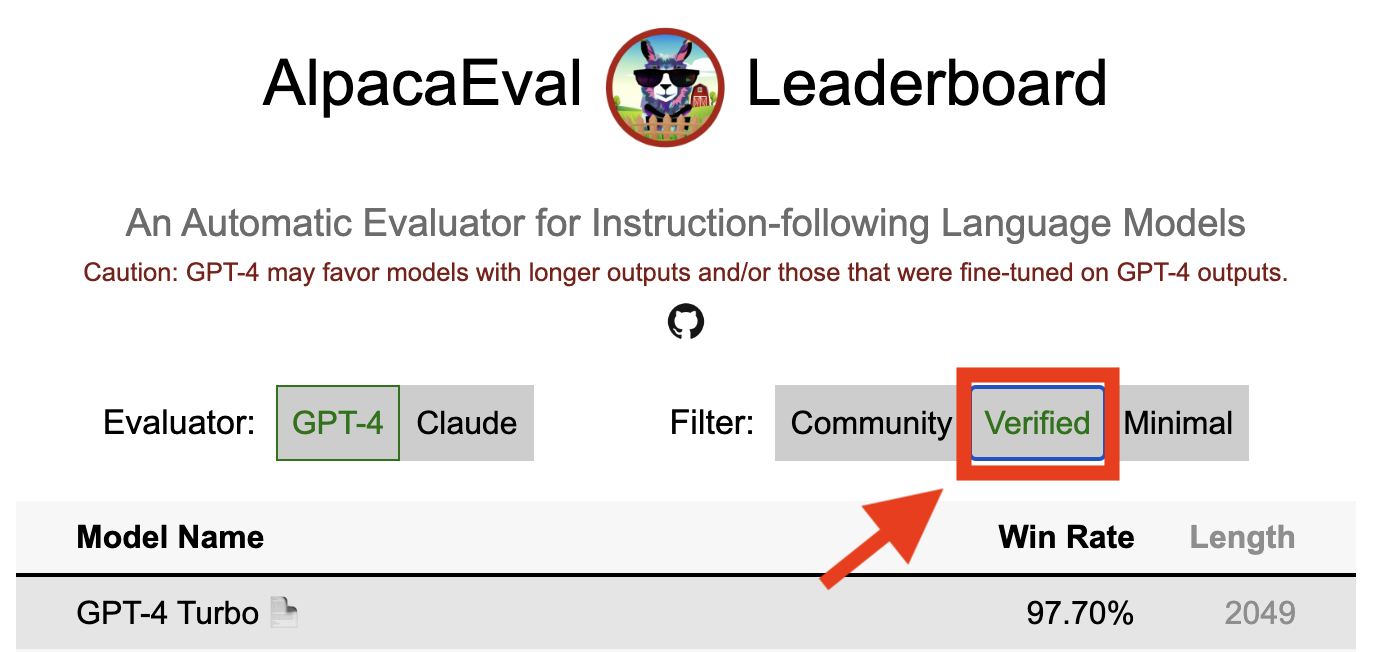
تشير نتيجة تم التحقق منها إلى alpacaeval إلى أن المشرف الأساسي قد فك تشفير المخرجات من النموذج وأجرى التقييم. لسوء الحظ ، نحن ، نصيحة Alpacaeval ، تفتقر إلى الموارد اللازمة للتحقق من جميع النماذج ، وبالتالي سنفعل ذلك فقط للنماذج الموجودة في أعلى 5 من المتصدرين. نعتذر عن أي إزعاج قد يسببه هذا ونقدر فهمك. للتحقق من النموذج الخاص بك ، يرجى اتباع الخطوات أدناه:
@yann on discord ، أو أرسل بريدًا إلكترونيًا إلينا إذا كان لديك بريدنا الإلكتروني ، مما يوفر مبررًا موجزًا لسبب التحقق من النموذج الخاص بك.alpaca_eval evaluate_from_model --model_configs '<your_model_name>' دون الحاجة إلى وحدة معالجة الرسومات المحلية.alpaca_eval evaluate_from_model --model_configs '<your_model_name>' ، وتحديث النتائج ، وإبلاغك حتى تتمكن من إلغاء المفاتيح المؤقتة.لاحظ أننا لن نعيد تقييم نفس النموذج. بسبب تباين أخذ العينات ، قد تختلف النتائج قليلاً عن النتائج الأولية. سنستبدل نتائج مجتمعك السابقة بالنتائج التي تم التحقق منها.
يرجى أولاً اتباع الإرشادات في صنع مقيم جديد. بمجرد إنشاء تكوين التعليقات الملحوظة ، نطلب أن تقوم بإنشاء لوحة المتصدرين الجديدة للمعلم من خلال تقييم الحد الأدنى من النماذج. يمكن العثور على مخرجات هذه النماذج عن طريق تنزيل alpaca_eval_all_outputs.json.
alpaca_eval make_leaderboard
  --leaderboard_path src/alpaca_eval/leaderboards/data_AlpacaEval/ < evaluator > _leaderboard.csv
  --all_model_outputs alpaca_eval_all_outputs.json
  --annotators_config < evaluator_config >
بعد ذلك ، يرجى إنشاء PR مع تكوين التعليقات الشراعية و CSV.
للمساهمة في مجموعة تقييم جديدة ، ستحتاج أولاً إلى تحديد مجموعة من الإرشادات النصية. بعد ذلك ، ستحتاج إلى تحديد مجموعة من المخرجات المرجعية (يتم حساب معدلات الفوز النموذجية مقابل هذا المرجع). لسهولة الاستخدام ، يمكنك استخدام التكوين المرجعي Davinci-003 الافتراضي.
ضعها معًا في JSON ، حيث يحدد كل إدخال instruction الحقول output generator . يمكنك أن تتطلع إلى alpaca_eval.json كدليل (حقل dataset ليس ضروريًا).
أخيرًا ، نطلب منك إنشاء الحد الأدنى من المتصدرين على مجموعة التقييم الجديدة هذه. يمكنك القيام بذلك بما يلي:
alpaca_eval make_leaderboard
  --leaderboard_path < src/alpaca_eval/leaderboards/data_AlpacaEval/your_leaderboard_name.csv >
  --all_model_outputs alpaca_eval_all_outputs.json
  --reference_outputs < path_to_json_file >
يرجى تقديم العلاقات العامة مع مجموعة eval مجموعة JSON و CSV المتصالح.
حاليًا ، نسمح بوظائف الإكمال المختلفة ، على سبيل المثال ، openai ، anthropic ، huggingface_local ، huggingface_hub_api ... إذا كنت تريد المساهمة في وظيفة / واجهة برمجة تطبيقات جديدة لإكمالها ، ثم اتبع هذه الخطوات:
<name>_completions(prompts : Sequence[str], model_name :str, ... ) في مجلد وحدة فك الترميز. يجب أن تأخذ هذه الوظيفة كوسيطة للمطالبات + kwargs وإرجاع الإكمال. يرجى إلقاء نظرة على وظائف الانتهاء الأخرى في الدليل للقوالب. مثل Huggingface_local_completions أو الأنثروبور.<name>_completions وتبعيات في init . مرة أخرى ، يمكنك اتباع مثال uggingface_local_completionsalpaca_eval evaluate_from_model --model_configs '<model_configs>'لا تتردد في بدء العلاقات العامة في وقت مبكر ، وسنكون قادرين على تقديم بعض المساعدة في هذه العملية!
يتمتع خط أنابيب التقييم Alpacaeval ، مثل المقيمين الحاليين الآخرين ، وبالتالي لا ينبغي استخدامه كبديل للتقييم البشري في البيئات المهمة ، مثل تحديد ما إذا كان النموذج جاهزًا للنشر. يمكن تجميعها على نطاق واسع في 3 فئات:
قد لا تكون التعليمات تمثل الاستخدام الحقيقي : تحتوي مجموعة Alpacaeval على أمثلة من مجموعة متنوعة من مجموعات البيانات (البنية الذاتية ، المساعد المفتوح ، Vicuna ، Koala ، HH-RLHF) والتي قد لا تمثل تطبيقات الاستخدام الحقيقي والتطبيقات المتقدمة لنماذج أفضل مثل GPT4. هذا على الأرجح يجعل أفضل النماذج المغلقة (GPT4 / Claude / ChatGPT / ...) تبدو أكثر شبهاً بالنماذج المفتوحة مما هي عليه. في الواقع ، يبدو أن هذه النماذج المغلقة قد تم تجهيزها/تم تجهيزها على بيانات أكثر تنوعًا. انظر على سبيل المثال هذه المدونة للحصول على نتائج أولية على تعليمات أكثر تعقيدًا. ومع ذلك ، لاحظ أنه في الألباكافيرم ، أظهرنا أن معدلات الفوز على مجموعة التقييم لدينا مرتبطة ارتباطًا وثيقًا (0.97 R2) مع معدلات الفوز على تعليمات من تفاعلات المستخدم مع عرض الألبكة. علاوة على ذلك ، تُظهر لوحة المتصدرين Alpacaeval فجوة أكبر بين النماذج المفتوحة ونماذج Openai من ألواح المتصدرين الأخرى (مثل LMSYS).
التحيزات من المضيفين التلقائيين : يبدو أن المذيعين الأوتوماتيكيين الخام لديهم تحيزات ضمنية. على وجه الخصوص ، وجدنا أنها تميل إلى تفضيل المخرجات والمخرجات الطويلة التي تحتوي على قوائم (على سبيل المثال 0.68 / 0.69 لـ alpaca_eval_gpt4 و 0.62 / 0.58 claude ). على الرغم من أننا وجدنا أن البشر لديهم تحيزات مماثلة (0.64 / 0.61) ، إلا أننا نعتقد أن هذا يمكن أن يكون أكثر من قيود على خط أنابيب التعليقات البشرية التي استخدمناها بدلاً من التحيز البشري الحقيقي. بشكل أعم ، من خلال التحليل النوعي ، وجدنا أن المعلمون التلقائيين يعطيون أهمية أكبر لأسلوب الإخراج أكثر من محتواه (مثل الواقعية). أخيرًا ، وجدنا أن المقيمين التلقائيين يميلون إلى تفضيل المخرجات من نماذج متشابهة (من المحتمل أن يتم تدريبهم على نفس البيانات) كما اقترح الفرق الكبير بين chatgpt/gpt4 على claude و alpaca_eval_gpt4 . لاحظ أن تحيز الطول يتم تخفيفه جزئيًا في معدلات الفوز التي يتم التحكم فيها عن الطول.
قلة تقييم السلامة : الأهم من ذلك ، يقيم Alpacaeval فقط إمكانات متابعة التعليمات للنماذج بدلاً من الضرر الذي يمكن أن تسببه (مثل السلوك السام أو التحيز). نتيجة لذلك ، لا ينبغي تفسير الفجوة الصغيرة بين ChatGPT الحالي وأفضل نماذج المصدر المفتوح كما لو أن هذا الأخير جاهز للنشر.
بالإضافة إلى هذه القيود المتعلقة بخطوط أنابيب التقييم ، هناك أيضًا قيود على التحقق من صحة المقيمين ونهجنا المقترح لاختيار مجموعات التقييم.
أولاً ، يعاني التحقق من صحة المقيمين القائم على عمليات التبادل البشري من القيود التالية: (1) وجدنا نوعيًا أن زملاء الحشود لدينا يميلون أيضًا إلى تفضيل الأسلوب مثل طول ووجود القوائم على الواقعية ؛ (2) هذا لا يتحقق من صحة ما إذا كانت معدلات الفوز ضد النموذج المرجعي هي استراتيجية تقييم جيدة في المقام الأول ؛ (3) تفضيلات من 16 من زملاء الحشد لا تمثل تفضيلات جميع البشر.
ثانياً ، يعاني نهجنا المقترح لاختيار مجموعات التقييم استنادًا إلى القوة الإحصائية من القيود التالية: (1) القوة الإحصائية لا تضمن الاتجاه الصحيح ، على سبيل المثال ، يمكنك الحصول على مجموعة غير طبيعية من التعليمات التي تؤدي فيها الألبكة "بشكل أفضل من نموذج أفضل ؛ و (2) يمكن أن يدفع المستخدمون إلى تحديد البيانات لدعم الفرضية التي يرغبون في التحقق منها.
تصورات الألباكافال التي تسيطر عليها الطول:
تطور الألباكيفال الذي يسيطر عليه:
يعرض دفتر الملاحظات خيارات مختلفة نظرنا إليها للتخفيف من تحيز طول المليقات التلقائية.
هنا نلخص بإيجاز النتائج الرئيسية. وهي:
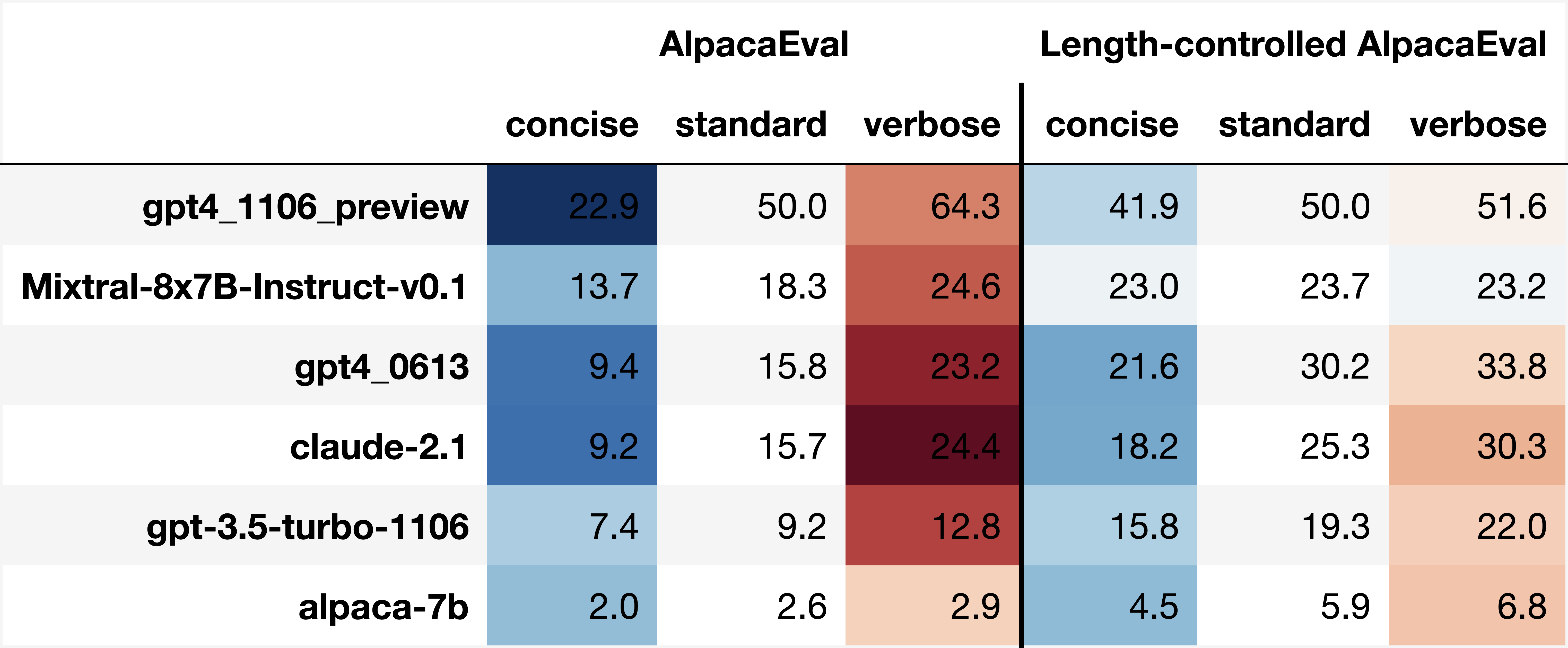
win_rate(m,b) = 1 - win_rate(b,m) in [0,1] and win_rate(m,m) = 0.5 . This is shown in the plot below. 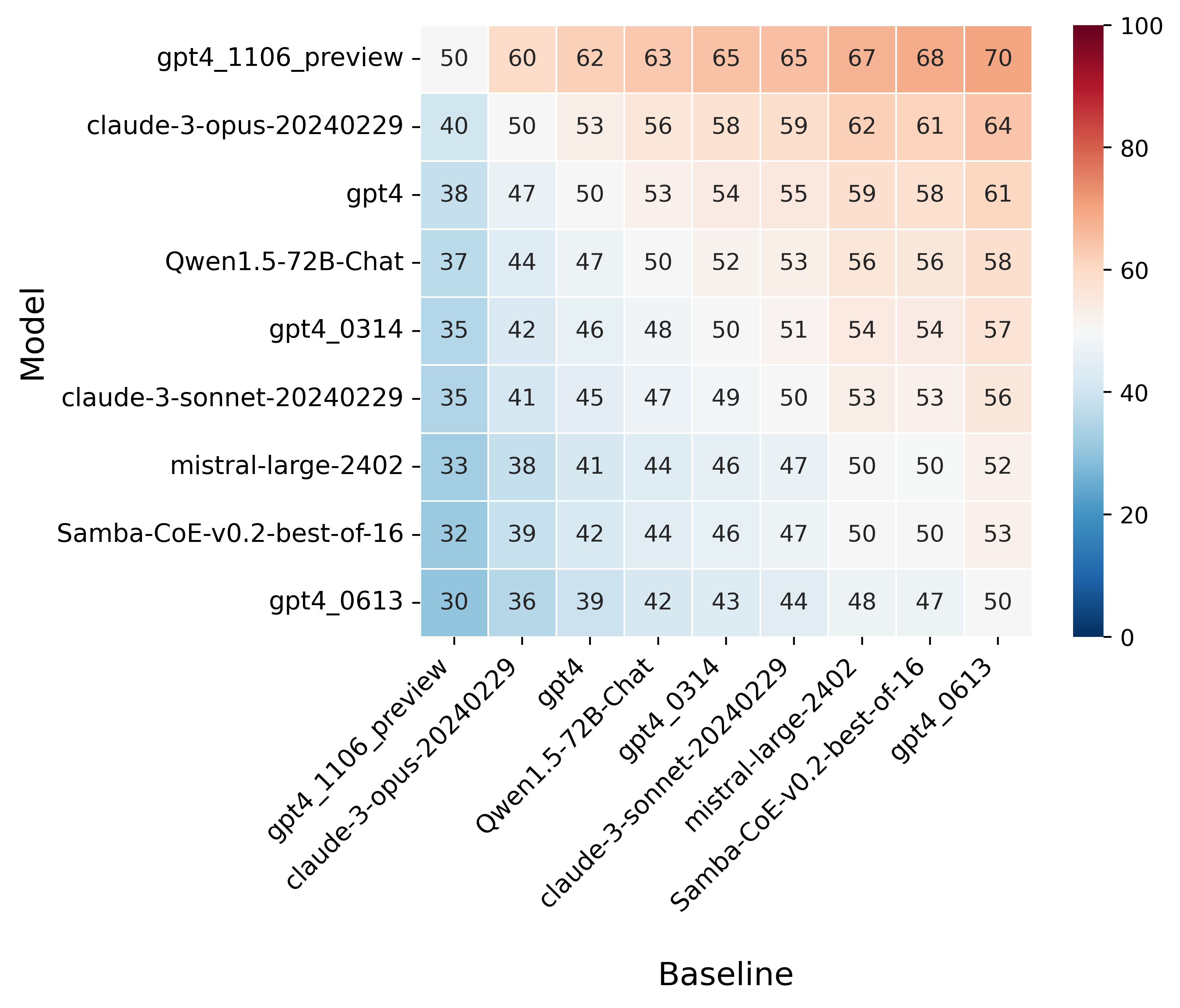
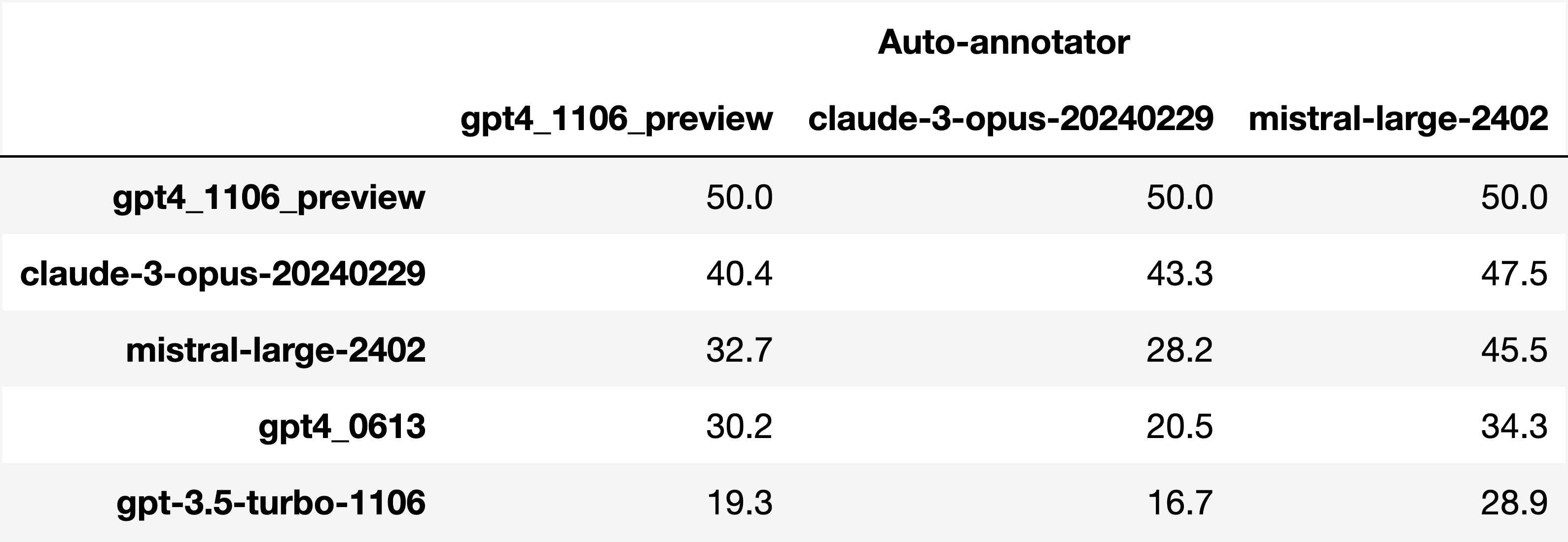
Finally, note that we are only controlling for length bias. There are other known biases that we are not controlling for, such as the fact that auto-annotators prefer outputs similar to their model. Although we could control for that, in practice we have found that to be less of an issue than length bias. For two reasons (1) this mostly a single model in the leaderboard because fine-tuning on outputs from the auto-annotator doesn't seem to have doesn't seem to impact the win-rate as much, and (2) the bias is actually less strong that what one could think. For example we show below a subset of the leaderboards auto-annotated by three different models, and we see that the ranking of models is exactly the same. In particular, claude-3-opus prefers gpt4_preview , and mistral-large prefers the former two.
Caution : all the following results are about AlpacaEval 1.0 and have not been updated since
Analyzing evaluators:
As we saw in the evaluator's leaderboard, there are many metrics to consider when selecting an evaluator, eg the quality, price, and speed. To assist with selection of the evaluator we provide a few functions to plot those metrics. The following shows for example the price/time/agreement of the different evaluators.
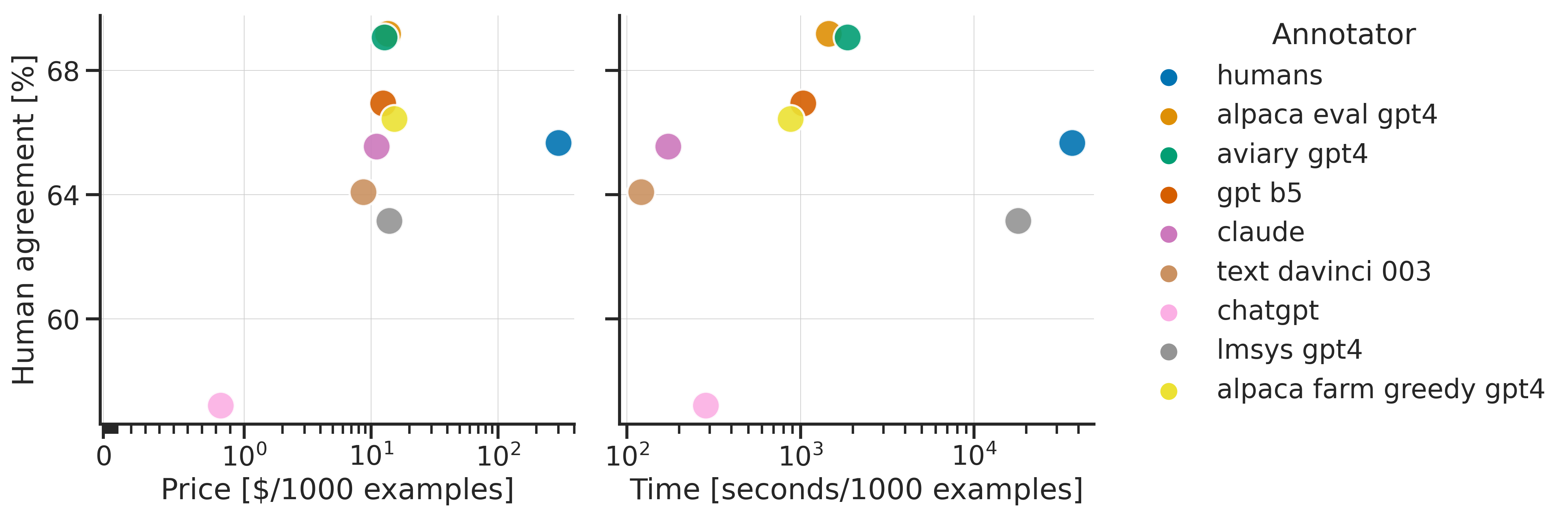
Here we see that alpaca_eval_gpt4 performs very well and is better than humans on all the considered metrics.
Previously we only considered the agreement with human annotators overall. An additional validation that one could do is checking whether making a leaderboard using our automatic annotator gives similar results as a leaderboard from humans. To enable such analysis, we release human annotations of outputs from 22 methods from AlpacaFarm => 22*805 = ~18K annotations. As a result we can test the correlation between the win-rates of the 22 models as evaluated by the humans and our automatic annotator. Note that this is arguably a better way of selecting an automatic evaluator than using "human agreement [%]" but is expensive given that it requires 18K annotations. The plot below shows such correlation for the alpaca_eval_gpt4 evaluator.
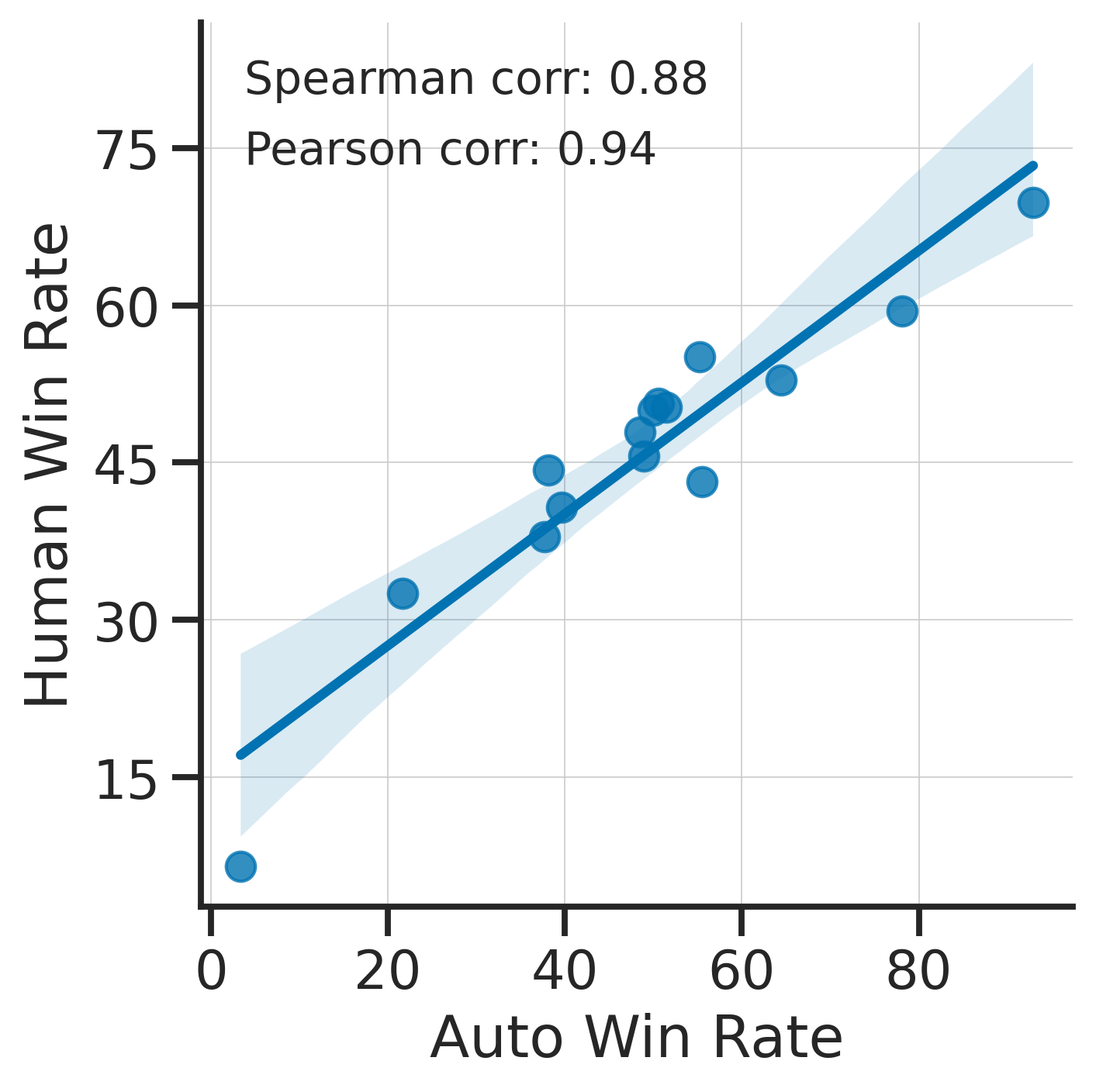
We see that the alpaca_eval_gpt4 leaderboard is highly correlated (0.94 Pearson correlation) to the leaderboard from humans, which further suggests that automatic evaluation is a good proxy for human evaluation. For the code and more analysis, see this notebook, or the colab notebook above.
Caution : all the following results are about AlpacaEval 1.0 and have not been updated since.
Making evaluation sets:
When creating an evaluation set there are two main factors to consider: how much data to use? and what data?
One way of answering those question is by considering a leaderboard of models that you believe are of different quality and checking what and how much data is needed to distinguish between them in a statistically significant way. We will do so below using a paired t-test to test if the difference in win-rates between every pair of models is statistically significant.
First, let us consider the question of how much data to use. Below we show the number of random samples needed from AlpacaEval for the paired t-test to give a p-value < 0.05 for each pair of models in the minimal alpaca_eval_gpt4 leaderboard. Grey cells correspond to pairs that are not significantly different on the 805 samples. y- and x-axis are ordered by the win-rate of the first and second model respectively.
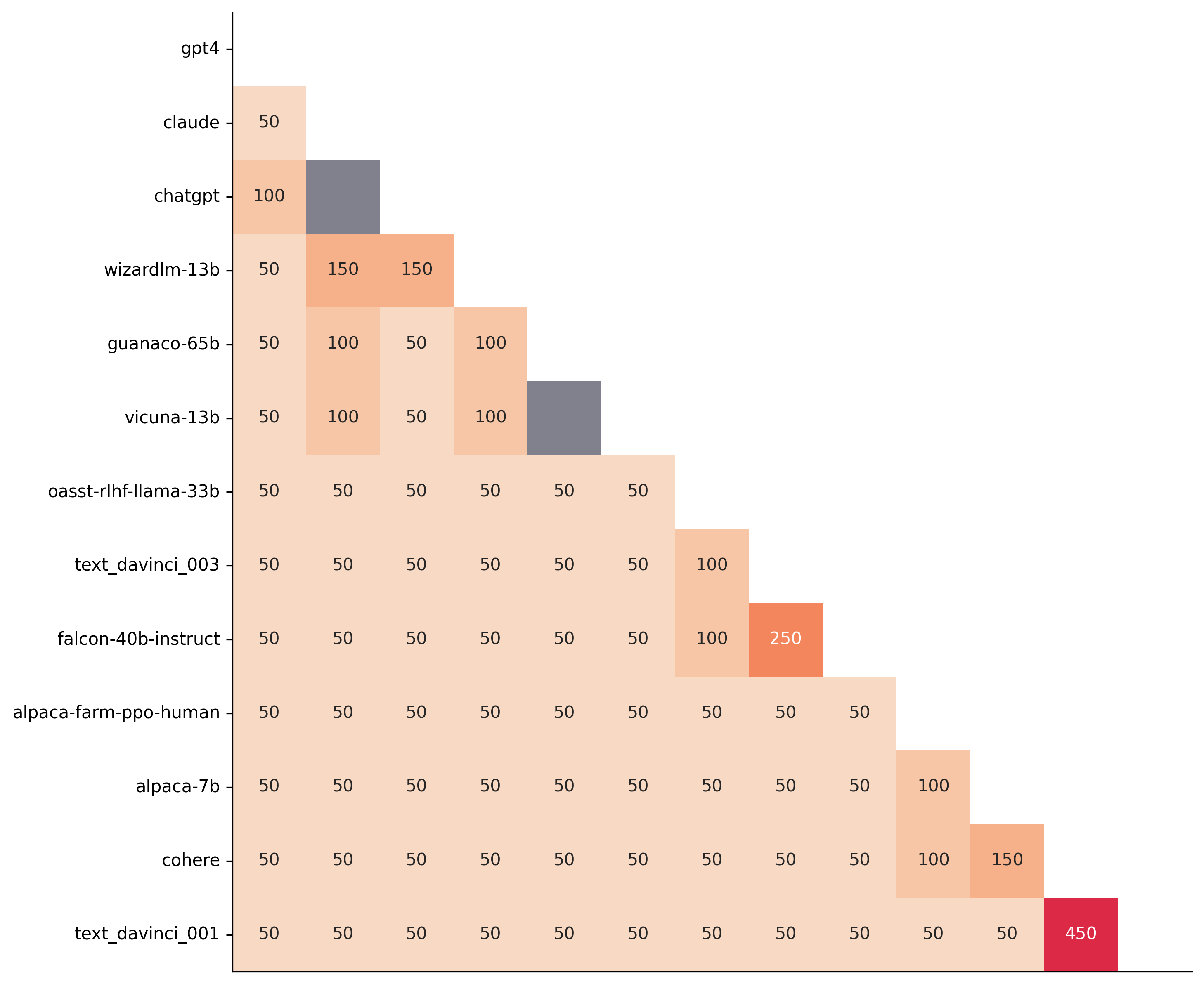
We see that most models can already be distinguished with 50 samples, and that 150 samples allows distinguishing the majority of pairs (74 out of 78). This suggests that we can decrease the evaluation set size by a factor of 4 when testing two models that have similar performance gaps as those on the minimal alpaca_eval_gpt4 leaderboard.
The second question is what data to use. Again we can try to answer this question from a statistical power perspective: what data allows to best distinguish between models. Let's consider this for all the datasets that are part of AlpacaEval, but let us control for the size of the evaluation sets as we only care about the quality of the data. The following plot shows the p-values from the paired t-test of each pairs of models on 80 examples of each subset of AlpacaEval.
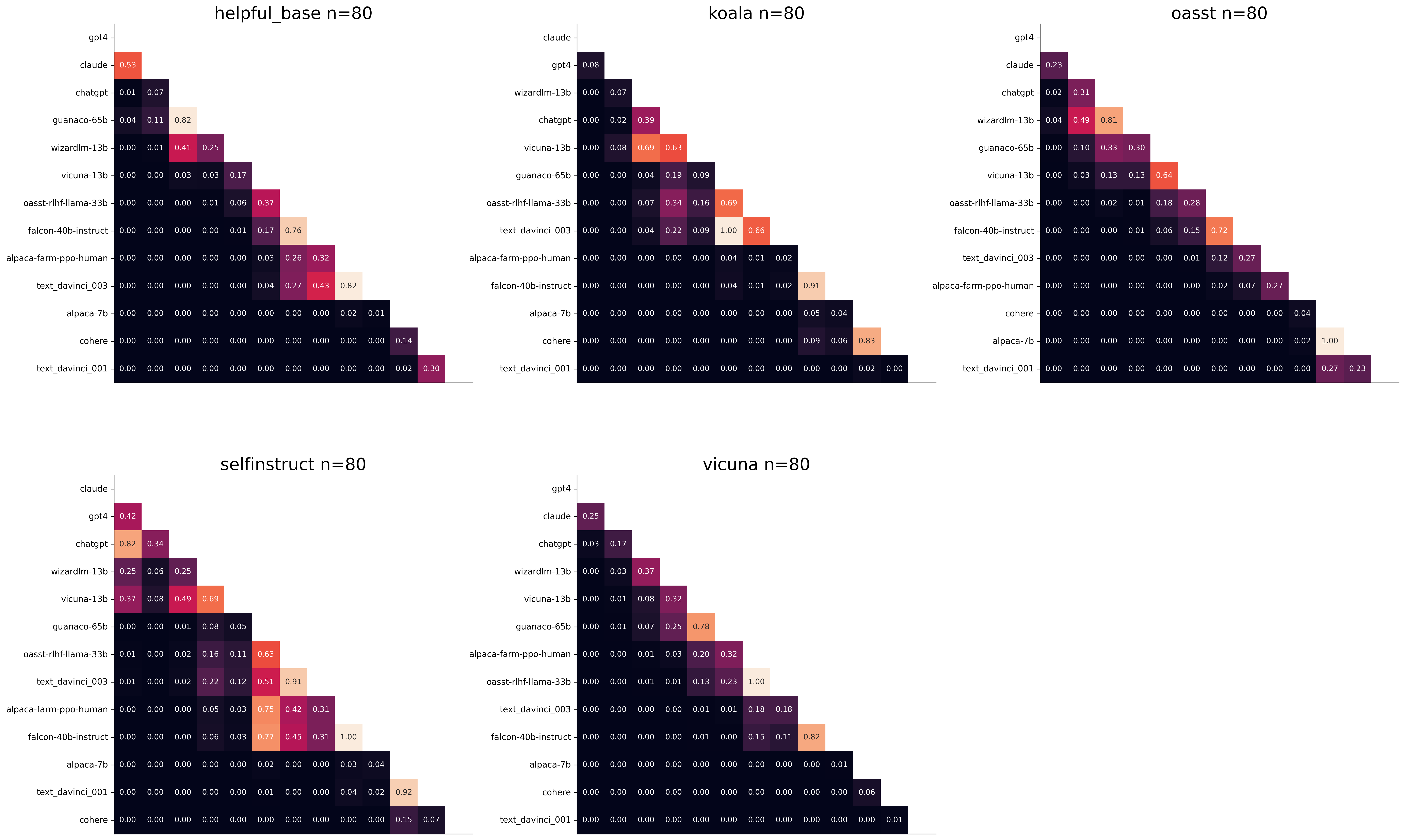
We see for example that the self-instruct dataset yields the least statistical power, which suggests that one could remove this dataset from the evaluation set. The exact reason should be analyzed in future work. For the code and more analysis see this notebook, or the colab notebook above.
Please consider citing the following depending on what you are using and referring to:
alpaca_eval (this repo). Specify whether you are using AlpacaEval or AlpacaEval 2.0. For length-controlled win-rates see below.alpaca_eval_length .dubois2023alpacafarm (AlpacaFarm)alpaca_eval and self-instruct, open-assistant, vicuna, koala, hh-rlhf.Here are the bibtex entries:
 @misc{alpaca_eval,
  author = {Xuechen Li and Tianyi Zhang and Yann Dubois and Rohan Taori and Ishaan Gulrajani and Carlos Guestrin and Percy Liang and Tatsunori B. Hashimoto },
  title = {AlpacaEval: An Automatic Evaluator of Instruction-following Models},
  year = {2023},
  month = {5},
  publisher = {GitHub},
  journal = {GitHub repository},
  howpublished = {url{https://github.com/tatsu-lab/alpaca_eval}}
}
 @article{dubois2024length,
  title={Length-Controlled AlpacaEval: A Simple Way to Debias Automatic Evaluators},
  author={Dubois, Yann and Galambosi, Bal{'a}zs and Liang, Percy and Hashimoto, Tatsunori B},
  journal={arXiv preprint arXiv:2404.04475},
  year={2024}
}
 @misc{dubois2023alpacafarm,
  title={AlpacaFarm: A Simulation Framework for Methods that Learn from Human Feedback},
  author={Yann Dubois and Xuechen Li and Rohan Taori and Tianyi Zhang and Ishaan Gulrajani and Jimmy Ba and Carlos Guestrin and Percy Liang and Tatsunori B. Hashimoto},
  year={2023},
  eprint={2305.14387},
  archivePrefix={arXiv},
  primaryClass={cs.LG}
}
Length controlled (LC) win-rates are a debiased version of the win-rates that control for the length of the outputs.
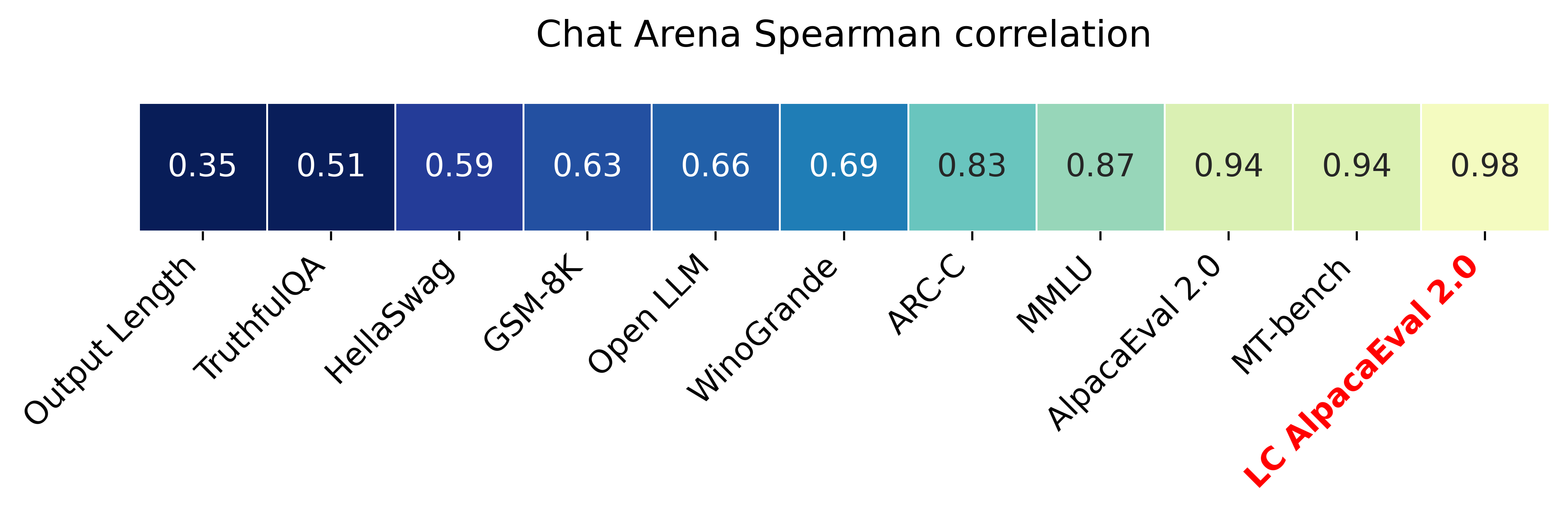
The main idea is that for each model we will fit a logistic regression to predict the preference of the autoannotator given: (1) the instruction, (2) the model, and (3) the difference of length between the baseline and model output. Given such a logistic regression we can then try to predict the counterfactual "what would the preference be if the model's output had the same length as the baseline" by setting the length difference to 0. By averaging over this length-controlled preference, we then obtain the length-controlled win-rate. The exact form of the logistic regression is taken such that the interpretation of LC win rates is similar to the raw win rates, for example for any model m1 and m2 we have win_rate(m1, m2) = 1 - win_rate(m2, m1) in [0,100] and win_rate(m1, m1) = 0.5 . Length controlled win-rates increase the correlation between AlpacaEval's leaderboard and Chat Arena from 0.93 to 0.98 Spearman correlation, while significantly decreasing the length gameability of the annotator . For more information and results about length controlled win-rates see this notebook.
This idea of estimating the controlled direct effect, by predicting the outcome while conditioning on the mediator (the length difference), is common in statistical inference.
To get LC win rates on previously annotated models, you can use the following command:
pip install -U alpaca_eval
alpaca_eval --model_outputs … --is_recompute_metrics_only True
AlpacaEval 2.0 is a new version of AlpacaEval. Here are the differences:
gpt4_turbo : we upgraded the baseline from text-davinci-003 to gpt4_turbo to make the benchmark more challenging and have a metric that better reflects the current state of the art.weighted_alpaca_eval_gpt4_turbo : we improved the annotator in quality and price. First, we use the gpt4_turbo model for annotating, which is approximately 2x cheaper than gpt4 . Second, we changed the prompt such that the model outputs a single token, which further reduced cost and speed. Finally, instead of using a binary preference, we used the logprobs to compute a continuous preference, which gives the final weighted win-rate. Note that the latter two changes had the surprising effect of decreasing the annotators' length biased. By default, AlpacaEval 2.0 will be used from pip install alpaca_eval==0.5 . If you wish to use the old configs by default, you can set IS_ALPACA_EVAL_2=False in your environment.
As part of AlpacaEval, we release the following data:
text-davinci-003 reference on the AlpacaFarm evaluation set. Annotations are from a pool of 16 crowd workers on Amazon Mechanical Turk. The different models are: 6 from OpenAI, 2 SFT models from AlpacaFarm, 13 RLHF methods from AlpacaFarm, and LLaMA 7B.For more details about the human annotations refer to the AlpacaFarm paper.
AlpacaEval is an improvement and simplification of the automatic pairwise preference simulator from AlpacaFarm. Outside AlpacaFarm, you should be using AlpacaEval. فيما يلي الاختلافات الرئيسية:
{instruction}nn{input} . This affects 1/4 of the examples in the AlpacaFarm evaluation set (the self-instruct subset). This simplification provides a more fair comparison for models that were not trained by distinguishing between the two fields.text-davinci-003 ), so the results on AlpacaEval are not comparable to those on AlpacaFarm even for examples that had no input field.--anotators_config 'alpaca_farm' and --p_label_flip 0.25 when creating an evaluator. There have been several work that propose new automatic annotators for instruction-following models. Here we list the ones that we are aware of and discuss how they differ from ours. We evaluated all of those in our evaluator's leaderboard.
lmsys_gpt4 ) evaluates the pair by asking the annotator a score from 1-10 for each output, and then selecting the output with the highest score as preferred. They do not randomize over output order and they ask an explanation after the score. Overall, we found that this annotator has strong bias towards longer outputs (0.74) and relatively low correlation with human annotations (63.2).alpaca_farm_greedy_gpt4 ) evaluates the pair by directly asking the annotator which output it prefers. Furthermore, it batches 5 examples together to amortize the length of the prompt and randomizes the order of outputs. Overall, we found that this annotator has much less bias towards longer outputs (0.60) and is faster (878 seconds/1000 examples) than others. It has a slightly higher correlation with the majority of human annotations (66.4) than humans themselves (65.7). However, it is more expensive ($15.3/1000 examples) and doesn't work with very long outputs given the batching.aviary_gpt4 ) asks the annotator to order the output by its preference, rather than simply selecting the preferred output. It does not randomize the order of outputs and uses high temperature for decoding (0.9). Overall, we found that this annotator has relatively strong bias towards longer outputs (0.70) and very high correlation with human annotations (69.1). By decreasing the temperature and randomizing the order of outputs, we further improved the correlation to 69.8 ( improved_aviary_gpt4 ) but this further increased the length bias to 0.73. Our alpaca_eval_gpt4 is a mix between the AlpacaFarm and Aviary annotators. It asks the annotator to order the outputs by preference, but it uses temperature 0, randomizes over outputs, and made some modifications to the prompt to decrease length bias to 0.68.
Other related work include recent papers which analyze automatic evaluators. على سبيل المثال:
For all models you can find the auto-annotations under results/<model_name>/*/annotations.json . The annotations have the following columns:
instruction : the promptgenerator_1 : the baseline modeloutput_1 : the output of the baseline modelgenerator_2 : the model being evaluatedoutput_2 : the output of the model being evaluatedannotator : the auto-annotatorpreference : the result of the auto-annotator. This is a float between 1 and 2. Closer to 1 means that the auto-annotator prefers output_1 , closer to 2 means that it prefers output_2 . For AlpacaEval 2.0, preference-1 corresponds to the probability of output_1 being preferred. For AlpacaEval 1.0, preference is 1 if output_1 is preferred, 2 if output_2 is preferred, and 1.5 if they are the same. The win rate is always (preference -1).mean() .raw_completion : the raw output of the auto-annotator. This is field contains the completions before de-randomization of the order between output_1 and output_2 ! It is thus much harder to interpret, see below for more information.Chain of thought
For some annotators, eg alpaca_eval_cot_gpt4_turbo_fn we use chain of thought reasoning to make the models preferences more interpretable. Those can then be found under concise_explanation . To interpret them, you should also look at referenced_models which translates the temporary model name (in the prompt) to the actual output. Below, we provide more explanation as to what is happening behind the scenes.
You can check the raw_annotations["concise_explanation] column in annotations.json (eg here) which contains the chain of thought reasoning of the auto annotator. Note that the raw_annotations is not modified by the randomization of the order of the outputs. In particular, "m" and "M" can sometime refer to the first model (the reference) and sometime to the second model (the model being evaluated). To understand which model is being referred to, you should use the column preference and ordered_models . To make it easier we add a column "referenced_models" mapping the model names to the corresponding outputs. For example in the following annotation we see that the preference is 1.0 (ie output_1 ) and corresponds to model M in concise_explanation (see ordered_models ).
{
  "instruction" : " How did US states get their names? " ,
  "output_1" : " The names of U.S. states are derived from a variety of languages and sources, including indigenous American languages, European languages (primarily English, Spanish, and French), as well as other historical influences. Here is a brief overview of how some states got their names: nn 1. **Indigenous American Languages**: Many state names come from Native American words or names of tribes, often from the languages of the indigenous peoples who lived in or near those areas. n   - **Alabama**: Possibly derived from the Choctaw language, meaning " thicket clearers. "n   - **Connecticut**: From a Mohegan-Pequot word meaning " long tidal river. "n   - **Massachusetts**: [...] " ,
  "generator_1" : " gpt4_1106_preview " ,
  "dataset" : " helpful_base " ,
  "output_2" : " The names of the 50 U.S. states come from a variety of sources, including Native American languages, European languages, and historical figures. Here's a brief overview of how some states got their names: nn 1. Native American origins: Many states have names derived from Native American languages. For example, Alabama comes from the Choctaw word " Albah amo, " meaning " plant gatherers " or " herb gatherers. " Similarly, the name Mississippi comes from the Ojibwe word " Misi-ziibi, " meaning " great river. "nn 2. European languages: [...]. " ,
  "generator_2" : " gpt4 " ,
  "annotator" : " alpaca_eval_cot_gpt4_turbo_fn " ,
  "preference" : 1.0 ,
  "raw_completion" : {
    "concise_explanation" : " Model M provided a more detailed and structured response, including bold headings for each category and a wider range of examples. It also included additional categories such as 'Other European Languages' and 'Combination of Languages and Influences', which added depth to the explanation. Model m's response was accurate but less comprehensive and lacked the clear structure found in Model M's output. " ,
    "ordered_models" : [
      {
        "model" : " M " ,
        "rank" : 1
      },
      {
        "model" : " m " ,
        "rank" : 2
      }
    ]
  },
  "referenced_models" : {
    "M" : " output_1 " ,
    "m" : " output_2 "
  }
}chatgpt_fn that anyone can use (no waiting lists).chatgpt_fn or alpaca_eval_gpt4_fn .




