HTML Guard
1.0.0

笔记
?尝试使用更高级的项目Websafecompiler ,以可靠地保护您的网站或复制源代码的任何分析!
当您添加静态模块html-guard.js时,它将自动混淆页面布局。保护您的Web应用程序/网站。
?可以使用内置功能来使用资源的动态加载,从而阻止样式和脚本的静态下载。
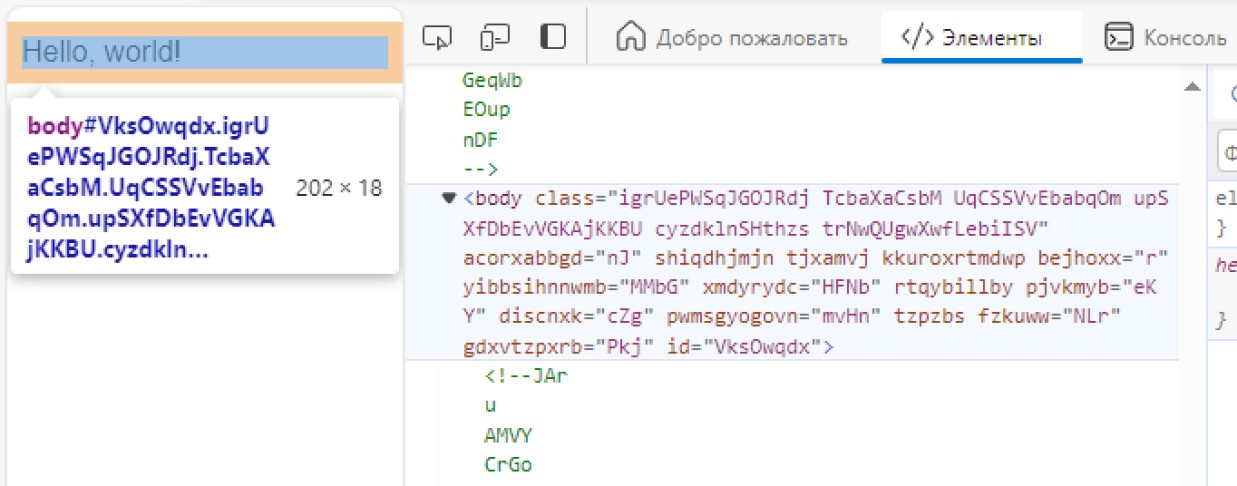
简要介绍HTML Guard的功能:
_
 <!DOCTYPE  html >
< html >
    < head >
        <!-- Site protection ON! -->
        < script src =" html-guard.min.js " > </ script >
        < script >
            // Configure protection & resource loading
        </ script >
    </ head >

    < body >
    </ body >
</ html > 避免使用<link> 。动态加载.css和.js文件!这种方法使绕过Web2zip.com等网站的下载器成为可能。动态的添加站点资源使得在静态分析过程中无法复制它们。在这种情况下,当从依赖项中删除HTML Guard时,由于明显的原因,Web应用程序的内容将无法加载。
 < script >
    // ADDING: Add link to 'style.css'
    HtmlGuard . loader . loadStyleByRef ( "styles.css" ) ;
</ script >
< script >
// ADDING: Add script "test.js" to head
HtmlGuard . loader . loadScriptBySrc ( "test.js" ) ;
// OR
// ADDING: Add script "test.js" to head after document loading
HtmlGuard . loader . loadScriptBySrc_ContentLoaded ( "test.js" ) ;
</ script >在任何属性之前添加_前缀,以便src成为_src 。 HTML Guard将自动加载此元素
此保护方法具有2个优势:
例如:
< img _src =" image.jpg " />此功能阻止了打开开发人员工具的任何尝试,如果检测到,则重新加载页面。
 < script >
    // PROTECTION: Disable DevTools
    HtmlGuard . protections . antiDevTools ( ) ;
</ script >阻止标准上下文菜单的开放。
 < script >
    // PROTECTION: Disable context menu
    HtmlGuard . protections . blockContextMenu ( ) ;
</ script >用户将无法从站点拖动元素。
 < script >
    // PROTECTION: Disable drag
    HtmlGuard . protections . blockDrag ( ) ;
</ script >删除使用选择的能力。
 < script >
    // PROTECTION: Disable selection
    HtmlGuard . protections . blockSelection ( ) ;
</ script >这对于隐藏浏览器控制台的调试日志非常有用。挂钩函数,例如log , debug , warn , error , dir , dirxml , assert , table使它们返回null
 < script >
    // PROTECTION: Disable console output
    HtmlGuard . protections . blockConsoleOutput ( ) ;
</ script > < head >
<!-- Example of HTML-Guard protection -->
<!DOCTYPE html >
< html >
< head >
< script src =" ../html-guard.js " > </ script >
< script >
// PROTECTION: Disable DevTools
HtmlGuard . protections . antiDevTools ( ) ;
// PROTECTION: Disable context menu
HtmlGuard . protections . blockContextMenu ( ) ;
// PROTECTION: Disable drag
HtmlGuard . protections . blockDrag ( ) ;
// PROTECTION: Disable selection
HtmlGuard . protections . blockSelection ( ) ;
// PROTECTION: Disable console output
HtmlGuard . protections . blockConsoleOutput ( ) ;
// ADDING: Add link to 'style.css'
HtmlGuard . loader . loadStyleByRef ( "styles.css" ) ;
// ADDING: Run 'test.js' script
HtmlGuard . loader . loadScriptBySrc ( "test.js" ) ;
</ script >
</ head >
< body >
< div >
<!-- '_id' is protected variant of 'id' -->
< p > Hello, world! Time: < span _id =" time " > </ span > </ p >
<!-- '_src' is protected variant of 'src' -->
< img _src =" test.jpg " _alt =" Test image " />
</ div >
< a _href =" https://github.com/DosX-dev/HTML-Guard " > HTML Guard in GitHub! </ a >
</ body >
</ html > 该模块的目的更多用于保护Web应用程序,而不是简单的站点。如果您使用ReactJ,Vuejs(等)等框架开发应用程序,那么此项目非常适合您







