HTML Guard
1.0.0

Catatan
? Coba proyek WebSafecompiler yang lebih canggih untuk perlindungan yang dapat diandalkan dari situs Anda dari menyalin atau analisis kode sumber apa pun!
Saat Anda menambahkan modul statis html-guard.js itu akan secara otomatis mengaburkan tata letak halaman. Lindungi aplikasi/situs web Anda.
? Memungkinkan untuk menggunakan pemuatan sumber daya yang dinamis menggunakan fungsi bawaan, yang mencegah pengunduhan statis gaya dan skrip.
Secara singkat tentang fungsi penjaga HTML:
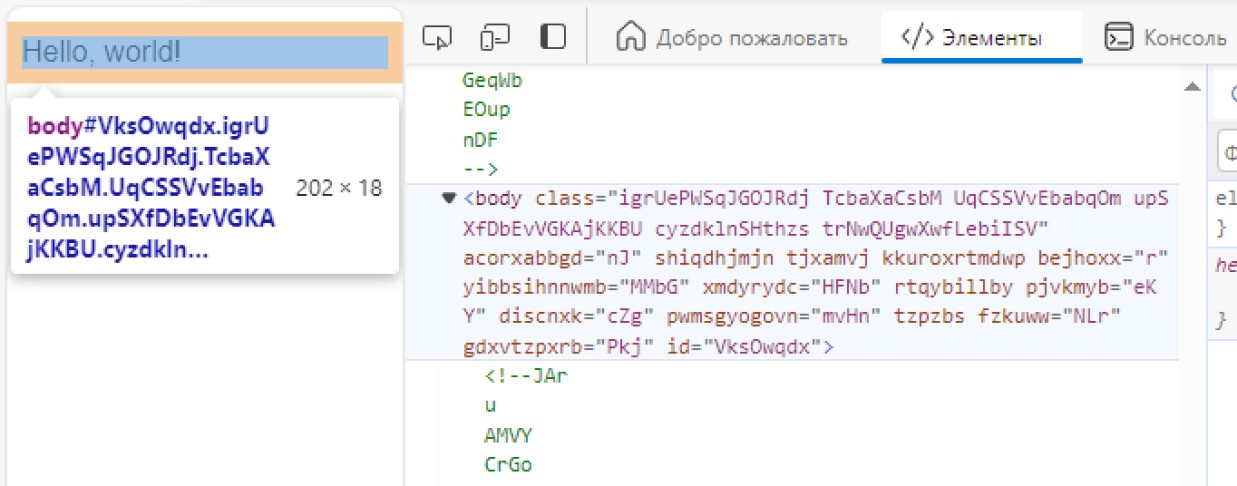
_
 <!DOCTYPE  html >
< html >
    < head >
        <!-- Site protection ON! -->
        < script src =" html-guard.min.js " > </ script >
        < script >
            // Configure protection & resource loading
        </ script >
    </ head >

    < body >
    </ body >
</ html > Hindari menggunakan <link> . Memuat file .css dan .js secara dinamis! Metode ini memungkinkan untuk memotong pengunduh situs seperti web2zip.com. Penambahan Dinamis Sumber Daya Situs membuat tidak mungkin untuk menyalinnya selama analisis statis. Dan dalam hal ini, ketika penjaga HTML dihapus dari dependensi, isi aplikasi web tidak akan dapat memuat karena alasan yang jelas.
 < script >
    // ADDING: Add link to 'style.css'
    HtmlGuard . loader . loadStyleByRef ( "styles.css" ) ;
</ script >
< script >
// ADDING: Add script "test.js" to head
HtmlGuard . loader . loadScriptBySrc ( "test.js" ) ;
// OR
// ADDING: Add script "test.js" to head after document loading
HtmlGuard . loader . loadScriptBySrc_ContentLoaded ( "test.js" ) ;
</ script > Tambahkan _ awalan sebelum atribut apa pun sehingga, src menjadi _src . Penjaga html akan secara otomatis memuat elemen ini
Metode perlindungan ini memiliki 2 keuntungan:
Misalnya:
< img _src =" image.jpg " />Fungsi ini memblokir setiap upaya untuk membuka alat pengembang dan, jika terdeteksi, memuat ulang halaman.
 < script >
    // PROTECTION: Disable DevTools
    HtmlGuard . protections . antiDevTools ( ) ;
</ script >Memblokir pembukaan menu konteks standar.
 < script >
    // PROTECTION: Disable context menu
    HtmlGuard . protections . blockContextMenu ( ) ;
</ script >Pengguna tidak akan dapat menyeret elemen dari situs.
 < script >
    // PROTECTION: Disable drag
    HtmlGuard . protections . blockDrag ( ) ;
</ script >Menghapus kemampuan untuk menggunakan seleksi.
 < script >
    // PROTECTION: Disable selection
    HtmlGuard . protections . blockSelection ( ) ;
</ script > Ini akan berguna untuk menyembunyikan log debug dari konsol browser. Fungsi kait seperti log , debug , warn , error , dir , dirxml , assert , table membuat mereka mengembalikan null
 < script >
    // PROTECTION: Disable console output
    HtmlGuard . protections . blockConsoleOutput ( ) ;
</ script > < head >
<!-- Example of HTML-Guard protection -->
<!DOCTYPE html >
< html >
< head >
< script src =" ../html-guard.js " > </ script >
< script >
// PROTECTION: Disable DevTools
HtmlGuard . protections . antiDevTools ( ) ;
// PROTECTION: Disable context menu
HtmlGuard . protections . blockContextMenu ( ) ;
// PROTECTION: Disable drag
HtmlGuard . protections . blockDrag ( ) ;
// PROTECTION: Disable selection
HtmlGuard . protections . blockSelection ( ) ;
// PROTECTION: Disable console output
HtmlGuard . protections . blockConsoleOutput ( ) ;
// ADDING: Add link to 'style.css'
HtmlGuard . loader . loadStyleByRef ( "styles.css" ) ;
// ADDING: Run 'test.js' script
HtmlGuard . loader . loadScriptBySrc ( "test.js" ) ;
</ script >
</ head >
< body >
< div >
<!-- '_id' is protected variant of 'id' -->
< p > Hello, world! Time: < span _id =" time " > </ span > </ p >
<!-- '_src' is protected variant of 'src' -->
< img _src =" test.jpg " _alt =" Test image " />
</ div >
< a _href =" https://github.com/DosX-dev/HTML-Guard " > HTML Guard in GitHub! </ a >
</ body >
</ html > Modul ini dimaksudkan lebih untuk melindungi aplikasi web daripada untuk situs sederhana. Jika Anda mengembangkan aplikasi menggunakan kerangka kerja seperti reactjs, vuej (dan sebagainya), maka proyek ini sangat cocok untuk Anda







