HTML Guard
1.0.0

บันทึก
- ลองใช้ WebSafecompiler โครงการขั้นสูงเพื่อป้องกันเว็บไซต์ของคุณจากการคัดลอกหรือการวิเคราะห์ซอร์สโค้ดใด ๆ !
เมื่อคุณเพิ่มโมดูลคง html-guard.js มันจะทำให้งงงวยเค้าโครงหน้าโดยอัตโนมัติ ปกป้องเว็บแอปพลิเคชัน/ไซต์ของคุณ
- ทำให้สามารถใช้การโหลดทรัพยากรแบบไดนามิกโดยใช้ฟังก์ชั่นในตัวซึ่งป้องกันการดาวน์โหลดสไตล์และสคริปต์แบบคงที่
สั้น ๆ เกี่ยวกับฟังก์ชั่นของ HTML Guard:
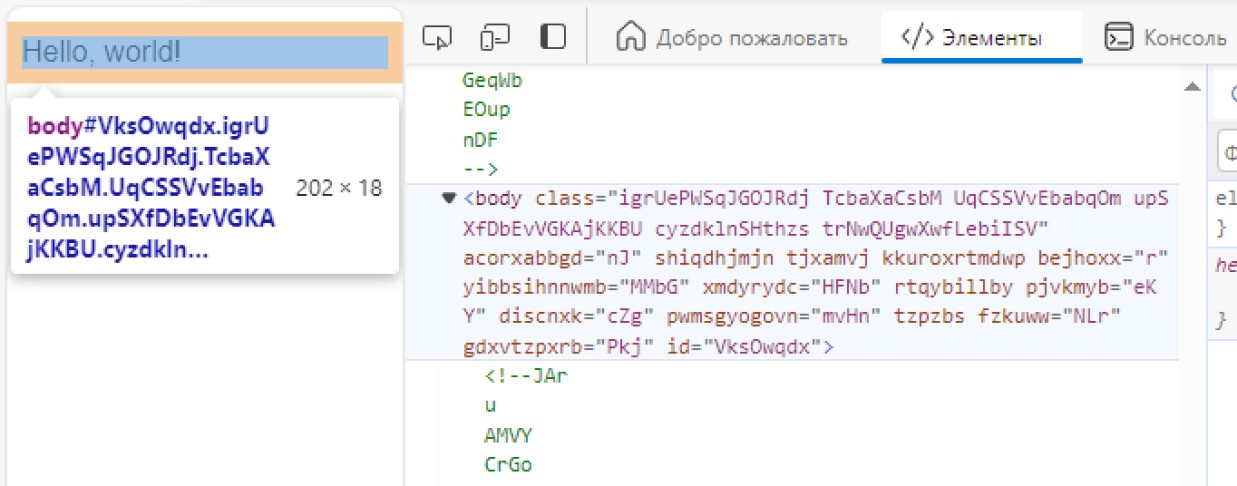
_
 <!DOCTYPE  html >
< html >
    < head >
        <!-- Site protection ON! -->
        < script src =" html-guard.min.js " > </ script >
        < script >
            // Configure protection & resource loading
        </ script >
    </ head >

    < body >
    </ body >
</ html > หลีกเลี่ยงการใช้ <link> โหลดไฟล์. css และ. js แบบไดนามิก! วิธีนี้ทำให้สามารถหลีกเลี่ยงการดาวน์โหลดเว็บไซต์เช่น web2zip.com การเพิ่มทรัพยากรไซต์แบบไดนามิกทำให้ไม่สามารถคัดลอกได้ในระหว่างการวิเคราะห์แบบคงที่ และในกรณีนี้เมื่อ HTML Guard ถูกลบออกจากการพึ่งพาเนื้อหาของเว็บแอปพลิเคชันจะไม่สามารถโหลดได้ด้วยเหตุผลที่ชัดเจน
 < script >
    // ADDING: Add link to 'style.css'
    HtmlGuard . loader . loadStyleByRef ( "styles.css" ) ;
</ script >
< script >
// ADDING: Add script "test.js" to head
HtmlGuard . loader . loadScriptBySrc ( "test.js" ) ;
// OR
// ADDING: Add script "test.js" to head after document loading
HtmlGuard . loader . loadScriptBySrc_ContentLoaded ( "test.js" ) ;
</ script > เพิ่ม _ คำนำหน้าก่อนแอตทริบิวต์ใด ๆ เพื่อให้ src กลายเป็น _src HTML Guard จะโหลดองค์ประกอบนี้โดยอัตโนมัติ
วิธีการป้องกันนี้มีข้อดี 2 ข้อ:
ตัวอย่างเช่น:
< img _src =" image.jpg " />ฟังก์ชั่นนี้บล็อกความพยายามใด ๆ ในการเปิดเครื่องมือนักพัฒนาและหากตรวจพบให้โหลดหน้าใหม่
 < script >
    // PROTECTION: Disable DevTools
    HtmlGuard . protections . antiDevTools ( ) ;
</ script >บล็อกการเปิดเมนูบริบทมาตรฐาน
 < script >
    // PROTECTION: Disable context menu
    HtmlGuard . protections . blockContextMenu ( ) ;
</ script >ผู้ใช้จะไม่สามารถลากองค์ประกอบจากเว็บไซต์ได้
 < script >
    // PROTECTION: Disable drag
    HtmlGuard . protections . blockDrag ( ) ;
</ script >ลบความสามารถในการใช้การเลือก
 < script >
    // PROTECTION: Disable selection
    HtmlGuard . protections . blockSelection ( ) ;
</ script > สิ่งนี้จะเป็นประโยชน์สำหรับการซ่อนบันทึกการดีบักจากคอนโซลเบราว์เซอร์ ฟังก์ชั่น hooks เช่น log , debug , warn , error , dir , dirxml , assert , table ทำให้พวกเขาส่งคืน null
 < script >
    // PROTECTION: Disable console output
    HtmlGuard . protections . blockConsoleOutput ( ) ;
</ script > < head >
<!-- Example of HTML-Guard protection -->
<!DOCTYPE html >
< html >
< head >
< script src =" ../html-guard.js " > </ script >
< script >
// PROTECTION: Disable DevTools
HtmlGuard . protections . antiDevTools ( ) ;
// PROTECTION: Disable context menu
HtmlGuard . protections . blockContextMenu ( ) ;
// PROTECTION: Disable drag
HtmlGuard . protections . blockDrag ( ) ;
// PROTECTION: Disable selection
HtmlGuard . protections . blockSelection ( ) ;
// PROTECTION: Disable console output
HtmlGuard . protections . blockConsoleOutput ( ) ;
// ADDING: Add link to 'style.css'
HtmlGuard . loader . loadStyleByRef ( "styles.css" ) ;
// ADDING: Run 'test.js' script
HtmlGuard . loader . loadScriptBySrc ( "test.js" ) ;
</ script >
</ head >
< body >
< div >
<!-- '_id' is protected variant of 'id' -->
< p > Hello, world! Time: < span _id =" time " > </ span > </ p >
<!-- '_src' is protected variant of 'src' -->
< img _src =" test.jpg " _alt =" Test image " />
</ div >
< a _href =" https://github.com/DosX-dev/HTML-Guard " > HTML Guard in GitHub! </ a >
</ body >
</ html > โมดูลนี้มีวัตถุประสงค์เพื่อปกป้องเว็บแอปพลิเคชันมากกว่าไซต์ที่เรียบง่าย หากคุณกำลังพัฒนาแอปพลิเคชันโดยใช้เฟรมเวิร์กเช่น ReactJs, Vuejs (และอื่น ๆ ) โครงการนี้เหมาะสำหรับคุณ







