HTML Guard
1.0.0

메모
? 소스 코드의 복사 또는 분석에서 사이트를 신뢰할 수있는 보호를 위해 고급 프로젝트 WebSafeCompiler를 사용해보십시오!
정적 모듈 html-guard.js 추가하면 페이지 레이아웃을 자동으로 난독 화합니다. 웹 애플리케이션/사이트를 보호하십시오.
? 내장 기능을 사용하여 자원의 동적로드를 사용할 수있게되므로 스타일과 스크립트의 정적 다운로드를 방지합니다.
HTML 가드의 기능에 대해 간단히 :
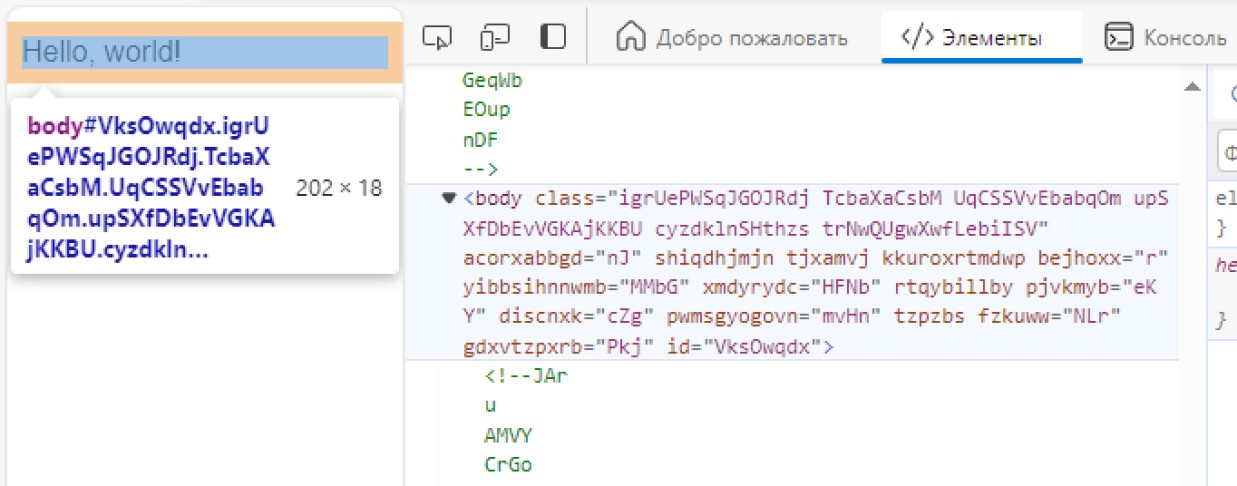
_
 <!DOCTYPE  html >
< html >
    < head >
        <!-- Site protection ON! -->
        < script src =" html-guard.min.js " > </ script >
        < script >
            // Configure protection & resource loading
        </ script >
    </ head >

    < body >
    </ body >
</ html > <link> 를 사용하지 마십시오. 동적으로 .css 및 .js 파일을로드하십시오! 이 방법을 사용하면 web2zip.com과 같은 사이트의 다운로더를 우회 할 수 있습니다. 사이트 리소스의 동적 추가로 정적 분석 중에 복사 할 수 없습니다. 이 경우 HTML 가드가 종속성에서 제거되면 웹 애플리케이션의 내용은 명백한 이유로로드 할 수 없습니다.
 < script >
    // ADDING: Add link to 'style.css'
    HtmlGuard . loader . loadStyleByRef ( "styles.css" ) ;
</ script >
< script >
// ADDING: Add script "test.js" to head
HtmlGuard . loader . loadScriptBySrc ( "test.js" ) ;
// OR
// ADDING: Add script "test.js" to head after document loading
HtmlGuard . loader . loadScriptBySrc_ContentLoaded ( "test.js" ) ;
</ script > src _src 되도록 속성 전에 _ 접두사를 추가하십시오. HTML 가드는이 요소를 자동으로로드합니다
이 보호 방법에는 두 가지 장점이 있습니다.
예를 들어:
< img _src =" image.jpg " />이 기능은 개발자 도구를 열려는 모든 시도를 차단하고 감지하면 페이지를 다시로드합니다.
 < script >
    // PROTECTION: Disable DevTools
    HtmlGuard . protections . antiDevTools ( ) ;
</ script >표준 컨텍스트 메뉴의 개방을 차단합니다.
 < script >
    // PROTECTION: Disable context menu
    HtmlGuard . protections . blockContextMenu ( ) ;
</ script >사용자는 사이트에서 요소를 드래그 할 수 없습니다.
 < script >
    // PROTECTION: Disable drag
    HtmlGuard . protections . blockDrag ( ) ;
</ script >선택 기능을 제거합니다.
 < script >
    // PROTECTION: Disable selection
    HtmlGuard . protections . blockSelection ( ) ;
</ script > 이는 브라우저 콘솔에서 디버그 로그를 숨기는 데 유용합니다. log , debug , warn , error , dir , dirxml , assert , table 과 같은 후크 기능
 < script >
    // PROTECTION: Disable console output
    HtmlGuard . protections . blockConsoleOutput ( ) ;
</ script > < head >
<!-- Example of HTML-Guard protection -->
<!DOCTYPE html >
< html >
< head >
< script src =" ../html-guard.js " > </ script >
< script >
// PROTECTION: Disable DevTools
HtmlGuard . protections . antiDevTools ( ) ;
// PROTECTION: Disable context menu
HtmlGuard . protections . blockContextMenu ( ) ;
// PROTECTION: Disable drag
HtmlGuard . protections . blockDrag ( ) ;
// PROTECTION: Disable selection
HtmlGuard . protections . blockSelection ( ) ;
// PROTECTION: Disable console output
HtmlGuard . protections . blockConsoleOutput ( ) ;
// ADDING: Add link to 'style.css'
HtmlGuard . loader . loadStyleByRef ( "styles.css" ) ;
// ADDING: Run 'test.js' script
HtmlGuard . loader . loadScriptBySrc ( "test.js" ) ;
</ script >
</ head >
< body >
< div >
<!-- '_id' is protected variant of 'id' -->
< p > Hello, world! Time: < span _id =" time " > </ span > </ p >
<!-- '_src' is protected variant of 'src' -->
< img _src =" test.jpg " _alt =" Test image " />
</ div >
< a _href =" https://github.com/DosX-dev/HTML-Guard " > HTML Guard in GitHub! </ a >
</ body >
</ html > 이 모듈은 간단한 사이트보다 웹 응용 프로그램을 보호하기위한 것입니다. Reactjs, vuejs (및 so)와 같은 프레임 워크를 사용하여 응용 프로그램을 개발하는 경우이 프로젝트는 귀하에게 적합합니다.







