HTML Guard
1.0.0

筆記
?嘗試使用更高級的項目Websafecompiler ,以可靠地保護您的網站或複制源代碼的任何分析!
當您添加靜態模塊html-guard.js時,它將自動混淆頁面佈局。保護您的Web應用程序/網站。
?可以使用內置功能來使用資源的動態加載,從而阻止樣式和腳本的靜態下載。
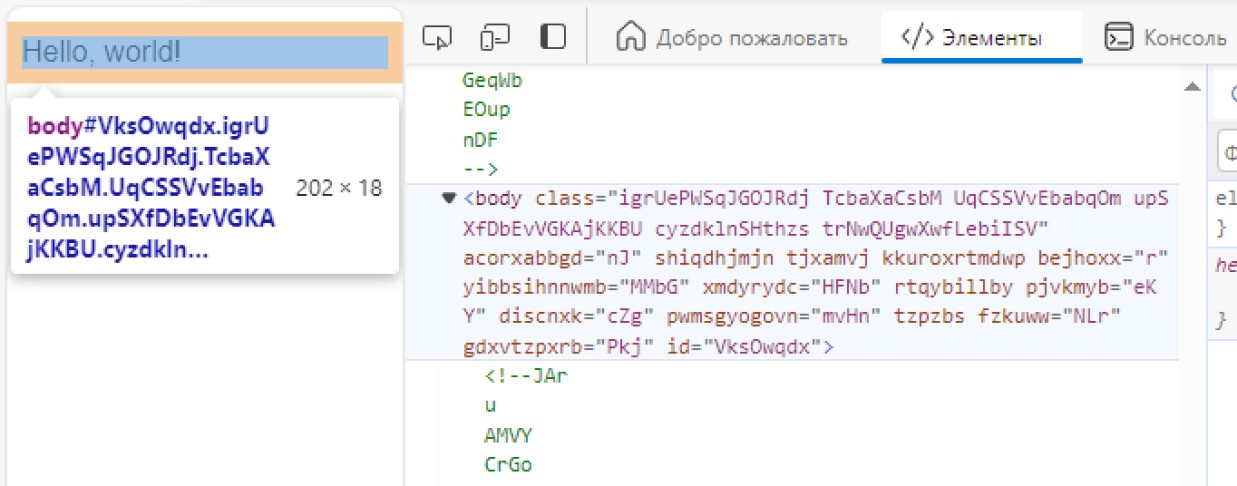
簡要介紹HTML Guard的功能:
_
 <!DOCTYPE  html >
< html >
    < head >
        <!-- Site protection ON! -->
        < script src =" html-guard.min.js " > </ script >
        < script >
            // Configure protection & resource loading
        </ script >
    </ head >

    < body >
    </ body >
</ html > 避免使用<link> 。動態加載.css和.js文件!這種方法使繞過Web2zip.com等網站的下載器成為可能。動態的添加站點資源使得在靜態分析過程中無法複製它們。在這種情況下,當從依賴項中刪除HTML Guard時,由於明顯的原因,Web應用程序的內容將無法加載。
 < script >
    // ADDING: Add link to 'style.css'
    HtmlGuard . loader . loadStyleByRef ( "styles.css" ) ;
</ script >
< script >
// ADDING: Add script "test.js" to head
HtmlGuard . loader . loadScriptBySrc ( "test.js" ) ;
// OR
// ADDING: Add script "test.js" to head after document loading
HtmlGuard . loader . loadScriptBySrc_ContentLoaded ( "test.js" ) ;
</ script >在任何屬性之前添加_前綴,以便src成為_src 。 HTML Guard將自動加載此元素
此保護方法具有2個優勢:
例如:
< img _src =" image.jpg " />此功能阻止了打開開發人員工具的任何嘗試,如果檢測到,則重新加載頁面。
 < script >
    // PROTECTION: Disable DevTools
    HtmlGuard . protections . antiDevTools ( ) ;
</ script >阻止標准上下文菜單的開放。
 < script >
    // PROTECTION: Disable context menu
    HtmlGuard . protections . blockContextMenu ( ) ;
</ script >用戶將無法從站點拖動元素。
 < script >
    // PROTECTION: Disable drag
    HtmlGuard . protections . blockDrag ( ) ;
</ script >刪除使用選擇的能力。
 < script >
    // PROTECTION: Disable selection
    HtmlGuard . protections . blockSelection ( ) ;
</ script >這對於隱藏瀏覽器控制台的調試日誌非常有用。掛鉤函數,例如log , debug , warn , error , dir , dirxml , assert , table使它們返回null
 < script >
    // PROTECTION: Disable console output
    HtmlGuard . protections . blockConsoleOutput ( ) ;
</ script > < head >
<!-- Example of HTML-Guard protection -->
<!DOCTYPE html >
< html >
< head >
< script src =" ../html-guard.js " > </ script >
< script >
// PROTECTION: Disable DevTools
HtmlGuard . protections . antiDevTools ( ) ;
// PROTECTION: Disable context menu
HtmlGuard . protections . blockContextMenu ( ) ;
// PROTECTION: Disable drag
HtmlGuard . protections . blockDrag ( ) ;
// PROTECTION: Disable selection
HtmlGuard . protections . blockSelection ( ) ;
// PROTECTION: Disable console output
HtmlGuard . protections . blockConsoleOutput ( ) ;
// ADDING: Add link to 'style.css'
HtmlGuard . loader . loadStyleByRef ( "styles.css" ) ;
// ADDING: Run 'test.js' script
HtmlGuard . loader . loadScriptBySrc ( "test.js" ) ;
</ script >
</ head >
< body >
< div >
<!-- '_id' is protected variant of 'id' -->
< p > Hello, world! Time: < span _id =" time " > </ span > </ p >
<!-- '_src' is protected variant of 'src' -->
< img _src =" test.jpg " _alt =" Test image " />
</ div >
< a _href =" https://github.com/DosX-dev/HTML-Guard " > HTML Guard in GitHub! </ a >
</ body >
</ html > 該模塊的目的更多用於保護Web應用程序,而不是簡單的站點。如果您使用ReactJ,Vuejs(等)等框架開發應用程序,那麼此項目非常適合您







