transformers interpret
v0.10.0

Transformers ตีความเป็นเครื่องมืออธิบายแบบจำลองที่ออกแบบมาเพื่อทำงานเฉพาะกับ? แพ็คเกจ Transformers
สอดคล้องกับปรัชญาของแพ็คเกจ Transpormer Transformers การตีความจะช่วยให้โมเดล Transformers ใด ๆ สามารถอธิบายได้ในสองบรรทัด ผู้อธิบายมีให้สำหรับทั้งรุ่นข้อความและคอมพิวเตอร์วิสัยทัศน์ การสร้างภาพข้อมูลยังมีอยู่ในสมุดบันทึกและเป็นไฟล์ PNG และ HTML ที่บันทึกได้
ตรวจสอบแอป Demo Streamlit ที่นี่
pip install transformers - interpretเริ่มต้นด้วยการเริ่มต้นโมเดลของ Transformers และ Tokenizer และเรียกใช้ผ่าน `sequenclassification explainer '
สำหรับตัวอย่างนี้เรากำลังใช้ distilbert-base-uncased-finetuned-sst-2-english ซึ่งเป็นแบบจำลอง Distilbert Finetuned ในงานการวิเคราะห์ความเชื่อมั่น
 from transformers import AutoModelForSequenceClassification , AutoTokenizer
model_name = "distilbert-base-uncased-finetuned-sst-2-english"
model = AutoModelForSequenceClassification . from_pretrained ( model_name )
tokenizer = AutoTokenizer . from_pretrained ( model_name )

# With both the model and tokenizer initialized we are now able to get explanations on an example text.

from transformers_interpret import SequenceClassificationExplainer
cls_explainer = SequenceClassificationExplainer (
    model ,
    tokenizer )
word_attributions = cls_explainer ( "I love you, I like you" )
ซึ่งจะส่งคืนรายการ tuples ต่อไปนี้:
 > >> word_attributions
[( '[CLS]' , 0.0 ),
 ( 'i' , 0.2778544699186709 ),
 ( 'love' , 0.7792370723380415 ),
 ( 'you' , 0.38560088858031094 ),
 ( ',' , - 0.01769750505546915 ),
 ( 'i' , 0.12071898121557832 ),
 ( 'like' , 0.19091105304734457 ),
 ( 'you' , 0.33994871536713467 ),
 ( '[SEP]' , 0.0 )]
ตัวเลขการระบุแหล่งที่มาในเชิงบวกบ่งชี้ว่าคำมีส่วนช่วยในเชิงบวกต่อคลาสที่คาดการณ์ไว้ในขณะที่จำนวนลบระบุว่าคำมีส่วนร่วมในเชิงลบต่อคลาสที่คาดการณ์ไว้ ที่นี่เราจะเห็นว่า ฉันรักคุณ ได้รับความสนใจมากที่สุด
คุณสามารถใช้ predicted_class_index ในกรณีที่คุณต้องการทราบว่าคลาสที่คาดการณ์คืออะไรจริง ๆ :
 > >> cls_explainer . predicted_class_index
array ( 1 )
และหากโมเดลมีชื่อฉลากสำหรับแต่ละคลาสเราสามารถเห็นสิ่งเหล่านี้ได้โดยใช้ predicted_class_name :
 > >> cls_explainer . predicted_class_name
'POSITIVE' บางครั้งการอ้างถึงตัวเลขอาจเป็นการยากที่จะอ่านโดยเฉพาะในกรณีที่มีข้อความจำนวนมาก เพื่อช่วยในการที่เรายังให้วิธีการ visualize() ที่ใช้ Captum's ในไลบรารี Viz ที่สร้างขึ้นเพื่อสร้างไฟล์ HTML ที่เน้นการอ้างเหตุผล
หากคุณอยู่ในสมุดบันทึกการโทรไปยังเมธอด visualize() จะแสดงการสร้างภาพข้อมูลในบรรทัด อีกทางเลือกหนึ่งคุณสามารถส่ง FilePath ในการโต้แย้งและไฟล์ HTML จะถูกสร้างขึ้นเพื่อให้คุณสามารถดูคำอธิบาย HTML ในเบราว์เซอร์ของคุณ
cls_explainer . visualize ( "distilbert_viz.html" )
คำอธิบายที่มาไม่ได้ จำกัด เฉพาะคลาสที่คาดการณ์ไว้ ลองทดสอบประโยคที่ซับซ้อนมากขึ้นซึ่งมีความรู้สึกผสมกัน
ในตัวอย่างด้านล่างเราผ่าน class_name="NEGATIVE" เป็นอาร์กิวเมนต์ที่ระบุว่าเราต้องการให้การอ้างเหตุผลที่จะอธิบายสำหรับคลาสเชิง ลบ โดยไม่คำนึงถึงการคาดการณ์ที่แท้จริง อย่างมีประสิทธิภาพเพราะนี่เป็นตัวจําแนกไบนารีที่เราได้รับการอ้างเหตุผลแบบผกผัน
 cls_explainer = SequenceClassificationExplainer ( model , tokenizer )
attributions = cls_explainer ( "I love you, I like you, I also kinda dislike you" , class_name = "NEGATIVE" )
ในกรณีนี้ predicted_class_name ยังคงส่งคืนการทำนายของคลาส ที่เป็นบวก เนื่องจากแบบจำลองได้สร้างการทำนายเดียวกัน แต่ถึงกระนั้นเราก็สนใจที่จะดูการอ้างเหตุผลสำหรับคลาสเชิงลบโดยไม่คำนึงถึงผลลัพธ์ที่คาดการณ์ไว้
 > >> cls_explainer . predicted_class_name
'POSITIVE'
แต่เมื่อเราเห็นภาพการอ้างถึงเราจะเห็นได้ว่าคำว่า " ... ไม่ชอบ " มีส่วนทำให้การทำนายของคลาส "ลบ"
cls_explainer . visualize ( "distilbert_negative_attr.html" )
การได้รับการอ้างถึงสำหรับคลาสที่แตกต่างกันนั้นมีความเข้าใจอย่างถ่องแท้โดยเฉพาะอย่างยิ่งสำหรับปัญหาหลายระดับเนื่องจากช่วยให้คุณสามารถตรวจสอบการทำนายแบบจำลองสำหรับคลาสที่แตกต่างกันและตรวจสอบความมีสติว่าแบบจำลองนั้น "มอง" ในสิ่งที่ถูกต้อง
สำหรับคำอธิบายโดยละเอียดของตัวอย่างนี้โปรดชำระเงินสมุดบันทึกการจำแนกประเภท multiclass นี้
PairwiseSequenceClassificationExplainer เป็นตัวแปรของ SequenceClassificationExplainer ที่ออกแบบมาเพื่อทำงานกับโมเดลการจำแนกประเภทที่คาดว่าลำดับอินพุตจะเป็นอินพุตสองอินพุตคั่นด้วยโทเค็นตัวคั่นแบบจำลอง ตัวอย่างทั่วไปของสิ่งนี้คือโมเดล NLI และการเข้ารหัสข้ามซึ่งใช้กันทั่วไปเพื่อให้คะแนนสองอินพุตคล้ายกัน
ผู้อธิบายนี้จะคำนวณการอ้างถึงคู่สำหรับสองอินพุตที่ผ่าน text1 และ text2 โดยใช้โมเดลและ tokenizer ที่ให้ไว้ในตัวสร้าง
นอกจากนี้เนื่องจากกรณีการใช้งานทั่วไปสำหรับการจำแนกลำดับแบบคู่คือการเปรียบเทียบสองอินพุตที่คล้ายคลึงกัน - แบบจำลองของลักษณะนี้มักจะมีโหนดเอาต์พุตเดี่ยวแทนที่จะเป็นหลายรายการสำหรับแต่ละคลาส การจำแนกลำดับแบบคู่มีฟังก์ชั่นยูทิลิตี้ที่มีประโยชน์บางอย่างเพื่อให้การตีความเอาต์พุตโหนดเดี่ยวชัดเจนขึ้น
โดยค่าเริ่มต้นสำหรับรุ่นที่ส่งออกโหนดเดียวการอ้างถึงนั้นเกี่ยวกับอินพุตที่ผลักดันคะแนนให้ใกล้กับ 1.0 อย่างไรก็ตามหากคุณต้องการเห็นการอ้างถึงด้วยคะแนนใกล้เคียงกับ 0.0 คุณสามารถผ่าน flip_sign=True สำหรับโมเดลที่มีความคล้ายคลึงกันนี้มีประโยชน์เนื่องจากโมเดลอาจทำนายคะแนนใกล้กับ 0.0 สำหรับอินพุตทั้งสองและในกรณีนั้นเราจะพลิกเครื่องหมายการอ้างถึงเพื่ออธิบายว่าทำไมอินพุตทั้งสองจึงแตกต่างกัน
มาเริ่มต้นด้วยการเริ่มต้นโมเดล cross-encoder และ tokenizer จากชุดของการเข้ารหัสข้ามที่ผ่านการฝึกอบรมมาแล้วที่จัดทำโดยผู้เปลี่ยนประโยค
สำหรับตัวอย่างนี้เราใช้ "cross-encoder/ms-marco-MiniLM-L-6-v2" เป็นรหัสข้ามคุณภาพสูงที่ผ่านการฝึกอบรมในชุดข้อมูล MSMARCO ชุดข้อมูลการจัดอันดับสำหรับการตอบคำถามและความเข้าใจในการอ่านเครื่อง
 from transformers import AutoModelForSequenceClassification , AutoTokenizer

from transformers_interpret import PairwiseSequenceClassificationExplainer

model = AutoModelForSequenceClassification . from_pretrained ( "cross-encoder/ms-marco-MiniLM-L-6-v2" )
tokenizer = AutoTokenizer . from_pretrained ( "cross-encoder/ms-marco-MiniLM-L-6-v2" )

pairwise_explainer = PairwiseSequenceClassificationExplainer ( model , tokenizer )

# the pairwise explainer requires two string inputs to be passed, in this case given the nature of the model
# we pass a query string and a context string. The question we are asking of our model is "does this context contain a valid answer to our question"
# the higher the score the better the fit.

query = "How many people live in Berlin?"
context = "Berlin has a population of 3,520,031 registered inhabitants in an area of 891.82 square kilometers."
pairwise_attr = pairwise_explainer ( query , context )
ซึ่งส่งคืนการอ้างถึงต่อไปนี้:
 > >> pairwise_attr
[( '[CLS]' , 0.0 ),
 ( 'how' , - 0.037558652124213034 ),
 ( 'many' , - 0.40348581975409786 ),
 ( 'people' , - 0.29756140282349425 ),
 ( 'live' , - 0.48979015417391764 ),
 ( 'in' , - 0.17844527885888117 ),
 ( 'berlin' , 0.3737346097442739 ),
 ( '?' , - 0.2281428913480142 ),
 ( '[SEP]' , 0.0 ),
 ( 'berlin' , 0.18282430604641564 ),
 ( 'has' , 0.039114659489254834 ),
 ( 'a' , 0.0820056652212297 ),
 ( 'population' , 0.35712150914643026 ),
 ( 'of' , 0.09680870840224687 ),
 ( '3' , 0.04791760029513795 ),
 ( ',' , 0.040330986539774266 ),
 ( '520' , 0.16307677913176166 ),
 ( ',' , - 0.005919693904602767 ),
 ( '03' , 0.019431649515841844 ),
 ( '##1' , - 0.0243808667024702 ),
 ( 'registered' , 0.07748341753369632 ),
 ( 'inhabitants' , 0.23904087299731255 ),
 ( 'in' , 0.07553221327346359 ),
 ( 'an' , 0.033112821611999875 ),
 ( 'area' , - 0.025378852244447532 ),
 ( 'of' , 0.026526373859562906 ),
 ( '89' , 0.0030700151809002147 ),
 ( '##1' , - 0.000410387092186983 ),
 ( '.' , - 0.0193147139126114 ),
 ( '82' , 0.0073800833347678774 ),
 ( 'square' , 0.028988305990861576 ),
 ( 'kilometers' , 0.02071182933829008 ),
 ( '.' , - 0.025901070914318036 ),
( '[SEP]' , 0.0 )] การแสดงภาพการอ้างสิทธิ์แบบคู่ไม่แตกต่างจากการจำแนกลำดับ เราจะเห็นได้ว่าทั้งใน query และ context มีการระบุแหล่งที่มาในเชิงบวกมากมายสำหรับคำว่า berlin รวมทั้งคำว่า population และ inhabitants ใน context สัญญาณที่ดีที่โมเดลของเราเข้าใจบริบทที่เป็นข้อความของคำถามที่ถาม
pairwise_explainer . visualize ( "cross_encoder_attr.html" )
หากเราสนใจที่จะเน้นการอ้างถึงอินพุตที่ผลักดันโมเดลออกไปจากระดับบวกของเอาต์พุตโหนดเดี่ยวนี้เราสามารถผ่านได้:
pairwise_attr = explainer ( query , context , flip_sign = True )นี่เป็นเพียงสัญลักษณ์ของการอ้างเหตุผลเพื่อให้แน่ใจว่าพวกเขาเกี่ยวข้องกับโมเดลที่ส่งออก 0 มากกว่า 1
ผู้อธิบายนี้เป็นส่วนขยายของ SequenceClassificationExplainer และเข้ากันได้กับแบบจำลองการจำแนกลำดับทั้งหมดจากแพ็คเกจ Transformers การเปลี่ยนแปลงที่สำคัญในผู้อธิบายนี้คือการอ้างเหตุผลสำหรับแต่ละฉลากในการกำหนดค่าของโมเดลและส่งคืนพจนานุกรมของการอ้างเหตุผลของคำ WRT ไปยังแต่ละฉลาก เมธอด visualize() ยังแสดงตารางของการอ้างเหตุผลด้วยการอ้างถึงการคำนวณต่อฉลาก
 from transformers import AutoModelForSequenceClassification , AutoTokenizer
from transformers_interpret import MultiLabelClassificationExplainer

model_name = "j-hartmann/emotion-english-distilroberta-base"
model = AutoModelForSequenceClassification . from_pretrained ( model_name )
tokenizer = AutoTokenizer . from_pretrained ( model_name )


cls_explainer = MultiLabelClassificationExplainer ( model , tokenizer )


word_attributions = cls_explainer ( "There were many aspects of the film I liked, but it was frightening and gross in parts. My parents hated it." )
สิ่งนี้สร้างพจนานุกรมของการจับคู่คำว่าการจับคู่คำไปยังรายการของ tuples สำหรับแต่ละคำและเป็นคะแนนการระบุแหล่งที่มา
 > >> word_attributions
{ 'anger' : [( '<s>' , 0.0 ),
           ( 'There' , 0.09002208622000409 ),
           ( 'were' , - 0.025129709879675187 ),
           ( 'many' , - 0.028852677974079328 ),
           ( 'aspects' , - 0.06341968013631565 ),
           ( 'of' , - 0.03587626320752477 ),
           ( 'the' , - 0.014813095892961287 ),
           ( 'film' , - 0.14087587475098232 ),
           ( 'I' , 0.007367876912617766 ),
           ( 'liked' , - 0.09816592066307557 ),
           ( ',' , - 0.014259517291745674 ),
           ( 'but' , - 0.08087144668471376 ),
           ( 'it' , - 0.10185214349220136 ),
           ( 'was' , - 0.07132244710777856 ),
           ( 'frightening' , - 0.4125361737439814 ),
           ( 'and' , - 0.021761663818889918 ),
           ( 'gross' , - 0.10423745223600908 ),
           ( 'in' , - 0.02383646952201854 ),
           ( 'parts' , - 0.027137622525091033 ),
           ( '.' , - 0.02960415694062459 ),
           ( 'My' , 0.05642774605113695 ),
           ( 'parents' , 0.11146648216326158 ),
           ( 'hated' , 0.8497975489280364 ),
           ( 'it' , 0.05358116678115284 ),
           ( '.' , - 0.013566277162080632 ),
           ( '' , 0.09293256725788422 ),
           ( '</s>' , 0.0 )],
 'disgust' : [( '<s>' , 0.0 ),
             ( 'There' , - 0.035296263203072 ),
             ( 'were' , - 0.010224922196739717 ),
             ( 'many' , - 0.03747571761725605 ),
             ( 'aspects' , 0.007696321643436715 ),
             ( 'of' , 0.0026740873113235107 ),
             ( 'the' , 0.0025752851265661335 ),
             ( 'film' , - 0.040890035285783645 ),
             ( 'I' , - 0.014710007408208579 ),
             ( 'liked' , 0.025696806663391577 ),
             ( ',' , - 0.00739107098314569 ),
             ( 'but' , 0.007353791868893654 ),
             ( 'it' , - 0.00821368234753605 ),
             ( 'was' , 0.005439709067819798 ),
             ( 'frightening' , - 0.8135974168445725 ),
             ( 'and' , - 0.002334953123414774 ),
             ( 'gross' , 0.2366024374426269 ),
             ( 'in' , 0.04314772995234148 ),
             ( 'parts' , 0.05590472194035334 ),
             ( '.' , - 0.04362554293972562 ),
             ( 'My' , - 0.04252694977895808 ),
             ( 'parents' , 0.051580790911406944 ),
             ( 'hated' , 0.5067406070057585 ),
             ( 'it' , 0.0527491071885104 ),
             ( '.' , - 0.008280280618652273 ),
             ( '' , 0.07412384603053103 ),
             ( '</s>' , 0.0 )],
 'fear' : [( '<s>' , 0.0 ),
          ( 'There' , - 0.019615758046045408 ),
          ( 'were' , 0.008033402634196246 ),
          ( 'many' , 0.027772367717635423 ),
          ( 'aspects' , 0.01334130725685673 ),
          ( 'of' , 0.009186049991879768 ),
          ( 'the' , 0.005828877177384549 ),
          ( 'film' , 0.09882910753644959 ),
          ( 'I' , 0.01753565003544039 ),
          ( 'liked' , 0.02062597344466885 ),
          ( ',' , - 0.004469530636560965 ),
          ( 'but' , - 0.019660439408176984 ),
          ( 'it' , 0.0488084071292538 ),
          ( 'was' , 0.03830859527501167 ),
          ( 'frightening' , 0.9526443954511705 ),
          ( 'and' , 0.02535156284103706 ),
          ( 'gross' , - 0.10635301961551227 ),
          ( 'in' , - 0.019190425328209065 ),
          ( 'parts' , - 0.01713006453323631 ),
          ( '.' , 0.015043169035757302 ),
          ( 'My' , 0.017068079071414916 ),
          ( 'parents' , - 0.0630781275517486 ),
          ( 'hated' , - 0.23630028921273583 ),
          ( 'it' , - 0.056057044429020306 ),
          ( '.' , 0.0015102052077844612 ),
          ( '' , - 0.010045048665404609 ),
          ( '</s>' , 0.0 )],
 'joy' : [( '<s>' , 0.0 ),
         ( 'There' , 0.04881772670614576 ),
         ( 'were' , - 0.0379316152427468 ),
         ( 'many' , - 0.007955371089444285 ),
         ( 'aspects' , 0.04437296429416574 ),
         ( 'of' , - 0.06407011137335743 ),
         ( 'the' , - 0.07331568926973099 ),
         ( 'film' , 0.21588462483311055 ),
         ( 'I' , 0.04885724513463952 ),
         ( 'liked' , 0.5309510543276107 ),
         ( ',' , 0.1339765195225006 ),
         ( 'but' , 0.09394079060730279 ),
         ( 'it' , - 0.1462792330432028 ),
         ( 'was' , - 0.1358591558323458 ),
         ( 'frightening' , - 0.22184169339341142 ),
         ( 'and' , - 0.07504142930419291 ),
         ( 'gross' , - 0.005472075984252812 ),
         ( 'in' , - 0.0942152657437379 ),
         ( 'parts' , - 0.19345218754215965 ),
         ( '.' , 0.11096247277185402 ),
         ( 'My' , 0.06604512262645984 ),
         ( 'parents' , 0.026376541098236207 ),
         ( 'hated' , - 0.4988319510231699 ),
         ( 'it' , - 0.17532499366236615 ),
         ( '.' , - 0.022609976138939034 ),
         ( '' , - 0.43417114685294833 ),
         ( '</s>' , 0.0 )],
 'neutral' : [( '<s>' , 0.0 ),
             ( 'There' , 0.045984598036642205 ),
             ( 'were' , 0.017142566357474697 ),
             ( 'many' , 0.011419348619472542 ),
             ( 'aspects' , 0.02558593440287365 ),
             ( 'of' , 0.0186162232003498 ),
             ( 'the' , 0.015616416841815963 ),
             ( 'film' , - 0.021190511300570092 ),
             ( 'I' , - 0.03572427925026324 ),
             ( 'liked' , 0.027062554960050455 ),
             ( ',' , 0.02089914209290366 ),
             ( 'but' , 0.025872618597570115 ),
             ( 'it' , - 0.002980407262316265 ),
             ( 'was' , - 0.022218157611174086 ),
             ( 'frightening' , - 0.2982516449116045 ),
             ( 'and' , - 0.01604643529040792 ),
             ( 'gross' , - 0.04573829263548096 ),
             ( 'in' , - 0.006511536166676108 ),
             ( 'parts' , - 0.011744224307968652 ),
             ( '.' , - 0.01817041167875332 ),
             ( 'My' , - 0.07362312722231429 ),
             ( 'parents' , - 0.06910711601816408 ),
             ( 'hated' , - 0.9418903509267312 ),
             ( 'it' , 0.022201795222373488 ),
             ( '.' , 0.025694319747309045 ),
             ( '' , 0.04276690822325994 ),
             ( '</s>' , 0.0 )],
 'sadness' : [( '<s>' , 0.0 ),
             ( 'There' , 0.028237893283377526 ),
             ( 'were' , - 0.04489910545229568 ),
             ( 'many' , 0.004996044977269471 ),
             ( 'aspects' , - 0.1231292680125582 ),
             ( 'of' , - 0.04552690725956671 ),
             ( 'the' , - 0.022077819961347042 ),
             ( 'film' , - 0.14155752357877663 ),
             ( 'I' , 0.04135347872193571 ),
             ( 'liked' , - 0.3097732540526099 ),
             ( ',' , 0.045114660009053134 ),
             ( 'but' , 0.0963352125332619 ),
             ( 'it' , - 0.08120617610094617 ),
             ( 'was' , - 0.08516150809170213 ),
             ( 'frightening' , - 0.10386889639962761 ),
             ( 'and' , - 0.03931986389970189 ),
             ( 'gross' , - 0.2145059013625132 ),
             ( 'in' , - 0.03465423285571697 ),
             ( 'parts' , - 0.08676627134611635 ),
             ( '.' , 0.19025217371906333 ),
             ( 'My' , 0.2582092561303794 ),
             ( 'parents' , 0.15432351476960307 ),
             ( 'hated' , 0.7262186310977987 ),
             ( 'it' , - 0.029160655114499095 ),
             ( '.' , - 0.002758524253450406 ),
             ( '' , - 0.33846410359182094 ),
             ( '</s>' , 0.0 )],
 'surprise' : [( '<s>' , 0.0 ),
              ( 'There' , 0.07196110795254315 ),
              ( 'were' , 0.1434314520711312 ),
              ( 'many' , 0.08812238369489701 ),
              ( 'aspects' , 0.013432396769890982 ),
              ( 'of' , - 0.07127508805657243 ),
              ( 'the' , - 0.14079766624810955 ),
              ( 'film' , - 0.16881201614906485 ),
              ( 'I' , 0.040595668935112135 ),
              ( 'liked' , 0.03239855530171577 ),
              ( ',' , - 0.17676382558158257 ),
              ( 'but' , - 0.03797939330341559 ),
              ( 'it' , - 0.029191325089641736 ),
              ( 'was' , 0.01758013584108571 ),
              ( 'frightening' , - 0.221738963726823 ),
              ( 'and' , - 0.05126920277135527 ),
              ( 'gross' , - 0.33986913466614044 ),
              ( 'in' , - 0.018180366628697 ),
              ( 'parts' , 0.02939418603252064 ),
              ( '.' , 0.018080129971003226 ),
              ( 'My' , - 0.08060162218059498 ),
              ( 'parents' , 0.04351719139081836 ),
              ( 'hated' , - 0.6919028585285265 ),
              ( 'it' , 0.0009574844165327357 ),
              ( '.' , - 0.059473118237873344 ),
              ( '' , - 0.465690452620123 ),
( '</s>' , 0.0 )]} บางครั้งการอ้างถึงตัวเลขอาจเป็นการยากที่จะอ่านโดยเฉพาะในกรณีที่มีข้อความจำนวนมาก เพื่อช่วยในการที่เรายังให้วิธีการ visualize() ที่ใช้ Captum's ในไลบรารี Viz ที่สร้างขึ้นเพื่อสร้างไฟล์ HTML ที่เน้นการอ้างเหตุผล สำหรับการอ้างเหตุผลของผู้อธิบายนี้จะแสดง WRT ไปยังแต่ละฉลาก
หากคุณอยู่ในสมุดบันทึกการโทรไปยังเมธอด visualize() จะแสดงการสร้างภาพข้อมูลในบรรทัด อีกทางเลือกหนึ่งคุณสามารถส่ง FilePath ในการโต้แย้งและไฟล์ HTML จะถูกสร้างขึ้นเพื่อให้คุณสามารถดูคำอธิบาย HTML ในเบราว์เซอร์ของคุณ
cls_explainer . visualize ( "multilabel_viz.html" )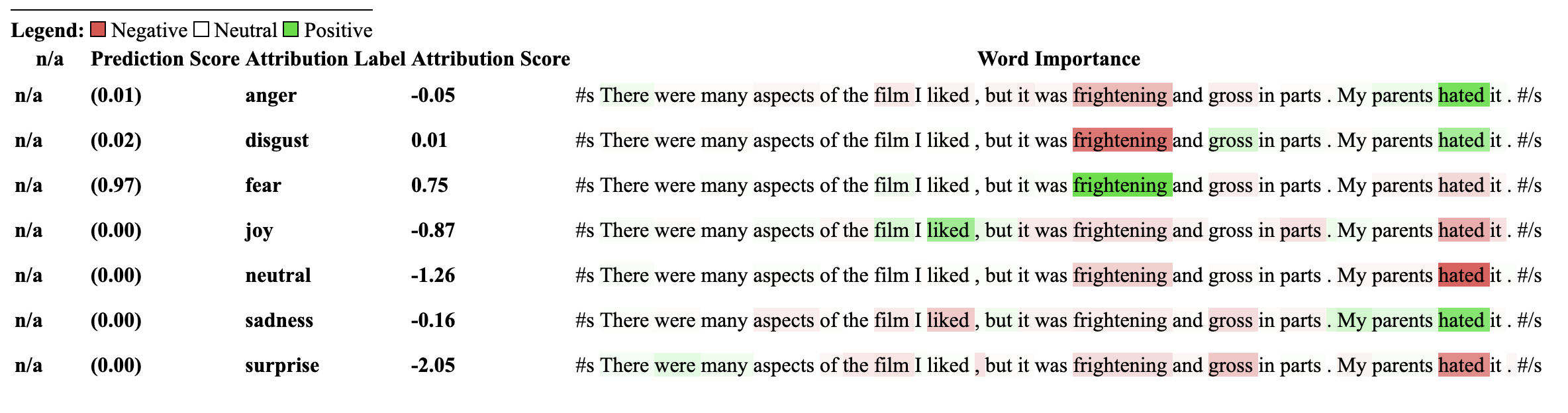
แบบจำลองที่ใช้ตัวอธิบายนี้ต้องได้รับการฝึกฝนก่อนหน้านี้เกี่ยวกับงานการจำแนกประเภท NLI และมีฉลากในการกำหนดค่าของโมเดลที่เรียกว่า "entailment" หรือ "entailment"
ผู้อธิบายนี้อนุญาตให้คำนวณการอ้างเหตุผลสำหรับการจำแนกประเภทช็อตเป็นศูนย์เช่นรุ่น เพื่อให้บรรลุเป้าหมายนี้เราใช้วิธีการเดียวกันกับที่ใช้โดยการกอดใบหน้า สำหรับผู้ที่ไม่คุ้นเคยกับวิธีการที่ใช้โดยการกอด Face เพื่อให้ได้การจำแนกประเภทการยิงแบบศูนย์วิธีการทำงานนี้โดยการใช้ประโยชน์จากฉลาก "entailment" ของโมเดล NLI นี่คือลิงค์ไปยังกระดาษที่อธิบายเพิ่มเติมเกี่ยวกับเรื่องนี้ รายการโมเดล NLI รับประกันว่าจะเข้ากันได้กับผู้อธิบายนี้สามารถพบได้ในศูนย์กลางโมเดล
เริ่มต้นด้วยการเริ่มต้นรูปแบบการจำแนกลำดับของหม้อแปลงและโทเค็นที่ผ่านการฝึกอบรมโดยเฉพาะในงาน NLI และส่งผ่านไปยัง ZeroShotClassificationExplainer
สำหรับตัวอย่างนี้เราใช้ cross-encoder/nli-deberta-base ซึ่งเป็นจุดตรวจสอบสำหรับรุ่น deberta-base ที่ผ่านการฝึกอบรมบนชุดข้อมูลชุดข้อมูล SNLI และ NLI โดยทั่วไปแล้วรุ่นนี้คาดการณ์ว่าคู่ประโยคนั้นเป็นสิ่งที่เป็นกลางหรือขัดแย้งหรือไม่อย่างไรก็ตามสำหรับศูนย์-ช็อตเราจะดูฉลาก entailment เท่านั้น
ขอให้สังเกตว่าเราผ่านฉลากที่กำหนดเองของเราเอง ["finance", "technology", "sports"] ไปยังอินสแตนซ์ของชั้นเรียน จำนวนฉลากใด ๆ สามารถส่งผ่านได้รวมถึงเพียงเล็กน้อย ไม่ว่าจะมีคะแนนฉลากที่สูงที่สุดสำหรับการเข้าร่วมผ่าน predicted_label อย่างไรก็ตามการอ้างเหตุผลนั้นจะถูกคำนวณสำหรับทุกฉลาก หากคุณต้องการเห็นการอ้างถึงสำหรับป้ายกำกับเฉพาะแนะนำเพียงแค่ส่งผ่านในป้ายกำกับหนึ่งนั้นจากนั้นการอ้างเหตุผลจะรับประกันว่าจะคำนวณ WRT ฉลากนั้น
 from transformers import AutoModelForSequenceClassification , AutoTokenizer
from transformers_interpret import ZeroShotClassificationExplainer

tokenizer = AutoTokenizer . from_pretrained ( "cross-encoder/nli-deberta-base" )

model = AutoModelForSequenceClassification . from_pretrained ( "cross-encoder/nli-deberta-base" )


zero_shot_explainer = ZeroShotClassificationExplainer ( model , tokenizer )


word_attributions = zero_shot_explainer (
    "Today apple released the new Macbook showing off a range of new features found in the proprietary silicon chip computer. " ,
    labels = [ "finance" , "technology" , "sports" ],
)
ซึ่งจะส่งคืนรายการ tuple ที่มาต่อไปนี้สำหรับแต่ละฉลาก:
 > >> word_attributions
{ 'finance' : [( '[CLS]' , 0.0 ),
  ( 'Today' , 0.144761198095125 ),
  ( 'apple' , 0.05008283286211926 ),
  ( 'released' , - 0.29790757134109724 ),
  ( 'the' , - 0.09931162582050683 ),
  ( 'new' , - 0.151252730475885 ),
  ( 'Mac' , 0.19431968978659608 ),
  ( 'book' , 0.059431761386793486 ),
  ( 'showing' , - 0.30754747734942633 ),
  ( 'off' , 0.0329034397830471 ),
  ( 'a' , 0.04198035048519715 ),
  ( 'range' , - 0.00413947940202566 ),
  ( 'of' , 0.7135069733740484 ),
  ( 'new' , 0.2294990755900286 ),
  ( 'features' , - 0.1523457769188503 ),
  ( 'found' , - 0.016804346228170633 ),
  ( 'in' , 0.1185751939327566 ),
  ( 'the' , - 0.06990875734316043 ),
  ( 'proprietary' , 0.16339657649559983 ),
  ( 'silicon' , 0.20461302470245252 ),
  ( 'chip' , 0.033304742383885574 ),
  ( 'computer' , - 0.058821677910955064 ),
  ( '.' , - 0.19741292299059068 )],
 'technology' : [( '[CLS]' , 0.0 ),
  ( 'Today' , 0.1261355373492264 ),
  ( 'apple' , - 0.06735584800073911 ),
  ( 'released' , - 0.37758515332894504 ),
  ( 'the' , - 0.16300368060788886 ),
  ( 'new' , - 0.1698884472100767 ),
  ( 'Mac' , 0.41505959302727347 ),
  ( 'book' , 0.321276307285395 ),
  ( 'showing' , - 0.2765988420377037 ),
  ( 'off' , 0.19388699112601515 ),
  ( 'a' , - 0.044676708673846766 ),
  ( 'range' , 0.05333370699507288 ),
  ( 'of' , 0.3654053610507722 ),
  ( 'new' , 0.3143976769670845 ),
  ( 'features' , 0.2108588137592185 ),
  ( 'found' , 0.004676960337191403 ),
  ( 'in' , 0.008026783104605233 ),
  ( 'the' , - 0.09961358108721637 ),
  ( 'proprietary' , 0.18816708356062326 ),
  ( 'silicon' , 0.13322691438800874 ),
  ( 'chip' , 0.015141805082331294 ),
  ( 'computer' , - 0.1321895049108681 ),
  ( '.' , - 0.17152401596638975 )],
 'sports' : [( '[CLS]' , 0.0 ),
  ( 'Today' , 0.11751821789941418 ),
  ( 'apple' , - 0.024552367058659215 ),
  ( 'released' , - 0.44706064525430567 ),
  ( 'the' , - 0.10163968191086448 ),
  ( 'new' , - 0.18590036257614642 ),
  ( 'Mac' , 0.0021649499897370725 ),
  ( 'book' , 0.009141161101058446 ),
  ( 'showing' , - 0.3073791152936541 ),
  ( 'off' , 0.0711051596941137 ),
  ( 'a' , 0.04153236257439005 ),
  ( 'range' , 0.01598478741712663 ),
  ( 'of' , 0.6632118834641558 ),
  ( 'new' , 0.2684728052423898 ),
  ( 'features' , - 0.10249856013919137 ),
  ( 'found' , - 0.032459999377294144 ),
  ( 'in' , 0.11078761617308391 ),
  ( 'the' , - 0.020530085754695244 ),
  ( 'proprietary' , 0.17968209761431955 ),
  ( 'silicon' , 0.19997909769476027 ),
  ( 'chip' , 0.04447720580439545 ),
  ( 'computer' , 0.018515748463790047 ),
  ( '.' , - 0.1686603393466192 )]}
เราสามารถค้นหาว่าฉลากใดที่คาดการณ์ด้วย:
 > >> zero_shot_explainer . predicted_label
'technology' สำหรับ ZeroShotClassificationExplainer Explainer วิธีการ Visualize () ส่งคืนตารางที่คล้ายกับ SequenceClassificationExplainer แต่มีการอ้างเหตุผลสำหรับทุกป้าย
zero_shot_explainer . visualize ( "zero_shot.html" )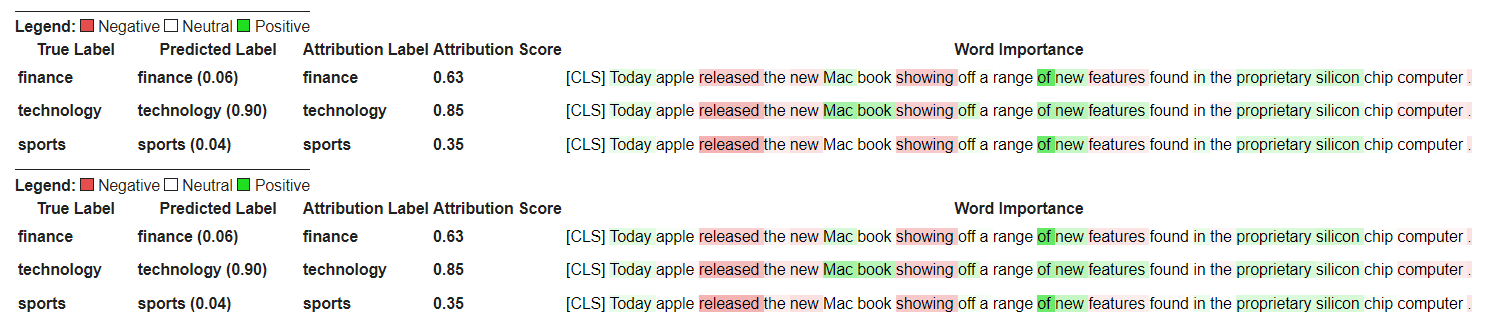
เริ่มต้นด้วยการเริ่มต้นรูปแบบการตอบคำถามของ Transformers และ Tokenizer และเรียกใช้ผ่าน QuestionAnsweringExplainer
สำหรับตัวอย่างนี้เราใช้ bert-large-uncased-whole-word-masking-finetuned-squad รุ่น Bert finetuned บนทีม
 from transformers import AutoModelForQuestionAnswering , AutoTokenizer
from transformers_interpret import QuestionAnsweringExplainer

tokenizer = AutoTokenizer . from_pretrained ( "bert-large-uncased-whole-word-masking-finetuned-squad" )
model = AutoModelForQuestionAnswering . from_pretrained ( "bert-large-uncased-whole-word-masking-finetuned-squad" )

qa_explainer = QuestionAnsweringExplainer (
    model ,
    tokenizer ,
)

context = """
In Artificial Intelligence and machine learning, Natural Language Processing relates to the usage of machines to process and understand human language.
Many researchers currently work in this space.
"""

word_attributions = qa_explainer (
    "What is natural language processing ?" ,
    context ,
)
ซึ่งจะส่งคืน dict ต่อไปนี้ที่มีการอ้างเหตุผลคำสำหรับทั้งตำแหน่งเริ่มต้นและสิ้นสุดที่คาดการณ์ไว้สำหรับคำตอบ
 > >> word_attributions
{ 'start' : [( '[CLS]' , 0.0 ),
  ( 'what' , 0.9177170660377296 ),
  ( 'is' , 0.13382234898765258 ),
  ( 'natural' , 0.08061747350142005 ),
  ( 'language' , 0.013138062762511409 ),
  ( 'processing' , 0.11135923869816286 ),
  ( '?' , 0.00858057388924361 ),
  ( '[SEP]' , - 0.09646373141894966 ),
  ( 'in' , 0.01545633993975799 ),
  ( 'artificial' , 0.0472082598707737 ),
  ( 'intelligence' , 0.026687249355110867 ),
  ( 'and' , 0.01675371260058537 ),
  ( 'machine' , - 0.08429502436554961 ),
  ( 'learning' , 0.0044827685126163355 ),
  ( ',' , - 0.02401013152520878 ),
  ( 'natural' , - 0.0016756080249823537 ),
  ( 'language' , 0.0026815068421401885 ),
  ( 'processing' , 0.06773157580722854 ),
  ( 'relates' , 0.03884601576992908 ),
  ( 'to' , 0.009783797821526368 ),
  ( 'the' , - 0.026650922910540952 ),
  ( 'usage' , - 0.010675019721821147 ),
  ( 'of' , 0.015346787885898537 ),
  ( 'machines' , - 0.08278008270160107 ),
  ( 'to' , 0.12861387892768839 ),
  ( 'process' , 0.19540146386642743 ),
  ( 'and' , 0.009942879959615826 ),
  ( 'understand' , 0.006836894853320319 ),
  ( 'human' , 0.05020451122579102 ),
  ( 'language' , - 0.012980795199301 ),
  ( '.' , 0.00804358248127772 ),
  ( 'many' , 0.02259009321498161 ),
  ( 'researchers' , - 0.02351650942555469 ),
  ( 'currently' , 0.04484573078852946 ),
  ( 'work' , 0.00990399948294476 ),
  ( 'in' , 0.01806961211334615 ),
  ( 'this' , 0.13075899776164499 ),
  ( 'space' , 0.004298315347838973 ),
  ( '.' , - 0.003767904539347979 ),
  ( '[SEP]' , - 0.08891544093454595 )],
 'end' : [( '[CLS]' , 0.0 ),
  ( 'what' , 0.8227231947501547 ),
  ( 'is' , 0.0586864942952253 ),
  ( 'natural' , 0.0938903563379123 ),
  ( 'language' , 0.058596976016400674 ),
  ( 'processing' , 0.1632374290269829 ),
  ( '?' , 0.09695686057123237 ),
  ( '[SEP]' , - 0.11644447033554006 ),
  ( 'in' , - 0.03769172371919206 ),
  ( 'artificial' , 0.06736158404049886 ),
  ( 'intelligence' , 0.02496399001288386 ),
  ( 'and' , - 0.03526028847762427 ),
  ( 'machine' , - 0.20846431491771975 ),
  ( 'learning' , 0.00904892847529654 ),
  ( ',' , - 0.02949905488474854 ),
  ( 'natural' , 0.011024507784743872 ),
  ( 'language' , 0.0870741751282507 ),
  ( 'processing' , 0.11482449622317169 ),
  ( 'relates' , 0.05008962090922852 ),
  ( 'to' , 0.04079118393166258 ),
  ( 'the' , - 0.005069048880616451 ),
  ( 'usage' , - 0.011992752445836278 ),
  ( 'of' , 0.01715183316135495 ),
  ( 'machines' , - 0.29823535624026265 ),
  ( 'to' , - 0.0043760160855057925 ),
  ( 'process' , 0.10503217484645223 ),
  ( 'and' , 0.06840313586976698 ),
  ( 'understand' , 0.057184000619403944 ),
  ( 'human' , 0.0976805947708315 ),
  ( 'language' , 0.07031163646606695 ),
  ( '.' , 0.10494566513897102 ),
  ( 'many' , 0.019227154676079487 ),
  ( 'researchers' , - 0.038173913797800885 ),
  ( 'currently' , 0.03916641120002003 ),
  ( 'work' , 0.03705371672439422 ),
  ( 'in' , - 0.0003155975107591203 ),
  ( 'this' , 0.17254932354022232 ),
  ( 'space' , 0.0014311439625599323 ),
  ( '.' , 0.060637932829867736 ),
  ( '[SEP]' , - 0.09186286505530596 )]}
เราสามารถรับช่วงข้อความสำหรับคำตอบที่คาดการณ์ด้วย:
 > >> qa_explainer . predicted_answer
'usage of machines to process and understand human language' สำหรับ QuestionAnsweringExplainer ถึงวิธีการแสดงภาพ () จะส่งคืนตารางที่มีสองแถว แถวแรกแสดงถึงการอ้างเหตุผลสำหรับตำแหน่งเริ่มต้นของคำตอบและแถวที่สองแสดงถึงการอ้างเหตุผลสำหรับตำแหน่งสิ้นสุดคำตอบ
qa_explainer . visualize ( "bert_qa_viz.html" )
ปัจจุบันเป็นผู้อธิบายการทดลองภายใต้การพัฒนาที่ใช้งานอยู่และยังไม่ได้ทดสอบอย่างเต็มที่ API ของผู้อธิบายอาจมีการเปลี่ยนแปลงเช่นเดียวกับวิธีการระบุแหล่งที่มาหากคุณพบข้อบกพร่องใด ๆ โปรดแจ้งให้เราทราบ
เริ่มต้นด้วยการเริ่มต้นรูปแบบโทเค็นคลาสสิกของหม้อแปลงและโทเค็นและเรียกใช้ผ่าน TokenClassificationExplainer
สำหรับตัวอย่างนี้เรากำลังใช้ dslim/bert-base-NER ซึ่งเป็นรุ่น Bert Finetuned บนชุดข้อมูลการจดจำเอนทิตีของ Conll-2003
 from transformers import AutoModelForTokenClassification , AutoTokenizer
from transformers_interpret import TokenClassificationExplainer

model = AutoModelForTokenClassification . from_pretrained ( 'dslim/bert-base-NER' )
tokenizer = AutoTokenizer . from_pretrained ( 'dslim/bert-base-NER' )

ner_explainer = TokenClassificationExplainer (
    model ,
    tokenizer ,
)

sample_text = "We visited Paris last weekend, where Emmanuel Macron lives."

word_attributions = ner_explainer ( sample_text , ignored_labels = [ 'O' ])
เพื่อลดจำนวนการอ้างเหตุผลที่คำนวณได้เราบอกผู้อธิบายให้เพิกเฉยต่อโทเค็นที่มีฉลากที่คาดการณ์ไว้คือ 'O' นอกจากนี้เรายังสามารถบอกผู้อธิบายให้เพิกเฉยต่อดัชนีบางอย่างที่ให้รายการเป็นอาร์กิวเมนต์ของพารามิเตอร์ ignored_indexes _indexes
ซึ่งจะส่งคืน dict ต่อไปนี้ของรวมถึงฉลากที่คาดการณ์และการอ้างเหตุผลสำหรับแต่ละโทเค็นยกเว้นที่คาดการณ์ว่า 'o':
 > >> word_attributions
{ 'paris' : { 'label' : 'B-LOC' ,
  'attribution_scores' : [( '[CLS]' , 0.0 ),
   ( 'we' , - 0.014352325471387907 ),
   ( 'visited' , 0.32915222186559123 ),
   ( 'paris' , 0.9086791784795596 ),
   ( 'last' , 0.15181203147624034 ),
   ( 'weekend' , 0.14400210630677038 ),
   ( ',' , 0.01899744327012935 ),
   ( 'where' , - 0.039402005463239465 ),
   ( 'emmanuel' , 0.061095284002642025 ),
   ( 'macro' , 0.004192922551105228 ),
   ( '##n' , 0.09446355513057757 ),
   ( 'lives' , - 0.028724312616455003 ),
   ( '.' , 0.08099007392937585 ),
   ( '[SEP]' , 0.0 )]},
 'emmanuel' : { 'label' : 'B-PER' ,
  'attribution_scores' : [( '[CLS]' , 0.0 ),
   ( 'we' , - 0.006933030636686712 ),
   ( 'visited' , 0.10396962390436904 ),
   ( 'paris' , 0.14540758744233165 ),
   ( 'last' , 0.08024018944451371 ),
   ( 'weekend' , 0.10687970996804418 ),
   ( ',' , 0.1793198466387937 ),
   ( 'where' , 0.3436407835483767 ),
   ( 'emmanuel' , 0.8774892642652167 ),
   ( 'macro' , 0.03559399361048316 ),
   ( '##n' , 0.1516315604785551 ),
   ( 'lives' , 0.07056441327498127 ),
   ( '.' , - 0.025820924624605487 ),
   ( '[SEP]' , 0.0 )]},
 'macro' : { 'label' : 'I-PER' ,
  'attribution_scores' : [( '[CLS]' , 0.0 ),
   ( 'we' , 0.05578067326280157 ),
   ( 'visited' , 0.00857021283406586 ),
   ( 'paris' , 0.16559056506114297 ),
   ( 'last' , 0.08285256685903823 ),
   ( 'weekend' , 0.10468727443796395 ),
   ( ',' , 0.09949509071515888 ),
   ( 'where' , 0.3642458274356929 ),
   ( 'emmanuel' , 0.7449335213978788 ),
   ( 'macro' , 0.3794625659183485 ),
   ( '##n' , - 0.2599031433800762 ),
   ( 'lives' , 0.20563450682196147 ),
   ( '.' , - 0.015607017319486929 ),
   ( '[SEP]' , 0.0 )]},
 '##n' : { 'label' : 'I-PER' ,
  'attribution_scores' : [( '[CLS]' , 0.0 ),
   ( 'we' , 0.025194121717285252 ),
   ( 'visited' , - 0.007415022865239864 ),
   ( 'paris' , 0.09478357303107598 ),
   ( 'last' , 0.06927939834474463 ),
   ( 'weekend' , 0.0672008033510708 ),
   ( ',' , 0.08316907214363504 ),
   ( 'where' , 0.3784915854680165 ),
   ( 'emmanuel' , 0.7729352621546081 ),
   ( 'macro' , 0.4148652759139777 ),
   ( '##n' , - 0.20853534512145033 ),
   ( 'lives' , 0.09445057087678274 ),
   ( '.' , - 0.094274985907366 ),
   ( '[SEP]' , 0.0 )]},
 '[SEP]' : { 'label' : 'B-LOC' ,
  'attribution_scores' : [( '[CLS]' , 0.0 ),
   ( 'we' , - 0.3694351403796742 ),
   ( 'visited' , 0.1699038407402483 ),
   ( 'paris' , 0.5461587414992369 ),
   ( 'last' , 0.0037948102770307517 ),
   ( 'weekend' , 0.1628100955702496 ),
   ( ',' , 0.4513093410909263 ),
   ( 'where' , - 0.09577409464161038 ),
   ( 'emmanuel' , 0.48499459835388914 ),
   ( 'macro' , - 0.13528905587653023 ),
   ( '##n' , 0.14362969934754344 ),
   ( 'lives' , - 0.05758007024257254 ),
   ( '.' , - 0.13970977266152554 ),
( '[SEP]' , 0.0 )]}} สำหรับ TokenClassificationExplainer explainer เมธอด Visualize () ส่งคืนตารางที่มีแถวมากเท่ากับโทเค็น
ner_explainer . visualize ( "bert_ner_viz.html" )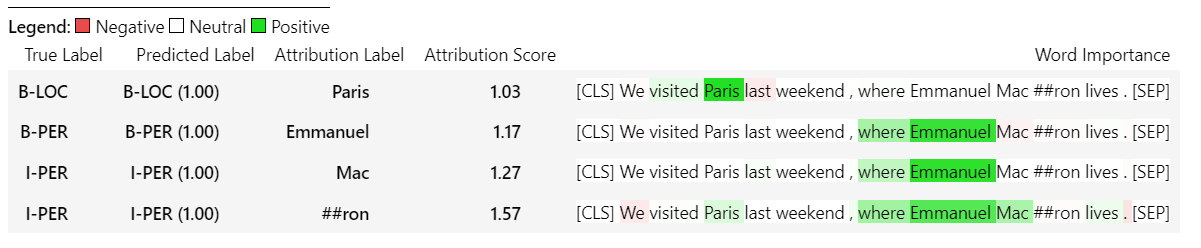
สำหรับรายละเอียดเพิ่มเติมเกี่ยวกับวิธีการทำงาน TokenClassificationExplainer คุณสามารถตรวจสอบโน้ตบุ๊กโน๊ตบุ๊ค/ner_example.ipynb
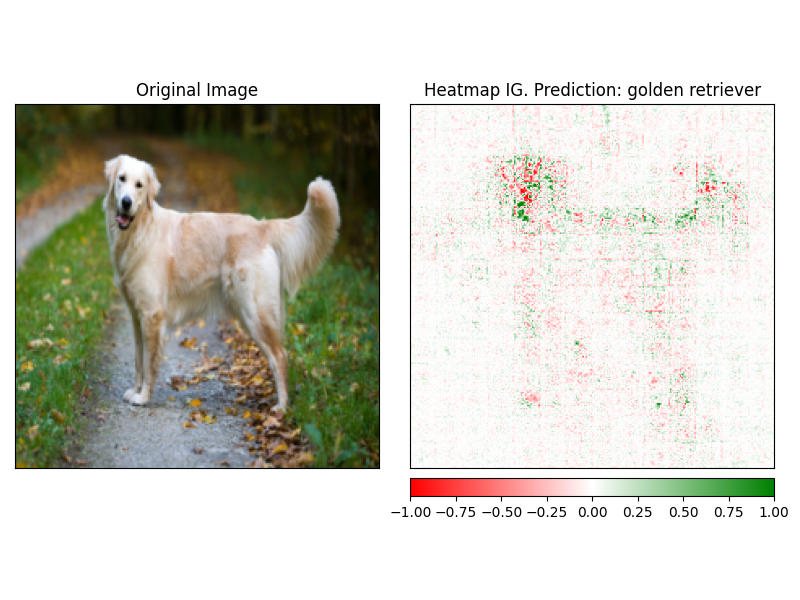
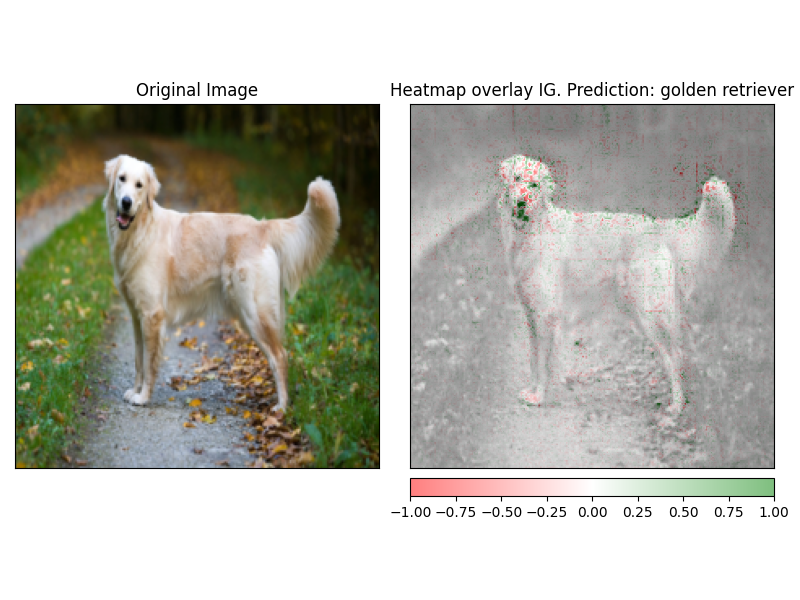
ImageClassificationExplainer Explainer ได้รับการออกแบบมาเพื่อทำงานกับทุกรุ่นจากไลบรารี Transformers ที่ได้รับการฝึกฝนสำหรับการจำแนกภาพ (Swin, Vit ฯลฯ ) มันให้การอ้างถึงสำหรับทุกพิกเซลในภาพที่สามารถมองเห็นได้ง่ายโดยใช้คำอธิบายที่สร้างขึ้นในวิธี visualize
การเริ่มต้นการจำแนกรูปภาพนั้นง่ายมากสิ่งที่คุณต้องมีคือรูปแบบการจำแนกภาพแบบ Finetuned หรือได้รับการฝึกฝนให้ทำงานกับ HuggingFace และตัวแยกฟีเจอร์
สำหรับตัวอย่างนี้เรากำลังใช้ google/vit-base-patch16-224 ซึ่งเป็นแบบจำลอง Vision Transformer (VIT) ที่ผ่านการฝึกอบรมล่วงหน้าบน ImageNet-21K ที่ทำนายจาก 1,000 คลาสที่เป็นไปได้
 from transformers import AutoFeatureExtractor , AutoModelForImageClassification
from transformers_interpret import ImageClassificationExplainer
from PIL import Image
import requests

model_name = "google/vit-base-patch16-224"
model = AutoModelForImageClassification . from_pretrained ( model_name )
feature_extractor = AutoFeatureExtractor . from_pretrained ( model_name )

# With both the model and feature extractor initialized we are now able to get explanations on an image, we will use a simple image of a golden retriever.
image_link = "https://imagesvc.meredithcorp.io/v3/mm/image?url=https%3A%2F%2Fstatic.onecms.io%2Fwp-content%2Fuploads%2Fsites%2F47%2F2020%2F08%2F16%2Fgolden-retriever-177213599-2000.jpg"

image = Image . open ( requests . get ( image_link , stream = True ). raw )

image_classification_explainer = ImageClassificationExplainer ( model = model , feature_extractor = feature_extractor )

image_attributions = image_classification_explainer (
    image
)

print ( image_attributions . shape )
ซึ่งจะส่งคืนรายการ tuples ต่อไปนี้:
> >> torch . Size ([ 1 , 3 , 224 , 224 ])เพราะเรากำลังจัดการกับการสร้างภาพภาพนั้นตรงไปตรงมามากกว่าในรูปแบบข้อความ
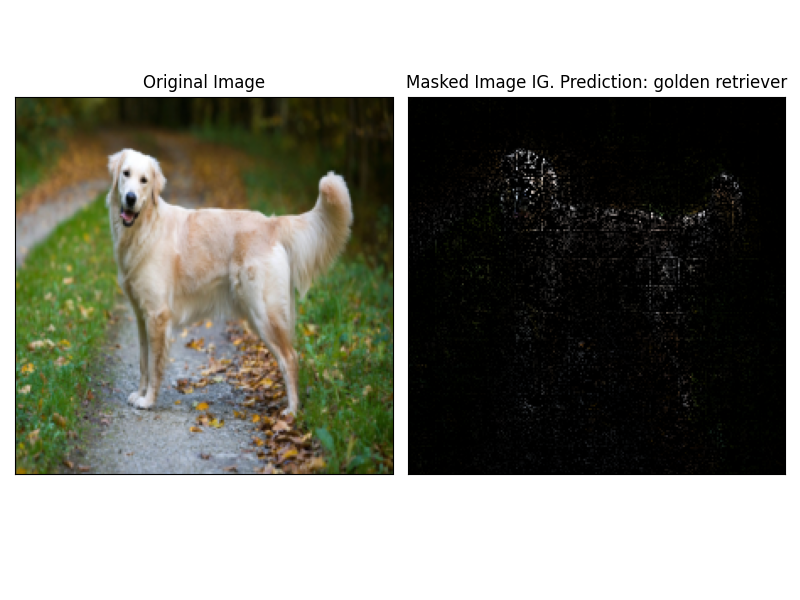
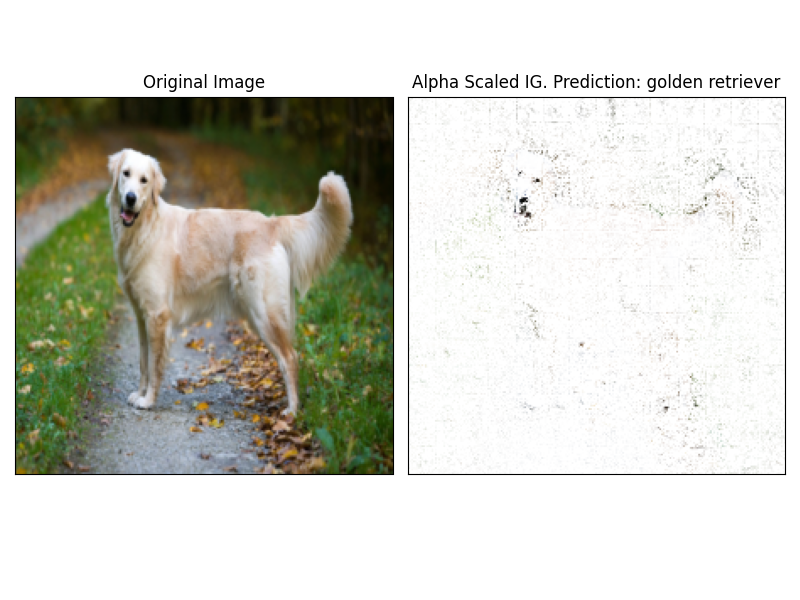
AttRbutions สามารถมองเห็นได้ง่ายโดยใช้วิธี visualize ของผู้อธิบาย ขณะนี้มีวิธีการสร้างภาพข้อมูลที่รองรับ 4 วิธี
heatmap - แผนที่ความร้อนของการอ้างเหตุผลเชิงบวกและเชิงลบถูกวาดในการใช้ขนาดของภาพoverlay - ความร้อนถูกซ้อนทับบนภาพต้นฉบับเวอร์ชันสีเทาmasked_image - ค่าสัมบูรณ์ของ attrbutions ใช้เพื่อสร้างหน้ากากเหนือภาพต้นฉบับalpha_scaling - ตั้งค่าช่องอัลฟา (ความโปร่งใส) ของแต่ละพิกเซลให้เท่ากับค่าที่ระบุแหล่งที่มาปกติ image_classification_explainer . visualize (
method = "heatmap" ,
side_by_side = True ,
outlier_threshold = 0.03
)
 image_classification_explainer . visualize (
    method = "overlay" ,
    side_by_side = True ,
    outlier_threshold = 0.03

)
 image_classification_explainer . visualize (
    method = "masked_image" ,
    side_by_side = True ,
    outlier_threshold = 0.03

)
 image_classification_explainer . visualize (
    method = "alpha_scaling" ,
    side_by_side = True ,
    outlier_threshold = 0.03

)
แพ็คเกจนี้ยังอยู่ในระหว่างการพัฒนาที่ใช้งานอยู่และมีการวางแผนมากขึ้น สำหรับการเปิดตัว 1.0.0 เรามีเป้าหมายที่จะมี:
หากคุณต้องการบริจาคเงินโปรดตรวจสอบแนวทางการบริจาคของเรา
ผู้ดูแลของที่เก็บนี้คือ @cdpierse
หากคุณมีคำถามข้อเสนอแนะหรือต้องการบริจาค (โปรดทำ?) อย่าลังเลที่จะติดต่อ [email protected]
ฉันขอแนะนำให้ตรวจสอบ captum หากคุณพบว่าการอธิบายแบบจำลองและความสามารถในการตีความที่น่าสนใจ
แพ็คเกจนี้ตั้งอยู่บนไหล่ของงานที่น่าทึ่งที่ทำโดยทีมงานที่ Pytorch Captum และกอดใบหน้าและจะไม่มีอยู่จริงหากไม่ใช่สำหรับงานที่น่าทึ่งที่พวกเขาทั้งคู่กำลังทำอยู่ในสาขา ML และการตีความแบบจำลองตามลำดับ
การอ้างเหตุผลทั้งหมดภายในแพ็คเกจนี้คำนวณโดยใช้แพ็คเกจอธิบายความสามารถในการอธิบายของ Pytorch ดูด้านล่างสำหรับลิงค์ที่มีประโยชน์ที่เกี่ยวข้องกับ Captum
การไล่ระดับสีแบบบูรณาการ (IG) และการเปลี่ยนแปลงของชั้นการไล่ระดับสีแบบบูรณาการ (LIG) เป็นวิธีการระบุแหล่งที่มาหลักที่การตีความของหม้อแปลงถูกสร้างขึ้นในปัจจุบัน ด้านล่างนี้เป็นแหล่งข้อมูลที่มีประโยชน์รวมถึงกระดาษต้นฉบับและลิงก์วิดีโอบางส่วนที่อธิบายถึงกลไกภายใน หากคุณอยากรู้อยากเห็นเกี่ยวกับสิ่งที่เกิดขึ้นภายใน Transformers ตีความฉันขอแนะนำให้ตรวจสอบอย่างน้อยหนึ่งทรัพยากรเหล่านี้
ลิงค์ captum
ด้านล่างนี้เป็นลิงค์บางส่วนที่ฉันใช้เพื่อช่วยให้ฉันได้แพ็คเกจนี้เข้าด้วยกันโดยใช้ Captum ขอขอบคุณ @davidefiocco สำหรับส่วนสำคัญของคุณ





