transformers interpret
v0.10.0

트랜스포머 해석은 독점적으로 작동하도록 설계된 모델 설명 도구입니다. 변압기 패키지.
Transformers Package Transformers의 철학에 따라 모든 Transformers 모델을 두 줄로 만 설명 할 수 있습니다. 설명자는 텍스트 및 컴퓨터 비전 모델 모두에 사용할 수 있습니다. 시각화는 노트북 및 저장 가능한 PNG 및 HTML 파일로도 제공됩니다.
여기에서 Streamlit 데모 앱을 확인하십시오
pip install transformers - interpretTransformers의 모델과 토큰 화제를 초기화하고`sequenceclassificationExplainer '를 통해 실행하는 것으로 시작하겠습니다.
이 예에서는 감정 분석 작업에 결합 된 Distilbert 모델 인 distilbert-base-uncased-finetuned-sst-2-english 사용하고 있습니다.
 from transformers import AutoModelForSequenceClassification , AutoTokenizer
model_name = "distilbert-base-uncased-finetuned-sst-2-english"
model = AutoModelForSequenceClassification . from_pretrained ( model_name )
tokenizer = AutoTokenizer . from_pretrained ( model_name )

# With both the model and tokenizer initialized we are now able to get explanations on an example text.

from transformers_interpret import SequenceClassificationExplainer
cls_explainer = SequenceClassificationExplainer (
    model ,
    tokenizer )
word_attributions = cls_explainer ( "I love you, I like you" )
다음 튜플 목록을 반환합니다.
 > >> word_attributions
[( '[CLS]' , 0.0 ),
 ( 'i' , 0.2778544699186709 ),
 ( 'love' , 0.7792370723380415 ),
 ( 'you' , 0.38560088858031094 ),
 ( ',' , - 0.01769750505546915 ),
 ( 'i' , 0.12071898121557832 ),
 ( 'like' , 0.19091105304734457 ),
 ( 'you' , 0.33994871536713467 ),
 ( '[SEP]' , 0.0 )]
양의 귀속 숫자는 단어가 예측 된 클래스에 긍정적으로 기여하는 것을 나타내고, 음수는 단어가 예측 된 클래스에 부정적인 기여를 나타냅니다. 여기서 우리는 내가 당신을 사랑하는 것이 가장 주목을 받는다는 것을 알 수 있습니다.
예측 된 클래스가 실제로 무엇인지 알고 싶을 때 predicted_class_index 사용할 수 있습니다.
 > >> cls_explainer . predicted_class_index
array ( 1 )
모델에 각 클래스에 대한 레이블 이름이있는 경우 predicted_class_name 사용하여 이들도 볼 수 있습니다.
 > >> cls_explainer . predicted_class_name
'POSITIVE' 때로는 텍스트가 많은 경우 숫자 속성을 읽기가 어려울 수 있습니다. visualize() 돕기 위해 Built Viz 라이브러리에 Captum을 사용하여 속성을 강조하는 HTML 파일을 만듭니다.
노트북에있는 경우 visualize() 메소드로 호출하면 시각화가 인라인으로 표시됩니다. 또는 인수로 FilePath를 전달할 수 있으며 HTML 파일이 생성되어 브라우저에서 HTML을 볼 수 있습니다.
cls_explainer . visualize ( "distilbert_viz.html" )
귀속 설명은 예측 된 클래스에만 국한되지 않습니다. 혼합 된 감정이 포함 된 더 복잡한 문장을 테스트합시다.
아래의 예에서는 실제 예측이 무엇인지에 관계없이 부정적인 클래스에 대해 속성을 설명하기를 원한다는 인수로 class_name="NEGATIVE" 를 통과합니다. 효과적으로 이것은 이진 분류기이기 때문에 반비례 속성을 얻고 있습니다.
 cls_explainer = SequenceClassificationExplainer ( model , tokenizer )
attributions = cls_explainer ( "I love you, I like you, I also kinda dislike you" , class_name = "NEGATIVE" )
이 경우, predicted_class_name 모델이 동일한 예측을 생성했지만 그럼에도 불구하고 우리는 예측 된 결과에 관계없이 부정적인 클래스의 속성을 보는 데 관심이 있기 때문에 여전히 양수 클래스의 예측을 반환합니다.
 > >> cls_explainer . predicted_class_name
'POSITIVE'
그러나 우리가 속성을 시각화 할 때 우리는 " ... 일종의 싫어하는 것 "이라는 단어가 "부정적인"클래스의 예측에 기여하고 있음을 알 수 있습니다.
cls_explainer . visualize ( "distilbert_negative_attr.html" )
다양한 클래스에 대한 속성을 얻는 것은 여러 가지 다른 클래스에 대한 모델 예측을 검사하고 모델이 올바른 것들을 "찾고있다"는 것을 확인할 수 있으므로 다중 클래스 문제에 대해 특히 통찰력이 있습니다.
이 예제에 대한 자세한 설명은이 멀티 클래스 분류 노트북을 확인하십시오.
PairwiseSequenceClassificationExplainer 는 입력 시퀀스가 모델 분리기 토큰으로 분리 된 두 개의 입력이 될 것으로 예상되는 분류 모델로 작동하도록 설계된 SequenceClassificationExplainer 하락자의 변형입니다. 이것의 일반적인 예는 NLI 모델과 크로스 코더입니다.
이 설명자는 생성자에 주어진 모델 및 토큰 화제를 사용하여 2 개의 전달 된 입력 text1 및 text2 에 대한 쌍별 속성을 계산합니다.
또한, 쌍별 시퀀스 분류에 대한 공통 사용 사례는 두 가지 입력 유사성을 비교하는 것이기 때문에,이 특성의 모델은 일반적으로 각 클래스에 대해 다중보다 단일 출력 노드 만 갖습니다. 쌍별 시퀀스 분류에는 단일 노드 출력 해석을 명확하게 해석하는 유용한 유틸리티 기능이 있습니다.
단일 노드를 출력하는 모델에 대한 기본적으로 속성은 1.0에 가까운 점수를 밀어 붙이는 입력과 관련이 있지만 0.0에 가까운 점수와 관련하여 속성을보고 싶다면 flip_sign=True 통과 할 수 있습니다. 유사성 기반 모델의 경우 모델이 두 입력에 대해 0.0에 가까운 점수를 예측할 수 있기 때문에 유용하며,이 경우 두 입력이 왜 다른지 설명하기 위해 속성 부호를 뒤집을 것입니다.
문장 변환기가 제공하는 미리 훈련 된 크로스 인코더의 스위트에서 크로스 인코더 모델과 토큰 화기를 초기화하는 것으로 시작하겠습니다.
이 예에서는 MSMARCO 데이터 세트에서 교육을받은 고품질 크로스 코더 인 "cross-encoder/ms-marco-MiniLM-L-6-v2" 사용하고 있습니다.
 from transformers import AutoModelForSequenceClassification , AutoTokenizer

from transformers_interpret import PairwiseSequenceClassificationExplainer

model = AutoModelForSequenceClassification . from_pretrained ( "cross-encoder/ms-marco-MiniLM-L-6-v2" )
tokenizer = AutoTokenizer . from_pretrained ( "cross-encoder/ms-marco-MiniLM-L-6-v2" )

pairwise_explainer = PairwiseSequenceClassificationExplainer ( model , tokenizer )

# the pairwise explainer requires two string inputs to be passed, in this case given the nature of the model
# we pass a query string and a context string. The question we are asking of our model is "does this context contain a valid answer to our question"
# the higher the score the better the fit.

query = "How many people live in Berlin?"
context = "Berlin has a population of 3,520,031 registered inhabitants in an area of 891.82 square kilometers."
pairwise_attr = pairwise_explainer ( query , context )
다음 속성을 반환합니다.
 > >> pairwise_attr
[( '[CLS]' , 0.0 ),
 ( 'how' , - 0.037558652124213034 ),
 ( 'many' , - 0.40348581975409786 ),
 ( 'people' , - 0.29756140282349425 ),
 ( 'live' , - 0.48979015417391764 ),
 ( 'in' , - 0.17844527885888117 ),
 ( 'berlin' , 0.3737346097442739 ),
 ( '?' , - 0.2281428913480142 ),
 ( '[SEP]' , 0.0 ),
 ( 'berlin' , 0.18282430604641564 ),
 ( 'has' , 0.039114659489254834 ),
 ( 'a' , 0.0820056652212297 ),
 ( 'population' , 0.35712150914643026 ),
 ( 'of' , 0.09680870840224687 ),
 ( '3' , 0.04791760029513795 ),
 ( ',' , 0.040330986539774266 ),
 ( '520' , 0.16307677913176166 ),
 ( ',' , - 0.005919693904602767 ),
 ( '03' , 0.019431649515841844 ),
 ( '##1' , - 0.0243808667024702 ),
 ( 'registered' , 0.07748341753369632 ),
 ( 'inhabitants' , 0.23904087299731255 ),
 ( 'in' , 0.07553221327346359 ),
 ( 'an' , 0.033112821611999875 ),
 ( 'area' , - 0.025378852244447532 ),
 ( 'of' , 0.026526373859562906 ),
 ( '89' , 0.0030700151809002147 ),
 ( '##1' , - 0.000410387092186983 ),
 ( '.' , - 0.0193147139126114 ),
 ( '82' , 0.0073800833347678774 ),
 ( 'square' , 0.028988305990861576 ),
 ( 'kilometers' , 0.02071182933829008 ),
 ( '.' , - 0.025901070914318036 ),
 ( '[SEP]' , 0.0 )]
쌍별 속성을 시각화하는 것은 서열 분류 설명과 다르지 않습니다. 우리는 query 와 context 모두에서 berlin 단어에 대한 긍정적 인 귀속이 많다는 것을 알 수 있습니다. 그리고 context 에서 population 와 inhabitants , 우리 모델이 질문의 텍스트 맥락을 이해한다는 좋은 신호.
pairwise_explainer . visualize ( "cross_encoder_attr.html" )
이 단일 노드 출력의 양수 클래스에서 모델을 밀어 붙인 입력 속성을 강조하는 데 더 관심이 있다면 다음을 통과 할 수 있습니다.
pairwise_attr = explainer ( query , context , flip_sign = True )이것은 단순히 속성의 부호를 반전시켜 1이 아닌 모델 출력 0과 관련이 있음을 보장합니다.
이 설명자는 SequenceClassificationExplainer 너의 확장이므로 변압기 패키지의 모든 시퀀스 분류 모델과 호환됩니다. 이 설명 자의 주요 변화는 모델의 구성에서 각 레이블에 대한 속성을 정리하고 각 레이블에 대한 Word 속성 사전을 반환한다는 것입니다. visualize() 메소드는 또한 레이블 당 계산 된 속성으로 속성 테이블을 표시합니다.
 from transformers import AutoModelForSequenceClassification , AutoTokenizer
from transformers_interpret import MultiLabelClassificationExplainer

model_name = "j-hartmann/emotion-english-distilroberta-base"
model = AutoModelForSequenceClassification . from_pretrained ( model_name )
tokenizer = AutoTokenizer . from_pretrained ( model_name )


cls_explainer = MultiLabelClassificationExplainer ( model , tokenizer )


word_attributions = cls_explainer ( "There were many aspects of the film I liked, but it was frightening and gross in parts. My parents hated it." )
이것은 단어 속성 사전을 각 단어에 대한 튜플 목록에 매핑하고 속성 점수를 매핑합니다.
 > >> word_attributions
{ 'anger' : [( '<s>' , 0.0 ),
           ( 'There' , 0.09002208622000409 ),
           ( 'were' , - 0.025129709879675187 ),
           ( 'many' , - 0.028852677974079328 ),
           ( 'aspects' , - 0.06341968013631565 ),
           ( 'of' , - 0.03587626320752477 ),
           ( 'the' , - 0.014813095892961287 ),
           ( 'film' , - 0.14087587475098232 ),
           ( 'I' , 0.007367876912617766 ),
           ( 'liked' , - 0.09816592066307557 ),
           ( ',' , - 0.014259517291745674 ),
           ( 'but' , - 0.08087144668471376 ),
           ( 'it' , - 0.10185214349220136 ),
           ( 'was' , - 0.07132244710777856 ),
           ( 'frightening' , - 0.4125361737439814 ),
           ( 'and' , - 0.021761663818889918 ),
           ( 'gross' , - 0.10423745223600908 ),
           ( 'in' , - 0.02383646952201854 ),
           ( 'parts' , - 0.027137622525091033 ),
           ( '.' , - 0.02960415694062459 ),
           ( 'My' , 0.05642774605113695 ),
           ( 'parents' , 0.11146648216326158 ),
           ( 'hated' , 0.8497975489280364 ),
           ( 'it' , 0.05358116678115284 ),
           ( '.' , - 0.013566277162080632 ),
           ( '' , 0.09293256725788422 ),
           ( '</s>' , 0.0 )],
 'disgust' : [( '<s>' , 0.0 ),
             ( 'There' , - 0.035296263203072 ),
             ( 'were' , - 0.010224922196739717 ),
             ( 'many' , - 0.03747571761725605 ),
             ( 'aspects' , 0.007696321643436715 ),
             ( 'of' , 0.0026740873113235107 ),
             ( 'the' , 0.0025752851265661335 ),
             ( 'film' , - 0.040890035285783645 ),
             ( 'I' , - 0.014710007408208579 ),
             ( 'liked' , 0.025696806663391577 ),
             ( ',' , - 0.00739107098314569 ),
             ( 'but' , 0.007353791868893654 ),
             ( 'it' , - 0.00821368234753605 ),
             ( 'was' , 0.005439709067819798 ),
             ( 'frightening' , - 0.8135974168445725 ),
             ( 'and' , - 0.002334953123414774 ),
             ( 'gross' , 0.2366024374426269 ),
             ( 'in' , 0.04314772995234148 ),
             ( 'parts' , 0.05590472194035334 ),
             ( '.' , - 0.04362554293972562 ),
             ( 'My' , - 0.04252694977895808 ),
             ( 'parents' , 0.051580790911406944 ),
             ( 'hated' , 0.5067406070057585 ),
             ( 'it' , 0.0527491071885104 ),
             ( '.' , - 0.008280280618652273 ),
             ( '' , 0.07412384603053103 ),
             ( '</s>' , 0.0 )],
 'fear' : [( '<s>' , 0.0 ),
          ( 'There' , - 0.019615758046045408 ),
          ( 'were' , 0.008033402634196246 ),
          ( 'many' , 0.027772367717635423 ),
          ( 'aspects' , 0.01334130725685673 ),
          ( 'of' , 0.009186049991879768 ),
          ( 'the' , 0.005828877177384549 ),
          ( 'film' , 0.09882910753644959 ),
          ( 'I' , 0.01753565003544039 ),
          ( 'liked' , 0.02062597344466885 ),
          ( ',' , - 0.004469530636560965 ),
          ( 'but' , - 0.019660439408176984 ),
          ( 'it' , 0.0488084071292538 ),
          ( 'was' , 0.03830859527501167 ),
          ( 'frightening' , 0.9526443954511705 ),
          ( 'and' , 0.02535156284103706 ),
          ( 'gross' , - 0.10635301961551227 ),
          ( 'in' , - 0.019190425328209065 ),
          ( 'parts' , - 0.01713006453323631 ),
          ( '.' , 0.015043169035757302 ),
          ( 'My' , 0.017068079071414916 ),
          ( 'parents' , - 0.0630781275517486 ),
          ( 'hated' , - 0.23630028921273583 ),
          ( 'it' , - 0.056057044429020306 ),
          ( '.' , 0.0015102052077844612 ),
          ( '' , - 0.010045048665404609 ),
          ( '</s>' , 0.0 )],
 'joy' : [( '<s>' , 0.0 ),
         ( 'There' , 0.04881772670614576 ),
         ( 'were' , - 0.0379316152427468 ),
         ( 'many' , - 0.007955371089444285 ),
         ( 'aspects' , 0.04437296429416574 ),
         ( 'of' , - 0.06407011137335743 ),
         ( 'the' , - 0.07331568926973099 ),
         ( 'film' , 0.21588462483311055 ),
         ( 'I' , 0.04885724513463952 ),
         ( 'liked' , 0.5309510543276107 ),
         ( ',' , 0.1339765195225006 ),
         ( 'but' , 0.09394079060730279 ),
         ( 'it' , - 0.1462792330432028 ),
         ( 'was' , - 0.1358591558323458 ),
         ( 'frightening' , - 0.22184169339341142 ),
         ( 'and' , - 0.07504142930419291 ),
         ( 'gross' , - 0.005472075984252812 ),
         ( 'in' , - 0.0942152657437379 ),
         ( 'parts' , - 0.19345218754215965 ),
         ( '.' , 0.11096247277185402 ),
         ( 'My' , 0.06604512262645984 ),
         ( 'parents' , 0.026376541098236207 ),
         ( 'hated' , - 0.4988319510231699 ),
         ( 'it' , - 0.17532499366236615 ),
         ( '.' , - 0.022609976138939034 ),
         ( '' , - 0.43417114685294833 ),
         ( '</s>' , 0.0 )],
 'neutral' : [( '<s>' , 0.0 ),
             ( 'There' , 0.045984598036642205 ),
             ( 'were' , 0.017142566357474697 ),
             ( 'many' , 0.011419348619472542 ),
             ( 'aspects' , 0.02558593440287365 ),
             ( 'of' , 0.0186162232003498 ),
             ( 'the' , 0.015616416841815963 ),
             ( 'film' , - 0.021190511300570092 ),
             ( 'I' , - 0.03572427925026324 ),
             ( 'liked' , 0.027062554960050455 ),
             ( ',' , 0.02089914209290366 ),
             ( 'but' , 0.025872618597570115 ),
             ( 'it' , - 0.002980407262316265 ),
             ( 'was' , - 0.022218157611174086 ),
             ( 'frightening' , - 0.2982516449116045 ),
             ( 'and' , - 0.01604643529040792 ),
             ( 'gross' , - 0.04573829263548096 ),
             ( 'in' , - 0.006511536166676108 ),
             ( 'parts' , - 0.011744224307968652 ),
             ( '.' , - 0.01817041167875332 ),
             ( 'My' , - 0.07362312722231429 ),
             ( 'parents' , - 0.06910711601816408 ),
             ( 'hated' , - 0.9418903509267312 ),
             ( 'it' , 0.022201795222373488 ),
             ( '.' , 0.025694319747309045 ),
             ( '' , 0.04276690822325994 ),
             ( '</s>' , 0.0 )],
 'sadness' : [( '<s>' , 0.0 ),
             ( 'There' , 0.028237893283377526 ),
             ( 'were' , - 0.04489910545229568 ),
             ( 'many' , 0.004996044977269471 ),
             ( 'aspects' , - 0.1231292680125582 ),
             ( 'of' , - 0.04552690725956671 ),
             ( 'the' , - 0.022077819961347042 ),
             ( 'film' , - 0.14155752357877663 ),
             ( 'I' , 0.04135347872193571 ),
             ( 'liked' , - 0.3097732540526099 ),
             ( ',' , 0.045114660009053134 ),
             ( 'but' , 0.0963352125332619 ),
             ( 'it' , - 0.08120617610094617 ),
             ( 'was' , - 0.08516150809170213 ),
             ( 'frightening' , - 0.10386889639962761 ),
             ( 'and' , - 0.03931986389970189 ),
             ( 'gross' , - 0.2145059013625132 ),
             ( 'in' , - 0.03465423285571697 ),
             ( 'parts' , - 0.08676627134611635 ),
             ( '.' , 0.19025217371906333 ),
             ( 'My' , 0.2582092561303794 ),
             ( 'parents' , 0.15432351476960307 ),
             ( 'hated' , 0.7262186310977987 ),
             ( 'it' , - 0.029160655114499095 ),
             ( '.' , - 0.002758524253450406 ),
             ( '' , - 0.33846410359182094 ),
             ( '</s>' , 0.0 )],
 'surprise' : [( '<s>' , 0.0 ),
              ( 'There' , 0.07196110795254315 ),
              ( 'were' , 0.1434314520711312 ),
              ( 'many' , 0.08812238369489701 ),
              ( 'aspects' , 0.013432396769890982 ),
              ( 'of' , - 0.07127508805657243 ),
              ( 'the' , - 0.14079766624810955 ),
              ( 'film' , - 0.16881201614906485 ),
              ( 'I' , 0.040595668935112135 ),
              ( 'liked' , 0.03239855530171577 ),
              ( ',' , - 0.17676382558158257 ),
              ( 'but' , - 0.03797939330341559 ),
              ( 'it' , - 0.029191325089641736 ),
              ( 'was' , 0.01758013584108571 ),
              ( 'frightening' , - 0.221738963726823 ),
              ( 'and' , - 0.05126920277135527 ),
              ( 'gross' , - 0.33986913466614044 ),
              ( 'in' , - 0.018180366628697 ),
              ( 'parts' , 0.02939418603252064 ),
              ( '.' , 0.018080129971003226 ),
              ( 'My' , - 0.08060162218059498 ),
              ( 'parents' , 0.04351719139081836 ),
              ( 'hated' , - 0.6919028585285265 ),
              ( 'it' , 0.0009574844165327357 ),
              ( '.' , - 0.059473118237873344 ),
              ( '' , - 0.465690452620123 ),
( '</s>' , 0.0 )]} 때로는 텍스트가 많은 경우 숫자 속성을 읽기가 어려울 수 있습니다. visualize() 돕기 위해 Built Viz 라이브러리에 Captum을 사용하여 속성을 강조하는 HTML 파일을 만듭니다. 이 설명자 속성은 각 레이블에 WRT를 표시합니다.
노트북에있는 경우 visualize() 메소드로 호출하면 시각화가 인라인으로 표시됩니다. 또는 인수로 FilePath를 전달할 수 있으며 HTML 파일이 생성되어 브라우저에서 HTML을 볼 수 있습니다.
cls_explainer . visualize ( "multilabel_viz.html" )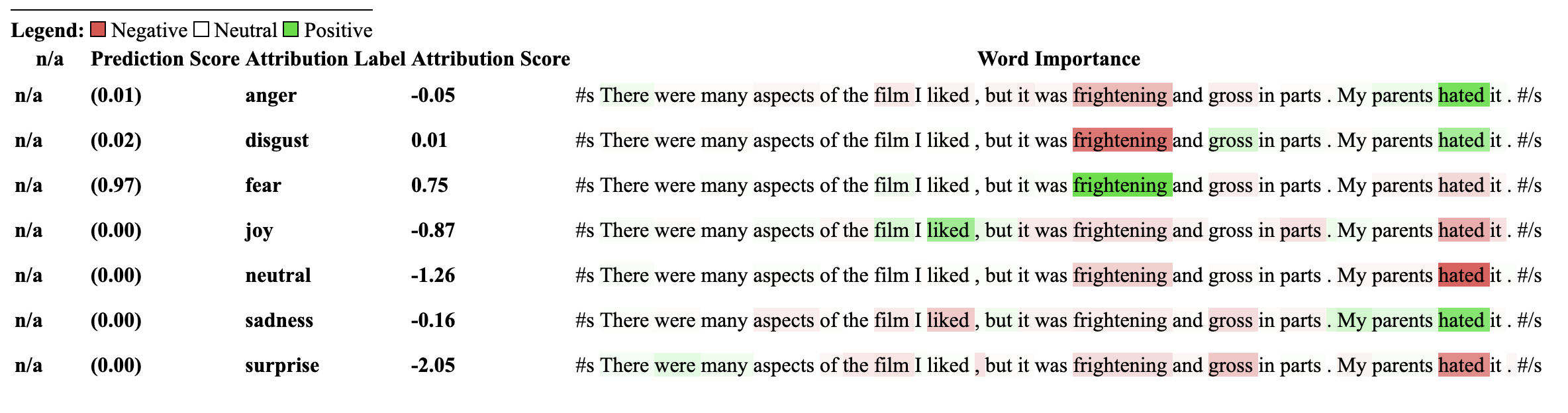
이 설명자를 사용하는 모델은 이전에 NLI 분류 다운 스트림 작업에 대해 교육을 받아야하며 "Entailment"또는 "Entailment"라는 모델 구성에 레이블이 있어야합니다.
이 설명자는 모델과 같은 제로 샷 분류에 대해 속성을 계산할 수 있습니다. 이를 달성하기 위해 우리는 포옹으로 사용하는 것과 동일한 방법론을 사용합니다. 제로 샷 분류를 달성하기 위해 얼굴을 껴안는 데 익숙하지 않은 방법은 NLI 모델의 "Entailment"레이블을 이용하는 것입니다. 다음은 그것에 대해 더 설명하는 논문에 대한 링크입니다. 이 설명 자와 호환되는 NLI 모델 목록은 모델 허브에서 찾을 수 있습니다.
NLI 작업에 대해 특별히 교육을받은 Transformers의 시퀀스 분류 모델과 토큰 화기를 초기화하여 ZeroshotClassificationExplainer로 전달하는 것으로 시작하겠습니다.
이 예에서는 SNLI 및 NLI 데이터 세트 데이터 세트에서 교육 된 Deberta-Base 모델에 대한 검문소 인 cross-encoder/nli-deberta-base 사용하고 있습니다. 이 모델은 일반적으로 문장 쌍이 수반, 중립 또는 모순인지 여부를 예측하지만, 제로 샷의 경우 우리는 만일 레이블 만 본다.
우리는 자신의 커스텀 레이블 ["finance", "technology", "sports"] 클래스 인스턴스에 전달합니다. 라벨을 거의 포함하지 않는 여러 가지 라벨을 전달할 수 있습니다. Enlailment에서 가장 높은 레이블 점수가 predicted_label 통해 액세스 할 수 있지만 속성 자체는 모든 레이블에 대해 계산됩니다. 특정 레이블에 대한 속성을 보려면 해당 레이블을 전달하는 것이 좋습니다. 그 속성은 해당 레이블을 계산하도록 보장됩니다.
 from transformers import AutoModelForSequenceClassification , AutoTokenizer
from transformers_interpret import ZeroShotClassificationExplainer

tokenizer = AutoTokenizer . from_pretrained ( "cross-encoder/nli-deberta-base" )

model = AutoModelForSequenceClassification . from_pretrained ( "cross-encoder/nli-deberta-base" )


zero_shot_explainer = ZeroShotClassificationExplainer ( model , tokenizer )


word_attributions = zero_shot_explainer (
    "Today apple released the new Macbook showing off a range of new features found in the proprietary silicon chip computer. " ,
    labels = [ "finance" , "technology" , "sports" ],
)
각 레이블에 대한 다음의 속성 튜플 목록을 반환합니다.
 > >> word_attributions
{ 'finance' : [( '[CLS]' , 0.0 ),
  ( 'Today' , 0.144761198095125 ),
  ( 'apple' , 0.05008283286211926 ),
  ( 'released' , - 0.29790757134109724 ),
  ( 'the' , - 0.09931162582050683 ),
  ( 'new' , - 0.151252730475885 ),
  ( 'Mac' , 0.19431968978659608 ),
  ( 'book' , 0.059431761386793486 ),
  ( 'showing' , - 0.30754747734942633 ),
  ( 'off' , 0.0329034397830471 ),
  ( 'a' , 0.04198035048519715 ),
  ( 'range' , - 0.00413947940202566 ),
  ( 'of' , 0.7135069733740484 ),
  ( 'new' , 0.2294990755900286 ),
  ( 'features' , - 0.1523457769188503 ),
  ( 'found' , - 0.016804346228170633 ),
  ( 'in' , 0.1185751939327566 ),
  ( 'the' , - 0.06990875734316043 ),
  ( 'proprietary' , 0.16339657649559983 ),
  ( 'silicon' , 0.20461302470245252 ),
  ( 'chip' , 0.033304742383885574 ),
  ( 'computer' , - 0.058821677910955064 ),
  ( '.' , - 0.19741292299059068 )],
 'technology' : [( '[CLS]' , 0.0 ),
  ( 'Today' , 0.1261355373492264 ),
  ( 'apple' , - 0.06735584800073911 ),
  ( 'released' , - 0.37758515332894504 ),
  ( 'the' , - 0.16300368060788886 ),
  ( 'new' , - 0.1698884472100767 ),
  ( 'Mac' , 0.41505959302727347 ),
  ( 'book' , 0.321276307285395 ),
  ( 'showing' , - 0.2765988420377037 ),
  ( 'off' , 0.19388699112601515 ),
  ( 'a' , - 0.044676708673846766 ),
  ( 'range' , 0.05333370699507288 ),
  ( 'of' , 0.3654053610507722 ),
  ( 'new' , 0.3143976769670845 ),
  ( 'features' , 0.2108588137592185 ),
  ( 'found' , 0.004676960337191403 ),
  ( 'in' , 0.008026783104605233 ),
  ( 'the' , - 0.09961358108721637 ),
  ( 'proprietary' , 0.18816708356062326 ),
  ( 'silicon' , 0.13322691438800874 ),
  ( 'chip' , 0.015141805082331294 ),
  ( 'computer' , - 0.1321895049108681 ),
  ( '.' , - 0.17152401596638975 )],
 'sports' : [( '[CLS]' , 0.0 ),
  ( 'Today' , 0.11751821789941418 ),
  ( 'apple' , - 0.024552367058659215 ),
  ( 'released' , - 0.44706064525430567 ),
  ( 'the' , - 0.10163968191086448 ),
  ( 'new' , - 0.18590036257614642 ),
  ( 'Mac' , 0.0021649499897370725 ),
  ( 'book' , 0.009141161101058446 ),
  ( 'showing' , - 0.3073791152936541 ),
  ( 'off' , 0.0711051596941137 ),
  ( 'a' , 0.04153236257439005 ),
  ( 'range' , 0.01598478741712663 ),
  ( 'of' , 0.6632118834641558 ),
  ( 'new' , 0.2684728052423898 ),
  ( 'features' , - 0.10249856013919137 ),
  ( 'found' , - 0.032459999377294144 ),
  ( 'in' , 0.11078761617308391 ),
  ( 'the' , - 0.020530085754695244 ),
  ( 'proprietary' , 0.17968209761431955 ),
  ( 'silicon' , 0.19997909769476027 ),
  ( 'chip' , 0.04447720580439545 ),
  ( 'computer' , 0.018515748463790047 ),
  ( '.' , - 0.1686603393466192 )]}
우리는 어떤 레이블이 예측되었는지 확인할 수 있습니다.
 > >> zero_shot_explainer . predicted_label
'technology' ZeroShotClassificationExplainer 의 경우 visuation () 메소드는 SequenceClassificationExplainer 하는 것과 유사한 테이블을 반환하지만 모든 레이블에 대한 속성을 반환합니다.
zero_shot_explainer . visualize ( "zero_shot.html" )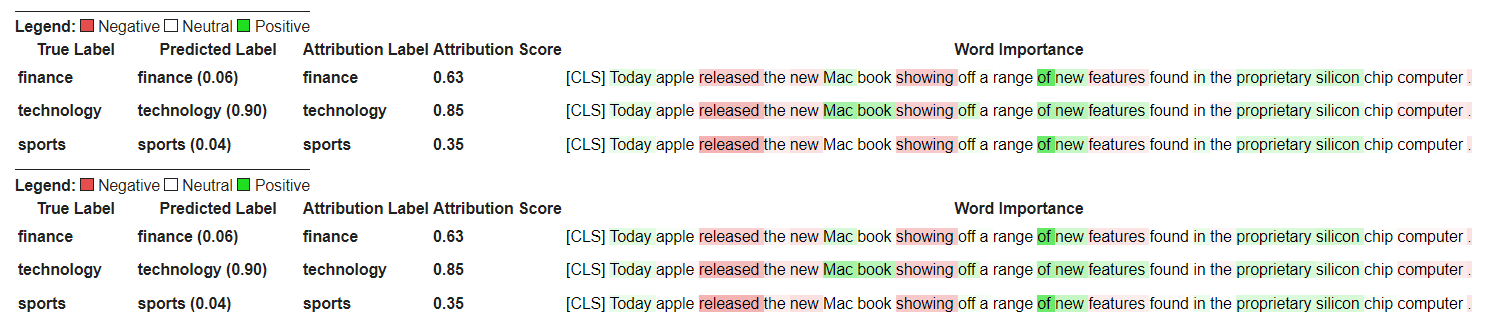
Transformers의 질문 답변 모델 및 토큰 화기를 초기화하고 QuestionAnsweringExplainer 통해 실행하는 것으로 시작하겠습니다.
이 예에서는 분대에 미세한 버트 모델 인 bert-large-uncased-whole-word-masking-finetuned-squad 사용하고 있습니다.
 from transformers import AutoModelForQuestionAnswering , AutoTokenizer
from transformers_interpret import QuestionAnsweringExplainer

tokenizer = AutoTokenizer . from_pretrained ( "bert-large-uncased-whole-word-masking-finetuned-squad" )
model = AutoModelForQuestionAnswering . from_pretrained ( "bert-large-uncased-whole-word-masking-finetuned-squad" )

qa_explainer = QuestionAnsweringExplainer (
    model ,
    tokenizer ,
)

context = """
In Artificial Intelligence and machine learning, Natural Language Processing relates to the usage of machines to process and understand human language.
Many researchers currently work in this space.
"""

word_attributions = qa_explainer (
    "What is natural language processing ?" ,
    context ,
)
이는 답변에 대한 예측 된 시작 및 종료 위치에 대한 단어 속성이 포함 된 다음 덕트를 반환합니다.
 > >> word_attributions
{ 'start' : [( '[CLS]' , 0.0 ),
  ( 'what' , 0.9177170660377296 ),
  ( 'is' , 0.13382234898765258 ),
  ( 'natural' , 0.08061747350142005 ),
  ( 'language' , 0.013138062762511409 ),
  ( 'processing' , 0.11135923869816286 ),
  ( '?' , 0.00858057388924361 ),
  ( '[SEP]' , - 0.09646373141894966 ),
  ( 'in' , 0.01545633993975799 ),
  ( 'artificial' , 0.0472082598707737 ),
  ( 'intelligence' , 0.026687249355110867 ),
  ( 'and' , 0.01675371260058537 ),
  ( 'machine' , - 0.08429502436554961 ),
  ( 'learning' , 0.0044827685126163355 ),
  ( ',' , - 0.02401013152520878 ),
  ( 'natural' , - 0.0016756080249823537 ),
  ( 'language' , 0.0026815068421401885 ),
  ( 'processing' , 0.06773157580722854 ),
  ( 'relates' , 0.03884601576992908 ),
  ( 'to' , 0.009783797821526368 ),
  ( 'the' , - 0.026650922910540952 ),
  ( 'usage' , - 0.010675019721821147 ),
  ( 'of' , 0.015346787885898537 ),
  ( 'machines' , - 0.08278008270160107 ),
  ( 'to' , 0.12861387892768839 ),
  ( 'process' , 0.19540146386642743 ),
  ( 'and' , 0.009942879959615826 ),
  ( 'understand' , 0.006836894853320319 ),
  ( 'human' , 0.05020451122579102 ),
  ( 'language' , - 0.012980795199301 ),
  ( '.' , 0.00804358248127772 ),
  ( 'many' , 0.02259009321498161 ),
  ( 'researchers' , - 0.02351650942555469 ),
  ( 'currently' , 0.04484573078852946 ),
  ( 'work' , 0.00990399948294476 ),
  ( 'in' , 0.01806961211334615 ),
  ( 'this' , 0.13075899776164499 ),
  ( 'space' , 0.004298315347838973 ),
  ( '.' , - 0.003767904539347979 ),
  ( '[SEP]' , - 0.08891544093454595 )],
 'end' : [( '[CLS]' , 0.0 ),
  ( 'what' , 0.8227231947501547 ),
  ( 'is' , 0.0586864942952253 ),
  ( 'natural' , 0.0938903563379123 ),
  ( 'language' , 0.058596976016400674 ),
  ( 'processing' , 0.1632374290269829 ),
  ( '?' , 0.09695686057123237 ),
  ( '[SEP]' , - 0.11644447033554006 ),
  ( 'in' , - 0.03769172371919206 ),
  ( 'artificial' , 0.06736158404049886 ),
  ( 'intelligence' , 0.02496399001288386 ),
  ( 'and' , - 0.03526028847762427 ),
  ( 'machine' , - 0.20846431491771975 ),
  ( 'learning' , 0.00904892847529654 ),
  ( ',' , - 0.02949905488474854 ),
  ( 'natural' , 0.011024507784743872 ),
  ( 'language' , 0.0870741751282507 ),
  ( 'processing' , 0.11482449622317169 ),
  ( 'relates' , 0.05008962090922852 ),
  ( 'to' , 0.04079118393166258 ),
  ( 'the' , - 0.005069048880616451 ),
  ( 'usage' , - 0.011992752445836278 ),
  ( 'of' , 0.01715183316135495 ),
  ( 'machines' , - 0.29823535624026265 ),
  ( 'to' , - 0.0043760160855057925 ),
  ( 'process' , 0.10503217484645223 ),
  ( 'and' , 0.06840313586976698 ),
  ( 'understand' , 0.057184000619403944 ),
  ( 'human' , 0.0976805947708315 ),
  ( 'language' , 0.07031163646606695 ),
  ( '.' , 0.10494566513897102 ),
  ( 'many' , 0.019227154676079487 ),
  ( 'researchers' , - 0.038173913797800885 ),
  ( 'currently' , 0.03916641120002003 ),
  ( 'work' , 0.03705371672439422 ),
  ( 'in' , - 0.0003155975107591203 ),
  ( 'this' , 0.17254932354022232 ),
  ( 'space' , 0.0014311439625599323 ),
  ( '.' , 0.060637932829867736 ),
  ( '[SEP]' , - 0.09186286505530596 )]}
예측 된 답변에 대한 텍스트 스팬을 얻을 수 있습니다.
 > >> qa_explainer . predicted_answer
'usage of machines to process and understand human language' QuestionAnsweringExplainer 의 경우 visualize () 메소드는 두 행으로 테이블을 반환합니다. 첫 번째 행은 답변의 시작 위치에 대한 속성을 나타내고 두 번째 행은 답변의 끝 위치에 대한 속성을 나타냅니다.
qa_explainer . visualize ( "bert_qa_viz.html" )
이것은 현재 적극적인 개발중인 실험 자이며 아직 완전히 테스트되지 않았습니다. 설명 자의 API는 귀속 방법과 마찬가지로 변경 될 수 있습니다. 버그를 찾으면 알려주십시오.
Transformers의 Token Classfication 모델 및 토큰 화기를 초기화하고 TokenClassificationExplainer 통해 실행하는 것으로 시작하겠습니다.
이 예에서는 Conll-2003이라는 이름의 엔티티 인식 데이터 세트에 미세한 버트 모델 인 dslim/bert-base-NER 사용하고 있습니다.
 from transformers import AutoModelForTokenClassification , AutoTokenizer
from transformers_interpret import TokenClassificationExplainer

model = AutoModelForTokenClassification . from_pretrained ( 'dslim/bert-base-NER' )
tokenizer = AutoTokenizer . from_pretrained ( 'dslim/bert-base-NER' )

ner_explainer = TokenClassificationExplainer (
    model ,
    tokenizer ,
)

sample_text = "We visited Paris last weekend, where Emmanuel Macron lives."

word_attributions = ner_explainer ( sample_text , ignored_labels = [ 'O' ])
계산 된 속성의 수를 줄이기 위해 설명자에게 예측 된 레이블이 'O' 인 토큰을 무시하도록 지시합니다. 또한 설명자에게 매개 변수의 인수 ignored_indexes 때문에 목록을 제공하는 특정 인덱스를 무시하도록 지시 할 수 있습니다.
'o'로 예측 된 것을 제외하고는 예측 된 레이블과 각 토큰에 대한 속성을 포함시키는 다음과 같은 반환을 반환합니다.
 > >> word_attributions
{ 'paris' : { 'label' : 'B-LOC' ,
  'attribution_scores' : [( '[CLS]' , 0.0 ),
   ( 'we' , - 0.014352325471387907 ),
   ( 'visited' , 0.32915222186559123 ),
   ( 'paris' , 0.9086791784795596 ),
   ( 'last' , 0.15181203147624034 ),
   ( 'weekend' , 0.14400210630677038 ),
   ( ',' , 0.01899744327012935 ),
   ( 'where' , - 0.039402005463239465 ),
   ( 'emmanuel' , 0.061095284002642025 ),
   ( 'macro' , 0.004192922551105228 ),
   ( '##n' , 0.09446355513057757 ),
   ( 'lives' , - 0.028724312616455003 ),
   ( '.' , 0.08099007392937585 ),
   ( '[SEP]' , 0.0 )]},
 'emmanuel' : { 'label' : 'B-PER' ,
  'attribution_scores' : [( '[CLS]' , 0.0 ),
   ( 'we' , - 0.006933030636686712 ),
   ( 'visited' , 0.10396962390436904 ),
   ( 'paris' , 0.14540758744233165 ),
   ( 'last' , 0.08024018944451371 ),
   ( 'weekend' , 0.10687970996804418 ),
   ( ',' , 0.1793198466387937 ),
   ( 'where' , 0.3436407835483767 ),
   ( 'emmanuel' , 0.8774892642652167 ),
   ( 'macro' , 0.03559399361048316 ),
   ( '##n' , 0.1516315604785551 ),
   ( 'lives' , 0.07056441327498127 ),
   ( '.' , - 0.025820924624605487 ),
   ( '[SEP]' , 0.0 )]},
 'macro' : { 'label' : 'I-PER' ,
  'attribution_scores' : [( '[CLS]' , 0.0 ),
   ( 'we' , 0.05578067326280157 ),
   ( 'visited' , 0.00857021283406586 ),
   ( 'paris' , 0.16559056506114297 ),
   ( 'last' , 0.08285256685903823 ),
   ( 'weekend' , 0.10468727443796395 ),
   ( ',' , 0.09949509071515888 ),
   ( 'where' , 0.3642458274356929 ),
   ( 'emmanuel' , 0.7449335213978788 ),
   ( 'macro' , 0.3794625659183485 ),
   ( '##n' , - 0.2599031433800762 ),
   ( 'lives' , 0.20563450682196147 ),
   ( '.' , - 0.015607017319486929 ),
   ( '[SEP]' , 0.0 )]},
 '##n' : { 'label' : 'I-PER' ,
  'attribution_scores' : [( '[CLS]' , 0.0 ),
   ( 'we' , 0.025194121717285252 ),
   ( 'visited' , - 0.007415022865239864 ),
   ( 'paris' , 0.09478357303107598 ),
   ( 'last' , 0.06927939834474463 ),
   ( 'weekend' , 0.0672008033510708 ),
   ( ',' , 0.08316907214363504 ),
   ( 'where' , 0.3784915854680165 ),
   ( 'emmanuel' , 0.7729352621546081 ),
   ( 'macro' , 0.4148652759139777 ),
   ( '##n' , - 0.20853534512145033 ),
   ( 'lives' , 0.09445057087678274 ),
   ( '.' , - 0.094274985907366 ),
   ( '[SEP]' , 0.0 )]},
 '[SEP]' : { 'label' : 'B-LOC' ,
  'attribution_scores' : [( '[CLS]' , 0.0 ),
   ( 'we' , - 0.3694351403796742 ),
   ( 'visited' , 0.1699038407402483 ),
   ( 'paris' , 0.5461587414992369 ),
   ( 'last' , 0.0037948102770307517 ),
   ( 'weekend' , 0.1628100955702496 ),
   ( ',' , 0.4513093410909263 ),
   ( 'where' , - 0.09577409464161038 ),
   ( 'emmanuel' , 0.48499459835388914 ),
   ( 'macro' , - 0.13528905587653023 ),
   ( '##n' , 0.14362969934754344 ),
   ( 'lives' , - 0.05758007024257254 ),
   ( '.' , - 0.13970977266152554 ),
( '[SEP]' , 0.0 )]}} TokenClassificationExplainer 의 경우 visualize () 메서드는 토큰만큼 행이 많은 테이블을 반환합니다.
ner_explainer . visualize ( "bert_ner_viz.html" )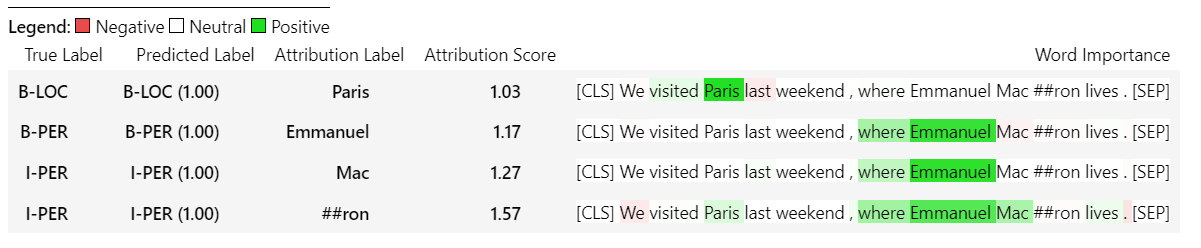
TokenClassificationExplainer 작동 방식에 대한 자세한 내용은 노트북 노트북/ner_example.ipynb를 확인할 수 있습니다.
ImageClassificationExplainer 는 이미지 분류 (SWIN, VIT 등)를 위해 교육을받은 Transformers 라이브러리의 모든 모델과 함께 작동하도록 설계되었습니다. visualize 방법에 내장 된 설명자를 사용하여 쉽게 시각화 할 수있는 이미지의 모든 픽셀에 대한 속성을 제공합니다.
이미지 분류를 초기화하는 것은 매우 간단합니다. 필요한 것은 이미지 분류 모델이 포옹 또는 기능 추출기로 작업하도록 구성되거나 훈련됩니다.
이 예에서는 1000 개의 가능한 클래스에서 예측하는 ImageNet-21K에서 미리 훈련 된 Vision Transformer (VIT) 모델 인 google/vit-base-patch16-224 사용하고 있습니다.
 from transformers import AutoFeatureExtractor , AutoModelForImageClassification
from transformers_interpret import ImageClassificationExplainer
from PIL import Image
import requests

model_name = "google/vit-base-patch16-224"
model = AutoModelForImageClassification . from_pretrained ( model_name )
feature_extractor = AutoFeatureExtractor . from_pretrained ( model_name )

# With both the model and feature extractor initialized we are now able to get explanations on an image, we will use a simple image of a golden retriever.
image_link = "https://imagesvc.meredithcorp.io/v3/mm/image?url=https%3A%2F%2Fstatic.onecms.io%2Fwp-content%2Fuploads%2Fsites%2F47%2F2020%2F08%2F16%2Fgolden-retriever-177213599-2000.jpg"

image = Image . open ( requests . get ( image_link , stream = True ). raw )

image_classification_explainer = ImageClassificationExplainer ( model = model , feature_extractor = feature_extractor )

image_attributions = image_classification_explainer (
    image
)

print ( image_attributions . shape )
다음 튜플 목록을 반환합니다.
> >> torch . Size ([ 1 , 3 , 224 , 224 ])이미지 시각화를 다루고 있기 때문에 텍스트 모델보다 훨씬 간단합니다.
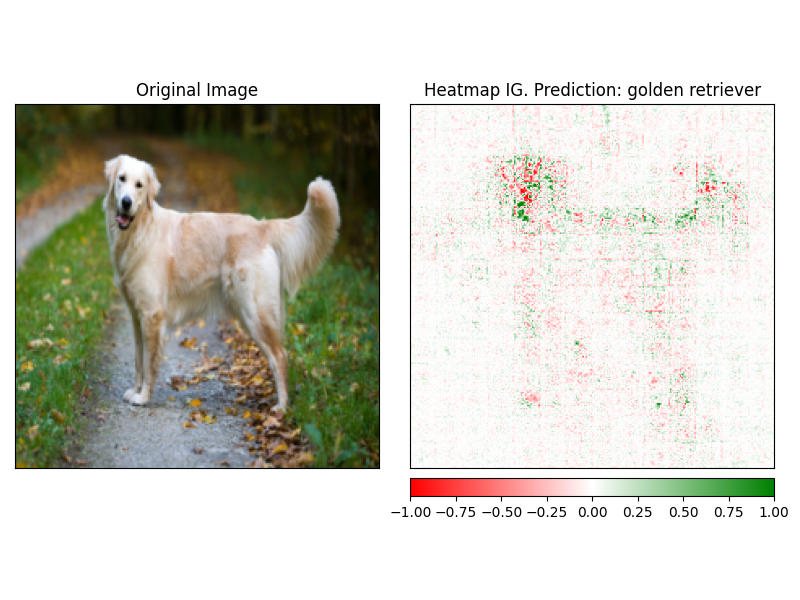
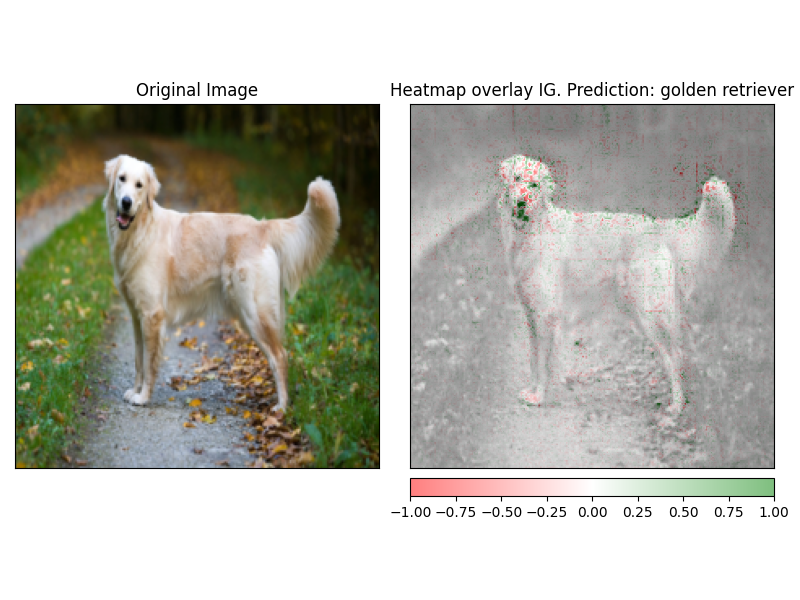
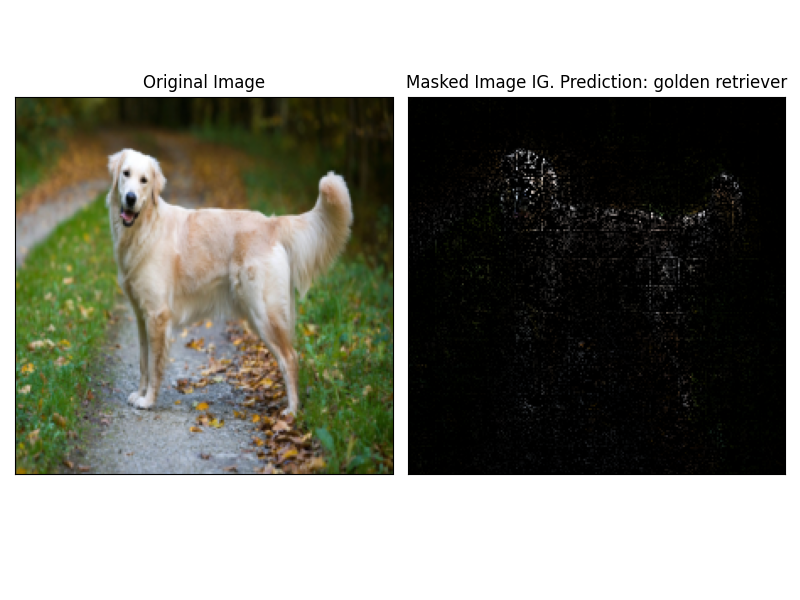
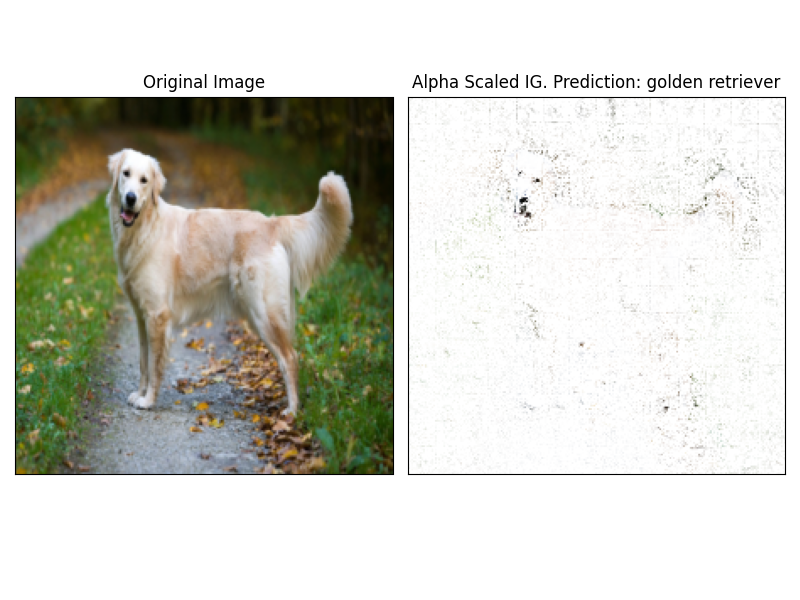
설명 자의 visualize 메소드를 사용하여 ATTRBUTUSION을 쉽게 시각화 할 수 있습니다. 현재 4 개의 지원되는 시각화 방법이 있습니다.
heatmap 이미지의 치수를 사용하여 양수 및 부정적인 귀속의 열 맵이 그려집니다.overlay - 히트 맵은 원본 이미지의 회색체 버전 위에 오버레이됩니다.masked_image Attrbutions의 절대 값은 원본 이미지 위에 마스크를 만드는 데 사용됩니다.alpha_scaling 각 픽셀의 알파 채널 (투명성)을 정규화 된 속성 값과 동일하게 설정합니다. image_classification_explainer . visualize (
method = "heatmap" ,
side_by_side = True ,
outlier_threshold = 0.03
)
 image_classification_explainer . visualize (
    method = "overlay" ,
    side_by_side = True ,
    outlier_threshold = 0.03

)
 image_classification_explainer . visualize (
    method = "masked_image" ,
    side_by_side = True ,
    outlier_threshold = 0.03

)
 image_classification_explainer . visualize (
    method = "alpha_scaling" ,
    side_by_side = True ,
    outlier_threshold = 0.03

)
이 패키지는 여전히 활발한 개발 중이며 훨씬 더 많은 계획이 있습니다. 1.0.0 릴리스의 경우 우리는 다음을 목표로하고 있습니다.
기부금을 원하시면 기부금 가이드 라인을 확인하십시오.
이 저장소의 관리자는 @cdpierse입니다.
궁금한 점, 제안이 있거나 기부를하고 싶다면 (하십시오?) [email protected]으로 언제든지 연락하십시오.
또한 모델 설명 및 해석 가능성이 흥미로운 경우 캡텀을 확인하는 것이 좋습니다.
이 패키지는 Pytorch Captum과 Hugging Face의 팀이 수행 한 놀라운 작업의 어깨에 서 있으며 ML의 분야와 모델 해석 가능성이 각각 수행되는 놀라운 작업이 아니라면 존재하지 않을 것입니다.
이 패키지 내의 모든 속성은 Pytorch의 설명 패키지 캡텀을 사용하여 계산됩니다. Captum과 관련된 유용한 링크는 아래를 참조하십시오.
IG (Integrated Gradients)와 IT 층 통합 그라디언트 (LIG)의 변형은 변압기 해석이 현재 구축되는 핵심 속성 방법입니다. 다음은 원본 용지와 내부 역학을 설명하는 일부 비디오 링크를 포함한 유용한 리소스입니다. Transformers Insider Insider에 대해 궁금한 점이 있다면 이러한 리소스 중 적어도 하나를 확인하는 것이 좋습니다.
캡텀 링크
다음은 Captum을 사용 하여이 패키지를 함께 모으는 데 도움이 된 링크입니다. 매우 통찰력있는 요점에 대해 @davidefiocco에 감사드립니다.





