nginx module vts
v0.2.2

โมดูลสถานะการรับส่งข้อมูลโฮสต์เสมือนจริงของ Nginx
ดู GitHub เผยแพร่สำหรับการติดแท็กล่าสุด
เรียกใช้ sudo prove -rt หลังจากที่คุณติดตั้งโมดูลนี้แล้ว จำเป็นต้องใช้ sudo เนื่องจากการทดสอบต้องการให้ Nginx ฟังบนพอร์ต 80
เวอร์ชันก่อนหน้านี้ไม่ได้ทดสอบ
shell> git clone git://github.com/vozlt/nginx-module-vts.git
เพิ่มโมดูลลง --add-module=/path/to/nginx-module-vts การกำหนดค่าบิล
สร้าง Nginx Binary
ติดตั้ง Nginx Binary
 http {
    vhost_traffic_status_zone;

    ...

    server {

        ...

        location /status {
            vhost_traffic_status_display;
            vhost_traffic_status_display_format html;
        }
    }
}นี่คือโมดูล NGINX ที่ให้การเข้าถึงข้อมูลสถานะโฮสต์เสมือนจริง มันมีสถานะปัจจุบันเช่นเซิร์ฟเวอร์ต้นน้ำแคช สิ่งนี้คล้ายกับการตรวจสอบกิจกรรมสดของ Nginx Plus HTML ในตัวยังนำมาจากหน้าสาธิตของเวอร์ชันเก่า
ก่อนอื่นจำเป็นต้องใช้คำสั่ง vhost_traffic_status_zone และจากนั้นหากมีการตั้งค่าคำสั่ง vhost_traffic_status_display สามารถเข้าถึงได้ดังนี้:
/status/format/json จะตอบกลับด้วยเอกสาร JSON ที่มีข้อมูลกิจกรรมปัจจุบันสำหรับการใช้ในแดชบอร์ดสดและเครื่องมือตรวจสอบของบุคคลที่สาม/status/format/html จะตอบกลับด้วยแดชบอร์ดสดในตัวใน HTML ที่ร้องขอภายในถึง /status/format/json/status/format/jsonp จะตอบกลับด้วยฟังก์ชั่นการโทรกลับ JSONP ที่มีข้อมูลกิจกรรมปัจจุบันสำหรับการใช้ในแดชบอร์ดสดและเครื่องมือตรวจสอบของบุคคลที่สาม/status/format/prometheus จะตอบกลับด้วยเอกสารโพรที่มีข้อมูลกิจกรรมปัจจุบัน/status/control จะตอบกลับด้วยเอกสาร JSON หลังจากรีเซ็ตหรือลบโซนผ่านสตริงการสืบค้น ดูการควบคุมเอกสาร JSON มีดังนี้:
{
    "hostName" : ...,
    "moduleVersion" : ...,
    "nginxVersion" : ...,
    "loadMsec" : ...,
    "nowMsec" : ...,
    "connections" : {
        "active" : ...,
        "reading" : ...,
        "writing" : ...,
        "waiting" : ...,
        "accepted" : ...,
        "handled" : ...,
        "requests" : ...
    },
    "sharedZones" : {
        "name" : ...,
        "maxSize" : ...,
        "usedSize" : ...,
        "usedNode" : ...
    },
    "serverZones" : {
        "..." :{
            "requestCounter" : ...,
            "inBytes" : ...,
            "outBytes" : ...,
            "responses" :{
                "1xx" : ...,
                "2xx" : ...,
                "3xx" : ...,
                "4xx" : ...,
                "5xx" : ...,
                "miss" : ...,
                "bypass" : ...,
                "expired" : ...,
                "stale" : ...,
                "updating" : ...,
                "revalidated" : ...,
                "hit" : ...,
                "scarce" : ...
            },
            "requestMsecCounter" : ...,
            "requestMsec" : ...,
            "requestMsecs" :{
                "times" :[ ... ],
                "msecs" :[ ... ]
            },
            "requestBuckets" :{
                "msecs" :[ ... ],
                "counters" :[ ... ]
            },
        }
        ...
    },
    "filterZones" : {
        "..." :{
            "..." :{
                "requestCounter" : ...,
                "inBytes" : ...,
                "outBytes" : ...,
                "responses" :{
                    "1xx" : ...,
                    "2xx" : ...,
                    "3xx" : ...,
                    "4xx" : ...,
                    "5xx" : ...,
                    "miss" : ...,
                    "bypass" : ...,
                    "expired" : ...,
                    "stale" : ...,
                    "updating" : ...,
                    "revalidated" : ...,
                    "hit" : ...,
                    "scarce" : ...
                },
                "requestMsecCounter" : ...,
                "requestMsec" : ...,
                "requestMsecs" :{
                    "times" :[ ... ],
                    "msecs" :[ ... ]
                },
                "requestBuckets" :{
                    "msecs" :[ ... ],
                    "counters" :[ ... ]
                },
            },
            ...
        },
        ...
    },
    "upstreamZones" : {
        "..." :[
            {
                "server" : ...,
                "requestCounter" : ...,
                "inBytes" : ...,
                "outBytes" : ...,
                "responses" :{
                    "1xx" : ...,
                    "2xx" : ...,
                    "3xx" : ...,
                    "4xx" : ...,
                    "5xx" : ...
                },
                "requestMsecCounter" : ...,
                "requestMsec" : ...,
                "requestMsecs" :{
                    "times" :[ ... ],
                    "msecs" :[ ... ]
                },
                "requestBuckets" :{
                    "msecs" :[ ... ],
                    "counters" :[ ... ]
                },
                "responseMsecCounter" : ...,
                "responseMsec" : ...,
                "responseMsecs" :{
                    "times" :[ ... ],
                    "msecs" :[ ... ]
                },
                "responseBuckets" :{
                    "msecs" :[ ... ],
                    "counters" :[ ... ]
                },
                "weight" : ...,
                "maxFails" : ...,
                "failTimeout" : ...,
                "backup" : ...,
                "down" : ...
            }
            ...
        ],
        ...
    }
    "cacheZones" : {
        "..." :{
            "maxSize" : ...,
            "usedSize" : ...,
            "inBytes" : ...,
            "outBytes" : ...,
            "responses" :{
                "miss" : ...,
                "bypass" : ...,
                "expired" : ...,
                "stale" : ...,
                "updating" : ...,
                "revalidated" : ...,
                "hit" : ...,
                "scarce" : ...
            }
        },
        ...
    }
}* ) และอัตราส่วนการเข้าชมvhost_traffic_status_filter_by_set_key directive* ) และอัตราส่วนการกดที่กรองผ่านคำสั่ง vhost_traffic_status_filter_by_set_key directive วัตถุ overCounts ในเอกสาร JSON ส่วนใหญ่สำหรับระบบ 32 บิตและจะเพิ่มขึ้น 1 หากค่าของมันเกินระดับ คำสั่ง vhost_traffic_status_display_format ตั้งค่ารูปแบบ ouput เริ่มต้นที่เป็นหนึ่งใน JSON, JSONP, HTML, Prometheus (ค่าเริ่มต้น: JSON)
การคำนวณการจราจรดังนี้:
การคำนวณทั้งหมดทำงานในขั้นตอนการประมวลผลบันทึกของ Nginx การเปลี่ยนเส้นทางภายใน (X-Accel-Redirect หรือ Error_Page) ไม่ได้คำนวณใน upstreamzones
Caveats: โมดูลนี้อาศัยระบบบันทึก Nginx (NGX_HTTP_LOG_PHASE: เฟสสุดท้ายของ NGINX HTTP) ดังนั้นปริมาณการใช้งานอาจอยู่ในบาง cirumstances ที่แตกต่างกัน WebSocket การดาวน์โหลดที่ถูกยกเลิกอาจเป็นสาเหตุของความไม่ถูกต้อง การทำงานของโมดูลไม่สำคัญเลยว่า Access_log Directive "ON" หรือ "OFF" อีกครั้งโมดูลนี้ทำงานได้ดีใน "Access_log Off" เมื่อใช้หลายโดเมนมันจะเป็นโดเมนแรก (ซ้าย) ของคำสั่ง server_name หากคุณไม่ต้องการให้ดู VHOST_TRAFFIC_STATUS_FILTER_BY_HOST, VHOST_TRAFFIC_STATUS_FILTER_BY_SET_KEY Directive
ดูโมดูลต่อไปนี้สำหรับสถิติการจราจร stream :
ค่าเฉลี่ยทั้งหมดจะถูกคำนวณเป็น AMM (ค่าเฉลี่ยเลขคณิต) ในช่วง 64 สุดท้าย
สามารถรีเซ็ตหรือลบโซนการจราจรผ่านสตริงแบบสอบถาม คำขอตอบกลับด้วยเอกสาร JSON
{status_uri} / control? cmd = {command} & group = {group} & zone = {name} http {
geoip_country /usr/share/GeoIP/GeoIP.dat;
vhost_traffic_status_zone;
vhost_traffic_status_filter_by_set_key $geoip_country_code country::*;
...
server {
server_name example.org;
...
vhost_traffic_status_filter_by_set_key $geoip_country_code country:: $server_name ;
location /status {
vhost_traffic_status_display;
vhost_traffic_status_display_format html;
}
}
} หากตั้งค่าไว้ด้านบนแล้ว URI ควบคุมจะเป็นเหมือนตัวอย่าง. example.org/status/control /control
อาร์กิวเมนต์คำขอที่มีอยู่มีดังนี้:
status | reset | delete >status/format/jsonserver | filter | upstream@alone | upstream@group | cache * > สิ่งนี้คล้ายกับ status/format/json ยกเว้นว่าจะได้รับแต่ละโซน
status/format/json ค่า Mainzones เป็นค่าสถานะเริ่มต้นรวมถึง hostName , moduleVersion , nginxVersion , loadMsec , nowMsec , connections
namefilter_group @ nameupstream_group @ namenamenameมันรีเซ็ตค่าของโซนที่ระบุเป็น 0
namefilter_group @ nameupstream_group @ namenamenameมันลบโซนที่ระบุในหน่วยความจำที่ใช้ร่วมกัน
namefilter_group @ nameupstream_group @ namenamename สามารถรับค่าสถานะในการกำหนดค่า Nginx แยกกันโดยใช้คำสั่ง vhost_traffic_status_set_by_filter มันสามารถรับค่าสถานะเกือบทั้งหมดและค่าที่ได้รับจะถูกเก็บไว้ในตัวแปรที่ผู้ใช้กำหนดซึ่งเป็นอาร์กิวเมนต์แรก
 http {

    geoip_country /usr/share/GeoIP/GeoIP.dat;

    vhost_traffic_status_zone;
    vhost_traffic_status_filter_by_set_key $geoip_country_code country::*;

    ...
    upstream backend {
        10.10.10.11:80;
        10.10.10.12:80;
    }

    server {

        server_name example.org;

        ...

        vhost_traffic_status_filter_by_set_key $geoip_country_code country:: $server_name ;

        vhost_traffic_status_set_by_filter $requestCounter server/example.org/requestCounter;
        vhost_traffic_status_set_by_filter $requestCounterKR filter/country::example.org@KR/requestCounter;

        location /backend {
            vhost_traffic_status_set_by_filter $requestCounterB1 upstream@group/[email protected]:80/requestCounter;
            proxy_pass http://backend;
        }
    }
}
การตั้งค่าข้างต้นมีดังนี้:
โปรดดูคำสั่ง VHOST_TRAFFIC_STATUS_SET_BY_FILTER คำสั่งสำหรับการใช้งานโดยละเอียด
ข้อมูลสถานะต่อไปนี้มีให้ในรูปแบบ JSON:
/ {status_uri} /format /json
/ {status_uri} / ควบคุม? cmd = สถานะ & ...
{version}(|.dev.{commit}) รูปแบบvhost_traffic_status )vhost_traffic_status_histogram_buckets DirectiveserverZones ยกเว้นว่ามีชื่อกลุ่มvhost_traffic_status_histogram_buckets Directivevhost_traffic_status_histogram_buckets Directiveweight ปัจจุบันของเซิร์ฟเวอร์max_fails ปัจจุบันของเซิร์ฟเวอร์fail_timeout ปัจจุบันของเซิร์ฟเวอร์backup ปัจจุบันของเซิร์ฟเวอร์down ปัจจุบันของเซิร์ฟเวอร์ โดยทั่วไปนี่เป็นเพียงเครื่องหมายที่เซิร์ฟเวอร์ NGX_HTTP_UPSTREAM_MODULE ลง (เช่น server backend3.example.com down ) ไม่ใช่สถานะเซิร์ฟเวอร์ต้นน้ำจริง มันจะเปลี่ยนเป็นสถานะจริงหากคุณเปิดใช้งานคำสั่งโซนต้นน้ำmax_size ใน proxy_cache_path DIRECTIVE คำสั่งขึ้นอยู่กับค่าของระบบ NGX_MAX_OFF_T_VALUE ถูกกำหนดโดยค่าเริ่มต้น กล่าวอีกนัยหนึ่งค่านี้มาจาก nginx ไม่ใช่สิ่งที่ฉันระบุmaxSize ข้างต้น / {status_uri} / ควบคุม? cmd = รีเซ็ต & ...
/ {status_uri} / ควบคุม? cmd = ลบ & ...
มีตัวแปรฝังตัวต่อไปนี้:
มันสามารถ จำกัด ปริมาณการใช้งานทั้งหมดต่อโฮสต์แต่ละโฮสต์โดยใช้ Directive vhost_traffic_status_limit_traffic นอกจากนี้ยังสามารถ จำกัด ทราฟฟิกทั้งหมดโดยใช้ Directive vhost_traffic_status_limit_traffic_by_set_key เมื่อเกินขีด จำกัด เซิร์ฟเวอร์จะส่งคืนข้อผิดพลาด 503 (บริการไม่พร้อมใช้งานชั่วคราว) ในการตอบกลับคำขอ รหัสส่งคืนสามารถเปลี่ยนแปลงได้
 http {

    vhost_traffic_status_zone;

    ...

    server {

        server_name *.example.org;

        vhost_traffic_status_limit_traffic in:64G;
        vhost_traffic_status_limit_traffic out:1024G;

        ...
    }
}*.example.org ถึง 64g และ 1024g ตามลำดับ มันทำงานเป็นรายบุคคลต่อแต่ละโดเมนหากเปิดใช้งานคำสั่ง vhost_traffic_status_filter_by_host http {
geoip_country /usr/share/GeoIP/GeoIP.dat;
vhost_traffic_status_zone;
...
server {
server_name example.org;
vhost_traffic_status_filter_by_set_key $geoip_country_code country:: $server_name ;
vhost_traffic_status_limit_traffic_by_set_key FG@country:: $server_name @US out:1024G;
vhost_traffic_status_limit_traffic_by_set_key FG@country:: $server_name @CN out:2048G;
...
}
}
example.org เป็น 1024g และ 2048g ตามลำดับ http {
vhost_traffic_status_zone;
...
upstream backend {
server 10.10.10.17:80;
server 10.10.10.18:80;
}
server {
server_name example.org;
location /backend {
vhost_traffic_status_limit_traffic_by_set_key UG@[email protected]:80 in:512G;
vhost_traffic_status_limit_traffic_by_set_key UG@[email protected]:80 in:1024G;
proxy_pass http://backend;
}
...
}
}
example.org เป็น 512g และ 1024g ต่อแต่ละเพียร์ Caveats: การจราจรคือการถ่ายโอนหรือตัวนับสะสมไม่ใช่แบนด์วิดท์
มันสามารถคำนวณสถิติของผู้ใช้ที่กำหนดไว้โดยใช้ Directive vhost_traffic_status_filter_by_set_key
 http {
    geoip_country /usr/share/GeoIP/GeoIP.dat;

    vhost_traffic_status_zone;
    vhost_traffic_status_filter_by_set_key $geoip_country_code country::*;

    ...

    server {

        ...

        vhost_traffic_status_filter_by_set_key $geoip_country_code country:: $server_name ;

        location /status {
            vhost_traffic_status_display;
            vhost_traffic_status_display_format html;
        }
    }
} โดยพื้นฐานแล้วรูปภาพของ Country Flags อยู่ใน HTML ภาพธงประจำประเทศเปิดใช้งานหากสตริง country รวมอยู่ในชื่อกลุ่มซึ่งเป็นอาร์กิวเมนต์ที่สองของ vhost_traffic_status_filter_by_set_key DIRECTIVE
 http {
    vhost_traffic_status_zone;

    ...

    server {

        ...

        location ~ ^/storage/(.+)/.*$ {
            set $volume $1 ;
            vhost_traffic_status_filter_by_set_key $volume storage:: $server_name ;
        }

        location /status {
            vhost_traffic_status_display;
            vhost_traffic_status_display_format html;
        }
    }
} http {
vhost_traffic_status_zone;
map $http_user_agent $filter_user_agent {
default 'unknown' ;
~ iPhone ios;
~ Android android;
~ (MSIE|Mozilla) windows;
}
vhost_traffic_status_filter_by_set_key $filter_user_agent agent::*;
...
server {
...
vhost_traffic_status_filter_by_set_key $filter_user_agent agent:: $server_name ;
location /status {
vhost_traffic_status_display;
vhost_traffic_status_display_format html;
}
}
}http_user_agent http {
vhost_traffic_status_zone;
server {
...
vhost_traffic_status_filter_by_set_key $status $server_name ;
location /status {
vhost_traffic_status_display;
vhost_traffic_status_display_format html;
}
}
}http status code โดยละเอียด Caveats: ตัวแปรสถานะ $ มีอยู่ใน nginx- (1.3.2, 1.2.2)
หากโดเมนมีระเบียน DNS A หลายรายการคุณสามารถคำนวณทราฟฟิกสำหรับ IPs แต่ละตัวสำหรับโดเมนโดยใช้คุณสมบัติตัวกรองหรือตัวแปรใน Proxy_Pass
 http {
    vhost_traffic_status_zone;

    upstream backend {
        elb.example.org:80;
    }

    ...

    server {

        ...

        location /backend {
            vhost_traffic_status_filter_by_set_key $upstream_addr upstream::backend;
            proxy_pass backend;
        }
    }
}elb.example.org หาก elb.example.org มีระเบียน DNS หลายรายการจะแสดง IP ทั้งหมดใน filterZones ในการตั้งค่าข้างต้นเมื่อ NGINX เริ่มต้นหรือโหลดการกำหนดค่าไอทีซ้ำมันจะทำการสอบถามเซิร์ฟเวอร์ DNS เพื่อแก้ไขโดเมนและ DNS A บันทึกถูกแคชในหน่วยความจำ ดังนั้น DNS A จะไม่เปลี่ยนแปลงในหน่วยความจำแม้ว่า DNS A บันทึกจะถูก chagned โดยผู้ดูแลระบบ DNS เว้นแต่ว่า Nginx จะเริ่มต้นใหม่หรือโหลดซ้ำ http {
vhost_traffic_status_zone;
resolver 10.10.10.53 valid=10s
...
server {
...
location /backend {
set $backend_server elb.example.org;
proxy_pass http:// $backend_server ;
}
}
}elb.example.org หาก DNS ของ elb.example.org มีการเปลี่ยนแปลงบันทึกจะแสดงทั้ง IP เก่าและ IP ใหม่ใน ::nogroups ซึ่งแตกต่างจากการตั้งค่ากลุ่มต้นน้ำครั้งแรกการตั้งค่าที่สองทำงานได้ดีแม้ว่า DNS A บันทึกจะถูก chagned โดยผู้ดูแลระบบ DNS Caveats: โปรดรายละเอียดเพิ่มเติมเกี่ยวกับ Nginx DNS ดู DNS-Service-Discovery-Nginx-Plus
 http {
    vhost_traffic_status_zone;

    ...

    server {

        ...

        location /status {
            vhost_traffic_status_bypass_limit on;
            vhost_traffic_status_bypass_stats on;
            vhost_traffic_status_display;
            vhost_traffic_status_display_format html;
        }
    }
}/status ไม่รวมอยู่ในการคำนวณปริมาณการใช้งานและคุณลักษณะขีด จำกัด ดูคำสั่งต่อไปนี้: http {
vhost_traffic_status_zone;
vhost_traffic_status_dump /var/log/nginx/vts.db;
...
server {
...
}
}vhost_traffic_status_dump จะรักษาข้อมูลสถิติอย่างถาวรแม้ว่าระบบจะได้รับการรีบูตหรือ NGINX ได้รับการรีสตาร์ท โปรดดูคำสั่ง vhost_traffic_status_dump สำหรับการใช้งานโดยละเอียด {{uri}} เป็น uri สถานะของคุณใน status.template.html ดังนี้: shell> vi share/status.template.html
var vtsStatusURI = "yourStatusUri/format/json", vtsUpdateInterval = 1000;
shell> cp share/status.template.html /usr/share/nginx/html/status.html
nginx.conf server {
server_name example.org;
root /usr/share/nginx/html;
# Redirect requests for / to /status.html
location = / {
return 301 /status.html;
}
location = /status.html {}
# Everything beginning /status (except for /status.html) is
# processed by the status handler
location /status {
vhost_traffic_status_display;
vhost_traffic_status_display_format json;
}
}
http://example.org/status.html
แก้ไข share/status.template.html (อย่าเปลี่ยน {{uri}} สตริง)
สร้าง ngx_http_vhost_traffic_status_module_html.h ดังนี้:
 shell> cd util
shell> ./tplToDefine.sh ../share/status.template.html > ../src/ngx_http_vhost_traffic_status_module_html.h
เพิ่มโมดูลลง --add-module=/path/to/nginx-module-vts การกำหนดค่าบิล
สร้าง Nginx Binary
ติดตั้ง Nginx Binary
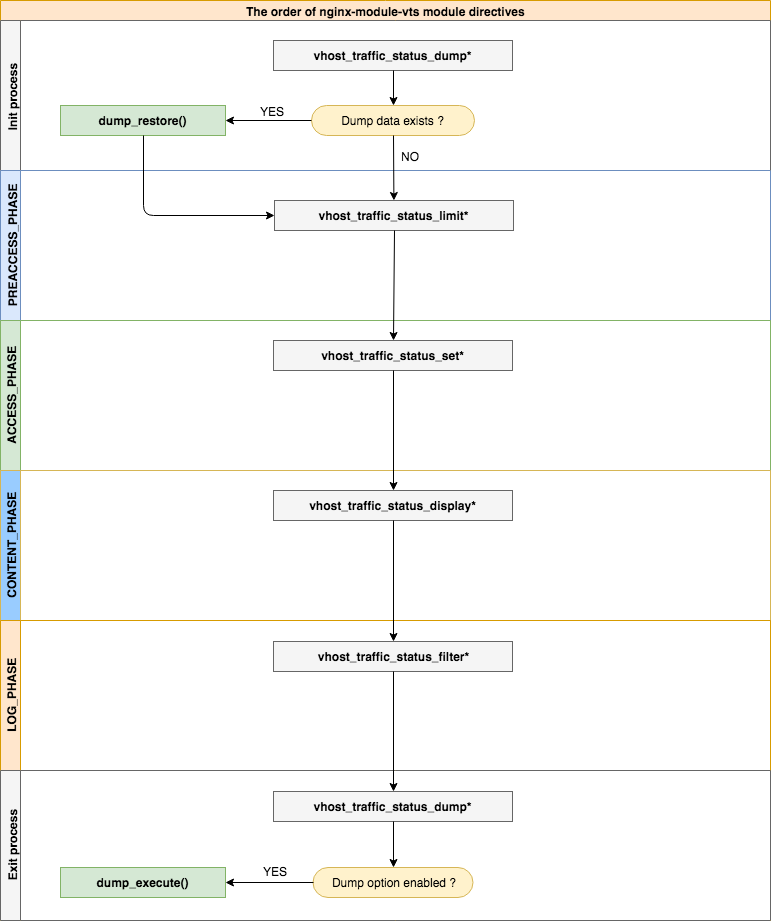
| - | - |
|---|---|
| ไวยากรณ์ | vhost_traffic_status <เปิด | ปิด> |
| ค่าเริ่มต้น | ปิด |
| บริบท | http, เซิร์ฟเวอร์, ตำแหน่ง |
Description: เปิดใช้งานหรือปิดใช้งานโมดูลการทำงาน หากคุณตั้งค่าคำสั่ง vhost_traffic_status_zone จะเปิดใช้งานโดยอัตโนมัติ
| - | - |
|---|---|
| ไวยากรณ์ | vhost_traffic_status_zone [แชร์: ชื่อ: ขนาด ] |
| ค่าเริ่มต้น | แชร์: vhost_traffic_status: 1m |
| บริบท | http |
Description: ตั้งค่าพารามิเตอร์สำหรับโซนหน่วยความจำที่ใช้ร่วมกันซึ่งจะรักษาสถานะสำหรับคีย์ต่างๆ แคชมีการแชร์ระหว่างกระบวนการของคนงานทั้งหมด ในกรณีส่วนใหญ่ขนาดหน่วยความจำที่ใช้ร่วมกันที่ใช้โดย Nginx-Module-VTS ไม่ได้เพิ่มขึ้นมากนัก ขนาดหน่วยความจำที่ใช้ร่วมกันเพิ่มขึ้นเมื่อใช้ vhost_traffic_status_filter_by_set_key Directive แต่ถ้าคีย์ของตัวกรองได้รับการแก้ไข ( เช่นจำนวนทั้งหมดของรหัสประเทศคือประมาณ 240 ) มันไม่เพิ่มขึ้นอย่างต่อเนื่อง
หากคุณใช้ vhost_traffic_status_filter_by_set_key Directive ให้ตั้งค่าดังนี้:
vhost_traffic_status_zone shared:vhost_traffic_status:32m )"ngx_slab_alloc() failed: no memory in vhost_traffic_status_zone" ) พิมพ์ใน error_log เพิ่มเป็นมากกว่า (ใช้ * 2)| - | - |
|---|---|
| ไวยากรณ์ | เส้นทาง vhost_traffic_status_dump [ ระยะเวลา ] |
| ค่าเริ่มต้น | - |
| บริบท | http |
Description: เปิดใช้งานการถ่ายโอนข้อมูลสถิติและกู้คืน เส้นทาง นี้เป็นที่ตั้งของการทิ้งข้อมูลสถิติ (เช่น /var/log/nginx/vts.db ) ระยะเวลา คือรอบการสำรองข้อมูล (ค่าเริ่มต้น: 60s) มันจะถูกสำรองไว้ทันทีโดยไม่คำนึงถึงวงจรการสำรองข้อมูลหาก Nginx ออกจากสัญญาณ ( SIGKILL )
| - | - |
|---|---|
| ไวยากรณ์ | vhost_traffic_status_display |
| ค่าเริ่มต้น | - |
| บริบท | http, เซิร์ฟเวอร์, ตำแหน่ง |
Description: เปิดใช้งานหรือปิดใช้งานตัวจัดการการแสดงผลโมดูล
| - | - |
|---|---|
| ไวยากรณ์ | vhost_traffic_status_display_format <json | html | jsonp | prometheus> |
| ค่าเริ่มต้น | JSON |
| บริบท | http, เซิร์ฟเวอร์, ตำแหน่ง |
Description: ตั้งค่ารูปแบบเอาต์พุตของตัวจัดการแสดงผล หากคุณตั้ง json จะตอบกลับด้วยเอกสาร JSON หากคุณตั้งค่า html จะตอบสนองด้วยแดชบอร์ดสดในตัวใน HTML หากคุณตั้งค่า jsonp จะตอบกลับด้วยฟังก์ชันการโทรกลับ JSONP (ค่าเริ่มต้น: NGX_HTTP_VHOST_TRAFFIC_STATUS_JSONP_CALLBACK ) หากคุณตั้ง prometheus จะตอบกลับด้วยเอกสาร Prometheus
| - | - |
|---|---|
| ไวยากรณ์ | vhost_traffic_status_display_jsonp โทรกลับ |
| ค่าเริ่มต้น | ngx_http_vhost_traffic_status_jsonp_callback |
| บริบท | http, เซิร์ฟเวอร์, ตำแหน่ง |
Description: ตั้งชื่อการโทรกลับสำหรับ JSONP
| - | - |
|---|---|
| ไวยากรณ์ | vhost_traffic_status_display_sum_key ชื่อ |
| ค่าเริ่มต้น | - |
| บริบท | http, เซิร์ฟเวอร์, ตำแหน่ง |
Description: ตั้งค่าสตริงคีย์รวมใน JSON ของฟิลด์ Serverzones สตริงคีย์รวมเริ่มต้นคือ "*"
| - | - |
|---|---|
| ไวยากรณ์ | vhost_traffic_status_filter <on | ปิด> |
| ค่าเริ่มต้น | บน |
| บริบท | http, เซิร์ฟเวอร์, ตำแหน่ง |
Description: เปิดใช้งานหรือปิดใช้งานคุณสมบัติตัวกรอง
| - | - |
|---|---|
| ไวยากรณ์ | vhost_traffic_status_filter_by_host <on | ปิด> |
| ค่าเริ่มต้น | ปิด |
| บริบท | http, เซิร์ฟเวอร์, ตำแหน่ง |
Description: เปิดใช้งานหรือปิดใช้งานคีย์ตามฟิลด์ส่วนหัวโฮสต์ หากคุณตั้ง on และคำสั่ง server_name ของ Nginx ตั้งชื่อหลายชื่อหรือชื่อไวด์การ์ดเริ่มต้นด้วยเครื่องหมายดอกจันเช่น“ *.example.org” และขอให้เซิร์ฟเวอร์พร้อมชื่อโฮสต์เช่น (a | b | c) .example.org หรือ *.example.org
 server {
  server_name *.example.org;
  vhost_traffic_status_filter_by_host on;

  ...

}
...
"serverZones" : {
"a.example.org" : {
...
},
"b.example.org" : {
...
},
"c.example.org" : {
...
}
...
},
... มันมีฟังก์ชั่นเดียวกับที่ตั้งค่า vhost_traffic_status_filter_by_set_key $host
| - | - |
|---|---|
| ไวยากรณ์ | vhost_traffic_status_filter_by_set_key คีย์ [ ชื่อ ] |
| ค่าเริ่มต้น | - |
| บริบท | http, เซิร์ฟเวอร์, ตำแหน่ง |
Description: เปิดใช้งานคีย์โดยตัวแปรที่ผู้ใช้กำหนด คีย์ คือสตริงคีย์ในการคำนวณทราฟฟิก ชื่อ คือสตริงกลุ่มเพื่อคำนวณทราฟฟิก คีย์ และ ชื่อ สามารถมีตัวแปรเช่น $ host, $ server_name กลุ่มของ ชื่อ เป็นของ filterZones หากระบุ กลุ่มของ คีย์ เป็นของ serverZones หากไม่ได้ระบุ ชื่อ อาร์กิวเมนต์ที่สอง ตัวอย่างของโมดูล GeOIP มีดังนี้:
 server {
  server_name example.org;
  vhost_traffic_status_filter_by_set_key $geoip_country_code country:: $server_name ;

  ...

}
...
"serverZones" : {
...
},
"filterZones" : {
"country::example.org" : {
"KR" : {
"requestCounter" : ...,
"inBytes" : ...,
"outBytes" : ...,
"responses" :{
"1xx" : ...,
"2xx" : ...,
"3xx" : ...,
"4xx" : ...,
"5xx" : ...,
"miss" : ...,
"bypass" : ...,
"expired" : ...,
"stale" : ...,
"updating" : ...,
"revalidated" : ...,
"hit" : ...,
"scarce" : ...
},
"requestMsecCounter" : ...,
"requestMsec" : ...,
"requestMsecs" :{
"times" :[ ... ],
"msecs" :[ ... ]
},
},
"US" : {
...
},
...
},
...
},
...
| - | - |
|---|---|
| ไวยากรณ์ | VHOST_TRAFFIC_STATUS_FILTER_CHECK_DUPLIPTION <เปิด | ปิด> |
| ค่าเริ่มต้น | บน |
| บริบท | http, เซิร์ฟเวอร์, ตำแหน่ง |
Description: เปิดใช้งานหรือปิดใช้งานการซ้ำซ้อนของ VHOST_TRAFFIC_STATUS_FILTER_BY_SET_KEY มันถูกประมวลผลเพียงหนึ่งในค่าที่ซ้ำกัน ( key + name ) ในแต่ละคำสั่ง (HTTP, เซิร์ฟเวอร์, ตำแหน่ง) หากเปิดใช้งานตัวเลือกนี้
| - | - |
|---|---|
| ไวยากรณ์ | vhost_traffic_status_filter_max_node หมายเลข [ สตริง ... ] |
| ค่าเริ่มต้น | 0 |
| บริบท | http |
Description: เปิดใช้งานขีด จำกัด ของขนาดตัวกรองโดยใช้ หมายเลข ที่ระบุและค่า สตริง หากเกิน จำนวน โหนดที่มีอยู่จะถูกลบโดยอัลกอริทึม LRU อาร์กิวเมนต์ จำนวน คือขนาดของโหนดที่จะ จำกัด ค่าเริ่มต้น 0 ไม่ จำกัด ตัวกรอง โหนดหนึ่งเป็นวัตถุใน filterZones ในเอกสาร JSON อาร์กิวเมนต์ สตริง คือค่าสตริงที่ตรงกันสำหรับค่าสตริงกลุ่มที่ตั้งค่าโดย vhost_traffic_status_filter_by_set_key DIRECTIVE แม้ว่าจะมีเพียงส่วนแรกที่ตรงกัน แต่การจับคู่ก็ประสบความสำเร็จเช่นนิพจน์ทั่วไป /^string.*/ โดยค่าเริ่มต้นหากคุณไม่ได้ตั้งค่าอาร์กิวเมนต์ สตริง ให้ใช้กับตัวกรองทั้งหมด
ตัวอย่าง:
$ vi nginx.conf
 http {

    geoip_country /usr/share/GeoIP/GeoIP.dat;

    vhost_traffic_status_zone;

    # The all filters are limited to a total of 16 nodes.
    # vhost_traffic_status_filter_max_node 16

    # The `/^uris.*/` and `/^client::ports.*/` group string patterns are limited to a total of 64 nodes.
    vhost_traffic_status_filter_max_node 16 uris client::ports;

    ...

    server {

        server_name example.org;

        ...

        vhost_traffic_status_filter_by_set_key $uri uris:: $server_name ;
        vhost_traffic_status_filter_by_set_key $remote_port client::ports:: $server_name ;
        vhost_traffic_status_filter_by_set_key $geoip_country_code country:: $server_name ;

    }
}
$ for i in {0..1000}; do curl -H 'Host: example.org' -i "http://localhost:80/test$i"; done
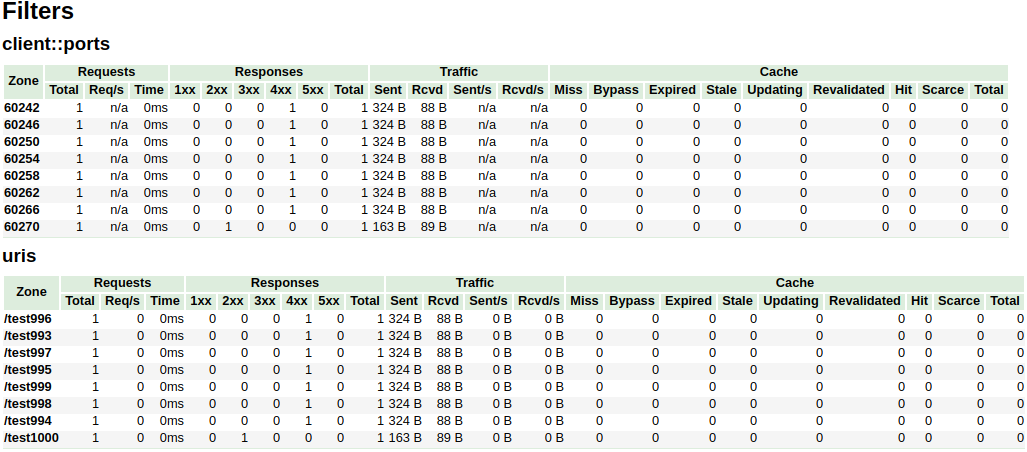
ในตัวอย่างข้างต้น The /^uris.*/ และ /^client::ports.*/ ports.*/ รูปแบบสตริงกลุ่มถูก จำกัด ไว้ที่ทั้งหมด 16 โหนด ตัวกรองอื่น ๆ เช่น country::.* ไม่ จำกัด
| - | - |
|---|---|
| ไวยากรณ์ | vhost_traffic_status_limit <on | ปิด> |
| ค่าเริ่มต้น | บน |
| บริบท | http, เซิร์ฟเวอร์, ตำแหน่ง |
Description: เปิดใช้งานหรือปิดใช้งานคุณสมบัติขีด จำกัด
| - | - |
|---|---|
| ไวยากรณ์ | vhost_traffic_status_limit_traffic สมาชิก : ขนาด [ รหัส ] |
| ค่าเริ่มต้น | - |
| บริบท | http, เซิร์ฟเวอร์, ตำแหน่ง |
Description: เปิดใช้งานขีด จำกัด การรับส่งข้อมูลสำหรับ สมาชิก ที่ระบุ สมาชิก เป็นสตริงสมาชิกเพื่อ จำกัด ทราฟฟิก ขนาด คือขนาด (k/m/g) เพื่อ จำกัด การรับส่งข้อมูล รหัส เป็นรหัสที่จะส่งคืนเพื่อตอบสนองต่อคำขอที่ถูกปฏิเสธ (ค่าเริ่มต้น: 503)
สตริง member ที่มีอยู่มีดังนี้:
| - | - |
|---|---|
| ไวยากรณ์ | vhost_traffic_status_limit_traffic_by_set_key สมาชิก คีย์ สมาชิก: ขนาด [ รหัส ] |
| ค่าเริ่มต้น | - |
| บริบท | http, เซิร์ฟเวอร์, ตำแหน่ง |
Description: เปิดใช้งานขีด จำกัด การรับส่งข้อมูลสำหรับ คีย์ และ สมาชิก ที่ระบุ คีย์ คือสตริงคีย์เพื่อ จำกัด ทราฟฟิก สมาชิก เป็นสตริงสมาชิกเพื่อ จำกัด ทราฟฟิก ขนาด คือขนาด (k/m/g) เพื่อ จำกัด การรับส่งข้อมูล รหัส เป็นรหัสที่จะส่งคืนเพื่อตอบสนองต่อคำขอที่ถูกปฏิเสธ (ค่าเริ่มต้น: 503)
key ไวยากรณ์มีดังนี้:
group @[ subgroup @] name สตริง group ที่มีอยู่มีดังนี้:
subgroup )subgroup ) สตริง member ที่มีอยู่มีดังนี้:
สมาชิก เหมือนกับ vhost_traffic_status_limit_traffic Directive
| - | - |
|---|---|
| ไวยากรณ์ | VHOST_TRAFFIC_STATUS_LIMIT_CHECK_DUPLIPTION <เปิด | ปิด> |
| ค่าเริ่มต้น | บน |
| บริบท | http, เซิร์ฟเวอร์, ตำแหน่ง |
Description: เปิดใช้งานหรือปิดใช้งานการซ้ำซ้อนของ VHOST_TRAFFIC_STATUS_LIMIT_BY_SET_KEY มันถูกประมวลผลเพียงหนึ่งในค่าที่ซ้ำกัน ( member | key + member ) ในแต่ละคำสั่ง (HTTP, เซิร์ฟเวอร์, ตำแหน่ง) หากเปิดใช้งานตัวเลือกนี้
| - | - |
|---|---|
| ไวยากรณ์ | vhost_traffic_status_set_by_filter $ กลุ่ม ตัวแปร / โซน / ชื่อ |
| ค่าเริ่มต้น | - |
| บริบท | http, เซิร์ฟเวอร์, ตำแหน่ง, ถ้า |
Description: รับค่าสถานะที่ระบุไว้ในหน่วยความจำที่ใช้ร่วมกัน มันสามารถรับค่าสถานะเกือบทั้งหมดและค่าที่ได้รับจะถูกเก็บไว้ใน $ ตัวแปร ซึ่งเป็นอาร์กิวเมนต์แรก
Caveats: The name is case sensitive. All return values take the integer type.
For examples:
$requestCounter server/example.org/requestCounter$requestCounter filter/country::example.org@KR/requestCounter$requestCounter upstream@group/[email protected]:80/requestCounter$requestCounter upstream@alone/10.10.10.11:80/requestCounter$cacheHit cache/my_cache_name/cacheHit| - | - |
|---|---|
| Syntax | vhost_traffic_status_average_method <AMM|WMA> [ period ] |
| ค่าเริ่มต้น | AMM 60s |
| บริบท | http, server, location |
Description: Sets the method which is a formula that calculate the average of response processing times. The period is an effective time of the values used for the average calculation.(Default: 60s) If period set to 0, effective time is ignored. In this case, the last average value is displayed even if there is no requests and after the elapse of time. The corresponding values are requestMsec and responseMsec in JSON.
| - | - |
|---|---|
| Syntax | vhost_traffic_status_histogram_buckets second ... |
| ค่าเริ่มต้น | - |
| บริบท | http, server, location |
Description: Sets the observe buckets to be used in the histograms. By default, if you do not set this directive, it will not work. The second can be expressed in decimal places with a minimum value of 0.001(1ms). The maximum size of the buckets is 32. If this value is insufficient for you, change the NGX_HTTP_VHOST_TRAFFIC_STATUS_DEFAULT_BUCKET_LEN in the src/ngx_http_vhost_traffic_status_node.h
For examples:
0.005 0.01 0.05 0.1 0.5 1 5 100.005 0.01 0.05 0.1 Caveats: By default, if you do not set this directive, the histogram statistics does not work. The restored histograms by vhost_traffic_status_dump directive have no affected by changes to the buckets by vhost_traffic_status_histogram_buckets directive. So you must first delete the zone or the dump file before changing the buckets by vhost_traffic_status_histogram_buckets directive. Similar to the above, delete the dump file when using the histogram for the first time.
| - | - |
|---|---|
| Syntax | vhost_traffic_status_bypass_limit <on|off> |
| ค่าเริ่มต้น | ปิด |
| บริบท | http, server, location |
Description: Enables or disables to bypass vhost_traffic_status_limit directives. The limit features is bypassed if this option is enabled. This is mostly useful if you want to connect the status web page like /status regardless of vhost_traffic_status_limit directives as follows:
 http {
    vhost_traffic_status_zone;

    ...

    server {

        ...

        location /status {
            vhost_traffic_status_bypass_limit on;
            vhost_traffic_status_display;
            vhost_traffic_status_display_format html;
        }
    }
}| - | - |
|---|---|
| Syntax | vhost_traffic_status_bypass_stats <on|off> |
| ค่าเริ่มต้น | ปิด |
| บริบท | http, server, location |
Description: Enables or disables to bypass vhost_traffic_status . The traffic status stats features is bypassed if this option is enabled. In other words, it is excluded from the traffic status stats. This is mostly useful if you want to ignore your request in status web page like /status as follows:
 http {
    vhost_traffic_status_zone;

    ...

    server {

        ...

        location /status {
            vhost_traffic_status_bypass_stats on;
            vhost_traffic_status_display;
            vhost_traffic_status_display_format html;
        }
    }
}To cut a release, create a changelog entry PR with git-chglog
 version="v0.2.0"
git checkout -b "cut-${version}"
git-chglog -o CHANGELOG.md --next-tag "${version}"
git add CHANGELOG.md
sed -i "s/NGX_HTTP_VTS_MODULE_VERSION ".*/NGX_HTTP_VTS_MODULE_VERSION "${version}"/" src/ngx_http_vhost_traffic_status_module.h
git add src/ngx_http_vhost_traffic_status_module.h
git-chglog -t .chglog/RELNOTES.tmpl --next-tag "${version}" "${version}" | git commit -F-
After the PR is merged, create the new tag and release on the GitHub Releases.
Stream traffic status
Prometheus
System protection
YoungJoo.Kim(김영주) [[email protected]]





