nginx module vts
v0.2.2

Modul Status Lalu Lintas Host Virtual Nginx
Lihat rilis GitHub untuk rilis Tagged terbaru.
Jalankan sudo prove -rt setelah Anda menginstal modul ini. sudo diperlukan karena tes mengharuskan Nginx untuk mendengarkan di port 80.
Versi sebelumnya tidak diuji.
shell> git clone git://github.com/vozlt/nginx-module-vts.git
Tambahkan modul ke konfigurasi build dengan menambahkan --add-module=/path/to/nginx-module-vts
Bangun biner nginx.
Pasang biner Nginx.
 http {
    vhost_traffic_status_zone;

    ...

    server {

        ...

        location /status {
            vhost_traffic_status_display;
            vhost_traffic_status_display_format html;
        }
    }
}Ini adalah modul Nginx yang menyediakan akses ke informasi status host virtual. Ini berisi status saat ini seperti server, hulu, cache. Ini mirip dengan pemantauan aktivitas langsung Nginx Plus. HTML bawaan juga diambil dari halaman demo versi lama.
Pertama -tama, diperlukan arahan vhost_traffic_status_zone , dan kemudian jika arahan vhost_traffic_status_display diatur, dapat diakses sebagai berikut:
/status/format/json , akan merespons dengan dokumen JSON yang berisi data aktivitas saat ini untuk digunakan di dasbor hidup dan alat pemantauan pihak ketiga./status/format/html , akan merespons dengan dasbor langsung bawaan di HTML yang meminta secara internal ke /status/format/json ./status/format/jsonp , akan merespons dengan fungsi callback JSONP yang berisi data aktivitas saat ini untuk digunakan di dasbor hidup dan alat pemantauan pihak ketiga./status/format/prometheus , akan merespons dengan dokumen Prometheus yang berisi data aktivitas saat ini./status/control , akan merespons dengan dokumen JSON setelah mengatur ulang atau menghapus zona melalui string kueri. Lihat kontrolnya.Dokumen JSON berisi sebagai berikut:
{
    "hostName" : ...,
    "moduleVersion" : ...,
    "nginxVersion" : ...,
    "loadMsec" : ...,
    "nowMsec" : ...,
    "connections" : {
        "active" : ...,
        "reading" : ...,
        "writing" : ...,
        "waiting" : ...,
        "accepted" : ...,
        "handled" : ...,
        "requests" : ...
    },
    "sharedZones" : {
        "name" : ...,
        "maxSize" : ...,
        "usedSize" : ...,
        "usedNode" : ...
    },
    "serverZones" : {
        "..." :{
            "requestCounter" : ...,
            "inBytes" : ...,
            "outBytes" : ...,
            "responses" :{
                "1xx" : ...,
                "2xx" : ...,
                "3xx" : ...,
                "4xx" : ...,
                "5xx" : ...,
                "miss" : ...,
                "bypass" : ...,
                "expired" : ...,
                "stale" : ...,
                "updating" : ...,
                "revalidated" : ...,
                "hit" : ...,
                "scarce" : ...
            },
            "requestMsecCounter" : ...,
            "requestMsec" : ...,
            "requestMsecs" :{
                "times" :[ ... ],
                "msecs" :[ ... ]
            },
            "requestBuckets" :{
                "msecs" :[ ... ],
                "counters" :[ ... ]
            },
        }
        ...
    },
    "filterZones" : {
        "..." :{
            "..." :{
                "requestCounter" : ...,
                "inBytes" : ...,
                "outBytes" : ...,
                "responses" :{
                    "1xx" : ...,
                    "2xx" : ...,
                    "3xx" : ...,
                    "4xx" : ...,
                    "5xx" : ...,
                    "miss" : ...,
                    "bypass" : ...,
                    "expired" : ...,
                    "stale" : ...,
                    "updating" : ...,
                    "revalidated" : ...,
                    "hit" : ...,
                    "scarce" : ...
                },
                "requestMsecCounter" : ...,
                "requestMsec" : ...,
                "requestMsecs" :{
                    "times" :[ ... ],
                    "msecs" :[ ... ]
                },
                "requestBuckets" :{
                    "msecs" :[ ... ],
                    "counters" :[ ... ]
                },
            },
            ...
        },
        ...
    },
    "upstreamZones" : {
        "..." :[
            {
                "server" : ...,
                "requestCounter" : ...,
                "inBytes" : ...,
                "outBytes" : ...,
                "responses" :{
                    "1xx" : ...,
                    "2xx" : ...,
                    "3xx" : ...,
                    "4xx" : ...,
                    "5xx" : ...
                },
                "requestMsecCounter" : ...,
                "requestMsec" : ...,
                "requestMsecs" :{
                    "times" :[ ... ],
                    "msecs" :[ ... ]
                },
                "requestBuckets" :{
                    "msecs" :[ ... ],
                    "counters" :[ ... ]
                },
                "responseMsecCounter" : ...,
                "responseMsec" : ...,
                "responseMsecs" :{
                    "times" :[ ... ],
                    "msecs" :[ ... ]
                },
                "responseBuckets" :{
                    "msecs" :[ ... ],
                    "counters" :[ ... ]
                },
                "weight" : ...,
                "maxFails" : ...,
                "failTimeout" : ...,
                "backup" : ...,
                "down" : ...
            }
            ...
        ],
        ...
    }
    "cacheZones" : {
        "..." :{
            "maxSize" : ...,
            "usedSize" : ...,
            "inBytes" : ...,
            "outBytes" : ...,
            "responses" :{
                "miss" : ...,
                "bypass" : ...,
                "expired" : ...,
                "stale" : ...,
                "updating" : ...,
                "revalidated" : ...,
                "hit" : ...,
                "scarce" : ...
            }
        },
        ...
    }
}* ) dan rasio hitvhost_traffic_status_filter_by_set_key Petunjuk* ) dan rasio hit disaring melalui vhost_traffic_status_filter_by_set_key DETTIVE Objek overCounts dalam dokumen JSON sebagian besar untuk sistem 32bit dan akan bertambah 1 jika nilainya dilahirkan. Directive vhost_traffic_status_display_format menetapkan format ouput default yang merupakan salah satu dari JSON, JSONP, HTML, Prometheus. (Default: json)
Perhitungan lalu lintas sebagai berikut:
Semua perhitungan bekerja dalam fase pemrosesan log nginx. Redirect internal (x-accel-redirect atau error_page) tidak menghitung di hulu.
Caveats: Modul ini bergantung pada sistem logging nginx (NGX_HTTP_LOG_PHASE: Fase terakhir dari Nginx HTTP), sehingga lalu lintas mungkin berada dalam cirumstances tertentu yang berbeda dengan lalu lintas bandwidth nyata. Websocket, unduhan yang dibatalkan mungkin menjadi penyebab ketidakakuratan. Pekerjaan modul sama sekali tidak masalah apakah arahan Access_Log "ON" atau "OFF". Sekali lagi, modul ini bekerja dengan baik di "access_log off". Saat menggunakan beberapa domain, itu ditetapkan untuk menjadi domain pertama (kiri) dari directive server_name. Jika Anda tidak menginginkannya, lihat vhost_traffic_status_filter_by_host, vhost_traffic_status_filter_by_set_key directive.
Lihat modul berikut untuk Statistik Lalu Lintas stream :
Semua rata -rata saat ini dihitung sebagai AMM (rata -rata aritmatika) selama 64 nilai terakhir.
Itu dapat mengatur ulang atau menghapus zona lalu lintas melalui string kueri. Permintaan itu merespons dengan dokumen JSON.
{status_uri} / control? cmd = {command} & grup = {group} & zona = {name} http {
geoip_country /usr/share/GeoIP/GeoIP.dat;
vhost_traffic_status_zone;
vhost_traffic_status_filter_by_set_key $geoip_country_code country::*;
...
server {
server_name example.org;
...
vhost_traffic_status_filter_by_set_key $geoip_country_code country:: $server_name ;
location /status {
vhost_traffic_status_display;
vhost_traffic_status_display_format html;
}
}
} Jika diatur seperti di atas, maka URI kontrol seperti example.org/status/control .
Argumen permintaan yang tersedia adalah sebagai berikut:
status | reset | delete >status/format/json .server | filter | upstream@alone | upstream@group | cache | * > Ini mirip dengan status/format/json kecuali bahwa itu bisa mendapatkan setiap zona.
status/format/json . Nilai MainZones adalah nilai status default termasuk hostName , moduleVersion , nginxVersion , loadMsec , nowMsec , connections .
namefilter_group @ nameupstream_group @ namenamenameIni mengatur ulang nilai zona yang ditentukan ke 0.
namefilter_group @ nameupstream_group @ namenamenameIni menghapus zona yang ditentukan dalam memori bersama.
namefilter_group @ nameupstream_group @ namenamename Ini bisa mendapatkan nilai status dalam konfigurasi nginx secara terpisah menggunakan vhost_traffic_status_set_by_filter Directive. Ini dapat memperoleh hampir semua nilai status dan nilai yang diperoleh disimpan dalam variabel yang ditentukan pengguna yang merupakan argumen pertama.
 http {

    geoip_country /usr/share/GeoIP/GeoIP.dat;

    vhost_traffic_status_zone;
    vhost_traffic_status_filter_by_set_key $geoip_country_code country::*;

    ...
    upstream backend {
        10.10.10.11:80;
        10.10.10.12:80;
    }

    server {

        server_name example.org;

        ...

        vhost_traffic_status_filter_by_set_key $geoip_country_code country:: $server_name ;

        vhost_traffic_status_set_by_filter $requestCounter server/example.org/requestCounter;
        vhost_traffic_status_set_by_filter $requestCounterKR filter/country::example.org@KR/requestCounter;

        location /backend {
            vhost_traffic_status_set_by_filter $requestCounterB1 upstream@group/[email protected]:80/requestCounter;
            proxy_pass http://backend;
        }
    }
}
Pengaturan di atas adalah sebagai berikut:
Silakan lihat arahan VHOST_TRAFFIC_STOTUS_SET_BY_FILTER untuk penggunaan terperinci.
Informasi status berikut disediakan dalam format JSON:
/ {status_uri} /format /json
/ {status_uri} / control? cmd = status & ...
{version}(|.dev.{commit}) format.vhost_traffic_status )vhost_traffic_status_histogram_buckets directive.serverZones kecuali termasuk nama grup.vhost_traffic_status_histogram_buckets directive.vhost_traffic_status_histogram_buckets directive.weight saat ini dari server.max_fails saat ini dari server.fail_timeout saat ini dari server.backup saat ini dari server.down saat ini dari server. Pada dasarnya, ini hanyalah tanda server NGX_HTTP_UPSTREAM_MODULE (mis. server backend3.example.com down ), bukan status server hulu yang sebenarnya. Ini akan diubah ke keadaan aktual jika Anda mengaktifkan arahan zona hulu.max_size di proxy_cache_path Directive tidak ditentukan, nilai dependen sistem NGX_MAX_OFF_T_VALUE ditetapkan secara default. Dengan kata lain, nilai ini dari nginx, bukan yang saya tentukan.maxSize di atas. / {status_uri} / control? cmd = reset & ...
/ {status_uri} / control? cmd = hapus & ...
Variabel tertanam berikut disediakan:
Ini dapat membatasi total lalu lintas per setiap host dengan menggunakan arahan vhost_traffic_status_limit_traffic . Ini juga dapat membatasi semua lalu lintas dengan menggunakan arahan vhost_traffic_status_limit_traffic_by_set_key . Ketika batas terlampaui, server akan mengembalikan kesalahan 503 (layanan sementara tidak tersedia) sebagai balasan atas permintaan. Kode pengembalian dapat diubah.
 http {

    vhost_traffic_status_zone;

    ...

    server {

        server_name *.example.org;

        vhost_traffic_status_limit_traffic in:64G;
        vhost_traffic_status_limit_traffic out:1024G;

        ...
    }
}*.example.org masing -masing ke 64g dan 1024g. Ini bekerja secara individual per setiap domain jika vhost_traffic_status_filter_by_host directive diaktifkan. http {
geoip_country /usr/share/GeoIP/GeoIP.dat;
vhost_traffic_status_zone;
...
server {
server_name example.org;
vhost_traffic_status_filter_by_set_key $geoip_country_code country:: $server_name ;
vhost_traffic_status_limit_traffic_by_set_key FG@country:: $server_name @US out:1024G;
vhost_traffic_status_limit_traffic_by_set_key FG@country:: $server_name @CN out:2048G;
...
}
}
example.org ke 1024g dan 2048G masing -masing. http {
vhost_traffic_status_zone;
...
upstream backend {
server 10.10.10.17:80;
server 10.10.10.18:80;
}
server {
server_name example.org;
location /backend {
vhost_traffic_status_limit_traffic_by_set_key UG@[email protected]:80 in:512G;
vhost_traffic_status_limit_traffic_by_set_key UG@[email protected]:80 in:1024G;
proxy_pass http://backend;
}
...
}
}
example.org ke 512g dan 1024g per masing -masing rekan. Caveats: Lalu lintas adalah transfer atau penghitung kumulatif, bukan bandwidth.
Ini dapat menghitung statistik individual yang ditentukan pengguna dengan menggunakan arahan vhost_traffic_status_filter_by_set_key .
 http {
    geoip_country /usr/share/GeoIP/GeoIP.dat;

    vhost_traffic_status_zone;
    vhost_traffic_status_filter_by_set_key $geoip_country_code country::*;

    ...

    server {

        ...

        vhost_traffic_status_filter_by_set_key $geoip_country_code country:: $server_name ;

        location /status {
            vhost_traffic_status_display;
            vhost_traffic_status_display_format html;
        }
    }
} Pada dasarnya, citra bendera negara adalah built-in dalam HTML. Gambar bendera negara diaktifkan jika string country disertakan dalam nama grup yang merupakan argumen kedua dari vhost_traffic_status_filter_by_set_key Petunjuk.
 http {
    vhost_traffic_status_zone;

    ...

    server {

        ...

        location ~ ^/storage/(.+)/.*$ {
            set $volume $1 ;
            vhost_traffic_status_filter_by_set_key $volume storage:: $server_name ;
        }

        location /status {
            vhost_traffic_status_display;
            vhost_traffic_status_display_format html;
        }
    }
} http {
vhost_traffic_status_zone;
map $http_user_agent $filter_user_agent {
default 'unknown' ;
~ iPhone ios;
~ Android android;
~ (MSIE|Mozilla) windows;
}
vhost_traffic_status_filter_by_set_key $filter_user_agent agent::*;
...
server {
...
vhost_traffic_status_filter_by_set_key $filter_user_agent agent:: $server_name ;
location /status {
vhost_traffic_status_display;
vhost_traffic_status_display_format html;
}
}
}http_user_agent http {
vhost_traffic_status_zone;
server {
...
vhost_traffic_status_filter_by_set_key $status $server_name ;
location /status {
vhost_traffic_status_display;
vhost_traffic_status_display_format html;
}
}
}http status code terperinci Caveats: Variabel status $ tersedia di Nginx- (1.3.2, 1.2.2).
Jika domain memiliki beberapa DNS A catatan, Anda dapat menghitung lalu lintas untuk IP individu untuk domain menggunakan fitur filter atau variabel di proxy_pass.
 http {
    vhost_traffic_status_zone;

    upstream backend {
        elb.example.org:80;
    }

    ...

    server {

        ...

        location /backend {
            vhost_traffic_status_filter_by_set_key $upstream_addr upstream::backend;
            proxy_pass backend;
        }
    }
}elb.example.org . Jika elb.example.org memiliki beberapa DNS A Records, akan ditampilkan semua IP di filterZones . Dalam pengaturan di atas, saat Nginx dimulai atau memuat ulang konfigurasi, ini menanyakan server DNS untuk menyelesaikan domain dan DNS, catatan di -cache dalam memori. Oleh karena itu DNS A Records tidak diubah dalam memori bahkan jika DNS catatan dikagumi oleh administrator DNS kecuali Nginx memulai kembali atau memuat ulang. http {
vhost_traffic_status_zone;
resolver 10.10.10.53 valid=10s
...
server {
...
location /backend {
set $backend_server elb.example.org;
proxy_pass http:// $backend_server ;
}
}
}elb.example.org . Jika elb.example.org 's DNS, catatan diubah, akan menampilkan IP lama dan IP baru di ::nogroups . Berbeda dengan pengaturan grup hulu pertama, pengaturan kedua bekerja dengan baik bahkan jika DNS catatan dikagumi oleh administrator DNS. Caveats: Harap lebih detail tentang nginx DNS lihat DNS-layanan-discovery-nginx-plus.
 http {
    vhost_traffic_status_zone;

    ...

    server {

        ...

        location /status {
            vhost_traffic_status_bypass_limit on;
            vhost_traffic_status_bypass_stats on;
            vhost_traffic_status_display;
            vhost_traffic_status_display_format html;
        }
    }
}
/status URI dikecualikan dari perhitungan lalu lintas status dan fitur batas. Lihat arahan berikut: http {
vhost_traffic_status_zone;
vhost_traffic_status_dump /var/log/nginx/vts.db;
...
server {
...
}
}vhost_traffic_status_dump memelihara data statistik secara permanen bahkan jika sistem telah di -boot atau nginx telah dimulai kembali. Silakan lihat arahan VHOST_TRAFFIC_STOTUS_DUMP untuk penggunaan terperinci. {{uri}} string ke status URI Anda di status.template.html sebagai berikut: shell> vi share/status.template.html
var vtsStatusURI = "yourStatusUri/format/json", vtsUpdateInterval = 1000;
shell> cp share/status.template.html /usr/share/nginx/html/status.html
nginx.conf server {
server_name example.org;
root /usr/share/nginx/html;
# Redirect requests for / to /status.html
location = / {
return 301 /status.html;
}
location = /status.html {}
# Everything beginning /status (except for /status.html) is
# processed by the status handler
location /status {
vhost_traffic_status_display;
vhost_traffic_status_display_format json;
}
}
http://example.org/status.html
Ubah share/status.template.html (Jangan ubah {{uri}} string)
Ciptakan kembali ngx_http_vhost_traffic_status_module_html.h sebagai berikut:
 shell> cd util
shell> ./tplToDefine.sh ../share/status.template.html > ../src/ngx_http_vhost_traffic_status_module_html.h
Tambahkan modul ke konfigurasi build dengan menambahkan --add-module=/path/to/nginx-module-vts
Bangun biner nginx.
Pasang biner Nginx.
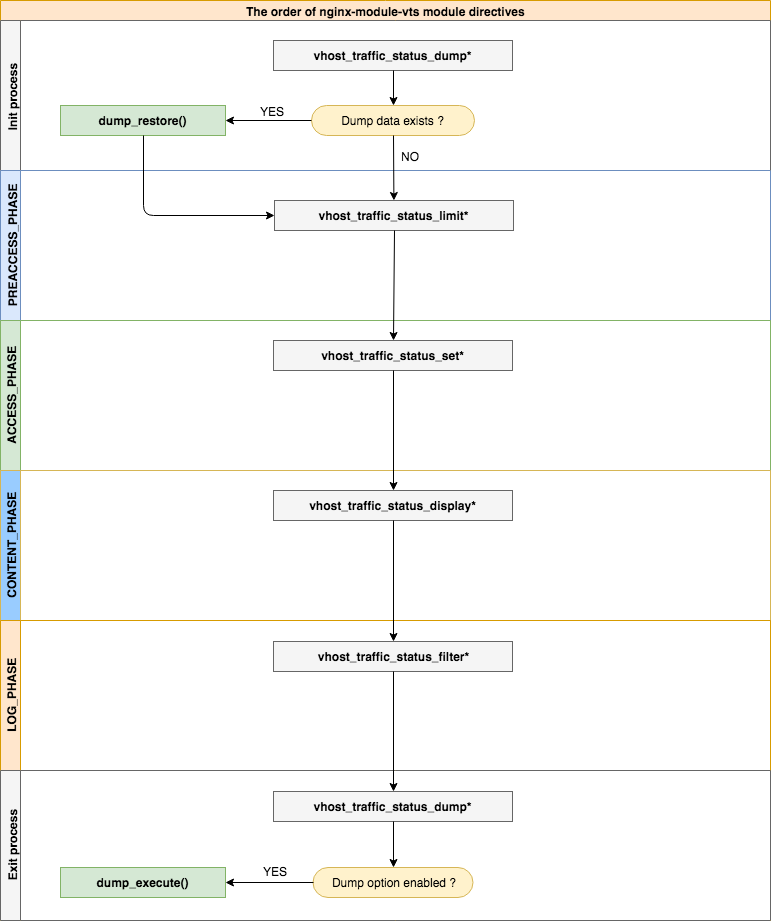
| - | - |
|---|---|
| Sintaksis | vhost_traffic_status <on | off> |
| Bawaan | mati |
| Konteks | http, server, lokasi |
Description: Mengaktifkan atau menonaktifkan modul yang berfungsi. Jika Anda mengatur arahan vhost_traffic_status_zone , diaktifkan secara otomatis.
| - | - |
|---|---|
| Sintaksis | vhost_traffic_status_zone [dibagikan: nama: size ] |
| Bawaan | Dibagi: VHOST_TRAFFIC_STATUS: 1M |
| Konteks | http |
Description: Menetapkan parameter untuk zona memori bersama yang akan menjaga status untuk berbagai kunci. Cache dibagi antara semua proses pekerja. Dalam kebanyakan kasus, ukuran memori bersama yang digunakan oleh Nginx-Modul-VT tidak meningkat banyak. Ukuran memori bersama meningkat cantik saat menggunakan vhost_traffic_status_filter_by_set_key DEANTIF tetapi jika tombol filter diperbaiki ( mis. Jumlah total kode negara adalah sekitar 240 ) tidak terus meningkat.
Jika Anda menggunakan arahan vhost_traffic_status_filter_by_set_key , atur sebagai berikut:
vhost_traffic_status_zone shared:vhost_traffic_status:32m )"ngx_slab_alloc() failed: no memory in vhost_traffic_status_zone" ) dicetak di error_log, tingkatkan menjadi lebih dari (UsedSize * 2).| - | - |
|---|---|
| Sintaksis | vhost_traffic_status_dump Path [ periode ] |
| Bawaan | - |
| Konteks | http |
Description: Mengaktifkan pembuangan dan pemulihan data statistik. Jalur ini adalah lokasi untuk membuang data statistik. (EG /var/log/nginx/vts.db ) Periode ini adalah waktu siklus cadangan. (Default: 60s) Segera dicadangkan terlepas dari siklus cadangan jika Nginx keluar oleh sinyal ( SIGKILL ).
| - | - |
|---|---|
| Sintaksis | vhost_traffic_status_display |
| Bawaan | - |
| Konteks | http, server, lokasi |
Description: Mengaktifkan atau menonaktifkan penangan tampilan modul.
| - | - |
|---|---|
| Sintaksis | vhost_traffic_status_display_format <json | html | jsonp | prometheus> |
| Bawaan | json |
| Konteks | http, server, lokasi |
Description: Mengatur format output penangan tampilan. Jika Anda mengatur json , akan menanggapi dengan dokumen JSON. Jika Anda mengatur html , akan merespons dengan dasbor hidup bawaan di HTML. Jika Anda mengatur jsonp , akan merespons dengan fungsi panggilan balik JSONP (default: NGX_HTTP_VHOST_TRAFFIC_STOTUS_JSONP_CALLBACK ). Jika Anda mengatur prometheus , akan merespons dengan dokumen Prometheus.
| - | - |
|---|---|
| Sintaksis | vhost_traffic_status_display_jsonp Callback |
| Bawaan | ngx_http_vhost_traffic_status_jsonp_callback |
| Konteks | http, server, lokasi |
Description: Mengatur nama panggilan balik untuk JSONP.
| - | - |
|---|---|
| Sintaksis | nama vhost_traffic_status_display_sum_key |
| Bawaan | * |
| Konteks | http, server, lokasi |
Description: Mengatur string kunci SUM di JSON bidang serverzones. String kunci jumlah default adalah "*".
| - | - |
|---|---|
| Sintaksis | vhost_traffic_status_filter <on | off> |
| Bawaan | pada |
| Konteks | http, server, lokasi |
Description: Mengaktifkan atau menonaktifkan fitur filter.
| - | - |
|---|---|
| Sintaksis | vhost_traffic_status_filter_by_host <on | off> |
| Bawaan | mati |
| Konteks | http, server, lokasi |
Description: Mengaktifkan atau menonaktifkan Keys By Host Header Field. Jika Anda on dan Nginx's Server_Name Directive mengatur beberapa atau nama wildcard dimulai dengan tanda bintang, misalnya " *.example.org" dan diminta ke server dengan nama host seperti (a | b | c) .example.org atau *.example.org maka json serverzones dicetak sebagai berikut sebagai berikut:
 server {
  server_name *.example.org;
  vhost_traffic_status_filter_by_host on;

  ...

}
...
"serverZones" : {
"a.example.org" : {
...
},
"b.example.org" : {
...
},
"c.example.org" : {
...
}
...
},
... Ini menyediakan fungsi yang sama yang mengatur vhost_traffic_status_filter_by_set_key $host .
| - | - |
|---|---|
| Sintaksis | vhost_traffic_status_filter_by_set_key key [ nama ] |
| Bawaan | - |
| Konteks | http, server, lokasi |
Description: Mengaktifkan kunci oleh variabel yang ditentukan pengguna. Kuncinya adalah string kunci untuk menghitung lalu lintas. Namanya adalah string grup untuk menghitung lalu lintas. Kunci dan namanya dapat berisi variabel seperti $ host, $ server_name. Grup nama milik filterZones jika ditentukan. Grup kunci milik serverZones jika tidak ditentukan nama argumen kedua. Contoh dengan modul geoip adalah sebagai berikut:
 server {
  server_name example.org;
  vhost_traffic_status_filter_by_set_key $geoip_country_code country:: $server_name ;

  ...

}
...
"serverZones" : {
...
},
"filterZones" : {
"country::example.org" : {
"KR" : {
"requestCounter" : ...,
"inBytes" : ...,
"outBytes" : ...,
"responses" :{
"1xx" : ...,
"2xx" : ...,
"3xx" : ...,
"4xx" : ...,
"5xx" : ...,
"miss" : ...,
"bypass" : ...,
"expired" : ...,
"stale" : ...,
"updating" : ...,
"revalidated" : ...,
"hit" : ...,
"scarce" : ...
},
"requestMsecCounter" : ...,
"requestMsec" : ...,
"requestMsecs" :{
"times" :[ ... ],
"msecs" :[ ... ]
},
},
"US" : {
...
},
...
},
...
},
...
| - | - |
|---|---|
| Sintaksis | vhost_traffic_status_filter_check_duplicate <on | off> |
| Bawaan | pada |
| Konteks | http, server, lokasi |
Description: Mengaktifkan atau menonaktifkan deduplikasi VHOST_TRAFFIC_STATUS_FILTER_BY_SET_KEY. Ini hanya diproses salah satu nilai duplikat ( key + name ) di setiap arahan (http, server, lokasi) jika opsi ini diaktifkan.
| - | - |
|---|---|
| Sintaksis | vhost_traffic_status_filter_max_node nomor [ string ...] |
| Bawaan | 0 |
| Konteks | http |
Description: Mengaktifkan batas ukuran filter menggunakan nilai dan nilai string yang ditentukan. Jika angka terlampaui, node yang ada dihapus oleh algoritma LRU. Argumen angka adalah ukuran simpul yang akan terbatas. Nilai default 0 tidak membatasi filter. One Node adalah objek di filterZones dalam dokumen JSON. Argumen string adalah nilai string yang cocok untuk nilai string grup yang ditetapkan oleh vhost_traffic_status_filter_by_set_key directive. Bahkan jika hanya bagian pertama yang cocok, pencocokan berhasil seperti ekspresi reguler /^string.*/ . Secara default, jika Anda tidak mengatur argumen string maka itu diterapkan untuk semua filter.
Sebagai contoh:
$ vi nginx.conf
 http {

    geoip_country /usr/share/GeoIP/GeoIP.dat;

    vhost_traffic_status_zone;

    # The all filters are limited to a total of 16 nodes.
    # vhost_traffic_status_filter_max_node 16

    # The `/^uris.*/` and `/^client::ports.*/` group string patterns are limited to a total of 64 nodes.
    vhost_traffic_status_filter_max_node 16 uris client::ports;

    ...

    server {

        server_name example.org;

        ...

        vhost_traffic_status_filter_by_set_key $uri uris:: $server_name ;
        vhost_traffic_status_filter_by_set_key $remote_port client::ports:: $server_name ;
        vhost_traffic_status_filter_by_set_key $geoip_country_code country:: $server_name ;

    }
}
$ for i in {0..1000}; do curl -H 'Host: example.org' -i "http://localhost:80/test$i"; done
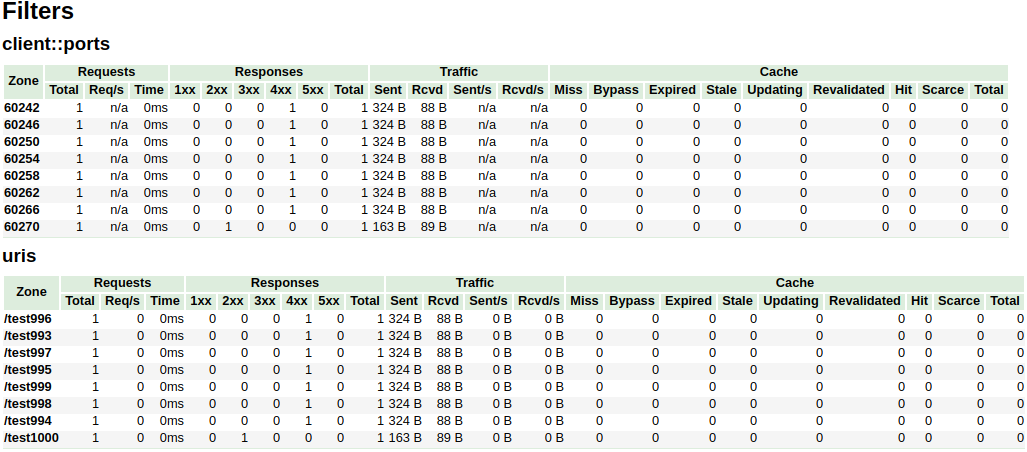
Dalam contoh di atas, /^uris.*/ dan /^client::ports.*/ Pola string grup terbatas pada total 16 node. Filter lain seperti country::.* Tidak terbatas.
| - | - |
|---|---|
| Sintaksis | vhost_traffic_status_limit <on | off> |
| Bawaan | pada |
| Konteks | http, server, lokasi |
Description: Mengaktifkan atau menonaktifkan fitur batas.
| - | - |
|---|---|
| Sintaksis | vhost_traffic_status_limit_traffic Anggota : size [ kode ] |
| Bawaan | - |
| Konteks | http, server, lokasi |
Description: Mengaktifkan batas lalu lintas untuk anggota yang ditentukan. Anggota adalah string anggota untuk membatasi lalu lintas. Ukurannya adalah ukuran (k/m/m) untuk membatasi lalu lintas. Kode adalah kode untuk dikembalikan sebagai tanggapan atas permintaan yang ditolak. (Default: 503)
String member yang tersedia adalah sebagai berikut:
| - | - |
|---|---|
| Sintaksis | vhost_traffic_status_limit_traffic_by_set_key anggota kunci : ukuran [ kode ] |
| Bawaan | - |
| Konteks | http, server, lokasi |
Description: Mengaktifkan batas lalu lintas untuk kunci dan anggota yang ditentukan. Kuncinya adalah string kunci untuk membatasi lalu lintas. Anggota adalah string anggota untuk membatasi lalu lintas. Ukurannya adalah ukuran (k/m/m) untuk membatasi lalu lintas. Kode adalah kode untuk dikembalikan sebagai tanggapan atas permintaan yang ditolak. (Default: 503)
Sintaks key adalah sebagai berikut:
group @[ subgroup @] name String group yang tersedia adalah sebagai berikut:
subgroup )subgroup ) String member yang tersedia adalah sebagai berikut:
Anggota itu sama dengan arahan vhost_traffic_status_limit_traffic .
| - | - |
|---|---|
| Sintaksis | vhost_traffic_status_limit_check_duplicate <on | off> |
| Bawaan | pada |
| Konteks | http, server, lokasi |
Description: Mengaktifkan atau menonaktifkan deduplikasi VHOST_TRAFFIC_STATUS_LIMIT_BY_SET_KEY. Ini hanya diproses satu dari nilai duplikat ( member | key + member ) di setiap arahan (http, server, lokasi) jika opsi ini diaktifkan.
| - | - |
|---|---|
| Sintaksis | vhost_traffic_status_set_by_filter $ variabel grup / zona / nama |
| Bawaan | - |
| Konteks | http, server, lokasi, jika |
Description: Dapatkan nilai status yang ditentukan disimpan dalam memori bersama. Ini dapat memperoleh hampir semua nilai status dan nilai yang diperoleh disimpan dalam variabel $ yang merupakan argumen pertama.
Caveats: Namanya sensitif. Semua nilai pengembalian mengambil tipe integer.
Sebagai contoh:
$requestCounter server/example.org/requestCounter$requestCounter filter/country::example.org@KR/requestCounter$requestCounter upstream@group/[email protected]:80/requestCounter$requestCounter upstream@alone/10.10.10.11:80/requestCounter$cacheHit cache/my_cache_name/cacheHit| - | - |
|---|---|
| Sintaksis | vhost_traffic_status_average_method <AMM|WMA> [ period ] |
| Bawaan | AMM 60s |
| Konteks | http, server, location |
Description: Sets the method which is a formula that calculate the average of response processing times. The period is an effective time of the values used for the average calculation.(Default: 60s) If period set to 0, effective time is ignored. In this case, the last average value is displayed even if there is no requests and after the elapse of time. The corresponding values are requestMsec and responseMsec in JSON.
| - | - |
|---|---|
| Sintaksis | vhost_traffic_status_histogram_buckets second ... |
| Bawaan | - |
| Konteks | http, server, location |
Description: Sets the observe buckets to be used in the histograms. By default, if you do not set this directive, it will not work. The second can be expressed in decimal places with a minimum value of 0.001(1ms). The maximum size of the buckets is 32. If this value is insufficient for you, change the NGX_HTTP_VHOST_TRAFFIC_STATUS_DEFAULT_BUCKET_LEN in the src/ngx_http_vhost_traffic_status_node.h
For examples:
0.005 0.01 0.05 0.1 0.5 1 5 100.005 0.01 0.05 0.1 Caveats: By default, if you do not set this directive, the histogram statistics does not work. The restored histograms by vhost_traffic_status_dump directive have no affected by changes to the buckets by vhost_traffic_status_histogram_buckets directive. So you must first delete the zone or the dump file before changing the buckets by vhost_traffic_status_histogram_buckets directive. Similar to the above, delete the dump file when using the histogram for the first time.
| - | - |
|---|---|
| Sintaksis | vhost_traffic_status_bypass_limit <on|off> |
| Bawaan | mati |
| Konteks | http, server, location |
Description: Enables or disables to bypass vhost_traffic_status_limit directives. The limit features is bypassed if this option is enabled. This is mostly useful if you want to connect the status web page like /status regardless of vhost_traffic_status_limit directives as follows:
 http {
    vhost_traffic_status_zone;

    ...

    server {

        ...

        location /status {
            vhost_traffic_status_bypass_limit on;
            vhost_traffic_status_display;
            vhost_traffic_status_display_format html;
        }
    }
}| - | - |
|---|---|
| Sintaksis | vhost_traffic_status_bypass_stats <on|off> |
| Bawaan | mati |
| Konteks | http, server, location |
Description: Enables or disables to bypass vhost_traffic_status . The traffic status stats features is bypassed if this option is enabled. In other words, it is excluded from the traffic status stats. This is mostly useful if you want to ignore your request in status web page like /status as follows:
 http {
    vhost_traffic_status_zone;

    ...

    server {

        ...

        location /status {
            vhost_traffic_status_bypass_stats on;
            vhost_traffic_status_display;
            vhost_traffic_status_display_format html;
        }
    }
}To cut a release, create a changelog entry PR with git-chglog
 version="v0.2.0"
git checkout -b "cut-${version}"
git-chglog -o CHANGELOG.md --next-tag "${version}"
git add CHANGELOG.md
sed -i "s/NGX_HTTP_VTS_MODULE_VERSION ".*/NGX_HTTP_VTS_MODULE_VERSION "${version}"/" src/ngx_http_vhost_traffic_status_module.h
git add src/ngx_http_vhost_traffic_status_module.h
git-chglog -t .chglog/RELNOTES.tmpl --next-tag "${version}" "${version}" | git commit -F-
After the PR is merged, create the new tag and release on the GitHub Releases.
Stream traffic status
Prometheus
System protection
YoungJoo.Kim(김영주) [[email protected]]





