nginx module vts
v0.2.2

nginx仮想ホストトラフィックステータスモジュール
最新のタグ付きリリースについては、GitHubリリースを参照してください。
このモジュールをインストールした後、 sudo prove -rtを実行します。このテストでは、Nginxがポート80でリッスンする必要があるため、 sudoが必要です。
以前のバージョンはテストされていません。
shell> git clone git://github.com/vozlt/nginx-module-vts.git
--add-module=/path/to/nginx-module-vtsを追加して、ビルド構成にモジュールを追加します
nginxバイナリを構築します。
nginxバイナリをインストールします。
 http {
    vhost_traffic_status_zone;

    ...

    server {

        ...

        location /status {
            vhost_traffic_status_display;
            vhost_traffic_status_display_format html;
        }
    }
}これは、仮想ホストステータス情報へのアクセスを提供するNginxモジュールです。サーバー、上流、キャッシュなどの現在のステータスが含まれています。これは、Nginx Plusのライブアクティビティモニタリングに似ています。組み込みのHTMLは、古いバージョンのデモページからも取得されます。
まず第一に、指令vhost_traffic_status_zoneが必要です。次に、 vhost_traffic_status_displayが設定されている場合、次のようにアクセスできます。
/status/format/jsonを要求する場合、ライブダッシュボードとサードパーティの監視ツールで使用するための現在のアクティビティデータを含むJSONドキュメントで応答します。/status/format/htmlを要求すると、 /status/format/jsonに内部的にリクエストするHTMLのビルトインライブダッシュボードで応答します。/status/format/jsonpを要求する場合、ライブダッシュボードとサードパーティの監視ツールを使用するための現在のアクティビティデータを含むJSONPコールバック関数で応答します。/status/format/prometheus要求する場合、現在のアクティビティデータを含むPrometheusドキュメントで応答します。/status/controlの場合、クエリ文字列を介してゾーンをリセットまたは削除した後、JSONドキュメントで応答します。コントロールを参照してください。JSONドキュメントには次のように含まれています。
{
    "hostName" : ...,
    "moduleVersion" : ...,
    "nginxVersion" : ...,
    "loadMsec" : ...,
    "nowMsec" : ...,
    "connections" : {
        "active" : ...,
        "reading" : ...,
        "writing" : ...,
        "waiting" : ...,
        "accepted" : ...,
        "handled" : ...,
        "requests" : ...
    },
    "sharedZones" : {
        "name" : ...,
        "maxSize" : ...,
        "usedSize" : ...,
        "usedNode" : ...
    },
    "serverZones" : {
        "..." :{
            "requestCounter" : ...,
            "inBytes" : ...,
            "outBytes" : ...,
            "responses" :{
                "1xx" : ...,
                "2xx" : ...,
                "3xx" : ...,
                "4xx" : ...,
                "5xx" : ...,
                "miss" : ...,
                "bypass" : ...,
                "expired" : ...,
                "stale" : ...,
                "updating" : ...,
                "revalidated" : ...,
                "hit" : ...,
                "scarce" : ...
            },
            "requestMsecCounter" : ...,
            "requestMsec" : ...,
            "requestMsecs" :{
                "times" :[ ... ],
                "msecs" :[ ... ]
            },
            "requestBuckets" :{
                "msecs" :[ ... ],
                "counters" :[ ... ]
            },
        }
        ...
    },
    "filterZones" : {
        "..." :{
            "..." :{
                "requestCounter" : ...,
                "inBytes" : ...,
                "outBytes" : ...,
                "responses" :{
                    "1xx" : ...,
                    "2xx" : ...,
                    "3xx" : ...,
                    "4xx" : ...,
                    "5xx" : ...,
                    "miss" : ...,
                    "bypass" : ...,
                    "expired" : ...,
                    "stale" : ...,
                    "updating" : ...,
                    "revalidated" : ...,
                    "hit" : ...,
                    "scarce" : ...
                },
                "requestMsecCounter" : ...,
                "requestMsec" : ...,
                "requestMsecs" :{
                    "times" :[ ... ],
                    "msecs" :[ ... ]
                },
                "requestBuckets" :{
                    "msecs" :[ ... ],
                    "counters" :[ ... ]
                },
            },
            ...
        },
        ...
    },
    "upstreamZones" : {
        "..." :[
            {
                "server" : ...,
                "requestCounter" : ...,
                "inBytes" : ...,
                "outBytes" : ...,
                "responses" :{
                    "1xx" : ...,
                    "2xx" : ...,
                    "3xx" : ...,
                    "4xx" : ...,
                    "5xx" : ...
                },
                "requestMsecCounter" : ...,
                "requestMsec" : ...,
                "requestMsecs" :{
                    "times" :[ ... ],
                    "msecs" :[ ... ]
                },
                "requestBuckets" :{
                    "msecs" :[ ... ],
                    "counters" :[ ... ]
                },
                "responseMsecCounter" : ...,
                "responseMsec" : ...,
                "responseMsecs" :{
                    "times" :[ ... ],
                    "msecs" :[ ... ]
                },
                "responseBuckets" :{
                    "msecs" :[ ... ],
                    "counters" :[ ... ]
                },
                "weight" : ...,
                "maxFails" : ...,
                "failTimeout" : ...,
                "backup" : ...,
                "down" : ...
            }
            ...
        ],
        ...
    }
    "cacheZones" : {
        "..." :{
            "maxSize" : ...,
            "usedSize" : ...,
            "inBytes" : ...,
            "outBytes" : ...,
            "responses" :{
                "miss" : ...,
                "bypass" : ...,
                "expired" : ...,
                "stale" : ...,
                "updating" : ...,
                "revalidated" : ...,
                "hit" : ...,
                "scarce" : ...
            }
        },
        ...
    }
}* )とヒット率vhost_traffic_status_filter_by_set_keyディレクティブを介してフィルタリングされた各サーバーゾーンごとに、トラフィック(イン/アウト)とリクエストと応答カウントとキャッシュヒット率* )とvhost_traffic_status_filter_by_set_keyディレクティブを介してフィルタリングされたヒット比 JSONドキュメントのoverCountsオブジェクトは、主に32ビットシステム用であり、その値がオーバーフローされている場合、1倍になります。ディレクティブvhost_traffic_status_display_formatは、JSON、JSONP、HTML、Prometheusの1つであるデフォルトのOouput形式を設定します。 (デフォルト:JSON)
トラフィックの計算は次のとおりです。
すべての計算は、Nginxのログ処理段階で機能しています。内部リダイレクト(x-accel-redirectまたはerror_page)は、アップストリームゾーンでは計算されません。
Caveats:このモジュールは、nginxロギングシステム(ngx_http_log_phase:nginx httpの最終フェーズ)に依存しているため、トラフィックは特定の帯域幅のトラフィックが異なる場合があります。 WebSocket、キャンセルされたダウンロードは、不正確さの原因である可能性があります。モジュールの動作は、access_logディレクティブが「オン」または「オフ」であってもまったく関係ありません。繰り返しますが、このモジュールは「Access_Log Off」でうまく機能します。いくつかのドメインを使用する場合、Server_Nameディレクティブの最初のドメイン(左)に設定します。必要でない場合は、vhost_traffic_status_filter_by_host、vhost_traffic_status_filter_by_set_keyディレクティブを参照してください。
streamトラフィック統計については、次のモジュールを参照してください。
現在、すべての平均は、最後の64値にわたってAMM(算術平均)として計算されています。
クエリ文字列を介してトラフィックゾーンをリセットまたは削除できます。リクエストはJSONドキュメントで応答します。
{status_uri} / control?cmd = {command} &group = {group} &ゾーン= {name} http {
geoip_country /usr/share/GeoIP/GeoIP.dat;
vhost_traffic_status_zone;
vhost_traffic_status_filter_by_set_key $geoip_country_code country::*;
...
server {
server_name example.org;
...
vhost_traffic_status_filter_by_set_key $geoip_country_code country:: $server_name ;
location /status {
vhost_traffic_status_display;
vhost_traffic_status_display_format html;
}
}
}上記のように設定した場合、コントロールURIはexample.org/status/controlのようなものです。
利用可能なリクエスト引数は次のとおりです。
status | reset | delete >status/format/jsonなどのJSON形式に戻ります。server | filter | upstream@alone | upstream@group | cache | * >これは、各ゾーンを取得できることを除いてstatus/format/jsonに似ています。
status/format/jsonとまったく同じです。 Mainzones値は、 hostName 、 moduleVersion 、 nginxVersion 、 loadMsec 、 nowMsec 、 connectionsなどのデフォルトステータス値です。
namefilter_group @ nameupstream_group @ namenamename指定されたゾーンの値を0にリセットします。
namefilter_group @ nameupstream_group @ namenamename共有メモリの指定されたゾーンを削除します。
namefilter_group @ nameupstream_group @ namenamename vhost_traffic_status_set_by_filterディレクティブを使用して、nginx構成のステータス値を個別に取得できます。ほぼすべてのステータス値を取得でき、取得した値は最初の引数であるユーザー定義の可変に保存されます。
 http {

    geoip_country /usr/share/GeoIP/GeoIP.dat;

    vhost_traffic_status_zone;
    vhost_traffic_status_filter_by_set_key $geoip_country_code country::*;

    ...
    upstream backend {
        10.10.10.11:80;
        10.10.10.12:80;
    }

    server {

        server_name example.org;

        ...

        vhost_traffic_status_filter_by_set_key $geoip_country_code country:: $server_name ;

        vhost_traffic_status_set_by_filter $requestCounter server/example.org/requestCounter;
        vhost_traffic_status_set_by_filter $requestCounterKR filter/country::example.org@KR/requestCounter;

        location /backend {
            vhost_traffic_status_set_by_filter $requestCounterB1 upstream@group/[email protected]:80/requestCounter;
            proxy_pass http://backend;
        }
    }
}
上記の設定は次のとおりです。
詳細な使用については、vhost_traffic_status_set_by_filterディレクティブをご覧ください。
次のステータス情報は、JSON形式で提供されます。
/ {status_uri} /format /json
/ {status_uri} / control?cmd = status&...
{version}(|.dev.{commit})形式のモジュールのバージョン。vhost_traffic_status )vhost_traffic_status_histogram_bucketsディレクティブによって設定されたヒストグラムのバケット値。serverZonesで同じフィールドを提供します。vhost_traffic_status_histogram_bucketsディレクティブによって設定されたヒストグラムのバケット値。vhost_traffic_status_histogram_bucketsディレクティブによって設定されたヒストグラムのバケット値。weight設定。max_fails設定。fail_timeout設定。backup設定。down設定。基本的に、これはNGX_HTTP_UPSTREAM_MODULEのサーバーダウン(例: server backend3.example.com down )のマークにすぎません。アップストリームゾーンディレクティブを有効にすると、実際の状態に変更されます。proxy_cache_pathディレクティブのmax_sizeが指定されていない場合、システム依存値NGX_MAX_OFF_T_VALUEはデフォルトで割り当てられます。言い換えれば、この値は私が指定したものではなく、Nginxからのものです。maxSize値のようにnginxから取得されます。 / {status_uri} / control?cmd = reset&...
/ {status_uri} / control?cmd = delete&...
次の埋め込み変数が提供されています。
ディレクティブvhost_traffic_status_limit_trafficを使用して、各ホストごとの合計トラフィックを制限できます。また、ディレクティブvhost_traffic_status_limit_traffic_by_set_keyを使用して、すべてのトラフィックを制限することもできます。制限を超えると、サーバーはリクエストへの返信で503(一時的に利用できない)エラーを返します。返品コードは変更可能です。
 http {

    vhost_traffic_status_zone;

    ...

    server {

        server_name *.example.org;

        vhost_traffic_status_limit_traffic in:64G;
        vhost_traffic_status_limit_traffic out:1024G;

        ...
    }
}*.example.orgの総トラフィックをそれぞれ64gと1024gに制限します。 vhost_traffic_status_filter_by_hostディレクティブが有効になっている場合、各ドメインごとに個別に機能します。 http {
geoip_country /usr/share/GeoIP/GeoIP.dat;
vhost_traffic_status_zone;
...
server {
server_name example.org;
vhost_traffic_status_filter_by_set_key $geoip_country_code country:: $server_name ;
vhost_traffic_status_limit_traffic_by_set_key FG@country:: $server_name @US out:1024G;
vhost_traffic_status_limit_traffic_by_set_key FG@country:: $server_name @CN out:2048G;
...
}
}
example.orgでそれぞれ1024gと2048gに米国とCNに行く総トラフィックを制限します。 http {
vhost_traffic_status_zone;
...
upstream backend {
server 10.10.10.17:80;
server 10.10.10.18:80;
}
server {
server_name example.org;
location /backend {
vhost_traffic_status_limit_traffic_by_set_key UG@[email protected]:80 in:512G;
vhost_traffic_status_limit_traffic_by_set_key UG@[email protected]:80 in:1024G;
proxy_pass http://backend;
}
...
}
}
example.orgの上流バックエンドに移動する総トラフィックは、各ピアごとに512gおよび1024gに1024gに制限します。 Caveats:トラフィックは累積転送またはカウンターであり、帯域幅ではありません。
ディレクティブvhost_traffic_status_filter_by_set_keyを使用して、ユーザー定義の個々の統計を計算できます。
 http {
    geoip_country /usr/share/GeoIP/GeoIP.dat;

    vhost_traffic_status_zone;
    vhost_traffic_status_filter_by_set_key $geoip_country_code country::*;

    ...

    server {

        ...

        vhost_traffic_status_filter_by_set_key $geoip_country_code country:: $server_name ;

        location /status {
            vhost_traffic_status_display;
            vhost_traffic_status_display_format html;
        }
    }
}基本的に、Country Flagsの画像はHTMLに組み込まれています。 country文字列がグループ名に含まれている場合、国フラグの画像vhost_traffic_status_filter_by_set_key有効になります。
 http {
    vhost_traffic_status_zone;

    ...

    server {

        ...

        location ~ ^/storage/(.+)/.*$ {
            set $volume $1 ;
            vhost_traffic_status_filter_by_set_key $volume storage:: $server_name ;
        }

        location /status {
            vhost_traffic_status_display;
            vhost_traffic_status_display_format html;
        }
    }
} http {
vhost_traffic_status_zone;
map $http_user_agent $filter_user_agent {
default 'unknown' ;
~ iPhone ios;
~ Android android;
~ (MSIE|Mozilla) windows;
}
vhost_traffic_status_filter_by_set_key $filter_user_agent agent::*;
...
server {
...
vhost_traffic_status_filter_by_set_key $filter_user_agent agent:: $server_name ;
location /status {
vhost_traffic_status_display;
vhost_traffic_status_display_format html;
}
}
}http_user_agentのトラフィックを計算します http {
vhost_traffic_status_zone;
server {
...
vhost_traffic_status_filter_by_set_key $status $server_name ;
location /status {
vhost_traffic_status_display;
vhost_traffic_status_display_format html;
}
}
}http status codeのトラフィックを計算しますCaveats: $ステータス変数は、nginx-(1.3.2、1.2.2)で利用できます。
ドメインに複数のDNS Aレコードがある場合、Proxy_Passの変数を使用して、ドメインの個々のIPSのトラフィックを計算できます。
 http {
    vhost_traffic_status_zone;

    upstream backend {
        elb.example.org:80;
    }

    ...

    server {

        ...

        location /backend {
            vhost_traffic_status_filter_by_set_key $upstream_addr upstream::backend;
            proxy_pass backend;
        }
    }
}elb.example.orgの個々のIPのトラフィックを計算します。 elb.example.orgに複数のDNS Aレコードがある場合、 filterZonesにすべてのIPSが表示されます。上記の設定では、nginxが設定を起動またはリロードすると、DNSサーバーをクエリしてドメインを解決し、DNSレコードがメモリにキャッシュされます。したがって、NGINXが再起動またはリロードしない限り、DNS AレコードがDNS管理者によってチャグされている場合でも、DNS Aレコードはメモリに変更されません。 http {
vhost_traffic_status_zone;
resolver 10.10.10.53 valid=10s
...
server {
...
location /backend {
set $backend_server elb.example.org;
proxy_pass http:// $backend_server ;
}
}
}elb.example.orgの個々のIPのトラフィックを計算します。 elb.example.orgのDNSレコードが変更された場合、古いIPと新しいIPの両方の両方を::nogroupsに表示します。最初のアップストリームグループ設定とは異なり、DNS AレコードがDNS管理者によってチャグされている場合でも、2番目の設定はうまく機能します。 Caveats: Nginx DNSの詳細については、DNS-Service-Discovery-Nginx-Plusを参照してください。
 http {
    vhost_traffic_status_zone;

    ...

    server {

        ...

        location /status {
            vhost_traffic_status_bypass_limit on;
            vhost_traffic_status_bypass_stats on;
            vhost_traffic_status_display;
            vhost_traffic_status_display_format html;
        }
    }
}
/status URIは、ステータストラフィックの計算と制限機能から除外されます。次の指令を参照してください。 http {
vhost_traffic_status_zone;
vhost_traffic_status_dump /var/log/nginx/vts.db;
...
server {
...
}
}vhost_traffic_status_dump Directiveは、システムが再起動されているか、nginxが再起動された場合でも、統計データを永久に維持します。詳細な使用については、vhost_traffic_status_dumpディレクティブをご覧ください。 {{uri}}文字列をステータスURIに変更する必要があります。 shell> vi share/status.template.html
var vtsStatusURI = "yourStatusUri/format/json", vtsUpdateInterval = 1000;
shell> cp share/status.template.html /usr/share/nginx/html/status.html
nginx.confを構成します server {
server_name example.org;
root /usr/share/nginx/html;
# Redirect requests for / to /status.html
location = / {
return 301 /status.html;
}
location = /status.html {}
# Everything beginning /status (except for /status.html) is
# processed by the status handler
location /status {
vhost_traffic_status_display;
vhost_traffic_status_display_format json;
}
}
http://example.org/status.html
share/status.template.htmlを変更する(変更しない{{uri}}文字列)
ngx_http_vhost_traffic_status_module_html.h次のように再作成します。
 shell> cd util
shell> ./tplToDefine.sh ../share/status.template.html > ../src/ngx_http_vhost_traffic_status_module_html.h
--add-module=/path/to/nginx-module-vtsを追加して、ビルド構成にモジュールを追加します
nginxバイナリを構築します。
nginxバイナリをインストールします。
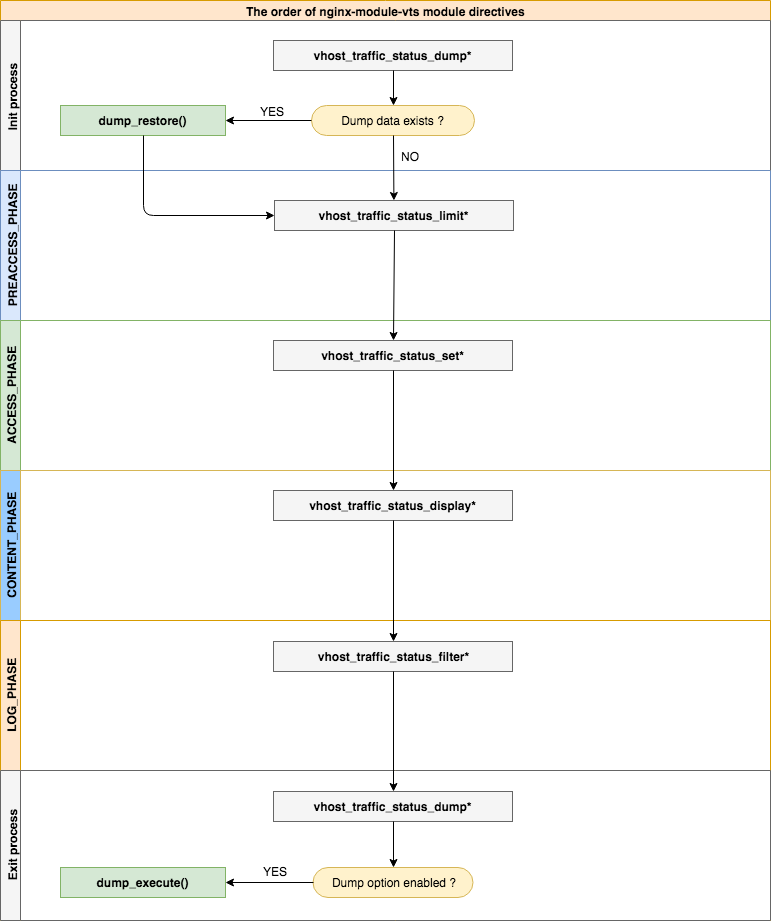
| - | - |
|---|---|
| 構文 | vhost_traffic_status <on | off> |
| デフォルト | オフ |
| コンテクスト | HTTP、サーバー、場所 |
Description:モジュールの動作を有効または無効にします。 vhost_traffic_status_zoneディレクティブを設定すると、自動的に有効になります。
| - | - |
|---|---|
| 構文 | vhost_traffic_status_zone [共有:名前:サイズ] |
| デフォルト | 共有:vhost_traffic_status:1m |
| コンテクスト | http |
Description:さまざまなキーの状態を保持する共有メモリゾーンのパラメーターを設定します。キャッシュは、すべてのワーカープロセス間で共有されます。ほとんどの場合、Nginx-Module-VTSが使用する共有メモリサイズはあまり増加しません。 vhost_traffic_status_filter_by_set_keyディレクティブを使用すると、共有メモリサイズがきれいになりますが、フィルターのキーが固定されている場合(たとえば、国コードの総数が約240です)、継続的に増加しません。
vhost_traffic_status_filter_by_set_keyディレクティブを使用する場合は、次のように設定します。
vhost_traffic_status_zone shared:vhost_traffic_status:32m )"ngx_slab_alloc() failed: no memory in vhost_traffic_status_zone" )がerror_logで印刷された場合、(usedsize * 2)以上に増加します。| - | - |
|---|---|
| 構文 | VHOST_TRAFFIC_STATUS_DUMP PATH [期間] |
| デフォルト | - |
| コンテクスト | http |
Description:統計データのダンプと復元を有効にします。パスSIGKILL統計データをダンプする場所です。(eg /var/log/nginx/vts.db )期間はバックアップサイクル時間です。
| - | - |
|---|---|
| 構文 | vhost_traffic_status_display |
| デフォルト | - |
| コンテクスト | HTTP、サーバー、場所 |
Description:モジュールディスプレイハンドラーを有効または無効にします。
| - | - |
|---|---|
| 構文 | vhost_traffic_status_display_format <json | html | jsonp | prometheus> |
| デフォルト | JSON |
| コンテクスト | HTTP、サーバー、場所 |
Description:ディスプレイハンドラーの出力形式を設定します。 jsonを設定した場合、JSONドキュメントで応答します。 htmlを設定すると、HTMLの組み込みライブダッシュボードで応答します。 jsonpを設定すると、JSONPコールバック関数(デフォルト: ngx_http_vhost_traffic_status_jsonp_callback )で応答します。 prometheusを設定した場合、Prometheus文書で応答します。
| - | - |
|---|---|
| 構文 | vhost_traffic_status_display_jsonpコールバック |
| デフォルト | ngx_http_vhost_traffic_status_jsonp_callback |
| コンテクスト | HTTP、サーバー、場所 |
Description: JSONPのコールバック名を設定します。
| - | - |
|---|---|
| 構文 | vhost_traffic_status_display_sum_key name |
| デフォルト | * |
| コンテクスト | HTTP、サーバー、場所 |
Description: ServerZonesフィールドのJSONに合計キー文字列を設定します。デフォルトの合計キー文字列は「*」です。
| - | - |
|---|---|
| 構文 | vhost_traffic_status_filter <on | off> |
| デフォルト | の上 |
| コンテクスト | HTTP、サーバー、場所 |
Description:フィルター機能を有効または無効にします。
| - | - |
|---|---|
| 構文 | vhost_traffic_status_filter_by_host <on | off> |
| デフォルト | オフ |
| コンテクスト | HTTP、サーバー、場所 |
Description:ホストヘッダーフィールドでキーを有効または無効にします。 nginxのserver_nameディレクティブon設定して、アスタリスクで始まるいくつかのまたはワイルドカード名を設定した場合、例:「 *.example.org」など、(a | b | c).example.orgまたは *.example.orgなどのホスト名でサーバーにリクエストした場合、次のようにjsonサーバーゾーンが印刷されます。
 server {
  server_name *.example.org;
  vhost_traffic_status_filter_by_host on;

  ...

}
...
"serverZones" : {
"a.example.org" : {
...
},
"b.example.org" : {
...
},
"c.example.org" : {
...
}
...
},
... vhost_traffic_status_filter_by_set_key $hostを設定するのと同じ関数を提供します。
| - | - |
|---|---|
| 構文 | vhost_traffic_status_filter_by_set_key key [ name ] |
| デフォルト | - |
| コンテクスト | HTTP、サーバー、場所 |
Description:ユーザー定義の変数によってキーを有効にします。キーは、トラフィックを計算するためのキー文字列です。名前は、トラフィックを計算するためのグループ文字列です。キーと名前には、$ host、$ server_nameなどの変数を含めることができます。名前のグループは、指定されている場合はfilterZonesに属します。キーのグループは、指定されていない場合はserverZonesに属します。 GEOIPモジュールの例は次のとおりです。
 server {
  server_name example.org;
  vhost_traffic_status_filter_by_set_key $geoip_country_code country:: $server_name ;

  ...

}
...
"serverZones" : {
...
},
"filterZones" : {
"country::example.org" : {
"KR" : {
"requestCounter" : ...,
"inBytes" : ...,
"outBytes" : ...,
"responses" :{
"1xx" : ...,
"2xx" : ...,
"3xx" : ...,
"4xx" : ...,
"5xx" : ...,
"miss" : ...,
"bypass" : ...,
"expired" : ...,
"stale" : ...,
"updating" : ...,
"revalidated" : ...,
"hit" : ...,
"scarce" : ...
},
"requestMsecCounter" : ...,
"requestMsec" : ...,
"requestMsecs" :{
"times" :[ ... ],
"msecs" :[ ... ]
},
},
"US" : {
...
},
...
},
...
},
...
| - | - |
|---|---|
| 構文 | vhost_traffic_status_filter_check_duplicate <on | off> |
| デフォルト | の上 |
| コンテクスト | HTTP、サーバー、場所 |
Description: vhost_traffic_status_filter_by_set_keyの重複排除を有効または無効にします。このオプションが有効になっている場合、各ディレクティブ(http、サーバー、場所)の重複値( key + name )の1つのみが処理されます。
| - | - |
|---|---|
| 構文 | vhost_traffic_status_filter_max_node番号[ string ...] |
| デフォルト | 0 |
| コンテクスト | http |
Description:指定された数値と文字列値を使用して、フィルターサイズの制限を有効にします。数値を超えた場合、既存のノードはLRUアルゴリズムによって削除されます。数字の引数は、制限されるノードのサイズです。デフォルト値0はフィルターを制限しません。 1つのノードは、JSONドキュメントのfilterZonesのオブジェクトです。文字列引数は、 vhost_traffic_status_filter_by_set_keyディレクティブによって設定されたグループ文字列値の一致する文字列値です。最初の部品のみが一致していても、マッチングは正規表現/^string.*/のように成功します。*/。デフォルトでは、文字列引数を設定しない場合、すべてのフィルターに適用されます。
例として:
$ vi nginx.conf
 http {

    geoip_country /usr/share/GeoIP/GeoIP.dat;

    vhost_traffic_status_zone;

    # The all filters are limited to a total of 16 nodes.
    # vhost_traffic_status_filter_max_node 16

    # The `/^uris.*/` and `/^client::ports.*/` group string patterns are limited to a total of 64 nodes.
    vhost_traffic_status_filter_max_node 16 uris client::ports;

    ...

    server {

        server_name example.org;

        ...

        vhost_traffic_status_filter_by_set_key $uri uris:: $server_name ;
        vhost_traffic_status_filter_by_set_key $remote_port client::ports:: $server_name ;
        vhost_traffic_status_filter_by_set_key $geoip_country_code country:: $server_name ;

    }
}
$ for i in {0..1000}; do curl -H 'Host: example.org' -i "http://localhost:80/test$i"; done
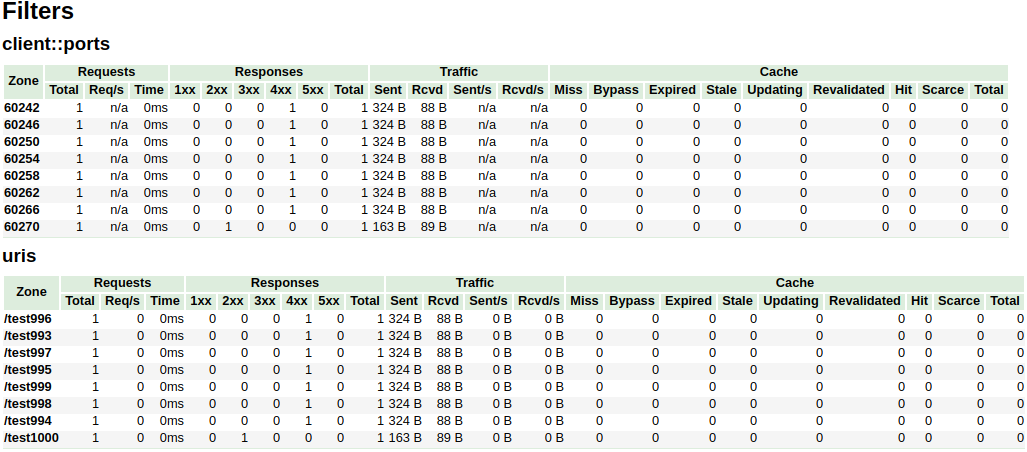
上記の例では、 /^uris.*/ and /^client::ports.*/グループ文字列パターンは、合計16のノードに制限されています。 country::.*は限定されません。
| - | - |
|---|---|
| 構文 | vhost_traffic_status_limit <on | off> |
| デフォルト | の上 |
| コンテクスト | HTTP、サーバー、場所 |
Description:制限機能を有効または無効にします。
| - | - |
|---|---|
| 構文 | vhost_traffic_status_limit_trafficメンバー: size [ code ] |
| デフォルト | - |
| コンテクスト | HTTP、サーバー、場所 |
Description:指定されたメンバーのトラフィック制限を有効にします。メンバーは、トラフィックを制限するメンバー文字列です。サイズは、トラフィックを制限するサイズ(k/m/g)です。コードは、拒否された要求に応じて返すコードです。(デフォルト:503)
利用可能なmember文字列は次のとおりです。
| - | - |
|---|---|
| 構文 | vhost_traffic_status_limit_traffic_by_set_keyキーメンバー: size [ code ] |
| デフォルト | - |
| コンテクスト | HTTP、サーバー、場所 |
Description:指定されたキーとメンバーのトラフィック制限を有効にします。キーは、トラフィックを制限するためのキー文字列です。メンバーは、トラフィックを制限するメンバー文字列です。サイズは、トラフィックを制限するサイズ(k/m/g)です。コードは、拒否された要求に応じて返すコードです。(デフォルト:503)
key構文は次のとおりです。
group @[ subgroup @] name利用可能なgroup文字列は次のとおりです。
subgroupを使用)subgroupを使用)利用可能なmember文字列は次のとおりです。
メンバーは、 vhost_traffic_status_limit_trafficディレクティブと同じです。
| - | - |
|---|---|
| 構文 | vhost_traffic_status_limit_check_duplicate <on | off> |
| デフォルト | の上 |
| コンテクスト | HTTP、サーバー、場所 |
Description: vhost_traffic_status_limit_by_set_keyの重複排除を有効または無効にします。このオプションが有効になっている場合、各ディレクティブ(HTTP、サーバー、場所)の重複値( member | key + member )の1つのみを処理されます。
| - | - |
|---|---|
| 構文 | vhost_traffic_status_set_by_filter $変動グループ/ゾーン/名前 |
| デフォルト | - |
| コンテクスト | http、サーバー、場所、if |
Description:共有メモリに保存されている指定されたステータス値を取得します。ほぼすべてのステータス値を取得でき、取得した値は最初の引数である$変数に保存されます。
Caveats:名前はケースに敏感です。すべての返品値は、整数タイプを取得します。
例として:
$requestCounter server/example.org/requestCounter$requestCounter filter/country::example.org@KR/requestCounter$requestCounter upstream@group/[email protected]:80/requestCounter$requestCounter upstream@alone/10.10.10.11:80/requestCounter$cacheHit cache/my_cache_name/cacheHit| - | - |
|---|---|
| 構文 | vhost_traffic_status_average_method <AMM|WMA> [ period ] |
| デフォルト | AMM 60s |
| コンテクスト | http, server, location |
Description: Sets the method which is a formula that calculate the average of response processing times. The period is an effective time of the values used for the average calculation.(Default: 60s) If period set to 0, effective time is ignored. In this case, the last average value is displayed even if there is no requests and after the elapse of time. The corresponding values are requestMsec and responseMsec in JSON.
| - | - |
|---|---|
| 構文 | vhost_traffic_status_histogram_buckets second ... |
| デフォルト | - |
| コンテクスト | http, server, location |
Description: Sets the observe buckets to be used in the histograms. By default, if you do not set this directive, it will not work. The second can be expressed in decimal places with a minimum value of 0.001(1ms). The maximum size of the buckets is 32. If this value is insufficient for you, change the NGX_HTTP_VHOST_TRAFFIC_STATUS_DEFAULT_BUCKET_LEN in the src/ngx_http_vhost_traffic_status_node.h
For examples:
0.005 0.01 0.05 0.1 0.5 1 5 100.005 0.01 0.05 0.1 Caveats: By default, if you do not set this directive, the histogram statistics does not work. The restored histograms by vhost_traffic_status_dump directive have no affected by changes to the buckets by vhost_traffic_status_histogram_buckets directive. So you must first delete the zone or the dump file before changing the buckets by vhost_traffic_status_histogram_buckets directive. Similar to the above, delete the dump file when using the histogram for the first time.
| - | - |
|---|---|
| 構文 | vhost_traffic_status_bypass_limit <on|off> |
| デフォルト | オフ |
| コンテクスト | http, server, location |
Description: Enables or disables to bypass vhost_traffic_status_limit directives. The limit features is bypassed if this option is enabled. This is mostly useful if you want to connect the status web page like /status regardless of vhost_traffic_status_limit directives as follows:
 http {
    vhost_traffic_status_zone;

    ...

    server {

        ...

        location /status {
            vhost_traffic_status_bypass_limit on;
            vhost_traffic_status_display;
            vhost_traffic_status_display_format html;
        }
    }
}| - | - |
|---|---|
| 構文 | vhost_traffic_status_bypass_stats <on|off> |
| デフォルト | オフ |
| コンテクスト | http, server, location |
Description: Enables or disables to bypass vhost_traffic_status . The traffic status stats features is bypassed if this option is enabled. In other words, it is excluded from the traffic status stats. This is mostly useful if you want to ignore your request in status web page like /status as follows:
 http {
    vhost_traffic_status_zone;

    ...

    server {

        ...

        location /status {
            vhost_traffic_status_bypass_stats on;
            vhost_traffic_status_display;
            vhost_traffic_status_display_format html;
        }
    }
}To cut a release, create a changelog entry PR with git-chglog
 version="v0.2.0"
git checkout -b "cut-${version}"
git-chglog -o CHANGELOG.md --next-tag "${version}"
git add CHANGELOG.md
sed -i "s/NGX_HTTP_VTS_MODULE_VERSION ".*/NGX_HTTP_VTS_MODULE_VERSION "${version}"/" src/ngx_http_vhost_traffic_status_module.h
git add src/ngx_http_vhost_traffic_status_module.h
git-chglog -t .chglog/RELNOTES.tmpl --next-tag "${version}" "${version}" | git commit -F-
After the PR is merged, create the new tag and release on the GitHub Releases.
Stream traffic status
Prometheus
System protection
YoungJoo.Kim(김영주) [[email protected]]





