nginx module vts
v0.2.2

NGINX虚拟主机流量状态模块
有关最新标记的版本,请参见GitHub版本。
安装此模块后,运行sudo prove -rt 。需要sudo ,因为测试要求NGINX在端口80上聆听。
未测试早期版本。
shell> git clone git://github.com/vozlt/nginx-module-vts.git
通过添加--add-module=/path/to/nginx-module-vts将模块添加到构建配置中
构建Nginx二进制。
安装NGINX二进制。
 http {
    vhost_traffic_status_zone;

    ...

    server {

        ...

        location /status {
            vhost_traffic_status_display;
            vhost_traffic_status_display_format html;
        }
    }
}这是一个NGINX模块,可提供对虚拟主机状态信息的访问。它包含当前状态,例如服务器,上游,缓存。这类似于Nginx Plus的现场活动监控。内置的HTML也从旧版本的演示页面中获取。
首先,需要指令vhost_traffic_status_zone ,然后如果设置了指令vhost_traffic_status_display ,则可以访问如下:
/status/format/json ,将使用一个JSON文档进行响应,其中包含当前活动数据,用于实时仪表板和第三方监视工具。/status/format/html ,将使用HTML中的内置仪表板进行响应,该仪表板内部请求/status/format/json 。/status/format/jsonp ,将使用一个JSONP回调函数响应,该函数包含当前活动数据,用于在实时仪表板和第三方监视工具中使用。/status/format/prometheus ,将使用包含当前活动数据的Prometheus文件进行响应。/status/control ,将通过查询字符串重置或删除区域后使用JSON文档进行响应。看到控件。JSON文档包含如下:
{
    "hostName" : ...,
    "moduleVersion" : ...,
    "nginxVersion" : ...,
    "loadMsec" : ...,
    "nowMsec" : ...,
    "connections" : {
        "active" : ...,
        "reading" : ...,
        "writing" : ...,
        "waiting" : ...,
        "accepted" : ...,
        "handled" : ...,
        "requests" : ...
    },
    "sharedZones" : {
        "name" : ...,
        "maxSize" : ...,
        "usedSize" : ...,
        "usedNode" : ...
    },
    "serverZones" : {
        "..." :{
            "requestCounter" : ...,
            "inBytes" : ...,
            "outBytes" : ...,
            "responses" :{
                "1xx" : ...,
                "2xx" : ...,
                "3xx" : ...,
                "4xx" : ...,
                "5xx" : ...,
                "miss" : ...,
                "bypass" : ...,
                "expired" : ...,
                "stale" : ...,
                "updating" : ...,
                "revalidated" : ...,
                "hit" : ...,
                "scarce" : ...
            },
            "requestMsecCounter" : ...,
            "requestMsec" : ...,
            "requestMsecs" :{
                "times" :[ ... ],
                "msecs" :[ ... ]
            },
            "requestBuckets" :{
                "msecs" :[ ... ],
                "counters" :[ ... ]
            },
        }
        ...
    },
    "filterZones" : {
        "..." :{
            "..." :{
                "requestCounter" : ...,
                "inBytes" : ...,
                "outBytes" : ...,
                "responses" :{
                    "1xx" : ...,
                    "2xx" : ...,
                    "3xx" : ...,
                    "4xx" : ...,
                    "5xx" : ...,
                    "miss" : ...,
                    "bypass" : ...,
                    "expired" : ...,
                    "stale" : ...,
                    "updating" : ...,
                    "revalidated" : ...,
                    "hit" : ...,
                    "scarce" : ...
                },
                "requestMsecCounter" : ...,
                "requestMsec" : ...,
                "requestMsecs" :{
                    "times" :[ ... ],
                    "msecs" :[ ... ]
                },
                "requestBuckets" :{
                    "msecs" :[ ... ],
                    "counters" :[ ... ]
                },
            },
            ...
        },
        ...
    },
    "upstreamZones" : {
        "..." :[
            {
                "server" : ...,
                "requestCounter" : ...,
                "inBytes" : ...,
                "outBytes" : ...,
                "responses" :{
                    "1xx" : ...,
                    "2xx" : ...,
                    "3xx" : ...,
                    "4xx" : ...,
                    "5xx" : ...
                },
                "requestMsecCounter" : ...,
                "requestMsec" : ...,
                "requestMsecs" :{
                    "times" :[ ... ],
                    "msecs" :[ ... ]
                },
                "requestBuckets" :{
                    "msecs" :[ ... ],
                    "counters" :[ ... ]
                },
                "responseMsecCounter" : ...,
                "responseMsec" : ...,
                "responseMsecs" :{
                    "times" :[ ... ],
                    "msecs" :[ ... ]
                },
                "responseBuckets" :{
                    "msecs" :[ ... ],
                    "counters" :[ ... ]
                },
                "weight" : ...,
                "maxFails" : ...,
                "failTimeout" : ...,
                "backup" : ...,
                "down" : ...
            }
            ...
        ],
        ...
    }
    "cacheZones" : {
        "..." :{
            "maxSize" : ...,
            "usedSize" : ...,
            "inBytes" : ...,
            "outBytes" : ...,
            "responses" :{
                "miss" : ...,
                "bypass" : ...,
                "expired" : ...,
                "stale" : ...,
                "updating" : ...,
                "revalidated" : ...,
                "hit" : ...,
                "scarce" : ...
            }
        },
        ...
    }
}* )和HIT比率vhost_traffic_status_filter_by_set_key指令过滤的每个服务器区域的流量(进出)以及请求和响应计数和缓存命中率* ),并通过vhost_traffic_status_filter_by_set_key指令过滤HIT比率 JSON文档中的overCounts对象主要用于32位系统,如果其值溢出,则将增加1个。指令vhost_traffic_status_display_format设置了JSON,JSONP,HTML,PROMETHEUS之一的默认OUPUT格式。 (默认:JSON)
流量计算如下:
所有计算都在NGINX的对数处理阶段工作。内部重定向(X-Accel-redirect或error_page)在上游区域中未计算。
Caveats:此模块依赖于NGINX记录系统(NGX_HTTP_LOG_PHASE:NGINX HTTP的最后阶段),因此流量可能在某些CirumStances中与实际带宽流量不同。 Websocket,已取消的下载可能导致不准确的原因。该模块的工作根本无关紧要,无论access_log指令“ on”或“ off”。同样,此模块在“ access_log Off”上效果很好。当使用多个域时,它将设置为Server_name指令的第一个域(左)。如果您不想要它,请参见vhost_traffic_status_filter_by_host,vhost_traffic_status_filter_filter_by_set_keyney指令。
有关stream流量统计信息,请参见以下模块:
当前所有平均值均在最后64个值中计算为AMM(算术平均值)。
它能够通过查询字符串重置或删除交通区域。请求用JSON文档做出响应。
{status_uri} / control?cmd = {command} &group = {group} &Zone = {name} http {
geoip_country /usr/share/GeoIP/GeoIP.dat;
vhost_traffic_status_zone;
vhost_traffic_status_filter_by_set_key $geoip_country_code country::*;
...
server {
server_name example.org;
...
vhost_traffic_status_filter_by_set_key $geoip_country_code country:: $server_name ;
location /status {
vhost_traffic_status_display;
vhost_traffic_status_display_format html;
}
}
}如果设置为上述,则控制URI就像example.org/status/control 。
可用的请求参数如下:
status | reset | delete >status/format/json 。server | filter | upstream@alone | upstream@group | cache | * >这类似于status/format/json除非它可以获取每个区域。
status/format/json完全相同。 MANXONES值是默认状态值,包括hostName , moduleVersion , nginxVersion , loadMsec , nowMsec , connections 。
namefilter_group @ nameupstream_group @ namenamename它将指定区域的值重置为0。
namefilter_group @ nameupstream_group @ namenamename它在共享内存中删除指定的区域。
namefilter_group @ nameupstream_group @ namenamename 它可以使用vhost_traffic_status_set_by_filter指令分别获得NGINX配置中的状态值。它几乎可以获取所有状态值,并且获得的值存储在用户定义变量中,这是第一个参数。
 http {

    geoip_country /usr/share/GeoIP/GeoIP.dat;

    vhost_traffic_status_zone;
    vhost_traffic_status_filter_by_set_key $geoip_country_code country::*;

    ...
    upstream backend {
        10.10.10.11:80;
        10.10.10.12:80;
    }

    server {

        server_name example.org;

        ...

        vhost_traffic_status_filter_by_set_key $geoip_country_code country:: $server_name ;

        vhost_traffic_status_set_by_filter $requestCounter server/example.org/requestCounter;
        vhost_traffic_status_set_by_filter $requestCounterKR filter/country::example.org@KR/requestCounter;

        location /backend {
            vhost_traffic_status_set_by_filter $requestCounterB1 upstream@group/[email protected]:80/requestCounter;
            proxy_pass http://backend;
        }
    }
}
上述设置如下:
请参阅vhost_traffic_status_set_by_filter指令详细使用。
以JSON格式提供以下状态信息:
/ {status_uri} /格式 /json
/ {status_uri} / control?cmd =状态&...
{version}(|.dev.{commit})格式中的模块的版本。vhost_traffic_status )vhost_traffic_status_histogram_buckets指令设置的直方图的存储桶值。serverZones ,除了包含组名称外。vhost_traffic_status_histogram_buckets指令设置的直方图的存储桶值。vhost_traffic_status_histogram_buckets指令设置的直方图的存储桶值。weight设置。max_fails设置。fail_timeout设置。backup设置。down设置。基本上,这只是一个标记NGX_HTTP_UPSTREAM_MODULE的服务器(例如server backend3.example.com down ),而不是实际的上游服务器状态。如果您启用了上游区域指令,它将更改为实际状态。proxy_cache_path指令中的max_size ,则默认情况下将分配系统依赖值NGX_MAX_OFF_T_VALUE 。换句话说,此值来自NGINX,而不是我指定的值。maxSize值。 / {status_uri} / control?cmd = reset&...
/ {status_uri} / control?cmd = delete&...
提供了以下嵌入式变量:
它能够使用指令vhost_traffic_status_limit_traffic限制每个主机的总流量。它还可以使用指令vhost_traffic_status_limit_traffic_by_set_key来限制所有流量。当超过限制时,服务器将返回503(暂时不可用的服务)错误,以回复请求。返回代码可以更改。
 http {

    vhost_traffic_status_zone;

    ...

    server {

        server_name *.example.org;

        vhost_traffic_status_limit_traffic in:64G;
        vhost_traffic_status_limit_traffic out:1024G;

        ...
    }
}*.example.org上的总流量分别限制为64G和1024G。如果启用了vhost_traffic_status_filter_by_host指令,则每个域单独工作。 http {
geoip_country /usr/share/GeoIP/GeoIP.dat;
vhost_traffic_status_zone;
...
server {
server_name example.org;
vhost_traffic_status_filter_by_set_key $geoip_country_code country:: $server_name ;
vhost_traffic_status_limit_traffic_by_set_key FG@country:: $server_name @US out:1024G;
vhost_traffic_status_limit_traffic_by_set_key FG@country:: $server_name @CN out:2048G;
...
}
}
example.org和CN的总流量分别限制为1024G和2048G。 http {
vhost_traffic_status_zone;
...
upstream backend {
server 10.10.10.17:80;
server 10.10.10.18:80;
}
server {
server_name example.org;
location /backend {
vhost_traffic_status_limit_traffic_by_set_key UG@[email protected]:80 in:512G;
vhost_traffic_status_limit_traffic_by_set_key UG@[email protected]:80 in:1024G;
proxy_pass http://backend;
}
...
}
}
example.org上游后端进入上游后端的总流量限制为每个对等点512G和1024G。 Caveats:流量是累积转移或计数器,而不是带宽。
它能够使用指令vhost_traffic_status_filter_by_set_key来计算用户定义的单个统计数据。
 http {
    geoip_country /usr/share/GeoIP/GeoIP.dat;

    vhost_traffic_status_zone;
    vhost_traffic_status_filter_by_set_key $geoip_country_code country::*;

    ...

    server {

        ...

        vhost_traffic_status_filter_by_set_key $geoip_country_code country:: $server_name ;

        location /status {
            vhost_traffic_status_display;
            vhost_traffic_status_display_format html;
        }
    }
}基本上,乡村标志图像是在HTML内置的。如果包含在组名称中的country字符串,则启用国家标志图像,这是vhost_traffic_status_filter_by_set_key指令的第二个参数。
 http {
    vhost_traffic_status_zone;

    ...

    server {

        ...

        location ~ ^/storage/(.+)/.*$ {
            set $volume $1 ;
            vhost_traffic_status_filter_by_set_key $volume storage:: $server_name ;
        }

        location /status {
            vhost_traffic_status_display;
            vhost_traffic_status_display_format html;
        }
    }
} http {
vhost_traffic_status_zone;
map $http_user_agent $filter_user_agent {
default 'unknown' ;
~ iPhone ios;
~ Android android;
~ (MSIE|Mozilla) windows;
}
vhost_traffic_status_filter_by_set_key $filter_user_agent agent::*;
...
server {
...
vhost_traffic_status_filter_by_set_key $filter_user_agent agent:: $server_name ;
location /status {
vhost_traffic_status_display;
vhost_traffic_status_display_format html;
}
}
}http_user_agent的流量 http {
vhost_traffic_status_zone;
server {
...
vhost_traffic_status_filter_by_set_key $status $server_name ;
location /status {
vhost_traffic_status_display;
vhost_traffic_status_display_format html;
}
}
}http status code的流量Caveats: $状态变量可在nginx-(1.3.2,1.2.2)中找到。
如果域具有多个DNS记录,则可以使用过滤器功能或Proxy_pass中的变量来计算单个IP的流量。
 http {
    vhost_traffic_status_zone;

    upstream backend {
        elb.example.org:80;
    }

    ...

    server {

        ...

        location /backend {
            vhost_traffic_status_filter_by_set_key $upstream_addr upstream::backend;
            proxy_pass backend;
        }
    }
}elb.example.org的单个IP的流量。如果elb.example.org具有多个DNS A记录,则将显示所有filterZones中的所有IPS。在上面的设置中,随着NGINX启动或重新加载IT配置,它会查询DNS服务器以解决域和DNS记录在内存中的缓存。因此,即使DNS a记录被DNS管理员call缩,除非nginx重新启动或重新加载,否则DNS的记录也不会更改。 http {
vhost_traffic_status_zone;
resolver 10.10.10.53 valid=10s
...
server {
...
location /backend {
set $backend_server elb.example.org;
proxy_pass http:// $backend_server ;
}
}
}elb.example.org的单个IP的流量。如果elb.example.org的DNS更改了记录,则将同时显示旧的IP和新IP ::nogroups中的新IP。与第一个上游组设置不同,即使DNS A记录被DNS管理员claging,第二个设置也可以很好地工作。 Caveats:请有关NGINX DNS的更多详细信息,请参见DNS-Service-Discovery-nginx-Plus。
 http {
    vhost_traffic_status_zone;

    ...

    server {

        ...

        location /status {
            vhost_traffic_status_bypass_limit on;
            vhost_traffic_status_bypass_stats on;
            vhost_traffic_status_display;
            vhost_traffic_status_display_format html;
        }
    }
}
/status URI被排除在状态流量计算和限制功能之外。请参阅以下指令: http {
vhost_traffic_status_zone;
vhost_traffic_status_dump /var/log/nginx/vts.db;
...
server {
...
}
}vhost_traffic_status_dump指令将永久维护统计数据数据。请参阅vhost_traffic_status_dump指令以获取详细用法。 {{uri}}字符串更改为状态uri。 shell> vi share/status.template.html
var vtsStatusURI = "yourStatusUri/format/json", vtsUpdateInterval = 1000;
shell> cp share/status.template.html /usr/share/nginx/html/status.html
nginx.conf server {
server_name example.org;
root /usr/share/nginx/html;
# Redirect requests for / to /status.html
location = / {
return 301 /status.html;
}
location = /status.html {}
# Everything beginning /status (except for /status.html) is
# processed by the status handler
location /status {
vhost_traffic_status_display;
vhost_traffic_status_display_format json;
}
}
http://example.org/status.html
修改share/status.template.html (请勿更改{{uri}}字符串)
重新创建ngx_http_vhost_traffic_status_module_html.h ,如下:
 shell> cd util
shell> ./tplToDefine.sh ../share/status.template.html > ../src/ngx_http_vhost_traffic_status_module_html.h
通过添加--add-module=/path/to/nginx-module-vts将模块添加到构建配置中
构建Nginx二进制。
安装NGINX二进制。
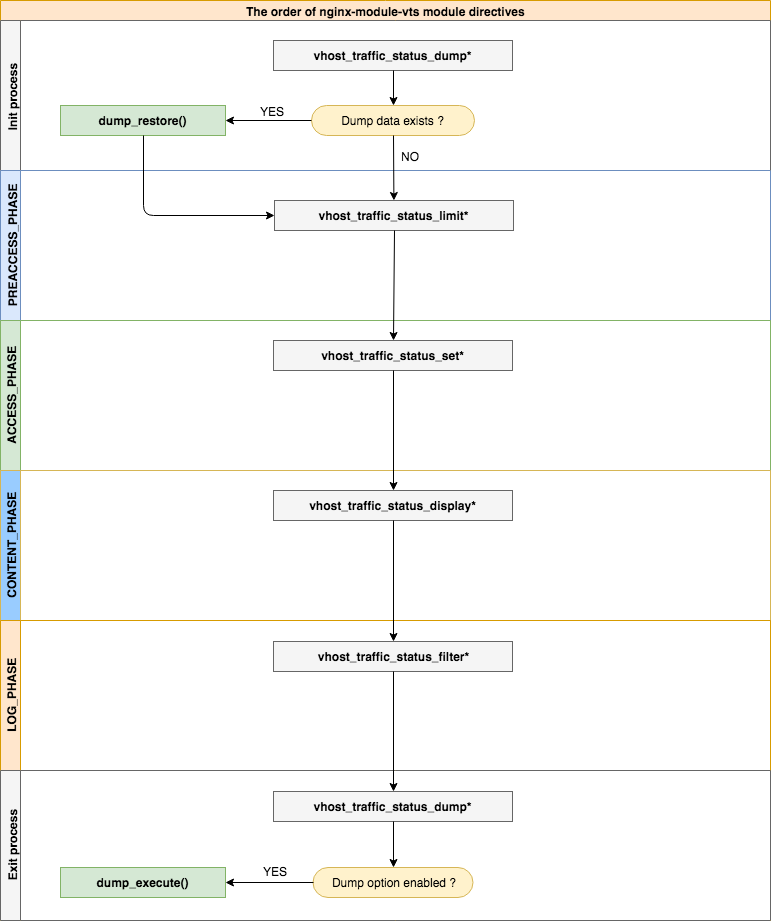
| - | - |
|---|---|
| 句法 | vhost_traffic_status <on | off> |
| 默认 | 离开 |
| 语境 | HTTP,服务器,位置 |
Description:启用或禁用模块工作。如果设置vhost_traffic_status_zone指令,将自动启用。
| - | - |
|---|---|
| 句法 | vhost_traffic_status_zone [共享:名称:大小] |
| 默认 | 共享:vhost_traffic_status:1m |
| 语境 | http |
Description:设置共享内存区域的参数,该参数将保留各种键的状态。缓存在所有工作过程之间共享。在大多数情况下,NGINX-MODULE-VTS使用的共享存储器大小不会增加太多。当使用vhost_traffic_status_filter_by_set_key指令时,共享存储器大小会增加,但是如果固定过滤器的键是固定的(例如。国家代码的总数约为240 ),则不会持续增加。
如果您使用vhost_traffic_status_filter_by_set_key指令,则将其设置如下:
vhost_traffic_status_zone shared:vhost_traffic_status:32m )"ngx_slab_alloc() failed: no memory in vhost_traffic_status_zone" )在error_log中打印出来,则增加到超过(二手size * 2)。| - | - |
|---|---|
| 句法 | VHOST_TRAFFIC_STATUS_DUMP PATH [周期] |
| 默认 | - |
| 语境 | http |
Description:启用统计数据转储并还原。该路径是转储统计数据的位置。(例如/var/log/nginx/vts.db )该周期是备份周期时间。(默认值:60s),如果NGINX由信号(Signal)(Sigkill)( SIGKILL ),则它会立即备份。
| - | - |
|---|---|
| 句法 | vhost_traffic_status_display |
| 默认 | - |
| 语境 | HTTP,服务器,位置 |
Description:启用或禁用模块显示处理程序。
| - | - |
|---|---|
| 句法 | vhost_traffic_status_display_format <json | html | jsonp | Prometheus> |
| 默认 | JSON |
| 语境 | HTTP,服务器,位置 |
Description:设置显示处理程序的输出格式。如果您设置json ,将使用JSON文档进行响应。如果设置了html ,将使用HTML的内置Live仪表板进行响应。如果设置jsonp ,将使用JSONP回调函数响应(默认: ngx_http_vhost_traffic_status_jsonp_callback )。如果您设定prometheus ,将使用Prometheus文件做出回应。
| - | - |
|---|---|
| 句法 | vhost_traffic_status_display_jsonp回调 |
| 默认 | ngx_http_vhost_traffic_status_jsonp_callback |
| 语境 | HTTP,服务器,位置 |
Description:设置JSONP的回调名称。
| - | - |
|---|---|
| 句法 | vhost_traffic_status_display_sum_key名称 |
| 默认 | * |
| 语境 | HTTP,服务器,位置 |
Description:在服务器字段的JSON中设置SUM键字符串。默认的总和键字符串是“*”。
| - | - |
|---|---|
| 句法 | vhost_traffic_status_filter <on | off> |
| 默认 | 在 |
| 语境 | HTTP,服务器,位置 |
Description:启用或禁用过滤器功能。
| - | - |
|---|---|
| 句法 | vhost_traffic_status_filter_by_host <on | off> |
| 默认 | 离开 |
| 语境 | HTTP,服务器,位置 |
Description:通过主机标头字段启用或禁用键。如果on并设置Nginx的Server_name指令将几个或通配符名称设置为星号,例如“ *.example.org”,并请求使用hostName,例如(a | b | c).example.org或 *.example.org.example.org,则json serverzones thts json serverzones均以下面的打印:如下所示:如下所示:如下:
 server {
  server_name *.example.org;
  vhost_traffic_status_filter_by_host on;

  ...

}
...
"serverZones" : {
"a.example.org" : {
...
},
"b.example.org" : {
...
},
"c.example.org" : {
...
}
...
},
...它提供了设置vhost_traffic_status_filter_by_set_key $host相同功能。
| - | - |
|---|---|
| 句法 | VHOST_TRAFFIC_STATUS_FILTER_BY_SET_KEY KEY [名称] |
| 默认 | - |
| 语境 | HTTP,服务器,位置 |
Description:通过用户定义的变量启用键。密钥是计算流量的键字符串。该名称是计算流量的组字符串。键和名称可以包含$ host,$ server_name之类的变量。如果指定了名称的s组,则属于filterZones 。如果未指定第二个参数名称,则键的组属于serverZones 。 GEOIP模块的示例如下:
 server {
  server_name example.org;
  vhost_traffic_status_filter_by_set_key $geoip_country_code country:: $server_name ;

  ...

}
...
"serverZones" : {
...
},
"filterZones" : {
"country::example.org" : {
"KR" : {
"requestCounter" : ...,
"inBytes" : ...,
"outBytes" : ...,
"responses" :{
"1xx" : ...,
"2xx" : ...,
"3xx" : ...,
"4xx" : ...,
"5xx" : ...,
"miss" : ...,
"bypass" : ...,
"expired" : ...,
"stale" : ...,
"updating" : ...,
"revalidated" : ...,
"hit" : ...,
"scarce" : ...
},
"requestMsecCounter" : ...,
"requestMsec" : ...,
"requestMsecs" :{
"times" :[ ... ],
"msecs" :[ ... ]
},
},
"US" : {
...
},
...
},
...
},
...
| - | - |
|---|---|
| 句法 | vhost_traffic_status_filter_check_duplate <on | off> |
| 默认 | 在 |
| 语境 | HTTP,服务器,位置 |
Description:启用或禁用VHOST_TRAFFIC_STATUS_FILTER_BY_SET_KEY的重复数据删除。如果启用了此选项,则仅处理每个指令(HTTP,Server,Location)中的重复值( key + name )之一。
| - | - |
|---|---|
| 句法 | vhost_traffic_status_filter_max_node编号[ String ...] |
| 默认 | 0 |
| 语境 | http |
Description:使用指定的数字和字符串值启用过滤器大小的限制。如果超过数字,则现有节点将被LRU算法删除。数字参数是节点的大小将受到限制。默认值0不限制过滤器。一个节点是JSON文档中filterZones中的对象。字符串参数是由vhost_traffic_status_filter_by_set_key指令设置的组字符串值的匹配字符串值。即使只有第一部分匹配,匹配也像正则表达式/^string.*/一样成功。默认情况下,如果未设置字符串参数,则将其应用于所有过滤器。
例如:
$ vi nginx.conf
 http {

    geoip_country /usr/share/GeoIP/GeoIP.dat;

    vhost_traffic_status_zone;

    # The all filters are limited to a total of 16 nodes.
    # vhost_traffic_status_filter_max_node 16

    # The `/^uris.*/` and `/^client::ports.*/` group string patterns are limited to a total of 64 nodes.
    vhost_traffic_status_filter_max_node 16 uris client::ports;

    ...

    server {

        server_name example.org;

        ...

        vhost_traffic_status_filter_by_set_key $uri uris:: $server_name ;
        vhost_traffic_status_filter_by_set_key $remote_port client::ports:: $server_name ;
        vhost_traffic_status_filter_by_set_key $geoip_country_code country:: $server_name ;

    }
}
$ for i in {0..1000}; do curl -H 'Host: example.org' -i "http://localhost:80/test$i"; done
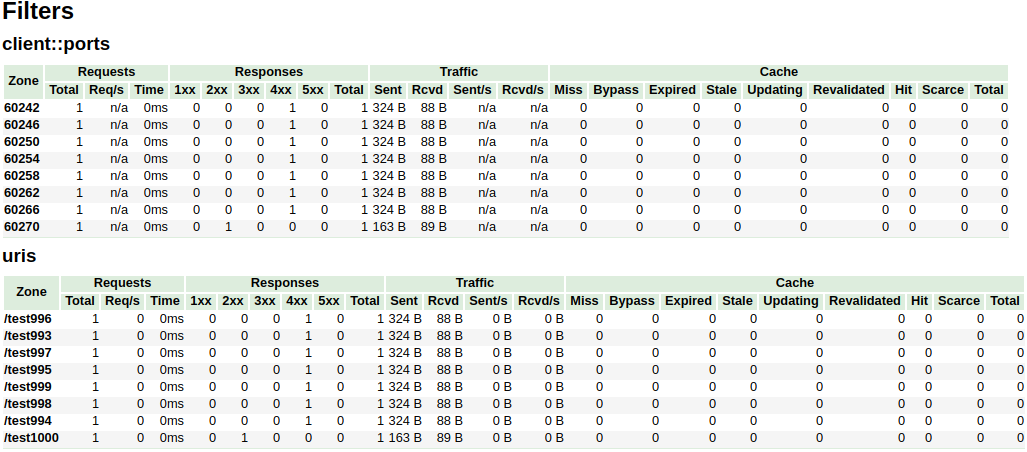
在上面的示例中, /^uris.*/和/^client::ports.*/组字符串模式仅限于16个节点。诸如country::.*不受限制。
| - | - |
|---|---|
| 句法 | vhost_traffic_status_limit <on | off> |
| 默认 | 在 |
| 语境 | HTTP,服务器,位置 |
Description:启用或禁用限制功能。
| - | - |
|---|---|
| 句法 | VHOST_TRAFFIC_STATUS_LIMIT_TRAFFIC成员:大小[代码] |
| 默认 | - |
| 语境 | HTTP,服务器,位置 |
Description:启用指定成员的流量限制。该成员是限制流量的成员字符串。大小是限制流量的大小(k/m/g)。该代码是响应被拒绝请求的返回的代码。(默认:503)
可用member字符串如下:
| - | - |
|---|---|
| 句法 | vhost_traffic_status_limit_traffic_by_set_key键: size [代码] |
| 默认 | - |
| 语境 | HTTP,服务器,位置 |
Description:启用指定密钥和成员的流量限制。关键是一个限制流量的键字符串。该成员是限制流量的成员字符串。大小是限制流量的大小(k/m/g)。该代码是响应被拒绝请求的返回的代码。(默认:503)
key语法如下:
group @[ subgroup @] name可用的group字符串如下:
subgroup )subgroup )可用member字符串如下:
成员与vhost_traffic_status_limit_traffic指令相同。
| - | - |
|---|---|
| 句法 | vhost_traffic_status_limit_check_duplate <on | off> |
| 默认 | 在 |
| 语境 | HTTP,服务器,位置 |
Description:启用或禁用vhost_traffic_status_limit_by_set_key的重复数据删除。如果启用了此选项,则仅处理每个指令(http,server,location)中的重复值( member | key + member )之一。
| - | - |
|---|---|
| 句法 | VHOST_TRAFFIC_STATUS_SET_BY_FILTER $变量组/区域/名称 |
| 默认 | - |
| 语境 | http,服务器,位置,如果 |
Description:获取存储在共享内存中的指定状态值。它几乎可以获取所有状态值,并且获得的值存储在$变量中,这是第一个参数。
Caveats:名称是案例敏感的。所有返回值均采用整数类型。
例如:
$requestCounter server/example.org/requestCounter$requestCounter filter/country::example.org@KR/requestCounter$requestCounter upstream@group/[email protected]:80/requestCounter$requestCounter upstream@alone/10.10.10.11:80/requestCounter$cacheHit cache/my_cache_name/cacheHit| - | - |
|---|---|
| 句法 | vhost_traffic_status_average_method <AMM|WMA> [ period ] |
| 默认 | AMM 60s |
| 语境 | http, server, location |
Description: Sets the method which is a formula that calculate the average of response processing times. The period is an effective time of the values used for the average calculation.(Default: 60s) If period set to 0, effective time is ignored. In this case, the last average value is displayed even if there is no requests and after the elapse of time. The corresponding values are requestMsec and responseMsec in JSON.
| - | - |
|---|---|
| 句法 | vhost_traffic_status_histogram_buckets second ... |
| 默认 | - |
| 语境 | http, server, location |
Description: Sets the observe buckets to be used in the histograms. By default, if you do not set this directive, it will not work. The second can be expressed in decimal places with a minimum value of 0.001(1ms). The maximum size of the buckets is 32. If this value is insufficient for you, change the NGX_HTTP_VHOST_TRAFFIC_STATUS_DEFAULT_BUCKET_LEN in the src/ngx_http_vhost_traffic_status_node.h
例如:
0.005 0.01 0.05 0.1 0.5 1 5 100.005 0.01 0.05 0.1 Caveats: By default, if you do not set this directive, the histogram statistics does not work. The restored histograms by vhost_traffic_status_dump directive have no affected by changes to the buckets by vhost_traffic_status_histogram_buckets directive. So you must first delete the zone or the dump file before changing the buckets by vhost_traffic_status_histogram_buckets directive. Similar to the above, delete the dump file when using the histogram for the first time.
| - | - |
|---|---|
| 句法 | vhost_traffic_status_bypass_limit <on|off> |
| 默认 | 离开 |
| 语境 | http, server, location |
Description: Enables or disables to bypass vhost_traffic_status_limit directives. The limit features is bypassed if this option is enabled. This is mostly useful if you want to connect the status web page like /status regardless of vhost_traffic_status_limit directives as follows:
 http {
    vhost_traffic_status_zone;

    ...

    server {

        ...

        location /status {
            vhost_traffic_status_bypass_limit on;
            vhost_traffic_status_display;
            vhost_traffic_status_display_format html;
        }
    }
}| - | - |
|---|---|
| 句法 | vhost_traffic_status_bypass_stats <on|off> |
| 默认 | 离开 |
| 语境 | http, server, location |
Description: Enables or disables to bypass vhost_traffic_status . The traffic status stats features is bypassed if this option is enabled. In other words, it is excluded from the traffic status stats. This is mostly useful if you want to ignore your request in status web page like /status as follows:
 http {
    vhost_traffic_status_zone;

    ...

    server {

        ...

        location /status {
            vhost_traffic_status_bypass_stats on;
            vhost_traffic_status_display;
            vhost_traffic_status_display_format html;
        }
    }
}To cut a release, create a changelog entry PR with git-chglog
 version="v0.2.0"
git checkout -b "cut-${version}"
git-chglog -o CHANGELOG.md --next-tag "${version}"
git add CHANGELOG.md
sed -i "s/NGX_HTTP_VTS_MODULE_VERSION ".*/NGX_HTTP_VTS_MODULE_VERSION "${version}"/" src/ngx_http_vhost_traffic_status_module.h
git add src/ngx_http_vhost_traffic_status_module.h
git-chglog -t .chglog/RELNOTES.tmpl --next-tag "${version}" "${version}" | git commit -F-
After the PR is merged, create the new tag and release on the GitHub Releases.
Stream traffic status
普罗米修斯
系统保护
YoungJoo.Kim(김영주) [[email protected]]





