neoplanner
1.0.0

repo นี้มีการใช้งานตัวแทนวางแผนตามลำดับที่เรียกว่า“ Neoplanner” นักวางแผนนี้เหมาะสำหรับสภาพแวดล้อมที่ใช้ข้อความที่มีพื้นที่รัฐและพื้นที่แอ็คชั่นขนาดใหญ่ มันประสานกันทั้งสองการค้นหาพื้นที่ของรัฐกับการสืบค้นกับพื้นฐาน LLM เพื่อให้ได้แผนปฏิบัติการที่ดีที่สุด สัญญาณรางวัลจะใช้ในเชิงปริมาณเพื่อขับเคลื่อนการค้นหา ความสมดุลของการสำรวจและการแสวงหาผลประโยชน์นั้นได้รับการบำรุงรักษาโดยการเพิ่มขอบเขตความเชื่อมั่นสูงสุดของค่าของรัฐ ในสถานที่ที่จำเป็นต้องมีการสำรวจแบบสุ่ม LLM จะถูกสอบถามเพื่อสร้างแผนปฏิบัติการ การเรียนรู้จากการทดลองแต่ละครั้งจะถูกเก็บไว้เป็นความสัมพันธ์ของเอนทิตีในรูปแบบข้อความ สิ่งเหล่านี้ใช้ในการสืบค้นในอนาคตกับ LLM เพื่อการปรับปรุงอย่างต่อเนื่อง การทดลองในสภาพแวดล้อม ScienceWorld เผยให้เห็นการปรับปรุง 124% จากวิธีที่ดีที่สุดในปัจจุบันในแง่ของรางวัลเฉลี่ยที่ได้รับในหลาย ๆ งาน ต่อไปนี้เป็น Architechture
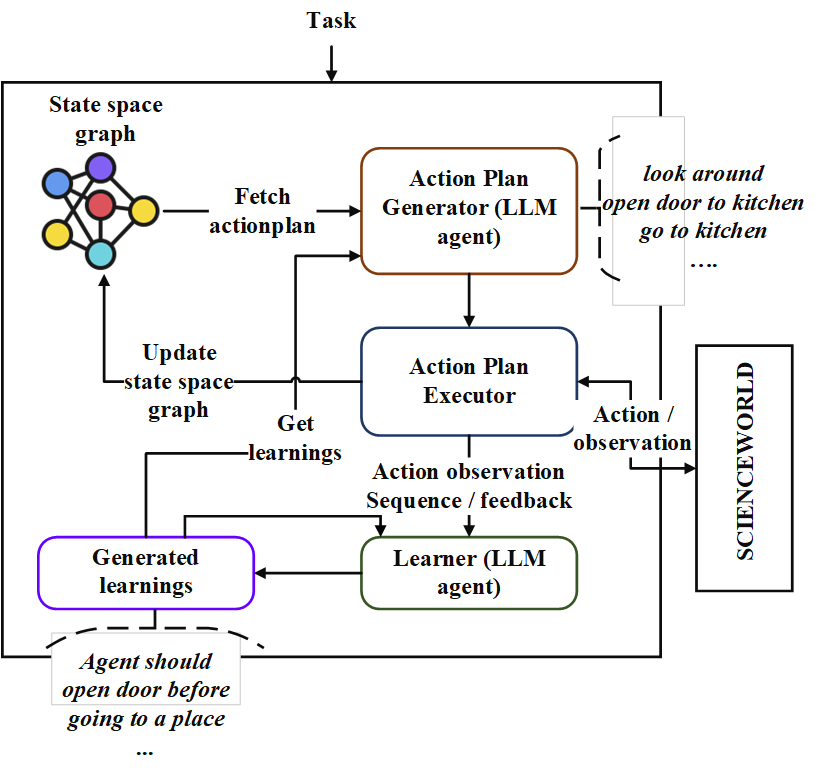
ขั้นแรกให้โคลน repo และนำทางไปยังไดเรกทอรี neoplanner และติดตั้งข้อกำหนด
git clone https://github.com/swarna-kpaul/neoplanner
cd neoplanner
python3 -m pip install -r requirements.txt
จากนั้นคุณต้องแก้ไขไฟล์ config/keys.py เพื่ออัปเดต openaiapikey คุณสามารถรับคีย์ API ของคุณได้โดยลงทะเบียนตัวเองใน OpenAI Portal ครั้งแรกที่ผู้ใช้สามารถรับเครดิตฟรี $ 5 เพื่อทดสอบด้วย คุณสามารถรับคีย์ API ของคุณได้จาก URL นี้
หลังจากนั้นสามารถนำเข้าแพ็คเกจได้
from solver import neoplannerเริ่มต้นวัตถุแก้ปัญหา
 # task is the identifier of tasks as specified in
# stmloadfile is the name of the file (with full path) that contains saved state. The state will be loaded initially. default value is None
# stmstoragefile is the name of the file (with full path) whare intermediate states can be saved. default value is None
# beliefstorefile is the name of the file (with full path) whare intermediate learnings can be saved. default value is None
# beliefloadfile is the name of the file (with full path) that contains intermediate learnings. The learnings will be loaded initially. default value is None
# sigma is exploration probability constant. Increasing its value would increase random exploration by the the LLM.
solverobj = neoplanner ( task = "2-1" , stmloadfile =  None , stmstoragefile = None , beliefstorefile = None , beliefloadfile = None , sigma = 0.3 )
เรียกใช้ Solver
 env = solverobj . train ()
######## get actionplan from statespace graph
additionalinstructions , actionplan , _ , _ , _ = env . getinstructions ()
การฝึกอบรมจะดำเนินต่อไปจนกว่าจะถึงเป้าหมาย คุณอาจขัดจังหวะกระบวนการฝึกอบรมในระหว่าง ในกรณีนั้นตรวจสอบให้แน่ใจว่าคุณได้จัดเตรียม stmstoragefile และ beliefstorefile เพื่อให้รัฐระดับกลางและความเชื่อได้รับการบันทึก
คุณสามารถโหลด STMSTORAGEFILE และสอบถามวัตถุ ENV เพื่อรับแผนปฏิบัติการจากกราฟพื้นที่สถานะ
 import pickle
from solver import scienv
env = scienv ( "2-1" )
stmstoragefile = < file name with full path >
with open ( stmstoragefile , 'rb' ) as f :
  rootnodeid , invalidnodeid , DEFAULTVALUE , statespace , totaltrials , actiontrace , environment = pickle . load ( f )
env . model . rootnodeid = rootnodeid
env . model . invalidnodeid = invalidnodeid
env . model . DEFAULTVALUE = DEFAULTVALUE
env . model . statespace = statespace
env . model . totaltrials = totaltrials
env . environment = environment
env . reset ()

additionalinstructions , actionplan , _ , _ , _ = env . getinstructions ()
โฟลเดอร์ PretrainedFiles มีสถานะที่ผ่านการฝึกอบรมทั้งหมดและไฟล์การเรียนรู้สำหรับ 7 งาน คุณสามารถตรวจสอบ ActionPlan ที่แก้ไขได้ของงานโดยใช้รหัสด้านบนโดยการตั้งค่า stmstorageFile ด้วยชื่อไฟล์ที่เหมาะสม
การเรียนรู้สามารถมองเห็นได้โดยเรียกใช้รหัสต่อไปนี้
 import pickle
beliefloadfile = < belief load file name >
with open ( beliefloadfile , 'rb' ) as f :
    beliefaxioms , totalexplore = pickle . load ( f )
print ( beliefaxioms ) @misc{paul2023sequential,
title={Sequential Planning in Large Partially Observable Environments guided by LLMs},
author={Swarna Kamal Paul},
year={2023},
eprint={2312.07368},
archivePrefix={arXiv},
primaryClass={cs.AI}
}





