neoplanner
1.0.0

このレポは、「Neoplanner」と呼ばれるシーケンシャル計画エージェントの実装が含まれています。このプランナーは、大きな状態スペースとアクションスペースを持つテキストベースの環境に適しています。最良のアクションプランを取得するために、基礎LLMにクエリを使用して両方の状態空間検索を相乗的にします。報酬信号は、検索を駆動するために定量的に使用されます。探査と搾取のバランスは、状態の価値の上位信頼境界を最大化することにより維持されます。ランダムな調査が必要な場所では、LLMがアクションプランを生成するために質問されます。各トライアルからの学習は、テキスト形式のエンティティ関係として保存されます。これらは、継続的な改善のために、将来のLLMのクエリで使用されます。 ScienceWorld環境での実験により、複数のタスクで得られた平均報酬に関して、現在の最良の方法から124%の改善が明らかになりました。以下はArchiteChtureです。
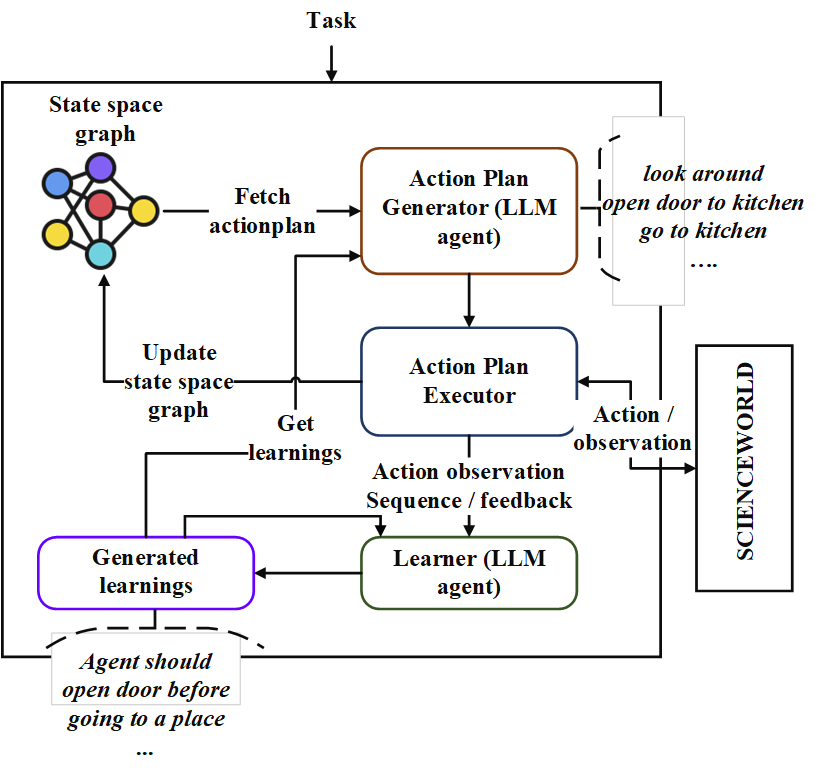
まず、レポをクローンしてNeoplannerディレクトリに移動し、要件をインストールします
git clone https://github.com/swarna-kpaul/neoplanner
cd neoplanner
python3 -m pip install -r requirements.txt
次に、 config/keys.pyファイルを変更して、 openaiapikeyを更新する必要があります。 OpenAIポータルに登録することで、APIキーを取得できます。初めてのユーザーは、実験するために5ドルの無料クレジットを取得できます。このURLからAPIキーを取得できます
その後、パッケージをインポートできます
from solver import neoplannerソルバーオブジェクトを初期化します
 # task is the identifier of tasks as specified in
# stmloadfile is the name of the file (with full path) that contains saved state. The state will be loaded initially. default value is None
# stmstoragefile is the name of the file (with full path) whare intermediate states can be saved. default value is None
# beliefstorefile is the name of the file (with full path) whare intermediate learnings can be saved. default value is None
# beliefloadfile is the name of the file (with full path) that contains intermediate learnings. The learnings will be loaded initially. default value is None
# sigma is exploration probability constant. Increasing its value would increase random exploration by the the LLM.
solverobj = neoplanner ( task = "2-1" , stmloadfile =  None , stmstoragefile = None , beliefstorefile = None , beliefloadfile = None , sigma = 0.3 )
ソルバーを実行します。
 env = solverobj . train ()
######## get actionplan from statespace graph
additionalinstructions , actionplan , _ , _ , _ = env . getinstructions ()
目標に達するまでトレーニングは実行され続けます。その間のトレーニングプロセスを中断することができます。その場合、中間状態と信念が救われるように、STMSTORAGEFILEとBELIEDSTOREFILEを提供してください。
STMSTORAGEFILEをロードし、ENVオブジェクトをクエリして、State Spaceグラフからアクションプランを取得できます。
 import pickle
from solver import scienv
env = scienv ( "2-1" )
stmstoragefile = < file name with full path >
with open ( stmstoragefile , 'rb' ) as f :
  rootnodeid , invalidnodeid , DEFAULTVALUE , statespace , totaltrials , actiontrace , environment = pickle . load ( f )
env . model . rootnodeid = rootnodeid
env . model . invalidnodeid = invalidnodeid
env . model . DEFAULTVALUE = DEFAULTVALUE
env . model . statespace = statespace
env . model . totaltrials = totaltrials
env . environment = environment
env . reset ()

additionalinstructions , actionplan , _ , _ , _ = env . getinstructions ()
前処理されたファイルフォルダーには、7つのタスク用のすべてのトレーニングされたSTATESPACEおよび学習ファイルが含まれています。適切なファイル名でstmstorageFileを設定することにより、上記のコードを使用してタスクの解決されたアクションプランを調べることができます
学習は、次のコードを実行することで見ることができます
 import pickle
beliefloadfile = < belief load file name >
with open ( beliefloadfile , 'rb' ) as f :
    beliefaxioms , totalexplore = pickle . load ( f )
print ( beliefaxioms ) @misc{paul2023sequential,
title={Sequential Planning in Large Partially Observable Environments guided by LLMs},
author={Swarna Kamal Paul},
year={2023},
eprint={2312.07368},
archivePrefix={arXiv},
primaryClass={cs.AI}
}





