neoplanner
1.0.0

이 repo에는“Neoplanner”라는 순차적 계획 에이전트의 구현이 포함되어 있습니다. 이 플래너는 상태 공간과 액션 공간이 큰 텍스트 기반 환경에 적합합니다. 최상의 행동 계획을 얻기 위해 기초 LLM에 대한 쿼리로 상태 공간 검색을 모두 시너지합니다. 보상 신호는 검색을 유도하는 데 정량적으로 사용됩니다. 탐사 및 착취의 균형은 국가의 가치의 상한 신뢰 범위를 극대화함으로써 유지됩니다. 임의의 탐사가 필요한 곳에서는 LLM이 행동 계획을 생성하도록 쿼리됩니다. 각 시험의 학습은 텍스트 형식의 엔티티 관계로 저장됩니다. 이들은 지속적인 개선을 위해 LLM의 향후 쿼리에 사용됩니다. Scienceworld 환경에서의 실험은 여러 작업에서 얻은 평균 보상 측면에서 현재 최상의 방법에서 124% 개선을 보여줍니다. 다음은 건축물입니다.
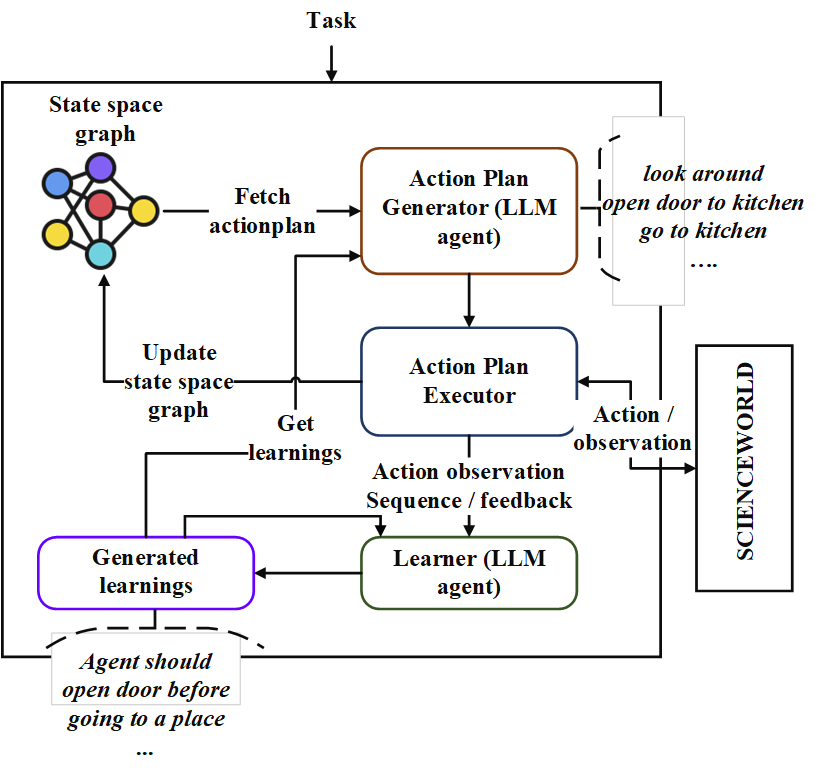
먼저, Repo를 복제하고 NeoPlanner 디렉토리로 이동하여 요구 사항을 설치하십시오.
git clone https://github.com/swarna-kpaul/neoplanner
cd neoplanner
python3 -m pip install -r requirements.txt
그런 다음 config/keys.py 파일을 수정하여 OpenAiaPikey를 업데이트해야합니다. OpenAI 포털에 자신을 등록하여 API 키를 얻을 수 있습니다. 처음 사용자는 실험 할 무료 $ 5 크레딧을받을 수 있습니다. 이 URL에서 API 키를 얻을 수 있습니다
그 후 패키지를 가져올 수 있습니다
from solver import neoplanner솔버 객체를 초기화하십시오
 # task is the identifier of tasks as specified in
# stmloadfile is the name of the file (with full path) that contains saved state. The state will be loaded initially. default value is None
# stmstoragefile is the name of the file (with full path) whare intermediate states can be saved. default value is None
# beliefstorefile is the name of the file (with full path) whare intermediate learnings can be saved. default value is None
# beliefloadfile is the name of the file (with full path) that contains intermediate learnings. The learnings will be loaded initially. default value is None
# sigma is exploration probability constant. Increasing its value would increase random exploration by the the LLM.
solverobj = neoplanner ( task = "2-1" , stmloadfile =  None , stmstoragefile = None , beliefstorefile = None , beliefloadfile = None , sigma = 0.3 )
솔버를 실행하십시오.
 env = solverobj . train ()
######## get actionplan from statespace graph
additionalinstructions , actionplan , _ , _ , _ = env . getinstructions ()
목표에 도달 할 때까지 훈련은 계속 진행됩니다. 당신은 그 사이의 훈련 과정을 중단 할 수 있습니다. 이 경우 STMSTORAGEFILE 및 신념을 제공하여 중간 상태와 신념이 절약되도록하십시오.
stmstorageFile을로드하고 ENV 객체를 쿼리하여 상태 공간 그래프에서 작업 계획을 얻을 수 있습니다.
 import pickle
from solver import scienv
env = scienv ( "2-1" )
stmstoragefile = < file name with full path >
with open ( stmstoragefile , 'rb' ) as f :
  rootnodeid , invalidnodeid , DEFAULTVALUE , statespace , totaltrials , actiontrace , environment = pickle . load ( f )
env . model . rootnodeid = rootnodeid
env . model . invalidnodeid = invalidnodeid
env . model . DEFAULTVALUE = DEFAULTVALUE
env . model . statespace = statespace
env . model . totaltrials = totaltrials
env . environment = environment
env . reset ()

additionalinstructions , actionplan , _ , _ , _ = env . getinstructions ()
PretrainedFiles 폴더에는 7 개의 작업에 대한 모든 훈련 된 주 공간 및 학습 파일이 포함되어 있습니다. 적절한 파일 이름으로 stmstorageFile을 설정하여 위의 코드를 사용하여 작업의 해결 된 액션 플랜을 살펴볼 수 있습니다.
다음 코드를 실행하여 학습을 볼 수 있습니다.
 import pickle
beliefloadfile = < belief load file name >
with open ( beliefloadfile , 'rb' ) as f :
    beliefaxioms , totalexplore = pickle . load ( f )
print ( beliefaxioms ) @misc{paul2023sequential,
title={Sequential Planning in Large Partially Observable Environments guided by LLMs},
author={Swarna Kamal Paul},
year={2023},
eprint={2312.07368},
archivePrefix={arXiv},
primaryClass={cs.AI}
}





