Yoopta Editor
v4.9.3

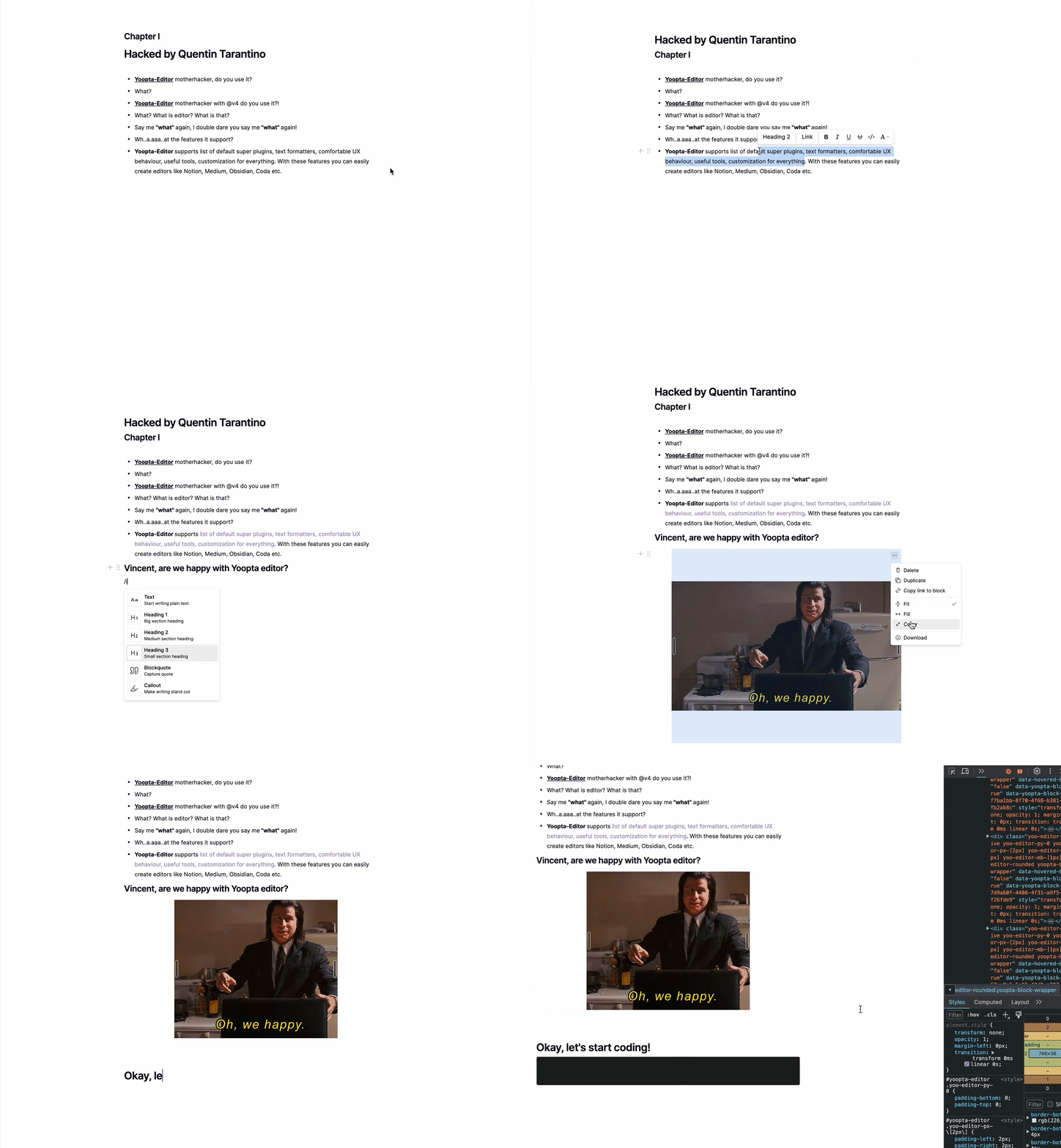
O Yoopta-Editor é um editor de texto rico gratuito e de código aberto criado para aplicativos React. Está repleto de recursos que permitem construir um editor tão poderoso e fácil de usar quanto noção, artesanato, coda, médio etc.
Com o Yoopta-Editor, você pode personalizar tudo para se adequar exatamente ao que precisa. Deseja ajustar a aparência, adicionar recursos legais ou criar uma interface de usuário completamente personalizada? Sem problemas. O Yoopta-Editor oferece a flexibilidade de fazer tudo, facilitando a criação da ferramenta perfeita para o seu projeto. Tudo isso é personalizável, extensível e fácil de configurar!
Essencial
Plugins
Ferramentas
Marcas
Primeiro, instale as dependências dos colegas e o pacote Yoopta Core com pelo menos um plug -in
 # # slate, slate-react, react, react-dom - peer dependencies
# # @yoopta/editor - core package
yarn add slate slate-react @yoopta/editor @yoopta/paragraph
# or
npm install slate slate-react @yoopta/editor @yoopta/paragraphImportar do pacote Core @Yoopta/Editor Componente e função do editor para criar a instância do editor
 import YooptaEditor , { createYooptaEditor } from '@yoopta/editor' ;

const plugins = [ ... ] ;

export default function Editor ( ) {
  const editor = useMemo ( ( ) => createYooptaEditor ( ) , [ ] ) ;
   const [ value , setValue ] = useState < YooptaContentValue > ( ) ;

  const onChange = ( value : YooptaContentValue , options : YooptaOnChangeOptions ) => {
    setValue ( value ) ;
  } ;

  return (
    < div >
      < YooptaEditor
        editor = { editor }
        plugins = { plugins }
        value = { value }
        onChange = { onChange }
      />
    </ div >
  ) ;
}
Adereços disponíveis para componentes do YooptaEditor
 type YooptaEditor = {
  /* editor instance */
  editor : YooEditor ;
  /* list of plugins */
  plugins : YooptaPlugin [ ] ;
  /* list of marks */
  marks ?: YooptaMark < any > [ ] ;
  /* Value. [Default] - undefined */
  value ?: YooptaContentValue ;
  /* Change handler  */
  onChange ?: ( value : YooptaContentValue , options : YooptaOnChangeOptions ) => void ;
  /* autoFocus. [Default] - true */
  autoFocus ?: boolean ;
  /* className - class name */
  className ?: string ;
  /* These props define the area for the selection box.
  Good practice - passing parent element.
  [Default] - document */
  selectionBoxRoot ?: HTMLElement | React . MutableRefObject < HTMLElement | null > | false ;
  children ?: React . ReactNode ;
  /* Props for tools. You can get access to any passed tools using `useTools` hook from @yoopta/editor  */
  tools ?: Partial < Tools > ;
  placeholder ?: string ;
  readOnly ?: boolean ;
  /* Width. [Default] - 400px. Will be DEPRECATED, use style object  */
  width ?: number | string ;
  /* Style CSS Object. [Default] - { width: '400px', paddingBottom: '100px' } */
  style ?: number | string ;
  /* Id for your editor instance. Can be useful for multiple editors */
  id ?: number | string ;
} ;Aqui está a lista de plugins disponíveis
 import YooptaEditor , { createYooptaEditor } from '@yoopta/editor' ;
import Paragraph from '@yoopta/paragraph' ;
import Blockquote from '@yoopta/blockquote' ;

const plugins = [ Paragraph , Blockquote ] ;

export default function Editor ( ) {
  const editor = useMemo ( ( ) => createYooptaEditor ( ) , [ ] ) ;
  const [ value , setValue ] = useState < YooptaContentValue > ( ) ;
  const onChange = ( value : YooptaContentValue , options : YooptaOnChangeOptions ) => {
    setValue ( value ) ;
  } ;

  return (
    < div >
      < YooptaEditor
        editor = { editor }
        placeholder = "Type text.."
        value = { value }
        onChange = { onChange }
        // here we go
        plugins = { plugins }
      />
    </ div >
  ) ;
}
Verifique o código com plugins
Yoopta-Editor fornece ferramentas úteis que podem ajudá-lo ao trabalhar com o editor
Aqui está uma lista de ferramentas disponíveis
Verifique o código com ferramentas
 // IMPORT TOOLS
import LinkTool , { DefaultLinkToolRender } from '@yoopta/link-tool' ;
import ActionMenu , { DefaultActionMenuRender } from '@yoopta/action-menu-list' ;
import Toolbar , { DefaultToolbarRender } from '@yoopta/toolbar' ;

// Tools should be defined outside component
const TOOLS = {
  Toolbar : {
    tool : Toolbar ,
    render : DefaultToolbarRender ,
  } ,
  ActionMenu : {
    tool : ActionMenu ,
    render : DefaultActionMenuRender ,
  } ,
  LinkTool : {
    tool : LinkTool ,
    render : DefaultLinkToolRender ,
  } ,
} ;

export default function Editor ( ) {
  const editor = useMemo ( ( ) => createYooptaEditor ( ) , [ ] ) ;
  const [ value , setValue ] = useState < YooptaContentValue > ( ) ;
  const onChange = ( value : YooptaContentValue , options : YooptaOnChangeOptions ) => {
    setValue ( value ) ;
  } ;

  return (
    < div >
      < YooptaEditor
        editor = { editor }
        plugins = { plugins }
        placeholder = "Type text.."
        value = { value }
        onChange = { onChange }
        // here we go
        tools = { TOOLS }
      />
    </ div >
  ) ;
}
Marcas são formatos de texto simples
Aqui está uma lista de marcas disponíveis do pacote @yoopta/marks
 // IMPORT MARKS
import { Bold , Italic , CodeMark , Underline , Strike , Highlight } from '@yoopta/marks' ;

const MARKS = [ Bold , Italic , CodeMark , Underline , Strike , Highlight ] ;

export default function Editor ( ) {
  const editor = useMemo ( ( ) => createYooptaEditor ( ) , [ ] ) ;
   const [ value , setValue ] = useState < YooptaContentValue > ( ) ;

  const onChange = ( value : YooptaContentValue , options : YooptaOnChangeOptions ) => {
    setValue ( value ) ;
  } ;

  return (
    < div >
      < YooptaEditor
        editor = { editor }
        placeholder = "Type text.."
        plugins = { plugins }
        value = { value }
        onChange = { onChange }
        tools = { TOOLS }
        // here we go
        marks = { MARKS }
      />
    </ div >
  ) ;
}
Verifique o código com marcas
Encontre abaixo exemplos úteis de utilização do Yoopta-Editor em seus projetos. Esses exemplos ajudarão você a começar rapidamente e mostrará como é fácil integrar e personalizar o editor às suas necessidades.
Ok, vamos lá!
Se você achar Yoopta-Editor útil e valioso para seus projetos, peço que você mostre seu apoio dando a esta estrela repositora no Github. Sua apreciação significa muito para mim e me ajuda a crescer e continuar melhorando o editor da comunidade. ?
Ei! Se você achar esse projeto útil ou ajudar você em seu trabalho, considere apoiá -lo para garantir melhorias e desenvolvimento contínuos. Suas doações ajudam a manter o projeto vivo e me permitir investir mais tempo e recursos para manter e aprimorá -lo.
Você pode apoiar o projeto por:
Qualquer contribuição, grande ou pequena, é muito apreciada e me ajuda a manter o projeto e adicionar novos recursos interessantes. Obrigado pelo seu apoio!
 packages/
├── core - core components of the editor
├── marks - text marks
├── plugins - editor plugin extensions
├── tools - tools packages
└── development - developer playground
Se você está pronto para apoiar Yoopta-Editor, veja como você pode fazer isso:
Yoopta-Editor é liberado sob a licença do MIT. Sinta -se à vontade para usá -lo e modificá -lo para seus projetos.






